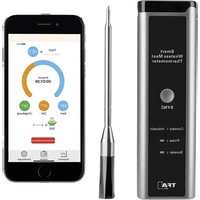
SMART BBQ Küchen-Chef 14.1515.10 - Thermometer TFA - Free user manual and instructions
Find the device manual for free SMART BBQ Küchen-Chef 14.1515.10 TFA in PDF.


| Product type | Wireless Smart Meat Thermometer |
| Brand | TFA |
| Model | SMART BBQ Küchen-Chef 14.1515.10 |
| Booster dimensions | 169 x 52 x 23 mm |
| Probe dimensions | ∅ 5.5 x 157 mm |
| Total weight | 129 g (booster + probe) |
| Booster power supply | Built-in Li-Ion battery 650 mAh, 3.7 V |
| Probe power supply | Built-in Li-Ion battery 5 mAh, 2.4 V |
| Charging | USB-C, 5 V, 2 A |
| Booster battery life | 3 months and more (fully charged) |
| Probe battery life | Up to 48 h (fully charged) |
| Probe measurement range (core temperature) | -10 to 100 °C (14 to 212 °F) |
| Cooking space sensor measurement range | -10 to 300 °C (14 to 572 °F) |
| Accuracy | ± 1 °C (± 2 °F) (probe and sensor up to 100 °C); 2% beyond |
| Resolution | 1 °C |
| Booster ↔ probe range | Up to 20 m (typ. 2-20 m depending on environment) |
| Booster ↔ smartphone range | Up to 50 m in open field |
| Connectivity | Bluetooth 5.0, 2.4 GHz |
| Main functions | Simultaneous monitoring of core and ambient temperature, free app (iOS/Android), meat presets, alarms, timer, history |
| Probe protection rating | IP67 (waterproof, dishwasher safe) |
| Maintenance and cleaning | Probe: dishwasher; Booster: damp cloth, do not immerse |
| Safety | Do not expose probe to >100 °C (core) or >300 °C (ambient); do not use in microwave; keep out of reach of children |
| Spare parts / repairability | Replaceable probe (contact customer service); battery not user-replaceable |
| General information | EU compliant (2014/53/EU); disposal via WEEE; manual available at www.tfa-dostmann.de |
Frequently Asked Questions - SMART BBQ Küchen-Chef 14.1515.10 TFA
User questions about SMART BBQ Küchen-Chef 14.1515.10 TFA
0 question about this device. Answer the ones you know or ask your own.
Ask a new question about this device
Download the instructions for your Thermometer in PDF format for free! Find your manual SMART BBQ Küchen-Chef 14.1515.10 - TFA and take your electronic device back in hand. On this page are published all the documents necessary for the use of your device. SMART BBQ Küchen-Chef 14.1515.10 by TFA.
USER MANUAL SMART BBQ Küchen-Chef 14.1515.10 TFA
SMART BBQ KÜCHEN-CHEF
Smartes kabelloses BBQ Fleischthermometer

Bedienungsanleitung
Instruction manual
Mode d'emploi
Thank you for choosing this instrument from TFA.
GB
Before you use this product: Please make sure you read the instruction manual carefully.
The operating instructions are enclosed with the device or can be downloaded at
www.tfa-dostmann.de/en/service/downloads/instruction-manuals
This product should only be used as described within these instructions.
Following and respecting the instructions in your manual will prevent damage to your instrument and loss of your statutory rights arising from defects due to incorrect use.
Please take particular note of the safety advice! Please keep this instruction manual safe for future reference.
Note: This procedure is necessary if you are using the probe for the first time or replacing it. After successful pairing, there is no need to repeat the steps.
FR
- Connect App <-> Temprobe
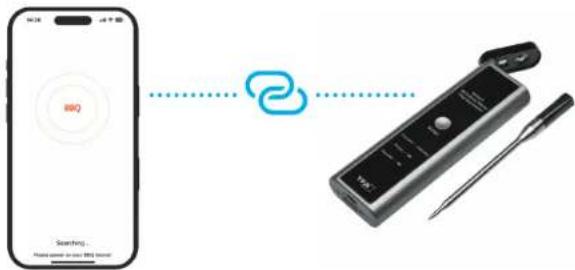
- Ready to cook!
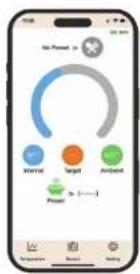
Fig. 1
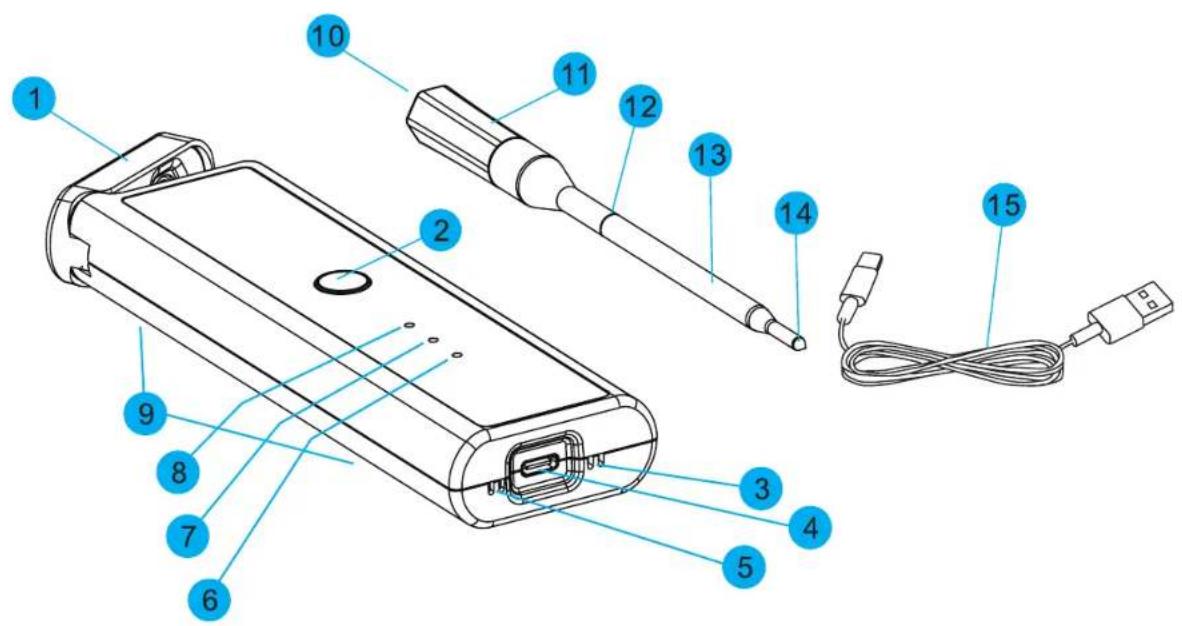
Fig. 2
flowchart
graph TD
    A["Beef Medium >"] --> B["36°C Internal"]
    B --> C["Target 63°C Ambient"]
    C --> D["Preset > (----)"]
    D --> E["Start Cook"]
    F["Elapsed time 00:00:10"] --> G["9"]
    G --> H["End Cook"]
    I["Beef Medium >"] --> J["36°C Internal"]
    J --> K["Target 63°C Ambient"]
    K --> L["Preset > (----)"]
    L --> M["End Cook"]
SMART BBQ KÜCHEN-CHEF
Smartes kabelloses BBQ Fleischthermometer
Bedienungsanleitung

Lieferumfang:
Google Play and the Google Play logo are trademarks of Google LLC. Android is a trademark of Google LLC.
Apple, Apple Watch, iPad, iPod, iPod touch, and iPhone, are trademarks of Apple Inc., registered in the U.S. and other countries. App Store is a service mark of Apple Inc., registered in the U.S. and other countries. IOS is a trademark or registered trademark of Cisco
in the U.S. and other countries and is used under license.
TEMPROBE App
Smart wireless BBQ meat thermometer
Instruction manual
Delivery contents:
• Wireless stainless-steel probe
- Booster/charging station
• USB-C charging cable - Instruction manual
Range of application and all the benefits of your new instrument at a glance:
• For simultaneous monitoring of the core temperature and the cooking chamber temperature
- For the optimal preparation of meat, poultry and fish, can be used for the grill, oven or hot air fryer
- Wireless stainless-steel probe with ceramic handle
- Comfortable operation via smartphone or tablet with free app for iOS & Android, range up to 70 metres (in free field)
• Pre-programmed settings for different types of meat and doneness
• Target temperature and upper/lower limit for cooking chamber individually adjustable
• Various alarm settings can be configured
• Timer to display the cooking time
• Magnets at the back for placement on metal surfaces.
For your safety:
- This product is exclusively intended for the range of application described above. It should only be used as described within these instructions.
- Unauthorised repairs, alterations or changes to the product are prohibited.

CAUTION!
of electrocution!
- Connect the booster via the USB cable only to a suitable USB power source such as a computer, USB charger or USB hub with charging output.
• The booster must not come into contact with water or moisture.
• Do not charge if the housing is damaged. - Charge out of reach of persons (including children) who cannot fully appreciate the potential risks of handling electrical equipment.
- Disconnect the booster from the charging power source immediately if any fault occurs.

CAUTION!
of Injury:
- Keep this device and all parts out of reach of children.
• Lithium batteries are permanently installed in the booster and the probe. -
Batteries containing lithium carry a risk of fire or explosion due to heat or mechanical damage!
-
Protect the booster and probe from excessive temperatures. Do not throw into fire, short-circuit or take apart.
- The maximum permissible temperature for the cooking chamber sensor is 300^ , for the core temperature sensor 100^ . To ensure the safety of the probe, you will be warned with an alarm tone if you approach these limit values.
- Always insert the probe into the food at least up to the mark and make sure it is securely and firmly seated. Otherwise, do not use the probe!
- When grilling with (wood) charcoal: Do not place the meat with the insertion probe directly over the heat source (embers or direct flames), but only grill with indirect heat. Never hold the probe directly over a fire.
• If the probe accidentally falls into the fire or direct heat source, close the lid of the grill or cooking appliance
immediately and switch off the heat. Allow the probe to cool down completely, before you remove it.
• Always remove the probe from the food before searing at high heat. - Wear heat-resistant protective gloves when touching the probe during or after cooking. Do not remove the probe until you have removed the meat from the grill and the probe has cooled down.
- Also wear protective safety glasses when removing a probe that has been exposed to temperatures above the maximum permissible value or has come into contact with hot embers or direct flames.
- Be careful when handling the pointed probe. Always store in the booster.
• Do not use the device in the microwave. - Do not place the booster directly on the grill lid or near a hot surface.
- If the booster or probe becomes hot while charging or the batteries are no longer charged, this is a sign of a defect. Disconnect the device from the charging power source immediately.
- The batteries cannot and must not be replaced or removed by you. There is a risk of explosion if the batteries are replaced incorrectly. If necessary, a qualified person can obtain instructions on how to dismantle the permanently installed batteries from info@fa-dostmann.de, should this be necessary for the purpose of repairing or recycling the product.
! Important Information on product safety!
• The probe is waterproof and can be cleaned in the dishwasher.
• Protect the booster from moisture and rain.
Elements
Fig.1 Booster and probe
1- Booster cover 2- SYNC button 3- Drain hole
4- USB port 5- Speaker 6- Charging symbol booster
7- Charging symbol probe 8- Connection indicator 9- Magnet for fixing (at the back)
10- Cooking chamber temperature sensor 11- Ceramic handle 12- Insertion depth marking
13- Probe 14- Core temperature sensor 15- USB charging cable
Fig.2 TEMPROBE App
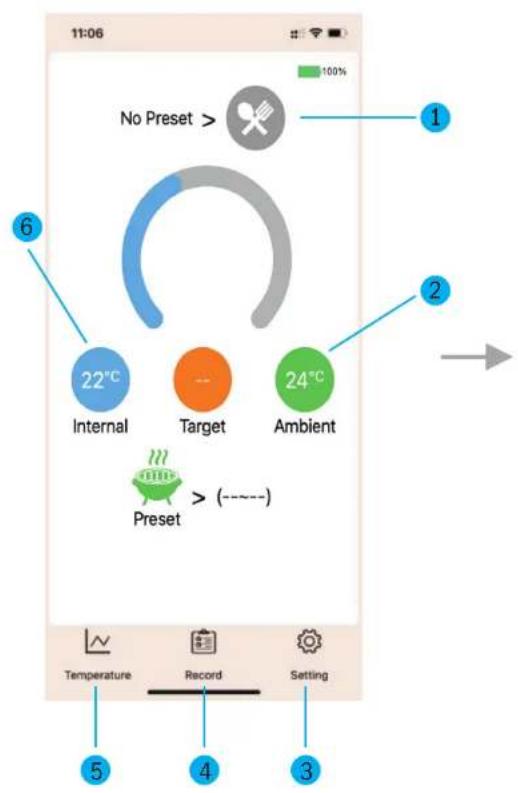
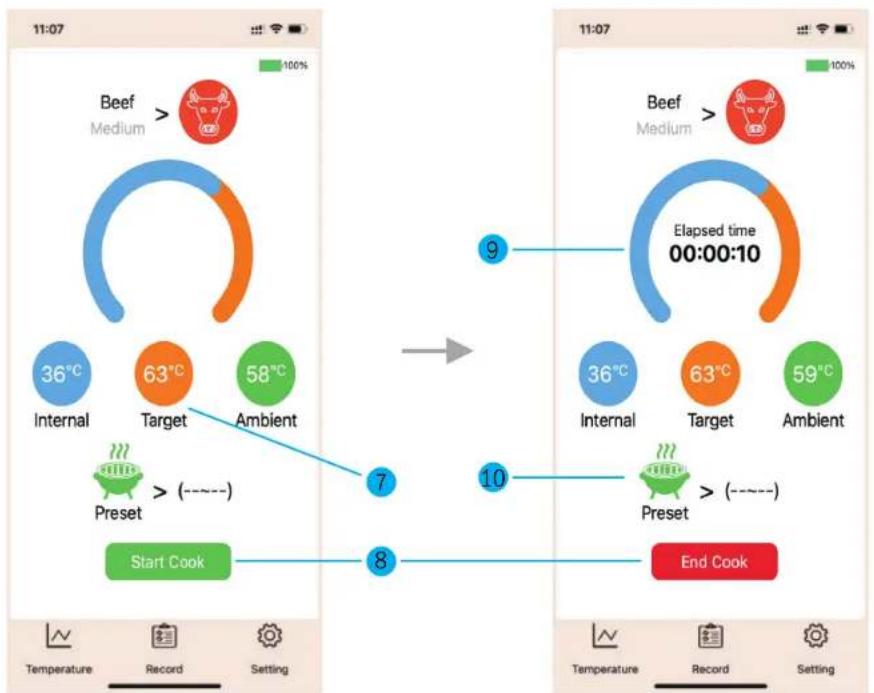
1- Selection
4- History
7- Target temperature
9- Indication of time
2- Cooking chamber temperature 3- Settings
5- Temperature diagram 6- Core temperature
8- Start/end cooking
10- Cooking chamber upper/lower temperature limit
Charging
Charging of booster
- The red charging symbol for the booster flashes when the battery needs to be charged.
- Please charge the device immediately to preserve battery life.
- Plug the supplied USB-cable into the designated port on the device and connect the unit to a suitable USB power source.
• To fully charge, leave the device connected for approximately 1 hour. - The red charging symbol lights up permanently when the battery is charging. As soon as the charging symbol turns off, the built-in rechargeable battery is fully charged.
- Disconnect the device from the charging power source.
- Recharge the battery every six months, even if the product is not in use.
Charging of probe
- Open the booster cover. To charge, insert the probe into the charging station with the handle facing upwards. Close the cover again.
- The red charging symbol for the probe flashes when the battery needs to be charged and lights up permanently when the battery is being charged. As soon as the charging symbol turns off, the built-in rechargeable battery is fully charged. To fully charge let the probe for at least 30 minutes in the connected charging station.
• Note: If the probe is placed in the booster for charging and storage, the connection indicator turns off.
Getting started
- Remove the protective film.
• Before the first use, please charge the booster and the probe fully.
Connect probe to booster (before first use)
- Open the booster cover, remove the probe and place it next to the booster.
- Now press the SYNC button on the booster for 3 seconds until you hear a signal tone.
- The probe is now connected to the booster. The connection indicator lights up blue.
Download the app
- Download the free Temprobe app from the "Apple App Store" or "Google Play Store".
• Make sure your mobile phone meets the necessary compatibility requirements.

Connect the booster to the app
• Before you use the app, make sure that you have activated the Bluetooth in your mobile phone.
• Start the app to establish connection.
- Open the booster cover and remove the probe.
• The connection between the app and the booster is established automatically.
Google Play and the Google Play logo are trademarks of Google LLC. Android is a trademark of Google LLC.
Apple, Apple Watch, iPad, iPod, iPod touch, and iPhone, are trademarks of Apple Inc., registered in the U.S. and other countries. App Store is a service mark of Apple Inc., registered in the U.S. and other countries. IOS is a trademark or registered trademark of Cisco in the U.S. and other countries and is used under license.
TEMPROBE App
• The app appearance can differ between iOS and Android and may change after an update.
Please always follow the current instructions in the app.
- In the settings (gear symbol) you can select Fahrenheit or Celsius, language and alarm (ringtone or vibration) or change the device.
Cooking
- Open the app. Tap the selection button on the start screen and select a type of meat from the overview.
- Select a preset target temperature via the desired cooking level or enter an individual target temperature.
- If you choose + instead of choosing a type of meat from the overview, you can save an individual name and temperature value here.
- Tap the grill button on the start screen and enter an individual upper and lower limit for the cooking chamber temperature.
- Confirm the setting.
- For measuring the core temperature of meat: Plunge the probe into the middle of the thickest part of the meat; for poultry, between the torso and the thigh - it should not touch bones or cartilage and it should not protrude from the meat.
- Caution: Make sure that the marking on the probe is completely inside the meat. If the sensor is not inserted correctly, the device may be damaged.
- On the start screen, you can start recording the cooking process and monitor the current core temperature and the ambient temperature in the cooking chamber.
- The settings for the target temperature and the upper and lower temperature limits in the cooking chamber are displayed. The timer will start to count-up the elapsed cooking time.
- You can use the temperature button on the home screen to view the core temperature and cooking chamber temperature as a diagram over time.
- With the button „Stop Cook“ you can stop the cooking process
Alarm
- If the core temperature has reached the target value, or if the cooking chamber temperature has exceeded or fallen below the limit value, an alarm is triggered.
- The alarm is sent to your mobile device with the selected alarm settings (ringtone or vibration) and as a message. Note: Enable the receipt of notifications for the Temprobe app in the system settings of your smartphone.
• A beeping alarm will sound on the booster for about 60 seconds.
- Press the SYNC button on the booster or confirm in the app to stop the sound.
- Note: If you approach the maximum measured values (probe 100°C, cooking chamber 300°C), a warning tone for overheating is activated.
Records
• The history button gives you an overview of previous completed cooking processes.
- You can call up and restart the recording of a cooking process using „Repeat“.
- You can select and delete individual cooking processes using the bin symbol.
Care and maintenance
- Clean the probe with washing-up liquid and water before and after each use.
- Ensure that the probe has cooled down first.
• Do not use solvents or scouring agents.
• The probe can be cleaned in the dishwasher.
- Insert the probe back into the booster after use.
• The probe should always be clean and dry to ensure the best loading capacity.
- Clean the booster with a soft damp cloth. Do not immerse in water!
Troubleshooting
| Problem Solution | |
| No connection between booster and probe.The connection indicator flashes in red. | Reduce the distance between the booster and the probe.If the connection does not work permanently, first fully charge the booster with inserted probe.Proceed as for the first start-up and re-connect the booster and probe. |
| No connection between app and booster. | Reduce the distance between the booster and smartphone.Make sure that Bluetooth is activated on your smartphone and that a connection can be established. Also check that your smart-phone supports at least Bluetooth 5.0. |
| Core temperature display is too high/too low. | Check the position of the probe in the food. |
If your device fails to work despite these measures, please contact the retailer where you purchased the product from for advice.
Specifications
Measuring range probe: -10...100°C (14...212°F)
Measuring range cooking chamber sensor: -10...300°C (14...572°F)
Accuracy probe: ±1°C (±2°F)
Response time probe: Approx. 1 second
Cooking chamber sensor: ± 1°C (±2°F) (-10...100°C | 14...212°F) otherwise 2%
Resolution:
Range booster <> probe: Max. 20 m,
typically 2 -20 m depending on ambient conditions
Range booster < > smartphone: Up to 50 m in open field
Wireless standard: Bluetooth 5.0
Transmission frequency: 2.4 GHz
Maximum radio-frequency power: < 10dbm
Protection class probe: IP 67
Booster
Power consumption: Integrated Lithium battery 650 mAh, 3.7 V
Battery runtime fully charged: 3 months and more
Charging time: Approx. 60 minutes
Charging input: USB Typ C, 5V, 2A
Probe
Power consumption: Integrated Lithium battery 5 mAh, 2.4 V
Battery runtime fully charged: Up to 48 hours
Charging time: approx. 30 minutes
Housing dimension probe: ∅ 5,5 x 157 mm
Housing dimension booster: 169 x 52 x 23 mm
Weight (booster + probe): 129 g
Waste disposal
This product and its packaging have been manufactured using high-grade materials and components which can be recycled and reused. This reduces waste and protects the environment.
Dispose of the packaging in an environmentally friendly manner using the collection systems that have been set up.
Disposal of the electrical device

Caution: This device contains built-in batteries that cannot be removed without damaging the housing. Improper removal represents a safety risk. Hand in the device unopened at the collection point; the device and batteries will be disposed of properly.
This product is labelled in accordance with the EU Waste Electrical and Electronic Equipment Directive (WEEE).
This product must not be disposed of in ordinary household waste. As a consumer, you are required to take end-of-life devices to a designated collection point for the disposal of electrical and electronic equipment, in order to ensure environmentally-compatible disposal. The return
service is free of charge. Observe the current regulations in place!
WARNING! Batteries containing lithium can explode
Old batteries and rechargeable batteries containing lithium (Li=lithium) present a high risk of fire and explosion due to heat or mechanical damage with potentially serious consequences for people and the environment. Pay particular attention to correct disposal
EU declaration of conformity
Hereby, TFA Dostmann declares that the radio equipment type 14.1515.10 is in compliance with Directive 2014/53/EU. The full text of the EU declaration of conformity is available at the following internet address: www.tfa-dostmann.de/service/downloads/ce
TFA Dostmann GmbH & Co. KG, Zum Ottersberg 12, 97877 Wertheim, Germany
Commercial registration number: Reg. Gericht Mannheim HRA 570186
www.tfa-dostmann.de
No part of this manual may be reproduced without written consent of TFA Dostmann. The technical data are correct at the time of going to print and may change without prior notice.
SMART BBQ KÜCHEN-CHEF
Google Play and the Google Play logo are trademarks of Google LLC. Android is a trademark of Google LLC.
Apple, Apple Watch, iPad, iPod, iPod touch, and iPhone, are trademarks of Apple Inc., registered in the U.S. and other countries. App Store is a service mark of Apple Inc., registered in the U.S. and other countries. IOS is a trademark or registered trademark of Cisco in the U.S. and other countries and is used under license.
TEMPROBE App
La consegna include:
Google Play and the Google Play logo are trademarks of Google LLC. Android is a trademark of Google LLC.
Apple, Apple Watch, iPad, iPod, iPod touch, and iPhone, are trademarks of Apple Inc., registered in the U.S. and other countries. App Store is a service mark of Apple Inc., registered in the U.S. and other countries. IOS is a trademark or registered trademark of Cisco in the U.S. and other countries and is used under license.
TEMPROBE App
Google Play and the Google Play logo are trademarks of Google LLC. Android is a trademark of Google LLC.
Apple, Apple Watch, iPad, iPod, iPod touch, and iPhone, are trademarks of Apple Inc., registered in the U.S. and other countries. App Store is a service mark of Apple Inc., registered in the U.S. and other countries. IOS is a trademark or registered trademark of Cisco in the U.S. and other countries and is used under license.
TEMPROBE App
Google Play and the Google Play logo are trademarks of Google LLC. Android is a trademark of Google LLC.
Apple, Apple Watch, iPad, iPod, iPod touch, and iPhone, are trademarks of Apple Inc., registered in the U.S. and other countries. App Store is a service mark of Apple Inc., registered in the U.S. and other countries. IOS is a trademark or registered trademark of Cisco in the U.S. and other countries and is used under license.
Aplicación TEMPROBE


- SMART BBQ KÜCHEN-CHEF
- Bedienungsanleitung
- Lieferumfang:
- TEMPROBE App
- Delivery contents:
- Range of application and all the benefits of your new instrument at a glance:
- For your safety:
- CAUTION!
- of electrocution!
- of Injury:
- ! Important Information on product safety!
- Elements
- Fig.1 Booster and probe
- Fig.2 TEMPROBE App
- Charging
- Charging of booster
- Charging of probe
- Getting started
- Connect probe to booster (before first use)
- Download the app
- Connect the booster to the app
- Cooking
- Alarm
- Records
- Care and maintenance
- Specifications
- Booster
- Probe
- Waste disposal
- Disposal of the electrical device
- WARNING! Batteries containing lithium can explode
- EU declaration of conformity
- La consegna include:
- Aplicación TEMPROBE
Brand : TFA
Model : SMART BBQ Küchen-Chef 14.1515.10
Category : Thermometer