FSH 804 ID TS WH 1 - Cooker Fulgor Milano - Free user manual and instructions
Find the device manual for free FSH 804 ID TS WH 1 Fulgor Milano in PDF.


User questions about FSH 804 ID TS WH 1 Fulgor Milano
0 question about this device. Answer the ones you know or ask your own.
Ask a new question about this device
Download the instructions for your Cooker in PDF format for free! Find your manual FSH 804 ID TS WH 1 - Fulgor Milano and take your electronic device back in hand. On this page are published all the documents necessary for the use of your device. FSH 804 ID TS WH 1 by Fulgor Milano.
USER MANUAL FSH 804 ID TS WH 1 Fulgor Milano
| FULGOR MILANO | |
| FSH 804 ID TS WH1 | |
| PIANO DI COTTURA INDUZIONE | IT ISTRUZIONI PER L'INSTALLAZIONE E L'uso |
| COOKING HOB INDUCTION | EN INSTRUCTIONS FOR INSTALLATION AND USE |
| TABLES DE CUISSON INDUCTION | FR MODE D'EMPLOI POUR L'INSTALLATION ET L'UTILISATION |
| EINBAUKOCHGERÄT INDUKTIONSHERD | DE INSTALLATIONS- UND GEBRAUCHSANLEITUNG |
| PLACA DE COCCION INDUCCION | ES INSTRUCCIONES PARA LA INSTALACION Y EL USO |
| MESAS DE ENCASTRAR INDUÇÃO | PT INSTRUÇOES PARA A INSTALAÇÃO E A UTILIZAZão |
Caro CLIENTE,
we would like to thank you and congratulate you on your choice.
This new product has been carefully designed and built using top quality materials, and meticulously tested to ensure that it meets all your culinary requirements.
Please read and observe these simple instructions, which will enable you to achieve excellent results from the very first time you use it. This state-of-the-art appliance comes to you with our very best wishes.
THE MANUFACTURER
INDEX PAGE
1- Operating principle 2
Induction 2
Operating principle 2
2-User instructions 3
Installation 3
Use 3
Pan detection 3
Residual heat indicator 3
Protection in the event of accidental switching on 3
Precautions 4
Pans 4
Maintenance 5
Turning the cooking surface on and off 5
Acoustic signal (buzzer) 5
Turning on a cooking area 5
Turning off a cooking area 5
Power level 5
Booster and power management. 5
INDEX PAGE
Automatic preheating
(or "heat-up" function) 5
Activating automatic heating
(or "heat-up" function) 5
Extension function (For large pans) 6
Special functions 6
Control lock (child safety) 6
Unlocking/deactivation child safety 6
Key 6
Pause 6
Deactivating Pause 6
Timer function 6
Independent timer 7
Turning off/changing the timer 7
Programming the timer for the cooking areas 7
3-Installation instructions 9
Installation 9
Positioning 9
Electrical connection 9
THIS PRODUCT IS DESIGNED FOR DOMESTIC USE.
THE MANUFACTURER DECLINES ALL RESPONSIBILITY FOR DAMAGES TO THINGS OR PEOPLE DERIVING FROM INCORRECT INSTALLATION OR IMPROPER, ERRONEOUS OR UNSUITABLE USE.
THE APPLIANCE MUST NOT BE USED BY PEOPLE (INCLUDING CHILDREN) WITH PHYSICAL, SENSORIAL OR MENTAL IMPAIRMENTS, OR BY PEOPLE WITHOUT THE NECESSARY EXPERIENCE OR KNOWLEDGE, UNLESS THEY ARE SUPERVISED OR INSTRUCTED IN THE USE OF THE APPLIANCE BY A PERSON RESPONSIBLE FOR THEIR SAFETY.
CHILDREN MUST BE SUPERVISED TO ENSURE THAT THEY DO NOT PLAY WITH THE APPLIANCE.
Induction
Heating by induction is the most efficient form of cooking available. The heat is generated by an electromagnetic field, directly on the bottom of the pan or pot used.
The surface which is free from contact remains virtually cold. When the cooking time is up and the container is removed, there is no residual heat. It is efficient to become there is no waste of energy due to dispersion, as happens with gas burners, it is 30 to 50% faster than normal hobs using HGL technology and allows energy savings of up to 25% .
If liquid overflow from the container, it does not stick to the surface of the hob, because this is just slightly warm.
Operating principle
This is based on the electromagnetic properties of most cooking containers.
The electronic circuit governs the operation of the coil (inductor), creating a magnetic field.
The heat is transmitted by the container to the food.
Te cooking process takes place as follows:
- minimum dispersion (high performance);
- the removal of the pan (simply lifting it) automatically stops the system;
- the electronic system allows maximum flexibility and precision of regulation.
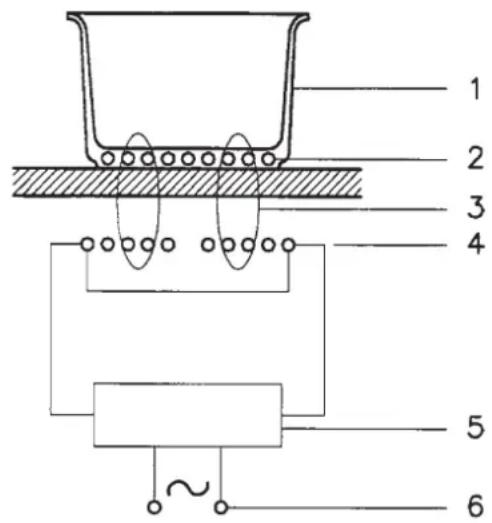
Fig. 1
1-Recipient
2 - Induced current
3 - Magnetic field
4 - Inductor
5 - Electronic circuit
6 - Electricity supply
Installation
All installation operations (electrical connection) must be carried out by people qualified in compliance with the laws in force. For specific instructions, see the installation section.
DO NOT FOCUS INENSEL ON THE LEDs AND DISPLAYS.
Use
First of all, position the pan in the chosen cooking area. The absence of the pan display means the system cannot start.
Pan detection
A certainty which distinguishes the knowledgeable use of technology in favour of the consumer.
Residual heat indicator
this tells the user that the glass is at a dangerously high heat in case of contract with the whole area over the cooking zone. The temperature is determined using a mathematical model and any residual heat is indicated with an "H" by the corresponding seven-segment display.
Heating and cooling are calculated in relation to:
the power level selected (from "0" to "9");
the relay activation period.
After switching off the cooking zone, the corresponding display shows an "H" until the temperature in the zone falls below the critical level (≤ 60^) in compliance with the mathematical model.
Protection in the event of accidental switching on
- If the electronic control sense continuous activation of a key for about 10 sec. it switches off automatically. The control gives off an acoustic error signal for 10 seconds, warning the user of the presence of an object on the sensors. The displays show the permanent error code, which will be displayed as long as the electronic control senses the error. If the cooking zone "burns", an "H" will appear on the display, alternating with the error signal.
- If no cooking zone is activated within 20 seconds of switching on the touch control, the control returns to stand-by mode. (See also paragraph 1.2.
- When the touch control is on, the ON/OFF key takes priority over all the other key, so the touch control can be switched off at any time, even in the case of multiple or continuous activation of the keys.
- In stand-by mode, continuous activation of the keys will have no effect. However, before the electronic control can be switched on again, it must acknowledge that no key is active.
Fig. 2
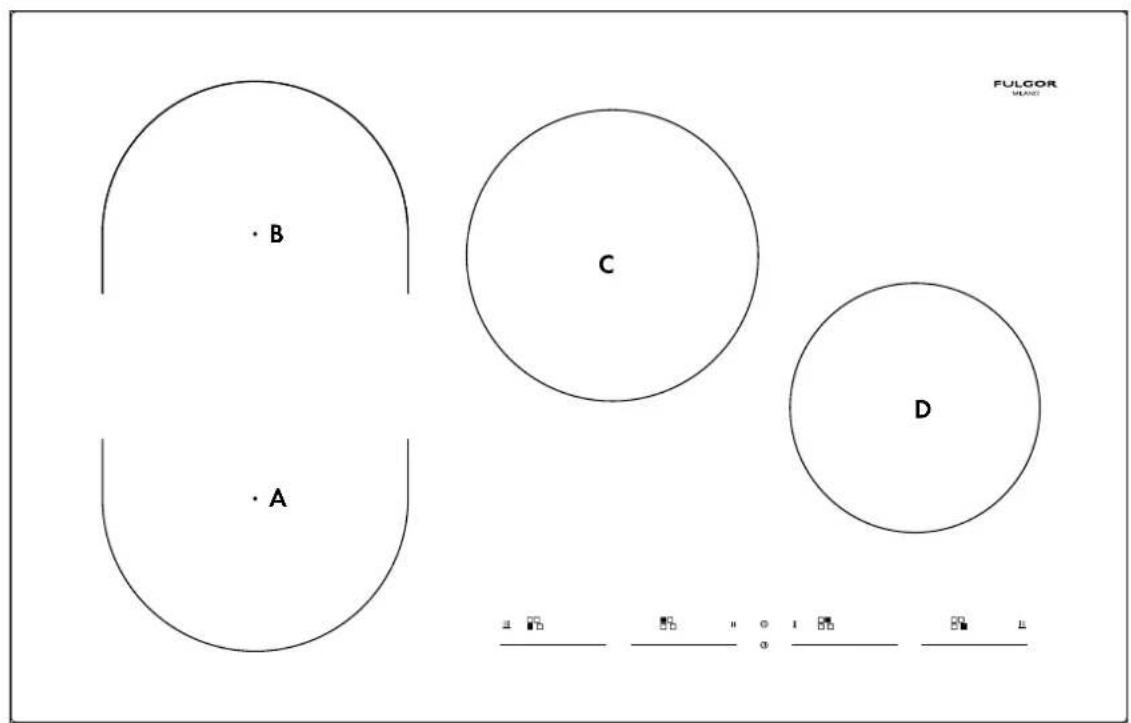
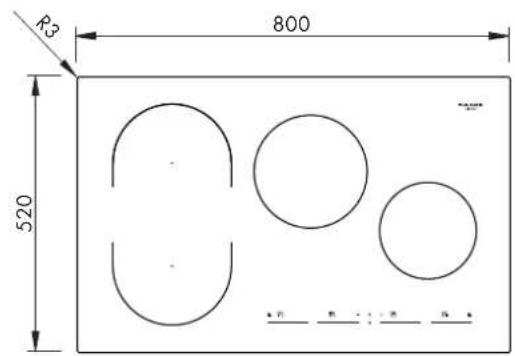
A:INDUCTION COOKING AREA 220× 1802300 / 3700W B:INDUCTION COOKING AREA 220× 1802300 / 3700W C:INDUCTION COOKING AREA 2102300 / 3700W D:INDUCTION COOKING AREA 1801850 / 3000W
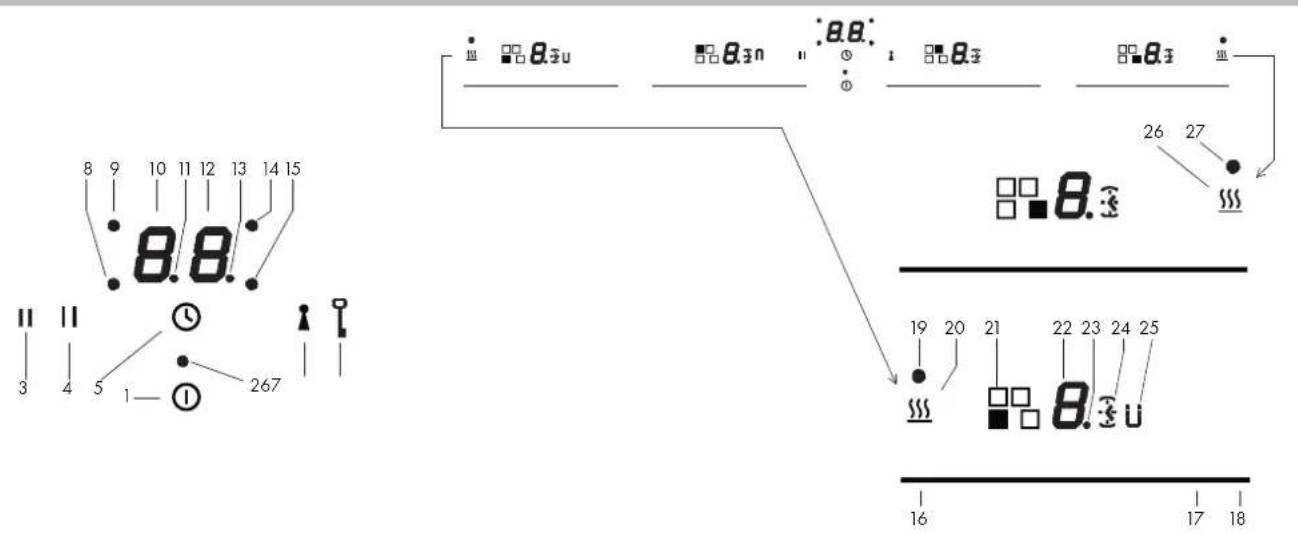
Fig. 3
1 ON/OFF
2 Power-on LED
3 Pause icon
4 Pause button
5 Timer button
6 Key button
7 Key icon
8 Timer on light - front left cooking area
9 Timer on light - rear left cooking area
10 Timer minute display
11 Timer separator dot
12 Timer minute display
13 Timer separator dot
14 Timer on light - rear right cooking area
15 Timer on light - front right cooking area
16 Minimum level cursor area
17 Maximum level cursor area
18 Power Booster (P) cursor area
19 Special function on icon
20 Special function (u) button
21 Only an indication of the cooking area position
22 Display value set
23 Display point
24 Timer icon for cooking area
25 Extension function on icon
26 Special function (U) button
27 Special function on icon
Precautions
- If there is even the tiniest crack in the ceramic glass surface, immediately disconnect the hob from the electricity supply;
- during operation, move any magnetic materials such as credit cards, computer disks, calculators, etc., away from the area;
- never use cooking foil or rest products wrapped in foil directly on the hob;
- metallic objects such as knives, forks, spoons and lids must not be rested on the surface of the hob to prevent them from heating up;
with cooking with non-stick containers, without using water or oil, limit any preheating time to one or two minutes; - when cooking foods which tend to stick to the bottom of the pan, start at minimum power and gradually increase the heat, stirring frequently;
- after use, switching off correctly (decreasing to "0") and avoid relying on the pan sensor.
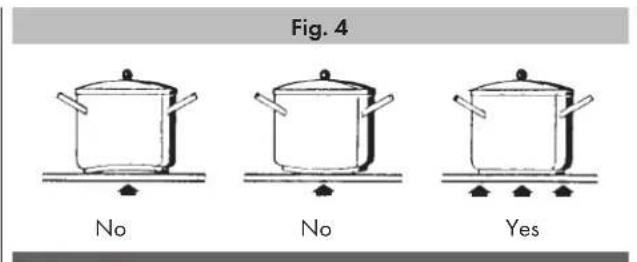
Pans (Fig. 4)
- If a magnet is attracted by the bottom of a container, the container is suitable for induction cooking;
- prefer pans declared as suitable for induction cooking;
- flat, thick-bottomed pans;
a 20 cm diameter saucepan can benefit from maximum power;
- a small saucepan reduces the power but will not cause energy dispersion. The use of containers with a diameter of less than 12 cm is not recommended;
- stainless steel containers with multilayer bottom or ferrite stainless steel if the bottom indicates: for induction;
- cast iron containers, better with an enamelled bottom to avoid scratching the ceramic glass hob;
- containers made of glass, ceramic, terracotta, aluminium, copper or non-magnetic stainless steel (austenitic) are not recommended and are unsuitable.
Maintenance (Fig. 5)
Traces of foil, food residues, splashes of fat, sugar or very sugary foods must be removed immediately from the hob using a scraper to avoid damaging the hob surface.
Then clean with SIDOL or STANFIX and kitchen paper, rinse with water and dry with a clean cloth.
Never use abrasive sponges or clothes and avoid using aggressive chemical cleansers such as OVEN SPRAYS or STAIN REMOVERS.
DO NOT USE STEAM CLEANERS
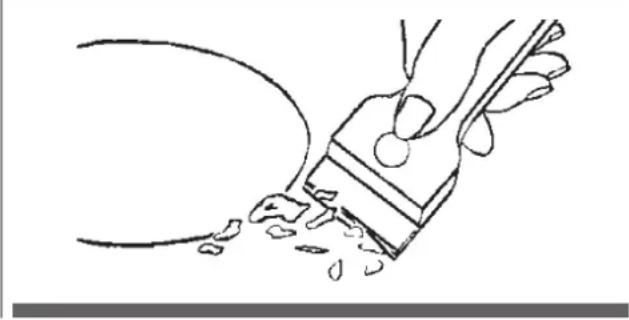
Fig. 5
Turning the cooking surface on and off
The cooking surface is turned on by pressing the "centre" On/Off button (1), you will hear a short beep and the 4 seven-segment displays light up showing "0".
If a cooking zone is "hot", the display will alternate between "H" and "0".
After switching on, the touch control remains active for 10 seconds. If you do not select either a cooking zone or the times, the touch control automatically returns to stand-by mode.
Acoustic signal (buzzer)
During use, the following activities are signaled by a buzzer:
- Normal pressing of the buttons with a short beep.
- Holding down buttons for more than 10 seconds with a long intermittent sound (an error symbol is displayed and, if you continue, the touch control is turned off)
Turning on a cooking area
Position a pot and touch an area of the cursor for the cooking area where the pot is (16-17-18), slide your finger to the right to increase the cooking level (17), or slide your finger to the left to decrease it (16).
Turning off a cooking area
A single cooking area can be turned off directly by selecting the "0" position by sliding your finger to the left in the cursor area for the cooking area that is working.
Hot cooking areas will be displayed with a letter "H".
You can turn off all cooking areas immediately at any time using the power On/Off button (1).
If, during cooking, you inadvertently turn off the surface while using the controls, you can turn it on again with the On/Off button and
you will have 6 seconds to press the pause button (4) that will be indicated by the (3) flashing icon; doing so will turn the surface on again with the same settings it had before it was accidentally turned off.
Power level
The power level of the cooking area can be set from level 1 to level 9. A further level P (Power Booster) is available that allows a very rapid heating of food and, therefore, saves you time.
The power level represented by an intermittent letter "A" is the activation of the automatic heating function.
Booster and power management.
The generator, with Booster enabled, provides the cooking area power that is significantly higher than the rated power; the display of the selected cooking area shows a "P". The Booster function can be activated by pressing at the end of the cursor of the cooking area (18).
The power increase is different depending on the size of the cooking area:
1) For a cooking area with a diameter of 180mm , the power goes from a level 9 of 1850W to the Booster level of 3000W for 10 minutes.
2) For a rectangular cooking area (220x190), the power goes from a level 9 of 2300 W to the Booster level of 3700 W for 10 minutes.
3) For a cooking area with a diameter of 210, the power goes from a level 9 of 2300W to the Booster level of 3700W for 10 minutes.
If during pot is removed from the cooking area during the Booster time, the Booster remains active and the Booster time is not deactivated.
With the Booster activated, changing the value set with your finger in the cursor area deactivates the Booster.
The Booster function "P" can be activated in all cooking areas, but priority is given to the last Booster activated, reducing any other cooking levels.
Automatic preheating (or "heat-up" function)
This feature makes cooking easier. You do not need to be permanently present during cooking: the surface automatically heats up at Full Power and then returns to the selected power level after a certain time (see Table 1).
Activating automatic heating (or "heat-up" function)
Press and hold an area of the cursor for the cooking area that is working for about 3 seconds until you hear a beep (such as 1/3 of the length of the cursor area).
For example: Select level 3 and activate the automatic heating function by pressing your finger for 3 seconds. The corresponding display shows the letter "A" alternating with "3". With these settings, the cooking surface heats the cooking area at the maximum level "9" for 2 minutes and then continues cooking level at level "3".
| POWER LEVEL | Duration Automatic HEATING Function (time in minutes) | Maximum Duration of Working Time without Commands (time in minutes) |
| 0 | - | |
| 1 0'40" 516 | ||
| 2 1'12" 402 | ||
| 3 2'318 | ||
| 4 2'56" 258 | ||
| 5 4'16" 210 | ||
| 6 7'12" 138 | ||
| 7 2'138 | ||
| 8 3'12" 108 | ||
| 9 -90 | ||
| P -10 | ||
Extension function (For large pans)
This function facilitates cooking with large rectangular pans, is only available for the rectangular cooking areas and is activated by simultaneously pressing the 2 cursors of the 2 cooking areas involved. At this point, a "U" icon (25) will light up next to the display of the levels (22) and the cooking area can now be controlled with the cursor to the left.
Special functions
By turning on the touch display, you can program a special function by pressing the dedicated buttons (20-26). The icon (19-27) will flash for 5 seconds during which you can assign the function to a cooking area. This function is available to "assist cooking" in each cooking area and is indicated by a "u" or "U"
It is possible to activate 2 "cooking" levels:
1) Melting with a temperature of approximately 42^ "u".
2) Heating with a temperature of approximately 70^ "U".
These temperatures are approximate and are greatly dependent on the pot and the quantity of food.
Control lock (child safety)
It is only activated when the cooking surface is on but no cooking area is on.
Simultaneously press the key button (6) and the pause button (4) and then press the pause button (4).
The letter "L" will appear on both displays for 10 seconds and then they will turn off.
When you try to turn on the cooking surface with the On/Off button (1), the letters "L" will be displayed and it will not be possible to cook.
Unlocking/deactivation child safety
There are two types of unlocking:
1) Unlocking for one time only: To disable the function, turn on the cooking surface and simultaneously press the pause (4) and key (6) buttons. The letters L disappear and are replaced by a "0" for each cooking area. If you turn off the cooking surface after use, when it is turned on again, the letters L will be displayed to indicate that the surface is locked.
2) Permanent unlocking: To disable the function permanently, turn on the cooking surface and simultaneously press the pause (4) and key (6) buttons. Then release these 2 buttons and press the key button (6) again.
Key
This cooking surface allows setting a keypad lock using the lock button (6). It may be useful to lock the keypad during operation, for example for cleaning the control area or, in any case, if you do not want to change any settings.
The On/Off button (1) still has priority.
Pause
This cooking surface allows setting a pause (4) during cooking (which is useful, for example, when answering a phone call). When this function is pressed, an LED lights above the button and the symbol "II" is displayed in all the cooking areas and the cooking settings and timers are frozen for a maximum of 10 minutes, after which the cooking surface turns off.
Deactivating Pause
Once activated, the function can be deactivated by pressing the pause button (4) again. The icon (3) flashes and you must select a cursor area within 10 seconds. This allows the surface to resume cooking and the timer starts from the same point at which it was stopped.
Timer function
There are two versions of the timer function:
- An independent timer from 1 to 99 minutes: it beeps when the time has run out. This function is available even when the cooking areas are on.
- A timer from 1 to 99 minutes for each cooking area: it beeps when the time has run out and turns off the cooking area where it was set. The 4 cooking areas can be programmed independently.
The timer starts with a default time of 10 minutes and the timer selection point (13) is active in the cursor area. When you touch the minimum level (16), the time decreases and when you touch the maximum level (17), it increases.
The type of timer activated is shown in the dedicated displays (10-12) and the timer with the least time left is highlighted. If the least time is related to an independent timer, the time is simply displayed without any particular indication while, if the least time is realted to a cooking area timer, the timer icon (24) flashes together with the related indicator light (8-9-14-15). The other timer settings are still active and running, but will have a clock icon (24) lit but not flashing.
Just the separator dot (13) is lit when the timer is selected and modifiable.
Independent timer
- If the touch display is on and all the cooking areas are at level "0", the independent timer can be used by pressing the timer button (5) and selecting any of the cursors of any cooking area. If, however, there are cooking areas switched on, to select the independent timer, you have to press the timer button (5) two times and then select any of the cursors. If you do not select any button, the timer deactivates within 10 seconds.
- The time setting (0-99 minutes) can be changed in increments of one minute by keeping your finger in the cursor (17).
- Holding down the button (16-17) dynamically increases the rate of change up to a maximum or minimum value, without beeps.
If the key (16-17) is released, the rate of increase (decrease) starts again from the initial value. - The timer can be set by either continuously pressing the buttons (16-17) or by pressing successively (with beeps).
After the timer is set, it begins to count down. When the time runs out, the timer display will flash and display "00", beeping for a maximum of 2 minutes.
The beep will not stop until a button is pressed. The display stops flashing and turns off.
Turning off/changing the timer
- The timer can be changed or turned off at any time by turning on the touch display again, if no cooking area is on, and pressing the timer button (5) to select the timer. At this point, set it to "0" by pressing the minimum level in any of the cursors (16) to turn it off, or by pressing the maximum level (17) of any of the cursors to increase the time setting.
- The independent timer remains active even when the On/Off button is pressed
Programming the timer for the cooking areas
By turning on the touch display, you can program an independent timer for each cooking area.
- At least one cooking area must be on and set to a certain level.
- Activate the cooking area, select a cursor (16-17) and then press the timer button (5) to set a countdown time for turning off the cooking area. The clock icons (24) will light next to the display of the cooking area. To set the timer of a cooking area when there is more than one cooking area on, you must:
- Activate the cooking area by selecting the cursor (16-17) then press the timer button (5). In this way, you can set a countdown to turn off the cooking area. Illuminated clock icons (24) will light up next to the cooking area display. To set To set the timer on a cooking area when there is more than one cooking area on, you must:
- Other functions of the timer are are the same as the independent timer. To increase the time, use the plus button.
- The expiry of the time is signalled by a beep and "00" on the display and the LED of the cooking area assigned to the timer flashes. The cooking area is turned off and an "H" is shown if the area is "hot", otherwise the display shows a hyphen. The beeping and flashing of the display stop:
- Automatically after 2 minutes.
- When you press the clock button, the timer display turns off.
Error codes are displayed by the 7-segment display with "E" or "ER" plus the error number.
| Error message | Description Possible error reason Troubleshooting | ||
| "flash" | Permanent use of keys; Control unit cuts off after 10 sec | Water or cooking utensils on the glass above the control unit | Cleaning of the operational surface |
| Er 22 | Defective Key evaluation. Control unit cuts off after 3.5 - 7.5 sec. | Short-circuit or discontinuation in the range of the key evaluation | Exchange control unit |
| Er20 | Flash-failure μC- faulty Exchange control unit | ||
| Er36 | NTC value is not within its specification (value < 200mV or > 4.9V; control unit cuts off | Short-circuit or cut-off at NTC Exchange control unit | |
| Er31 | Configuration data incorrect Configuration of induction necessary New Configuration | ||
| Er47 | Communication error between TC and induction | None or faulty communication! Ensure that connection cable is plugged on correctly and functional. | |
| E2 | Overheating of the induction coils Cooling down necessary | ||
| U400 | Secondary voltage of the power unit to high (primary > 300V). Control unit cuts off after 1 sec releasing a permanent tone. | Control unit is wrongly connected. Connect to correct mains voltage | |
| E5 | Error on filter board Exchange filter board | ||
| E6 | Error on power unit Exchange power unit | ||
| E9 | Coil temperature sensor defective Exchange temperature sensore | ||
Installation
these instructions are aimed at qualified fitters as a guide to installation, adjustment and maintenance in compliance with the laws and standards in force. The operations must always be carried out with the appliance disconnected from the electricity supply.
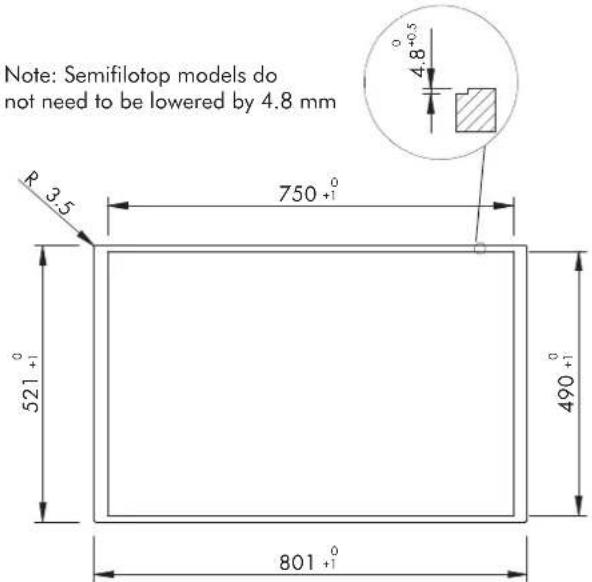
Positioning (Fig. 6-7)
The appliance is made to be fitted into a counter top, as show in the figure. Apply the sealant supplied around the whole perimeter of the hob. Installation over an oven is not recommended, but if this is necessary, check that:
- the oven has an efficient cooling system;
- there is no passage of hot air from the oven to the hob;
- allow air passages as shown in the figure.
Electrical connection (Fig. 8)
Before connecting to the electricity supply, ensure that:
- the characteristics of the system are such as to satisfy that indicated on the registration plate applied to the bottom of the hob;
- the system has an effective earth connection compliant with the
standards and laws in force. Connection to earth is compulsory by law.
If the appliance has no cable and/or plug, use material suitable for the absorption indicated on the registration plate and for the working temperature. The cable must not reach a temperature higher than 50^ above room temperature in any point.
For direct connection to the network it is necessary to fit an omnipolar switch of a suitable size to ensure disconnection of he network with a contact opening distance that allows complete disconnection in the conditions of the overtension category III, compliant with the installation regulations (the yellow/green earth wire must not be interrupted).
The omnipolar socket or switch must be easy to reach when the appliance is installed.
N.B.:
The manufacturer declines all responsibility if the usual accident prevention standards and the above instructions are not observed.
If the power cable is damaged, it must be replaced by the manufacturer or by the manufacturer's technical servicing network, or by a similarly qualified operator, to prevent every possible risk.
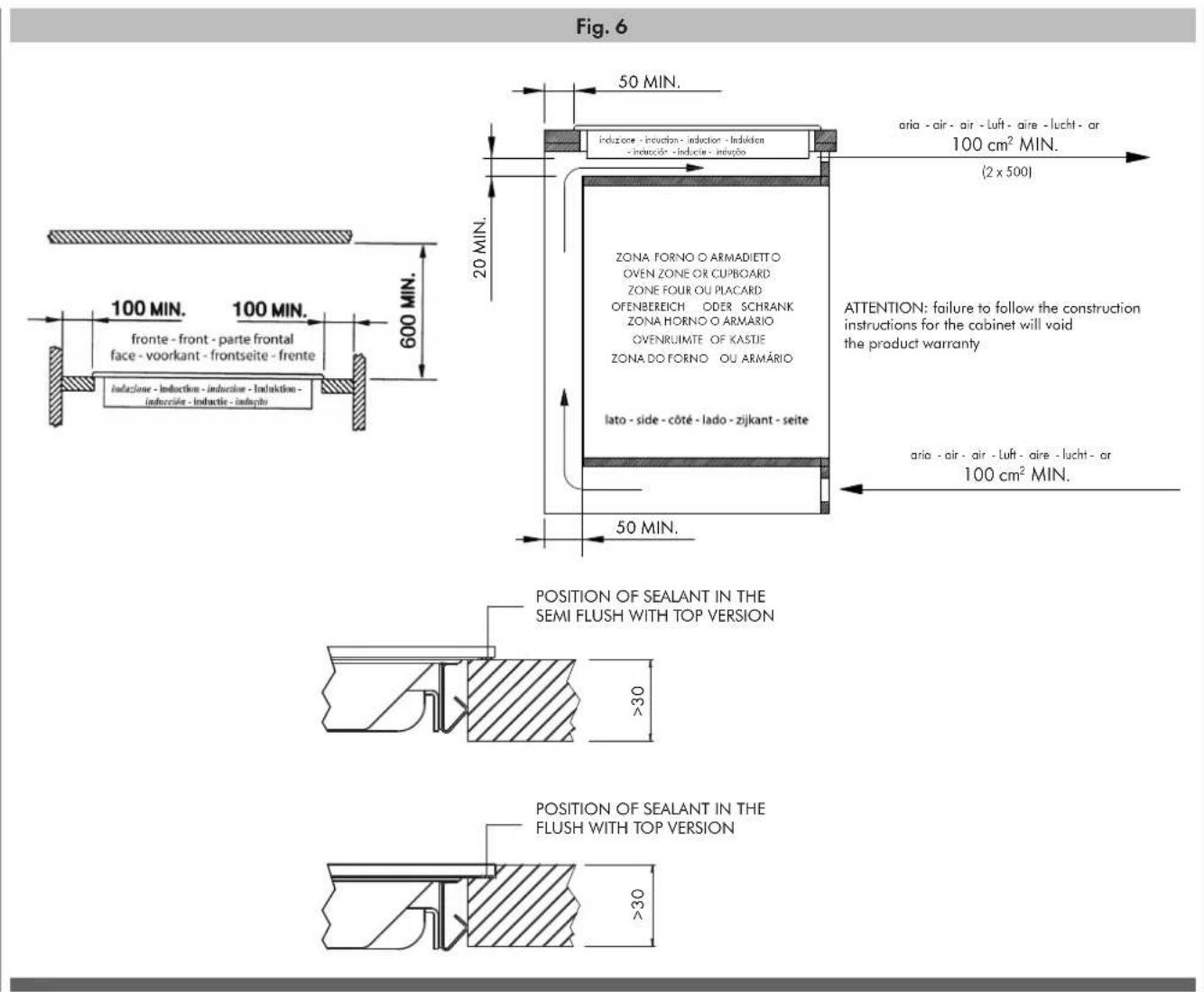

Fig. 7
Note: Semifilotop models do not need to be lowered by 4.8 mm
Note: Do not glue or silicone the glass when lowering by 4.8mm
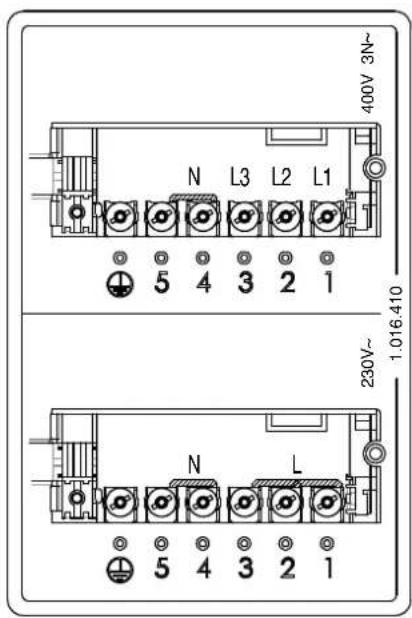
Fig. 8
Cher Client,
-性和 speed of the use of the apparatus, such as the speed of the apparatus used for measuring the distance between two points.