
DKC4756MB - Microwave Oven DE DIETRICH - Free user manual and instructions
Find the device manual for free DKC4756MB DE DIETRICH in PDF.


| Brand | De Dietrich |
| Model | DKC4756MB |
| Product type | Built-in microwave oven |
| Dimensions (W x H x D) | 592 x 447 x 547 mm |
| Weight | Approximately 30 kg |
| Power supply | 220-240 V ~, 16 A, 50/60 Hz |
| Microwave power | 1000 W |
| Microwave power levels | 100 W, 200 W, 300/400 W, 500 W, 800/900 W, 1000 W |
| Cooking functions | Microwave, microwave + convection combination, microwave + grill combination, convection, fan grill, variable grill, express cooking, automatic cooking, automatic defrost |
| Control type | Rotary knob with central push + touch keys |
| Display | Digital screen |
| Control lock | Simultaneous press on back and 30s |
| Capacity | Not specified |
| Turntable | Yes, glass |
| Included accessories | Safety grid, multi-purpose enameled dish (45 mm drip tray), 2 racks, turntable, drive, caster support |
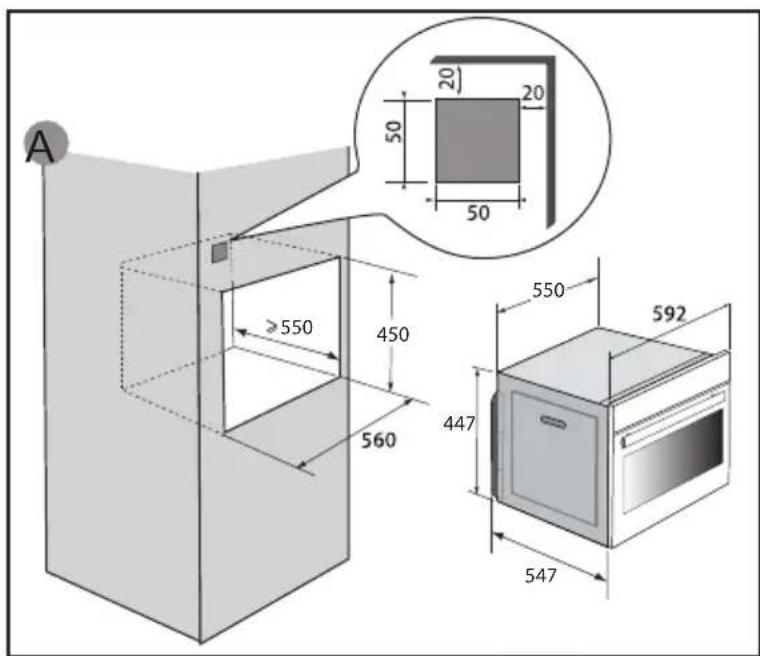
| Recess dimensions | Minimum height 850 mm from floor, minimum distance 10 mm from adjacent cabinet |
| Cleaning | Soft cloth and glass cleaner or diluted liquid black soap |
| Safety | Child lock, automatic stop (AS), fault detection |
| Country of manufacture | France (Origine France Garantie label) |
| After-sales service | 0 892 02 88 04 (€0.50/min + call price) |
Frequently Asked Questions - DKC4756MB DE DIETRICH
User questions about DKC4756MB DE DIETRICH
0 question about this device. Answer the ones you know or ask your own.
Ask a new question about this device
Download the instructions for your Microwave Oven in PDF format for free! Find your manual DKC4756MB - DE DIETRICH and take your electronic device back in hand. On this page are published all the documents necessary for the use of your device. DKC4756MB by DE DIETRICH.
USER MANUAL DKC4756MB DE DIETRICH
1 INSTALLATION....7-8
CHOIX DE L'EMPLACEMENT ET ENCASTREMENT....7
RACCORDEMENT ÉLECTRIQUE....8
2 ENVIRONNEMENT....9
RESPECT DE L'ENVIRONNEMENT....9
3 PRÉSENTATION DE VOTRE APPAREIL....10-13
LES COMMANDES ET L'AFFICHEUR....11
VERROUILLAGE DES TOUCHES....11
LES ACCESSOIRES (SELON MODÈLES)....12
LE PLATEAU TOURNANT....13
PRINCIPES DE FONCTIONNEMENT....13
4 MISE EN SERVICE ET RÉGLAGES....14
PREMIÈRE MISE EN SERVICE....14
MENU RÉGLAGES (SELON MODÈLES)....14
5 MODE DE CUISSON MANUEL....15-18
RÉALISER UNE CUISSON....15
FONCTION MICRO-ONDES....15
FONCTION MICRO-ONDES COMBINÉES....16
FONCTION DE CUISSONS TRADITIONNELLES....17
DÉMARRAGE D'UNE CUISSON....18
6 MODE DE CUISSON AUTOMATIQUE....19-20
PRÉSENTATION DU MODE AUTOMATIQUE....19
PRÉSENTATION DES CATÉGORIES DE PLATS....19
CUISSON AUTOMATIQUE ....20
7 AUTRES FONCTIONS ......21
FAVORIS 21
FONCTION MINUTERIE 21
8 ENTRETIEN....22
9 ANOMALIES ET SOLUTIONS....23
10 SERVICE APRÈS-VENTE......24
SÉCURITÉ ET PRÉCAUTIONS IMPORTANTES
INSTRUCTIONS DE SÉCURITÉ IMPORTANTES - LIRE AVEC ATTENTION ET GARDER POUR DE FUTURES UTILISATIONS.
natural_image
Line drawing of a rectangular metal rack or tray structure with no text or symbols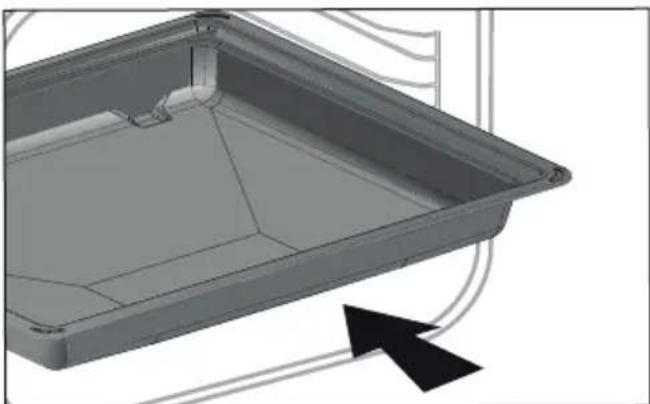
natural_image
3D CAD model of a rectangular tray or container with internal channels and a black arrow indicating direction (no text or symbols)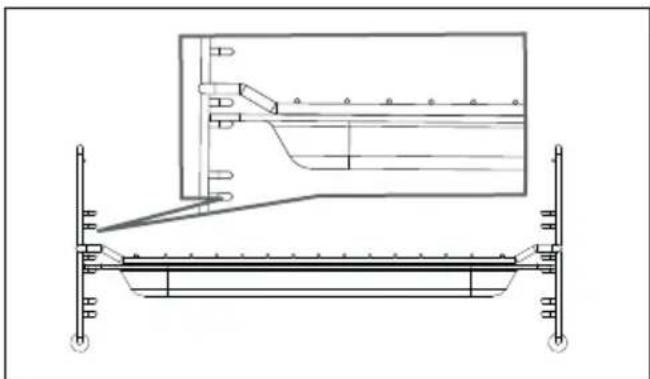
natural_image
Technical line drawing of a structural support frame with an inset showing a mechanical component (no text or symbols)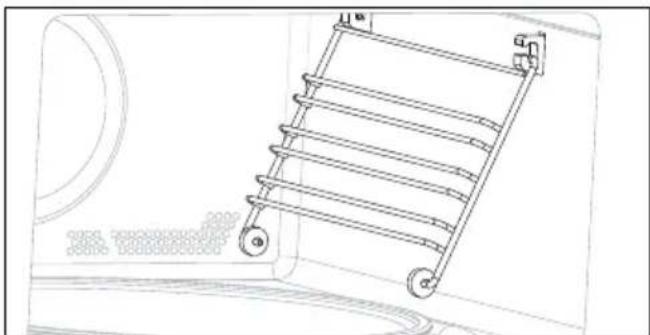
natural_image
Line drawing of a ladder mounted on a wall, with no visible text or symbolsLES ACCESSOIRES (SELON MODÈLE)
natural_image
Diagram showing two circular components connected by a wire, with an arrow pointing to a magnified inset of the innermost ring (no text or symbols)LE PLATEAU TOURNANT
DISPONIBLE POUR LES MODES MANUEL
RELATIONS CONSOMMATEURS FRANCE
natural_image
Diagram of a door opening with a slide inside, showing a black arrow pointing to the slide area (no text or symbols present)| A | B | G | |
| SERVICE: | C | TYPE: D | I CE |
| E | F | ||
| Nr | H | Made in France |
You have just purchased a De Dietrich product. This choice reflects your high standards and taste for the French way of life.
Resulting from over 300 years' know-how, the De Dietrich creations embody the fusion between design, authenticity and technology at the service of culinary arts. Our appliances are manufactured using noble materials and offer an irreproachable quality of fi nish.
We are certain this high-quality product will enable cooking enthusiasts to express all their talents.
The De Dietrich Customer Service Department is at your disposal for all your questions and suggestions to always better meet your expectations.
We are honoured to be your new partner in the kitchen and thank you for your trust.
With its factories based in France, in Orléans and Vendôme, De Dietrich cultivates a constant search for excellence, perpetuating exceptional know-how in the design of perfectly finished products. Many of our electrical appliances are certified by the “Origine France Garantie” label, an acknowledgement which certifies they are manufactured in France.
This label both ensures the quality and durability of our appliances, as well as their traceability, thus offering a clear and objective indication of their provenance.
www.de-dietrich.com
De Dietrich
CRÉATEUR D'ÉMOTIONS DEPUIS 1684
IMPORTANT SAFETY ADVICE AND PRECAUTIONS 4-6
1 INSTALLATION 7-8
Choice of location and fitting....7
Electrical connection 8
2 ENVIRONMENT 9
Caring for the environment 9
3 PRESENTATION OF YOUR APPLIANCE 10-13
The controls and display 11
Locking the controls ....11
Accessories (depending on model) 12
The turntable....13
Operating principles ....13
4 FIRST USE AND SETTINGS....14
Using the oven for the first time ....14
Settings menu (depending on model) 14
5 MANUAL COOKING MODE....15-19
Cooking....15
Microwave function 15
Combined microwave function 16
Traditional cooking functions 17
Starting a cooking programme ....18
6 AUTOMATIC COOKING MODE.... 19-20
Presentation of the cooking mode ....19
Presentation of dish categories 19
Immediate cooking ....20
7 OTHER FUNCTION....21
Favourites ......21
Timer function 21
8 CARE....22
9 ANOMALIES AND SOLUTIONS....23
10 AFTER SALES SERVICES 24
IMPORTANT SAFETY INSTRUCTIONS - READ CAREFULLY AND KEEP FOR FUTURE USE.
This user guide is available for download on the brand's website.
Once you receive the appliance, unpack it or have it unpacked immediately. Give it an overall inspection. Make a note of any reservations on the delivery slip and keep a copy.

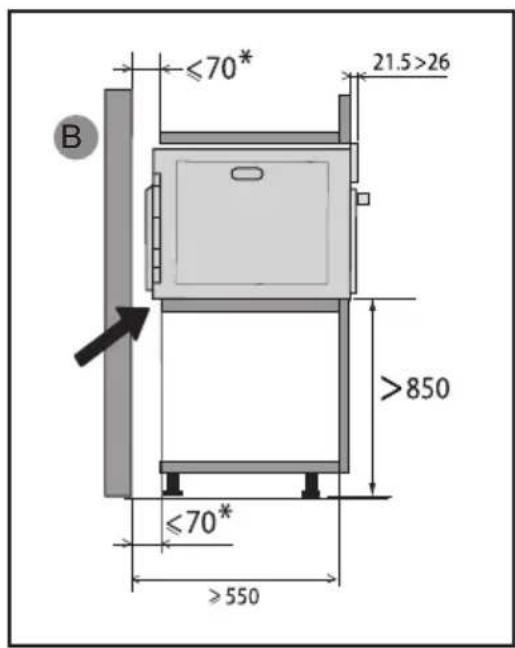
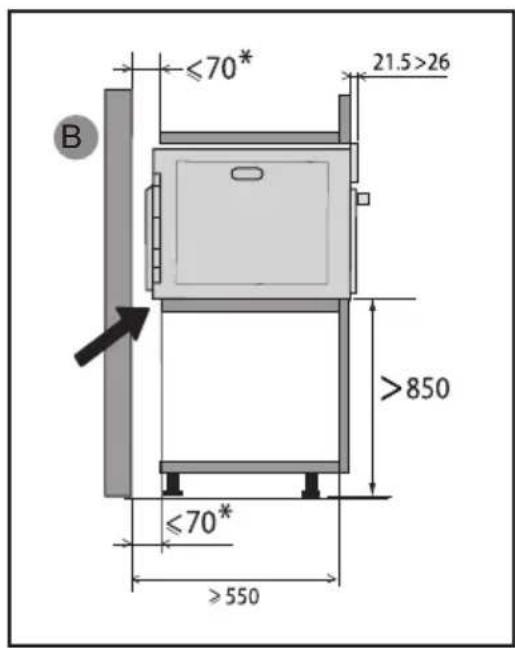
This appliance must be installed more than 850mm up off the ground.
— The appliance must not be installed behind a decorative door to prevent overheating.
— Centre the oven in the cabinet so as to ensure a minimum gap of 10mm between the appliance and the surrounding unit.
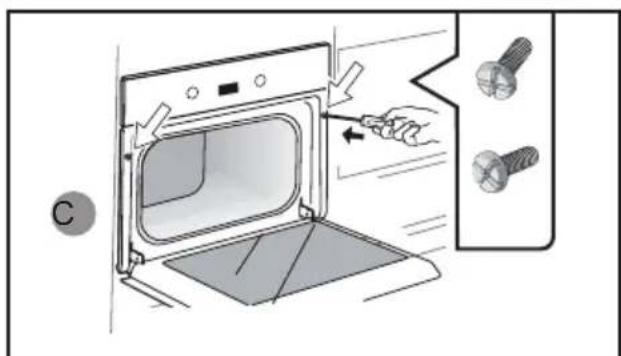
The material of the unit supporting the appliance must be heat-resistant (or covered with a heat-resistant material). For greater stability, attach the oven to the unit with 2 screws through the holes provided on the side panels.

It must be possible to disconnect the appliance from the power supply by fi tting a switch on the fixed wiring system in accordance with installation rules. — If the power cable is damaged, it should be replaced by the manufacturer, its after-sales service department or by a
similarly qualifi ed person in order to avoid danger.

WARNING:
It is dangerous for anyone other than a qualified person to perform maintenance or repairs that requires the removal of the cover providing protection against exposure to microwave power.
— This appliance is designed to cook with the door closed.
— This appliance is designed to be used for domestic and similar applications such as kitchen areas for the staff of shops, offices and other professional premises; farms; use by clients of hotels, motels and other residential type establishments; guest house type environments.
— This appliance may be used by children aged 8 years and older, and by persons with impaired physical, sensory or mental capacities, or without experience or knowledge, if they are supervised or have received prior instructions on how to use the appliance safely and have understood the risks involved.
— Children must not play with the appliance. The appliance should
not be cleaned or maintained by unsupervised children.
— Children should be supervised to prevent them from playing with the appliance.

WARNING:
The appliance and its accessible parts become hot during use. Be careful not to touch the heating elements inside the oven. Children under 8 years of age should not be allowed near the appliance, unless they are constantly supervised.

WARNING:
If the appliance is being used in combination mode, it is recommended that children only use the oven under adult supervision due to the temperatures generated.
— Only use utensils suitable for use in microwave ovens. Metal food and beverage containers cannot be used for microwave cooking.
— The microwave oven is intended for heating food and drinks. Drying food products or linen or heating heat pads, slippers, sponges, damp clothes or similar could cause injury, combustion or fire.

WARNING:
Liquids and other foods should not be heated in tightly closed containers as they may explode.
— When heating food items in plastic or paper containers, monitor the microwave's contents due to the risk of combustion.
— If smoke appears, stop or unplug the oven and keep the door closed to smother any flames.
— Heating beverages in the microwave oven can cause the sudden and/or delayed splattering of boiling liquid, so care must be taken when handling their containers.
— The contents of baby bottles and baby food jars must be stirred or shaken and the temperature must be checked before consumption, so as to prevent burns.
— It is not recommended to heat eggs in their shells or whole hard-boiled eggs in a microwave oven, as they may explode, even after cooking has ended.
— It is recommended to clean the oven regularly and to remove any food residue.
— If the appliance is not cleaned regularly, its surface could become damaged, permanently affecting the appliance's lifespan and possibly causing a safety hazard.

WARNING:
If the door or door seal is damaged, the oven must not be operated until it has been repaired by an authorised person.
— Do not use abrasive cleaning products or hard metal scrapers to clean the glass oven door as this may scratch the surface and can cause the glass to crack.
— Do not use a steam cleaner.
— Only allow children to use the oven without supervision if adequate instructions have been given so that the child is able to use the oven safely and understands the dangers of incorrect use.
CHOICE OF LOCATION AND FITTING
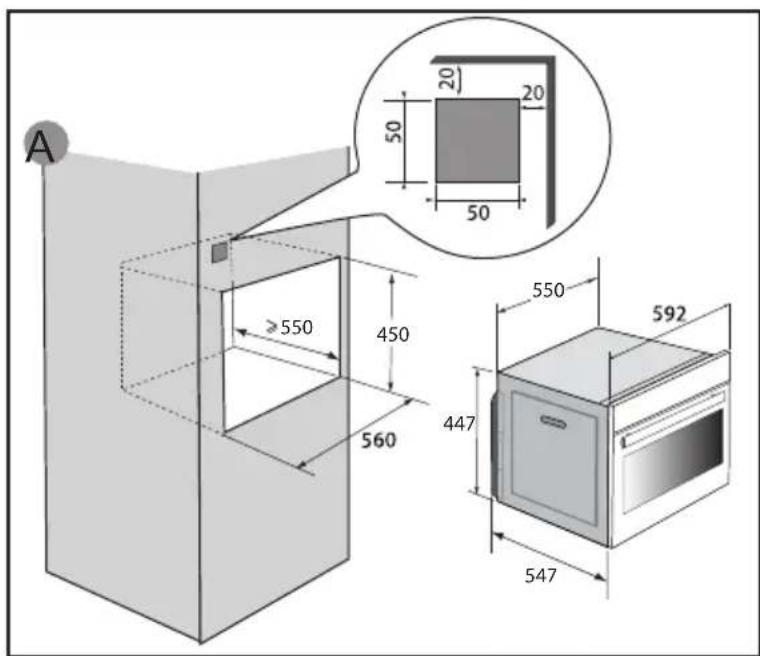
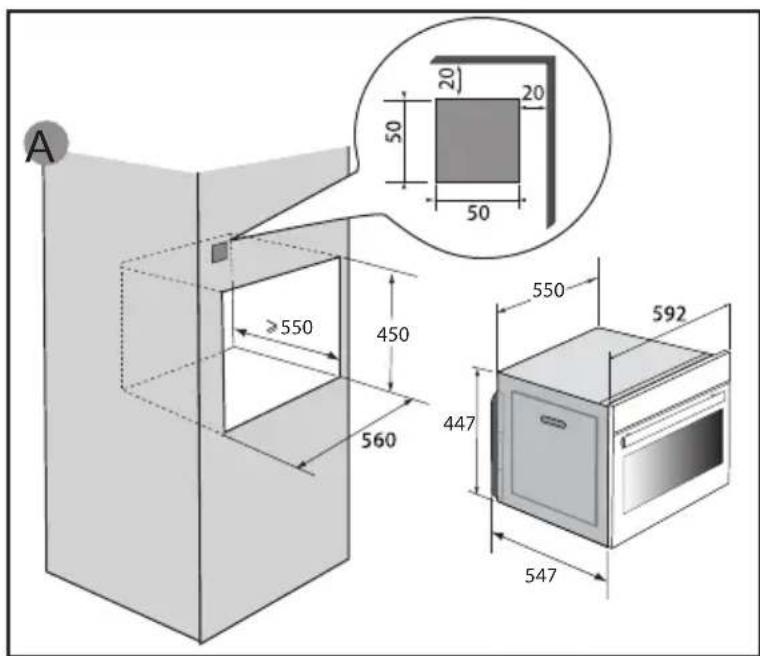
This appliance must be installed more than 850 mm up off the ground. This appliance may be installed in a cabinet column, as indicated on the installation diagram (fi g. A).
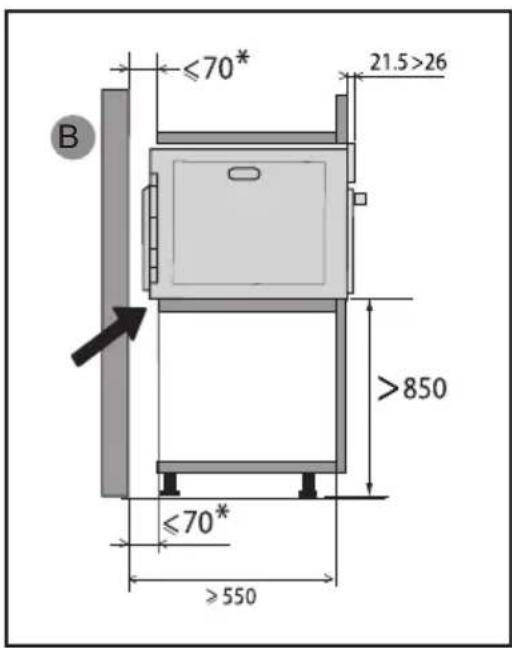
Caution: if the back of the cabinet is open, the space between the wall and the surface on which the oven rests must be no more than 70 mm* (fi g. B).
Do not use your appliance immediately (wait for about 1 to 2 hours) after transferring it from a cold place to a warm place, as condensation may cause a malfunction.
Centre the oven in the cabinet so as to ensure a minimum gap of 10 mm between the appliance and the surrounding unit. The material of the unit supporting the appliance must be heat-resistant (or covered with a heat-resistant material). Drill a 2 mm diameter hole in the cabinet panel to avoid splitting the wood.
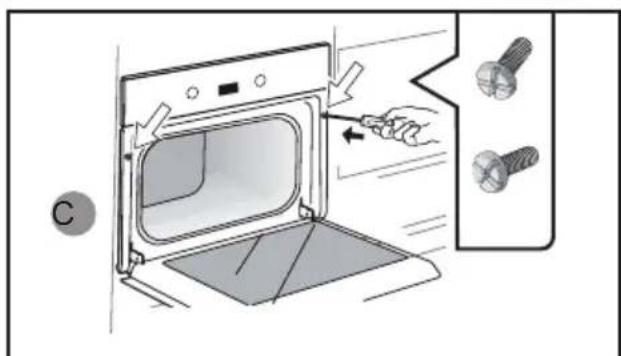
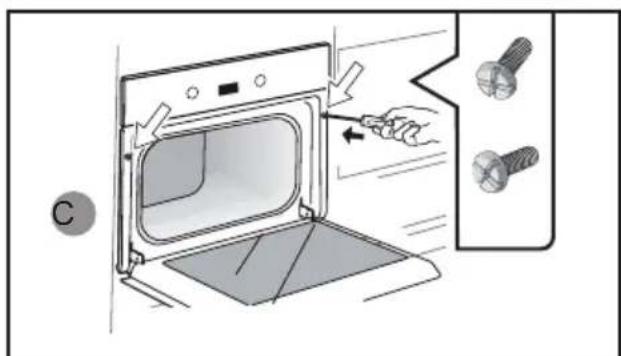
For greater stability, attach the oven to the unit with 2 screws through the holes provided on the side panels (fi g. C).
ELECTRICAL CONNECTIONS
The appliance must be recess-fitted correctly to ensure electrical safety. The electrical connections should be made before the appliance is installed in its
The oven is supplied with a standardised power cable with 3 conductors of 1.5mm^2 (1 live + 1 neutral + earth) which must be connected to a 220-240V single-phase system by means of an IEC 60083 standard power socket or via an all-pole cut-off device in compliance with the installation rules.
Check that:
- the electrical installation has suffi cient voltage (220-240 Volts\~ 16 Amps). If the electrical installation of your home requires a modifi cation to connect the appliance, call a qualifi ed electrician.
During maintenance, the appliance must be disconnected from the mains, the fuses must be switched off or removed.
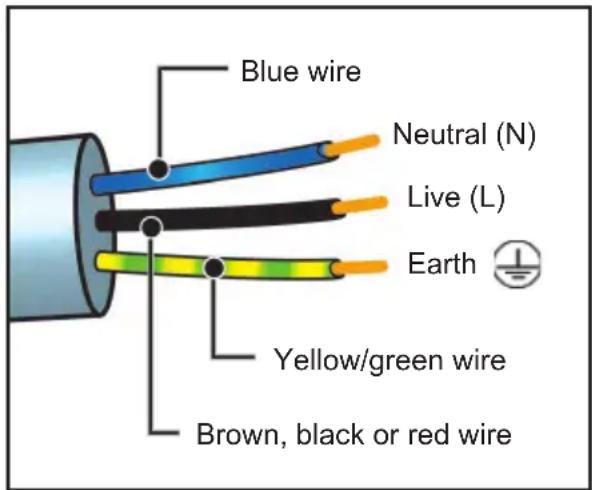

Important:
This appliance should be installed by a qualified technician / installer.

Important:
The safety wire (green-yellow) is connected to the appliance's terminal and must be connected to the installation's earth.
If the oven malfunctions in any way, unplug the appliance or remove the fuse for the oven's connection line.

Important:
We cannot be held responsible for any accident or incident resulting from non-existent, defective or incorrect earthing or non-compliant connection.
• 2 ENVIRONMENT
ENVIRONMENTAL COMPLIANCE
The packaging material of this appliance is recyclable. Please recycle it and help protect the environment by depositing it in municipal containers provided for this purpose.
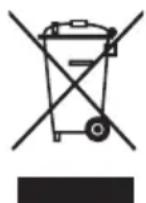
Your appliance also contains many recyclable materials. It is therefore marked with this logo to indicate that used appliances should not be mixed with other waste. Recycling of appliances organised by your manufacturer
is carried out under the best possible conditions, in accordance with the European directive in force on waste electronic and electrical equipment. Contact your local authority or retailer for information on used appliance collection points close to your home.
We thank you for your help in protecting the environment.
• 3 PRESENTATION OF YOUR APPLIANCE
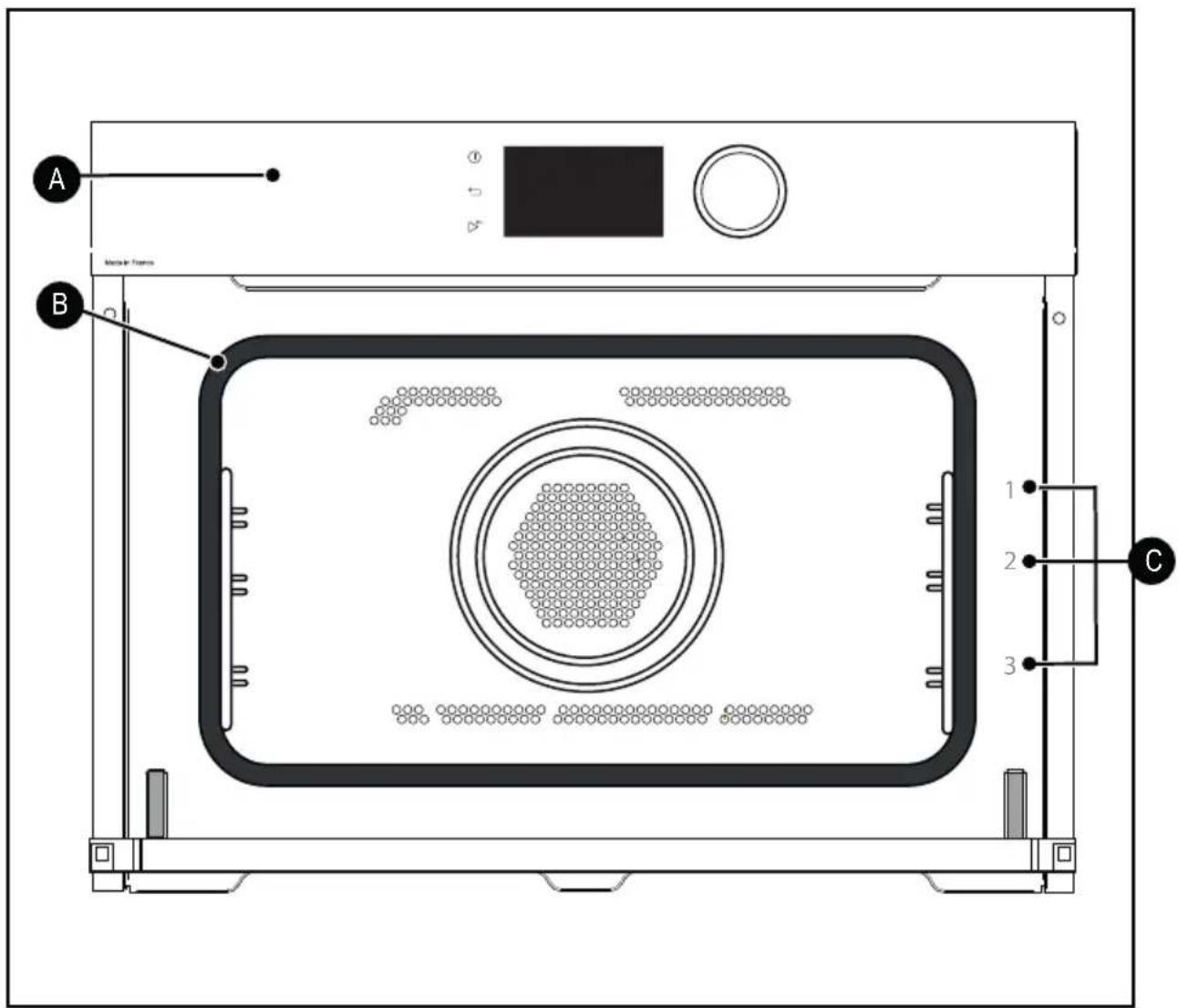
A Control panel
B Light
C Shelf runners (3 heights available)
• 3 PRESENTATION OF YOUR APPLIANCE
CONTROLS AND DISPLAY
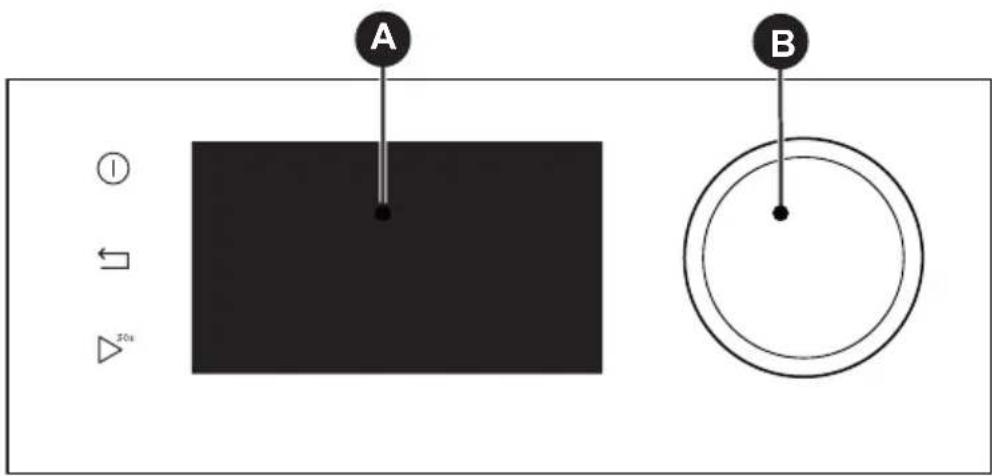

Oven off touch control (press and hold)
Back key
Key to start the microwave oven for 30 seconds

Display

Rotating knob with central button (cannot be removed):
- Choose programmes, increase or reduce values by turning it.
- Validate each action by pressing the centre.
LOCKING THE CONTROLS
Simultaneously press the return and 30s keys until the symbol appears on the display.
The control lock can be accessed during cooking or when the oven is switched off.
NOTE: only the stop key Ⓘ remains active.
To unlock the keypad, simultaneously press the return and until the padlock symbol disappears from the display.
• 3 PRESENTATION OF YOUR APPLIANCE
ACCESSORIES (DEPENDING ON MODEL)
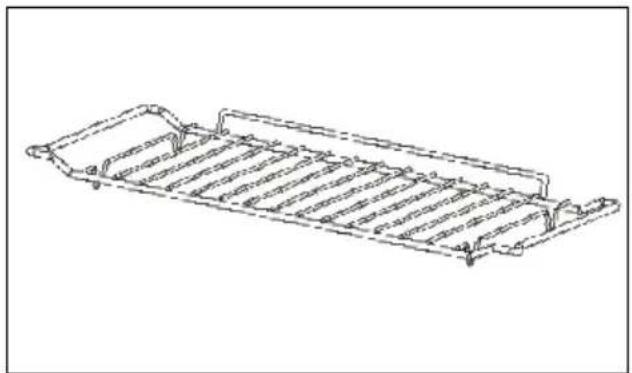
- Anti-tip safety rack.
Allows you to toast, brown or grill.
The grill rack must never be used with other metal containers in microwave, grill + microwave or convection + microwave mode.
However, you can heat food in an aluminium tray by isolating it from the rack using a plate.
natural_image
Line drawing of a rectangular metal tray with ribbed sides and handles (no text or symbols)- Multi-purpose enamel tray, 45 mm drip tray
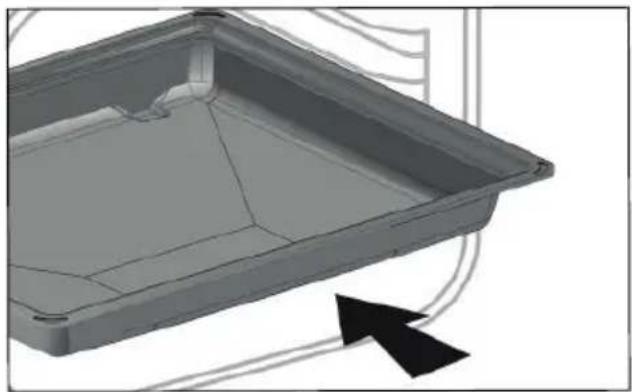
It can be used half fi lled with water for boiling food with convection heat. It can serve as a cooking dish.
natural_image
3D model of a rectangular tray with internal compartments and a black arrow indicating direction (no text or symbols)- Grill + enamel tray
To roast and save the cooking juices, place the grill rack on the drip tray.
natural_image
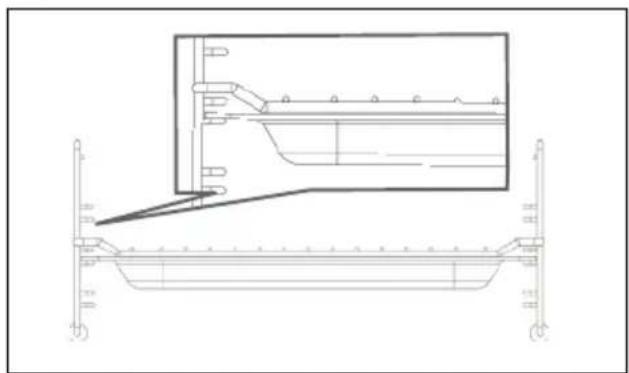
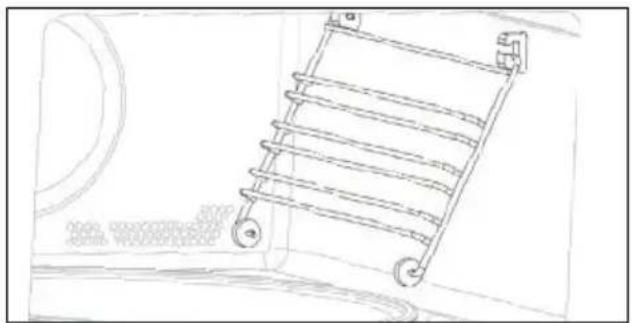
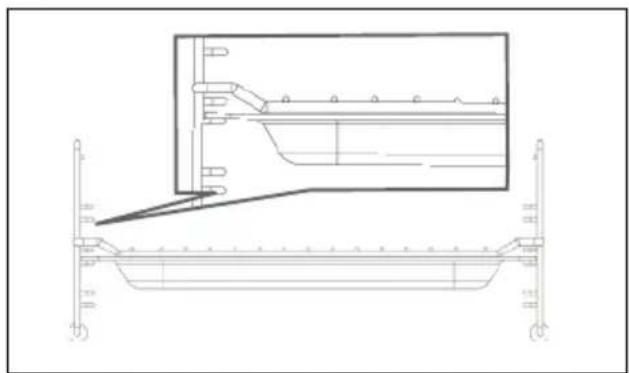
Technical line drawing of a structural beam with support details and an inset detail (no text or symbols)- Shelf runners
2 shelf supports allow you to use the rack at 3 heights.
natural_image
Line drawing of a ladder mounted on a wall, with no visible text or symbols• 3 PRESENTATION OF YOUR APPLIANCE
ACCESSORIES (DEPENDING ON MODEL)
natural_image
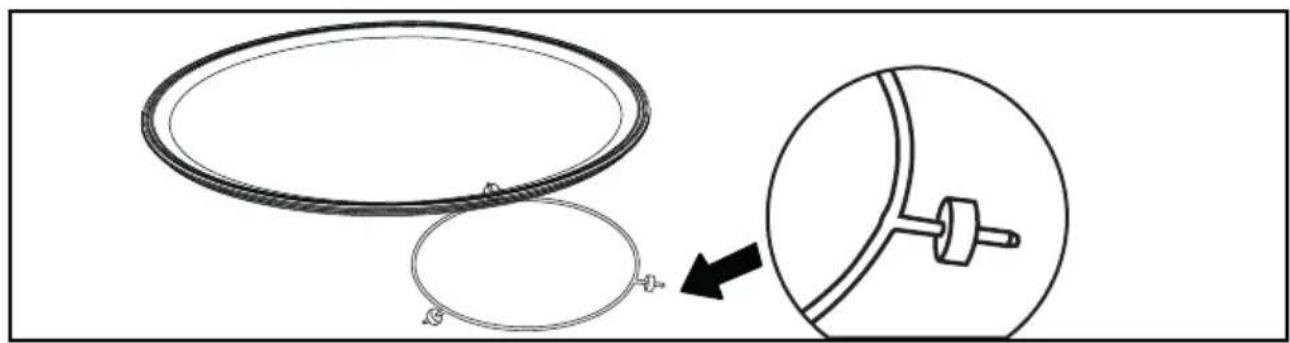
Diagram showing two circular components with a connector, one being cut and the other inserted into a mechanical component (no text or symbols)TURNTABLE
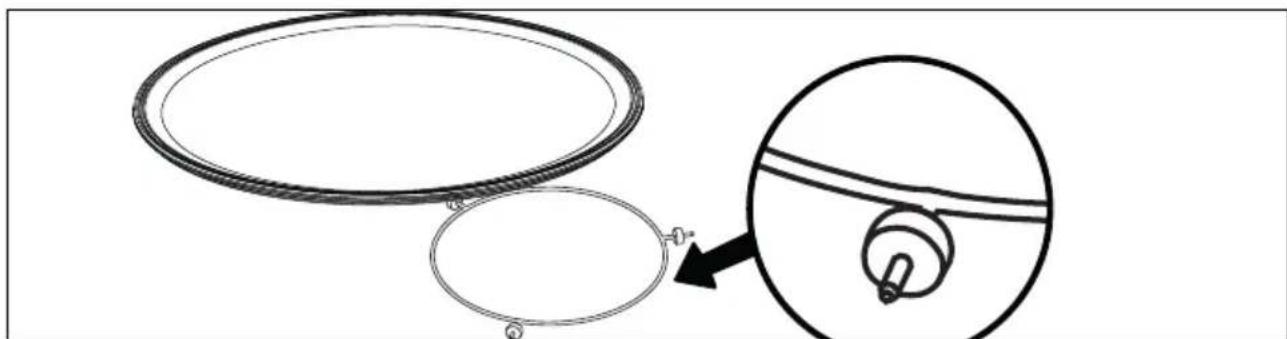
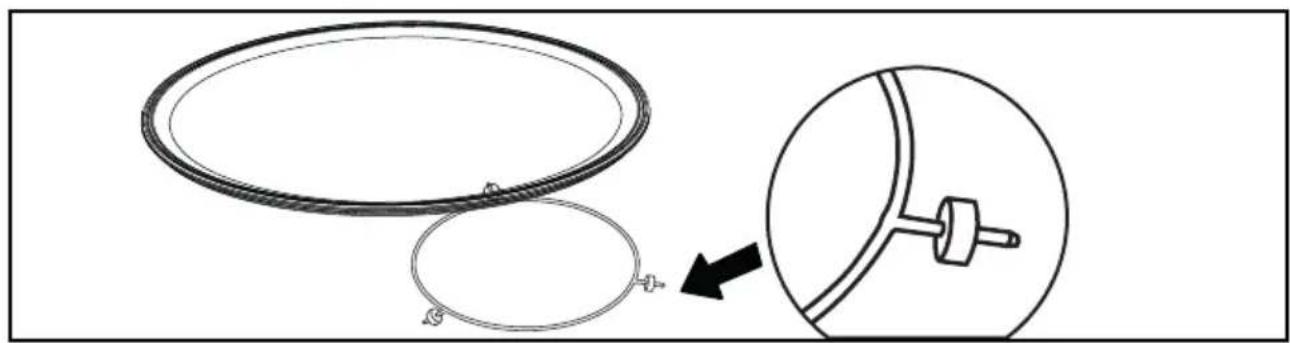
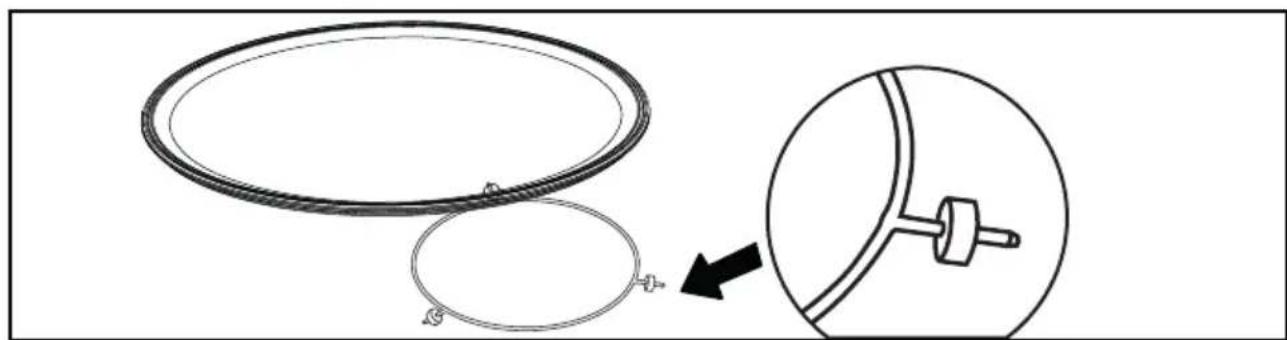
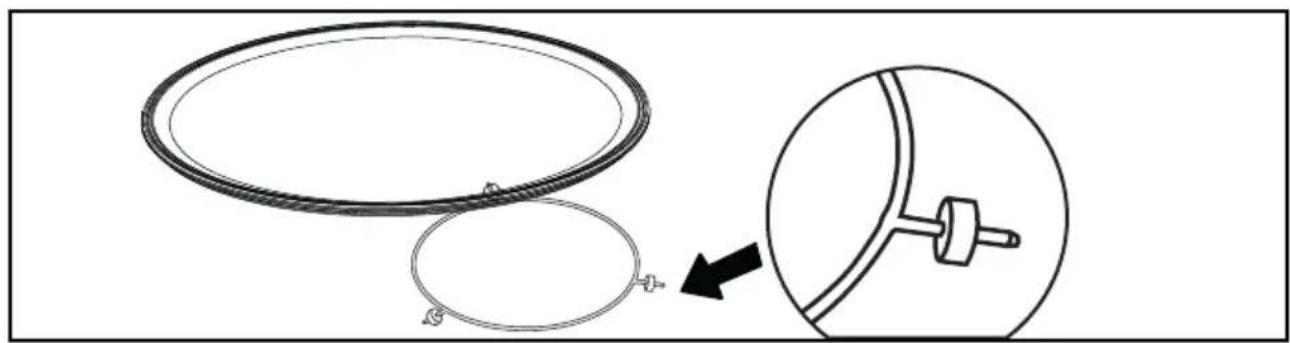
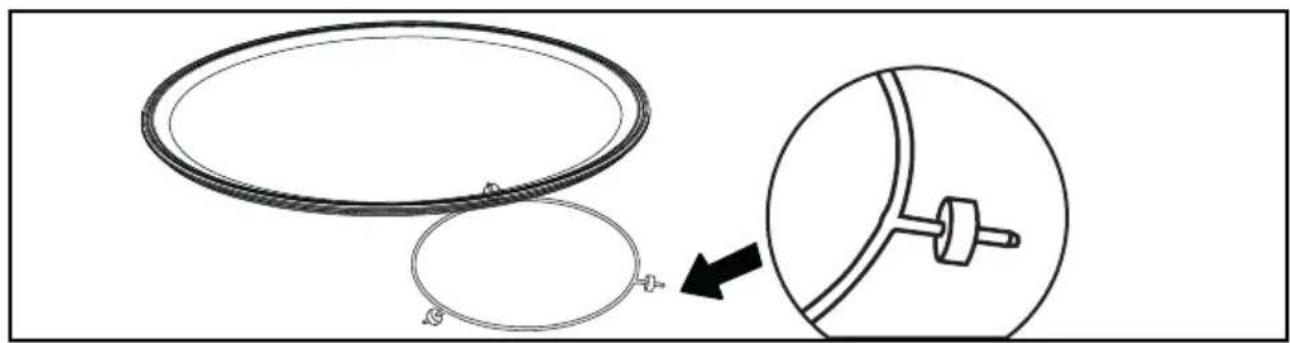
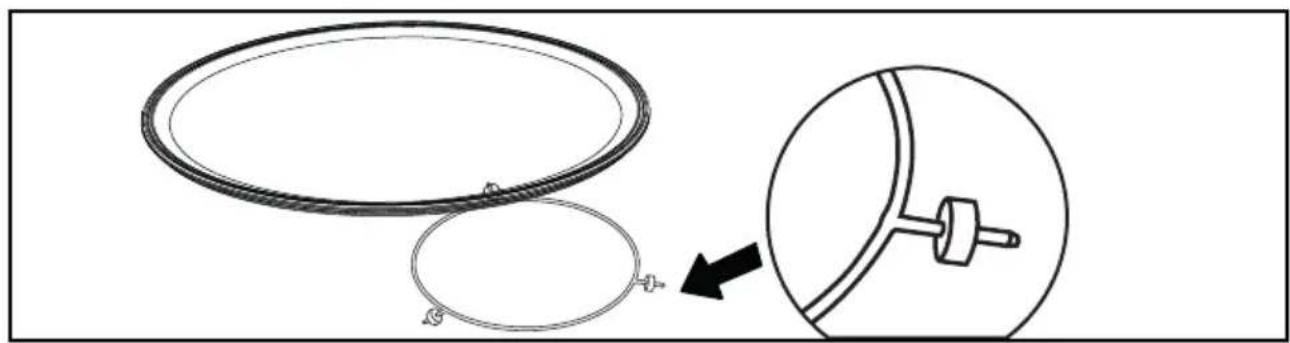
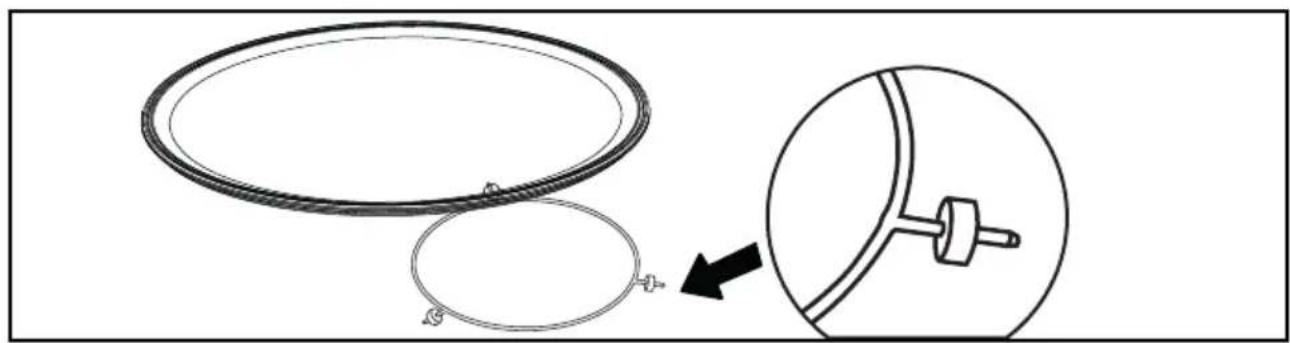
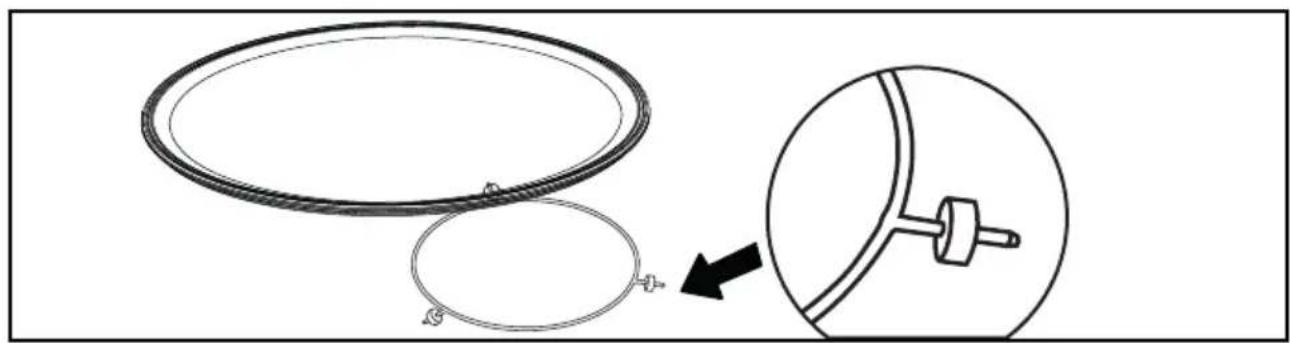
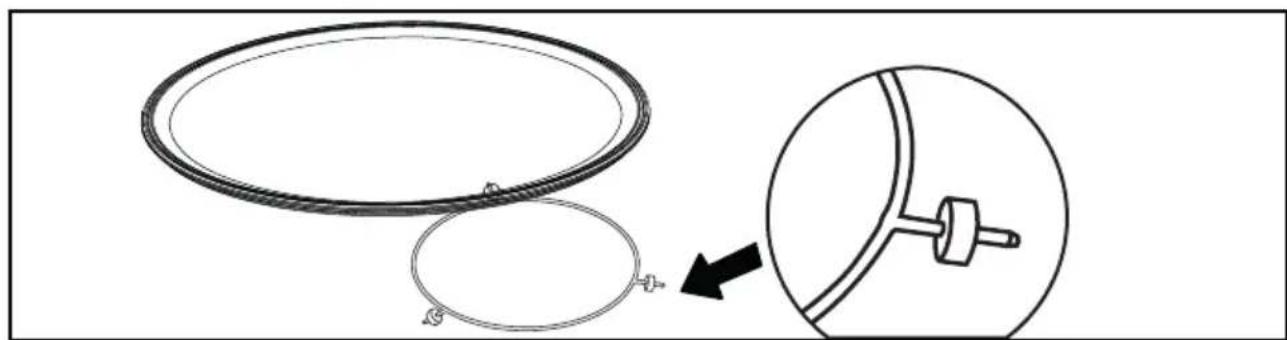
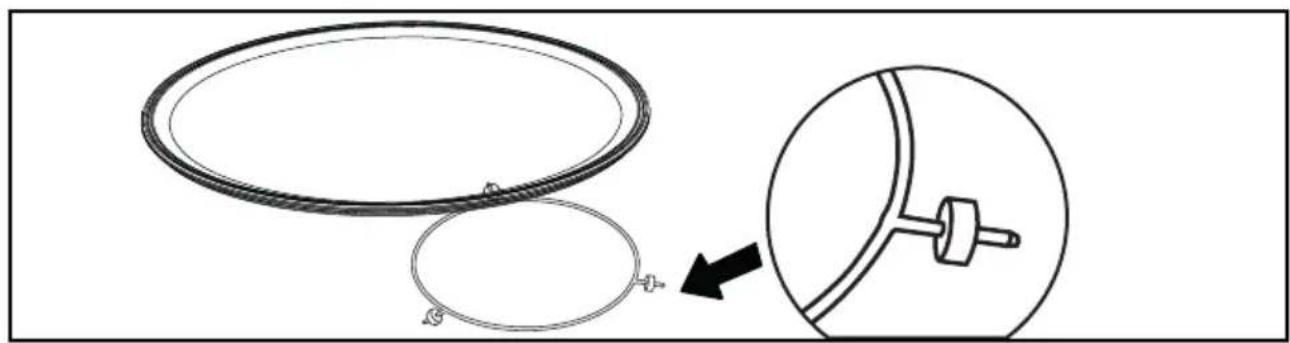
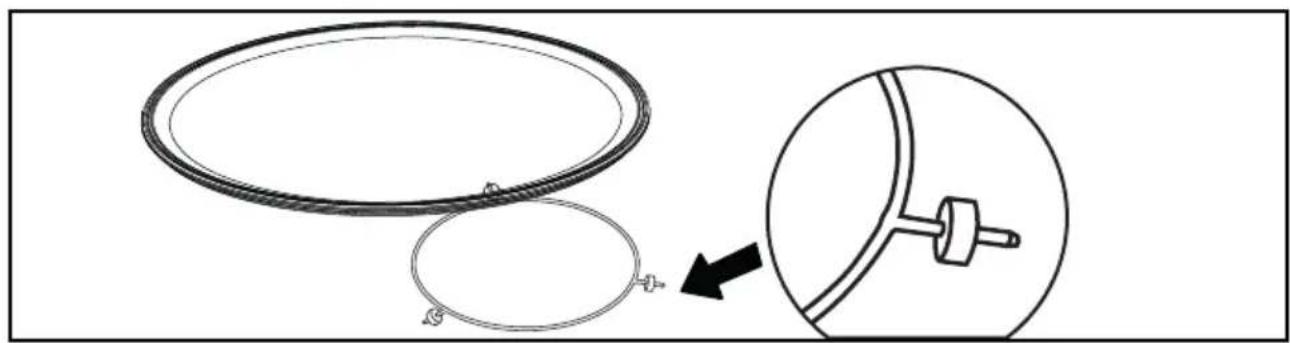
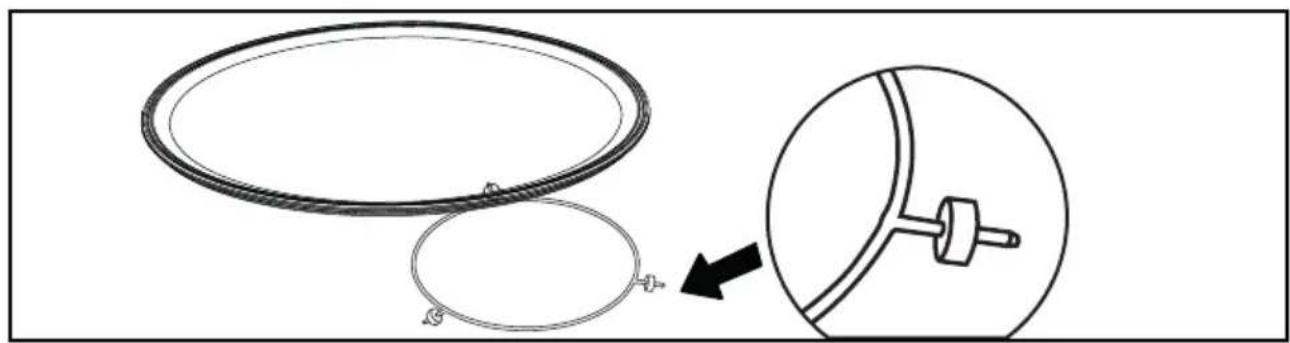
The turntable allows even cooking of the food without having to handle it.
It rotates in both directions. If it does not rotate, verify that all components are properly positioned.
It can be used as a cooking dish. To remove it, grab it by using the access areas in the cavity.
The turntable allows the glass plate to turn. If you remove the turntable, avoid getting water in the motor shaft hole.
Do not forget to put the turntable, the roller frame and the glass turntable plate back in.
OPERATING PRINCIPLE
Microwaves used for cooking are electromagnetic waves. They are commonly found in our environment in the form of radio waves, light, or infrared radiation.
Their frequency is in the
2450 Mhz range.
This is how they work:
• They are reflected by metals.
• They pass through any other material.
• They are absorbed by water, fat and sugar molecules.
Do not attempt to manually turn the glass plate as this may damage the drive system. If it does not turn properly, check that there is nothing underneath the plate stopping it from turning.
If the plate is set to the stop position, large dishes can be placed on the entire surface of the oven.
In this case you will need to manually turn the container or mix its contents mid-program.
When food is exposed to microwaves, its molecules begin moving rapidly, causing it to heat up.
The depth of penetration of the waves into the food is about 2.5 cm. If the food is thicker, cooking at its centre occurs by conduction just like traditional cooking.
In essence, microwaves simply cause a thermal change inside the food and are therefore not harmful to health.
USING THE OVEN FOR THE FIRST TIME
- Select the language
The first time you use your oven or after a power cut, turn the knob to select your language and press to confirm your choice.
- Set the time
Adjust the hours and minutes successively by turning the knob, then press to confirm.
Your oven displays the time.
SETTINGS MENU (DEPENDING ON MODEL)
In the general menu, select the "SETTINGS" function by turning the control knob and confirm. Different settings are proposed.
Select the setting you want by turning the control knob then confi rm.
Then set your parameters and confirm them.
- Time
Modify the hour, validate, then modify the minutes and validate again. If you oven is connected, the time updates automatically.
- Sleep mode
You can also put your display on standby:
ON position: the display switches off after a certain amount of time.
OFF position: the brightness diminishes after a certain amount of time.
- Sound
Your oven emits sounds when you use the keys. To keep these sounds, select ON, otherwise select OFF to deactivate them and confi rm.-
- Brightness
Select the desired brightness level.
- Language
Choose your language and confi rm.
- DEMO mode
By default, the oven is configured in normal heating mode.
If it is activated in DEMO mode (ON position), the mode for presenting products in stores, your oven will not warm up.
- Diagnostic
Access the Diagnostic menu if a problem occurs.
If you contact the After-Sales Service, you will be asked to provide the codes displayed in the diagnostic.
The ‘Reset’ option allows you to restore your oven to its initial settings.
COOKING
This oven enables you to access 3 types of cooking mode, the settings of which can be adjusted:
- The microwave function.
- The combined microwave functions (microwave + traditional cooking).
- The traditional cooking functions.
MICROWAVE FUNCTIONS

Caution
Do not use the enamel tray.
| Position | Power | Use |
 | Microwave 1000 W | When quickly heating drinks, water and dishes containing a large amount of liquid.When cooking food containing lots of water (soups, sauces, tomatoes, etc.). |
 | Microwave 800-900 W When cooking fresh or frozen vegetables | |
 | Microwave 500 W | When cooking fish and shellfish. 2 level reheating.When cooking dried vegetables over low heat.Reheating or cooking delicate egg-based foods. |
 | Microwave 400/300 W | When cooking dairy products or jams at low heat. |
 | Microwave 200 W Manual defrost. To soften butter or ice cream. | |
 | Microwave 100 W When defrosting pastries containing cream. | |

Note: With the combined microwave function, you can use the enamel drip tray with the grill.
COMBINED MICROWAVE FUNCTIONS
| Position | Recommended T°C and power mini - maxi | Use | |
 | Express cooking | 200°C50-200°C300 W100-300 W | This combined function combines microwave and convection cooking, saving you considerable time.Recommended for meat, chicken and roasts cooked in a dish. |
 | Microwave 200 W Defrost fragile foods. | ||
 | Grill + microwave | 31 - 4500 W100-700 W | This function lets you use the grill and the micro-wave simultaneously, which makes cooking very quick.This function lets you cook and brown foods such as gratin dishes and meats. It can be used before or after cooking, depending on the recipe. |
• 5 MANUAL COOKING MODE
This mode lets you set the cooking parameters yourself: temperature, cooking type, cooking time.
TRADITIONAL COKING FUNCTIONS
| Position | T°C and power mini - maxi | Use | |
 | Fan oven* | 200°C50-200°C | Recommended for keeping white meat, fi sh and vegetables moist |
 | Ventilated grill | 200°C50-200°C | Roasts and poultry are juicy and crisp all over.To retain the moist texture of fi sh steaks. |
 | Variable grill | 21 - 4 | Recommended for grilling cutlets, sausages, toasting bread and prawns placed on the grill. |
 | Reheating 500 W Reheating or cooking delicate foods | ||
*Cooking mode as per standard EN 60350-1: 2016 to demonstrate compliance with requirements of the energy label of European regulation UE/65/2014.
STARTING A COOKING PROGRAMME
STARTING IMMEDIATE COOKING
Once you have selected and validated your cooking function, for example :
Ventilated grill :
- Press the knob again to start cooking. The temperature will rise immediately.
The oven will recommend one or two cooking levels depending on the selected cooking sequence:
- Place your dish in the oven at the recommended level.
NB: Some parameters can be modified according to the cooking sequence selected, before the start of cooking (temperature, cooking time and timer) see the following chapters.
CHANGING THE TEMPERATURE AND POWER
Depending on the type of cooking you have selected or the power level, the oven will recommend the ideal cooking temperature.
This can be changed as follows:
- Select temperature / power then confi rm.
- Turn the knob to change the temperature / power then confirm.
COOKING TIME
You can enter the cooking time for your dish by selecting time then enter the cooking time by turning the knob and confirm.
END OF COOKING TIME SETTING (delayed end)
When you set the cooking time, the end of cooking time is automatically incremented. You can change this end of cooking time if you want it to be delayed.
-Select Delayed end of cooking and confi rm. Once you have set the delayed end of cooking time, confi rm. A message will appear telling you the delayed end time.
NB: You can start cooking without selecting a duration or end time.
In this case, when you have estimated the cooking time for your dish, stop cooking (see section ‘Stopping cooking in progress’).
STOPPING COOKING IN PROGRESS
To stop cooking in progress, press the knob. Select 'STOP'.
Confirm by selecting 'YES' and confirm or select 'NO' and confirm to continue cooking or press and hold the Stop button.
PRESENTATION OF THE AUTOMATIC MODE
This mode selects for you the suitable cooking parameters based on the food to be prepared. For some types of food, some additional parameters must be entered (weight, size, etc.).
In the general menu, select the "AUTO COOKING or AUTO DEFROST" function by turning the control knob and confirm. Different dish categories are available to you (see table):
PRESENTATION OF DISH CATEGORIES
In the general menu, select the "AUTO COOKING" function by turning the control knob and confirm.
Different dish categories are available to you:
Select the setting you want by turning the control knob then confirm.
| FOOD |
| FRESH FIBROUS VEGETABLES |
| FRESH VEGETABLES |
| FROZEN VEGETABLES |
| EXPRESS POULTRY (COMBINED FUNCTION) |
| EXPRESS BEEF (COMBINED FUNCTION) |
| FISH |
| FRESH PIZZA (COMBINED FUNCTION) |
| EXPRESS FROZEN PIZZA (COMBINED FUNCTION) |
| FROZEN PIZZA (TRADITIONAL COOKING) |
| EXPRESS FRESH DISH |
| EXPRESS FRESH DISH (MICROWAVE) |
| EXPRESS FROZEN DISH |
| SAVOURY TART |
| QUICHE |
| POTATO GRATIN |
PRESENTATION OF DISH CATEGORIES
In the general menu, select the “AUTO DEFROST” function by turning the control knob and confirm. Different dish categories are available to you:
Select the setting you want by turning the control knob then confirm.
| FOOD |
| BREAD |
| PREPARED DISH |
| MEAT |
| POULTRY |
| FISH |
NB: No delayed start can be programmed for defrosting and AUTO cooking functions.
NB: To stop the oven at any time, press and hold the ⓚkey or the selector and follow the instructions.
IMMEDIATE COOKING
- Select the “AUTO COOKING or AUTO DEFROST” mode when you are in the general menu then confi rm.
The oven suggests several categories of dishes (Meat, Fish, Dishes, Bread & Doughs, Desserts):
Depending on the dish selected or the oven status (already preheated), the AI mode suggests a default weight which you will need to adjust if necessary before confirming. The oven automatically calculates the cooking time and temperature parameters. The shelf height displays, insert your dish and confi rm.
- The oven beeps and turns off when the cooking time is finished; your screen then indicates that the dish is ready.
FAVOURITES
AVAILABLE FOR THE MANUAL AND AUTO MODES
The “Favourites” function lets you save 3 manual cooking modes and 3 auto cooking modes that you make frequently.
During a manual or auto cooking programme, press the control knob and turn it to “Add to favourites”. To save it, press to confirm.
Your cooking is then memorised as "FAVORI MANUAL 1".
Confir rm again to start cooking.
NB: If the 3 favourites have already been used, any new memory entry will replace one of the three existing favourites.
TIMER FUNCTION
This function can only be used either when the oven is off or during cooking.
- Press the 🔔 key.
Set the minute minder by turning the knob and then press to confirm. The timer starts.
Once the time has lapsed, there is a sound signal. To stop it, press any key.
Note: You can modify or cancel the timer at any time.
Press the ⚙ key again and set your time or set it to 0m00s to cancel. Pressing the control knob during the countdown will also stop the timer.
COOKING END OPTIONS (ACCORDING TO THE TYPE OF COOKING)
Once cooked in both the manual and Auto mode, the oven offers three options to adjust to the expected result: CRISP, KEEP WARM and ADD 5MIN.
CRISP
You can brown a dish once cooked with the "Crisp" function.
Select a cooking function, add the temperature and set a cooking time
cooking again. Then select the “Crisp” function and confirm by pressing the control knob.
Cooking starts. A symbol displays at the bottom right of the screen and the grill will automatically switch on during the 5 last minutes of your cooking time.

Note:
The ‘CRISP’ option may be configured at the start of cooking, during cooking or at the end of the set cooking time.
ADD 5 MIN (only in manual mode)
You can select the “ADD 5 MIN” option at the end of your cooking with a set time. By activating “ADD 5 MIN”; the oven will use the same cooking mode and temperature settings for 5 more minutes. You may press this again if necessary.
KEEP WARM
Once cooked, you can select the “KEEP WARM” option, which enables you to leave your dish in the oven without overcooking it. The oven temperature will adjust to an eating temperature until you are ready.
CLEANING THE INNER AND OUTER SURFACES
We recommend you clean the oven regularly and remove any deposits of food inside and outside of the appliance. Use a soft cloth soaked in glass cleaner or liquid black soap diluted in water. Do not use scouring cream or a scrubbing sponge. If the appliance is not cleaned regularly, its surface could become damaged, permanently affecting the appliance's lifespan and possibly causing a safety hazard.
The use of abrasive products, alcohol or thinners is not recommended as they are likely to damage the appliance.
If the oven smells bad or is dirty, boil a cup of water with lemon juice for 2 minutes and clean the walls with a small amount of washing up liquid.
The turntable can be removed for easy cleaning. To remove it, pick it up using the hand-holds provided for the purpose. If you
remove the drive hub, avoid getting water in the motor shaft hole. Remember to put back the support, the support wheels and the turntable.
If the door or door seal are damaged, the oven should not be used until it has been repaired by a qualified person.

Warning
Do not use scouring products, abrasive sponges or metal scrapers to clean the glass oven door as this could scratch the surface and cause the glass to shatter.
REPLACING THE LIGHT BULB
Contact the After Sales Service for any work on the light bulb, or a qualified professional accredited to work on the brand.
• 9 ANOMALIES AND SOLUTIONS
| Questions Troubleshooting and Solutions | |
| - “AS” is displayed (Auto Stop system). | This function stops the oven heating if you forget. Turn your oven OFF. |
| - Default code starting with "F". Your oven has | detected a problem.Stop the oven for 30 minutes.If the fault is still there, cut off the power supply for at least one minute. If the fault persists, contact the After Sales Service. |
| - The oven is not heating. Check that the oven is | correctly connected and that your installation's fuse is not out of service. Check that the oven is not set to "DEMO" mode (see settings menu). |
| - The oven light is not working. Replace the bulb or fuse. Make sure the oven is properly plugged in. See chapter on replacing the light bulb | |
| - The cooling fan continues to operate after the oven stops. | This is normal, the fan may run for up to one hour after cooking to cool down the oven. If it continues beyond this, contact the After Sales Service. |
• 10 AFTER-SALES SERVICE
SERVICING AND REPAIRS, FRANCE
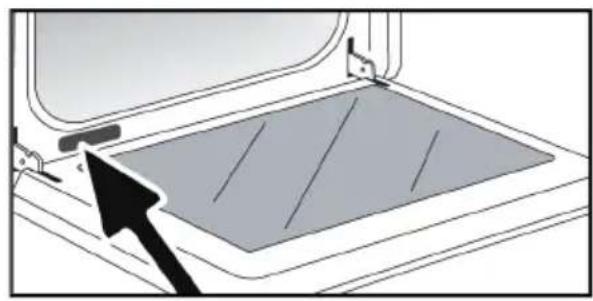
Any repairs that are made to your appliance must be handled by a qualified professional authorised to work on the brand. When calling, please provide the full references of your appliance (commercial reference, service reference, serial number), so that we can handle your call more efficiently. This information can be found on the data plate.
natural_image
Diagram of a door frame with a gray panel and an arrow pointing to the lid area (no text or symbols)| A | B | G | |
| SERVICE: | C | TYPE: | D |
| E | F | I CEMade in France | |
| Nr | H |
B: Commercial reference
C: Service reference
H: Serial number
NOTE:
- With a view to constantly improving our products, we reserve the right to make changes to their technical, functional or aesthetic characteristics in line with technological progress.

VÁŽENÁ ZÁKAZNICE, VÁŽENÝ ZÁKAZNÍKU
natural_image
Line drawing of a rectangular metal grate with side handles and central slots (no text or symbols)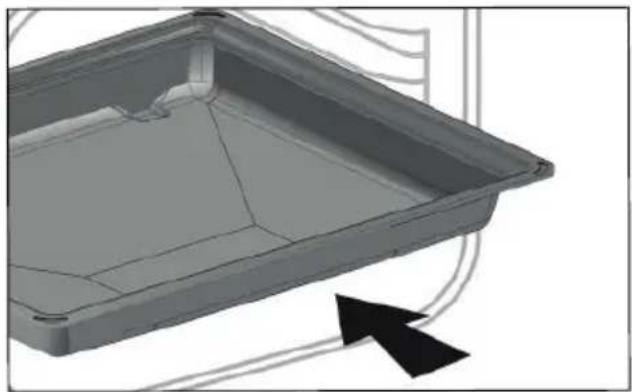
natural_image
3D model of a rectangular tray with internal compartments and a black arrow indicating direction (no text or symbols)natural_image
Technical line drawing of a structural beam with support details and an inset detail (no text or symbols)- Vodicí lišty
natural_image
Line drawing of a ladder mounted on a wall, with no visible text or symbols• 3 POPIS VAŠEHO PŘÍSTROJE
PŘÍSLUŠENSTVÍ (PODLE MODELU)
natural_image
Diagram showing two circular components with a connector, one being cut and the other inserted into a mechanical component (no text or symbols)OTOČNÝ TALÍŘ
natural_image
Diagram of a device with a grid pattern inside a container, showing an arrow pointing to the component (no text or symbols present)| A | B | G | |
| SERVICE: | C | TYPE: | D |
| E | F | I CEMade in France | |
| Nr | H |
1 INSTALLATION....7-8

Tast Stop (langt tryk)
Returtast

TILBEH∅R (IF∅LGE MODELLEN)
natural_image
Line drawing of a rectangular metal tray with ribbed sides and handles (no text or symbols)- Emaljeret universalplade, bradepande 45 mm
natural_image
3D model of a rectangular tray with internal compartments and a black arrow indicating direction (no text or symbols)- Rist + emaljeret bradepande
Sæt risten på bradepanden for at stege og opsamle stegesaft eller fedt.
natural_image
Technical line drawing of a structural beam with support details and an inset detail (no text or symbols)- Ribberne
natural_image
Line drawing of a ladder mounted on a wall, with no visible text or symbolsTILBEH∅R (IF∅LGE MODELLEN)
natural_image
Diagram showing two circular components with a connector, one being cut and the other inserted into a component (no text or symbols present)DREJENDE PLADE
GENNEMF∅RE EN TILBEREDNING
natural_image
Diagram of a device with a gray panel and an arrow pointing to it, no text or symbols present| A | B | G | |
| SERVICE: | C | TYPE: | D |
| E | F | I CEMade in France | |
| Nr | H |
B: Forhandlingsreference
C: Servicereference
H: Serienummer
BEMÆRKNING:

ZUBEHÖR (JE NACH MODELL)
natural_image
Line drawing of a rectangular metal grate or rack structure (no text or symbols)natural_image
3D model of a rectangular tray or container with internal compartments and a black arrow indicating direction (no text or symbols)natural_image
Technical line drawing of a structural beam with support details and an inset detail (no text or symbols)- Einschubleisten
natural_image
Line drawing of a ladder mounted on a wall, with no visible text or symbolsZUBEHÖR (JE NACH MODELL)

natural_image
Diagram showing two circular components with a connector, one being cut and the other inserted into a mechanical component (no text or symbols)DREHTELLER
natural_image
Diagram of a device with a gray panel and an arrow pointing to it, no text or symbols present| A | B | G | |
| SERVICE: | C | TYPE: | D |
| E | F | I CEMade in France | |
| Nr | H |
B: Handelsreferenznummer
C: Service-Referenznummer
H: Seriennummer
HINWEIS:
natural_image
Line drawing of a rectangular metal grate with side handles and slats (no text or symbols)natural_image
3D model of a rectangular tray with internal compartments and a black arrow indicating direction (no text or symbols)natural_image
Technical line drawing of a structural beam with support details and an inset detail (no text or symbols)- Ράγες στήριξης
natural_image
Line drawing of a ladder attached to a wall, with no visible text or symbolsnatural_image
Diagram showing two circular components with a connector, one being cut and the other inserted into a mechanical component (no text or symbols)natural_image
Diagram of a device with a gray panel and an arrow pointing to it, no text or symbols present| A | B | G | |
| SERVICE: | C | TYPE: | D |
| E | F | I CEMade in France | |
| Nr | H |
natural_image
Line drawing of a rectangular metal grate or rack structure (no text or symbols)- Bandeja esmaltada multiusos, grasera 45 mm
natural_image
3D model of a rectangular tray with internal compartments and a black arrow indicating direction (no text or symbols)natural_image
Technical line drawing of a structural beam with support details and an inset detail (no text or symbols)- Los niveles
natural_image
Line drawing of a ladder attached to a wall, with no visible text or symbolsLOS ACCESORIOS (SEGÚN EL MODELO)
natural_image
Diagram showing two circular components with a connector, one being cut and the other inserted into a component (no text or symbols present)EL PLATO GIRATORIO
natural_image
Diagram of a door frame with a gray panel and an arrow pointing to the lid area (no text or symbols)| A | B | G | |
| SERVICE: | C | TYPE: | D |
| E | F | I CEMade in France | |
| Nr | H |
5 MANUAALINEN KYPSENNYSTILA.... 15-19
7 MUUT TOIMINNOT ....21
natural_image
Line drawing of a rectangular metal grate with side handles and slats (no text or symbols)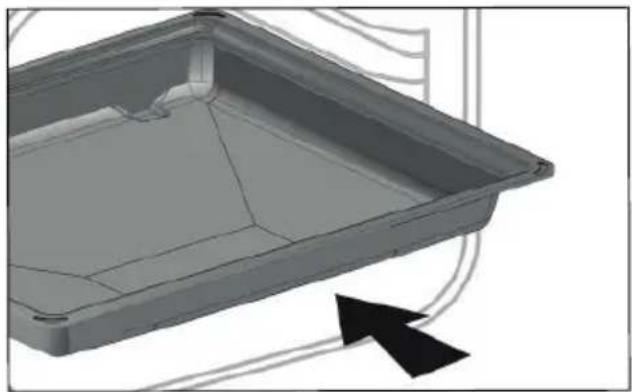
natural_image
3D model of a rectangular tray with internal compartments and a black arrow indicating direction (no text or symbols)natural_image
Technical line drawing of a structural beam with support details and an inset detail (no text or symbols)- Peltitasot
natural_image
Line drawing of a ladder mounted on a wall, with no visible text or symbolsLISÄVARUSTEET (MALLIKOHTAISET)
natural_image
Diagram showing two circular components with a connector, one being cut and the other inserted into a component (no text or symbols present)PYÖRIVÄ ALUSTA
• 5 MANUAALINEN KYPSENNYSTILA

• 5 MANUAALINEN KYPSENNYSTILA
SAATAVILLA MANUAALISESSA JA AUTOMAATTISESSA TILASSA
natural_image
Diagram of a device with a gray panel and an arrow pointing to it, no text or symbols present| A | B | G | |
| SERVICE: | C | TYPE: | D |
| E | F | I CEMade in France | |
| Nr | H |
B: Tuotenumero
C: Huoltotiedot
H: Sarjanumero
HUOMAUTUS:
natural_image
Line drawing of a rectangular metal grate with side handles and slats (no text or symbols)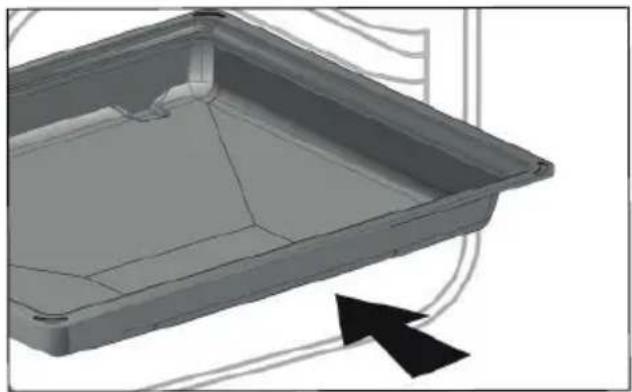
natural_image
3D model of a rectangular tray with internal compartments and a black arrow indicating direction (no text or symbols)natural_image
Technical line drawing of a structural beam with support details and an inset detail (no text or symbols)- A szintemelők
natural_image
Line drawing of a ladder mounted on a wall, with no visible text or symbolsTARTOZÉKOK (MODELLTÓL FÜGGÖEN)
natural_image
Diagram showing two circular components with a connector, one being cut and the other inserted into a component (no text or symbols present)A FORGÓTÁNYÉR
natural_image
Diagram of a device with a gray panel and an arrow pointing to it, no text or symbols present| A | B | G | |
| SERVICE: | C | TYPE: | D |
| E | F | I CEMade in France | |
| Nr | H |
B: Kereskedelmi referencia
natural_image
Line drawing of a rectangular metal grate or rack structure (no text or symbols)- Teglia smaltata multiuso, leccarda 45 mm.
natural_image
3D model of a rectangular tray with internal compartments and a black arrow indicating direction (no text or symbols)- La griglia + teglia smaltata
natural_image
Technical line drawing of a structural beam with support details and an inset detail (no text or symbols)- I ripiani
natural_image
Line drawing of a ladder attached to a wall, with no text or symbols present• 3 PRESENTAZIONE DELL'APPARECCHIO
GLI ACCESSORI (A SECONDA DEL MODELLO)
natural_image
Diagram showing two circular components with a connector, one being cut and the other inserted into a component (no text or symbols present)IL PIATTO GIREVOLE
natural_image
Diagram of a device with a gray panel and an arrow pointing to it, no text or symbols present| A | B | G | |
| SERVICE: | C | TYPE: | D |
| E | F | I CEMade in France | |
| Nr | H |
7 ANDERE FUNCTIE ....21
Favorieten....21
Timerfunctie 21
8 ONDERHOUD....22
9 STORINGEN EN OPLOSSINGEN 23
10 SERVICEDIENSI 24
BELANGRIJKE VEILIGHEIDSINSTRUCTIES. LEES ZE AANDACHTIG EN BEWAAR ZE VOOR TOEKOMSTIG GEBRUIK.
natural_image
Line drawing of a rectangular metal tray with ribbed sides and handles (no text or symbols)natural_image
3D model of a rectangular tray with internal structure and an arrow indicating direction (no text or symbols)natural_image
Technical line drawing of a structural beam with support details and an inset detail (no text or symbols)- De niveauhouders
natural_image
Line drawing of a ladder mounted on a wall, with no visible text or symbols• 3 VOORSTELLING VAN UW APPARAAT
DE ACCESSOIRES (AFHANKELIJK VAN HET MODEL)
natural_image
Diagram showing two circular components with a connector, one being cut and the other inserted into a mechanical component (no text or symbols)HET DRAAIPLATEAU
natural_image
Diagram of a device with a gray panel and an arrow pointing to it, no text or symbols present| A | B | G | |
| SERVICE: | C | TYPE: | D |
| E | F | I CEMade in France | |
| Nr | H |
natural_image
Line drawing of a rectangular metal tray with ribbed sides and handles (no text or symbols)- Flerbrukspanne, langpanne 45 mm
natural_image
3D model of a rectangular tray with internal compartments and a black arrow indicating direction (no text or symbols)- Rist + fl erbrukspanne
natural_image
Technical line drawing of a structural beam with support details and an inset detail (no text or symbols)- Riller
natural_image
Line drawing of a ladder mounted on a wall, with no visible text or symbolsTILBEH∅R (AVHENGIG AV MODELL)
natural_image
Diagram showing two circular components with a connector, one being cut and the other inserted into a component (no text or symbols)ROTERENDE TALLERKEN
Den roterende tallerkenen varmer opp matvarene like mye overalt.
INNSTILLING AV SLUTTID FOR TILBEREDNING (forsinket slutt)
Når du stiller inn tilberedningstiden, økes sluttiden for tilberedning automatisk. Du kan endre denne sluttiden hvis du vil at den skal utsettes.
-Velg Forsinket slutt på tilberedning og bekreft.
Når du har stilt inn den forsinkede slutten av tilberedningstiden, bekrefter du. Det vises en melding som forteller deg den forsinkede sluttiden.
FINNES I MODUSENE MANUELL OG AUTO
natural_image
Diagram of a device with a gray panel and an arrow pointing to it, no text or symbols present| A | B | G | |
| SERVICE: | C | TYPE: | D |
| E | F | I CEMade in France | |
| Nr | H |
B: Salgsreferanse
C: Servicereferanse
H: Serienummer
NB:
WYBÓR MIEJSCA INSTALACJI I WBUDOWANIA
natural_image
Line drawing of a rectangular metal tray with internal compartments and handles (no text or symbols)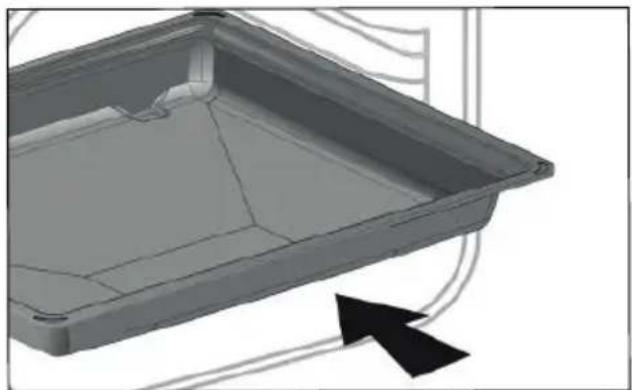
natural_image
3D CAD model of a rectangular tray or container with internal structure and an arrow indicating direction (no text or symbols)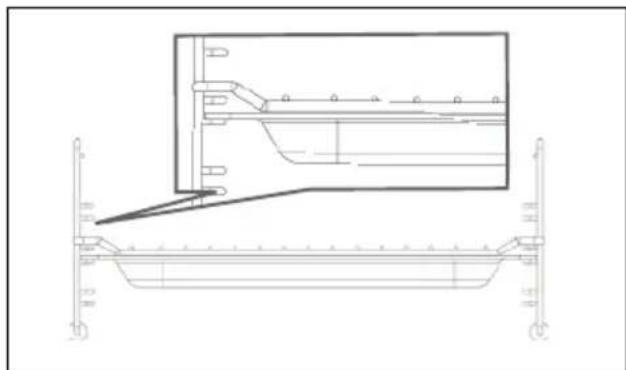
natural_image
Technical line drawing of a structural beam with support details and an inset detail (no text or symbols)- Stopnie
natural_image
Line drawing of a ladder-like structure with wheels and a circular opening, no text or symbols presentAKCESORIA (W ZALEŻNOŚCI OD MODELU)
natural_image
Diagram showing two circular components with a connector, one being cut and the other inserted into a component (no text or symbols present)PŁYTA OBROTOWA
natural_image
Diagram of a device interior with a tray and mounting bracket, showing no text or symbols| A | B | G | |
| SERVICE: | C | TYPE: | D |
| E | F | I CEMade in France | |
| Nr | H |
B: nazwa handlowa
C: numer serwisowy
H: Numer seryjny
UWAGA:
natural_image
Line drawing of a rectangular metal tray with ribbed sides and handles (no text or symbols)- Pratos vidrado multiusos, pingadeira de 45 mm
natural_image
3D model of a rectangular tray with internal compartments and a black arrow indicating direction (no text or symbols)natural_image
Technical line drawing of a structural beam with support details and an inset detail (no text or symbols)- Níveis
natural_image
Line drawing of a ladder mounted on a wall, with no visible text or symbolsACESSÓRIOS (CONFORME O MODELO)
natural_image
Diagram showing two circular components with a connector, one being cut and the other inserted into a mechanical component (no text or symbols)PRATO GIRATÓRIO
INÍCIO DA COZEDURA IMEDIATA
natural_image
Diagram of a device with a gray panel and an arrow pointing to it, no text or symbols present| A | B | G | |
| SERVICE: | C | TYPE: | D |
| E | F | I CEMade in France | |
| Nr | H |
flowchart
graph TD
    A[" "] --> B["RU"]
    B --> C[" "]
    C --> D["O"]
natural_image
Line drawing of a rectangular metal grate or rack structure (no text or symbols)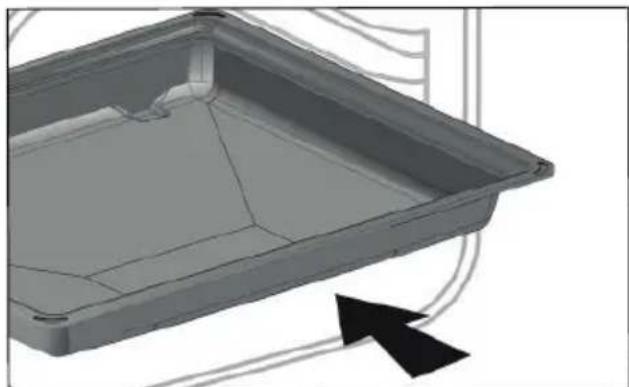
natural_image
3D model of a rectangular tray with internal compartments and a black arrow indicating direction (no text or symbols)natural_image
Technical line drawing of a structural beam with support details and an inset detail (no text or symbols)- Направляющие
natural_image
Line drawing of a ladder with wheels, no text or symbols presentnatural_image
Diagram showing two circular components with a connector, one being cut and the other inserted into a component (no text or symbols)ВРАЩАЮЩЕЕСЯ БЛЮДО
natural_image
Diagram of a device interior with a gray panel and an arrow pointing to it, no text or symbols present.| A | B | G | |
| SERVICE: | C | TYPE: | D |
| E | F | I CEMade in France | |
| Nr | H |
natural_image
Line drawing of a rectangular metal grate or rack structure (no text or symbols)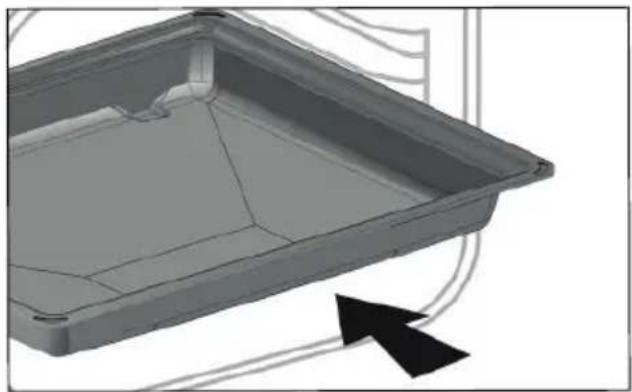
natural_image
3D model of a rectangular tray with internal compartments and a black arrow indicating direction (no text or symbols)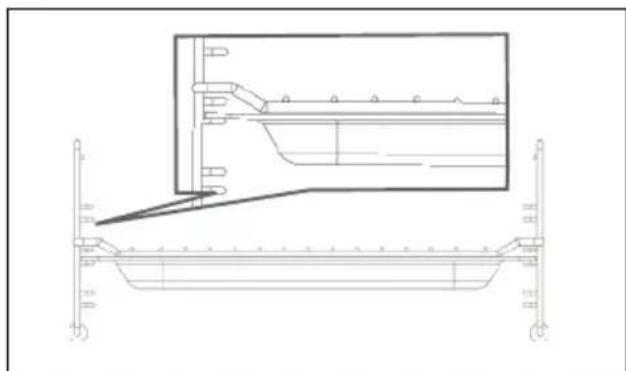
natural_image
Technical line drawing of a structural beam with support beams and a magnified inset showing internal components (no text or symbols)- Stupienky
natural_image
Line drawing of a ladder attached to a wall, with no text or symbols present• 3 PREZENTÁCIA VÁŠHO ZARIADENIA
PRÍSLUŠENSTVO (V ZÁVISLOSTI OD MODELU)
natural_image
Diagram showing two circular components with a connector, one being cut and the other inserted into a mechanical component (no text or symbols)TOČŇA
natural_image
Diagram of a device interior with a gray rectangular panel and an arrow pointing to it, no text or symbols present.| A | B | G | |
| SERVICE: | C | TYPE: | D |
| E | F | I CEMade in France | |
| Nr | H |
B: Obchodná referencia
C: Servisná referencia
H: Sériové číslo
POZNÁMKA:
INNEHÅLLSFÖRTECKNING
SÄKERHET OCH VIKTIGA FÖRSIKTIGHETSÅTGÄRDER 4-6
1 INSTALLATION 7-8
VAL AV PLACERING OCH INBYGGNAD
natural_image
Line drawing of a rectangular metal tray with ribbed sides and handles (no text or symbols)natural_image
3D model of a rectangular tray with internal compartments and a black arrow indicating direction (no text or symbols)natural_image
Technical line drawing of a structural beam with support details and an inset detail (no text or symbols)natural_image
Line drawing of a ladder mounted on a wall, with no visible text or symbolsnatural_image
Diagram showing two circular components with a connector, one being cut and the other inserted into a mechanical component (no text or symbols)DEN ROTERANDE TALLRIKEN
FINNS FÖR MANUELLT OCH AUTO-LÄGE
natural_image
Diagram of a door frame with a gray panel and an arrow pointing to the lid area (no text or symbols)| A | B | G | |
| SERVICE: | C | TYPE: | D |
| E | F | I CEMade in France | |
| Nr | H |
natural_image
Line drawing of a rectangular metal grate with side handles and slats (no text or symbols)natural_image
3D model of a rectangular tray with internal compartments and a black arrow indicating direction (no text or symbols)natural_image
Technical line drawing of a structural beam with support details and an inset detail (no text or symbols)- Яруси
natural_image
Line drawing of a ladder mounted on a wall, with no visible text or symbols• 3. опис пристрою
natural_image
Diagram showing two circular components with a connector, one being cut and the other inserted into a mechanical component (no text or symbols)ПОВОРОТНЕ БЛЮДО
natural_image
Diagram of a device interior with a tray and mounting bracket, showing no text or symbols| A | B | G | |
| SERVICE: | C | TYPE: | D |
| E | F | I CEMade in France | |
| Nr | H |
В: артикул
תְקָרִי אַלְאָה

תְרָה

natural_image
Line drawing of a rectangular metal tray with internal compartments (no text or symbols).תְקַרָה בְּרָה -
natural_image
3D model of a rectangular tray with internal compartments and a black arrow indicating direction (no text or symbols)natural_image
Technical line drawing of a structural support frame with an inset showing a bracket detail (no text or symbols)natural_image
Line drawing of a ladder-like structure with wheels, mounted on a curved surface (no text or symbols)תְקּרָה -
natural_image
Diagram showing two circular components with a connector, one being cut and the other inserted into a labeled component (no text or symbols present)תְבָרִיַעֹת אַלְא
.הכלההוּרָהוּרָהוּרָהוּרָהוּרָהוּרָהוּרָהוּרָהוּרָהוּרָהוּרָהוּרָהוּרָהוּרָהוּרָה
תְרָה בַרִשׁעֹל 5.
תַלְרָה
.הכלההוּרָהוּרָהוּרָהוּרָהוּרָהוּרָהוּרָהוּרָהוּרָהוּרָהוּרָהוּרָהוּרָהוּרָהוּרָה
natural_image
Diagram of a door opening with a gray tray and an arrow pointing to the lid area (no text or symbols)| A | B | G | |
| SERVICE: | C | TYPE: D | I CE |
| E | F | ||
| Nr | H | Made in France |
B: o'c'
תְרָבִי לַלְהָם C:
הכלה : H
:תַרְשָׁ