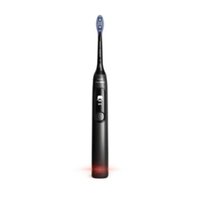
Sonicare 6800 Series HX3792 - Toothbrush PHILIPS - Free user manual and instructions
Find the device manual for free Sonicare 6800 Series HX3792 PHILIPS in PDF.

 FR
FR
 AZ
AZ
 BG
BG
 CS
CS
 DA
DA
 DE
DE
 EL
EL
 EN
EN
 ES
ES
 ET
ET
 FI
FI
 HE
HE
 HU
HU
 IT
IT
 KK
KK
 KY
KY
 LT
LT
 LV
LV
 MK
MK
 NL
NL
 NO
NO
 PL
PL
 PT
PT
 RO
RO
 RU
RU
 SK
SK
 SL
SL
 SQ
SQ
 SV
SV
 TG
TG
 TK
TK
 UK
UK
 UZ
UZ
User questions about Sonicare 6800 Series HX3792 PHILIPS
0 question about this device. Answer the ones you know or ask your own.
Ask a new question about this device
Download the instructions for your Toothbrush in PDF format for free! Find your manual Sonicare 6800 Series HX3792 - PHILIPS and take your electronic device back in hand. On this page are published all the documents necessary for the use of your device. Sonicare 6800 Series HX3792 by PHILIPS.
USER MANUAL Sonicare 6800 Series HX3792 PHILIPS
text_image
Diagram of an electric toothbrush with labeled parts including head, teeth, and base componentsEnglish 6
Azərbaycanca 25
Čeština 44
Dansk 63
Deutsch 82
Eesti 105
Español 124
Français 144
Hrvatski 165
Italiano 184
Latviešu 205
Lietuviškai 224
Magyar 243
Nederlands 263
Norsk 284
O'zbek 303
Polski 323
Português 344
Română 364
Shqip 383
Slovenščina 403
Slovensky 422
Srpski 441
Suomi 460
Svenska 479
Türkmençe 498
Ελληνικά 517
Български 539
Кыргызча 560
Македонски 581
Русский 601
Точикй 623
Українська 645
Қазақша 665
Ruijtntu 685
Jusmonyunn 707
729
Introduction
Congratulations on your purchase and welcome to Philips! To fully benefit from the support that Philips offers, register your product at www.philips.com/welcome.
Important safety information
Only use the product for its intended purpose. Read this information carefully before you use the product and its batteries and accessories, and save it for future reference. Misuse can lead to hazards or serious injuries. Accessories supplied may vary for different products.
Warnings
- Only use original Philips accessories or consumables. If supplied, only use the original USB cable and USB power supply unit.
- This appliance contains no user-serviceable parts. If the appliance is damaged, stop using it and contact the Consumer Care Center in your country (see 'Warranty and support').
- If the USB cable or USB power supply unit is damaged, stop using it.
- Keep the charger away from water.
- This appliance can be used by children and persons with reduced physical, sensory or mental capabilities or lack of experience and knowledge if they have been given supervision or instruction concerning use of the appliance in a safe way and understand the hazards involved. Cleaning and user maintenance shall not be made by children without supervision.
- Children should be supervised to ensure that they do not play with the product.
- Do not use adapters and chargers outdoors or near heated surfaces.
- Do not clean any part of the product in the dishwasher.
- After cleaning, make sure the charger is completely dry before you connect it.
- Rinse the handle, especially the brush head connection. Gently clean around the rubber seal.
- Replace the brush head every 3 months or sooner if signs of wear appear. Stop using a brush head with crushed or bent bristles.
- This appliance has only been designed for cleaning teeth, gums and tongue.
- Avoid direct contact with products that contain essential oils or coconut oil. Contact may result in bristles dislodging.
- The maximum altitude of use is 4500 meters.
- Information on REACH substances, contained in Philips products, can be found on www.philips.com/REACH
Medical warnings
- This appliance is a personal care device and is not intended to be shared by multiple users.
- Stop using the appliance and consult your dentist/doctor if excessive or prolonged bleeding occurs after use, or if you experience discomfort or pain during use.
- If you have a pacemaker or other implanted device, contact your doctor or the manufacturer of the implanted device prior to use.
Battery safety instructions
- This appliance contains batteries that are only removable by skilled persons.
- Keep product and batteries away from fire and do not expose them to direct sunlight or high temperatures.
- If the product becomes abnormally hot or smelly, changes color or if charging takes longer than usual, stop using and charging the product and contact Philips.
- Do not place products and their batteries in microwave ovens or on induction cookers.
- Do not open, modify, pierce, damage or dismantle the product or battery to prevent batteries from heating up or releasing toxic or hazardous substances. Do not short-circuit, overcharge or reverse charge batteries.
- This appliance contains batteries that are non-replaceable. When the battery is at end of life, the appliance shall be properly disposed of, see section on Recycling.
- Charge only with Philips WAA1001, WAA2001, safety approved IPX4 adapters with input ratings (100-240 V\~; 50/60 Hz; 3.5 W) and output ratings (5 V dc; 2.5 W). For the list of adapters, please see www.philips.com/support.
- Charge and use the product at a temperature between 0 °C and 40 °C (32°F and 104 °F).
- Power consumption:
- Off mode: Not applicable
- Standby mode: < 0.1 W (automatically reached within 1 minute)
Storage and transportation conditions
Temperature -10^ to +60^ ( 14^ to 140^ ).
Electromagnetic fields (EMF)
This Philips appliance complies with all applicable standards and regulations regarding exposure to electromagnetic fields.
Radio Equipment Directive
Hereby, Philips declares that electric toothbrushes with radio equipment type (Bluetooth, NFC) are in compliance with Directive 2014/53/EU.
- The Bluetooth radio frequency interface in applicable products operates at 2.4 GHz.
- The maximum output power by the Bluetooth appliance is 3 dBm.
- The NFC radio frequency interface in applicable products operates at 13.56 MHz.
- The maximum RF power transmitted by the appliance is 30.16 dBm.
The full text of the EU declaration of conformity is available at the following internet address:
www.philips.com/support
Note: The Features of different models may vary. Some models may not be equipped with Bluetooth or NFC.
LIST OF SYMBOLS USED

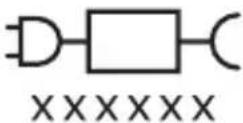
The following symbols may appear on the product: This symbol means read the instructions for use, before using the appliance.
This symbol means to use the indicated power supply.
Intended use
This Sonicare power toothbrush is intended to remove adherent plaque and food debris from the teeth to reduce tooth decay and improve and maintain oral health. This Sonicare power toothbrush is intended for consumer home use. Use by children should be with adult supervision.
Your Philips Sonicare (Fig 1.)
1 Brush head cap
2 Smart brush head
3 BrushSync symbol
4 Handle
5 Smart display
6 Power/mode button
7 Pressure sensor indicator
8 USB charger (wall adapter not included)
Note: Accessories included may vary based on the model purchased.
Getting started
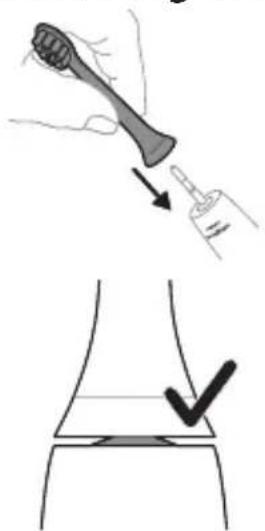
Attaching the brush head
text_image
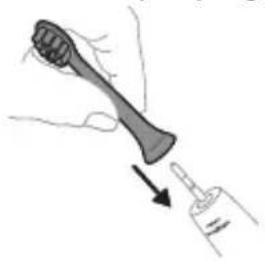
Medical illustration showing a hand holding a needle and a syringe, with a checkmark indicating a procedure on the knee joint.1 Align the brush head so the bristles point in the same direction as the front of the handle.
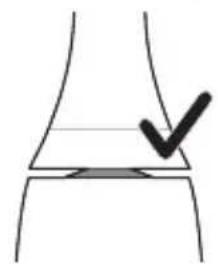
2 Firmly press the brush head down onto the metal shaft until it stops.
Note: It is normal to see a slight gap between the brush head and the handle. This allows the brush head to vibrate properly.
Using your Philips Sonicare toothbrush
If you are using your Sonicare toothbrush for the first time, it is normal to feel more vibration than when using a non-electric toothbrush. It is common for first time users to apply too much pressure. Only apply gentle pressure and let the toothbrush do the brushing for you. Please follow brushing instructions below for the best experience.
To help you transition to your new Sonicare power toothbrush, it comes with the EasyStart feature activated. This feature gradually increases the power over the first 14 brushing sessions to help you adapt to brushing with your Sonicare toothbrush.
Brushing instructions
natural_image
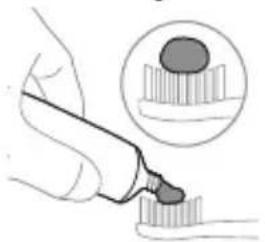
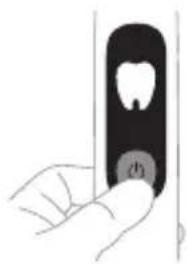
Illustration of a hand holding a pen and a nail, with an inset showing a magnified view of a nail (no text or symbols present)1 Wet the bristles and apply a small amount of toothpaste.
natural_image
Hand holding a black rectangular object with a circular button labeled '###' (no text or symbols on the object itself)
text_image
45°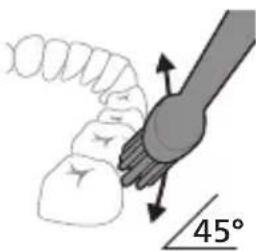
natural_image
Diagram showing a hand holding a small object with directional arrows indicating movement, labeled '45°' (no text or symbols on the diagram itself)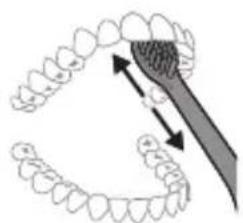
natural_image
Illustration of a dental tool interacting with teeth (no text or symbols)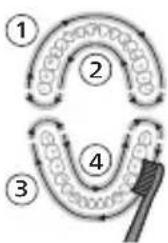
flowchart
graph TD
    A["Step 1"] --> B["Step 2"]
    B --> C["Step 3"]
    C --> D["Step 4"]
    D --> E["Brush"]
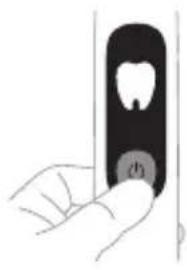
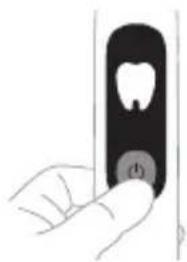
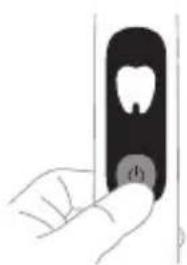
2 Press the power button to turn on your Philips Sonicare. Then select a brushing mode.
Note: The first 3 seconds of all modes start with a gentle vibration. This prevents toothpaste from splattering and lets you cycle through the modes to select your preferred brushing mode.
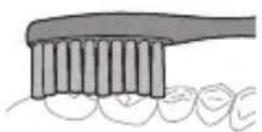
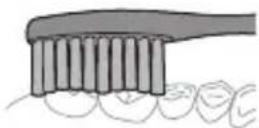
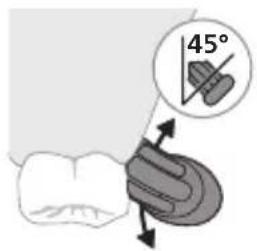
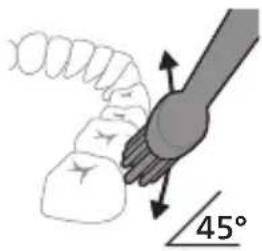
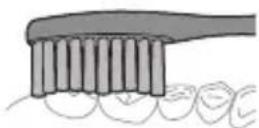
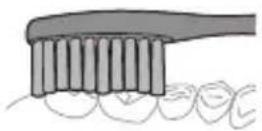
3 Place the toothbrush bristles against the teeth at a slight angle (45 degrees), pressing gently to make the bristles reach the gumline or slightly beneath the gumline.
Note: Keep the center of the brush in contact with the teeth at all times.
4 Gently keep the bristles placed on the teeth and in the gumline. Brush your teeth with small back and forth motion so the bristles reach between the teeth. Continue this motion throughout your brushing cycle.
Note: The bristles should slightly flare. It is not recommended to scrub as you would with a manual toothbrush.
5 To clean the inside surfaces of the front teeth, tilt the brush handle semi-upright and make several vertical overlapping brushing strokes on each tooth.
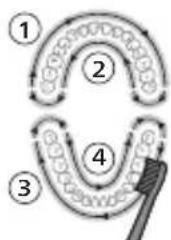
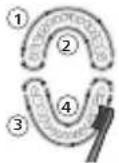
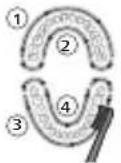
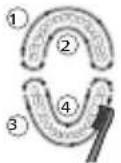
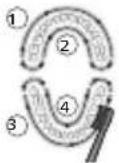
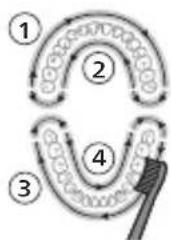
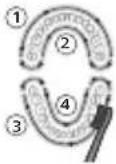
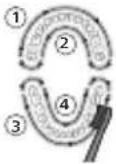
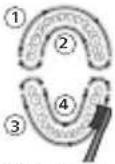
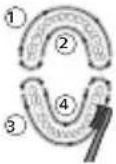
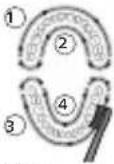
6 Begin brushing in section 1 (outside upper teeth) and brush for 30 seconds before you move to section 2 (inside upper teeth). Continue brushing in section 3 (outside lower teeth) and brush for 30 seconds before you move to section 4 (inside lower teeth).
Note: Additional time is added when you use the Deep Clean, Gum Pro, or White modes.
12 English
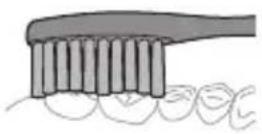
7 After you have completed the brushing cycle, you can spend additional time brushing the chewing surfaces of your teeth and areas where staining occurs. You can also brush your tongue, with the toothbrush turned on or off, as you prefer.
Your Philips Sonicare toothbrush should be safe to use on braces (brush heads wear out sooner when used on braces) and dental restorations (fillings, crowns, veneers) if they are properly adhered and not compromised. If a problem occurs, please follow up with a dental professional.
Note: When the Philips Sonicare toothbrush is used in clinical studies, it must be used in Clean mode with the handle fully charged and the EasyStart feature deactivated.
Modes
natural_image
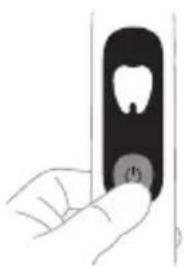
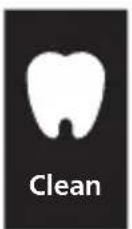
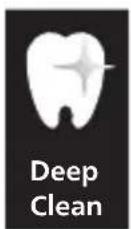
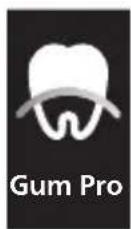
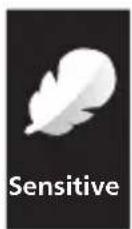
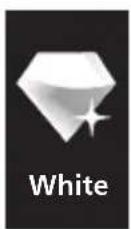
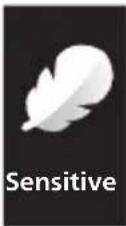
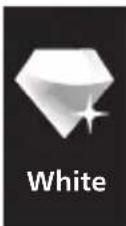
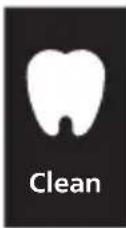
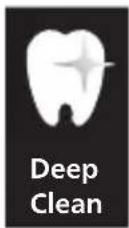
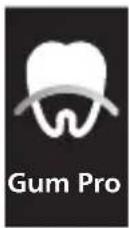
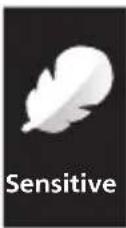
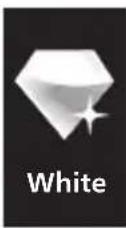
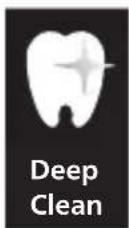
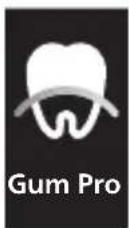
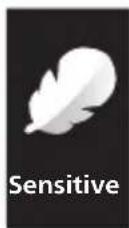
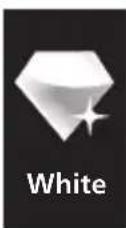
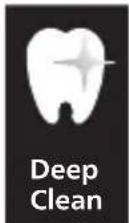
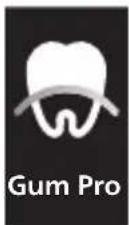
Hand holding a toothbrush with a circular button labeled 'P1' (no text or symbols on the object itself)Your power toothbrush is equipped with five different modes: Clean, Deep Clean, Gum Pro, Sensitive, and White.
Based on the smart brush head you use; the optimal mode will be selected automatically by the BrushSync technology.
To manually change the mode, press the power button when the toothbrush is on. All Philips Sonicare brush heads work with each mode.
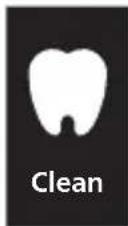
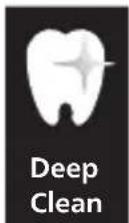
Mode Clean Deep
Clean
Mode image
Gum Pro Sensitive White
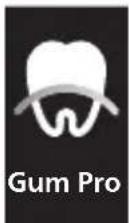
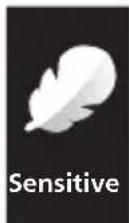
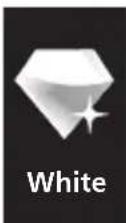
| Mode Clean Deep | Clean | Gum Pro Sensitive White | |||
| Benefit Plaque removal | Superior plaque removal | Plaque removal and gum massage | Extra gentle mode for sensitive teeth and gums | Plaque and surface stains removal | |
| Total brushing time | 2 minutes 3 minutes 3 minutes 2 minutes 2 minutes and 30 seconds | ||||
| How to brush | Brush each segment for 30 seconds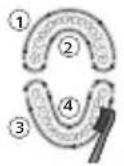 | Brush each segment for 45 seconds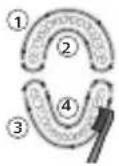 | Brush each segment for 30 seconds,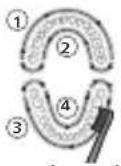 then brush along the gum line of each segment for 15 seconds each. then brush along the gum line of each segment for 15 seconds each. | Brush each segment for 30 seconds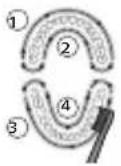 | Brush each segment for 30 seconds,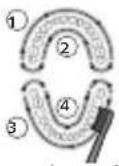 then brush the upper and lower front teeth for 15 seconds each. then brush the upper and lower front teeth for 15 seconds each. |
BrushSync technology
natural_image
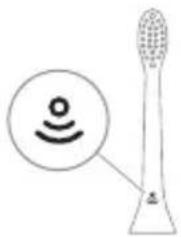
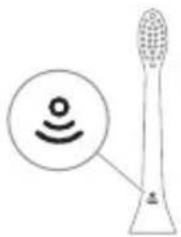
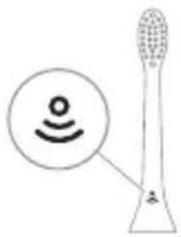
Illustration of a toothbrush with a sensor icon and a magnified circular detail (no text or symbols)BrushSync technology enables your brush head to communicate with your handle using a microchip. The symbol at the bottom of the brush head indicates that the brush head is equipped with this technology.
BrushSync technology enables:
- Brush head replacement reminder
- Brush head mode pairing
Philips Sonicare offers a wide range of smart brush heads, equipped with BrushSync technology. To explore our full range of toothbrush brush heads, and find the brush head that is best for you, go to
www.philips.com/toothbrush-heads for more information.
Features
- Pressure sensor
- SmarTimer
- Brushing reports
- QuadPacer
- EasyStart
- Brush head replacement reminder
- Brush head mode pairing
Pressure Sensor
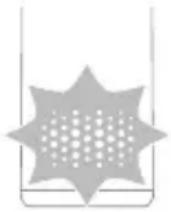
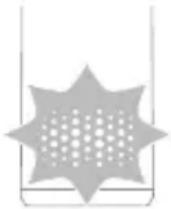
Your Philips Sonicare is equipped with an advanced sensor that measures the pressure you apply while brushing. If you apply too much pressure, the toothbrush provides immediate feedback to indicate that you need to adjust the pressure. When you apply too much pressure during brushing, you will feel a change in vibration and the bottom of the handle will light up in orange.
Brushing reports
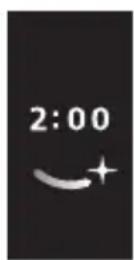
Your Philips Sonicare regularly provides a report on your brushing behavior.
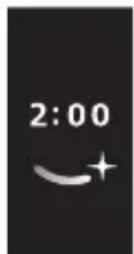
After brushing the display shows a report with the brushing time.
- Brushing time of 2 minutes or more
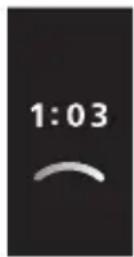
- Brushing time of less than 2 minutes
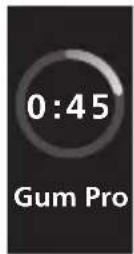
- During brushing the display shows the current brushing mode and brushing time
SmarTimer
The SmarTimer indicates that your brushing cycle is complete by automatically switching off the toothbrush at the end of the brushing cycle.
Dental professionals recommend brushing no less than 2 minutes twice a day.
Note: If you press the power button after you started the brushing cycle, the toothbrush will pause. After a pause of 15 seconds, the SmarTimer resets.
QuadPacer
flowchart
graph TD
    A["①"] --> B["②"]
    B --> C["③"]
    C --> D["④"]
    D --> E["④"]
    style A fill:#f9f,stroke:#333
    style B fill:#ccf,stroke:#333
    style C fill:#cfc,stroke:#333
    style D fill:#fcc,stroke:#333
    style E fill:#ffc,stroke:#333
The QuadPacer is an interval timer that has a short beep and pause to remind you to brush the 4 sections of your mouth evenly and thoroughly. This Philips Sonicare toothbrush comes with the QuadPacer feature activated.
Note: Additional time is added when you use the Deep Clean, Gum Pro, or White modes.
EasyStart
This Philips Sonicare model comes with the EasyStart feature activated. The EasyStart feature gently increases the power over the first 14 brushings to help you get used to the brushing with the Philips Sonicare.
When the Philips Sonicare toothbrush is used in clinical studies, it must be used at high intensity with the handle fully charged and the EasyStart feature deactivated.
To deactivate EasyStart (see 'Activating or deactivating features').
Brush head replacement reminder
Your Philips Sonicare is equipped with BrushSync technology that tracks the wear of your brush head. This
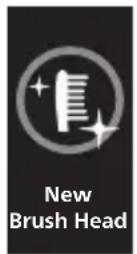
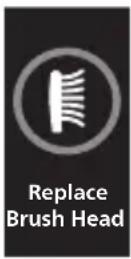
feature gives you the guarantee for the best cleaning and care of your teeth.
Note: This feature only works with Philips Sonicare smart brush heads with BrushSync technology.
1 When a new smart brush head is attached for the first time, the handle recognizes that you have a Philips brush head with BrushSync technology and the display shows the brush head symbol.
2 Over time, based on the pressure you apply and how long the brush head has been used, the handle will track brush head wear in order to determine the optimal time to change your brush head. When the life of the brush head ends, the display shows the brush head replacement reminder symbol and indicates that you should replace the brush head as soon as possible.
Note: Replace Philips Sonicare brush heads every 3 months to achieve optimal results. Use only Philips Sonicare replacement brush heads.
Brush head mode pairing
Brush heads with BrushSync technology are equipped with a microchip which communicates with the handle and automatically pairs it with the recommended mode and intensity. Most brush heads with BrushSync technology will auto pair to Clean Mode. Brush heads with specific benefits will pair with the corresponding mode (when available), examples include:
G3 Premium Gum Care: Gum Pro Mode
S2 Sensitive: Sensitive mode
W Optimal White: White Mode
Note: If you choose to change mode from the recommended setting, the brush head will remember the chosen setting for future brushing sessions.
Charging and battery status
Charging your Philips Sonicare
1 Attach the USB charger to a wall adapter and plug the wall adapter into an electrical outlet.
2 Place the handle on the plugged-in charger.
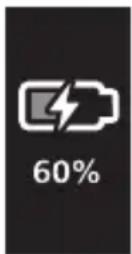
- The battery icon with lightning symbol is shown on the display and you hear two beeps. The pressure sensor indicator light will also light up white for 5 seconds.
Note: It can take up to 16 hours to fully charge the battery, but you can use the Philips Sonicare toothbrush before it is fully charged.
Note: This Philips Sonicare toothbrush is designed to provide at least 28 brushing sessions, each session lasting 2 minutes (14 days if used twice per day).
Battery status
The LCD screen will show the battery level after each brushing session, when placing the handle on the charger, and when removing it from the charger. While charging, press the power button to check the battery level.
The battery icon changes color with different battery levels: it turns yellow if the battery level is below 40%; while low battery is indicated by a red icon flashing with two short beeps.
Battery status Battery icon color Battery percentage
| Low Red 0% - 20% |
| Medium Yellow 21% - 40% |
| Full Blue 41% - 100% |
Activating or deactivating features
You can activate or deactivate the following features of your toothbrush:
- EasyStart
- Brush head replacement reminder
To activate or deactivate these features, follow the instructions below:
EasyStart
1 Place the handle on the plugged-in charger.
2 Keep the power button pressed until you hear a single short beep (after 3 seconds).
3 Release the power button.
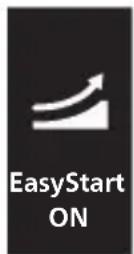
- Triple tone of low-medium-high means the EasyStart feature has been activated. The icon on the display shows that the EasyStart has been activated.
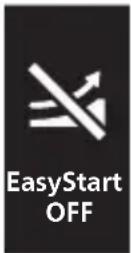
- Triple tone of high-medium-low means the EasyStart feature has been deactivated. The icon on the display shows that the EasyStart has been deactivated.
Note: To achieve clinical efficacy, EasyStart needs to be deactivated.
Brush head replacement reminder
Note: You can only activate or deactivate the brush head replacement reminder when a smart brush head is on the handle.
1 Place the handle on the plugged-in charger.
2 Press and hold the power button while the handle remains on the charger.
3 Keep the power button pressed until you hear two short beeps (after 6 seconds).
4 Release the power button.
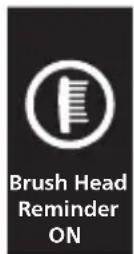
- Triple tone of low-medium-high means the brush head replacement reminder feature has been activated. The icon on the display shows that the brush head replacement reminder has been activated.
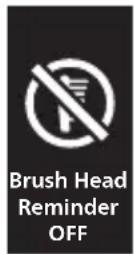
- Triple tone of high-medium-low means the brush head replacement reminder feature has been deactivated. The icon on the display shows that the brush head replacement reminder has been deactivated.
Cleaning
You should clean your Philips Sonicare toothbrush regularly to remove toothpaste and other residue. Failure to clean your Philips Sonicare toothbrush may result in an unhygienic product and damage to it may occur.
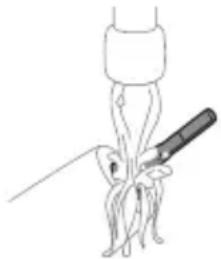
Warning: Do not clean the product or accessories with sharp objects or in the dishwasher, microwave, with chemicals or in boiling hot water
Toothbrush handle
natural_image
Simple line drawing of a medical procedure with a needle inserted into tissue (no text or symbols)1 Remove the brush head and rinse the metal shaft area with warm water. Make sure you remove any residual toothpaste on the handle and around the buttons at least once a week, but preferably after each use.
Caution: Do not push on the rubber seal on the metal shaft or around the buttons with sharp objects, as this may cause damage.
2 Wipe the entire surface of the handle with a damp cloth.
Caution: Do not tap the handle on the sink or counter to remove excess water.
3 Dry the handle with a soft cloth or towel.
Brush head

natural_image
Diagram of a mechanical or electrical component with two arms and a central shaft, intersected by a diagonal line (no text or symbols)1 Rinse the brush head and bristles after each use and allow to air dry.
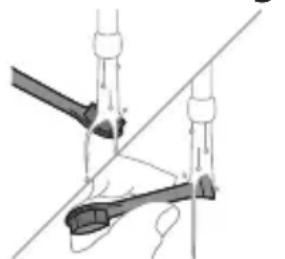
2 Remove the brush head from the handle and rinse the brush head connection with warm water at least once a week.
Charger
1 Unplug the charger before you clean it.
2 Wipe the surface of the charger with a damp cloth.
Storage
If you are not going to use the product for a long time, unplug it, and clean it (see chapter 'Cleaning'). Store it in a cool and dry place away from direct sunlight.
Charge the toothbrush regularly to prevent the battery from discharging completely. A completely discharged battery may fail to charge again.
Locating the model number
Look on the bottom of the Philips Sonicare toothbrush handle for the model number (e.g. HX123A).
Troubleshooting
This chapter summarizes the most common problems you could encounter with the appliance. If you are unable to solve the problem with the information below, visit www.philips.com/support and insert your model number for a list of frequently asked questions or contact the Consumer Care Center in your country.
Problem Possible Cause Solution
| I cannot fully attach the brush head. There is a gap between the brush head and handle. | This gap is normal and is needed for the brush head to vibrate appropriately. The brush head must be able to move to create the right amount of vibrations. |
Problem Possible Cause Solution
| My Philips Sonicare toothbrush vibration is less powerful than before. | The brush head is too close to the body of the toothbrush or the toothbrush needs to be charged. | Remove the brush head from the handle and re-set it on the metal shaft leaving a small gap.(1-2mm).When charging, make sure the charger is plugged into a power supply and placed on a flat surface before placing the toothbrush on the charger. Allow the toothbrush to charge for 24 hours. |
| I charged my toothbrush, but it only works for a short time. | The base of the toothbrush is not placed flat on the charger when attempting to charge. | Make sure the charger is plugged into a power supply and placed on a flat surface before placing the toothbrush on the charger. Allow the toothbrush to charge for 24 hours. |
Warranty and support
If you need information or support, please visit www.philips.com/support or read the international warranty leaflet.
Warranty restrictions
The terms of the international warranty do not cover the following:
- Brush heads.
- Damage caused by use of unauthorized replacement parts.
- Damage caused by misuse, abuse, neglect, alterations or unauthorized repair.
- Normal wear and tear, including chips, scratches, abrasions, discoloration or fading.
Recycling
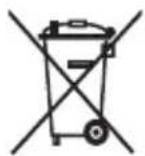
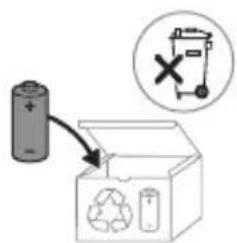
- This symbol means that electrical products and batteries shall not be disposed of with normal household waste.
- Follow your country's rules for the separate collection of electrical products and batteries.
Removal of built-in rechargeable battery
CONTAINS LITHIUM-ION RECHARGEABLE CELL. MUST BE RECYCLED OR DISPOSED OF PROPERLY.
The built-in rechargeable battery must only be removed by a qualified professional when the appliance is discarded. Before removing the battery, make sure that the appliance is disconnected from the wall socket and that the battery is completely empty.
Take any necessary safety precautions when you handle tools to open the appliance and when you dispose of the rechargeable battery.
When you handle batteries, make sure that your hands, the product and the batteries are dry.
If batteries are damaged or leaking, avoid contact with the skin or eyes. If this occurs, immediately rinse well with water and seek medical care.
To avoid accidental short-circuiting of batteries after removal, do not let battery terminals come into contact with metal objects (e.g. coins, hairpins, rings). Do not wrap batteries in aluminum foil. Tape battery terminals or put batteries in a plastic bag before you discard them.
Before removing the battery, make sure that the battery is completely empty.
To remove the rechargeable battery, you need a flat-head (standard) screwdriver.

1 To deplete the rechargeable battery of any charge, remove the handle from the charger, turn on the Philips Sonicare and let it run until it stops. Repeat this step until you can no longer turn on the Philips Sonicare.
2 Remove the film at the bottom of handle, then release the screw.
3 Remove the end cap from the toothbrush handle.
4 Holding the handle upside down, press the shaft down on a hard surface.
5 Wedge the screwdriver between the battery and the white frame at the bottom of the internal components. Then pry the screwdriver away from the battery to break the bottom of the white frame.
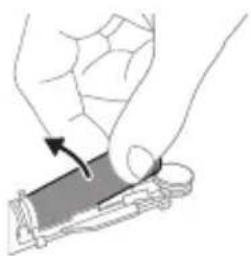
6 Insert the screwdriver between the bottom of the battery and the white frame to break the metal tab connecting the battery to the green printed circuit board. This will release the bottom end of the battery from the frame.
natural_image
Illustration of a hand holding a small object with an arrow indicating motion (no text or symbols)7 Grab the battery and pull it away from the internal components to break the second metal battery tab.
Caution: Be aware of the sharp edges of the battery tabs so as to avoid injury to your fingers.
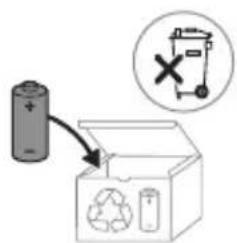
text_image
Diagram showing a battery connected to an open recycling bin with a 'X' symbol indicating no detectable waste.8 Cover the battery contacts with tape to prevent any electrical short from residual battery charge. The rechargeable battery can now be recycled and the rest of the product discarded appropriately.
Giriş
www.philips.com/support
natural_image
Simple line drawing of an open book with no text or symbols visiblenatural_image
Illustration of a hand holding a toothbrush and a nail being inserted (no text or symbols)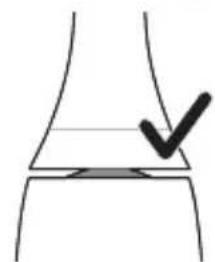
natural_image
Simple line drawing of a curved surface with a black checkmark mark (no text or symbols)natural_image
Illustration of a hand using a pipette to apply liquid onto a surface, with an inset showing a droplet on a surface (no text or symbols present)natural_image
Illustration of a hand holding a black rectangular object with a circular button labeled 'd' (no text or symbols on the object itself)natural_image
Illustration of dental tool interacting with teeth (no text or symbols)natural_image
Illustration of a hand holding a tooth with a circular button (no text or symbols)natural_image
Illustration of a toothbrush with a sensor icon and a magnified circular detail (no text or symbols)S2 Sensitive: Sensitive rejimi
W Optimal White: "White" Rejimi
natural_image
Line drawing of a medical procedure with a needle inserted into a tube (no text or symbols)natural_image
Diagram of a mechanical or electrical component with two arms and a central shaft, intersected by a diagonal line (no text or symbols)The built-in rechargeable battery must only be removed by a qualified professional when the appliance is discarded. Before removing the battery, make sure that the appliance is disconnected from the wall socket and that the battery is completely empty.
natural_image
Illustration of a hand holding a cylindrical object with a rotating arrow indicating rotation (no text or symbols)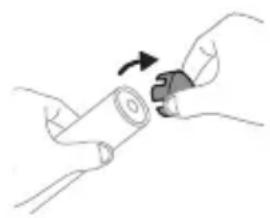
natural_image
Illustration of hands holding a cylindrical object with a curved arrow indicating rotation (no text or symbols)
www.philips.com/support
text_image
Medical illustration showing a hand holding a needle and a checkmark on a knee joint, with an arrow indicating the process.natural_image
Illustration of a hand using a pipette to apply liquid onto a surface, with an inset showing a droplet on a surface (no text or symbols present)natural_image
Illustration of a hand holding a small black object with a circular button labeled 'd' (no text or symbols on the object itself)natural_image
Diagram showing dental tool interacting with teeth (no text or labels)natural_image
Illustration of a hand holding a tooth with a circular button (no text or symbols)natural_image
Diagram of a brightness sensor on a tripod, showing signal icon and base (no text or symbols)natural_image
Line drawing of a medical procedure involving an incision or needle inserted into a surgical instrument (no text or symbols present)natural_image
Diagram of a mechanical or electrical component with two vertical rods and a central rod, intersected by a diagonal line (no text or symbols)The built-in rechargeable battery must only be removed by a qualified professional when the appliance is discarded. Before removing the battery, make sure that the appliance is disconnected from the wall socket and that the battery is completely empty.
natural_image
Illustration of a hand holding a cylindrical object with a curved arrow indicating rotation (no text or symbols)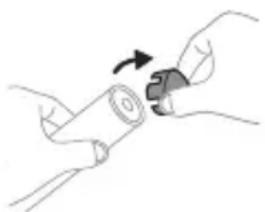
natural_image
Illustration of hands holding a cylindrical object with a curved arrow indicating rotation (no text or symbols)
www.philips.com/support
natural_image
Simple line drawing of an open book with no text or symbols visibletext_image
Medical illustration showing a hand holding a needle and a tool, with a checkmark indicating a procedure on the knee joint.natural_image
Illustration of a hand holding a pen with a small object inside, showing a magnified view of a droplet on a surface (no text or symbols present)natural_image
Hand holding a toothbrush with a circular button labeled 'P1' (no text or symbols on the object itself)Din eltandbørste har fem forskellige indstillinger: Clean, Deep Clean, Gum Pro, Sensitive og White.
Gum Pro Sensitive White
natural_image
Illustration of a toothbrush with a circular icon showing wireless signal (no text or symbols)W Optimal White: White-indstilling
natural_image
Line drawing of a fork being held by a knife (no text or symbols)natural_image
Diagram of a mechanical linkage or lever mechanism with no visible text or symbolsOplader
The built-in rechargeable battery must only be removed by a qualified professional when the appliance is discarded. Before removing the battery, make sure that the appliance is disconnected from the wall socket and that the battery is completely empty.
natural_image
Illustration of a hand holding a cylindrical object with a rotating arrow indicating rotation (no text or symbols)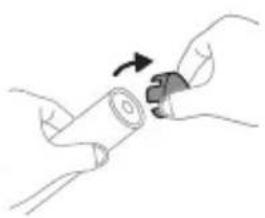
natural_image
Illustration of hands performing a step-up on a cylindrical object (no text or symbols)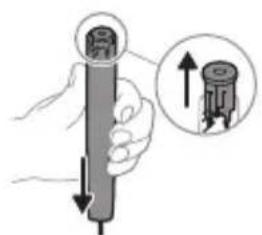
text_image
Diagram showing a hand holding a cylindrical object with an inset magnified view of the internal structure.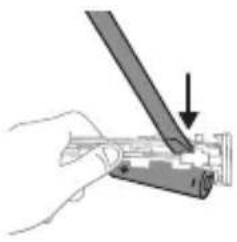
natural_image
Hand holding a mechanical component with a tool, no visible text or symbolsnatural_image
Illustration showing a hand holding a tool with a magnified inset of the tool interacting with a device (no text or symbols present)text_image
Diagram showing a battery connected to an open box with a recycling symbol and a 'X' indicating no disposal or reuse.www.philips.com/support
natural_image
Illustration of a hand holding a tool with an arrow indicating motion (no text or symbols)natural_image
Simple line drawing of a curved object with a checkmark mark, no text or symbols presentnatural_image
Illustration of a hand using a pipette to apply liquid onto a surface, with an inset showing a magnified view of the surface (no text or symbols present)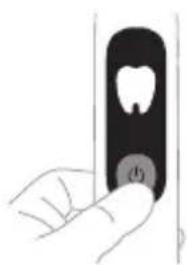
natural_image
Hand holding a black object with a circular button labeled (b), no visible text or symbols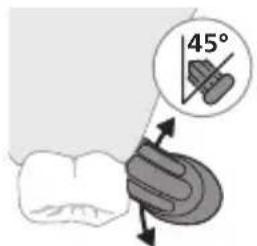
text_image
45°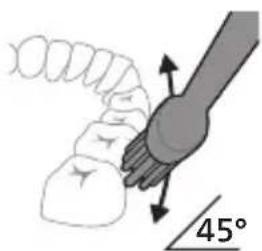
text_image
45°natural_image
Diagram showing dental tool application on upper teeth with magnified view (no text or symbols)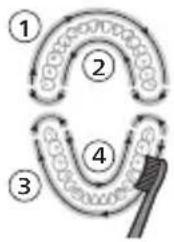
flowchart
graph TD
    A["①"] --> B["②"]
    B --> C["③"]
    C --> D["④"]
    D --> E["③"]
    E --> F["②"]
    style A fill:#f9f,stroke:#333
    style B fill:#ccf,stroke:#333
    style C fill:#cfc,stroke:#333
    style D fill:#fcc,stroke:#333
    style E fill:#ffc,stroke:#333
natural_image
Illustration of a hand holding a toothbrush with a circular button (no text or symbols)natural_image
Illustration of a toothbrush with a sensor icon and a magnified view of its surface (no text or symbols)natural_image
Line drawing of a medical procedure involving a tool and tubing (no text or symbols)natural_image
Diagram of a mechanical or electrical component with two arms and a central shaft, no visible text or symbolsThe built-in rechargeable battery must only be removed by a qualified professional when the appliance is discarded. Before removing the battery, make sure that the appliance is disconnected from the wall socket and that the battery is completely empty.
natural_image
Illustration of a hand holding a cylindrical object with a rotating arrow indicating rotation (no text or symbols)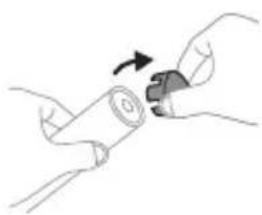
natural_image
Illustration of hands holding a cylindrical object with a curved arrow indicating rotation (no text or symbols)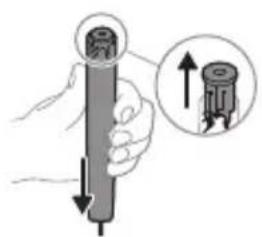
text_image
Diagram showing a hand holding a cylindrical object with an arrow indicating upward movement, accompanied by a magnified inset showing the same object.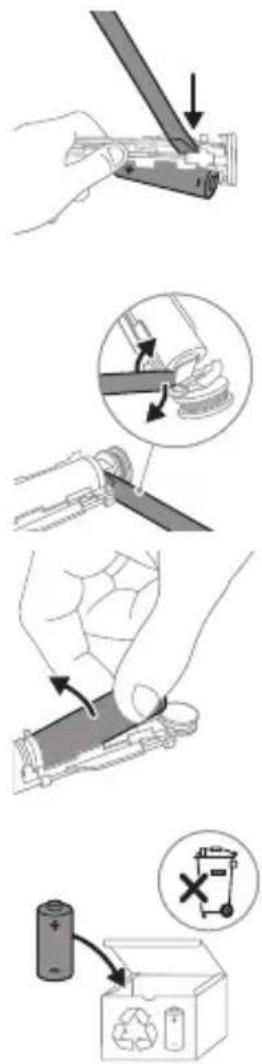
natural_image
Simple line drawing of an open book with no text or symbols visiblenatural_image
Illustration of a hand holding a pen or stylus with a magnified inset showing the tip (no text or symbols)natural_image
Simple line drawing of a curved object with a checkmark mark, no text or symbols presentnatural_image
Illustration of a hand holding a pen with a magnified inset showing a droplet on a surface (no text or symbols)natural_image
Hand holding a black rectangular object with a circular button labeled '###' (no text or symbols on the object itself)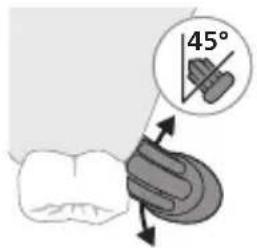
text_image
45°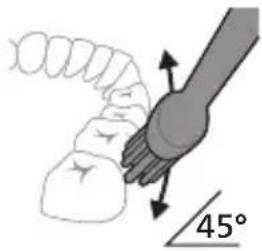
text_image
45°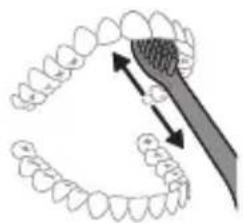
natural_image
Illustration of a tooth being brushed with a tool, showing teeth and jawbone structure (no text or symbols)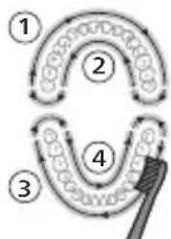
flowchart
graph TD
    A["①"] --> B["②"]
    B --> C["③"]
    C --> D["④"]
    D --> E["④"]
    style A fill:#f9f,stroke:#333
    style B fill:#ccf,stroke:#333
    style C fill:#cfc,stroke:#333
    style D fill:#fcc,stroke:#333
    style E fill:#ffc,stroke:#333
natural_image
Illustration of a hand holding a vertical object with a small circular button, no text or symbols present.natural_image
Illustration of a toothbrush with a sensor icon and signal symbol (no text or labels)www.philips.com/toothbrush-heads.
Omadused
natural_image
Line drawing of a medical procedure with a needle inserted into tissue (no text or symbols)natural_image
Diagram of a mechanical or electrical component with two arms and a central shaft, intersected by a diagonal line (no text or symbols)The built-in rechargeable battery must only be removed by a qualified professional when the appliance is discarded. Before removing the battery, make sure that the appliance is disconnected from the wall socket and that the battery is completely empty.
text_image
Diagram showing a battery connected to an open box with recycling symbols and a circled 'X' indicating a chemical or operational hazard.natural_image
Simple line drawing of an open book with no text or symbols visiblenatural_image
Illustration of a hand holding a toothbrush with a finger pointing to it (no text or symbols present)natural_image
Simple line drawing of a curved object with a checkmark mark, no text or symbols presentnatural_image
Illustration of a hand using a pipette to apply liquid onto a surface, with an inset showing a droplet on a surface (no text or symbols present)natural_image
Illustration of a hand holding a small object with a circular button labeled 'd' (no text or symbols on the object itself)natural_image
Diagram showing dental tool interacting with teeth (no text or labels)natural_image
Hand holding a black rectangular object with a small circular button, resembling a tooth or device (no text or symbols visible)natural_image
Diagram of a toothbrush with a sensor icon and a magnified view of its base (no text or symbols)S2 Sensitive: Modo Sensitive (Suave)
W Optimal White: Modo White (Blanqueado)
natural_image
Simple line drawing of a medical procedure with a needle inserted into tissue (no text or symbols)natural_image
Diagram of a mechanical or electrical component with two arms and a central rod, no visible text or symbolsThe built-in rechargeable battery must only be removed by a qualified professional when the appliance is discarded. Before removing the battery, make sure that the appliance is disconnected from the wall socket and that the battery is completely empty.
text_image
Diagram showing a battery connected to an open box with a recycling symbol and a circled 'X' indicating a waste or disposal mechanism.natural_image
Illustration of a hand holding a tool with an arrow indicating motion (no text or symbols)natural_image
Simple line drawing of a curved object with a checkmark mark, no text or symbols presentnatural_image
Illustration of a hand holding a pen with a dropper, showing a magnified view of a dropper above its tip (no text or symbols present)natural_image
Illustration of a hand inserting a tooth into a rectangular device (no text or symbols)natural_image
Diagram showing dental tool interacting with teeth and jawbone structure (no text or labels)natural_image
Illustration of a hand holding a small object with a tooth symbol, no text or labels presentnatural_image
Illustration of a toothbrush with a circular icon showing wireless signal waves (no text or symbols)natural_image
Line drawing of a medical procedure with a needle inserted into a tube (no text or symbols)natural_image
Diagram of a mechanical or electrical component with two arms and a central rod, no visible text or symbolsThe built-in rechargeable battery must only be removed by a qualified professional when the appliance is discarded. Before removing the battery, make sure that the appliance is disconnected from the wall socket and that the battery is completely empty.
natural_image
Illustration of a hand holding a small object with an arrow indicating motion (no text or symbols)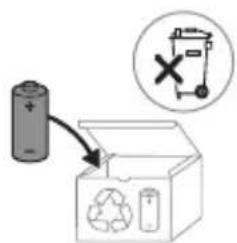
text_image
Diagram showing a battery connected to an open recycling bin with a 'X' symbol indicating no detectable waste.natural_image
Simple line drawing of an open book with no text or symbols visibleNa proizvodu se mogu pojaviti sljedeći simboli: Ovaj simbol znači da prije upotrebe uređaja morate pročitati upute za upotrebu.
Ovaj simbol znači da morate upotrijebiti naznačeno napajanje.
Namjena
Ova električna četkica za zube Sonicare namijenjena je za uklanjanje naslaga i ostataka hrane sa zuba kako bi se smanjio karijes te poboljšalo i održavalo oralno zdravlje. Ova električna četkica za zube Sonicare namijenjena je za kućnu uporabu. Djeca četkicu trebaju upotrebljavati uz nadzor odrasle osobe.
Vaš Philips Sonicare (Slika 1)
1 Poklopac glave četkice
2 Pametna glava četkice
3 simbol značajke BrushSync
4 Drška
5 Pametni zaslon
6 Gumb za uključivanje/isključivanje i način rada
7 Indikator senzora pritiska
8 USB punjač (zidni adapter nije uključen)
Napomena: priloženi dodaci mogu se razlikovati ovisno o kupljenom modelu.
Početak korištenja
Postavljanje glave četkice
natural_image
Illustration of a hand holding a small object with an arrow pointing to it, no text or symbols presentnatural_image
Simple line drawing of a curved object with a checkmark mark, no text or symbols presentnatural_image
Illustration of a hand applying a color to a toothbrush, with an inset showing a magnified view of the tooth (no text or symbols present)1 Smočite vlakna i nanesite malu količinu paste za zube.

natural_image
Hand holding a black object with a circular button labeled (no text or symbols visible)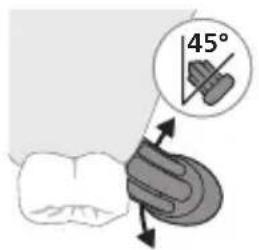
text_image
45°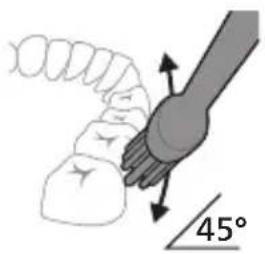
natural_image
Diagram showing a mechanical component with angular measurement of 45° (no text or symbols present)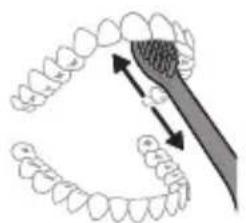
natural_image
Illustration of dental arching technique showing tooth arrangement and magnified detail (no text or symbols)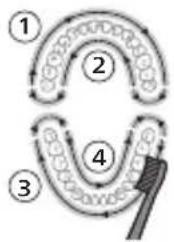
flowchart
graph TD
    A["①"] --> B["②"]
    B --> C["③"]
    C --> D["④"]
    D --> E["End"]
natural_image
Hand holding a toothbrush with a circular button labeled 'P1' (no text or symbols on the object itself)Vaša električna četkica za zube ima pet različitih načina rada: Clean, Deep Clean, Gum Pro, Sensitive i White. Pomoću tehnologije BrushSync automatski će se odabrati optimalni način rada na temelju pametne glave četkice koju upotrebljavate. Kako biste ručno promijenili način rada, pritisnite gumb za napajanje dok je četkica za zube uključena. Sve glave četkice Philips Sonicare rade u svakom načinu rada.
Način rada
Clean Deep
Gum Pro Sensitive White
Način slike
| Način rada | Clean Deep Clean | Gum Pro Sensitive White | |||
| Prednost uklanjanje naslaga | Vrhunsko uklanjanje naslaga | uklanjanje naslaga i masaža desni | izuzetno nježan način rada za osjetljive zube i desni | uklanjanje naslaga i površinskih mrlja | |
| Ukupno vrijeme četkanja | 2 minute 3 minute 3 minute 2 minute 2 minute i | 30 sekundi | |||
| Kako četkati | četkajte svaki segment 30 sekundi | Četkajte svaki segment 45 sekundi | četkajte svaki segment 30 sekundi, | četkajte svaki segment 30 sekundi | četkajte svaki segment 30 sekundi, |
 |  |  |  |  | |
| zatim četkajte duž linije desni svakog segmenta 15 sekundi. | zatim četkajte gornje i donje prednje zube po 15 sekundi. | ||||
Tehnologija BrushSync
natural_image
Illustration of a toothbrush with a sensor icon and signal symbol (no text or labels)Tehnologija BrushSync omogućava glavi četkice da komunicira s drškom s pomoću mikročipa. Simbol na donjem dijelu glave četkice naznačuje da je glava četkice opremljena tom tehnologijom.
Tehnologija BrushSync omogućuje:
natural_image
Line drawing of a medical procedure with a needle inserted into a tube (no text or symbols)1 Odvojite glavu četkice i isperite prostor oko metalne osovine toplom vodom. Najmanje jednom tjedno, a po mogućnosti nakon svake uporabe, obavezno uklonite svu preostalu zubnu pastu s drške i oko tipki.
natural_image
Diagram of a mechanical or electrical component with two arms and a central shaft, no visible text or symbolsThe built-in rechargeable battery must only be removed by a qualified professional when the appliance is discarded. Before removing the battery, make sure that the appliance is disconnected from the wall socket and that the battery is completely empty.
Poduzmite sve sigurnosne mjere kad koristite alate za otvaranje uređaja i kad odlažete punjivu bateriju.
text_image
Technical diagram illustrating a mechanical assembly process with labeled steps and directional arrows indicating motion.Kako biste izvadili punjivu bateriju, trebate odvijač plosnate -glave (standardni).
1 Kako biste potpuno ispraznili punjivu bateriju, izvadite dršku iz punjača, uključite četkicu Philips Sonicare i ostavite je da radi dok se ne zaustavi. Ponavljajte taj postupak sve dok se četkica Philips Sonicare više ne može uključiti.
2 Uklonite foliju na dnu ručke, zatim otpustite vijak.
3 Uklonite krajnji čep s drške četkice za zube.
4 Držeći dršku naopako, pritisnite osovinu na tvrdu površinu.
natural_image
Illustration of a hand holding a rectangular object with an arrow indicating motion (no text or symbols)7 Primate bateriju i povucite je od unutarnjih dijelova da biste prelomili drugu metalnu pločicu baterije.
text_image
Diagram showing a battery connected to an open recycling bin with a 'X' symbol indicating no detectable waste.8 Pokrijte kontakte baterije trakom da spriječite kratko spajanje struje od preostalog punjenja baterije. Punjiva baterija se sada može reciklirati a ostatak proizvoda se može odbaciti na odgovarajući način.
Introduzione
www.philips.com/support
natural_image
Simple line drawing of an open book with no text or symbols visiblenatural_image
Illustration of a hand holding a toothbrush with a finger inserted (no text or symbols)natural_image
Simple line drawing of a curved surface with a checkmark mark, no text or symbols presentnatural_image
Illustration of a hand using a pipette to apply liquid onto a surface, with an inset showing a droplet on a surface (no text or symbols present)natural_image
Illustration of a hand holding a small black object with a circular button labeled 'd' (no text or symbols on the object itself)natural_image
Diagram of dental tool application on upper teeth with magnified view (no text or labels)natural_image
Illustration of a hand holding a black rectangular object with a circular button labeled 'D' (no text or symbols on the object itself)Gum Pro Sensitive White
natural_image
Illustration of a toothbrush with a sensor icon and a circular label (no text or symbols)www.philips.com/toothbrush-heads.
Caratteristiche
natural_image
Line drawing of a medical procedure with a needle inserted into a tube (no text or symbols)natural_image
Diagram of a mechanical or electrical component with two arms and a central rod, intersected by a diagonal line (no text or symbols)The built-in rechargeable battery must only be removed by a qualified professional when the appliance is discarded. Before removing the battery, make sure that the appliance is disconnected from the wall socket and that the battery is completely empty.
natural_image
Illustration of a hand holding a small object with a curved arrow indicating rotation (no text or symbols)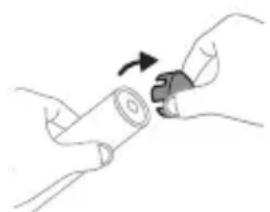
natural_image
Illustration of hands holding a cylindrical object with an arrow indicating rotation (no text or symbols)
www.philips.com/support
natural_image
Simple line drawing of an open book with no text or symbols visiblenatural_image
Illustration of a hand holding a toothbrush and a finger pointing to a small object (no text or symbols)natural_image
Simple line drawing of a curved object with a checkmark mark, no text or symbols presentnatural_image
Illustration of a hand applying a color to a toothbrush, with an inset showing a magnified view of the tooth (no text or symbols present)1 Samitriniet sarus un uzklājiet mazliet zobu pastas.
natural_image
Hand holding a black object with a circular button labeled (no text or symbols visible)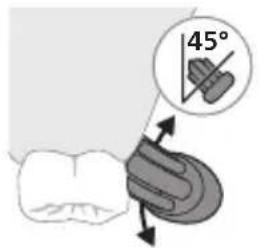
text_image
45°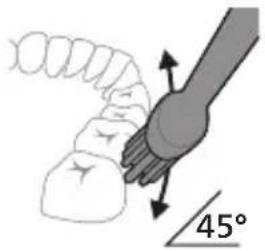
text_image
45°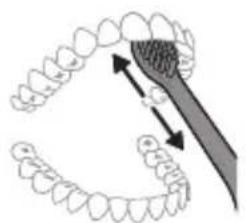
natural_image
Diagram showing dental alignment with a toothbrush and tooth arrangement (no text or labels)
flowchart
graph TD
    A["①"] --> B["②"]
    B --> C["③"]
    C --> D["④"]
    D --> A
natural_image
Hand holding a black rectangular object with a small circular button, no visible text or symbolsGum Pro Sensitive White
Režima attēls
natural_image
Diagram of a toothbrush with a circular icon showing wireless signal and a small sensor symbol (no text or labels)W Optimal White: Režīms "White"
natural_image
Line drawing of a medical procedure with a needle inserted into tissue (no text or symbols)natural_image
Diagram of a mechanical or electrical component with no visible text, numbers, or symbolsThe built-in rechargeable battery must only be removed by a qualified professional when the appliance is discarded. Before removing the battery, make sure that the appliance is disconnected from the wall socket and that the battery is completely empty.
natural_image
Illustration of a hand holding a rectangular object with an arrow indicating motion (no text or symbols)text_image
Diagram showing a battery connected to an open recycling bin with a 'X' symbol indicating no detectable waste.natural_image
Simple line drawing of an open book with no text or symbols visiblenatural_image
Illustration of a hand holding a pen or stylus with a downward arrow indicating force or movement (no text or symbols)natural_image
Simple line drawing of a curved surface with a checkmark mark (no text or symbols)natural_image
Illustration of a hand using a pipette to apply a product to a toothbrush, with an inset showing a magnified view of the tooth (no text or symbols present)natural_image
Hand holding a black rectangular object with a circular button labeled '###' (no text or symbols on the object itself)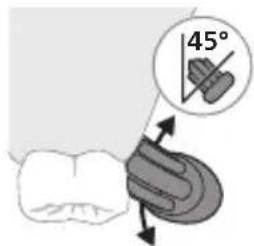
text_image
45°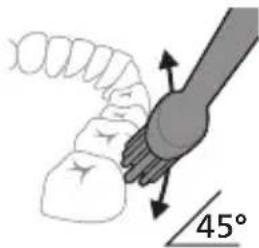
text_image
45°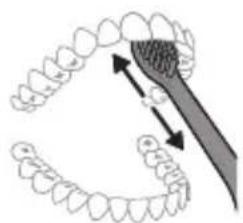
natural_image
Illustration of dental arching technique showing tooth arrangement and tool (no text or symbols)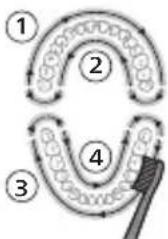
flowchart
graph TD
    A["①"] --> B["②"]
    B --> C["③"]
    C --> D["④"]
    D --> E["④"]
    style A fill:#f9f,stroke:#333
    style B fill:#f9f,stroke:#333
    style C fill:#f9f,stroke:#333
    style D fill:#f9f,stroke:#333
    style E fill:#ccf,stroke:#333
natural_image
Illustration of a hand holding a toothbrush with a small circular button (no text or symbols)natural_image
Illustration of a toothbrush with a sensor icon and a circular label (no text or symbols)natural_image
Simple line drawing of a rope being inserted into a bottle (no text or symbols)natural_image
Diagram of a mechanical or electrical component with two arms and a central rod, no visible text or symbolsThe built-in rechargeable battery must only be removed by a qualified professional when the appliance is discarded. Before removing the battery, make sure that the appliance is disconnected from the wall socket and that the battery is completely empty.
natural_image
Illustration of a hand holding a cylindrical object with a curved arrow indicating rotation (no text or symbols)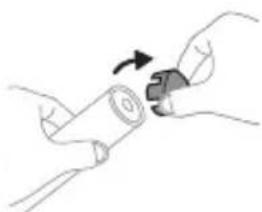
natural_image
Illustration of hands holding a cylindrical object with a knob, no text or symbols present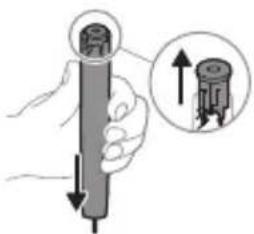
natural_image
Illustration of a hand holding a cylindrical object with an arrow pointing to it, showing a magnified inset of the top view (no text or symbols present)www.philips.com/support
natural_image
Simple line drawing of an open book with no text or symbols visiblenatural_image
Illustration of a hand holding a tool with an arrow indicating motion (no text or symbols)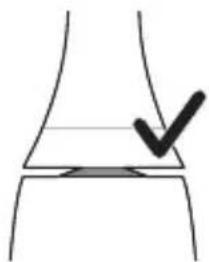
natural_image
Simple line drawing of a curved object with a checkmark mark, no text or symbols presentnatural_image
Illustration of a hand using a pipette to apply liquid onto a surface, with an inset showing a droplet on a surface (no text or symbols present)natural_image
Hand holding a toothbrush with a circular button labeled 'P1' (no text or symbols on the object itself)natural_image
Diagram showing dental tool interacting with teeth and jawbone structure (no text or labels)natural_image
Hand holding a toothbrush with a small circular button (no text or symbols visible)Gum Pro Sensitive White
Üzemmód kép
natural_image
Illustration of a toothbrush with a sensor icon and a magnified circular detail (no text or symbols)natural_image
Line drawing of a medical procedure showing a needle inserted into an anatomical structure (no text or labels)natural_image
Diagram of a mechanical or electrical component with two arms and a central shaft, no visible text or symbolsThe built-in rechargeable battery must only be removed by a qualified professional when the appliance is discarded. Before removing the battery, make sure that the appliance is disconnected from the wall socket and that the battery is completely empty.
text_image
Diagram illustrating four steps of a mechanical or electrical component handling, with arrows indicating rotation and assembly.natural_image
Illustration showing a hand holding a tool with arrows indicating movement or force (no text or symbols present)text_image
Diagram showing a battery connected to an open box with a recycling symbol and a 'X' indicating a waste or disposal process.natural_image
Illustration of a hand holding a tool with an arrow indicating force or movement (no text or symbols)natural_image
Simple line drawing of a curved object with a checkmark mark, no text or symbols presentnatural_image
Illustration of a hand holding a pipette with a magnified inset showing a droplet on a surface (no text or symbols)natural_image
Illustration of a hand holding a tooth with a circular button (no text or symbols)natural_image
Diagram showing dental tool interacting with teeth and jawbone structure (no text or labels)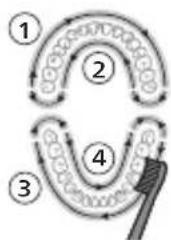
flowchart
graph TD
    A["①"] --> B["②"]
    B --> C["③"]
    C --> D["④"]
    D --> E["④"]
    style A fill:#f9f,stroke:#333
    style B fill:#ccf,stroke:#333
    style C fill:#cfc,stroke:#333
    style D fill:#fcc,stroke:#333
    style E fill:#ffc,stroke:#333
natural_image
Hand holding a black rectangular object with a circular button labeled '###' (no text or symbols on the object itself)Gum Pro Sensitive White
natural_image
Illustration of a toothbrush with a sensor icon and signal symbol (no text or labels)natural_image
Line drawing of a medical procedure with a needle inserted into a tube (no text or symbols)natural_image
Diagram of a hand holding a tool with a fork, against a diagonal line (no text or symbols)The built-in rechargeable battery must only be removed by a qualified professional when the appliance is discarded. Before removing the battery, make sure that the appliance is disconnected from the wall socket and that the battery is completely empty.
natural_image
Illustration of a hand holding a rectangular object with an arrow indicating motion (no text or symbols)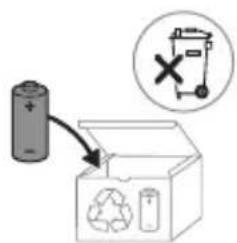
text_image
Diagram showing a battery connected to an open recycling box with a 'X' symbol and recycling symbol, indicating no chemical reaction or disposal.text_image
Medical illustration showing a hand holding a needle and a syringe, with a checkmark indicating a procedure step.natural_image
Illustration of a hand holding a pen with a magnified inset showing a droplet on a surface (no text or symbols)natural_image
Hand holding a black rectangular object with a circular button labeled '###' (no text or symbols on the object itself)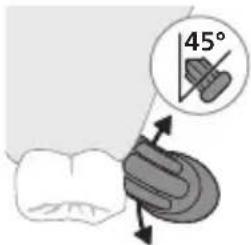
text_image
45°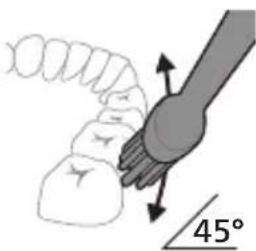
natural_image
Diagram showing a hand holding a small object with directional arrows indicating movement, labeled '45°' (no text or symbols on the diagram itself)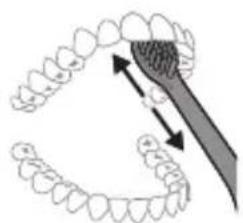
natural_image
Diagram showing dental tool application on upper teeth with magnified detail (no text or symbols)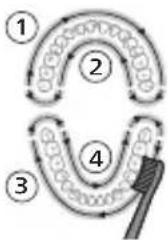
flowchart
graph TD
    A["①"] --> B["②"]
    B --> C["③"]
    C --> D["④"]
    D --> E["④"]
    style A fill:#f9f,stroke:#333
    style B fill:#ccf,stroke:#333
    style C fill:#cfc,stroke:#333
    style D fill:#fcc,stroke:#333
    style E fill:#ffc,stroke:#333
natural_image
Illustration of a hand holding a tooth with a small circular button (no text or symbols)Gum Pro Sensitive White
Modusbilde
natural_image
Diagram of a toothbrush with sensor icon and magnified view (no text or symbols)natural_image
Line drawing of a medical procedure showing a needle inserted into a tube with an applicator (no text or symbols)natural_image
Diagram of a mechanical or electrical component with two arms and a central rod, no visible text or symbolsThe built-in rechargeable battery must only be removed by a qualified professional when the appliance is discarded. Before removing the battery, make sure that the appliance is disconnected from the wall socket and that the battery is completely empty.
natural_image
Illustration of a hand holding a small object with an arrow indicating motion (no text or symbols)text_image
Diagram showing a battery connected to an open recycling bin with a 'X' symbol indicating no detectable waste.natural_image
Simple line drawing of an open book with no text or symbols visiblenatural_image
Illustration of a hand holding a pen or stylus with an arrow indicating force application (no text or symbols present)1 Cho'tka tuklari dastaning old qismi bilan bir xil yo'nalishda bo'lishi uchun cho'tka kallagini tekislang.
natural_image
Simple line drawing of a curved object with a checkmark mark, no text or symbols present2 Cho'tka kallagini u to'xtaguncha metall valga qattiq bosing.
Izoh: Cho'tka kallagi va dasta orasida kichik tirqish ko'rinishi – normal holat. Bu cho'tka kallagining to'g'ri tebranishiga yordam beradi.
Philips Sonicare tish pastangizdan foydalanish
Agar Sonicare tish pastasidan birinchi marta foydalanayotgan bo'lsangiz, elektr bo'Imagan tish cho'tkasidan foydalanishga qaraganda ko'proq tebranish sezish normal holat. Odatda birinchi marta foydalanayotgan foydalanuvchilar ortiqcha bosim beradi.
Faqat yumshoq bosib bering va tish cho'tkasi siz uchun tozalashiga imkon bering. Eng yaxshi taassurot uchun tish tozalash ko'rsatmalariga amal qiling.
natural_image
Illustration of a hand using a pipette to apply liquid onto a surface, with an inset showing a droplet on a surface (no text or symbols present)1 Cho'tkani namlang va unga kam miqdorda tish pastasi surting.
natural_image
Illustration of a hand holding a tooth with a circular button (no text or symbols)2 Philips Sonicare yoqilishi uchun quvvat tugmasini bosing. Keyin cho'tkalash rejimini tanlang.
Izoh: Barcha rejimlarning dastlabki 3 soniyasi yumshoq tebranish bilan boshlanadi. Bu tish pastasining sochilishining oldini oladi va o'zingizga yoqqan cho'tkalash rejimini tanlash uchun rejimlarni almashtirish imkonini beradi.
text_image
45°3 Tish cho'tkasini tishlar qarshisida kichik (45 daraja) burchak ostida tuting va cho'tkalar milk chizig'iga yoki uning tagiga yetishi uchun uni yengil bosing.
Izoh: Cho'tka markazini tishlarga doimi to'liq tekkizib turing.
text_image
45°4 Cho'tkani tishlar va milk chizig'iga yengil tutib turing. Cho'tkalar tishlar orasiga kirishi uchun cho'tka kallagini oldinga-orqaqa kichik harakatlar bilan tishlaringizni tozalang. Bu harakatlarni tish tozalash siklingiz yakunlangunga qadar bajaring.
natural_image
Diagram showing dental tool interacting with teeth and jawbone structure (no text or labels)5 Old tishlarning ichki yuzalarini tozalash uchun dastani yarim-vertikal qilib ushlang va har bir tishni bir necha vertikal harakatlar bilan birma-bir tozalab chiqing.
flowchart
graph TD
    A["①"] --> B["②"]
    B --> C["③"]
    C --> D["④"]
    D --> E["④"]
    style A fill:#f9f,stroke:#333
    style B fill:#ccf,stroke:#333
    style C fill:#cfc,stroke:#333
    style D fill:#fcc,stroke:#333
    style E fill:#ffc,stroke:#333
natural_image
Hand holding a black rectangular object with a circular button labeled '###' (no text or symbols on the object itself)Bu rejimni oddiy usulda almashtirish uchun tish cho'tkasi yoniq paytda quvvat tugmasini bosing. Barcha Philips Sonicare cho'tka kallaklari alohida rejim bilan ishlaydi.
| Rejim Clean Deep | Clean+ | Gum Pro Sezuvcha-n | White | ||
| Rejim rasmi |  | 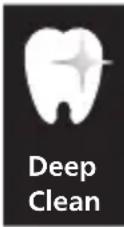 | 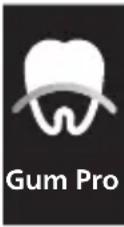 | 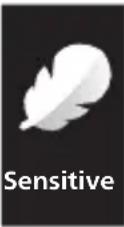 | 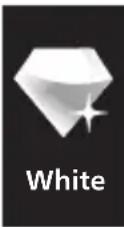 |
| Foydasi Qasmoqla-rni ketkazish | Yuqori karashni olib tashlash | Qasmoqla-rni ketkazish va milklarni uqalash | Sezuvchan tishlar va milklar uchun juda yumshoq rejim | Qasmoqla-rni va yuzadagi dog'larni ketkazish | |
| Jami tish tozalash vaqti | 2 daqiga 3 daqiga 3 daqiga 2 daqiga 2 daqiga | va 30 soniya | |||
| Tozalash usuli | Har bir segmentni 30soniyadan tozalang | Har bir segmentni 45soniyadan tozalang | Har bir segmentni 30soniyadan tozalang, | Har bir segmentni 30soniyadan tozalang | Har bir segmentni 30soniyadan tozalang, |
 |  |  |  |  | |
| keyin har bir segmentni-ng milk chizig'i bo'ylab 15soniya davomida cho'tkalan-g. | keyin yuqori va pastki old tishlarning har biri 15soniya davomida tozalang. | ||||
BrushSync texnologiyasi
natural_image
Illustration of a toothbrush with a sensor icon and a magnified circular detail (no text or symbols)BrushSync texnologiyasi cho'tka kallagining dasta bilan mikrochip orqali muloqot qilishiga yordam beradi.
Cho'tka kallagi ostidagi belgisi cho'tka kallagi ushbu texnologiya bilan jihozlanganini anglatadi.
BrushSync texnologiyasi quyidagilarni faollashtiradi:
- Cho'tka kallagini almashtirishni eslatish funksiyasi
- Cho'tka kallagini juftlash rejimi
Philips Sonicare BrushSync texnologiyasiga ega keng turdagi smart cho'tka kallaklarini taklif qiladi. Tish cho'tkasining cho'tka kallaklari to'liq ko'lami bilan tanishish va sizga eng mos keladigan cho'tka kallagini topish uchun www.philips.com/toothbrush-heads veb-saytiga kiring.
Funksiyalar
- Bosim sensori
- SmarTimer
- Cho'tkalash hisobotlari
312 O'zbek
- QuadPacer
- EasyStart
- Cho'tka kallagini almashtirishni eslatish funksiyasi
- Cho'tka kallagini juftlash rejimi
Bosim sensori
Philips Sonicare tish tozalash vaqtida qo'llangan bosimni o'lchaydigan murakkab sensor bilan jihozlangan. Ortiqcha bosim qo'llasangiz, tish cho'tkasi bosimni rostlashingiz kerakligini bildirish uchun tezkor munosabat bildiradi. Cho'tkalash paytida juda ko'p bosim qo'llasangiz, tebranishning o'zgarishini sezasiz va tutqichning pastki qismi to'q sariq rangda yonadi.
Cho'tkalash hisobotlari
Philips Sonicare muntazam ravishda cho'tkalash xattiharakatlaringiz haqida hisobot taqdim etadi.
natural_image
Line drawing of a medical procedure showing a tool interacting with an anatomical structure (no text or symbols)1 Cho'tka kallagini chiqarib oling va metall val atrofini iliq suv bilan yuving. Dasta va tugmalar atrofidagi tish pastasi qoldiqlarini haftada kamida bir marta, lekin yaxshisi har foydalanishdan keyin tozalang.
Ogohlantirish: Metall valdagi yoki tugmalar atrofidagi rezina zichlagichni o'tkir narsalar bilan bosmang, bu shikastlanishga olib kelishi mumkin.
2 Dastaning butun yuzasini nam mato bilan artib oling.
Ogohlantirish: Ortiqcha suvni yo'qotish uchun dastani chanoq yoki stolga urmang.
3 Dastani yumshoq mato yoki sochiq bilan quriting.
Cho'tka kallagi
natural_image
Diagram of a mechanical or electrical device with two vertical rods and a connecting rod, no text or symbols present.1 Har foydalanishdan keyin cho'tka kallagi va cho'tkalarini yuving va havoda quriting.
2 Cho'tka kallagini dastadan chiqarib oling va cho'tka kallagi ulanish qismini kamida haftada bir marta iliq suv bilan yuving.
Quvvatlash moslamasi
1 Tozalashdan avval, quvvatlagichni tarmoqdan uzing.
2 Quvvatlash moslamasining butun yuzasini nam mato bilan artib oling.
Xotira
Agar siz mahsulotni uzoq vaqt ishlatmoqchi bo'lmasangiz, uni elektr tarmog'idan uzing va tozalang ("Tozalash" bo'limiga qarang). Uni bevosita quyosh nuri tushmaydigan salqin va quruq joyda saqlang. Batareyaning to'liq quvvatsizlanishiga yo'l qo'ymaslik uchun tish cho'tkasini muntazam ravishda quvvatlang. To'liq quvvatsizlangan batareya qayta quvvatlanmasligi mumkin.
The built-in rechargeable battery must only be removed by a qualified professional when the appliance is discarded. Before removing the battery, make sure that the appliance is disconnected from the wall socket and that the battery is completely empty.
Jihozni ochish uchun asboblardan foydalanishda va quvvatlanadigan batareyalarni chiqindiga tashlashda barcha kerakli xavfsizlik choralarini ko'ring.
natural_image
Illustration of a hand holding a cylindrical object with a rotating arrow indicating rotation (no text or symbols)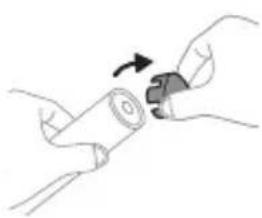
natural_image
Illustration of hands holding a cylindrical object with a knob, no text or symbols present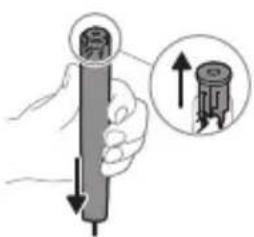
text_image
Diagram showing a hand holding a cylindrical object with an inset magnified view of the internal structure, likely illustrating a mechanical or electrical process.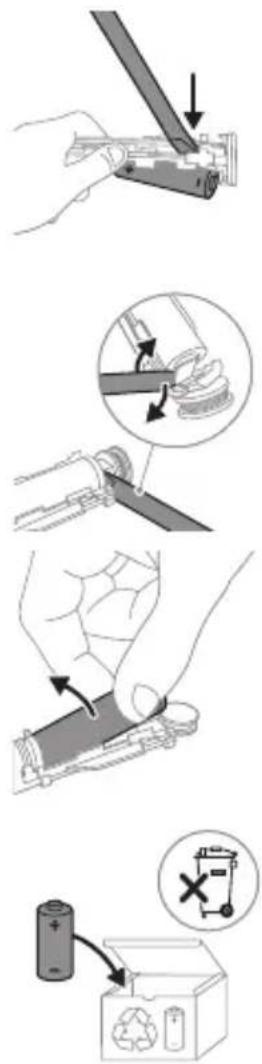
5 Buragichni batareya va ichki qismlarning ostidagi oq korpus orasiga kiriting. Keyin oq korpus ostidagi qismni sindirish uchun buragichni batareyadan uzoqlashtiring.
6 Batareyani yashil bosma plata bilan ulab turadigan metall tilchani sindirish uchun buragichni batareya osti va oq korpus orasiga kiriting. Bu batareyaning ostki uchini korpusdan chiqarib oladi.
7 Ikkinchi metall tilchani sindirish uchun batareyani oling va uni ichki qismlarga teskari tarafga torting.
Ogohlantirish: Barmog'ingizni tilib olmaslik uchun batareya tilchasining o'tkir qirralaridan ehtiyot bo'ling.
www.philips.com/support
natural_image
Simple line drawing of an open book with no text or symbols visiblenatural_image
Illustration of a hand holding a tool with an arrow indicating motion (no text or symbols)natural_image
Simple line drawing of a curved object with a checkmark mark, no text or symbols presentnatural_image
Illustration of a hand holding a pen with a magnified inset showing a droplet on a surface (no text or symbols)natural_image
Illustration of a hand holding a toothbrush with a circular button labeled (no text or symbols)natural_image
Diagram showing dental tool interacting with teeth and jawbone structure (no text or labels)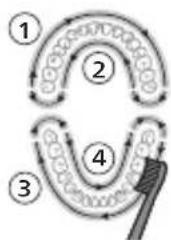
flowchart
graph TD
    A["①"] --> B["②"]
    B --> C["③"]
    C --> D["④"]
    D --> E["④"]
    style A fill:#f9f,stroke:#333
    style B fill:#ccf,stroke:#333
    style C fill:#cfc,stroke:#333
    style D fill:#fcc,stroke:#333
    style E fill:#ffc,stroke:#333
natural_image
Illustration of a hand holding a vertical object with a small circular button labeled '###' (no text or symbols on the object itself)natural_image
Illustration of a toothbrush with a sensor icon and signal symbol (no text or labels)S2 Sensitive: Tryb Sensitive
W Optimal White: tryb White
natural_image
Line drawing of a medical procedure with a needle inserted into a tube (no text or symbols)natural_image
Diagram of a hand holding a tool with a ruler, against a diagonal line (no text or symbols)The built-in rechargeable battery must only be removed by a qualified professional when the appliance is discarded. Before removing the battery, make sure that the appliance is disconnected from the wall socket and that the battery is completely empty.
natural_image
Illustration of a hand holding a small object with a curved arrow indicating rotation (no text or symbols)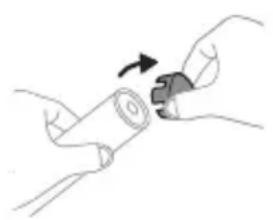
natural_image
Illustration of hands holding a cylindrical object with an arrow indicating rotation (no text or symbols)www.philips.com/support
natural_image
Simple line drawing of an open book with no text or symbols visiblenatural_image
Illustration of a hand holding a tool with an arrow indicating motion (no text or symbols)natural_image
Simple line drawing of a curved object with a checkmark mark, no text or symbols presentnatural_image
Illustration of a hand holding a pipette with a magnified inset showing a droplet on a surface (no text or symbols)natural_image
Hand holding a toothbrush with a circular button labeled 'b' (no text or symbols on the object itself)natural_image
Diagram showing a hand holding a tool with a 45-degree angle indicator (no text or symbols present)natural_image
Diagram showing dental tool application on tooth structure (no text or symbols)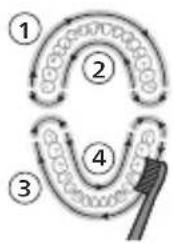
flowchart
graph TD
    A["①"] --> B["②"]
    B --> C["③"]
    C --> D["④"]
    D --> E["④"]
    style A fill:#f9f,stroke:#333
    style B fill:#f9f,stroke:#333
    style C fill:#f9f,stroke:#333
    style D fill:#f9f,stroke:#333
    style E fill:#f9f,stroke:#333
natural_image
Illustration of a hand holding a small black object with a white circular button labeled '###' (no text or symbols on the object itself)Gum Pro Sensitive White
natural_image
Illustration of a toothbrush with a sensor icon and signal symbol (no text or labels)natural_image
Line drawing of a medical procedure with a needle inserted into a tube (no text or symbols)natural_image
Diagram of a mechanical or electrical component with two arms and a central rod, no visible text or symbolsThe built-in rechargeable battery must only be removed by a qualified professional when the appliance is discarded. Before removing the battery, make sure that the appliance is disconnected from the wall socket and that the battery is completely empty.
natural_image
Illustration showing a hand holding a tool with arrows indicating movement or force (no text or symbols present)text_image
Diagram showing a battery connected to a recycling bin with a 'X' symbol indicating a waste disposal or recycling process.www.philips.com/support
text_image
Medical illustration showing a hand holding a syringe and a checkmark on a knee joint, with an arrow indicating the process.natural_image
Illustration of a hand using a pipette to apply liquid onto a surface, with an inset showing a droplet on a surface (no text or symbols present)natural_image
Illustration of a hand holding a small black object with a circular button labeled 'd' (no text or symbols on the object itself)natural_image
Illustration of dental tool interacting with teeth (no text or symbols)natural_image
Illustration of a hand holding a black rectangular object with a circular button labeled 'φ' (no text or symbols on the object itself)natural_image
Illustration of a toothbrush with a sensor icon and a magnified view of its base (no text or symbols)natural_image
Line drawing of a medical procedure with a needle inserted into a tube (no text or symbols)natural_image
Diagram of a mechanical or electrical component with two arms and a central rod, no visible text or symbolsThe built-in rechargeable battery must only be removed by a qualified professional when the appliance is discarded. Before removing the battery, make sure that the appliance is disconnected from the wall socket and that the battery is completely empty.
natural_image
Illustration of a hand holding a cylindrical object with a rotating arrow indicating rotation (no text or symbols)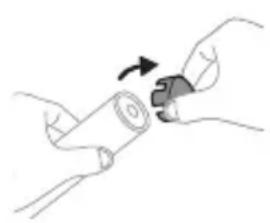
natural_image
Illustration of hands holding a cylindrical object with an arrow indicating rotation (no text or symbols)
www.philips.com/support
text_image
Medical illustration showing a hand holding a syringe and a checkmark indicating a procedure on the knee joint.natural_image
Illustration of a hand using a pipette to apply liquid onto a surface, with an inset showing a droplet on a surface (no text or symbols present)natural_image
Illustration of a hand holding a small object with a circular button labeled 'd' (no text or symbols on the object itself)natural_image
Diagram of dental tool application on tooth structure (no text or labels)natural_image
Hand holding a black rectangular object with a small circular button labeled '小' (small) on its side, against a plain background (no text or symbols)natural_image
Illustration of a toothbrush with a circular icon showing wireless signal (no text or symbols)natural_image
Simple line drawing of a medical procedure with a needle inserted into tissue (no text or symbols)natural_image
Diagram of a mechanical or electrical component with two arms and a central rod, intersected by a diagonal line (no text or symbols)Ngarkuesi
The built-in rechargeable battery must only be removed by a qualified professional when the appliance is discarded. Before removing the battery, make sure that the appliance is disconnected from the wall socket and that the battery is completely empty.
natural_image
Illustration of a hand holding a cylindrical object with a curved arrow indicating rotation (no text or symbols)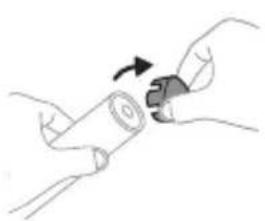
natural_image
Illustration of hands holding a cylindrical object with a curved arrow indicating rotation (no text or symbols)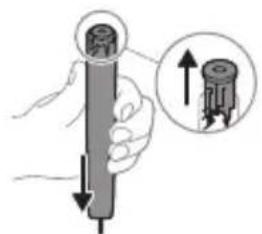
natural_image
Illustration of a hand holding a cylindrical object with an arrow indicating direction, accompanied by a magnified inset showing upward arrows (no text or symbols)natural_image
Hand holding a tool interacting with a mechanical component (no text or symbols visible)natural_image
Illustration showing a hand holding a tool with a magnified inset of the blade being cut (no text or symbols present)text_image
Diagram showing a battery connected to an open recycling bin with a 'X' symbol and a recycling symbol below.natural_image
Illustration of a hand holding a toothbrush and a finger, with an arrow indicating the process (no text or symbols present)natural_image
Simple line drawing of a curved object with a checkmark mark, no text or symbols present2 Glavo ščetke odločno pritisnite na kovinsko os do konca.
natural_image
Illustration of a hand using a pipette to apply liquid onto a surface, with an inset showing a droplet on a surface (no text or symbols present)natural_image
Illustration of a hand holding a toothbrush with a circular button (no text or symbols)Gum Pro Sensitive White
Slika načina
natural_image
Diagram of a toothbrush with sensor icon and magnified view (no text or symbols)S2 Sensitive: Način Sensitive
W Optimal White: način White
natural_image
Line drawing of a medical procedure showing a needle inserted into a tube with an applicator (no text or symbols)natural_image
Diagram of a mechanical or electrical component with two arms and a central rod, no visible text or symbolsThe built-in rechargeable battery must only be removed by a qualified professional when the appliance is discarded. Before removing the battery, make sure that the appliance is disconnected from the wall socket and that the battery is completely empty.
text_image
Technical diagram illustrating a mechanical assembly process with labeled steps and directional arrows indicating motion.natural_image
Illustration of a hand holding a rectangular object with an arrow indicating motion (no text or symbols)7 Baterijo primite in jo odmaknite od notranjih delov, da prelomite drugi kovinski jeziček baterije.
Opozorilo: Pazite, da si z ostrimi robovi jezičkov baterije ne poškodujete prstov.
text_image
Diagram showing a battery connected to an open recycling bin with a 'X' symbol indicating no disposal or reuse.natural_image
Simple line drawing of an open book with no text or symbols visiblenatural_image
Illustration of a hand holding a tool with an arrow indicating motion (no text or symbols)natural_image
Simple line drawing of a curved object with a checkmark mark, no text or symbols presentnatural_image
Illustration of a hand using a pipette to apply liquid onto a surface, with an inset showing a droplet on a surface (no text or symbols present)1 Navlhčite štetiny a vytlačte na kefku trochu zubnej pasty.
natural_image
Illustration of a hand holding a small black object with a circular button labeled 'd' (no text or symbols on the object itself)natural_image
Diagram showing dental tool interacting with teeth (no text or labels)natural_image
Hand holding a black rectangular object with a white circular opening, resembling a stylized tooth or device (no text or symbols visible)Vaša elektrická zubná kefka je vybavená piatimi rôznymi režimami: Clean, Deep Clean, Gum Pro, Sensitive a White. Podl'a použitej hlavice zubnej kefky technológia BrushSync automaticky vyberie optimálny režim.
Gum Pro Sensitive White
(Bielenie)
Obrázok režimu

natural_image
Illustration of a toothbrush with a sensor icon and a magnified view of its base (no text or symbols)natural_image
Line drawing of a medical procedure with a needle inserted into a tube (no text or symbols)natural_image
Diagram of a mechanical or electrical component with two arms and a central rod, no visible text or symbolsThe built-in rechargeable battery must only be removed by a qualified professional when the appliance is discarded. Before removing the battery, make sure that the appliance is disconnected from the wall socket and that the battery is completely empty.
natural_image
Illustration of a hand holding a cylindrical object with a rotating arrow indicating rotation (no text or symbols)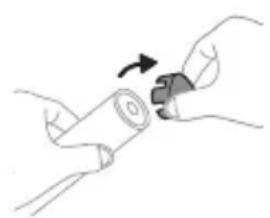
natural_image
Illustration of hands holding a cylindrical object with an arrow indicating rotation (no text or symbols)www.philips.com/support
text_image
Medical illustration showing a hand holding a syringe and a checkmark on a knee joint, with an arrow indicating the process.1 Poravnajte glavu četkice tako da su vlakna okrenuta u istom smeru kao i prednja strana drške.
2 Čvrsto pritisnite glavu četkice nadole na metalnu osovinu dok se ne zaustavi.
natural_image
Illustration of a hand using a pipette to apply liquid onto a surface, with an inset showing a droplet on a surface (no text or symbols present)1 Pokvasite vlakna i nanesite malu količinu paste za zube.

2 Pritisnite dugme za napajanje da biste uključili svoju Philips Sonicare četkicu. Zatim izaberite režim četkanja.
natural_image
Illustration of a hand holding a toothbrush with a small circular button (no text or symbols)Vaša električna četkica ima pet različitih režima: Clean, Deep Clean, Gum Pro, Sensitive i White.
Na osnovu pametne glave četkice koju koristite, optimalni režim će automatski biti izabran zahvaljujući BrushSync tehnologiji.
Da biste ručno promenili režim, pritisnite dugme za napajanje dok je četkica uključena. Sve Philips Sonicare glave četkica su kompatibilne sa svakim režimom.
Režim Clean Dubinsko
čišćenje
Gum Pro Sensitive White
Slika režima
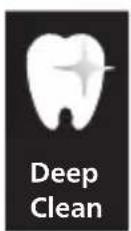
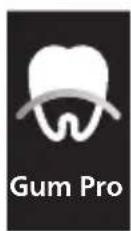

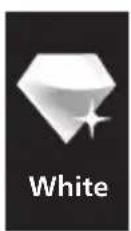
| Režim Clean Dubinskočišćenje | Gum Pro Sensitive White | ||||
| Pogodnost | Uklanjanje plaka | Superiorno uklanjanje zubnih naslaga | Uklanjanje plaka i masaža desni | Veoma nežan režim za osetljive zube i desni | Uklanjanje plaka i mrlja sa površina |
| Ukupno vreme pranja zuba | 2 minuta 3 minuta 3 minuta 2 minuta 2 minuta i | 30 sekundi | |||
| Kako se pere | perite svaki segment 30 sekundi | perite svaki segment 45 sekundi | perite svaki segment 30 sekundi, | perite svaki segment 30 sekundi | perite svaki segment 30 sekundi, |
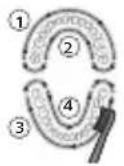 | 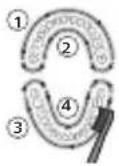 | 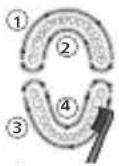 | 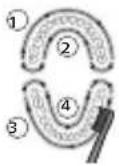 | 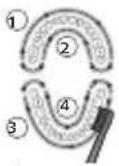 | |
| zatim četkajte duž linije desni svakog segmenta po 15 sekundi. | zatim četkajte gornje i donje prednje zube po 15 sekundi. | ||||
Tehnologija BrushSync
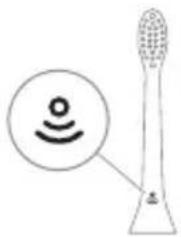
natural_image
Illustration of a toothbrush with a sensor icon and signal symbol (no text or labels)Tehnologija BrushSync omogućava komunikaciju između glave četkice i drške koristeći mikročip. Simbol na donjoj strani glave četkice označava da glava četkice sadrži ovu tehnologiju.
Tehnologija BrushSync omogućava:
- Podsetnik za zamenu glave sa četkicom
- Režim uparivanja glave sa četkicom
Philips Sonicare ima široku paletu pametnih glava četkica sa tehnologijom BrushSync. Za više informacija o našoj cjelokupnoj paleti glava četkica za zube posjetite
www.philips.com/toothbrush-heads i pronadite glavu četkice koja vam najviše odgovara.
Karakteristike
- Senzor pritiska
- SmarTimer
- Izveštaji o četkanju
- QuadPacer
- EasyStart
- Podsetnik za zamenu glave sa četkicom
- Režim uparivanja glave sa četkicom
Senzor pritiska
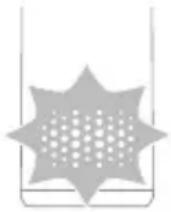
natural_image
Line drawing of a medical procedure showing a needle inserted into an anatomical structure (no text or labels)1 Skinite glavu četkice i isperite oblast oko metalne osovine toplom vodom. Obavezno uklonite ostatke paste sa drške i oko dugmadi najmanje jednom nedeljno, a po mogućstvu nakon svake upotrebe.
Oprez: Ne pritiskajte gumeni zaptivač na metalnom vratilu ili oko dugmadi oštrim predmetima, jer može doći do oštećenja.
2 Čitavu površinu drške obrišite vlažnom krpom.
natural_image
Diagram of a mechanical or electrical device with two arms and a central shaft, no visible text or symbols1 Isperite glavu četkice i vlakna nakon svake upotrebe i ostavite ih da se osuše na vazduhu.
2 Bar jednom nedeljno skinite glavu četkice sa drške i toplom vodom isperite njen priključak.
Punjač
1 Isključite punjač iz električne mreže pre čišćenja.
2 Obrišite površinu punjača vlažnom krpom.
Skladištenje
The built-in rechargeable battery must only be removed by a qualified professional when the appliance is discarded. Before removing the battery, make sure that the appliance is disconnected from the wall socket and that the battery is completely empty.
natural_image
Illustration of a hand holding a rectangular object with an arrow indicating motion (no text or symbols)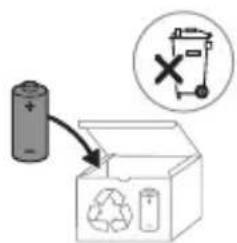
text_image
Diagram showing a battery connected to an open recycling box with a 'X' symbol and recycling symbol, indicating no chemical reaction or disposal.7 Uhvatite bateriju i odvojite je od unutrašnjih komponenti kako biste slomili drugi metalni jezičak baterije.
Oprez: pazite na oštre ivice jezičaka baterije da ne biste povredili prste.
8 Kontakte na bateriji zaštitite trakom kako preostali napon baterije ne bi prouzrokovao kratak spoj. Punjivu bateriju sada je moguće reciklirati, a ostatak proizvoda odložiti na odgovarajući način.
Johdanto
www.philips.com/support
natural_image
Illustration of a hand holding a pen or stylus with an arrow pointing to it, no text or symbols present.natural_image
Simple line drawing of a curved object with a checkmark mark, no text or symbols presentnatural_image
Illustration of a hand using a pen to apply a product to a toothbrush, with an inset showing a circular object (no text or symbols present)natural_image
Hand holding a black rectangular object with a circular button labeled '###' (no text or symbols on the object itself)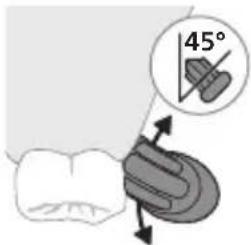
text_image
45°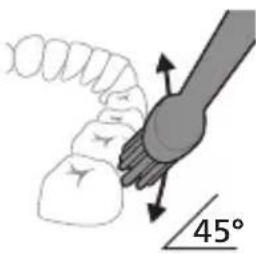
text_image
45°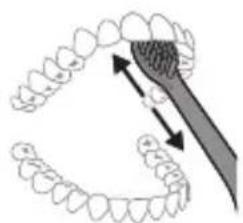
natural_image
Diagram showing dental tool application on upper teeth with magnified detail (no text or symbols)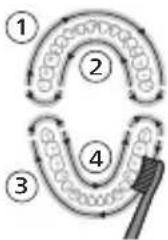
flowchart
graph TD
    A["①"] --> B["②"]
    B --> C["③"]
    C --> D["④"]
    D --> E["④"]
    style A fill:#f9f,stroke:#333
    style B fill:#f9f,stroke:#333
    style C fill:#f9f,stroke:#333
    style D fill:#f9f,stroke:#333
    style E fill:#f9f,stroke:#333
natural_image
Illustration of a hand holding a toothbrush with a circular button (no text or symbols)Gum Pro Sensitive White
text_image
Diagram showing a stylized toothbrush with a circular icon containing a Wi-Fi symbol, likely indicating sound or signal detection.S2 Sensitive: Sensitive-tila
W Optimal White: White-tila
natural_image
Simple line drawing of a fork being held by a knife (no text or symbols)natural_image
Diagram of a mechanical or electrical component with two arms and a central rod, intersected by a diagonal line (no text or symbols)Laturi
The built-in rechargeable battery must only be removed by a qualified professional when the appliance is discarded. Before removing the battery, make sure that the appliance is disconnected from the wall socket and that the battery is completely empty.
natural_image
Illustration of a hand holding a cylindrical object with an arrow indicating rotational motion (no text or symbols)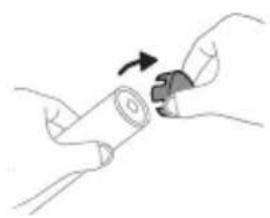
natural_image
Illustration of hands holding a cylindrical object with a curved arrow indicating rotation (no text or symbols)
natural_image
Simple line drawing of an open book with no text or symbols visiblenatural_image
Illustration of a hand holding a toothbrush and a finger pointing to a small object (no text or symbols)natural_image
Simple line drawing of a curved object with a checkmark mark, no text or symbols presentnatural_image
Illustration of a hand applying a toothbrush to a tooth, with an inset showing a magnified view of the tooth (no text or symbols present)natural_image
Illustration of a hand holding a vertical object with a circular button labeled '内' (no text or symbols on the object itself)natural_image
Diagram of a toothbrush with a sensor icon and a magnified view of its base (no text or symbols)text_image
1:03 0:45 Gum Pronatural_image
Simple line drawing of a medical procedure with a tool and tubing (no text or symbols)natural_image
Diagram of a mechanical lever system with two arms and a central pivot, no text or symbols presentLaddare
The built-in rechargeable battery must only be removed by a qualified professional when the appliance is discarded. Before removing the battery, make sure that the appliance is disconnected from the wall socket and that the battery is completely empty.
natural_image
Illustration showing a hand holding a tool with arrows indicating movement, no text or symbols presenttext_image
Diagram showing a battery connected to a recycling bin with a 'X' symbol indicating a waste disposal or recycling process.www.philips.com/support
Bellik: Dürli modellerin ayratynlyklary dürlüçe bolup bilýär. Käbir modeller Bluetooth ya-da NFC bilen enjamlaşdyrylmadyk bolup biler.
ULANYLÝAN NYŞANLARYŇ SANAWY

natural_image
Illustration of a hand holding a toothbrush with a finger pointing to it (no text or symbols)1 Gyllar tutawajyň öň tarapy bilen bir ugra seredip durar ýaly edip, nasadkany deňläň.
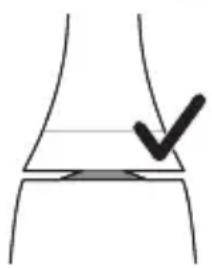
natural_image
Simple line drawing of a curved object with a checkmark mark, no text or symbols presentnatural_image
Illustration of a hand using a pipette to apply liquid onto a surface, with an inset showing a droplet on a surface (no text or symbols present)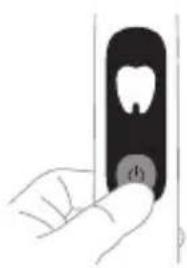
natural_image
Illustration of a hand holding a small object with a circular button labeled 'd' (no text or symbols on the object itself)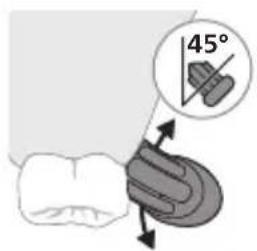
text_image
45°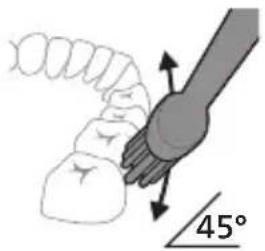
text_image
45°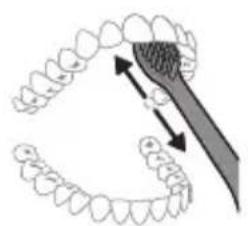
natural_image
Diagram of dental tool application on tooth structure (no text or labels)1 Gyllary öllän we üstüne azajyk diş pastasyny çalyn.
natural_image
Hand holding a toothbrush with a small circular mark on the cheek (no text or symbols visible)Elektrikli diş çotgaňyz bâş dürli tertip bilen enjamlaşdyrylandyr: Clean, Deep Clean, Gum Pro, Sensitive we White.
Ulanýan akylly nasadkaňyza baglylykda; optimal tertip BrushSync tehnologiýasy tarapyndan awtomatik saýlanylar.
Gum Pro Sensitive White
natural_image
Diagram of a toothbrush with a sensor icon and a magnified view of its base (no text or symbols)natural_image
Line drawing of a medical procedure with a needle inserted into a tube (no text or symbols)natural_image
Diagram of two mechanical arms with a tool, no text or symbols present1 Her gezek ulanylandan soň çotga nasadkasyny we gyllaryny yuwuň hem-de howada guramagyna maý beriň.
The built-in rechargeable battery must only be removed by a qualified professional when the appliance is discarded. Before removing the battery, make sure that the appliance is disconnected from the wall socket and that the battery is completely empty.
natural_image
Illustration of a hand holding a cylindrical object with an arrow indicating rotational motion (no text or symbols)
www.philips.com/support
natural_image
Simple line drawing of an open book with no text or symbols visiblenatural_image
Illustration of a hand holding a pen or stylus with an arrow pointing to it, no text or symbols present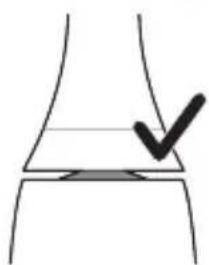
natural_image
Simple line drawing of a curved surface with a checkmark mark (no text or symbols)natural_image
Illustration of a hand applying a toothbrush to a nail, with an inset showing a magnified view of the tooth (no text or symbols present)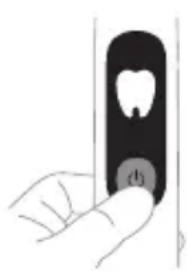
natural_image
Illustration of a hand holding a vertical object with a small circular button labeled 'd' (no text or symbols on the object itself)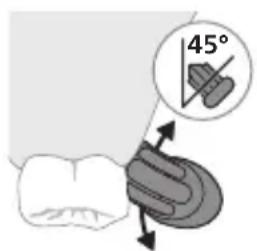
text_image
45°natural_image
Illustration of dental arching technique showing tooth arrangement and tool placement (no text or symbols)natural_image
Hand holding a toothbrush with a circular button (no text or symbols visible)natural_image
Illustration of a toothbrush with a sensor icon and signal symbol (no text or labels)natural_image
Line drawing of a person holding a tool with a pen, no text or symbols presentnatural_image
Diagram of a mechanical or electrical component with two arms and a central rod, intersected by a diagonal line (no text or symbols)Βάση φόρτισης
The built-in rechargeable battery must only be removed by a qualified professional when the appliance is discarded. Before removing the battery, make sure that the appliance is disconnected from the wall socket and that the battery is completely empty.
natural_image
Illustration of a hand holding a small object with an arrow indicating motion (no text or symbols)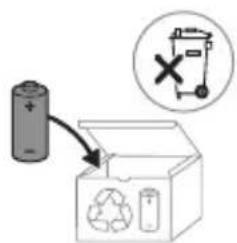
text_image
Diagram showing a battery connected to an open recycling bin with a 'X' symbol indicating no detectable waste.www.philips.com/support
natural_image
Simple line drawing of an open book with no text or symbols visibletext_image
Medical illustration showing a hand holding a needle and a tool, with a checkmark indicating a procedure step.natural_image
Illustration of a hand using a pen to apply liquid onto a tooth, with an inset showing a magnified view of the tooth (no text or symbols present)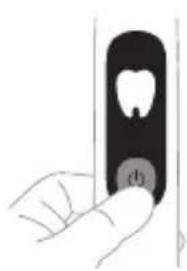
natural_image
Illustration of a hand holding a vertical object with a circular button labeled 'd' (no text or symbols on the object itself)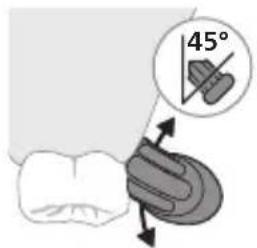
text_image
45°natural_image
Diagram showing dental tool application on upper teeth with magnified view (no text or symbols)natural_image
Hand holding a toothbrush with a circular button (no text or symbols visible)natural_image
Diagram of a toothbrush with a circular icon showing wireless signal, no text or symbols presentnatural_image
Line drawing of a medical procedure involving a needle inserted into a patient's abdomen (no text or symbols)natural_image
Diagram of mechanical components with no visible text or symbolsThe built-in rechargeable battery must only be removed by a qualified professional when the appliance is discarded. Before removing the battery, make sure that the appliance is disconnected from the wall socket and that the battery is completely empty.
natural_image
Illustration of a hand holding a cylindrical object with a curved arrow indicating rotation (no text or symbols)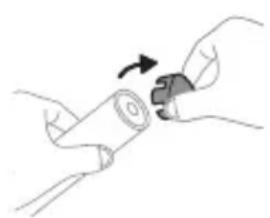
natural_image
Illustration of hands holding a cylindrical object with an arrow indicating rotation (no text or symbols)
www.philips.com/support
natural_image
Simple line drawing of an open book with no text or symbols visiblenatural_image
Illustration of a hand holding a tool with an arrow indicating motion (no text or symbols)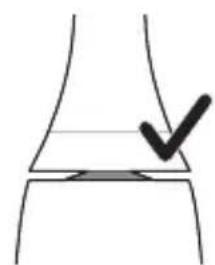
natural_image
Simple line drawing of a curved object with a checkmark mark, no text or symbols presentnatural_image
Illustration of a hand holding a pipette with a magnified inset showing a droplet on a surface (no text or symbols)natural_image
Illustration of a hand holding a tooth with a circular button labeled 'θ' (no text or symbols on the object itself)natural_image
Diagram showing dental tool interacting with teeth and jawbone structure (no text or labels)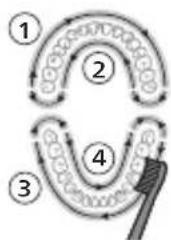
flowchart
graph TD
    A["①"] --> B["②"]
    B --> C["③"]
    C --> D["④"]
    D --> E["④"]
    style A fill:#f9f,stroke:#333
    style B fill:#ccf,stroke:#333
    style C fill:#cfc,stroke:#333
    style D fill:#fcc,stroke:#333
    style E fill:#ffc,stroke:#333
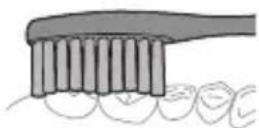
natural_image
Illustration of a hand holding a small black object with a white cavity, no text or symbols presentnatural_image
Illustration of a toothbrush with a sensor icon and signal symbol (no text or labels)natural_image
Line drawing of a medical procedure with a needle inserted into a tube (no text or symbols)natural_image
Diagram of a mechanical or electrical component with two arms and a central rod, no visible text or symbolsThe built-in rechargeable battery must only be removed by a qualified professional when the appliance is discarded. Before removing the battery, make sure that the appliance is disconnected from the wall socket and that the battery is completely empty.
natural_image
Illustration of a hand holding a small object with an arrow indicating motion (no text or symbols)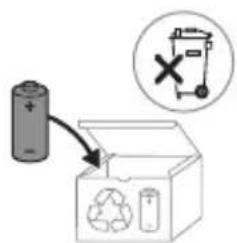
text_image
Diagram showing a battery connected to an open recycling bin with a 'X' symbol indicating no detectable waste.www.philips.com/support
natural_image
Simple line drawing of an open book with no text or symbols visiblenatural_image
Illustration of a hand holding a pen or stylus with a downward arrow indicating force or movement (no text or symbols)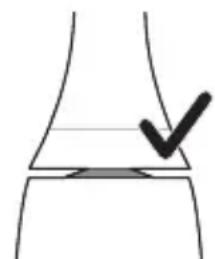
natural_image
Simple line drawing of a curved object with a checkmark mark, no text or symbols presentnatural_image
Illustration of a hand using a pen to apply a sample onto a surface, with an inset showing a magnified view of the sample (no text or symbols present)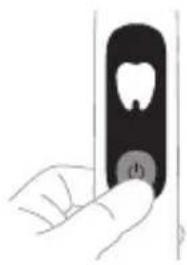
natural_image
Hand holding a toothbrush with a circular button labeled (no text or symbols on the object)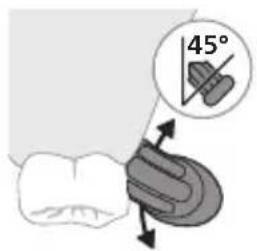
text_image
45°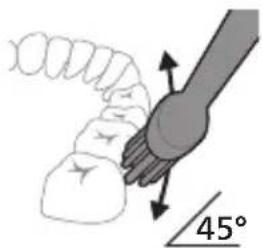
text_image
45°natural_image
Diagram showing dental tool application on upper teeth with magnified detail (no text or labels)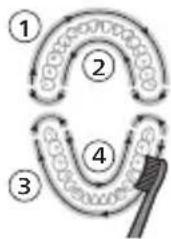
flowchart
graph TD
    A["①"] --> B["②"]
    B --> C["③"]
    C --> D["④"]
    D --> E["④"]
    style A fill:#f9f,stroke:#333
    style B fill:#ccf,stroke:#333
    style C fill:#cfc,stroke:#333
    style D fill:#fcc,stroke:#333
    style E fill:#ffc,stroke:#333
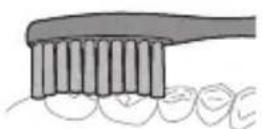
natural_image
Illustration of a hand holding a tooth with a circular button labeled 'D' (no text or symbols on the object itself)Gum Pro Sensitive White
Придоби- вка
natural_image
Illustration of a toothbrush with a sensor icon and a magnified view of its tip (no text or symbols)natural_image
Simple line drawing of a medical procedure with a needle inserted into tissue (no text or symbols)natural_image
Diagram of a mechanical or electrical component with two arms and a central rod, intersected by a diagonal line (no text or symbols)The built-in rechargeable battery must only be removed by a qualified professional when the appliance is discarded. Before removing the battery, make sure that the appliance is disconnected from the wall socket and that the battery is completely empty.
natural_image
Illustration of a hand holding a cylindrical object with a curved arrow indicating rotation (no text or symbols)
www.philips.com/support
natural_image
Illustration of a hand holding a toothbrush and a finger, with an arrow indicating the process (no text or symbols present)natural_image
Simple line drawing of a curved object with a checkmark mark, no text or symbols presentnatural_image
Illustration of a hand using a pipette to apply liquid onto a surface, with an inset showing a droplet on a surface (no text or symbols present)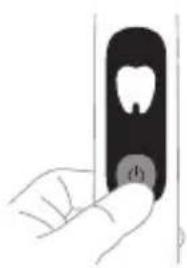
natural_image
Illustration of a hand holding a small object with a circular button labeled 'd' (no text or symbols on the object itself)natural_image
Diagram showing a hand holding a tool with a 45-degree angle indicator (no text or symbols present)natural_image
Diagram of dental tool interacting with teeth and jawbone (no text or labels)natural_image
Hand holding a black rectangular object with a circular button, no visible text or symbolsnatural_image
Illustration of a toothbrush with a sensor icon and signal symbol (no text or labels)natural_image
Line drawing of a medical procedure with a needle inserted into a tube (no text or symbols)natural_image
Diagram of a mechanical assembly with two arms and a central component, no visible text or symbolsThe built-in rechargeable battery must only be removed by a qualified professional when the appliance is discarded. Before removing the battery, make sure that the appliance is disconnected from the wall socket and that the battery is completely empty.
natural_image
Illustration of a hand holding a cylindrical object with a curved arrow indicating rotation (no text or symbols)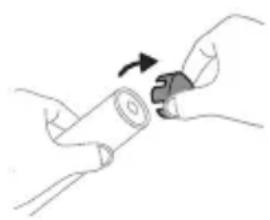
natural_image
Illustration of hands holding a cylindrical object with an arrow indicating rotation (no text or symbols)
www.philips.com/support
natural_image
Simple line drawing of an open book with no text or symbols visible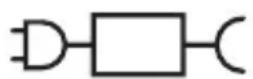
XXXXXX
text_image
Medical illustration showing a hand holding a needle and a tool interacting with a device, with a checkmark indicating the procedure.natural_image
Illustration of a hand using a pipette to apply liquid onto a surface, with an inset showing a droplet on a surface (no text or symbols present)natural_image
Illustration of a hand holding a tooth with a circular button (no text or symbols)natural_image
Diagram showing dental tool application on upper teeth with magnified view (no text or symbols)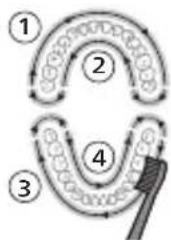
flowchart
graph TD
    A["①"] --> B["②"]
    B --> C["③"]
    C --> D["④"]
    D --> E["④"]
    style A fill:#f9f,stroke:#333
    style B fill:#ccf,stroke:#333
    style C fill:#cfc,stroke:#333
    style D fill:#fcc,stroke:#333
    style E fill:#ffc,stroke:#333
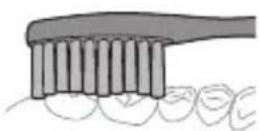
3 Лифхои чёткаро ба дандонхо дар кунчи хурд (45 дарача) чойгир кунед, фишори нармро истифода баред, то ки лифхо ба хати милки дандон ё каме зери хати милки дандон расанд.
natural_image
Illustration of a hand holding a toothbrush with a circular button (no text or symbols)Чуткаи баркии шумо бо панч речаи гуногун мучаххаз шудааст: Clean (Тоза кардан), Deep Clean (Тозакунии амик), Gum Pro (Нигохубини милки дандон), Sensitive (Барои дандонхои хассос), ва White (Сафедкуни). Вобаста аз сараки хушманди чуткаи истифодашаванда, речаи муносиб ба таври худкор тавассути технологияи BrushSync интихоб карда мешавад.
Gum Pro Sensitive White
Реча Clean Deep
Clean
text_image
Diagram showing a toothbrush with a sensor icon and a speech bubble, likely indicating sound or signal detection.natural_image
Line drawing of a fork being held by a knife (no text or symbols)natural_image
Diagram of a mechanical or electrical component with two arms and a central rod, intersected by a diagonal line (no text or symbols)The built-in rechargeable battery must only be removed by a qualified professional when the appliance is discarded. Before removing the battery, make sure that the appliance is disconnected from the wall socket and that the battery is completely empty.
natural_image
Illustration showing a hand holding a tool with arrows indicating movement or process (no text or symbols present)text_image
Diagram showing a battery connected to an open box with a recycling symbol and a 'X' indicating a waste or disposal mechanism.www.philips.com/support
natural_image
Illustration of a hand holding a pen or stylus with an arrow pointing to a finger (no text or symbols present)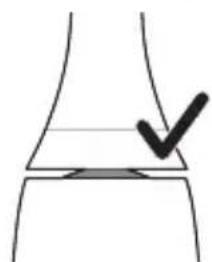
natural_image
Simple line drawing of a curved surface with a checkmark mark (no text or symbols)natural_image
Illustration of a hand using a pen to apply a sample onto a surface, with an inset showing a magnified view of the sample (no text or symbols present)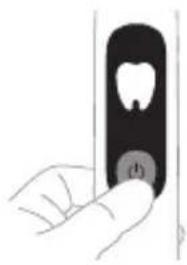
natural_image
Hand holding a toothbrush with a circular button labeled (no text or symbols on the object)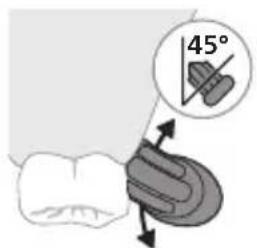
text_image
45°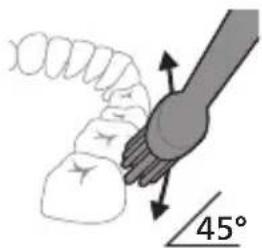
text_image
45°natural_image
Diagram showing dental tool interacting with teeth and jawbone structure (no text or labels)natural_image
Illustration of a hand holding a small black object with a white cavity, no text or symbols presentnatural_image
Illustration of a toothbrush with a circular icon showing sensor signal (no text or symbols)natural_image
Illustration of a medical procedure showing a needle inserted into an anatomical structure (no text or symbols present)natural_image
Diagram of a mechanical or electrical component with two arms and a central rod, no visible text or symbolsThe built-in rechargeable battery must only be removed by a qualified professional when the appliance is discarded. Before removing the battery, make sure that the appliance is disconnected from the wall socket and that the battery is completely empty.
natural_image
Illustration of a hand holding a cylindrical object with a rotating arrow indicating rotation (no text or symbols)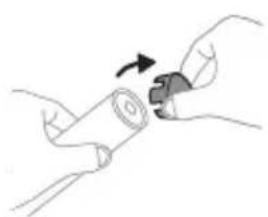
natural_image
Illustration of hands holding a rolled-up scroll with an arrow indicating rotation (no text or symbols)text_image
Diagram showing a hand holding a cylindrical object with an inset magnified view of the internal structure.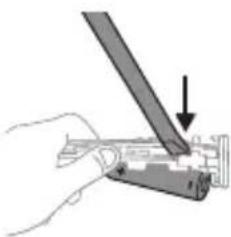
natural_image
Illustration of a hand using a tool to cut or mark a mechanical component (no text or symbols visible)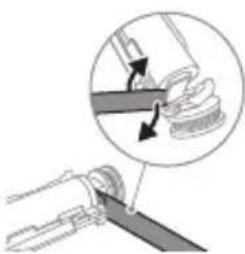
natural_image
Diagram showing a mechanical assembly with a magnified inset of a tool interacting with a curved component (no text or symbols present)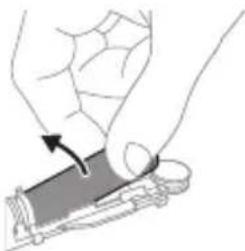
natural_image
Illustration of a hand holding a rectangular object with an arrow indicating motion (no text or symbols)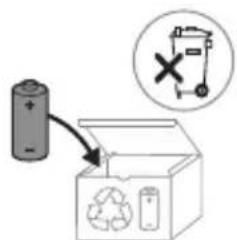
text_image
Diagram showing a battery connected to an open recycling bin with a 'X' symbol indicating no waste or disposal.www.philips.com/support
natural_image
Illustration of a hand holding a tool with an arrow indicating motion (no text or symbols)natural_image
Simple line drawing of a curved object with a checkmark mark, no text or symbols presentnatural_image
Illustration of a hand using a pipette to apply liquid onto a surface, with an inset showing a droplet on a surface (no text or symbols present)natural_image
Illustration of a hand holding a small object with a tooth symbol, no text or labels presentnatural_image
Diagram showing dental tool application on upper teeth with magnified detail (no text or symbols)natural_image
Hand holding a black rectangular object with a circular button, no visible text or symbolsGum Pro Sensitive White
Режим кескіні
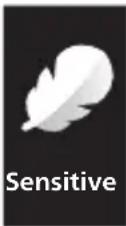
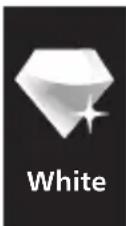
Gum Pro Sensitive White
natural_image
Illustration of a toothbrush with a sensor icon and signal symbol (no text or labels)natural_image
Simple line drawing of a medical procedure with a needle inserted into tissue (no text or symbols)natural_image
Diagram of a mechanical or electrical component with two arms and a central shaft, no visible text or symbolsThe built-in rechargeable battery must only be removed by a qualified professional when the appliance is discarded. Before removing the battery, make sure that the appliance is disconnected from the wall socket and that the battery is completely empty.
natural_image
Illustration of a hand holding a cylindrical object with a curved arrow indicating rotation (no text or symbols)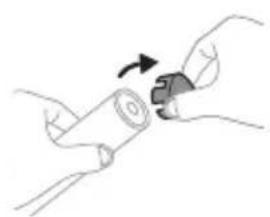
natural_image
Illustration of hands holding a cylindrical object with an arrow indicating rotation (no text or symbols)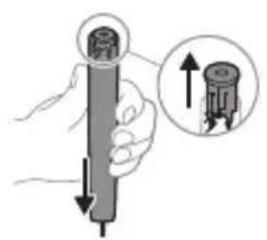
natural_image
Illustration of a hand holding a cylindrical device with a close-up inset showing upward force (no text or symbols)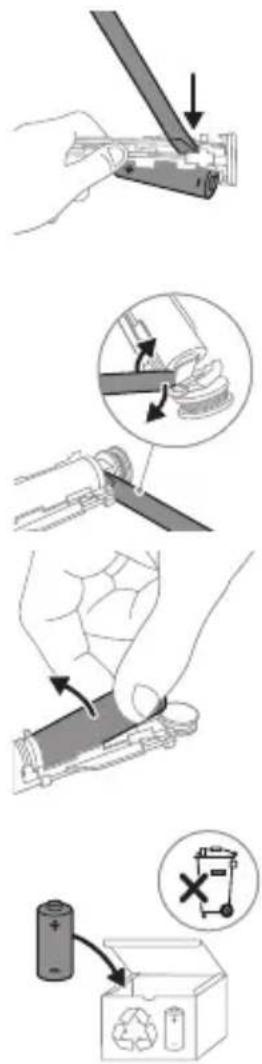
natural_image
Illustration of a hand holding a toothbrush and a finger with a nail, showing a downward arrow (no text or symbols)1 funquuwuh qihuhyn hwulwuwntgntap wjuwytu, nn uwqhylutnú ninnylwó jhutú unyú ninnniqjwup, hús przuwuh nhúwgh ynnúp:
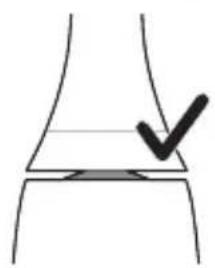
natural_image
Simple line drawing of a curved object with a checkmark mark, no text or symbols present2 Uünin utnútp hunqwùwlyh qihuhyn útnplu' nthwh útunwnwlywu jhutnh útg, puùh nán wju zh wúnwgti:
L2nuS lunqwùwuh qihuhuh u pnùwuh shgul hnnpn wùgph wnlywjniqniún ünnúwl 5: Uw jnyll 5 unwlhu hunqwùwuh qihuhuhu ywwunów2 ytinwnu ljanjwni:
2tn Philips Sonicare wunwutph hunquuwlyh oqunwqndnuiŋ
tpati wnwghù wùqwú tþ oqunwqnδniú ðtn Sonicare winwúh hunqwùwlyn, wultih 2win pénjæng qquīn ünnuúl 5' hwúbúwinnwð nε 5tāyunnwlywù hunqwùwlyh htún: 1nnúw l, tþp wirwghù wùqwú oqunwqnδnnútnp 2wwhg 2win utnúniú tǔ qnnδwnpnniú: Uhwjù yhhwntrp üninp utnúniú u pniyl nultip, nnwtuqh winwúh hunqwùwlyn ðtn uhnhwntǔ úwpnh: hūynpníú tǔp htúnutī hunqwùwlyhg oqunultīni gnigniúutnhù' luwlwqnijù wnnjniúpùtn unnwùwlni huúwún: Sonicare 5tāyunnwlywù hunqwùwlyhù wǔgniúu wultih htzun ηwnàútāni huúwún, wjù wunwpūniú 5 wlyunhulwgulwó EasyStart qnnδwnnyjənu: Uju qnnδwnnyjəu wunhǎwúwpwn wultiugūniú 5 hnuwùpù winwghù 14 úwpnniúutnh dwúwùwly` oqutāni ðtbq unlqnptl ðtn Sonicare winwúh hunqwùwlyhg oqunultīniú:
Uwpnúwù hnwhwùqùtn
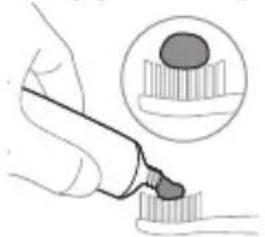
natural_image
Illustration of a hand using a pipette to apply liquid onto a surface, with an inset showing a droplet on a surface (no text or symbols present)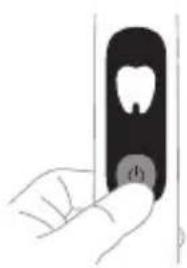
natural_image
Illustration of a hand holding a small object with a circular button labeled 'd' (no text or symbols on the object itself)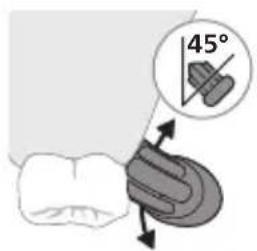
text_image
45°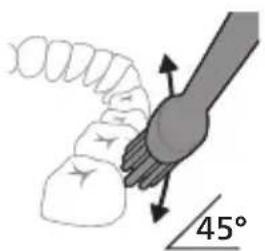
text_image
45°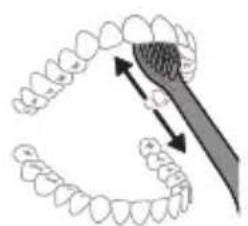
natural_image
Diagram showing dental tool interacting with teeth (no text or labels)1 əngtɪp hunqwɪwʊlyh ʊwqhlyɪtɪŋ n u ʊtɪngntɪp wʊnʊwʊh ʊwɒnɪlyh phz pwiʊwʊlnɪŋəniːu:
2 Utnútp úhwúwù lynǎwlyn` átín Philips Sonicare-n úhwútānì hwiúwn: Ujùnhtānlu nùunntp hunquúwùh nàdhún:
L2niú' Fnnn ntchúutph wnwghù 3 uujnljuwùuttn uujulniú tǔ útnú pénpənniúnú: Uw lquuhuniú 5 wnuwúh úwðnilýh 2wn unwln l u panyl 5 unwihu chnhutl ntchúuttn' pùunntínu hunqwùwwlyh àtn uwhupùunpwò ntchún:
3 Stwnnptp winwuh hunqwuwyh uwqhlyutnp winwutph ynw uh qhn pwn wuljwu unw (45 wuunhawu) 'unpnntu utnutlnu, npwtuqh uwqhlyutnp hwuutu luntnh tanwqohu ywu luntnh tanwqohg uh qhn p'utnpu:
U2niú Uúpnnq dwiúwúwly hunqwúwúh ytúuynnún wuwhtp wunwúutnh htún 2zhúwú útg:
4 Unpntu wuhtp hunwuwlyh uwqtnu wunwutph ynw untwnwnluwó u juntph tqnwqdnui: Uwpntp wunwutph p#puwlyh htun ni wnwg 2wndnutpnu, nnwtuqh hunwuwlyh uwqhutph hwutu wunwutphu: Cwnniuwtyp wju 2wndniyn atn uwpnuwu hnlyh wupnng npawgpniu:
^12 nui hunqwiuwlyh uwqhyttnn wtinp t uh hnnp lwjuwiuwu: hnphnnn zh unpniu wunwuttnn uwpnti wjuwtu, huzwtu nnip lywpthp unlwnwlywu wunwuh hunqwuwynu:
5 Ungluh winwuttnh utnuh uwlvtntuuttnn uwpntini hwuiwn pæptp hunqwùwlyh pràuwln yhuwninh nhhnpnl u jninwpwùyjnh ynw uh pwuh ninnwhwjwg uwpnnn qnnδnnημεjniùutn ywinwntp winwuttnh ynw:
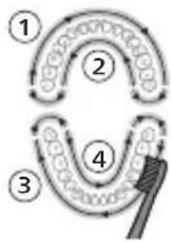
flowchart
graph TD
    A["①"] --> B["②"]
    B --> C["③"]
    C --> D["④"]
    D --> E["④"]
    style A fill:#f9f,stroke:#333
    style B fill:#ccf,stroke:#333
    style C fill:#cfc,stroke:#333
    style D fill:#fcc,stroke:#333
    style E fill:#ffc,stroke:#333
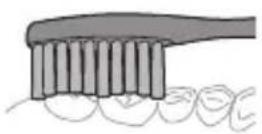
6 Uyutp úwpntl hwnulwð 1-hg (útnluh winnušutph nnuh lynnún) u úwpntp 30 úwjnljuwi úwhupwu hwnulwð 2-hu wǔgutln (útnluh winnušutph útnuh lynnún): Čwnniùwlytp úwpntl hwnulwð 3-niú (útnpluh winnušutph nnuh lynnún) u úwpntp 30 úwjnljuwi úwhupwu hwnulwð 4-hu wǔgutln (útnpluh winnušutph útnuh lynnún):
L2niú Lnwgnighs dwuwüwly t wuğluwgüniú, tnp oqnuwqnöniú ttp Deep Clean (hunn uwpnniú), Gum Pro (Lüntph hwüwn wüluwu) ywú White (Uwhunwylgünn) ntdhúutp:
7 Uwpnti ni yhni u wluwuntinig htunn ywnn t p lnwgnighs dwu wuwly hwnlqwgutl winwutph dwunn uwytntuutph uwpntni u wju hwnlwwdutphu, nnntn wengwunui t powlnnni: Uwpnn t p uwu uwpntl lqniu hunqwuwyn wwhtinl uhwgnwod ywi wugwinwod, huswtu xuwhpunwnni tip: 2tn Philips Sonicare winwuh hunqwuwyn wtinp t wwwhnl jhuh pntytunutph (pntytunutph ynw yhnwnzuw duwzuwly hunqwuwutph qihuhutph wultih 2niun uw2jniú ti) u winwutph yltpnwlywquwu huwwn (ignuniutph, wuwutph, yhhnptn), tiat nnpup wwn2wa lytnwnl ywsylwod tiu i stu yuwutl: hunhn wengwuwini ntwpniu huynnni tip hunhnnwlgtl winwutwpnyd- uwuuwqtunh htun:
L2nuS bnp Philips Sonicare wunwuh hunquuwlyu oqunwqnndlnuS Ljihuhlywlywuhtnwnqnnnipajniuutpnnu, wju wtupn S oqunwqnndh «Uwpnyn» ntdhuniS pnuwlynl wupnngnijawup lhgpwulnpuwud u EasyStart \$niulyghwu wugwinluud:
Ntchutn
Eğluynwlywiu hunqwüwlyu niüh hhuq unwnptn ntdhuútn. Uwpnın, hunn uwpnniú, Lünthh hwúwn wuúluwu, 2qujnìu u Uwhunwlytagünn: 2tn oqunwannówó hutlugh hunqwüwlyh qihuhh hhuúwú ynw, owunhúwl ntdhún ynúunnpíh wulnnúwn ytnwný BrushSync unthuúnqnhwjh úhongnu:
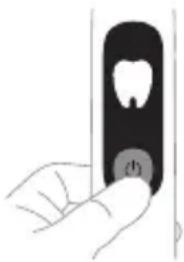
natural_image
Hand holding a black rectangular object with a circular button, no visible text or symbolsNTdchún àtnpnu ühnhtjni hwúwn utnútp úhwguwù lynówyn, tnp wunwúh hunquìuwyn úhwguwòξ: Philips Sonicare-h pninn hunquìuwlyutnh qihuhlyuttnw2huwunniu tǔ jninwpwùygnin ntdchúnj:
Ntdu Clean Hunnn
นัพย์นิส
Lùntnh
huúwùn
wùuìwù
Sensitive White
| NTd húh wwnltytn | 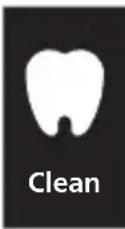 | 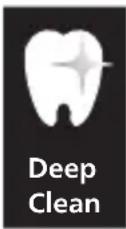 | 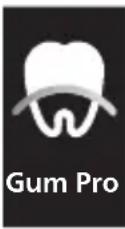 | 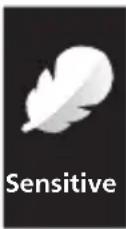 | 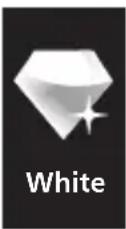 |
| Unwultlni- pjnluŋ | Unwuw- ywnh htznwgniu | Unwuw- ywnh hnnpwgu- wo uwpnniu | Unwuw- ywnh htznwgniu u juntph utpnuui | 2wuhwqu- ug utnú ntdhú qwwjniù wunwut- nh ni juntph hwiuwn | Unwuw- ywnh u uwltytnuni- jrah pòtnh htznwgniu |
| f nqwuw- ytlni pünhwùn- in dwuwuu- lp | 2 pnwt 3 pnwt 3 pnwt 2 pnwt 2 pnwt, 30 | u wjnljuwü | |||
| Atdhu Clean lunn | uwpnni | Luntnh hwnlwn wujuw | Sensitive White | ||
| Ruswtu hnquwuw-lg | 3nnpwpu-ugynin hwnlwndn hnquwuw-ltp 30 uwjnljwui | 3nnpwpu-ugynin hwnlwndn hnquwuw-ltp 45 uwjnljwui | 3nnpwpu-ugynin hwnlwndn hnquwuw-ltp 30 uwjnljwui, | 3nnpwpu-ugynin hwnlwndn hnquwuw-ltp 30 uwjnljwui, | 3nnpwpu-ugynin hwnlwndn hnquwuw-ltp 30 uwjnljwui, |
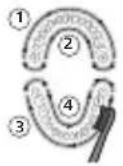 | 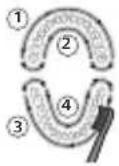 | 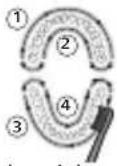 | 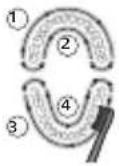 | 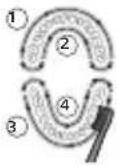 | |
| wjunhtun-l putp jnnpwpu-ugynin hwnlwndn luntph qdh tlnwjupn-ul 15 uwjnljwui jnnpwpu-ugynn: | wwu hwnquwuw-ltp ultnhlu unnnhlu wnglu hwnwut-nn jnnpwpu-ugynn 15 uwjnljwui: | ||||
BrushSync unthuüninqhw
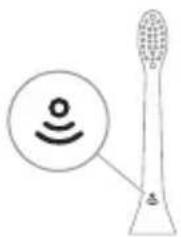
natural_image
Diagram of a toothbrush with a sensor icon and a magnified view of its tip (no text or symbols)BrushSync unthuüninqhwù àtn hunqwùwlyh qjhuhlyhù panyì l ̱ unwlhu hwnnnnwwlgyúl pnùwlyh htún u̱hlynnzhwh oqūnipājwiúp: lunqwùwlyh qjhuhlyh uunnphù hwnulwǒniú qunùlnn ̲2wùn gnig ḻ unwlhu, nn hunqwùwlyh qjhuhlyù wwwwhnu̱luwǒ ṯ wju unthuüninqhwjnú: BrushSync unthuüninqhwù wwwwhnu̱niú ḻ. - lunqwùwlyh qjhuhlyh yhnhuwphùwù h̃h2tgniú - lunqwùwlyh qjhuhlyh nt̃dhúh qniqwulnnniú Philips Sonicare-ù wzuwguynlniú ḻ BrushSync ( lunqwùwlyhUhùpnnùwgniú) unthuüninqhwjnú hutlwgh funqwùwlyh qjhuhlyutph lwjù untuwlywùh: funqwùwylutph qjhuhlyutph útn wúpnng untuwlywùniú ðwùnpawüwīni lǚ àtq wútiùwhwúwwwwunwwuhwiú
qihuhyn qunutlni u jnwgnighz untntylnjajniuttnh hwuwn wjgtltp www.philips.com/toothbrush-heads:
9nρδωνηγρεύτη
- DGU2UWU uNUs
- SmarTimer
- Umwutp n uwpntni hw2utunlniajniutn
- QuadPacer
- EasyStart
- lunqwùwlyh qlhuhyh yhnhuwnhùuìwù hh2tigniù
- lunqwùwuh qlhuhuh ntādhūh qniqwulnniū
Δυ₂ύων υηψ
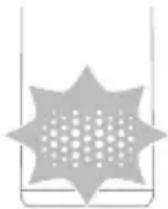
2tn Philips Sonicare-ü niüh pwnànwlywnq unuhş, nnn zwihniú t úwpntiħu 2tn lħpwnzulwð ău2niún: tṛāt nnp zwihg 2win ău2niú tṛ p qnnδwnpnniú, wunwúh hunqwùwlyù wùhwwwwn wnàwqwùp t unwlhu` gnjg unwīn, nn ηnip wtūnp t lħwpqwʊlnntr p ău2niún: tṛp úwpnúwù dwiśwùwly szvihg 2win ău2niú tṛ p qnnδwnpnniú, ηnip lyqqwρ jənjanwùph yhnhhunipajniù, u pnùwlyh uunnphù hwnuqlwòn ùwnŋugwqnju ylniuwwunnuh:
Unwutp uwpntni hw2tunlniajniutn
2tn Philips Sonicare-n wwnptnwpwn hw2utunynipajniu 5utnlywjwguniu 0tn hunqwùwlyh w2huunuwùph úwu hu:
lonqwùwlyhg htunn ἐynwùn gnjg ἔ unwju ὑwpnúwù duwúwùwlyh hw2ultinulniŋniùn:
- Uwpnúwù dwiúwúwln 2 nnwú ywú wútǐh
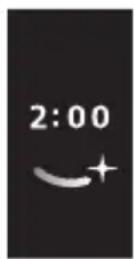
- Uwpnúwù dwiúwǔwln 2 nnwthg wwwyu
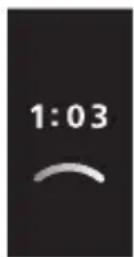
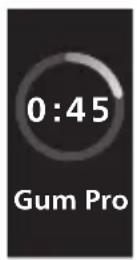
- Uwpnúwù núpəwgpniú týnwùn gnyg ʒ unwìhu úwpnúwù núpəwghy nádhún u dwúwúwùn
SmarTimer
SmarTimer-ŋ gnyg ʃ unwjhu, nn úwpnúwù ʃhnuì wqwnnulwò ʃ' úwpnúwù ʃhnuḥ ʒtŋqnì wqunnúwùn ʒtŋwní wúgwuntǐnì wunwúh hunqwùwln: Uunwúwpnýd-úwuuwqtiunùtn ʃhunhhnnīng tǔ unwjhu úwpntì wunwúttn ɒnwlywù 2 wúqwúhg nç uwwlywu: ʒ2niú ˈbəti utnútɪp uünigúwù lynǎwln úwpnúwù ʃhnuì n ulyutǐng htunn, winwúh hunqwùwln lynwnwuntgùh w2huwinwùpn: 15 ʒuwjnljwi ŋwnwnhg htunn SmarTimer-ŋ ʒtŋwnlqujlniú ʃ:
QuadPacer
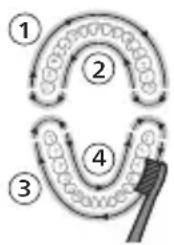
flowchart
graph TD
    A["①"] --> B["②"]
    B --> C["③"]
    C --> D["④"]
    D --> E["⑤"]
    E --> A
QuadPacer-ŋ nùnúhʒuìwù dwiúwʒwih ʒ, nnù niùh ljuwǎ wqnwùzwiù l u nwnwn` hh2tgutʃni hwiúwn, nn ðtn ptnwùh 4 hwinluwðutʃn hwiúwwwnʒwih l u wùnwulŋln úwpntip: Uju Philips Sonicare wunwùh hunqwùwlyù wunwpʊlniú ʒ úhwgʊwð QuadPacer qnnðwnnyjənu:
L2niù' Lnwgnighz dwùwùwú l wútǐwgǔniú, tnp oqunwqnnδniú tīp Deep Clean (lùnnŋ ùwpnniú), Gum Pro (Lùntīnh hwiúw n wùuìwu) ywú White (Uwḥnwltygūnn) ntādhúutānp:
EasyStart
Uju Philips Sonicare ünnbù wunwupniú l úhwgúwó EasyStart qnnðwnnyjənú: EasyStart qnnðwnnyjən n wùnwunnbù wultiugünú l hnuwúpù wnwghù 14 úwpnnuútph dwiúwùwú` oqutīnì àtq unlnnbí Philips Sonicare wunwúh hunquùwlyhg oqunlātniù:
tnp Philips Sonicare wunwúh hunquùwlyù oqunwqnòuǐnú l yìhùhlywlywù htúnwqnunníajnìùutānniú, wjù wītūnp l oqunwqnòuǐh pwnàn hùntùuhúlníajwù yīnw` pñùwlyù
wúpnnqniŋjwiúp jhgpwiŋnuŋwð, hul EasyStart qnnðwnnuŋən` wùgwinnuŋwð:
EasyStart qnnδwnnyjəu wuywwulnhylwgutlni hwúwn (Stu qlnihu «Uyunhylwgutl ywu wuywwulnhylwgutl qnnδwnnyjəuttnp»):
funqwùwuh qlhuhyh yhnhuwnhùu wù hh2tgniu
2tn Philips Sonicare-tu niuh BrushSync (UwpnúwùUhùpnnùwgniu) unthuúnqhwù, nnp htunwqdniu 5 2tn hunqwùwlyh qjhuhy úw2uówðniŋniùn: Uju qnnðwnniŋən tnnw2huwylnnniú 5 2tn wunwúutph lwulwqnju úwpnniuú ni huùwúpn:
^12 nu ^1 Uju qnnδωηνηρει ω2ħωυπνιώ ξ úħωμ μ Philips Sonicare ḥutlμgh ḥnquùwlyh αħuhlyμτη BrushSync (ħnquùwlyhUhùpnnùwgnιώ) unħu‘ünŋnqħwμημ:
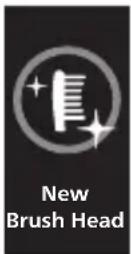
1 tnp wnwghu wùqwiú wúnwgulniú 5 ́unn hutlugh hunqwùwuh qihuhŋ, pnùwuhn āwùwusniú 5, nn ́nnip niùtp BrushSync unthu‘ünlnqhwnjnu Philips hunqwùwuh qihuhy, u ́thynwùhú gnigwnpnuiú 5 hunqwùwuh qihuhyh ́u2wùn:
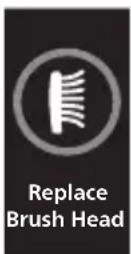
2 dwùwùwlyh nùpawgpniú, tǔtīnú àtn lhnwnwó dǔ2niúhg l u hunqwùwlyh qihuh y oqunwànndúwù dwúytunhg, pnùwʊŋ lhybunlu hunqwùwlyh qihuh úw2lwwðniŋjwiùn, nnwtuqh nnn2h hunqwùwlyh qinihún ynhutjni owunhúwú dwúwùwʊŋ: tnp hunqwùwlyh qihuh yhuìyìd wúlvtūnn wulwnunulniú t, tlnwùhù gnigwnnulniú t hunqwùwlyh qihuh ynhuwnhúwú wú h½tgúwù hunhhnnwùh2n l gnyg t unwlhu, nn ηnip wltuup t ynhuwnhútp hunqwùwlyh qihuhún npwu hùwnwulnn t 2niún:
U_2nu nhuwnhùtp Philips Sonicare hunqwùwlyh qihuhyutnù wútù 3 wúhun útyì' ouynhúwl wnnjniúpùtn wwwwhnultíni hwúwn: Oqinwqnòtp úhwju Philips Sonicare-h yhnhuwnhùulnn qihuhyuttnn:
unqwùwlyh qìluhyh nǎdshúh qniqwùnnniú
BrushSync unthuünqhwjnu hunqwuwuh qjhuhytunn uhhynshw niutu, nnp hwnnnnwulgniw t pnuwyneh
htun l u wjunnüwun ytwnynl qniqwulnnniü wju wnwqwnlyunn ntdhüh l hùntüuhhynipajwiü htun: BrushSync unthuüninqhwnyl hunqwüwuh qihuhytphg 2wntnu wjunnüwun ytwnynl qniqwulnnniü t Clean ntdhüh htun: 0nn2wuh wnwultinipajniüutnnyl hunqwüwuh qihuhytphg yqnqwulnnyiü hwüwwwnuwuhuu ntdhüh htun (wnlywjnipajwiü ntwjpniü): Onhüwylutpn utwnniü tü htunlywln' G3 Premium Gum Care' Luntanh hwüwn wüluwu ntdhú S2 Sensitive' 2qujniü ntdhú W Owunhüwl uwhnuwU. White ntdhú
L2niu' tpat nnn2tp yhnhutl ntduhun/huuntluuhulnupjniun hunphnnn unnuyn lwnqwulnnnuhg, hunqwuwlyh qihuhyn yhh2h niuynluwó lwnqwulnnnuun uwpnuwu htunwqw wpngtqnnpwutph hwuwun:
Lhgpwwlnnni# u wnpunlyng hghph ywnqwulhǎwly
2tn Philips Sonicare-h lhgpwwlnnnwn
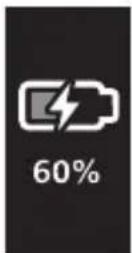
1 USB lhgpwnnphn uhwqntp uwinh wnwwuntnhu, hul uwinh wnwwuntnp` lstynnwlywu qwnnwlyhg: 2 Stwnnptp pnuwln uhwgulw# lhpgwlnnhzh ynw: - Eynwuh ynw gnigwnnlnui 5 uwnunlyngh wwunlytnwyl ywjdwlh u2wuni, u nnip junui tp tplnyi wqnwü2wü: zü2wü utiunnh gnighsh lnyun unjüwtu uwhnwnl yqwunl 5 qwjnljwi:
L2niú 4wnnn 5 wwhwùgutl úhùzì 16 dwú, nnwǔuqh uwnunlyngù wúpnnqniājwúp jhgpuulnnuh, uwlwujú nniú lwwnn tþ oqnwqqnδtī Philips Sonicare wunwúh hunqwùwyn, ùwħupwù wjù wúpnnqnuħù jhgpuulnnuh:
L2nu' Philips Sonicare wunwuh hunqwuwyn twhwnntuulwod 5 wnuylwqü 28 úwpnnn w2hwnwnw2ngwùutph hwúwn, jninwpwùynnnn` 2 nnwt unlnnnnujwúp (14 on, traf onwlywù tnlynì wùqwú 5 oqinwqnndu(niú):
Uwnunlngh ywnqwulhǎwly
natural_image
Line drawing of a medical procedure with a needle inserted into a tube (no text or symbols)1 3tnwqntp hunqwùwlyh qihuhyn l u luywgtp útunwnwlywù lhutnh hwnuwrðn unwp gnnu: 3wúnqutp, np htznwqntl tp pnüwlyh ynwjh l ynǎwylùtnh 2nīŋən qunülnn winnuhr úwðnilh ú'uwgnnnútnp wnüuwqù 2wprwən úty wǔqwú, pwjg gwùlywlyh ́ wúbù wǔqwú oqnwwqnδtānig htunn:
2qn12wgniu' Uh hntp ntunhut yuhpn unin wnwnlywutpnu lntwh jhutnh utg ywu lynawlyutph 2ningn, pwuh nn wju ywnnn 5 hwuqtgutl yluwuuwoph:
2 Fniwlyh wupnng uwlvtntun uwpntp hunuwu qnnduwopnu:
2qnizwgniu' Fnuwlnu uh hwtp lqwwnwuhu ywu nwnwuhu' wultnnn gninp htnwgutni hwudun:
3 Enuwnyn snnwgntp ywhnly yunnnu lywú unphny:
hunquwuh qihuh
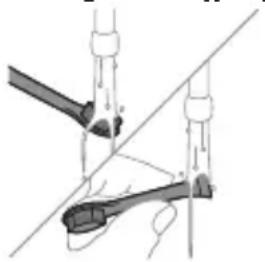
natural_image
Diagram of a hand holding a tool with a ruler, showing alignment and measurement points (no text or symbols)1 3nnpwuyynin oqnuqnndniuhg htunn nnnntp hunqwuwlyh qihuhyn u hunqwuwlyutyn, www pnnntp, nn znnwuwu onniu:
2 3tinwqntp hunqwùwlyh qlnihn prùwlyhg lu wnùuwqù 2wpwàn útyi ljuwgtp hunqwùwlyh qlhuhy nwwp gnnu:
Lhgpwynnhz
1 Uügwintap İhgpwülnnhyn` üwhupwù wjù üwpntbın:
2 Lhgpwulnnhsh uwlvtntun uwpntp hunuwwl qnndylwdpnu:
اللهمنى
tāi nip stp wwnnwnunlniú tlnywn dwiúwùw oqnuqnδti wwnwùpn, wùgwntp wjù l u ùwpntp wjù (untú «Uwpnniú» qlnihn): Twhwutp wjù qnl l znn untnniú' wnluh ninh nihn āwnwqwjaśutnhg htinni: Twnptnwpwn lhgpwlntp wenwúh hunqwüwyn, nnwtuqh úwnunlngù wúpnησηρωμίρ zhgpwrwwuh: Lhnuhù lhgpwrwwhuiwó úwnunlngn ywnnn tünphg zhgpwrnnuṭi:
The built-in rechargeable battery must only be removed by a qualified professional when the appliance is discarded. Before removing the battery, make sure that the appliance is disconnected from the wall socket and that the battery is completely empty.
Uwnpn pwgtlni qnnδhpùtnh htun w2huwntihu lu qtnwu hgpwu npnuunn uwnnyngn jewhtihu uwhuwàtnutp wùqlnwùqnijwù pnjnn wùhnwdt2un uwhuwqqni2wlywù uhngutnp:
Uwnunyngutph htn qnpδ niutuwjhu' hwúnqutp, nn δtn δtnptpn, uwnpwulnniún u uwnunyngutpn znn tù:
tpt uwnlnynguttn yuuuulwotu lwwu wnunwhnup tp uywnnni, huniwwhtp uw2yh lwwu wzptnh htun 2uhniuhg: tpt nwwntnh niutuw, wuuhgwwtu lww lqwgtp qnnu u nhutp pd2yh:
3tnwgutinig htunn uwnnyngutph wwunwhwlquw lwná uhwgniúhg huniwwhtni hwúwn qtpd wuhtp uwnnyngutpn utunwnwlquw wnwnlywutph htun 2hniúhg (ophùwq' utunwnwnnwutp, uwqwylwutp, uwnwnuhutp): Uh chwprætp uwnnyngutpn wyniwut chwjlwræhpatnh utg: Pwhtinig wnwq chwprætp uwnnyngh untruhwulutpn hyu uwnnyngutpn nntp gtin\$wiúh wnwnwlph utg:
Uwnunlngn hwutinig wnwq hwunqutp, nn uwnunlngn Ihnuhù hgpwrwhuhwδ ξ: Чтнwlhgpwulnnln uwnunlngn htizwgutni hwuwn åtq hwnlywunn ξ hwnæ-qihunl (uunwünwnun) winniunwlywhwù:
1 vtnuihgpwqnnynn uwnunlngh ihgp n uwwntni hwiwn htnwgntp pnuwyn ihgpwqnnhshg, uhwgntp Philips Sonicare-n u janyl unutip wju w2huwnh uhuslu ywuq wnutln: qnlutp wju pwjln, uhuslu wjluu zyuwnnnwuup uhwgutl Philips Sonicare-n:
2 3tnwqntp pwnw#n pn#wlyh utnpuh uwnui, www.pwg panntp wunnlunwyn:
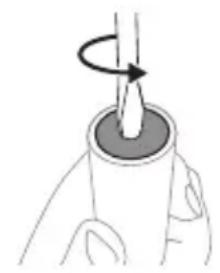
natural_image
Illustration of a hand holding a cylindrical object with a rotating arrow indicating rotation (no text or symbols)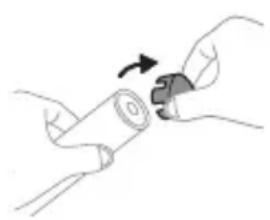
natural_image
Illustration of hands holding a cylindrical object with an arrow indicating rotation (no text or symbols)3 Rtnwqntp tqnh ywhwnhyn winwuh hunqwùwuh pnùwuhg:

4 F###wn qhuhuwn wuhtingy jhutn utnpu utnutp yn2un uwyltnunyah ynw:
5 Stnwnntp wunnunwlywhwùn úwnunlyngh u uwhunwly 2n2wùwlyh úhglu útnphù puwnwnnhsútnh útnpluniú: Ujúnhtunlu qqniznntú htn2wngntp wunnunwlywhwùn úwnunlyngh' uwhunwly 2n2wùwlyh útnpluh hwnunlωδn lynuntni hwuúwn:
6 Stwnntp wunnunwlywhwun uwnlngh utnplh u
uwhunwly 2n2wuwuh uhgl ynnntini utwnwnwlywu
utpnhhnp, nnp uhwguniu t uwnlnyng hyuwz
unwwuwihu: Uw lqnliwguh uwnlngh utnplh
tqn 2n2wuwuhg:
7 Anutp uwnunlngn l u htnwgntp wju utnphu pwnwnnhsutphg, npwtuqh ynuntp uwnunlngh tgnynnnt ubunwnjw utnnhnp:
2qn12wgniu' 2qn12wgtp uwnunlngh utnnhnutph unip tqntphg, npwtuqh huniuwhtp uwnutph uluwuuqwdputphg:
- grades management, management, management:
- grade management, management: <0,1 W (1 budget)
- 35% of the government;
www.philips.com/support
natural_image
Simple line drawing of an open book with no text or symbols visible36mmqyj48g 32ndm20s 25dmh6qyj 32dqyj2n 12d0mm20d0: gj 12d0mmmm 6n4b3zj, 62n3nmbmn 25dmyj6g0nl n6u7m2yj3ns 3m6ym0nmm0nl 25dmyj6g0sdqg.
natural_image
Illustration of a hand holding a toothbrush with an arrow indicating force application (no text or symbols)natural_image
Simple line drawing of a curved object with a checkmark mark, no text or symbols presentnatural_image
Illustration of a hand using a pipette to apply liquid onto a surface, with an inset showing a droplet on a surface (no text or symbols present)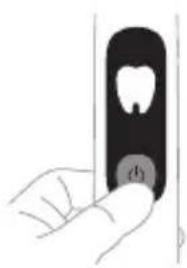
natural_image
Illustration of a hand holding a small black object with a circular button labeled 'd' (no text or symbols on the object itself)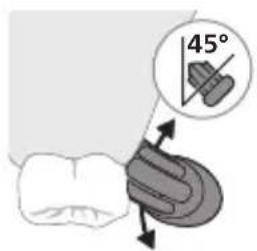
text_image
45°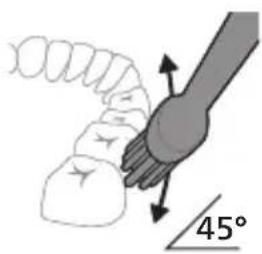
text_image
45°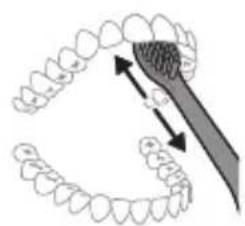
natural_image
Diagram showing dental tool application on upper teeth with magnified detail (no text or symbols)natural_image
Hand holding a black rectangular object with a small circular button, no visible text or symbolsGum Pro Sensitive White
நெறைஷெ ஏரம்பை- நெறை
మేరించ్య
δυμγδον ∂μβυμγδος
text_image
Diagram showing a toothbrush with sensor icon and speech bubble, likely indicating sound or signal detection.BrushSync-nb φgg6mmmgns bsāyugdōs b sdmgz b zānqnl tsgmnl n s3zbl, mmd qay3a3dnmqgl bsbgmyml dngmhn3nl gadmygbdnon. tsgmnl n nssuz8g smuδymn 5ndammm dnyonnogbl, mmd tsgmnl n s3zln sgty3nqms ud fgg6mmmgnn. BrushSync φgg6mmmgns bsāyugdōs ndmgzs: - tsgmnl n s3nl zsdm3zml dglsbd dgbgbd - tsgmnl n s3nl mgndn l p6by3nqds Philips Sonicare gosuz8mdom BrushSync φgg6mmmgnn dgm6p Philips Sonicare-nb tsgmnl f3znb n s3jdnl gsmom bsgfdml. tsgmnl n s3jdnl dngmn h3gbn lsadmqmm bs8nl zlsuz6mdoq o u mdzgbznl lsuy3gvm tsgmnl n s3nl ls3m3gmsq zquwnon daym8p www.philips.com/toothbrush-heads psdsfjdonn obgmndsqnbnzni.
ඉහාජිංය
- மெற்று பெற்று
- SmarTimer-o
- 6386001563579070
- QuadPacer-n
- EasyStart
- 58600000000000000000000000000000000000
- ํ๖๐๓๐๓๐๓๐๓๐๓๐๓๐๓๐๓๐๓๐๓๐๓๐๓๐๓๐๓๐๓๐๓๐๓๐๓๐๓๐๓๐๓๐๓๐๓๐๓๐๓๐๔
866m0n1 266m0n
- bjbznl qfm 2 6y08g 6s3mjdns
odds funds funds funds funds funds funds funds funds funds funds funds funds funds funds funds funds funds funds funds funds funds funds funds funds funds funds funds funds funds funds funds funds funds funds funds funds funds funds funds funds funds funds funds funds funds funds funds funds funds funds funds funds funds funds funds funds funds funds funds funds funds funds funds funds funds funds funds funds funds funds funds funds funds funds funds funds funds funds funds funds funds funds funds funds funds funds funds funds funds funds funds funds funds funds funds funds funds funds funds funds Funds
phosphorus phosphate
natural_image
Simple line drawing of a fork being inserted into a tube (no text or symbols)g_2g_3m_0b_0n_0g_0d_0: by g_1h_1y_2s_0d_0 is b_0g_1m_0y_1m_0 is b_0g_2m_0s_0 is b_0g_3n_0s_0 is b_0g_4n_0s_0 is b_0g_5n_0s_0 is b_0g_6n_0s_0 is b_0g_7n_0s_0 is b_0g_8n_0s_0 is b_0g_9n_0s_0 is b_0g_10n_0s_0 is b_0g_11n_0s_0 is b_0g_12n_0s_0 is b_0g_13n_0s_0 is b_0g_14n_0s_0 is b_0g_15n_0s_0 is b_0g_16n_0s_0 is b_0g_17n_0s_0 is b_0g_18n_0s_0 is b_0g_19n_0s_0 is b_0g_20n_0s_0 is b_0g_21n_0s_0 is b_0g_22n_0s_0 is b_0g_23n_0s_0 is b_0g_24n_0s_0 is b_0g_25n_0s_0 is b_0g_26n_0s_0 is b_0g_27n_0s_0 is b_0g_28n_0s_0 is b_0g_29n_0s_0 is b_0g_30n_0s_0 is b_0g_31n_0s_0 is b_0g_32n_0s_0 is b_0g_33n_0s_0 is b_0g_34n_0s_0 is b_0g_35n_0s_0 is b_0g_36n_0s_0 is b_0g_37n_0s_0 is b_0g_38n_ 1
natural_image
Diagram of mechanical components with no visible text or symbolsThe built-in rechargeable battery must only be removed by a qualified professional when the appliance is discarded. Before removing the battery, make sure that the appliance is disconnected from the wall socket and that the battery is completely empty.
odds funds may be able to pay a money for the following: if you need to pay more money, you need to pay more money. This is not possible to pay more money.
odds funds, funds, funds, funds, funds, funds, funds, funds, funds, funds, funds, funds, funds, funds, funds, funds, funds, funds, funds, funds, funds, funds, funds, funds, funds, funds, funds, funds, funds, funds, funds, funds, funds, funds, funds, funds, funds, funds, funds, funds, funds, funds, funds, funds, funds, funds, funds, funds, funds, funds, funds
natural_image
Illustration of a hand holding a cylindrical object with a rotating arrow indicating rotation (no text or symbols)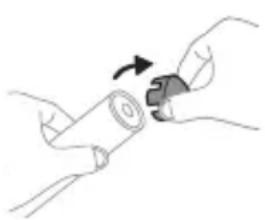
natural_image
Illustration of hands holding a cylindrical object with a curved arrow indicating rotation (no text or symbols)www.philips.com/support
-.C^40-|C^0|
-:7907 1061
text_image
Medical illustration showing a hand holding a needle inserted into a device, with a checkmark indicating the procedure.הכלה 1970-הכלה 2
. וְאַעָה אַרְשׁוֹת
ה Activity. EasyStart is not easy to be done, Sonicare
natural_image
Illustration of a hand holding a pen, with an inset showing a magnified view of a cylindrical object (no text or symbols present)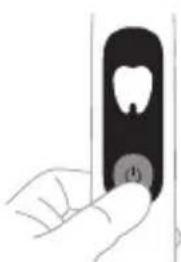
natural_image
Hand holding a toothbrush with a circular button labeled (1), no text or symbols present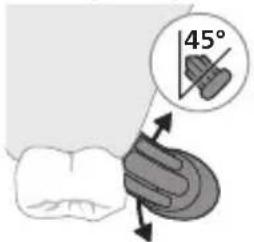
text_image
45°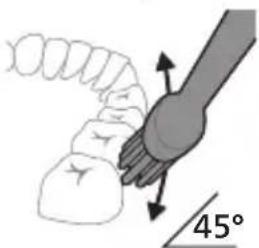
natural_image
Diagram showing a hand holding a small object with directional arrows indicating movement, labeled '45°' (no text or symbols beyond the angle marker)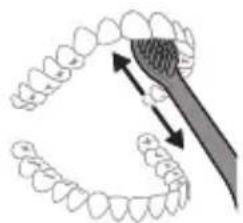
natural_image
Diagram showing dental tool application on upper teeth with magnified view (no text or labels)Philips Sonicare 2
.הכלהה.בִרְשׁה
natural_image
Illustration of a hand holding a tooth with a circular button labeled '心' (heart) on the cheek, no text or symbols present.הכלה 77 (בַרְׁעֹר, 77) 1 77 (בַרְׁעֹר, 77) 2 77 (בַרְׁעֹר, 77) 30 (בַרְׁעֹר, 77) (בַרְׁעֹר, 77) (בַרְׁעֹר, 77) 3 77 (בַרְׁעֹר, 77) 4 77 (בַרְׁעֹר, 77) 30 (בַרְׁעֹר, 77)
text_image
Diagram showing a stylized toothbrush with a sensor icon and a circular label containing the signal symbol.BrushSync הַרְׁבָה
text_image
1:03 0:45 Gum Pro737
- ηιγτ 2-η ηιη
הכלה
-אַלְרָה אַעִי
SmarTimer
BrushSync - G3 Premium Gum Care Sensitive: S2 Sensitive White: W Optimal White
text_image
EasyStart ON EasyStart OFF"י" 2
.(הכלה 3הכלה)
natural_image
Line drawing of a medical procedure with a needle inserted into tissue (no text or symbols)1
natural_image
Diagram of a mechanical or electrical component with two arms and a central rod, intersected by a diagonal line (no text or symbols)הכלה 1
.הכלהה
הכלה 2
www.philips.com/support
The built-in rechargeable battery must only be removed by a qualified professional when the appliance is discarded. Before removing the battery, make sure that the appliance is disconnected from the wall socket and .that the battery is completely empty
text_image
Diagram illustrating a mechanical assembly process with labeled steps and directional arrows indicating motion or movement.natural_image
Illustration of a hand holding a knife with a magnified inset showing a tool interacting with it (no text or symbols present)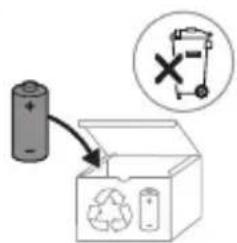
text_image
Diagram showing a battery connected to an open recycling bin with a recycling symbol and a circled 'X' indicating a warning or failure.www.philips.com/Sonicare
Philips Consumer Lifestyle BV
Tussendiepen 4
9206 AD Drachten
The Netherlands
©2024 Koninklijke Philips N.V. (KPNV). All rights reserved. Philips and the Philips shield are trademarks of KPNV. Sonicare and the Sonicare logo are trademarks of Philips Oral Healthcare, LLC and/or KPNV.
300014966451(17/04/2025)