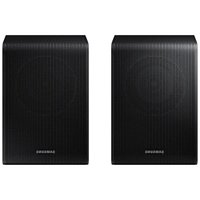
SWA-9250S - Speaker SAMSUNG - Free user manual and instructions
Find the device manual for free SWA-9250S SAMSUNG in PDF.


| Product Type | Wireless Surround Speaker Kit |
| Brand | Samsung |
| Model | SWA-9250S |
| Weight (each speaker) | 1.7 kg |
| Dimensions (W x H x D) | 105.0 x 152.8 x 109.0 mm |
| Power Supply | AC/DC adapter (provided) |
| Standby Power Consumption | 0.5 W |
| Wireless Transmission Power | 25 mW max at 5.725-5.825 GHz |
| Speaker Cable Length | 6 m |
| Connectivity | Wireless with compatible Samsung Soundbar |
| Package Contents | 2 surround speakers, 2 speaker cables, AC/DC adapter, power cord |
| Operating Temperature | 10 °C to 40 °C |
| Operating Humidity | 10% to 80% non-condensing |
| Wall Mounting | Possible (optional brackets not provided) |
| Maintenance and Cleaning | Disconnect before cleaning; use a soft, dry cloth; avoid chemicals |
| Safety | Do not expose to water or rain; do not block ventilation slots |
| Parts and Reparability | No user-serviceable parts; contact an authorized center |
| Warranty | See general conditions on Samsung website |
Frequently Asked Questions - SWA-9250S SAMSUNG
User questions about SWA-9250S SAMSUNG
0 question about this device. Answer the ones you know or ask your own.
Ask a new question about this device
Download the instructions for your Speaker in PDF format for free! Find your manual SWA-9250S - SAMSUNG and take your electronic device back in hand. On this page are published all the documents necessary for the use of your device. SWA-9250S by SAMSUNG.
USER MANUAL SWA-9250S SAMSUNG
Thank you for purchasing this product (SWA-9250S).
| [CHXH] | CAUTIONRISK OF ELECTRIC SHOCK. DONOT OPEN. |  |
| CAUTION: TO REDUCE THE RISK OF ELECTRIC SHOCK,DO NOT REMOVE THE COVER (OR BACK). NO USER-SERVICEABLE PARTS ARE INSIDE. REFER SERVICINGTO QUALIFIED SERVICE PERSONNEL. Refer to thetable below for an explanation of symbols which maybe on your Samsung product. | ||
 | This symbol indicates that high voltage ispresent inside. It is dangerous to make anykind of contact with any internal part ofthis product. | |
 | This symbol indicates that this product hasincluded important literature concerningoperation and maintenance. | |
 | Class II product : This symbol indicates thatit does not require a safety connection toelectrical earth (ground).If this symbol is not present on a productwith a power cord, the product MUST havea reliable connection to protective earth(ground). | |
 | AC voltage : This symbol indicates that therated voltage marked with the symbol isAC voltage. | |
 | DC voltage : This symbol indicates that therated voltage marked with the symbol isDC voltage. | |
 | Caution, Consult instructions for use :This symbol instructs the user to consultthe user manual for further safety relatedinformation. | |
- The slots and openings in the cabinet and in the back or bottom are provided for necessary ventilation. To ensure reliable operation of this apparatus, and to protect it from overheating, these slots and openings must never be blocked or covered.
- Do not place this apparatus in a confined space, such as a bookcase, or built-in cabinet, unless proper ventilation is provided.
- Do not place this apparatus near or over a radiator or heat register, or where it is exposed to direct sunlight.
-
Do not place vessels (vases etc.) containing water on this apparatus. A water spill can cause a fire or electric shock.
-
Do not expose this apparatus to rain or place it near water (near a bathtub, washbowl, kitchen sink, or laundry tub, in a wet basement, or near a swimming pool, etc.). If this apparatus accidentally gets wet, unplug it and contact an authorized dealer immediately.
- Do not overload wall outlets, extension cords or adaptors beyond their capacity, since this can result in fire or electric shock.
- Route power-supply cords so that they are not likely to be walked on or pinched by items placed on or against them. Pay particular attention to cords at the plug end, at wall outlets, and the point where they exit from the apparatus.
- To protect this apparatus from a lightning storm, or when it is left unattended and unused for long periods of time, unplug it from the wall outlet and disconnect the antenna or cable system. This will prevent damage to the set due to lightning and power line surges.
- Before connecting the AC power cord to the DC adaptor outlet, make sure the voltage designation of the DC adaptor corresponds to the local electrical supply.
-
Never insert anything metallic into the open parts of this apparatus. Doing so may create a danger of electric shock.
-
To avoid electric shock, never touch the inside of this apparatus. Only a qualified technician should open this apparatus.
- Make sure to plug the power cord in until it is firmly seated. When unplugging the power cord from a wall outlet, always pull on the power cord's plug. Never unplug by pulling on the power cord. Do not touch the power cord with wet hands.
- If this apparatus does not operate normally - in particular, if there are any unusual sounds or smells coming from it - unplug it immediately and contact an authorized dealer or service centre.
- Maintenance of Cabinet.
– Before connecting other components to this product, be sure to turn them off. - Be sure to pull the power plug out of the outlet if the product is to remain unused or if you are leaving the house for an extended period of time (especially when children, elderly, or disabled people will be left alone in the house).
- Accumulated dust can cause an electric shock, an electric leakage, or a fire by causing the power cord to generate sparks and heat or the insulation to deteriorate.
- Contact an authorized service centre for information if you intend to install your product in a location with heavy dust, high or low temperatures, high humidity, chemical substances, or where it will operate 24 hours a day such as in an airport, a train station, etc. Failing to do so may cause serious damage to your product.
- Use only a properly grounded plug and wall outlet.
-
An improper ground may cause electric shock or equipment damage. (Class I Equipment only.)
-
To turn this apparatus off completely, you must disconnect it from the wall outlet. Consequently, the wall outlet and power plug must be readily accessible at all times.
- Do not allow children to hang on the product.
- Store the accessories (battery, etc.) in a location safely out of the reach of children.
- Do not install the product in an unstable location such as a shaky self, a slanted floor, or a location exposed to vibration.
- Do not drop or strike the product. If the product is damaged, disconnect the power cord and contact a service centre.
- To clean this apparatus, unplug the power cord from the wall outlet, and then wipe the product using a soft, dry cloth. Do not use any chemicals such as wax, benzene, alcohol, thinners, insecticide, air fresheners, lubricants, or detergent. These chemicals can damage the appearance of the product or erase the printing on the product.
- Do not expose this apparatus to dripping or splashing. Do not put objects filled with liquids, such as vases, on the apparatus.
- Do not plug multiple electric devices into the same wall socket. Overloading a socket can cause it to overheat, resulting in a fire.
WARNING
• TO PREVENT THE SPREAD OF FIRE, KEEP CANDLES AND OTHER ITEMS WITH OPEN FLAMES AWAY FROM THIS PRODUCT AT ALL TIMES.
- To reduce the risk of fire or electric shock, do not expose this appliance to rain or moisture.
- Do not use liquid fumigators containing chemicals, such as mosquito repellent or air freshener, around the product. If steam comes in contact with the product surface or enters the product, it may cause stains or malfunction.

Precautions
- Ensure that the AC or DC power supply in your house complies with the power requirements listed on the identification sticker located on the rear of your product. Install your product horizontally, on a suitable base (furniture), with enough space around it for ventilation (7\~10 cm). Make sure the ventilation slots are not covered. Do not place the unit on amplifiers or other equipment which may become hot. This unit is designed for continuous use. To fully turn off the unit, disconnect the AC plug from the wall outlet.
- Do not expose the unit to direct sunlight or other heat sources. This could lead to overheating and cause the unit to malfunction.
- Unplug the Power cord from the AC wall socket if the unit malfunctions. Your product is not intended for industrial use. It is for personal use only. Condensation may occur if your product has been stored in cold temperatures. If transporting the unit during the winter, wait approximately 2 hours until the unit has reached room temperature before using it.
- If the electricity supplied to your home is rated at 240V AC, use a suitable plug adapter to connect this unit to your electrical outlets.
Important Safety Instructions
Read these operating instructions carefully before using the unit. Follow all the safety instructions listed below. Keep these operating instructions handy for future reference.
- Read these instructions.
- Keep these instructions.
- Heed all warnings.
- Follow all instructions.
- Do not use this apparatus near water.
- Clean only with a dry cloth.
- Do not block any ventilation openings. Install in accordance with the manufacturer's instructions.
- Do not install near any heat sources such as radiators, heat registers, stoves, or other apparatus (including AV receivers) that produce heat.
- Do not defeat the safety purpose of the polarized or grounding-type plug. A polarized plug has two blades with one wider than the other. A grounding type plug has two blades and a third grounding prong. The wide blade or the third prong are provided for your safety. If the provided plug does not fit into your outlet, consult an electrician for replacement of the obsolete outlet.
- Protect the power cord from being walked on or pinched particularly at plugs, convenience receptacles, and the point where it exits the apparatus.
- Only use attachments/accessories specified by the manufacturer.
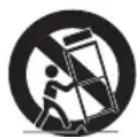
- Use only with the cart, stand, tripod, bracket, or table specified by the manufacturer, or sold with the apparatus. When a cart is used, use caution when moving the cart/ apparatus combination to avoid injury from tip-over.
- Unplug this apparatus during lightning storms or when you intend to leave it unused for long periods of time.
- Refer all servicing to qualified service personnel. Servicing is required when the apparatus has been damaged in any way, such as when the power-supply cord or plug is damaged, liquid has been spilled or objects have fallen into the apparatus, the apparatus has been exposed to rain or moisture, does not operate normally, or has been dropped.
01 CHECKING THE COMPONENTS
Surround Speaker X 2 / Speaker Cable / AC/DC Adapter / Power Cord
NOTE
- For more information about the power supply and power consumption, refer to the label attached to the product. (Label: Rear of the Main Unit)
- Design and specifications are subject to change without prior notice.
02 CONNECTING THE SWA-9250S TO A SOUNDBAR
1. Connect the Surround speaker cables
Use the speaker cables to connect the two surround sound speakers.
- When connecting the speaker cable, connect the core wire to the speaker.
- Insert the wire fully, taking care not to insert beyond the wire insulation.
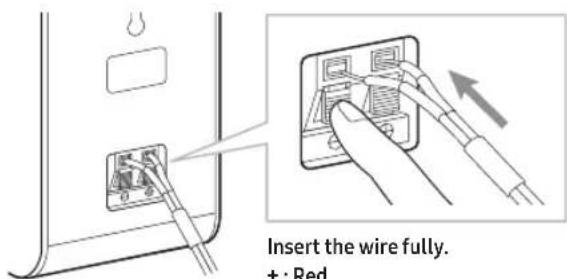
+:Red
- : Black
- When connecting the speaker cables to the surround speakers, follow these steps:
- Insert the red and black colored ends of each speaker cable into the red and black jacks of the appropriate speaker.
— The labels are on the backs of the speakers.
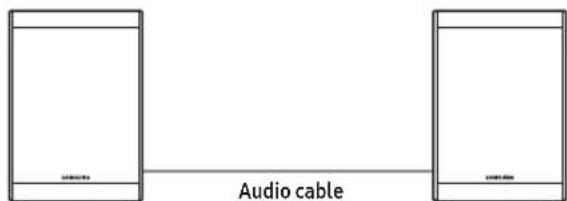
- The length of the speaker audio cable: 6 m
2. Turn on the Surround speakers
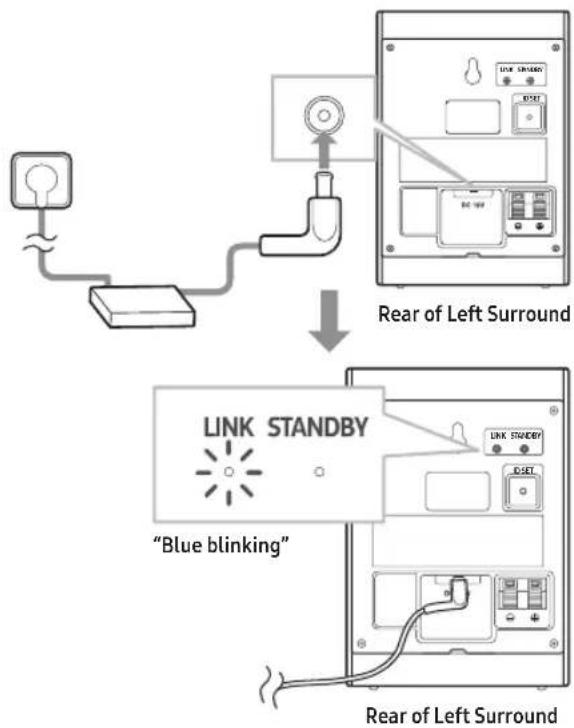
Plug the Surround speakers' power cord into an electrical outlet to turn on the Surround speakers. The LINK LED indicator(blue LED) on the rear of left surround speaker will blink quickly. If the LINK LED does not blink, please see step 6.
3. Turn off the Soundbar
If the Soundbar is turned on, please turn off the Soundbar by pressing the (Power) button on the Soundbar or remote control.
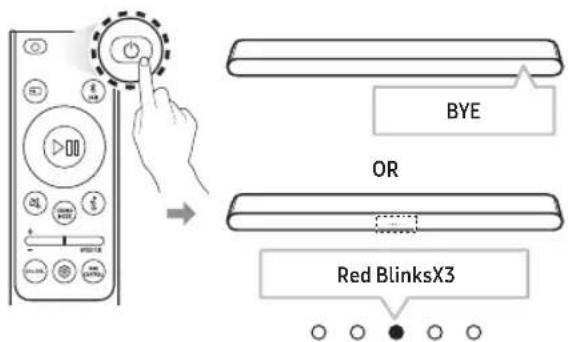
- The image of the Soundbar may differ from your Soundbar, depending on the model.
4. Connect Soundbar and Surround Speakers
Press the Up button on the remote control for more than 5 seconds until the "ID SET" message appears on the Soundbar's display. The message will disappear shortly. (If your Soundbar does not have a display window and only LED indicators, please refer to the LED information below.)
• After the ID SET process is successful, the Soundbar will turn on automatically.
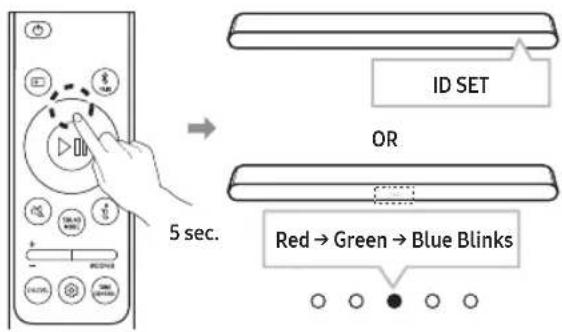
- The image of the Soundbar may differ from your Soundbar, depending on the model.
5. Check the connection complete
The LINK LED stops blinking and changes to solid blue when the Soundbar and surround speakers are successfully linked.
Please turn off the Soundbar and turn it back on.
Confirm that the LINK LED is blue.
(It may take a minute depending on the environment.)
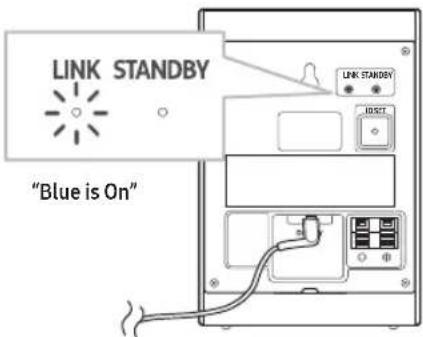
Rear of Left Surround
- If the LINK LED does not turn to solid blue in a minute, please repeat from step 2 through 5 referring to step 6 (LED indicator's status).
6. LED Indicator's status
LINK (Blue) On : Connected with the Soundbar.
LINK (Blue) Blinking fast (at an interval of around 0.5 second): Surround speakers are in ID SET mode.
- Check if the Soundbar is turned on and in ID SET mode.
- Repeat steps 3 through 5.
LINK (Blue) Blinking slow (at an interval of around 1 second): Previously connected to a Soundbar but cannot currently find it.
- Check if the Soundbar is turned on.
-
If the LINK LED keeps blinking slowly even when the Soundbar is turned on,
-
Press the ID SET button on the rear of the left surround for more than 5 seconds until the LINK LED starts blinking fast in blue.
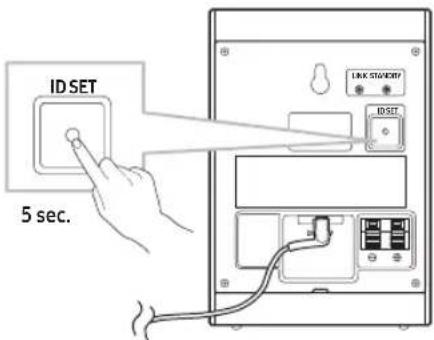
Rear of Left Surround
- Repeat steps 3 through 5.
STANDBY (Red) On : When the Soundbar turns off or connection has failed.
- Follow the instructions for "Link (Blue) Blinking slow (at an interval of around 1 second)" above.
Others : Errors
- Contact a Samsung Service Centre.
03 TROUBLE SHOOTING
There is no sound from Surround Speakers
- If the Surround speakers are successfully paired and connected to a Soundbar, the LINK LED indicator on the rear of the Left Surround is on and solid blue. Please reconnect the Surround speakers to your Soundbar referring to 02-6, LED Indicator's status.
- Other devices sending radio frequency signals in proximity may interrupt the connection. Please keep your speaker away from such devices.
- The content you are playing may have no surround track but only stereo. Please change the sound mode to Surround by pressing SOUND MODE button on the remote control.
There is sound jitter, delays, noise or dropout from the sound of Surround Speakers.
- There may be sound jitter or delays when the Surround Speakers are far from the Soundbar. Please place them near the Soundbar.
- There may be sound jitter or delays when the Soundbar is near an electrical device that can cause radio interference. Please place the Soundbar far from such devices that can cause radio interference (e.g. wireless router).
- Please change the TV network connection status from wireless to wired.
The volume of Surround Speakers is too low
- Please increase the rear level referring to the manual of your Soundbar. (You can download the manual of your Soundbar from www.samsung.com/support)
04 MOUNTING ON A WALL
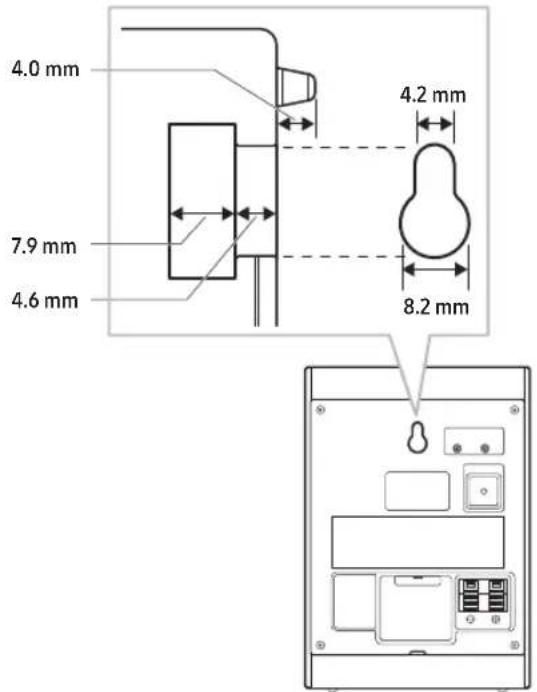
- Be sure the wall is stable. If the wall is weak, reinforce it before installation.
• Take care not to install the speakers sideways or upside down. - Samsung Electronics is not liable for any damage to the product due to improper installation.
• Wall mounts aren't sold by Samsung Electronics.
05 COMPATIBLE MODELS
- Compatible with select Samsung Soundbar. Please visit the Soundbar product page at www.samsung.com/support for more information.
- Compatible model list is subject to change without further notice.
06 OPEN SOURCE LICENSE NOTICE
To send inquiries and requests for questions regarding open sources, contact Samsung Open Source (http://opensource.samsung.com)
07 IMPORTANT NOTES ABOUT SERVICE
- An administration fee may be charged if either
(a) an engineer is called out at your request and there is no defect with the product (i.e. where the user manual has not been read).
(b) you bring the unit to a repair centre and there is no defect with the product (i.e. where the user manual has not been read). - You will be informed of the administration fee amount before a technician visits.
08 SPECIFICATIONS AND GUIDE
Specifications
| Model NameSWA-9250S (LEFT/RIGHT) | |
| Weight1.7 kg | Dimensions (W x H x D)105.0 x 152.8 x 109.0 mm |
| Operating Temperature Range10 °C to 40 °C | Operating Humidity Range10 % ~ 80 %,non-condensing |
| Overall Standby Power Consumption (W)0.5 W | |
| WIRELESS DEVICE OUTPUT POWERSRD max transmitter power25mW at 5.725GHz – 5.825GHz | |
NOTE
- Samsung Electronics Co., Ltd reserves the right to change the specifications without notice.
• Weight and dimensions are approximate. -
Please visit www.samsung.com/global/ecodesign_energy to find further information about off mode, standby mode, and networked standby mode associated with EU standby ecodesign regulation.
-
Hereby, Samsung declares that this radio equipment is in compliance with Directive 2014/53/EU and the relevant UK statutory requirements.
The full text of the declaration of conformity is available at the following internet address: http://www.samsung.com go to Support and enter the model name.
This equipment may be operated in all EU countries and in the UK.
Correct Disposal of This Product (Waste Electrical & Electronic Equipment)
(Applicable in countries with separate collection systems)
This marking on the product, accessories or literature indicates that the product and its electronic accessories (e.g. charger, headset, USB cable) should not be disposed of with other household waste at the end of their working life. To prevent possible harm to the environment or human health from uncontrolled waste disposal, please separate these items from other types of waste and recycle them responsibly to promote the sustainable reuse of material resources. Household users should contact either the retailer where they purchased this product, or their local government office, for details of where and how they can take these items for environmentally safe recycling.
Business users should contact their supplier and check the terms and conditions of the purchase contract.
This product and its electronic accessories should not be mixed with other commercial wastes for disposal.
For information on Samsung's environmental commitments and product specific regulatory obligations e.g. REACH, WEEE, Batteries, visit: www.samsung.com/uk/aboutsamsung/sustainability/environment/our-commitment/data/
07 REMARQUES IMPORTANTES RELATIVES AU SERVICE
Altoparlante surround posteriore o sinistro
INFORMATII DESPRE SIGURANTĂ
www.samsung.com/uk/aboutsamsung/sustainability/environment/our-commitment/data/
BEZPEČNOSTNÉ INFORMÁCIE
07 DÔLEŽITÉ POZNÁMKY K SERVISU
www.samsung.com/uk/aboutsamsung/sustainability/environment/our-commitment/data/
SIGURNOSNE INFORMACIJE
Hvala što ste kupili ovaj proizvod (SWA-9250S).
 | PAŽNJAOPASNOST OD STRUJNOGUDARA. NE OTVARAJTE. |  |
| PAŽNJA: DA BISTE SMANJILI OPASNOST OD STRUJNOGUDARA, NEMOJTE UKLANJATI POKLOPAC (NITI ZADNJIDEO). UNUTRA SE NE NALAZE DELOVI KOJE KORISNICIMOGU SAMI DA POPRAVE. SVE POPRAVKE PREPUSTITEKVALIFIKOVANOM SERVISNOM OSOBLJU. Pogledajtetabelu u nastavku za objašnjenje simbola koji mogu da senalaze na vašem Samsung proizvodu. | ||
 | Ovaj simbol znači da je struja u unutrašnjostivisokog napona. Opasno je dolaziti u bilo kakav dodir sa unutrašnjim sklopovimaproizvoda. | |
 | Ovaj simbol označava da je uz uređaj priloženavažna dokumentacija o njegovom radu iodržavanju. | |
 | Proizvod II klase: ovaj simbol označava da nijepotrebna sigurnosna veza sa uzemljenjem.Ako se ovaj simbol ne nalazi na proizvodu sakablom za napajanje, proizvod MORA da budepouzdano povezan na zaštitno uzemljenje. | |
 | Naizmenična struja: ovaj simbol označavada napon označen tim simbolom predstavljanazmeničnu struju. | |
 | Jednosmerna struja: ovaj simbol označavada napon označen tim simbolom predstavlja jednosmernu struju. | |
 | Pažnja, Pogledajte uputstva za upotrebu:ovaj simbol upućuje korisnika da potražidodatne informacije po pitanju sigurnosti ukorisničkom priručniku. | |
- Prorezi i otvori na kućištu i na zadnjoj ili donjoj strani su predviđeni za neophodnu ventilaciju. Da bi se obezbedio pouzdan rad ovog uređaja i da bi se zaštitio od pregrevanja, ovi prorezi i otvori nikada ne smeju biti blokirani ili prekriveni.
- Ne postavljajte ovaj uređaj u skučeni prostor, kao što je polica za knjige ili ugrađeni orman, osim ako nije obezbeđena odgovarajuća ventilacija.
- Ne postavljajte ovaj uređaj blizu ili iznad radijatora ili rešetke na otvoru za grejanje ili na mestima gde je izložen direktnoj sunčevoj svetlosti.
- Nemojte da stavljajte posude (vaze itd.) koje sadrže vodu na ovaj uređaj. Zalivanje vodom može izazvati požar ili strujni udar.
- Nemojte da izlažete ovaj uređaj kiši niti da ga postavljajte blizu vode (blizu kade, umivaonika, sudopere ili kade za veš, u vlažnom podrumu ili blizu bazena itd.). Ako se ovaj uređaj slučajno pokvasi, isključite ga i odmah se obratite ovlašćenom prodavcu.
- Nemojte preopteretiti zidne utičnice, produžne kablove ili adaptere preko njihovog kapaciteta, jer to može dovesti do požara ili strujnog udara.
- Provucite kablove za napajanje tako da izbegnete verovatnost da ih se gazi ili priklešti predmetima koji su postavljeni na ili uz njih. Obratite posebnu pažnju na kablove na kraju utikača, na zidnim utičnicama i na mestu gde izlaze iz uređaja.
- Da biste zaštitili ovaj uređaj od oluje sa grmljavinom, ili kada je ostavljen bez nadzora i nekorišćen tokom dužeg vremenskog perioda, isključite ga iz zidne utičnice i izvucite antenu ili kablovski sistem. Ovo će sprečiti oštećenje kompleta usled udara groma i strujnih udara.
- Pre nego što povežete kabl za napajanje naizmeničnom strujom u utičnicu adaptera za jednosmernu struju, proverite da li oznaka napona adaptera za jednosmernu struju odgovara lokalnom električnom napajanju.
-
Nikada nemojte stavljati ništa metalno u otvorene delove ovog uređaja. To može stvoriti opasnost od strujnog udara.
-
Da biste izbegli strujni udar, nikada ne dodirujte unutrašnjost ovog uređaja. Ovaj uređaj treba da otvara samo kvalifikovani tehničar.
- Uverite se da ste priključili kabl za napajanje tako da je čvrsto nalegao. Kada izvlačite kabl za napajanje iz zidne utičnice, uvek povucite utikač kabla za napajanje. Nikada ne izvlačite utikač povlačenjem kabla za napajanje. Nemojte da dirate kabl za napajanje mokrim rukama.
- Ako ovaj uređaj ne radi normalno – posebno ako iz njega dopiru neobični zvukovi ili mirisi – odmah ga isključite i kontaktirajte ovlašćenog prodavca ili servisni centar.
- Održavanje kućišta.
- Pre nego što povežete druge komponente sa ovim proizvodom, obavezno ih isključite.
- Obavezno izvucite utikač iz utičnice ako proizvod ostane nekorišćen ili ako napuštate kuću na duži vremenski period (naročito kada će deca, starije osobe ili osobe sa invaliditetom ostati sami u kući).
- Akumulirana prašina može da izazove strujni udar, curenje struje ili požar tako što prouzrokuje generisanje varnica i toplote u kablu za napajanje ili pogoršanje stanja izolacije.
- Kontaktirajte ovlašćeni servisni centar za informacije ako nameravate da instalirate svoj proizvod na mestu sa velikom prašinom, visokim ili niskim temperaturama, visokom vlažnošću, hemijskim supstancama ili gde će raditi 24 sata dnevno, kao što je aerodrom, železnička stanica itd. Ako to ne učinite, može doći do ozbiljnog oštećenja vašeg proizvoda.
- Koristite samo pravilno uzemljene utikač i zidnu utičnicu.
-
Neispravno uzemljenje može izazvati strujni udar ili oštećenje opreme. (Samo oprema klase l.)
-
Za potpuno isključivanje uređaja morate da ga isključite iz zidne utičnice. Zato zidna utičnica i utikač za napajanje moraju u svakom trenutku da budu lako dostupni.
- Ne dozvolite deci da vise na proizvodu.
- Čuvajte pribor (bateriju itd.) na bezbednom mestu van domašaja dece.
- Ne postavljajte proizvod na nestabilnu lokaciju kao što je klimava polica, nagnut pod ili lokacija izložena vibracijama.
- Nemojte ispuštati ili udarati proizvod. Ako je proizvod oštećen, izvucite kabl za napajanje i kontaktirajte servisni centar.
- Da biste očistili ovaj uređaj, izvucite kabl za napajanje iz zidne utičnice, a zatim obrišite proizvod mekom, suvom krpom. Nemojte koristiti nikakve hemikalije kao što su vosak, benzol, alkohol, razređivači, insekticidi, osveživači vazduha, maziva ili deterdžent. Ove hemikalije mogu oštetiti izgled proizvoda ili izbrisati štampu na proizvodu.
- Ne izlažite uređaj prskanju ili kapljanju. Ne stavljajte predmete napunjene tečnošću, na primer vaze, na uređaj.
- Nemojte uključivati više električnih uređaja u istu zidnu utičnicu. Preopterećenje utičnice može dovesti do njenog pregrevanja, što može dovesti do požara.
UPOZORENJE
- DA SE SPREČI ŠIRENJE POŽARA, UVEK DRŽITE SVEĆE I DRUGE PREDMETE SA OTVORENIM PLAMOM DALJE OD OVOG PROIZVODA.
- Kako bi se smanjila opasnost od požara ili strujnog udara, ne izlažite ovaj uređaj kiši ili vlazi.
- Ne koristite tečne fumigatore koji sadrže hemikalije, kao što su repelent protiv komaraca ili osvežavač vazduha, oko proizvoda. Ako para dođe u kontakt sa površinom proizvoda ili uđe u proizvod, to može izazvati mrlje ili kvar.

Mere opreza
Zadnja stran levega zvočnika za prostorski zvok
- Ponovite korake od 3 do 5.
www.samsung.com/uk/aboutsamsung/sustainability/environment/our-commitment/data/
www.samsung.com/uk/aboutsamsung/sustainability/environment/our-commitment/data/
OHUTUSALANE TEAVE
Täname teid, et ostsite selle toote (SWA-9250S).
www.samsung.com/uk/aboutsamsung/sustainability/environment/our-commitment/data/


If you have any questions or comments relating to Samsung products, please contact the Samsung customer care Centre.
| Country/Region | Samsung Service Center | Web Site |
| UK 0333 | 000 0333 | www.samsung.com/uk/support |
| IRELAND (EIRE) | 0818 717100 | www.samsung.com/ie/support |
| GERMANY 06 | 196 77 555 77 | www.samsung.com/de/support |
| FRANCE 01 | 48 63 00 00 | www.samsung.com/fr/support |
| ITALIA | 800-SAMSUNG (800.7267864) | www.samsung.com/it/support |
| SPAIN 91 | 75 00 15 | www.samsung.com/es/support |
| PORTUGAL | 210 608 098Chamada para a rede fixa nacionalDias úteis das 9h às 20h | www.samsung.com/pt/support |
| LUXEMBURG | 261 03 710 | www.samsung.com/be_fr/support |
| NETHERLANDS | 088 90 90 100 | www.samsung.com/nl/support |
| BELGIUM 02 | -201-24-18 | www.samsung.com/be/support (Dutch)www.samsung.com/be_fr/support (French) |
| NORWAY 21 | 629099 | www.samsung.com/no/support |
| DENMARK 70 | 70 19 70 | www.samsung.com/dk/support |
| FINLAND 03 | -622 75 15 | www.samsung.com/fi/support |
| SWEDEN 07 | 71-400 300 | www.samsung.com/se/support |
| POLAND | 801-172-678* *(opłata według taryfy operatora) | http://www.samsung.com/pl/support/ |
| HUNGARY | 0680SAMSUNG (0680-726-7864) | www.samsung.com/hu/support |
| AUSTRIA | 0800 72 67 864 (0800-SAMSUNG) | www.samsung.com/at/support |
| SWITZERLAND | 0800 726 786 | www.samsung.com/ch/support (German)www.samsung.com/ch_fr/support (French) |
| ESTONIA 80 | -7267 | www.samsung.com/ee/support |
| Country/Region | Samsung Service Center | Web Site |
| CZECH | 800 - SAMSUNG(800-726786) | www.samsung.com/cz/support |
| SLOVAKIA | 0800 - SAMSUNG(0800-726 786) | www.samsung.com/sk/support |
| CROATIA 072 | 726 786 | www.samsung.com/hr/support |
| BOSNIA 055 | 233 999 | www.samsung.com/ba/support |
| North Macedonia | 023 207 777 | www.samsung.com/mk/support |
| MONTENEGRO | 020 405 888 | www.samsung.com/support |
| SLOVENIA | 080 697 267 (brezplačna številka) | www.samsung.com/si/support |
| SERBIA 011 | 521 6899 | www.samsung.com/rs/support |
| Kosovo 038 | 40 30 90 | www.samsung.com/support |
| ALBANIA | 045 620 202 | www.samsung.com/al/support |
| BULGARIA | 0800 111 31 - Безплатен за всички оператори*3000 - Цена на един градски разговор или според тарифата на мобилният оператор 09:00 до 18:00 - Понеделник до Петък | www.samsung.com/bg/support |
| ROMANIA | 0800872678 - Apel gratuit*8000 - Apel tarifat în rețeaProgram Call Center Luni - Vineri: 9 AM - 6 PM | www.samsung.com/ro/support |
| CYPRUS | 8009 4000 only from landline, toll free | www.samsung.com/gr/support |
| GREECE | 80111-SAMSUNG(80111 726 7864) from mobile and land line(+30) 210 6897691 from mobile and land line | |
| LITHUANIA | 0-800-77777 | www.samsung.com/lt/support |
| LATVIA 8000 | -7267 | www.samsung.com/lv/support |
© 2025 Samsung Electronics Co., Ltd. All rights reserved.