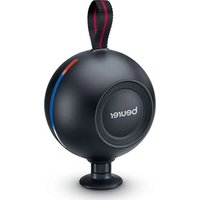
MG 101 - Massage device BEURER - Free user manual and instructions
Find the device manual for free MG 101 BEURER in PDF.


| Product type | Muscle massage device |
| Brand | Beurer |
| Model | MG 101 |
| Dimensions (without accessories) | 9.1 x 7.1 x 9.6 cm |
| Weight (without attachments and cable) | Approx. 405 g |
| Power supply | Li-ion battery 7.4 V / 1250 mAh, rechargeable via USB-C (5 V ⎓ 1 A) |
| Battery life | Approx. 2 hours after full charge |
| Charging time | At least 2 hours for the first charge |
| Intensity levels | 5 levels (from 1800 to 3000 rpm) |
| Included attachments | 5 attachments: shear, arc, air cushion, spiral, flat |
| Main functions | Muscle massage, pressure indicator (white/blue/red LED), automatic shut-off after 10 min, travel lock |
| Material | Plastic, attachments made of synthetic material |
| Care and cleaning | Clean with a slightly damp cloth and non-abrasive cleaner; attachments washable with water and mild detergent. Do not immerse. |
| Safety | Automatic shut-off, overheating protection, stop in case of excessive pressure, do not use on sensitive or injured areas |
| Spare parts and repairability | Interchangeable attachments; replaceable battery (removable); do not open the housing, repair by professional only |
| General information | Domestic use, non-medical, do not use on pacemaker, pregnancy, children under 8 without supervision |
Frequently Asked Questions - MG 101 BEURER
User questions about MG 101 BEURER
0 question about this device. Answer the ones you know or ask your own.
Ask a new question about this device
Download the instructions for your Massage device in PDF format for free! Find your manual MG 101 - BEURER and take your electronic device back in hand. On this page are published all the documents necessary for the use of your device. MG 101 by BEURER.
USER MANUAL MG 101 BEURER
natural_image
Black beurer-style balloon with a handle, no visible text or symbols on the device itself.EN Deep Tissue Massager Instructions for use......15
natural_image
Illustration of an open book with a geometric window and horizontal lines, no text or symbols presentEN Unfold page 3 before reading the instructions for use.
natural_image
Simple line drawing of an open book with no text or symbols visiblenatural_image
Hand holding a circular device with a pointer and control knob (no text or symbols visible)natural_image
Illustration of a hand holding a tool next to a circular component with internal structure (no text or symbols)natural_image
Simple line drawing of a bowl with a curved handle and an arrow pointing to the rim (no text or symbols)
natural_image
Illustration of two hands holding a circular object with internal patterns and arrows indicating rotation (no text or symbols)natural_image
Line drawing of a hand holding a circular object with arrows indicating motion or force (no text or symbols)natural_image
Technical line drawing of a mechanical component with internal cavity and directional arrow (no text or symbols)natural_image
Simple line drawing of an open book with no text or symbols visibleRead these instructions for use carefully and keep them for later use. Make them accessible to other users and note the information they contain.
- Warnings and safety notes ......17
- Included in delivery....18
- Intended purpose ....18
- Signs and symbols ......19
- Device description....20
5.1 Deep Tissue Massager .....20
5.2 Attachments....20 - Usage.....20
6.1 Initial use/charging the battery......20
6.2 Selecting/changing the attachment .....21
6.3 Switching on the device/selecting the intensity level ....21
6.4 Pressure indicator .....22 - Cleaning and maintenance ......22
- What if there are problems? .....23
- Disposal 23
- Technical specifications .....24
- Guarantee / Service ......24
WARNING
- The device is only intended for domestic/private use, not for commercial use.
- This device may be used by children over the age of 8 and by people with reduced physical, sensory or mental skills or a lack of experience or knowledge, provided that they are supervised or have been instructed on how to use the device safely, and are fully aware of the consequent risks of use.
- Children must not play with the device.
- Cleaning and user maintenance must not be performed by children unless supervised.
- If the mains connection cable of this device is damaged, it must be disposed of. If it cannot be removed, the device must be disposed of.
- Under no circumstances should you open or repair the device yourself. If you do so, it may no longer function correctly. Failure to comply will invalidate the guarantee.
- Do not insert any objects into the opening in the device or into the moving parts. Ensure that the moving parts can move freely at all times.
- Do not force or jam any part of your body, in particular your fingers, between the moving massage elements or their holders in the device.
1. WARNINGS AND SAFETY NOTES
WARNING
Do not use the device if you suffer from a medical abnormality or injury in the area to be massaged (e.g. slipped disc, open wounds).
- Do not use the device if you wear a pacemaker.
- Do not use the device for massaging the area around the heart.
- Do not use the device on swollen, burnt, inflamed or injured skin and body parts.
- Do not use the device on cuts, capillaries, varicose veins, acne, couperose, herpes or other skin diseases.
- Do not use the device during pregnancy.
- Do not use the device on the head or face (e.g. on the eyes), on the larynx, in the pubic area or other particularly sensitive body parts.
- Do not use the device on the spine or directly on the bone.
- Do not use the device while sleeping.
- Do not use the device on animals.
- Do not use the device after the consumption of medicines or alcohol (reduced cognition!).
- Do not use the device in a vehicle.
You should consult your doctor before using the device, especially
- if you suffer from a severe illness,
• if you suffer from thrombosis,
• if you suffer from diabetes, - if you are suffering from pain, the cause of which is unknown.

WARNING
- Danger of suffocation! Keep packaging material away from children.
- Danger of suffocation! Keep the attachments away from children.
- Risk of electric shock! Make sure that the device does not come into contact with water or other liquids.
- Risk of electric shock! Never pick up a device that has fallen into water.
- Children must be supervised at all times whilst using the device.
- There may be a risk of fire if the device is used improperly or these instructions for use are ignored.
- Never leave the device unattended when it is in operation, particularly if there are children nearby.
- Never operate the device underneath a cover, such as a blanket, pillow, etc.
- Never use the device near petrol or other highly flammable substances.
- Only operate the device in dry indoor areas.
- Never operate the device in the bath or a sauna.
IMPORTANT
- Before use, ensure that the device and the attachments show no visible damage. If you have any doubts, do not use the device and contact your retailer or the specified Customer Services address.
- Never open the housing.
- Keep the device away from pointed or sharp objects.
- If the device has been dropped or has suffered any other damage, it must no longer be used.
-
Switch off the device after every use and before cleaning.
-
Never use the device for more than 15 minutes (risk of overheating). Allow the device to cool down for at least 15 minutes before using it again.
- Only use the device with the supplied accessories.
- Protect the device and the attachments from knocks, dust, chemicals, drastic changes in temperature, electromagnetic fields and nearby sources of heat (ovens, heaters).
WARNING
Repairs
- Never attempt to repair the device yourself!
- Only specialist personnel may perform repairs on electrical devices. Under no circumstances should you open or repair the device yourself. If you do so, it may no longer function correctly. Improper repairs may put users in significant danger. For repairs, please contact Customer Services or an authorised retailer. Failure to comply will invalidate the guarantee.
WARNING
Notes on handling batteries
- If fluid from a battery cell comes into contact with your skin or eyes, wash the affected areas with water and seek medical assistance.
- Choking hazard! Small children could swallow and choke on batteries. Therefore, keep batteries out of the reach of small children!
- If a battery has leaked, put on protective gloves to dispose of the device.
- Protect batteries from excessive heat.
- Risk of explosion! Never throw batteries into a fire.
-
Do not disassemble, split or crush the batteries.
-
In order to achieve as long a battery service life as possible, fully charge the battery at least 2 times a year.
- Always switch the device off in advance of charging.
- Batteries must be charged correctly prior to use. The instructions from the manufacturer and the specifications in these instructions for use regarding correct charging must be observed at all times.
2. INCLUDED IN DELIVERY
Check that the exterior of the cardboard delivery packaging is intact and make sure that all contents are present. Before use, ensure that the Deep Tissue Massager and the attachments show no visible damage.
• 1 Deep Tissue Massager
- 5 attachments
- 1 USB-C cable
• 1 copy of these instructions for use
3. INTENDED PURPOSE
WARNING
Only use the Deep Tissue Massager with the attachments included in delivery. The Deep Tissue Massager and the attachments are not medical devices, but massage treatment devices. The Deep Tissue Massager is only suitable for personal use, not for medical or commercial purposes. The device may only be used for the purpose for which it is designed and in the manner specified in the instructions for use. Any form of improper use can be dangerous. The manufacturer is not liable for damage resulting from improper or incorrect use. Do not use the Deep Tissue Massager if one or several of the listed warnings and safety notes applies to you. If you are unsure whether the Deep Tissue Massager is suitable for you, please consult your doctor.
4. SIGNS AND SYMBOLS
The following symbols are used on the device, in these instructions for use, on the packaging and on the type plate for the device:

DANG
Indicates an imminent danger. If it is not avoided, it will result in death or serious injury.

WARNING
Indicates a potentially impending danger. If it is not avoided, there is a risk of death or serious injury.

CAUTION
Indicates a potentially impending danger. If it is not avoided, slight or minor injuries may result.
NOTICE
Indicates a potentially harmful situation. If it is not avoided, the system or something in its vicinity may be damaged.
Read the instructions

Product information
Note on important information

CE labelling
This product satisfies the requirements of the applicable European and national directives.
Manufacturer

Do not use the Deep Tissue Massager on people with implanted electrical devices (e.g. a pacemaker)

Separate the packaging elements and dispose of them in accordance with local regulations.
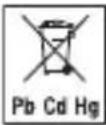
Do not dispose of batteries containing harmful substances with household waste

Separate the product and packaging elements and dispose of them in accordance with local regulations.


The products demonstrably meet the requirements of the Technical Regulations of the EAEU.

Conformity assessed marking for the United Kingdom
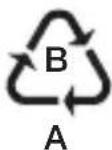
Marking to identify the packaging material.
A = material abbreviation, B = material number: 1–7 = plastics, 20–22 = paper and cardboard
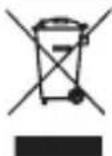
Disposal in accordance with the Waste Electrical and Electronic Equipment EC Directive – WEEE
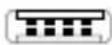
Polarity of DC power connection
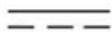
Direct current
The device is suitable for use with direct current only

Importer symbol
5. DEVICE DESCRIPTION
5.1 Deep Tissue Massager
The associated illustrations are on page 3.
1 Intensity indicator
5 LEDs, starting from left to right
1 Battery level indicator
During operation:
Battery level < 25% = active LEDs flash
During charging:
LEDs flash blue = battery charging
LEDs light up blue = battery fully charged

Each of the five LEDs represents 20% charging capacity. The level currently being charged flashes blue; the levels already charged light up solid blue.
2 ON/OFF button
3 USB-C cable connection
4 Battery compartment cover
5 Attachment connection
6 Pressure indicator
7 USB-C cable
5.2 Attachments
8 Scraper head
Best suited to glide along the length of the muscles.
9 Curved head
Best suited for areas of the body that are naturally rounded (e.g. arms, lower legs or thighs).
10 Air cushion head
Best suited for sensitive parts of the body (e.g. the neck).
11 Spiral head
Best suited for treating deep muscle tissue and for targeted spot mas-sages (e.g. on the sole of the foot).
12 Flat head
Best suited for treating large areas on the entire body (e.g. the thigh).
6. USAGE
6.1 Initial use/charging the battery
The massage must feel pleasant at all times. Start the treatment at the lowest intensity level and then increase it according to your preferences if necessary. A slight haematoma may well occur – this is a positive therapeutic effect as the use of the device can selectively encourage your blood flow. In isolated cases, areas of redness may also occur on the skin. If you experience excessive skin irritation, stop using the device and consult a doctor. Depending on the level of tension, a treatment time of approx. 10 minutes is recommended for the desired area (neck, shoulders, back, arms, buttocks or legs).
Before using the Deep Tissue Massager for the first time, you need to charge it for a minimum of 2 hours. To do so, proceed as follows:
-
Remove all packaging material from the device.
-
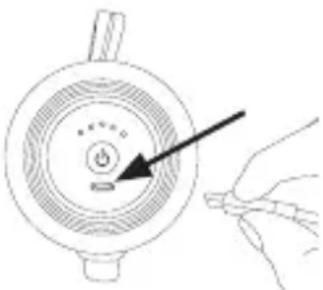
Connect the supplied USB-C cable to the Deep Tissue Massager. The connector for the USB-C cable
3 is located
on the side of the device, below the ON/OFF button.
- Connect the USB-C cable to a mains plug (not included in delivery). Insert
natural_image
Hand holding a circular device with a power button and indicator light (no text or symbols visible)the mains plug into a suitable socket. The battery level indicator 1 shows the current battery level.
| Battery level indicator LEDs 1 flash blue | = | battery charging |
| All LEDs of the battery level indicator 1 light up permanently blue | = | battery is fully charged |
- As soon as all the LEDs of the battery level indicator 1 light up permanently blue, remove the mains plug (not included in delivery) from the socket. The battery is now fully charged. The battery will last for approx. 2 hours of operation when fully charged. As soon as the battery level indicator 1 starts to flash blue, you must recharge the Deep Tissue Massager; otherwise it will automatically switch off soon.
6.2 Selecting/changing the attachment
Select the appropriate attachment before starting the massage. To change an attachment, proceed as follows:
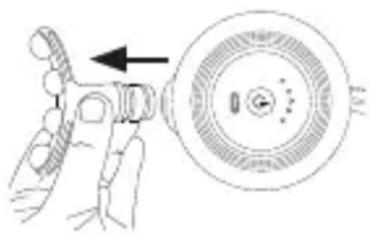
- Pull the existing attachment horizontally off the Deep Tissue Massager.
natural_image
Diagram showing a hand holding a tool next to a circular component with internal structure (no text or symbols)- Slide your desired attachment firmly into the Deep Tissue Massager until you feel it click securely into place.
6.3 Switching on the device/ selecting the intensity level

The Deep Tissue Massager comes with an automatic switch-off function. This means that the Deep Tissue Massager automatically switches off after a period of use of approx. 10 minutes.
- Press and hold the ON/OFF button ⏻ 2 for 2 seconds. The 5 LEDs of the intensity indicator 1 light up for approx. 2 seconds. In addition, the side LED strips fill from bottom to top and then empty again except for the first LED. This lights up white. The device is now in standby mode.
- Briefly press the ON/OFF button ⏻② to switch on the device. The left LED of the intensity indicator 1 starts to light up. The massage starts at intensity level 1.
- To switch between the intensity levels, briefly press the ON/OFF button ⏻2. The intensity indicator 1 shows the current intensity level.
Intensity level 1 (1800 rpm/30 Hz) → Intensity level 2 (2100 rpm/35 Hz) → Intensity level 3 (2400 rpm/40 Hz) → Intensity level 4 (2700 rpm/45 Hz) → Intensity level 5 (3000 rpm/50 Hz) → Standby.
- You can switch off the device at any time during use by pressing and holding the ON/OFF button ⏻2(2 seconds). If you press the ON/OFF button ⏻2 again at the fifth intensity level, the device switches off. The device is in standby mode.

If the device stops during use, this may be due to excessive pressure. Make sure that you do not exert too much pressure on the Deep Tissue Massager when using it.
6.4 Pressure indicator
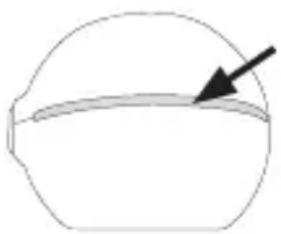
The side LED bar (pressure indicator) 6 lights up in a corresponding colour depending on how firmly you press the selected massage attachment against the skin.
natural_image
Simple line drawing of a bowl with a curved handle and an arrow pointing to the rim (no text or symbols)
The pressure indicator 6 and associated recommendations are not mandatory. Since body sensations vary greatly, you should immediately reduce the contact pressure as soon as you feel pain. The massage should always feel pleasant.
| Light pressure (suitable for small and sensitive muscle groups) | = | LED bar is in the white area |
| Strong pressure (suitable for large muscle groups) | = | LED bar is in the blue area |
| Too much pressure (may cause pain to most people during usage and should therefore be avoided) | = | LED strip is in the red area, reduce pressure |
The recommendations apply to the attachments 8 / 9 / 10 / 12. Attachment 11 is perceived as more intense due to its
shape and should therefore only be used in the white area of the LED strip.
7. CLEANING AND MAINTENANCE
Cleaning

WARNING
- Switch off the device each time before cleaning.
- Do not clean the device in the dishwasher.
- Clean the device only using a slightly damp cloth and a non-abrasive cleaning product. For hygienic cleaning, clean all attachments with water and a non-abrasive cleaning product.
- Clean the device using only the methods specified. Under no circumstances may liquid enter the device.
- When using massage oils (recommended for attachment 11/12 only), ensure that all residue is completely removed and cleaned.
- Do not use the device or attachments again until all components are completely dry.
Care
If you do not plan to use the Deep Tissue Massager for a long period of time, we recommend that you store it in the original packaging in a dry environment, ensuring it is not weighed down by additional items.
8. WHAT IF THERE ARE PROBLEMS?
| Problem | The Deep Tissue Massager stops during use. |
| Solution | Make sure that you do not exert too much pressure on the Deep Tissue Massager when using it. If you exert too much pressure, the device will stop briefly. |
9. DISPOSAL
Battery disposal
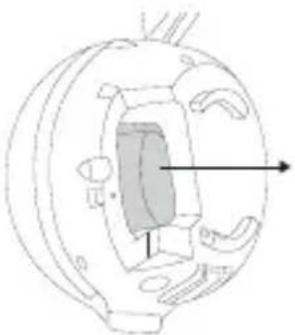
When disposing of the device, you must first remove the battery from the device. To do so, proceed as follows:
- Remove the battery cover by turning it anti-clockwise 90°. The battery cover is then loose and can be removed.

natural_image
Illustration of two hands holding a circular object with a curved arrow indicating rotation (no text or symbols)- Then loosen the housing shell on the side of the battery cover.

- Now pull the battery out of the device and disconnect the battery from the device using the plug connection.
natural_image
Technical line drawing of a mechanical component with internal structure and directional arrows (no text or symbols)- You can then place the housing shell back on the device and replace the battery cover.
Empty, completely flat batteries must be disposed of in specially designated collection boxes, at recycling points or at electronics retailers. You are legally required to dispose of the batteries.
The codes below are printed on batteries containing harmful substances:
Pb = battery contains lead
Cd = battery contains cadmium
Hg = battery contains mercury
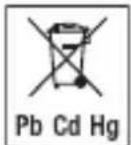
Faulty or used batteries must be recycled in accordance with Directive 2006/66/EC and amendments thereto. Return the batteries and/or the device using the collection facilities provided.
For environmental reasons, do not dispose
of the device in household waste at the end of its service life.
Dispose of the device at a suitable local collection or recycling point in your country. Dispose of the device in accordance with EC Directive Waste Electrical and Electronic Equipment (WEEE). If you have any questions, please contact the local authorities responsible for waste disposal.
10. TECHNICAL SPECIFICATIONS
| Mains operation:Input 5 V | ——1 A |
| Dimensions approx. | 9.1 x 7.1 x9.6 cm(without attachments and without strap) |
| Weight approx. 405 g | (without attachments, without USB-C cable) |
| Battery:CapacityNominal voltageType designation | 1250 mAh7.4 VLithium-ion |
11. GUARANTEE / SERVICE
Further information on the guarantee and guarantee conditions can be found in the guarantee leaflet supplied.
FRANÇAIS

natural_image
Simple line drawing of an open book with no text or symbols visiblenatural_image
Hand holding a circular device with a pointer and control knob, no visible text or symbolsnatural_image
Illustration of a hand holding a tool next to a circular device with internal components (no text or symbols)natural_image
Simple line drawing of a bowl with a curved band and an arrow pointing to the rim (no text or symbols)
natural_image
Illustration of two hands holding a circular object with a curved arrow indicating rotation (no text or symbols)natural_image
Technical line drawing of a mechanical component with internal structure and directional arrows (no text or symbols)natural_image
Simple line drawing of an open book with no text or symbols visiblenatural_image
Hand holding a small electronic device with a power button and indicator lights (no text or symbols visible)natural_image
Illustration of a hand holding a tool next to a circular device with a pointer and internal components (no text or symbols)natural_image
Simple line drawing of a dome-shaped object with a horizontal line and an arrow pointing to the edge (no text or symbols)
natural_image
Illustration of two hands holding a circular object with a curved arrow indicating rotation (no text or symbols)natural_image
Line drawing of a hand holding a mechanical component with arrows indicating direction (no text or symbols)natural_image
Technical line drawing of a mechanical component with internal structure and directional arrow (no text or symbols)natural_image
Simple line drawing of an open book with no text or symbols visiblenatural_image
Hand holding a circular device with a pointer and a small button, no visible text or symbolsnatural_image
Diagram showing a hand holding a tool next to a circular component with internal structure (no text or symbols)natural_image
Simple line drawing of a bowl with a horizontal bar and arrow pointing to the rim (no text or symbols)
natural_image
Illustration of two hands holding a circular object with a curved arrow indicating rotation (no text or symbols)natural_image
Illustration of a hand holding a cylindrical object with a knob, showing internal components and arrows indicating movement (no text or symbols)natural_image
Technical line drawing of a mechanical component with internal structure and directional arrow (no text or symbols)natural_image
Simple line drawing of an open book with no text or symbols visiblenatural_image
Hand holding a small electronic device with a power button and indicator lights (no text or symbols visible)natural_image
Illustration of a hand holding a tool next to a circular device with a handle (no text or symbols)natural_image
Simple line drawing of a dome-shaped object with a horizontal line and an arrow pointing to it (no text or symbols)
natural_image
Illustration of two hands holding a circular object with a curved arrow indicating rotation (no text or symbols)natural_image
Technical line drawing of a mechanical component with internal structure and directional arrow (no text or symbols)natural_image
Simple line drawing of an open book with no text or symbols visiblenatural_image
Hand holding a circular device with a pointer and control knob (no text or symbols visible)natural_image
Diagram showing a hand holding a tool next to a circular device with internal components (no text or symbols)natural_image
Simple line drawing of a dome-shaped object with a horizontal bar and an arrow pointing to it (no text or symbols)
natural_image
Illustration of two hands holding a circular object with a curved arrow indicating rotation (no text or symbols)natural_image
Illustration of a hand holding a cylindrical object with a knob, showing mechanical components (no text or symbols)natural_image
Technical line drawing of a mechanical component with internal channels and arrows indicating direction (no text or symbols)natural_image
Simple line drawing of an open book with no text or symbols visiblenatural_image
Illustration of a hand holding a tool next to a circular device with a knob (no text or symbols)natural_image
Simple line drawing of a bowl with a curved handle and an arrow pointing to the rim (no text or symbols)
natural_image
Illustration of two hands holding a circular object with a curved arrow indicating rotation (no text or symbols)natural_image
Diagram of a hand holding a cylindrical object with arrows indicating direction (no text or symbols present)natural_image
Technical line drawing of a mechanical component with internal structure and directional arrow (no text or symbols)11. GWARANCJA/SERWIS
natural_image
Simple line drawing of an open book with no text or symbols visible5. BESCHRIJVING VAN HET APPARAAT
5.1 Spiermassageapparaat
natural_image
Illustration of a hand holding a circular device with a power button and indicator light (no text or symbols)natural_image
Illustration of a hand holding a tool next to a circular device with a pointer (no text or symbols)natural_image
Simple line drawing of a dome-shaped object with a curved horizontal line and an arrow pointing to the edge (no text or symbols)
natural_image
Illustration of two hands holding a circular object with a curved arrow indicating rotation (no text or symbols)natural_image
Illustration of a hand holding a cylindrical object with arrows indicating direction (no text or symbols)natural_image
Technical line drawing of a mechanical component with internal structure and directional arrows (no text or symbols)natural_image
Simple line drawing of an open book with no text or symbols visiblenatural_image
Hand holding a small electronic device with a circular dial and pointer, no visible text or symbolsnatural_image
Diagram showing a hand holding a tool next to a circular device with a pointer and control knob (no text or symbols)natural_image
Simple line drawing of a dome-shaped object with a horizontal line and an arrow pointing to its edge (no text or symbols)
natural_image
Illustration of two hands holding a circular object with a curved arrow indicating rotation (no text or symbols)natural_image
Illustration of a hand holding a cylindrical object with arrows indicating motion or force direction (no text or symbols)natural_image
Technical line drawing of a mechanical component with internal structure and directional arrow (no text or symbols)natural_image
Simple line drawing of an open book with no text or symbols visiblenatural_image
Hand holding a small electronic device with a power button and indicator light (no text or symbols visible)natural_image
Illustration of a hand using a tool to adjust a circular component with an arrow indicating the direction (no text or symbols present)natural_image
Simple line drawing of a bowl with a curved handle and an arrow pointing to the rim (no text or symbols)
natural_image
Illustration of two hands holding a circular object with a curved arrow indicating rotation (no text or symbols)natural_image
Technical line drawing of a mechanical component with internal structure and directional arrow (no text or symbols)natural_image
Simple line drawing of an open book with no text or symbols visiblenatural_image
Hand holding a small electronic device with a power button and indicator light (no text or symbols visible)- Koble USB-C-kabelen til et støpsel (medfølger ikke). Plugg støpselet inn i en passende stikkontakt. Batterinivåindikatoren 1 viser aktuelt batterinivå.
| LED-lysene på batteri-indikatoren 1 blinker blått | = Batteriet lades |
| Alle LED-lysene på batteriindikatoren 1 lyser konstant blått | = Batteriet er fulladet |
natural_image
Illustration of a hand holding a tool next to a circular component with internal structure (no text or symbols)natural_image
Simple line drawing of a bowl with a curved seam and an arrow pointing to the rim (no text or symbols)
natural_image
Illustration of two hands holding a circular object with concentric rings and arrows indicating rotation (no text or symbols)natural_image
Technical line drawing of a mechanical component with internal structure and directional arrow (no text or symbols)natural_image
Simple line drawing of an open book with no text or symbols visiblenatural_image
Hand holding a power button inside a circular device (no text or symbols visible)natural_image
Diagram showing a hand holding a tool next to a circular device with a pointer and control knob (no text or symbols)natural_image
Simple line drawing of a dome-shaped object with a horizontal line and an arrow pointing to it (no text or symbols)
natural_image
Illustration of two hands holding a circular object with a curved arrow indicating rotation (no text or symbols)natural_image
Technical line drawing of a mechanical component with internal structure and directional arrows (no text or symbols)Suite 16, Stonecross Place, Stonecross Lane North
WA3 2SH Lowton
United Kingdom