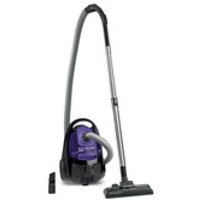
City Space Cyclonic RO2529 - Vacuum Cleaner ROWENTA - Free user manual and instructions
Find the device manual for free City Space Cyclonic RO2529 ROWENTA in PDF.


| Product type | Bagless canister vacuum cleaner |
| Model | City Space Cyclonic RO2529 |
| Brand | Rowenta |
| Technology | Cyclonic |
| Filtration | HEPA filter cassette (ref. ZR0056 01), microfilter, black foam filter |
| Dustbin capacity | 1.5 L |
| Power | 800 W |
| Power supply | Mains, 220-240 V, 50/60 Hz |
| Cord length | 8 m |
| Operating radius | 9 m |
| Noise level | 78 dB |
| Weight | 5.5 kg |
| Dimensions (W x D x H) | 400 x 300 x 250 mm |
| Included accessories | Flexible hose with handle and mechanical power control, telescopic tube, combination floor nozzle, crevice tool convertible into dusting brush, upholstery nozzle, parquet nozzle*, turbo brush*, mini turbo brush* |
| Maintenance | Empty dustbin after each use, wash black foam filter after each emptying, clean HEPA filter monthly, clean dustbin and air/dust separator monthly |
| Operation | On/off foot pedal, cord rewind, mechanical power control on handle, horizontal and vertical parking |
| Safety | Thermal protection against overheating, automatic shut-off in case of blockage |
| Spare parts | HEPA filter cassette ref. ZR0056 01, microfilter ref. ZR0056 01, black foam filter, 3-in-1 accessories |
| Warranty | Domestic use only, warranty void if instructions not followed |
Frequently Asked Questions - City Space Cyclonic RO2529 ROWENTA
User questions about City Space Cyclonic RO2529 ROWENTA
0 question about this device. Answer the ones you know or ask your own.
Ask a new question about this device
Download the instructions for your Vacuum Cleaner in PDF format for free! Find your manual City Space Cyclonic RO2529 - ROWENTA and take your electronic device back in hand. On this page are published all the documents necessary for the use of your device. City Space Cyclonic RO2529 by ROWENTA.
USER MANUAL City Space Cyclonic RO2529 ROWENTA
b - Parking vertical
For your safety, this appliance complies with all applicable standards and regulations (Low Voltage, Electromagnetic Compatibility, Environmental directives, etc.)
This appliance is not intended to be used by persons (including children) with reduced physical, sensory or mental capacities, or with lack of experience and knowledge, unless they are supervised or have been given proper instructions by a person responsible for the safety.
Children should be supervised to ensure they do not play with the appliance.
This device can be used by children provided that they are at least 8 years old, as well as by people lacking experience and knowledge or whose physical, sensorial or mental abilities are reduced, if they have been properly trained and duly informed of the incurred risks. You may not let children play with this appliance. Cleaning and maintenance of this appliance must not be carried out by children unless they are at least 8 years old and supervised responsible person. Keep the device and its cord away from children under 8 years old.
Do not use the appliance if: the cord is damaged. In order to avoid all possible danger, the winding system and the cord of your vacuum cleaner should only be replaced by a Rowent Authorized Service Centre.
CONDITIONS FOR USE
- Your vacuum cleaner is an electrical appliance: is should always be used under normal conditions.
- Use and store the appliance out of children's reach. Never leave the vacuum on unattended.
- Do not place the nozzle or the end of the tube near the eyes or ears.
- Do not vacuum wet surfaces, any type of liquids, hot substances, super fine substances (plaster, cement, ashes, etc.), large sharp waste (glass), harmful products (solvents, abrasives, etc.), aggressive products (acids, cleaning agents, etc.), or flammable or explosive products (oil or alcohol based).
- Never immerse the appliance in water, do not spill water on the appliance and do not store it outside.
- Do not use the appliance if it has been dropped and there is visible damage to it, or if it fails to function normally. In this case, do not open the appliance but send it to the nearest Approved Service Centre or contact Rowenta Customer Services.
ELECTRIC POWER SOURCE
- Check that your vacuum cleaner voltage corresponds to that of your mains: you will find this information on the bottom side of the appliance.
- Switch off and unplug the appliance:
- immediately after each use,
- before every change of accessories,
- before every cleanup or maintenance procedure, and before changing the filter.
REPAIRS
Repairs should only be performed by specialists using original spare parts. Repairs carried out by the user can pose a risk and will cancel the guarantee.
2.DESCRIPTION
- a - Horizontal parking
b - Vertical parking - ON/OFF pedal
- Cord winding pedal
- a - Wheel
b - Multidirectional wheel - Air outlet grill
- Transport handle
- Dust tray compartment
- a - Microfilter (ref ZR0056 01)
b - Motor protection grill - Microfilter compartment
- Vacuum opening
- Storage compartment for crevice/brush nozzle
- Power cord
- Dust tray
a-Dust tray handle
b-Lid
c - Lid opening lever
d - Extraction clips for the HEPA filter case
- HEPA filter case (ref. ZR0056 01):
a - Black foam filter (14a bis : replacement black foam filter)
b - HEPA filter
- Air/dust separator
- Air/dust separator base
- Air/dust separator base bolt
18.3 in 1 accessory* (ref. ZR0056 01):
a - Air/dust separator cleaning brush
b - HEPA filter scraper + unscrewing accessory for the air/dust separator
Standard accessories :
- Tube with grip and mechanical power control
- Telescopic tube*
- Tubes*
- Tube extension*
- Multi-surface nozzle
- Parquet nozzle*
- Unholstery nozzle*
- Crevice/brush nozzle
- Turbobrush*
- Mini turbobrush*
3. BEFORE FIRST USE
UNPACKING
- Unpack your appliance and remove all possible labels.
- Keep your guarantee form and read the instructions carefully before using your appliance for the first time.
SAFETY PRECAUTIONS
Each time before use, unwind the power cord completely.
- Do not jam it or allow it to rub against sharp edges.
- If you need to use an extension cord, make sure that it is in perfect condition and that it corresponds to your mains voltage.
- Your vacuum cleaner is fitted with a safety device which prevents the motor from overheating. In certain cases (when used on chairs, sofas, etc.) the safety device may be tripped and the appliance may make an unusual noise that is not serious.
- Do not move the vacuum cleaner by pulling on the power cord, the appliance must only be moved using its transport handle.
- Do not use the power cord to lift the appliance.
- Never unplug the appliance by pulling on the power cord.
- Never activate the vacuum cleaner without its dust tray (13) or without its HEPA filter case (14) (black foam filter (14a) and HEPA filter (14b)).
- Use original Rowenta filters only.
- Use original Rowenta accessories only.
- If you have any difficulties in finding accessories or filters for this vacuum cleaner, contact the Rowenta Customer Service.
- Switch off and unplug your vacuum cleaner each time after use.
- Always switch off and unplug your vacuum cleaner before maintenance or cleaning.
4. USE
ASSEMBLING THE APPLIANCE
- Firmly place the tube (19) in the vacuum opening (10) and turn to screw on - fig.1. To withdraw the tube, turn in the opposite sense and pull - fig.2.
- If your vacuum cleaner is equipped with a telescopic tube (20): push the adjustment button forward, pull out the tube as much as necessary and then release the button to block it - fig. 3. Otherwise, assemble both tubes (21) by turning them slightly - fig. 4.
- Attach the tube extension* (22) if necessary.
- Fit the corresponding accessory to the end of the tube or butt:
WARNING: Always switch off and unplug your vacuum cleaner before changing any accessories.
- For rugs and carpets: use the multi-surface nozzle (23) in the retracted brush position (fig. 5) or the Turbo-brush (fibers and animal hairs) (27^ or 28^*)
- For wood and hard floors: use the multi-surface nozzle (23) in the exterior brush position (fig. 6) or, for best results, use the parquet nozzle* (24).
- For corners and hard to reach spots: use the crevice/brush nozzle (26) in the flat position.
- For upholstery and delicate surfaces: use the brush side of the crevice/brush nozzle (26) or the upholstery nozzle* (25).
PLUGING IN THE POWER CORD AND STARTING THE APPLIANCE
- Unwind the power cord completely, plug in your vacuum cleaner (fig. 7) and press the ON/OFF pedal. On/Off (2) - fig. 8.
- Set the suction power using the manual power control located on the grip: increase the control opening in order to manually diminish the vacuuming power, for example on fragile surfaces... - fig. 9.
STORING AND TRANSPORTING THE APPLIANCE
After use, switch off your vacuum cleaner by pressing the ON/OFF pedal (2) -fig. 8- and unplug it (fig. 10).
- Rewind the power cord by pressing the power cord rewind pedal (3) - fig. 11.
- In the vertical position, place the nozzle (23) in its compartment under the appliance (1b) - fig. 12.
- In the horizontal position, place the nozzle (23) in its compartment at the back of the appliance (1b) - fig. 13.
- Transport your vacuum cleaner easily thanks to its transport handle (6).
5. CLEANING AND MAINTENANCE
Important: Always switch off and unplug your vacuum cleaner before maintenance or cleaning.
REMOVE THE DUST TRAY (13)
- Withdraw the tube (19) from the vacuum opening (10) - Fig.2.
- Remove the dust tray (13) from its housing (7): take the tray handle (13a) and remove the tray - fig. 14.
1. EMPTY THE DUST TRAY
Important: Empty the dust tray (13) after each use.
- Press on the opening lever (13c) - fig. 15a—and then remove the lid - fig. 15b.
- Empty the tray over a bin - Fig. 16.
- Make sure that no dust remains inside the tray.
- Place the lid back: place the stops in their slots - fig. 17a - and close the lid - fig. 17b.
- Replace the tray (13) in its compartment (7) - Fig. 18.
2. CLEANING THE BLACK FOAM FILTER (14A)
Important! To optimise the performance of your vacuum cleaner, make sure you clean the foam (14a) each time you empty the dust tray (13).
- Pull simultaneously on the opening clips (13d) of the HEPA filter case - Fig.19.
- Separate the black foam filter (14a) from the HEPA filter (14b) - Fig. 20.
- Wash the black foam filter (14a) under the tap, squeeze it out like a sponge and leave to dry for 12 hours - fig. 21.
- Once the foam is completely dry, assemble the HEPA filter case (14): black foam filter (14a) and HEPA filter (14b) under the dust tray (13) - Fig. 22, then replace the dust tray inside its compartment (7) - Fig. 18.
Warning!
The black foam filter (14a) should only be put back into the appliance when it is completely dry. You can use your vacuum cleaner while the black foam filter (14a) is drying by using the replacement black foam filter (14abis).
3. CLEAN THE DUST TRAY (13) AND THE AIR/DUST SEPARATOR (15)
Important: Clean the dust tray (13) and the dust separator (15) every month.
- Press on the opening lever (13c) - fig. 15a—and then remove the lid - fig. 15b.
- Empty the tray over a bin - Fig. 23.
- Unlock the HEPA filter case (14) by simultaneously pulling on the opening clips (13d) located at either end of the dust tray - Fig. 24.
- Remove the HEPA filter case (14) - Fig. 25.
- Turn the compartment over and place the accessory (18b) into the lock slot of the air/dust separator base (17) - fig 26.
- Open, making sure to turn in the proper sense for unlocking ( Fig.27.
- Remove the dust separator base (16) - Fig. 28.
- Unclip then remove the air/dust separator (15) by turning it in the unlocking direction ( Fig.29.
- Then rinse the dust tray (13), the air/dust separator base (16) and the air/dust separator (15) with soapy water - Fig. 30.
- Dry them with a cloth - Fig. 31.
- Once dry, replace then clip the air/dust separator (15) on the air/dust separator base (16), following the right sense for locking ( - Fig.32.
- Place them back on the dust tray (13) - fig 33.
- Place the accessory (18b) into the lock slot of the air/dust separator base (16) - fig 34.
- Close, making sure to turn in the proper sense for locking (Fig.35.
- Clip the HEPA filter case (14) (black foam filter (14a) + HEPA filter (14b)) onto the tray - Fig. 36.
- Replace the tray (13) in its compartment (7) - Fig. 18.
4. CLEANING THE HEPA FILTER (14B)
The air we breathe contains particles that can be allergenic: larva and dust mite faeces, mould, pollen, smoke, and animal waste (hair, skin, saliva, urine). The finest of these particles penetrate deeply into the respiratory system, where they can cause inflammation and alter the respiratory function as a whole. (H)EPA ([High] Efficiency Air Particle Filter) filters retain even the smallest particles. Thanks to the (H)EPA filter, the air that is expelled back into the room is cleaner than the air vacuumed.
Important!
Remember to clean the HEPA filter case (14) [black foam filter (14a) and HEPA filter (14b)] every month.
- Pull simultaneously on the opening clips (13d) of the HEPA filter case - Fig.19.
- Separate the black foam filter (14a) from the HEPA filter (14b) - Fig. 20.
- Turn the HEPA filter (14b) over and tap the dust into a dustbin - fig. 37.
- Then scrape the HEPA filter under warm water using the accessory (18b), then leave the HEPA filter to dry for 24h - Fig. 38.
- Once the foam is completely dry, assemble the HEPA filter case (14): black foam filter (14a) and HEPA filter (14b) under the dust tray (13) - Fig. 22, then replace the dust tray inside its compartment (7) - Fig. 18.
- Ensure that the HEPA filter (14b) is completely dry before you put it back in the appliance.
Warning! Make sure that the whole filter system is well placed before starting your appliance again.
5. REPLACE THE FILTERING SYSTEM
5.1. HEPA FILTER CASE (14) - Ref. ZR0056 01
Important: Change the HEPA filter case (14) every 6 months.
The HEPA filter case (ref. ZR0056 01 is available at your local retail store or at one of our Authorized Service Centres.
- Pull simultaneously on the opening clips (13d) of the HEPA filter case - Fig.19.
- Separate the black foam filter (14a) from the HEPA filter (14b) - Fig. 20.
- If the HEPA filter case (14) (black foam filter (14a) and HEPA filter (14b)) is damaged, throw it in the bin - Fig. 39 - and replace it with a new HEPA filter case (ref. ZR0056 01).
- Assemble the HEPA filter case (14): black foam filter (14a) and HEPA filter (14b) under the dust tray (13) - Fig. 22, then replace the dust tray inside its compartment (7) - Fig. 18.
5.2.MICROFILTER (8A)-Ref.ZR0056 01
Important: Change the microfilter* every 6 months.
The microfilter ref. ZR0056 01 is available at your local retail store or at one of our Authorized Service Centres.
- Remove the motor protection grill (8b) - Fig. 40.
- Remove the microfilter (8a) - Fig. 41 - and keep the motor protection grill (8b).
- Throw the microfilter (8a) in the bin - Fig. 42.
- Place a new microfilter (8a) on the motor protection grill (8b) - Fig. 43.
- Slide the ledges into the slots - fig. 44.
- Screw on the motor protection grill (8b) - Fig. 45.
- Before placing back the dust tray, make sure that the motor protection grill is placed properly.
CLEANING THE VACUUM CLEANER
- Wipe the body of the vacuum cleaner and accessories with a soft damp cloth, then dry.
Wipe the lid with a dry cloth - fig. 46. - Do not use any detergents, or corrosive or abrasive products.
6. TROUBLESHOOTING
Important: If you notice that your vacuum cleaner is not operating well, switch it off using the ON/OFF pedal before carrying out any checks.
If your vacuum cleaner will not start
- The appliance is not plugged in : check that the appliance is correctly plugged in.
If your vacuum cleaner has no suction power
- Either an accessory or the hose tube is partially blocked: unblock the accessory or the hose.
- Check that the dust tray is placed properly inside its compartment.
If your vacuum cleaner is not working properly, makes noise or whistles
- Either an accessory or the hose tube is partially blocked: unblock the accessory or the hose.
- The dust tray is full: empty it (see chapter on CLEANING AND MAINTENANCE).
- The filtration system is saturated: clean the HEPA filter case (14) (see chapter on CLEANING AND MAIN-TENANCE). If the problem persists, change the filtration system (see chapter on CLEANING AND MAIN-TENANCE).
- Make sure that the dust tray (13) is well positioned in the dust tray compartment (7).
- The manual vacuum power regulator on the grip is open: close it.
If it is difficult to move the nozzle
- Open the regulator on the handle in order to decrease suction power.
- Make sure that the position of the all-surface nozzle (23) corresponds to the floor being vacuumed:
- for rugs and carpets, use the nozzle in the retracted brush position,
- for parquets and smooth grounds, use the nozzle in the exterior brush position.
If the power cord does not wind completely
- The cord slowed down as it was winding up: pull the power cord out again and press the power cord wind button.
If your vacuum cleaner stops during vacuuming
- The thermal security system has been activated. Make sure that the hose or tube are not blocked and that the filters are not saturated. Let cool for 30 minutes before restarting the vacuum cleaner.
If a problem persists, take your vacuum cleaner to your local Rowenta Approved Service Centre or contact a Rowenta customer service office.
GUARANTEE
This appliance is for domestic use only; any misuse or use that does not conform to the instructions will release the brand from all liability and the guarantee will be cancelled.
- Always read the instructions carefully before using your appliance for the first time: use that does not conform to the instructions will release Rowenta from all liability.
7. ACCESSORIES*
| ACCESSORIES* | USE | PLACING THE ACCESSORY | WHERE TO BUY |
| Upholstery nozzle | To clean upholstery | Fit the upholstery nozzle to the end of the tube. | |
| Crevice/brush nozzle | To access corners and hard to reach places. | Fit the crevice/brush nozzle to the end of the tube. | |
| Parquet nozzle | For fragile floors. | Fit the parquet nozzle to the end of the tube. | Rowenta Authorized Service Centre |
| Mini turbobrush | To clean upholstery fabrics tho- roughly. | Fit the mini turbobrush to the end of the tube. | |
| Turbobrush | To vacuum threads and animal hairs stuck to rugs and carpets. | Fit the turbobrush to the end of the tube. |
8. ENVIRONMENT
According to current regulations, every device that is out of use must be made definitively unusable: unplug and cut the cord before throwing away the appliance.
Think of the environment!
① Your appliance contains many materials which can be recovered or recycled.
Leave it at a local civic waste collection point, where it will be disposed of properly.
b - Parking vertical
HET APPARAAT OPBERGEN EN VERPLAATSEN
3.KhONka cMaTbIBaHnIshHypa
4.a-Koneco
b-KoIecnKo, BpaaIoueecB pa3HbIX HappaBJeHnJx
-
Pewetka Дяг Вьхда BOZdya
-
Pучka Длиа поскп
-
OTeCk IIbIeSc6OpHnKa
8.a-MukpooHnbTp(ref ZR0056 01)
b-3aunTHnapewETkaDburatela
9.Гнэздо MИкpoфиьтpa
- BcacbIbAIOoee OTBepCTne
11.Отделене наcaКн дя сelen co sTeKoN - UHyp nHaHn
13.Пылесборнк
a-Pyuka nblnc6OpHnka
b-Kpbilka
c-KhONKa ynpaBHeHnO tKpbITmE KpbIiKN
d-KhONKoTkpBITnKaCCTeHOroΦnIbTpHaHEPA
- KaccetHbIy nIbTp HEPA (ref. ZR0056 01):
a - YepHbI ΦnIbTp-ry6Ka (14a bis :3anacHOyepHbI ΦnIbTp-ry6Ka)
b-ФильтгHEPA
15.Bo3nyxo-/nbIneoTdeInteIb
16.Дерхатенипьлесгдпerteя
17.Фнкcatopдрхатети NBileOTdennTeTЯ
18. Akceccyap 3 B 1* (ref. ZR0056 01):
a-TeTka dIy ouNCTKn nbJeoteDennteIa
b-Ckpe6ok dny fynbtpa HEPA + akceccyap nay pa36nokpoBaHna depkaTe na neoTdeHnTe
CtaHapThbIe akceccyapbl:
19.Шанс руковский Perynatopom Mochocn
20. Teneckonučeká Tpy6ka
21. Tpy6kn
22. yДиИняюцЯ Тубka
23. HacaKa yHnBepcaIbHa
24. HacaKaДЯnapKeTa
25. Hacaika Дя Me6eni
26. Κεπεναγ hαςκα co Κετκοι
27. Typ6oIeTka
28. Мнн-Турбошткa*
Ecn nblnecoC He BkIouaetc
- Pnp6op He nodknloyen K cetn nntaHna: y6eDNTecb, yTO nbIleCoc npabunbHO noDKnloyen K cetn nntaHna.
Ecn He pa6oTaet yHKcna BcacbBaHn
3a6nncOINH3akceccyapOBnnuHaR: npoucnTe akceccyap nnuHaHr.
- y6eIuTcB, yTO nbIeSc6OpHnK npaBnIbHo yCTaHOBneH CBOeM OTceKe.
Ecn yMeHbUnlaC TaRa BCaCbIBaHn, NOBUNcShyM, CBNC
- YactnHIO 3a6nIcra OIN H3 akceccyapOB IIn IJNaHr: npOuNCTnTe akceccyap IIn IJNaHr.
- IepenonHe nIbIe6OpHnK: onopokhnte erO (cm. pa3dien YNCTKA N YXOD).
3a6nacb nIbTpauOnHna CnCTema: ouNCTte KaccetbH bIbTp HEPA (14) (cm. pa3dJe YNCTKA U YXOД). Ecnn npo6ne He nCye3He, 3ameHnTe oIbTpauOnHnyo CnCTeMy (cm. pa3dJe YNCTKA U YXOД). - y6eunTecb, yTO nbIe6OpHnK (13) npaBnIbHo yCTaHOBJIeH B CBOEm OTceKe (7)
- OTKpbT MexaHueckn nepeKJIouaTeNb MOUHOCTN Ha pyKOaTKe: 3aKpOte MexaHueckn peyIaTOP MOUHOCTN.
Ecn 3aTpynHeNo nepemueHne BCacbIbAIOUeHnAcdkn
To6bI yMeHbIHTcNly BCaCbIbAHn,OTKpoTe peryIaTOp Ha pyKOaTKe.
- y6eHntecb, cyTO noLoXKeHne yHnBepcAusbHO HacaIKN (23) COOTBeTCTByET Tnny NOBepxHOCTN, KOTOpYIO Bbl NbJIeCOCNTe:
-ДЯ KMBOBи KOBPObIx NOKpbIiN, INCNoJIb3yIte HaCaIky B NOLOXKeHn C y6paHHoI cTeKoi
-Дя napKeTa n rIaKnx NOBepXHOCTeN, INcNoJIb3yIeTc b HacAnky B NIOJoxeHN C BbIDBuHyToI ΣeTKoI
EcnHyp nHTaHnHe cMaTbIbAeTcNoJIHOCTbIO
3aMeIeNo CMaTbIBaHHe shHypa: eue pa3 n3BnEKeNTe shHyp n HaxMnTe Ha KHOrky CMaTbIBaHnR shHypa.
Ecn np60p Bbiklouaetc BO BpeMa nCNoB3OBaHn
Cpa6oTana cncTeMa TepMo3aunTbI. Y6eHntecb YTO He 3a6IOKnpObaHb Tpy6Ka nn nn nlaHr, nn He 3arpa3HeHb fNltpbl OctabBe nbJnecoc octbItb Ha 30 mH. nepei NOBtOpHbIM BKNIOueHneM.
Ecn npo6nema He nCye3HET, OTHeCnTe nbIeCoc B 6JnxKaIshn aKKpeIITOBaHHbI cepBnCHbI cHTp Rowenta nn CBAKIn-TEcb c cHTpOM o6cnykBaHnN KIneHTOB Rowenta.
TAPAHTR
-Даньл пиборпрднэхаehИСКЛIOчNTeьн ДЯ 6ыTOВОу ИСПОЛБ3OBaHЯ.ВсIуае erO HeHaJIEXkaUe YKcIIpyaTuaN ININ NCSIOJIb3OBaHЯ He NO Ha3HaeHnIO KOMNaHЯ OCBO6OxJaETcR O T IIO6OJ OTBETCTBeHHOCtN, a rapaHTnAHHyIpyeTcR.
- Npeed nepBbIM nCNOJb3OBAHnEM yCTPOINCTBa, NOXaIyInCTa, BHIMATEJbHO npOHTaTe INHCTpyKcIIO NO 3KcNJIyatauIN: KOM naHnra Rowenta He HecET HnKaOK OTBeTCTBeHHOCHe CnIy yCTPOINCTBO nCNOJb3OBAIocb He B COOTBeTCTBm C INHCTpyKcUeIe
7. AKCECCYAPbl*
| AKCECCYAPbl* | ИСПОЛьЗОВАНЕ | UCTAHOBKA AKCECCYAPOВ | ПУнКтbl ППОБРЕНИЯ |
| Hасадka дя мeбелi | Для оочстkn Meбелi | 3akpenite hacaikу дя napkeTa ha konuce trpyбkn. | |
| Шелевая hacaia co шet- коi | Для уборкВ углaxи Trpyndno-do- Stупьх мectax. | 3akpenite шel'vebyu hacaikу co шetКоi Ha konuce rykoTkn Илtn Trpyбkn. | Аkkpeintobahnbie cepBic-hble ceHTpbI Rowenta |
| Hасадka дя napkeTa | Для уборкДеликathbix noberpx-HocTei. | 3akpenite hacaikу дя napkeTa ha konuce trpyбkn. | |
| Мини-тубошетka | Для Trlyбokой oочstkn Tkaheи Me- sieьно obuBkn. | 3akpenite мини-тубошету ha konuce trpyбkn. | |
| Турбошетka | Для уборкПLOTTHO priStabushxBOLOKOHи ШерстиЖИВOTbIXС КOBрOBи КOBрOBbIX ПОррытii. | 3akpenite мини-тубошету ha konuce trpyбkn. |
8. OKPYKAIOU A CPEA
B COOTBETCTBUN C DeIeCTBYIOUIM 3aKHOHaTeNbCTBOM BCE npn6Opbl, BbiueJHne N3 EKcNpyaTuHN, DOnXHbI 6bITb npINBeJeHb I B COCTOAHNE NOHON HENpNIroHOCTN DJIY NCNOJb3OBAHN: NepeD TeM, KaK Bbl6pocNTb npn6Op, BblKnIOuHTe erO n3 PO3eTKN IOpeXkTe shHyp.
3aunTm Okpykaioyucpey!
6. YCYHEHRA HECPABHOCTEi
Baxnbo: Pnp noripseHhi p6oTo nopoxotra Ta nepe 6ydb-akmnepeBipkam, BmKHiTb Ioro, HATNCHyBn Ha KhoNky Bkn./Bumk.
JaKo Baw npoxotr He BMnkaetbca
-Прилад He ni'd' endaHо Do Mepeksi XnBHeHHa: nepekoHaTecb, lo npoxoTg HalexHm YHOM nIqKluOeHn do elektpuHoi Mepeksi.
Akuo Baw npoxotr He npoxotkntb
- Hacaika a6o ⅢaHaT 3acMitunncr: npouncitb Tpy6y a6o Hacaiky.
- IpekeohaiTecra, 00 nio36ipHnK npabunbHO BCTaHOBJeHO B iDineHHI dny nio36ipHnKa.
Akuo npoxotar noaB ripse BtaryBatn 6pyd, BuaC CTOpOHHi 3Bykn a6o CBnCT
KuO uHyp He 3MOTyETbC NOBHiTIO
5.1. Kazetovy filter HEPA (14) - Ref. c. ZR0056 01
Dolezite: Vymienejte kazetovy filter HEPA (14) každych 6 mesiacov.
Kazetovy filter HEPA ref. c. ZR0056 01 sa da zakupit' u vasho predajcu alebo v autorizovanych servisnych strediskach.
- Potiahnite sučasne otváracie klipsne (13d) kazetového filtra HEPA - Fig.19.
- Oddelte cierny penovy filter (14a) od filtrha HEPA (14b)-Fig.20.
- Ak je kazetovy filter HEPA (14) (cierny penovy filter (14a) a filter HEPA (14b)) poskodeny, vyhodte ho do smetného koša - Fig. 39 a vložte novy kazetovy filter HEPA (ref. c. ZR0056 01).
- Poskladajte kazetovy filter HEPA (14): cierny penovy filter (14a) a filter HEPA (14b) dajte pod nádobku na prach (13) - Fig. 22, potom vložte nádobku na prach spa't do jej oddelenia (7) - Fig.18.
5.2.MIKROFILTER (8a)-Ref. c.ZR0056 01
Dólezite: Mikrofilter* vymieñajte každych 6 mesiacov.
Mikrofilter ref. c. ZR0056 01 sa da zakupit'u vasho predajcu alebo v autorizovanych servisnych strediskach.
- Odoberte ochrannú mriežku motora (8b) - fig. 40.
- Odoberte mikrofilter (8a) - fig.41 a odložte nabok ochrannú mriežku motora (8b).
- Vyhod'te mikrofilter (8a) do smetného kosa - fig. 42.
Vlozte novy mikrofilter (8a) do ochrannej mriežky motora (8b)-fig.43.
Vlozte kolíky do dražok - fig. 44. - Uzamknite ochrannú mriežku motora (8b) - fig. 45.
Pred vratenim nadobky na prach na miesto sa ubezpecte, ze ste ochrannu mriezku motora umiestnili spravne.
CistEni VYsÁVáČa
- Utrite telo vysávača a prislušenstvo mäkkou, vlhkou handričkou, potom ho vysušte.
- Utrite kryt suchou handričkou - fig. 46.
Nepouzivajte rozpustadla, agresivne ani drsne cistiace latky.
6. ODSTRUANOVANIE PORUCH
CbBETN 3A B3O3ONACHOCT
3a Baawata 6e30naCHOCT, TO3n ypeI e CbBMeCTUM C BCNUKn npNIOXIMN CTaHdapTN n Hape6n (HNCbK BONTaJx, eNeKTPOMaRHTHa CbBMeCTMOCCT, dIpeKTKNB 3a ONa3BaHe Ha OKoJIHaTa cpea I,...).
To3n ypei He Tp86Ba Da Ce 3no3Ba OT Xopa (BkIIOUHTeHNO n Deua) C HamaJIeHN I3NueCKn, CeH3OpHN nn YMCTBeHn CnOCO6HOCTn nn C HeIOCTaTbueH ONIT IN PO3HaHn, OCBEN B Cnyau, Ye 6bDaT BnIMATEJHo Ha6IoJaBAHn nn Ca 6nIn O6- yueHn OT CTpaHa Ha Liue, OTROBOPHO 3a TExHaTa 6e3OnacHOCT. UnpaxHraYBaTe Na3Op HaI Deuata, 3a Da Ce yBepnte, Ye He CN nIgparT C ypeda.
To3n ypeJ moKe da ce n3noJ3Ba OT deca, npn ycNoBne ye Te ca NaD OCemro- DnshA Bb3pact, KaKTO N OT IINca C HamaJIeH N OIN3NueCKN, ceH3OpHN IIN yMCTBeHn CNOCO6HOCTN, INI TaKINBa C HeIOCTaTbUeH ONIT N IO3HaHIny, aKO Te 6bDaT BHIMATEJNO Ha6NJIOdaBAHn, INI aKO IOnyuaT Heo6XODIMTe IHCTpyKcN IN BvB Bpb3Ka C yIpOTpe6bata Ha ypeJa n aKO Te pa36epaT HApBlnHO pNCKOBete, C KOnTO TOBa e CBbp3aHo. DeuTa He Tp86Ba Da nIgpaT C ypeJa. PoUnCTBaHeTo n IOndPbXkKaTa Ha ypeJa He Tp86Ba Da ce n3BbPShBa OT deca, OCBen aKO Te He Ca NaO ECemroDnSHA Bb3pact n Ca Ha6NJIOdaBAHn. CbXpaHЯBaIte ypeJa n HerOBnra 3aXpaHbAs KabeJ Ha MeCTa, HeIOCTbPHN 3a deCa IOn OCemroDnSHA Bb3pact.
He n3no13BaIte ypeDa, ako: Ka6eIbTe e nobpeDeH. 3a da n36eHHeTe BCnUKn Bb3MOxHN ONaCHOCTN, CNCTeMaTa 3a npi6bpaHe Ha Ka6eJa, KaKTo i CamnT Ka6eJHa BaShaTa npaxOcMyKaUka Tp46Ba 3aIbJIkITeJHo Da ce IOpMeHrT cMo OT OToPn3InpaH cepBn3eH ueHTbp Ha Rowenta.
YCIOBnA 3A IIOJI3BAHE
- Baśaṭa npaxocmykačka e eñečtrpùchečn ypeş; Toŋ Třябba da ce n3non3Ba camo πρn HopmaJIHn yCIOBna.
-Изпалзваши сбхраняваши урEDA на HeюctbHH 3a Deca MeCTa. HNKORA He octabraye BKHoueHaTa npaxocmyKauchka 6e3 Na3Op. - He do6nkaBai Te hakpaHnKa nn Kpa H Ta oOHTe nn yuTe.
He nouchBaIte NOBbpxHOCTn, Bbpy KOnTO mMa BOa nN KaKBaTo n da e npyra TeuHocT; ropeun noBbpxHOCTn; CBpbXΦmH cy6ctaHcun (runc, cImMeH, neen...); ronemn octpn OTnaDbu (CTbkIO), onacn Be-ueCTBa (pa3TBOpHTe nn, a6pa3NBn...); arpecNBn npOdyKTn (KncelHH, nooNCTBaun npenapatn...); 3anaHmN nn ekcnno3NBn BeueCTBa (Ha oCHObaTa Ha 6eHNnn ankoXoN). - Hinkora He notanayte ypea BbB BOda; He n3nBaTe BOda Bbpxy ypea n He ro cbxpaHraBaTe Ha OKpnTO.
He n3no3BaIte ypeDa, aKe e 6nI n3nychat n e BnuDIMO nobpeDen nn aKO he pa6oTn HopMaJHo. B To3n clyaH, He otBapRyTe ypeDa, a ro 3aHeceTe B HaN-6n3Kn8 oO6peh cepBn3eH ceHTbp, nn Ce CbPjKeTe c Rowenta ueHTbp 3a 06cnykBaHe Ha KIneHTn.
EJEKTP03AXPAHBAHE
- YBepete ce, ye BOITaKbT Ha BaIaTa npaxocMyKaUka CbOTBeTCTBa Ha To3n Ha IOMaHHaTa eJeKTpuecka MpeJa: Ta3n HhOpMaunr e 06o3NaeHa Bbpx ypeDa.
-ИЗкlioуeteуpedaOT6yToHaиOT3axpaHbAheTo: - BeHa rA cIeN BCaKa yNoTpe6a,
-празди и сдд зарждане Ha akcecoapnte, - npeiBcKa npoceDpya, Cbbp3aHa c NouchTaHeTo i NpdpkKaTa, KaKTo i npei CmHa Ha fNtbpa.
ПОПРABKA
NonpaBkata cIeBa da ce n3BbPbBa cAmO OT CneuaHnCTn, KaTO ce n3NoJ3BaT opuHaHn pe3epBn qactn. N3BbPbBaHeTo Ha nonpaBkAOT noTpE6ntela MoKe da 6bJe pNcKOBaHO IN BODn DO aHyInpaeHa rapaHnzraTa.
2.ОПИСАНЕ
- a - Xopn3oHTaJIHo napKnpaHe b - BepTnKaJIHo napKnpaHe
2.педалзаВКЛIOчBAHe/U3KЛIOчBAHe
3.Пелдалза HabиВане Ha 3axpaHbAunя Ka6eI
4.a-KoIeNo b-MHoronocuHo KoJeIe - PeWetka Ha Bb3dyuHnI n3XoD
6.Дрьжka 3a ТрансорТираHe
7.Отденине Ha kytnya 3a npax
8.a-MakpooHnTbppeΦ.No ZR0056 01) b-npedna3Ha peweTka 3a MoTopa - OTdeneHne 3a MmKpOΦnTbpa
10.CmyKaTeJIeH OTBOP - Otdeene 3a cbxpanen He nakpaHnka 3a noocTbaHe Ha npocen
12.3axpaHbau Ka6eI - Kytnia 3a npax
a - Дрьжka Ha Kytnia Ta 3a npax
b - Kanak
c - Лост 3a OTBapяHe Ha KaNaKa
d - сипки 3a ИЗвajdaHe Ha HEPA Филтbp касета - HEPA ΦιπΤβρΚαςτα (peφ. N° ZR0056 01):
a-Yepeh 尼 尼 尼 尼 尼 尼 尼 尼 尼 尼 尼 尼 尼 尼 尼 尼 尼 尼 尼 尼 尼 14a bis: pe3epBeH uepeh fNITbP ot nHa)
b-HEPAΦnntbp
- Pa3dieniTeN Bb3dyx/npax
- NocTabka Ha pa3delenTeNa Bb3dyx/npax
- UcpoctBO 3a fHKcapaHe Ha NOCTaBkata Ha pa3dJeNTeRb3dyx/npax
- Akcecoap 3 B 1* (peφ. N° ZR0056 01): a - Yetka 3a nouCTBaHe Ha pa3dienTeIЯ Bb3dyx/npax
b-CpeIcTBo 3a n3cTbprBaHe Ha HEPA nITbpa + akcecoap 3a ocBO6OJaBAHe Ha noCTaBkata Ha pa3dienTeJy Bb3dyx/npax
CTaHdapTHn akcecoapn :
- MapkycdpbXka mExaHn3bM 3a KOHTpOHa MoUHOCTTa
- TeileckonuHa Tpb6a*
- Tpb6n
22.УдьnxнтелнаТрб6a - HαkpαHnK 3a BCαKaBb BVn PoiD
- HaupaHnK 3a napKeT*
- HakpaHnk 3a tanucepnn*
- YeTka HaKpaHnK 3a npoceHn
- Typ6o ueTka*
- Мнн Турбо четka*
3. П pareди пьвATERУПOTPEБА
PA30IAKOBAHE
- Pa3oNaKobaiTe ypea n OTcTpaHete BCuKneEtKeTn.
3ana3eTepaahnOHHata KapTa n npoTeTe BnMaTeHNO INCTpyKunTe 3a ynoTpe6a.
CbBETN INIPEINPA3HN MEPKN
- Pa3BnIte HnIbINo 3axpaHbAaIy Ka6eI npEi BCaY yNtpe6a.
-
He no3BovlaBaiTe Toi da ce onnete nn da ce onnpa do octpn pb6oBe.
-
Ako n3non3BaTe yDbJxNtEn, yBepeTe ce, ye ToI e B OTnUHc bCTOaHne I, ye CbOTBeTCTBa Ha MoUHOCTTa H aBawata npaxOCMykauKa.
- Baшатурахocmykaчka e санбдега сьс 3aшит, каято ппедпаЗв мотopa OT npерряbahe. Всяков сусан (използваны Ндлгата дрьжka Bьрху ФOTьолл, CTOLOBe...) 3aшитata ce 3адевства и уретьт може за n3daide Heobucaeh wum, koTo He e o6e3nOKoNTeJIen.
He npemecBaIte npaxocmykaKATA dbpnaKN 3aXpaHbauN Kabe; ypeBt Tpr6Ba Da ce npemeCTBa C nOmoTuHa DpbKkata 3a TpaHCnOpTnpaHe. - He n3noI3BaIte 3axpaHbauJna Ka6eI 3a da noBdInrHeTe ypeJa
- HnKora He n3KnIOuBaIte ypeDa OT 3axpaHbAHeTo DbPnaKn 3axpaHbAunKa6eJ.
- Hnkora He n3non3BaIte npaxocmykaKaTa 6e3 da Ima noCTaBeHa Kyttna 3a npax (13) n 6e3 HEPA funTbp KaCeta (14) (yepeH fuiTbp ot TnHa (14a) n HEPA fuiTbp (14b)).
-Използваши само оригиhalи Фильту на Rowenta. - Изпаловутcaю opигиhalнakcecoapn Rowenta.
- Ako cpeuata TpydnoCTB HAMIPAHeTo Ha akcecoapn i ΦHTPn 3a Ta3n npaxocmykaUka, ce o6bphTe KbM ueHTbpa 3a o6cIyKbaHe Ha KJIneHTn Ha Rowenta.
CneBcraKa ynoTpe6a N3KlHouBaIe BaIaTa npaxoMcykaKaOT 6yToHa n OT 3axpaHbAHeTO.
-ИЗкlioчытЕ BAшаТа пaxocmykaчka OT 6уTOHa И OT 3axpaHbaHeTo ПpeДи BCЯКО NOUcTbAHe И NOДрьЖka.
4. YNOTPE6A
CTIO6BAHE HA YPEDA
- ПocтавеTe Sta6ино Маркуа (19)В symkaTeHnIЯ OTbOp (10)и 3abbpTeTe Taka, Ye da ФнКсирATE - fig.1. 3a做一个ИЗВадиTe Маркуа,ЗаврTeTe O6paTHo ИдрьнHeTe - fig.2.
- Ako Baawata npaxocmykaue c Cha6deha c TeleckoNnHa Tpb6a* (20) : HATNCHepe perynpaun 6ytoH Hanpei, n3-DbpnaTe Tpb6aTa do JeenaHata dblnHa n OTyncheTe 6yToHa, 3a da fHKcapate Tpb6aTa Ha Macto - fig.3. B npotInBEN cnUaai, crIb6eTe DBeTe Tpb6n* (21) cJeKO 3aBbptane - fig.4.
- Ako e Heo6xOuMo, NocTaBeTe yDbJnxIeTena 3a Tpb6aTa* (22).
- NocTaBete B KpaHa Tpb6aTa HnHa DpbXkKaTa Heo6xOuIMna akcecoap:
BHIMAHINE: Binhari n3KIIouBaIte npaxocmykaKaTa oT 6yToHa n OT 3aXpaHbaHeTo Ipei Da CMeHrTe HraKaBn akcecoapn.
- 3a cheprn u knlmmu: n3noJ3BaIte HaKpaHnka ,3a BcKaKbB BnD HacTnIKn" (23) c cheTkata np6paHa HabbTppe - fig 5, nn Typ6o cheTkata* (27 nn 28*)
-3aДырBEHи TБьрДи NOДОВИ NaCTUKNI: n3NoJ3BaIte HaKpaHnKa „3a BCЯKaBb BnД NaCTUKNI" (23) CчETkaTaN3Ba-DeHa HABbN (fig. 6) nJi, 3a Han-dO6pn pe3yIITaTn, n3NoJ3BaIte HAnpavo HoKpaHnKa 3a NapKeT * (24). - 3a bfln n trpyndnooctbnn Mecta: n3nol3BaIte yeTeKaTa HakpaHnk 3a npoceen (26) B xopn3oHTaHa nO3nucra.
- 3a Tañnucepn n ñeñnkattn NOBbpxHocTn: i3PON3BaIte yETkata HaKpaHnK 3a npocePi (26) iJIn HApKaHnKa 3a Tañnucepn* (25).
BKNIOUBAHE HA YPEDA
Pa3BnIe HantbIHO 3axpaHbaaIIa Ka6eI, BkIIOueTe npaxocMykaKaTa B 3axpaHbaHeTo - fig. 7 nHaTnCHeTe neJaTa 3a BKJIIOUvBaHe/IN3KJIIOUvBaHe - fig. 8.
- HacpoTe cunata Ha 3acMyKbaHe, KaTo n3non3BaTe pa3noJoxeHn Ha dpbXkTa 6yToH 3a pbuHO perynipaHe Ha MOUOCTTa: OTBOpTe peYnaOHHN Bb3dUweH OTBOp, 3a da HamaJIte pbuHO cunata Ha 3acMyKbaHe, HAp. Bbpxy DeNKaTHn NOBbPxHOCTn... - fig. 9.
CbXPAHEHNE IN TPAHCIOPT HA YPEDA
-ИЗкlioчытЕ npaxocmykaчКаТСлД BCЯKa yNtpe6a, KaTo HaTuscheTe peJana 3a BKJIIOUBaHe/ɪn3KJIIOUBaHe (2) - fig.8 -иЯИЗкlioчITEOT3axpaHbAheTo - fig.10.
-Пиберете Ka6eNa, KaTo HaTncHeteпада 3a HabuBaHe Na Ka6eNa (3)-fig.11.
BbB BepTnKaJIHo nOLOXeHne, nocTaBeTe HaKpaHnKa (23) B OTDeIeHneTo My 3a cbxpaHeHne B DoJIHaTa YacT Ha ypeDa (1b)- fig. 12.
B xopn3oHTaHNo noloxehne, noCTabeTe hakpaHnka (23) B OTdeneHneTo My 3a cbxpaHneB 3aHaTa Yact Ha ypeDa (1a)- fig. 13.
- JIeCHO MoXeTe Da npiDnBxKBaTe BaShaTa npaxOcMyKaUc Ka NOMoUa Ha IpbXkATo 3a TpaHCnOpTnpaHe (6).
Ako Baata npaxocmykaHa He MoKe da 3acMykBa
- Hяко ot akcecoapnte nii MapkybT ca 6lOKupaHn: ocbo6oTe cboTBetHnA akcecoap nii Mapkya ot 6lOKupaHeto.
-Поверете Далу Ктугая за прах e правино постаьа В сьотбтHTоTo OTделен.
Ako Baata npaxocmykaKa He 3acmykBa do6pe nnnn3daBa 3ByK, Hano06raaCbnphe
- Hякол ot akcecoapnte nii MapkybT ca qactuHNO 6JIOKupaHn: OcBO6OJeTe cBOTBeTHnA kCEcoap nii MapKyua ot 6JIOkupaHeto.
- Kytnya 3a npax e nblHa : n3npa3Hete r (Bx. pa3dien: IOUHCTBAHE IN OIDPbXKA).
- Φиntpupaata cnctema e npenbHeHa : nouCTeHEPA φиntbp kaceTa (14) (Bx. pa3d: IOnUCTBAH E I NOДДРbKKA). Ako npo6IeMbT npoDbIgkaBa da ce nOaRbA, cmeHete φиntpupaata cnctema (Bx. pa3d: IOnUCTBAH E I NOДДPbKKA).
- YBepeTe ce, ue KytnaTa 3a npax (13) e npabuHnO noCTaBeHa B CbOTBeTHoTo OTJeHeHne(7)
MexaHnHnT perynatop 3a MoUHocTtHa nDpbXkKaTa e OTBOpEn : 3aTBOpTe MexaHnHnIpeynatop 3a MoUHocTtA.
Ako 3acmyKbauata npncTaBka ce npudBnKBa Tpydno
- O'TbOpTe perynatopa Ha npbxxkata, Taka ye da ce HamaJIi cnilaTa Ha 3acMyKbaHe .
- YBepTe ce, Ye NOCTaBeHaTa npNCtBaKka 3a BCaKaBb BnD NOBbpxHocT (23) e cbo6pa3eHa C BnDa Ha NOUcTBaHaTaNOBbpxHOCT:
- 3a KINIMN IN MOKeTn, IN3No13BaIte HaKpaHnKa C ueTa npIn6paHa HABbTpe
-3a IbpeHn N TBpNIOOBn HaCTnIKN, INON3BaIte HAcpaHnKa C YeTKaTa INBaIeHa HABh
Ako 3axpaHbauT Ka6e He ce HaBbHaHbIHO
Ka6eBbT n3BeDnBx Cnpra da ce HABNBa: n3DbpnaTe 3axpaHbaunr Ka6eH HABbH nHaTnCHte neJaTa HABuBaHe Ha Ka6eNa.
Ako npaxocmykaukkata cnpe da pa60Tu no BpeMe Ha nouchTbaHe
-Функцятza 3a 3auiTa ot nperepBaHe ce e 3aedcTBana.Проверete dani Tpb6ata n Mapkya He ca 3anyeHn nn Фиntpnte -npenbIhEn. Octabete npaxocmykaKkata da ce oxlaadn 3a 30 mHytn npede n a BkIouHTe oTHOBO..
Ako daen npo6nem npo4bnxna ce no8ra, 3ahece Te npaxocmykaKaTa B na-6n3kn Oo6peH ot Rowenta cepBn3eH ueHTbp nll ce CbprKeTe c ueHTbp 3a o6cnykBaHe Ha KIneHTn Ha Rowenta.
TAPAHUN
To3n ypeE npedHa3HaueH cmo 3a domaunHa ynoTpe6a; B cnuya, ye 6bJe n3non3BaH HenpaBnH0 nn no Naun, KOJTO He cbOTBeTc7Ba Ha IHCTpyKUnTe 3a ynoTpe6a, npoN3BOOnTeIaT Ce OCBO6OJaBA OT BCRAKaBA OTROBOPHOCT I rapaHnraTa ce anynpa.
- Пюочete Инстукципг вимаелно пешд Дд Илольагусяда 3a nbрвпьт: уnotpe6a, каято He e cbo6pa-3eha с Истукципг, ще освобODи Rowenta ot BCЯкбВо OTROBOPHocT.
- AKCECOAPN*
aalalalalalalalalalalalalalalalalalalal
i 1
-ENTA 1
aROW
y j 1111111111111111111111111111111111111111111111111111
1 1
19J-HEPA (13b)
.20K- (14b) HEPA jisjgJjilal
.37J- yalagall aLw gagg 14b)HEPA
.38 Jk- aclw Y 2dol Iolai jy jy (18b) qalll Jlaaay baii dll lall HEPA jda baii pHEPA jg.(14a) uaiy jy jy (14) HEPA jda aagb y jy Lola i jilal
- - (7) 22 J3) 14b)
i:
5
ZR0056 01 - (14) HEPA JgJ.5.1
(14b) HEPA jds
a a 01 (ZR0056 01:0) HEPA jia jia jia jia jia jia jia jia jia jia jia jia jia jia jia jia jia jia jia jia jia jia jia jia jia jia jia jia jia jia jia jia jia jia jia jia jia jia
19Jk-HEPA (13b)
Lolai piaa a b 1000 aaaa aalaa aalaa aalaa aalaa aalaa
- Jus - 1sJus Jus Jus Jus Jus Jus Jus
Jzai 2g.Lally aji y. Lally jaiil J
J 1
ROWENTA 1e 1s
a
.
-1y
JLaxu! J5 1g
J 1
a
1

- CONDITIONS FOR USE
- ELECTRIC POWER SOURCE
- REPAIRS
- 2.DESCRIPTION
- Standard accessories :
- BEFORE FIRST USE
- UNPACKING
- SAFETY PRECAUTIONS
- USE
- ASSEMBLING THE APPLIANCE
- WARNING: Always switch off and unplug your vacuum cleaner before changing any accessories.
- PLUGING IN THE POWER CORD AND STARTING THE APPLIANCE
- STORING AND TRANSPORTING THE APPLIANCE
- CLEANING AND MAINTENANCE
- Important: Always switch off and unplug your vacuum cleaner before maintenance or cleaning.
- REMOVE THE DUST TRAY (13)
- EMPTY THE DUST TRAY
- CLEANING THE BLACK FOAM FILTER (14A)
- Warning!
- CLEAN THE DUST TRAY (13) AND THE AIR/DUST SEPARATOR (15)
- CLEANING THE HEPA FILTER (14B)
- Important!
- REPLACE THE FILTERING SYSTEM
- HEPA FILTER CASE (14) - Ref. ZR0056 01
- 5.2.MICROFILTER (8A)-Ref.ZR0056 01
- CLEANING THE VACUUM CLEANER
- TROUBLESHOOTING
- If your vacuum cleaner will not start
- If your vacuum cleaner has no suction power
- If your vacuum cleaner is not working properly, makes noise or whistles
- If it is difficult to move the nozzle
- If the power cord does not wind completely
- If your vacuum cleaner stops during vacuuming
- GUARANTEE
- ACCESSORIES*
- ENVIRONMENT
- HET APPARAAT OPBERGEN EN VERPLAATSEN
- CtaHapThbIe akceccyapbl:
- Ecn nblnecoC He BkIouaetc
- Ecn He pa6oTaet yHKcna BcacbBaHn
- Ecn yMeHbUnlaC TaRa BCaCbIBaHn, NOBUNcShyM, CBNC
- Ecn 3aTpynHeNo nepemueHne BCacbIbAIOUeHnAcdkn
- EcnHyp nHTaHnHe cMaTbIbAeTcNoJIHOCTbIO
- Ecn np60p Bbiklouaetc BO BpeMa nCNoB3OBaHn
- TAPAHTR
- AKCECCYAPbl*
- OKPYKAIOU A CPEA
- YCYHEHRA HECPABHOCTEi
- JaKo Baw npoxotr He BMnkaetbca
- Akuo Baw npoxotr He npoxotkntb
- Akuo npoxotar noaB ripse BtaryBatn 6pyd, BuaC CTOpOHHi 3Bykn a6o CBnCT
- KuO uHyp He 3MOTyETbC NOBHiTIO
- Kazetovy filter HEPA (14) - Ref. c. ZR0056 01
- 5.2.MIKROFILTER (8a)-Ref. c.ZR0056 01
- CistEni VYsÁVáČa
- ODSTRUANOVANIE PORUCH
- CbBETN 3A B3O3ONACHOCT
- YCIOBnA 3A IIOJI3BAHE
- EJEKTP03AXPAHBAHE
- ПОПРABKA
- 2.ОПИСАНЕ
- CTaHdapTHn akcecoapn :
- П pareди пьвATERУПOTPEБА
- PA30IAKOBAHE
- CbBETN INIPEINPA3HN MEPKN
- YNOTPE6A
- CTIO6BAHE HA YPEDA
- BHIMAHINE: Binhari n3KIIouBaIte npaxocmykaKaTa oT 6yToHa n OT 3aXpaHbaHeTo Ipei Da CMeHrTe HraKaBn akcecoapn.
- BKNIOUBAHE HA YPEDA
- CbXPAHEHNE IN TPAHCIOPT HA YPEDA
- Ako Baata npaxocmykaHa He MoKe da 3acMykBa
- Ako Baata npaxocmykaKa He 3acmykBa do6pe nnnn3daBa 3ByK, Hano06raaCbnphe
- Ako 3acmyKbauata npncTaBka ce npudBnKBa Tpydno
- Ako 3axpaHbauT Ka6e He ce HaBbHaHbIHO
- Ako npaxocmykaukkata cnpe da pa60Tu no BpeMe Ha nouchTbaHe
- TAPAHUN
Brand : ROWENTA
Model : City Space Cyclonic RO2529
Category : Vacuum Cleaner