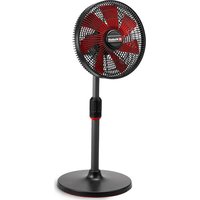
GE-CF 18/320 P Li - Air Conditioning EINHELL - Free user manual and instructions
Find the device manual for free GE-CF 18/320 P Li EINHELL in PDF.


| Product type | Cordless pedestal fan |
| Brand | Einhell |
| Model | GE-CF 18/320 P Li |
| Power supply | 18 V DC (Li-Ion Power X-Change battery) |
| Propeller diameter | 32 cm |
| Maximum air speed | 15 km/h |
| Weight | 3.4 kg |
| Number of speeds | 4 air flow levels |
| Oscillation | Yes, adjustable to 30°, 60° or 120° |
| Timer | Yes, 1 h, 4 h or 8 h |
| Head tilt | Manually adjustable |
| Battery type | Li-Ion, Power X-Change series (not included) |
| Charger | Power X-Change (not included) |
| Battery charge indicator | Yes, 3 LEDs on the battery |
| Housing material | Plastic |
| Adjustable height | Yes, telescopic tube |
| Dust protection | Front and rear protective grille |
| Usage | Domestic, general ventilation |
| Maintenance | Clean with a damp cloth and mild soap |
| Wear parts | Battery |
| Customer service | www.Einhell-Service.com |
Frequently Asked Questions - GE-CF 18/320 P Li EINHELL
User questions about GE-CF 18/320 P Li EINHELL
0 question about this device. Answer the ones you know or ask your own.
Ask a new question about this device
Download the instructions for your Air Conditioning in PDF format for free! Find your manual GE-CF 18/320 P Li - EINHELL and take your electronic device back in hand. On this page are published all the documents necessary for the use of your device. GE-CF 18/320 P Li by EINHELL.
USER MANUAL GE-CF 18/320 P Li EINHELL
GB Original operating instructions Cordless blower
natural_image
Close-up of a multi-blade electric fan with labeled parts (7 and 11), no visible text or symbols beyond labels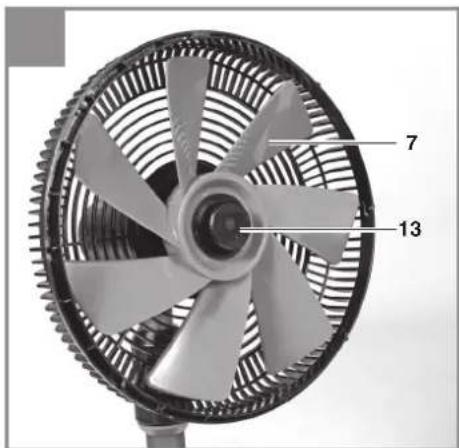
natural_image
Close-up of a mechanical fan with visible blades and internal structure (no text or symbols)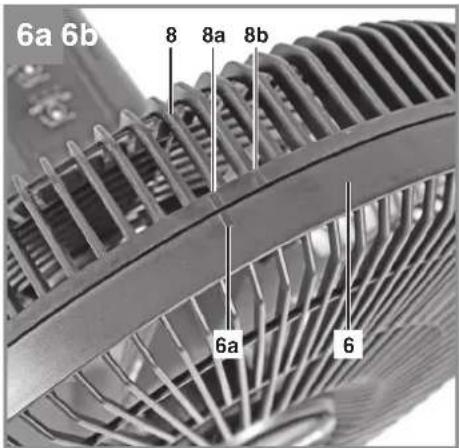
natural_image
Close-up of a mechanical fan with visible mesh blades and a tool inserted, no text or symbols present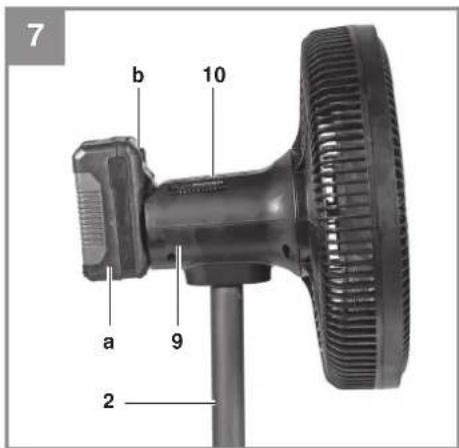
natural_image
Simple line drawing of an open book with no text or symbols on the pagesD
Gefahr!
When using the equipment, a few safety precautions must be observed to avoid injuries and damage. Please read the complete operating instructions and safety regulations with due care. Keep this manual in a safe place, so that the information is available at all times. If you give the equipment to any other person, hand over these operating instructions and safety regulations as well. We cannot accept any liability for damage or accidents which arise due to a failure to follow these instructions and the safety instructions.
Explanation of the symbols used (see Fig. 11)
- Danger! - Read the operating instructions to reduce the risk of injury.
1. Safety regulations
The corresponding safety information can be found in the enclosed booklet.
Warning!
Read all the safety information, instructions, illustrations and technical data provided on or with this power tool. Failure to adhere to the following instructions may result in electric shock, fi re and/or serious injury.
Keep all the safety information and instructions in a safe place for future use.
This equipment can be used by children of 8 years and older and by people with limited physical, sensory or mental capacities or those with no experience and knowledge if they are supervised or have received instruction in how to use the equipment safely and understand the dangers which result from such use. Children are not allowed to play with the equipment. Unless supervised, children are not allowed to clean the equipment and carry out user-level maintenance work.
- Use the appliance only after it is completely assembled.
- Never use the appliance if the safety grille is missing or damaged.
- Never cover the safety grille or block the fan impeller.
- Do not use the appliance in rooms in which inflammable materials (for example solvents, etc.) or gases are used or stored.
- Do not use the appliance near an open flame or smoldering ash.
- Do not leave the appliance unsupervised when in operation.
2. Layout and items supplied
2.1 Layout (Fig. 1/2)
- Fan head
- Telescopic tubular stand
- Lock nut
- Fixed tubular stand
- Pedestal
- Front safety grille
- Fan impeller
- Rear safety grille
- Motor unit
- Control panel
- Motor shaft
- Rear safety grille locknut
- Fan impeller locknut
- Multipurpose hex key (Internal hexagon/Phillips head)
- Socket head screw with washer and spring washer
- Retaining screw for safety grille
2.2 Items supplied
Please check that the article is complete as specified in the scope of delivery. If parts are missing, please contact our service center or the sales outlet where you made your purchase at the latest within 5 working days after purchasing the product and upon presentation of a valid bill of purchase. Also, refer to the warranty table in the service information at the end of the operating instructions.
- Open the packaging and take out the equipment with care.
- Remove the packaging material and any packaging and/or transportation braces (if available).
- Check to see if all items are supplied.
• Inspect the equipment and accessories for
GB
transport damage.
- If possible, please keep the packaging until the end of the guarantee period.
Danger!
The equipment and packaging material are not toys. Do not let children play with plastic bags, foils or small parts. There is a danger of swallowing or suff ocating!
- Cordless Blower
• Original operating instructions
• Safetyinstructions
3. Proper use
This device is designed for the general ventilation of household rooms.
Protect the equipment from rain and damp conditions.
The equipment is to be used only for its prescribed purpose. Any other use is deemed to be a case of misuse. The user / operator and not the manufacturer will be liable for any damage or injuries of any kind caused as a result of this.
Please note that our equipment has not been designed for use in commercial, trade or industrial applications. Our warranty will be voided if the machine is used in commercial, trade or industrial businesses or for equivalent purposes.
4. Technical data
Motor power supply: 18 V DC
Max. air speed: 15 km/h
Fan size: 32 cm
Weight: 3.4 kg
Important!
The equipment is supplied without rechargeable batteries and without a charger and is allowed to be used only with the lithium-ion batteries of the Power X-Change series!
The lithium-ion batteries of the Power X-Change series are allowed to be charged only with Power X-chargers.
5. Before starting the equipment
- Fig. 2/Fig. 3a: Connect the pedestal (Item 4) to the tubular stand (Item 5). To do this, the spindle on the stand (Item 5a) must be aligned with the hole (Item 4a). Otherwise assembly is not possible.
- Fig. 3b: Screw the tubular stand (Item 4) tightly onto the pedestal (Item 5) with the socket head screw (Item 15). Use the multipurpose hex key (Item 14) to do this.
- Fig. 4a: Place the rear safety grille (Item 8) onto the motor unit (Fig. 2/Item 9). When doing this, please note the anti-twist lock on the motor unit (Item 9a) and the safety grille (Fig. 2/Item 8a).
- Fig. 4b: Fasten the rear safety grille (Item 8) to the motor unit using the locknut (Item 12).
- Fig. 4b/Fig. 5a: Place the fan impeller (Item 7) on the motor shaft (Item 11). When doing this, please note the anti-twist lock on the motor shaft (Item 11a) and the fan impeller (Fig. 2/Item 7a).
- Fig. 5b: Secure the fan impeller (Item 7) using the locknut (Item 13) – left-handed thread!
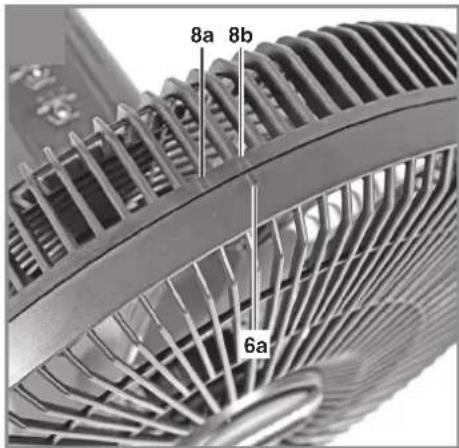
- Fig. 6a/Fig. 6b: Fit the front safety grille (Item 6) onto the rear safety grille (Item 8) so that the mark shown in Item 6a lines up opposite Item 8a. Then twist the front safety grille so that the mark shown in Item 6a is lined up opposite Item 8b.
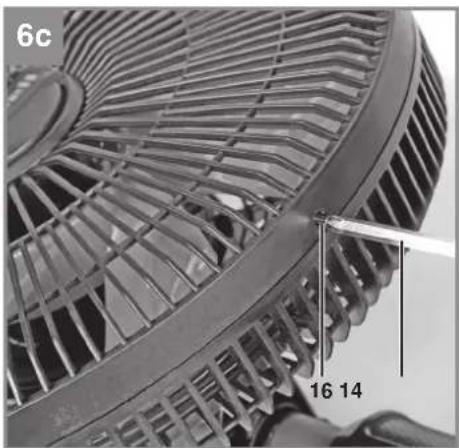
- Fig. 6c: Screw the front safety grille onto the rear safety grille where marked on the opposite side. In doing so, make sure that the holes on both safety grilles are aligned. Use the retaining screw for the safety grille (Item 16) and the multipurpose hex key (Item 14) to screw it on.
5.2 Fitting the battery (Fig. 7)
Press the pushlock button (b) of the battery as shown in Fig. 7 and push the battery (a) into the mount provided. Make sure that the pushlock button engages properly! To remove the battery, proceed in reverse order!
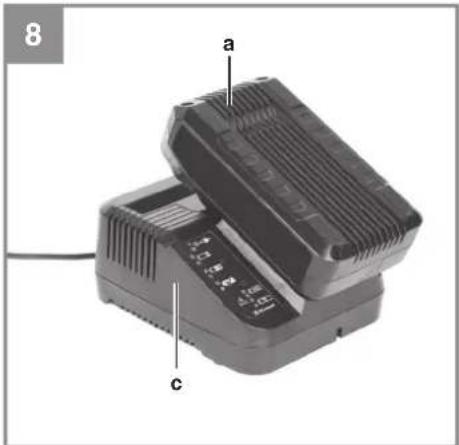
5.2 Charging the lithium battery pack (Fig. 7/8)
- Pull the battery pack (a) out of the battery mount, pressing the pushlock button (b) downwards as you do so.
- Check that your mains voltage is the same as that marked on the rating plate of the battery
GB
charger. Insert the power plug of the charger into the power socket. The green LED will begin to blink.
- Push the battery onto the charger (c).
In section "Charger indicator" you will find a table with an explanation of the LED indicator on the charger.
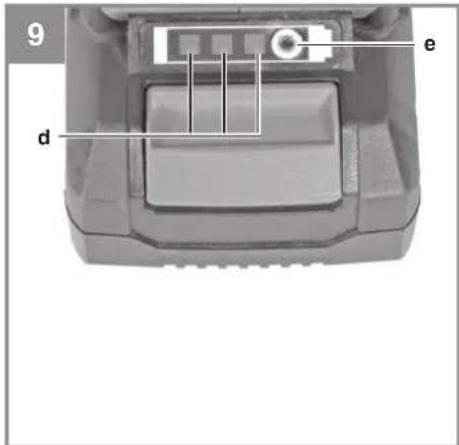
5.4 Battery capacity indicator (Fig. 9)
Press the button for the battery capacity indicator (e). The battery capacity indicator (d) shows the charge status of the battery using 3 LEDs.
All 3 LEDs are lit:
The battery is fully charged.
2 or 1 LED(s) are lit:
The battery has an adequate remaining charge.
1 LED fl ashes:
The battery is empty, recharge the battery.
All LEDs blink:
The battery temperature is too low. Remove the battery from the equipment, keep it at room temperature for one day. If the fault reoccurs, this means that the rechargeable battery has undergone exhaustive discharge and is defective. Remove the battery from the equipment. Never use or charge a defective battery.
If the battery pack fails to become charged, please check
• whether there is voltage at the socket-outlet
- whether there is proper contact at the charging contacts on the charger.
If the battery still fails to become charged, please return
• thecharger
• the battery pack
to our Customer Service Department.
To ensure that items are properly packaged and delivered when you send them to us, please contact our customer service or the point of sale at which the equipment was purchased.
When shipping or disposing of batteries and cordless tools, always ensure that they are packed individually in plastic bags to prevent short circuits and fi res.
To ensure that the battery pack provides long service, you should take care to recharge it promptly. You must recharge the battery pack when you notice that the performance of the device drops. Never allow the battery pack to become fully discharged. This will cause it to develop a defect.
6. Before starting the equipment
Note: The fan head can rotate horizontally. Oscillation begins at the current fan head position (zero point). When you switch off the appliance, the fan head returns to its initial position (zero point).
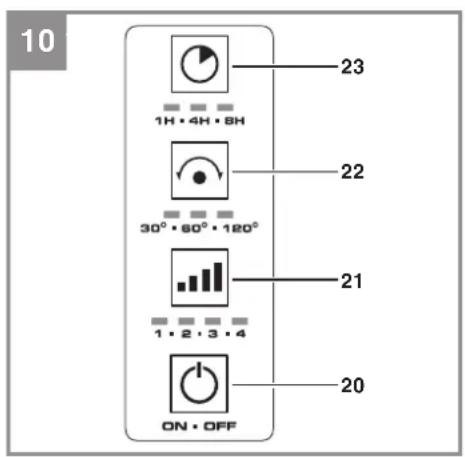
6.1 On/Off switch (Fig. 10)
The control panel (Fig. 7/Item 10) contains an On/Off button and buttons for adjusting the air flow level, oscillation and operating time, as well as a LED display for each selected setting, ranging from Min. (1 LED is lit) to Max. (all LEDs are lit).
Switching on:
• Press the On/Off switch (20).
- The cordless fan will then come on at the lowest level.
Switching off :
• Press the On/Off switch (20) again.
6.2 Adjusting the air flow level (Fig. 10)
- The fan has 4 air flow level settings to adapt to each specific situation.
- The cordless fan always switches on at the lowest level.
• To raise the air flow level, press on the air flow level selector (21). - The air flow level will go up one level each time you press the button.
6.3 Adjusting the oscillation function (Fig. 10)
- Press the button (22) to switch on the oscillation function, and press it repeatedly to change the setting. The oscillation function switches off again after pressing the button 4 times.
- The oscillation function can be set to 30^/60^/120^ , always starting at the lowest level.
GB
6.4 Setting the timer (Fig. 10)
- Press the button (23) to limit the operating time, and press it repeatedly to change the setting. The timer function switches off again after pressing the button 4 times.
- The timer function can be set to 1h/4h/8h, always starting at the lowest level.
6.5 Adjusting the angle (Fig. 7)
Press on the motor head (9) to tilt it upwards or downwards.
7. Cleaning, maintenance and ordering of spare parts
Danger!
Always pull out the battery pack before starting any cleaning work.
7.1 Cleaning
- Keep all safety devices, air vents and the motor housing free of dirt and dust as far as possible. Wipe the equipment with a clean cloth or blow it with compressed air at low pressure.
• We recommend that you clean the device immediately each time you have finished using it. - Clean the equipment regularly with a moist cloth and some soft soap. Do not use cleaning agents or solvents; these could attack the plastic parts of the equipment. Ensure that no water can seep into the device. The ingress of water into an electric tool increases the risk of an electric shock.
7.2 Maintenance
There are no parts inside the equipment which require additional maintenance.
7.3 Ordering replacement parts:
Please quote the following data when ordering replacement parts:
• Type of machine
• Article number of the machine
• Identification number of the machine
• Replacement part number of the part required
For our latest prices and information please go to www.Einhell-Service.com
8. Disposal and recycling
The equipment is supplied in packaging to prevent it from being damaged in transit. The raw materials in this packaging can be reused or recycled. The equipment and its accessories are made of various types of material, such as metal and plastic. Never place defective equipment in your household refuse. The equipment should be taken to a suitable collection center for proper disposal. If you do not know the whereabouts of such a collection point, you should ask in your local council offices.
9. Storage
Remove the rechargeable battery/batteries. Store the equipment and accessories in a dark and dry place at above freezing temperature. The ideal storage temperature is between 5 and 30 °C. Store the electric tool in its original packaging. If the appliance is to be stored unused for a long period, the batteries are removed.
10. Charger indicator
| Indicator status Explanations and actions | ||
| Red LED Green LED | ||
| Off | Flashing | Ready for useThe charger is connected to the mains and is ready for use; there is no battery pack in the charger |
| On Off Charging | The charger is charging the battery pack in quick charge mode. The charging times are shown directly on the charger.Important! The actual charging times may vary slightly from the stated charging times depending on the existing battery charge. | |
| Off | On | The battery is charged and ready for use. (READY TO GO)The unit then changes over to gentle charging mode until the battery is fully charged.To do this, leave the rechargeable battery on the charger for approx. 15 minutes longer.Action:Take the battery pack out of the charger. Disconnect the charger from the mains supply. |
| Flashing Off | Adapted charging | The charger is in gentle charging mode.For safety reasons the charging is performed less quickly and takes more time. The reasons can be:- The rechargeable battery has not been used for a very long time.- The battery temperature is outside the ideal range.Action:Wait for the charging to be completed; you can still continue to charge the battery pack. |
| Flashing Flashing Fault | Charging is no longer possible. The battery pack is defective.Action:Never charge a defective battery pack.Take the battery pack out of the charger. | |
| On On Temperature fault | The battery pack is too hot (e.g. due to direct sunshine) or too cold (below 0^ ).Action:Remove the battery pack and keep it at room temperature (approx. 20^ ) for one day . | |
GB
Disposal

Power tools, rechargeable batteries, accessories and packaging should be sorted for environmental-friendly recycling.
Do not dispose of power tools and batteries/rechargeable batteries into household waste!
Only for EU countries:
According to the Directive 2012/19/EU on waste electrical and electronic equipment and its transposition into national law, power tools that are no longer usable, and, according to the Directive 2006/66/EC, defective or drained batteries must be collected separately and disposed of in an environmentally correct manner.
If disposed incorrectly, waste electrical and electronic equipment may have harmful effects on the environment and human health, due to the potential presence of hazardous substances.
Only for United Kingdom:
According to The Waste Electrical and Electronic Equipment Regulations 2013 (SI 2013/3113) (as amended) and the Waste Batteries and Accumulators Regulations 2009 (SI 2009/890) (as amended), products that are no longer usable must be collected separately and disposed of in an environmentally friendly manner.
The reprinting or reproduction by any other means, in whole or in part, of documentation and papers accompanying products is permitted only with the express consent of the Einhell Germany AG.
Subject to technical changes.
GB
Service information
We have competent service partners in all countries named on the guarantee certificate whose contact details can also be found on the guarantee certificate. These partners will help you with all service requests such as repairs, spare and wearing part orders or the purchase of consumables.
Please note that the following parts of this product are subject to normal or natural wear and that the following parts are therefore also required for use as consumables.
| Category Example | |
| Wear parts* Battery | |
| Consumables* | |
| Missing parts |
* Not necessarily included in the scope of delivery!
In the effect of defects or faults, please register the problem on the internet at www.Einhell-Service.com. Please ensure that you provide a precise description of the problem and answer the following questions in all cases:
• Did the equipment work at all or was it defective from the beginning?
• Did you notice anything (symptom or defect) prior to the failure?
• What malfunction does the equipment have in your opinion (main symptom)?
Describe this malfunction.
F
Danger!

- D
- Gefahr!
- Explanation of the symbols used (see Fig. 11)
- Safety regulations
- Warning!
- Layout and items supplied
- Layout (Fig. 1/2)
- Items supplied
- GB
- Danger!
- Proper use
- Technical data
- Important!
- Before starting the equipment
- Fitting the battery (Fig. 7)
- Charging the lithium battery pack (Fig. 7/8)
- Battery capacity indicator (Fig. 9)
- All 3 LEDs are lit:
- or 1 LED(s) are lit:
- LED fl ashes:
- All LEDs blink:
- Before starting the equipment
- On/Off switch (Fig. 10)
- Switching on:
- Switching off :
- Adjusting the air flow level (Fig. 10)
- Adjusting the oscillation function (Fig. 10)
- Setting the timer (Fig. 10)
- Adjusting the angle (Fig. 7)
- Cleaning, maintenance and ordering of spare parts
- Cleaning
- Maintenance
- Ordering replacement parts:
- Disposal and recycling
- Storage
- Charger indicator
- Disposal
- Only for EU countries:
- Only for United Kingdom:
- Service information
- F
Brand : EINHELL
Model : GE-CF 18/320 P Li
Category : Air Conditioning