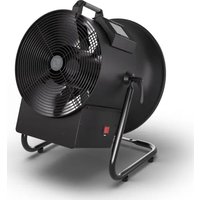
Instant Air 3000 - Effect machine Cameo - Free user manual and instructions
Find the device manual for free Instant Air 3000 Cameo in PDF.


| Product type | Wind machine |
| Brand | Cameo |
| Model | Instant Air 3000 |
| Reference | CLIA3000 |
| Dimensions (with stand) | 385 x 515 mm |
| Weight (with stand) | 11 kg |
| Power supply | 220-240 V / 50 Hz |
| Power consumption | 385 W (standby 7 W) |
| Maximum airflow | 77 m³/min |
| Air speed | 17 m/s |
| Fan rotation speed | 440 - 3100 rpm |
| Fan diameter | 310 mm |
| DMX control | DMX512, 1 channel, W-DMX (optional) |
| DMX inputs | XLR 3- and 5-pin male, iDMX port |
| DMX outputs | XLR 3- and 5-pin female |
| Remote control | 433 MHz radio included |
| Power connectors | Seetronic TR1 In/Out (max 11 A) |
| Fuse | T3.15 A / 250 V |
| Operating temperature | 0 °C to 40 °C |
| Relative humidity | < 85 % without condensation |
| Housing material | Metal, black |
| Display | Color touchscreen |
| Maintenance | Exterior cleaning with damp cloth, dusting of grilles |
| Repairability | No user-repairable parts |
| Included accessories | Adjustable stand, remote control, power cable, manual |
Frequently Asked Questions - Instant Air 3000 Cameo
User questions about Instant Air 3000 Cameo
0 question about this device. Answer the ones you know or ask your own.
Ask a new question about this device
Download the instructions for your Effect machine in PDF format for free! Find your manual Instant Air 3000 - Cameo and take your electronic device back in hand. On this page are published all the documents necessary for the use of your device. Instant Air 3000 by Cameo.
USER MANUAL Instant Air 3000 Cameo
natural_image
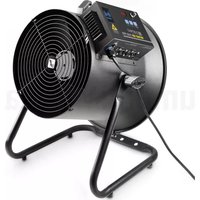
Black industrial fan with circular blades and a flat top, mounted on a stand (no visible text or symbols)INSTANT AIR 3000
WIND MACHINE WITH VARIABLE FAN SPEED AND WIND DIRECTION
CLIA3000
CONTENTS / INHALTSVERZEICHNIS / CONTENU / CONTENIDO / TREŚĆ / CONTENUTO
ENGLISH
INFORMATION ON THIS USER MANUAL 6
INTENDED USE 6
EXPLANATIONS OF TERMS AND SYMBOLS 6
SAFETY INSTRUCTIONS 7
NOTES FOR PORTABLE INDOOR DEVICES 11
PACKAGING CONTENT 12
INTRODUCTION 12
CONNECTIONS AND OPERATING/DISPLAY ELEMENTS 13
OPERATION 14
CONTROL VIA REMOTE CONTROL 16
SET-UP AND INSTALLATION 17
CARE, MAINTENANCE, AND REPAIR 18
OPTIONAL ACCESSORIES 19
TECHNICAL DATA 19
DISPOSAL 20
MANUFACTURER'S DECLARATIONS 20
DEUTSCH
You have made the right choice!
This device has been developed and manufactured to the highest quality standards to ensure many years of trouble-free operation. Please read this user manual carefully to be able to quickly put your new Cameo Light product to optimum use. Further information about Cameo Light is available on our website: CAMEOLIGHT.COM
INFORMATION ON THIS USER MANUAL
- Carefully read the safety instructions and the entire manual before operating the device.
- Observe the warnings on the device and in the user manual.
• Always keep the user manual within reach. - If you sell or pass on the device, it is important that you also include this user manual, as it is an integral part of the product.
INTENDED USE
This product is a device for event technology!
This product has been developed for professional use in the field of event technology and is not suitable for use as domestic lighting!
Temporary operation! Event equipment is generally designed for temporary use only and not for continuous operation and fixed installation!
Furthermore, this product is only intended for qualified users with specialist knowledge of event technology!
Use of the product outside the specified technical data and operating conditions is considered improper use!
Liability is exempted when damage and third-party damage to persons and property is caused by inappropriate use!
The product is not suitable for:
- Persons (including children) with limited physical, sensory, or mental abilities or lack of experience and knowledge.
- Children (children must be instructed not to play with the device).
EXPLANATIONS OF TERMS AND SYMBOLS
- DANGER: The word DANGER, possibly in combination with a symbol, indicates immediately hazardous situations or conditions for life and limb.
- WARNING: The word WARNING, possibly in combination with a symbol, indicates potentially hazardous situations or conditions for life and limb.
- CAUTION: The word CAUTION, possibly in combination with a symbol, indicates situations or conditions that may lead to injury.
- ATTENTION: The word ATTENTION, possibly in combination with a symbol, indicates situations or conditions that may lead to damage to property and/or the environment.
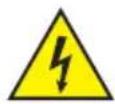
This symbol identifies hazards that can cause electric shock.

This symbol indicates hazardous areas or hazardous situations.
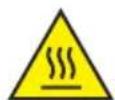
This symbol indicates hazards caused by hot surfaces.

This symbol indicates hazards due to suspended loads.

This symbol indicates a device in which there are no user-serviceable parts.

This symbol indicates additional information on the operation of the product.

This symbol indicates a device that may only be used in dry rooms.
SAFETY INSTRUCTIONS
DANGER:
- Do not open the device, and do not make any modifications to it.
- If your device no longer functions properly, if liquids or objects get inside it, or if it has been damaged in any other way, switch it off immediately and disconnect it from the power supply. The device may be repaired only by authorised qualified personnel.
- For devices of protection class 1, the protective conductor must be connected correctly. Never disconnect the protective conductor. Devices of protection class 2 do not have a protective conductor.
- Ensure that live cables are not kinked or otherwise mechanically damaged.
- Never bypass the device fuse.
WARNING:
- The device may not be operated if it shows obvious signs of damage.
- The device may only be installed in a voltage-free state.
- If the device's mains cable is damaged, the device may not be operated.
- Permanently attached mains cables may only be replaced by a qualified person.
ATTENTION:
- Do not switch on the device if it has been exposed to extreme temperature fluctuations (for example, following transport). Moisture and condensation can damage the device. Switch on the device only when it has reached ambient temperature.
- Make sure that the voltage and frequency of the mains correspond to the values indicated on the device. If the device has a voltage selector switch, do not turn the device on until it has been set correctly. Use only suitable mains cables.
- To disconnect the device from the mains at all poles, it is not sufficient to press the on/off switch on the unit.
- Make sure that the fuse used corresponds to the type printed on the device.
- Make sure that appropriate measures have been taken against overvoltage (for example, lightning strike).
- Observe the specified maximum output current on devices with a Power Out connection. Ensure that the total current consumption of all connected devices does not exceed the specified value.
- Replace plug-in mains cables only with original cables.
- Connect the device only to compliant, tested, and undamaged power outlets.

DANGER:
- Danger of suffocation/choking! Plastic bags and small parts must be kept out of reach of persons (including children) with reduced physical, sensory, or mental capabilities.
- Danger caused by falling device! Make sure that the device is securely installed and cannot fall down. Only use suitable stands or mounts (particularly for fixed installations). Ensure that accessories are properly installed and secured. Ensure that applicable safety regulations are observed.

WARNING:
- Use the device only in the prescribed manner.
- Operate the device only with the accessories recommended and intended by the manufacturer.
- During installation, observe the safety regulations applicable in your country.
- After connecting the device, check all cable routes to avoid damage or accidents, for example, due to tripping hazards.
- Always observe the specified minimum distance to normally flammable materials! Unless explicitly stated, the minimum distance is 0.3 m.

CAUTION:
- Moving components such as mounting brackets or other movable components may become jammed.
- Devices with motor-driven components may result in injury from the movement of the device. Sudden movement of the device can cause shock reactions.
- The exterior surface of the device can become very hot during regular operation. Ensure that accidental touching of the housing is not possible. Always allow the device to cool sufficiently before removal, maintenance work, charging, or similar.
ATTENTION:
- Do not install or operate the device near any radiators, heat registers, stoves, or other heat sources. Ensure that the device is always installed in such a way that it is sufficiently cooled and cannot overheat.
- Do not place ignition sources such as burning candles near the device.
- Ventilation openings must not be covered, and fans must not be blocked.
- Use the original packaging or packaging provided by the manufacturer for transport.
- Avoid shock or impact to the device.
- Observe the IP protection class, as well as the ambient conditions such as temperature and humidity according to the specification.
- Devices can be constantly further developed. In the event of deviating information on operating conditions, performance, or other device properties between the user manual and the device labelling, the information on the device always takes priority.
- The device is not suitable for tropical climates and for operation at heights of 2,000 m above sea level or higher.
- Unless explicitly stated, the device is not suitable for operation in marine conditions.

NOTE: For conversion or retrofit kits supplied by the manufacturer, the enclosed installation instructions must be observed.

(for example, W-DMX or audio radio systems):
The quality and performance of wireless signal transmissions generally depends on the ambient conditions.
For example, the following factors can impact range and signal stability:
Shielding (for example, masonry, metal structures, water)
High volumes of radio traffic (for example, powerful wireless LAN networks) Interference
Electromagnetic radiation (for example, LED video screens, dimmers)

All range specifications refer to free-field line-of-sight applications without interference! The operation of radio transmission systems is subject to official regulations. These may vary from region to region and must be checked by the operator before use (for example, radio frequency and transmission power).

WARNING: Devices with wireless signal transmission are not suitable for use in sensitive areas in which radio operation can lead to potential detrimental effects. These include:
- Hospitals, health centres, or other healthcare facilities that provide patient treatments with skilled personnel and equipment.
• Class I, II, and III hazardous areas - Restricted areas
- Military facilities
- Aircraft or vehicles
- Areas where the use of mobile phones is prohibited

TRANSMISSION VIA W-DMX
WARNING: In general, wireless DMX transmission must not be used for applications involving safety-related factors that might result in personal injury or property damage in the event of a failure.
This applies in particular to moving scene or traverse structures, DMX-controlled motors/lifts or lifting devices for operating DMX-operated platform lifts, hydraulic systems, or comparable moving components.
Furthermore, wireless DMX transmission must not be used to control flame or pyrotechnic devices, explosion-driven effects, or gas or liquid effects. These include, for example, CO2 cannons, confetti shooters, water effects, or similar.

CAUTION! IMPORTANT INFORMATION REGARDING WIND MACHINES!
- Never reach through the protective grille; there is a risk of injury!
- Never insert objects through the protective grille!
- Never operate without the protective grille!
- People with long hair should exercise particular caution, as long hair can be sucked in and get caught in the fan, which can result in serious injuries! Ensure that people with long hair are not in the device's immediate vicinity!
- Make sure that the air intake is free.
- Make sure that dust, sand, paper, clothing, etc. cannot be sucked in.

DEVICES WITH USER-SERVICEABLE DISPOSABLE OR RECHARGEABLE BATTERIES (for example, remote control)
DANGER: Always observe the manufacturer's data sheet for disposable or rechargeable batteries!
- Disposable and rechargeable batteries must be kept out of reach of children and persons with limited physical, sensory, or mental abilities. Choking hazard!
- Do not subject disposable and rechargeable batteries to strong mechanical forces! Damage caused by falling, crushing, or piercing, as well as high pressure, leads to a danger of fire and explosion as well as a danger of other hazardous situations (for example, outgassing).
- Leaked battery fluid is corrosive and can be toxic. It can cause skin and eye irritations and is dangerous if swallowed. Avoid any contact with leaked fluid. In the event of contact with leaked fluid, immediately wash the affected area with plenty of water and contact a doctor.
- Do not attempt to charge non-rechargeable batteries. Danger of explosion!
- Do not throw disposable and rechargeable batteries in a fire! Danger of explosion!
- Do not short-circuit disposable and rechargeable batteries! Avoid contact between the battery terminals and electrically conductive objects (for example, key ring, coins, tools).

ATTENTION:
- Ensure correct polarity when inserting disposable and rechargeable batteries (see diagrams in the battery compartment or on the housing).
- Do not use different types of battery cells or battery brands in a device at the same time.
- Only use disposable and rechargeable batteries with the same discharge status.
- Check the disposable and rechargeable batteries for damage, and do not use any damaged disposable and rechargeable batteries.

NOTES FOR PORTABLE INDOOR DEVICES
- Temporary operation! Event equipment is generally only designed for temporary operation.
- Continuous operation or permanent installation can impair the functionality of the device and cause premature ageing.
PACKAGING CONTENT
Remove the product from the packaging, and remove all packaging material.
Please check the completeness and integrity of the delivery, and notify your distribution partner immediately after purchase if the delivery is not complete or if it is damaged.
The packaging content for the product includes:
▶ 1 × Instant Air 3000 wind machine
▶ 1 × Supporting and mounting bracket (pre-assembled)
▶ 1 × Radio remote control
▶ 1 × Mains cable
▶ Safety and compliance information (user manual as a download via QR code)
INTRODUCTION
INSTANT AIR 3000
CLIA3000
CONTROL FUNCTIONS:
1-channel DMX control DMX512 W-DMX via optionally available Cameo iDMX stick Controllable via radio remote control Stand-alone operation
FEATURES:
DMX512. Radio remote control included. 3-pin and 5-pin DMX connections. Connection for optional iDMX stick for wireless control via W-DMX.
CONNECTIONS AND OPERATING/DISPLAY ELEMENTS
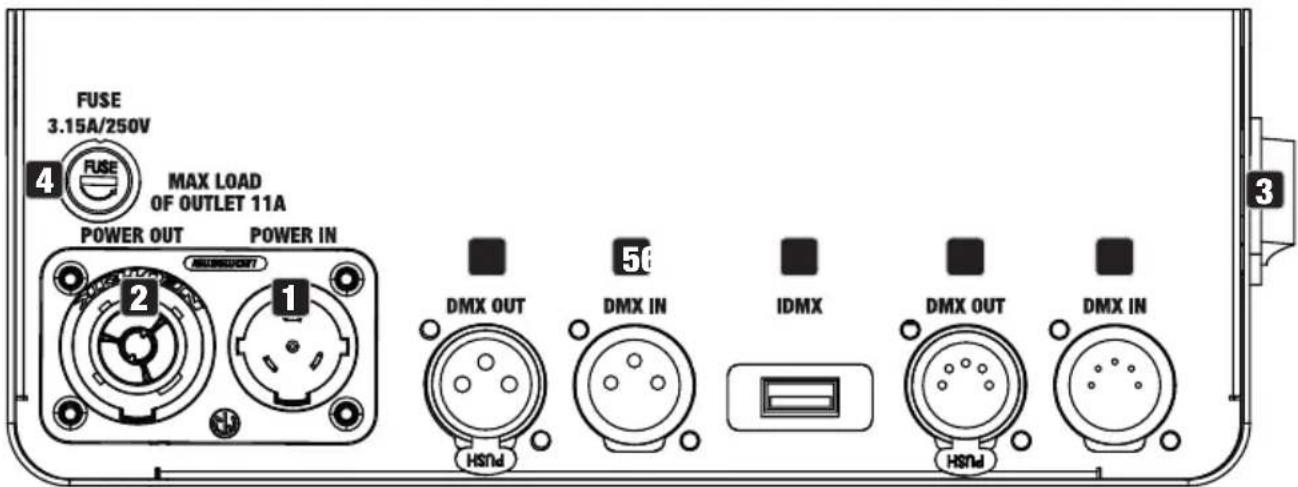
1 POWER IN
Mains input socket. Operating voltage: 200 V–240 V AC/50 Hz. Connection possible via the included mains cable.
2 POWER OUT
Mains output socket. Enables mains supply to other CAMEO lights. Ensure that the total current consumption of all connected devices does not exceed the value specified on the device in amperes (A).
3 POWER
Rocker switch for switching the device on and off.
4 FUSE
Fuse holder for 5 × 20 mm fuses. IMPORTANT NOTE: Only replace the fuse with a fuse of the same type and value. In the event of repeated fuse failure, please contact an authorised service centre.
5 DMX IN
One male 3-pin and 5-pin XLR socket each for connection of DMX control device (for example, DMX console). Only use the ports alternatively.
6 DMX OUT
One female 3-pin and 5-pin XLR socket each for relaying of DMX control signal. Only use the ports alternatively.
7 IDMX
Connection for the optionally available iDMX stick for wireless DMX operation.
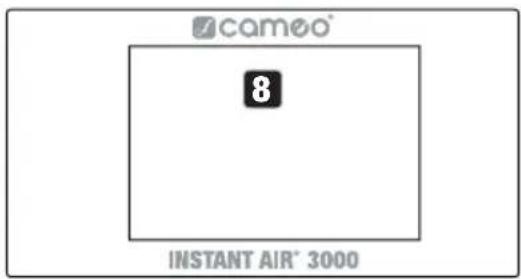
8 TOUCH DISPLAY
Illuminated touch display for navigating the device menu.
RADIO RECEIVER
The radio receiver for control via radio remote control is located in the appliance housing.
OPERATION
NOTE
After switching on the wind machine, a brief system check is carried out, and the model designation is shown on the display. Once this process is complete, the wind machine is ready for operation.

MAIN DISPLAY (DMX signal present)
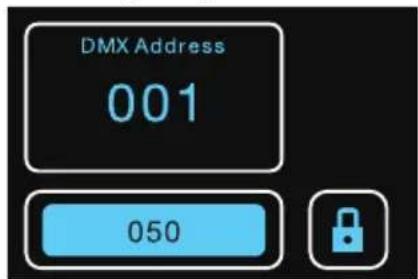
As soon as a DMX signal is present at one of the DMX inputs DMX IN or the wireless interface IDMX, the DMX operating mode is automatically activated and the window with the currently set DMX start address and the field for entering the password to change the address are displayed.
MAIN DISPLAY (no DMX signal)
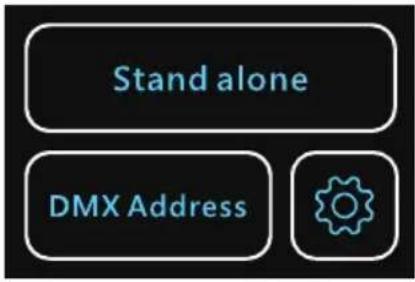
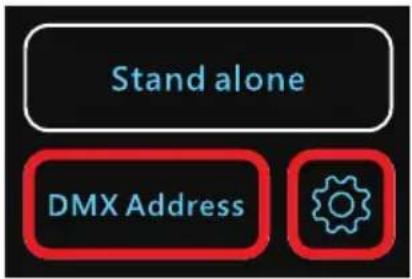
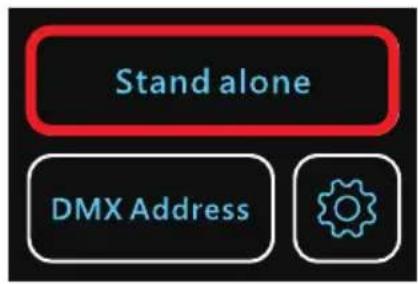
If there is no DMX signal on the device, three control panels are displayed: Stand alone (manual control), DMX Address (set DMX start address), and the cogwheel symbol (activate/deactivate control via remote control and pair remote control).
CONFIGURE DMX START ADDRESS
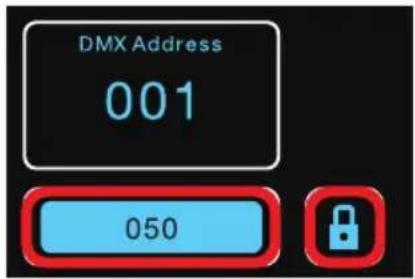
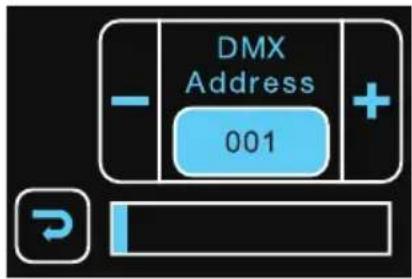
- DMX signal is present: enter the password 050 in the input field and tap the lock symbol. Now tap on the plus or minus symbol to set the desired start address (press and hold to change the value quickly). Tap the arrow symbol to return to the main display.
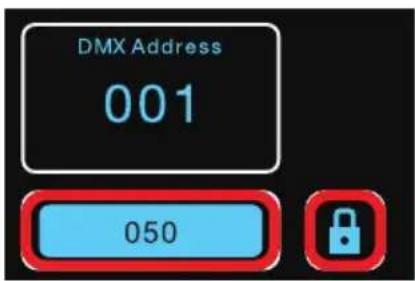
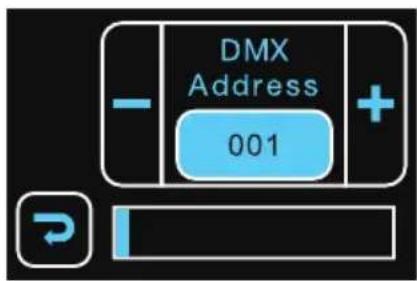
- DMX signal is not present: tap DMX Address in the main display. Enter the password 050 in the relevant input field and tap the lock symbol. Now tap on the plus or minus symbol to set the desired start address (press and hold to change the value quickly). Tap the arrow symbol to return to the previous display.
MANUAL CONTROL
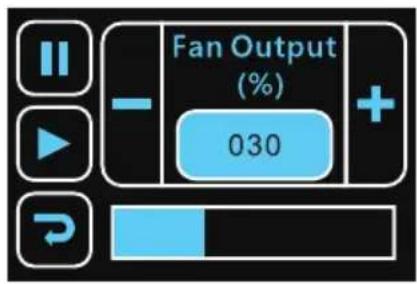
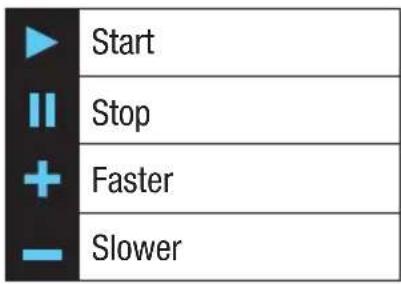
If a DMX signal is present on the device, manual control is not possible, so disconnect the device from a DMX network. Tap on Stand alone to open the window with the control panels for manual control (see table for functions). The rotation speed is displayed as a percentage. Tap the arrow symbol to return to the main display.
CONTROL VIA REMOTE CONTROL
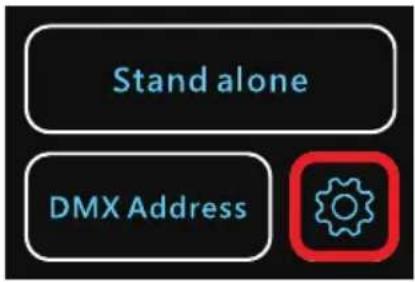
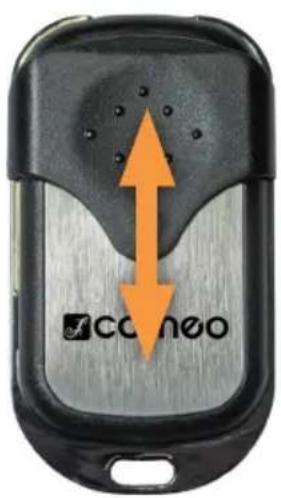
The scope of delivery includes a radio remote control (433 MHz) for operating the wind machine. If a DMX signal is present on the device, manual control is not possible, so disconnect the wind machine from the DMX network. Tap the cogwheel symbol and activate the remote control (Remote function ON). To deactivate the remote control, select OFF. Tap the arrow symbol to return to the main menu.
To pair a new radio remote control with the wind machine, hold theremote control in the immediate vicinity of the wind machine and tap on next to Remote pairing. The same applies if a new battery has been inserted in the remote control.
next to Remote pairing. The same applies if a control.

The remote control has a sliding cover to protect the operating buttons from accidental operation. To do this, slide the protective cover upwards over the buttons. Slide the protective cover down as far as it will go to release the buttons and control the wind machine with the remote control. The LED in the control panel lights up as soon as one of the buttons is pressed.
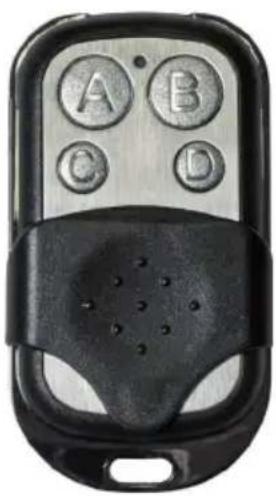
natural_image
Close-up of a black remote control with four circular buttons labeled A, B, C, D (no text or symbols beyond labels)| A | tart |
| B | top |
| C | aster |
| D | lower |
If the LED does not light up when activated, the internal battery must be replaced. To do this, remove the three screws on the back of the remote control. Now remove the battery compartment cover from the housing, remove the used battery, insert a new battery (battery type: 27A, 12 V; ensure correct polarity), and close the cover again with the three screws.
SET-UP AND INSTALLATION

DANGER: Overhead mounting requires extensive experience, including calculating the load limit values of the mounting hardware and regular safety inspection of all installation materials and lights. If you do not have these qualifications, do not attempt to perform installation yourself. Refer instead to a qualified professional. There is a risk that devices that are incorrectly installed and secured may come loose and fall down. This can cause serious injury or death.
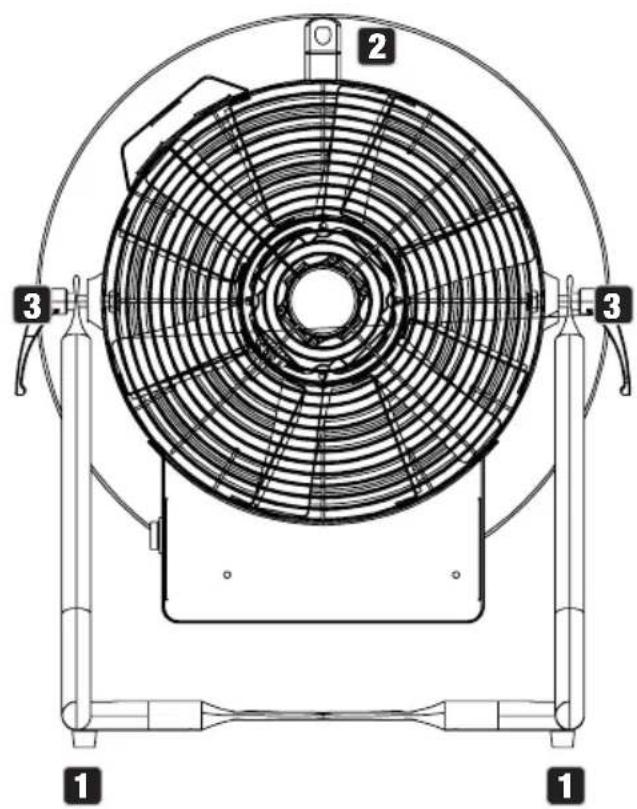
- Four rubber feet for positioning in a suitable place on a level surface.
- Carrying handle and securing point for traverse assembly.
- Two toggle screws for adjusting the direction of the airflow.
- Mounting holes for attaching truss clamps (use two truss clamps for truss mounting; truss clamps optionally available).
- When mounting the wind machine truss, always secure it to the carrying handle with a suitable safety rope.
natural_image
Technical line drawing of a circular fan or fan assembly with numbered components (no text or symbols present)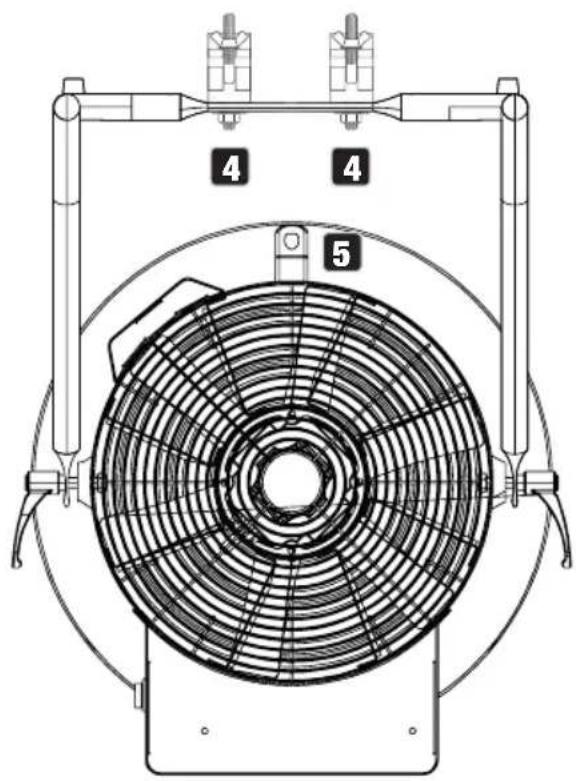
CARE, MAINTENANCE, AND REPAIR
In order to ensure the long-term, proper functioning of the device, it must be regularly cleaned and, if necessary, serviced. The servicing requirement depends on the intensity of use and the environment in which it is used.
A visual inspection should be carried out before each commissioning. In particular, all safety-relevant components, such as connecting elements, safety points, electrical connections and cables, must be taken into account. Furthermore, we recommend carrying out all the applicable maintenance measures specified below once every 500 operating hours or, in the case of a lower intensity of use, at the latest after one year. Warranty claims may be limited should defects result from inadequate service and maintenance.
CARE (carried out by user)
WARNING! Before carrying out any care or maintenance, the power supply – and, if possible, all device connections – must be disconnected.
PLEASE NOTE! Improper care can lead to impairment of the device or even its destruction.
- Housing surfaces must be cleaned with a clean, damp cloth. Make sure that no moisture can penetrate the device.
- Air inlets and outlets must be regularly cleaned of dust and dirt. If compressed air is used, make sure that damage to the device is prevented (for example, fans must be blocked in this case).
- Cables and connectors must be cleaned regularly and dust and dirt must be removed.
- In general, no cleaning agents or abrasive agents may be used; otherwise, the surface finish may be damaged.
- Devices must be stored in a dry environment and protected from dust and dirt.
MAINTENANCE AND REPAIR (by qualified personnel only)
DANGER! There are live components in the device. Even after disconnecting from the mains, there may still be residual voltage in the device, for example, due to charged capacitors.
PLEASE NOTE! There are no user-serviceable assemblies in the device.
PLEASE NOTE! Maintenance and repair work may only be carried out by qualified specialist personnel authorised by the manufacturer. If in doubt, consult the manufacturer.
PLEASE NOTE! Improperly performed maintenance work may affect warranty claims.
OPTIONAL ACCESSORIES
CLIDMXSTICKG2
W-DMX receiver
TECHNICAL DATA
| Product number CLIA3000 | |
| Product type: Wind machine | |
| Maximum airflow rate: 77 m3/min. | |
| Air speed: 17 m/s | |
| Fan speed: 440–3100 rpm | |
| Fan diameter: 310 mm | |
| DMX input: | 3-pin XLR male5-pin XLR maleConnection for optional iDMX stick |
| DMX output: | 3-pin XLR female5-pin XLR female |
| DMX mode: 1-channel | |
| DMX functions: Fan control | |
| Stand-alone functions: Fan control | |
| Control: DMX512, remote control | |
| Operating and display elements: Full colour display with touchscreen | |
| Operating voltage: 220 V–240 V AC / 50 Hz | |
| Power consumption: | 385 W |
| Stand-by power consumption: | 7 W |
| Power supply connection: | Seetronic TR1 IN-OUT |
| Maximum output current: | 11 A |
| Fuse: | T3,15 A / 250 V |
| Ambient temperature (in operation): | 0°C–40°C |
| Relative air humidity: | < 85%, non-condensing |
| Housing material: | Metal |
| Housing colour: | Black |
| Dimensions (∅ × H, with stand): | 385 × 515 mm |
| Weight: | 11 kg incl. stand |
| Additional features: | Carrying handle, adjustable stand included,radio remote control included |
DISPOSAL

PACKAGING:
- Packaging can be recycled using the usual disposal methods.
- Please separate the packaging in accordance with the disposal laws and recycling regulations in your country.
DEVICE:
- This device is subject to the European Directive on Waste Electrical and Electronic Equipment, as amended. WEEE Directive Waste Electrical and Electronic Equipment. Waste equipment does not belong in household waste. Waste equipment must be disposed of via an authorised waste disposal company or a municipal waste disposal facility. Please observe the applicable regulations in your country!
- Observe all disposal laws and regulations applicable in your country.
- As a private customer, you can obtain information on environmentally friendly disposal options from the seller of the product or the appropriate regional authorities.

DISPOSABLE AND RECHARGEABLE BATTERIES:
- Disposable and rechargeable batteries should not be disposed of in household waste. Disposable and rechargeable batteries must be disposed of by an authorised waste disposal company or a municipal waste disposal facility.
- Observe all disposal laws and regulations applicable in your country.
- As a private customer, you can obtain information on environmentally friendly disposal options from the seller of the product or the appropriate regional authorities.
- Devices with disposable and rechargeable batteries that cannot be removed by the user must be taken to a collection point for electrical devices.
MANUFACTURER'S DECLARATIONS
Manufacturer's warranty and limitation of liability
Adam Hall GmbH | Adam-Hall-Str.1 | 61267 Neu-Anspach | Germany
Email: Info@adamhall.com / +49 (0)6081 / 9419-0
Our current warranty conditions and limitation of liability can be found at:
https://cdn-shop.adamhall.com/media/pdf/Manufacturers-Declarations-CAMEO_DE_EN_ES_FR.pdf
For service requests, please contact your distribution partner.
CE conformity
Adam Hall GmbH hereby confirms that this product meets the following guidelines
(where applicable):
Low-Voltage Directive (2014/35/EU)
EMC Directive (2014/30/EU)
RoHS (2011/65/EU)
RED (2014/53/EU)
EC Declaration of Conformity
Declarations of conformity for products subject to the LVD, EMC, and RoHS Directives can be requested from info@adamhall.com
Declarations of conformity for products subject to RED can be downloaded from www.adamhall.com/compliance/
Subject to misprints and errors, as well as technical or other modifications!
DEUTSCH
natural_image
Close-up of a black remote control with four circular buttons labeled A, B, C, D (no text or symbols beyond labels)natural_image
Technical line drawing of a circular fan or fan assembly with numbered components (no text or symbols present)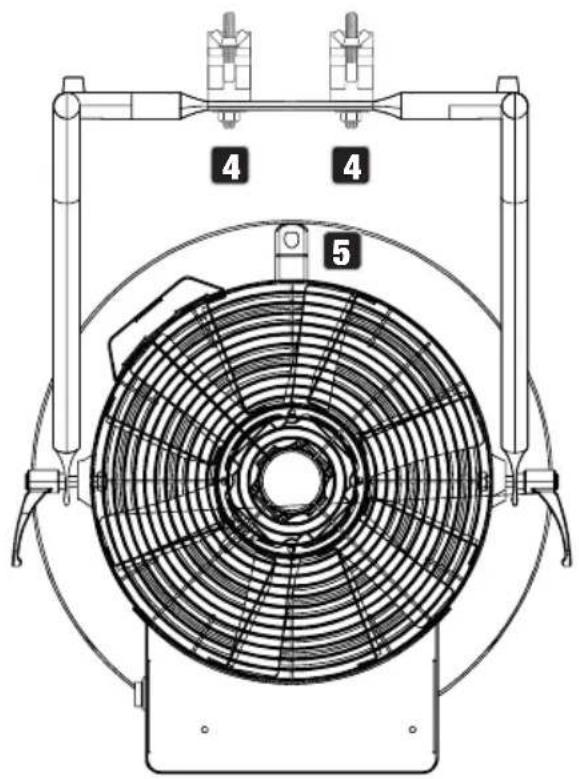
https://cdn-shop.adamhall.com/media/pdf/Manufacturers-Declarations-CAMEO_DE_EN_ES_FR.pdf
natural_image
Close-up of a black remote control with four labeled buttons (A, B, C, D) and a central knob (no text or symbols beyond labels)natural_image
Technical line drawing of a circular fan or fan assembly with numbered components (no text or symbols present)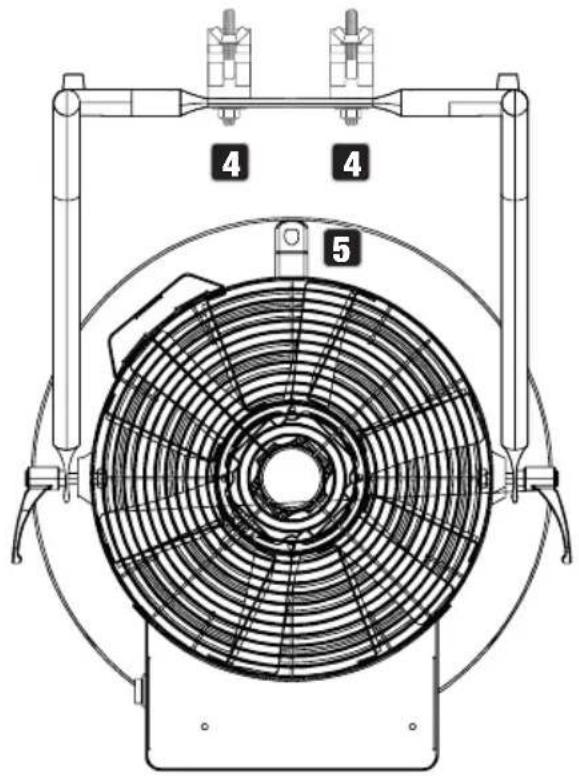
ENTRETIEN, MAINTENANCE ET RÉPARATION
https://cdn-shop.adamhall.com/media/pdf/Manufacturers-Declarations-CAMEO_DE_EN_ES_FR.pdf.
Directive CEM (2014/30/UE)
RoHS (2011/65/UE)
RED (2014/53/UE)
natural_image
Close-up of a black remote control with four labeled buttons (A, B, C, D) and a perforated base (no text or symbols beyond labels)| A | niciar |
| B | top |
| C | lás rápido |
| D | lás lento |
natural_image
Technical line drawing of a circular fan or fan assembly with numbered components (no text or symbols present)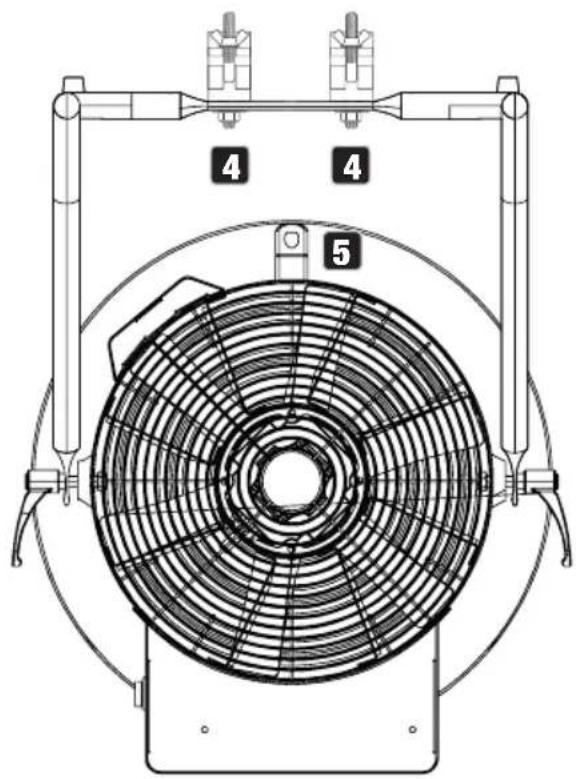
https://cdn-shop.adamhall.com/media/pdf/Manufacturers-Declarations-CAMEO_DE_EN_ES_FR.pdf
TRANSMISJA SYGNAŁÓW W W-DMX
natural_image
Close-up of a black remote control with four circular buttons labeled A, B, C, D (no additional text or symbols visible)natural_image
Technical line drawing of a circular fan or fan assembly with numbered components (1, 2, 3), no text or symbols present.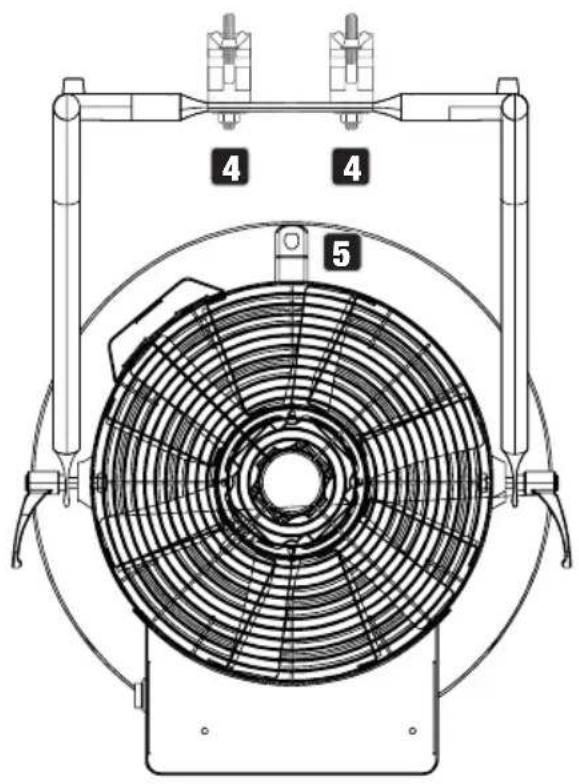
CZYSZCZENIE, KONSERWACJA I NAPRAWY
natural_image
Close-up of a black remote control with four buttons (A, B, C, D) and a perforated base (no visible text or symbols)natural_image
Technical line drawing of a circular fan or fan assembly with numbered components (no text or symbols present)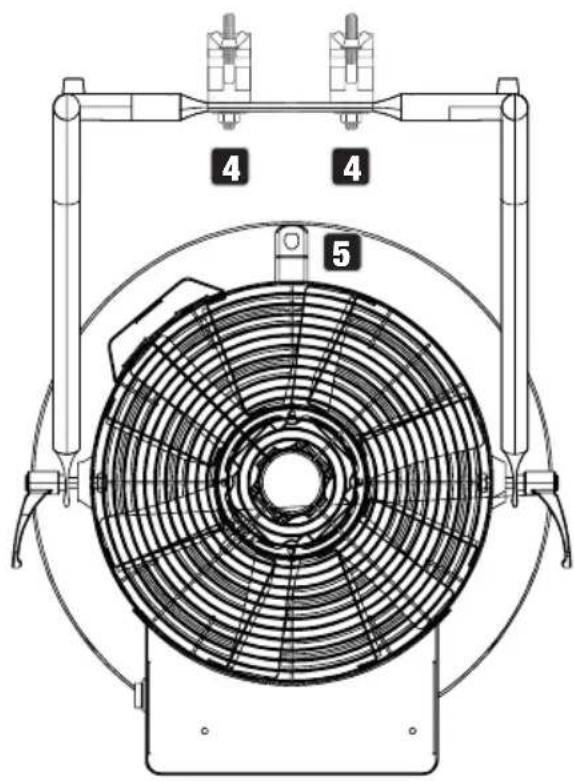
https://cdn-shop.adamhall.com/media/pdf/Manufacturers-Declarations-CAMEO_DE_EN_ES_FR.pdf
- INSTANT AIR 3000
- CONTENTS / INHALTSVERZEICHNIS / CONTENU / CONTENIDO / TREŚĆ / CONTENUTO
- ENGLISH
- DEUTSCH
- INFORMATION ON THIS USER MANUAL
- INTENDED USE
- EXPLANATIONS OF TERMS AND SYMBOLS
- SAFETY INSTRUCTIONS
- DANGER:
- WARNING:
- ATTENTION:
- CAUTION:
- (for example, W-DMX or audio radio systems):
- TRANSMISSION VIA W-DMX
- CAUTION! IMPORTANT INFORMATION REGARDING WIND MACHINES!
- DEVICES WITH USER-SERVICEABLE DISPOSABLE OR RECHARGEABLE BATTERIES (for example, remote control)
- DANGER: Always observe the manufacturer's data sheet for disposable or rechargeable batteries!
- NOTES FOR PORTABLE INDOOR DEVICES
- PACKAGING CONTENT
- INTRODUCTION
- CONTROL FUNCTIONS:
- FEATURES:
- POWER IN
- POWER OUT
- POWER
- FUSE
- DMX IN
- DMX OUT
- IDMX
- TOUCH DISPLAY
- RADIO RECEIVER
- OPERATION
- NOTE
- MAIN DISPLAY (DMX signal present)
- MAIN DISPLAY (no DMX signal)
- CONFIGURE DMX START ADDRESS
- MANUAL CONTROL
- CONTROL VIA REMOTE CONTROL
- SET-UP AND INSTALLATION
- CARE, MAINTENANCE, AND REPAIR
- CARE (carried out by user)
- MAINTENANCE AND REPAIR (by qualified personnel only)
- OPTIONAL ACCESSORIES
- CLIDMXSTICKG2
- DISPOSAL
- PACKAGING:
- DEVICE:
- DISPOSABLE AND RECHARGEABLE BATTERIES:
- MANUFACTURER'S DECLARATIONS
- Manufacturer's warranty and limitation of liability
- CE conformity
- EC Declaration of Conformity
- ENTRETIEN, MAINTENANCE ET RÉPARATION
- TRANSMISJA SYGNAŁÓW W W-DMX
- CZYSZCZENIE, KONSERWACJA I NAPRAWY
Brand : Cameo
Model : Instant Air 3000
Category : Effect machine