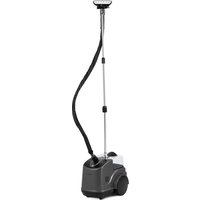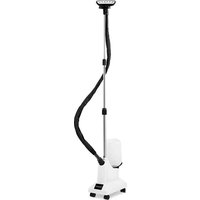
Ulsonix USX-ST2250IT - Steam cleaner

USX-ST2250IT - Steam cleaner Ulsonix - Free user manual and instructions

Find the device manual for free USX-ST2250IT Ulsonix in PDF.
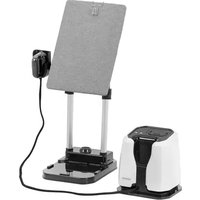
📄 145 pages English EN Download 💬 AI Question
Notice Ulsonix USX-ST2250IT - page 19
Pick your language and provide your email: we'll send you a specifically translated version.

User questions about USX-ST2250IT Ulsonix

0 question about this device. Answer the ones you know or ask your own.

Ask a new question about this device

The email remains private: it is only used to notify you if someone responds to your question.

No questions yet. Be the first to ask one.

Download the instructions for your Steam cleaner in PDF format for free! Find your manual USX-ST2250IT - Ulsonix and take your electronic device back in hand. On this page are published all the documents necessary for the use of your device. USX-ST2250IT by Ulsonix.

USER MANUAL USX-ST2250IT Ulsonix
natural_image Exploded view diagram of a mechanical assembly with layered components and mounting base (no text or symbols)
text_image Technical diagram of a mechanical assembly with numbered components and an arrow indicating a downward motion or force.
natural_image Diagram of a grid-patterned electronic component with two parallel wires and a numbered label (5), no readable text or symbols present.
text_image Technical diagram showing a mechanical device with labeled parts and an inset view of its internal components.
text_image Technical diagram of a mechanical assembly with numbered components and directional arrows indicating assembly steps.
natural_image Mechanical assembly diagram showing two vertical rods connected by a horizontal bracket with downward arrows indicating motion (no text or symbols)
natural_image Technical line drawing of a mechanical clamp or bracket assembly with a close-up view of the handle (no text or symbols present)
natural_image Line drawing of a mechanical device with a downward arrow indicating motion (no text or symbols)
text_image Diagram showing a mechanical setup with a magnified view of two hands holding cylindrical components, labeled with number 16.
text_image Technical diagram of a device with labeled components, including a presser and circuit board assembly.
text_image Technical diagram of a mechanical device with numbered parts labeled 13 and 14
natural_image Technical line drawing of a mechanical housing component with mounting holes and a circular component labeled 17 (no text or symbols beyond labels)
natural_image Line drawing of a mechanical device with a top handle and base mount (no text or symbols)

Ulsonix USX-ST2250IT - 1

natural_image Line drawing of a mechanical device with directional arrows indicating motion (no text or symbols)

Ulsonix USX-ST2250IT - 2

natural_image Line drawing of a mechanical device with a handle and base (no text or symbols)
natural_image Line drawing of a mechanical device with no visible text or symbols

Ulsonix USX-ST2250IT - 3

natural_image Line drawing of a mechanical device with directional arrows indicating motion (no text or symbols)

Ulsonix USX-ST2250IT - 4

text_image Diagram showing a robot with labeled parts and directional arrows, including a close-up of the device's internal structure.

3.3.2 Steuerfeld

Level 1

Level 2

Level 3

Ulsonix USX-ST2250IT - Steuerfeld - 1

text_image Fiber Cotton Linen Strong Steam Dry Ironing Alarm Level 4 Level 5 Warning
natural_image Simple line drawing of a container with liquid and a handle, no text or symbols present
natural_image Line drawing of a hand inserting a USB into a connector (no text or symbols)
natural_image Interior view of a black electrical fuse box with red and green components, no visible text or symbols
natural_image Line drawing of hands inserting a component into a device (no text or symbols)

This User Manual has been translated for your convenience using machine translation. Reasonable efforts have been made to provide an accurate translation; however, no automated translation is perfect nor is it intended to replace human translators. The official User Manual is the English version. Any discrepancies or differences created in the translation are not binding and have no legal effect for compliance or enforcement purposes. If any questions arise related to the accuracy of the information contained in the User Manual, please refer to the English version of those contents which is the official version.

Technical data

Parameter descriptionParameter value
Product nameSteam iron
ModelUSX-ST2250IT
Supply voltage [V~] / Frequency [Hz]230 / 50
Rated power [W].2200
Safety class1
Dimensions [width x depth x height; mm]270 x 320 x 340
Weight [kg]8,7
Water tank capacity [ml]1.2
Maximum steam pressure [bar]5
Steam output [g/min]50
Warm-up time [s]Approx. 60
Stand height [mm]755-960
Ironing board dimensions [mm]540 x 365
The angle of the ironing board [°]45 / 90 / 180

1. General Description

The manual is intended to assist in safe and reliable use. The product is designed and manufactured strictly according to technical specifications using the latest technology and components and maintaining the highest quality standards.

CAREFULLY READ AND UNDERSTAND THIS MANUAL BEFORE STARTING THE WORK.

To ensure the long and reliable operation of the device, make sure to operate and maintain it properly following the guidelines in this instruction manual. The technical data and specifications in this manual are up-to-date. The manufacturer reserves the right to make changes to improve the quality. Taking the technical progress and the possibility of reducing noise into account, the unit is designed and built in such a way that risks resulting from noise emissions are reduced to the lowest possible level.

Explanation of symbols

CEThe product complies with applicable safety standards.
Ulsonix USX-ST2250IT - Explanation of symbols - 1Read the manual before use.
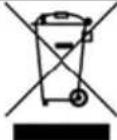
Ulsonix USX-ST2250IT - Explanation of symbols - 2Recyclable product.
Ulsonix USX-ST2250IT - Explanation of symbols - 3CAUTION! or WARNING! or REMEMBER! describing a situation (general warning sign).
Ulsonix USX-ST2250IT - Explanation of symbols - 4CAUTION! Risk of electric shock!
Ulsonix USX-ST2250IT - Explanation of symbols - 5CAUTION! Warning against loud noise!
Ulsonix USX-ST2250IT - Explanation of symbols - 6Caution! Hot surface can cause burns!
Ulsonix USX-ST2250IT - Explanation of symbols - 7For indoor use only.

Ulsonix USX-ST2250IT - Explanation of symbols - 8

CAUTION! The figures in this manual are illustrative only and may vary in some details from the actual appearance of the product.

2. Safety of use

Ulsonix USX-ST2250IT - Safety of use - 1

CAUTION! Read all safety warnings and instructions. Failure to follow the warnings instructions may result in electric shock, fire and/or serious injury or death.

The term "device" or "product" in the warnings and in the description of the instructions refers to: the

Steam iron

2.1. Electrical safety

a) The plug of this device must fit into the outlet. Do not modify the plug in any way. Original plugs and matching outlets reduce the risk of electric shock.
b) Do not touch the device with wet or damp hands.
c) Do not use the cord in an unintended manner. Never use it to carry the device or to pull the plug out of the socket. Keep the cord away from heat sources, oil, sharp edges, or moving parts. Damaged or tangled cords increase the risk of electric shock.
d) If you cannot avoid using the product in a wet environment, use a residual current device (RCD) to connect it to electrical mains. Using an RCD reduces the risk of electric shock.
e) Do not use the device if the power cord is damaged or shows signs of wear. A damaged power cord should be replaced by a qualified electrician or the manufacturer's service department.
f) To avoid electric shock, do not immerse the cable, plug, or the device itself in water or other liquid. Do not use the appliance on wet surfaces.
g) CAUTION – DANGER TO LIFE! When cleaning or using the appliance, never immerse it in water or other liquids.

2.2. Safety in the workplace

a) Keep the work area tidy and well-lit. Disorder or poor lighting can lead to accidents. Be foresighted, watch what you are doing, and use common sense when using the device.
b) If in doubt as to whether the product is working properly or found to be damaged, contact the manufacturer's technical service.
c) Only the manufacturer's service department may repair the appliance. Do not attempt to repair the product on your own!
d) In the event of ignition or fire, use only powder or snow (CO2) fire extinguishers to suppress the live device.
e) Keep this manual for future reference. If the product is to be handed over to a third party, hand it over with this user manual.
f) Keep packaging components and small installation parts out of the reach of children.
g) Keep the device away from children and animals.

Ulsonix USX-ST2250IT - Safety in the workplace - 1

Remember! Keep children and other bystanders safe while operating the equipment.

2.3. Personal safety

a) Do not operate this device if you are tired, ill, or under the influence of alcohol, drugs, or medication that could impair your ability to operate the device.
b) The device is not intended to be used by persons (including children) with reduced mental, sensory or intellectual functions or persons who lack experience and/or knowledge unless they are supervised or have been instructed by a person responsible for their safety on how to operate the device.
c) Use caution and common sense when operating this device. A moment's inattention during operation may result in serious personal injury.
d) The product is not a toy. Children should be watched to ensure that they do not play with the appliance.
e) To reduce the risk of contact with hot steam, check the device before each use, keeping the steam head away from your body and other objects.
f) Never steam iron clothes on the body!
g) Be especially careful when holding steamed clothes! Touching hot clothing or pointing the steam head towards the body can cause burns!

2.4. Safe use of the unit

a) Do not use the unit if the ON/OFF switch does not function properly (does not turn on and off). Units that cannot be controlled by the switch are unsafe, cannot operate, and must be repaired.
b) Disconnect the device from the power supply before adjusting, cleaning, or servicing. This precaution reduces the risk of accidental start-up.
c) Keep unused product out of the reach of children and anyone unfamiliar with the device or this manual. Products are dangerous when used by inexperienced users.
d) Keep the product in good working order. Check before each use for general damage or damage to moving parts (cracks in parts and components or any other condition that may affect the safe operation of the device). If damaged, return the device for repair before use.
e) Keep the product out of the reach of children.
f) Repairs and maintenance should be carried out by qualified personnel using only original spare parts. This will ensure the safety of use.
g) Do not leave the device switched on unattended.
h) Clean the device regularly to prevent permanent dirt build-up.
i) The product is not a toy. Cleaning and maintenance must not be performed by children without adult supervision.
j) Do not start up an empty unit.
k) Do not tamper with the device to alter its performance or design.
I) Keep the unit away from sources of fire and heat.
m) It is forbidden to point the steam head directly at people or animals!
n) Use cold demineralized or distilled water for steam generation. The use of any hot water is prohibited due to the risk of damaging the tank!

Ulsonix USX-ST2250IT - Safe use of the unit - 1

CAUTION! Although the product has been designed to be safe and has adequate safeguards and despite the additional safety features provided to the user, there is still a slight risk of accident or injury when handling the product. Caution and common sense are advised when using the product.

3. Instructions for use

The product is designed for ironing clothes, etc. fabrics, and thanks to the steam generator, it also allows you to iron vertically and heavily creased fabrics. The steamer makes it more efficient than traditional irons.

ATTENTION: the product is unsuitable for materials such as moire, airy fabrics, silk taffeta, artificial or natural fur, or leather flesh.

The user is responsible for any damage resulting from misuse.

3.1. Product overview
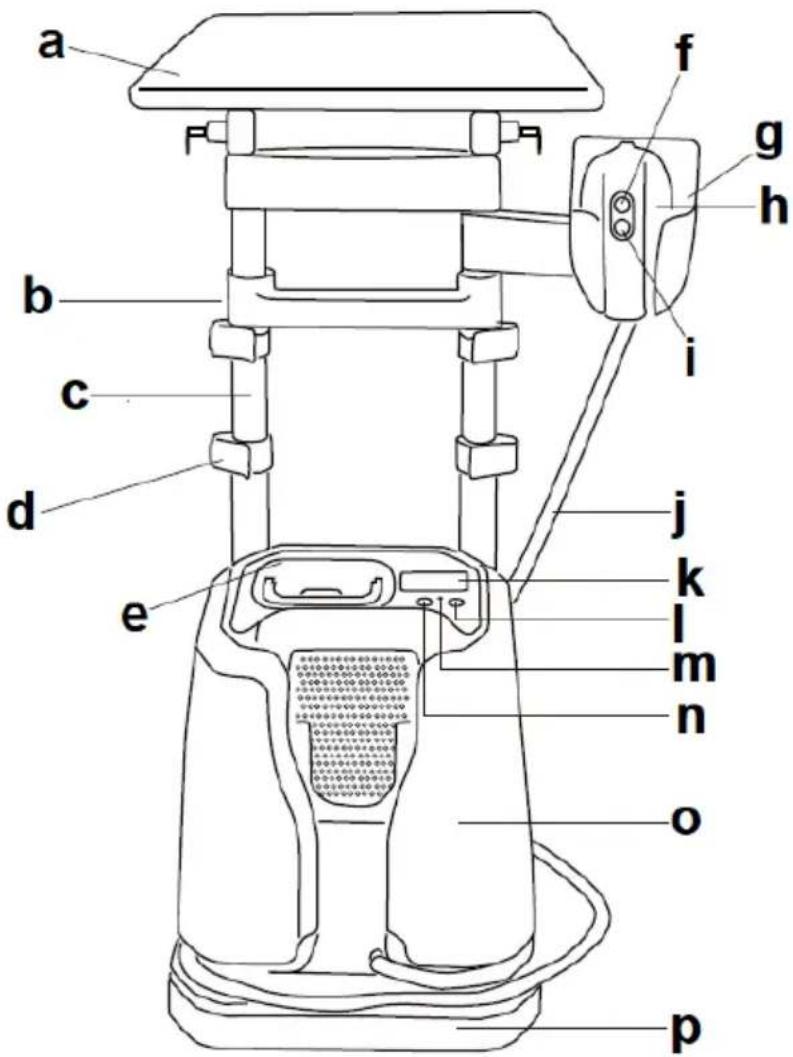
Ulsonix USX-ST2250IT - Product overview - 1

text_image a b c d e f g h i j k l m n o p

a) Ironing board
b) Rack crossbar
c) Adjustable frame post
d) Rack adjustment lock (x4)
e) Water tank
f) Steam setting button
g) Steam iron handle
h) Steam iron
i) Steam release button
j) Steam hose
k) Control panel
I) Steam setting button
m) Hole for resetting the reminder to change the water filter/decalcification
n) ON/OFF button

o) The steamer
p) Ironing board base

3.2. Preparation for operation

POSITIONING OF THE UNIT

The ambient temperature must not exceed 40^ C and ambient humidity should not exceed 85%. Place the unit in a way that ensures good air circulation. Maintain a minimum clearance of 20 cm from any wall of the unit. Keep the unit away from any hot surfaces. Always operate the unit on a level, stable, clean, fireproof, and dry surface and out of the reach of children and persons with impaired mental, sensory, and intellectual functions. Place the unit in such a way that the main plug can be reached at any time. Ensure that the power supply to the unit corresponds to that specified on the identification plate!

ASSEMBLY OF THE DEVICE
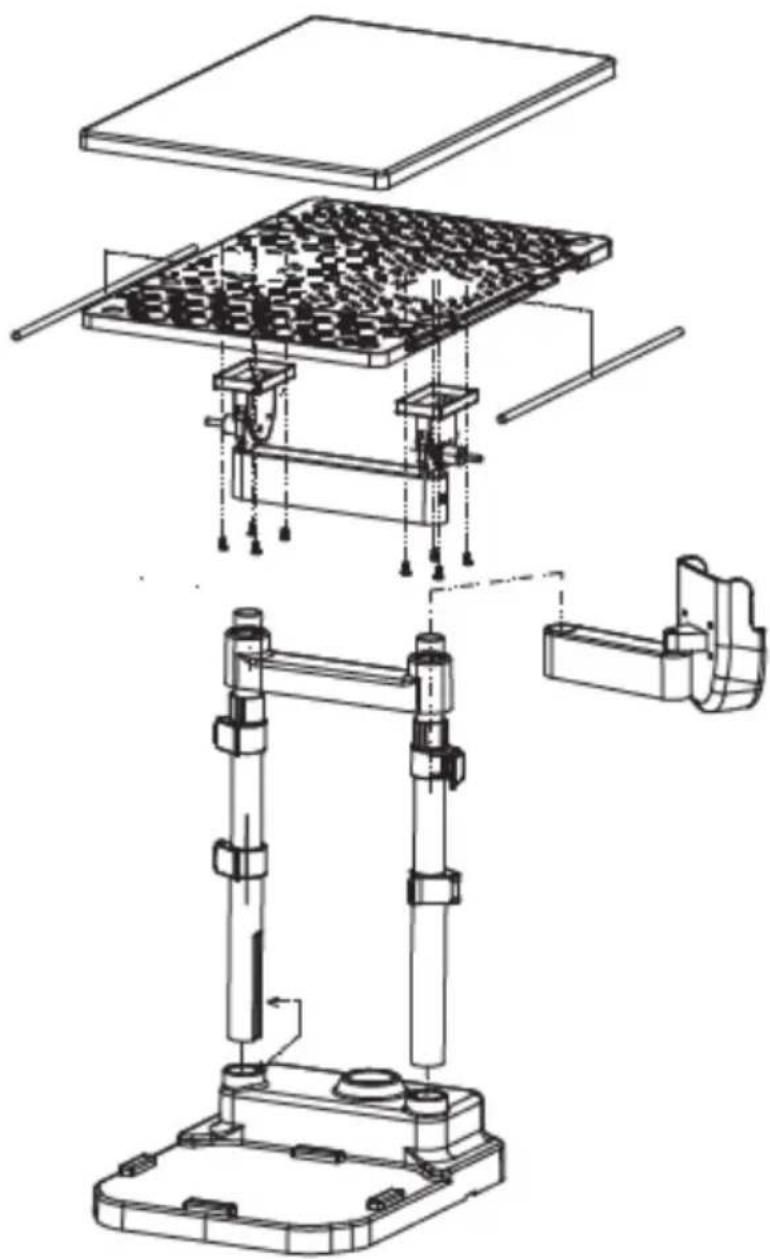
Ulsonix USX-ST2250IT - POSITIONING OF THE UNIT - 1

natural_image Exploded view diagram of a mechanical assembly with layered components and mounting base (no text or symbols)

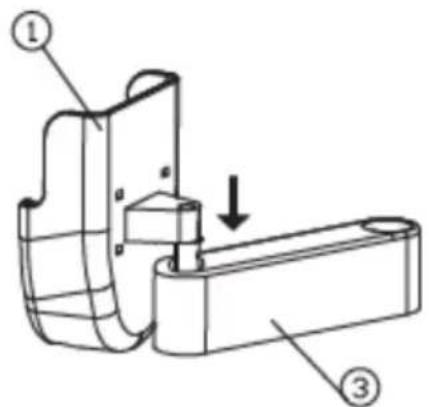
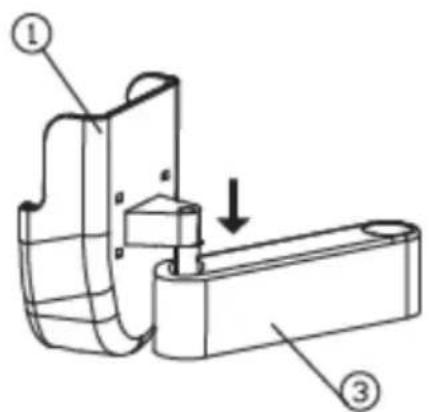
A. Slide part (1) into element (3):

Ulsonix USX-ST2250IT - POSITIONING OF THE UNIT - 2

text_image Technical diagram of a mechanical assembly with numbered components and directional arrow indicating movement or force

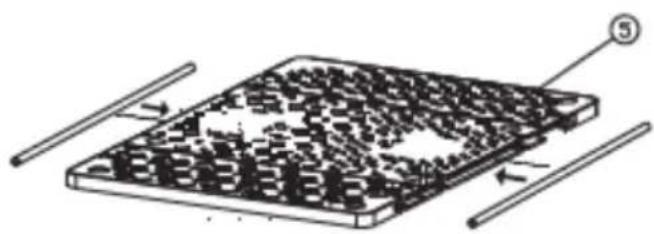
B. Place the ironing plate (5) on a flat surface and insert the rods into the grooves on both sides of it:
Ulsonix USX-ST2250IT - POSITIONING OF THE UNIT - 3

natural_image Diagram of a grid-patterned electronic component with two parallel wires and a numbered label (3), no readable text or symbols present.

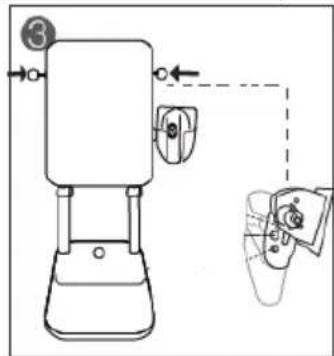
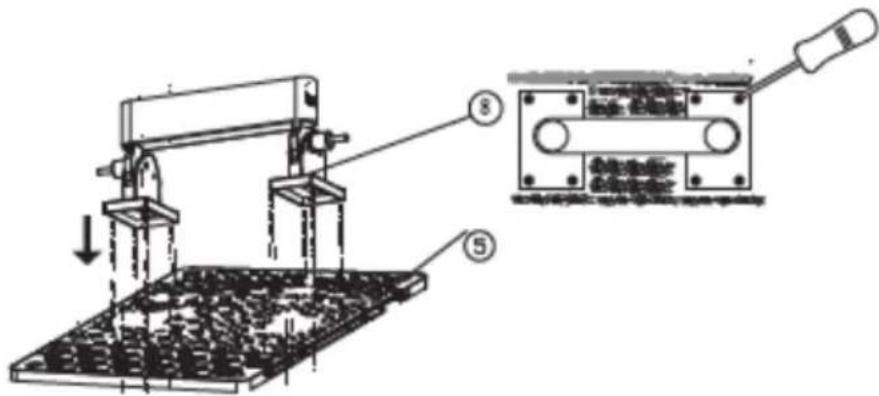
C. Connect part (8) to part (5) using screws:

Ulsonix USX-ST2250IT - POSITIONING OF THE UNIT - 4

text_image Technical diagram showing a mechanical device with labeled parts and an inset view of its internal components.

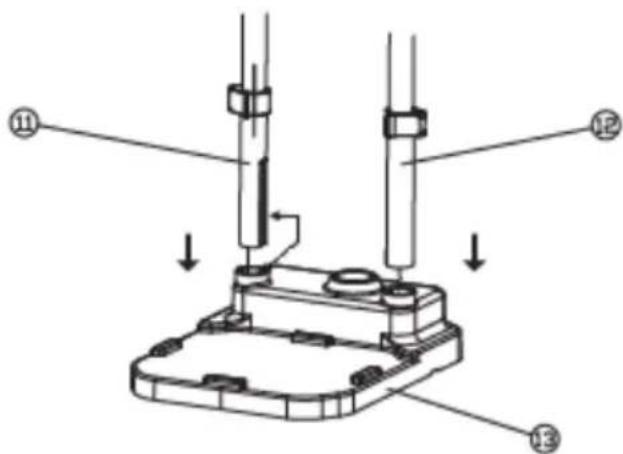
D. Insert the adjustable rack posts (11) and (12) into the base of the ironing board (13):
Ulsonix USX-ST2250IT - POSITIONING OF THE UNIT - 5

text_image Technical diagram of a mechanical assembly with labeled parts and directional arrows indicating assembly steps.

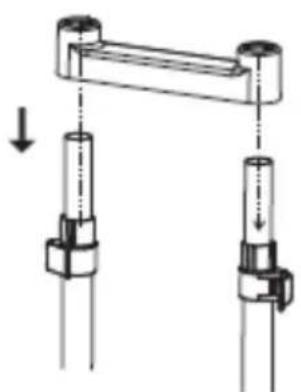
E. Attach the crossbar of the frame to the upper ends of the adjustable rods:
Ulsonix USX-ST2250IT - POSITIONING OF THE UNIT - 6

natural_image Mechanical assembly diagram showing two vertical rods connected by a horizontal beam with downward arrows indicating motion (no text or symbols)

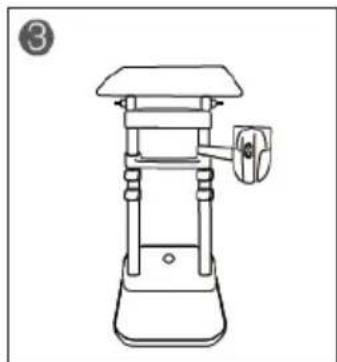
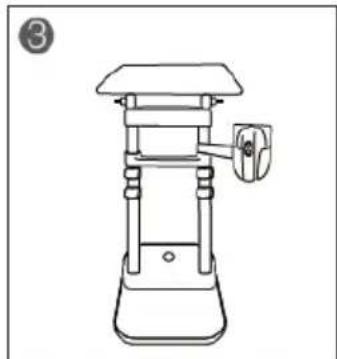
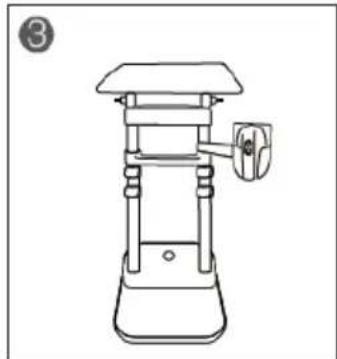
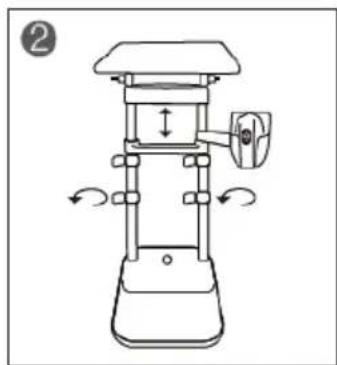
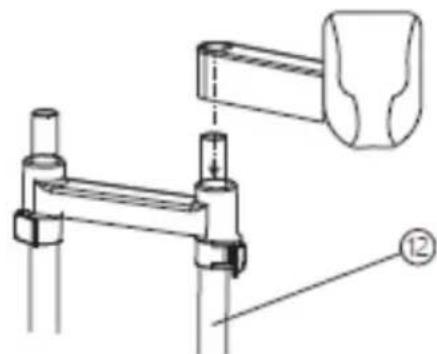
F. Attach the steam iron holder to the adjustable rod (12):
Ulsonix USX-ST2250IT - POSITIONING OF THE UNIT - 7

natural_image Technical line drawing of a mechanical clamp or bracket assembly with no visible text or symbols

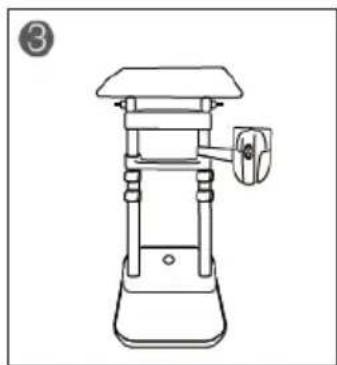
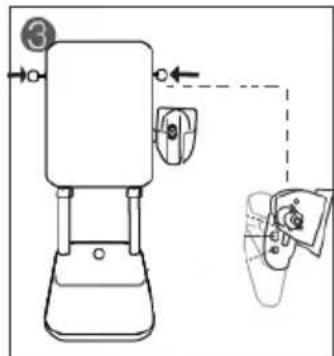
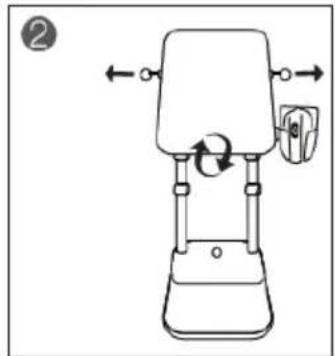
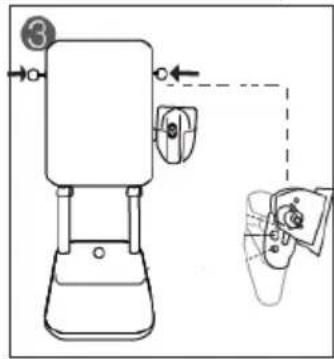
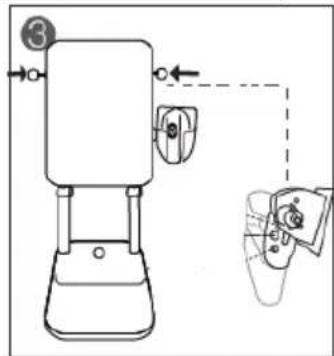
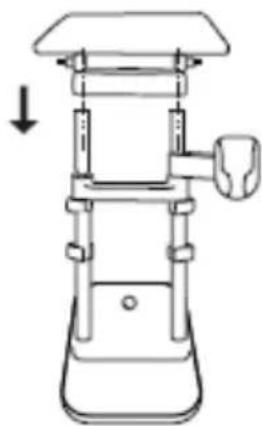
G. Connect all the components pre-assembled in B, C, and D together while making sure that all the connection points are in the right places:
Ulsonix USX-ST2250IT - POSITIONING OF THE UNIT - 8

natural_image Line drawing of a mechanical device with a downward arrow indicating motion (no text or symbols)

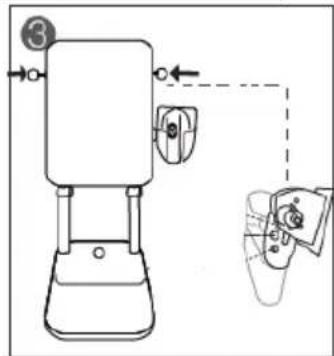
H. Push the mounting elements (8) into the holes as far as they will go until they lock into place:

Ulsonix USX-ST2250IT - POSITIONING OF THE UNIT - 9

natural_image Illustration of a mechanical device with two hands holding cylindrical components, showing a close-up view (no text or symbols)

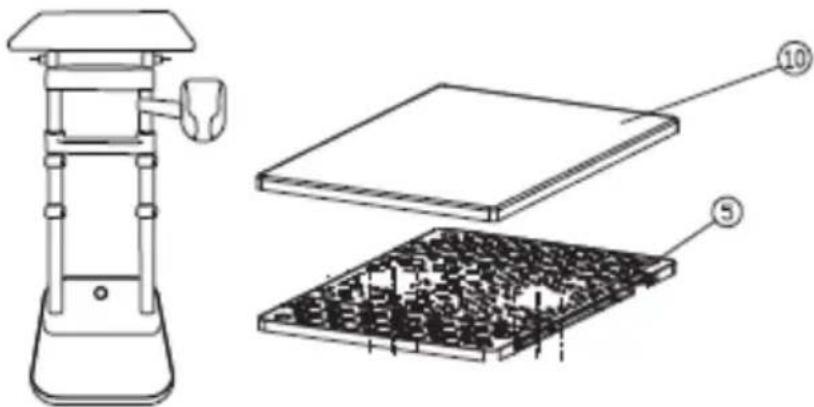
I. Place the fabric pillowcase (10) on the ironing board (5):
Ulsonix USX-ST2250IT - POSITIONING OF THE UNIT - 10

text_image Technical diagram of a device with labeled components, including a top view and internal assembly.

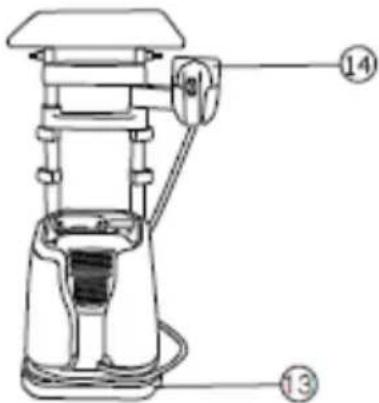
J. Place the steam iron on the base of the ironing board (13) and, if necessary, place the steam iron in the special holder in the steam iron or the holder at the ironing board (14):
Ulsonix USX-ST2250IT - POSITIONING OF THE UNIT - 11

text_image Technical diagram of a mechanical device with numbered parts labeled 13 and 14

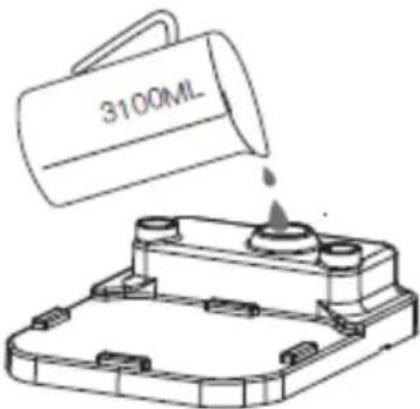
K. In order for the base holding the ironing board to be more stable during operation, pour approx. 3.1 L of water:
Ulsonix USX-ST2250IT - POSITIONING OF THE UNIT - 12

text_image 3100ML

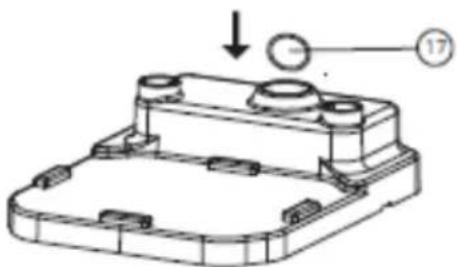
L. After filling the base, plug the water filler hole back with the cap (17):
Ulsonix USX-ST2250IT - POSITIONING OF THE UNIT - 13

natural_image Technical line drawing of a mechanical housing component with mounting holes and a circular component labeled 17 (no text or symbols beyond labels)

3.3. Working with the device

3.3.1 Adjusting the position of the ironing board

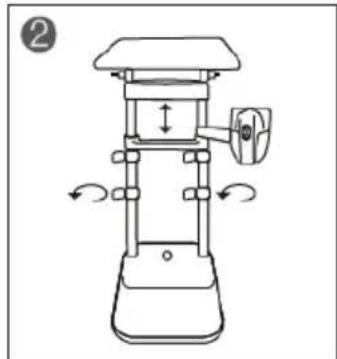
a) Height adjustment:

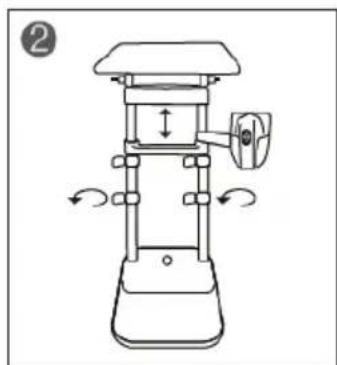
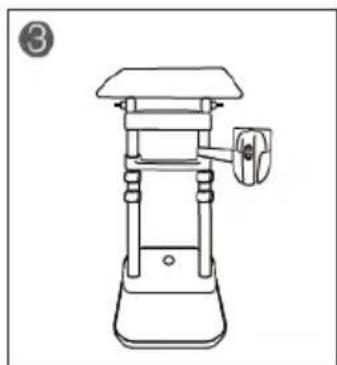
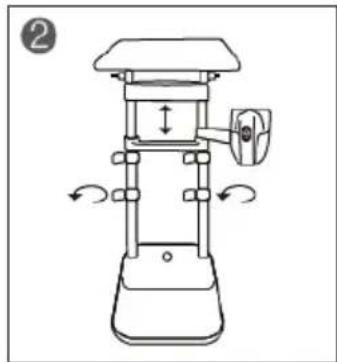
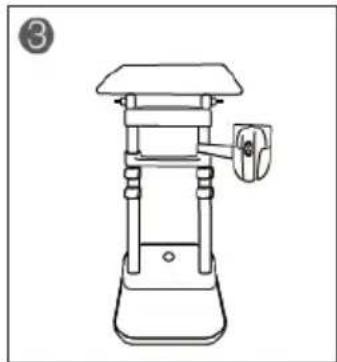
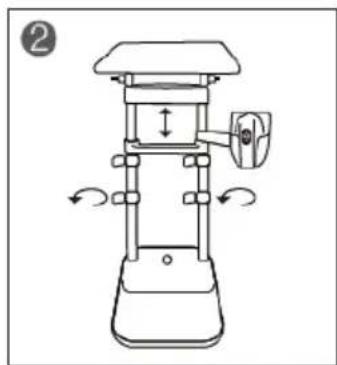
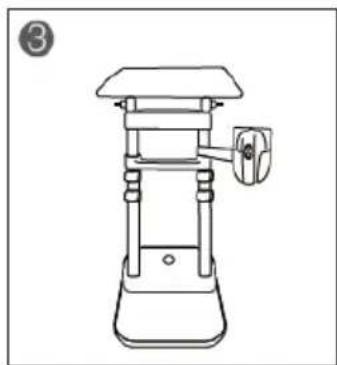
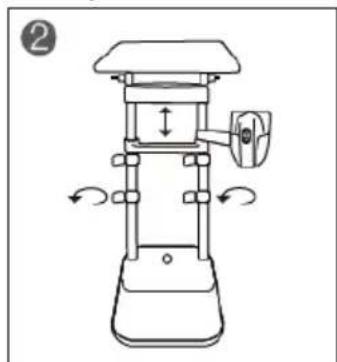
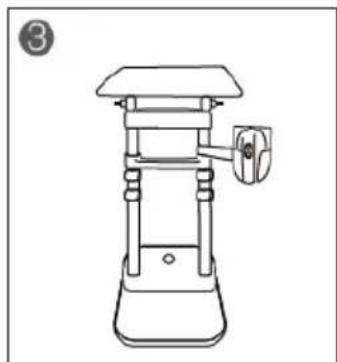
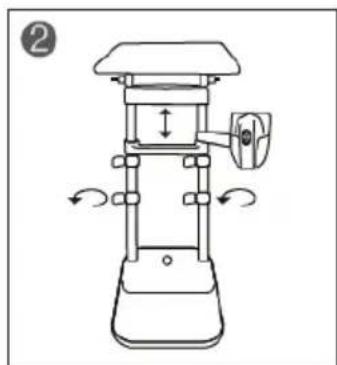
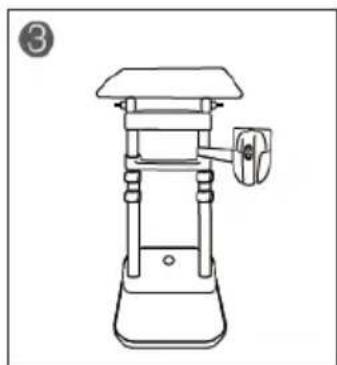
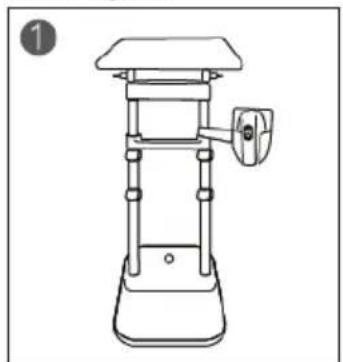
Loosen all 4 rack locks on the posts and adjust the rack crossbar and ironing board to the desired height and tighten all 4 rack locks again:
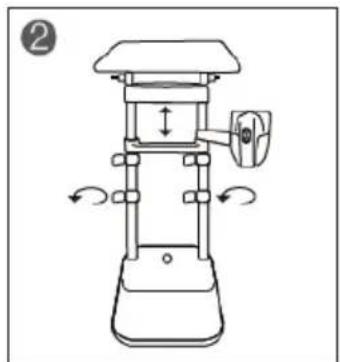
Ulsonix USX-ST2250IT - Adjusting the position of the ironing board - 1

natural_image Line drawing of a mechanical device with a handle and base (no text or symbols)

Ulsonix USX-ST2250IT - Adjusting the position of the ironing board - 2

natural_image Line drawing of a mechanical device with directional arrows indicating motion (no text or symbols)

Ulsonix USX-ST2250IT - Adjusting the position of the ironing board - 3

natural_image Line drawing of a mechanical press or stand device with a handle and base (no text or symbols)

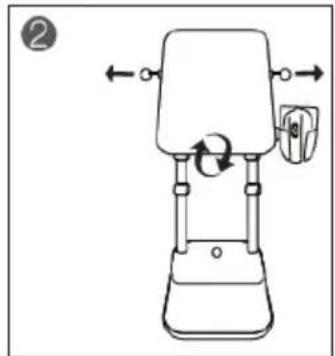
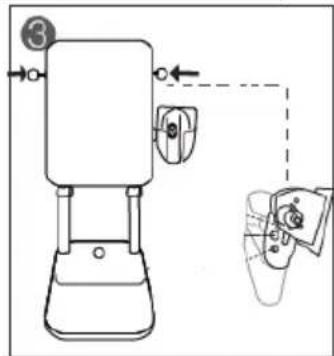
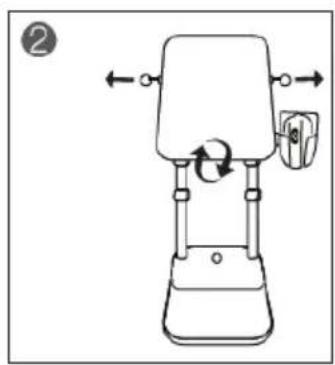
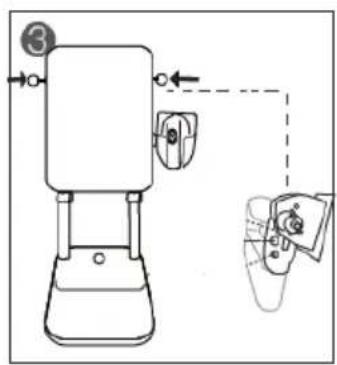
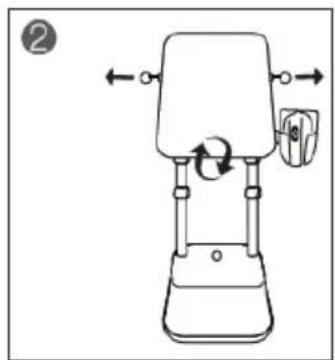
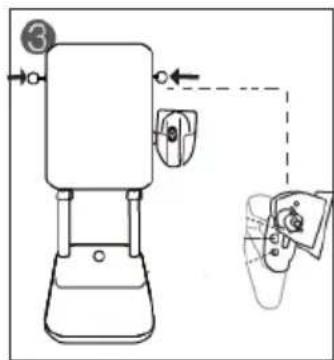
b) Tilt adjustment:

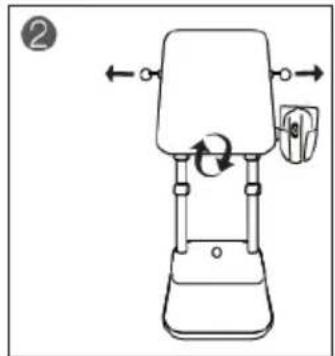
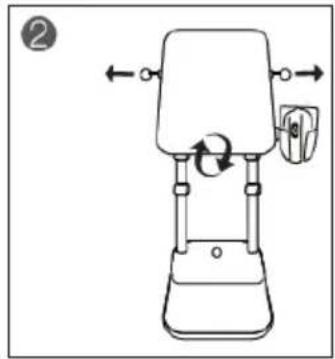
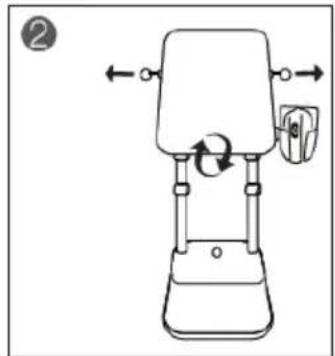
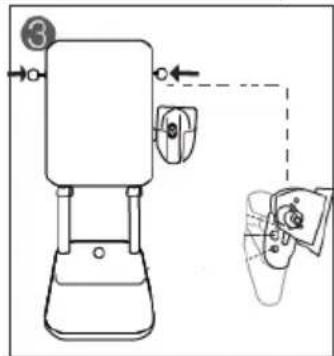
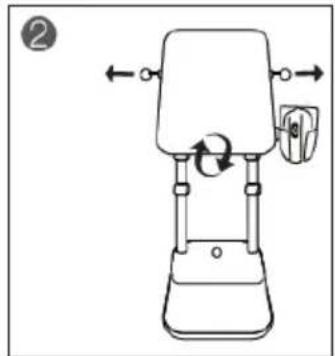
Grab both board locks and pull them from both sides at the same time. Then, holding the locks loose, set the ironing board at one of the possible angles. After setting the desired angle, let go of the locks to return to the starting position:
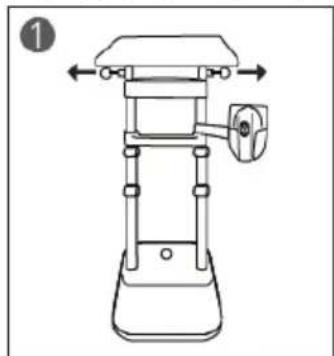
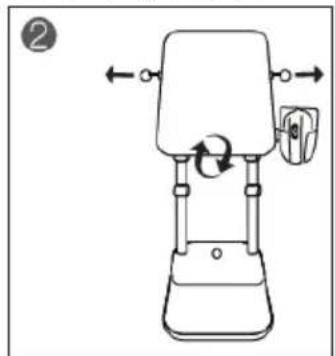
Ulsonix USX-ST2250IT - Adjusting the position of the ironing board - 4

natural_image Line drawing of a mechanical device with no visible text or symbols

Ulsonix USX-ST2250IT - Adjusting the position of the ironing board - 5

natural_image Line drawing of a mechanical device with directional arrows indicating motion (no text or symbols)

Ulsonix USX-ST2250IT - Adjusting the position of the ironing board - 6

natural_image Technical line drawing of a mechanical device with a control knob and adjustment arm (no text or symbols)

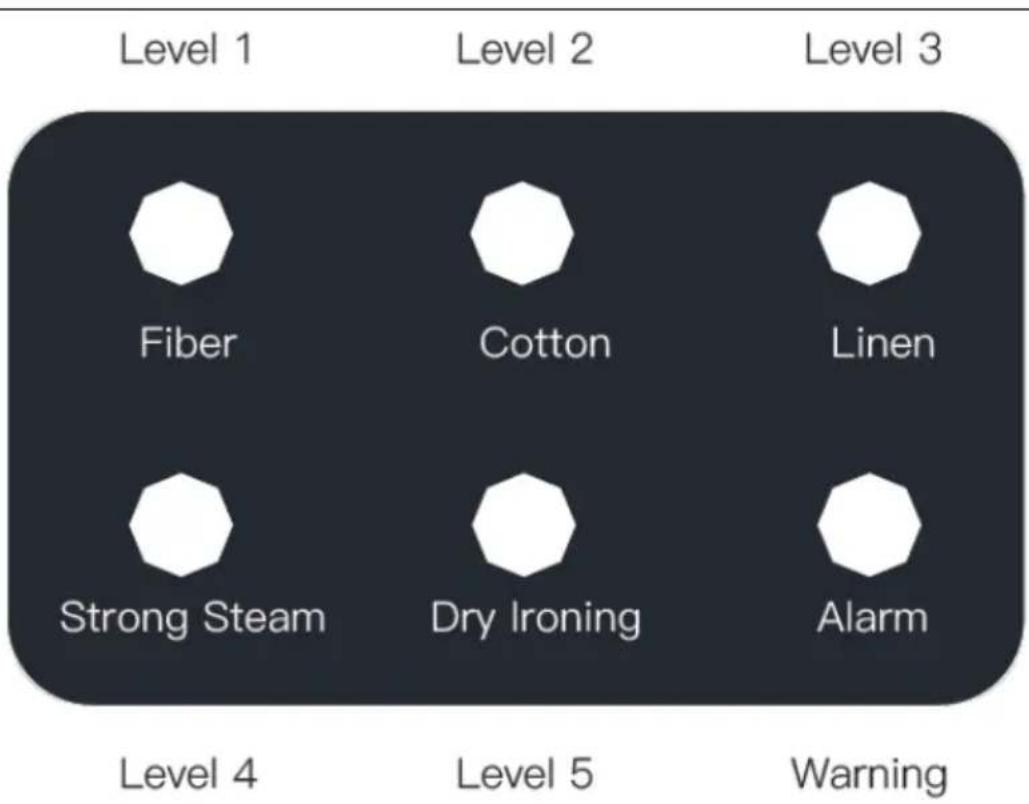
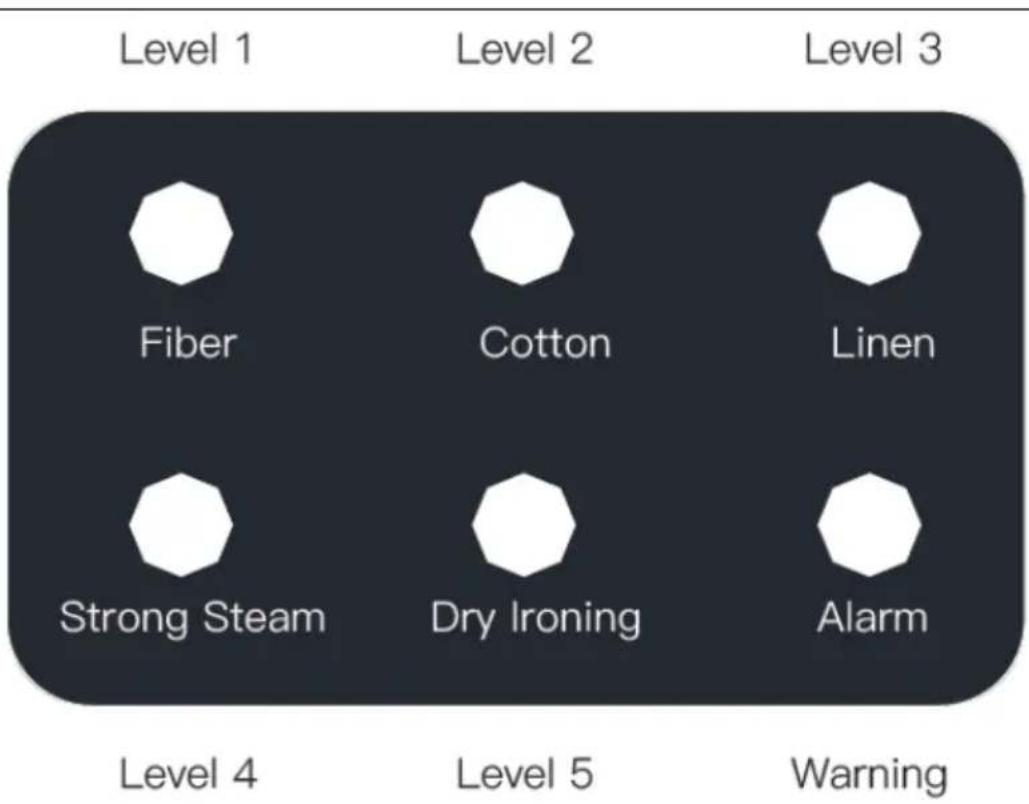
3.3.2 Control panel

Ulsonix USX-ST2250IT - Control panel - 1

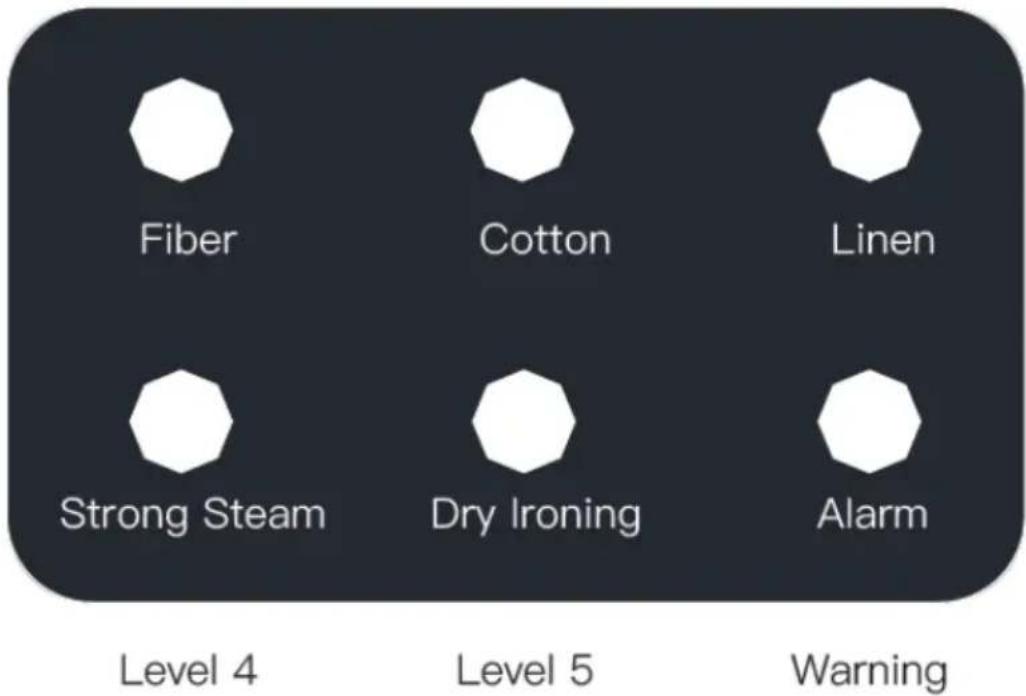
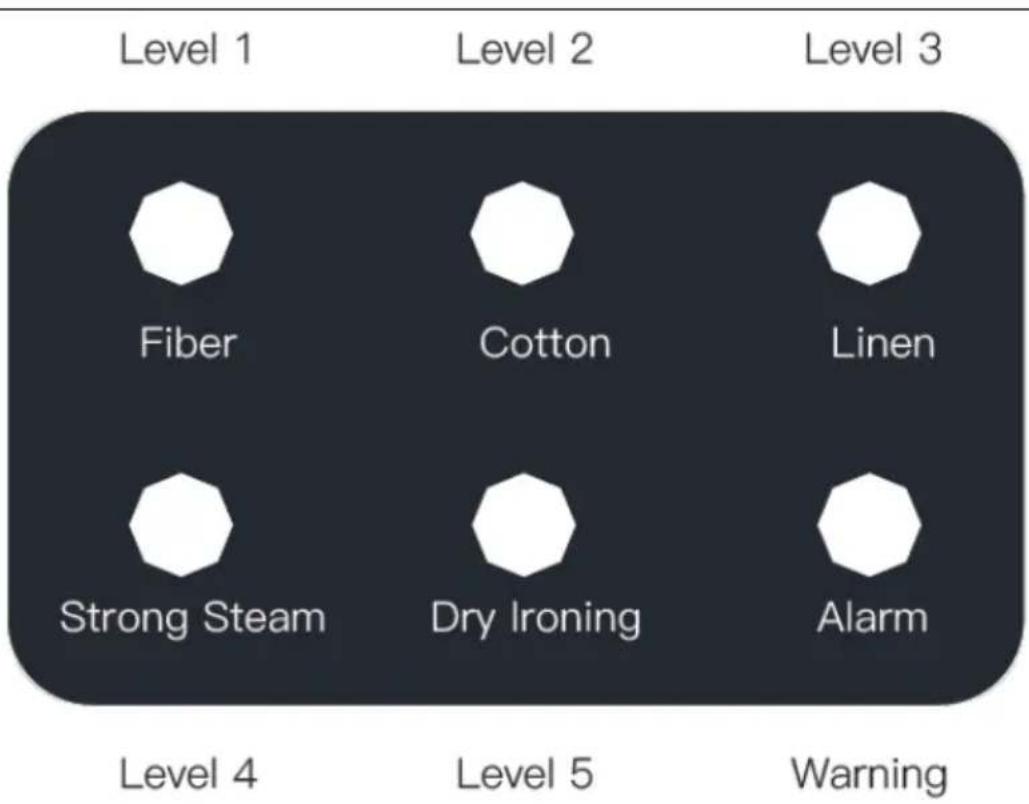
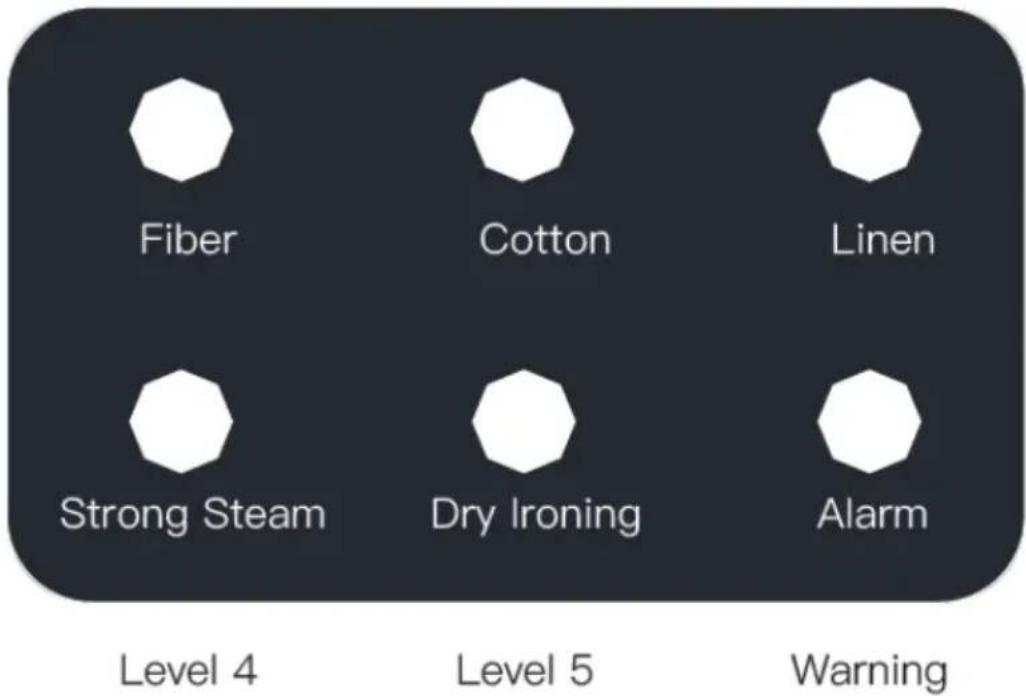
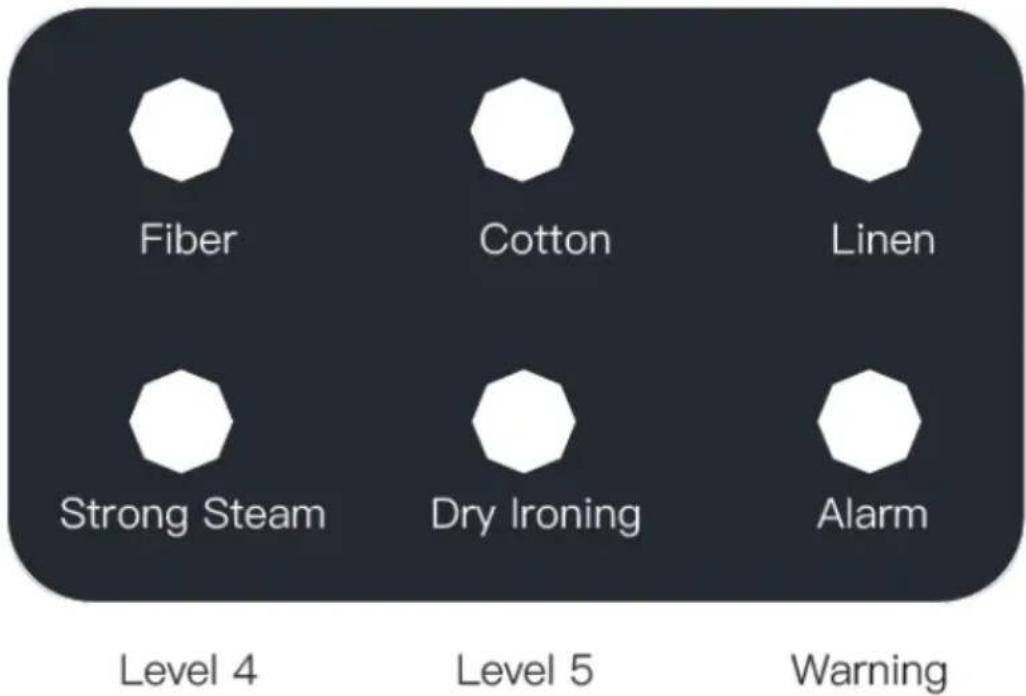
text_image Level 1 Level 2 Level 3 Fiber Cotton Linen Strong Steam Dry Ironing Alarm Level 4 Level 5 Warning

• Level 1 pair (Level 1) "Fiber" - the weakest pair to fiber.
• Level 2 (Level 2) "Cotton" - for cotton materials
• Level 3 (Level 3) "Linen" - for linen materials.
• Level 4 (Level 4) " Strong Steam" - the strongest steam.
• Level 5 (Level 5) "Dry Ironing" - ironing without steam.
- Warning "Alarm" - alarm light for lack of water in the steamer.

3.3.3 Using the device

CAUTION:

• Empty clothes of any contents in pockets.
- If the device has not been used for a long time or before the first use in order not to stain the material with residual water/fine dirt, it is necessary to direct the steam into an open space for a while after starting.
- Start ironing on the lowest steam setting and gradually increase it if necessary.
- It is recommended to first test the device's operation on a small, invisible scrap of material.
- When using the device for the first time, there may be an unpleasant odor from the device - this is normal and the smell will disappear over time.
- Do not direct steam on metal parts of clothing (buttons, zippers, etc.) - the risk of corrosion!

a) Fill the tank of the steamer with suitable water (demineralized or distilled):
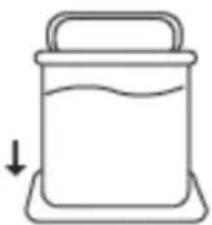
Ulsonix USX-ST2250IT - CAUTION: - 1

natural_image Simple line drawing of a container with liquid and a handle, no text or symbols present

b) Plug the power cord into a power outlet

c) Turn on the device with the ON/OFF button:
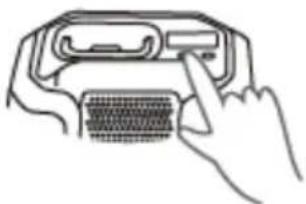
Ulsonix USX-ST2250IT - CAUTION: - 2

natural_image Line drawing of a hand inserting a device into a device (no text or symbols)

d) Wait until the device heats up and produces steam, then press the steam release button - start with the lowest setting and possibly increase the amount with the button on the iron or steamer.

NOTE: The descaling light turns on approximately every 3 months with regular use.

e) When you finish ironing, turn off the device and let it cool down and unplug it from the power outlet. Empty both water tanks - in the steamer and in the base of the ironing board.

f) The device must be completely cooled down before storage.

3.4. Cleaning and maintenance

a) Before any cleaning, adjustment, or replacement of accessories, and if the device is not in use, unplug the mains plug and completely cool down the device, and get rid of any residual water from both tanks.

b) Use only non-corrosive cleaning agents for cleaning the surfaces.

c) After each cleaning, all the parts should be dried well before the unit is used again.

d) Store the unit in a dry and cool place protected from moisture and direct sunlight.

e) Do not spray the unit with a stream of water or immerse it in water.

f) Make sure that no water enters through the ventilation openings in the casing.

g) Clean the ventilation openings with a brush and compressed air.

h) Perform regular inspections of the unit checking technical fitness and any damages.

i) Use a soft cloth for cleaning.

j) Do not use sharp and/or metal objects (e.g. wire brush or metal spatula) for cleaning as they may damage the surface of the appliance material.

k) Do not clean the device with acidic substances, medical products, thinners, fuel, oil, or other chemicals as this may damage the device.

I) Do not lead to the formation of scale on the steam outlet. If contaminated water comes out of the device, it should be descaled.

m) If the water filter alarm light comes on, you should:

- Turn off the device, cool down, and empty the residual water in the steamer tank.

- Turn the steamer upside down and locate the flap at the bottom of the base.

- Open the flap and inside find a water filter:
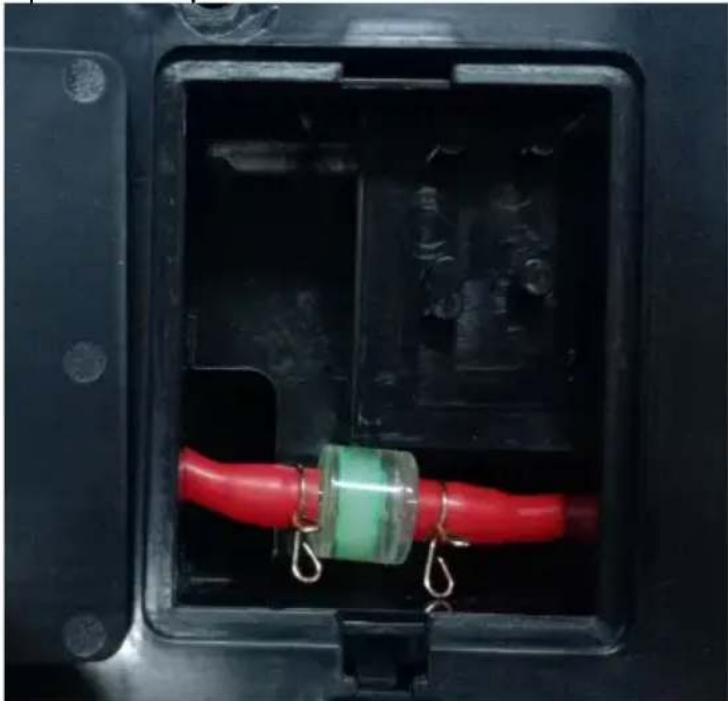
Ulsonix USX-ST2250IT - Cleaning and maintenance - 1

natural_image Interior view of a black electrical fuse box with red and green components suspended by metal hooks (no text or symbols visible)

- Remove the water filter and install a new one in its place.

- Close the flap back.

- Connect the device to the power supply and turn it on - insert a sharp object (such as a needle) into the reset hole of the water filter service alarm, which will restart the reminder:
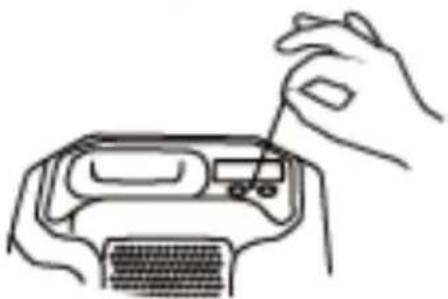
Ulsonix USX-ST2250IT - Cleaning and maintenance - 2

natural_image Line drawing of hands using a tool to adjust or install a device into a computer case (no text or symbols present)

At the end of its useful life, this product should not be disposed of with normal household waste but should be taken to a collection point for the recycling of electrical and electronic equipment. This is indicated by the symbol on the product, operating instructions, or packaging. The materials used in this appliance are recyclable according to their marking. By reusing, recycling, or applying other forms of use of waste machines, you make a significant contribution to the protection of our environment.

Your local administration will provide you with information about the appropriate disposal point for used appliances.

Ulsonix USX-ST2250IT - Cleaning and maintenance - 3

natural_image Exploded view diagram of a mechanical assembly with layered components and mounting base (no text or symbols)
text_image Technical diagram of a mechanical assembly with numbered components and an arrow indicating a downward motion or force.
natural_image Diagram of a grid-patterned electronic component with two parallel wires and a numbered label (5), no readable text or symbols present.
text_image Technical diagram showing a mechanical device with labeled parts and an inset view of its internal components.
text_image Technical diagram of a mechanical assembly with numbered components and directional arrows indicating assembly steps.
natural_image Mechanical assembly diagram showing two vertical rods connected by a horizontal beam, with arrows indicating force direction (no text or symbols)
natural_image Technical line drawing of a mechanical clamp or bracket assembly with a hatched part inserted (no text or symbols)
natural_image Technical line drawing of a mechanical device with no visible text or symbols
text_image Diagram showing a mechanical setup with a magnified view of two hands holding cylindrical components, labeled with number 16.
text_image Technical diagram of a device with labeled components, including a presser and circuit board assembly.
text_image Technical diagram of a mechanical device with numbered parts labeled 13 and 14
natural_image Technical line drawing of a mechanical housing component with mounting holes and a circular component labeled 17 (no text or symbols beyond labels)
natural_image Line drawing of a mechanical device with a handle and base (no text or symbols)

Ulsonix USX-ST2250IT - Cleaning and maintenance - 4

natural_image Line drawing of a mechanical device with rotating arms and adjustment knobs (no text or symbols)

Ulsonix USX-ST2250IT - Cleaning and maintenance - 5

natural_image Line drawing of a mechanical device with a handle and base (no text or symbols)
natural_image Line drawing of a mechanical device with no visible text or symbols

Ulsonix USX-ST2250IT - Cleaning and maintenance - 6

natural_image Line drawing of a mechanical device with directional arrows indicating motion (no text or symbols)

Ulsonix USX-ST2250IT - Cleaning and maintenance - 7

text_image Diagram showing a robot with labeled parts and directional arrows, including a close-up of the device's internal structure.

3.3.2 Panel kontrolny

Level 1

Level 2

Level 3

Ulsonix USX-ST2250IT - Panel kontrolny - 1

text_image Fiber Cotton Linen Strong Steam Dry Ironing Alarm Level 4 Level 5 Warning
natural_image Simple line drawing of a container with liquid and a handle, no text or symbols present
natural_image Line drawing of a hand inserting a USB into a connector (no text or symbols)
natural_image Close-up of a black electrical fuse box with red and green wires, suspended by metal hooks (no text or symbols visible)
natural_image Line drawing of hands using a tool to adjust or install a device into a computer case (no text or symbols present)

USUWANIE ZUŻYTYCH URZĄDZEŃ.

natural_image Exploded view diagram of a mechanical assembly with labeled components (no text or symbols)
text_image Technical diagram of a mechanical component with numbered parts and an arrow indicating direction
natural_image Diagram of a grid-patterned electronic component with two parallel wires and a numbered label (5), no readable text or symbols present.
text_image Technical diagram showing a mechanical device with labeled parts and an inset view of its internal components.
text_image Technical diagram showing mechanical assembly with labeled parts and directional arrows indicating assembly steps
natural_image Mechanical assembly diagram showing two vertical rods connected by a horizontal beam, with arrows indicating direction of movement (no text or symbols present)
natural_image Technical line drawing of a mechanical clamp or bracket assembly with a close-up view of the handle (no text or symbols present)
natural_image Line drawing of a mechanical device with a downward arrow indicating motion (no text or symbols)
text_image Diagram showing a mechanical device with a magnified view of two hands holding cylindrical components, labeled with number 16.
text_image Technical diagram of a device with labeled components, including a presser and circuit board assembly.
text_image Technical diagram of a mechanical device with numbered parts labeled 13 and 14
natural_image Technical line drawing of a mechanical housing component with mounting holes and a circular component labeled 17 (no text or symbols beyond labels)
natural_image Line drawing of a mechanical device with a base and top component (no text or symbols)

Ulsonix USX-ST2250IT - USUWANIE ZUŻYTYCH URZĄDZEŃ. - 1

natural_image Line drawing of a mechanical device with directional arrows indicating motion (no text or symbols)

Ulsonix USX-ST2250IT - USUWANIE ZUŻYTYCH URZĄDZEŃ. - 2

natural_image Line drawing of a mechanical press or press device with a handle and base (no text or symbols)
natural_image Line drawing of a mechanical device with no visible text or symbols

Ulsonix USX-ST2250IT - USUWANIE ZUŻYTYCH URZĄDZEŃ. - 3

natural_image Line drawing of a mechanical device with directional arrows indicating motion (no text or symbols)

Ulsonix USX-ST2250IT - USUWANIE ZUŻYTYCH URZĄDZEŃ. - 4

text_image Diagram showing a robot with labeled parts and directional arrows, including a close-up of the device's screen.
text_image Fiber Cotton Linen Strong Steam Dry Ironing Alarm Level 4 Level 5 Warning
natural_image Simple line drawing of a container with liquid and a handle, no text or symbols present
natural_image Line drawing of a hand inserting a USB into a device (no text or symbols)
natural_image Close-up of a black electrical connector with red and green wires, suspended by metal hooks (no text or symbols visible)
natural_image Line drawing of hands inserting a component into a device (no text or symbols)

LIKVIDACE POUŽITÝCH ZAŘÍZENÍ.

natural_image Exploded view diagram of a mechanical assembly with components like a base, spring, and clamping mechanism (no text or labels)
text_image Technical diagram of a mechanical assembly with numbered components and an arrow indicating direction
natural_image Diagram of a grid-patterned electronic component with two parallel wires and a numbered label (5), no readable text or symbols present.
text_image Technical diagram showing a mechanical device with labeled parts and an inset view of its internal components.
text_image Technical diagram of a mechanical assembly with numbered components and directional arrows indicating assembly steps.
natural_image Mechanical assembly diagram showing two vertical rods connected by a horizontal bracket with downward arrows indicating motion (no text or symbols)
natural_image Technical line drawing of a mechanical clamp or bracket assembly with no visible text or symbols
natural_image Line drawing of a mechanical device with a downward arrow indicating motion (no text or symbols)
text_image Diagram showing a mechanical setup with a magnified view of two hands holding cylindrical components, labeled with number 16.
text_image Technical diagram of a device with labeled components, including a presser and circuit board assembly.
text_image Technical diagram of a mechanical device with numbered parts labeled 13 and 14
natural_image Technical line drawing of a mechanical housing component with mounting holes and a circular component labeled 17 (no text or symbols beyond labels)
natural_image Line drawing of a mechanical device with a handle and base (no text or symbols)

Ulsonix USX-ST2250IT - USUWANIE ZUŻYTYCH URZĄDZEŃ. - 5

natural_image Line drawing of a mechanical device with directional arrows indicating motion (no text or symbols)

Ulsonix USX-ST2250IT - USUWANIE ZUŻYTYCH URZĄDZEŃ. - 6

natural_image Line drawing of a mechanical device with a handle and base (no text or symbols)
natural_image Line drawing of a mechanical device with no visible text or symbols

Ulsonix USX-ST2250IT - USUWANIE ZUŻYTYCH URZĄDZEŃ. - 7

natural_image Line drawing of a mechanical device with directional arrows indicating motion (no text or symbols)

Ulsonix USX-ST2250IT - USUWANIE ZUŻYTYCH URZĄDZEŃ. - 8

text_image Technical diagram showing a device with labeled components and directional arrows, including a zoomed-in view of the device's internal structure.
text_image Fiber Cotton Linen Strong Steam Dry Ironing Alarm Level 4 Level 5 Warning
natural_image Simple line drawing of a container with liquid and a handle, no text or symbols present
natural_image Line drawing of a hand inserting a USB into a device (no text or symbols)
natural_image Close-up of a black electrical fuse box with red and green wires, suspended by metal hooks (no text or symbols visible)
natural_image Line drawing of hands using a tool to adjust or install a device (no text or symbols visible)

ÉLIMINATION DES APPAREILS USAGÉS.

natural_image Exploded view diagram of a mechanical assembly with layered components and mounting base (no text or symbols)
text_image Technical diagram of a mechanical assembly with numbered components and an arrow indicating direction
natural_image Diagram of a grid-patterned electronic component with two parallel wires and a numbered label (5), no readable text or symbols present.
text_image Technical diagram showing a mechanical device with labeled parts and an inset view of its internal components.
text_image Technical diagram showing mechanical assembly with labeled parts and directional arrows indicating assembly steps
natural_image Mechanical assembly diagram showing two vertical rods connected by a horizontal beam, with arrows indicating motion direction (no text or symbols)
natural_image Technical line drawing of a mechanical clamp or bracket assembly with a close-up view of the handle (no text or symbols present)
natural_image Line drawing of a mechanical device with a downward arrow indicating motion (no text or symbols)
text_image Diagram showing a mechanical device with a magnified view of two hands holding cylindrical components, labeled with number 16.
text_image Technical diagram of a device with labeled components, including a presser and circuit board assembly.
text_image Technical diagram of a mechanical device with numbered parts labeled 13 and 14
natural_image Technical line drawing of a mechanical housing component with mounting holes and a circular component labeled 17 (no text or symbols beyond labels)
natural_image Line drawing of a mechanical device with a handle and base (no text or symbols)

Ulsonix USX-ST2250IT - ÉLIMINATION DES APPAREILS USAGÉS. - 1

natural_image Line drawing of a mechanical device with directional arrows indicating motion (no text or symbols)

Ulsonix USX-ST2250IT - ÉLIMINATION DES APPAREILS USAGÉS. - 2

natural_image Line drawing of a mechanical press or stand device with a handle and base (no text or symbols)
natural_image Line drawing of a mechanical device with no visible text or symbols

Ulsonix USX-ST2250IT - ÉLIMINATION DES APPAREILS USAGÉS. - 3

natural_image Line drawing of a mechanical device with directional arrows indicating motion (no text or symbols)

Ulsonix USX-ST2250IT - ÉLIMINATION DES APPAREILS USAGÉS. - 4

text_image Diagram showing a robot with labeled parts and directional arrows, including a close-up of the device's internal structure.
text_image Fiber Cotton Linen Strong Steam Dry Ironing Alarm Level 4 Level 5 Warning
natural_image Simple line drawing of a container with liquid and a handle, no text or symbols present
natural_image Line drawing of a hand inserting a USB into a connector (no text or symbols)
natural_image Close-up of a black electrical fuse box with red and green wires, suspended by metal hooks (no text or symbols visible)
natural_image Line drawing of hands using a tool to adjust or install a device (no text or symbols visible)

SMALTIMENTO DEI DISPOSITIVI USURATI.

natural_image Exploded view diagram of a mechanical assembly with layered components and mounting base (no text or symbols)
text_image Technical diagram of a mechanical assembly with numbered components and an arrow indicating a downward motion or force.
natural_image Diagram of a grid-patterned electronic component with two parallel wires and a numbered label (3), no readable text or symbols present.

C. Conecte la parte (8) a la parte (5) usando tornillos:

Ulsonix USX-ST2250IT - SMALTIMENTO DEI DISPOSITIVI USURATI. - 1

text_image Technical diagram showing a mechanical device with labeled parts and an inset view of its internal components.
text_image Technical diagram of a mechanical assembly with labeled parts and directional arrows indicating assembly steps.
natural_image Mechanical assembly diagram showing two vertical rods connected by a bracket with downward arrows indicating motion (no text or symbols)
natural_image Technical line drawing of a mechanical clamp or bracket assembly with no visible text or symbols
natural_image Technical line drawing of a mechanical device with no visible text or symbols
natural_image Illustration of a mechanical device with two hands holding cylindrical components, showing a close-up view (no text or symbols)
text_image Technical diagram of a device with labeled components, including a top-mounted sensor and internal circuit board.
text_image Technical diagram of a portable device with numbered parts labeled 13 and 14
natural_image Technical line drawing of a mechanical housing component with mounting holes and a circular component labeled 17 (no text or symbols beyond labels)
natural_image Line drawing of a mechanical device with a handle and base (no text or symbols)

Ulsonix USX-ST2250IT - SMALTIMENTO DEI DISPOSITIVI USURATI. - 2

natural_image Line drawing of a mechanical device with directional arrows indicating motion (no text or symbols)

Ulsonix USX-ST2250IT - SMALTIMENTO DEI DISPOSITIVI USURATI. - 3

natural_image Line drawing of a mechanical press or press device with a handle and base (no text or symbols)
natural_image Line drawing of a mechanical device with no visible text or symbols

Ulsonix USX-ST2250IT - SMALTIMENTO DEI DISPOSITIVI USURATI. - 4

natural_image Line drawing of a mechanical device with directional arrows indicating motion (no text or symbols)

Ulsonix USX-ST2250IT - SMALTIMENTO DEI DISPOSITIVI USURATI. - 5

text_image Technical diagram showing a device with labeled components and directional arrows, including a numbered circle marker.

3.3.2 Panel de control

Ulsonix USX-ST2250IT - Panel de control - 1

text_image Level 1 Level 2 Level 3 Fiber Cotton Linen Strong Steam Dry Ironing Alarm Level 4 Level 5 Warning
natural_image Simple line drawing of a container with liquid and a handle, no text or symbols present
natural_image Line drawing of a hand inserting a USB into a device (no text or symbols)
natural_image Close-up of a black electrical connector with red and green wires, suspended by metal hooks (no visible text or symbols)
natural_image Line drawing of a hand inserting a small object into a computer monitor (no text or symbols)
natural_image Exploded view diagram of a mechanical assembly with layered components and mounting base (no text or symbols)
text_image Technical diagram of a mechanical assembly with numbered components and directional arrow indicating movement or force
natural_image Technical line drawing of a mechanical clamp or bracket assembly with no visible text or symbols
natural_image Line drawing of a mechanical device with a downward arrow indicating motion (no text or symbols)
text_image Diagram showing a mechanical setup with a magnified view of two hands holding cylindrical components, labeled with number 16.
text_image Technical diagram of a device with labeled components, including a presser and circuit board assembly.
text_image Technical diagram of a mechanical device with numbered parts labeled 13 and 14
natural_image Technical line drawing of a mechanical housing component with mounting holes and a circular component labeled 17 (no text or symbols beyond labels)
natural_image Line drawing of a mechanical device with a base and top component (no text or symbols)

Ulsonix USX-ST2250IT - Panel de control - 2

natural_image Line drawing of a mechanical device with directional arrows indicating motion (no text or symbols)

Ulsonix USX-ST2250IT - Panel de control - 3

natural_image Line drawing of a mechanical press or stand device with a handle and base (no text or symbols)

b) Dölésbeállítás:

natural_image Line drawing of a mechanical device with bidirectional arrows indicating movement or force (no text or symbols)

Ulsonix USX-ST2250IT - Panel de control - 4

natural_image Line drawing of a mechanical device with directional arrows indicating motion (no text or symbols)

Ulsonix USX-ST2250IT - Panel de control - 5

text_image Technical diagram showing a device with labeled components and directional arrows, including a zoomed-in view of the component.

3.3.2 Kezelőpanel

Ulsonix USX-ST2250IT - Kezelőpanel - 1

text_image Level 1 Level 2 Level 3 Fiber Cotton Linen Strong Steam Dry Ironing Alarm Level 4 Level 5 Warning
natural_image Simple line drawing of a container with liquid and a handle, no text or symbols present
natural_image Line drawing of a hand inserting a device into a device housing (no text or symbols)
natural_image Close-up of a black electrical fuse box with red and green wires, suspended by metal hooks (no text or symbols visible)
natural_image Line drawing of hands using a tool to adjust or install a device (no text or symbols visible)

APPARATETS PLACERING

natural_image Exploded view diagram of a mechanical assembly with layered components and mounting base (no text or symbols)

A. Skub del (1) ind i element (3):

Ulsonix USX-ST2250IT - APPARATETS PLACERING - 1

text_image Technical diagram of a mechanical assembly with numbered components and an arrow indicating direction
natural_image Diagram of a grid-patterned electronic component with two parallel wires and a numbered label (5), no readable text or symbols present.
text_image Technical diagram showing a mechanical device with labeled parts and an inset view of a switch mechanism.
text_image Technical diagram showing mechanical assembly with labeled parts and directional arrows indicating assembly steps
natural_image Mechanical assembly diagram showing two vertical rods connected by a horizontal beam with arrows indicating force direction (no text or symbols)
natural_image Technical line drawing of a mechanical clamp or bracket assembly with a close-up view of the handle (no text or symbols present)
natural_image Line drawing of a mechanical device with a downward arrow indicating motion (no text or symbols)
text_image Diagram showing a mechanical setup with a magnified view of two hands holding cylindrical components, labeled with number 16.
text_image Technical diagram of a device with labeled components, including a presser and circuit board assembly.
text_image Technical diagram of a mechanical device with numbered parts labeled 13 and 14
natural_image Technical line drawing of a mechanical housing component with mounting holes and a circular component labeled 17 (no text or symbols beyond labels)
natural_image Line drawing of a mechanical device with a top handle and base mount (no text or symbols)

Ulsonix USX-ST2250IT - APPARATETS PLACERING - 2

natural_image Line drawing of a mechanical device with directional arrows indicating motion (no text or symbols)

Ulsonix USX-ST2250IT - APPARATETS PLACERING - 3

natural_image Line drawing of a mechanical device with a handle and base (no text or symbols)
natural_image Line drawing of a mechanical device with no visible text or symbols

Ulsonix USX-ST2250IT - APPARATETS PLACERING - 4

natural_image Line drawing of a mechanical device with directional arrows indicating motion (no text or symbols)

Ulsonix USX-ST2250IT - APPARATETS PLACERING - 5

text_image Diagram showing a robot with labeled parts and directional arrows, including a close-up of the device's internal structure.

3.3.2 Kontrolpanel

Level 1

Level 2

Level 3

Ulsonix USX-ST2250IT - Kontrolpanel - 1

text_image Fiber Cotton Linen Strong Steam Dry Ironing Alarm Level 4 Level 5 Warning

• Niveau 1 par (Niveau 1) "Fiber" - det svageste par til fiber.
• Niveau 2 (Niveau 2) "Bomuld" - til bomuldsmaterialer
• Niveau 3 (Level 3) "Linen" - til materialer af linned.
• Niveau 4 (Level 4) "Strong Steam" - den stærkeste damp.
• Niveau 5 (Level 5) "Dry Ironing" - strygning uden damp.
- Advarsel "Alarm" - alarmlampe for mangel på vand i damperen.

natural_image Simple line drawing of a container with liquid and a handle, no text or symbols present
natural_image Line drawing of a hand inserting a USB into a device (no text or symbols)
natural_image Close-up of a black electrical connector with red and green wires, suspended by metal hooks (no visible text or symbols)
natural_image Line drawing of hands using a tool to adjust or install a device (no text or symbols visible)

BORTSKAFFELSE F BRUGT UDSTYR.

For the disposal of the device please consider and act according to the national and local rules and regulations.

CONTACT

expondo Polska sp. z o.o. sp. k.
Manual assistant
Powered by Anthropic
Waiting for your message
Product information

Brand : Ulsonix

Model : USX-ST2250IT

Category : Steam cleaner