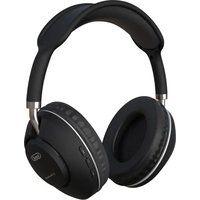
DJ 12E42 BT - Earphones Trevi - Free user manual and instructions
Find the device manual for free DJ 12E42 BT Trevi in PDF.


| Product Type | Bluetooth Headset |
| Brand | Trevi |
| Model | DJ 12E42 BT |
| Bluetooth Version | V5.3 |
| Operating Range | 10 m |
| Frequency Response | 20 Hz - 20 kHz |
| Battery | Lithium 3.7 V, 300 mAh |
| Battery Life | Approximately 10 hours |
| Charging Time | 3-4 hours |
| Power Supply | USB Type-C, 5 V |
| Weight | 157 g |
| FM Radio | 87.5 - 108 MHz (export version) |
| Playback via microSD Card | Yes |
| Connectivity | 3.5 mm Jack |
| Built-in Microphone | Yes |
| Call Control | Answer, end, reject, redial |
| Playback Functions | Play/pause, volume, next/previous track |
| Supported Bluetooth Profiles | A2DP, AVRCP, HFP |
| Auto Power Off | Yes (after inactivity) |
| Safety | Hearing protection, do not expose to water |
Frequently Asked Questions - DJ 12E42 BT Trevi
User questions about DJ 12E42 BT Trevi
0 question about this device. Answer the ones you know or ask your own.
Ask a new question about this device
Download the instructions for your Earphones in PDF format for free! Find your manual DJ 12E42 BT - Trevi and take your electronic device back in hand. On this page are published all the documents necessary for the use of your device. DJ 12E42 BT by Trevi.
USER MANUAL DJ 12E42 BT Trevi
natural_image
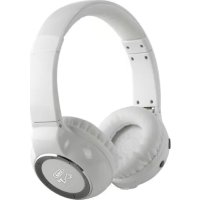
Black and white photo of a modern outdoor headphones with adjustable neck and ear (no visible text or symbols)DJ 12€42 BT
CUFFIA DJ HIFI STEREO BLUETOOTH/MP3 PLAYER
MANUALE D'USO USER GUIDE
ENGTA DE JFRA ESP POR
Bluetooth® version: V5.3
■ Place the device on a flat surface.
■ Position the device so that there is always enough space on its sides for free air circulation (at least 10 cm).
- Do not place any objects on top of the device.
■ Do not cover the ventilation slots above and behind the device.
■ The appliance must not be exposed to dripping or splashing water. No liquid-filled objects, such as vessels, should be placed on the appliance.
■ No source of naked flame, such as lighted candles, shall be placed on the appliance.
■ The cables must be hidden and protected to prevent tripping by someone and the consequent fall of the appliance.
- Keep the appliance away from the following locations: near heat sources (radiators, stoves, direct sunlight, etc ...); near wetlands (bathrooms, swimming pools, etc ...); dusty areas; areas subject to strong vibrations.
■ Unplug the power cord during thunderstorms or for long periods of inactivity.

DESCRIPTION OF CONTROLS
I. USB Type-C Charging Socket
2. ◀◀ key: Volume down, previous song
3. /○|| key: Power On/Off
4. ▶▶ key: Volume up, next song
5. Microphone
6. microSD Card input
7. LED indicator
8. 3.5mm Audio Jack
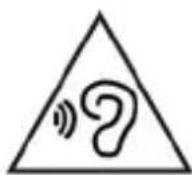
To avoid possible hearing damage, limit the listening time at high volumes
ENGLISH
BATTERY CHARGING
Headphones have an internal rechargeable battery.
The first time you use headphones, make a charge for 3-4 hours; a fully charged battery headphones have a battery life of about 10 hours of music listening.
To recharge:
- Connect the included USB/USB Type-C cable to an external device equipped with USB port (computer, tablet...) or to a power supply with USB 5V (not supplied);
- Connect the included USB/USB Type-C cable to the connector (I); while charging the red LED indicator (7) will light;
- At the end of charging the LED indicator (7) will turn blue.
Indication of battery being phased out:
- When the battery is low, you will hear the message “Battery low” a few times then the headset will automatically turn off.
POWER ON AND OFF
To turn on the device: Press and hold the On/Off button ⏻/ ▶ II (3) for a few seconds, a "Power On" voice message will be sounded;
To turn off the device: Press and hold the On/Off button ⏻/ ▶ II (3) for a few seconds, a "Power Off" voice message will be sounded.
Auto Turn off: after a period of inactivity with Bluetooth pairing inactive, the headphones automatically turn off. To turn on them, the headphones must be switched on again.
PAIRING WITH A BLUETOOTH DEVICE
I. Turn on the device. The LED indicator (7) will start flashing blue and red;
2. The guide voice will indicate "Bluetooth mode";
3. Enable the Bluetooth® connection on the external device (Mobile phone, Tablet, etc ...) by referring to its manual;
4. From the external device search for Bluetooth devices and select "DJ12E42BT";
5. When pairing with the external device the voice guide will indicate the "Connecting".
Note:
- With paired device, it may happen that the connection is interrupted (such as when the devices connected via Bluetooth stray too far from each other); Normally the connection is automatically restored, otherwise it is necessary to carry out the procedure again coupling from step 1 to 5.
- Whenever you want to pair your headset to a new device, you must disconnect the headphones (if connected) from the old device and pairing repeating the above procedure from step 1 to step 5.
- During pairing the two devices must be placed at a distance less than one meter, in normal use, the maximum distance for a correct operation is about 10 meters.
ENGLISH
MUSIC PLAYBACK
Through the buttons on the headphone you can manage the playback of the songs contained in the paired device.
- Press the button ⏻▶ II (3) to play/pause the music playback;
- Press the ▶▶ key (4) to switch to the next song;
- Press the ◀ key (2) to switch to the previous song.
Note: Due to the continuous evolution of Bluetooth® technology, some devices may not be compatible or fully compatible with the TREVI DJ 12E42 BT.
VOLUME ADJUSTEMNT
You can adjust the audio volume with the following keys:
- Press and hold the ▶ key (4) to increase the volume;
- Press and hold the ◀ key (2) to decrease the volume.
CALL HANDLING ON MOBILE PHONE
Through the headphones, different operations are possible when receiving calls on a mobile phone.
Answering a call: press the button ⏻ ▶ II (3) once when the call arrives;
End a call: press the button ⏻ ▶ II (3) once during the conversation;
Reject an incoming call: long press the button ⏻▶ II (3);
Make a call to the last number called: quickly press two times the button ⏻▶ II (3).
MUSIC PLAYBACK WITH MICRO SD CARD
1 Insert the micro SD Card into the input (6) with the contacts to the outside;
2. Turn on the device and press the button ⏻▶ II (3) three times to change the function, until the guide voice indicates “Play by TF card”;
- Press the button ⏻▶ II (3) to play/pause the music playback;
- Press the ▶ key (4) to switch to the next song;
- Press the ◀ key (2) to switch to the previous song.
FM RADIO (ONLY FOR EXPORT VERSION)
- Turn on the device and press the button ⏻▶ II (3) three times to change the function, until the guide voice indicates “FM mode”;
- Press the button ⏻▶ II (3) to start automatic storage of radio stations;
- Press the ▶ key (4) to switch to the next radio station;
- Press the ◀ key (2) to switch to the previous radio station.
WIRED FUNCTION
You can use the headphones as passive headphones by connecting them via cable to an external device with a headphone jack via a stereo jack/jack cable.
In the wired state the music playback is controlled by the data output part.
ENGLISH
TECHNICAL SPECIFICATIONS
Bluetooth® version: V5.3
Working distance:....10m
Bluetooth transmission power:......2,5mW
Bluetooth transmission: 2,4GHz
Support:...... A2DP\AVCTP\AVDTP\AVRCP\HFP\SPP\SMP\ATT\GAP\ ...... GATT\RFCOMM\SDP\L2CAP
FM range: 87,5-108MHz
Frequency response: 20Hz - 20KHz
Battery: Ricaricabile al Lithio 3,7V, 300mAh
Charging voltage: 5V ---
Weight: 157g
WARNING FOR THE PROPER USE OF RECHARGEABLE BATTERY
- Charge the battery at a temperature between 5°C and 35°C.
- Do not extend the recharge over the indicated time to avoid the risk of overheating and explosion.
- The charging of the battery over the indicated time period or a prolonged period of inactivity can shorten battery life.
- The rechargeable battery is subject to wear and its capacity gradually decreases.
- To prolong battery life, use it when it is fully charged to fully discharge and then fully charge it again before using it again.
Putting in a battery is not depleted, its lifetime will be reduced. In this case, repeat the cycle charge / discharge fully again.
INFORMATION NOTE ON THE REMOVAL AND DISPOSAL OF BATTERIES
Warning: Only high-qualified personnel should perform this operation!
BATTERY REMOVAL
The appliance should not be plugged to the mains socket when performing this operation! Used batteries should not be disposed of with household waste or thrown into fire or water. Used batteries should be recycled or disposed of in separate waste collection centres.
To remove the battery:
I. Remove the seat cushion by the R ear cap;
2. Unscrew the screws and open the pavilion;
3. Locate the battery and remove it by unplugging it from the power cables present.
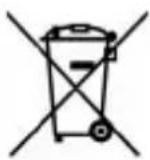
■ USERS INFORMATION pursuant to Legislative Decree No. 49 of March 14, 2014 “Implementation of Directive 2012/19/EU on Waste Electrical and Electronic Equipment (WEEE)”
This wheeled bin symbol on the product indicates that at the end of its life must be collected separately from other waste. The user must, therefore, take the remote control integrates the essential components that got to its life to the appropriate differentiated collection centers for electronic and electro-technical waste, or return it to the dealer when purchasing a new appliance of equivalent type, in terms of one to one, or one to zero for equipment having longer side of less than 25 cm. Appropriate separate collection for the decommissioned equipment for recycling, processing and environmentally compatible disposal helps prevent negative impact on the environment and human health and promotes recycling of the materials making up the product. Illegal dumping of the product by the user entails the application of administrative sanctions stated in Legislative Decree n. Legislative Decree No. 49 of March 14, 2014.
FRANÇAIS
PRÉCAUTIONS DE SÉCURITÉ
DESCRIPTION DES COMMANDES
Bluetooth® version: V5.3
SIMPLIFIED EU DECLARATION OF CONFORMITY
Hereby TREVI Spa declares that the radio equipment type DJ 12E42 BT is in compliance with directive 2014/53/EU.
The full text of the EU declaration of conformity is available at the following internet address: https://www.trevi.it/dms/zidi/TREVI/DJ12E42BT.pdf

- DJ 12€42 BT
- CUFFIA DJ HIFI STEREO BLUETOOTH/MP3 PLAYER
- MANUALE D'USO USER GUIDE
- DESCRIPTION OF CONTROLS
- ENGLISH
- BATTERY CHARGING
- POWER ON AND OFF
- PAIRING WITH A BLUETOOTH DEVICE
- Note:
- MUSIC PLAYBACK
- VOLUME ADJUSTEMNT
- CALL HANDLING ON MOBILE PHONE
- MUSIC PLAYBACK WITH MICRO SD CARD
- FM RADIO (ONLY FOR EXPORT VERSION)
- WIRED FUNCTION
- TECHNICAL SPECIFICATIONS
- WARNING FOR THE PROPER USE OF RECHARGEABLE BATTERY
- INFORMATION NOTE ON THE REMOVAL AND DISPOSAL OF BATTERIES
- BATTERY REMOVAL
- ■ USERS INFORMATION pursuant to Legislative Decree No. 49 of March 14, 2014 “Implementation of Directive 2012/19/EU on Waste Electrical and Electronic Equipment (WEEE)”
- FRANÇAIS
- PRÉCAUTIONS DE SÉCURITÉ
- DESCRIPTION DES COMMANDES
- SIMPLIFIED EU DECLARATION OF CONFORMITY
Brand : Trevi
Model : DJ 12E42 BT
Category : Earphones