
HMP 1245 BT - Earphones Trevi - Free user manual and instructions
Find the device manual for free HMP 1245 BT Trevi in PDF.


| Product Type | True Wireless Stereo (TWS) Earphones |
| Model | HMP 1245 BT |
| Brand | Trevi |
| Driver Size | 10 mm |
| Frequency Response | 20 Hz - 20 kHz |
| Impedance | 32 Ohms |
| Bluetooth Version | 5.0 |
| Wireless Range | Up to 10 meters |
| Battery Life (Earphones) | Up to 5 hours |
| Battery Life (with Charging Case) | Up to 20 hours |
| Charging Time | Approx. 1.5 hours for earphones, 2 hours for case |
| Charging Port | Micro-USB |
| Microphone | Built-in, with noise reduction |
| Controls | Touch controls (play/pause, volume, track, call) |
| Water Resistance | IPX4 (splash proof) |
| Weight (per earphone) | 4 g |
| Weight (charging case) | 35 g |
| Dimensions (case) | 62 x 40 x 27 mm |
| Included Accessories | Charging case, USB cable, 3 pairs of ear tips (S/M/L), user manual |
| Color Options | Black, White |
| Compatibility | iOS and Android smartphones, tablets, laptops with Bluetooth |
| Warranty | 1 year |
Frequently Asked Questions - HMP 1245 BT Trevi
User questions about HMP 1245 BT Trevi
0 question about this device. Answer the ones you know or ask your own.
Ask a new question about this device
Download the instructions for your Earphones in PDF format for free! Find your manual HMP 1245 BT - Trevi and take your electronic device back in hand. On this page are published all the documents necessary for the use of your device. HMP 1245 BT by Trevi.
USER MANUAL HMP 1245 BT Trevi
natural_image
Three black and white handheld earbuds with green ear tags, coiled together (no text or symbols visible)HMP 1245 BT
MANUALE D'USO
USER GUIDE
MANUAL DE USUARIO
natural_image
Two black earbuds shown side by side, one with a microphone and the other with a textured earpiece (no text or symbols visible)SPECIFICHE TECNICHE
Profili Bluetooth®: V4.0 compatibile con profili A2DP, AVRCP, HSP, HFP
Thank you for purchasing the Bluetooth® Headset HMP 1245 BT. Please read this User's Manual completely before you use the Headset.
HMP 1245 BT designed for listening the high quality music wirelessly that based on the latest Bluetooth® wireless technology. HMP 1245 BT can be easily connected to a mobile phone for call conversation and music listening. It is also capable to connect to the other Bluetooth®-enabled devices like Notebook, iPod etc.
HMP I245 BT is compliant with Bluetooth V4.0 specification, supports HSP, HFP, A2DP and AVRCP profiles. Please make sure your phone or other device supports these profiles.
02. Package Contents List
Please inspect this package and refer to the package contents list below to verify all items were included in this package:
• HMP I245 BT Bluetooth® headset
- USB Charging Cable
- User's Manual
• Acrilic Ear hook one pair
- Soft Earhook one pair
• Ear Gel 3 pairs (Small, Medium, Large)
03. HMP I245 BT Bluetooth® Headset Overview
I. Ear Cap.
2. Indicator.
3. Micro USB
4. Pairing/Answer, Power/Play
5. Volume Up/Previous.
6. Volume Down/Next.

04. Battery information
The device is equipped with an integrated lithium-polymer battery. The battery cannot be replaced. Do not attempt to remove the battery from the device since it would damage the device. The full performance of a new battery is not achieved until after two or three complete charging-discharging cycles. The battery can be charged and discharged several hundred times, but it looses its capacity over time.
Disconnect the HMP 1245 BT from the power supply as soon as the battery is fully charged, overcharging would reduce the service life of the battery. A charged battery will lose its capacity if it is not used on a regular basis.
Important: Ensure that the battery is fully charged if you do not use the device for a long period of time. To avoid a complete discharge of the battery, the HMP 1245 BT should be charged at least every 3 months.
05. Charging the battery
The HMP 1245 BT is operated with a rechargeable battery. Charge the battery completely before its first use. Read the section “Battery information” before starting the charging process.
I. Connect USB cable to a general USB power supplier.
ENGLISH
HMP 1245 BT
-
Connect the charger to the correct outlet.
-
When the charger is connected to the headset, the red indicator light will turn on. Charging the battery fully may take up to 1 hours.
-
When the battery is fully charged, the red indicator light will turn blue. Disconnect the charger from the headset and the outlet. The headset is ready to use.

Note:
For first time use, please charge the headset fully.
- The fully charged battery has power for up to 6 hours of talk-time and 5 hours music playing time, and up to 120 hours of standby time. However, the talk and standby times may vary when used with different mobile phones or other compatible Bluetooth® devices, usage settings, usage styles, and environments. When the battery power is low, the headset will remind you by voice prompt “Battery low” every 20 seconds, and the red indicator light starts to flash.
- For using the HMP 1245 BT with iPhone, an additional battery meter ( ) will be activated and the remaining battery capacity will display on your phone.
06. Pair to your Bluetooth® phone
Before you use your headset the first time, you must pair the unit with a Bluetooth® enabled mobile phone. Pairing is a one-time process and required
only for the first connection with the Mobile phone. The HMP I245 BT can be connected with two mobile phones simultaneously.
I. Keep the HMP 1245 BT within 1 meter range of a Bluetooth®-ready Mobile phone.
2. Press and hold the Power/Play button for about 5s, the indicator light will flashes red and blue intermittently, the device is now in pairing mode.
3. Find the Bluetooth® setting of your Mobile phone and start the search for Bluetooth® devices. (For further details, please read the operating instructions of your Mobile phone).
4. From the list of devices found, select the "HMP I245 BT" or "SHI".
5. If required, enter the PIN code “0000” and confirm the entry. Once the pairing process was successful, the HMP 1245 BT will connect to Mobile phone automatically then switch to standby mode, the indicator will flash blue every 5 seconds.
6. If you want to pair two Bluetooth devices, please
6.1 Firstly, pair HMP 1245 BT with one Bluetooth device
6.2 Switch off HMP 1245 BT, and switch on again
6.3 Pair and connect to the other Bluetooth device
6.4 Switch off HMP 1245 BT, and switch on again, HMP 1245 BT will connect with the two devices automatically.
Note:
- If pairing is not completed within 2 minutes, the headset will turn off. If this happens, please repeat the pairing steps.
- The HMP 1245 BT supports Multi-connection that allows for the simultaneous use of the HMP 1245 BT with two mobile phones. After paring successfully with 2 mobile phones, switch off the headset and switch on again, the headset will connect to both 2 mobile phones automatically. Otherwise, you can connect the headset on the cellphone manually.
07. Turning headset on /off
Turn on your headset
Long press the Power/Play for 3s to turn on your headset. If your headset has completed the pairing process successfully, when the headset is turned on, it will connect to the phone you last connected automatically. Please ensure your phone's Bluetooth® function is active.
Turn off the headset
Long press the power button for 3s to turn off the headset. the Red indicator will flash red.
Note:
- To conserve power, if the headset is not connected to a device for approximately 10 minutes, the headset will turn off automatically.
08. Using for music play
Play/Pause
Press Power/Play button to get the music play or pause.
Next/Previous song
Press and hold Next button to skip to next song or chapter, press and hold Previous button to go back previous song or chapter.
Increase/Decrease volume
Press Volume Up button to increase volume, press Volume Down button to decrease volume.
09. Using for phone call
Last number re-dialing
At standby status, keep pressing 2 seconds the Answer (4), the last number dialed will be re-dialed.
Note: The last number re-dialing is available only for the first device if two Mobile
phones are connected. The connection sequence can be determined by reconnect manually.
Answering a call
Press Answer shortly to answer the incoming call.
Reject an incoming call
Press and hold Answer for 2 seconds to reject the incoming call.
Transferring a call
Press and hold Volume Up and Volume Down to transfer the call between the phone and headset.
Ending a call
Press the Answer shortly to end a call.
Call-waiting
- If there is an incoming call while a call is in progress, press Answer shortly to accept the waiting call and end current calling.
- If there is an incoming call while a call is in progress, press and hold Answer for 3 seconds to accept the incoming call and place the current call on hold.
Note: The same operation could be performed in case of Multi-connection.
Volume adjusting
Press the Volume Up and Volume Down button to adjust the volume.
Mute
While a call is in progress, press and hold Volume Down button for 2s to mute the headset, a remindful tone would be heard. Repeat the operation to un-mute.
10. Selfie function for shooting
Once paired earphones to an external device with camera, you can manage the shot function directly from the earphones:
I. Once paired your device turn on the Camera.
2. Go to General Settings of the Camera and ensure that the setting of the volume key is on Camera or Shutter or Capture, as per the image below.
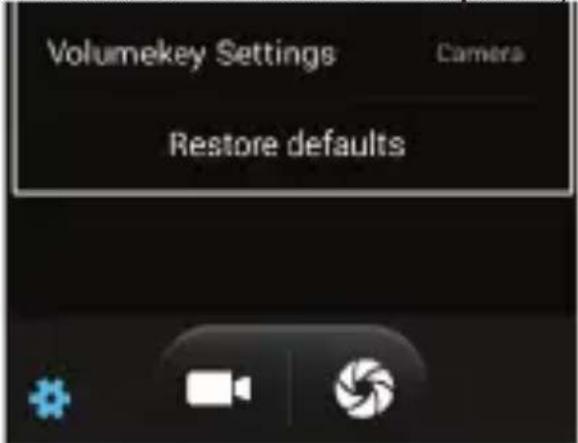
Note: every Android ® device uses its own terms. Be sure to verify the correct setting.
Some Android devices can be without the setting of the volume key. To work around this we recommend to download from the Play Store® an App that enabling this setting, for example Camera360.
- Double press Volume + (5) to capture the picture.
Note: in case of capturing through the App, the pictures will be stored in the App Gallery.
Photo capturing with iOS® System
I. Once paired your device, turn on the Camera.
2. Double press Volume + (5) to capture the picture.
II. Safety and general information
I. Please read this User's Manual carefully and follow all instructions.
2. To avoid any damage or malfunction of the device do not drop the device
from high places.
- Keep device away from humidity, water and any other liquid. If the device is exposed to water, moisture and other liquids do not operate it to avoid any electrical shock, explosion and damage to the device or yourself.
- Do not place or keep this device near any heat sources, such as, direct sunlight, radiators, stoves or other apparatus that produce heat. This may cause an explosion, degrade the performance and/or reduce battery life.
- Do not modify, repair or disassemble device (Especially the battery). Doing this will void the warranty.
- Do not place heavy objects on the device.
- Use only the supplied and approved chargers.
- Unplug this device when unused for long periods of time or during lightening storms.
- The battery used in this device may present a risk of fire or chemical burn if mistreated.
12. Using Sport
By using the earphones while doing sport, we recommend using the bearings sports (supplied) that staring at the top, back and bottom of the inner ear restrict its movement and block out the exit in any sport.

natural_image
Two black earbuds shown side by side, one with antenna and the other with mesh earband (no text or symbols visible)TECHNICHAL SPECIFICATION
Bluetooth®:Version...... V4.0 supported profile A2DP,
AVRCP, HSP, HFP
Battery: Rechargeable internal Battery Li-Po
Supply: ......DC 5V
WARNING FOR A CORRECT USE OF RECHARGEABLE BATTERY
- Recharge the battery in an ambient temperature between 5irc C and 35irc C.
- Don't recharge more than the suitable period to prevent the risk of overheating and burst.
- Recharging the battery over the suitable period or an extended period of inactivity may reduce battery duration.
- Rechargeable battery is liable to wear and tear and its performance will reduce gradually.
- To extend the duration of the battery use it when is completely charged up to the complete discharging, then recharge it fully before use it again. Recharge a battery not completely consumed, will result a reduced duration. In this case, repeat the full charging/discharging cycle many times.
- Avoid recharge the battery for the whole night.
Information Note on the Removal and Disposal of Batteries
Only high-qualified personnel should perform this operation!
Used batteries should not be disposed of with household waste or thrown into fire or water. Used batteries should be recycled or disposed of in separate waste collection centres.
Precautions for correct disposal of the product.
The symbol shown on the equipment indicates that waste must be disposed of in “separate collection” and so the product must not be disposed of together with urban waste.
The user must take the product to special “separate waste collection centres” provided by local government, or deliver it to the retailer against the purchase of a new product.
Separate collection of waste and subsequent treatment, recycling and disposal operations promotes the production of equipment with recycled materials and limits negative effects on the environment and on health caused by improper handling of waste.
Illegal disposal of the product leads to the enforcement of administrative penalties.
INTRODUCCIÓN
natural_image
Two black earbuds shown side by side, one with antenna and the other with textured earband (no text or symbols visible)ESPAÑOL
HMP I245 BT
CARACTERÍSTICASTÉCNICAS
Profiles Bluetooth®: V4.0 compatibile con profili A2DP, AVRCP, HSP, HFP
Tel. +39.0541.756420 - Fax +39.0541.756430
www.trevi.it - e-mail: info@trevi.it


MADE IN CHINA

- HMP 1245 BT
- SPECIFICHE TECNICHE
- Package Contents List
- HMP I245 BT Bluetooth® Headset Overview
- Battery information
- Charging the battery
- ENGLISH
- Note:
- Pair to your Bluetooth® phone
- Turning headset on /off
- Turn on your headset
- Turn off the headset
- Using for music play
- Play/Pause
- Next/Previous song
- Increase/Decrease volume
- Using for phone call
- Last number re-dialing
- Answering a call
- Reject an incoming call
- Transferring a call
- Ending a call
- Call-waiting
- Volume adjusting
- Mute
- Selfie function for shooting
- Photo capturing with iOS® System
- Safety and general information
- Using Sport
- TECHNICHAL SPECIFICATION
- WARNING FOR A CORRECT USE OF RECHARGEABLE BATTERY
- Information Note on the Removal and Disposal of Batteries
- Precautions for correct disposal of the product.
- INTRODUCCIÓN
- ESPAÑOL
- HMP I245 BT
- CARACTERÍSTICASTÉCNICAS
Brand : Trevi
Model : HMP 1245 BT
Category : Earphones