
DJ 1280 BTR - Earphones Trevi - Free user manual and instructions
Find the device manual for free DJ 1280 BTR Trevi in PDF.


| Product type | Bluetooth DJ headphones |
| Brand | Trevi |
| Model | DJ 1280 BTR |
| Dimensions (folded) | 18,5 x 14,5 x 6,5 cm |
| Weight | 250 g |
| Power supply | Rechargeable Lithium-Ion battery, 3.7 V / 300 mAh |
| Battery life | Up to 12 hours |
| Charging time | Approximately 2 hours |
| Bluetooth version | Bluetooth 5.0 |
| Bluetooth range | Up to 10 meters |
| Connectivity | Bluetooth and 3.5mm jack input |
| Speaker diameter | 40 mm |
| Frequency response | 20 Hz - 20 kHz |
| Impedance | 32 Ω |
| Main features | Wireless Bluetooth listening, wired mode, foldable, padded ear cushions, adjustable headband |
| Care and cleaning | Clean with a soft dry cloth. Do not use chemical products. |
| Safety | Avoid exposure to humidity, extreme temperatures and shocks. |
| Spare parts and repairability | The ear cushions and cable are replaceable. Contact Trevi customer service. |
| General information | Bluetooth DJ headphones with built-in microphone and volume controls. |
Frequently Asked Questions - DJ 1280 BTR Trevi
User questions about DJ 1280 BTR Trevi
0 question about this device. Answer the ones you know or ask your own.
Ask a new question about this device
Download the instructions for your Earphones in PDF format for free! Find your manual DJ 1280 BTR - Trevi and take your electronic device back in hand. On this page are published all the documents necessary for the use of your device. DJ 1280 BTR by Trevi.
USER MANUAL DJ 1280 BTR Trevi
natural_image
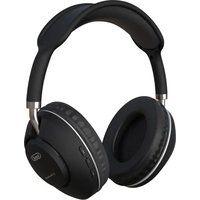
Black and white photo of an outdoor headphones with black covers and silver bezel (no visible text or symbols)
DJ 1280 BTR
CUFFIA HIFI MULTIFUNZIONE BLUETOOTH/RADIO FM/LETTORE MP3
MANUALE D'USO
USER GUIDE
ENGITA DEUFRA SP
I. Switch ON/OFF/BT/MP3/RADIO
2. Play / Pause/ Pairing Button
3. NEXT button,
forward, increasing the volume
4. PREV button,
back, decreases the volume
5. Indicator LED
6. Microphone
7. Micro USB port
8. AUX IN
Enclosed accessories: Jack/Jack stereo cable for connection to a device equipped with an Audio Out socket, micro USB/Usb cable to charge the multifunction HiFi headphones from a device equipped with a USB port or 5VDC USB external adapter (not included in the supply).
BATTERY CHARGING
Multifunction HiFi Headphones have an internal rechargeable battery.
The first time you use headphones, make a charge for 3-4 hours; a fully charged battery headphones have a battery life of about 8 hours of music listening.
To recharge:
- Connect the included Micro USB cable to an external device equipped with USB port (computer, tablet ...) or to a power supply with USB 5V DC (not supplied).
- Connect the supplied USB cable Micro HiFi headphones into the multifunction connector (7); while charging the red LED indicator (5) will light ‘.
- Charging is completed, the LED red light will go off'.
Indication of battery being phased out:
- When the battery ‘next to low, the LED indicator (5) will make a double flash every 30 seconds, and at the same time you will hear ‘an intermittent beep warning headphones.
TURNING ON AND OFF
To turn the headset: set the switch On/Off/BT/MP3/RADIO (I) to the MP3 or BT.
To turn off the headphones: turn the switch On/Off/BT/MP3/RADIO (I) to the OFF position.
standby:
In BT mode after a period of inactivity of 2 minutes HiFi headphones automatically turn off.
CONNECTION TO A BLUETOOTH DEVICE
I. Set switch On/Off/BT/MP3/RADIO (I) to the BT.
If it is the first pairing with a new BT device hold for 3 seconds, the Play / Pause button (2).
The indicator LED (5) will turn blue and begin to flash.
- Enable the Bluetooth ^ connection on the external device (phone, tablet, etc ...), referring to its manual
- From external device to perform a search for devices and select "TREVI DJ1280BTR" o "R-16"; If prompted, type the key code "0000".
- When coupling with the external device will place the LED (5) will flash slowly.
Note: A paired device, it may happen that the connection is interrupted (for example, when the devices connected via Bluetooth stray too far from each other); Normally the connection is automatically restored, otherwise it is necessary to perform the pairing procedure again from step 1 to 4.
Whenever you want to pair your headset to a new device, you need to make a new pair repeating the above procedure from step 1 to step 4.
During mating the two devices must be placed at a distance less than one meter in normal use the maximum distance for a proper functioning ‘of about 8-10 meters.
CABLE CONNECTION TO AN EXTERNAL DEVICE
You can use the headset like regular headphones HiFi multifunction connecting cable to an external device equipped with a headphone jack using the cable supplied stereo Jack-Jack:
I. A headset turned off connect a power cable to the headphone jack into the AUX IN jack (8), connect the other plug of the cable into the jack HEADPHONES of the device.
2. Turn on the external device and start playback sound.
VOLUME CONTROL
You can adjust the sound volume with the volume adjustment keys.
I. Hold the button Next (3) to increase the volume.
2. Hold the button Prev (4) to decrease the volume.
PLAYBACK CONTROL
Using the buttons on the headset, you can control the playback of songs on the associated device.
Once you have paired the headset to your device, turn the music playback.
Sara 'can run the following commands:
- Press the PLAY / PAUSE button (2) to play or pause the song.
- Press the NEXT button (3) to advance to the next track.
- Press the PREV button (4) to move to the previous track.
Note: Due to the continuous evolution of Bluetooth ^ technology, some devices may not be compatible or fully compatible with the device TREVI DJ1280BTR.
MANAGING MOBILE PHONE CALLS
Through the headphones are different operations when receiving calls on mobile phone:
Answering a call: press once on the Play / Pause button (2) to start the conversation.
Ending a call: a conversation once finished press the Play / Pause button (2).
Reject an incoming call: Press for 3 seconds, the Play / Pause button (2).
MANAGEMENT OF MUSIC PLAYBACK WITH SD CARD
I. Insert the SD CARD into the slot.
2. Set switch On/Off/BT/MP3/RADIO/RADIO (I) to the MP3 position
- Press the PLAY / PAUSE button (2) to play or pause the song.
- Press the NEXT button (3) to advance to the next track.
- Press the PREV button (4) to move to the previous track.
FM RADIO OPERATION
Set switch On/Off/BT/MP3/RADIO (I) to the MP3 position
- Press the PLAY / PAUSE button (2) to perform an automatic search for radio stations.
- Press the NEXT button (3) to advance to the next station.
- Press the PREV button (4) to move to the previous station.
Note: To operate the RADIO remove the SD card from the slot.
WARNING FOR THE PROPER USE OF RECHARGEABLE BATTERY
- Charge the battery at a temperature between 5 °C and 35 °C.
- Do not extend the recharge over the indicated time to avoid the risk of overheating and explosion.
- The charging of the battery over the indicated time period or a prolonged period of inactivity can shorten battery life.
- The rechargeable battery is subject to wear and its capacity gradually decreases.
- To prolong battery life, use it when it is fully charged to fully discharge and then fully charge it again before using it again.
- Putting in a battery is not depleted, its lifetime will be reduced. In this case, repeat the cycle charge / discharge fully again.
- Avoid keeping the battery undercharge all night.
INFORMATION NOTE ON THE REMOVAL AND DISPOSAL OF BATTERIES
Warning: Only high-qualified personnel should perform this operation!
BATTERY REMOVAL
The appliance should not be plugged to the mains socket when performing this operation!
Used batteries should not be disposed of with household waste or thrown into fire or water.
Used batteries should be recycled or disposed of in separate waste collection centres.
TECHNICAL SPECIFICATION
Bluetooth ® profiles: ......V3.0 + EDR
Frequency Response: 20Hz-20KHz
Sensitivity: 95 DB
Speaker Impedance: 40 Ohm
Battery: ....Rechargeable Lithium Battery 350mA
Power supply: ......DC 5V
Weight: 190 gr.

PRECAUTIONS FOR CORRECT DISPOSAL OF THE PRODUCT.
The symbol shown on the equipment indicates that waste must be disposed of in “separate collection” and so the product must not be disposed of together with urban waste.
The user must take the product to special “separate waste collection centres” provided by local government, or deliver it to the retailer against the purchase of a new product.
Separate collection of waste and subsequent treatment, recycling and disposal operations promotes the production of equipment with recycled materials and limits negative effects on the environment and on health caused by improper handling of waste.
Illegal disposal of the product leads to the enforcement of administrative penalties.

DESCRIPTION DES COMMANDES ET ACCESSOIRES
I. Commutateur ON/OFF/BT/MP3/RADIO
2. Play / Pause / Pairing
3. NEXT, avant, augmentant le volume
4. PREV, Retour, diminue le volume
5. Indicateur LED
6. Microphone
7. Port Micro USB
8. AUX IN
RECOMMANDATIONS POUR L'ÉLIMINATION CORRECTE DU
PRODUIT.

- DJ 1280 BTR
- CUFFIA HIFI MULTIFUNZIONE BLUETOOTH/RADIO FM/LETTORE MP3
- BATTERY CHARGING
- TURNING ON AND OFF
- CONNECTION TO A BLUETOOTH DEVICE
- CABLE CONNECTION TO AN EXTERNAL DEVICE
- VOLUME CONTROL
- PLAYBACK CONTROL
- MANAGING MOBILE PHONE CALLS
- MANAGEMENT OF MUSIC PLAYBACK WITH SD CARD
- FM RADIO OPERATION
- WARNING FOR THE PROPER USE OF RECHARGEABLE BATTERY
- INFORMATION NOTE ON THE REMOVAL AND DISPOSAL OF BATTERIES
- BATTERY REMOVAL
- TECHNICAL SPECIFICATION
- PRECAUTIONS FOR CORRECT DISPOSAL OF THE PRODUCT.
- DESCRIPTION DES COMMANDES ET ACCESSOIRES
- RECOMMANDATIONS POUR L'ÉLIMINATION CORRECTE DU
- PRODUIT.
Brand : Trevi
Model : DJ 1280 BTR
Category : Earphones