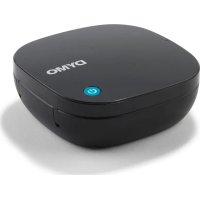
LetraTag 80 - Label printer DYMO - Free user manual and instructions
Find the device manual for free LetraTag 80 DYMO in PDF.


User questions about LetraTag 80 DYMO
0 question about this device. Answer the ones you know or ask your own.
Ask a new question about this device
Download the instructions for your Label printer in PDF format for free! Find your manual LetraTag 80 - DYMO and take your electronic device back in hand. On this page are published all the documents necessary for the use of your device. LetraTag 80 by DYMO.
USER MANUAL LetraTag 80 DYMO
© 2023 Newell Brands Belgium BV. All rights reserved.
No part of this document may be reproduced or transmitted in any form or by any means, or translated into another language without the prior written consent of Newell Brands Belgium BV.
Trademarks
DYMO and LetraTag are registered marks in the United States and other countries. All other trademarks are the property of their respective holders.
About Your New Label Maker
The DYMO LetraTag label maker uses DYMO LT 12 mm label cassettes. LT label cassettes are available in a variety of colors and materials.
Download the full LetraTag 80 User Guide from support.dymo.com.
Download User Guide
Registering Your Label Maker
Visit www.dymo.com/register to register your label maker online. During the registration process, you will need the serial number, which is located inside the back cover of the label maker.
Inserting the Batteries
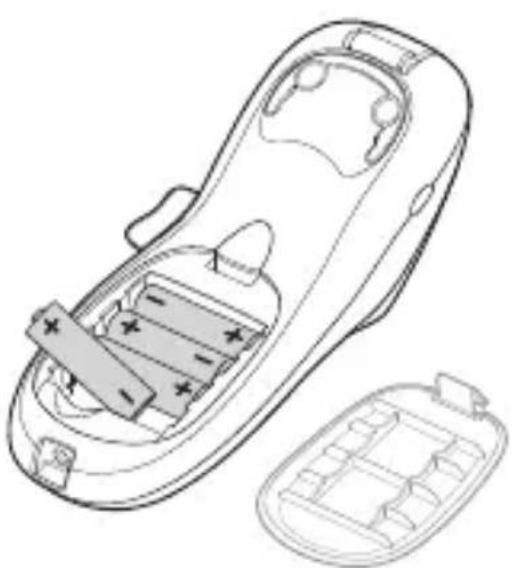
The label maker uses 4 high-capacity AA alkaline batteries.
To insert the batteries
1 Remove the battery compartment cover.
2 Insert the batteries following the polarity markings (+ and -).
3 Replace the cover.
Safety Precautions
- Do not mix old and new batteries.
- Do not mix alkaline, standard (carbon-zinc), or rechargeable (ni-cad, ni-mh, etc.) batteries.
- Remove the batteries if the printer will not be used for a long period of time.
Inserting the Label Cassette
Your label maker uses DYMO LT label cassettes.
To insert the label cassette
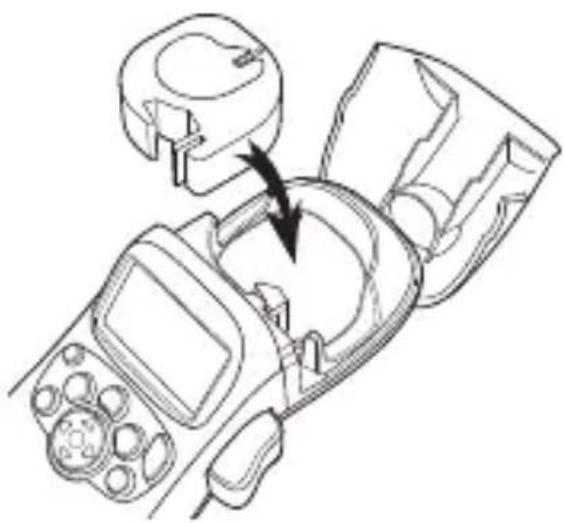
1 Press and release the label cassette cover to open the label compartment.
2 Insert the cassette with the label positioned between the print head and pinch roller.
3 Press firmly until cassette clicks into place.
4 Close the label cassette cover and press turn on the power.

Printing Your First Label
The first time you turn on the power, you are asked to select the language settings.
To print a label
1 Enter text to create a simple label.
2 Press
3 Press the cutter button to cut the label.
4 Remove the paper backing from the label and attach the label.
Limited Warranty
Your electronic DYMO product is sold with a warranty from the date of purchase against defects in material and workmanship. To submit a warranty claim, you must reside in the region where your DYMO product was purchased. Your warranty will extend for a length of time specific to that region. See below for regional warranty periods:
| Region of Residence and DYMO Purchase | Warranty Period |
| North and South America 1 year | |
| Europe, Asia, Australia/New Zealand | 2 years (+1 with product registration. See section below) |
DYMO will repair or replace your product free of charge on the following conditions:
1 Products returned under this warranty must be accompanied by a description of the defect together with a copy of the product's proof of purchase and your full contact and delivery details: name, telephone, complete address - street, house number, postal code, city, country.
2 Products returned to DYMO must be adequately packaged. DYMO will accept no liability for goods lost or damaged in transit from the customer.
3 Products must have been used strictly in accordance with operating instructions supplied. DYMO will have no liability for defects caused by accident, misuse, alteration or neglect.
4 DYMO accepts no liability for any consequential loss, damage or expense of any kind resulting from the machines or accessories or the use thereof, save that liability for death or bodily injury caused by such products is not excluded.
5 DYMO label printers are designed for use only with DYMO-branded labels. This warranty does not cover any malfunction or damage caused by the use of third-party labels.
6 This warranty does not affect your statutory rights as a consumer.
Special Provisions for Australia
The following provisions shall apply in addition to the above warranty if the sale of the DYMO product occurred in Australia:
- Our goods come with guarantees that cannot be excluded under the Australian Consumer Law.
- You are entitled to a replacement or refund for major failure and compensation for any other reasonably foreseeable loss or damage.
- You are also entitled to have the goods repaired or replaced if the goods fail to be of acceptable quality and the failure does not amount to a major failure.
Any repair or replacement will be at DYMO's expense and free of charge to you.
Refer to www.dymo.com to find your local service center contact information.
Register for 2 + 1 year warranty
Customers living in Europe, Asia, Australia or New Zealand only: Register your new DYMO product and get 1-year additional warranty.
As a registered user you also receive:
Technical support from experts
- Helpful tips and tricks on the use of your product
Special offers and new product announcements
Go to www.dymo.com/register
What to do if your product is defective?
DYMO offers you the following service options:
- DYMO Website: In most situations a visit to www.dymo.com will give you the right assistance. In the Customer Support area, you will find information about your DYMO product, such as Frequently Asked Questions and solutions to known problems. The User Guide also gives you additional information.
- DYMO Help Desk: You can also contact the DYMO Help Desk where an associate will help you to determine the exact nature of the problem and advise you what to do next:
US/CAN 1877-724-8324
UK 020 3564 8354
AUS 1800 633 868
NZ 0800 396 669
Intl +44 203 564 8354
Pourmettrelapileenplace
Vaya a www.dymo.com/register
Para colocar as pilhas
OTpeatbaHe Ha nbpBnB N eTnKeT
Пьрвягпьт, Когато Вклочитуринтура, щe 6ьдete поdkаненда ИЗберете eзИкa и мерн'te edини на ИЗмерваелн'te Habстpoйки.
3a otneuatbaHe Ha etnKeT
1BbBeTe TeKCT,3a da c3daTe npocTe tKeT.
2 HaTnchete
3 HaTnchete 6yToHa Ha pe3aua, 3a da OTpeXeTe eTnKeTa.
4 Otrctpahe Te xaptneHTo nokpntne ot rbp6a Ha etnkeTa n ro 3aIeneTe.
2 roDNn oRpaHnueHa rapaHcna
Baшият селковен пордукт на DYMO ce порда в2roidи rapанць оТдата на покункata сршу.Deфекгв матерпалite и n3pa6otkata.DYMO ichepe moHTnpa nll nodmehn Baшия пордукт 6e3platno рп следнite ycnoBn:
1 Ipoodykntte, BbpaTn no Ta3n rapaHcna, Tp6Ba da 6bdaT npndpykeHn OT OINscaHne Ha DeΦeKta, 3aEDNo C KOIne OT DOKymeHTa, yOCTOBepRABaI NOKyPkata Ha npodykTa n BaunTe PbLnH daHHn 3a KOtAKT n DoCTaBka: IMe, TelefoH, PbLnH aDpeC - ylnu, Homep, NoUeHcKn KOD, HaceJeHo MRCTO, DbpXkAba.
2 ПюдуктITE, Врьшани на DYMO Тразба дa 6ьдат дocтатыно добpe onakobahn. DYMO He noeMa HnkaKba OTROBOPHOCT 3a CTOKN, n3ry6eHn nIIN NOBpeHn пп ТраHCNoPTupaHeto OT KJIneHTa.
3 Пюдуктente Тябва да сбил ИЗползван CTpoROВ CBOTBETCTBNE CпразoctавенITE Инструкци 3a pa6ota. DYMO He hocn HnkaKba OTROBOPHOCT 3a Deфekti, приинени OT ИнцideHT, He npabInHa ynotpe6a, npomЯн He6pexHocT.
4 DYMO He noema HnkaKbBa OTROBOpHoc 3a nocleDbauu 3aury6n, nobpeu nn pa3xOAn OT KaKbBTo I da 6nlo BnD B pe3yIaT ot MaunHn nn akcecoapn, nn TExHOTo N3NoJ3BaHe, npn NoLoXeHne, ye OTROBOpHOCTTa 3a CmbpT nn TeJeCHO HapaHBAHe, npnUHHEN OT Te3N pOdykTN, He Ce n3KIOUvBa.
5ПиntepeTe 3a etkeTn DYMO ca npedHa3NaueHn 3a ynoTppe6a cmo c etkeTn CMapkata DYMO.Ta3n rapaHnz He nokpna Henn3npabHoctn IIn IOBpeDn, PnuchHeNOTn0n3BaHeto Ha etkeTu HA TpeTu CTpaHN.
6 Ta3n rapaHnz He 3acra Baunte 3akOHn npaba KaTo KIneHT.
PergntpnpaTe ce 3a 2 + 1 roDnHa rapaHcna
PernctpnpaTe cBorHOB npOdyKT Ha DYMO n noLyuBaTe 1 roHa dOnbHnTeHa rapaHcIy.
Kato pernctpnpan notpe6ntel Bne cbyo noyuabaTe:
Texnuecka nodpbXka ot cneuaJIncTn
I OJIe3Hn CbBETn yIeSHeHna pN yNoTpe6aTa Ha npOdyKta
CneuaHn oeptn n cbo6eHna 3a HOBn npOyKTH
OtnideTe Ha www.dymo.com/register
KaKBO Da HaIpaBHTe, aKO BaIINrT IpoIyKT e DeΦeKTeH?
DYMO Bn npedna rane cneHnte onu 3a o6cnykBaHe:
Ye6caIHa DYMO:B noBeeTo cHTyaun nOceueHne Ha www.dymo.com 1e Bn npedocTaN npabInHaTa nOMoU.B 30HaTa 3a noDpBXka Ha KIneHTnte, 1e HamePte INΦOpMaun 3a Baun npOdyKT Ha DYMO, KaTO yeCTO 3aDaBaHN Bbnpocn INpeSeHn Ha nO3HaTN pO6JIemn. PbKOBOCTBO 3a Notpe6ntela CbUo Bn npedocTabr DOnbHnTeHa INΦOpMaun.
OTdJI 3a IOMOJHa DYMO: MoXeTe cBIO da ce CbbpXeTe c OTdela 3a IOMOJ Ha DYMO, KbDeTo cBtpyDnK ige Bn NOMORHe da ONpeDEInTe TOOHOT eCTeCTBO Ha npobIema n ige Bn NocBBeTba KaKBO da HappaBNTe CNeI TOBa:
MekdynapoHnHomep +44 203 564 8354
Apie jusu naujaji etikeciu spausdintuva
Su etikeciu spausdintuvu „DYMO LetraTag" naudojamos DYMO LT 12 mm etikeciu kasetes. LT etikeciu kaseciu yra jvairiu spalvui ir jvairiu medziagu.
Atsisiyskite visă „LetraTag 80“ naudotojo vadovă iš support.dymo.com.