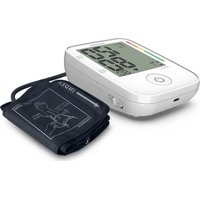
BPA-P200 - Blood pressure monitor HOMEDICS - Free user manual and instructions
Find the device manual for free BPA-P200 HOMEDICS in PDF.


| Product Type | Automatic Upper Arm Blood Pressure Monitor |
| Brand | Homedics |
| Model | BPA-P200 |
| Measurement Method | Oscillometric |
| Measurement Range - Blood Pressure | 40 to 255 mmHg |
| Measurement Range - Pulse | 40 to 199 beats/min |
| Accuracy - Blood Pressure | ±3 mmHg |
| Accuracy - Pulse | ±4 % of reading |
| Arm Circumference | 22 to 42 cm (M/L cuff) |
| Display | LCD Screen |
| Power Supply | 4 AAA 1.5 V batteries (LR03) |
| Dimensions | Approx. 138 x 103 x 54 mm |
| Net Weight | Approx. 222 g (without batteries) |
| Memory | 100 measurements per user, with morning/evening averages |
| Special Features | Irregular heartbeat detection, atrial fibrillation detection, WHO indicator, auto shut-off |
| Operating Environment | Temperature 10°C-40°C, humidity ≤85% |
| Protection Rating | IP22 |
| Housing Material | Plastic |
| Maintenance | Clean with a soft, dry cloth; do not immerse |
| Warranty | 3 years |
| Certifications | CE (MDD 93/42/EEC), RoHS, REACH |
| Intended Use | Adult, at home, by the patient or a caregiver |
Frequently Asked Questions - BPA-P200 HOMEDICS
User questions about BPA-P200 HOMEDICS
0 question about this device. Answer the ones you know or ask your own.
Ask a new question about this device
Download the instructions for your Blood pressure monitor in PDF format for free! Find your manual BPA-P200 - HOMEDICS and take your electronic device back in hand. On this page are published all the documents necessary for the use of your device. BPA-P200 by HOMEDICS.
USER MANUAL BPA-P200 HOMEDICS
pregnancy accurate automatic arm blood pressure monitor
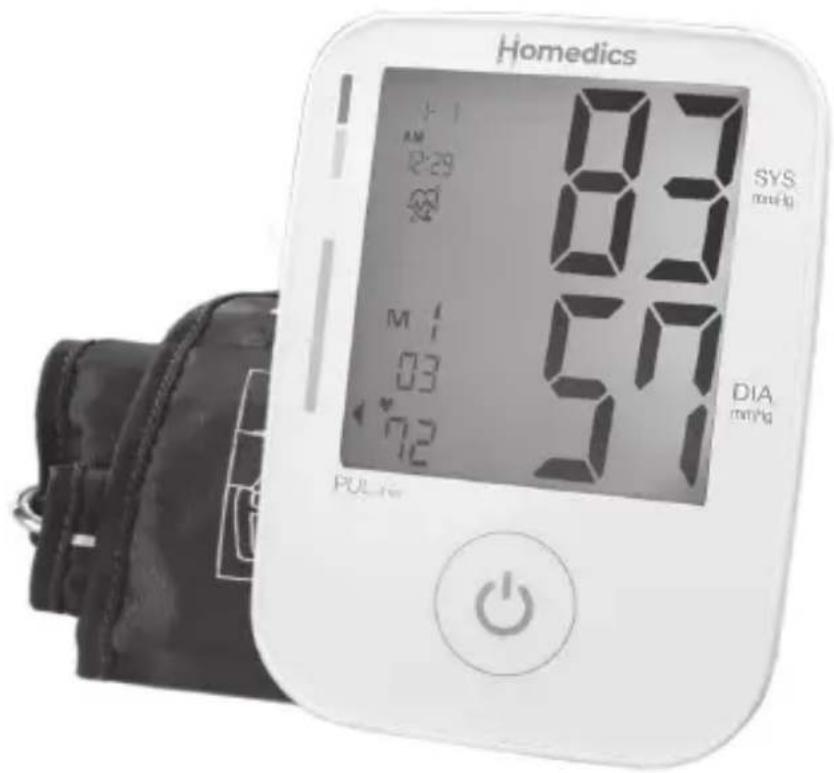
3 YEAR GUARANTEE
BPM83
INTRODUCTION
Intended Use
The BPM83 automatically measures adults' Systolic, Diastolic blood pressure and pulse rate by oscillometric method. The measurement results are displayed on the LCD. Measurement position is at adult's upper arm. The intended use of this over-the-counter device is for adults with upper arm circumference ranging from 220 mm to 420 mm (Approx. 8.7 \~ 16.6 inches) and for home use. When the device detects the appearance of irregular heartbeats such as atrial or ventricular premature beats during measurement, an indicated symbol will appear with measuring readings. This device is designed only for adults.
Type of Use/ Reuse
Multiple patient multiple use
Intended User
The Arm type blood pressure monitor is intended for both professional and consumer, and the patient is the intended operator. Patient selection criteria: disabled persons are the exception: disabled persons need assistance by another competent adult to use the device.
 | The CE marking with the Registration Number of the Notified Body. This denotes the compliance of Regulation Medical Device Directive 93/42/EEC. | REACH | This product fulfilling the requirements of the REACH Directive EC 1907/2006 and its amendments, do not contain Substances of Very High Concern in concentration above the limit of 0.1%. No substance(s) is/are present in the parts of the product above the concentration of 0.1% weight by weight. |
 | Medical Device | ||
 | Manufacturer | ||
 | Authorized representative in the European Community | ||
 | Date of manufacture(YYYY-MM-DD or YYYY-MM) |  | Stand-by |
 | Device classification type BF | ||
 | Batch code LOT WWWXXXXLOT: Lot Number; WWW: working sheet; XXXXX: serial no. |  | This product meets the basic safety and essential performance requirements indicated in the IP22 conditioning test (protection against solid foreign objects of 12.5mmø and greater and against vertically falling water drops when enclosure tiled up to 15°) |
 |  | ||
| Serial number SN YYMWWWXXXXXXYY: year; M:month; WWW: working sheet; XXXXX: serial no. |  | ||
 |  | ||
 | Keep dry | ||
 | Temperature limit |  | The empty, completely flat batteries must be disposed of through specially designated collection boxes, recycling points or electronics retailers. You are legally required to dispose of the batteries. |
| Humidity limitation |  | ||
 | Atmospheric pressure limitation |  | |
 | Caution |  | Importer |
 | Consult the instruction for use | ||
 | Disposal information: Should you wish to dispose of the article, do so in accordance with current regulations. Details are available from your local authority.WEEE 2012/19/EU Directives |  | Distributor |
 |  | Model Number | |
 | Country of Manufacturer | ||
 | Caution | ||
| RoHS | This product fulfilling the requirements of the RoHS Directive 2011/65/EU. |  | Unique Device Identifier |
Important Information before Use
- Blood pressure measurements should only be interpreted by a physician or a trained health care professional who is familiar with your medical history. Through regular use of this device and recording of your measurements, you can keep your physician informed of the changes in your blood pressure.
- Perform your measurement in a quiet place. You should be seated in a relaxed position.
- Avoid smoking, eating, taking medication, alcohol consumption or physical activity 30 minutes prior to taking a reading. If you are exhibiting signs of stress, avoid taking your measurement until the feeling subsides.
- Rest 15 minutes prior to taking a reading.
- Remove any constrictive clothing or jewelry that may interfere with the cuff placement.
- Keep the monitor stable during measurement to achieve an accurate reading. Remain still; do not talk during the measurement.
- Record your daily blood pressure and pulse readings on a chart.
- Take your readings at the same time, each day or as recommended by your physician to get an accurate indication of change in your true blood pressure.
- Wait a minimum of 15 minutes between readings to allow for the blood vessels to return to normal. The wait time may vary depending on your individual physiological characteristics.
- Although such cases are rare, for those with an extremely weak pulse or irregular pulse, errors may result which prevent proper measurement. If abnormal variations are noticed, consult with your physician or trained healthcare professional.
- This device is intended for adult use. While taking a measurement, you can stop the inflation or deflation process of the cuff at any time by pressing the POWER button.
- Do not use in this case. (e.g. Device for use in an ambulance or helicopter, For use in the professional environment.)
- This product is suitable for use in the home healthcare environment.
- The performance of the device can be affected by extremes of temperature, humidity and altitude, Please refer to the instructions for use.

CAUTION:
- Keep this device out of the reach of children. Strangulation resulting from baby or child entanglement in cables.
- Please keep this device away from pets, pests, and children.
- Avoid potential allergic reactions; please avoid the device in direct contact to patient's wound.
- No modification of this equipment is allowed.
PRODUCT IDENTIFICATION
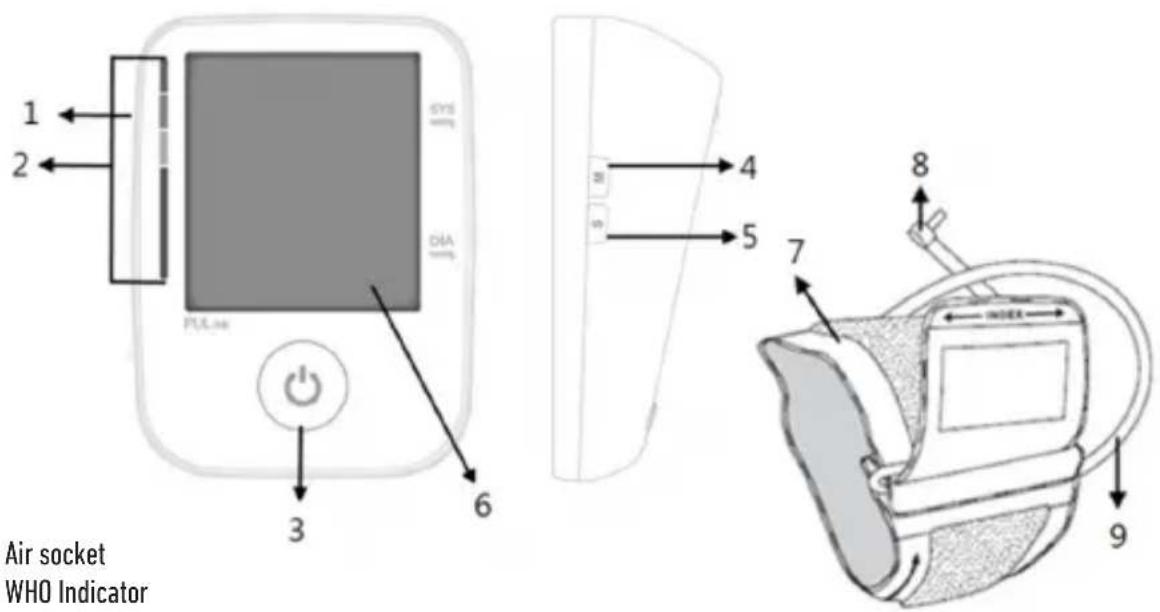
1 Air socket
2 WHO Indicator
3 Start/Stop button (Power key)
4 Memory button (M key)
5 Set button (S key)
6 Display
7 Cuff
8 Cuff connector
9 Cuff tube
| Symbol Description | |
 | Low battery indicator |
| WHO indicator | |
| Date & Time | |
| Irregular Heartbeat Symbol | |
| AF Symbol | |
| Memory Symbol | |
| Memory Set | |
| Heartbeat Symbol | |
| Pulse rate | |
 | Release air |
| Systolic Pressure | |
| Systolic Pressure | |
BATTERY INSTALLATION
Low battery warning:
It is necessary to replace the batteries when the Low Battery symbol “” appears on the display, or when the display does not turn on after the POWER key is pressed.
Replacing the Battery:
- Press down on latch and lift the cover on the bottom of the monitor.
- Insert or replace 4x 1.5 V AAA batteries into the battery compartment, ensuring to match the indicated polarity symbols. Always use new batteries.
- Replace the battery cover.

CAUTION: Risk of explosion if battery is replaced by an incorrect type. Dispose of used batteries according to
the instructions.
NOTE: Battery-operated
- Please properly dispose of the batteries away from small children and heat. Do not let children swallow the battery.
- Remove the batteries if the unit will not be used for more than 1 month.
- Batteries must be disposed of in accordance with local environmental and institutional policies.
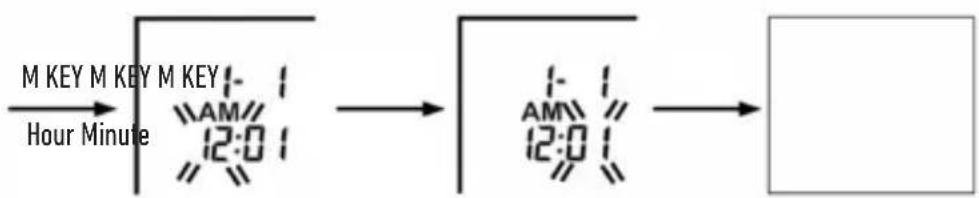
SETTING THE DATE AND TIME
It is necessary to set the date and time for the unit every time batteries are initially installed or replaced.
To set the date and time, proceed as follows:
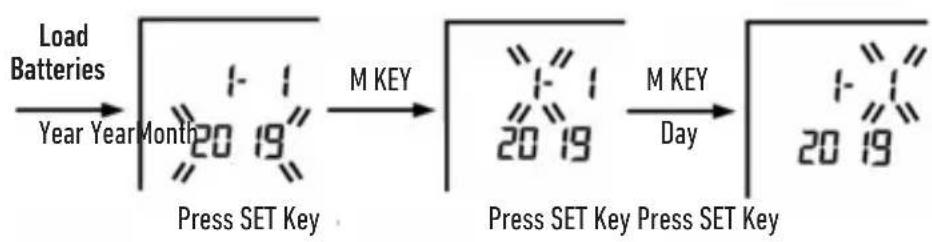
- While in power off mode, press and hold the "SET" key for at least 3 seconds to enter Date and Time setting procedure and the Year value will begin to flash.
- Press the "SET" key to advance the display to the desired year, press the "M" key to confirm the year.
- Next, the month will blink. Repeat step 2 to set the month and date, then hours, then minutes.
• After setting the minutes, the unit will automatically exit out of the date/time setting mode and shut off.
flowchart
graph LR
    A["Load Batteries"] --> B["Year Year Month"]
    B --> C["Press SET Key"]
    C --> D["M KEY"]
    D --> E["Press SET Key Press SET Key"]
    E --> F["M KEY Day"]
    F --> G["20 19"]
flowchart
graph LR
    A["M KEY M KEY M KEY"] --> B["Hour Minute"]
    B --> C["12:0 1"]
    C --> D["AM 12:0 1"]
    D --> E["Output"]
Press SET Key Press SET Key
PLACEMENT OF THE PRESSURE SLEEVE
It is important to avoid smoking, eating, taking medication, alcohol consumption or physical activity 30 minutes prior to taking a reading. If for any reason you are unable to or should not use your left arm, please modify the instructions for cuff application to your right arm. Your physician can help you identify which arm is best for you to take measurements from.
- Remove any restrictive clothing or jewelry that may interfere with cuff placement.
- Sit at a table or desk with your feet flat on the floor.
- The cuff should not be plugged into the monitor until after the cuff is applied to your arm.
Note:
Blood pressure naturally varies from one arm to the other; therefore, always measure your blood pressure on the same arm to ensure comparability of the two readings.

natural_image
Line drawing of a hand holding a tool interacting with a device (no text or symbols)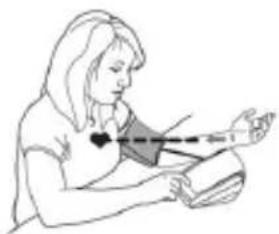
natural_image
Illustration of a person performing a medical or health procedure with a bandage and arm (no text or symbols)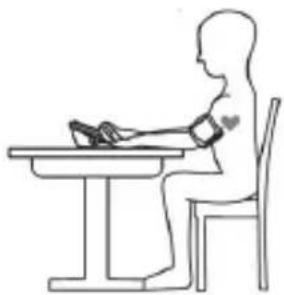
natural_image
Line drawing of a person sitting at a desk using a computer (no text or symbols)- Position the cuff on a solid surface with the tubing facing up and away from you. The metal ring/bar on the cuff should be to the left of the tubing.
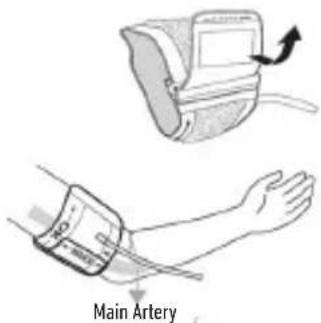
- Open the cuff by pulling or rolling the bottom of the cuff to the right. This should open the cuff without fully unrolling it, creating a cylinder. Do not fully unwrap or unroll the cuff.
-
Insert your left arm into the created cuff cylinder
-
The bottom edge of the cuff should be positioned approximately one inch (2.5cm) above the elbow joint.
-
Reaching underneath your left arm with your right hand, pull the end of the cuff towards your body to tighten the cuff. Wrap and secure the cuff, making sure it is in place as shown.
-
The cuff should fit comfortably, yet snugly around your arm. You should be able to insert one finger easily between your arm and the cuff.
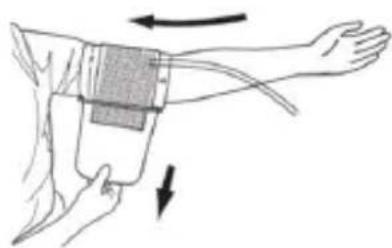
natural_image
Illustration of a human forearm with a hand holding an IVI device, showing pressure application and movement arrows (no text or symbols)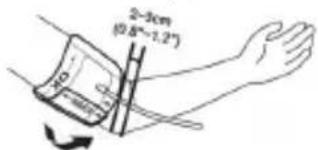
Note:
If you are not comfortable with applying your cuff, please seek the assistance of another member of your household or work with your physician to practice the cuff application. Incorrectly applied cuffs may result in inaccurate readings.
MEASUREMENT OF PULSE RATE AND BLOOD PRESSURE
To set the user and memory zone, proceed as follows:
While in power off mode, press the "SET" key to select user. Confirm your selection with the Power key to turn the power on and start to measure your blood pressure. Or wait for 3 seconds, your selection is then stored and shut off automatically.
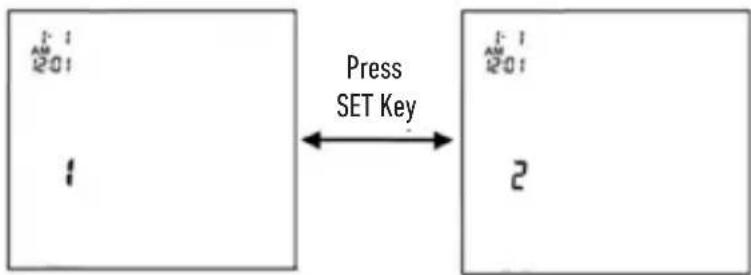
- Press the Power key to turn the power on. After full display is shown, the values for the last reading will appear on the display. If there is no measurement, the unit displays the value "0".
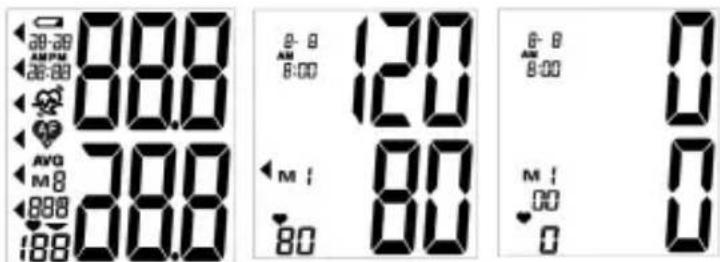
- After the self-test, the blood pressure monitor starts to measure. The cuff will automatically begin to inflate, with the display showing the increasing pressure in the cuff.
- As the pressure increases, the indicator will increase upwards according to the pressure value on the display.
- As the cuff inflates, the monitor automatically determines your ideal inflation level. This monitor detects your blood pressure and pulse rate during inflation.
- To detect the heartbeat, the heartbeat symbol will appear and continuous flashes on the LCD display.
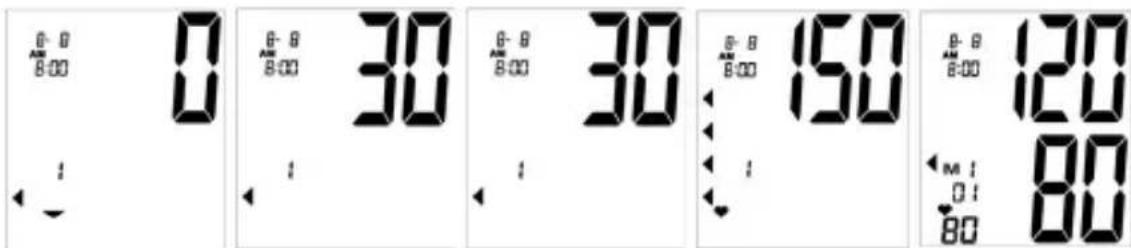
- Your blood pressure measurement and pulse will display simultaneously on the screen.
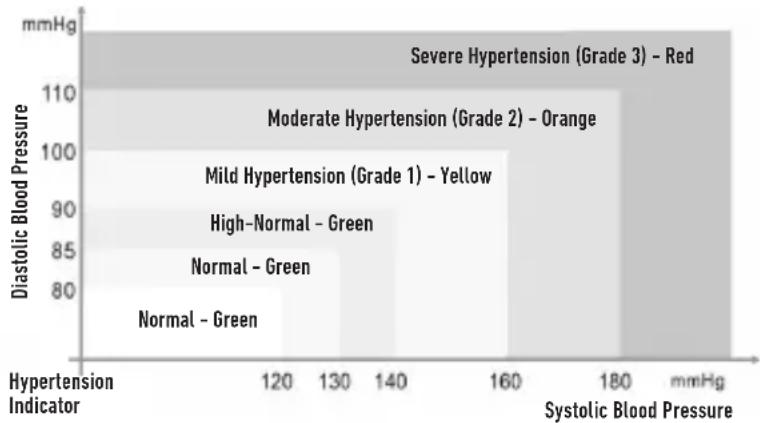
- The Hypertension Indicator will indicate your reading range on the display separately.
- Press the Power key to turn the unit off and conserve energy and battery life.
The unit will automatically shut-off approximately 2 minutes.
WORLD HEALTH ORGANIZATION (WHO)
This unit features our unique Hypertension Indicator. The World Health Organization has established globally accepted standards for the assessment of high or low blood pressure readings. The below chart should be considered only as a guideline, always consult with your physician or health care professional to interpret your individual results.
bar
| Hypertension Indicator | Diastolic Blood Pressure (mmHg) | |---|---| | Severe Hypertension (Grade 3) - Red | 110 | | Moderate Hypertension (Grade 2) - Orange | 105 | | Mild Hypertension (Grade 1) - Yellow | 95 | | High-Normal - Green | 85 | | Normal - Green | 80 | | Normal - Green | 75 |Irregular Heartbeat Detector
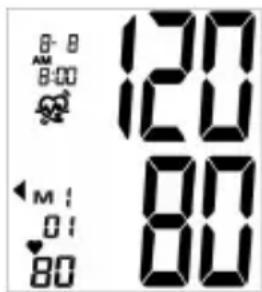
Your digital blood pressure monitor features an Irregular Heartbeat Detector. This feature allows users to accurately monitor blood pressure even if an irregular heartbeat should occur. When an irregular heartbeat "no detected, the icon will appear on the display.
Note:
Please consult with your physician or trained healthcare professional for further information regarding an irregular heartbeat and if this symbol appears frequently.
ATRIAL FIBRILLATION (AFIB)
This device is a blood pressure monitor that also analyses heart rate variability during measurement.
While in power off mode, switch the "AF" key to select AF mode "ON" or "OFF". After measurement mode setting, press the "SET" key to select user. Confirm your selection with the Power key to turn the power on and start to measure your blood pressure. Or wait for 3 seconds, your selection is then stored and shut off automatically.
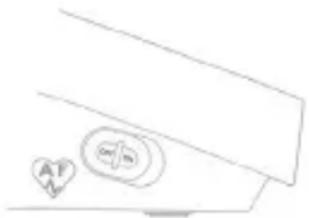
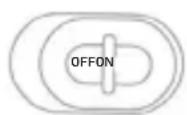
This feature allows users to accurately monitor blood pressure even if atrial fibrillation should occur. When atrial fibrillation is detected, the "when will appear on the display.
Note:
Please consult with your physician or trained healthcare professional for further information regarding an atrial fibrillation and if this symbol appears frequently.
MEMORY FUNCTION
Recalling Measurements in Memory:
You can recall up to 100 measurements for each user, plus those average values stored measurements in memory to share with your physician or trained healthcare professional.
If you press the M key, the unit will first display the average of last 3 currently stored measurements. Continue to press the M key to successively view the average value of the morning measurements and evening measurements for the last 7 days will be displayed.
The duration of morning is AM5:00 - AM9:00,
The duration of evening is PM6:00 – PM8:00
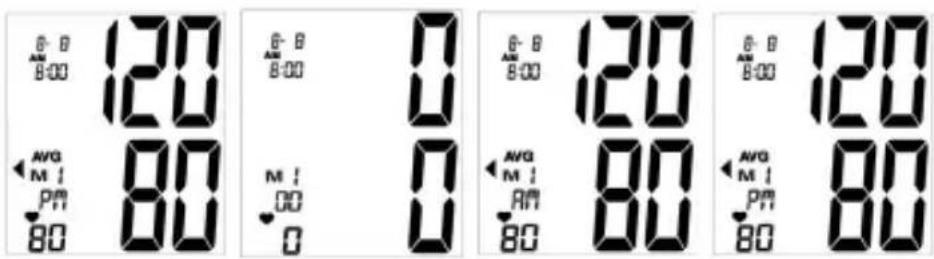
If you press the M key again, the measurements will appear on the display from most current to oldest. And the memory number will appear on the display.
All results for a given measurement will display, including measurement results, pulse rate, Hypertension Indicator, Irregular Heartbeat alert, and date/time stamp.
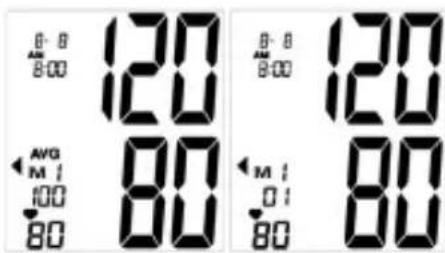
When the number of readings exceeds 100, the oldest data will be replaced with the new record.
Press the Power key to turn the unit off at any time when you check the stored measurements
Clearing Measurements from Memory:
From the memory mode, press and hold down the M key until the display shows CLr. This indicates that all measurements have been erased.
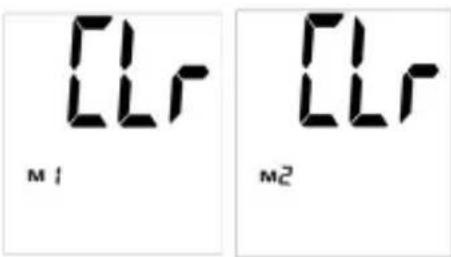
ERROR CODES
| Err Code Meaning Corrective Action | ||
| Err 00 No pulse or detect pulses not enough. Take off heavy clothes and retry again. | ||
| Err 01 The cuff is not fastened correctly | The Arm cuff is not fastened properly. Re- apply the cuff, and take a measurement again. | |
| Err 02 Inaccurate reading Rest a while, relax and retry again. | ||
| Err 03 | Inflation or deflation fail during the measurement | The Arm cuff is not fastened properly. Re- apply the cuff, and take a measurement again. |
| Err Memory error. | Take off batteries to reboot the device, then take another measurement. | |
 | Low batteries Replace all batteries with new ones. | |
TROUBLESHOOTING
| Problem Probable Cause Recommended Action | ||
| Nothing appears in the display even when the power is turned on. | Batteries are drained. Replace all batteries with new ones. | |
| Batteries are not correctly aligned with terminals. | Reinsert batteries in the correct position. | |
| Low Battery Symbol appears. | Batteries are drained. Replace all batteries with new ones. | |
| In colder temperatures batteries have weaker electrical charges. | Warm up the batteries, or use the device in a warmer setting. | |
| Device operation time is inconsistent. | Different battery brands have different life spans. | Use Alkaline batteries and replace all batteries at the same time with same brand batteries. |
| No reading after measurement. | Batteries are drained. Replace all batteries with new ones. | |
| Suspicious blood pressure results. | Perhaps the cuff was improperly positioned. | Adjust patient and Arm cuff to measure. |
| Blood pressure naturally varies throughout the day. | Rest a while, relax and measure again. | |
| Suspicious heart rate results. | Bodily movement during device use. Refrain from moving during measurement. | |
| Measurement shortly after exercise or exposure to the outdoors. | Do not take measurements after exercise or coming back from the outdoors. | |
| Power switches off automatically. | System design. | Push the power button again, and then begin measure again. |
| During measuring, air re-inflates. | It could be a normal action if the user's blood pressure is higher than the initial pressure value, the device automatically pumps to a higher pressure by 40mmHg each time. | Relax, and try to take a measure again. |
| The Arm cuff is not fastened properly. | Check that the Arm cuff is fastened properly and retake the measurement. | |
TECHNICAL SPECIFICATION
| Power Source 4 x 1.5V LR03 (AAA) alkaline | |
| Measurement range | Blood Pressure : 40~255 mmHgPulse Rate : 40~199 beats/min |
| Calibration Accuracy: | Blood Pressure : ± 3 mmHgPulse rate : ± 4% of reading |
| Operating environment | 10°C~40°C≤85 % relative air humidity (non-condensing)700-1060 hPa ambient pressure |
| Storage/ Transportation environment | -20 to 50 °C≤85 % relative air humidity (non-condensing)700-1060 hPa ambient pressure |
| Dimensions Approx. 138 mm x 103 mm x 54 | mm (L x W x H) |
| Net Weight Approx. 222g (exclude batteries) | +/- 5% |
| Cuff circumference (M/L Size) Approx. 22 ~ | 42 cm (9" ~ 17") |
WARNING: No modification of this equipment is allowed.
CONTACT INFORMATION
For more information about our products, please visit www.homedics.co.uk
Manufactured by: AViTA Corporation
9F., No. 78, Sec. 1, Kwang Fu Rd., San Chung Dist., New Taipei City 24158, Taiwan
Model: BPM83
Authorized European Representative:
MDSS - Medical Device Safety Service GmbH
Schiffgraben 41,
30175 Hannover,
Germany
Imported into the UK by:
FKA Brands Ltd, Somerhill Business Park, Tonbridge, Kent, TN11 0GP
Imported into the EU by:
FKA Brands Ltd, 29 Earlsfort Terrace, Dublin 2. IE
Customer Support: +44(0) 1732 378557
Support@homedics.co.uk
EMC TABLES
| Guidance and manufacturer's declaration – electromagnetic immunity | |||
| BPM83 is intended for use in the electromagnetic environment specified below. The customer or the user of BPM83 must make sure that it is used in such an environment. | |||
| Phenomenon | Professional healthcare facility environment a) | Home Healthcare Environment A) | |
| Conducted and radiated RF MISSIONS | a) CISPR 11 | Group 1 Class B | |
| Harmonic distortion Not applicable | |||
| Voltage fluctuations and flickering | Not applicable | ||
| a) The equipment is suitable for use in Home Health Environments and Professional Health Care Environments limited to patient rooms and respiratory treatment facilities in hospital or clinics. The more restrictive acceptance limits of Group 1 Class B (CISPR 11) have been considered and applied. The equipment is suitable for use in the mentioned environments when directly connected to the Public Mains Network.b) The test is not applicable in this environment unless the ME EQUIPMENT and ME SYSTEM used will be connected to the PUBLIC MAINS NETWORK and the power input is otherwise within the scope of the Basic EMC standard. | |||
| Guidance and manufacturer's declaration - Electromagnetic immunity - Enclosure port | |||
| Phenomenon | Basic EMC standard or test method | Immunity test levels | |
| Professional healthcare facility environment | HOME HEALTHCARE ENVIRONMENT | ||
| ELECTROSTATIC DISCHARGE | IEC 61000-4-2 | ±8kV contact ±2 kV, ±4kV ±, ±8 kV, ±15 kV air | |
| Radiated RF EM fields | IEC 61000-4-3 | a) | 10 V/m b) 80MHz - 2.780% AM at 1kHz |
| Proximity fields from RF wireless communications equipment | IEC 61000-4-3 | COMPLIANTNOTE: Further information about distances to be maintained between portable and mobile RF communications equipment (transmitters) and BPM83 can be requested from supplier using t contact information provided in this manual. H it is advisable to keep the electromechanical a equipment at an adequate distance of, at least, m from mobile phones or other RF communica transmitters to minimise possible interference. | |
| RATED power frequency magnetic fields. | IEC 61000-4-8 | 30 A/m c)50 Hz or 60 Hz | |
| a) The equipment is suitable for use in Home Health Environments and Professional Health C to patient rooms and respiratory treatment facilities in hospital or clinics. The more restrictive limits have been considered and applied.b) Before modulation is applied.c) This test level assumes a minimum distance of at least 15 cm between the ME EQUIPMENT of power frequency magnetic fields. | |||
3 YEAR GUARANTEE
FKA Brands Ltd guarantees this product from defect in material and workmanship for a period of 3 years from the date of purchase, except as noted below. This FKA Brands Ltd product guarantee does not cover damage caused by misuse or abuse; accident; the attachment of any unauthorised accessory; alteration to the product; or any other conditions whatsoever that are beyond the control of FKA Brands Ltd. This guarantee is effective only if the product is purchased and operated in the UK / EU. A product that requires modification or adaptation to enable it to operate in any country other than the country for which it was designed, manufactured, approved and / or authorised, or repair of products damaged by these modifications is not covered under this guarantee. FKA Brands Ltd shall not be responsible for any type of incidental, consequential or special damages.
To obtain guarantee service on your product, return the product post-paid to your local service centre along with your dated sales receipt (as proof of purchase). Upon receipt, FKA Brands Ltd will repair or replace, as appropriate, your product and return it to you, post-paid. Guarantee is solely through HoMedics Service Centre. Service of this product by anyone other than the HoMedics Service Centre voids the guarantee.
This guarantee does not affect your statutory rights.
For your local HoMedics Service Centre, go to www.homedics.co.uk/servicecentres
INTRODUCTION
Usage prévu
natural_image
Line drawing of a hand holding a tool near a device (no text or symbols)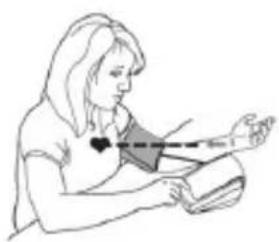
natural_image
Line drawing of a person performing a medical or health procedure with a shaded area and dashed line indicating a measurement (no text or symbols present)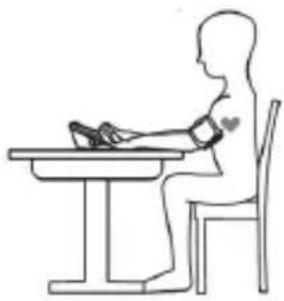
natural_image
Line drawing of a person sitting at a desk using a pressure monitor (no text or symbols)ORGANISATION MONDIALE DE LA SANTÉ (OMS)
natural_image
Simple line drawing of a vehicle's roof and side profile with no text or symbols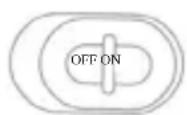
9F., No. 78, Sec. 1, Kwang Fu Rd., San Chung Dist., New Taipei City 24158, Taiwan
Modèle : BPM83
FKA Brands Ltd, Somerhill Business Park, Tonbridge, Kent, TN11 OGP
Support@homedics.co.uk
TABLEAUX CEM
9F., No. 78, Sec. 1, Kwang Fu Rd., San Chung Dist., New Taipei City 24158, Taiwan
Modell: BPM83
FKA Brands Ltd, Somerhill Business Park, Tonbridge, Kent, TN11 0GP
FKA Brands Ltd, 29 Earlsfort Terrace, Dublin 2. IE
Kundendienst: +44(0) 1732 378557
Support@homedics.co.uk
EMV-TABELLEN
chemical
Reaction scheme showing the conversion of 'Pilas insertadas' to 'Pulse la tecla S' via TECLA M and Día steps
flowchart
graph LR
    A["TECLA M TECLA M TECLA M\nHora Minutos"] --> B["12:01 AM"]
    B --> C["12:01 AM"]
    C --> D[" "]
natural_image
Line drawing of a hand holding a small object with an arrow indicating direction (no text or symbols)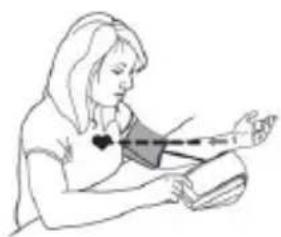
natural_image
Line drawing of a person sitting with hands placed on a surface, no text or symbols present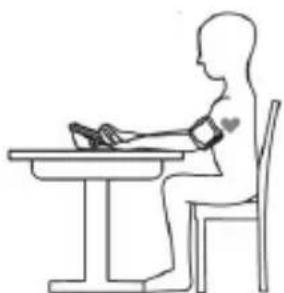
natural_image
Line drawing of a person sitting at a desk using a medical or anatomical device (no text or symbols present)natural_image
Illustration of a wristwatch and forearm with motion arrows indicating movement (no text or symbols)Arteria principal

natural_image
Illustration of a human forearm with a hand holding an IVI device, showing pressure application (no text or symbols)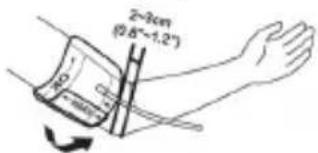
FKA Brands Ltd, Somerhill Business Park, Tonbridge, Kent, TN11 0GP
FKA Brands Ltd, 29 Earlsfort Terrace, Dublin 2. IE
Support@homedics.co.uk
TABLA CEM
www.homedics.co.uk/servicecentres
INTRODUZIONE
Uso previsto
chemical
Chemical reaction scheme showing the synthesis of Premere il tasto SET from caricare le batterie and Anno Anno Mese under TASTO M and Giorno conditions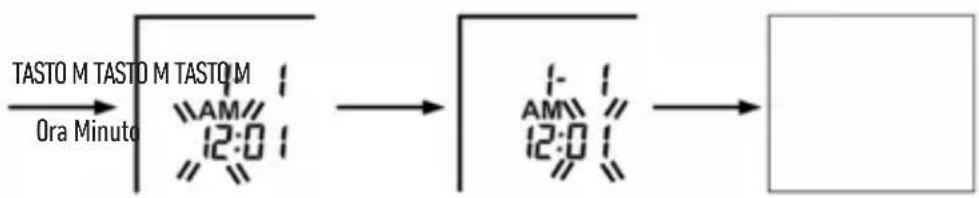
flowchart
graph LR
    A["TASTO M TASTO M TASTO M\nOra Minuto"] --> B["12:0"]
    B --> C["AM/12:0"]
    C --> D[" "]
natural_image
Line drawing of a hand using a tool to adjust or install a device (no text or symbols present)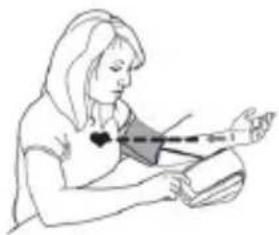
natural_image
Illustration of a person sitting with hands placed on a surface, no text or symbols present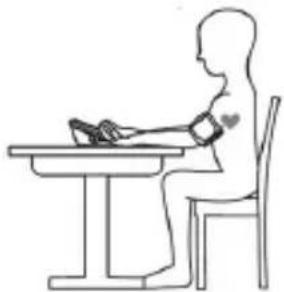
natural_image
Line drawing of a person sitting at a desk using a medical device (no text or symbols)9F., No. 78, Sec. 1, Kwang Fu Rd., San Chung Dist., New Taipei City 24158, Taiwan
Modello: BPM83
FKA Brands Ltd, Somerhill Business Park, Tonbridge, Kent, TN11 0GP
FKA Brands Ltd, 29 Earlsfort Terrace, Dublin 2. IE
Support@homedics.co.uk
TABELLE EMC
M-TOETS M-TOETS M-TOETS
Uur Minuten
SET-toets
indrukken
SET-toets
indrukken
DE MANCHET PLAATSEN
natural_image
Line drawing of a hand holding a tool next to a square device (no text or symbols)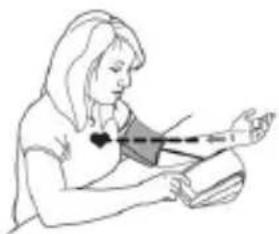
natural_image
Illustration of a person performing a medical or health procedure with a hand near the wrist (no text or symbols present)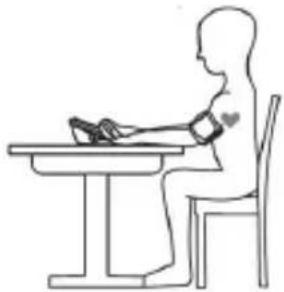
natural_image
Line drawing of a person sitting at a desk using a medical or physical device (no text or symbols present)links van de slang bevinden.
WORLD HEALTH ORGANIZATION (WHO OF WERELDGEZONDHEIDSORGANISATIE)
9F., No. 78, Sec. 1, Kwang Fu Rd., San Chung Dist., New Taipei City 24158, Taiwan
Model: BPM83
FKA Brands Ltd, Somerhill Business Park, Tonbridge, Kent, TN11 0GP
Support@homedics.co.uk
EMC-TABELLEN
flowchart
graph LR
    A["TECLA M TECLA M TECLA M"] --> B["Hora Minute"]
    B --> C["12:01 AM"]
    C --> D["1-AM 12:01 AM"]
    D --> E[" "]
Pressionar tecla SET (Definir) Pressionar tecla SET (Definir)
natural_image
Line drawing of a hand holding a tool next to a device with an arrow indicating motion (no text or symbols)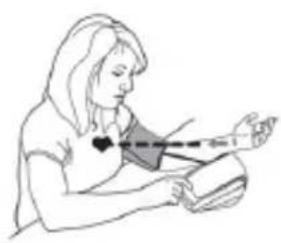
natural_image
Line drawing of a person holding an object with a dashed line indicating measurement or alignment (no text or symbols)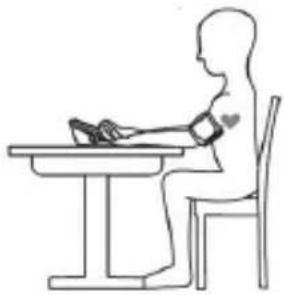
natural_image
Line drawing of a person sitting at a desk using a computer (no text or symbols)9F., No. 78, Sec. 1, Kwang Fu Rd., San Chung Dist., New Taipei City 24158, Taiwan
Modelo: BPM83
FKA Brands Ltd, Somerhill Business Park, Tonbridge, Kent, TN11 0GP
MDSS - Medical Device Safety Service GmbH
FKA Brands Ltd, 29 Earlsfort Terrace, Dublin 2. IE
30175 Hannover,
Support@homedics.co.uk
www.homedics.co.uk/servicecentres
INTRODUKTION
Avsedd användning
natural_image
Line drawing of a hand holding a tool interacting with a device (no text or symbols)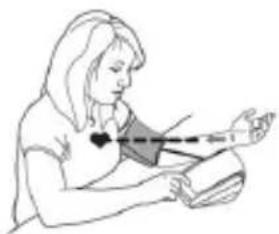
natural_image
Illustration of a person performing a medical or health procedure with a bandage and arm (no text or symbols)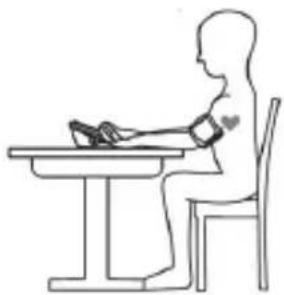
natural_image
Line drawing of a person sitting at a desk using a medical or physical device (no text or symbols present)9F., No. 78, Sec. 1, Kwang Fu Rd., San Chung Dist., New Taipei City 24158, Taiwan
Modell: BPM83
Auktoriserad representant i Europa:
FKA Brands Ltd, Somerhill Business Park, Tonbridge, Kent, TN11 OGP
FKA Brands Ltd, 29 Earlsfort Terrace, Dublin 2. IE
Kundsupport: +44(0) 1732 378557
Support@homedics.co.uk
EMC-TABELLER
9F., No. 78, Sec. 1, Kwang Fu Rd.,
San Chung Dist., New Taipei City 24158, Taiwan
ECREP
MDSS - Medical Device Safety Service GmbH
Schiffgraben 41, 30175 Hannover, Germany
Imported into the UK by FKA Brands Ltd, Somerhill Business Park, Tonbridge, Kent, TN11 0GP
Imported into the EU by FKA Brands Ltd, 29 Earlsfort Terrace, Dublin 2. IE
Customer Support: +44(0)1732 378557 | support@homedics.co.uk

0598
IB-BPAP200-0822-03

- INTRODUCTION
- Intended Use
- Type of Use/ Reuse
- Intended User
- Important Information before Use
- CAUTION:
- BATTERY INSTALLATION
- Low battery warning:
- Replacing the Battery:
- SETTING THE DATE AND TIME
- PLACEMENT OF THE PRESSURE SLEEVE
- Note:
- MEASUREMENT OF PULSE RATE AND BLOOD PRESSURE
- To set the user and memory zone, proceed as follows:
- WORLD HEALTH ORGANIZATION (WHO)
- ATRIAL FIBRILLATION (AFIB)
- MEMORY FUNCTION
- Recalling Measurements in Memory:
- Clearing Measurements from Memory:
- CONTACT INFORMATION
- YEAR GUARANTEE
- Usage prévu
- ORGANISATION MONDIALE DE LA SANTÉ (OMS)
- INTRODUZIONE
- Uso previsto
- DE MANCHET PLAATSEN
- WORLD HEALTH ORGANIZATION (WHO OF WERELDGEZONDHEIDSORGANISATIE)
- INTRODUKTION
- Avsedd användning
Brand : HOMEDICS
Model : BPA-P200
Category : Blood pressure monitor