USER MANUAL CORE-S5 CROSSCALL
Designed in France, assembled in China
Imported by : CROSSCALL
245 rue Paul Langevin
13290 Aix-en-Provence - FRANCE



| FR | Les informations présentes dans ce manuel étant susceptibles d'évoluer du fait notamment de contraintes techniques ou légales, nous vous invitons à consulter régulièrement le manuel d'utilisation complet, dans sa dernière version, accessible sur le site Internet www.crosscall.com/fr_FR/userguides |
| EN | As the information in this manual is subject to change, particularly due to technical or legal constraints, we invite you to regularly consult the latest version of the complete user manual, which is available at www.crosscall.com/en_FR/userguides |
| ES | La información presente en este manual puede ser objeto de modificaciones, en especial, debido a las exigencias técnicas o legales. Por esto, le invitamos a consultar con regularidad el manual de uso integral, y en su versión más reciente, al que puede acceder a través del sitio Internet www.crosscall.com/es_ES/userguides |
| DE | Da die Informationen in diesem Handbuch Änderungen unterliegen können, insbesondere aufgrund technischer oder rechtlicher Anforderungen, fordern wir Sie auf, regelmäßig das vollständige Benutzerhandbuch in seiner neuesten Version zu konsultieren, das auf der Website www.crosscall.com/de_DE/userguides eingesehen werden kann. |
| IT | Le informazioni contenute nel presente manuale sono soggette a modifiche, in particolare a causa di vincoli tecnici o legali. Invitiamo pertanto l'utilizzatore a consultare regolarmente il manuale d'uso completo, nell'ultima versione disponibile, accessibile sul sito web www.crosscall.com/it_IT/userguides |
| PT | As informações presentes neste manual estão sujeitas a alterações, devido principalmente a restrições técnicas ou legais; pedimos-lhe que consulte regularmente o manual de utilização completo, na sua versão mais recente, acessível na página da internet www.crosscall.com/pt_PT/userguides |
| NL | De informatie in deze handleiding is onderhevig aan verandering, met name als gevolg van technische en juridische beperkingen of verplichtingen. We nodigen u daarom uit de meest recente versie van de volledige handleiding te raadplegen op de website www.crosscall.com/nl_NL/userguides |
| HR | Informacije u ovom priručniku podliježu promjenama, posebno zbog tehničkih ili zakonskih ograničenja. Pozivamo vas da redovito pregledavate cjeloviti korisnički priručnik, u njegovoj najnovijoj verziji, dostupan na web mjestu www.crosscall.com/en_FR/userguides. |
| PL | Informacje zawarte w niniejszej instrukcji mogą ulec zmianie ze względu na ograniczenia techniczne lub prawne. Zachęcamy zatem do regularnego zapoznawania się z pełną instrukcją obsługi, w jej najnowszej wersji, która jest dostępna na stronie internetowej www.crosscall.com/en_FR/userguides |
| SL | Podatki v tem priročniku se lahko spremenijo, zlasti zaradi tehničnih ali zakonskih omejitev, zato vas vabimo, da redno pregledujete celotni uporabniški priročnik v njegovi najnovejši različici, ki je na voljo na spletišču www.crosscall.com/sl_SI/userguides. |
| AR | specific informoats lwarde في هذا دليل لل spectroبر بسب القيود الفنية أو القانونية. ول ذلك، نوصيك بالرجوع بانظام إلى دليل المستخدم капитал، في tightت إصدار له، هو متاح على الموقع www.crosscall.com/en_FR/userguides |
| SR | Будући да су информације у овом приручнику подложне променама, посебно због техничких или законских ограничења, позивамо вас да редовно консултујете комплетан кориснички приручник, у његовој најновијој верзији, доступан на интернет сајту www.crosscall.com/en_FR/userguides |
Bands Frequency Maximum power
| LTE Band1 1920MHz-2170MHz 22.5±2dBm |
| LTE Band3 1710MHz-1880MHz 22.5±2dBm |
| LTE Band7 2500MHz-2690MHz 21.5±2dBm |
| LTE Band8 880MHz-960MHz 22.5±2dBm |
| LTE Band20 791MHz-862MHz 22.5±2dBm |
| LTE Band28 703MHz-803MHz 22.5±2dBm |
| WCDMA Band1 1920MHz-2170MHz 23±2dBm |
| WCDMA Band2 1850MHz-1990MHz 23±2dBm |
| WCDMA Band5 824MHz-894MHz | 23±2dBm |
| WCDMA Band8 880MHz-960MHz | 23±2dBm |
| GSM850 | 824MHz-894MHz | 32.5±2 dBm |
| GSM900 | 880MHz-960MHz | 32.5±2 dBm |
| DCS1800 | 1710MHz-1880MHz 29.5±2dBm | |
| PCS1900 | 1850MHz-1990MHz 29.5±2dBm | |
| Bluetooth | 2402MHz-2480MHz <10dBm | |
Thank you for choosing Crosscall and for buying this mobile phone!
The quick start guide will show you how to get started with your new device.
INSTALLING THE SIM CARD
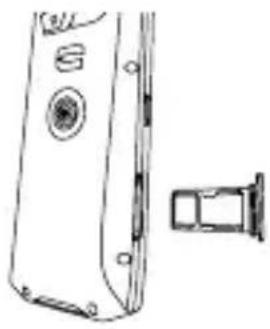
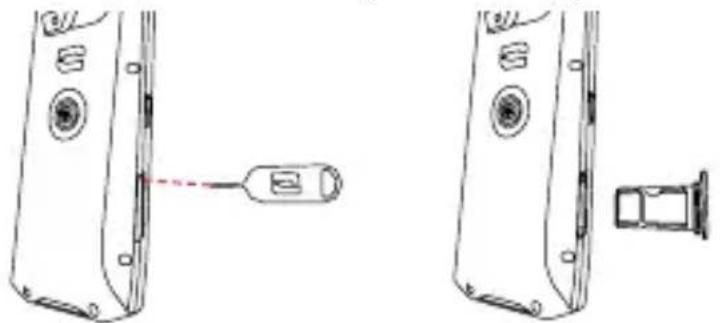
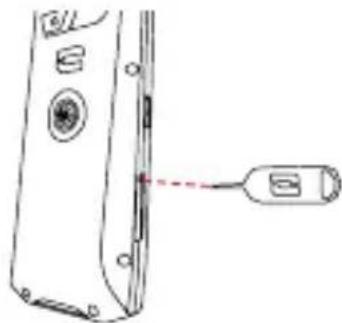
- Eject the SIM card drawer using the SIM card ejection tool provided.

-
Remove the drawer completely.
-
Insert the SIM card, face down, into the smallest slot. If you wish, insert a second SIM card or a 16 GB max. micro SD card in the big slot.

- Slide the tray back into the phone.
Warning: to ensure that your phone is waterproof, make sure that the tray is fully inserted and locked.
To avoid prematurely draining your phone battery, we recommend that you follow the battery charging instructions for each charging cycle. To do this, it is better to top up the battery when it reaches 20% and avoid charging it beyond 80%, rather than putting it through full charging cycles (from 0% to 100%).
For environmental reasons, this packaging does not contain a charger. This device can be powered using most USB adapters and a cable with a USB Type-C connector.
To ensure that your phone is charged correctly and to avoid damaging the battery, it is best to use the USB-A/USB-C cable supplied with your phone.
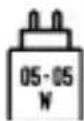
The power supplied by the charger must be between the minimum 5 Watts required by the radio equipment and the maximum 5 Watts to achieve maximum charging speed.
STARTING THE DEVICE
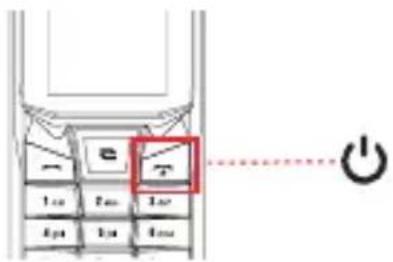
To switch on the device, press the On/Off button for a few seconds.
PHONE CONFIGURATION

To set up your phone, select your language and follow the instructions displayed on the screen.
X-LINK™*
THE SMART MAGNETIC ATTACHMENT SYSTEM

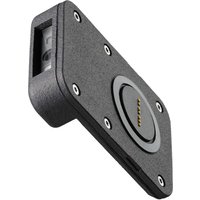
With this magnetic attachment on the back of your phone, it's easy to connect your device to exclusive X-LINK™ accessories. Depending on the accessories, the X-LINK ™ can charge your phone.
X-BLOCKER
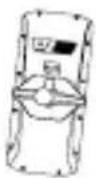
In situations that require maximum hold, this exclusive accessory guarantees secure attachment for your phone to compatible accessories (pull-out force 20kg). It is easily attached to the slots on the side of your mobile. The silicone coating reduces vibrations caused by knocks. (accessory sold separately)
Discover the full range of accessories compatible with the X-LINK * and the X-BLOCKER on www.crosscall.com > Accessories
DELETING DATA (FACTORY RESET)
Before performing a reset, make sure you have backed up your important data stored on the device.
To restore your phone to its factory settings, go to Main menu > Settings > Phone settings, click on «Restore factory settings» and enter the code 1234.

This action will erase all data from your phone's internal memory.
SECURITY MEASURES

WATERPROOFNESS
- You have just bought an IP68 international standard-compliant mobile phone. To guarantee optimal use and watertightness, ensure that all the flaps covering the USB connectors and the earphone jack
are correctly closed.
- Do not open the back cover of the device if it is in water or a very humid environment.
- The rubber seals attached to the flaps are key components of the device. Ensure that you do not damage the rubber seal when you open or close the waterproof cap. Ensure that the seal is free from any debris, such as sand or dust, to avoid damaging the device.
- The flaps covering the openings may come loose in the event of a fall or knock. Ensure that all the covers are properly aligned and completely closed.
- If the device has been submerged in water or the microphone or Loud speaker is wet, the sound may not be clear during a call. Make sure that the microphone or loud speaker is clean and dry by wiping it with a dry cloth. Do not push anything sharp (toothpick, metal object or other) into the microphone or loud speaker because this could damage the waterproof membrane.
- If you put your phone in sea water or chlorinated water, rinse it in fresh water.
- If the device gets wet, dry it thoroughly with a soft, clean cloth.
- The water resistance of the device can lead to slight vibrations under certain circumstances. These vibrations, for example when the volume is turned up high, are entirely normal and do not affect the performance of the device.
- Temperature fluctuation can lead to an increase or decrease in the pressure, which may affect the quality of the sound. If required, open the watertight flaps to release the air.
- Each time the mobile phone is immersed in water, dry the inside of the USB and JACK waterproof caps thoroughly. It is quite possible for drops of water to remain in the caps, leading to a risk of oxidation.

BATTERY
- Do not remove the battery from your phone yourself. If you encounter a problem, contact Crosscall Customer Services.
- Use the charger included in your original phone box
- Do not expose it to temperatures above 55°C / 131°F .
- Do not tamper with your phone using sharp metal objects because this may puncture the battery.
- If your phone has been crushed or severely damaged and the battery is affected, do not touch your phone and contact Customer Services who will tell you the procedure to follow.
- If you detect signs of overheating (abnormal smell, suspicious marks), do not touch your mobile and contact Customer Service immediately who will tell you what procedure to follow.
- Do not short-circuit.
- Recycle the battery according to standards in force.
- Do not throw into fire.
- Do not charge your phone during an electrical storm.
- Do not use your charger in a humid environment, this could cause short-circuits, fires, or damage the charger.
- Leaving a battery in an extremely high-temperature environment can result in an explosion or the leakage of flammable liquid or gas.
- A battery subjected to extremely low air pressure may result in an explosion or the leakage of flammable liquid or gas.


IMPORTANT
- Respect all the safety measures and standards relating to the use of your device when driving. Use of a hand-held telephone by the driver of a vehicle on the move is prohibited.
- Keep your telephone at least 15mm from your body when you take calls.
- Small parts may cause choking.
- Your telephone can emit a loud sound.
- Do not only rely on your telephone to make emergency calls.
- Do not use it in service stations.
- Avoid exposing to magnetic fields.
- Keep it away from pacemakers and other electronic medical devices (15cm).
- Keep the device on the side opposite the implant.
- Follow the specific restrictions for use in certain locations (hospitals, aeroplanes, petrol stations, schools, etc.)
- Please switch off your phone when you are near explosive materials or liquids.
- Avoid extreme temperatures. Do not keep your device in extremely hot or cold places.
- Do not disassemble your phone.
- Avoid impacts or damage to your phone.
- Make sure that the battery terminals do not touch any conductive materials, such as metal or liquid.
- Stop using your device if any of its parts are cracked, broken or if it overheats.
- Do not allow your children or pets to chew or lick the device.
- Do not press on your eyes, ears or any part of the body with your device and do not put it in your mouth.
- Do not use the flash close to the eyes of people or animals.
- Do not use your device outside during a thunderstorm.
- Only use the original accessories for this phone and do not install its battery in another phone.

PROTECTING YOUR HEARING
- This telephone adheres to the current regulations in terms of limiting the maximum output volume. Listening with earphones at high volume for extended periods can cause hearing loss!
- Stop using the product or lower the volume if you feel that your ears are ringing.
- Do not adjust the volume to too high a level, medical professionals do not recommend being exposed to a high volume for a prolonged period of time.
- Use the earphones smartly, as excessive sound pressure coming from them or an audio headset can cause hearing loss.
- In order to avoid any hearing damage, a high volume over long periods of time must be avoided.
- Please only use headphones suitable for your telephone
RECOMMENDATIONS TO REDUCE THE USER'S EXPOSURE TO RADIATION
- Use your phone where there is good reception (maximum number of signal bars) to reduce the amount of radiation your phone puts out. Avoid making calls in underground carparks or during train or car journeys.
- Use a hands-free kit or loudspeaker.
- Children and teenagers should make reasonable use of mobile phones by avoiding, for example, night-time calls and limiting the frequency and duration of calls.
- Keep the phone away from the abdomen of pregnant women and the lower abdomen of teenagers.
ENVIRONMENTAL PROTECTION
Please respect the local regulations in terms of removing waste when you are getting rid of the packaging, the battery or the used phone. Place them in a collection point so they can be properly recycled. Do not dispose of phones or used batteries in ordinary rubbish bins. Please dispose of used lithium batteries that you do not want to keep in a designated place for this purpose.
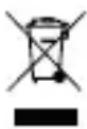
DO NOT DISPOSE OF THEM IN RUBBISH BINS.

CROSSCALL confirms that this device complies with the basic requirements and other relevant provisions under Directives 2014/53/EU and 2014/30/EU. The full certifi cate of EU conformity is available at the following web address: https://docs.crosscall.com/public/CERTIFICAT/CORE-S5_CERTIFICATE-OF-CONFORMITY_INTERNATIONAL.pdf
Represented by Authorised Rep Compliance, ARC House, Thurnham, Lancaster, LA2 0DT, UK
- Frequency band used by radio equipment: certain bands may not be available in all countries or all regions. Please contact the local operator to get more detailed information.
- Maximum radio signal frequency emitted in the frequency band where the radio equipment operates: The maximum power for all the bands is less than the highest specified limit value under the associated harmonised standard. The nominal frequency band and power transmission limits (radiated and/or by conduction) applicable to this radio equipment are the following: See page 11.

The product software version is L2106.6.01.0x.FR00 (where X=0 to 9, A to Z, representing updates to the user experience, Google security patches, etc). Software updates are published by the manufacturer to correct bugs or improve features after the product's launch. All the software versions published by the manufacturer have been verified and always comply with the applicable regulations.

Not all the radio frequency settings (for example, the frequency band and output power) are accessible by the user or can be modified by him/her. The latest information relating to accessories and software is available in the Declaration of Conformity, which can be viewed on the website https://www.crosscall.com/en_FR/userguides
SPECIFIC ABSORPTION RATE (SAR)
This device complies with the directives relating to radio frequency exposure, when it is used near the head or at a minimum distance of 5mm from the body. According to ICNIRP guidelines, the SAR limit is 2.0 watts/kg for head and body, and 4.0 watts/kg for limb for 10g of cellular tissue absorbing the majority of frequencies.
Maximum values for this model:
- SAR head: 0.938 (W/kg) ==> authorised limit value: 2 (W/kg)
- SAR body: 1.431(W/kg) ==> authorised limit value: 2 (W/kg)
- SAR limb: 1.921(W/kg) ==> authorised limit value: 4 (W/kg)
WARRANTY*
Your phone, along with the battery and accessories in the box, are guaranteed against any defect or malfunction which might arise as a result of their design or their manufacture or an equipment failure, in normal conditions of use, for the term of the warranty period of thirty-six (36) months from the date of purchase of your phone, as featured on your original invoice. The warranty automatically ends at the end of thirty-six (36) months.
(*To see the warranty terms and conditions, go to www.crosscall.com
Assistance > Warranty)

KONFIGURATION DES PHONE
ACCENSIONE DEL DISPOSITIVO
- Duw de lade terug in de telefoon.
CONFIGURATIE VAN DE TELEFOON
-
Potpuno izvucite ladicu.
-
Umetnite SIM karticu, licem prema dolje u manji utor. Ako želite, umetnite drugu SIM karticu ili mikro SD karticu od maks. 16 GB u veći utor.
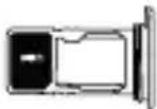
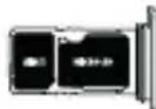
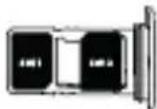

- Vratite ladicu u telefon.
Upozorenje: kako bi se osiguralo da je telefon vodonepropusan, provjerite je li ladica potpuno umetnuta i sigurno zaključana.
Kako ne biste prerano koristili baterij u pametnog telefona, preporučuje se pridržavati se ispravnih pravila upotrebe za svaki ciklus punjenja. Zbog toga je bolje napuniti baterij u čim dosegne 20% i izbjegavati je da napunite više od 80%, nego da obavljate kompletne cikluse punjenja (od 0 do 100%).
Zbog ekoloških razloga ovo pakiranje ne sadrži punjač. Ovaj se uređaj može napajati s većinom USB adaptera i kabela s USB Type-C priključkom
Kako biste osigurali pravilno punjenje vašeg pametnog telefona i kako biste sprij ečili oštećenje njegove baterij e, po mogućnosti koristite USB-A/USB-C kabel koji ste dobili s mobilnim telefonom.
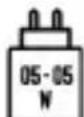
Snaga koju daje punjač mora biti između najmanje 5 W potrebnih za radio opremu i najviše 5 W za postizanje maksimalne brzine punjenja.
POKRETANJE UREĐAJA
KONFIGURACIJA TELEFONA
Za konfiguriranje telefona, odaberite jezik i slijedite upute na zaslonu.
X-LINK™*
INTELIGENTNI MAGNETSKI PRIKLJUČNI SUSTAV
Ovaj magnetski konektor, koji se nalazi na stražnjoj strani vašeg telefona, omogućuje njegovo učvršćivanje i povezivanje s ekskluzivnom dodatnom opremom X-LINK TM . Ovisno o dodacima, X-LINK TM može služiti za punjenje vašeg mobitela.
工
X-BLOCKER
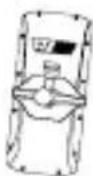
U situacijama koje zahtijevaju maksimalnu pričvršćenost, ovaj ekskluzivni uređaj osigurava priključivanje vašeg telefona na kompatibilni dodatni pribor (snaga kidanja 20 kg). Jednostavno se pričvršćuje na bočne zareze vašeg mobitela. Njegov silikonski premaz smanjuje vibracije uzrokovane šokovima. (dodatak se prodaje zasebno)
Provjerite cijelu liniju X-LINK kompatibilnog pribora™ i X-BLOCKER na www.crosscall.com
BRISANJE PODATAKA (TVORNIČKA POSTAVKA)
Prije vraćanja telefona na zadane postavke, provjerite jeste li napravili sigurnosnu kopiju vaših važnih podataka pohranjenih na uređaju.
Za vraćanje uređaja na tvorničke postavke idite na Glavni izbornik > Postavke > Postavke telefona, kliknite na «Vrati tvorničke postavke» i unesite kod 1234.

- Potisnite predal nazaj v telefon.
Pozor: da bi zagotovili vodotesnost telefona, poskrbite, da je predal popolnoma vstavljen in zaklenjen.
NASTAVITEV TELEFONA
Za nastavitev telefona izberite jezik in sledite navodilom na zaslonu.
X-LINK™*
PAMETNI SISTEM MAGNETNE POVEZAVE
VAMA TRADE
POVŠIČ & CO. D.O.O.
تشغيل الجهاز
КОНФИГУРАЦИЈА ТЕЛЕФОНА
CROSSCALL