JAM3000 - Car stereo JBL - Free user manual and instructions
Find the device manual for free JAM3000 JBL in PDF.


| Product type | Car stereo |
| Brand | JBL |
| Model | JAM3000 |
| Power supply | 9 V – 16 V, DC |
| RMS output power | 15 W x 4 (low distortion) / 25 W x 4 (high distortion) at 4 ohms |
| Frequency response | 20 Hz – 20 kHz (±3 dB) |
| Signal-to-noise ratio | >75 dB |
| Reception bands | FM (87.5 – 108 MHz depending on region) / AM (530 – 1710 kHz depending on region) |
| Number of presets | 18 (6 per band) |
| Bluetooth | Version 5.3, protocols A2DP 1.3.2, AVRCP 1.5, SPP 1.2 |
| Bluetooth pairing | Up to 5 phones, automatic reconnection of the last one |
| USB audio formats | WAV, MP3, M4A, WMA |
| Max number of USB files | 9999 |
| Adjustment functions | Volume, bass, treble, balance, fader, equalizer (5 modes), loudness, subwoofer |
| USB input | Yes, with playback and folder navigation |
| RCA outputs | Yes (subwoofer or front/rear depending on configuration) |
| Equalizer | Off, flat, classic, pop, rock |
| Loudness | On/off |
| Subwoofer | Adjustable level from 0 to 20 (default 12) |
| Tuner region setting | USA, Europe, Japan, Australia |
| Backlight | Adjustable brightness from 0 to 10 |
| Standby | Adjustable initial volume (I-Volume) from 0 to 50 |
| Care and cleaning | Wipe with a soft, dry cloth. Do not use abrasive products. |
| Safety | Disconnect the negative battery terminal before any installation. |
| Dimensions | Standard 1 DIN (approx. 178 x 50 x 100 mm) |
Frequently Asked Questions - JAM3000 JBL
User questions about JAM3000 JBL
0 question about this device. Answer the ones you know or ask your own.
Ask a new question about this device
Download the instructions for your Car stereo in PDF format for free! Find your manual JAM3000 - JBL and take your electronic device back in hand. On this page are published all the documents necessary for the use of your device. JAM3000 by JBL.
USER MANUAL JAM3000 JBL
Owner's Manual
EN
Mode d'emploi
FR
Bedienungsanleitung
DE
MOUNTING THE STEREO....3
GENERAL BUTTON OPERATION....3
SYSTEM SETUP 4
EN
FM/AM TUNER OPERATION .... 4
Tuning stations....4
Auto Preset / Presets Scan 4
Manual Preset / Presets Recall....4
BLUETOOTH OPERATION....4
Pairing a Bluetooth device....4
Selecting tracks 4
Pausing playback....4
Connecting or disconnecting a device....4
USB OPERATION....5
Connecting a USB device 5
Play Mode Select / File Search....5
Navigating tracks 5
Pausing playback....5
SPECIFICATIONS 5
Caution 5
WIRING THE STEREO
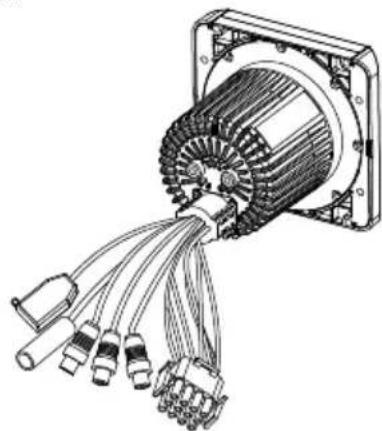
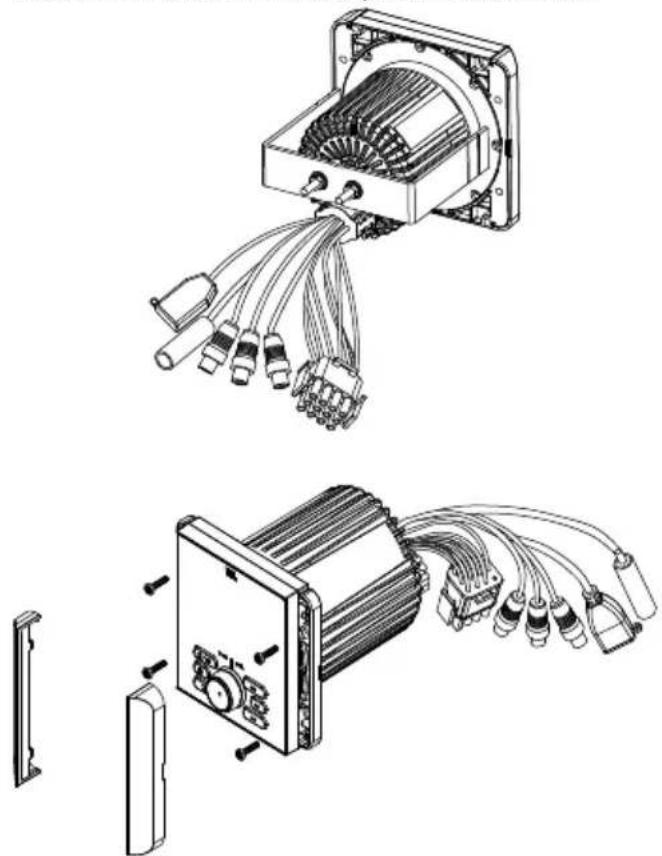
IMPORTANT: Disconnect the vehicle's negative (−) battery terminal before beginning the installation.
- Plug the vehicle harness into the connectors on the back of the stereo.
natural_image
Technical line drawing of an electric motor with multiple terminal connectors (no text or symbols)MOUNTING THE STEREO
You can choose either one mounting method shows below:
natural_image
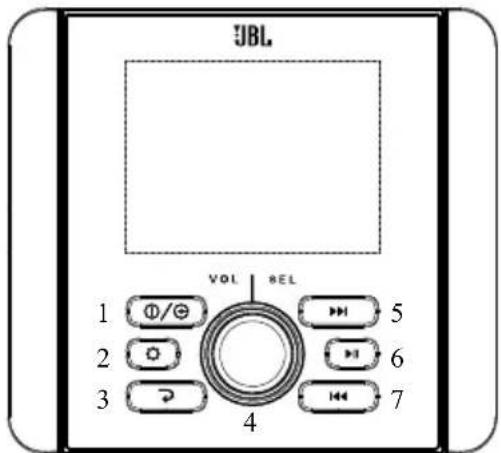
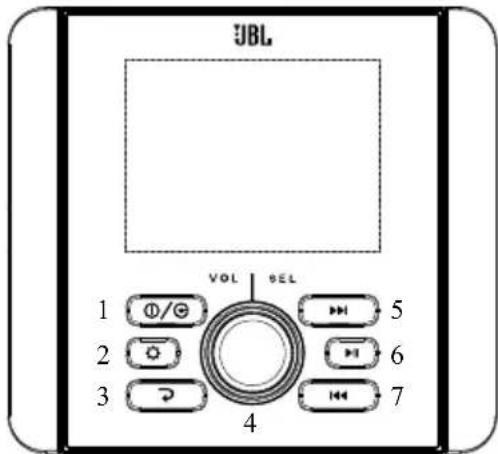
Technical line drawings of an electrical component with multiple connectors and wiring, showing exploded and assembled views (no text or symbols)- Power/SRC: Press for the first time to turn the unit on. Press and hold for more than 3 seconds to turn the unit off. With unit powered on, short repeat press to switch mode in following sequence: FM1 → FM2 → AM → BT → USB → FM1.....
- Setup: In Radio mode, short press to scan listening to the preset stations. Long press it to auto store 6 stations in each band in sequence by signal strength. After Auto Store is completed, it will auto scan every preset for 6s in sequence. In USB mode, press it repeatedly to select between Repeat one, Repeat Folder, Random Folder, Random all, Intro Scan. Long press it to enter Track Number search mode. Turn SEL knob and press to set value of track number, then press and hold SEL for 2s to confirm the selection.
- Return: In selection station, press it to back to source playing screen.
- Volume/enter: Turn the knob to raise or lower the volume, or to highlight desired control menu options.
Press the SEL knob to enter 1st setting menu, then press it repeatedly to display features in following sequence:
VOLUME → BASS → TREBLE → BALANCE → FADER → EQ → LOUD → SUBWOOFER → VOLUME.....
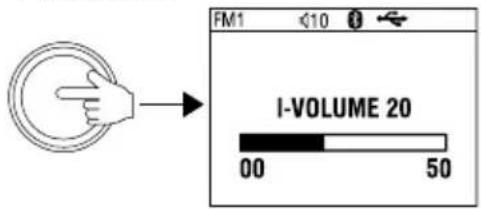
Press and hold SEL knob for over 2s to enter 2nd setting menu, then press it repeatedly to display features in following sequence: I-VOLUME → BRIGHTNESS → AREA → BEEP → ABOUT → RESET → I-VOLUME.....
On each setting, the level can be controlled by turning SEL knob. When the last adjustment is made, the display will automatically return to the original mode after 5 seconds, or you can press Return button to return the original mode quickly.
- NEXT: In Radio mode, press it to work as Manual Seek, repeat press to tune the frequency in steps. Press and hold it to activate Auto Seek.
In BT Music or USB mode, press it to select the next track. In USB mode, press and hold it to fast forward.
- PLAY/PAUSE: In Radio mode, press it to MUTE sound output. In BT Music or USB mode, press it to Pause playback; press it again to resume playback.
In USB mode, long press PLAY/PAUSE button to enter USB files folder list.
- PREVIOUS: In Radio mode, press it to work as Manual Seek, repeat press to tune the frequency in steps. Press and hold it to activate Auto Seek.
In BT Music or USB mode, press it to select the previous track.
In USB mode, press and hold it to fast rewind.
SYSTEM SETUP
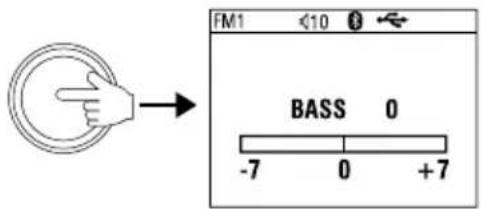
Press the SEL knob to enter 1 ^st setting menu, then press it repeatedly to display features in following sequence: VOLUME → BASS → TREBLE → BALANCE → FADER → EQ → LOUD → SUBWOOFER → VOLUME.....
EN
1st setting options:
Bass: -7dB - +7dB
Treble: -7dB - +7dB
Balance: Left 10 – Right 10 (default: 0)
Fader: Front 10 – Rear 10 (default: 0)
EQ: OFF, FLAT, CLASSIC, POP, ROCK
Loud: OFF/ON
Subwoofer: 0 \~ 20 (default at 12)
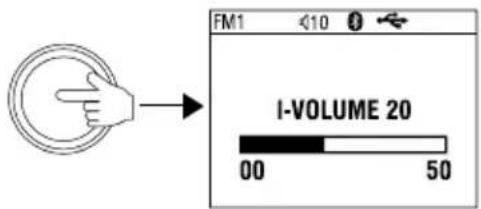
Note: with EQ activated, Bass and Treble will not be displayed Press and hold SEL knob for over 2s to enter 2nd setting menu, then press it repeatedly to display features in following sequence: I-VOLUME → BRIGHTNESS → AREA → BEEP → ABOUT → RESET → I-VOLUME.....
2nd setting options:
I-Volume: 0 - 50 (default at 20)
BT Volume: 0 - 50 (default at 30)
Brightness: 0 - 10 (default at 5)
Area: USA, EUROPE, JAPAN, AUSTRALIA
Beep: ON/2ND/OFF
About: SW version display
Reset: YES/NO (With Reset displayed, turn VOL knob to highlight at YES, then press and hold SEL knob for about 5s to reset the system.)
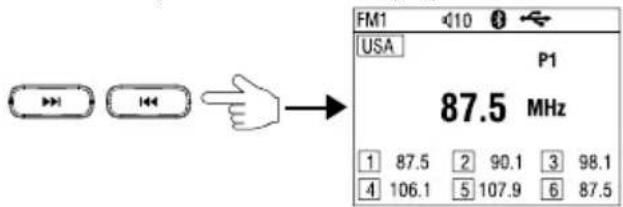
- Repeat short press >>| or |<< button to tune the frequency step by step.
- Long press >>| or |<< button for over 2s results in auto search of the next or previous station of strong signal.
Auto Preset / Presets Scan
- In Radio mode, press Setup button (2) momentarily, it will scan listening to each preset station for 6 seconds. At desired preset station, press Return button to stop scanning.
- Long press it to auto store 6 stations in each band in sequence by signal strength. After Auto Store is completed, it will auto scan every preset for 6s in sequence.
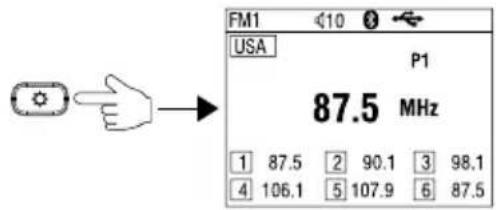
Manual Preset / Presets Recall
- To manually store a preset, first manual tune to a station, press and hold >>| button (6) to activate Manual Preset (Preset #1 is now highlighted, then press >>| or |<< button (5/7) to select a preset number, then preset and hold SEL knob (4) for over 2 seconds to store the frequency in that preset.
- To recall a preset station, press and hold > button (6) to activate Manual Preset first, then press or |<< button (5/7) to select a preset number, press SEL knob (4) momentarily to recall the station in that preset.
- Press Return button (3) or long press >|| button (6) to exit Manual Preset status.
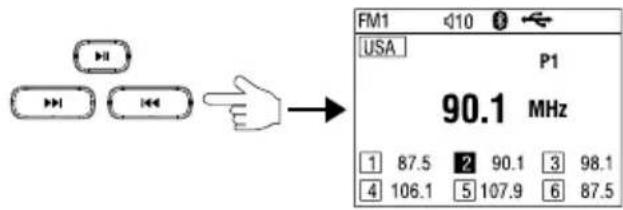
BLUETOOTH OPERATION
Pairing a Bluetooth device
- Select Bluetooth as the source on the stereo.
- Find and select "JBL JAM3000" in the list of available sources in your phone's Bluetooth pairing menu.
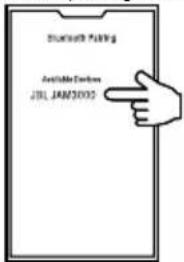
Selecting tracks
Press >>| or |<< button to select the next or previous track.
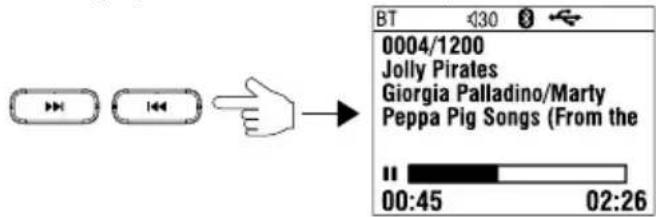
Pausing playback
While playing track, you can pause the track by press > button (6), then press again to resume to playback status.
Connecting or disconnecting a device
In BT Music mode, press and hold SEL knob (4) for over 2s, it will display the Device List and highlighted at current connected device. To disconnect the device, press and hold the SEL knob within 5s
To connect or delete the device, press and hold SEL knob to show the Device List first, then turn the knob to move highlight to desired device, then press and hold the knob again to show Connect or Delete, turn the knob and press it to confirm selection.
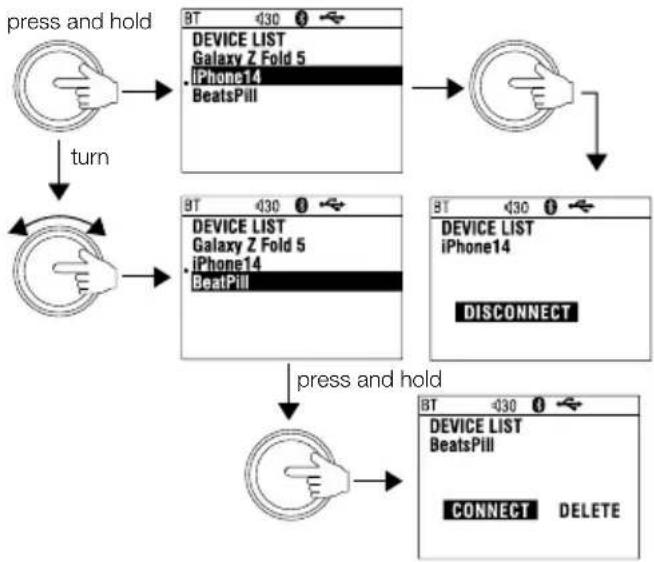
flowchart
graph TD
    A["press and hold"] --> B["Device List\nGalaxy Z Fold 5\niPhone14\nBeatsPill"]
    B --> C["Device List\niPhone14\nDISCONNECT"]
    C --> D["press and hold"]
    D --> E["Device List\nBeatsPill\nCONNECT DELETE"]
    A --> F["turn"]
    F --> G["Device List\nGalaxy Z Fold 5\niPhone14\nBeatPill"]
    G --> H["Device List\niPhone14\nDISCONNECT"]
USB OPERATION
Connecting a USB device
Plug a USB drive into the USB slot. It will auto begin to read the tracks in the device.

Play Mode Select / File Search
- While USB playing, press Setup button (2) repeatedly to select between Repeat one, Repeat Folder, Random Folder, Random all, Intro Scan.
Playback mode options:
Repeat:
- ONE (one track)
- FOLDER (all tracks in one folder)
Random:
- ALL (all tracks on the USB device)
- FOLDER (all tracks in one folder)
INTRO: Plays a brief sample of the beginning of each song on the USB device
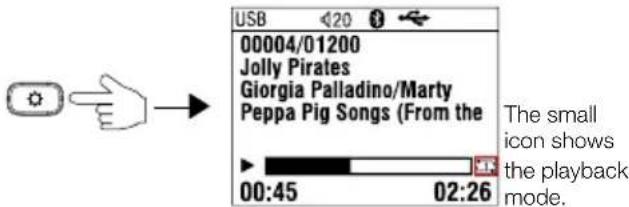
- Long press it to enter Track Number search mode. Turn SEL knob and press to set value of track number, then press and hold SEL for 2s to confirm the selection.
![press and hold INPUT NUMBER 0000[1]](/content/2026/04/712579/images/7ffed79998a96a1994bbcb2035859a6051246b7632b1cf3661abc1f85dfaf675.jpg)
Navigating tracks
-
Press the PREVIOUS and NEXT buttons to restart the current track, select a previous track, or jump to the next track.
-
Press and hold the PREVIOUS and NEXT buttons to rewind or fast-forward a track.
Note: If the current playing track elapsed time is less than 5 seconds, then press Previous button to select previous track.
If the track elapsed time is over 5 seconds, then press Previous the first time will result in back to the beginning of current track, press it again within 5 seconds to select previous track.
Pausing playback
- Press the PLAY/PAUSE button to pause or resume playing a track.
- Press and hold the PLAY/PAUSE button to enter files folder list. Turn SEL knob to find desired fold/file and press to confirm selection.
SPECIFICATIONS
| Tuner bands AM/FM | |
| AM Band for USA 530 - 171 | 0kHz (10kHz STEP) |
| AM Band for Europe 522 - 1 | 620kHz (9kHz STEP) |
| AM Band for Japan 522 - 16 | 629 KHZ (9kHz STEP) |
| AM Band for Australia 531 | - 1602 kHz (9kHz STEP) |
| FM Band for USA 87.5 - 107 | 7.9MHz (0.2MHz STEP) |
| FM Band for Europe 87.50 - | 108.00MHz (0.05MHz STEP) |
| FM Band for Japan 76.0 - 9 | 5.0 MHz (0.1MHz STEP) |
| FM Band for Australia 87.5 | - 108.0 MHz (0.1MHz STEP) |
| Number of station presets | 18 |
| Bluetooth version 5.3 | |
| Bluetooth A2DP protocol 1 | 3.2 |
| Bluetooth AVRCP 1.5 | |
| BT Max Power <10dBm | |
| Bluetooth transmitter frequency range | 2400MHz - 2483.5MHz |
| Serial Port Profile (SPP) 1.2 | |
| Simple Secure Pairing (SSP) | Yes |
| Number of paired phones | 5 |
| Bluetooth auto reconnect | Yes (most recently paired phone) |
| Compatible media file formats | WAV, MP3, M4A, WMA |
| Maximum number of files on USB device | 9999 |
| RMS Power Output (Watts x Channel) @ 4-ohm | Low distortion power 15W x 4 |
| High distortion power 25W x 4 | |
| Frequency Response, +/- 3dB | 20Hz to 20kHz |
| Signal-to-Noise Ratio | >75dB |
| THD+N @ 2.1Vrms (RCA outputs) | 1% |
| Operating voltage | 9V - 16V |
| Quiescent current | <80mA |
Caution
- The product is a built-in component. The terminal where the product is installed should be used for the evaluation of product structure, and no consideration should be given to the temperature of the metallic casing. After the product is installed, only the operation panel is exposed to users.
TABLE DES MATIÈRES
CÂBLAGE DE L'AUTORADIO STÉRÉO....7
MONTAGE DE L'AUTORADIO STÉRÉO....7
FONCTIONNEMENT GÉNÉRAL DES BOUTONS....7
CONFIGURATION DU SYSTÈME....8
FONCTIONNEMENT DU TUNER FM/AM....8
FR
natural_image
Technical illustration of an electric motor with multiple terminal connectors (no text or symbols)MONTAGE DE L'AUTORADIO STÉRÉO
natural_image
Technical line drawings of an electrical connector assembly, showing internal wiring and housing (no text or symbols)FONCTIONNEMENT GÉNÉRAL DES BOUTONS
FR
Suspension de la lecture
natural_image
Technical illustration of an electric motor with multiple power connectors (no text or symbols)INSTALLATION DER STEREOANLAGE
natural_image
Technical line drawings of an electronic device with multiple connectors and wiring, showing exploded and assembled views (no text or symbols)VOLUME → BASS → TREBLE → BALANCE → FADER → EQ → LOUD → SUBWOOFER → VOLUME.....
Titel auswählen
natural_image
Technical illustration of an electric motor with multiple power connectors (no text or symbols)MONTAJE DEL SISTEMA ESTÉREO
natural_image
Technical line drawings of an electrical connector assembly, showing internal wiring and housing (no text or symbols)I-VOLUME → BRIGHTNESS → AREA → BEEP → ABOUT → RESET → I-VOLUME.....
natural_image
Technical line drawing of an electric motor with multiple terminal connectors (no text or symbols)IT
MONTAGGIO DELLO STEREO
natural_image
Technical line drawings of an electronic device with multiple connectors and wiring, showing exploded and assembled views (no text or symbols)Brightness: 0 - 10 (predefinita a 5)
Area: USA, EUROPA, GIAPPONE, AUSTRALIA
Beep: ON/2ND/OFF
Selezione dei brani
natural_image
Technical illustration of an electric motor with multiple terminal connectors (no text or symbols)DE STEREO MONTEREN
natural_image
Technical line drawings of an electrical connector assembly, showing internal wiring and housing (no text or symbols)BEDIENING VAN DE KNOPPEN
Nummers selecteren
Afspelen pauzeren
natural_image
Technical illustration of an electric motor with multiple terminal connectors (no text or symbols)natural_image
Technical line drawing of an electrical connector with multiple power connectors (no text or symbols)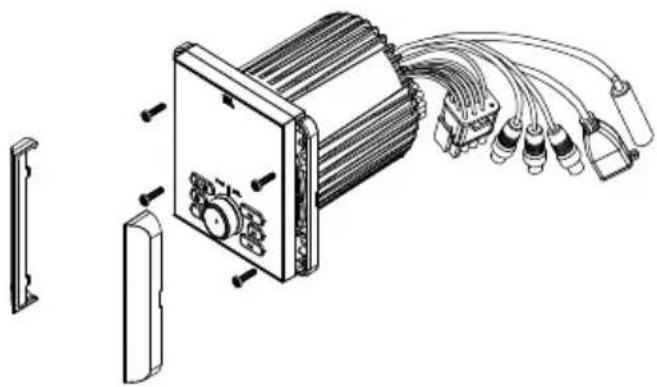
natural_image
Technical line drawing of an electronic device with attached cables and components (no text or symbols)Bass (Grave): -7dB - +7dB
Treble (Agudo): -7dB - +7dB
Pausar a reprodução
Max. operating temperature: 70°C
Fuse: 10A
Bluetooth profile Version: A2DP 1.3.2, AVRCP 1.5
Bluetooth transmitter frequency range: 2.4\~2.4835 GHz
Bluetooth Max. transmitting power: < 10dBm
Bluetooth transmitter modulation: GFSK, π/4-DQPSK, 8DPSK
Bluetooth Version: 5.3

Bluetooth®
The Bluetooth ^® word mark and logos are registered trademarks owned by the Bluetooth SIG, Inc. and any use of such marks by HARMAN International Industries, Incorporated is under license. Other trademarks and trade names are those of their respective owners.