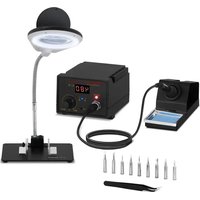
S-LS-12 - Welding machine Stamos - Free user manual and instructions
Find the device manual for free S-LS-12 Stamos in PDF.


| Product type | Soldering and desoldering station |
| Brand | Stamos |
| Model | S-LS-12 |
| Power supply | 230 V ~ 50 Hz |
| Power | 60 W (station), 65 W (iron) |
| Temperature range | 200 °C to 480 °C |
| Display | Temperature in °C or °F |
| Tip resistance | < 2 ohms |
| Tip voltage | < 2 mV |
| Temperature stability | ± 2 °C |
| Main functions | Soldering and desoldering of electronic components (SOIC, CHIP, QFP, PLCC, BGA, SMD, etc.) |
| Maintenance and cleaning | Clean the tip regularly with a damp sponge; replace the heating element and tip if necessary |
| Safety | Disconnect before cleaning; do not use near flammable gases; do not touch hot parts |
| Spare parts and repairability | Tips and heating elements replaceable; repairs by qualified personnel only |
| General information | Multi-language manual available; storage temperature: -20 °C to +80 °C; storage humidity: 35 to 45% |
Frequently Asked Questions - S-LS-12 Stamos
User questions about S-LS-12 Stamos
0 question about this device. Answer the ones you know or ask your own.
Ask a new question about this device
Download the instructions for your Welding machine in PDF format for free! Find your manual S-LS-12 - Stamos and take your electronic device back in hand. On this page are published all the documents necessary for the use of your device. S-LS-12 by Stamos.
USER MANUAL S-LS-12 Stamos
TECHNISCHES DATENBLATT
General safety information for the use of electrical devices:
To avoid injury from fire or electric shock, please ensure compliance with safety instructions when using this device. Please read the instruction carefully and make sure that you have understood it well. Keep the manual near the equipment to be able to read it at any time. Always use current sources connected to the ground and providing the necessary voltage (indicated on the label on the device). If you have any doubt, let an electrician check that your outlet is properly grounded. Never use a damaged power cable. Do not open the unit in damp or wet environment, or if you are wet yourself. Protect the unit of solar radiation. Use the device in a protected location to avoid damaging the equipment or endangering others. Make sure the device is able to cool and avoid placing it too close to other devices that produce heat. Before cleaning, disconnect it. Use a soft damp cloth for cleaning. Avoid using detergent and make sure that no liquid enters the unit. No internal element of this device needs to be maintained by the user. An opening of the device without our approval leads to a loss of warranty.
General safety information for the use of the device:
- The user manual should be kept close to the device and should always be accessible for the users. Instruct your employees how to use the device properly.
- Make sure the hot air can circulate well and place the device more than 10 cm away from walls and other electrical devices. Aerate well the working area.
- Do not place the device close to combustible materials.
- It may happen that by first use, the heating element produces a light smoke. This is absolutely normal. Simply check that the smoke can evaporate and that a good aeration is provided.
• Some parts of the device can get extremely hot. To avoid any injuries, be careful by every contact with the device. - Clean the device regularly to avoid a durable encrustation of dirt.
TECHCNICAL DETAILS
| Model 6111 S-LS-12 | |
| Voltage (V) 230 ~ 50Hz | |
| Rated current (A) I | |
| Power (W) 65 | |
| Work temperature ( 0C ) | 0/+40 |
| Storage temperature ( 0C ) | -20 / +80 |
| Storage humidity 35 - 45% | |
| SOLDERING IRON | |
| Output power (W) 60 | |
| Temperature range ( 0C ) | 200 - 480 |
| Tip resistance to ground < 2ohm | |
| Tip-to-ground voltage < 2mV | |
| Temperature stability ± 2 °C | |
USAGE PURPOSE
The device is designed for:
Different kind of soldering, de-soldering of the electronic components such as: SOIC, CHIP, QFP, PLCC, BGA, SMD, etc.
Any damage resulting from a non-conform use of the device is payable by the user!
- on / off switch
- soldering iron temperature setting knob
- temperature unit switch
- soldering iron temperature display
- working (heating) indicator
- soldering iron connection socket
BEFORE FIRST USE
Upon receipt of the goods, check the packaging for integrity and open it. If the packaging is damaged, please contact your transport company and distributor within 3 days, and document the damages as detailed as possible. Do not turn the package upside down! When transporting the package, please ensure that it is kept horizontal and stable. Please keep all packaging materials (cardboard, plastic tapes and styrofoam), so that in case of a problem, the device can be sent back to the service centre in accurate condition.
Disposing of packaging
The various items used for packaging (cardboard, plastic straps, polyurethane foam) should be conserved, so that the device can be sent back to the service center in best conditions in case of problem!
INSTALLING THE APPLIANCE
Appliance location
The work surface where the device will be located must be suitable for the size of the appliance, please refer to the measurements. The work surface must be levelled, dry, heat-resistant and at a fitting height from the ground to enable a proper use of the device.
The power cord connected to the appliance must be properly grounded and correspond to the technical details.
OPERATION
I. Device must be placed on stable work table, soldering iron must be placed into the holder.
2. Fix the appropriate soldering tip and connect the device to the power source.
3. Turn on the soldering iron with switch (1), it will start to heat.
4. Set the desired temperature using knob (2). Display (4) will show this temperature for a moment and then it will show the actual temperature of the soldering iron.
5. Heat indicator (5) lights during heating. When the soldering iron reaches the set temperature, indicator flashes regularly.
6. After work, the soldering iron should be placed into the holder. Turn off the soldering station by switch (1).
CHANGING THE TEMPERATURE DISPLAY UNITS
Switch (3) is designed for changing the temperature units between Celsius and Fahrenheit ( 0 C – Celsius, 0 F – Fahrenheit)
GENERAL REMARKS
I. If the display is showing "S-E" it means that soldering iron is disconnected.
2. When the device is being turned on, the soldering iron should be placed in the holder.
3. Good ventilation of the room in which the appliance is used must be provided. In addition, the device should be placed in a location with good air circulation to dissipate heat.
SAFETY ISSUES REMARKS
I. Tips can be changed when the soldering iron is completely cold.
2. It is forbidden to use the device near the flammable or combustible elements and objects or at similar places. Soldering iron tips have very high temperature, it is forbidden to touch these elements. This can cause serious burns.
3. Too high temperature of the soldering iron may be the cause of reduction of the functionality of the soldering tips.
4. Soldering iron tip must be cleaned regularly using sponge and plate on a layer of tin to prevent tips oxidation.
REPLACEMENT OF THE SOLDERING IRON TIP AND SOLDERING IRON HEATING CORE ELEMENT
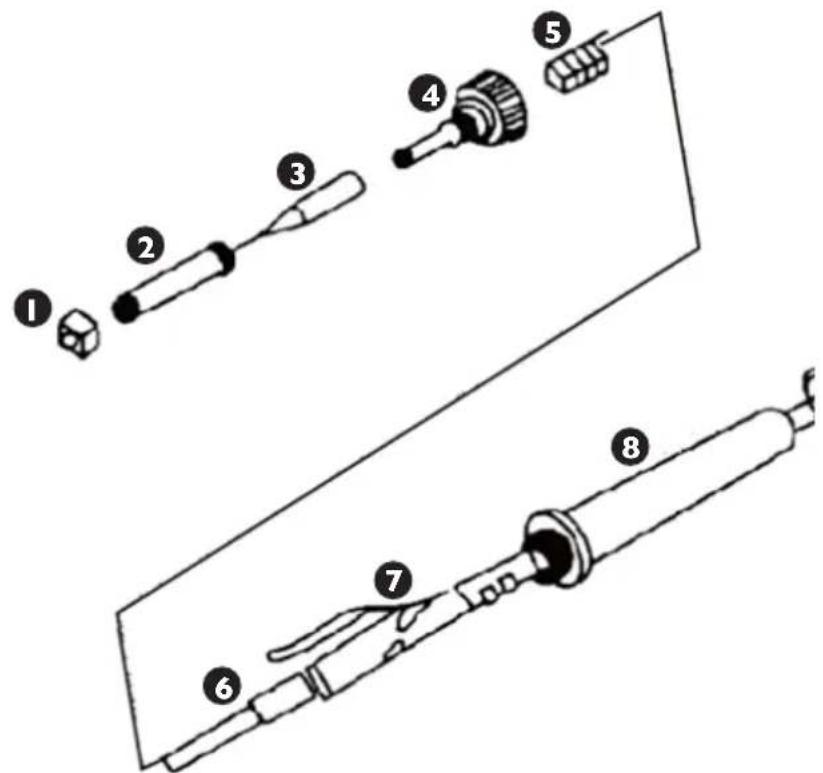
I. nut for mounting the soldering iron tip housing
2. soldering iron tip housing
3. soldering iron tip
4. plastic nut for mounting the heater and the board wires
5. spring
6. heater
7. wires board
8. handle
REGULAR CLEANING
Generalities
- Never clean the device with a pressurized water-jet, industrial cleaners, and brushes or any other type of cleaning utensil that could damage the surface of the appliance.
- Before cleaning you must remove the electricity supply plug isolating the appliance from the main power circuit.
REGULAR CONTROL OF THE DEVICE
Control regularly that the device doesn't present any damage. If it should be the case, please contact your customer service to solve the problem.
What to do in case of problem?
Please contact your customer service and prepare following information:
- Invoice number and serial number (the latest is to be found on the technical plate on the device).
- If relevant, a picture of the damaged, broken or defective part.
- It will be easier for your customer service clerk to determinate the source of the problem if you make a detailed and precise description of the matter. Avoid formulations like “the device doesn’t heat”, which may mean that it doesn’t heat enough or even not at all. Though, those two possibilities have a different causation!
The more detailed your information, the quicker the customer service will be able to answer your problem rapidly and efficiently!
CAUTION: Never open the device without the authorization of your customer service. This can lead to a loss of warranty!
IPL
ZALECENIA ODNOŚNIE BEZPIECZEŃSTWA
The image contains no text or symbols. Therefore, the correct OCR output is an empty string.
NORME DI SICUREZZA
Corriente nominal (A) I
Potencia (W) 65
Temperatura ambiental 0 - 40
We hereby certify that the appliances listed in this manual are CE compliant.
FR
For the disposal of the device please consider and act according to the national and local rules and regulations.
CONTACT

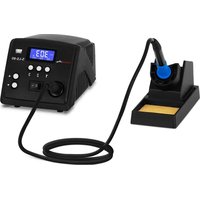

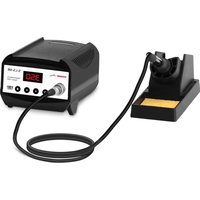

- USAGE PURPOSE
- BEFORE FIRST USE
- DISPOSING OF PACKAGING
- INSTALLING THE APPLIANCE
- APPLIANCE LOCATION
- OPERATION
- CHANGING THE TEMPERATURE DISPLAY UNITS
- GENERAL REMARKS
- SAFETY ISSUES REMARKS
- REPLACEMENT OF THE SOLDERING IRON TIP AND SOLDERING IRON HEATING CORE ELEMENT
- REGULAR CLEANING
- GENERALITIES
- REGULAR CONTROL OF THE DEVICE
- IPL
- ZALECENIA ODNOŚNIE BEZPIECZEŃSTWA
- THE IMAGE CONTAINS NO TEXT OR SYMBOLS. THEREFORE, THE CORRECT OCR OUTPUT IS AN EMPTY STRING
- NORME DI SICUREZZA
- FR
- CONTACT
Brand : Stamos
Model : S-LS-12
Category : Welding machine