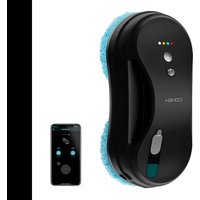
Windroid 880 SprayWater Connected T - Robot vacuum CECOTEC - Free user manual and instructions
Find the device manual for free Windroid 880 SprayWater Connected T CECOTEC in PDF.


| Product Type | Robot window cleaning vacuum |
| Brand | Cecotec |
| Model | Windroid 880 SprayWater Connected T (Conga WinDroid 880) |
| Reference | 05871 |
| Power | 90 W |
| Power Supply Voltage | 100-240 V ~, 50/60 Hz |
| Charger Included | Model WT120-2403750-T |
| Charging Time | Approximately 2 hours |
| Battery Life (UPS) | Up to 30 minutes |
| Operating Temperature | 0 °C to 75 °C |
| Cleaning Modes | Automatic (top-bottom, left-bottom, right-bottom), manual, dry, spray |
| Control | Mobile app (Connectivity) |
| Safety Cord | Included, to be attached before use |
| Cleaning Cloths Included | 12 washable and reusable cloths |
| Cleaning Rings Included | 4 rings |
| Cleaning Wheels Included | 1 pair |
| Recommended Use | Windows, glass, vertical flat surfaces (min. thickness 3 mm) |
| Safety | Safety cord, UPS system (uninterrupted power supply), automatic shutdown in case of failure |
| Maintenance | Clean with a soft, damp cloth; machine-washable cloths |
| Origin | Made in China, designed in Spain |
Frequently Asked Questions - Windroid 880 SprayWater Connected T CECOTEC
User questions about Windroid 880 SprayWater Connected T CECOTEC
0 question about this device. Answer the ones you know or ask your own.
Ask a new question about this device
Download the instructions for your Robot vacuum in PDF format for free! Find your manual Windroid 880 SprayWater Connected T - CECOTEC and take your electronic device back in hand. On this page are published all the documents necessary for the use of your device. Windroid 880 SprayWater Connected T by CECOTEC.
USER MANUAL Windroid 880 SprayWater Connected T CECOTEC
880 SPRAYWATER CONNECTED T
Robot limpiacristales / Window cleaning robot
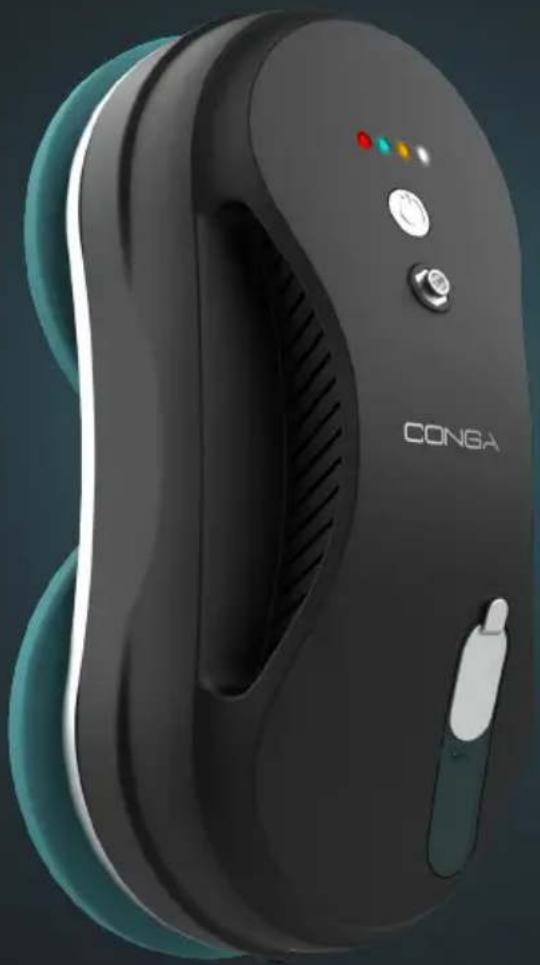
natural_image
Exterior view of a black and teal handheld device labeled 'CONGA' (no additional text or symbols visible)cecòtec
Safety instructions 8
-
Parts and components 47
-
Before use 47
-
Operation 48
-
Cleaning and maintenance 52
-
Troubleshooting 52
-
Technical specifications 54
-
Disposal of old electrical appliances 54
-
Technical support and warranty 55
-
Copyright 55
-
Declaration of conformity 55
SOMMAIRE
Read these instructions thoroughly before using the product. Keep this instruction manual for future reference or new users.
- Make sure that the mains voltage matches the voltage stated on the rating label of the appliance and that the wall outlet is grounded.
- This product is designed for household use only.
- Do not use it for industrial or commercial purposes.
- Check the power cord regularly for visible damage. If the cord is damaged, it must be replaced by the official Technical Support Service of Cecotec in order to avoid any type of danger.
- This product can only be assembled, disassembled and repaired by qualified personnel.
- Do not touch the cable, the power socket or the charger when your hands are wet.
- Keep the robot away from clothing, curtains and any other similar materials. Keep hair, fingers and other body parts away from the robot's openings.
- Do not sit or place heavy or sharp objects on top of the appliance or its cord.
- Do not operate the appliance close to heat sources, flammable substances, wet surfaces where it can fall or be pushed into water or allow it to come into contact with water or other liquids.
- The appliance can only be operated with the supplied battery and power adapter. The use of other components or accessories could cause risk of fire, electric shock or product damage. The charger included with this device is model WT120-2403750-T.
- Do not expose the device to excessive humidity or rain, and keep it away from liquids.
- Do not expose the device to direct sunlight, intense light or strong magnetic fields.
- Allow adequate ventilation around the adapter when using it to operate the device. Do not cover the power adapter with objects that could reduce cooling.
- To avoid risks, do not disassemble, short contact, incinerate or heat the battery above 60 °C.
- Make sure the product is not plugged in the power supply or on after every use and before carrying out any cleaning or maintenance task. To disconnect it, do not pull on the power cord. Instead, pull on the adapter.
- Do not twist, bend, strain, or damage the power cord. Do not place any heavy or sharpened objects on the cord, this could cause a fire or electrical shock.
- The device should not be unattended while it is connected to a power supply.
- The filling inlet must not be open during operation.
- The device should not be used if it has fallen, if there are any visible signs of damage or if it leaks.
- Keep the device out of reach of children when it is under tension or cooling down.
- Do not use the robot on frameless glass.
- Do not use the product on cracked glass. Reflective coating or glass may be slightly scratched due to dirt on the glass during operation.
- This appliance can be used by persons with reduced physical, sensory or mental capabilities or lack of experience and knowledge if they have been given supervision or instruction concerning the use of the appliance in a safe way and understand the hazards involved. Children must not play with the appliance.
- Supervise children, as they shall not play with the appliance.
Close supervision is necessary when the appliance is being used by or near children.
- It is not suggested to use it on glasses thicker than 3 mm.
- IMPORTANT: You cannot activate the robot without having secured the safety rope to a solid surface at home. After and before every use, you must check the safety rope is not damaged. You must also check it is properly secured and at the appropriate height to prevent the robot from falling.
Battery instructions
- Should a battery have leaked, do not allow your skin, eyes or mucous membranes to come into contact with the battery acid.
- WARNING: In case of contact with acid, rinse the affected areas with abundant fresh water immediately and seek medical help as soon as possible.
- Make sure the battery contacts in the device are clean before inserting batteries. if they are not, clean them.
- When replacing batteries, note the correct polarity (+/-).
- Remove the batteries from the device when they are discharged or when the window cleaning robot is not going to be used for some time.
- The battery must not be peeled, thrown into fire or short-circuited.
- Keep batteries out of the reach of children when there is a risk of ingestion.
- Battery ingestion can cause burns, soft tissue perforation and death. It can cause severe burns within two hours of the ingestion.
- In case of battery ingestion please seek medical help immediately.
INSTRUCTIONS DE SÉCURITÉ
Li-ion Rechargeable battery
14,8 V DC
600 mAh
Cargador:
Input: 100-240 V\~, 50/60 Hz 2.0 A
Output: 24 V DC 3, 75 A.
- Indicator lights:
- Red: Error
- Steady blue: Manual mode
- Flashing blue: Automatic mode
- Green: Fully charged
- Orange: Low battery/charging
- White: Connected to the power supply
- On/off
- Power connector
- Air outlet
- Filling inlet
- Sprayer
- Safety rope attachment hole
- Blue indicator. Normal operation
- Red indicator. Abnormal operation
NOTE:
The graphics in this manual are schematic representations and may not exactly match the product.
2. BEFORE USE
Box contents:
- Conga WinDroid 880 SprayWater Connected T robot.
- Charger.
- Power cord.
- Safety rope.
- 12 mops.
- 1 set of cleaning discs.
- 4 cleaning rings.
-
Instruction manual.
-
Take the product out of the box and remove all packaging materials.
- Make sure all parts and accessories are present and in good conditions. If there is any piece missing or not in good condition, immediately contact the Technical Support Service of Cecotec.
- Check if the safety rope is broken or the knot is loose.
ENGLISH
- Fasten the safety rope and tie to indoor fixture before operating the device.
- Make sure the battery is fully charged (green light indicator on).
- Turn the robot on before putting it onto the glass. Once on the glass, make sure it remains stuck before letting it go.
- Remove anything on the glass.
Warnings
- It is recommended to supervise the robot's operating during its first use in order to ensure it operates properly on the surface you wish to clean.
- The device should not be unattended while it is connected to a power supply.
- Always use the safety rope. Ensure its proper positioning and state.
If you wish to clean a surface with specific features and you are not sure if the robot will work properly, increase the precautions taken and supervise its operation.
Warning
Remember that the safety rope must be always used.
- Conga WinDroid 880 has been designed to clean every type of window, store window, or standard, flat, vertical surfaces.
- For safety reasons, it is recommended not to use the product under the following circumstances:
- Do not use the robot in windows or glass without frames.
- Do not use the robot on curved windows, both concave or convex.
- Do not use the robot in windows thinner than 3 mm.
- Do not use the robot in windows with a joint (silicone or rubber) between the frame and the glass with the following characteristics: the joint has an angle (a) under 45° and its distance to the frame (lb) is higher than 5 mm; the robot could become loose and fall. If the joint in your windows have these characteristics, do not use the robot.
3. OPERATION
Important
The robot must always be connected to the power supply in order to operate.
Connectivity
Fig. 2
Plug the power cord to the cable from the power adapter.
Plug the connector to the WinDroid and press the trigger.
Finally, plug the power cord to the electric circuit.
On/off
Fig. 3
Hold down the On/off button to turn the device on or off.
During operation, press the On/off button to pause or start the cleaning process.
How to charge the battery
Note
The WinDroid battery has a safety system which, in the event of a power failure, has a back-up of up to 30 minutes. The approximate back-up time (30 minutes) will depend on the current charge when the device stops receiving electrical power or on the previous work. Make sure your battery is completely charged before starting the device (green light).
- Turn off the switch, plug the power cord and the orange light will turn on, indicating it is charging the battery.
- When it is completely charged, the light will turn green.
- Charging time is approximately 2 hours. It can vary depending on the charging conditions (fully or not) and the product age.
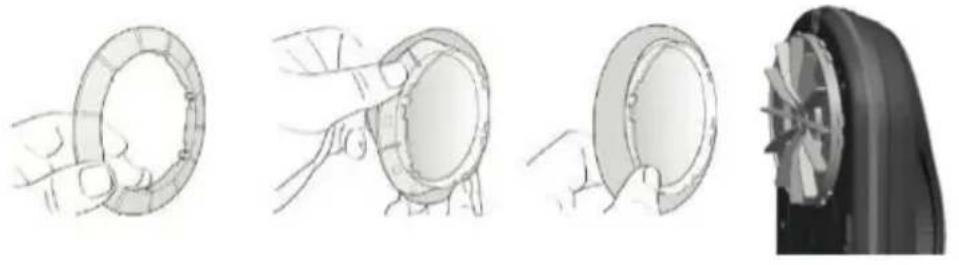
How to assemble the cleaning cloth and ring.
Fig. 4
- Assemble the cleaning cloth onto the ring.
- Place the ring in the cleaning disc. Make sure it is properly placed to avoid leakages.
How to activate the safety measures.
Before starting:
- To clean windows or glass doors without a balcony, you must place a safety warning for the persons near the objects.
- After every use, check the safety rope does not show any damage or faults. You must also check the wire from the safety rope is properly secured and at the appropriate height.
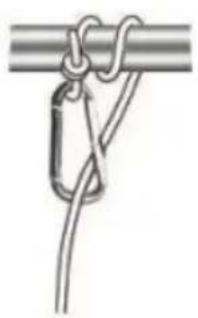
- Positioning the rope:
- Loosen the thread from the end of the rope and tighten it in the hole.
- Secure the safety rope before using the robot, ensuring it is tight. Place the hook from the other end of the rope to a fix and stable object at home to prevent risks. Male sure the rope height is appropriate to prevent risks in case of accidental dropping. Fig. 5
How to pour water/glass cleaner
Fig. 6
- Lift the silicone tab on the water tank, located on the upper part of the window cleaning robot.
- Pour the liquid. Use water or glass cleaner. Do not introduce any other liquid.
ENGLISH
- Close the tank by properly fixing the silicone tab.
How to place the Conga WinDroid robot on the glass/window
- Hold down the On/Off button for some seconds and make sure the fan is activated.
- Put the robot onto the glass or window. Keep it 10 cm away from the window frame.
- Make sure the robot stays firmly on the glass before releasing it.
Warning
Hold the robot with your hand before turning it off.
How to remove the Conga WinDroid robot from the glass/window
- When the cleaning is finished, hold the power cord tightly with one hand and detach the robot from the glass with the other.
- Turn the power switch off when the robot is left on a safe surface.
UPS (Uninterrupted Power System) function
- This safety system will be effective when the electric circuit fails. It provides up to 30-min autonomy depending on the charge level and the previous work.
- The product will stop operating automatically and the red light indicator will blink.
- Remove the robot from the glass as soon as possible. You can pull carefully from the safety rope to detach it.
Remember
The device should not be unattended while it is connected to a power supply.
Robot operation
App
- You can control the cleaning modes from the mobile app.
- Next, you will see the functions of every icon you will find.
 | Automatic cleaning mode - up and down |
 | Automatic cleaning mode - left and down |
 | Automatic cleaning mode - right and down |
 | Pause/Start |
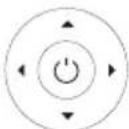 | Manual mode: up, down, left, right |
 | Automatic spray mode |
 | Manual spraying mode. |
Dry mode
The machine can operate in every mode without activating the spraying.
Spraying mode
To start the spraying you need to press Ⓐ or ⭕. If you select the automatic mode Ⓐ, the robot will automatically spray when it moves to the right. If you select the manual mode ⭕, you must press every time you wish the robot to spray.
Manual mode operation
- You must press every time you wish the robot to spray.
- You can also indicate the robot route by pressing the direction arrows.

Automatic mode
You can choose from 3 route modes:

Left-down

Right-down

Up-down.
- You can also select the automatic spraying mode Ⓐ. The robot will automatically spray the water tank when it moves to the right.
- Remember that the spray frequency has been stablished according to the natural operation of the device, so with the automatic mode, you will get good results.
ENGLISH
Cleaning instructions
Step 1. Dry cleaning Fig. 7
- For the first use, you must use the "dry mode". Do not activate the spray mode or spray water/glass cleaner. If the surface to be cleaned has too much sand, remove the sand previously.
- If the surface to be cleaned has a lot of sand, it could form mud when spraying. Cleaning would not have an optimum result.
- If you use the machine on sunny days or with low humidity, the dry mode will get better results.
Step 2. Spraying mode Fig. 8
- Choose the spraying mode. Select the automatic or manual cleaning mode, according to the desired spraying frequency or the areas to be cleaned.
- Remember that if the device cloths are too wet, you may not get the desired cleaning result. It is recommended to slightly moisten them.
4. CLEANING AND MAINTENANCE
- Use a soft, damp cloth to clean the product's outside surface.
- The cleaning cloths are washable and reusable.
- Do not immerse the product in water or put it under running water.
- Do not expose the robot to direct sunlight or high temperatures.
5. TROUBLESHOOTING
| Problem Cause | |
| The robot slips and cannot detect the upper window frame in Auto up and down mode. | Press stop and select the left-down cleaning mode to continue cleaning. |
| The robot does not finish cleaning the whole window and stops in the middle. | Press left and right buttons to continue cleaning. |
| The robot does not move smoothly or moves irregularly. | The cleaning cloth is too dirty. Clean it or replace it. Remove stickers or films on the window. The screw on the cleaning wheel is loose, tighten it. |
| After cleaning, the robot leaves a mark on the glass surface. | The cloth is too dirty or too wet. Clean it or replace it. |
| The robot has stopped operating due to power cut and it is too high to reach it. | Carefully pull from the safety rope and grab the robot.Turn off the power switch. |
| The robot has stopped operating and the red light indicator blinks. | Carefully pull from the safety rope and grab the robot.Make sure there are no obstacles on the window or glass. If there are any, remove them.Check if there is air leakage caused by a gap or uneven window frames.Check the power cord. |
| When the robot is turned on, the fan does not run and there is no alarm. | Check the red light in the low sensor and/or the surface of the device is on.Orange light without beep:Low battery, fully charge the robot. |
| Wen using the robot for the first time, it is slow or even fails. | Moisten the cleaning cloth with some water or glass cleaner directly on the cloth or glass. After the cleaning cloth is wet, place it in the machine's cleaning ring. |
| When activated it emits a failure signal. | The robot tests its operating when activated. If you notice that the friction is too long or too short, it will warn you of a fault. Possible reasons may be:The cloth is too dirty.The glass is too clean and the surface slips.If the glass is wet, the surface slips.There are stickers on the glass surface.Check the mains connection. |
| Possible reasons for the robot to slip and not climb. | Humidity, stickers...The cloth is too wet.The window is too clean.When humidity is very low (rooms with air conditioning).Do not respect the safety distance with the frame. |
| The robot does not work properly.Possible causes: | The cloth is too dirty.Different types of surfaces in the same cleaning area (sand area, stickers...)The screw does not make a good connection. |
| The robot does not spray water or glass cleaner. | Check the spray mode is activated.Clean the nozzle with a soft, clean cloth.Check the water tank is full. |
6. TECHNICAL SPECIFICATIONS
Product: Conga WinDroid 880 SprayWater Connected T
Product reference: 05871
90 W, 100-240 V\~, 50/60 HZ
Li-ion rechargeable battery
14.8 V DC
600 mAh
Charger:
Input: 100-240 V\~, 50/60 Hz 2.0 A
Output: 24 V DC 3,75 A.
Charging time: approximately 2 hours.
Autonomy up to 30 minutes (for mains failure)
Operating temperature: 0 °C\~75 °C
Technical specifications may change without prior notification to improve product quality.
Made in China | Designed in Spain
7. DISPOSAL OF OLD ELECTRICAL APPLIANCES
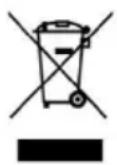
This symbol indicates that, according to the applicable regulations, the product and/or battery must be disposed of separately from household waste. When this product reaches the end of its shelf life, you should dispose of the batteries/accumulators and take them to a collection point designated by the local authorities.
Consumers must contact their local authorities or retailer for information concerning the correct disposal of old appliances and/or their batteries.
Compliance with the above guidelines will help to protect the environment.
8. TECHNICAL SUPPORT AND WARRANTY
Cecotec shall be liable to the end user or consumer for any lack of conformity that exists at the time of delivery of the product under the terms, conditions and deadlines established by the applicable regulations.
It is recommended that repairs be carried out by qualified personnel.
If at any moment you detect any problem with your product or have any doubt, do not hesitate to contact Cecotec official Technical Support Service at +34 963 210 728.
9. COPYRIGHT
The intellectual property rights over the texts in this manual belong to CECOTEC INNOVACIONES, S.L. All rights reserved. The contents of this publication may not, in whole or in part, be reproduced, stored in a retrieval system, transmitted or distributed by any means (electronic, mechanical, photocopying, recording or similar) without the prior authorization of CECOTEC INNOVACIONES, S.L.
10. DECLARATION OF CONFORMITY
Cecotec Innovaciones hereby declares this robot vacuum cleaner, model 05781 Conga WinDroid 880 SprayWater Connected T, complies with the Directive 2014/53/EU on radio equipment.
The complete text of the EU declaration of conformity is available in the following Internet address:
www.cecotec.es
FRANÇAIS
1. PIÈCES ET COMPOSANTS
Img. 1
Li-ion Rechargeable battery
FRANÇAIS
14,8 V DC
600 mAh
Chargeur :
Input. 100-240 V\~, 50/60 Hz 2.0 A
Output. 24 V DC 3,75 A.
Li-ion Rechargeable battery
14,8 V DC
600 mAh
Ladegerät:
Input. 100-240 V\~, 50/60 Hz 2.0 A
Output. 24 V DC 3, 75 A.
Li-ion Rechargeable battery
14,8 V DC
600 mAh
Caricabatterie:
Input: 100-240 V\~, 50/60 Hz 2.0 A
Output: 24 V DC 3, 75 A.
Li-ion Rechargeable battery
14,8 V DC
600 mAh
Carregador:
Input: 100-240 V\~, 50/60 Hz 2.0 A
Output: 24 V DC 3, 75 A.
5. PROBLEEMOPLOSSING
Product: Conga WinDroid 880 SprayWater Connected T
Li-ion Rechargeable battery
14,8 V DC
600 mAh
Lader:
Input: 100-240 V\~, 50/60 Hz 2.0 A
Output: 24 V DC 3, 75 A.
- Robot Conga WinDroid 880 SprayWater Connected T.
- ładowarka.
- Kabel.
Li-ion Rechargeable battery
14,8 V DC
600 mAh
Ładowarka:
Input. 100-240 V\~, 50/60 Hz 2.0 A
Output. 24 V DC 3, 75 A.
natural_image
Simple black circular icon with a white 'Power' symbol in the center (no text or numbers)Fig./Img./Abb./Afb./Rys./Obr. 3
natural_image
Illustration of four stages of a car wheel rim and wheel rim assembly (no text or symbols)Fig./Img./Abb./Afb./Rys./Obr. 4
natural_image
Simple line drawing of a rope knot with a hanging hook and rope (no text or symbols)Fig./Img./Abb./Afb./Rys./Obr. 5

natural_image
Line drawing of a handheld electronic device with a mesh chamber and control buttons (no text or symbols)Fig./Img./Abb./Afb./Rys./Obr. 6
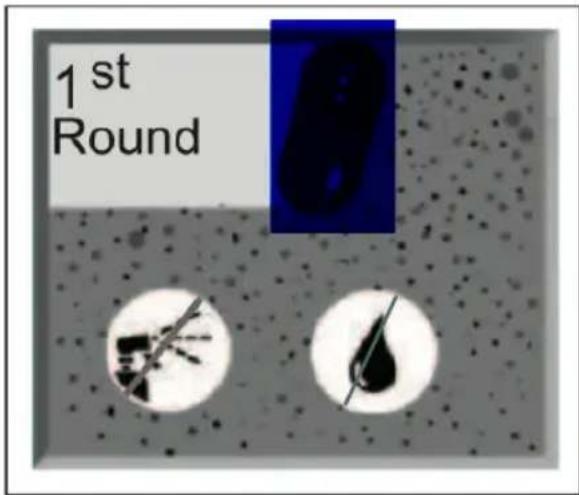
Fig./Img./Abb./Afb./Rys./Obr. 7
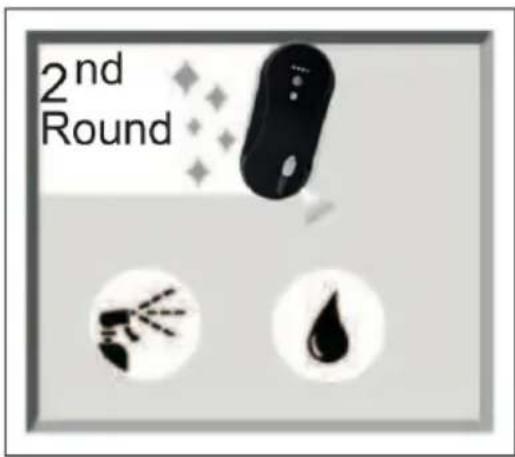
Fig./Img./Abb./Afb./Rys./Obr. 8
www.cecotec.es
Quart de Poblet, Valencia (Spain)
YV_01220803
- SOMMAIRE
- Battery instructions
- INSTRUCTIONS DE SÉCURITÉ
- NOTE:
- BEFORE USE
- Box contents:
- ENGLISH
- Warnings
- Warning
- OPERATION
- Important
- Connectivity
- On/off
- How to charge the battery
- Note
- How to assemble the cleaning cloth and ring.
- How to activate the safety measures.
- How to pour water/glass cleaner
- How to place the Conga WinDroid robot on the glass/window
- How to remove the Conga WinDroid robot from the glass/window
- UPS (Uninterrupted Power System) function
- Remember
- Robot operation
- App
- Dry mode
- Spraying mode
- Manual mode operation
- Automatic mode
- Cleaning instructions
- Step 1. Dry cleaning Fig. 7
- Step 2. Spraying mode Fig. 8
- CLEANING AND MAINTENANCE
- TROUBLESHOOTING
- TECHNICAL SPECIFICATIONS
- DISPOSAL OF OLD ELECTRICAL APPLIANCES
- TECHNICAL SUPPORT AND WARRANTY
- COPYRIGHT
- DECLARATION OF CONFORMITY
- FRANÇAIS
- PIÈCES ET COMPOSANTS
- Img. 1
- PROBLEEMOPLOSSING
Brand : CECOTEC
Model : Windroid 880 SprayWater Connected T
Category : Robot vacuum