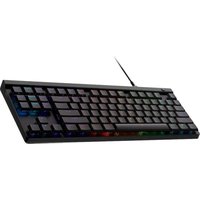
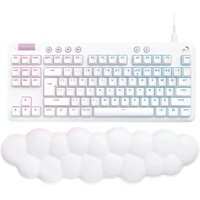
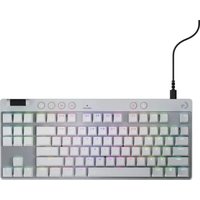
G515 TKL - Keyboard LOGITECH - Free user manual and instructions
Find the device manual for free G515 TKL LOGITECH in PDF.
User questions about G515 TKL LOGITECH
0 question about this device. Answer the ones you know or ask your own.
Ask a new question about this device
Download the instructions for your Keyboard in PDF format for free! Find your manual G515 TKL - LOGITECH and take your electronic device back in hand. On this page are published all the documents necessary for the use of your device. G515 TKL by LOGITECH.
USER MANUAL G515 TKL LOGITECH

text_image
Black-and-white image of a computer keyboard with visible function keys and control buttons
logitech


text_image
CUC F1 F2 F3 F4 F5 F6 F7 F8 F9 F10 F11 F12 - 1 1 2 3 4 5 6 7 8 9 10 11 12 TAB Q W E R T Y U I G P [ I ] 1 CAN A S D F G H J K L : - * ←2 SHIFT Z X C V B N M + - / ↑ SHIFT CTRL ■ ALT ALF FN ME CTRL 4 * P
natural_image
Pure electrical circuit lines without any symbolsENGLISH....3
DEUTSCH....6
FRANÇAIS 9
ITALIANO....12
ESPAÑOL 15
PORTUGUÊS .....18
NEDERLANDS 21
SVENSKA 24
DANSK 27
NORSK....30
SUOMI 33
ΕΛΛΗΝΙΚΑ....36
ПО-РУССКИ ..... 39
PO POLSKU 42
MAGYAR....45
48 ...... ۶۱۰۲۵۴
ČESKÁ VERZE....51
SLOVENČINA....54
УКРАЇНСЬКА....57
EESTI 60
LATVISKI....63
LIETUVIŲ 66
БЪЛГАРСКИ....69
HRVATSKI....72
SRPSKI 75
SLOVENŠČINA....78
ROMÂNĂ 81
TÜRKÇE 84
87 ......العربيya
90
SETTING UP
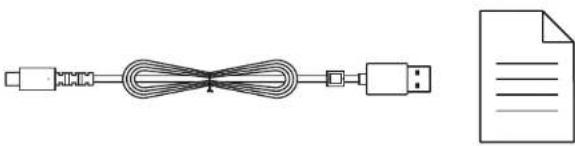
1 Use the cable inside the box to connect the keyboard with your PC USB port.

flowchart
graph LR
A["Input: Keyboard"] --> B["Processing Unit"]
B --> C["Output: Computer"]
2 Download and install G HUB software to your PC/MAC for the best gaming experience (G HUB has onboarding story for features). Go to www.logitechG.com/ghub

text_image
logitechG.com/ghubGAME MODE
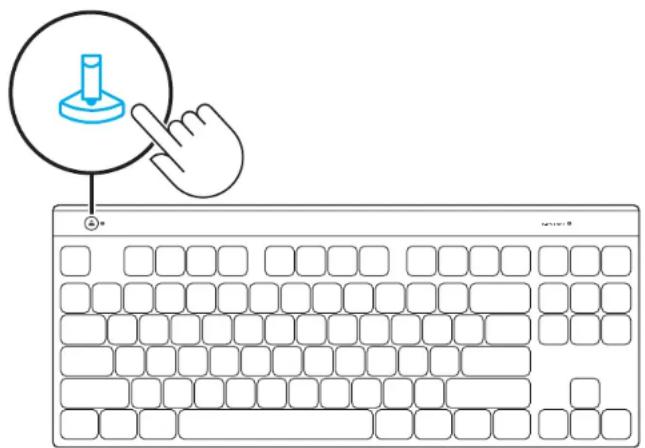
Pressing the Game mode button blocks the Windows and Menu keys when pressed.
Additional keys can be blocked using G HUB software.
text_image
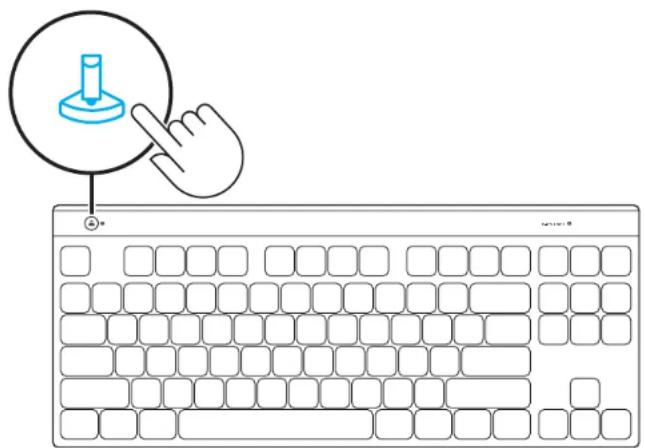
Illustration of a hand pointing at a keyboard with a blue icon and a cursor pointer, symbolizing typing or editing.FULL KEY CUSTOMIZATION
Use FN+A to activate your KEYCONTROL, then you can start to use the Remap key you have assigned in Ghub.
| FN + A | Activate the Full Key Customization layout |
FN CONTROL
Media Controls
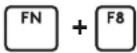
![]() | Brightness Control(5 Level Rotation) |
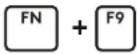
![]() | Play/Pause |
![]() | Stop |
![]() | Previous Track |
![]() | Next Track |
![]() | Mute |
![]() | Volume down |
![]() | Volume Up |
Lighting Brightness Control
| FN + F8 | Brightness Degree |
EINRICHTUNG
text_image
Illustration of a hand pointing at a keyboard with a blue icon and a cursor pointer, symbolizing typing or editing.VOLLE TASTENANPASSUNG
text_image
Illustration of a hand pointing at a computer keyboard with a blue icon and 'OK' button, symbolizing navigation or function.PERSONNALISATION COMPLÈTE DES TOUCHES
text_image
Illustration of a hand pointing at a computer keyboard with a blue icon and 'OK' button, symbolizing typing or navigation.PERSONALIZZAZIONE COMPLETA DEI TASTI
text_image
Illustration of a hand pointing at a keyboard with a blue icon and a cursor pointer, symbolizing typing or editing.text_image
Illustration of a hand pointing at a computer keyboard with a blue icon and 'OK' button, symbolizing navigation or function.VOLLEDIGE TOETSAANPASSING
natural_image
Line drawing of a laptop with a download icon on the screen (no text or symbols)logitechG.com/ghub
SPELLÄGE
text_image
Illustration of a hand pointing at a keyboard with a blue icon and a cursor pointer, symbolizing typing or editing.FULLSTÄNDIG KNAPPANPASSNING
text_image
Illustration of a hand pointing at a keyboard with a blue icon and a cursor pointer, symbolizing typing or editing.BRUG AF OMPROGRAMMERDE TASTER
text_image
Illustration of a hand pointing at a keyboard with a blue icon and a cursor pointer, symbolizing typing or editing.FULL TASTETILPASNING
Bruk FN+A for å aktivere KEYCONTROL. Da kan du bruke Remap-tasten du har tilordnet i Ghub.
text_image
Illustration of a hand pointing at a keyboard with a blue icon and a cursor pointer, symbolizing typing or editing.TÄYSI NÄPPÄINTEN RÄÄTÄLÖINTI
text_image
Illustration of a hand pointing at a keyboard with a blue icon and a cursor pointer, symbolizing typing or editing.text_image
Illustration of a hand pointing at a keyboard with a blue icon and a cursor pointer, symbolizing typing or editing.PEŁNA PERSONALIZACJA KŁAWISZY
text_image
Illustration of a hand pointing at a keyboard with a blue icon and a cursor pointer, symbolizing typing or editing.TELJES BILLENTYÜ-TESTRESZABÁS
natural_image
Line drawing of a laptop with a download icon on the screen (no text or symbols)logitechG.com/ghub
九十 بازى
text_image
Illustration of a hand pointing at a computer keyboard with a blue circular icon highlighting the key area.text_image
Illustration of a hand pointing at a keyboard with a blue icon and a cursor pointer, symbolizing typing or editing.ÚPLNÉ PŘIZPŮSOBENÍ KLÁVES
natural_image
Line drawing of a laptop with a download icon on the screen (no text or symbols)logitechG.com/ghub
HERNÝ REŽIM
text_image
Illustration of a hand pointing at a keyboard with a blue icon and a cursor pointer, symbolizing typing or editing.ÚPLNÉ PRISPÔSOBENIE KLÁVESOV
text_image
Illustration of a hand pointing at a keyboard with a blue icon and a cursor pointer, symbolizing typing or editing.text_image
Illustration of a hand pointing at a keyboard with a blue icon and a cursor pointer, symbolizing typing or editing.PILNĪGA TAUSTIŅU PIELĀGOŠANA
Nospiediet FN+A, lai aktivizētu "KEYCONTROL". Tad varat säkt lietot "G HUB" programmatūrā pieškirto "Remap" taustinu.
text_image
Illustration of a hand pointing at a keyboard with a blue icon and a cursor pointer, symbolizing typing or editing.VISIŠKAS KLAVIATŪROS TINKINIMAS
text_image
Illustration of a hand pointing at a computer keyboard with a blue icon and 'OK' button, symbolizing typing or navigation.natural_image
Simple line drawing of a laptop with a download icon on the screen (no text or symbols)logitechG.com/ghub
NAČIN RADA ZA IGRANJE
Pritiskom gumba načina rada za igranje blokiraju se tipke za Windows i izbornik kada se pritisnu.
Dodatne tipke mogu se blokirati uz pomoć G HUB softvera.

text_image
Illustration of a hand pointing at a keyboard with a blue icon and a cursor pointer, symbolizing typing or editing.PUNA PRILAGODBA TIPKI
text_image
Illustration of a hand pointing at a keyboard with a blue icon and a cursor pointer, symbolizing typing or editing.POTPUNO PRILAGOĐAVANJE TASTERA
Koristite FN+A da aktivirate KEYCONTROL, nakon čega možete početi da koristite taster za ponovno mapiranje dodeljen u softveru Ghub.
| FN + A | Aktivirajte raspored potpunog prilagođavanja tastera |
FN KONTROLA
Medijske komande
Kontrola osvetljenosti osvetljenja
![]() | Kontrola osvetljenosti (5 stepena rotacije) |
![]() | Reprodukcija/pauza |
![]() | Zaustavljanje |
![]() | Prethodna numera |
![]() | Sledeća numera |
![]() | Isključivanje zvuka |
![]() | Utišavanje zvuka |
![]() | Pojačavanje zvuka |
| FN + F8 | Stepen osvetljenosti |
NASTAVITEV
1 S kablom v škatli povežite tipkovnico z vhodom USB računalnika.

flowchart
graph LR
A["Input: Keyboard"] --> B["Processing Unit"]
B --> C["Output: Tablet"]
text_image
Illustration of a hand pointing at a keyboard with a blue icon and a cursor pointer, symbolizing typing or editing.POPOLNA PRILAGODITEV TIPK
text_image
Illustration of a hand pointing at a computer keyboard with a blue icon and 'OK' button, symbolizing navigation or function.PERSONALIZARE COMPLETĂ A TASTELOR
text_image
Illustration of a hand pointing at a keyboard with a blue icon and a cursor pointer, symbolizing typing or editing.natural_image
Simple line drawing of a laptop with a download icon on the screen (no text or symbols)logitechG.com/ghub
وضع الألعاب
text_image
Illustration of a hand pointing at a computer keyboard with a blue icon and a cursor pointer, symbolizing typing or editing.©2024 Logitech, Logitech, Logitech G, Logi and their respective logos are trademarks or registered trademarks of Logitech Europe S.A. and/or its affiliates in the U.S. and other countries. All other trademarks are the property of their respective owners. Logitech assumes no responsibility for any errors that may appear in this manual. Information contained herein is subject to change without notice.
WEB-621-002482 002