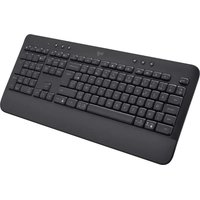
MK543 - Keyboard LOGITECH - Free user manual and instructions
Find the device manual for free MK543 LOGITECH in PDF.


Pick your language and provide your email: we'll send you a specifically translated version.
| Product Type | Wireless Keyboard |
| Brand | Logitech |
| Model | MK543 |
| Dimensions (W x D x H) | Approx. 440 x 140 x 20 mm |
| Weight | Approx. 430 g (with batteries) |
| Power Source | 2 x AAA alkaline batteries (included) |
| Battery Life | Up to 24 months (based on usage) |
| Wireless Range | Up to 10 m |
| Wireless Technology | Logitech Advanced 2.4 GHz |
| Key Type | Membrane with scissor mechanism |
| Number of Keys | 104 (US layout) |
| Special Keys | Hotkeys: media control, volume, mute, calculator, sleep |
| Compatible Systems | Windows 7/8/10/11, macOS, Linux, Chrome OS |
| Connection Type | USB receiver (Logitech Unifying) |
| Maintenance | Clean with a soft, damp cloth; avoid liquids |
| Safety Warnings | Keep away from water; do not disassemble; use only specified batteries |
| Spare Parts | Batteries, USB receiver (compatible with Logitech Unifying) |
| Repairability | Not user-serviceable; contact Logitech support |
Frequently Asked Questions - MK543 LOGITECH
How do I pair the MK543 keyboard with my computer?
Simply plug the included Logitech Unifying USB receiver into a USB port on your computer. The keyboard will automatically pair. If not, press the Connect button on the receiver and then on the keyboard (under the battery cover).
What batteries does the MK543 use?
The keyboard requires 2 AAA alkaline batteries (included). For best performance, use high-quality alkaline batteries.
How long does the battery last?
Battery life is up to 24 months, depending on usage. The keyboard has an on/off switch to extend battery life.
Can I use the MK543 with multiple computers?
Yes, if you have a Logitech Unifying receiver that supports multiple devices. Otherwise, you need to move the receiver between computers. The keyboard does not have multi-device Bluetooth.
Is the keyboard compatible with macOS?
Yes, the MK543 works with macOS. Some special keys like Command and Option are supported.
How do I clean the keyboard?
Unplug the receiver and turn off the keyboard. Use a soft, slightly damp cloth to wipe the surface. Do not use solvents or immerse in water. Shake out debris gently.
What is the wireless range?
The keyboard has a wireless range of up to 10 meters (30 feet) in typical usage conditions.
Can I replace the USB receiver if lost?
Yes, you can buy a replacement Logitech Unifying receiver. Visit Logitech's website or contact support. You may need to re-pair the keyboard.
Why are some keys not working?
Check if the keyboard is turned on and has fresh batteries. Ensure the USB receiver is properly plugged in. Try re-pairing. If issues persist, contact Logitech support.
What is the warranty for the MK543?
Logitech offers a 1-year limited hardware warranty. For details, visit the Logitech website.
User questions about MK543 LOGITECH
0 question about this device. Answer the ones you know or ask your own.
Ask a new question about this device
No questions yet. Be the first to ask one.
Download the instructions for your Keyboard in PDF format for free! Find your manual MK543 - LOGITECH and take your electronic device back in hand. On this page are published all the documents necessary for the use of your device. MK543 by LOGITECH.
USER MANUAL MK543 LOGITECH


Manual assistant
Powered by Anthropic
Waiting for your message
Product information
Brand : LOGITECH
Model : MK543
Category : Keyboard