40040 - Toilet Trixie - Free user manual and instructions
Find the device manual for free 40040 Trixie in PDF.


User questions about 40040 Trixie
0 question about this device. Answer the ones you know or ask your own.
Ask a new question about this device
Download the instructions for your Toilet in PDF format for free! Find your manual 40040 - Trixie and take your electronic device back in hand. On this page are published all the documents necessary for the use of your device. 40040 by Trixie.
USER MANUAL 40040 Trixie
natural_image
Line drawing of a circular appliance with a lid and control panel (no text or symbols)DE Selbstreinigende Katzentoilette Gebrauchsanweisung
EN Self-Cleaning Cat Litter Box Instructions
FR Litière auto-nettoyante pour chats
Mode d'emploi
NL Zelfreinigende kattenbak
Handleiding
IT Lettiera autopulente per gatti
Istruzioni
SV Självrengörande Kattlåda
Instruktioner
ES WC de limpieza automática para gatos
Instrucciones
RU Самоочищающийся туалет для кошек
Инструкция
natural_image
Illustration of a washing machine with a prohibition symbol (no text or labels)natural_image
Illustration of a device with a prohibition sign, showing airflow and motion (no text or symbols)natural_image
Line drawing of a circular appliance with a lid and control buttons (no text or symbols)Verwendungszweck
natural_image
Diagram of a cylindrical device with a meshed top and a base, showing internal structure and directional arrow (no text or symbols)
natural_image
Diagram of a washing machine with arrows indicating force or motion (no text or symbols)
natural_image
Diagram of a refrigerator interior with internal compartments and a close-up of a cable (no text or symbols)
natural_image
Line drawing of a portable electronic device with a cable and indicator lights, no text or symbols present
natural_image
Technical line drawing of a mechanical device with internal components and directional arrows (no text or symbols)1
natural_image
Line drawing of a mechanical device with internal components and directional arrows (no text or symbols)2
natural_image
Diagram of a container being placed on top, showing internal structure and downward force arrow (no text or symbols)3
text_image
Technical diagram of a device interior with labeled components and directional arrows indicating flow or movement.4
text_image
Diagram illustrating a food waste sorting process with labeled steps: bag dropping into trash bin, tray holding lid, and cake being placed.1
natural_image
Hand pointing at a computer control panel with icons, next to a circular icon labeled 'Waste' (no text or symbols on the diagram itself)2
text_image
Diagram illustrating a food waste sorting process with labeled steps: dropping into a trash bin and splitting into a rectangular container.3
text_image
Technical diagram of a mechanical device with numbered components and directional arrows indicating motion or flow.1
text_image
Diagram showing two safety symbols: one with a hand cleaning a device, the other without a leaf symbol.5
natural_image
Illustration of a hand cleaning a washing machine with water splashing (no text or symbols)2
natural_image
Diagram of a mechanical device with arrows indicating motion or operation, no text or symbols present6
natural_image
Diagram showing a hand inserting a component into a cylindrical device, with no visible text or symbols.3
natural_image
Illustration of a hand placing a lid onto a cylindrical container with liquid at the base (no text or symbols)4
Part I Important Safety Instructions
Part II Product Introduction
2.1 Product Structure
2.2 Control Panel
2.3 Status Indicators
Part III Installation and Operation
3.1 Setting Up
3.2 Turn On
3.3 Replacing Litter Box Liner
3.4 Replacing Litter
3.5 Care and Cleaning
Part IV Functional Parameters
4.1 Multiple Protection Mechanism
4.2 Specifications
Part V Troubleshooting
Part I Important Safety Instructions
Read all instructions before use and save for future reference.

text_image
> 3 lbsCat or kitten must weigh at least 3lbs and age 4 months or more to safely use the litter box.
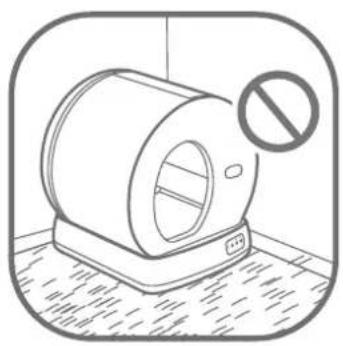
natural_image
Illustration of a shower unit with a prohibition symbol (no text or labels)DO NOT place on carpet. Place on a firm, level surface with a little space around.
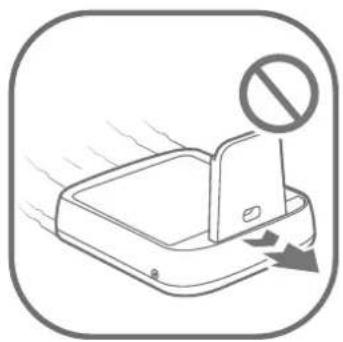
natural_image
Illustration of a device with a prohibition symbol above it, showing airflow or heat transfer (no text or symbols present)DO NOT drag when moving the litter box. Move by lifting the base with both hands.
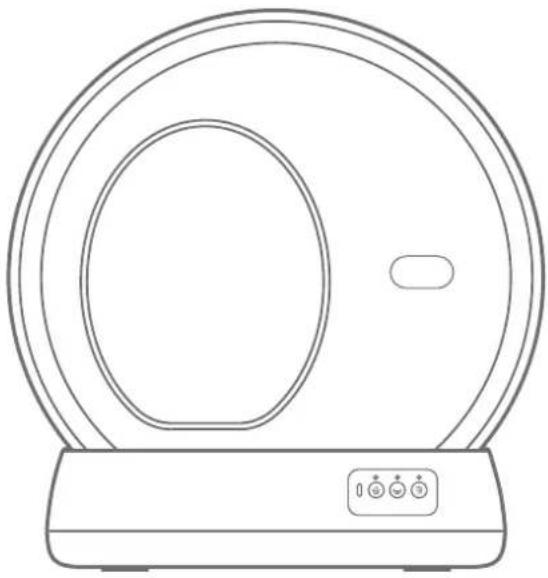
natural_image
Line drawing of a circular appliance with a lid and control panel (no text or symbols)Intended use
- Close supervision is necessary when any appliance is used by or near children. Children should be supervised to ensure that they do not play with, in or around the appliance.
- Use the appliance only for intended household purposes as described in this User Manual.
Electricity safety
- DO NOT operate the appliance if it has a damaged power cord or plug, or if it is malfunctioning or has been damaged in any manner.
- DO NOT use an external power supply other than the one provided with the appliance.
- DO NOT wet or submerge the bonnet or base, or allow moisture to come into contact with these parts.
• Always unplug when not in use, before putting on or taking off parts and before cleaning.
Related to use
Always place the litter box on a firm, level surface. Avoid soft, uneven, or unstable flooring, which may affect the ability of the unit to detect your cat. If using litter mats or rugs, place in front of, or completely under, the unit. Do not place mats partially under the unit.
- Keep indoors in a cool, dry location. Reduce exposure to high temperature and humidity.
- Clean up the waste bin before replacing the litter.
• Make sure the deodorization cover is not stuck. - DO NOT continue pushing the cover when already opened to the max.
• DO NOT sit on or place anything on top of the litter box. - DO NOT put anything in the unit other than clumping litter or litter beads and crystals that are small enough to pass through the filter.
• DO NOT force your cat into the litter box. - DO NOT open the top cover while the litter box is rotating.
- DO NOT attempt to disassemble, repair, modify or replace any part of your product. All servicing should be performed by qualified personnel only. No user serviceable parts inside.
- Dispose of all packaging materials properly. Keep away from children and pets.
• Always wash hands thoroughly after removing the waste. Pregnant women and those with suppressed immune systems should note that a parasite sometimes found in cat feces could cause toxoplasmosis. - How often you will need to replace the litter box liner depends on the number and size of your cats. We recommend to replace every 3 to 5 days to avoid bacteria growth.
Part II Product Introduction
2.1 Product Structure
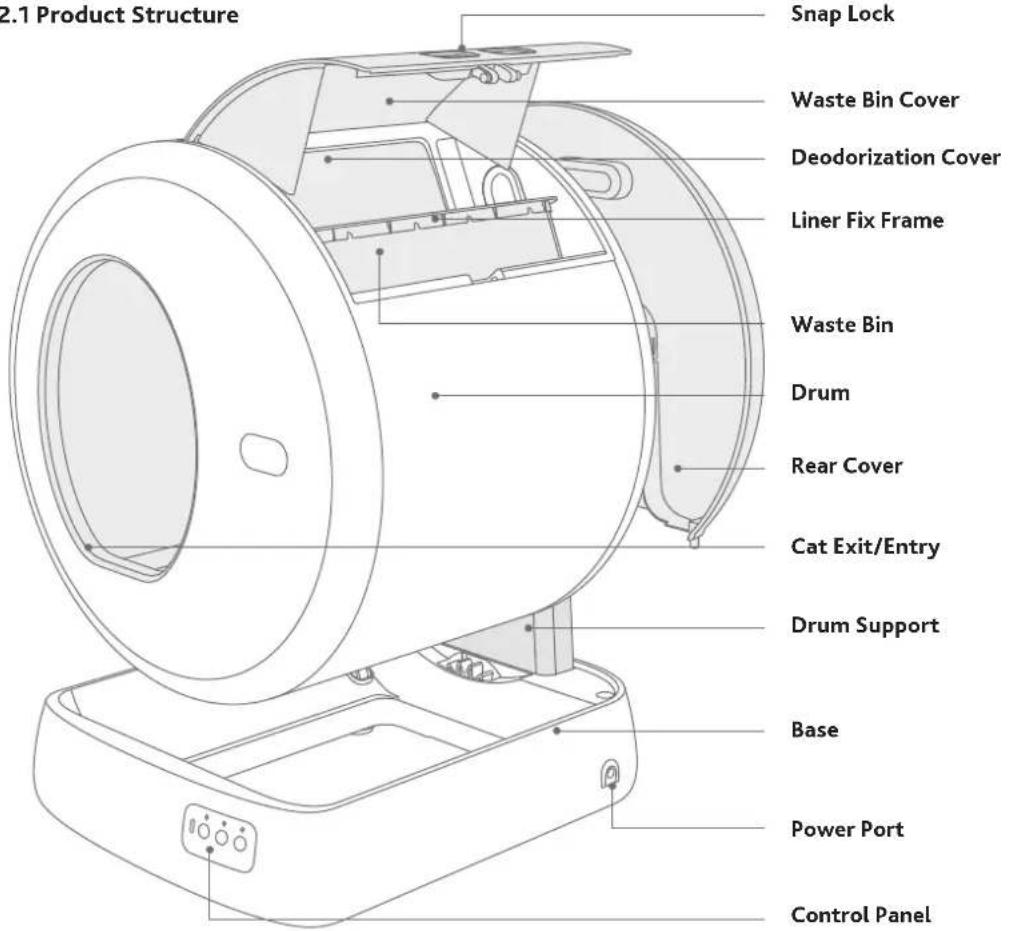
text_image
2.1 Product Structure Snap Lock Waste Bin Cover Deodorization Cover Liner Fix Frame Waste Bin Drum Rear Cover Cat Exit/Entry Drum Support Base Power Port Control Panel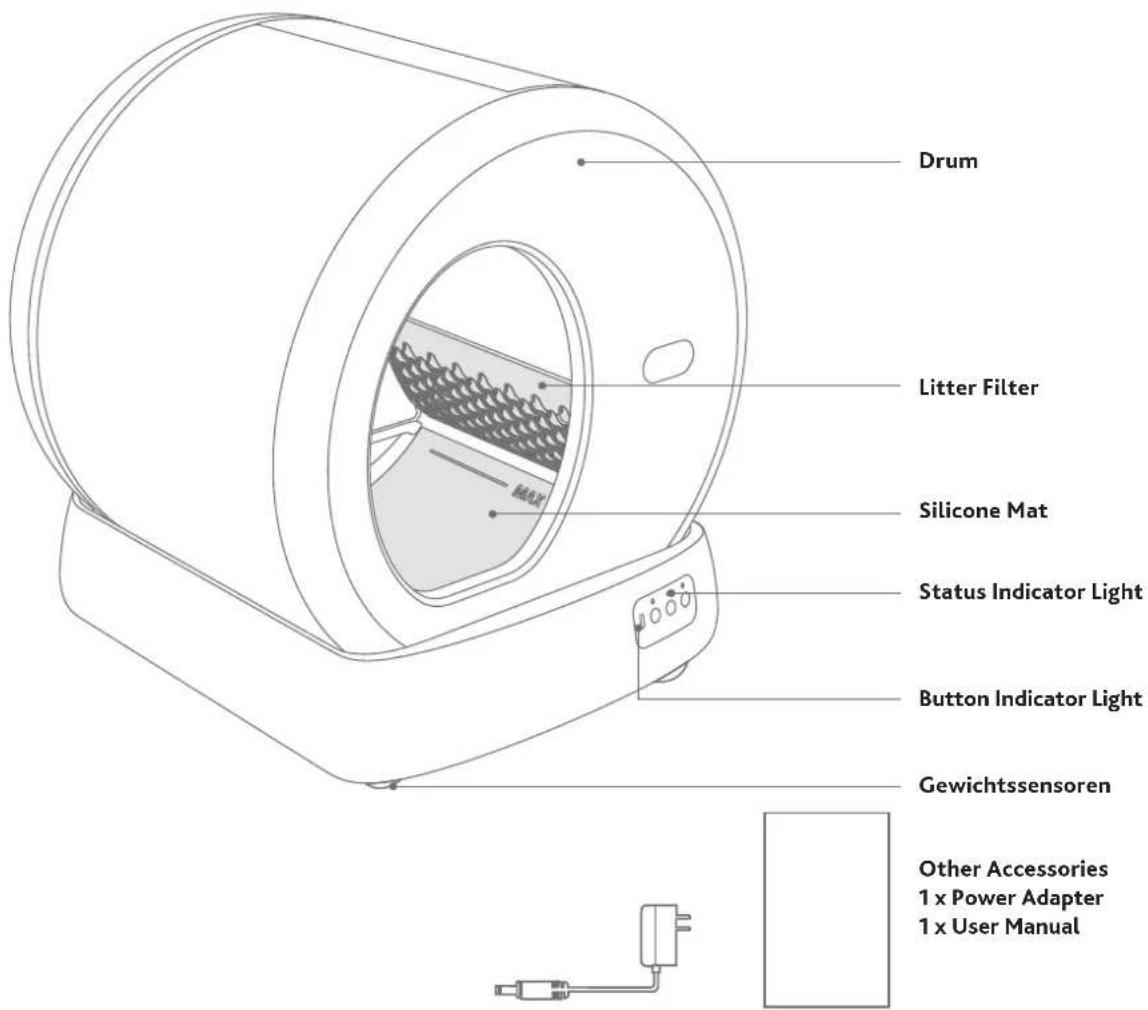
text_image
Drum Litter Filter Silicone Mat Status Indicator Light Button Indicator Light Gewichtssensoren Other Accessories 1 x Power Adapter 1 x User Manual2.2 Control Panel
For all button indicators: When the selected process is engaged, the corresponding indicator stays solid on. If paused, it will flash.

Clean: Press once to start a cleaning cycle. If already started, press it again to pause.

Flatten: Press once to start spreading the litter flat. If already started, press it again to pause.

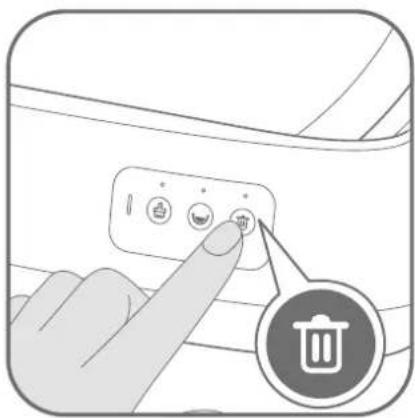
Replace: Hold for 3s to start emptying the litter. If already started, press it once to pause or resume.
Child Lock: Press twice to lock or unlock (status indicator flashes green twice)
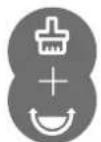
Restore to Factory Settings: Hold 📁 and 😊 simultaneously for 5s to restore to factory settings.
2.3 Status Indicators
| Status Indicators | Button Indicators○○○ | Function description |
| Solid Blue Firmware | ☑ ☑ ☑ | Ready for use or working | |
| upgrading | ||
| Flashing | Restoring to factory settings | |
| Solid Green | Cat / weight detected when stationary | |
| Flashing Green | Drum returning to Home position | |
| Flashing Green Twice | Child Lock on/off | |
| Solid Red | Clean / Flatten / Replace paused | |
| Cat / weight detected when rotating | ||
| Foreign object approached when rotating | ||
| Rear cover opened | ||
| Flashing | Drum not in place | |
| Motor error |
Part III Installation and Operation
3.1 Setting Up
Place the litter box indoors on a firm, level surface and in a cool, dry location. Do not touch any walls. Leave a little space around.
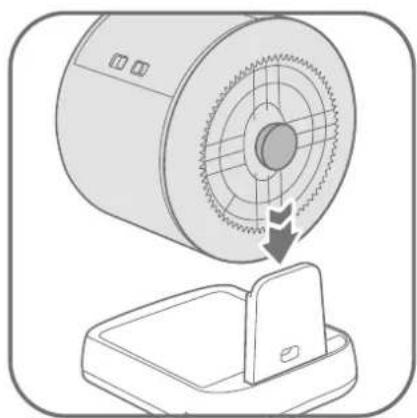
natural_image
Diagram of a cylindrical device with a mesh center and an attached base, showing a downward arrow indicating rotation or change (no text or symbols present)
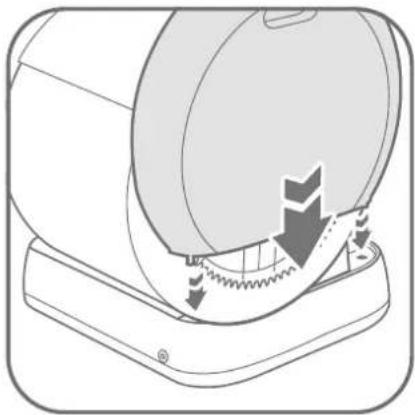
Place the drum on the base.
Note: The rotating shaft of the drum should be inserted into the slot of the base support.
natural_image
Diagram of a washing machine with arrows indicating process flow (no text or symbols)
Insert the rear cover into the slot of the base.
3.2 Turn On
natural_image
Diagram of a refrigerator interior with internal compartments and a close-up of a cable (no text or symbols)
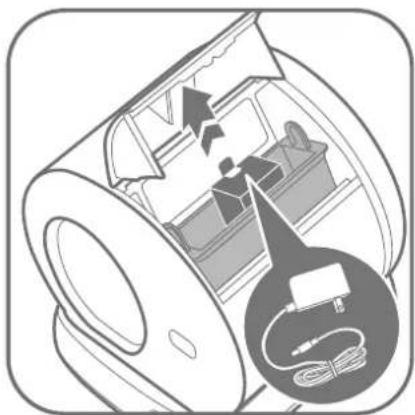
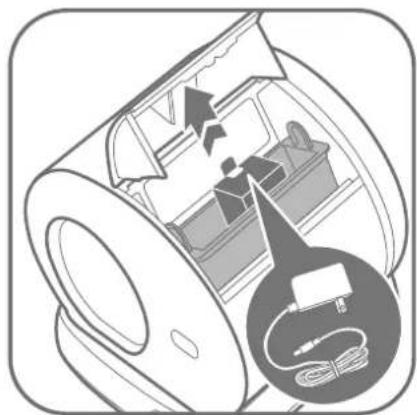
Open the waste bin cover to take out adapter, plug adapter in the litter box.
natural_image
Line drawing of a portable electronic device with a cable and indicator lights, no text or symbols present
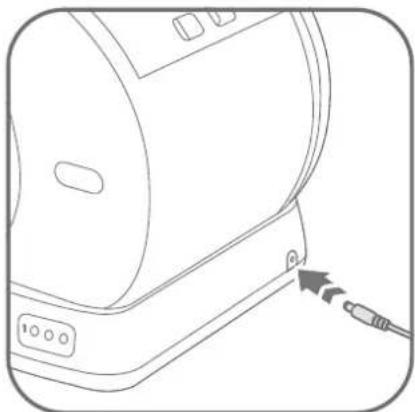
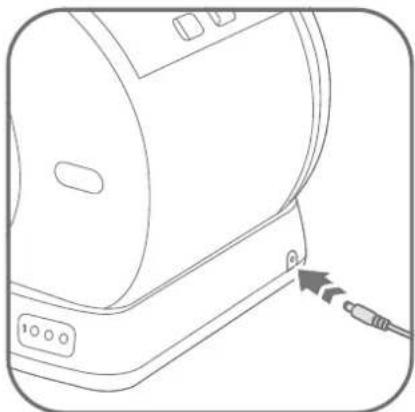
Plug in the litter box. The drum will rotate a full circle automatically. Wait for it to return to Home position, then the unit is ready for use.
Make sure the cable is not stuck in the rotating shaft. Keep the cable away from cats.
3.3 Replacing Litter Box Liner
How often you will need to replace the litter box liner depends on the number and size of your cats. We recommend to replace every 3 to 5 days to avoid bacteria growth.
3.4 Replacing Litter
- Always make sure the waste bin is empty before replacing the litter. - If litter replace is activated by mistake, unplug and reconnect the power supply to reset.
natural_image
Technical line drawing of a mechanical device with internal components and directional arrows (no text or symbols)1
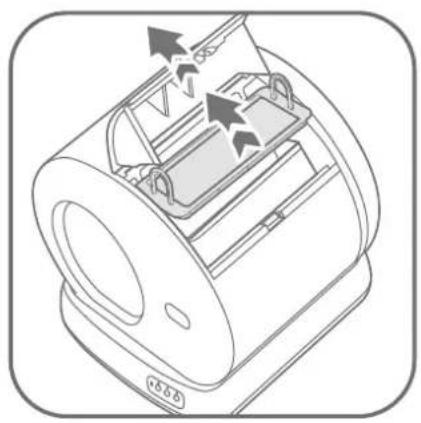
Pinch the snap lock inward to open the cover and take out the fix frame.
text_image
Diagram illustrating a food preservation procedure: dropping from a bag to a trash bin, then applying a lid to a cake.1
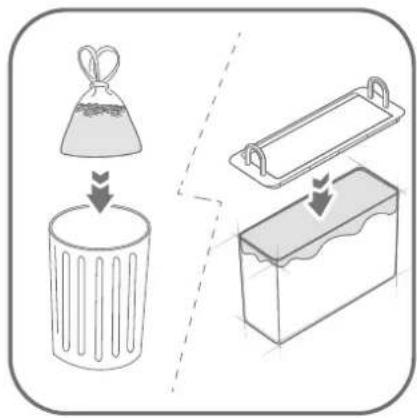
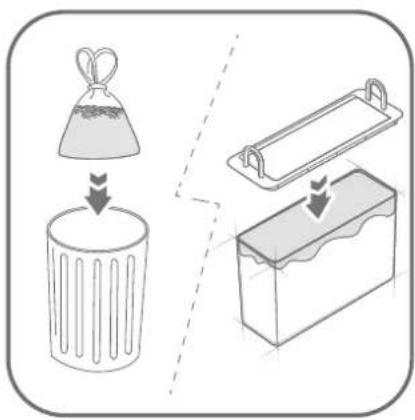
Empty and clean up the waste bin. Then replace with a new litter box liner. Make sure the deodorization cover is not stuck.
natural_image
Diagram of a mechanical device with internal components and directional arrows, no visible text or symbols2
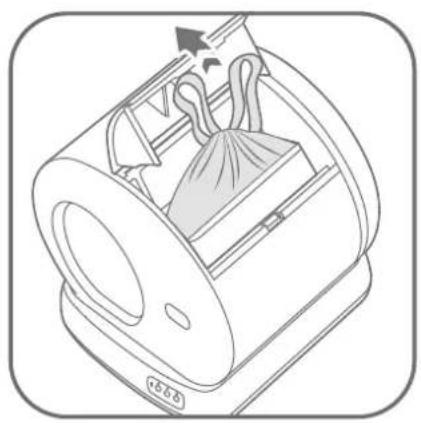
Gather the edges of the liner and dispose. Take out the waste bin.
natural_image
Hand pointing at a computer control panel with a circular icon labeled 'Waste' (no text or symbols on the diagram itself)2
Hold for 3s to start emptying the litter. Press it once to pause if desired.
natural_image
Diagram of a mechanical component with a downward arrow indicating compression or disassembly (no text or symbols present)3
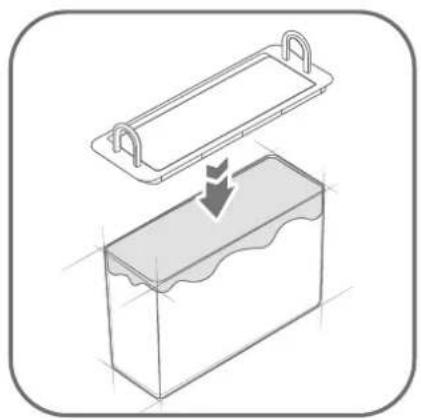
Spread the new bag evenly inside and smooth out all edges. Insert the frame back.
text_image
Diagram illustrating a food waste sorting process with labeled steps: dropping into a trash bin and splitting into a cake.3
Wait until the empty cycle is done (drum stops rotating). After the litter is emptied, clean up the waste bin. Then replace with a new liner.
text_image
Technical diagram of a device interior with labeled components and directional arrows indicating flow or movement.4
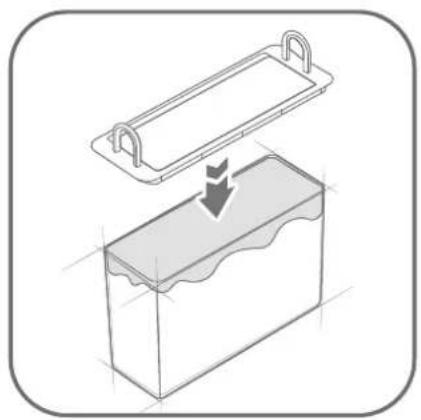
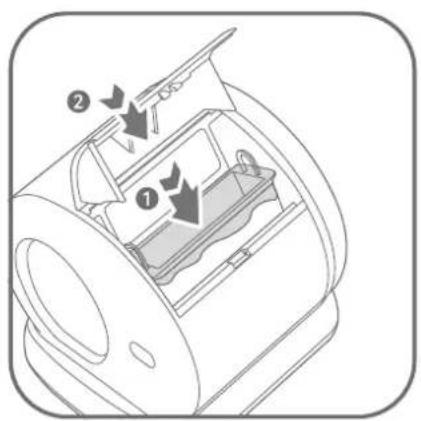
Place the waste liner back in place. Pinch the snap lock inward to lock the cover.
text_image
MAX4
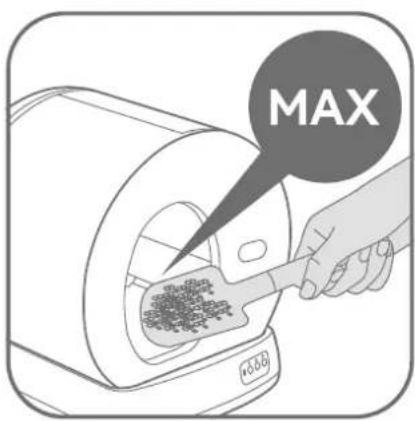
Add new clumping litter below the MAX fill line when spread flat. Do not overfill.
Note: clumping cat litter (length < 15 mm). The amount of tofu litters shall not exceed 2.8kg (about 4L).
3.5 Care and Cleaning
- How often you will need to clean on your personal preference and your cat's behavior. We recommend cleaning the inside every one to three months.
text_image
Technical diagram of a mechanical device with numbered components and directional arrows indicating motion or flow.1
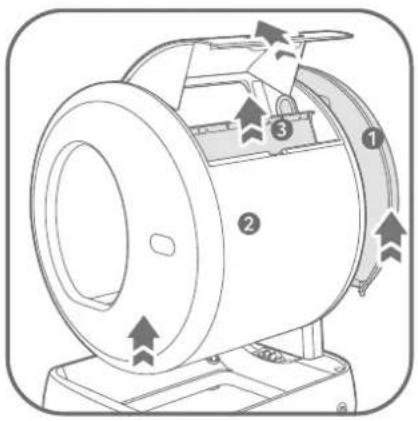
Clean up the waste bin, then unplug the litter box. Take out the rear cover first then hold to take out the drum.
text_image
Diagram showing two steps to clean a device: one with hand cleaning and checkmark, the other without a leaf.5
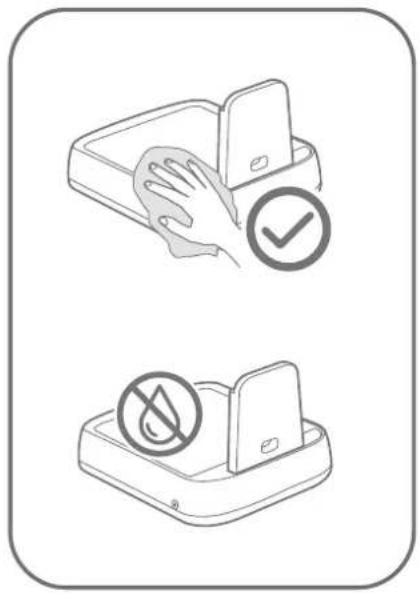
Wipe the base with a soft and damp cloth. Do not rinse or immerse in water.
natural_image
Illustration of a hand placing a water tap into a washing machine with arrows indicating flow direction (no text or symbols)2
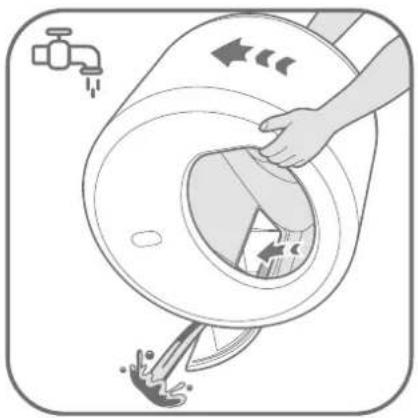
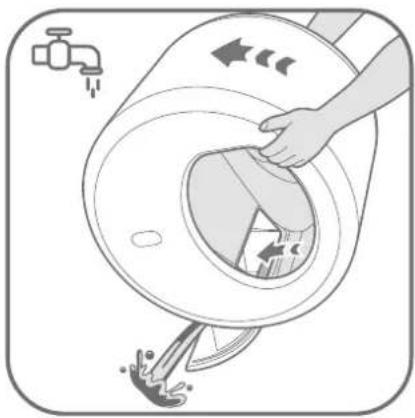
Rinse clean the drum and turn round the drum counterclockwise to drain any residual water.
natural_image
Line drawing of a mechanical device with arrows indicating motion or operation, no text or symbols present.6
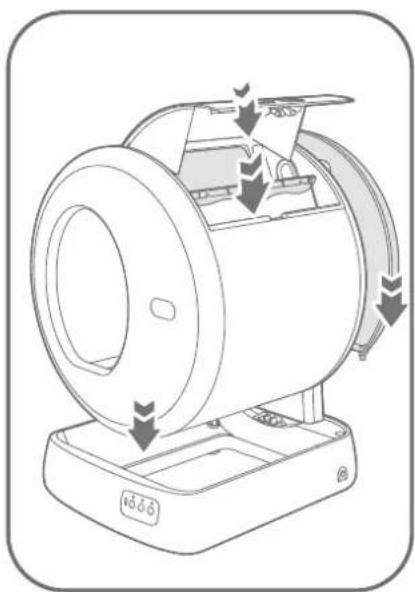
Install all parts back in place as instructed in "Setting Up" and "Replacing Litter Box Liner".
natural_image
Diagram showing two mechanical components with hands inserting or connecting, no text or symbols present3
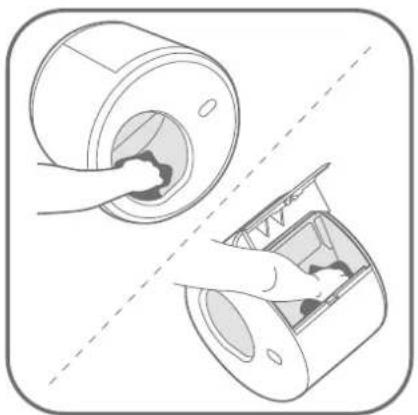
Wipe the inside of the drum and waste bin with a soft and damp cloth.
natural_image
Illustration of a hand placing a lid onto a cylindrical container with liquid at the base (no text or symbols)4
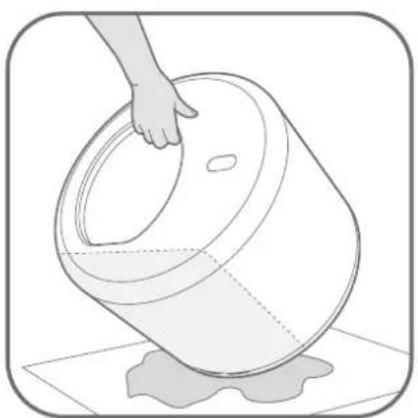
Tilt the drum to drain any residual water under the silicone pad. Air dry thoroughly before reassembling.
Part IV Functional Parameters
4.1 Multiple Protection Mechanism
| Protection function | Priority Description | |
| Radar protection | Level 1 | The radar protection is initially triggered When something approaches, the drum stops rotating. The drum will continue to rotate if the object gets away or stay static. |
| Weighting protection | Level 2 | The weighting protection will be triggered when an object more than 500g enters the drum or press the drum, the drum will stop rotating. The drum will continue to rotate if the gravity is disappearing. |
| Locked-motor protection | Level 3 | The drum will stop rotating when the motor resistance suddenly increases during rotation, the lock-motor protection can be cancelled under human intervention. |
| Anti-pinch protection | Level 4 | The structural design is innovative. When all sensors are abnormal and fail to work, it can still ensure that there is no risk of getting stuck. |
4.2 Specifications
Product Name: Self-Cleaning Cat Litter Box/#40040
Product Model: UCAT C10
Main Material: PP
Product Size: 520 x 530 x 555 mm
Input: 12 V/1A
Rated Power: 12 W
For Cat: Weight 3-22 lbs / Age > 4 months
Machine Weight: 9.5 kg
Max Weight Capacity: 44 lbs/20 kg
Waste Bin Capacity: 5 L / 1.3 Gal
Applicable Litter: All clumping cat litter (length <15 mm)
Part V Troubleshooting
The troubleshooting guide addresses the most common problems.
Q: The drum does not rotate or stops rotating suddenly.
A:
- Disconnect from the power supply and remove the drum to check if there is any foreign object stuck at the gear of the base.
- Make sure the drum is installed properly on the base. Reconnect it to the power supply and try again.
- The drum stops rotating automatically when cat/ weight is detected or when object is approached. It will resume rotating after the cat exists, or the weight or object is removed.
Q: The waste cannot be cleaned.
A:
- Check if the deodorization cover is blocked by the litter box liner, cat litter or waste. Open the waste bin cover and remove any foreign objects.
Electrical and electronic devices/ information for private households
The Directive 2012/19/EU on waste electrical and electronic equipment contains a large number of requirements for handling electrical and electronic equipment. The most important are compiled here.
1. Separate collection of waste electrical and electronic equipment
Electrical and electronic equipment that has become waste is referred to as waste electrical and electronic equipment (WEEE). Owners of WEEE must collect them separately from unsorted municipal waste. WEEE do not belong in household waste, but in special collection and return systems.
2. Batteries, accumulators and lamps
Owners of WEEE must hand over them in complete condition. However, owners of WEEE have to separate old batteries and accumulators which are not enclosed by the WEEE, as well as lamps which can be removed, from the WEEE without destroying it before handing it over to a collection point.
3. Ways to return the WEEE
Owners of WEEE from private households can hand them in free charge at the designated collection points of the public waste disposal authorities or at the take-back points set up by manufacturers or distributors in terms of the Directive 2012/19/EU.
4. Potential environmental impact
WEEE often contain sensitive personal data. This applies especially to information and telecommunications technology devices such as computers and smartphones. In your own interest, please note that each end user is responsible for deleting the data on the WEEE before disposing it.
5. Potential environmental impact
WEEE contain substances that may have a negative impact on the environment and human health if their collection, hand-over, re-use or material recovery is not done in compliance with respective leg tion.
6. Your role in WEEE waste treatment
By fulfilling these obligations and especially by fulfilling the obligation to collect WEEE separately, not to dispose it together with unsorted municipal waste and to hand it over to at collection points, you as the end user contribute to the re-use and material recovery of WEEE.
7. Meaning of the crossed-out dustbin symbol
The crossed-out dustbin, which is regularly displayed on electrical and electronic equipment, indicates that the respective device must be collected separately from unsorted municipal waste at the end of its life cycle.
Version 1.0 / March 2022
FR Contenu
natural_image
Illustration of a washing machine with a prohibition symbol on its side (no text or labels present)natural_image
Illustration of a device emitting exhaust heat with a prohibition symbol (no text or labels)natural_image
Line drawing of a circular appliance with a lid and control panel (no text or symbols)Utilisation
natural_image
Diagram of a cylindrical device with a meshed circular top and a base, showing a downward arrow indicating rotation or assembly (no text or symbols present)
natural_image
Diagram of a washing machine with arrows indicating process flow (no text or symbols)
natural_image
Diagram of a refrigerator interior with internal compartments and a close-up of a cable (no text or symbols)
natural_image
Line drawing of a portable electronic device with a cable and indicator lights, no text or symbols present
natural_image
Technical line drawing of a mechanical device with internal components and directional arrows (no text or symbols)1
text_image
Diagram illustrating a food waste sorting process with labeled steps: feeding into a bag, lifting a trash bin, and drying into a cake.1
natural_image
Diagram of a mechanical device with internal components and directional arrows, no visible text or symbols2
natural_image
Hand pointing at a computer control panel with icons, next to a circular icon labeled 'Waste' (no text or symbols on the diagram itself)2
natural_image
Diagram of a rectangular container with a downward arrow indicating compression or disassembly (no text or symbols present)3
text_image
Diagram illustrating a food waste sorting process with labeled steps: dropping into a trash bin and splitting into a rectangular cake.3
text_image
Technical diagram of a device interior with labeled components and directional arrows indicating flow or movement.4
text_image
Technical diagram of a mechanical device with numbered components and directional arrows indicating motion or flow.1
text_image
Diagram showing two steps to clean a device: one with hand cleaning and checkmark, the other without a leaf.5
natural_image
Illustration of a hand cleaning a large washing machine with water splashing (no text or symbols)2
natural_image
Line drawing of a mechanical device with arrows indicating motion or flow, no text or symbols present6
natural_image
Illustration of a hand inserting a component into a cylindrical device, showing internal structure and assembly (no text or symbols)3
natural_image
Illustration of a hand placing a lid into a bucket with liquid, no text or symbols present4
natural_image
Illustration of a washing machine with a prohibition symbol on its side (no text or labels present)natural_image
Illustration of a device emitting exhaust heat with a prohibition symbol (no text or labels)natural_image
Line drawing of a circular electronic device with a lid and control buttons (no text or symbols)natural_image
Diagram of a cylindrical device with a meshed circular top and a base, showing a downward arrow indicating rotation or change (no text or symbols present)
natural_image
Diagram of a washing machine with a circular component and mechanical components, showing internal structure and motion arrows (no text or symbols)
natural_image
Diagram of a refrigerator interior with internal compartments and a close-up of a cable (no text or symbols)
natural_image
Line drawing of a portable electronic device with a cable and indicator lights, no text or symbols present
natural_image
Technical line drawing of a mechanical device with internal components and directional arrows (no text or symbols)1
text_image
Diagram illustrating a food waste sorting process: dropping from a bag to a trash bin and then spreading into a cake.1
natural_image
Diagram of a mechanical device with internal components and directional arrows (no text or symbols)2
natural_image
Hand pointing at a computer control panel with a circular icon labeled 'Waste' (no text or symbols on the diagram itself)2
natural_image
Diagram of a rectangular container with a downward arrow indicating compression or disassembly (no text or symbols present)3
text_image
Diagram illustrating a food processing step: dropping from a bag to a trash bin, then adding a cake into a tray.3
text_image
Technical diagram of a device interior with labeled components and directional arrows indicating flow or movement.4
text_image
Technical diagram of a mechanical device with numbered components and directional arrows indicating motion or flow.1
text_image
Diagram showing two safety symbols: one with a hand cleaning a device, the other without a leaf symbol.5
natural_image
Illustration of a hand cleaning a washing machine with water splashing (no text or symbols)2
natural_image
Diagram of a mechanical device with arrows indicating motion or operation, no text or symbols present6
natural_image
Diagram showing a hand inserting a component into a cylindrical device, with no visible text or symbols.3
natural_image
Illustration of a hand placing a lid onto a cylindrical container with liquid at the base (no text or symbols)4
natural_image
Illustration of a washing machine with a prohibition symbol (no text or labels)natural_image
Illustration of a device emitting exhaust smoke with a prohibition symbol (no text or labels)natural_image
Line drawing of a circular electronic device with a lid and control buttons (no text or symbols)Uso previsto
natural_image
Diagram of a cylindrical device with a meshed top and a base, showing a downward arrow indicating a process or operation (no text or symbols present)
natural_image
Diagram of a washing machine with arrows indicating process flow (no text or symbols)
natural_image
Diagram of a refrigerator interior with internal compartments and a close-up of a cable (no text or symbols)
natural_image
Line drawing of a portable electronic device with a cable and indicator lights, no text or symbols present
natural_image
Technical line drawing of a mechanical device with internal components and directional arrows (no text or symbols)1
text_image
Diagram illustrating a food preservation procedure: dropping from a bag to a trash bin, then applying a lid to a cake.1
natural_image
Diagram of a mechanical device with internal components and directional arrows, no visible text or symbols2
natural_image
Hand pointing at a computer control panel with a circular icon labeled 'Waste' (no text or symbols on the diagram itself)2
natural_image
Diagram of a container with a lid and internal structure, showing a downward force or compression process (no text or symbols)3
text_image
Diagram illustrating a food preservation procedure: dropping from a bag to a trash bin, then applying a lid to a cake.3
text_image
Technical diagram of a device interior with labeled components and directional arrows indicating flow or movement.4
text_image
Technical diagram of a mechanical device with numbered components and directional arrows indicating motion or flow.1
text_image
Diagram showing two safety symbols: one with a hand cleaning a device, the other without a leaf symbol.5
natural_image
Illustration of a hand cleaning a washing machine with water splashing (no text or symbols)2
natural_image
Diagram of a mechanical device with arrows indicating motion or flow, no text or symbols present6
natural_image
Diagram showing a hand inserting a component into a cylindrical device, with no visible text or symbols.3
natural_image
Illustration of a hand placing a lid into a bucket with liquid, no text or symbols present4
natural_image
Illustration of a washing machine with a prohibition symbol (no text or labels)natural_image
Illustration of a device emitting exhaust smoke with a prohibition symbol (no text or labels)natural_image
Line drawing of a circular electronic device with a lid and control buttons (no text or symbols)Avsedd användning
natural_image
Diagram of a cylindrical device with a meshed circular top and a base, showing a downward arrow indicating rotation or assembly (no text or symbols present)
natural_image
Diagram of a washing machine with arrows indicating process flow (no text or symbols)
natural_image
Diagram of a refrigerator interior with internal compartments and a close-up of a cable (no text or symbols)
natural_image
Line drawing of a portable electronic device with a cable and indicator lights, no text or symbols present
natural_image
Diagram of a mechanical device with internal components and directional arrows indicating motion (no text or symbols)1
text_image
Diagram illustrating a food waste sorting process: dropping from a bag to a trash bin and then spreading into a cake.1
natural_image
Diagram of a mechanical device with internal components and directional arrows (no text or symbols)2
natural_image
Hand pointing at a computer control panel with a circular icon labeled 'Waste' (no text or symbols on the diagram itself)2
natural_image
Diagram of a container with a lid and internal structure, showing a downward arrow indicating flow or movement (no text or symbols present)3
text_image
Diagram illustrating a food waste sorting process: dropping from a bag to a trash bin and then splitting into a cake with leaves.3
text_image
Technical diagram of a device with labeled components and directional arrows indicating flow or movement.4
text_image
Technical diagram of a mechanical device with numbered components and directional arrows indicating motion or flow.1
text_image
Diagram showing two safety symbols: one with a hand cleaning a device, the other without a leaf symbol.5
natural_image
Illustration of a hand cleaning a washing machine with water splashing (no text or symbols)2
natural_image
Diagram of a mechanical device with arrows indicating motion or operation, no text or symbols present6
natural_image
Diagram showing a hand inserting a component into a cylindrical device, with no visible text or symbols.3
natural_image
Illustration of a hand placing a lid onto a cylindrical container with liquid at the base (no text or symbols)4
natural_image
Illustration of a washing machine with a prohibition symbol (no text or labels)natural_image
Illustration of a device emitting exhaust heat with a prohibition symbol (no text or labels)natural_image
Line drawing of a circular electronic device with a lid and control buttons (no text or symbols)Uso adecuado
natural_image
Diagram of a cylindrical device with a meshed top and a base, showing a downward arrow indicating rotation or assembly (no text or symbols present)
natural_image
Diagram of a washing machine with arrows indicating process flow (no text or symbols)
natural_image
Diagram of a refrigerator interior with internal compartments and a close-up of a cable (no text or symbols)
natural_image
Line drawing of a portable electronic device with a cable and indicator lights, no text or symbols present
natural_image
Technical line drawing of a mechanical device with internal components and directional arrows (no text or symbols)1
text_image
Diagram illustrating a food waste sorting process with labeled steps: bag dropping into trash bin, tray holding lid, and cake being placed.1
natural_image
Line drawing of a mechanical device with internal components and directional arrows (no text or symbols)2
natural_image
Hand pointing at a computer control panel with icons, next to a circular icon labeled 'Waste' (no text or symbols on the diagram itself)2
natural_image
Diagram of a container being placed on top, showing internal structure and downward force arrow (no text or symbols)3
text_image
Diagram illustrating a food waste sorting process: dropping from a bag to a trash bin, then splitting into a cake with leaves.3
text_image
Technical diagram of a device interior with labeled components and directional arrows indicating flow or movement.4
text_image
Technical diagram of a mechanical device with numbered components and directional arrows indicating flow or movement.1
text_image
Diagram showing two safety symbols: one with a hand cleaning a device, the other without a leaf symbol.5
natural_image
Illustration of a hand removing or removing a washing machine into a sink, with faucet and water drop symbols nearby (no text or labels)2
natural_image
Diagram of a mechanical device with arrows indicating motion or flow, no text or symbols present6
natural_image
Diagram showing a hand inserting a component into a cylindrical device, with no visible text or symbols.3
natural_image
Illustration of a hand placing a lid onto a cylindrical container with liquid at the base (no text or symbols)4
natural_image
Illustration of a washing machine with a prohibition symbol (no text or labels)natural_image
Illustration of a device emitting exhaust heat with a prohibition symbol (no text or labels)natural_image
Line drawing of a circular appliance with a lid and control buttons (no text or symbols)natural_image
Diagram of a cylindrical device with a fan blade and a base device, showing internal structure and airflow direction (no text or symbols)
Установите барабан на основание.
Примечание:
natural_image
Diagram of a washing machine with arrows indicating process flow (no text or symbols)
natural_image
Diagram of a refrigerator interior with internal compartments and a close-up of a cable being inserted (no text or symbols)
natural_image
Line drawing of a portable electronic device with a cable and indicator lights, no text or symbols present
natural_image
Technical line drawing of a mechanical device with internal components and directional arrows (no text or symbols)1
text_image
Diagram illustrating a food waste sorting process with labeled steps: dropping into a trash bin, adding powder, and splitting into a cake.1
natural_image
Diagram of a mechanical device with internal components and directional arrows (no text or symbols)2
natural_image
Hand pointing at a computer control panel with a circular icon labeled 'Waste' (no text or symbols on the diagram itself)2
natural_image
Diagram of a rectangular container with a downward arrow indicating compression or disassembly (no text or symbols present)3
text_image
Diagram illustrating a food processing step: dropping from a bag to a trash bin, then adding a cake into a tray.3
text_image
Technical diagram of a device interior with labeled components and directional arrows indicating flow or movement.4
text_image
Technical diagram of a mechanical device with numbered components and directional arrows indicating motion or flow.1
text_image
Diagram showing two safety symbols: one with a hand cleaning a device, the other without a leaf, both marked with checkmarks.5
natural_image
Illustration of a hand cleaning a washing machine with water splashing (no text or symbols)2
natural_image
Diagram of a mechanical device with arrows indicating motion or flow, no text or symbols present6
natural_image
Diagram showing a hand inserting a component into a cylindrical device, with no visible text or symbols.3
natural_image
Illustration of a hand placing a lid into a bucket with liquid on the floor (no text or symbols)4
natural_image
Illustration of a washing machine with a prohibition symbol (no text or labels)natural_image
Illustration of a device emitting exhaust smoke with a prohibition symbol (no text or labels)natural_image
Line drawing of a circular electronic device with a lid and control buttons (no text or symbols)natural_image
Diagram of a cylindrical device with a fan blade and a base device, showing internal structure and airflow direction (no text or symbols)
Colocar o tambor na base.
natural_image
Diagram of a washing machine with arrows indicating process flow (no text or symbols)
Inserir a tampa traseira na ranhura da base.
3.2 Ligar
natural_image
Diagram of a refrigerator interior with internal compartments and a close-up of a cable (no text or symbols)
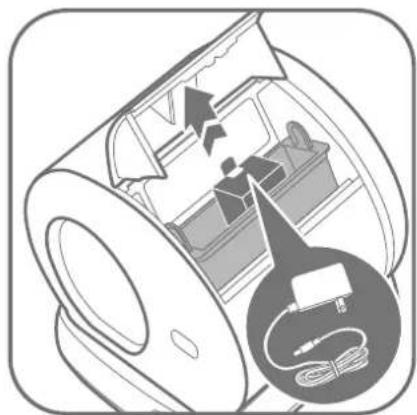
Abrir a tampa do recipiente de resíduos para retirar o transformador, ligar o transformador na toilete.
natural_image
Line drawing of a portable electronic device with a cable and indicator lights, no text or symbols present
natural_image
Technical line drawing of a mechanical device with internal components and directional arrows (no text or symbols)1
text_image
Diagram illustrating a food waste sorting process: dropping from a bag to a trash bin and then spreading into a cake.1
natural_image
Diagram of a mechanical device with internal components and directional arrows (no text or symbols)2
natural_image
Illustration of a hand pressing a button on a device with a circular icon showing a trash bin (no text or symbols)2
natural_image
Diagram of a rectangular container with a downward arrow indicating compression or disassembly (no text or symbols present)3
text_image
Diagram illustrating a food preservation procedure: dropping from a bag to a trash bin and then to a cake with a lid.3
text_image
Technical diagram of a device interior with labeled components and directional arrows indicating flow or movement.4
Colocar novamente o recipiente de residuos no seu lugar. Apertar o fecho de encaixe para dentro para fechar a tampa.

text_image
MAX4
text_image
Technical diagram of a mechanical device with numbered components and directional arrows indicating motion or flow.1
text_image
Diagram showing two safety icons: one with a hand cleaning a device, the other without a leaf symbol.5
natural_image
Illustration of a hand pouring liquid into a washing machine with arrows indicating flow direction (no text or symbols)2
natural_image
Diagram of a mechanical device with arrows indicating motion or operation, no text or symbols present6
natural_image
Diagram showing a hand inserting a component into a cylindrical device, with no visible text or symbols.3
natural_image
Illustration of a hand placing a lid onto a cylindrical container with liquid at the base (no text or symbols)4
natural_image
Illustration of a washing machine with a prohibition symbol (no text or labels)natural_image
Illustration of a device with a prohibition sign, showing airflow and motion (no text or symbols)natural_image
Line drawing of a circular appliance with a lid and control panel (no text or symbols)Przeznaczenie
natural_image
Diagram of a cylindrical device with a fan blade and a base device, showing internal structure and airflow direction (no text or symbols)
natural_image
Diagram of a washing machine with arrows indicating process flow (no text or symbols)
natural_image
Diagram of a refrigerator interior with internal compartments and a close-up of a cable (no text or symbols)
natural_image
Line drawing of a portable electronic device with a cable inserted, showing no text or symbols
natural_image
Technical line drawing of a mechanical device with internal components and directional arrows (no text or symbols)1
text_image
Diagram illustrating a food waste sorting process with labeled steps: dropping into a trash bin, adding a cloth, and splitting into a cake.1
natural_image
Diagram of a mechanical device with internal components and directional arrows (no text or symbols)2
natural_image
Hand pointing at a computer control panel with a circular icon labeled 'Waste' (no text or symbols on the diagram itself)2
natural_image
Diagram of a container with a lid and internal structure, showing a downward arrow indicating flow or movement (no text or symbols present)3
text_image
Diagram illustrating a food processing step: dropping from a bag to a trash bin, then adding a cake into a tray.3
text_image
Technical diagram of a device interior with labeled components and directional arrows indicating flow or movement.4
text_image
Technical diagram of a mechanical device with numbered components and directional arrows indicating motion or flow.1
text_image
Diagram showing two safety symbols: one with a hand cleaning a device, the other without a leaf symbol.5
natural_image
Illustration of a hand cleaning a washing machine with water drops (no text or symbols)2
natural_image
Diagram of a mechanical device with arrows indicating motion or flow, no text or symbols present6
natural_image
Diagram showing a hand inserting a component into a cylindrical device, with no visible text or symbols.3
natural_image
Illustration of a hand placing a lid onto a cylindrical container with liquid at the base (no text or symbols)4
natural_image
Illustration of a washing machine with a prohibition symbol (no text or labels)natural_image
Illustration of a device emitting exhaust smoke with a prohibition symbol (no text or labels)natural_image
Line drawing of a circular appliance with a lid and control panel (no text or symbols)Určené použití
natural_image
Diagram of a cylindrical device with a meshed top and a base, showing internal structure and a downward arrow (no text or symbols)
natural_image
Diagram of a washing machine with arrows indicating process flow (no text or symbols)
natural_image
Diagram of a refrigerator interior with internal compartments and a close-up of a cable (no text or symbols)
natural_image
Line drawing of a portable electronic device with a cable and indicator lights, no text or symbols present
natural_image
Technical line drawing of a mechanical device with internal components and directional arrows (no text or symbols)1
text_image
Diagram illustrating a food preservation procedure: dropping from a bag to a trash bin, then applying a lid to a cake.1
natural_image
Diagram of a mechanical device with internal components and directional arrows (no text or symbols)2
natural_image
Hand pointing at a computer control panel with a circular icon labeled 'Waste' (no text or symbols on the diagram itself)2
natural_image
Diagram of a rectangular container with a downward arrow indicating compression or disassembly (no text or symbols present)3
text_image
Diagram illustrating a food preservation procedure: dropping from a bag to a trash bin and then to a rectangular cake with a lid.3
text_image
Technical diagram of a device interior with labeled components and directional arrows indicating flow or movement.4
text_image
Technical diagram of a mechanical device with numbered components and directional arrows indicating motion or flow.1
text_image
Diagram showing two safety symbols: one with a hand cleaning a device, the other without a leaf symbol.5
natural_image
Illustration of a hand pouring liquid into a washing machine with arrows indicating flow direction (no text or symbols)2
natural_image
Diagram of a mechanical device with arrows indicating motion or flow, no text or symbols present6
natural_image
Diagram showing a hand inserting a component into a cylindrical device, with no visible text or symbols.3
natural_image
Illustration of a hand placing a lid into a bucket with liquid, no text or symbols present4
natural_image
Illustration of a washing machine with a prohibition symbol (no text or labels)natural_image
Illustration of a device emitting exhaust smoke with a prohibition symbol (no text or labels)natural_image
Line drawing of a circular electronic device with a lid and control buttons (no text or symbols)Anvendelsesformål
natural_image
Diagram of a cylindrical device with a mesh fan and a base device, showing internal structure and airflow direction (no text or symbols)
natural_image
Diagram of a washing machine with arrows indicating process flow (no text or symbols)
natural_image
Diagram of a refrigerator interior with internal compartments and a magnified view of the refrigerator (no text or symbols)
natural_image
Line drawing of a portable electronic device with a cable and indicator lights, no text or symbols present
natural_image
Technical line drawing of a mechanical device with internal components and directional arrows (no text or symbols)1
text_image
Diagram illustrating a food waste sorting process with labeled steps: dropping into a trash bin, adding powder, and splitting into a cake.1
natural_image
Diagram of a mechanical device with internal components and directional arrows, no visible text or symbols2
natural_image
Hand pointing at a computer control panel with a circular icon labeled 'Waste' (no text or symbols on the diagram itself)2
Hold i 3 sekunder for at begynde at tømme kuldet. Tryk én gang for at holde pause, hvis det ønskes.
natural_image
Diagram of a container with a lid and a downward arrow indicating process (no text or symbols)3
text_image
Diagram illustrating a food preservation procedure: dropping from a bag to a trash bin and then moving into a cake with a lid.3
text_image
Technical diagram of a device interior with labeled components and directional arrows indicating flow or movement.4
text_image
Technical diagram of a mechanical device with numbered components and directional arrows indicating motion or flow.1
text_image
Diagram showing two safety symbols: one with a hand cleaning a device, the other without a leaf, both marked with checkmarks.5
natural_image
Illustration of a hand cleaning a washing machine with water splashing (no text or symbols)2
natural_image
Diagram of a mechanical device with arrows indicating motion or operation, no text or symbols present6
natural_image
Diagram showing a hand inserting a component into a cylindrical device, with no visible text or symbols.3
natural_image
Illustration of a hand placing a lid onto a cylindrical container with liquid at the base (no text or symbols)4
natural_image
Illustration of a washing machine with a prohibition symbol (no text or labels)natural_image
Illustration of a device emitting exhaust heat with a prohibition symbol (no text or labels)natural_image
Line drawing of a circular appliance with a lid and control panel (no text or symbols)Zamýšlané použitie
natural_image
Diagram of a cylindrical device with a mesh fan and a base device, showing internal structure and airflow direction (no text or symbols)
natural_image
Diagram of a washing machine with arrows indicating process flow (no text or symbols)
natural_image
Diagram of a refrigerator interior with internal compartments and a magnified view of the refrigerator (no text or symbols)
natural_image
Line drawing of a portable electronic device with a cable and indicator lights, no text or symbols present
Zapoj box na odpadky. Bubon sa automaticky otočí o celý kruh. Počkaj, kým sa vráti do polohy Home, potom je jednotka pripravená na použitie.
natural_image
Technical line drawing of a mechanical device with internal components and directional arrows (no text or symbols)1
text_image
Diagram illustrating a food waste sorting process: dropping from a bag to a trash bin, then splitting into a cake with a drop.1
natural_image
Diagram of a mechanical device with internal components and directional arrows, no visible text or symbols2
natural_image
Illustration of a hand pressing a button on a device (no text or symbols visible)2
natural_image
Diagram of a rectangular container with a downward arrow indicating compression or disassembly (no text or symbols present)3
text_image
Diagram illustrating a food waste sorting process: dropping from a bag to a trash bin and then spreading into a cake.3
text_image
Technical diagram of a device interior with labeled components and directional arrows indicating flow or movement.4
text_image
Technical diagram of a mechanical device with numbered components and directional arrows indicating motion or flow.1
text_image
Diagram showing two safety icons: one with a hand cleaning a device, the other without a leaf symbol.5
Základňu utri mäkkou a vlhkou handričkou. Neoplachuj ani neponáraj do vody.
natural_image
Illustration of a hand pouring liquid into a washing machine with arrows indicating flow direction (no text or symbols)2
natural_image
Diagram of a mechanical device with arrows indicating motion or flow, no text or symbols present6
natural_image
Diagram showing a hand inserting a component into a cylindrical device, with no visible text or symbols.3
natural_image
Illustration of a hand placing a lid into a bucket with liquid, no text or symbols present4
Nakloň bubon, aby sa vypustila zvyšná voda pod silikónovou podložkou. Pred opätovnou montážou dôkladne vysuš na vzduchu.
natural_image
Illustration of a washing machine with a prohibition symbol (no text or labels)natural_image
Illustration of a device with a prohibition symbol above it, showing airflow or heat (no text or symbols on the device itself)natural_image
Line drawing of a circular electronic device with a lid and control buttons (no text or symbols)natural_image
Diagram of a cylindrical device with a grid pattern and an arrow pointing to its base, showing internal structure (no text or symbols)
natural_image
Diagram of a washing machine with arrows indicating process flow (no text or symbols)
Вставте задню кришку в паз основи.
3.2 Увімкнення
natural_image
Diagram of a refrigerator interior with internal compartments and a close-up of a cable being inserted (no text or symbols)
natural_image
Line drawing of a portable electronic device with a cable inserted, showing no text or symbols
natural_image
Technical line drawing of a mechanical device with internal components and directional arrows (no text or symbols)1
natural_image
Diagram of a mechanical device with internal components and directional arrows, no visible text or symbols2
natural_image
Diagram of a container with a lid and internal structure, showing a downward force or compression process (no text or symbols)3
text_image
Technical diagram of a device interior with labeled components and directional arrows indicating flow or movement.4
text_image
Diagram illustrating a food waste sorting process with labeled steps: feeding into a bag, lifting a trash bin, and drying into a cake.1
natural_image
Hand pointing at a computer control panel with icons, next to a circular icon labeled 'Waste' (no text or symbols on the diagram itself)2
text_image
Diagram illustrating a food preservation procedure: dropping from a bag to a trash bin and then moving into a cake with a lid.3
text_image
Technical diagram of a mechanical device with numbered components and directional arrows indicating motion or flow.1
text_image
Diagram showing two safety symbols: one with a hand cleaning a device, the other without a leaf symbol.5
natural_image
Illustration of a hand cleaning a washing machine with water splashing (no text or symbols)2
natural_image
Diagram of a mechanical device with arrows indicating motion or flow, no text or symbols present6
natural_image
Diagram showing a hand inserting a component into a cylindrical device, with no visible text or symbols.3
natural_image
Illustration of a hand placing a lid onto a cylindrical container with liquid at the base (no text or symbols)4
Π: The waste cannot be cleaned.
B:
natural_image
Illustration of a washing machine with a prohibition symbol (no text or labels)natural_image
Illustration of a device emitting exhaust smoke with a prohibition symbol (no text or labels)natural_image
Line drawing of a circular electronic device with a lid and control buttons (no text or symbols)natural_image
Diagram of a cylindrical device with a grid pattern and an arrow indicating rotation or adjustment, mounted on a base (no text or symbols present)
natural_image
Diagram of a washing machine with arrows indicating process flow (no text or symbols)
natural_image
Diagram of a refrigerator interior with internal compartments and a close-up of a cable (no text or symbols)
natural_image
Line drawing of a portable electronic device with a cable inserted, showing no text or symbols
natural_image
Technical line drawing of a mechanical device with internal components and directional arrows (no text or symbols)1
text_image
Diagram illustrating a food preservation procedure: dropping from a bag to a trash bin, then applying a lid to a cake.1
natural_image
Diagram of a mechanical device with internal components and directional arrows, no visible text or symbols2
natural_image
Hand pointing at a computer control panel with a circular icon labeled 'Waste' (no text or symbols on the diagram itself)2
natural_image
Diagram of a rectangular container with a downward arrow indicating compression or disassembly (no text or symbols present)3
text_image
Diagram illustrating a food processing step: dropping from a bag to a trash bin, then adding a lid to a cake.3
text_image
Technical diagram of a device interior with labeled components and directional arrows indicating flow or movement.4
text_image
Technical diagram of a mechanical device with numbered components and directional arrows indicating motion or flow.1
text_image
Diagram showing two safety symbols: one with a hand cleaning a device, the other without a leaf symbol.5
natural_image
Illustration of a hand cleaning a washing machine with water splashing (no text or symbols)2
natural_image
Diagram of a mechanical device with arrows indicating motion or operation, no text or symbols present6
natural_image
Diagram showing a hand inserting a component into a cylindrical device, with no visible text or symbols.3
natural_image
Illustration of a hand placing a lid onto a cylindrical container with liquid at the base (no text or symbols)4
text_image
QR code image containing encoded data, no visible human-readable textDE Selbstreinigende Katzentoilette Gebrauchsanweisung
EN Self-Cleaning Cat Litter Box Instructions
FR Litière auto-nettoyante pour chats
Mode d'emploi
NL Zelfreinigende kattenbak
Handleiding
IT Lettiera autopulente per gatti
Istruzioni
SV Självrengörande Kattlåda
Instruktioner
ES WC de limpieza automática para gatos Instrucciones
RU Самоочищающийся туалет для кошек Инструкция
PT Toilete para gatos com autolimpeza
Instruções
PL Samoczyszcząca kuweta dla kota Instrukcja
©Samočisticí toaleta pro kočky
Instrukce
⑭ Selvrensende kattebakke
Vejledning
SK Inteligentný box na podstielku pre mačky
Úvod
UK Розумний котячий лоток
Інструкція
HU Intelligens macskaalom
Útmutató
natural_image
Line drawing of a circular electronic device with a lid and control buttons (no text or symbols)