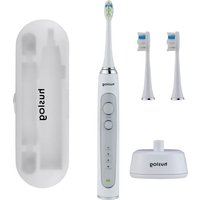
AL-050131 - Toothbrush Huslog - Free user manual and instructions
Find the device manual for free AL-050131 Huslog in PDF.


User questions about AL-050131 Huslog
0 question about this device. Answer the ones you know or ask your own.
Ask a new question about this device
Download the instructions for your Toothbrush in PDF format for free! Find your manual AL-050131 - Huslog and take your electronic device back in hand. On this page are published all the documents necessary for the use of your device. AL-050131 by Huslog.
USER MANUAL AL-050131 Huslog
text_image
QR code image with a central circular logo, likely linking to a digital resource or website.natural_image
Line drawing of a hand brushing teeth with a toothbrush (no text or symbols)natural_image
Simple line drawing of a tooth with a hammer inserted, no text or symbols presentEquipment Delivery Point:
mPTech Sp. z o.o.
street Krakowska 119
50-428 Wrocław
Poland
Designed in Poland
Made In China
Manufacturer:
mPTech Sp. z o.o.
- Safety of use....12
- Specification....14
2.1 Technical data....14
2.2 Contents....14
- Structure of the device....16
- Use of the device....17
- Troubleshooting 19
- Cleaning and maintenance of the device ....20
- Explanation of symbols....21
- Use of the manual....22
- Warranty and Service 22
- Declaration of conformity with EU directives....22
1. Safety of use
Please read the instructions provided here carefully. Failure to follow these instructions may be unsafe or illegal.

This appliance can be used by children aged from 8 years and above and persons with reduced physical and mental capabilities and lack of experience and knowledge of the appliance if
supervision or instruction concerning use of the appliance is provided in a safe manner and the hazards involved are clearly understood.

Children without supervision should not clean or carry on maintenance of the device.

Children should not play with the device.

The device is intended for use only with the charging base included. Do not charge the e with other charging bases.

The non-removable power cord cannot be replaced. If the cable is damaged, the ment becomes unusable.
- Use this device only when it is properly assembled (also applies to the charging base).
- Only use the device as described in this user manual!
- Do not use damaged device In case of damage, do not repair it yourself. Return the device for repair to a specialist or deliver it to the place of purchase.
- Do not use the device in areas where the use of electrical equipment is prohibited and where it may cause interference or other hazards.
Do not switch on or use the appliance near flammable materials. - Do not use the appliance to clean surfaces other than your teeth, gums and tongue.
- Keep out of reach of children.
- The manufacturer is not responsible for any problems caused by self-modifications of the device.
When using the device, make sure that there are no objects that can be damaged, broken or overturned near the place where the brush will be placed. The power base cable should be routed so that it does not come into
contact with objects that generate high temperature, nor should it be exposed to crushing, pulling or other damage. The charging base cable should not interfere with the movement of persons and pets, as this may lead to tripping, tipping over or injury to the body.
- Avoid exposing the appliance to very low or very high temperatures (below 0°C/32°F or above 40°C/104°F). Components made of plastic may deform, which may affect the operation of the device or lead to its complete deterioration.
- Do not expose the charging base and its power cord to water and other liquids. This may adversely affect the operation and service life of the device components or cause a short circuit or even an electric shock. Do not immerse the toothbrush in water to a depth of more than 1 m and for more than 30 minutes.
- Avoid exposing the built-in battery to very low or very high temperatures (below 0°C / 32°F or above 45°C / 113°F). Extreme temperatures can affect their life span. Avoid contact of the battery with fluids and metal objects, they may lead to their complete or partial damage. Do not disassemble, modify, short circuit or throw the battery into a fire – this may cause an explosion and fire. Put the used/damaged battery in a special container. The battery in the device is non-replaceable by the user.
2. Specification
2.1 Technical data
| Sonic toothbrush | |
| Model | AL-050131 |
| Batch number | 613103 |
| Charging base power supply | 5V = 600mA |
| Built-in battery | Li-ion 3.7V = 650mAh, 2.405Wh |
| Protective class | IPX7 |
| Number of vibrations | 40,000 micro vibrations/min |
| Number of programmes | 4 |
| Duration of the programme | 2 min with 30 sec interval |
2.2 Contents
- Sonic toothbrush
- Replacement tips (3 pcs.)
Case - Charging base
- User Manual

If any of the above items are missing or damaged, please contact your dealer.

We recommend to keep the packaging in case of any complaint.
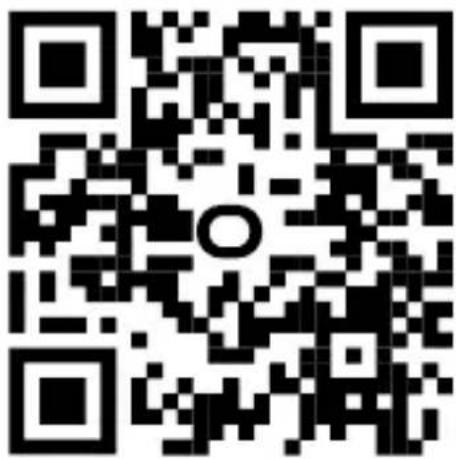
It is possible to download the electronic version of the user manual from the following Internet address:
https://huslog.eu/
Or by scanning the QR code:
text_image
QR code image with a central circular logo, likely linking to a digital resource or website.3. Structure of the device
text_image
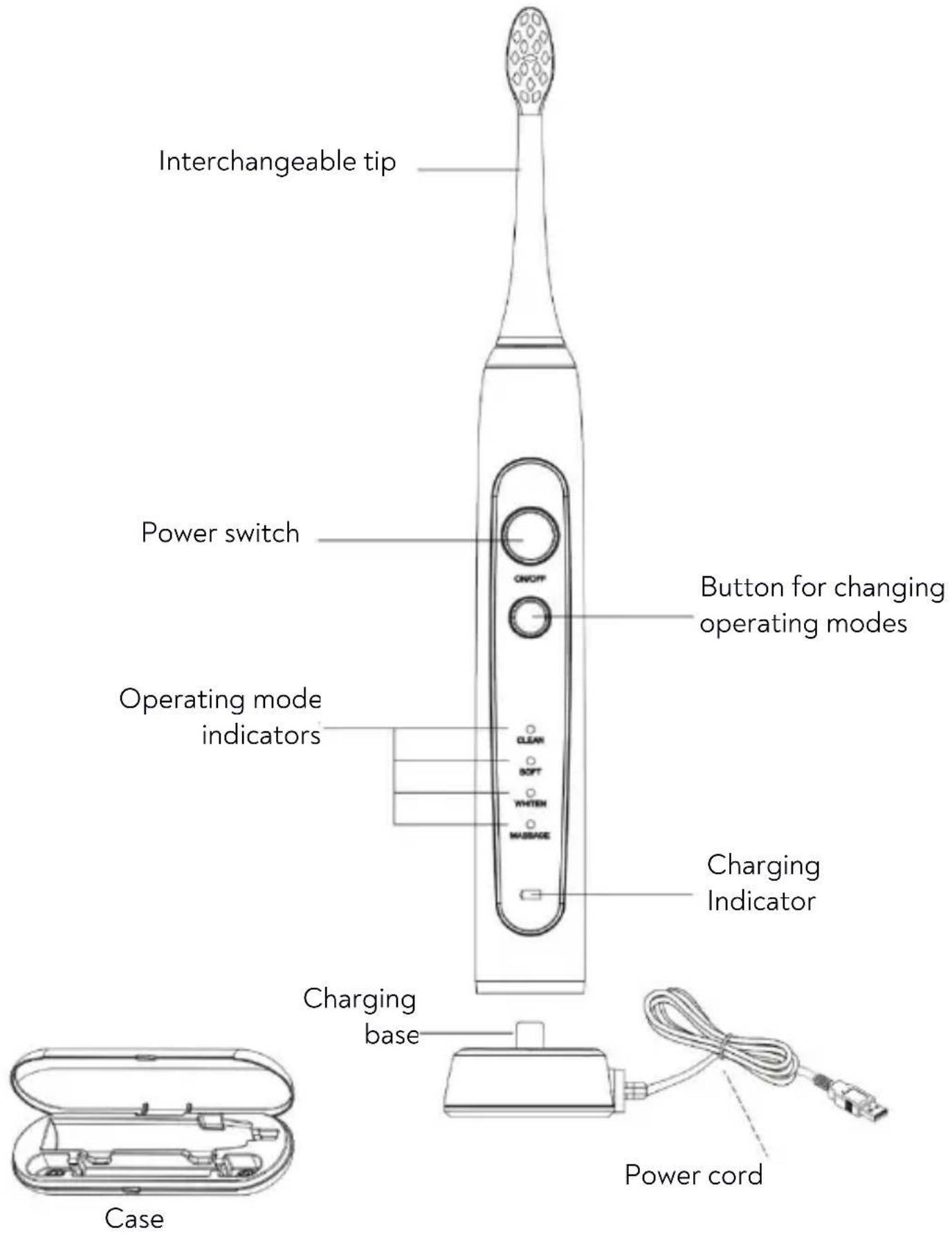
Interchangeable tip Power switch Button for changing operating modes Operating mode indicators Charging Indicator Charging base Case Power cord4. Use of the device

Before starting the operation of the device, as well as after its completion, check each of the components for damage. Damaged components cannot
be used, as this may cause personal injury to the user.

Do not use the tip for more than 3 months from the first use. Wearing off the bristles or the tip itself may result in damage to the teeth or gums.
ASSEMBLING AND DISASSEMBLING THE BRUSH TIPS
Remove the toothbrush and one of the tips from the packaging. Remove the protective cap from the tip and insert the tip through the hole on the mandrel stick protruding from the brush holder so that the bristles of the tip face the same direction as the switch and diodes on the brush holder. Press the two parts together with a firm movement. There will be a small space between the tip and the brush holder, approx. 0.5 mm. This is due to the design of the device and do not force the tip against the brush holder so that they touch.
To remove the tip, pull it gently upwards until it disengages from the brush holder.
CHARGING THE TOOTHBRUSH BATTERY

Before operating the charging base and charging the batteries on the device, make sure that your hands are dry.

Do not charge or store the device below 0^ C, or above 40^ C, otherwise the quality will be affected.
And charging length.

The device may get a little hot during charging, this is completely normal phenomenon.

Try not to discharge the battery completely, as this can lead to permanent damage to the battery and the toothbrush holder.

The built-in battery is not suitable for replacement by the user. To replace the battery, contact the manufacturer's service.
Before charging the brush battery for the first time, remove the charging base from the packaging. Gently unwind the charging base cable and set it on a stable horizontal ground. Connect the USB plug of the power cable of the base to a powered USB adapter (not included) with output parameters of 5 V 0.6 A or higher current.
EN © 2023 huslog All rights reserved
Sonic toothbrush
Place the bottom of the brush holder in the charging base dock. Once charging has started, the charging indicator will illuminate. In the event of an extreme discharge of the battery, the device may not turn on or off before completing the program. When charging is complete, the charging indicator will go out.
TOOTHBRUSH MODES
The toothbrush offers four modes of operation:
- Clean – basic mode for brushing teeth
- Soft – gentle brushing for sensitive mouth
- Whitening – brushing with polishing and whitening
○ Massage – pulsates for gentle gum stimulation
Subsequent presses of the switch button as soon as the device is switched on will result in switching between successive operating modes. After all modes have been passed, another press of the switch button will turn off the toothbrush. Operation of a given mode for approx. 3 seconds activates it and further switching between operating modes is not possible without turning off the brush or ending the program and selecting the program again.
TEETH BRUSHING TECHNIQUE WITH A SONIC TOOTHBRUSH
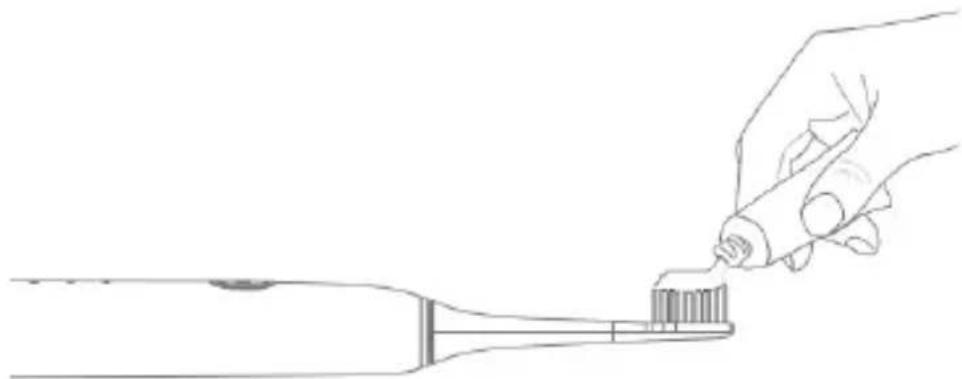
To use the sonic toothbrush effectively, please follow the instructions below. Apply a portion of your favorite toothpaste to the bristles of the tip. In the case of sonic toothbrushes, the portion of toothpaste may be smaller than previously used on ordinary toothbrushes.
natural_image
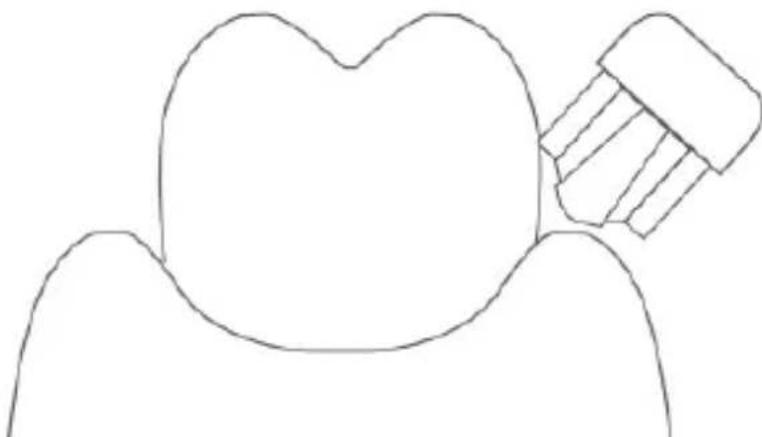
Line drawing of a hand brushing teeth with a toothbrush (no text or symbols)The bristles of the toothbrush should be directed at an angle of 45 degrees so that the bristles have the ability to clean the side surfaces of the tooth and gums.
natural_image
Simple line drawing of a tooth with a hammer inserted, no text or symbols presentTurn on the device, the tip of the brush should be guided slowly, very gently pressing it to the surface of the teeth and connecting them to the gums. A single cleaning cycle lasts 4x30s. It is a good idea to divide the tooth surfaces into four parts so that you clean each one for 30 seconds. After 2 minutes of operation, the toothbrush will turn off.
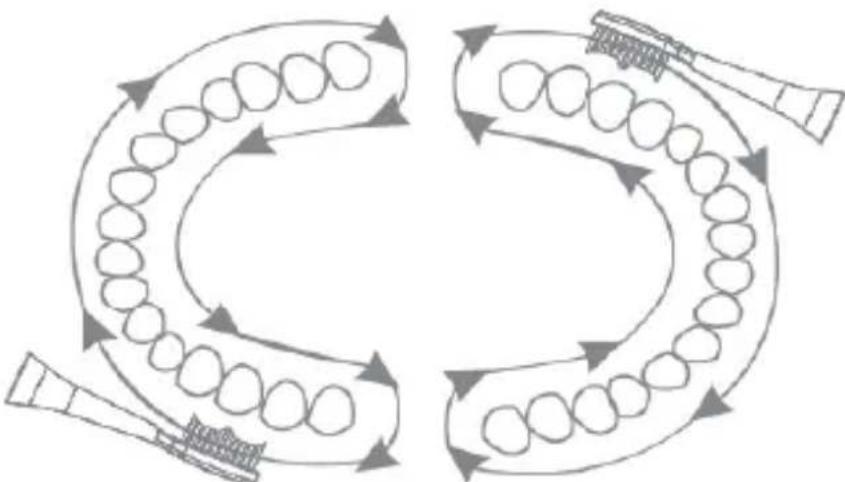
flowchart
graph TD
    A["Step 1: Teeth"] --> B["Step 2: Tooth"]
    B --> C["Step 3: Tooth"]
    C --> D["Step 4: Tooth"]
    D --> E["Step 5: Tooth"]
    E --> F["Step 6: Tooth"]
    F --> G["Step 7: Tooth"]
    G --> H["Step 8: Tooth"]
    H --> I["Step 9: Tooth"]
    I --> J["Step 10: Tooth"]
    J --> K["Step 11: Tooth"]
    K --> L["Step 12: Tooth"]
    L --> M["Step 13: Tooth"]
    M --> N["Step 14: Tooth"]
    N --> O["Step 15: Tooth"]
    O --> P["Step 16: Tooth"]
    P --> Q["Step 17: Tooth"]
    Q --> R["Step 18: Tooth"]
    R --> S["Step 19: Tooth"]
    S --> T["Step 20: Tooth"]
For the first dozen or so, the gums may bleed slightly (an uncommon phenomenon) or you may feel discomfort (a common phenomenon among people who have not used mechanical brushes so far). This usually happens when the gums are not taught the new cleaning technique and are not used to the amount of vibrations of the toothbrush. If after 2 weeks of using the toothbrush the gums still bleed, then you should stop using the device and consult a specialist doctor – dentist.
5. Troubleshooting
In case of problems with the device, please refer to the following tips.

This device does not contain any parts that can be repaired by users.
| Toothbrush won't turn on | Check that the battery is charged.The battery life may have come to an end - contact the manufacturer's service. |
| The vibrations are too delicate | Check that you are not pressing the tooth tip too hard.Check that the tip or housing of the toothbrush is not damaged.Check that the tip does not accidentally sit too firmly on the mandrel in the brush, which may restrict its movements. |
| Despite the position of the brush on the base charging the battery, the brush does not charge | Check that the cable or plug coming out of the charging base is not damaged.Check that the charging base is connected to the power supply.The battery life may have come to an end - contact the manufacturer's service. |
| My gums bleed after using the toothbrush | Check that you are not pressing the tooth tip too hard.Check that you are not pressing the tip against your gums at too small an angle.For the first dozen or so, the gums may bleed slightly (an uncommon phenomenon) or you may feel discomfort (a common phenomenon among people who have not used mechanical brushes so far). This usually happens when the gums are not taught the new cleaning technique and are not used to the amount of vibrations of the toothbrush. If after 2 weeks of using the toothbrush the gums still bleed, then you should stop using the device and consult a specialist doctor - dentist. |
| If the problem has not been resolved, please contact the manufacturer's service. | |
6. Cleaning and maintenance of the device

Regular and properly carried out cleaning and maintenance will ensure long service life of the equipment and its trouble-free operation.

Cleaning and maintenance can only be carried out when the machine is switched off.

It is not allowed to clean any part of the brush in the dishwasher.

Do not immerse the toothbrush in water to a depth of more than 1 m and for more than 30 minutes.
The components of the device can be cleaned under low-pressure running water and temperature. In the case of strong dirt, it is possible to use mild detergents, e.g. unconcentrated dishwashing liquids. Then thoroughly dry the surfaces of the device components with a paper or textile towel and leave to dry completely in a ventilated place. The tips should be washed under running water and then allowed to dry. From time to time, you can wash the tip using this mouthwash.
7. Explanation of symbols

The packaging of the device can be recycled according to local requirements.
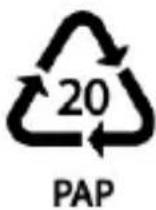
Symbol indicating corrugated board (packaging mat.).

The symbol indicates that the package contains a user manual which must be read before use.
IPX7
Degree of protection IPX7, according to which the device is waterproof to a maximum immersion depth of 1 m for no more than 30 minutes (applies to the lowest part of the device).

The mark placed on the product means that this product complie with the basic requirements and other provisions of the so-called “Nev Approach” of the European Union.

In accordance with Directive 2013/56/EU on the disposal of batteries and accumulators, this product is marked with the symbol of a crossed-out waste bin. The symbol indicates that the batteries and accumulators used in this product should not be disposed of together with normal household waste, but treated in accordance with the directive and local regulations. Do not dispose of batteries and accumulators with unsorted municipal waste. Users of batteries and rechargeable batteries must use the available collection network for these items, which allows for their return, recycling and disposal. In the EU, the collection and recycling of batteries and accumulators is subject to separate procedures. To learn more about existing recycling procedures for batteries and accumulators in your area, contact your city, waste management institution, or landfill.

The device is marked with the symbol of a crossed-out garbage container, in accordance with the European Directive 2012/19/EU on waste electrical and electronic equipment (WEEE). Products marked with this symbol should not be disposed of or disposed of with other household waste after me of use. The user is obliged to dispose of waste electrical and electronic
equipment by delivering it to the designated point at which such hazardous waste is recycled. The accumulation of this type of waste in indicated places and the proper process of its recovery contribute to the protection of natural resources. Proper recycling of waste electrical and electronic equipment has a beneficial effect on human health and the environment. For information on where and how to dispose of waste electrical and electronic equipment in an environmentally safe manner, the user should contact the relevant local authority, waste collection point or point of sale where he purchased the equipment.
8. Use of the manual
Without the prior written consent of the manufacturer, no part of this manual may be reproduced, distributed, translated or transmitted in any form or by any electronic or mechanical means, including by photocopying, recording or storing in any storage and information-sharing systems.
The illustrations of the device in this user manual may differ from the actual product.
All brands and product names are trademarks or registered trademarks of the respective companies.
9. Warranty and Service
The product has a 2-year warranty, starting from the date of sale of the product. In the event of a defect, the product should be returned to the store where it was purchased, remembering the need to present proof of purchase. The product should be complete and preferably placed in its original packaging.
10. Declaration of conformity with EU directives
CE
Hereby mPTech Sp. z o.o. declares that this product complies with the basic requirements and other provisions of the Directives of the so-called “New Approach” of the European Union.