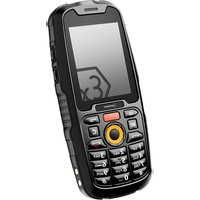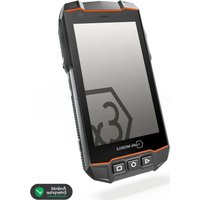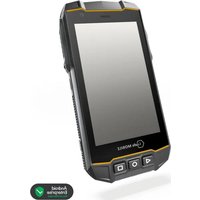
IS520.1 - Smartphone i.safe Mobile - Free user manual and instructions
Find the device manual for free IS520.1 i.safe Mobile in PDF.


User questions about IS520.1 i.safe Mobile
0 question about this device. Answer the ones you know or ask your own.
Ask a new question about this device
Download the instructions for your Smartphone in PDF format for free! Find your manual IS520.1 - i.safe Mobile and take your electronic device back in hand. On this page are published all the documents necessary for the use of your device. IS520.1 by i.safe Mobile.
USER MANUAL IS520.1 i.safe Mobile
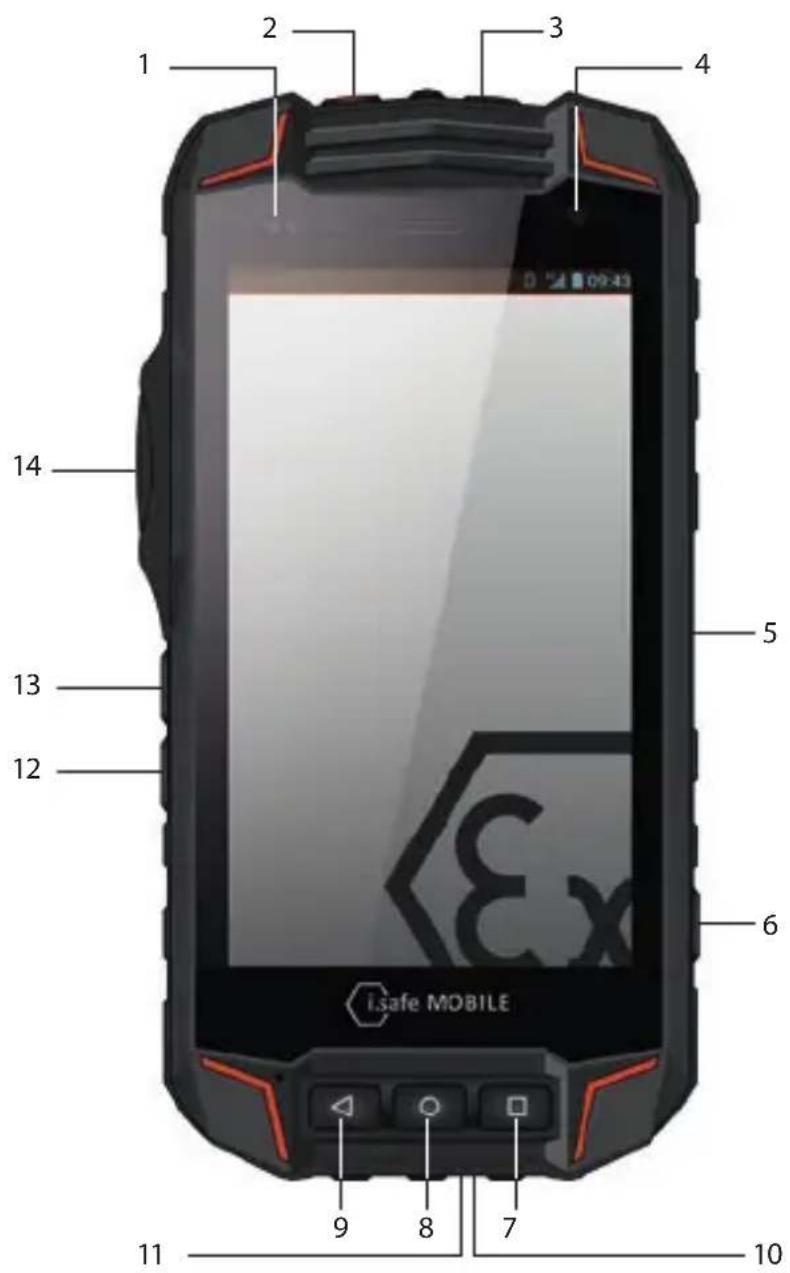
> KEYS AND SPECIAL FEATURES
text_image
1 2 3 4 5 6 7 8 9 10 11 12 13 14 iSafe MOBILEDocument No. 1015MM01REV07
Version: 2019-05-14
(c) 2019 i.safe MOBILE GmbH
i.safe MOBILE GmbH
i_Park Tauberfranken 10
97922 Lauda-Koenigshofen
Germany
Tel. +49 9343/60148-0
info@isafe-mobile.com
www.isafe-mobile.com Template:TEMPMM01REV10
CONTENTS
English 4
Deutsch 8
Česky 14
Dansk....19
Español....24
Suomi....29
Français....34
Magyar 39
Italiano 44
Nederlands 49
Norsk 55
Polski 60
Portuguesa 65
Русский....70
Svenska 75
Korean 80
Chinese 85
ENGLISH
INTRODUCTION
This document contains information and safety regulations which are to be observed without fail for safe operation of the device IS520.1 under the described conditions. Non-observance of this information and instructions can have serious consequences and / or may violate regulations.
Please read the manual and these safety instructions before using the device. In case of any doubt, the German version shall apply.
The current EU-declaration of conformity, certificates, safety instructions and manuals can be found at www.isafe-mobile.com or requested from i.safe MOBILE GmbH.
> RESERVATION
The content of this document is presented as it currently exists. i.safe MOBILE GmbH does not provide any explicit or tacit guarantee for the accuracy or completeness of the content of this document, including, but not restricted to, the tacit guarantee of market suitability or fitness for a specific purpose unless applicable laws or court decisions make liability mandatory.
i.safe MOBILE GmbH reserves the right to make changes to this document or to withdraw it any time without prior notice. Changes, errors and misprints may not be used as a basis for any claim for damages. All rights reserved.
i.safe MOBILE GmbH cannot be held responsible for any data or other loss and direct or indirect damages caused by any improper use of this device.
EX-SPECIFICATIONS
The device IS520.1 is suitable for use in potentially explosive atmospheres classified zone 1/21 and 2/22 in accordance with directives 2014/34/EU and 2014/53/EU, as well as the IECEx scheme.
EX-MARKINGS
» ATEX:
Ex II 2G Ex ib IIC T4 Gb
① II 2D Ex ib IIIC T135°C Db IP6X
EU Type Examination Certificate:
EPS 17 ATEX 1 062 X
CE-designation: € 2004
»IECEx:
Ex ib IIC T4 Gb
Ex ib IIIC T135 °C Db IP6X
IECEx Certificate: IECEx EPS 17.0032X
» Temperature range:
-20^ +60^
» Manufactured by:
i.safe MOBILE GmbH
i_Park Tauberfranken 10
97922 Lauda-Koenigshofen
Germany
EU-DECLARATION OF CONFORMITY
The EU-declaration of conformity can be found at the end of this manual.
>FAULTS AND DAMAGES
If there is any reason to suspect that the safety of the device has been compromised, it must be withdrawn from use and removed from any ex-hazardous areas immediately. Measures must be taken to prevent any accidental restarting of the device. The safety of the device may be compromised, if, for example:
» Malfunctions occur.
» The housing of the device shows damage.
» The device has been subjected to excessive loads.
» The device has been stored improperly.
» Markings or labels on the device are illegible.
We recommend that a device displaying errors or in which an error is suspected be sent back to i.safe MOBILE GmbH to be checked.
EX-RELEVANT SAFETY REGULATIONS
Use of this device assumes that the operator observes the conventional safety regulations and has read and understood manual, safety instructions and certificate.
The following safety regulations must also be complied with:
» Inside ex-hazardous areas the covers of all interfaces must be closed.
» To ensure the IP-protection, it has to be ensured that all gaskets are present and functional. There must be no large gap between the two halves of the housing.
» The device may only be charged outside ex-hazardous areas using the i.safe PROTECTOR 2.0 or i.safe PROTECTOR 3.0 USB-cable or other equipment approved by i.safe MOBILE GmbH.
» Physical data connections to other equipment are only allowed outside ex-hazardous areas using the i.safe PROTECTOR 2.0 or other equipment approved by i.safe MOBILE GmbH.
» The device may only be charged at ambient temperatures between +5°C ... +35°C.
» The device may not be exposed to any aggressive acids or alkalis.
» The device may not be taken into zones 0 and 20.
» Only accessories approved by i.safe MOBILE GmbH may be used.
FURTHER SAFETY ADVISES
» Do not touch the screen of the device with sharp objects. Dust particles and nails may scratch the screen. Please maintain the screen clean. Remove dust on the screen with a soft cloth gently, and do not scratch the screen.
» Do not put the device in environments with excessive temperatures, as this could lead to heating of the battery, resulting in fire or explosion.
» Do not charge the device near any flammable or explosive substances.
» Charge the device under indoor conditions only.
» Do not charge the device in environments with much dust or humidity.
» The device may only be charged at ambient temperatures between +5°C ... +35°C.
» Do not use the device in areas where regulations or legislatives prohibit the use.
» Do not expose the device or charger to strong magnetic fields, such as are emitted from induction ovens or microwaves.
» Do not attempt to open or repair the device. Improper repair or opening can lead to the destruction of the device, fire or explosion. Only authorized personnel are allowed to repair the device.
» Only use accessories approved by i.safe MOBILE GmbH.
Power off the device in hospitals or other places where the use of mobile phones is prohibited. This device may affect proper work of medical equipment, such as pacemakers. Always keep a distance of at least 15 cm between the device and these devices.
» To prevent possible hearing damages, do not listen at high volume level for long periods. Fully understand user manual before use. Ensure your player at low volume levels or power off before you leaving.
» Observe all corresponding laws that are in force in the respective countries regarding the use of devices while operating a vehicle.
» Please power off the device and disconnect the charging cable before cleaning the device.
» Do not use any chemical cleaning agents to clean the device or the charger. Use a damp and anti-static soft cloth for cleaning.
» Do not discard old and abandoned lithium batteries into the trash, send them to designated waste disposal locations.
» The user alone is responsible for any and all damages and liabilities caused by malware downloaded when using the network or other data-exchange functions of the device. i.safe MOBILE GmbH cannot be held responsible for any of those claims.
WARNING
i.safe MOBILE GmbH will not assume any liability for damages caused by disregarding any of these advices or by any inappropriate use of the device.
MAINTENANCE/REPAIR
Please note any legal requirements for periodic inspection.
The device itself has no user-serviceable parts. It is recommended to perform inspections according to the safety regulations and advises. If there is a problem with the device, please contact your vendor or consult the service center. If your device is in need of repair, you can either contact the service center or your vendor.
BATTERY
The device may only be charged at ambient temperatures in a range from +5°C ... +35°C. Caution: risk of explosion if battery is replaced by an incorrect type. Dispose used batteries according to the instructions.
> INSTALLATION OF THE MICRO SIM CARD
The device features two micro SIM card slots. These are located in the battery compartment under the battery.
If you have installed two micro SIM cards, you can choose your primary card in
WARNING
Do only change the SIM card when the device is switched off. Do not try to insert or remove the SIM cards when any external power supply is connected.
> CELL BROADCAST
The device supports cell broadcast.
> INSTALLATION OF THE microSD CARD
The device features a microSD card slot (up to 32GB). This is located in the battery compartment under the battery.
If you want to remove the microSD card, please make sure that the card is not in use by the device. To remove the microSD card follow the instructions given in
WARNING
Do only change the microSD card when the device is switched off. Do not try to insert or remove the microSD card when any external power supply is connected, otherwise the microSD card may be damage.
> KEYS AND SPECIAL FEATURES
(see illustration on page 2)
1> CONTROL LED: Control LEDs for charging and notification.
2) SOS BUTTON: Long press automatically selects an emergency number stored by you. This function can only be used in conjunction with an optionally available LWP app.
3) POWER KEY: Long press to power ON/OFF the device. Short press to power ON/OFF the standby mode.
4 CAMERA:Front camera.
5) MAGNETIC CHARGER PORT: To charge the device with the delivered magnetic i.safe PROTECTOR 3.0 USB cable.
6> SIDE KEY RIGHT: Optional key used by different apps.
7> HOME KEY: To go back to the homescreen.
8) CURRENT APPLICATION: Close all applications.
9> BACKKEY: Back to previous screen mask.
10> MICRO USB TYP C: To charge and to connect the device with the delivered i.safe PROTECTOR 2.0 USB cable.
11> EARPHONE JACK: To connect an earphone.
12 LOUDNESS CONTROL: Volume up.
13 LOUDNESS CONTROL: Volume down.
14> SIDE KEY LEFT: Optional key used by different apps.
> SETTING PASSWORD
In settings a password is required, use standard password "1234".
>IMPORTANTINFORMATION!
FACTORY RESET/ACTIVATE OEM MODE
If you have set up a Google ^TM Account, it is important to proceed with the following steps before you make a factory reset. This ensures that all private data will be deleted on the device:
→ enable back to
If you do not enable the OEM unlocking, the device will always ask you to sign in with the previously synced Google Account after the restart. In that case the device is unusable for other user.
RECYCLING
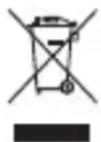
The crossed-out wheeled-bin symbol on your product, battery, literature, or packaging reminds you that all electrical and electronic products, batteries, and accumulators must be taken to separate collection at the end of their working life. This requirement applies in the European Union. Do not dispose of these products as unsorted municipal waste. Always return your used electronic products, batteries, and packaging materials to dedicated collection points. This way you help prevent uncontrolled waste disposal and promote the recycling of materials. More detailed information is available from the product retailer, local waste authorities, national producer responsibility organisations, or your local i.safe MOBILE GmbH representative.
Correct Disposal of this product. This marking indicates that this product should not be dispose other household wastes throughout the EU. To prevent possible harm to the environment or human he from uncontrolled waste disposal, recycle it responsibly to promote the sustainable reuse of material resources. To return your used device, please use the return and collection systems or contact the retailer where the product was purchased. They can take this product for environmental safe recycling.
> INFORMATION CONCERNING SAR CERTIFICATION (SPECIFIC ABSORBATION RATE)
Maximum SAR values for this model and the conditions under which these were determined: SAR (head) 0.46 W/kg
SAR (body - worn) 1.39 W/kg
This device was tested for typical body-worn operations with the back of the handset kept 5 mm from the body. The device complies with RF specifications when the device used at 5 mm from your body.
» The product shall only be connected to a USB interface of version USB2.0.
» Adapter shall be installed near the equipment and shall be easily accessible.
TRADEMARKS
» i.safe MOBILE and the i.safe MOBILE logo are registered trademarks of the i.safe MOBILE GmbH.
» Google is a trademark of Google LLC.
» All other trademarks and copyrights are the properties of their respective owners.
DEUTSCH
EINFÜHRUNG
SAR (hoved) 0.46 W/kg
Laite tukee cell broadcast.
microSD-KORTIN ASENNUS
PAINIKKEIDEN TOIMINNOT
Certification CE: 2004
»IECEx:
Ex ib IIC T4 Gb
Ex ib IIIC T135 °C Db IP6X
Certificat IECEx: IECEx EPS 17.0032X
»Plage de temperature:
-20^ +60^
»Fabrique par:
i.safe MOBILE GmbH
i_Park Tauberfranken 10
97922 Lauda-Koenigshofen
Allemagne
> DÉCLARATION DE CONFORMITÉ EU
VEDLIKEHOLD / REPARASJON
Ta hensyn til eventuelle lovmessige direktiver i forbindelse med periodiske kontroller, som f.eks. driftssikkerhetsdirektivet (et direktiv som gjelder i Tyskland)!
PASSORD I INNSTILLINGENE
Frequency bands Maximum output power
GSM 900 33dBm
DCS 1800 32dBm
WCDMA 900 24dBm
WCDMA 2100 24dBm
LTE Band 1 24dBm
LTE Band 3 23.5dBm
LTE Band 7 23.5dBm
LTE Band 20 24dBm
LTE Band 28 24dBm
LTE Band 38 24dBm
LTE Band 40 24dBm
WiFi 19dBm
BT 10dBm
CONTACT/SERVICE CENTER
FOR FURTHER QUESTIONS PLEASE CONTACT OUR SERVICE CENTER:
» www.isafe-mobile.com/service
EU-DECLARATION OF CONFORMITY

text_image
i.safe MOBILEEU – Declaration of Conformity
The company i.safe MOBILE GmbH declares under its sole responsibility that the product to which this declaration relates is in accordance with the provisions of the following data, directives and standards:
EU-DECLARATION OF CONFORMITY
i.safe MOBILE
| EN60950-1: 2006 + A11: 2009 + A1: 2010 + A12: 2011 + A2: 2013; EN 62209-1: 2016; EN 62209-2: 2010; EN 62479: 2010; Final Draft EN 301 489-3 V2.1.1; Final Draft EN 301 893 V2.1.0; Final Draft EN 303 345 V1.1.7 | |
| Conformity statement 2015/863/EU amending 2011/65/EU issued by Konformitätsaussage 2015/65/EU ergänzt 2011/65/EU ausgestellt durchApplied harmonized standards Angewandte harmonisierte Standards | SGS-CsTC Standards Technical Services Co., Ltd. 198 Kezhu Road,Scientech Park Guangzhou Economic & Technology Development District, Guangzhou, China 510663IEC 62321-2: 2013; IEC 62321-1: 2013; IEC 62321-3-1: 2013; IEC 62321-5: 2013; IEC 62321-4: 2013 + A1: 2017; IEC 62321-7-1: 2015; IEC 62321-7-2: 2017 & ISO 17075-1: 2017; IEC 62321-6: 2015 |
I.safe MOBILE
Lauda –Koenigshofen 10.05.2019
Dirk Amann
Managing Director
Geschäftsführer
natural_image
Nighttime exterior view of a large industrial chemical plant with illuminated towers and piping (no visible text or signage)WWW.ISAFE-MOBILE.COM