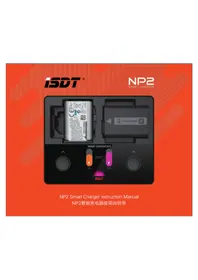
NP2 - Battery charger ISDT - Free user manual and instructions
Find the device manual for free NP2 ISDT in PDF.


User questions about NP2 ISDT
0 question about this device. Answer the ones you know or ask your own.
Ask a new question about this device
Download the instructions for your Battery charger in PDF format for free! Find your manual NP2 - ISDT and take your electronic device back in hand. On this page are published all the documents necessary for the use of your device. NP2 by ISDT.
USER MANUAL NP2 ISDT
text_image
MOTOR N63 BAS 80% Diner Charger NP2 1975/01/06/2012 Smart Charger NP2 ISDT 9.1V ISDTNP2 Smart Charger Instruction Manual
NP2智能充电器使用说明书
Thank you for purchasing the ISDT NP2 smart battery charger which is compatible with the SONY NP-BX1, NP-FZ100 and NP-FW50 battery types. The charger is equipped with a wide viewing angle LCD screen which can display the status of the charging process and battery parameters in detail.
The two independent charging channels can charge batteries of different types simultaneously. The ISDT NP2 can also identify the battery model and automatically adapt to the optimal charging parameters and algorithm.
Safety Precautions
Please read these instructions and warnings before using this product:
1) Keep the charger away from sources of heat and damp environments during use. Ventilation is necessary for heat dissipation.
2) Please do not allow children to operate the charger.
3) Do not attempt to charge incompatible batteries with this battery charger. Attempting to do so as can cause damage to the charger or battery, or even result in disastrous consequences;
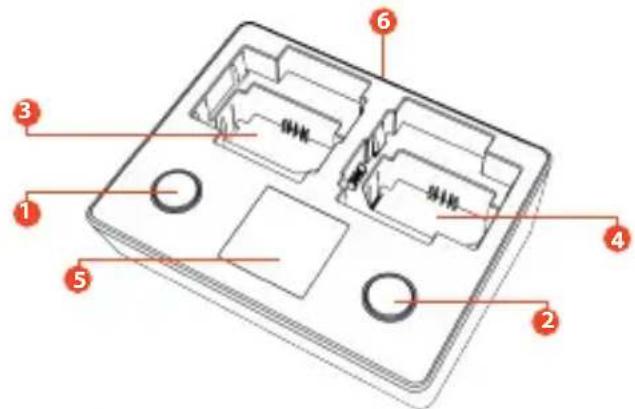
text_image
Technical diagram of a device casing with numbered components for identificationEnglish | 01
1) Channel 1 operation key
2) Channel 2 operation key
3) Channel 1 battery slot
4) Channel 2 battery slot
5) LCD display screen
6) USB Type-C power supply input port
Charger Specification
Model type: NP2
Power supply input port: USB Type-C
Input voltage: 5\~12V
Compatible USB adapter: 5V/1.0A, 5V/2.0A, QC 2.0/3.0
Max charge current: 1.5A /Slot
Max input power: 18W
Charging mode: normal mode/quick mode
Compatible battery type: NP-FZ100,NP-FW50,NP-BX1
Display: 240 x 240 IPS LCD
Working temperature: 0°C - 40°C
Size: (L x W x H) 112 x 91 x 33.5mm
Weight:115g
Operation Instruction
In this charger, two batteries can be charged in different modes in various combinations.
1) Connect the USB type-C cable and USB power adapter, then the NP2 will be ready for charging. NP2 supports a variety of USB power adapters and automatically identifies and matches the input power.
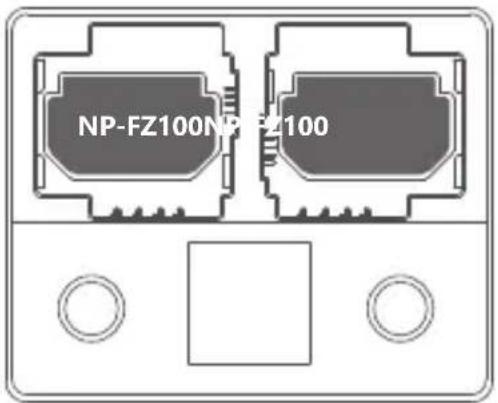
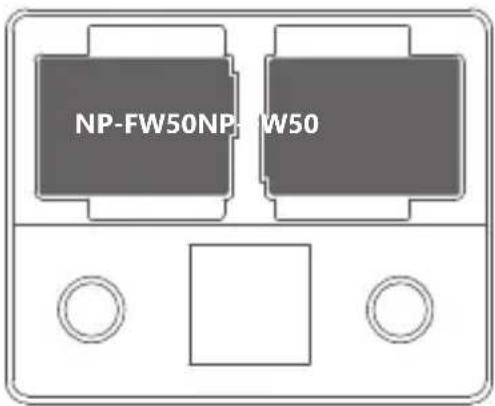
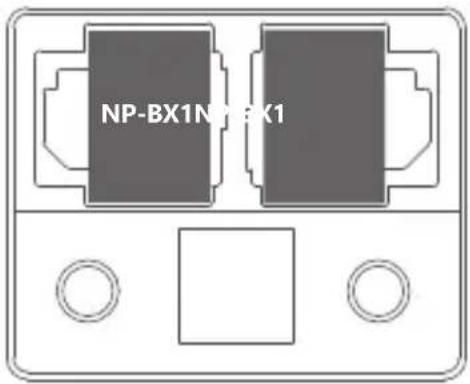
2) Insert batteries into the battery slot as shown below. The NP2 supports mixed charging of different types of batteries and can automatically identify and adjust charging parameters.
text_image
NP-FZ100NP-FZ100Insertion diagram for NP-FZ100
text_image
NP-FW50NP-W50Insertion diagram for NP-FW50
text_image
NP-BX1N X1Insertion diagram for NP-BX1
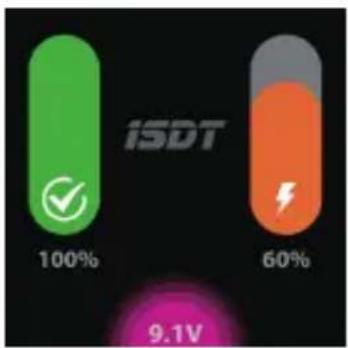
3) After correctly inserting a battery, the charger will beep and sound the prompt tone. Default charging mode will start automatically without setup. To enter Fast Charging mode, press the channel operate button for a few seconds and the selected channel will switch into fast charging mode. Please note that the actual charging current is limited by the output wattage of the USB adaptor. The maximum input wattage is 18W when using a standard adaptor which supports QC 2.0/3.0. It can automatically allocate a maximum 75% wattage after the channel has been activated in fast charging mode.
bar
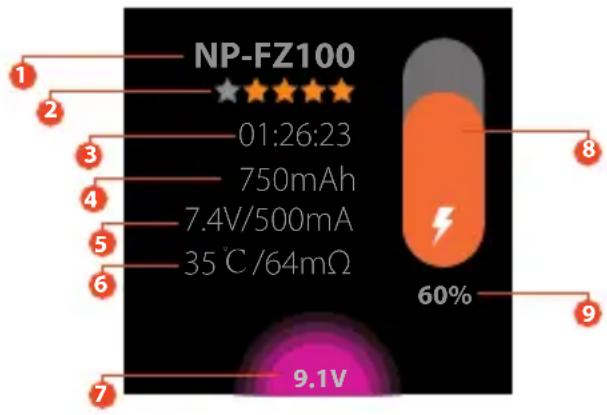
| Category | Value | | -------- | ----- | | iSDT | 100% | | iSDT | 60% | | iSDT | 9.1V |4) To view detailed charging parameters for individual batteries, press the corresponding operate button to display the screen showing charging parameters and battery status details as described below:
text_image
NP-FZ100 01:26:23 750mAh 7.4V/500mA 35 ℃ /64mΩ 9.1V 60%Display details
1) Battery type
2) Health rating of the battery
3) Charging elapsed time
4) Charge capacity
5) Charging voltage and current
6) Temperature and electrical resistance
7) USB/Type C input voltage, the colour of this area will turn purple when connecting with a QC adaptor.
8) Charge Status Bar, the bar is an orange colour in standard charging mode and purple when in fast charging mode. It turns green when charging is complete.
9) Battery charge percentage.
Battery Health Rating
During charging, the charger will rate the battery according to the internal resistance of the battery, and the full score is five stars in white. After the charging cycle is complete, the charger will evaluate the health of the battery based on the electrical resistance and the accumulated charge capacity. Five stars in the top rating.
Standby Mode
When the charger is in standby mode or if the charge cycle has finished and the inserted batteries are fully charged, the brightness of the display backlight will drop to the lowest level after five minutes of inactivity. Inserting or removing a battery or pushing any button will wake up the charger from standby mode.
Capacity Limiting
For the health of the battery and for general safety, the charger will cut off the charge current automatically and display a warning message when the applied charge exceeds that of the capacity of the battery being charged.
Battery Level Checking
When the charger is not connected to USB power, if you want to check the status of a battery, the battery can be inserted into the battery slot and with a long press of either key, you can look at the battery level. The screen will turn off after five seconds to save battery consumption.
Note: for NP-BX1 batteries, it is necessary to load another NP-FW50 or NP-FZ100 battery in another position to display the power correctly.
NP2 Battery Charger Charging
| Battery Type | NP-FZ100 | NP-FW50 | NP-BX1 |
| Full charge voltage 8.40V 8.40V 4.20V | |||
| General mode maximumcharge current | 1000mA | 500mA 600mA | |
| Normal mode maximum chargecurrent normal mode(approximate full charge time) | 2.5h 2.5h 2.5h | ||
| Maximum charging currentin fast mode | 1500mA | 800mA 1000mA | |
| A full charge in fast mode(approximate full charge time) | 1.5h 1.5h 1.5h |
System Setting
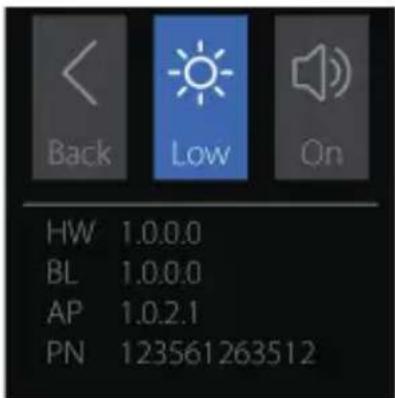
When the charger does not have a battery inserted, long press the two channel selection buttons to enter the system setting interface.
text_image
Back Low On HW 1.0.0.0 BL 1.0.0.0 AP 1.0.2.1 PN 123561263512In the system setting interface, press the first channel button to switch the selected option, and press the second channel button to set the selected option parameters.
< Return to the previous
Display brightness Settings, there are three options: low, medium, high
Beeper volume setting with both on and off options
HWBHardware version Boot version
AP App version PN PN code
Firmware Update
ISDT continually strive in the pursuit of perfection on all products. Our R&D engineers concentrate their effort over days and months on the enhancement of the functions and algorithms, as well as the visual optimization. Continuous improvement of the performance is shaped up in the firmware upgrade program. Latest upgrade firmware can be downloaded from the ISDT official website:
The upgrade steps of NP2 smart charger are as follows:
1) Connect PC and NP2 with USB type-C data cable; 2) Start the firmware update program and update the firmware to NP2 according to the software guidelines;
Packaged Items
1) NP2 smart charger 2) USB type-C cable
All pictures, statements and text information of this product are for reference only. Please refer to the actual information on the official website www.isdt.co. ISDT reserves the right for final explanation and modification of the specification.
感谢您购买ISDT NP2智能充电器
text_image
Technical diagram of a device casing with numbered components for identification简体中文|01
bar
| Category | Value | | -------- | ----- | | iSDT | 100% | | | 60% | | | 9.1V |text_image
Technical diagram of a device casing with numbered components and Chinese labelsFrench | 01
bar
| Category | Value | | -------- | ----- | | iSDT | 100% | | | 60% | | | 9.1V |text_image
Technical diagram of a device casing with numbered components and Chinese labelsSpanish | 01
bar
| Category | Value | | -------- | ----- | | ISDT | 100% | | | 60% | | | 9.1V |text_image
Technical diagram of a device casing with numbered components and labeled parts in ChineseGerman | 01
1) kanal 1 bedientaste
2) kanal 2 bedientaste
3) kanal 1 akku schacht
4) kanal 2 akku schacht
5) Icd display
6) usb type-c netzteil eingang
Technische Daten
bar
| Category | Value | | -------- | ----- | | ISDT | 100% | | | 60% | | | 9.1V |HW Hardware version BL Software version in Boot area
AP Software version in APP area PN PN code
Firmware Update
text_image
Technical diagram of a device casing with numbered components for identificationItalian | 01
bar
| Category | Value | | -------- | ----- | | iSDT | 100% | | | 60% | | | 9.1V |bar
| Category | Value | | -------- | ----- | | ISDT | 100% | | | 60% |Address: 5th Fl., Bldg. 9, Mabian Industrial Zone, Yangtian Rd., Block 72, Xin'An Street, Bao'An District, Shenzhen, PRC Email:hi@isdt.co
NP2电池兼容型号 NP2 Compatible Camera list
| Battery type | 兼容相机列表电池型号Compatible Camera list |
| NP-FZ100 | ILCE-7M3, ILCE-7RM3, ILCE-9 |
| NP-FW50 | ILCE-6000 / 6300 / 6500 / 5000 / 5100 / 7 / 7M2 / 7S / 7SM2 / 7R / 7RM2 / QX1DSC-RX10 / RX10M2 / RX10M3 / RX10M4NEX-C3 / F3 / 3N / 5C / 5N / 5R / 5T / 6 / 7 33, 35, 37, 55, 3000 |
| NP-BX1 DSC-RX1 / RX1R / RX1RM2 / RX100 / RX100M2 / RX100M3 / RX100M4 / RX100M5,DSC-RX100M6 / HX350 / WX500 / HX90 / WX350 / HX60 / H400 / HX400 / HX50 / HX300,HDR-CX405 / PJ410 / MV1 / AS300 / AS50 /GWP88E / CX240E / PJ240E / AS200V,FDR-X3000 / X1000V |