UC1 - Charger ISDT - Free user manual and instructions
Find the device manual for free UC1 ISDT in PDF.


User questions about UC1 ISDT
0 question about this device. Answer the ones you know or ask your own.
Ask a new question about this device
Download the instructions for your Charger in PDF format for free! Find your manual UC1 - ISDT and take your electronic device back in hand. On this page are published all the documents necessary for the use of your device. UC1 by ISDT.
USER MANUAL UC1 ISDT
Please read this user manual in detail and follow the instructions carefully before using your new charger:
- Keep the charger away from humidity and heat source while charging, ensure proper cooling during use.
- Make sure the battery cells is correct before charging, avoid over-discharge of the battery.
- This charger can only use for 2\~6S Lipo (voltage 7.4\~26V) battery as power supply. Do not use an input power supply beyond the range of voltage, avoid damage the charger or even cause dangerous.
text_image
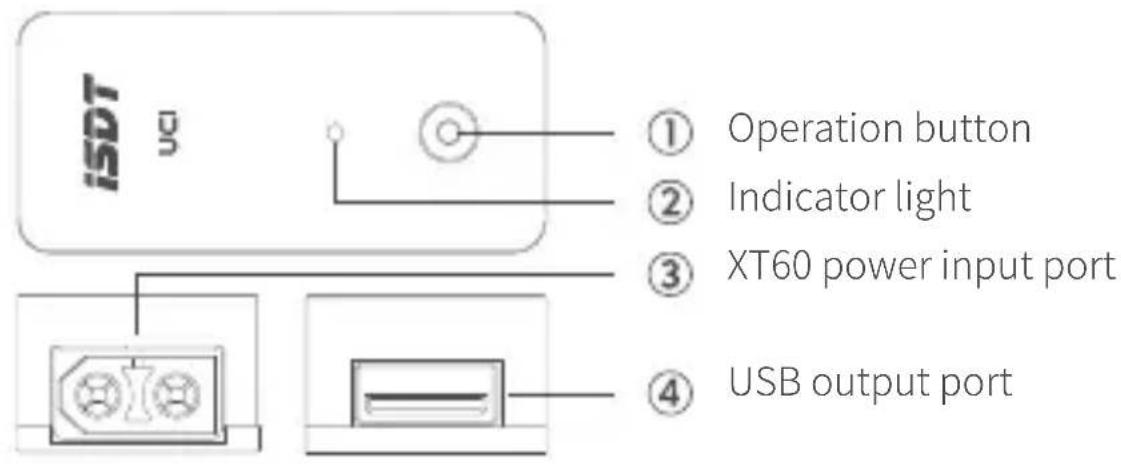
ISDT ① Operation button ② Indicator light ③ XT60 power input port ④ USB output portSpecifications
Type: UC1
Power input port: XT60
Input voltage: 2\~6S LiPo (7.4\~26V)
Max output current: 2A
Max output power: 18W
Charging protocol support:
QC2.0/3.0, FCP, BC 1.2
Operating temperature: 0 \~40 °C
Size: (L × W × H) 48.5×22×14.5mm
Weight: 23 g
Indicator light status
| Indicator light | Solid green light | Red light quick flash | Red light slow flash | Purple light slow flash | Cyan light slow flash |
| Instructions | Charging | Internal circuit abnormal, charging stop | Low voltage alarm, the flash times is the number of battery cells | The input voltage is higher than the battery cells setting | Setting state |
| Output |  |  |  |  |  |
Operating instructions
- Plug the 2\~6S Lipo battery with XT60 to input port, the indicator light turns green means normal state. If the cell amounts setting on UC1 is not match the battery cells, the indicator light turns purple or red at slow flash.
- Press and hold the button for 3 seconds until the light turns cyan, it enters the setup state to set the battery cells.
- The cyan light flash times is the battery cells that have been set. Press the button to alter the battery cells within 2\~6S running in cycle. When the cyan-light flash times are same as battery cells, press and hold the button more than 3 seconds and it will save the setting and exit.
- Press button can check the battery cells during charging. The flash times of the green light is the battery cells.
- When the red light flash slowly it indicates low battery capacity, you should cut off to prevent the over-discharge, otherwise, it will consume current internal.
*All pictures, statements and text information of this product are for reference only.
Please refer to the actual information on the official website www.isdt.co.
SHENZHEN ISD TECHNOLOGY CO.,LTD reserves the right for final explanation and modification of the specification.