T6 - Charger ISDT - Free user manual and instructions
Find the device manual for free T6 ISDT in PDF.


User questions about T6 ISDT
0 question about this device. Answer the ones you know or ask your own.
Ask a new question about this device
Download the instructions for your Charger in PDF format for free! Find your manual T6 - ISDT and take your electronic device back in hand. On this page are published all the documents necessary for the use of your device. T6 by ISDT.
USER MANUAL T6 ISDT
T series is ISDT produced high-performance smart balance charger.
With T8 \ T6 \ T6 Lite
Please visit : www.isdt.co for more details on the functions of this smart charger, as well as purchase various accessories.
Functions of products will be kept on upgrading, the manual in your hand may be different from the actual operation; please refer to the actual functions.
This user guide update date is September 2017
text_image
QR code image containing encoded data, no visible human-readable textRevolution Starts Here
Innovative reform, Friendly to use
Contents
Warnings and Safety Tips 04
Product Parameters and Characteristics 05
Default Battery Type of Charger and Task Parameters 07
How to Confirm Charging Current 08
Task Setting 09
Working Parameters Display 12
System Default 15
Troubleshoot 18
Product Qualification Declaration 19
Warnings and Safety Tips
The following safety tips are essentially important. Please strictly follow the manual's instructions in operation to guarantee safety. Improper operation or incorrect working parameter settings may cause damages to the charger and battery and/or result to a fire.
Do not use the charger in an unattended manner; in case of any functional abnormality, please stop using it and refer to the manual.
- Keep the charger away from dust, humidity, rain and high temperature, as well as avoid direct exposure to the sun and intense vibration.
Charger power input for the DC T6 / T6 Lite (8-32V), T8 (12-40V), make sure the polarities are correct when connecting to the power supply.
Please place the charger on a heat-resisting, non-flammable and insulating surface. Do not use it by placing it on the car's seats, carpet or other similar places. Keep inflammable and explosive objects away from operation areas of the charger.
Make sure the heat emission hole at the bottom of the charger is uncovered while in use, and ensure the cooling fan smoothly extracts heat.
Please fully understand the charging and discharging characteristics as well as the battery's specifications. Additionally, set up proper charging parameters in the charger. Incorrect setting of parameters can cause damage to the charger and battery and/or result to disastrous consequences such as fire or explosion.
- When charging or discharging is completed, please press the speed shuttle key to terminate current task, and remove the battery when the charger shows the standby screen.
Product Parameters and Characteristics
text_image
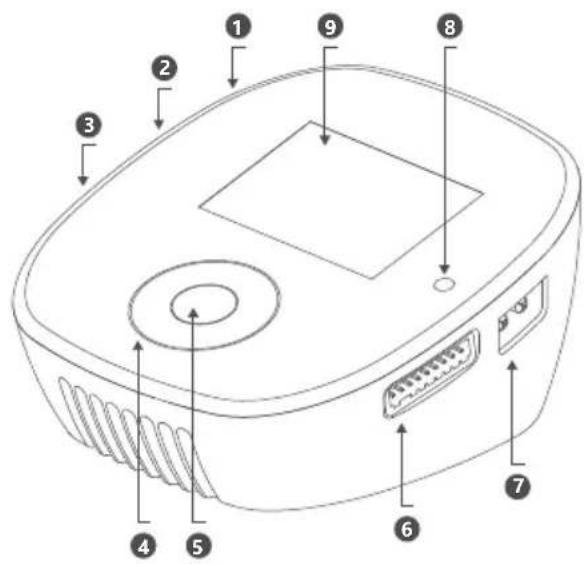
Diagram of an electronic device with numbered components for identification- Input port
- Update port
-
USB port
-
Multi-function key
- Enter key
-
Balance port
-
Output port
- Light sensor
- Screen
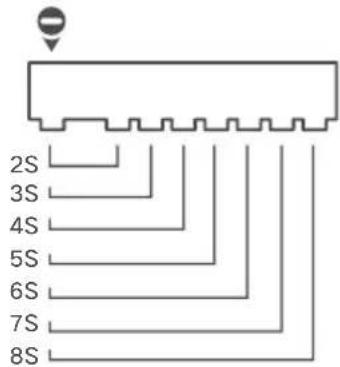
Guide For the
Connection
of Balanced Port
text_image
2S 3S 4S 5S 6S 7S 8S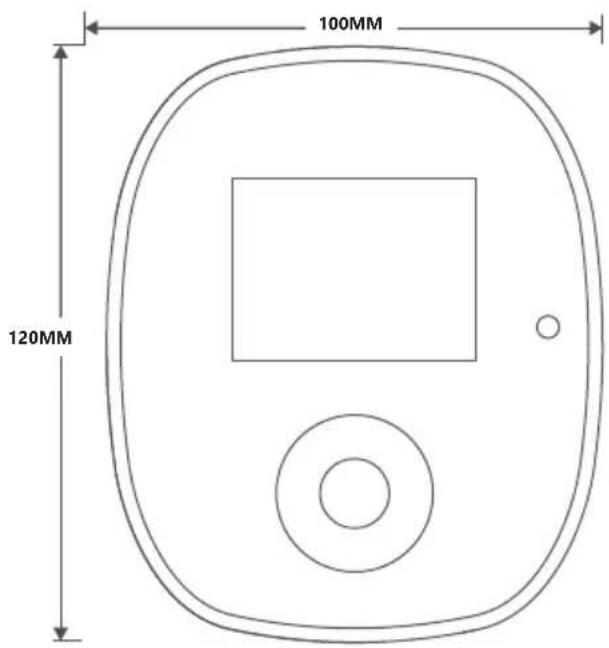
text_image
100MM 120MM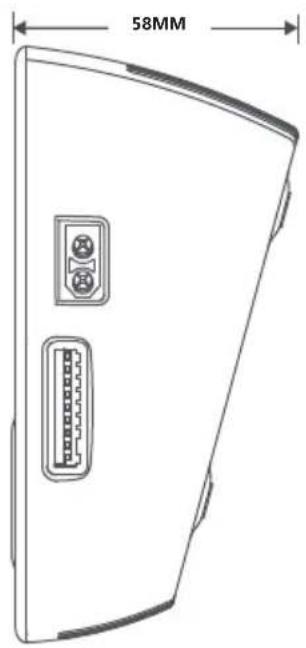
text_image
58MMProduct Parameters and Characteristics
| T6 Lite T6 | T8 | ||
| Input Voltage | DC 8-32V | DC 8-32V | DC 12-40V |
| Maximum input current | 30A | 35A | 35A |
| Output voltage | 0-30V | 0-30V | 0-37V |
| BattGO ^TM Support smart battery | Output support | Input/Output support | Input/Output support |
| Charge Current | 0.1-25.0A | 0.1-30.0A | 0.1-30.0A |
| Discharge Current | 0.1-5.0A | 0.1-5.0A | 0.1-5.0A |
| Max Charge Capacity | 600W | 780W | 1000W |
| Max Discharge Capacity | 20W | 20W | 20W |
| Balancing Current | 1.5A/cell | 1.5A/cell | 2.2A/cell |
| Balance Cells | 2-6S | 2-6S | 2-8S |
| USB Output | 5V/2.1A | 5V/2.1A | 5V/2.1A |
| Color | black | black | multi-color cover |
| Supported Battery Type | LiFe/Lilon/LiPo/LiHv (1-6S)NiMH/Cd (1-16S)Pb (1-12S) | LiFe/Lilon/LiPo/LiHv (1-6S)NiMH/Cd (1-16S)Pb (1-12S) | LiFe/Lilon/LiPo/LiHv (1-8S)NiMH/Cd (1-21S)Pb (1-14S) |
| Display | 2.4'' 320x240 IPS LCD | ||
| Operating Temperature | 0-40°C | ||
| Storage Temperature | -20-60°C | ||
| Dimensions | 100x120x58 mm | ||
| Weight | 305g | ||
| Supported languages | English, German, French, Spanish, Japanese,Traditional Chinese, Simplified Chinese | ||
Default Battery Type of Charger and Task Parameters
| NiCd/NiMH | Pd | LiFe | Lilon | LiPo | LiHv | |
| Rated Voltage | 1.20V | 2.00V | 3.20V | 3.60V | 3.70V | 3.80V |
| Full Charge Voltage | 1.40V | 2.46V | 3.65V | 4.10V | 4.20V | 4.35V |
| Storage Voltage | Not supported | Not supported | 3.30V | 3.70V | 3.80V | 3.85V |
| Discharge Voltage | 1.10V | 1.90V | 2.90V | 3.20V | 3.30V | 3.40V |
| Pre-charge Voltage | 0.90V | 1.80V | 2.60V | 2.90V | 3.00V | 3.10V |
| Balance Charge | Not supported | Not supported | supported | supported | supported | supported |
| Unbalanced Charge | supported | supported | supported | supported | supported | supported |
| T6 Lite Support Cells | 1-16S | 1-12S | 1-6S | 1-6S | 1-6S | 1-6S |
| T6 Support Cells | 1-16S | 1-12S | 1-6S | 1-6S | 1-6S | 1-6S |
| T8 Support Cells | 1-21S | 1-14S | 1-8S | 1-8S | 1-8S | 1-8S |
| T6 Lite Max Charge Current | 25.0A | 25.0A | 25.0A | 25.0A | 25.0A | 25.0A |
| T6 Max Charge Current | 30.0A | 30.0A | 30.0A | 30.0A | 30.0A | 30.0A |
| T8 Max Charge Current | 30.0A | 30.0A | 30.0A | 30.0A | 30.0A | 30.0A |
Please be cautious when selecting the charging parameters for different types of batteries; otherwise, the batteries may be damaged. Incorrect setting can result to fire and/or explosion.
How to Confirm Charging Current
It is very important to know the maximum charging current of the battery as excessive current could influence the life span of battery and/or cause damages. In addition, excessive current can cause heating and/or explosion of the battery during the charging process.
The charging and discharging capacity of battery is usually marked with C value. Multiplying the charging C value and battery capacity equals to the maximum charging current supported by the battery. For example, for a 1000 mAh battery with a charging capacity of 5C, the maximum charging current would be 1000 × 5 = 5000 mA; therefore, the maximum charging current is 5A.
For a lithium battery, if it is impossible to confirm the supported charging C value, please set the charging current below 1C for the sake of its (lithium battery) safety.
The reference relation between C value and charging time: charging time ≥ 60 minutes/charging C value (it therefore needs around 60\~70 minutes to complete charging with 1C). Due to differences in battery conversion efficiency, the period to complete the charging might be extended.
Task Setting
Task Settings
| LiPo-8S | 4.20V |
| Current | 30.0A |
| Task | Charge |
| Input Limit | 3.3V/Cell |
| Start | |
| Back |
Task Settings
| Battery Type | LiPo |
| Cells Voltage | 4.20V |
| Cell Count | 8S |
| Currnet | 30.0A |
| Task | Charge |
| Input Limit | |
| Back |
Input/Output normal battery Input/Output
Connect PSU to charger, wait until charger is in standby then connect your battery to charger. Short Press ▶/■, you will see task setting below:
Input/Output BattGo smart battery
| LiPo-8S | Auto-detect battery type, battery cells |
| Current | Settings based on BattGo battery's parameter |
| Task | Select charge/discharge and storage |
| Input Limit | BattGo battery as input source, input limit could be set to 3.8v/cell or 3.3v/cell |
| Start | Start task |
| Back | Back |
Task Setting
Input/Output normal battery
| Battery Type | Battery type selection |
| Cells Voltage | End voltage slight adjustment, range ± 0.05v |
| Cell Count | Battery cell selection, auto detection if balance port is connected |
| Curnet | Current selection, charge / store (T6 Lite) 0.1-25.0A (T6 T8) 0.1-30.0A, discharge 0.1-5.0A |
| Task | Select the task contents Charge / Discharge // Storage |
| Input Limit | Start task |
| Back | back |
T series charger will charge battery in series, make sure output port is connected. For lithium battery, in order to detect each cell's voltage and make sure battery is well balanced, we strongly suggest user to connect balance port to do balance charging. When try to do unbalanced charging, before starting charger will give you warning.
Storage function
While Select storage function, if battery voltage is lower than storage voltage, charger will perform charging task. If battery voltage is higher than storage voltage, charger will perform discharging function. While in charging and discharging, to save task time, charger will not do precise balancing.
When task finishes, there might be difference between setting voltage and real voltage. This is totally normal.
Task Setting
Over-discharging battery reactivate and repair function
Over-discharging battery reactivate and repair function
After charging task initiates, if battery voltage is lower than pre-charging voltage, charger will charge battery at 0.1A to reactivate and repair. After battery voltage is higher than pre-charging voltage, charger will charge battery as setting. This procedure can protect over-discharging battery then reactivate and repair
Resistance detection
Charger support resistance detection. This function can only be used while charger is doing balancing charging. After initiating charging task in 2\~3 minutes, charger can measure cell resistance. In different battery capacity, battery resistance is different. Generally speaking, higher the remaining capacity is, resistance is lower.
During resistance measurement, charger will adjust instantaneous current. So during charging if you find any sudden change of current, this is normal.
This value of resistance is not as precise as professional resistance meter. Resistance is only used for comparison for each cell. Also charging current influence resistance accuracy.
● Charging process complete.
During charging process, screen displays orange, after charging completion screen will change to green or blue. After charging completion, voltage difference between each cell is less than 20mV, screen will turn to green. If you are in hurry, it's good to stop the charging process. If keep charging, charger will continue balancing battery, if voltage difference is less than 10mV, screen will turn to blue. After that, charger will continue to precise balancing battery. If difference is small enough, after charging completion, charger jump to blue directly.
Due to the performance of different kinds of battery, after charging completion, voltage will fall a little. This is normal. For battery used for a lot of times, this will occur more often. Charging with higher current this circumstance would occur too.
Kind notice: For field charging, if you would like to do quick charging, when screen shows green it's ok to stop charging. If you would like to do precise charging, wait until blue.
Working Parameters Display
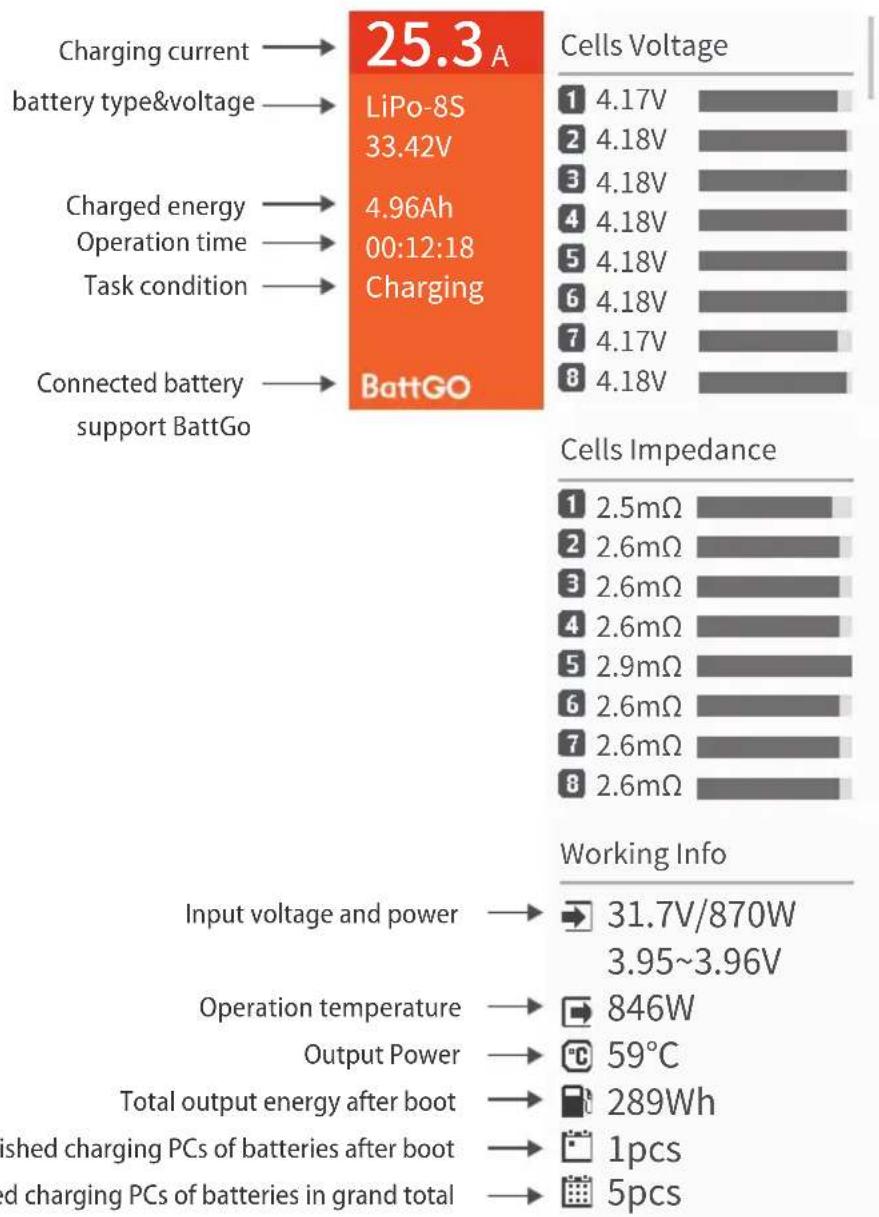
bar
| Category | Value | | -------- | ----- | | Charging current | 25.3 A | | battery type&voltage | 33.42 V | | Charged energy | 4.96 Ah | | Operation time | 00:12:18 | | Task condition | Charging | | Connected battery support BattGo | BattGO | | Cells Voltage | Cells Impedance | | --- | --- | | 1 | 4.17V | | 2 | 4.18V | | 3 | 4.18V | | 4 | 4.18V | | 5 | 4.18V | | 6 | 4.18V | | 7 | 4.17V | | 8 | 4.18V | | Working Info | Output Voltage and Power (V) | | --- | --- | | Input voltage and power | 31.7V/870W | | Operation temperature | 846W | | Output Power | 59°C | | Total output energy after boot | 289Wh | | Finished charging PCs of batteries after boot | 1pcs | | Finished charging PCs of batteries in grand total | 5pcs |Fast Charging
Press ↗ to check more info :
Voltage for each cell, resistance for each cell, operation status, input status, output status. Resistance for each cell will display while charger is doing balance charging for at least 3 min. Detail info for input/output only available while connecting with BattGo smart battery,
Working Parameters Display
25.3 A
LiPo-8S
33.42V
4.96Ah
00:12:18
Charging
BattGO
Cells Voltage
1 4.17V
2 4.18V
3 4.18V
4 4.18V
5 4.18V
6 4.18V
7 4.17V
8 4.18V
BattGo smart battery input info
BattGO
R BattGO
2017-07-28
8 LiPo-6S
20000 mAh
2C 25C
10 0
0 0
← Max discharging C
← Times of over temperature
← Times of over discharge
Max charging C →
Battery circulation →
Battery overcharging times →
BattGo smart battery output info
BattGO
® BattGO
2017-08-18
LiPo-8S
16000 mAh
5C 50C
19 0
0 0
Working Parameters Display
Fast charging complete
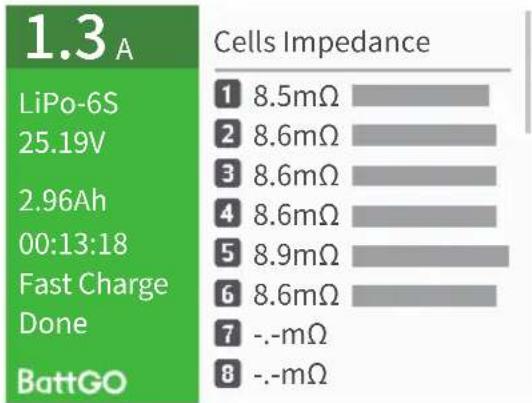
bar
1.3A | Model | Cells Impedance (mΩ) | |---|---| | 1 | 8.5 | | 2 | 8.6 | | 3 | 8.6 | | 4 | 8.6 | | 5 | 8.9 | | 6 | 8.6 | | 7 | -.-mΩ | | 8 | -.-mΩ | BattGO
bar
| Category | Cells Voltage | |---|---| | 1 | 4.20V | | 2 | 4.20V | | 3 | 4.20V | | 4 | 4.20V | | 5 | 4.20V | | 6 | 4.20V | | 7 | 4.20V | | 8 | 4.20V |Precise Balance Charging
text_image
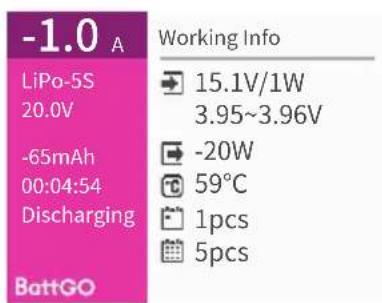
-1.0 A LiPo-5S 20.0V -65mAh 00:04:54 Discharging BattGO Working Info 15.1V/1W 3.95~3.96V -20W 59°C 1pcs 5pcs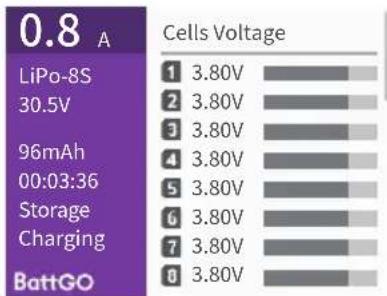
bar
0.8 A | Category | Cells Voltage (V) | |---|---| | LiPo-8S | 3.80 | | 96mAh | 3.80 | | Storage Charging | 3.80 | | BattGO | 3.80 |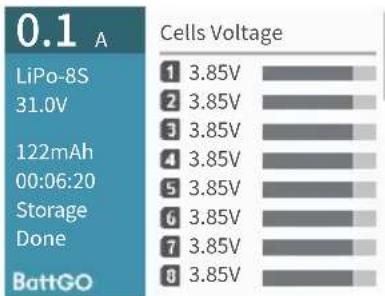
bar
0.1 A Cells Voltage | Category | Cells Voltage (V) | | :--- | :--- | | 1 | 3.85 | | 2 | 3.85 | | 3 | 3.85 | | 4 | 3.85 | | 5 | 3.85 | | 6 | 3.85 | | 7 | 3.85 | | 8 | 3.85 | BattGODischarge state Storage status Discharge / storage
completion status
System Default
text_image
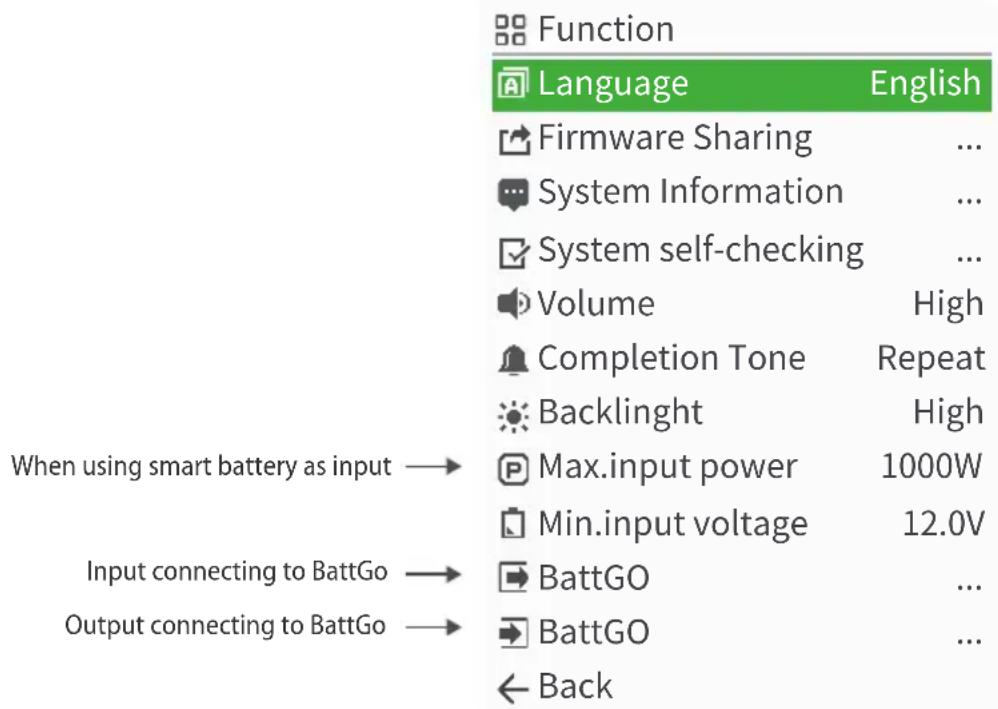
Function Language English Firmware Sharing ... System Information ... System self-checking ... Volume High Completion Tone Repeat Backlinght High Max.input power 1000W Min.input voltage 12.0V Input connecting to BattGo → BattGO ... Output connecting to BattGo → BattGO ... ← BackMax input power: when PSU could not meet max operation power(1000w), to protect PSU and charger working stability, user should adjust this value based on PSU. Eg:PSU with 12V/10A, this should be set to 120W.
Min input voltage: While using battery as input, this can help you avoid over discharge input battery. When charger detects input voltage is less than Min input voltage, charger will stop any on-going task and warn too low input voltage. Eg: 6S LiPo battery as input, set 21v as Min input to avoid over discharge battery.
Beeper sound: When setting to off, this will mute operation sound, but won't mute warning alarm.
System Default
In standby, long press to enter system setting.
| Language | Support up to 7 languages |
| Firmware Sharing | By using ISDT sclinker, user can share firmware to same model. |
| System Information | Show firmware version |
| System self-checking | To check hardware is working properly |
| Volume | Beeper volume adjustment, high, middle low and off |
| Completion Tone | Single time or multiple time(1 time/ min) |
| Backlinght | Back light adjustment, high, middle , low and auto |
| Max.input power | Input power range (T6 Lite)50-660W (T6)50-858W (T8)50-1100W |
| Min.input voltage | Input voltage range(T6 Lite/T6)8-32V (T8)12-40V |
| BattGO | Input connecting to BattGo battery, Storage, charge/discharge parameters could be adjusted. |
| BattGO | Output connecting to BattGo battery, Storage, charge/discharge parameters could be adjusted. |
| Back | Exit system menu |
System Default

BattGO
| Auto Storage | Off |
| Storage Voltage | 3.80V |
| Charge Current | 3.4A |
| Charge Voltage | 4.20V |
| Exception Record | ... |
| Back |
Both input and output connecting to BattGo battery, system menu shows as below:
| Auto Storage | When smart battery supports auto discharging, you can select after how many hours battery starts auto discharging. |
| Storage Voltage | Slight adjustment for storage voltage, from 0 to -0.20V |
| Charge Current | Charge current could be adjusted from 0 to Max current which smart battery could support. |
| Charge Voltage | Full voltage could be adjusted, from 0 to -0.10V |
| Exception Record | Over charge voltage, over discharge voltage, over temperature record |
| Back | back |
Troubleshoot
Error in power on self-testing: the charger can automatically carry out a self-testing when connected to a power supply. A self-testing error warning sound should be heard when the charger is connected to the battery; power on after removing the battery for 5 minutes.
Error for abnormal battery connection: pull out and plug in the battery again to ensure all connections are reliably contacted; if the error reminder continues, please check whether the metal parts on the battery interface are oxidized or burned resulting in unreliable connection.
Error for unstable power voltage: check whether the battery socket is reliably connected, and whether the power of electric supply can match the input requirement of the charger. If capacity of PSU is less than charger's Max power, please adjust the max input power to match the power of electric supply in the system fault menu of the charger.
Product Qualification Declaration
This smart charger conforms to relevant EC command and relevant commands in B: 2010, CHAPTER 15, FCC
| Testing standards | Result |
| EN 55014-1:2006+ A1:2009+A2:2011 | YES |
| EN 55014-2:1997+ A1:2001+A2:2008 | YES |

For electronic products with this marking in their manuals, please separately dispose them with family garbage. When a charger gets spoilt and cannot be used anymore, please take it to a nearby garbage station or recycle center.
isDT ^TM
WWW.ISDT.CO
Manufacturer
Shenzhen ISD Technology CO.,LTD
Address: 5th Fl., Bldg. 9, Mabian Industrial Zone, Yangtian Rd., Block 72, Xin'An Street, Bao'An District, Shenzhen, PRC
Changes in specifications and data will not be further noticed.
Email:hi@isdt.co