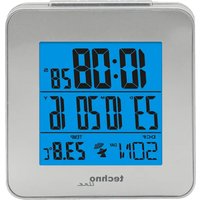
WT 268 - Thermometer Techno Line - Free user manual and instructions
Find the device manual for free WT 268 Techno Line in PDF.


| Product type | Indoor thermometer with radio-controlled clock |
| Brand | Techno Line |
| Model | WT 268 |
| Power supply | 2 AAA batteries (not included) |
| Display | LCD with LED backlight |
| Indoor temperature range | 0 °C to 50 °C |
| Temperature unit | °C or °F (selectable) |
| Radio-controlled reception | WWVB, DCF, MSF, JJY |
| Time zones | Up to 32 world cities |
| Dual alarm | Yes, with snooze function (5 minutes) |
| Timer | Adjustable in 10-minute intervals |
| Calendar | Years 2000-2999, day in 7 languages |
| Time format | 12/24 h |
| Day languages | German, English, French, Italian, Spanish, Danish, Dutch |
| Temperature measurement cycle | Every 30 seconds |
| Dimensions (approx.) | Not specified |
| Weight (approx.) | Not specified |
| Care and cleaning | Clean with a dry cloth, avoid moisture and solvents |
| Safety | Use only non-rechargeable alkaline batteries, observe polarity, do not expose to extreme temperatures or water |
| Spare parts and repairability | Not specified, do not open the case |
| General information | Indoor use only, do not throw into fire, comply with electronic waste regulations |
Frequently Asked Questions - WT 268 Techno Line
User questions about WT 268 Techno Line
0 question about this device. Answer the ones you know or ask your own.
Ask a new question about this device
Download the instructions for your Thermometer in PDF format for free! Find your manual WT 268 - Techno Line and take your electronic device back in hand. On this page are published all the documents necessary for the use of your device. WT 268 by Techno Line.
USER MANUAL WT 268 Techno Line
natural_image
Simple line drawing of a trash bin with crossed lines indicating no waste or plastic (no text or symbols)natural_image
Simple line drawing of a trash bin with crossed lines and a circular object below (no text or symbols)- Radio-controlled time receiving systems: WWVB, DCF, MSF & JJY
- Day of week in 7 languages: German, English, French, Italian, Spanish, Danish, Dutch
- Time display: hour, minute, second.
- Calendar range (2000\~2099 year), 12/24 hour selectable.
- °C/°F selectable.
- Indoor temperature range: 0°C--50°C
- Dual alarm
- With LED backlight
- 10min steps timer function
Overview
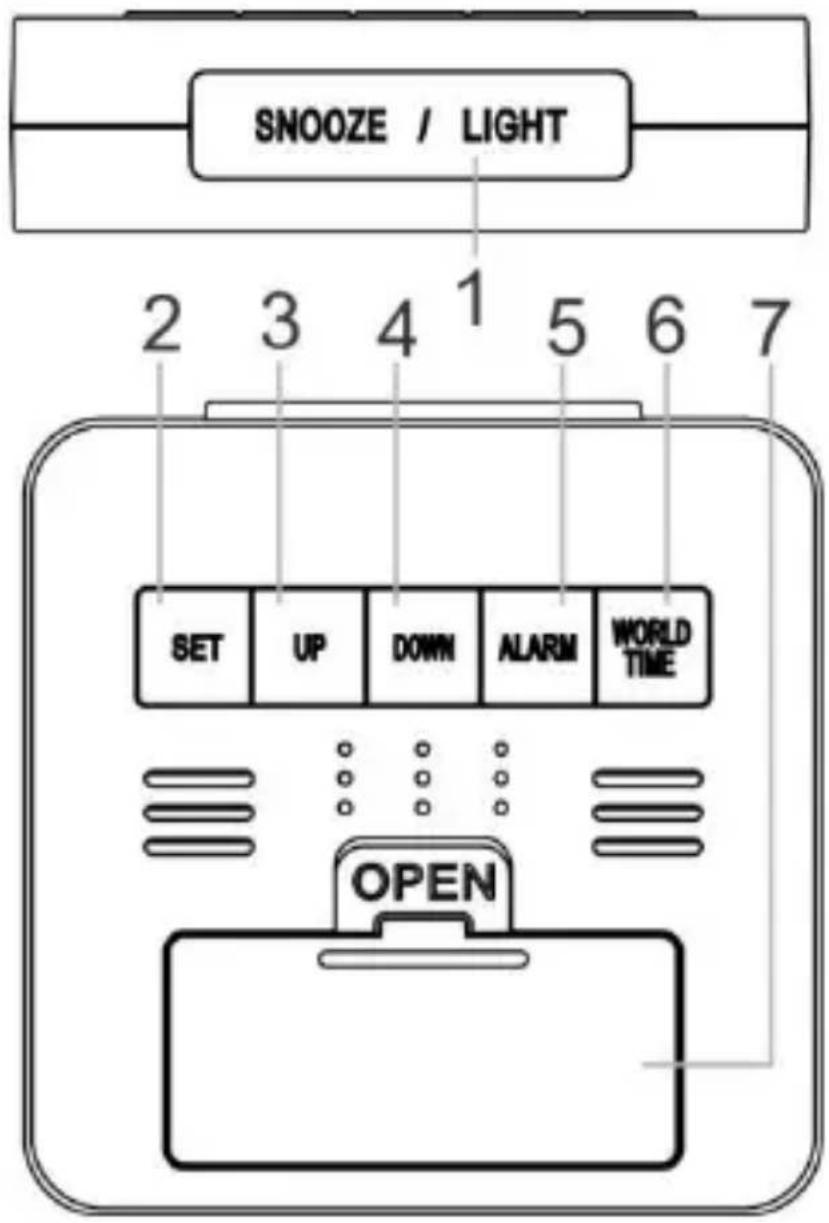
1 -SNOOZE/LIGHT button
2 - SET button
3 - UP button
4 - DOWN button
5 - ALARM button
6 – WORLD TIME button
7 – Battery compartment
cover
Getting started
- Open the battery compartment cover and insert 2 x AAA batteries under
Environmental reception effects
The clock obtains the accurate time with wireless technology. Same as all wireless devices, the reception is maybe affected by the following circumstances:
- long transmitting distance
• nearby mountains and valleys - near freeway, railway, airports, high voltage cable etc.
- near construction site
- among tall buildings
• inside concrete buildings
- near electrical appliances (computers, TV's, etc) and metallic structures
• inside moving vehicles
Place the clock at a location with optimal signal, i.e. close to a window and away from metal surfaces or electrical appliances.
Under standard status, press SET to switch 24HR/D/M and
12HR/M/D
Under standard status, hold SET to enter into time setting:
➢ Time setting sequence: Year → month → date → language
choice → timezone → hour → minute → DST on/off → exit
➢ Press UP or DOWN to adjust the desired data
Year range: 2000-2999
Language setting sequence: Germany→ English→ Italian→
French→ Dutch→ Spanish→ Danish
It will automatically exit if no key is operated in 20 seconds
➢ After setting finished, press "set" to confirm the setting
➢ At the same time of adjusting the minute, the second will
return to zero
When WWVB is received, press UP to switch time zone
among (P → M → C → E → P)
▶ Time zone for Germany is 00
In Germany you will receive the DCF time zone
RCC RECEIVING FUNCTION
How to enter RCC receiving mode
a. The clock will enter into RCC receiving state automatically after
powering on
b. Hold DOWN to enter into RCC receiving
c. The clock enters RCC receiving automatically every day
Automatic RCC receiving
- Time of automatically RCC receiving at AM1:00, 2:00, 3:00, 4:00, 5:00. It must receive at AM1:00, 2:00, 3:00 automatically, if it fails to receive until 3:00, it will enter receive status selectable at 4:00 or 5:00, If the reception is successful at 4:00, it will not receive again in a day. Otherwise, it will enter receiving at 5:00. And after
that it will not enter the receiving status again whatever successful or not. RCC receiving time is 7 minutes.
- During receiving, RCC tower icon flashes at 1HZ. After RCC is received, RCC tower will show on the LCD. If no signal is received, there will be no tower icon
- When the RCC symbols display fully, the relative RCC icon will be OFF if reset the time.
- When the RCC is receiving, all keys have not function except "SNOOZE/LIGHT" and "DOWN"
- RCC receiving will automatically exit when alarm rings
-
During RCC receiving, press DOWN to adjust the RCC system with the sequence: DCF→MSF→WWVB→JJY →EXIT
-
When receiving DST signal, DST signal will display.
Day display in 7 languages
| DayLanguage | Monday | Tuesday | Wednesday |
| German(GER) | MON | DIE | MIT |
| English(ENG) | MON | TUE | WED |
| Italian (ITA) | LUN | MAR | MER |
| French (FRE) | LUN | MAR | MER |
| Dutch (NET) | MAA | DIN | WOE |
| Spanish(ESP) | LUN | MAR | MIE |
| Danish (DAM) | MAN | TIR | ONS |
| DayLanguage | Thursday | Friday | Saturday | Sunday |
| German(GER) | DON | FRE | SAM | SON |
| English(ENG) | THU | FRI | SAT | SUN |
| Italian (ITA) | GIO | VEN | SAB | DOM |
| French (FRE) | JEU | VEN | SAM | DIM |
| Dutch (NET) | DON | VRI | ZAT | ZON |
| Spanish(ESP) | JUE | VIE | SAB | DOM |
| Danish(DAM) | TOR | FRE | LOR | SON |
Timer function:
Under standard mode: hold "UP" into timer mode, then date area will show 00M00S
➢ Press UP or DOWN to adjust TIMER time. the minute will go forwards or backwards 10 mins
After setting is ready, press SNOOZE/LIGHT to start or pause
When Timer is paused, click UP or down to make necessary adjustment
When Time arrives, it begins to ring.( The sound is the same as alarm time)
Hold "UP" to return to standard mode
World time checking
- Under standard mode, press “world time” to check the world time
- Press "up" or "down" to check the world time circularly
- Hold "up" or "down" to browse the world time fleetly.
- 32 cities time can be checked
32 cities list
| CityCode | Country | City Name | ZONE | |
| 1 | LON | U.K | London | 0 |
| 2 | DUB | IRELAND | Dublin | 0 |
| 3 | WLG | NEW ZEALAND | Wellington | 12 |
| 4 | SYD | AUSTRALIA | Sydney | 10 |
| 5 | TYO | JAPAN | Tokyo | 9 |
| 6 | SIN | SINGAPORE | Singapore | 8 |
| 7 | HKG | CHINA | Hong Kong | 8 |
| 8 | PEK | CHINA | Beijing | 8 |
| 9 | BKK | THAILAND | Bangkok | 7 |
| 10 | DBX | U.A.E | Dubai | 4 |
| 11 | MOW | RUSSIA | Moscow | 3 |
| 12 | JRS | PALESTINE | Jerusalem | 2 |
| 13 | IST | TURKEY | Istanbul | 2 |
| 14 | CAI | EGYPT | Cairo | 2 |
| 15 | CPT | SOUTH AFRICA | Cape Town | 2 |
| 16 | ATH | GREECE | Athens | 2 |
| 17 | AMM | JORDAN | Amman | 2 |
| 18 | PAR | FRANCE | Paris | 1 |
| 19 | FRA | GERMANY | Frankfurt | 1 |
| 20 | CPH | DANMARK | Copenhagen | 1 |
| 21 | BCN | SPAIN | Barcelona | 1 |
| 22 | AMS | NETHERLANDS | Amsterdam | 1 |
| 23 | ALA | U.S.A | Alaska | -9 |
| 24 | LAX | U.S.A | Los Angeles | -8 |
| 25 | MEX | MEXICO | Mexico | -6 |
| 26 | CHI | U.S.A | Chicago | -6 |
| 27 | YOW | CANADA | Ottawa | -5 |
| 28 | WAS | U.S.A | Washington DC | -5 |
| 29 | NYC | U.S.A | New York | -5 |
| 30 | HAV | CUBA | Havana | -5 |
| 31 | FAL | FalklandIsland | -4 | |
| 32 | RIO | BRAZIL | Rio deJaneiro | -3 |
Alarm setting:
Under standard status, Press ALM, the switch on/off alarm, the sequence is AL1 ON→AL2 ON→AL1+AL2 ON→AL2 OFF
Under standard status, Hold "SNZ/LIGHT" to enter into alarm setting mode, the date position will show the alarm time and flashing, the setting sequence is A1 hour→A1 minute→A2 hour→A2 minute→exit
➢ Hold UP or DOWN, the unit will go forwards or backwards at 8
steps/second
It will automatically exit if no key is operated in 20 seconds
Remark
a/. The buzzer will ring for 2 minutes as below
0-10sec: one BI/SEC
11-20sec: two BI/SEC
21-30sec: four BI/SEC
31-120sec: BI continuously
b/. When ringing, press SNOOZE/LIGHT once to enter into 5 minutes snooze states, end if any other key is clicked.
Temperature
- Indoor temperature range: 0°C--50°C
- Measurement cycle: 30 seconds
- If temperature is higher than 50^ C, it will show HH, if lower than 0^ C, it will show LL
- When alarm is ringing or RCC is receiving, the temperature is stop detection
Precautions
- This main unit is intended to be used only indoors.
- Do not subject the unit to excessive force or shock.
- Do not expose the unit to extreme temperatures, direct sunlight, dust or humidity.
-
Do not immerse in water.
-
Avoid contact with any corrosive materials.
- Do not dispose this unit in a fire as it may explode.
- Do not open the inner back case or tamper with any components of this unit.
Batteries safety warnings
- Use only alkaline batteries, not rechargeable batteries.
• Install batteries correctly by matching the polarities (+/-). - Always replace a complete set of batteries.
- Never mix used and new batteries.
- Remove exhausted batteries immediately.
- Remove batteries when not in use.
- Do not recharge and do not dispose of batteries in fire as the batteries may explode.
-
Ensure batteries are stored away from metal objects as contact may cause a short circuit.
-
Avoid exposing batteries to extreme temperature or humidity or direct sunlight.
- Keep all batteries out of reach from children. They are a choking hazard.
Use the product only for its intended purpose!
Consideration of duty according to the battery law
natural_image
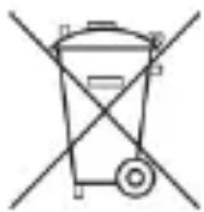
Simple line drawing of a trash bin with crossed-out diagonal lines (no text or symbols)Old batteries do not belong to domestic waste because they could cause damages of health and environment. You can return used batteries free of
charge to your dealer and collection points. As end-user you are committed by law to bring back needed batteries to distributors and other collecting points!
Consideration of duty according to the law of electrical devices
natural_image
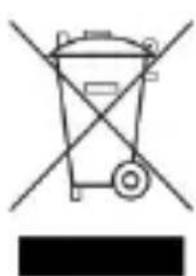
Simple line drawing of a trash bin with crossed lines indicating no waste or plastic (no text or symbols)This symbol means that you must dispose of electrical devices separated from the General household waste when it reaches the end of its useful life. Take your unit to your local waste
collection point or recycling centre. This applies to all countries of the European Union, and to other European countries with a separate waste collection system.
FONCTION DE RÉCEPTION RCC
natural_image
Simple line drawing of a trash bin with no text or symbolsnatural_image
Pure electrical circuit lines without any symbolsnatural_image
Simple line drawing of a trash bin with two crossed lines indicating no text or symbols (no text or labels)natural_image
Simple line drawing of a trash bin with crossed lines indicating no waste or discharge (no text or symbols)natural_image
Simple line drawing of a trash bin with no text or symbolsnatural_image
Simple line drawing of a trash bin with crossed lines indicating no waste or discharge (no text or symbols)RCC ONTVANGSTFUNCTIE
natural_image
Simple line drawing of a trash bin with crossed lines indicating no text or symbols (no text or labels)natural_image
Pure electrical circuit lines without any symbolsnatural_image
Simple line drawing of a trash bin with two crossed lines indicating no text or symbols (no text or labels)natural_image
Simple line drawing of a trash bin with crossed lines indicating no waste or discharge (no text or symbols)
- Getting started
- Environmental reception effects
- RCC RECEIVING FUNCTION
- How to enter RCC receiving mode
- Automatic RCC receiving
- Timer function:
- World time checking
- Alarm setting:
- Remark
- Temperature
- Precautions
- Batteries safety warnings
- Consideration of duty according to the battery law
- FONCTION DE RÉCEPTION RCC
- RCC ONTVANGSTFUNCTIE
Brand : Techno Line
Model : WT 268
Category : Thermometer