IR 380 - Thermometer Techno Line - Free user manual and instructions
Find the device manual for free IR 380 Techno Line in PDF.


| Product Type | Non-contact Infrared Thermometer |
| Model | IR 380 |
| Temperature Range | -50°C to 380°C (-58°F to 716°F) |
| Accuracy | ±1.5°C or ±1.5% of reading (whichever is greater) |
| Resolution | 0.1°C/°F |
| Response Time | Less than 1 second |
| Distance to Spot Ratio | 12:1 |
| Emissivity | 0.95 preset |
| Display Type | LCD with backlight |
| Measurement Units | °C and °F selectable |
| Auto Power Off | After approx. 15 seconds of inactivity |
| Battery Type | 2 x AAA 1.5V batteries (included) |
| Battery Life | Approximately 12 hours of continuous use |
| Memory | Stores last 10 readings |
| Dimensions | 150 x 75 x 40 mm (5.9 x 2.95 x 1.57 in) |
| Weight (including battery) | Approx. 180 g (6.35 oz) |
| Operating Temperature | 0°C to 50°C (32°F to 122°F) |
| Storage Temperature | -20°C to 60°C (-4°F to 140°F) |
| Cleaning | Wipe with a soft, dry cloth. Do not use harsh chemicals. |
| Safety | Laser class II, avoid direct eye exposure. |
| Battery Replacement | Open battery compartment, replace with new AAA batteries, observe polarity. |
| Included Items | Thermometer, 2 x AAA batteries, user manual |
Frequently Asked Questions - IR 380 Techno Line
User questions about IR 380 Techno Line
0 question about this device. Answer the ones you know or ask your own.
Ask a new question about this device
Download the instructions for your Thermometer in PDF format for free! Find your manual IR 380 - Techno Line and take your electronic device back in hand. On this page are published all the documents necessary for the use of your device. IR 380 by Techno Line.
USER MANUAL IR 380 Techno Line
Laser Radiation Do not stare into the beam IEC 60825-1:2014 Class 2 laser product Max. power 1 mW at 650nm
LASER KLASSE 2 Nach IEC 60825-1:2014
Funktion

Please read the manual carefully and familiarize yourself with the functions of the unit before using it. Retain these instructions for future reference and pass them on together with the device when you pass on the device to other users.
Scope of delivery:
1 Digital Infra-red Thermometer 1 x Instruction manual
General safety information
This unit can be used by children aged 8 years and above and persons with reduced physical, sensory or mental capabilities or lack of experience and knowledge if they are supervised and have been instructed concerning the safe use of the appliance and have understood the resulting risks. Children should never play with the device. Cleaning and user maintenance must not be performed by children without supervision.
Laser Safety Instructions
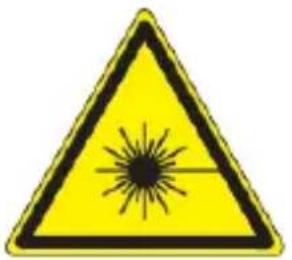
Laser Radiation Do not stare into the beam IEC 60825-1:2014 Class 2 laser product Max. power 1 mW at 650nm
- Use extreme caution when using the laser beam.
- DO NOT point the laser towards yourself, other people's eyes or animals.
- DO NOT look directly into the laser beam. This can result in permanent eye damage if the eye's natural reflex to close does not take place.
- Keep out of reach of children. This is not a toy.
- Never direct the laser beam onto objects that can reflect light.
- Even looking briefly into the beam can result in eye damage.
- Any adjustment to increase the power of the laser is not permitted.
- Remove the batteries if the device breaks down or is defective.
- Otherwise, there is the danger that the laser may be inadvertently switched on. This could lead to permanent eye damage.
Product Overview
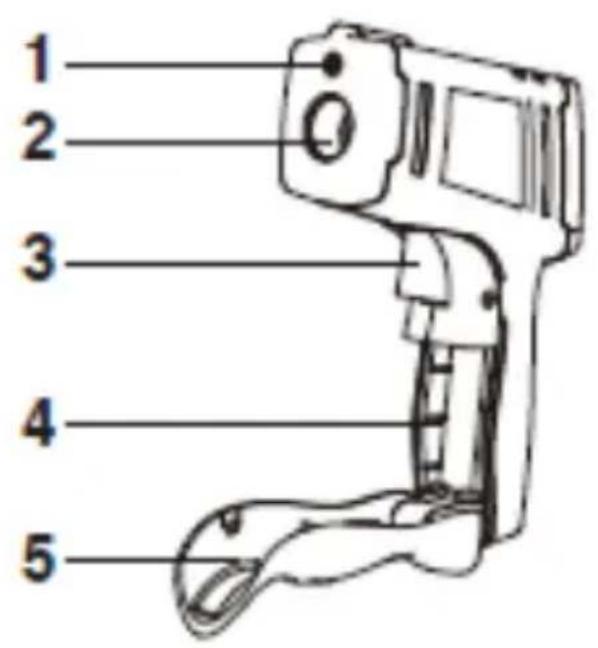
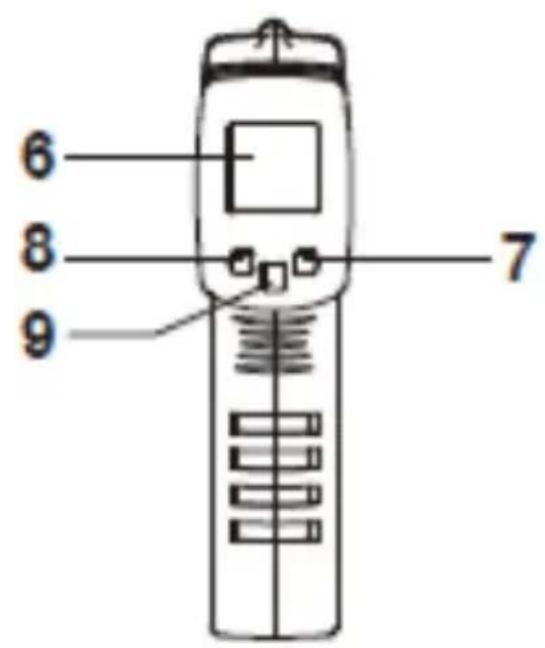
- Laser pointer
- Infra-red sensor
- Trigger switch
- Battery compartment
- Handle
- Display
- LIGHT button
- Celsius/Fahrenheit button (°C/°F)
- LASER button
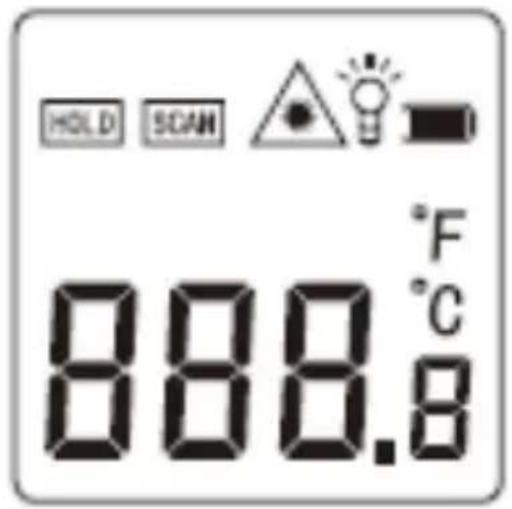
Function
: Hold Illuminates when temperature is saved
: Illuminates when temperature is measured
: Illuminates when the laser pointer is switched on
: Illuminates when the light is switched on
: Low battery indicator. Illuminates when the battery is low.
°F
°C : Indicates which temperature mode is selected Celcius or Fahrenheit
888. : Displays the current temperature detected




Operating Instructions
Startup and installations
- Open the battery compartment cover
- Insert the battery into the battery compartment (4)
- Close the battery compartment cover
EN4
NOTE: Remove the battery if you do not use the device for a long time.
Basic Functions
Switching between Celcius and Fahrenheit
Press the °C/°F button (8) to switch between °C and°F
Background light
Press the LIGHT button (7) to turn the backlight light on and off.
The background light will automatically turn off after approx. 10 seconds
Automatic switch off
The device automatically switches off after approx.. 20 seconds if no button is pressed.
Laser pointer
Press the LASER button (9) to turn the laser pointer (1) on or off. This function can only be used with the device being turn on
NOTE: It is recommended to not turn the laser pointer on when measuring close surfaces to save battery life.
Operating
Useful tips for measuring:
- The measured object/surface should be bigger than the scanned spot size.
- The spot size increases with the distance from the object/surface.
- For best results, the distance between the surface and the device should be as small as possible.
- DO NOT measure in steamy, dusty or smoky environments to avoid false readings.
- Measurements may not be accurate for any transparent objects/ surfaces such as glass or objects/surfaces with high reflectivity such as stainless steel.
- After a change of the ambient temperature allow the device to compensate before measuring.
Measuring temperatures:
- Press the trigger switch (3) to turn the device on.
- Point the device upright to the selected object/surface.
- Press the trigger switch (3) again to measure the temperature. The measured temperature is shown on the display.
Technical Data
Model: IR 380
Battery: 1 x 9V (6F22) Battery
Laser classification: Class 2
Wavelength: 650 nm
Laser power output :< 1 mW
Temperature detection range: -50°C- 380°C
Temperature accuracy: 0°-380°C (32°F-716°F) ± 1.5°C
(2.7°F) or ± 1.5%,
$$ - 5 0 ^ {\circ} \mathrm{C} - \mathrm{O} ^ {\circ} \mathrm{C} (- 5 8 ^ {\circ} \mathrm{F} - 3 2 ^ {\circ} \mathrm{F}) \pm 3. 0 ^ {\circ} \mathrm{C} $$
$$ (\pm 5 ^ {\circ} F) $$
Temperature Resolution: 0.1°C or 0.1°F
Response time: 500 ms
Distance to spot size: 12:1
Operating Temperature: 0-40°C (32°F-104°F)
Operating Humidity: 10-95% RH non-condensation, up to 30°C (86°F)
Cleaning and Care
The device should only be cleaned on the outside with a soft dry cloth.
Precautions
- Do not subject the unit to excessive force or shock.
-
Do not expose the unit to extreme temperatures, direct sunlight, dust or humidity.
-
Do not immerse in water.
- Avoid contact with any corrosive materials.
- Do not dispose this unit in a fire as it may explode.
- Do not open the inner back case or tamper with any components of this unit.
Batteries safety warnings
- Don't use rechargeable batteries.
• Install batteries correctly by matching the polarities (+/-). - Remove exhausted batteries immediately.
- Remove batteries when not in use.
- Do not recharge and do not dispose of batteries in fire as the batteries may explode.
- Ensure batteries are stored away from metal objects as contact may cause a short circuit.
- Avoid exposing batteries to extreme temperature or humidity or direct sunlight.
- Keep all batteries out of reach from children. They are a choking hazard.
Use the product only for its intended purpose!
Consideration of duty according to the battery law
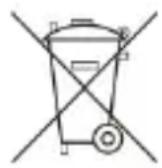
Old batteries do not belong to domestic waste because they could cause damages of health and environment. You can return used batteries free of charge to your dealer and collection points. As end-user you are committed by law to bring back needed batteries to distributors and other collecting points!
Consideration of duty according to the law of electrical devices

This symbol means that you must dispose of electrical devices separated from the General household waste when it reaches the end of its useful life. Take your unit to your local waste collection point or recycling centre. This applies to all countries of the European Union, and to other European countries with a separate waste collection system.
Brand : Techno Line
Model : IR 380
Category : Thermometer