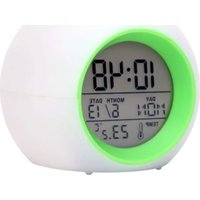
WT 502 - Thermometer Techno Line - Free user manual and instructions
Find the device manual for free WT 502 Techno Line in PDF.


| Product type | Thermometer with alarm |
| Brand | Techno Line |
| Model | WT 502 |
| Power supply | 3 LR03/AAA/Micro batteries, 1.5 V |
| Display | Time, day of the week, date, indoor temperature |
| Indoor temperature range | -25 °C to +55 °C |
| Time format | 12 h / 24 h (selectable) |
| Temperature unit | °C / °F (selectable) |
| Alarm function | Alarm with snooze (adjustable interval from 1 to 60 min) |
| Nature sounds | 6 nature sounds with color-changing light |
| TAP function | Press the top of the alarm clock or TAP button to stop the alarm or start the sounds |
| Maintenance | Clean with a soft, dry cloth; do not immerse in water |
| Safety | Use only alkaline batteries; observe polarity; remove used batteries |
| Intended use | Indoor only |
| Package contents | 1 alarm clock, 1 instruction manual |
Frequently Asked Questions - WT 502 Techno Line
User questions about WT 502 Techno Line
0 question about this device. Answer the ones you know or ask your own.
Ask a new question about this device
Download the instructions for your Thermometer in PDF format for free! Find your manual WT 502 - Techno Line and take your electronic device back in hand. On this page are published all the documents necessary for the use of your device. WT 502 by Techno Line.
USER MANUAL WT 502 Techno Line
WT 502 Quartz alarm clock - user manual
Please read the manual carefully and familiarize yourself with the functions of the alarm clock before using it.
Retain these instructions for future reference and pass them on together with the device when you pass on the device to other users.
Use the product only for its intended purpose!
Scope of delivery:
1 Quartz alarm clock
1 User manual
General safety information
This unit can be used by children aged 8 years and above and persons with reduced physical, sensory or mental capabilities or lack of experience and knowledge if they are supervised or have been instructed concerning the safe use of the appliance and have understood the resulting risks. Children should never play with the device. Cleaning and user maintenance must not be performed by children without supervision.
Batteries safety warnings
- Use only alkaline batteries, not rechargeable batteries.
• Install batteries correctly by matching the polarities (+/-).
• Always replace a complete set of batteries. - Never mix used and new batteries.
- Remove exhausted batteries immediately.
- Remove batteries when not in use.
- Do not recharge and do not dispose of batteries in fire as the batteries may explode.
- Ensure batteries are stored away from metal objects as contact may cause a short circuit.
- Avoid exposing batteries to extreme temperature or humidity or direct sunlight.
- Keep all batteries out of reach from children. They are a choking hazard.
Disposal
Packaging
Product packaging consists of recyclable materials. Dispose of it in an environmentally friendly and pure way in the provided collection containers.
Electronic waste and batteries
Electronic waste and batteries must not be disposed of with normal household waste.
According to Directive 2012/19/EU, the device is to be supplied to a proper disposal at the end of its working life. Here reusable materials contained within the device will be supplied to the recycling process and environmental pollution will be avoided. Submit the old device to a collection point for electronic waste or a recycling center.
Remove the batteries from the device before disposing and dispose of them separately. Every consumer is legally obliged to dispose of used batteries to a collection point for used batteries at a recycling center or battery point of sale.
Please contact your local disposal company or your municipal administration for further information.


Consideration of duty according to the battery law
Old batteries do not belong to domestic waste because they could cause damages of health and environment. You can return used batteries free of charge to your dealer and collection points. As end-user you are committed by law to bring back needed batteries to distributors and other collecting points!
Protection and care of your alarm clock
- This main unit is intended to be used only indoors.
- Do not subject the unit to excessive force or shock.
- Do not expose the unit to extreme temperatures, direct sunlight, dust or humidity.
- Do not immerse in water.
- Avoid contact with any corrosive materials.
- Do not dispose this unit in a fire as it may explode.
- Do not open the inner back case or tamper with any components of this unit.
Specifications and functions
- Quartz clock
- Indoor temperature display
- Calendar display
- Alarm and snooze function (interval of the snooze alarm and various alarms are adjustable)
- Playback of nature sounds and lighting with color change function
• Measuring range – indoor temperature: -25°C to +55 °C
• Power supply: 3 x batteries LR03/AAA/Micro, 1,5 V
Structure:
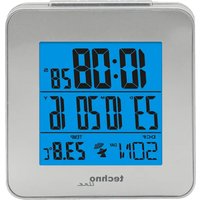
1 – Time, 2 – Weekday, 3 – Date, 4 – Temperature, 5 – TAP button, 6 – UP button,
7 – DOWN button, 8 – SET button, 9 – AL button, 10 – Battery compartment
Operating conditions
Set the alarm clock in a dry interior and protected from direct sunlight.
Quick setup
Remove the battery strip from the battery compartment. Insert 3 x Micro AAA LR03 batteries with correct polarity (+/-) in the battery compartment.
Changing of batteries
Remove the old battery from the battery compartment and insert 3 new Micro AAA LR03 batteries with correct polarity (+/-) in the battery compartment.
Time setting
- Press the "SET" button once to enter time set mode.
- Press the "UP" and "DOWN" buttons to set the desired value in the sequence: hour - minute - year - month - date - exit. Hold the "UP" or "DOWN" buttons to speed up the selection process.
- Press the "SET" button after setting one segment of the sequence to accept the selected value and to continue to the next segment.
- Press the "SET" button after setting the date to return to the time display mode.
12 / 24 hour time display
Press the "UP" button to select time in 12 or 24 hour format in time display mode.
Temperature unit setting
Press the "DOWN" button to select the indoor temperature format in °C or °F in time display mode.
Alarm setting
- Press the "AL" button once to enter alarm mode.
- In alarm mode, press the "SET" button once to enter alarm set mode.
- Press the "UP" and "DOWN" buttons to set the desired value in the sequence: hour - minute - snooze interval (1-60 minutes) - alarm sounds (6 selections with 5 sounds) - exit. Hold the "UP" or "DOWN" buttons to speed up the selection process.
- Press the "SET" button after setting one segment of the sequence to accept the selected value and to continue to the next segment.
- Press the "SET" button after setting the alarm sounds to return to the alarm mode.
- In alarm mode, press the "AL" button to return to the time display mode.
Activation and deactivation of alarm and snooze mode
- Press the "AL" button once to enter alarm mode.
- In alarm mode, press the "UP" or "DOWN" button to select "alarm", "alarm and snooze" or "off".
- Press the "AL" button twice to go back to normal mode.
- When the alarm sounds, press the top of clock or press any "TAP" button once at the bottom of clock to stop the alarm if "alarm" is selected.
- When the alarm sounds, press the top of clock or press "TAP", "AL", "UP", "DOWM" once at the bottom of clock to activate snooze when "alarm and snooze" selected, alarm will sounds again as per selected interval, snooze will be activated automatically without pressing any pushers after two minutes.
- The alarm will sound again next day as long as "alarm" or "alarm and snooze" is selected.
Nature sound play mode
- Press the top of clock or press the "TAP" buttons to enter the sound play mode for ten minutes, colorful lighting is changing in this mode.
-
Press the top of clock or press the "TAP" buttons once to stop the sounds and the clock will return to normal mode after one minute.
-
Press the top of clock or press the "TAP" buttons twice to select different nature sounds (six options with 5 possible sounds).
- Press the "SET" or "AL" button once to select normal mode anytime in this mode.
- WT 502 Quartz alarm clock - user manual
- Scope of delivery:
- General safety information
- Batteries safety warnings
- Disposal
- Packaging
- Electronic waste and batteries
- Consideration of duty according to the battery law
- Protection and care of your alarm clock
- Specifications and functions
- Structure:
- Operating conditions
- Quick setup
- Changing of batteries
- Time setting
- / 24 hour time display
- Temperature unit setting
- Alarm setting
- Activation and deactivation of alarm and snooze mode
- Nature sound play mode
Brand : Techno Line
Model : WT 502
Category : Thermometer