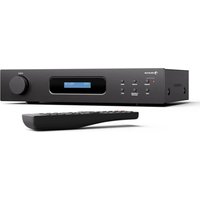
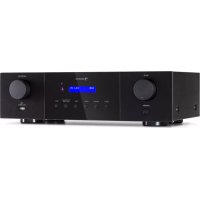
Curtis - Receiver Auna - Free user manual and instructions
Find the device manual for free Curtis Auna in PDF.


| Product type | Stereo receiver |
| Brand | Auna |
| Model | Curtis |
| Article numbers | 10045433, 10045434 |
| Power supply | 100-240 V ~ 50/60 Hz |
| Power consumption | 130 W |
| RMS output power | 49 W + 49 W (4 Ω) |
| Maximum output power | 63 W + 63 W (4 Ω) |
| Speaker impedance | ≥ 4 Ω |
| Bluetooth frequency | 2,402 - 2,480 GHz |
| Bluetooth transmission power | 0 dBm |
| DAB frequency | 174 - 240 MHz |
| Audio inputs | CD, DVD, AUX, USB, MP3 (3.5 mm jack) |
| Outputs | Speakers (terminal block), REC OUT (RCA) |
| Connectivity | Bluetooth, DAB+ |
| Display | LED screen |
| Remote control | Yes, included |
| Audio functions | Bass, Treble, Loudness, Mute, Balance |
| DAB functions | Automatic scan, station selection, display of numbers |
| Safety | Short circuit protection, do not open, do not expose to water |
Frequently Asked Questions - Curtis Auna
User questions about Curtis Auna
0 question about this device. Answer the ones you know or ask your own.
Ask a new question about this device
Download the instructions for your Receiver in PDF format for free! Find your manual Curtis - Auna and take your electronic device back in hand. On this page are published all the documents necessary for the use of your device. Curtis by Auna.
USER MANUAL Curtis Auna
INHALTSVERZEICHNIS
Technische Daten 3
VORBEREITUNG
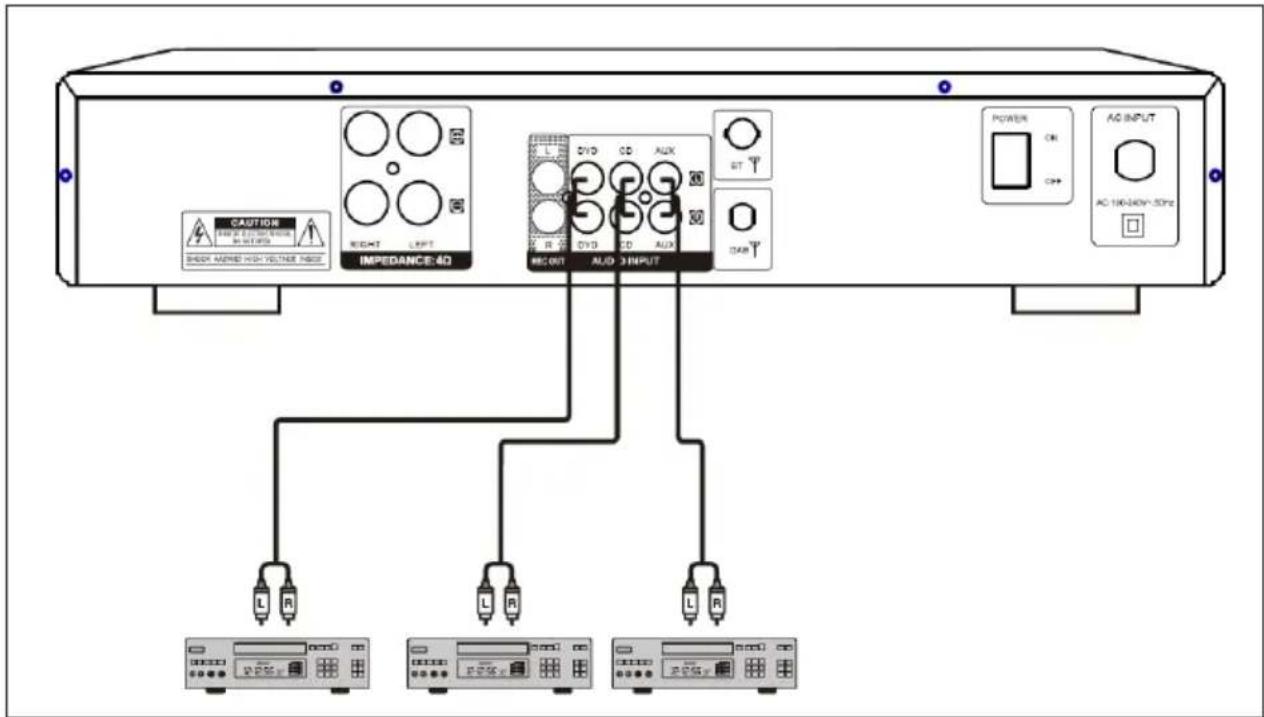
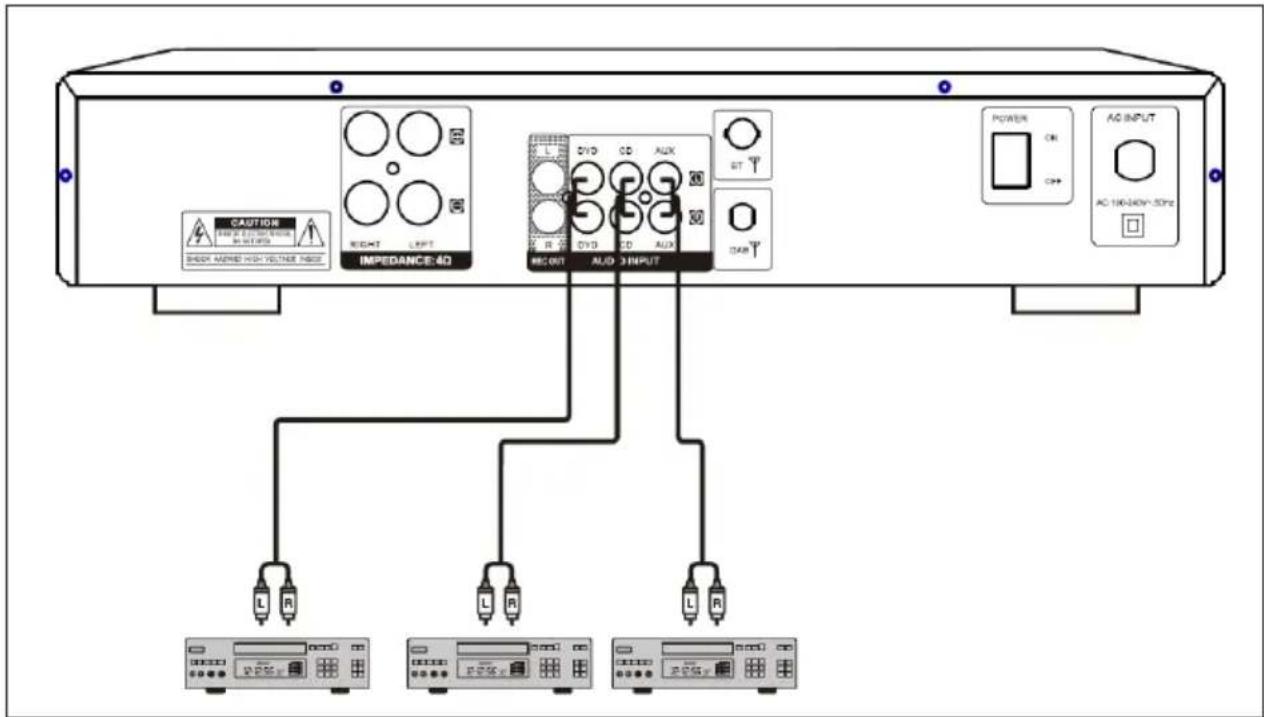
Systemanschlüsse
flowchart
graph TD
    A["Device 1"] --> B["IMPEDANCE:4D"]
    A --> C["AVDC INPUT"]
    A --> D["POWER"]
    A --> E["AC INPUT"]
    B --> F["L R"]
    B --> G["L R"]
    B --> H["L R"]
    C --> I["ST T"]
    C --> J["DAT T"]
    D --> K["CK"]
    D --> L["CND"]
    E --> M["AC 100-340V~50Hz"]
natural_image
Symbol of a trash bin crossed with a diagonal line, representing no waste or discharge (no text or labels)Berlin Brands Group UK Limited PO Box 42
272 Kensington High Street
London, W8 6ND
United Kingdom
Congratulations on the purchase of your device. Please read the following instructions carefully and follow them to prevent potential damage. We accept no liability for damage caused by disregarding the instructions or improper use. Please scan the QR code to access the latest operating instructions and for further information about the product.
CONTENTS
Safety Instructions 16
Device Overview 17
Remote control 19
Preparation 20
Operation and functions 21
Troubleshooting 23
Disposal Considerations 24
Declaration of conformity 24
TECHNICAL DATA
| Article number 10045433, 10045434 | |
| Power supply 100-240 V ~ 50/60 Hz | |
| Output power RMS 49 W + 49 W (4 Ω) | |
| Output power Max 63 W + 63 W (4 Ω) | |
| BT frequency 2.402-2.480 GHz | |
| BT sending power 0 dBm | |
| DAB frequency 174-240 MHz | |
| Power consumption 130 W |
SAFETY INSTRUCTIONS
- Children over 8 years as well as mentally, sensory and physically impaired persons may only use the device if they have been informed in detail about the functions and safety precautions by a supervisor responsible for them beforehand and understand the associated risks.
- Observe all the instructions given in the operating instructions.
- The unit must not be used near water or in a humid environment.
- Take care not to spill any liquid over the appliance and the appliance openings.
- Move the unit carefully so as not to damage it.
- Do not block the unit outputs.
- Do not place the unit near heat sources (e.g. heating). Do not expose the device to direct sunlight.
- Plug the power plug of the device into the mains socket.
- Insert the mains plug of the device into the socket in the intended way.
- Under no circumstances should you attempt to service or repair the device yourself. In this case, the warranty becomes void.
- The mains plug is used to disconnect the unit from the mains after it has been switched off. Make sure that the mains plug is always freely accessible.
- Do not expose the appliance to splashing water and do not place objects filled with liquids, such as vases, on the appliance.
- Do not expose the batteries to extreme heat such as sunlight or fire.
- Never obstruct the ventilation of the appliance by blocking the ventilation openings with objects such as newspapers, tablecloths, curtains etc.
- Make sure that a minimum distance of 5 mm is maintained to all sides of the unit.
- Do not place any sources of ignition with an open flame, such as lit candles, on the device.
- Only use the unit in a temperate climate, not in a tropical climate.
WARNING
Danger of injury! To reduce the risk of electric shock, do not open the unit cover or the back of the unit. The unit does not contain any parts that could be serviced by the customer. Please contact customer service or similarly qualified personnel for maintenance and repair.
DEVICE OVERVIEW
Front side
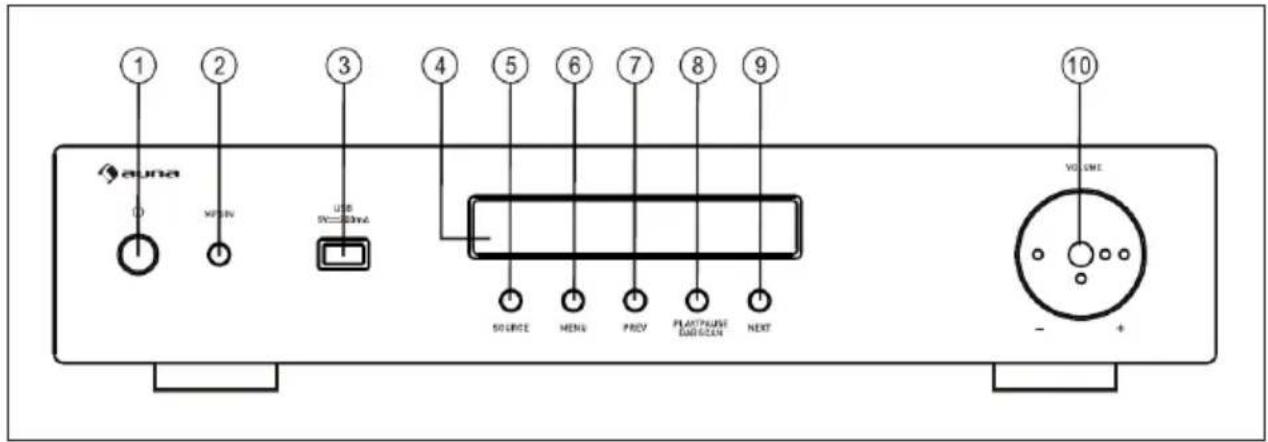
| 1 STANDBY/ON: Press this button to switch the device on or off. | |
| 2 MP3 IN: Slot for plugs from MP3 players | |
| 3 USB SLOT | |
| 4 LED DISPLAY | |
| 5 | SOURCE: Press this button to select the music source: USB, BT, MP3, CD, DVD or DAB |
| 6 | MENU: Press this button to choose between the following settings: BASS, TREB, LOUDNESS |
| 7 PREV: Press this button to go to the previous music track | |
| 8 | PLAY/PAUSE/DAB SCAN: Press this button to play/pause music and scan for DAB stations |
| 9 NEXT: Press this button to go to the next music track | |
| 10 VOLUME: To adjust the volume of the device | |
Back side
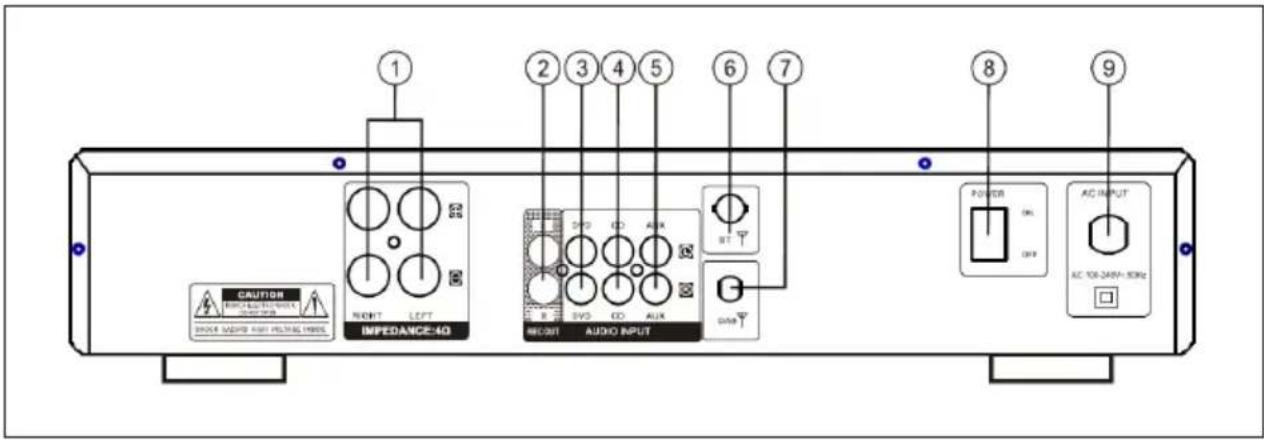
| 1 | SPEAKER TERMINAL: Connect speakers here with an impedance of ≥ 4 ohms |
| 2 | REC OUT: Signal output jack for recording |
| 3 | DVD AUDIO INPUT: Signal input jack for DVD players |
| 4 | CD AUDIO INPUT: Signal input jack for CD players |
| 5 | AUX AUDIO INPUT: Signal input jack for AUX devices |
| 6 BT antenna | |
| 7 DAB antenna | |
| 8 | POWER SWITCH: Turn the device on and off |
| 9 | POWER SUPPLY: 100-240 V ~ 50/60 Hz |
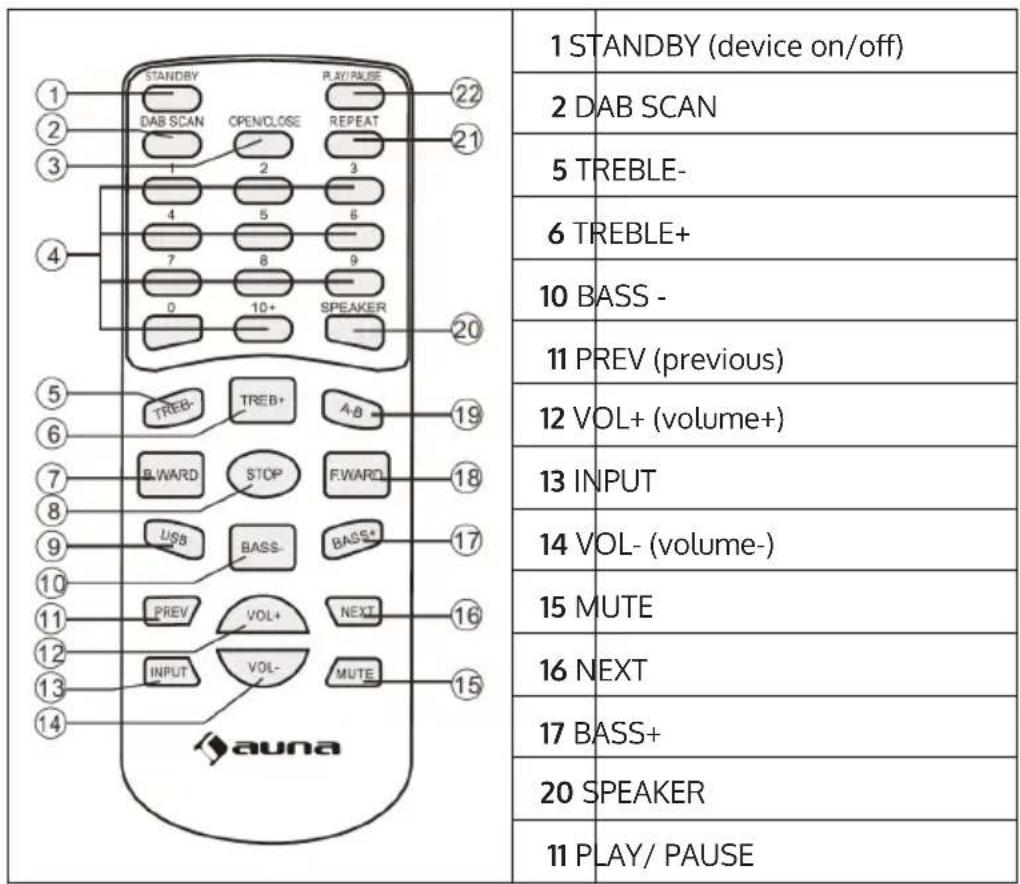
REMOTE CONTROL
The buttons described here are necessary for the operation of the amplifier. The other buttons are not needed.
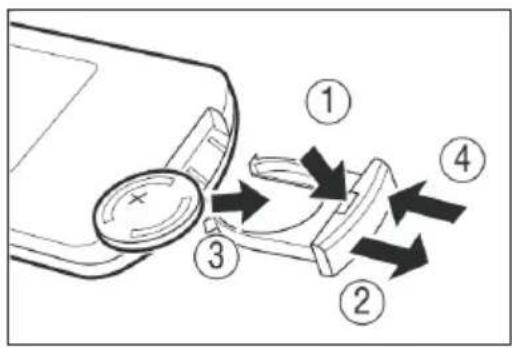
Insert / replace battery
PREPARATION
System connections
flowchart
graph TD
    A["POWER"] --> B["AC 106340V-53Hz"]
    C["AC 106340V-53Hz"] --> D["AUD INPUT"]
    E["IMPEDANCE:4D"] --> F["DVD CD AUX"]
    F --> G["ST"]
    F --> H["CAN"]
    I["CASTOR"] --> J["HEIGHT LEFT"]
    K["SHORE MARED HIGH VOLTAGE INDEX"] --> L["RIGHT"]
    M["L R"] --> N["L R"]
    O["L R"] --> P["L R"]
Speaker connections

Important notes on speaker connection
- The resistance of the connected speakers must be ≥ 4 Ohm, otherwise the device or the speakers may be damaged.
- Bare speaker cables must not touch each other or other metal parts, otherwise the device or the speakers may be damaged.
- Make sure you connect the speakers to the correct inputs: (+) to (+) and (-) to (-). Otherwise the sound will sound unnatural.
OPERATION AND FUNCTIONS
General operation
- Select audio source by pressing the INPUT button on the remote control or the SOURCE button on the control panel to select USB, BT, MP3, CD, DVD or DAB.
- Adjust the volume using the VOLUME knob on the control panel or the VOL+/VOL- button on the remote control to adjust the master volume to suit your listening preferences.
- Press the MENU button on the front panel to select BASS, TREB, Loudness. Then use the VOLUME control to change the bass and treble of the music.
- Press the MUTE button on the remote control to mute the device. Press the MUTE button again to unmute.
Establishing a BT connection
1 Turn off all BT devices previously connected to this unit.
2 Turn on the BT functions on your phone or music player.
3 Turn on the amplifier and select BT mode as the source. The flashing blue letter BT on the display indicates that the device is in pairing mode.
4 Set your phone or music player to search for Bluetooth devices.
5 Select the amplifier from the search results on your phone or music player.
6 Select OK or YES to connect this device to your phone or music player.
Search for DAB stations
1 Press the DAB SCAN button.
2 The display shows [Scanning XXX%].
3 Once a station is found, the number of the DAB station is displayed and the first station is automatically played.
4 Press the PREV/NEXT button to select the next or previous station. You may have to wait a moment for the device to tune to the new station.
TROUBLESHOOTING
| Problem Potential cause | Possible solution | |
| The indicator does not light up and there is no sound signal from the speakers. | The power plug is not properly connected. | Check the cable and connection. |
| The indicator lights up but there is no sound signal from the speakers. | The speakers are not properly connected. | Check the cable and connection of the speaker. |
| The volume control is on minimum. | Adjust the volume. | |
| No sound from centre channel. | The speakers are not properly connected. | Secure the connections. |
| Centre channel volume is set to minimum. | Adjust the centre channel volume. | |
| Centre channel audio only. | The speakers are not properly connected. | Check the cable and connection of the speaker. |
| Input/output connections. | ||
| Left/right balance off. Adjust | balance controls. | |
| No surround sound. The speakers are not properly connected. | Check the cable and connection of the speaker. | |
| Surround channel volume is set to minimum. | ||
| The stereo sound is distorted (left/right reversed, the sound seems to come from a distance.) | Problem with polarity. Adjust | balance controls. |
DISPOSAL CONSIDERATIONS
natural_image
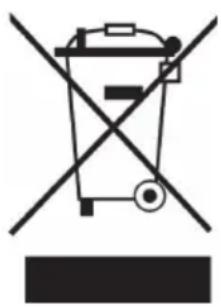
Symbol of a trash bin crossed with a diagonal line, representing no waste or discharge (no text or labels)If there is a legal regulation for the disposal of electrical and electronic devices in your country, this symbol on the product or on the packaging indicates that this product must not be disposed of with household waste. Instead, it must be taken to a collection point for the recycling of electrical and electronic equipment. By disposing of it in accordance with the rules, you are protecting the environment and the health of your fellow human beings from negative consequences. For information about the recycling and disposal of this product, please contact your local authority or your household waste disposal service.
This product contains batteries. If there is a legal regulation for the disposal of batteries in your country, the batteries must not be disposed of with household waste. Find out about local regulations for disposing of batteries. By disposing of them in accordance with the rules, you are protecting the environment and the health of your fellow human beings from negative consequences.
DECLARATION OF CONFORMITY

Manufacturer:
Chal-Tec GmbH, Wallstrasse 16, 10179 Berlin, Germany.
Importer for Great Britain:
Berlin Brands Group UK Limited
PO Box 42
272 Kensington High Street
London, W8 6ND
United Kingdom
Chal-Tec GmbH hereby declares that the radio equipment complies with Directive 2014/53/EU. The complete text of the EU declaration of conformity is available at the following internet address: use.berlin/10045433
For Great Britain: Hereby, Chal-Tec GmbH declares that the radio equipment is in compliance with the relevant statutory requirements. The full text of the declaration of conformity is available at the following internet address: use.berlin/10045433
Estimado cliente:
ÍNDICE
PREPARACIÓN
natural_image
Symbol of a trash bin crossed with a diagonal line, no text or labels presentBerlin Brands Group UK Limited PO Box 42
272 Kensington High Street
London, W8 6ND
Reino Unido
Cher client, chère cliente,
SOMMAIRE
PRÉPARATIFS
natural_image
Symbol of a trash bin crossed with a diagonal line, representing no waste or discharge (no text or labels)DÉCLARATION DE CONFORMITÉ

Fabricant :
Chal-Tec GmbH, Wallstraße 16, 10179 Berlin, Allemagne.
Berlin Brands Group UK Ltd PO Box 42
272 Kensington High Street London, W8 6ND
United Kingdom
INDICE
PREPARAZIONE
natural_image
Symbol of a trash bin crossed with a diagonal line, representing no waste or discharge (no text or labels)Berlin Brands Group UK Limited
PO Box 42
272 Kensington High Street
London, W8 6ND
United Kingdom
natural_image
Abstract white logo design on dark background, resembling stylized letter 'S' or wave form (no text or symbols)

- INHALTSVERZEICHNIS
- VORBEREITUNG
- CONTENTS
- SAFETY INSTRUCTIONS
- WARNING
- DEVICE OVERVIEW
- REMOTE CONTROL
- PREPARATION
- Important notes on speaker connection
- OPERATION AND FUNCTIONS
- General operation
- Establishing a BT connection
- Search for DAB stations
- TROUBLESHOOTING
- DISPOSAL CONSIDERATIONS
- DECLARATION OF CONFORMITY
- Manufacturer:
- Importer for Great Britain:
- Estimado cliente:
- ÍNDICE
- PREPARACIÓN
- Cher client, chère cliente,
- SOMMAIRE
- PRÉPARATIFS
- DÉCLARATION DE CONFORMITÉ
- Fabricant :
- INDICE
- PREPARAZIONE
Brand : Auna
Model : Curtis
Category : Receiver