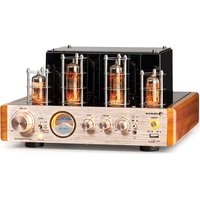
Amp VT - Receiver Auna - Free user manual and instructions
Find the device manual for free Amp VT Auna in PDF.


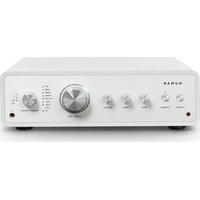
| Product Type | Tube Amplifier Receiver |
| Brand | Auna |
| Model | Amp VT |
| Power Supply | 230 V~, 50 Hz |
| Power Consumption | 80 W |
| Bluetooth | Yes, standard range |
| Bluetooth Frequency | 2402-2480 MHz |
| Bluetooth Transmission Power | 2.84 dBm |
| Tubes | 6P1, 6N1 |
| Connectivity | USB, AUX (RCA), optical, coaxial, Sub Out, headphone, speakers |
| Minimum Speaker Impedance | 4 Ω |
| Controls | Volume, treble, bass, input selector, playback knob |
| USB Playback | Yes, via USB drive |
| Headphone Output | Yes, with speaker/headphone switch |
| Maintenance | Damp cloth, no solvents |
| Safety | Do not open, risk of electric shock |
| Approximate Weight | 5 kg |
| Item Number | 10038336, 10038337 |
Frequently Asked Questions - Amp VT Auna
User questions about Amp VT Auna
0 question about this device. Answer the ones you know or ask your own.
Ask a new question about this device
Download the instructions for your Receiver in PDF format for free! Find your manual Amp VT - Auna and take your electronic device back in hand. On this page are published all the documents necessary for the use of your device. Amp VT by Auna.
USER MANUAL Amp VT Auna
TECHNISCHE DATEN
natural_image
Symbol of a trash bin crossed with a diagonal line, representing no waste or discharge (no text or labels)Congratulations on purchasing this device. Please read the following instructions carefully and follow them to prevent possible damages. We assume no liability for damage caused by disregard of the instructions and improper use. Scan the QR code to get access to the latest user manual and more product information.

TECHNICAL DATA
| Item number 10038336, 10038337 | |
| Power supply 230 V~ 50 Hz | |
| Leistungsaufnahme 80 W | |
| BTFrequency rangeMaximum radio-frequency power | 2402-2480 MHz2.84 dBm |
| Tubes 6P1, 6N1 |
SAFETY INSTRUCTIONS
Explanation of the symbols on the appliance
 | CAUTION |  |
| RISK OF ELECTRIC SHOCKDO NOT OPEN | ||
| WARNING: TO REDUCE THE RISK OF ELECTRIC SHOCK; DO NOT REMOVE THE COVER OR BACK. NO USER-SERVICEABLE PARTS INSIDE: REFER SERVICING TO QUALIFIED PERSONNEL. | ||

The lightning symbol is intended to alert you to the presence of uninsulated, dangerous voltage within this product's enclosure that might be of sufficient magnitude to constitute a risk of electric shock. Do not open the product case.
The exclamation symbol is intended to inform you that important operating and maintenance instructions are included in the literature accompanying this product..
Children over the age of 8 and persons with reduced physical, sensory or mental capabilities or those with a lack of experience and knowledge may only use the device if they are instructed on how to do so by a person responsible for their safety, or if they are supervised and understand the hazards associated with the use of the device.
Care
- Keep the amplifier dry. If it gets wet, wipe immediately.
- Use the amplifier only in well-ventilated installations.
- Handle the amplifier away from dust and dirt.
- Wipe occasionally with a damp cloth to keep it looking new.
- Do not use harsh chemical, solvents or detergents
FEATURES AND CONTROLS
Front
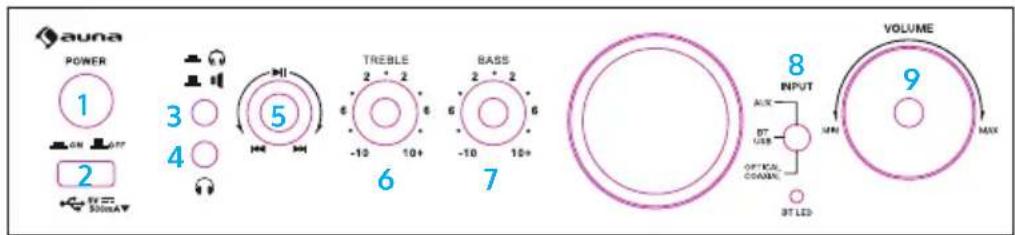
1 Power
Press this button to power ON/OFF the unit.
2 USB
Connect your USB card here.
3 Headphone & Speaker Switch
Press this button to switch between headphone output & speaker output.
4 Headphone Output
Connect your headphone here.
5 Play/Pause & PREV & NEXT
Press this button to pause the playing. Press again to play. Turn this button clockwise to go to next track. Turn this button counterclockwise to go to previous track.
6 TREBLE
Press this button and then turn the volume knob to adjust the treble of output.
7 BASS
Press this button and then turn the volume knob to adjust the bass of output.
8 INPUT
Use this switch to switch among all input modes.
9 VOLUME
Use this knob to adjust the master volume, bass or treble of output.
Back
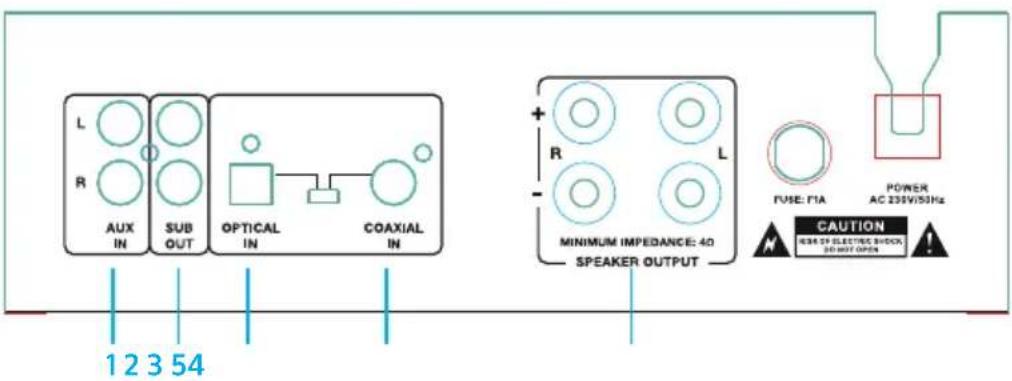
1 AUX Input
Connect your AUX signal here.
2 SUB Output
Connect this output to the LINE Input of another active subwoofer.
3 Optical Input
Connect your optical signal here.
4 OPTICAL/COAXIAL Input Switch
Set this switch to corresponding position to select optical or coaxial input mode.
5 COAXIAL Input
Connect your coaxial signal here.
6 Main Speaker Outputs
Connect your main speakers here.
BT OPERATION
To play BT signal, enable the BT function on a BT device like cell phone and set the amplifier to BT input mode and then search for available BT devices nearby on cell phone. The BT name of the speaker is "Amp VT". Pair and connect. There is no pairing code.
Note: The Amp VT is only discoverable when input is set to BT.
DISPOSAL CONSIDERATIONS

natural_image
Symbol of a trash bin crossed with a diagonal line, no text or labels presentIf there is a legal regulation for the disposal of electrical and electronic devices in your country, this symbol on the product or on the packaging indicates that this product must not be disposed of with household waste. Instead, it must be taken to a collection point for the recycling of electrical and electronic equipment. By disposing of it in accordance with the rules, you are protecting the environment and the health of your fellow human beings from negative consequences. For information about the recycling and disposal of this product, please contact your local authority or your household waste disposal service.
DECLARATION OF CONFORMITY

Manufacturer:
Chal-Tec GmbH, Wallstrasse 16, 10179 Berlin, Germany.
Importer for Great Britain:
Berlin Brands Group UK Ltd PO Box 1145 Oxford, OX1 9UW United Kingdom
Hereby, Chal-Tec GmbH declares that the radio equipment type Amp VT is in compliance with Directive 2014/53/EU. The full text of the EU declaration of conformity is available at the following internet address: use.berlin/10038336
For Great Britain: Hereby, Chal-Tec GmbH declares that the radio equipment type Amp VT is in compliance with the relevant statutory requirements. The full text of the declaration of conformity is available at the following internet address: use.berlin/10038336
Cher client, chère cliente,
FICHE TECHNIQUE
natural_image
Symbol of a trash bin crossed with a diagonal line, no text or numbers presentDÉCLARATION DE CONFORMITÉ

Fabricant :
Chal-Tec GmbH, Wallstraße 16, 10179 Berlin, Allemagne.
Berlin Brands Group UK Ltd
PO Box 1145
Oxford, OX1 9UW
United Kingdom
DATOS TÉCNICOS
natural_image
Symbol of a trash bin crossed with a diagonal line, representing no waste or discharge (no text or labels)DATI TECNICI
natural_image
Symbol of a trash bin crossed with a diagonal line, no text or numbers presentBerlin Brands Group UK Ltd
PO Box 1145
Oxford, OX1 9UW
United Kingdom
natural_image
Abstract white logo design on dark background, resembling stylized letter 'S' or wave form (no text or symbols)

- SAFETY INSTRUCTIONS
- Care
- FEATURES AND CONTROLS
- Front
- Power
- USB
- Headphone & Speaker Switch
- Headphone Output
- Play/Pause & PREV & NEXT
- TREBLE
- BASS
- INPUT
- VOLUME
- Back
- BT OPERATION
- DISPOSAL CONSIDERATIONS
- DECLARATION OF CONFORMITY
- Manufacturer:
- Importer for Great Britain:
- Cher client, chère cliente,
- DÉCLARATION DE CONFORMITÉ
- Fabricant :
Brand : Auna
Model : Amp VT
Category : Receiver