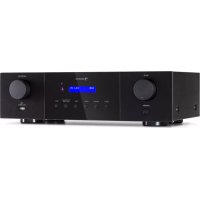
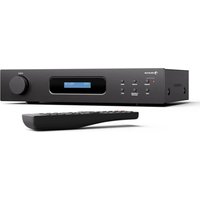
USER MANUAL AMP4000 DAB Auna
Member of Berlin Brands Group
Handwerkerstr. 11
15366 Dahlwitz-Hoppegarten
Deutschland
Berlin Brands Group UK Ltd
PO Box 1145
Oxford, OX1 9UW
United Kingdom
Congratulations on purchasing this equipment. Please read this manual carefully and take care of the following hints to avoid damages. Any failure caused by ignoring the items and cautions mentioned in the instruction manual are not covered by our warranty and any liability. Scan the QR code to get access to the latest user manual and other information about the product.
CONTENTS
Technical Data 20
Safety Instructions 22
Product Description 24
Remote Control 26
Preparation 28
Operation 30
Troubleshooting 31
Disposal Considerations 32
Declaration of Conformity 32
TECHNICAL DATA
| Item number 1003832 | 9, 10038330 |
| Power supply 230 V~ | 50 Hz |
| FM radio FM 87.5-108 MHz |
| DAB radio | Digital Band III 174-240 MHz
External antenna connector |
| BT | Frequency range: 2402 – 2480 MHz
Maximum power: <20 dBm (EIRP) |
| Input connectors | AUX IN
Coaxial x2
Optical
USB Type A |
| Output connectors | 4x2 speaker terminals
Line out |
EXPLANATION OF THE WARNING SYMBOLS
| CAUTION
RISK OF ELECTRIC SHOCK
DO NOT OPEN | A |
| CAUTION: TO REDUCE THE RISK OF ELECTRIC SHOCK AND SERIOUS PERSONAL INJURY, DO NOT REMOVE ANY COVER. NO USER-SERVICABLE
PARTS INSIDE. REFER SERVICING TO QUALIFIED SERVICE PERSONNEL ONLY. |
| WARNING. TO REDUCE THE RISK OF FIRE OR ELECTRICAL SHOCK, DO NOT EXPOSE THIS PRODUCT TO WATER, RAIN OR MOISTURE. |
| 3 | Triangle with lightning plus explanation as follows:
DANGEROUS VOLTAGE: The lightning flash with arrowhead symbol within the equilateral triangle is intended to alert the user to the presence of uninsulated dangerous voltage within the product's enclosure that may be of sufficient magnitude to constitute a risk of electric shock to persons. |
| ! | Triangle with exclamation point plus explanation as follows:
ATTENTION: The exclamation point within the equilateral triangle is intended to alert the user to the presence of important operating and maintenance (servicing) instructions in the literature accompanying this product. |
SAFETY INSTRUCTIONS
Read these instructions. All uses guidelines must be read before using the device. Keep the instructions for future use.
- Children over the age of 8 and persons with reduced physical, sensory or mental capabilities or those with a lack of experience and knowledge may only use the device if they are instructed on how to do so by a person responsible for their safety, or if they are supervised and understand the hazards associated with the use of the device.
- Use and security guidelines must be respected.
- The device must not be used near water or be put in contact with moisture.
- Make sure has no liquid is spilled on device and device openings.
- Move device carefully, avoid shocks.
- Do not block the breakdown of the device outputs.
- Do not place the device near from a heat source (e.g. radiator). Do not expose it to the Sun.
- Plug the device as indicate on this information form.
- This device has a connection with overload protection. Replacement should only be done bt an experienced technician or the device manufacturer.
- For cleaning the device, please follow the recommendations of the manual.
- The power cord should be unplugged when not using for a long period of time.
- The device shall be repaired by a qualified person when:
a. the power cord is damaged,
b. objects have fallen into the apparatus or a liquid has been spilled into device,
c. device was exposed to the rain,
d. device does not work correctly without notable exterior change,
e. device is broken.
- The user shall not try to maintain the device beyond that which is described in this manual.
- The device must not be exposed to dripping or splashing and that no objects filled with liquids, such as vases, shall be placed on apparatus.
-
To be completely disconnect the power input, the mains plug of apparatus must be disconnected from the mains, as the disconnect devices is the mains plug of apparatus.
-
The mains plug of apparatus should not be obstructed OR should be easily accessed during intended use.
- Excessive sound pressure form earphones and headphones can cause hearing loss.
- No naked flame sources such as lighted candles should be placed on the apparatus;
- Attention should be drawn to the environmental aspects of battery disposal;
- The device can be used in moderate climates.
PRODUCT DESCRIPTION
Front
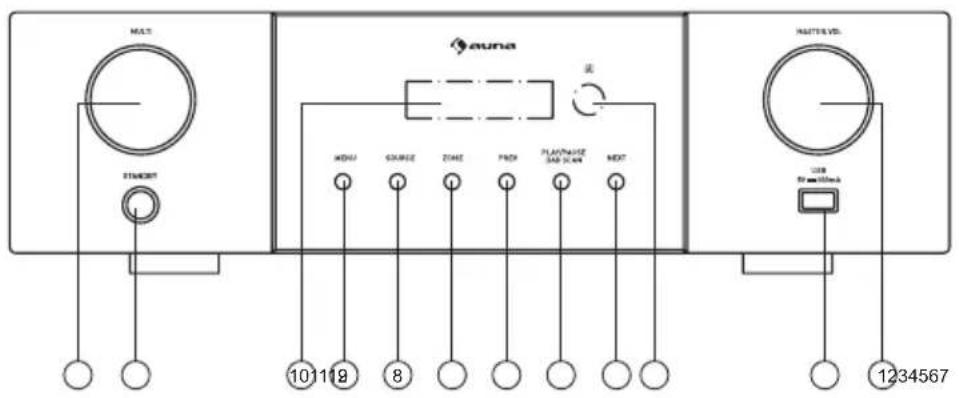
1 STANDBY
2 To play fast backward or forward
3 PLAY/PAUSE:Press this key to play/pause music.
4 OPEN/CLOSE: Press this key to open or close the compartment door.
5 COMPARTMENT DOOR
6 LED DISPLAY
7 IR (Remote Sensor)
8 NEXT: Press this key to next music.
9 PREVIOUS: Press this key to previous music.
10 PRE. VOL: To Adjust the CD Player volume.
11 USB Slot
12 MASTER VOLUME:
Rear
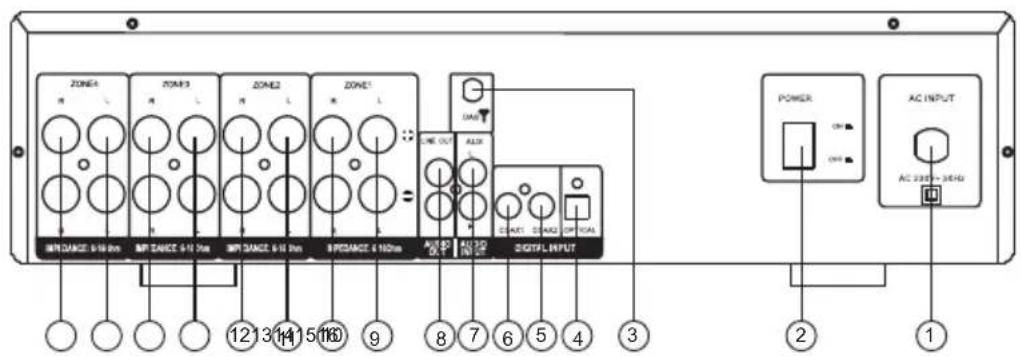
1 AC Input 230 V ~ 50 Hz
2 Power Switch
3 DAB ANTENNA
4 OPTICAL INPUT
5 COAXIAL2 INPUT
6 COAXIAL1 INPUT
7 AUX AUDIO INPUT JACK
8 LINE OUT AUDIO OUTPUT JACK
9 ZONE1:Speaker terminal (LEFT)
10 ZONE1:Speaker terminal (RIGHT)
11 ZONE2 :Speaker terminal (LEFT)
12 ZONE2 :Speaker terminal (RIGHT)
13 ZONE3:Speaker terminal (LEFT)
14 ZONE3:Speaker terminal (RIGHT)
15 ZONE4 :Speaker terminal (LEFT)
16 ZONE4 :Speaker terminal (RIGHT)
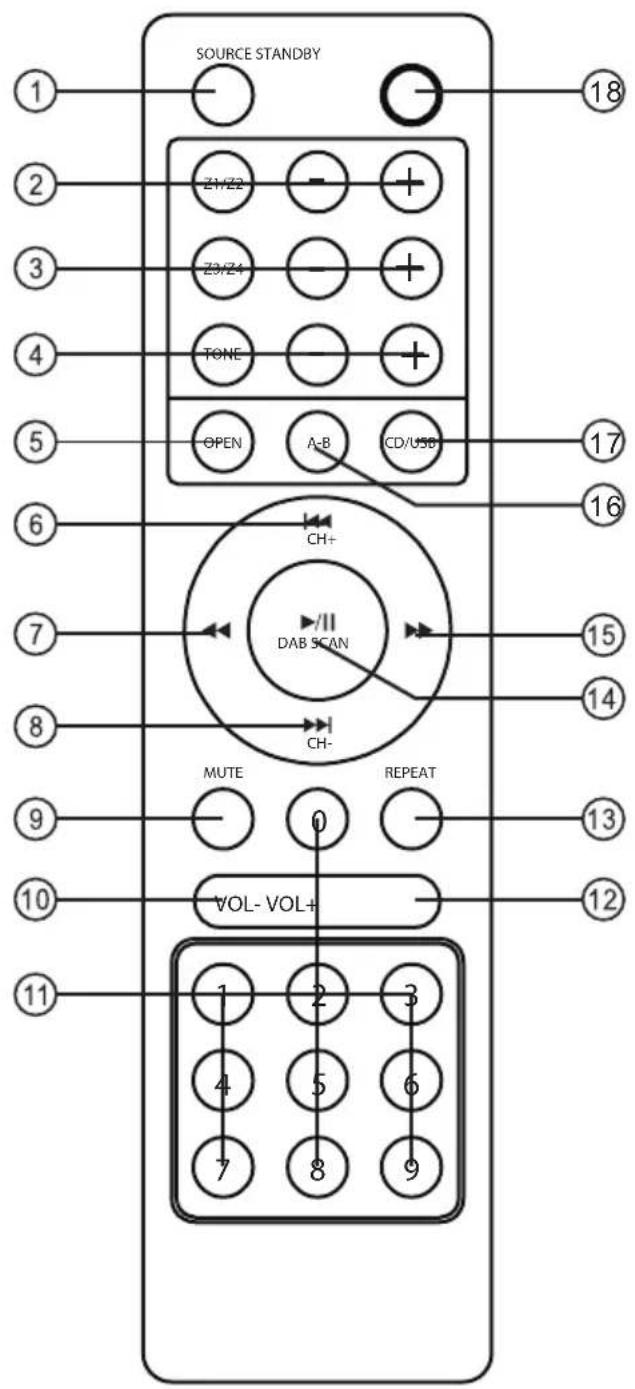
For Amplifier For CD Player (Item 1003829/30)
1 SOURCE
2 ZONE1/ZONE2 VOLUME +/-
3 ZONE3/ZONE4 VOLUME +/-
4 TONE(BASS/TREBLE) +/-
5
6 PREVIOUS/CHANNEL+ PREVIOUS
7
8 NEXT/CHANNEL- NEXT
9 MUTE
10 VOLUME-
11 NUMBER BUTTONS NUMBER BUTTONS
12 VOLUME+ VOLUME+
13
14 PLAY/PAUSE/DAB SCAN PLAY/PAUSE
15
16
17
18 STANDBY
OPEN
BACKWARD
REPEAT
F.WARD
A-B
CD/USB
PREPARATION
System connection
- The speaker impedance should be correct (read „Speaker Choice”), or this unit or speakers could be damaged.
- Do not let the bare speaker wires touch each other or any other metal parts as this could damage this unit or speakers.
- Make sure the polarity of speaker wires is correct, +, + and , - 10 , if these wires areincorrectly connected, the sound will be unnatural.
Connection to an amplifier
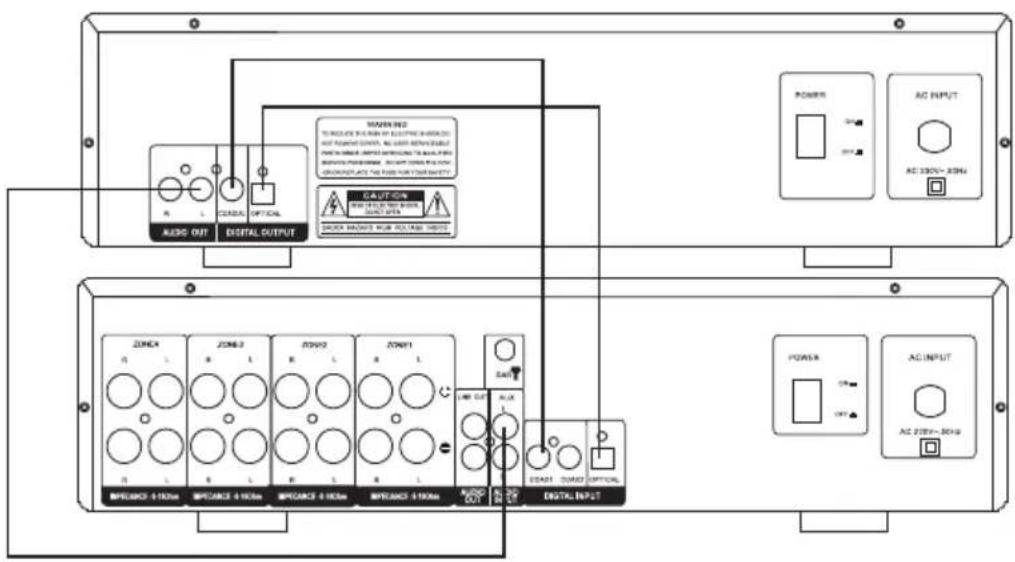
Source Equipment Connections Instructions
- While connecting, you should switch off power supply, and after finishing connections, switch on the unit again.
- All plus should be inserted firmly, or noise will be heard.
Connection to speakers
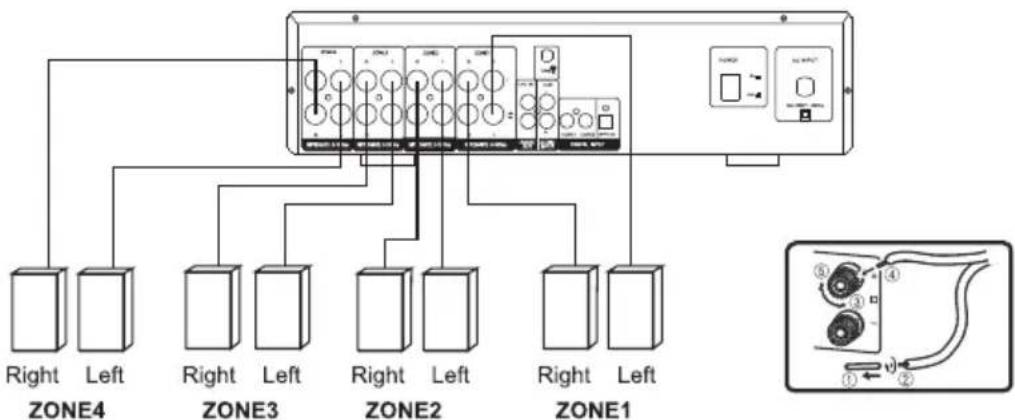
Set up Your Speaker System
- Five speakers system, you can have a good sound field effect, the rear speakers provide widely diffused sound, center speaker use for dialogue environment.
- If using only main speakers and rear surround speakers, four speakers also can provide a live feeling.
- By using of center speaker, dialogue and vocal sounds are precisely localized.
- If you want to feel low frequency effect and vibrant atmosphere, subwoofer is essential.
Place of Speakers
Centre speaker in the central position should upper or lower than TV screen to avoid magnet influence or use magnet proof speakers. The place of subwoofer is not so critical because low frequency without highly directional. Rear surround speakers, which behind your listening position should be nearly 2 meters up the floor
Speaker Choice
Speaker should be powerful enough. Front speaker impedance should be 6Ω - 16Ω . Centre and surround speaker impedance all should be 6Ω - 16Ω .
OPERATION
- Select audio source by pressing the SOURCE key on the front panel or on the remote control, to display BT, USB, AUX, OPTI, COAX1, COAX2, DAB.
- Adjust the knob MASTER.VOL on the front panel or the key VOL+/- on the remote control to adjust the setting of the main volume control to your listening level.
- Press the key ZONE on the front panel to select zone1, zone2, zone3, zone4, and adjust MULTI on the front panel to setting the zone volume.
Press the key Z1/Z2 on the remote to select zone 1, zone 2, and press +/- to increase or decrease volume.
Press the key Z3/Z4 on the remote to select zone1, zone2, and press +/to Increase or decrease volume.
- Press the key MENU on the front panel to select BASS, TREB, and adjust MULTI on the front panel to setting the volume.
Press the key TONE on the remote to select BASS, TREBLE,and press + / - to Increase or decrease volume.
- Press the MUTE key on the remote control to mute, press it again to reset.
BT Pair and Connect
- Turn off any Bluetooth devices previously paired (Linked) with this unit.
- Turn on the Bluetooth features on your phone or music player.
- Turn on and set this unit to Bluetooth mode. The flashing blue Letter BT on LED display indicates the unit in pairing mode.
- Set your phone or music player to search for Bluetooth devices.
- Select AMP-4000 DAB from search results on your phone or music player.
- Select OK or YES to pair this unit with your phone or music player.
- If protected, enter 0000 for passkey steady blue Light indicates successful connection.
In DAB Mode
Press the BT/DAB button to select DAB radio mode
Press the DAB SCAN button, "Scanning XXX%" will show on the display, and the number of DAB station will show, and it will automatically play the first station. Tune the PREV/NEXT key to choose the next or previous station.
Note : you many have to wait for the unit to tune in to the new channel.
TROUBLESHOOTING
| Problem Possible Cause | Suggested Solution | |
| The display does not light and there is no output sound. | Power cord not plugged in securely. | Check power cord & plug connection. |
| Display lights but sound is not produced. | Speaker connections not secure.
Volume control at minimum level. | Connect securely.
Turn volume up. |
| No sound from Centre channel. | Speaker connections not secure.
Centre channel volume set to minimum. | Connect securely.
Adjust Centre channel volume control. |
| Sound from one channel only. | Speaker connections
Input/Output connections
Left/Right balance off. | Connect securely.
Connect securely.
Adjust balance control. |
| Sound channel no sound. | Speaker connections
Surround channel volume set to minimum. | Connect securely.
Adjust Surround channel volume control. |
| Instrument sound reversed in stereo playback. | Incorrect speaker polarity.
Incorrect input polarity. | Make sure that the + connections are connected together and the - connections are connected together. |
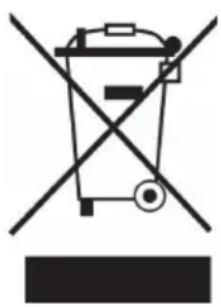
If there is a legal regulation for the disposal of electrical and electronic devices in your country, this symbol on the product or on the packaging indicates that this product must not be disposed of with household waste. Instead, it must be taken to a collection point for the recycling of electrical and electronic equipment. By disposing of it in accordance with the rules, you are protecting the environment and the health of your fellow human beings from negative consequences. For information about the recycling and disposal of this product, please contact your local authority or your household waste disposal service.
This product contains batteries. If there is a legal regulation for the disposal of batteries in your country, the batteries must not be disposed of with household waste. Find out about local regulations for disposing of batteries. By disposing of them in accordance with the rules, you are protecting the environment and the health of your fellow human beings from negative consequences.
CE UK CA
Manufacturer:
Chal-Tec GmbH, Wallstrasse 16, 10179 Berlin, Germany.
Importer for Great Britain:
Berlin Brands Group UK Ltd
PO Box 1145
Oxford, OX1 9UW
United Kingdom
Hereby, Chal-Tec GmbH declares that the radio equipment type AMP-4000 is in compliance with Directive 2014/53/EU. The full text of the EU declaration of conformity is available at the following internet address: use.berlin/10038329
For Great Britain: Hereby, Chal-Tec GmbH declares that the radio equipment type AMP-4000 is in compliance with the relevant statutory requirements. The full text of the declaration of conformity is available at the following internet address: use.berlin/10038329
Cher client, chere clientele,
Berlin Brands Group UK Ltd
PO Box 1145
Oxford, OX1 9UW
United Kingdom
Berlin Brands Group UK Ltd
PO Box 1145
Oxford, OX1 9UW
United Kingdom
Berlin Brands Group UK Ltd
PO Box 1145
Oxford, OX1 9UW
United Kingdom