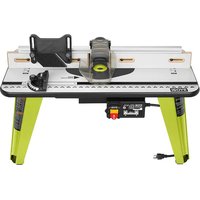
A25RT03 - Milling machine RYOBI - Free user manual and instructions
Find the device manual for free A25RT03 RYOBI in PDF.


| Product Type | Router Table |
| Brand | RYOBI |
| Model | A25RT03 |
| Table Dimensions | 406.4 mm x 812.8 mm x 25.4 mm (16 in x 32 in x 1 in) |
| Net Weight | 12.7 kg (28 lbs) |
| Rated Input | 120 V, 60 Hz, AC, 15 A |
| Maximum Cutter Diameter | 49.21 mm (1-15/16 in) |
| Fence Length | 711.2 mm (28 in) |
| Miter Gauge Slot | 6.35 mm x 19.01 mm x 812.8 mm (1/4 in x 3/4 in x 32 in) |
| Main Functions | Routing, mortising, shaping with fence or starting pin |
| Care and Cleaning | Clean with a clean cloth, avoid solvents. For abrasive materials, clean with compressed air. |
| Safety | Always wear safety glasses. Read the manual before use. Unplug before any adjustment or maintenance. Use the locking key. |
| Replacement Parts and Servicing | Use only genuine parts. Contact customer service at 1-800-525-2579 or visit www.ryobitools.com. |
| General Information | 3-year limited warranty. Proof of purchase required. Manufactured under license from Ryobi Limited. |
Frequently Asked Questions - A25RT03 RYOBI
User questions about A25RT03 RYOBI
0 question about this device. Answer the ones you know or ask your own.
Ask a new question about this device
Download the instructions for your Milling machine in PDF format for free! Find your manual A25RT03 - RYOBI and take your electronic device back in hand. On this page are published all the documents necessary for the use of your device. A25RT03 by RYOBI.
USER MANUAL A25RT03 RYOBI
natural_image
Technical line drawing of a workbench with tools and components (no text or symbols)TABLE OF CONTENTS
■ General Safety Rules....2-3
■ Specific Safety Rules ....3
Symbols....4
■ Electrical....5
■ Features....6-7
■ Assembly......8-15
■ Operation....16-18
■ Maintenance....19
■ Parts Ordering
and Service......Back page

WARNING: To reduce the
risk of injury, the user must read and understand the operator's manual before using this product.
SAVE THIS MANUAL FOR FUTURE REFERENCE
TABLE DES MATIÈRES
Read and understand all instructions. Failure to follow all instructions listed below, may result in electric shock, fire and/or serious personal injury.
READ ALL INSTRUCTIONS
- KNOW YOUR POWER TOOL. Carefully read the router table operator's manual and the manual for the particular router you are using. Learn the applications and limitations as well as the specific potential hazards related to this tool.
■ GUARD AGAINST ELECTRICAL SHOCK BY PREVENTING BODY CONTACT WITH GROUNDED SURFACES. For example: pipes, radiators, ranges, refrigerator enclosures. - KEEP GUARDS IN PLACE and in good working order.
■ REMOVE ADJUSTING KEYS AND WRENCHES. Form habit of checking to see that keys and adjusting wrenches are removed from tool before turning it on. - KEEP WORK AREA CLEAN. Cluttered areas and benches invite accidents. DO NOT leave tools or pieces of wood on the tool while it is in operation.
■ DO NOT USE IN DANGEROUS ENVIRONMENTS. Do not use power tools in damp or wet locations or expose to rain. Keep the work area well lit. - KEEP CHILDREN AND VISITORS AWAY. All visitors should wear safety glasses and be kept a safe distance from work area. Do not let visitors contact tool or extension cord while operating.
■ MAKE WORKSHOP CHILDPROOF with padlocks, master switches, or by removing starter keys.
■ DON'T FORCE THE TOOL. It will do the job better and safer at the feed rate for which it was designed.
■ USE THE RIGHT TOOL. Do not force the tool or attachment to do a job for which it was not designed.
■ USE THE PROPER EXTENSION CORD. Make sure your extension cord is in good condition. Use only a cord heavy enough to carry the current your product will draw. An undersized cord will cause a drop in line voltage resulting in loss of power and overheating. A wire gauge size (A.W.G.) of at least 14 is recommended for an extension cord 25 feet or less in length. If in doubt, use the next heavier gauge. The smaller the gauge number, the heavier the cord.
■ DRESS PROPERLY. Do not wear loose clothing, neckties, or jewelry that can get caught and draw you into moving parts. Rubber gloves and nonskid footwear are recommended when working outdoors. Also wear protective hair covering to contain long hair.
■ ALWAYS WEAR SAFETY GLASSES WITH SIDE SHIELDS. Everyday eyeglasses have only impact-resistant lenses, they are NOT safety glasses.
■ SECURE WORK. Use clamps or a vise to hold work when practical, it is safer than using your hand and frees both hands to operate the tool.
■ DO NOT OVERREACH. Keep proper footing and balance at all times.
■ MAINTAIN TOOLS WITH CARE. Keep tools sharp and clean for better and safer performance. Follow instructions for lubricating and changing accessories.
■ DISCONNECT TOOLS. When not in use, before servicing, or when changing attachments, blades, bits, cutters, etc., all tools should be disconnected from power source.
■ AVOID ACCIDENTAL STARTING. Be sure switch is off when plugging in any tool.
■ USE RECOMMENDED ACCESSORIES. Consult the operator's manual for recommended accessories. The use of improper accessories may result in injury.
■ NEVER STAND ON TOOL. Serious injury could occur if the tool is tipped or if the cutting tool is unintentionally contacted.
■ CHECK DAMAGED PARTS. Before further use of the tool, a guard or other part that is damaged should be carefully checked to determine that it will operate properly and perform its intended function. Check for alignment of moving parts, binding of moving parts, breakage of parts, mounting and any other conditions that may affect its operation. A guard or other part that is damaged must be properly repaired or replaced by an authorized service center to avoid risk of personal injury.
■ NEVER LEAVE TOOL RUNNING UNATTENDED. TURN THE POWER OFF. Don't leave tool until it comes to a complete stop.
■ USE THE RIGHT DIRECTION OF FEED. Feed work into a blade, cutter, or sanding spindle against the direction or rotation of the blade, cutter, or sanding spindle only.
■ PROTECT YOUR LUNGS. Wear a face or dust mask if the cutting operation is dusty.
■ PROTECT YOUR HEARING. Wear hearing protection during extended periods of operation.
■ DO NOT ABUSE CORD. Never carry tool by the cord or yank it to disconnect from receptacle. Keep cord from heat, oil, and sharp edges.
■ ALWAYS USE AN OUTDOOR EXTENSION CORD MARKED "W-A" OR "W". These cords are rated for outdoor use and reduce the risk of electric shock.
■ NEVER USE IN AN EXPLOSIVE ATMOSPHERE. Normal sparking of the motor could ignite fumes.
■ INSPECT TOOL CORDS PERIODICALLY. If damaged, have repaired by a qualified service technician at an authorized service facility. The conductor with insulation having an outer surface that is green with or without yellow
GENERAL SAFETY RULES
stripes is the equipment-grounding conductor. If repair or replacement of the electric cord or plug is necessary, do not connect the equipment-grounding conductor to a live terminal. Repair or replace a damaged or worn cord immediately. Stay constantly aware of cord location and keep it well away from the rotating blade.
■ INSPECT EXTENSION CORDS PERIODICALLY and replace if damaged.
- KEEP TOOL DRY, CLEAN, AND FREE FROM OIL AND GREASE. Always use a clean cloth when cleaning. Never use brake fluids, gasoline, petroleum-based products, or any solvents to clean tool.
■ STAY ALERT AND EXERCISE CONTROL. Watch what you are doing and use common sense. Do not operate tool when you are tired. Do not rush.
■ DO NOT USE TOOL IF SWITCH DOES NOT TURN IT ON AND OFF. Have defective switches replaced by an authorized service center.
■ DO NOT OPERATE A TOOL WHILE UNDER THE INFLUENCE OF DRUGS, ALCOHOL, OR ANY MEDICATION.
■ WHEN SERVICING use only identical replacement parts. Use of any other parts may create a hazard or cause product damage.
■ USE ONLY RECOMMENDED ACCESSORIES listed in this manual or addendums. Use of accessories that are not listed may cause the risk of personal injury. Instructions for safe use of accessories are included with the accessory.
SPECIFIC SAFETY RULES
FOR YOUR OWN SAFETY, read this router table operator's manual and the router manual before operating the router or using the router table.
■ ALWAYS USE THE ARTICULATING ROUTER CUTTER BIT GUARD.
■ WHEN USING THE ROUTER ON THE ROUTER TABLE, the router must be plugged into the router table switch outlet.
- KEEP HANDS AWAY FROM CUTTING AREA. Do not reach underneath the table or in the cutting path with your hands or fingers at any time while the tool is connected to a power source.
■ DO NOT USE AWKWARD HAND POSITIONS.
■ FIRMLY CLAMP OR BOLT THE ROUTER TABLE TO A WORK SURFACE so that the router table surface is approximately hip height.
■ ALWAYS FEED WORKPIECE AGAINST ROTATION OF CUTTER.
■ INSPECT FOR AND REMOVE ALL NAILS FROM LUMBER BEFORE ROUTING. Following this rule will reduce the risk of serious personal injury.
- KEEP FINGERS AWAY FROM REVOLVING CUTTER, USE FIXTURES WHEN NECESSARY.
■ ALWAYS SUPPORT WORKPIECE FIRMLY AGAINST TABLE AND FENCE.
■ IF THE POWER SUPPLY CORD IS DAMAGED, it must be replaced only by the manufacturer or by an authorized service center to avoid risk.
■ SAVE THESE INSTRUCTIONS. Refer to them frequently and use them to instruct others who may use this tool. If you loan someone this tool, loan them these instructions also.
SYMBOLS
| The following signal words and meanings are intended to explain the levels of risk associated with this product. SYMBOL SIGNAL MEANING | ||
 | DANGER: | Indicates a hazardous situation, which, if not avoided, will result in death or serious injury. |
 | WARNING: | Indicates a hazardous situation, which, if not avoided, could result in death or serious injury. |
 | CAUTION: | Indicates a hazardous situation, that, if not avoided, may result in minor or moderate injury. |
| NOTICE: | (Without Safety Alert Symbol) Indicates information considered important, but not related to a potential injury (e.g. messages relating to property damage). | |
| Some of the following symbols may be used on this product. Please study them and learn their meaning. Proper interpretation of these symbols will allow you to operate the product better and safer. SYMBOL NAME DESIGNATION/EXPLANATION | ||
 | Safety Alert Indicates a potential personal injury hazard. | |
 | Read Operator's Manual | To reduce the risk of injury, user must read and understand operator's manual before using this product. |
 | Eye Protection | Always wear eye protection with side shields marked to comply with ANSI Z87.1. |
 | Wet Conditions Alert Do not expose to rain or use in damp locations. | |
| V Volts Voltage | ||
| A Amperes Current | ||
| Hz Hertz Frequency (cycles per second) | ||
| min Minutes Time | ||
| ~ | Alternating Current | Type of current |
| n_0 | No Load Speed | Rotational speed, at no load |
| .../min | Per Minute | Revolutions, strokes, surface speed, orbits etc., per minute |
ELECTRICAL
EXTENSION CORDS
Use only 3-wire extension cords that have 3-prong grounding plugs and 3-pole receptacles that accept the product's plug. When using a power product at a considerable distance from the power source, use an extension cord heavy enough to carry the current that the product will draw. An undersized extension cord will cause a drop in line voltage, resulting in a loss of power and causing the motor to overheat. Use the chart provided below to determine the minimum wire size required in an extension cord. Only round jacketed cords listed by Underwriter's Laboratories (UL) should be used.
**Ampere rating (on product data plate)
0-2.0 2.1-3.4 3.5-5.0 5.1-7.0 7.1-12.0 12.1-16.0
| Cord Length | Wire Size (A.W.G.) | ||||
| 25' | 16 | 16 | 16 | 16 | 14 |
| 50' | 16 | 16 | 16 | 14 | 14 |
| 100' | 16 | 16 | 14 | 12 | 10 |
**Used on 12 gauge - 20 amp circuit.
NOTE: AWG = American Wire Gauge
When working outdoors with a product, use an extension cord that is designed for outside use. This type of cord is designated with "W-A" or "W" on the cord's jacket.
Before using an extension cord, inspect it for loose or exposed wires and cut or worn insulation.

WARNING:
Keep the extension cord clear of the working area. Position the cord so that it will not get caught on lumber, products or other obstructions while you are working with a power product. Failure to do so can result in serious personal injury.

WARNING:
Check extension cords before each use. If damaged replace immediately. Never use product with a damaged cord since touching the damaged area could cause electrical shock resulting in serious injury.
ELECTRICAL CONNECTION
This product is powered by a precision built electric motor. It should be connected to a power supply that is 120 V, AC only (normal household current), 60 Hz. Do not operate this product on direct current (DC). A substantial voltage drop will cause a loss of power and the motor will overheat. If the saw does not operate when plugged into an outlet, double check the power supply.
SPEED AND WIRING
The no-load speed of this product depends on the router you are using. This speed is not constant and decreases under a load or with lower voltage. For voltage, the wiring in a shop is as important as the motor's horsepower rating. A line intended only for lights cannot properly carry a power product motor. Wire that is heavy enough for a short distance will be too light for a greater distance. A line that can support one power product may not be able to support two or three products.
GROUNDING INSTRUCTIONS
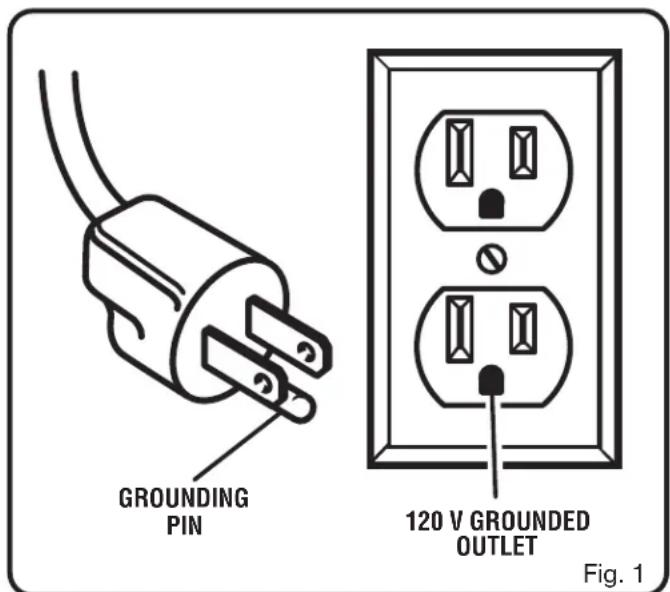
See Figure 1.
In the event of a malfunction or breakdown, grounding provides a path of least resistance for electric current to reduce the risk of electric shock. This product is equipped with an electric cord having an equipment-grounding conductor and a grounding plug. The plug must be plugged into a matching outlet that is properly installed and grounded in accordance with all local codes and ordinances.
Do not modify the plug provided. If it will not fit the outlet, have the proper outlet installed by a qualified electrician. Improper connection of the equipment-grounding conductor can result in a risk of electric shock. The conductor with insulation having an outer surface that is green with or without yellow stripes is the equipment-grounding conductor. If repair or replacement of the electric cord or plug is necessary, do not connect the equipment-grounding conductor to a live terminal.
Check with a qualified electrician or service personnel if the grounding instructions are not completely understood, or if in doubt as to whether the product is properly grounded.
Repair or replace a damaged or worn cord immediately.
This product is intended for use on a circuit that has an outlet like the one shown in figure 1. It also has a grounding pin like the one shown.
FEATURES
PRODUCT SPECIFICATIONS
Table Dimensions ....16 in. x 32 in. x 1 in.
Maximum Cutter Diameter 1-15/16 in.
Fence Length.... 28 in.
Miter Slot....1/4 in. x 3/4 in. x 32 in.
Rating 120 V, 60 Hz, AC only, 15 Amps
Net Weight....28 lbs.
KNOW YOUR ROUTER TABLE
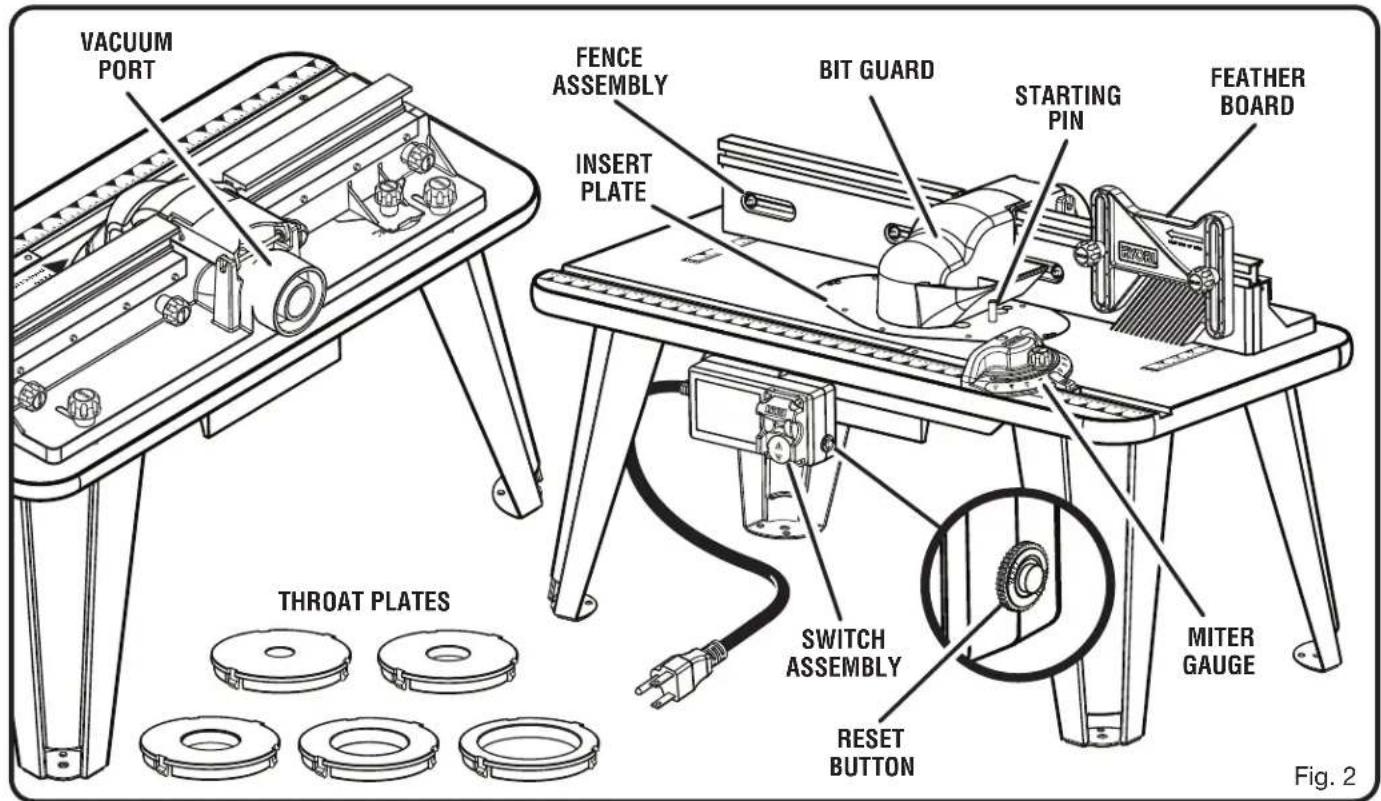
See Figure 2.
The safe use of this product requires an understanding of the information on the product and in this operator's manual as well as a knowledge of the project you are attempting. Before use of this product, familiarize yourself with all operating features and safety rules.
BIT GUARD
The articulating router cutter bit guard on the fence assembly provides a barrier to protect the operator from contact with the cutter and is designed to stay in contact with the workpiece.
FEATHERBOARD
The featherboard allows for safe movement of the workpiece through the cutter area and is height adjustable.
FENCE ASSEMBLY
The sacrificial MDF fence assembly provides an adjustable surface to support and guide the work. Molded into the fence assembly is the vacuum port.
INSERT PLATE
The insert plate can be used in combination with a variety of routers. It also has pre-drilled countersunk holes that can be used with a variety of routers.
MITER GAUGE
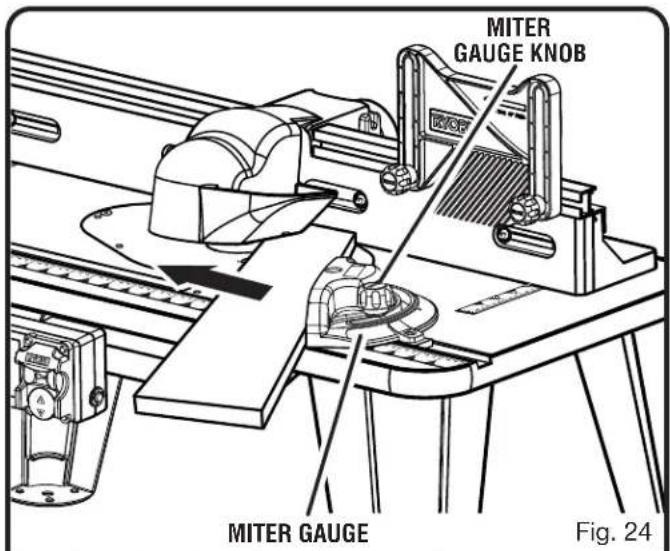
A miter gauge is used for mitered routing and to help support wider pieces.
RESET BUTTON
The router table switch is equipped with a reset button that protects the electronic components of the router table switch box from overload.
STARTING PIN
When you are unable to use the fence for a guide because the workpiece is odd-shaped or too small, use the starting pin for a guide and/or pivot point. Only use piloted cutters when using the starting pin.
FEATURES
THROAT PLATES
Five throat plates are included with the router table. The throat plate provides a stable surface around the cutter and prevents objects from falling through the throat and damaging the spindle.
VACUUM PORT
The vacuum ports molded into the fence will accept either a 1-1/4 in. or 2-1/2 in. vacuum attachment.
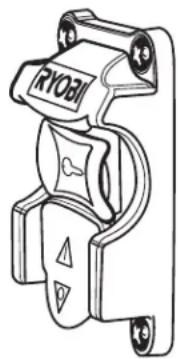
SWITCH ASSEMBLY
See Figure 3.
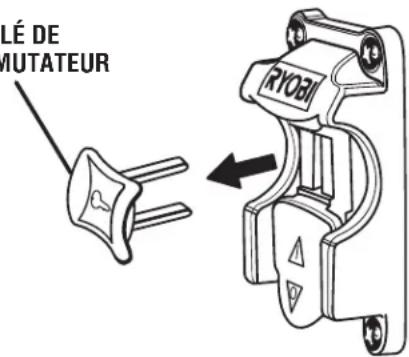
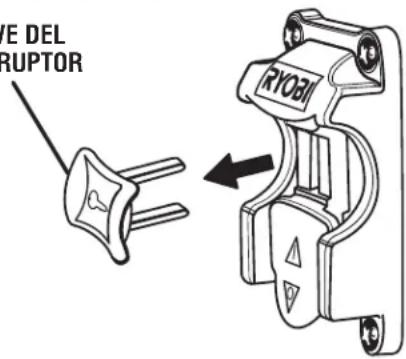
This product is equipped with a switch assembly that has a built-in locking feature. This feature is intended to prevent unauthorized and possible hazardous use by children and others.
TO TURN YOUR ROUTER TABLE ON:
- Plug the router into either switch box outlet on the router table and plug the router table into a 120 volt grounded outlet.
■ With the switch key inserted into the switch, lift the switch to turn ON (1).
NOTE: The router table is equipped with a reset button. See Figure 2. If, for any reason, the router table will not turn on, press the reset button and then restart.
TO TURN YOUR ROUTER TABLE OFF:
■ Press the switch down to turn OFF (O).
TO LOCK YOUR ROUTER TABLE:
■ Press the switch down.
■ Remove the switch key from the switch and store in a safe, secure location.

WARNING:
Always remove the switch key when the tool is not in use and keep it in a safe place. In the event of a power failure, turn the switch OFF (O) and remove the key. This action will prevent the tool from accidentally starting when power returns.

WARNING:
ALWAYS make sure your workpiece is not in contact with the cutter before operating the switch to start the tool. Failure to heed this warning may cause the workpiece to be kicked back toward the operator and result in serious personal injury.

WARNING:
To reduce the risk of accidental starting, ALWAYS make sure the switch is in the OFF (O) position before plugging tool into the power source.
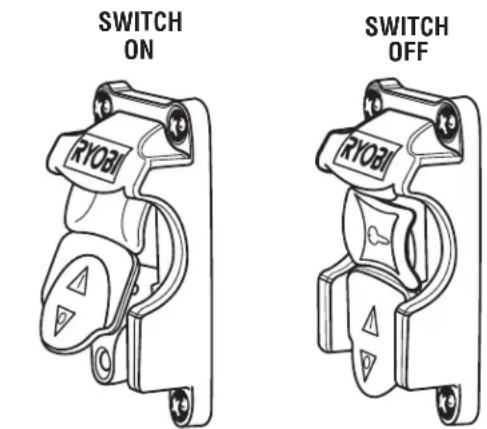
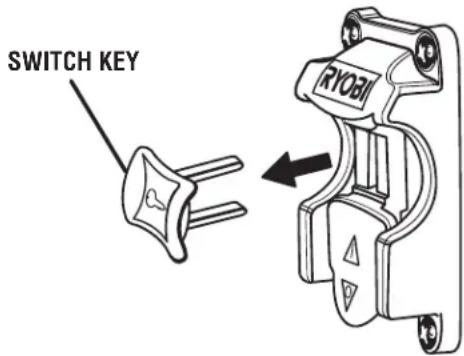
SWITCH IN LOCKED POSITION
Fig. 3
ASSEMBLY
UNPACKING
This product requires assembly.
- Carefully remove the product and any accessories from the box. Make sure that all items listed in the loose parts list are included.

WARNING:
Do not use this product if any parts on the Loose Parts List are already assembled to your product when you unpack it. Parts on this list are not assembled to the product by the manufacturer and require customer installation. Use of a product that may have been improperly assembled could result in serious personal injury.
■ Inspect the product carefully to make sure no breakage or damage occurred during shipping.
■ Do not discard the packing material until you have carefully inspected and satisfactorily operated the product.
■ If any parts are damaged or missing, please call 1-800-525-2579 for assistance.

WARNING:
If any parts are damaged or missing do not operate this tool until the parts are replaced. Use of this product with damaged or missing parts could result in serious personal injury.

WARNING:
Do not attempt to modify this product or create accessories not recommended for use with this product. Any such alteration or modification is misuse and could result in a hazardous condition leading to possible serious personal injury.

WARNING:
Do not connect to power supply until assembly is complete. Failure to comply could result in accidental starting and possible serious personal injury.

WARNING:
The undertable guards must be securely in place before using the router table. Failure to do so could result in serious personal injury.
ASSEMBLY
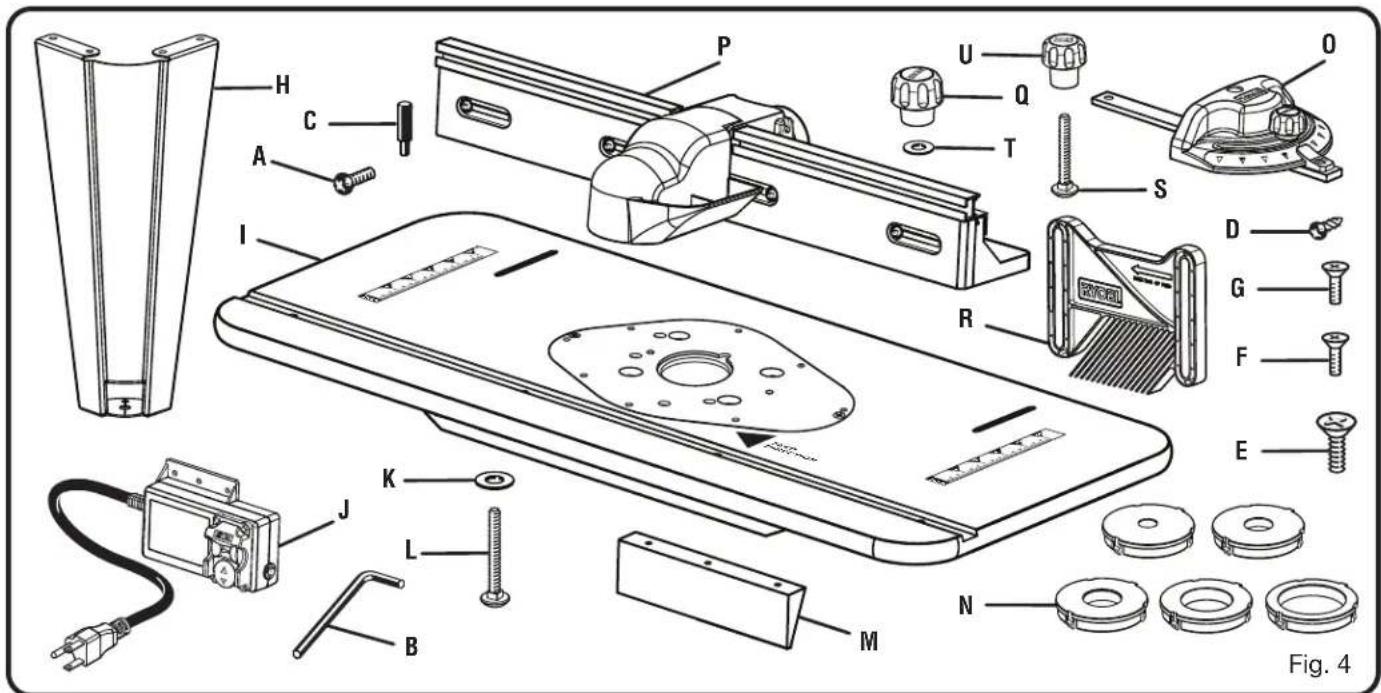
PACKING LIST
See Figure 4.
A. Table Leg Phillips Head Screw....16
B. Hex Key....1
C. Starting Pin .... 1
D. Under Table Guard Screw 6
E. Router Insert Plate Screws (5/16-18 x 3/4 in.)....3
F. Router Insert Plate Screws (10-24 x 5/8 in.) .... 3
G. Router Insert Plate Screws (10-32 x 5/8 in.) ...... 3
H. Table Leg....4
I. Table Top......1
J. Switch Box....1
K. Carriage Bolt Washer 2
L. Carriage Bolt....2
M. Under Table Guard....2
N. Throat Plates....5
O. Miter Gauge .... 1
P. Fence Assembly....1
Q. Fence Lock Knobs....2
R. Featherboard....1
S. Featherboard Bolts 2
T. Fence Lock Knob Washer....2
U. Featherboard Lock Knobs 2
V. Operator's Manual (not shown)
NOTE: Items A-G are included in a separate blister pack.
ASSEMBLY
ASSEMBLING THE ROUTER TABLE
Assembling the router table involves attaching the switch box, the under table guards, the legs, the router/insert plate assembly, the fence assembly, featherboard, throat plate, starting pin, and installing the miter gauge to the router table.
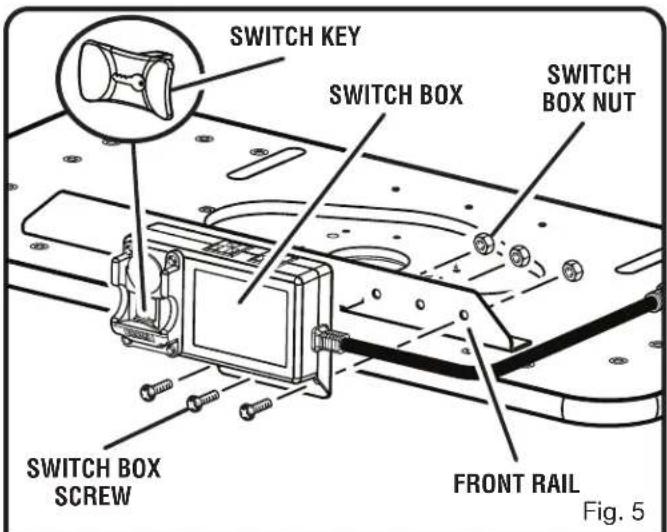
ATTACHING THE SWITCH BOX
See Figure 5.
The switch box will come with the screws and nuts attached. Use these screws and nuts to attach the switch box to the table.
■ Loosen and remove the screws and nuts from the switch box.
■ Place the router table upside down on a flat surface.
■ Hold the switch box so that the words ON and OFF on the toggle switch are upside down.
■ Line up the three holes in the switch box with the three holes on the outside of the front rail, this is the rail that is already installed on the front underside of the router table.
■ Insert the switch box screws through the holes in the switch box and through the holes in the front rail.
■ Install the nuts on the back of the switch box screws.
■ Holding the screws in place with a screwdriver, tighten the nuts onto the screws with a wrench or socket.
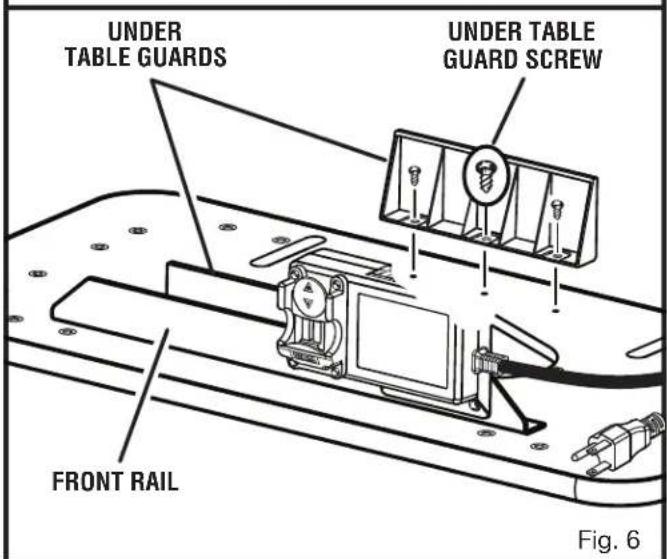
ATTACHING THE UNDER TABLE GUARDS
See Figure 6.
Remove the under table guard screws from the blister pack. Use these screws to attach the under table guards.
■ Place the router table upside down on a flat surface.
■ Position the under table guards in front of and behind the insert plate area. The front under table guard should have the open ended side facing the back of the router table.
■ Align the three holes of the under table guards with the holes in the table. The front under table guard will be bolted through the front rail and in to the table.
■ Insert the under table guard screws through the holes and into the table.
■ Tighten screws with a screwdriver.
ATTACHING THE TABLE LEGS
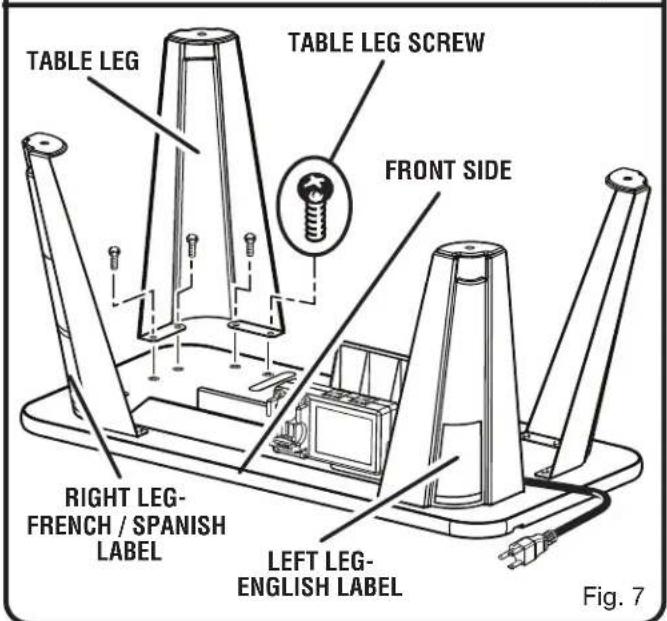
See Figure 7.
Remove the table leg screws from the blister pack. Use these screws to attach the table legs.
■ Place router table upside down on a flat, level surface with the front edge closest to you.
Place each leg in a corner of the table. The legs with the warning labels should go in the front, and the legs without the warning labels should go in the back.
ASSEMBLY
NOTE: The table leg with the English language warning should go next to the switch box.
■ Align the four holes in the legs with the four corresponding threaded holes in the table.
■ Insert the table leg screws through the holes and into the table.
■ Tighten screws with a screwdriver.
PRE-DRILLING HOLES FOR THROUGH TABLE DEPTH ADJUSTMENT
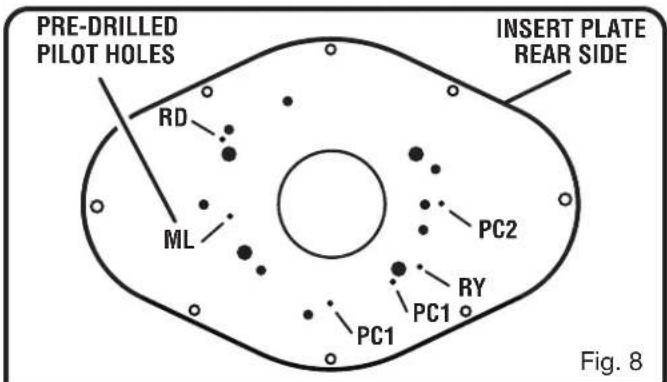
See Figure 8.
Since each router will have different placements for through table depth adjustments, pilot holes have been pre-drilled in the throat plate to assist in through table adjustments. Only the models listed below in the key are available for use with the through table depth adjustment feature.
■ Remove the throat plate.
■ Determine which router you have and find the pre-drilled pilot hole that matches your router. (Refer to the key below.)
■ Using a drill and drill bit, drill a hole through the pilot hole large enough for the depth adjustment tool (not included with router table, but may be included with your router) to pass though so through table depth adjustments can be made.
Figure 8 Key:
RD: RIDGID R2930, R22002
RY: Ryobi R163K, R163GK
ML: Milwaukee 5615-20, 5616-20
PC1: Porter-Cable 890 Series
PC2: Porter-Cable 8529
ATTACHING THE ROUTER TO THE TABLE
For ease of use, assemble the router to the insert plate with the insert plate removed first, then install the insert plate/router assembly into the router table.
ATTACHING THE ROUTER TO THE INSERT PLATE
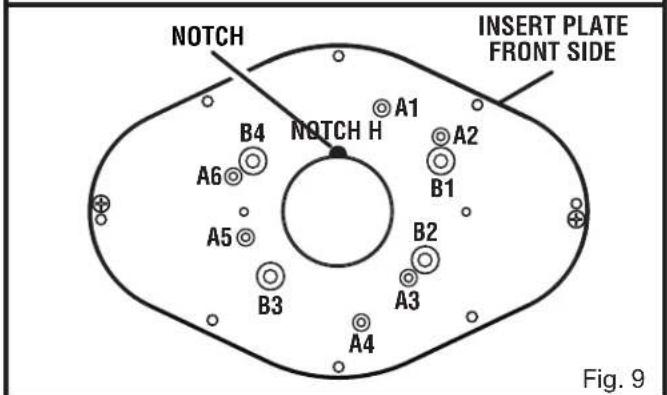
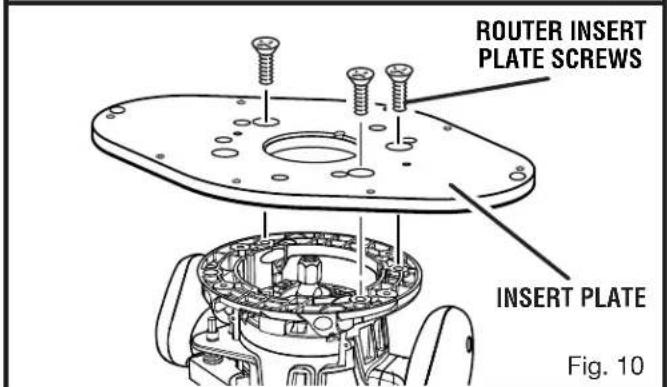
See Figures 9 - 10.
Remove the router insert plate screws from the blister pack. Use these screws to attach the router insert plate.
■ Unplug the router table and/or the router.
■ Remove the insert plate.
■ Remove the subbase plate from the router.
■ Using the following chart for reference, and using one of the three included sets of three router insert plate screws, attach the router to the insert plate with the pilot holes facing the router and the notch in the insert plate facing the back of the router table.
NOTE: When attaching insert plate to the router, make sure the holes in the router base match up with the insert plate accurately and are not off-center.
ASSEMBLY
BRAND MODEL BASE TYPE FASTENER SIZE INSERT PLATE HOLES USED NUMBER OF HOLES
| Bosch 1617 | Fixed 10-24 x 5/8 in. A1, A3, A5 3 | ||||
| Bosch 1617 | EVS Fixed 10-24 x 5/8 in. A1, A3, A5 3 | ||||
| Bosch 1617 | EVSPK Fixed 10-24 x 5/8 in. A1, A3, A5 3 | ||||
| Craftsman 17504 | Fixed 10-32 x 5/8 in. A2, A4, A6 3 | ||||
| Craftsman 17505 | Fixed 10-32 x 5/8 in. A2, A4, A6 3 | ||||
| Craftsman 17506 | Fixed 10-32 x 5/8 in. A2, A4, A6 3 | ||||
| Craftsman 17508 | Fixed 10-32 x 5/8 in. A2, A4, A6 3 | ||||
| Craftsman 17510 | Fixed 10-32 x 5/8 in. A2, A4, A6 3 | ||||
| Craftsman 17511 | Fixed 10-32 x 5/8 in. A2, A4, A6 3 | ||||
| Craftsman | 17515 | Plunge | 5/16-18 x 3/4 in. | B1, B2, B4 | 3 |
| Craftsman 17517 | Plunge | 10-32 x 5/8 in. A2, A4, A6 3 | |||
| Craftsman 17533 | Fixed 10-32 x 5/8 in. A2, A4, A6 3 | ||||
| Craftsman | 17533 | Plunge | 5/16-18 x 3/4 in. | B1, B2, B4 | 3 |
| Craftsman 24833 | Fixed 10-32 x 5/8 in. A2, A4, A6 3 | ||||
| Craftsman | 24833 | Plunge | 5/16-18 x 3/4 in. | B1, B2, B4 | 3 |
| Craftsman | 27500 | Fixed | 5/16-18 x 3/4 in. | B1, B2, B4 | 3 |
| Craftsman 26921 | Fixed 10-32 x 5/8 in. A2, A4, A6 3 | ||||
| Hitachi | M12V | Plunge | 10-32 x 5/8 in. | A1, A3, A5 | 3 |
| Hitachi KM | 12VC | Fixed 10-32 x 5/8 in. A1, A3, A5 3 | |||
| Makita | RF1101 | Fixed | 10-24 x 5/8 in. | A1, A3, A5 | 3 |
| Makita | RP1101 | Plunge | 10-24 x 5/8 in. | A1, A3, A5 | 3 |
| Makita | RF1101K | Fixed/Plunge | 10-24 x 5/8 in. A1, | A3, A5 3 | |
| Milwaukee 5615-20 | Fixed 10-24 x 5/8 in. A1, A3, A5 3 | ||||
| Milwaukee 5616-20 | Fixed 10-24 x 5/8 in. A1, A3, A5 3 | ||||
| Porter Cable | 693LRPK | Plunge only | 10-24 x 5/8 in. A1, | A3, A5 3 | |
| Porter Cable | 694PK | Plunge only | 10-24 x 5/8 in. A1, | A3, A5 3 | |
| Porter Cable | 694VK | Plunge only | 10-24 x 5/8 in. A1, | A3, A5 3 | |
| Porter Cable | 892 | Fixed 10-24 x 5/8 in. A1, A3, A5 3 | |||
| Porter Cable | 893PK | Fixed 10-24 x 5/8 in. A1, A3, A5 3 | |||
| Porter Cable | 7529 | Plunge | 10-24 x 5/8 in. A1, | A3, A5 3 | |
| Porter Cable | 8529 | Plunge | 10-24 x 5/8 in. A1, | A3, A5 3 | |
| RIDGID R2930 | Fixed/Plunge | 10-32 x 5/8 in. A1, | A3, A5 3 | ||
| RIDGID | R22002 | Fixed | 10-32 x 5/8 in. A1, | A3, A5 3 | |
| Ryobi R163GK | Fixed | 5/16-18 x 3/4 in. | B1, B2, B4 | 3 | |
| Ryobi | R160 | Fixed | 5/16-18 x 3/4 in. | B1, B2, B4 | 3 |
| Ryobi | R161K | Fixed | 5/16-18 x 3/4 in. | B1, B2, B4 | 3 |
| Ryobi | R162K | Fixed | 5/16-18 x 3/4 in. | B1, B2, B4 | 3 |
| Ryobi | R163K | Fixed | 5/16-18 x 3/4 in. | B1, B2, B4 | 3 |
| Ryobi | R165U | Fixed | 5/16-18 x 3/4 in. | B1, B2, B4 | 3 |
| Ryobi | R175 | Plunge | 5/16-18 x 3/4 in. | B1, B3 | 2 |
| Ryobi | RE175 | Plunge | 5/16-18 x 3/4 in. | B1, B3 | 2 |
| Ryobi | RE180PL/PL1/PL1G | Plunge | 5/16-18 x 3/4 in. | B1, B3 | 2 |
| Skil | 1810 Fixed | 10-32 x 5/8 in. A2, A4, A6 3 | |||
| Skil | 1825 | Fixed/Plunge | 10-32 x 5/8 in. A2, | A4, A6 3 | |
All identified trademarks and trade names are the property of their respective owners.
ASSEMBLY
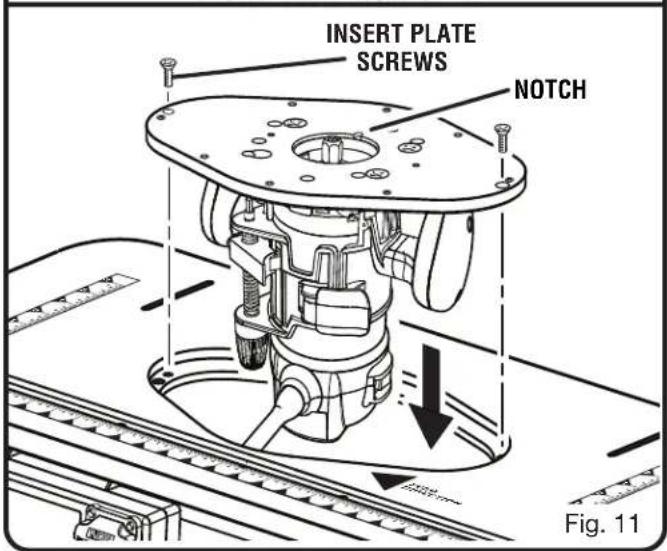
INSTALLING THE ROUTER/INSERT PLATE ASSEMBLY
See Figure 11.
■ Unplug the router table and/or the router.
■ With the insert plate installed on the router, insert router and insert plate assembly into the router table with the notch in the insert plate facing the back of the router table away from the switch box.
■ Install the insert plate screws and leave loose until all adjustments have been made.
■ Unplug the router table and/or the router.
■ Check to see if the insert plate mounted assembly is level with a straight edge or level.
■ Loosen insert plate screws.
■ Using the supplied hex key, tighten or loosen the adjusting screws depending on how the insert plate needs to be adjusted in order to make the insert plate level.
■ Tighten insert plate screws with a screwdriver.
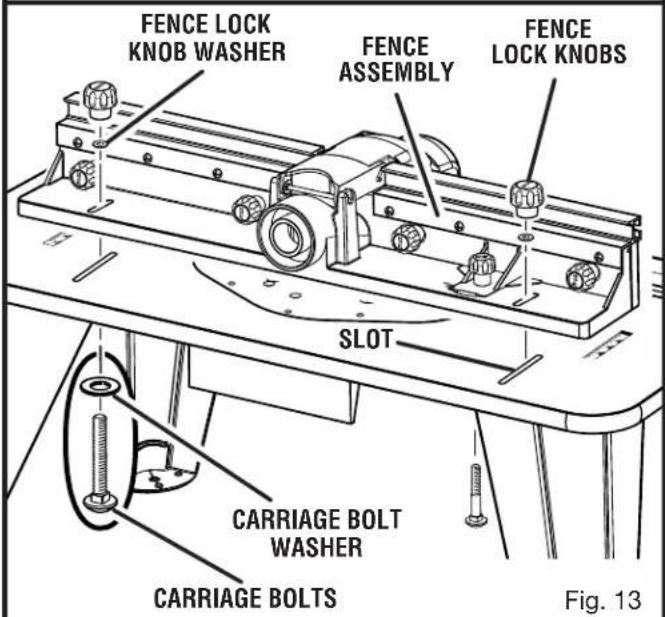
ATTACHING THE FENCE ASSEMBLY
See Figure 13.
■ Unplug the router table and/or the router.
■ Place the router table right side up with the back edge closest to you.
■ Slide the carriage bolt washers onto the carriage bolts.
■ Slide carriage bolts through the slot in the router table and through the slots in the fence assembly.
■ Slide the fence lock knob washer over the carriage bolts.
■ Install the fence lock knobs over the carriage bolts.
■ Tighten the fence lock knobs.

WARNING:
Make sure throat plates snap securely into place. Do not use if snaps are damaged or throat plates do not snap in securely. Failure to do so could result in serious personal injury.
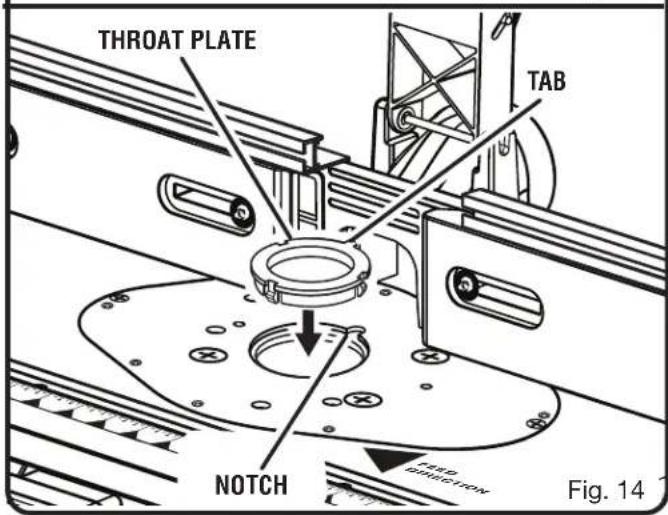
INSERTING AND REMOVING THROAT PLATES
See Figure 14.
The throat plate provides a stable surface around the cutter and prevents objects from falling through the throat plate and damaging the spindle.
The proper size throat plate depends on the size and shape of the cutter. When inserted, the throat plate opening should be within approximately 1/4 in. of the outermost edge of the cutter.
■ Unplug the router table and/or the router.
■ Select the throat plate you wish to use.

ASSEMBLY
■ Press throat plate into insert plate slot until it snaps into place.
■ To remove, push throat plate out from the bottom of the insert plate.
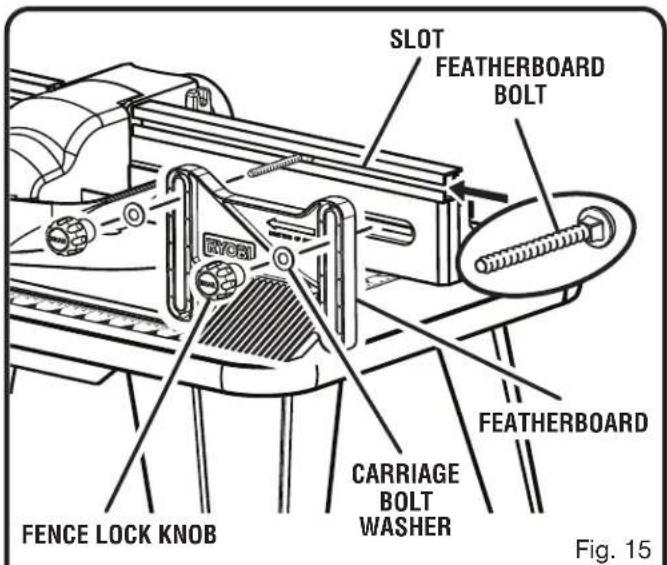
ATTACHING THE FEATHERBOARD
See Figure 15.
■ Unplug the router table and/or the router.
■ Insert the featherboard bolts through the slots in the fence assembly.
■ Slide the featherboard over the featherboard bolts.
■ Install the fence lock knobs and carriage bolt washers over the carriage bolts.
■ Tighten the fence lock knobs.
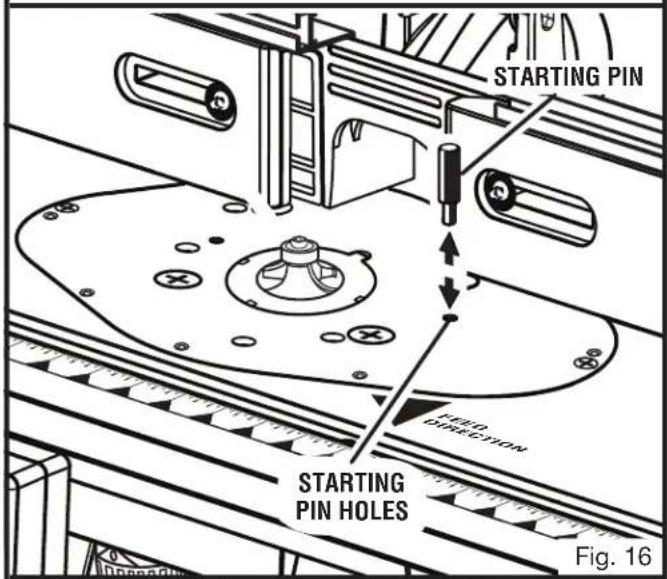
INSERTING THE STARTING PIN
See Figure 16.
Remove the starting pin from the blister pack. Place the starting pin on the router table and use it as a pivot point when cutting small, odd-shaped pieces.
NOTE: It is not necessary to use the fence when you are using the starting pin, but the bit guard should be used to cover the cutter. Additionally, only use piloted cutters when using the starting pin.
■ Unplug the router table and/or the router.
■ Place the starting pin into the hole to the right of the router table throat opening.
■ Push the pin in to secure.
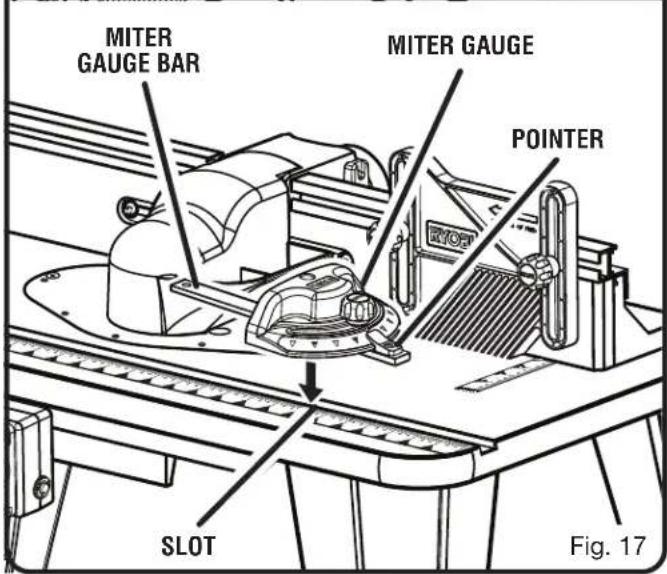
INSTALLING THE MITER GAUGE
See Figure 17.
■ Unplug the router table and/or the router.
■ With the router table right side up, and the front edge closest to you, place the miter gauge bar in the slot near the front of the table with the pointer on the right.
ASSEMBLY
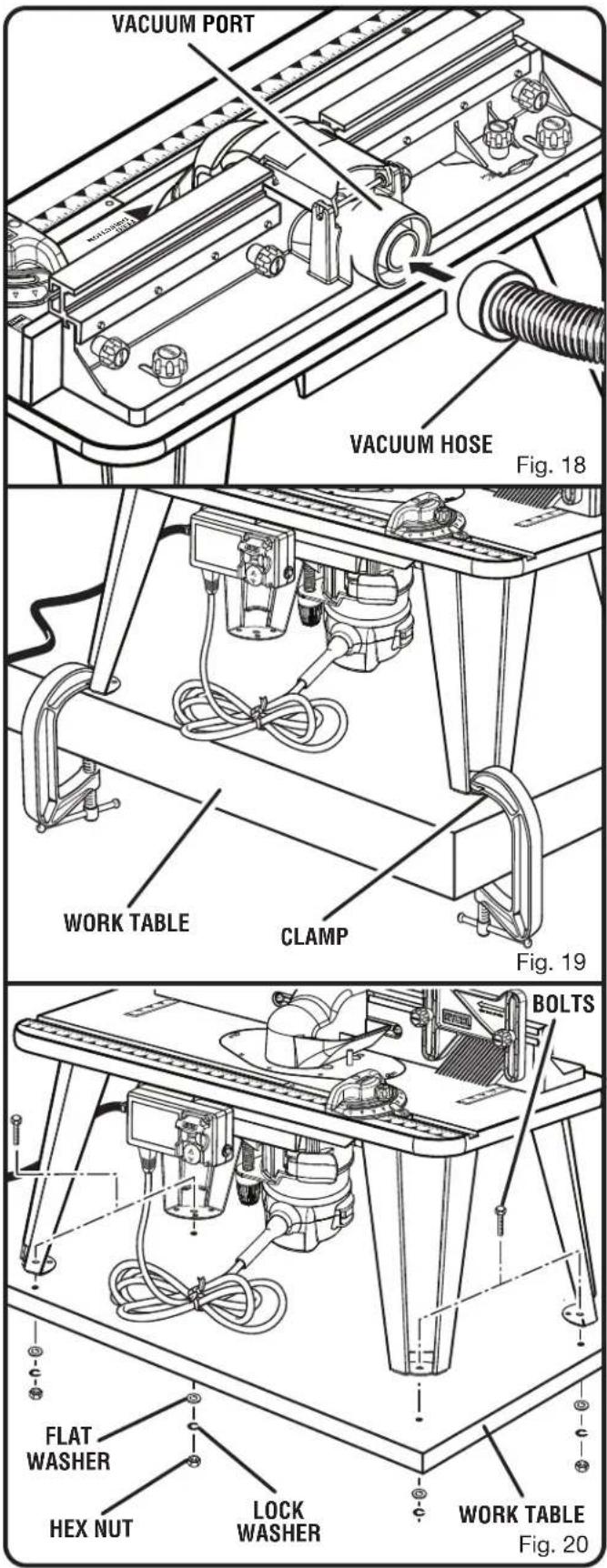
ATTACHING THE VACUUM HOSE
See Figure 18.
The vacuum port molded into the fence will accept either a 1-1/4 in. or 2-1/2 in. vacuum attachment.
CLAMPING THE ROUTER TABLE TO A WORK BENCH
See Figure 19.
■ Unplug the router table and/or the router.
■ Place the router table right side up on a sturdy work surface; e.g., leg stand, workbench, counter top.
■ Using a clamp, insert the top front of clamp through the opening in the router table leg.
■ Tighten clamp securely.
MOUNTING THE ROUTER TABLE TO A WORK BENCH
See Figure 20.
■ Unplug the router table and/or the router.
■ Place the router table right side up on a sturdy work surface; e.g., leg stand, workbench, counter top.
■ Mark the holes with a pencil.
■ Remove the router table.
■ Drill four holes through the work surface.
Place the router table back on the work surface, aligning the holes in the table legs with the holes in the work surface.
NOTE: Position the router table surface at approximately hip height.
■ Insert four bolts (not included, 1/4-20 recommended) and tighten securely with flat washers, lock washers, and hex nuts (not included).
OPERATION

WARNING:
Do not allow familiarity with products to make you careless. Remember that a careless fraction of a second is sufficient to inflict serious injury.

WARNING:
Always wear eye protection with side shields marked to comply with ANSI Z87.1. Failure to do so could result in objects being thrown into your eyes, resulting in possible serious injury.

WARNING:
Do not use any attachments or accessories not recommended by the manufacturer of this product. The use of attachments or accessories not recommended can result in serious personal injury.
APPLICATIONS
You may use this product for the purposes listed below:
■ Table mounted dado and mortise operations in wood and wood composition materials
■ Fence guided edging operations for cabinetry and picture framing on wood and wood composition materials
- Piloted cutter operations using the starting pin for edging patterned surfaces on wood and wood composition materials

WARNING:
The router or router table should never be connected to a power supply when you are assembling parts, making adjustments, installing or removing cutters, cleaning, or when not in use. Disconnecting the router and router table will prevent accidental starting that could cause serious personal injury.

WARNING:
The direction of feed for the workpiece is always against the sharp edges of the cutter and therefore into the rotation of the cutter. Failure to heed this warning can result in serious personal injury.

WARNING:
When operating the router with the router table, the router must only be plugged into and controlled by the router table switched outlet. To reduce the risk of serious personal injury, never connect the table mounted router into another power source.
OPERATION
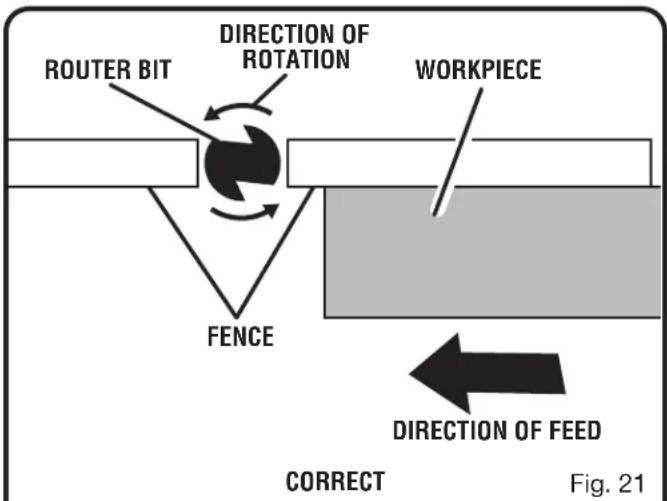
PERFORMING A ROUTING OPERATION
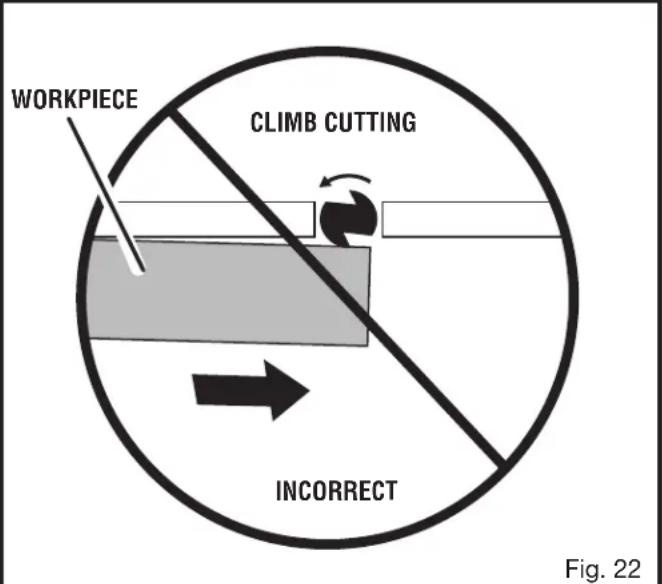
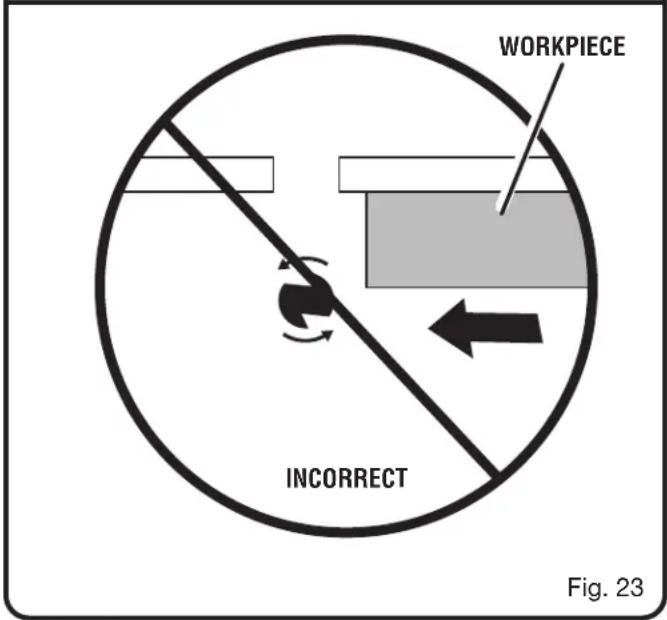
See Figures 21 - 23.
Observe the following rules when using the router:
- Read the entire operator's manual for the router and router table.
- Plug the router table power cord into a power source.
■ Always control the power to the router with the router table switch whenever the router is mounted on the table.
■ Always plug the router into either of the router table switched outlets. Never plug a router table mounted router into another power source.
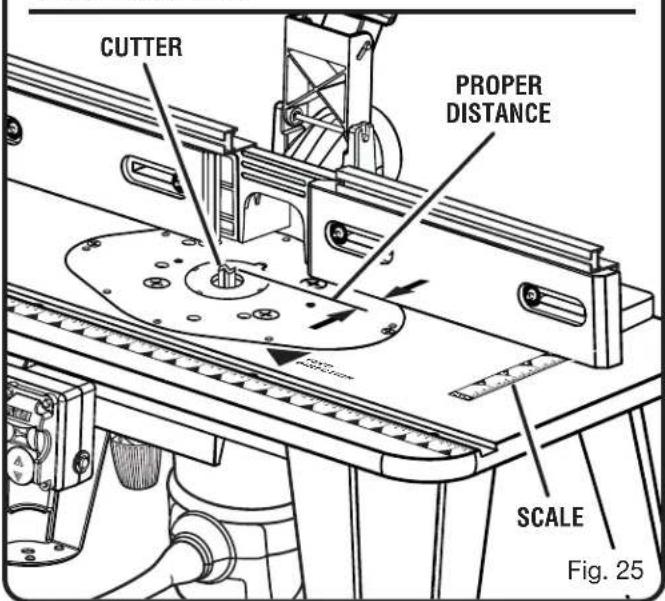
■ Position the infeed and outfeed fence so they are close to the maximum diameter of the cutter, but not touching the cutter.
NOTE: The workpiece must always be tight against the fence, unless you are using a ball-bearing piloted cutter.
- Adjust the infeed fence to support the uncut workpiece and adjust the outfeed fence to support the workpiece after the cut. The "0" location on the fence scale denotes the center of the throat opening of the table.
■ Reconfirm that all router adjustments are securely locked before connecting the router table to a power source.
■ The cutter rotates counterclockwise (as viewed above the table) on the router table. Always feed the workpiece against the sharp edges of the cutter.
■ Make sure the router table switch is OFF (O) when not in use. Remove the switch key to ensure the router table is off.

WARNING:
Never feed the workpiece in the same direction of rotation of the bit. Feeding in this direction can cause the workpiece to climb over the bit and cause serious personal injury.

WARNING:
When making a side or edge cut, never position the fence such that the workpiece is located between the cutter and the fence. Failure to heed this warning can result in serious personal injury.
INSERTING/REMOVING CUTTERS
■ Unplug the router table and/or the router.
■ Remove the router/insert plate assembly. (See Installing Router/Insert Plate Assembly in the Assembly section.)
OPERATION

WARNING:
If you are changing a cutter immediately after use, be careful not to touch the cutter or collet with your hands or fingers. They will get burned because of the heat buildup from cutting. Always use a wrench.
- Consult the router operator's manual for proper cutter removal/installation procedure and replace cutter.
ADJUSTING DEPTH OF CUT
Consult the router operator's manual for adjusting the depth of cut.
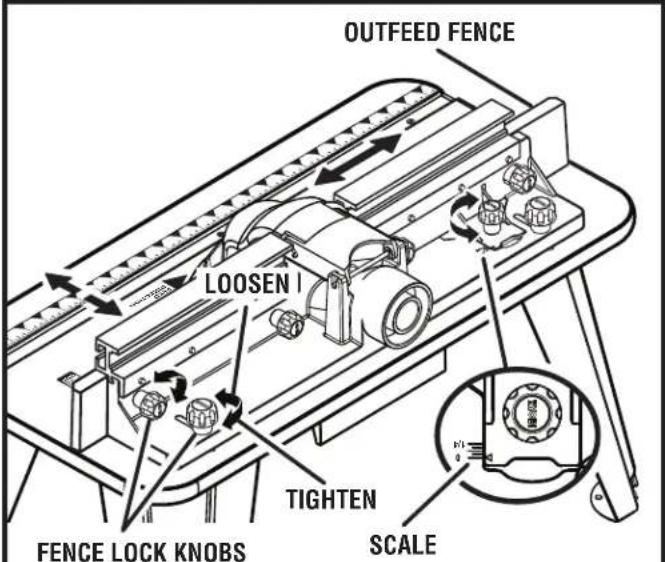
The fence enables you to support and guide the workpiece.
■ Unplug the router table and/or the router.
■ Loosen the fence lock knobs.
■ Position the fence to the desired location.
■ Tighten the fence lock knobs.
NOTE: The outfeed fence has joining capabilities and can be adjusted out in increments up to 1/4 in. and enable you to support the workpiece as it exits the cutter.

WARNING:
When making a side or edge cut, never position the fence such that the workpiece is located between the cutter and the fence. Failure to heed this warning can result in serious personal injury.
A groove can be cut in the workpiece by adjusting the fence back from the cutter. When cutting a groove, feed the workpiece from right to left. When widening an existing groove, make certain that the side being cut is against the leading edge of the cutter. This would be the side farthest from the fence when the workpiece is fed from right to left. As shown in figures 21 - 23.

WARNING:
When making a secondary groove cut to widen a groove, always cut the groove against the direction of rotation of the cutter. Failure to do this can cause the workpiece to pull away and can result in serious personal injury.
MAINTENANCE

WARNING:
When servicing, use only identical replacement parts. Use of any other parts could create a hazard or cause product damage.

WARNING:
Always wear eye protection with side shields marked to comply with ANSI Z87.1, along with hearing protection. Failure to do so could result in objects being thrown into your eyes and other possible serious injuries.
GENERAL MAINTENANCE
Avoid using solvents when cleaning plastic parts. Most plastics are susceptible to damage from various types of commercial solvents and may be damaged by their use. Use clean cloths to remove dirt, dust, oil, grease, etc.

WARNING:
Do not at any time let brake fluids, gasoline, petroleum-based products, penetrating oils, etc., come in contact with plastic parts. Chemicals can damage, weaken or destroy plastic which could result in serious personal injury.
Electric tools used on fiberglass material, wallboard, spackling compounds, or plaster are subject to accelerated wear and possible premature failure because the fiberglass chips and grindings are highly abrasive to bearings, brushes, commutators, etc. Consequently, we do not recommend using this tool for extended work on these types of materials. However, if you do work with any of these materials, it is extremely important to clean the tool using compressed air.
RÈGLES DE SÉCURITÉ GÉNÉRALES

AVERTISSEMENT :
natural_image
Line drawing of a mechanical device with no visible text or symbolsCOMMUTATEUR EN POSITION D'ARRÊT
natural_image
Technical line drawing of a mechanical clamp or bracket component (no text or symbols)CLÉ DE
COMMUTATEUR
COMMUTATEUR EN POSITION VERROUILLÉE
Fig. 3
ASSEMBLAGE
DÉBALLAGE
LISTE DE CONTRÔLE D'EXPÉDITION
Voir la figure 4.
A. Vis phillips de pied de table.... 16
B. Cle en hex....1
0-2,0 2,1-3,4 3,5-5,0 5,1-7,0 7,1-12,0 12,1-16,0
natural_image
Line drawing of a mechanical device with no visible text or symbolsnatural_image
Line drawing of a mechanical clamp or bracket with no visible text or symbolsLLAVE DEL
INTERRUPTOR
B. Llave hexagonal....1
PC1: Porter-Cable 890 Series
PC2: Porter-Cable 8529
MONTAJE DE LA FRESADORA EN LA MESA
To request service, purchase replacement parts,
locate an Authorized Service Center or obtain Customer or Technical Support:
Visit www.ryobitools.com or call 1-800-525-2579
If any parts or accessories are damaged or missing, do not return this product to the store.
Call 1-800-525-2579 for immediate service.
Please obtain your model and serial number from the product data plate.
This product is covered under a 3-year limited Warranty. Proof of purchase is required.
MODEL NUMBER* ____ SERIAL NUMBER ____
*Model number on product may have additional letters at the end. These letters designate manufacturing information and should be provided when calling for service.
RYOBI is a trademark of Ryobi Limited and is used pursuant to a license granted by Ryobi Limited.



- TABLE OF CONTENTS
- TABLE DES MATIÈRES
- READ ALL INSTRUCTIONS
- GENERAL SAFETY RULES
- SPECIFIC SAFETY RULES
- SYMBOLS
- ELECTRICAL
- EXTENSION CORDS
- WARNING:
- ELECTRICAL CONNECTION
- SPEED AND WIRING
- GROUNDING INSTRUCTIONS
- See Figure 1.
- FEATURES
- PRODUCT SPECIFICATIONS
- KNOW YOUR ROUTER TABLE
- See Figure 2.
- BIT GUARD
- FEATHERBOARD
- FENCE ASSEMBLY
- INSERT PLATE
- MITER GAUGE
- RESET BUTTON
- STARTING PIN
- THROAT PLATES
- VACUUM PORT
- SWITCH ASSEMBLY
- TO TURN YOUR ROUTER TABLE ON:
- TO TURN YOUR ROUTER TABLE OFF:
- TO LOCK YOUR ROUTER TABLE:
- ASSEMBLY
- UNPACKING
- PACKING LIST
- ASSEMBLING THE ROUTER TABLE
- ATTACHING THE SWITCH BOX
- See Figure 5.
- ATTACHING THE UNDER TABLE GUARDS
- See Figure 6.
- ATTACHING THE TABLE LEGS
- See Figure 7.
- PRE-DRILLING HOLES FOR THROUGH TABLE DEPTH ADJUSTMENT
- ATTACHING THE ROUTER TO THE TABLE
- ATTACHING THE ROUTER TO THE INSERT PLATE
- INSTALLING THE ROUTER/INSERT PLATE ASSEMBLY
- ATTACHING THE FENCE ASSEMBLY
- INSERTING AND REMOVING THROAT PLATES
- ATTACHING THE FEATHERBOARD
- INSERTING THE STARTING PIN
- INSTALLING THE MITER GAUGE
- ATTACHING THE VACUUM HOSE
- CLAMPING THE ROUTER TABLE TO A WORK BENCH
- MOUNTING THE ROUTER TABLE TO A WORK BENCH
- OPERATION
- APPLICATIONS
- PERFORMING A ROUTING OPERATION
- INSERTING/REMOVING CUTTERS
- ADJUSTING DEPTH OF CUT
- MAINTENANCE
- GENERAL MAINTENANCE
- RÈGLES DE SÉCURITÉ GÉNÉRALES
- AVERTISSEMENT :
- ASSEMBLAGE
- DÉBALLAGE
- LISTE DE CONTRÔLE D'EXPÉDITION
- MONTAJE DE LA FRESADORA EN LA MESA
Brand : RYOBI
Model : A25RT03
Category : Milling machine