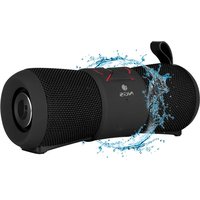
USER MANUAL Roller Stream NGS
WATERPROOF IP67
TRUE WIRELESS
BLUETOOTH SPEAKER
ENGLISH I FRANÇAIS I ESPAÑOL I DEUTSCH
ITALIANO I PORTUGUÊS I POLSKI I NEDERLANDS
ČEŠTINA I SLOVENČINA I EΛΛΗΝΙΚΑ


www.ngs.eu
USER'S MANUAL
natural_image
Diagram of a device with a central port and directional arrow, no text or symbols present
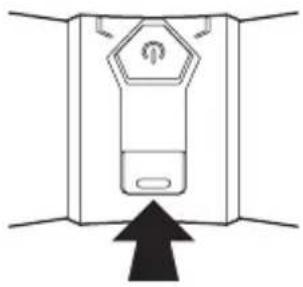
IMPORTANT!
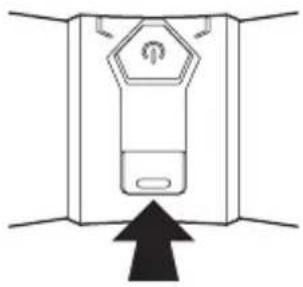
Close the rear rubber correctly to prevent water getting in.
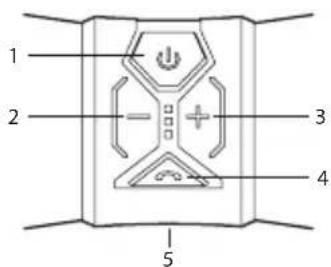
OVERVIEW
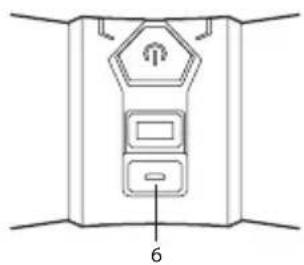
1 Power on / Power off
2 Volume - / previous track
3 Volume + / next track
4 Play / Pause / Call/answer
5 Microphone
6 Micro USB charging port
natural_image
Diagram of a device with labeled parts, no readable text or symbols present
ENGLISH

NGS
CHARGING THE BLUETOOTH SPEAKER
- Connect the Bluetooth speaker's micro USB socket with the computer's USB port through USB cable.
- The charging LED will turn ON in red light; the rechargeable battery is in charging.
- The charging LED red light will turn OFF when the rechargeable battery is fully charged.
- Disconnect the USB cable.
BLUETOOTH SPEAKER PAIRING / RECONNECTING
- Hold down the button for 3 seconds, a message sound "beep" will announce from speaker and the mode LED will blinking in blue; the device is turned ON and goes into searching / paring / reconnect mode for pair.
-
Now, turn ON the Bluetooth function on your mobile phone.
-
Search for "NGS ROLLER STREAM" and select it to pair (for first time pairing or pairing a new mobile device).
- The Bluetooth speaker will be reconnecting automatically if your mobile phone has been paired (Depend on the of mobile phone's type and configuration, manual reconnection may require on some devices).
- If pairing is successful, a message sound; "beep" will announce from speaker and the mode LED light will keep turn on.
BLUETOOTH SPEAKER CONTROL FUNCTION
- In playing music, press button to pause music, press it once again to play.
- Press the + button to increases the volume level.
- Press the - button to decreases the volume level.
- Press and hold the + button to play next music file.
- Press and hold the - button to play previous music file.
USER'S MANUAL
HAND FREE FUNCTION BLUETOOTH MODE ONLY
When there is an incoming call:
- The ringing sound will up and the playing music will pause automatically.
- Press button to pick up the call if you want.
- Now you have hand free function with the Bluetooth speaker.
- Hold down the button for 2 seconds to hand up the call when finished. And,
- The paused music will start to play automatically.
HOW TO CONNECT 2 LOUDSPEAKERS TO EACH OTHER
- In order to connect them to each other, both speakers must be the same model; NGS Roller Stream.
- Turn on both speakers and press the button on each of them. You will hear a beep and both blue LEDs will flash.
- One blue LED will flash every three seconds and the other twice a second.
- Open the bluetooth options on your mobile device (phone, tablet, computer, etc...) and select the NGS ROLLER STREAM device.
- In this manner, they will be synchronised and ready to use with your mobile device.
- Unpairing: Press the button on each of them for 2 seconds
ENGLISH

NGS
LINE IN MODE
- Connect the audio source to the speaker via a jack 3.5mm audio cable.
- Play music from external audio source.
Note: Not all functions are available in LINE IN mode. Only volume function is available.
SPECIFICATIONS
Bluetooth
True Wireless (connects two identical speakers at the same time and doubles the power)
IP67 waterproof
Battery: 2000mAh
Working time: 6 hours (at 70% volume)
Output power: 24W
Hands free
Battery warranty
The battery is a consumer product, and as such it is under warranty for 12 months.
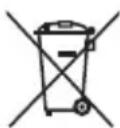
If at any time in the future you should need to dispose of this product please note that:
Waste electrical products should not be disposed of with household waste. Please recycle where facilities exist.
Check with your Local Authority or retailer for recycling advice.
(Waste Electrical and Electronic Equipment Directive)
MANUEL DE L'UTILISATEUR
natural_image
Diagram of a device with a central button and directional arrow, no text or symbols present
IMPORTANT!
natural_image
Diagram of a device with labeled parts, no readable text or symbols present
CHARGEMENT DU HAUT-PARLEUR BLUETOOTH
natural_image
Diagram of a device with a central port and directional arrow, no text or symbols present
¡IMPORTANTE!
natural_image
Diagram of a device with labeled parts, no readable text or symbols present
ESPAÑOL

NGS
CARGA DEL ALTAVOZ BLUETOOTH
natural_image
Diagram of a device with a central port and directional arrow, no text or symbols present
ACHTUNG!
natural_image
Diagram of a device with labeled parts, no readable text or symbols present
AUFLADEN DES BLUETOOTH LAUTSPRECHERS
natural_image
Diagram of a device with a central port and directional arrow, no text or symbols present
MOLTO IMPORTANTE!
natural_image
Diagram of a device with labeled parts, no readable text or symbols present
ITALIANO

NGS
RICARICA DELL'ALTOPARLANTE BLUETOOTH
natural_image
Diagram of a device with a central port and directional arrow, no text or symbols present
IMPORTANTE!
natural_image
Diagram of a device with labeled parts, no readable text or symbols present
natural_image
Diagram of a device with a central port and directional arrow, no text or symbols present
WAŻNE!
natural_image
Diagram of a device with labeled parts, no readable text or symbols present
NABÍJENÍ BLUETOOTH REPRODUKTORU
natural_image
Diagram of a device with a central port and directional arrow, no text or symbols present
BELANGRIJK!
natural_image
Diagram of a device with labeled parts, no readable text or symbols present
BLUETOOTH-LUIDSPREKER OPLADEN
natural_image
Diagram of a device with a central port and directional arrow, no text or symbols present
DŮLEŽITÉ!
natural_image
Diagram of a device with labeled parts, no readable text or symbols present
NABÍJENÍ BLUETOOTH REPRODUKTORU
natural_image
Diagram of a device with a central port and directional arrow, no text or symbols present
DÔLEŽITÉ!
natural_image
Diagram of a device with labeled parts, no readable text or symbols present
NABÍJANIE BLUETOOTH REPRODUKTORA
- Pripojte microUSB konektor Bluetooth reproduktora k USB portu počitača pomocou USB kábla.
- Červený LED indikátor nabíjania sa rozsvieti, čo znamená, že nabíjateľná batéria sa nabíja.
- Červený LED indikátor nabíjania sa zhasne, ked' sa nabíjatelná batéria úplne nabije.
- Odpojte USB kábel.
PÁROVANIE / OPÄTOVNÉ BLUETOOTH PRIPOJENIE REPRODUKTORA
natural_image
Diagram of a device with a sensor and directional arrow, no text or symbols present
ΣΗΜΑΝΤΙΚΟ!
natural_image
Diagram of a device with labeled parts, no readable text or symbols present
HAS BEEN TESTED AND FOUND IN CONFORMITY WITH THE FOLLOWING HARMONIZED EUROPEAN STANDARDS:
HA SIDO TESTADO EN CONFORMIDAD CON LAS SIGUIENTES NORMAS STANDARD EUROPEAS ARMONIZADAS:
EN 60950-1:2006+A11:2009+A1:2010+A12:2011+A2:2013
EN 50663:2017
EN 301 489-1 V2.2.0
EN 301 489-17 V3.2.0
EN 300 328 V2.1.1
AND THEREFORE COMPLY WITH THE ESSENTIAL REQUIREMENTS AND PROVISIONS OF THE FOLLOWING DIRECTIVES OF THE EUROPEAN PARLIAMENT AND EUROPEAN COUNCIL:
Y, POR LO TANTO, CUMPLE CON LOS REQUERIMIENTOS Y PROVISIONES DE LAS SIGUIENTES DIRECTIVAS DEL PARLAMENTO EUROPEO:
RADIO EQUIPMENT DIRECTIVE 2014/53/EU
ROHS DIRECTIVE 2011/65/EU
RAÚL MARTÍN
PRODUCT MANAGER
CE

technical support: www.ngs.eu/support
www.ngs.eu