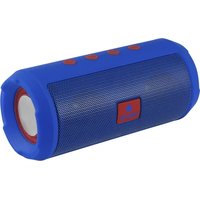
Roller Tumbler - Docking station NGS - Free user manual and instructions
Find the device manual for free Roller Tumbler NGS in PDF.


| Product Type | Docking station / Portable Bluetooth speaker |
| Brand | NGS |
| Model | Roller Tumbler |
| Dimensions (approx.) | Height 15 cm, Diameter 8 cm |
| Weight (approx.) | 0.3 kg |
| Power supply | Built-in rechargeable battery, charges via micro USB cable |
| Power consumption | 5V, 1A (via USB port) |
| Estimated battery life | 4 to 6 hours |
| Bluetooth connectivity | Version 5.0, range approx. 10 meters |
| Playback modes | Bluetooth, FM radio, Micro SD card, USB flash drive, Line-in (AUX) |
| Multifunction button (M) | Mode change, answer/hang up call |
| Playback controls | Play/Pause (▶), Volume +/- (long press), Next/Previous track (short press +/-) |
| Hands-free function | Yes (in Bluetooth mode) |
| Ports and connectors | 1 x micro USB (charge), 1 x USB-A port (playback), 1 x Micro SD slot |
| Indicator lights | Red LED (charging), Blue LED (Bluetooth) |
| FM radio | Automatic station search, USB cable as antenna |
| Compatibility | Smartphones, tablets, computers, any Bluetooth device |
| Care and cleaning | Soft dry cloth, avoid moisture |
| Safety | Do not expose to water, do not open the device |
| Spare parts | Micro USB cable included, internal battery (non-replaceable) |
| Battery warranty | 6 months (consumable) |
| Recycling | Do not dispose of with household waste, take to recycling center |
| Package contents | Speaker, micro USB cable, user manual |
Frequently Asked Questions - Roller Tumbler NGS
User questions about Roller Tumbler NGS
0 question about this device. Answer the ones you know or ask your own.
Ask a new question about this device
Download the instructions for your Docking station in PDF format for free! Find your manual Roller Tumbler - NGS and take your electronic device back in hand. On this page are published all the documents necessary for the use of your device. Roller Tumbler by NGS.
USER MANUAL Roller Tumbler NGS
natural_image
Top-down schematic of a device casing with no visible text or symbols
ROLLER TUMBLER
BLUETOOTH STEREO SPEAKER
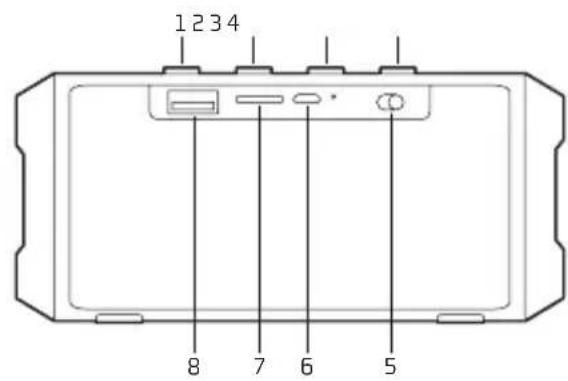
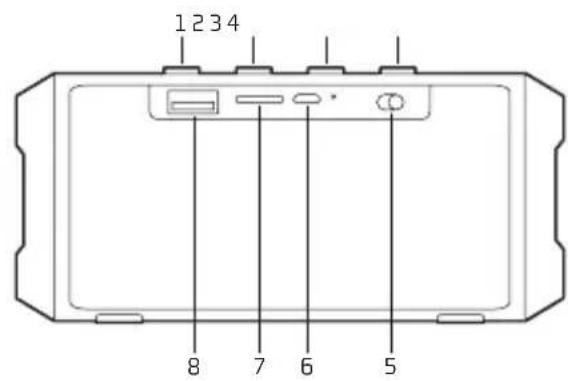
OVERVIEW
1 Volume + (long press) / FWD (short press)
2 Short press for Play/Pause
3 Long press for shifting among Bluetooth / FM / Micro SD / USB
Short press for answering call
4 Volume - (long press) / REW (short press)
5 On/Off
6 Micro USB charging port
7 Micro SD card slot
8 USB playing port
CHARGING THE BLUETOOTH SPEAKER
- Connect the Bluetooth speaker's micro USB socket with the computer's USB port through USB cable.
- The charging LED will turn ON in red light; the rechargeable battery is in charging.
- The charging LED red light will turn OFF when the rechargeable battery is fully charged.
- Disconnect the USB cable.
BLUETOOTH SPEAKER PAIRING / RECONNECTING
- Turn on the power, a message sound; "beep" will announce from speaker and the mode LED will blinking in blue; the device is turned ON and goes into searching / paring / reconnect mode for pair.
- Now, turn ON the Bluetooth function on your mobile phone.
- Search for "NGS ROLLER TUMBLER" and select it to pair (for first time pairing or pairing a new mobile device).
-
The Bluetooth speaker will be reconnecting automatically if your mobile phone has been paired (Depend on the of mobile phone's type and configuration, manual reconnection may require on some devices).
-
If pairing is successful, a message sound; "beep" will announce from speaker and the mode LED light will keep turn on.
MODES
BLUETOOTH / LINE IN / MICRO SD CARD / USB / FM RADIO
To switch between modes, press the Key. If the device is not connected to a micro SD card or USB memory, it will skip these modes.
BLUETOOTH SPEAKER CONTROL FUNCTION
- In playing music, press ▶button to pause music, press it once again to play.
- Press and hold the + button to increases the volume level.
- Press and hold the - button to decreases the volume level.
- Press the + button to play next music file.
- Press the – button to play previous music file.
HAND FREE FUNCTION
BLUETOOTH MODE ONLY
When there is an incoming call;
- The ringing sound will up and the playing music will pause automatically.
- Press Mbutton to pick up the call if you want.
- Now you have hand free function with the Bluetooth speaker.
- Hold down the Mutton for 2 seconds to hand up the call when finished.
- The paused music will start to play automatically.
MICRO SD CARD MODE
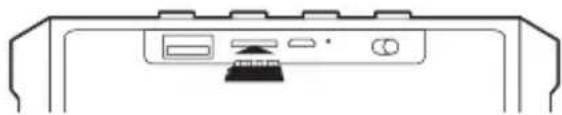
- Insert the micro SD card or a USB flash drive into the slot.
natural_image
Simple line drawing of a computer monitor with ports and a scroll wheel (no text or symbols)- The device will automatically play any music in MP3 format on the card or USB flash drive.
FM MODE
- Hold down the Button and the device will cycle between modes until you hear the message "FM RADIO MODE".
- Press the ▶ button for automatic channel search. Once the search is finished, skip between channels by pressing the - and + buttons.
Note: For better radio reception, connect the charging cable (which also acts as an antenna) into the micro USB slot.
Battery warranty: The battery is a consumer product, and as such it is under warranty for 6 months.
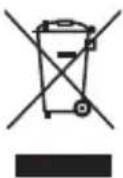
If at any time in the future you should need to dispose of this product please note that:
Waste electrical products should not be disposed of with household waste. Please recycle where facilities exist.
Check with your Local Authority or retailer for recycling advice.
(Waste Electrical and Electronic Equipment Directive)

ROLLER TUMBLER
HAUT-PARLEUR BLUETOOTH STÉRÉO
APERÇU GENERAL
natural_image
Simple line drawing of a computer monitor with ports and a scroll wheel (no text or symbols)natural_image
Simple line drawing of a computer monitor with ports and a scroll wheel (no text or symbols)natural_image
Simple line drawing of a computer monitor with ports and a scroll wheel (no text or symbols)natural_image
Simple line drawing of a computer monitor with ports and a scroll wheel (no text or symbols)natural_image
Simple line drawing of a computer monitor with ports and a scroll wheel (no text or symbols)natural_image
Simple line drawing of a computer monitor with ports and a scroll wheel (no text or symbols)natural_image
Simple line drawing of a computer monitor with ports and a scroll wheel (no text or symbols)natural_image
Simple line drawing of a computer monitor with ports and a scroll wheel (no text or symbols)natural_image
Simple line drawing of a computer monitor with ports and a scroll wheel (no text or symbols)HAS BEEN TESTED AND FOUND IN CONFORMITY WITH THE FOLLOWING HARMONIZED EUROPEAN STANDARDS:
HA SIDO TESTADO EN CONFORMIDAD CON LAS SIGUIENTES NORMAS STANDARD EUROPEAS ARMONIZADAS:
ETSI EN 301 489-1 V 1.9.2 (2011-09) EN 62479:2010
ETSI EN 301 489-17 V 2.2.1 (2012-09) EN 60065:2014
ETSIEN 300 328 V1.8.1 (2012-06)
AND THEREFORE COMPLY WITH THE ESSENTIAL REQUIREMENTS AND PROVISIONS OF THE FOLLOWING DIRECTIVES OF THE EUROPEAN PARLIAMENT AND EUROPEAN COUNCIL:
Y, POR LO TANTO, CUMPLE CON LOS REQUERIMIENTOS Y PROVISIONES DE LAS SIGUIENTES DIRECTIVAS DEL PARLAMENTO EUROPEO:
ELECTROMAGNETIC COMPATIBILITY DIRECTIVE (EMC) 2014/30/EU
RADIO EQUIPMENT DIRECTIVE 2014/53/EU
ROHS DIRECTIVE 2011/65/EU
DIRECTIVA DE COMPATIBILIDAD ELECTROMAGNÉTICA (EMC) 2014/30/EU
Brand : NGS
Model : Roller Tumbler
Category : Docking station