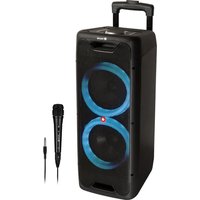
Wild Jam 2 - Docking station NGS - Free user manual and instructions
Find the device manual for free Wild Jam 2 NGS in PDF.


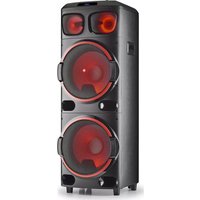
| Product Type | Docking Station / Portable Speaker |
| Brand | NGS |
| Model | Wild Jam 2 |
| Maximum Output Power | 200 W |
| RMS Power | 80 W |
| Frequency Response | 40 Hz - 18 kHz |
| USB Port | Yes (MP3, WMA, FLAC playback) |
| Auxiliary Input (LINE IN) | Yes (3.5 mm jack) |
| Microphone Input | Yes (6.35 mm jack) |
| Guitar Input | Yes (6.35 mm jack) |
| LED Screen | Yes |
| Battery Level Indicator | Yes (red/green light) |
| Ambient LED Lights | Yes, multiple modes |
| Bluetooth | Yes, version not specified |
| TWS (True Wireless Stereo) Function | Yes |
| Battery Life | Up to 8 hours (at 50% volume, lights and super bass off) |
| Power Supply | Mains (AC) or battery (DC) via included adapter |
| Remote Control | Yes, with basic functions |
| Maintenance and Cleaning | Clean with a soft, dry cloth. Do not use abrasive products. Avoid moisture. |
| Safety | Do not expose to water or extreme temperatures. Disconnect before cleaning. Recycle in accordance with WEEE regulations. |
Frequently Asked Questions - Wild Jam 2 NGS
User questions about Wild Jam 2 NGS
0 question about this device. Answer the ones you know or ask your own.
Ask a new question about this device
Download the instructions for your Docking station in PDF format for free! Find your manual Wild Jam 2 - NGS and take your electronic device back in hand. On this page are published all the documents necessary for the use of your device. Wild Jam 2 by NGS.
USER MANUAL Wild Jam 2 NGS
NORSK I SUOMI I SVENSKA I DANSK I LIETUVIU


www.ngs.eu
USER'S MANUAL
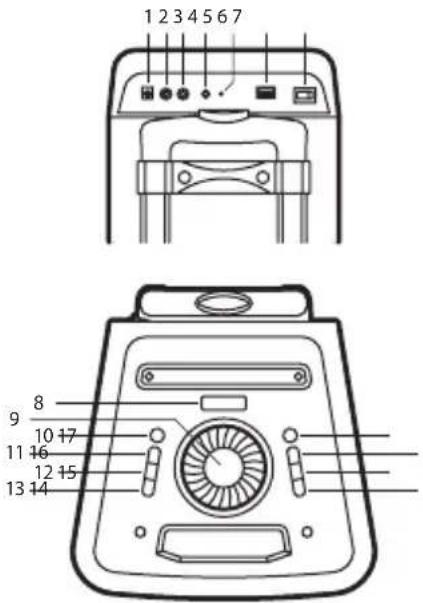
DESCRIPTION OF FRONT PANEL
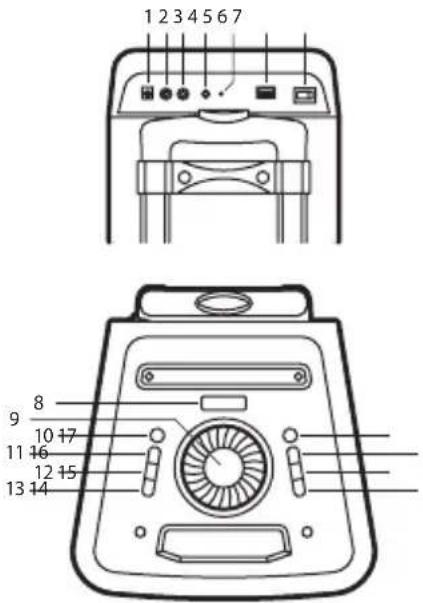
1 DC INPUT: DC input socket
2 MIC: Wired microphone input socket
3 GUITAR: Guitar input socket
4 LINE IN: Line input socket
5 CHARGING: Charging light
6 USB: USB input socket
7 Power switch: Switch power between DC input, AC input, AC or DC off.
- Press AC: AC status, the speaker is working and the battery is charging.
- Press OFF: Power off, the speaker cannot work in this mode.
- Press DC: Battery powered, the speaker will work in battery mode (if charging cable is not connected).
ENGLISH

NGS
8 LED display
9 VOLUME/MULTI: Increase or decrease speaker main volume.
10 STANDBY
11 SOURCE: Press to charge the source between USB, BT, LINE
12 LIGHT FX: Press to change the source between LED1, LED2, LED3, LED4, OFF
13 X-DRIVE: Press to turn the extra bass effect ON/OFF. Press for 1-2 seconds to unpair bluetooth device.
14 PREV: Press this key to go to the previous track in USB/BT mode.
15 PLAY/PAUSE: Press to play/pause a track.
16 NEXT: Press this key to go to the next track in USB/BT mode.
17 MENU: Press this key to change the menu between mic/guitar volume, echo volume, bass, treble.
- Display "Z" mean for MIC/GUITAR VOL 10, rotate VOLUME/MULTI knob to adjust 0-30.
- Display "E" mean for ECHO VOL 10, rotate VOLUME/MULTI knob to adjust 0-30.
- Display "8" mean for BASS 00, rotate VOLUME/MULTI knob to adjust ± 6dB.
- Display "E" mean for TREBLE 00, rotate VOLUME/MULTI knob to adjust ± 6dB.
USER'S MANUAL
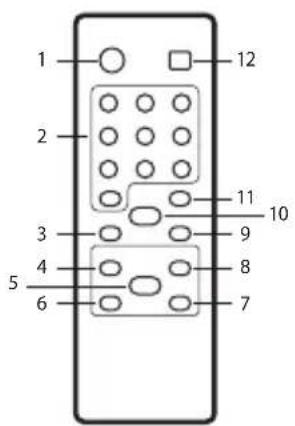
DESCRIPTION OF REMOTE CONTROL
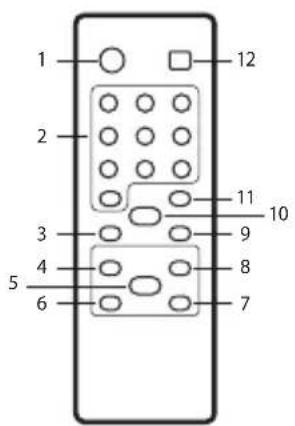
1 STANDBY: Standby ON/OFF
2 0-9 numeric keys: These keys are used to play a track directly in USB source mode. Eg: To play 12th track in the USB playlist press the numeric key "1" followed by "2".
3 VOL-: To decrease the volume
4 : Play the previous song
5 ▶: Play / pause
6 ◀: Fast rewind a song by pressing, only in USB input mode.
7 ▶: Fast forward song by pressing, only in USB input mode.
8 ▶▶: Play the next song
9 VOL+: To increase the volume.
10 MUTE: Press to switch mute ON/OFF.
11 REPEAT: To choose repeat mode in USB input mode: repeat one (ONE), repeat all (ALL), repeat randomize (RAN).
12 SOURCE: Press to change the source between USB, BT, LINE.
TWS MODE (TRUE WIRELESS STEREO)
A. Turn on 2 speakers and select both INPUT modes as Bluetooth.
B. Press "Mikey on speaker set for 2 seconds and " I will be displayed. When the display light is "ti" or a tone is heard from another device, the TWS is established.
C. Turn on the Bluetooth feature on your mobile phone to search for Bluetooth devices an select "NGS WILDJUNGLE" from the search result. Select OK o YES to pair this unit with your mobile phone and steady blue light indicate a successful connection. Once connected you can play music from your mobile phone.
D. Press "V" key on the speaker unit for 2 seconds. Turn off the TWS features when "L" is displayed.
USB CARD / BLUETOOTH
USB CARD PLAYING
When power ON the product, if USB card inserted, it can play the MP3 / AMR / WAV / WMA / FLAC format music from the USB. Press PREV/NEXT buttons to select the song you want. Press the play/pause button to pause / resume the music.
BLUETOOTH MODE
A. Press the SOURCE button until the screen displays the word BL. In Bluetooth mode the device goes into searching / paring / reconnect mode for pair.
B. Now, turn ON the Bluetooth function on your mobile phone.
C. Search for "NGS WILDJUNGLE" and select it to pair (for first time pairing or pairing a new mobile device).
D. The Bluetooth speaker will be reconnecting automatically if your mobile phone has been paired (depend on the mobile phone's type and configuration, manual reconnection may require on some devices).
E. To unpair the speaker from the mobile phone, press and hold the X DRIVE button for 6 seconds.
USER'S MANUAL
LINE IN
You can connect the device with the external multimedia audio sources through the port "LINE IN". After connection, just set the mode to LINE by pressing the "SOURCE" button on the device. The device can play the audio files from multimedia sources like PC, mobile phone, MP3 and MP4, etc.
CHARGING INSTRUCTIONS
During playback, if the battery is low, the red light will turn on indicating that the speaker should be charged or else it will turn off soon.
- Set the switch in the OFF position.
- Connect the power adapter to the speaker.
- Connect the adapter to electrical power.
- Set the switch to AC position.
- When the charge LED turns from red to green, it indicates that it's fully charged. Set the switch in the OFF position, disconnect the charger from the mains and disconnect the adapter from the speaker.
TECHNICAL SPECIFICATIONS
Output peak power 200W 300W
Battery 12V/2.4Ah 12V/2.4Ah
Bluetooth Yes Yes
Working range 10m 10m
Frequency response 40Hz\~18kHz 40Hz\~18kHz
USB port Yes Yes
Aux input Yes Yes
Microphone Yes Yes
Guitar input Yes Yes
LED screen Yes Yes
Battery level indicator Yes Yes
LED lights Yes Yes
RMS 80W 100W
Battery life 6 hours* 5 hours**
* 4 hours at 100% volume (lights and super-bass off)
6 hours at 70% volume (lights and super-bass off)
8 hous at 50% volume (lights and super-bass off)
** 3 hours at 100% volume (lights and super-bass off)
5 hours at 70% volume (lights and super-bass off)
7 hous at 50% volume (lights and super-bass off)
If at any time in the future you should need to dispose of this product please note that:
Waste electrical products should not be disposed of with household waste. Please recycle where facilities exist.
Check with your Local Authority or retailer for recycling advice.
(Waste Electrical and Electronic Equipment Directive)
MANUEL DE L'UTILISATEUR
DESCRIPTION DU PANNEAU AVANT
Batterie 12V/2,4Ah 12V/2,4Ah
Bluetooth Oui Oui
Plage de travail 10m 10m
Batterie 12V/2,4Ah 12V/2,4Ah
Bluetooth Ja Ja
MODALITÀ TWS (TRUE WIRELESS STEREO)
Batteria 12V/2,4Ah 12V/2,4Ah
Bluetooth Sì Sì
Bateria 12V/2,4Ah 12V/2,4Ah
Bluetooth Sim Sim
Display LED Sim Sim
Akumulator 12V/2,4Ah 12V/2,4Ah
Bluetooth Tak Tak
Batterij 12V/2,4Ah 12V/2,4Ah
Bluetooth Ja Ja
Werkbereik 10m 10m
Frequentiebereik 40Hz\~18kHz 40Hz\~18kHz
USB-poort Ja Ja
Aux-ingang Ja Ja
Microfoon Ja Ja
Gitaaringang Ja Ja
Ledscherm Ja Ja
Batterij-indicator Ja Ja
LED-lichten Ja Ja
RMS 80W 100W
REŽIM TWS (TRUE WIRELESS STEREO)
Baterie 12V/2,4Ah 12V/2,4Ah
Bluetooth Ano Ano
Pracovní dosah 10m 10m
Frekvenční odezva 40Hz\~18kHz 40Hz\~18kHz
Port USB Ano Ano
REŽIM TWS (TRUE WIRELESS STEREO)
Batéria 12V/2,4Ah 12V/2,4Ah
Bluetooth Áno Áno
Dosah 10m 10m
Frekvenčný rozsah 40Hz\~18kHz 40Hz\~18kHz
USB port Áno Áno
KAPTA USB / BLUETOOTH
ΑΝΑΠΑΡΑΓΩΓΗ ΑΠΟ USB
- Vis "2 middel for MIC/GUITAR VOL 10, vri VOLUME/MULTI-knappen for å justere 0-30.
- Vis "E" middel for ECHO VOL 10, vri VOLUME/MULTI-knappen for å justere 0-30.
- Vis "l" middel for BASS 00, vri VOLUME/MULTI-knappen for å justere ± 6dB.
- Vis "L"middel for TREBLE 00, vri VOLUME/MULTI-knappen for å justere ± 6dB.
BRUKERVEILEDNING
BESKRIVELSE AV FJERNKONTROLL
Batteri 12V/2.4Ah 12V/2.4Ah
Bluetooth Ja Ja
Batteri 12V/2.4Ah 12V/2.4Ah
Bluetooth Ja Ja
Räckvidd 10 m 10 m
Frekvenssvar 40Hz\~18kHz 40Hz\~18kHz
USB-uttag Ja Ja
Aux-ingång Ja Ja
Mikrofon Ja Ja
Gitarringång Ja Ja
LED-skärm Ja Ja
Batterinivåindikator Ja Ja
LED-lampor Ja Ja
RMS 80 W 100 W
Batteri 12V/2.4Ah 12V/2.4Ah
Bluetooth Ja Ja
TWS REŽIMAS (TRUE WIRELESS STEREO)
HAS BEEN TESTED AND FOUND IN CONFORMITY WITH THE FOLLOWING HARMONIZED EUROPEAN STANDARDS:
HA SIDO TESTADO EN CONFORMIDAD CON LAS SIGUIENTES NORMAS STANDARD EUROPEAS ARMONIZADAS:
EN60065:2014
IEC62321:2013
EN62479:2010
ETSI EN 301 489-1 V2.2.0 (2017-03)
ETSI EN 301 489-17 V3.2.0 (2017-03)
ETSI EN 301 489-53 V1.1.0 (2017-03)
ETSI EN 300 328 V2.1.1 (2016-11)
ETSI EN 303 345 V1.1.7 (2017-03)
AND THEREFORE COMPLY WITH THE ESSENTIAL REQUIREMENTS AND PROVISIONS OF THE FOLLOWING DIRECTIVES OF THE EUROPEAN PARLIAMENT AND EUROPEAN COUNCIL:
Y, POR LO TANTO, CUMPLE CON LOS REQUERIMIENTOS Y PROVISIONES DE LAS SIGUIENTES DIRECTIVAS DEL PARLAMENTO EUROPEO:
RADIO EQUIPMENT DIRECTIVE 2014/53/EU
ROHS DIRECTIVE 2011/65/EU & (EU) 2015/863
technical support: www.ngs.eu/support
www.ngs.eu


- DESCRIPTION OF FRONT PANEL
- ENGLISH
- DESCRIPTION OF REMOTE CONTROL
- TWS MODE (TRUE WIRELESS STEREO)
- USB CARD / BLUETOOTH
- USB CARD PLAYING
- BLUETOOTH MODE
- LINE IN
- CHARGING INSTRUCTIONS
- TECHNICAL SPECIFICATIONS
- DESCRIPTION DU PANNEAU AVANT
- MODALITÀ TWS (TRUE WIRELESS STEREO)
- REŽIM TWS (TRUE WIRELESS STEREO)
- KAPTA USB / BLUETOOTH
- ΑΝΑΠΑΡΑΓΩΓΗ ΑΠΟ USB
- BRUKERVEILEDNING
- BESKRIVELSE AV FJERNKONTROLL
- TWS REŽIMAS (TRUE WIRELESS STEREO)
Brand : NGS
Model : Wild Jam 2
Category : Docking station