81008 - Fan KORONA - Free user manual and instructions
Find the device manual for free 81008 KORONA in PDF.


User questions about 81008 KORONA
0 question about this device. Answer the ones you know or ask your own.
Ask a new question about this device
Download the instructions for your Fan in PDF format for free! Find your manual 81008 - KORONA and take your electronic device back in hand. On this page are published all the documents necessary for the use of your device. 81008 by KORONA.
USER MANUAL 81008 KORONA
natural_image
Exterior view of a modern office building (no signage)CE
KORONA electric GmbH, Sundern/Germany
www.korona-electric.de
Bedienungsanleitung
text_image
Technical diagram of a smart air conditioner with numbered parts and exploded viewsnatural_image
Metallic plastic bracket with multiple screws and four white plastic connectors (no text or symbols visible)natural_image
Simple line drawing of a handheld device with a circular component and cable (no text or symbols)text_image
Diagram showing two devices with labeled parts and directional arrows indicating movement or assembly.
natural_image
Illustration of a hand cleaning a helmet with spray bottle and X mark (no text or symbols)Read these instructions carefully before assembling and/or operating the appliance. Keep these instructions including warranty, receipt and, if possible, the box with the internal packing.
When passing on the appliance to a third party, make sure to include these instructions for use.
Intended Use
This appliance is intended for household use only and not for commercial, industrial or outdoor use. Other use not recommended may cause fire, electric shock or injury.
Safety:

This symbol identifies hazards which may cause injuries!

This symbol identifies electric shock hazards!

This symbol identifies tips and information.
IMPORTANT SAFETY INSTRUCTIONS
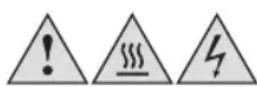
Warning! To avoid the possibility of injury/damage to the appliance, electric shock and risk of fire.
Danger of injury and damage to the appliance!
- Manufacturer takes no responsibility for any damage caused by incorrect use.
- Incorrect or improper use can damage the appliance and cause injuries to the user.
- Before connecting this appliance to the mains, make sure your local voltage matches the technical data of the appliance. Otherwise the appliance may overheat and get damaged.
- Do avoid contact with all moving parts. Always wait until all moving parts have come to stand still before touching them.
- Do not insert fingers or allow foreign objects to enter the air vents.
- Make sure the fan is not placed near drapes, curtains, or any objects that may be drawn (including hair and clothes) into the fan.
- Never place or operate the unit where it could be subject to:
- Heat sources such as radiators, heat registers, stoves or other products that produce heat
- Direct sunlight
- Excessive dust
- Mechanical vibration or shock
- Lack of ventilation
- Uneven surfaces, to avoid the tipping of the fan during use
- Attention: The temperature of accessible surfaces may be high during operation. Therefore, do not touch the appliance during and/or immediately after operation.
Danger of burns!
- Always turn OFF and unplug the fan when not in use and/or when moving it from one location to another.
Caution! Danger of electric shock!
- Never put the appliance, cord or plug into water or any other liquid.
- Do not use the appliance near a sink or wash basin.
- Do not use the appliance with wet hands.
- Do not use the appliance outdoors.
- Do not place the appliance close to an open window. Rain splashing on the fan could cause an electric shock hazard.
An electric appliance is not a toy!
- Never leave the appliance unattended during use.
- This appliance can be used by children aged from 8 years and above and persons with reduced physical, sensory or mental capabilities or lack of experience and knowledge if they have been given supervision or instruction concerning the use of the appliance in a safe way and understand the hazards involved. Children shall not play with the appliance. Cleaning and user maintenance shall not be made by children unless they are older than 8 and supervised.
- Keep the appliance and its cord out of reach of children less than 8 years.
- Always unplug your appliance when it is not in use, and before cleaning.
- Always pull the plug – not the cord.
- Keep the appliance and the cord well away from any hot surfaces to avoid any damage to the appliance.
- Do not run cord under carpeting. Make sure the cord may not inadvertently be pulled or cause anyone to trip when in use.
- Do not allow the cord to hang over sharp edges.
- Do not bend the cord or wind it round the appliance.
Do not use the appliance,
- if the cord is damaged.
• in case of malfunction.
- if the appliance was dropped or is damaged otherwise. Have it checked and, if necessary, repaired by a qualified person/Customer Service. Never attempt to make any modifications to or repair the appliance yourself.
- Only use accessories evaluated for use with this appliance.
- Never attempt to drive any objects into the appliance.
- Never attempt to open the housing yourself!
- The appliance is not intended to be operated by means of an external timer or separate remote-control system.
Notes on handling batteries

Warning:
- Swallowing batteries can be extremely dangerous. Keep the batteries out of the reach of small children. Should a child swallow a battery, seek medical assistance, immediately.
- Batteries must not be recharged, taken apart, thrown into an open fire or short circuited. Risk of fire/explosions!
- Always replace all batteries at the same time and always use the same battery type.
- Batteries can contain toxins that are harmful to your health and the environment. Always dispose of batteries in accordance with applicable legal regulations. Do not dispose of batteries with the normal household waste.
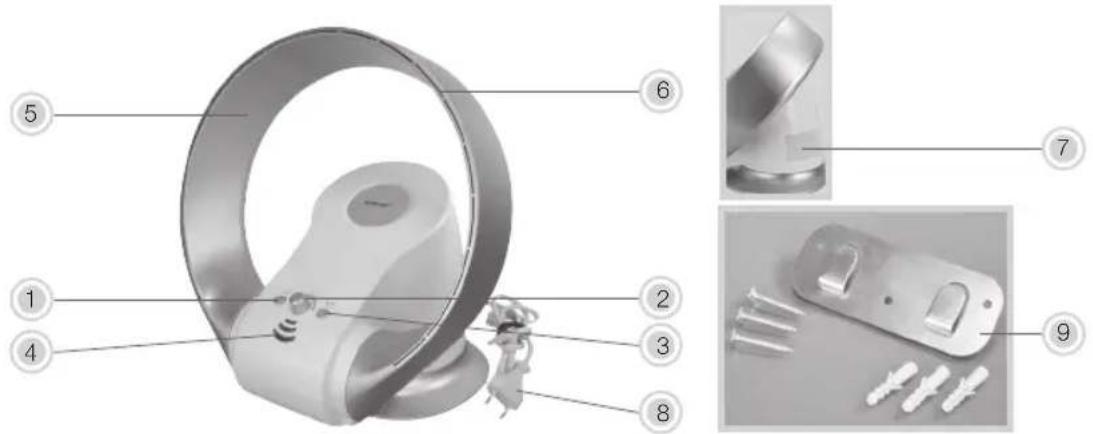
DESCRIPTION OF PARTS
text_image
Exploded view diagram of a smart air conditioner with numbered parts and exploded views-
On / Off button
-
Speed control knob

Attention: The speed control knob is continuously variable.
-
Oscillation button (rotation 50° Right and left)
-
Indicator light / sensor of the remote control
-
Air diffuser
-
Air outlets
-
Air inlet (at the back of the device)
-
Power cord and plug
-
Wall bracket for wall mounting (incl. 3 x screws + 3 wall plugs)
-
Remote control
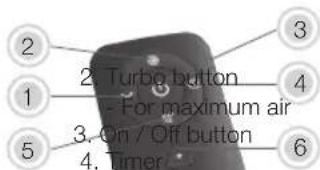
text_image
2 1 5 3 2. Turbo button - For maximum air 3. On / Off button 4. 6 4.- Oscillation (50° rotation Right and left)
- adjustable from 1 to 2 hours
- Night position
- the air is modulated and soft
-
Key + to increase the airflow speed
-
Key - to decrease the airflow speed

Before first use of the remote control, remove the protective sheet from the button cell.
BEFORE FIRST USE
- Remove all packaging material and check whether the appliance is complete and that all accessories are included.
• Fully unwind the power cord.
• Clean the appliance as described under Cleaning and Care.

If any items are damaged or missing, contact your dealer or customer service.

Warning: Plastic bags are a danger to toddlers and babies, therefore keep them away to avoid it on.
WALL MOUNTING
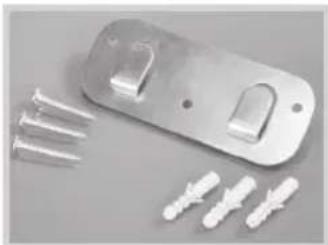
natural_image
Metallic plastic door clip with four white plastic connectors and screws, arranged on a plain surface (no text or symbols visible)Attach the wall bracket to the wall at the desired location with the supplied wall plugs and screws.
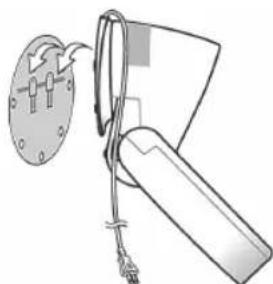
natural_image
Diagram of a mechanical device with a circular component and cable, no text or symbols presentInsert the fan base into the lugs protruding from the wall bracket and make sure that it is firmly attached.
OPERATION

Only use the appliance on a flat and stable surface or when it is fixed securely to a wall!
The appliance can be operated via the buttons on the appliance or the remote control.

Make sure your local voltage matches the technical data of the appliance. Otherwise the appliance heat and get damaged.
- Switch on the appliance by pressing the On/Off button.
- Choose your desired settings by pressing the respective buttons or turning the resp. knobs
- ADJUST THE SPEED
Turn the speed control knob or press the + key to increase the speed or the - key to decrease it. The fan has 7 speeds.
- TURBO MODE (remote control only!)
Press the key for 1 second and the fan will blow to maximum level. To exit this mode, press the + or - button.
- OSCILLATION (rotation)
Press the button for 1 second to start the rotation process. To stop the rotation process, press the button until you hear a beep sound.
- TIMER (only via remote control)
Allows for automatic shut off after set time. Press the button once for 1 hour (one beep sound) and press the button twice for 2 hours (2 beep sounds). To cancel this function, press the button once (confirmed by a long beep sound)

When using the timer function, all other settings can still be used. If the fan is turned off, the timer setting will also be cancelled.
-SLEEP MODE (only via remote control)
Once you press the sleep button, the fan will gradually slow down and remain at low setting. To cancel this function, press the + or - button.
- After use, press the On/Off button to switch off the appliance and unplug it.
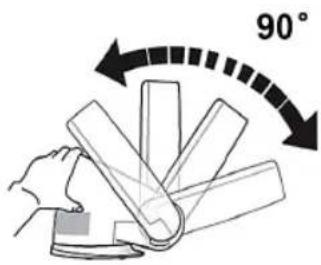
ADJUST TILT ANGLE
Caution: The fan should always be switched off when making this adjustment!
text_image
90°Hold the appliance with one hand and adjust the air diffuser to the desired tilt angle.
It is also possible to adjust the inclination if the appliance is fixed to the wall.
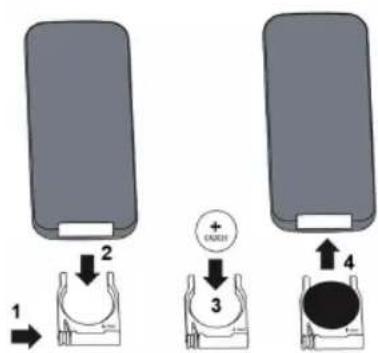
INSERTING / REPLACING Battery in REMOTE CONTROL
Only use CR2025 button cell!
- To open the battery compartment, press onto the battery compartment lock and pull out the battery holder.
- Insert a new CR2025 battery
- With the + sign at the top.
- Re-insert the battery holder into the remote control. Make sure that the battery holder is properly inserted into the remote control.
text_image
1 2 + EXCEL 3 4
Always remove the battery from the remote control if it will not be used for a longer period of time.
CLEANING AND CARE
Before cleaning, always switch off the appliance and disconnect it from the mains.
Never immerse the appliance in water. Danger! Electric Shock!
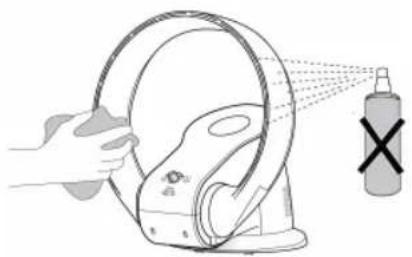
- Clean the appliance using a a soft damp cloth.
- Never spray the appliance with liquids or submerge it in water or other liquids.
natural_image
Illustration of a hand spraying a circular object onto a device with a spray bottle nearby (no text or symbols)After the cleaning process is finished, make sure that all parts are dry.

Never use alcohol, gasoline, and/or any other aggressive cleaning agents/hard objects.
STORAGE
Keep the appliance away from children and store it in a clean and dry place, best in its original box or cover it to protect it from dust.
Disposal Instructions
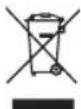
Waste electrical devices marked with this sign must not be disposed of with your household waste, but are to be collected separately. Therefore, please return this device at the end of its life cycle to special collection points for disposal or your local dealer.

Your Bladeless Fan 81008 is packed in a retail box. Such boxes are recyclable waste, i.e. they are reusable or recyclable.
DISPOSAL INSTRUCTIONS FOR BATTERIES

Standard and rechargeable batteries should not be thrown into regular household waste. As a ter, you are legally obliged to return used batteries for proper disposal. You can hand in your used at your local recycling centre in your district or sales outlets where batteries of this type are sold.
Only dispose fully discharged batteries.

Note: The codes below are printed on batteries containing harmful substances:
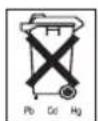
Pb = Battery contains lead
Cd = Battery contains cadmium
Hg = Battery contains mercury
TECHNICAL DATA
Voltage: 220 - 240 V \~ 50 / 60 Hz
Power: 26 W
Protection class: II
Technical data subject to change!
| Description Symbol Value Unit | |||
| Maximum fan flow rate F 23.0 m3/min | |||
| Fan power input P 26 W | |||
| Service value | SV | 0.884 | (m3/min)/W |
| Standby power consumption | PSB | 0.326 | W |
| Fan sound power level | LWA | 56.5 dB(A) | |
| Maximum air velocity | C | 2.7 | meter/sec |
| Measurement standard for service value | IEC 60879:1986 (corr. 1992)Performance and construction of electric circulating fans and regulators | ||

NOTE: As a result of continual improvements, the design and specifications of the product within may differ slightly to the unit illustrated on the packaging.
Guarantee:
This product is guaranteed against defects in materials and workmanship for a period of 2 years.
This guarantee is not valid:
- if the appliance has not been used in accordance to the instructions
• for damages due to wear and tear (batteries, etc.)
• for damages known by customer at time of purchase
• for damages caused by owner
This guarantee does not affect your statutory right, nor any legal right you may have as a customer under applicable national legislation governing the purchase of goods.
In order to assert his/her right in a guarantee case during the guaranteed period, the customer must provide evidence of the date of purchase (receipt).
The guarantee is to be asserted against
KORONA electric GmbH, Sundern/Germany.
Telephone Hotline: +49 2933 90284-80
Mail: service@korona-electric.de
web: www.korona-electric.de
within 2 years after the date of purchase. In case of guarantee the customer is given the right to get the appliance repaired at our own or at an authorized shop. Further rights (due to guarantee case) are not given to the customer.
Handleiding
text_image
Exploded view diagram of a smart air conditioner with numbered parts and exploded viewsnatural_image
Metallic mechanical component with a numbered connection point (7) between it and the other side (no text or symbols on the component itself)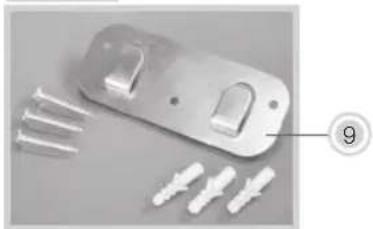
natural_image
Metallic plastic bracket with multiple pins and two connectors, plus three white plastic connectors (no text or symbols visible)
natural_image
Metallic plastic door clip with four pins and three white plastic clips arranged on a gray surface (no text or symbols visible)natural_image
Diagram of a mechanical device with wires and a circular component, no text or symbols presenttext_image
Diagram showing two device parts with numbered labels and directional arrows indicating movement or assembly.
natural_image
Illustration of a hand cleaning a circular object with spray, producing a spray bottle (no text or symbols)text_image
Exploded view diagram of a smart air conditioner with numbered parts and exploded viewsnatural_image
Metallic plastic bracket with four white plastic pins and a side clip, arranged on a plain surface (no text or symbols visible)natural_image
Diagram of a mechanical device with a circular component and cable, no text or symbols presenttext_image
Diagram showing two device setups with labeled components and directional arrows indicating movement or assembly.
natural_image
Illustration of a hand cleaning a car wheel with spray bottle and cross symbol (no text or labels)text_image
Exploded view diagram of a smart air conditioner with numbered parts and exploded viewsnatural_image
Metallic plastic bracket with two side clips and four white plastic connectors (no text or symbols visible)natural_image
Line drawing of a mechanical device with a circular component and cable, no text or symbols presentnatural_image
Illustration of a hand spraying a circular object onto a device with a spray bottle nearby (no text or symbols)text_image
Exploded view diagram of a smart air conditioner with numbered parts and exploded viewsnatural_image
Metallic mechanical component with four white plastic connectors and screws, arranged on a plain surface (no text or symbols visible)natural_image
Line drawing of a mechanical device with a circular component and cable, no text or symbols presenttext_image
Diagram showing two devices with labeled parts and directional arrows indicating movement or assembly.
natural_image
Illustration of a hand spraying a circular object onto a device with a spray bottle nearby (no text or symbols)text_image
Technical diagram of a smart air conditioner housing with numbered components and exploded viewnatural_image
Metallic plastic bracket with multiple screws and three white plastic connectors (no text or symbols visible)natural_image
Diagram of a mechanical device with a circular component and cable, no visible text or symbolsnatural_image
Illustration of a hand spraying a hose onto a device with a spray bottle nearby (no text or symbols)text_image
Exploded view diagram of a smart air conditioner with numbered parts and exploded viewsnatural_image
Metallic plastic bracket with multiple screws and three white plastic connectors (no text or symbols visible)natural_image
Diagram of a mechanical device with a circular component and cable, no text or symbols presentnatural_image
Illustration of a hand cleaning a car hood with a spray bottle emitting a cross (no text or symbols)text_image
Technical diagram of a smart speaker with numbered parts and exploded viewsnatural_image
Metallic plastic bracket with multiple screw fasteners and three white plastic connectors (no text or symbols visible)natural_image
Diagram of a mechanical device with a circular component and cable, no visible text or symbolsnatural_image
Illustration of a hand cleaning a circular device with a spray bottle emitting a cross (no text or symbols)natural_image
Abstract geometric shape with curved and angular lines, no text or symbols presentRef: 81008/2020.11