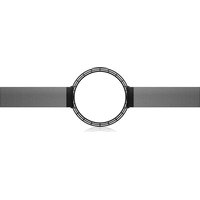
PMK 8 - Loudspeaker TANNOY - Free user manual and instructions
Find the device manual for free PMK 8 TANNOY in PDF.


| Product type | Pre-mounting kit for in-ceiling speaker |
| Brand | Tannoy |
| Model | PMK 8 |
| Intended use | For PCI and QCI 8" ceiling speakers |
| Materials | Steel and plastic |
| Dimensions (diameter x height) | Approximately 280 mm x 80 mm |
| Weight | Approximately 1.5 kg |
| Power supply | None (passive accessory) |
| Main functions | Mounting support, circular frame for fixing, retaining clips |
| Included accessories | Mounting supports, circular frame, four clips |
| Compatibility | Tannoy PCI and QCI 8" speakers; can be used with or without the Back Can S back box |
| Maintenance | Clean with a dry cloth |
| Safety | Wear safety glasses and gloves; disconnect the amplifier before wiring; avoid electrical lines, cables, and plumbing |
| Repairability | No user-serviceable parts; contact a qualified professional |
| Warranty | Limited, see musictribe.com/warranty |
| Recycling | WEEE: dispose of at an approved collection point |
| Operating temperature | Up to 45°C (tropical or moderate climate) |
| Manufacturer | Music Tribe Global Brands Ltd. |
Frequently Asked Questions - PMK 8 TANNOY
User questions about PMK 8 TANNOY
0 question about this device. Answer the ones you know or ask your own.
Ask a new question about this device
Download the instructions for your Loudspeaker in PDF format for free! Find your manual PMK 8 - TANNOY and take your electronic device back in hand. On this page are published all the documents necessary for the use of your device. PMK 8 by TANNOY.
USER MANUAL PMK 8 TANNOY
natural_image
Technical line drawing of a mechanical component with top and side views (no text or symbols)Back Can S
Steel Back Can for PCI and QCI In-Ceiling Loudspeakers
PMK 8
Pre-Mount Kit for QCI and PCI 8" In-Ceiling Loudspeakers
PMK 6
Pre-Mount Kit for QCI and PCI 6" In-Ceiling Loudspeakers
PMK 3
Pre-Mount Kit for QCI 3" In-Ceiling Loudspeakers
2 Back Can S/PWK 8/PWK 6/PWK 3 Quick Stat. Guide 3
EN
ES
Important Safety Instructions
Terminals marked with this symbol carry electrical current of sufficient magnitude to constitute risk of electric shock. the only high quality professional speaker tables with 15" TS or twist, locking plugs pre installed. All other installation or modification should be performed only by qualified personnel.
This symbol, wherever it appears, alerts you to the presence of uninsulated dangerous voltage inside the enclosure - voltage that may be sufficient to constitute a risk of shock.
This symbol, wherever it appears, alerts you to important operating and maintenance instructions in the accompanying literature. Please read the manual.
Caution To reduce the risk of electric shock, do not remove the top cover (or the rear section). No user serviceable parts include. Refer servicing to qualified personnel.
Caution To reduce the risk of fire or electric shock, do not expose this appliance to rain and moisture. The apparatus shall not be exposed to dripping or splashing liquids and no objects filled with liquids, such as wares, shall be plated on the apparatus.
Caution These service instructions are for use by qualified service personnel only. To reduce the risk of electric shock do not perform any servicing other than that contained in the operation instructions. Repairs have to be performed by qualified service personnel.
- Read these instructions.
- Keep these instructions
- Head all warnings.
- Followall instructions.
- Do not use this apparatus near water.
- Clean only with dry cloth.
- Do not block any ventilation openings install in
accordance with the manufacturer's instructions -
Do not install near any heat sources such as radiators, heat registers, stores, or other apparatus (including amplifiers) that produce heat.
-
Do not defeat the safety purpose of the polarized or grounding-type plug. A polarized plug has two blades with one wider than the other. A grounding-type plug has two blades and a third grounding proong. The wide blade or the third proong are provided for your safety. If the provided plug does not fit into your outlet, consult an electrician for replacement of the obsovere outlet.
-
Protect the power cord from being walked on or pinched particularly at plugs, convenience receptacles, and the point where they eat from the apparatus.
-
Use only attachments/accessories specified by the manufacturer.

- Use only with the cart, stand, tripod, bracket, or table specified by the manufacturer, or sold with the apparatus. When a cart is used, use caution when moving the cart/apparatus combination to avoid
injury from tip-over
-
Unplug this apparatus during lightning storms or when unused for long periods of time.
-
Refer all servicing to qualified service personnel. Servicing is required when the apparatus has been damaged in any way, such as power supply cord or plug in damaged, liquid has been spilled or objects have fallen into the apparatus, the apparatus has been exposed to rain or moisture, does not operate normally, or has been dropped.
-
The apparatus shall be connected to a MANG socket outlet with a protective earthing connection.
-
Where the MAINS plug or an appliance coupler is used as the disconnect device, the disconnect device shall remain nearly operable.

- Correct disposal of this product: This symbol indicates that this product must not be disposed of with household waste, according to the WEE Directive (2012/19/EU) and
should be taken to a collection center formed for the recycling of waste electrical and electronic equipment (EEL). The misunderstanding of this type of waste could have a possible negative impact on the environment and human health due to potentially hazardous substances that are generally associated with EEL, at the same time, your corporation in the correct disposal of this product will contribute to the efficient use of natural resources. For more information about where you can take your waste equipment for recycling, please contact your local city office, or your household waste collection service. 18. Do not install in a confined space, such as a book case or similar unit.
-
Do not place naked flame sources, such as lighted candles, on the apparatus.
-
Please keep the environmental aspects of battery disposal in mind. Batteries must be disposed-of at a battery collection point.
-
This apparatus may be used in tropical and moderate climates up to 45°C.
LEGAL DISCLAIMER
Music Tribe accepts no liability for any loss which may be suffered by any person who relies either wholly or in part upon any description, photograph, or statement contained herein. Technical specifications, appearances and other information are subject to change without notice. All trademarks are the property of their respective owners. Vidas, Klark Teknik, Lab Suggers, Lake, Tanney, Turbosound, TC Electronic, TC Helicon, Behringes, Sugera, Osterheim, Auratone, Aston Microphones and Coledudio are trademarks or registered trademarks of Music in The Global Brands Ltd. © Music Tribe Global Brands Ltd. 2021 All rights reserved.
LIMITED WARRANTY
For the applicable warranty terms and conditions and additional information regarding Music Tribe's Limited Warranty, please see complete details online at musictribe.com/warranty.
ES
BESCHRÄNKTE GARANTIE
Thank you for purchasing this Accessory for Tammy Dual Concentric In-Ceiling Loudspeakers for Installation Applications.
The Back Can S is an optional steel back can for the PCI and QCI in-celling loudspeakers.
The PWK 3 is an optional pre-mount kit for the QCI 3 in-ceiling loudspeakers.
The PMK 6 is an optional pre-mount kit for the PCI and QCI 6" in-ceiling loudspeakers.
The PWK B is an optional pre-mount kit for the PCI and QCI 8' in-ceiling loudspeakers.
The PMR 6 and PMR 8 kits can be used with or without the Back Can S.
The Back Can S can be used with or without the PMK 6 or PMK 8 kits.
Each accessory is available separately, and this quick start guide covers them all.
Unpacking
Every Tannoy product is carefully inspected before shipment. After unpacking, please inspect your product to ensure no damage has occurred in transit, in the unlikely event of damage, please notify your dealer and retain all shipping materials as your dealer may require return shipment.
Safety Notices
Tanncy will not be held responsible for any damages caused by the improper installation of these loudspeaker accessories.
WARNING: This procedure requires the use of personal protection equipment, such as safety glasses and gloves.
WARNING: To avoid potential damage to your loudspeaker, ensure that the power amplifier is switched OFF prior to connecting or disconnecting any cables.
WARNING: Make sure that there are no power lines, other cables, or plumbing such as water, sewer, gas lines in the chosen location.
ES
Introducción
Product Feature Identification
PMK Pre-Mount Kit
PMK 3 is used for the QCI 3
PMK 6 (shown below) is used for the PCI and QCI 6" loudspeakers
PMK 8 is used for the PCI and QCI 8" loudspeakers
Back Can S
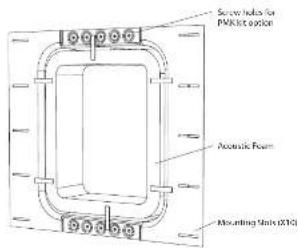
Steel back can for PCI and QCI in-ceiling loudspeakers
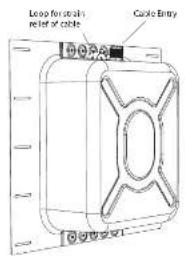
Installation Guide

Back Can Installation
WARNING: This procedure requires the use of personal protection equipment, such as safety glasses and gloves.
WARNING: To avoid potential damage to your loudspeaker, ensure that the power amplifier is switched OFF prior to connecting or disconnecting any cables.
WARNING: Make sure that there are no power lines, other cables, or plumbing such as water, sewer, gas lines in the chosen location.
The Back Can S is an optional back can that can be used for the PCI and QCI 6DC/8DC in-ceiling loudspeakers.
The procedure below describes the installation of the back can into a typical 2" x 6" ceiling with 16" centers, with dry-wall/plasterboard not yet installed.
After the back can and dry wall is installed, the PCI and OC 6DC/SDC ceiling loudspeakers can be wired and installed, and the paint mask added during wall painting and finishing.
Procedure
Follow the procedure steps below in the order in which they are presented. Read all the instructions before starting.
- Locate a suitable mounting position for the loudspeaker that will offer optimum acoustic performance for the listening environment and audio system, and that is also practical and aesthetically pleasing.
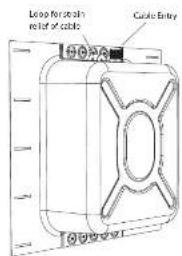
- Carefully move the back can to the chosen location between the ceiling joists, and lift it to the desired height, allowing enough room for the speaker wire to enter the cable gland (Fig. 1).
- Make sure that the back can is plumb and level, then attach the back can to the ceiling joists using 5 screws or nails per stud.
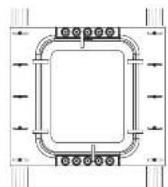
Fig. 1 Install the Back Can between the joists
Wiring the Back Can
WARNING: To avoid potential damage to your loudspeaker, ensure that the amplifier is switched OFF prior to connecting or disconnecting any cables.
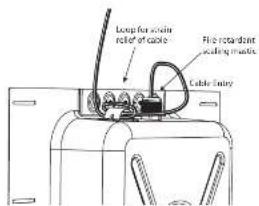
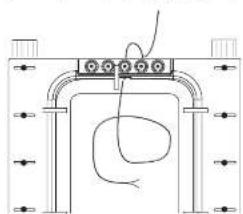
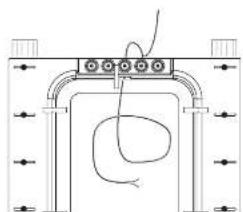
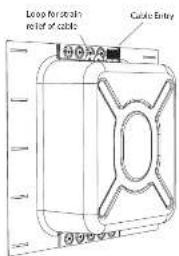
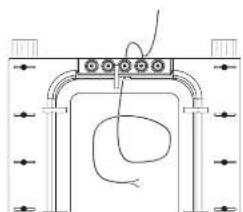
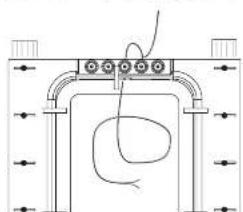
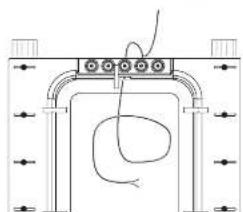
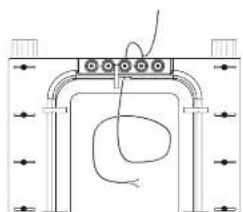
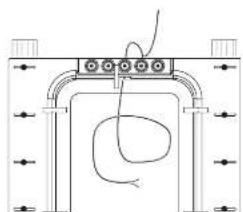
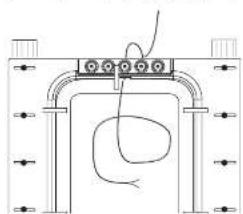
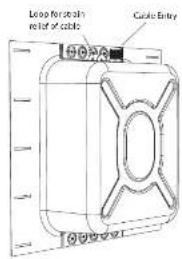
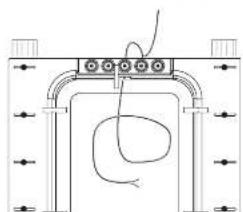
The speaker wire connections are made to the cable entry gland into the back can. A loop is provided to secure the cable before it enters the cable gland.
- Loop the speaker wire once around the provided cable loop, and pass the cable through the cable gland and into the back can (Fig. 2) and past the acoustic foam inside the back can. Love enough slack to make the connections when that time comes. Tighten the cable gland, and tie down the speaker cable to prevent it moving and rattling in operation. Make sure that the speaker cable does not come into contact with nails or screws that might damage the electrical insulation.
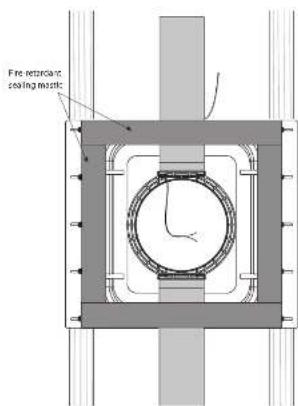
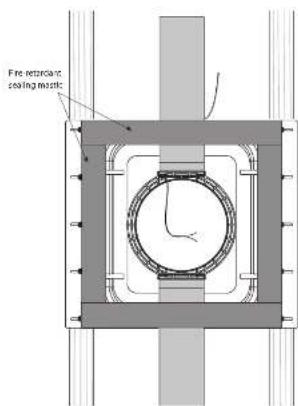
- Once the speaker cable has been brought through the gland, and the gland tightened, fire-retardant sealing mastic should be used to seal the assembly.
natural_image
Pure mechanical diagram showing a bracket with mounting holes and a curved internal component (no text or symbols)Fig. 2 Install the writing into the Back can. Some languages are incorrect also. Apply as well.
Optional Pre-Mount Kit Installation
The optional Pre-Mount Kits provide a circular surround for a strong mounting surface for the damping mechanism of the loudspeaker, and they make it easier to install the drywall.
The PMK RRs can be used with or without the back can.
Preparing the PMK Pre-Mount Kit
-
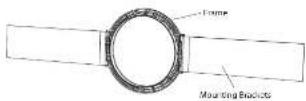
Each pre-mount slit consists of two mounting brackets, a circular frame, and four small clips that help secure the brackets to the frame.
-
Attach the mounting brackets to the frame (Fig. 3).
-
Press the four clips in place, to hold the brackets in position.
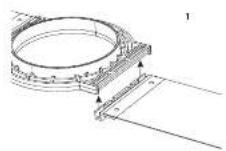
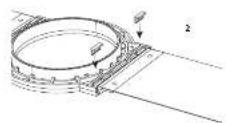
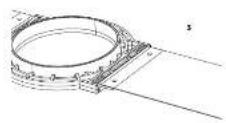
Fig. 3. Installing the PMK brackets to the frame

natural_image
Pure mechanical diagram showing a circular component mounted between two rectangular blocks (no text or symbols)Fig. 4. PMR assembly (PMR 3 shown)
Quick Star Guide
Installing the PMK into the Back Can
The following procedure shows how to connect a PMK 6 to the back can. The procedure is the same for the PMK 8. The PMK 3 is not used with the back can.
- Hold the PMK 6 or PMK 8 assembly onto the back can, with the circular lip of the frame pointing into the room (Fig. 5).
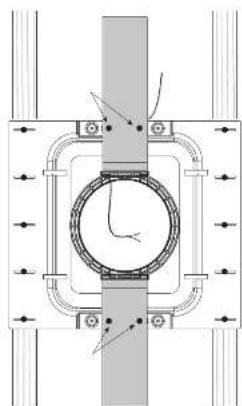
- Make sure the PMR assembly is centered, plumb, and level. Secure it to the back can with four screws, using the existing holes at the top and bottom of the back can (Fig. 6).
- When the drywall is fitted over the back can, a generous bead of fire-retardant sealing mastic should be applied to the back can flanges in order to seal the assembly and minimise the possibility of vibration when the speaker is in use.
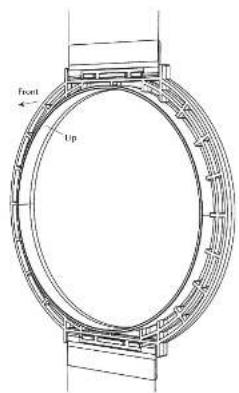
Fig. 5 Front of the PMK is the side with the lip (PMK 6 shown)
natural_image
Pure mechanical diagram showing a circular component with directional arrows, no text or symbols presentFig. 6. Install the PMK-6 into the Back can
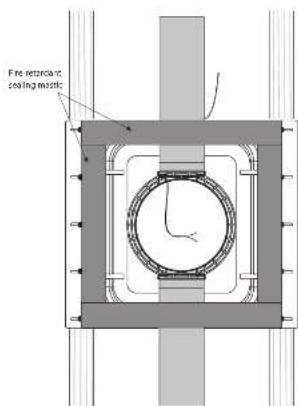
Fig. 7 Apply a generous amount of fire-retardant sealing mastic over the back can flange area as shown.
Installing the PMK without the Back Can
- Assemble the PMK with the mounting brackets attached to the PMK frame (See Fig. 4 on page 11).
- Hold the PMK assembly onto the joists, with the circular lip of the frame pointing into the room.
- Make sure the PMK assembly is centered, plumb, and level. Secure it to the joists using four woodstrews.
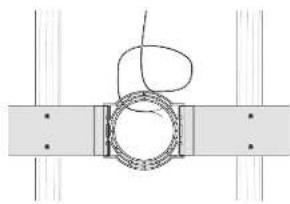
- Run speaker wire to this location (Fig. 8). Leave enough slack to make the connections when that time comes. Tie down the speaker cable to prevent it moving and rattling in operation. Make sure that the speaker cable does not come into contact with nails or screws that might damage the electrical insulation.
Installing the Drywall
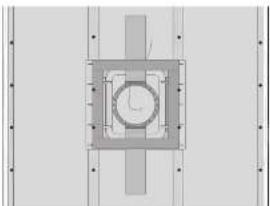
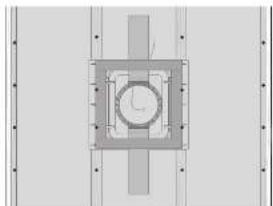
- The installation of drywall around the PMK location is best arranged so there are no drywall joins near the PMK (Fig. 9).
- If you want to cut the drywall aperture before installation, use the PMK aperture as a guide. Step 5 below describes cutting after the installation. Use whichever method you prefer.
- Use adhesive on the wall studs and the front face of the back can (if used), and install the drywall using drywall screws approximately 8 to 10 inches apart. This will help prevent wall rattling and drywall movement and noises during operation. If the loudspeaker is being installed on an interior wall, then adhesive and extra screws may also be added to the drywall used in the room behind the loudspeaker.
- Note: Before adding any drywall screws where the metal back can is installed, drill small pilot holes into the metal of the back can.
- After the drywall installation, carefully cut out the hole in the drywall with a suitable handtool, using the inside aperture of the PMK as a guide (Fig. 10 and 11). Be careful not to cut the speaker wires or cut into the back can acoustic foam. Make sure the drywall aperture is no larger than the inside aperture of the PMK frame. Remove any dust or debris from within the back can.
- The PCI and QCI ceiling loudspeaker quick start guide includes the procedures for installing the loudspeakers into the wall apertures.
natural_image
Pure mechanical diagram showing a ring and shaft assembly without any text, numbers, or symbolsFig. 8. PMK attached to ceiling joints or wall studs (PMK 3 shown)
natural_image
Pure technical diagram of a mechanical assembly with no visible text, numbers, or symbolsFig. 9. Drywall Screws, PMK-6 with back can
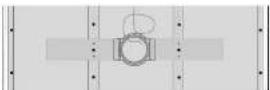
Fig. 10. Drywall Screws, PMK 3 without back can
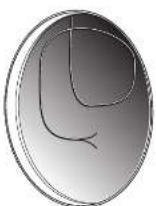
Fig. 11. Drywall Cutout (with PMK)
Cutout Procedure without the PMK
If you are using the back can, but not the PMR pre-mount kits, then follow this procedure below for cutting out the drywall.
Circular cutout templates are supplied with the loudspeakers, and act as a guide for cutting out the correctly sized hole in the wall (Fig. 12).
Follow the procedure steps below in the order in which they are presented. Read all the instructions before starting.
- In the position of the back can, and the supplied template to the drywall, centered exactly on the center of the back can.
- Using the template, carefully cut out a hole in the drywall using a suitable handtool. Be careful not to damage the back can, its acoustic foam, or the speaker wires. Remove any dust and debris from the hole.
- The PCI and QCI ceiling loudspeaker quick start guides include the procedures for installing the loudspeakers into the aperture.

Fig. 12. Drywall Cutout Dimensions (PCI/QCI & shown)
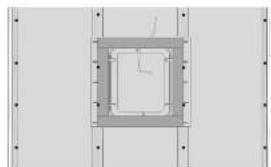
natural_image
Pure technical diagram of a square component with mounting holes and internal channels (no text or symbols)Fig. 13. Back can without PMK
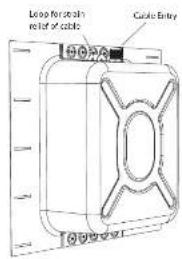
Guía de instalación
natural_image
Pure mechanical diagram showing a bracket with internal components and a curved wire, no text or symbols present.natural_image
Pure mechanical diagram showing a circular component with flanges and brackets, no text or symbols presentnatural_image
Technical diagram of a mechanical assembly with no visible text, numbers, or symbolsnatural_image
Pure mechanical diagram showing a coiled spring or ring assembly with no text, numbers, or symbolsnatural_image
Pure technical diagram of a mechanical assembly with no text, numbers, or symbolsnatural_image
Pure technical diagram of a square frame with mounting holes and dimension lines (no text or symbols)Fig. 13. Recipiente trasero sin PMK
natural_image
Pure mechanical diagram showing a bracket with internal components and a curved wire, no text or symbols present.natural_image
Pure mechanical diagram showing a circular component mounted between two rectangular plates (no text or symbols)Fig. 4. Ensemble PMK (PMK 3 Illustré)
Quick Star Guide
natural_image
Pure mechanical diagram showing a circular component with directional arrows, no text or symbols presentnatural_image
Pure mechanical diagram showing a coiled spring or ring assembly with no text, numbers, or symbolsnatural_image
Pure mechanical assembly diagram showing a central circular component with flanges and mounting brackets (no text or symbols)natural_image
Pure technical diagram of a square frame with mounting holes and dimension lines (no text or symbols)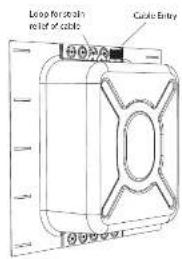
Back Can Installation
natural_image
Pure mechanical diagram showing a bracket with internal components and arrows, no text or symbols presentnatural_image
Pure mechanical component diagram without any text, numbers, or symbolsnatural_image
Pure mechanical diagram showing a circular component with internal components and directional arrows, no text or symbols present.natural_image
Pure mechanical diagram showing a ring and shaft assembly without any text, numbers, or symbolsnatural_image
Pure technical diagram of a mechanical assembly with no text, numbers, or symbolsnatural_image
Pure technical diagram of a square component with mounting holes and internal channels (no text or symbols)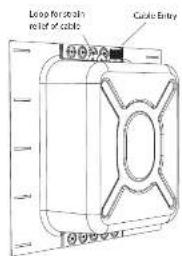
Guia de instalação
natural_image
Pure mechanical diagram showing a bracket with internal components and a curved wire, no text or symbols present.natural_image
Pure mechanical diagram showing a circular component with directional arrows, no text or symbols presentnatural_image
Pure mechanical diagram showing a coiled spring or ring assembly with no text, numbers, or symbolsFig. 8. PMK anerado a vigas de teto ou vigas de parede (PMK 3 mostrado)
natural_image
Pure technical diagram of a mechanical assembly with no visible text, numbers, or symbolsFig. 9. Parafusos de drywall, PMX-6 com lata traseira
natural_image
Pure technical diagram of a square component with mounting holes and dimension lines (no text or symbols)Fig. 13. Lata traseira sem PMK
natural_image
Pure mechanical diagram showing a bracket with internal components and a curved wire, no text or symbols present.natural_image
Pure mechanical component diagram without any text, numbers, or symbolsnatural_image
Pure mechanical diagram showing a circular component with flanged sides and directional arrows, no text or symbols present.natural_image
Pure mechanical diagram showing a coiled spring or ring assembly with no text, numbers, or symbolsnatural_image
Pure technical diagram of a mechanical assembly with no text, numbers, or symbolsnatural_image
Pure technical diagram of a square component with mounting holes and dimension lines (no text or symbols)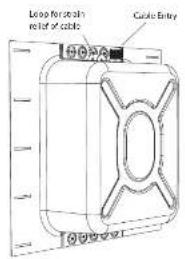
Installatie gids
natural_image
Pure mechanical diagram showing a bracket with internal components and a curved wire, no text or symbols present.natural_image
Pure mechanical diagram showing a circular component mounted between two rectangular plates (no text or symbols)natural_image
Pure mechanical diagram showing a circular component with internal channels and directional arrows, no text or symbols present.Afb. 6. Installeer de PMK 6 in de achterste bus
natural_image
Pure mechanical diagram showing a ring and shaft assembly without any text, numbers, or symbolsnatural_image
Pure technical diagram of a mechanical assembly with no text, numbers, or symbolsnatural_image
Pure technical diagram of a square component with mounting holes and dimension lines (no text or symbols)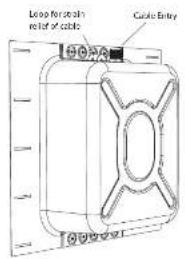
Installationsguide
Installation på baksidan
natural_image
Pure mechanical diagram showing a bracket with mounting holes and a curved internal component (no text or symbols)natural_image
Pure mechanical component diagram without any text, numbers, or symbolsFig 4. PMK-monitoring [PMK 3 visas]
Quick Star Guide
61
Installera PMK i baksidan
natural_image
Pure mechanical diagram showing a circular component with internal channels and directional arrows, no text or symbols present.Fig. 6. Installera PMK 6 i den bakre burken
natural_image
Pure mechanical diagram showing a coiled spring or ring assembly with no text, numbers, or symbolsnatural_image
Pure technical diagram of a mechanical assembly with no visible text, numbers, or symbolsnatural_image
Pure technical diagram of a square component with mounting holes and dimension lines (no text or symbols)Fig. 13. Baksida utan PAK
natural_image
Pure mechanical diagram showing a bracket with internal components and a curved wire, no text or symbols present.natural_image
Pure mechanical diagram showing a circular component mounted between two rectangular plates (no text or symbols)Rys.A Monta2 PMK [pokazano PMK 3]
natural_image
Pure mechanical diagram showing a circular component with directional arrows, no text or symbols presentnatural_image
Pure mechanical diagram showing a ring and shaft assembly without any text, numbers, or symbolsnatural_image
Pure mechanical assembly diagram showing a central circular component with flanges and supports (no text or symbols)natural_image
Pure technical diagram of a square component with mounting holes and dimension lines (no text or symbols)Other important information

Important information
-
Register online. Please register your new Music Tribe equipment right after you purchase it by visiting musctribe.com. Registering your purchase using our simple online form helps us to process your repair claims more quietly and efficiently. Also, read the terms and conditions of our warranty, if applicable.
-
Malfunction. Should your Music Tribe Authorized Reveller not be installed in your vicinity, you may contact the Music Tribe Authorized Further for your country listed under "Support" at musicitibe.com. Should your country not be listed, please check if your problem can be dealt with by our "Online Support" which may also be found under "Support" at musicitibe.com. Alternatively, please submit an online warranty claim at musicitibe.com BEFORE returning the product.

Informations importantes
Hereby, Music Tribe declares that this product is in compliance with Directive
2011/65/EU and Amendment 2015/863/EU, Directive 2012/19/EU, Regulation ELDN2013 REACHSVEC and Direction 1907/2006/EU, and this prior product is out
3.9.2012 RECH 5MTC and Directive 1907, 2006, TC, and this pass applicable to DAC Directive 2014/30/11. 12 Directive 2014/35/TIL
Full text of EU DoC is available at https://community.musictribe.com/
EU Representative: Music Tribe Brands DK A/S
Address: In Spang Ulsens-Sade 17, DK-8200 Parthus N, Denmark
EN




- Back Can S
- PMK 8
- PMK 6
- PMK 3
- LEGAL DISCLAIMER
- LIMITED WARRANTY
- BESCHRÄNKTE GARANTIE
- Unpacking
- Safety Notices
- ES
- Introducción
- Product Feature Identification
- Installation Guide
- Back Can Installation
- Procedure
- Wiring the Back Can
- Optional Pre-Mount Kit Installation
- Preparing the PMK Pre-Mount Kit
- Installing the PMK into the Back Can
- Installing the PMK without the Back Can
- Installing the Drywall
- Cutout Procedure without the PMK
- Guía de instalación
- Guia de instalação
- Installatie gids
- Installationsguide
- Installation på baksidan
- Installera PMK i baksidan
- Other important information
- Important information
- Informations importantes
Brand : TANNOY
Model : PMK 8
Category : Loudspeaker