Platinum Penta - Audio Equipment FOCUSRITE - Free user manual and instructions
Find the device manual for free Platinum Penta FOCUSRITE in PDF.


User questions about Platinum Penta FOCUSRITE
0 question about this device. Answer the ones you know or ask your own.
Ask a new question about this device
Download the instructions for your Audio Equipment in PDF format for free! Find your manual Platinum Penta - FOCUSRITE and take your electronic device back in hand. On this page are published all the documents necessary for the use of your device. Platinum Penta by FOCUSRITE.
USER MANUAL Platinum Penta FOCUSRITE
Focusrite Audio Engineering Ltd, Lincoln Road, High Wycombe, Bucks HP12 3FX England
Phone: +44 (0)1494 462246 FAX: +44 (0)1494 459920
e-mail: sales@focusrite.com
www.focusrite.com
This equipment complies
with the EMC Directive
89/336/EEC

THANK YOU for purchasing the Penta brought to you by the Focusrite team - Trevor, Rob, Pauline, Tom, Jo, Helen, Simon, Phil, Mick, Chris, Ollie, Paul, Chris, Bryn, Giles, Spike, Ruby, Roger and Peter.
The chaps at Focusrite are a jolly hard working bunch and take a great deal of pride in designing, building and delivering products which are considered the best audio units around; we hope your new Focusrite unit lives up to that reputation and that you enjoy many years of productive recording.
If you would like to tell us about your recording experiences then e-mail us at:- sales@locustrite.com
Gain Mic: 0dB to +60dB, Line -10dB to +10dB
Mic EIN -128dBu @150Ω (60dB gain)
Outputs:
Electronically balanced, impedance 50Ω, nominal level +4dBu. Unbalanced, ground compensated, impedance 75Ω, nominal level -10dBV.
Headroom:
26dB
THD @ 0dB gain (MIC/ Line) or minimum gain (Inst) <0.002%(20Hz - 20kHz BW)
Noise (20Hz - 20kHz BW)
Line Input -93dBu at +4dBu out -98dBu at -10dBV out
Inst Input -92dBu (min. gain) -80dBu (max. gain)
Frequency Response
20Hz - 85kHz +/- 3dB
Dimensions:
Whilst every effort has been made to ensure the accuracy and content of this manual, Focusrite Audio Engineering Ltd makes no representations or warranties regarding the contents.
Copyright:
Copyright March 2000 Focusrite Audio Engineering Ltd. All rights reserved. No part of this manual may be reproduced, photocopied, stored on a retrieval system, transmitted or passed to a third party by any means or in any form without the express prior consent of Focusrite Audio Engineering Ltd.
Warranty:
All Focusrite products are covered by a warranty against manufacturing defects in material or craftsmanship for a period of one year from the date of purchase. Focusrite in the UK, or its authorised distributor worldwide will do its best to ensure that any fault is remedied as quickly as possible. This warranty is in addition to your statutory rights.
This warranty does not cover any of the following:
- Carriage to and from the dealer or factory for inspection or repair labour charge if repaired other than by the distributor in the country of purchase or Focusrite in the U.K.
- Consequential loss or damage, direct or indirect, of any kind, however caused
- Any damage or faults caused by abuse, negligence, improper operation, storage or maintenance
If a product is faulty, please first contact your dealer in the country of purchase; alternatively, contact the factory. If the product is to be shipped back, please ensure that it is packed correctly, preferably in the original packing materials. We will do our best to remedy the fault as quickly as possible.
Please help us to serve you better by completing and returning the Warranty Registration Card enclosed with this manual. Thank you.
English
Deutsch
Français
Italiano
Español
Contents
Important Safety Instructions .....2
Connecting Up....4
Preset Compressor Settings .....45
Block Diagram .....46
Distributor List ....47
Getting Started 5
Understanding Compression .....6
Why you need Compressors .....6
Introduction to the Penta™ .....7
Rear Panel Connections
and Switches....7
Facilities and Controls .....7
Discrete Transistor Input Stage .7
Optical Compressor .....8
Preset Compressor Selections ..9
Output 10
Digital Output .....11
Frequently Asked Questions ....11
Troubleshooting .....12
Contacting Us 12
Inhalt
Discrete Transistor Input Stage 31
Optical Compressor .....32
Preset Compressor Selections .33
Output 34
Digital Output .....35
Domande e Risposte .....35
IMPORTANT SAFETY INSTRUCTIONS
Read all of these instructions and save them for future reference. Follow all warnings and instructions marked on the unit.
- Do not obstruct air vents in the rear panel. Do not insert objects through any apertures.
- Do not use a damaged or frayed power cord.
- Unplug the unit before cleaning. Clean with a damp cloth only. Do not spill liquid on the unit.
- Ensure adequate airflow around the unit to prevent overheating. We recommend leaving a blank 1U panel above the unit to aid ventilation.
- Unplug the unit and refer servicing to qualified service personnel under the following conditions:
If the power cord or plug is damaged; if liquid has entered the unit; if the unit has been dropped or the case damaged; if the unit does not operate normally or exhibits a distinct change in performance. Adjust only those controls that are covered by the operating instructions.
- Do not defeat the safety purpose of the polarised or grounding-type plug. A polarised plug has two blades with one wider than the other. A grounding type plug has two blades and a third grounding prong. The wider blade or the third prong are provided for your safety. When the plug provided does not fit into your outlet, consult an electrician for replacement of the obsolete outlet.
WARNING: THIS UNIT MUST BE EARTHED BY THE POWER CORD UNDER NO CIRCUMSTANCES SHOULD THE MAINS EARTH BE DISCONNECTED FROM THE MAINS LEAD.
This unit is capable of operating over a range of mains voltages as marked on the rear panel. Ensure correct mains voltage setting and correct fuse before connecting mains supply. Do not change mains voltage settings while mains supply is connected.
To avoid the risk of fire, replace the mains fuse only with the correct value fuse, as marked on the rear panel.
The internal power supply unit contains no user serviceable parts. Refer all servicing to a qualified service engineer, through the appropriate Focusrite dealer.
- Ensure that nothing other than the mains supply is connected to your Penta™, then switch it on via the POWER switch on the right hand side of the unit.
- Connect the left line output of the Penta ^TM to your recorder, via a stereo (balanced), or mono (unbalanced) TRS connector, choosing +4dBu or -10 dBV (using the switch on the rear panel) to match the input levels on your recorder. If you are unsure of which level is required, refer to the manual of your recording device.
- Switch MIC/INST 'in'.
- Ensure that INPUT GAIN is set to minimum.
- Connect a microphone to MIC INPUT via an XLR cable.
- If necessary, switch +48V in. If you are unsure whether your microphone requires this phantom power, refer to its handbook, as phantom power will damage some microphones.
- Increase INPUT GAIN until the INPUT LEVEL meter peaks at -2 when the loudest signal is present.
- Select the VOCALS preset, using the left and right scrolling switches.
- Engage COMPRESSOR IN switch.
- Adjust the PRESET MODIFY parameters if you wish. If you would like to use the unmodified preset, set all controls to their central détente positions.
RECORDING AND COMPRESSING A GUITAR OR BASS
- Follow steps 1-4 above.
-
Connect a guitar or bass to the INSTRUMENT INPUT via a mono (unbalanced) TRS connector.
-
Increase INPUT GAIN until the INPUT LEVEL meter peaks at -2 when the loudest signal is present.
- Select appropriate preset, using the left and right scrolling switches.
- Engage COMPRESSOR IN switch.
- Adjust the PRESET MODIFY parameters if you wish. If you would like to use the unmodified preset, set all controls to their central détente positions.
COMPRESSING A STEREO MIX
- Ensure that nothing other than the mains supply is connected to your Penta ^™ , then switch it on via the POWER switch on the right hand side of the unit.
- Connect the line inputs and outputs of the Penta™ to the mix inserts of your mixing board, via a 'Y' connector, choosing +4dBu or -10 dBV (using the switch on the rear panel) to match the input levels on your recorder. If you are unsure of which level is required, refer to the manual of your recording device.
- Ensure that the MIC/INST switch is disengaged
- Ensure that INPUT GAIN is set to minimum.
- Increase INPUT GAIN until the INPUT LEVEL meter peaks at -2 when the loudest signal is present.
- Select MIX (PUMP) preset, using the left and right scrolling switches.
- Engage COMPRESSOR IN switch.
- Adjust the PRESET MODIFY parameters if you wish. If you would like to use the unmodified preset, set all controls to their central detent positions.

text_image
Focusrite INC SPLIT HDF INPUT LEVEL 1 2 3 4 5 6 7 8 9 10 11 12 13 14 15 16 17 18 19 20 21 22 23 24 25 26 27 28 29 30 31 32 33 34 35 36 37 38 39 40 41 42 43 44 45 46 47 48 49 50 51 52 53 54 55 56 57 58 59 60 61 62 63 64 65 66 67 68 69 70 71 72 73 74 75 76 77 78 79 80 81 82 83 84 85 86 87 88 89 90 91 92 93 94 95 96 97 98 99 100 CAPSICUM REDUCTION COMPRESSOR INSEEP GAIN KATED ATTACK RELEASE WHMTCH OUTPUT LEVEL OUTR 100 VEN 100 VEN 100 VEN 100 VEN 100 VEN 100 VEN 100 VEN 100 VEN 100 VEN 100 VEN 100 VEN 100 VEN 100 VEN 100 VEN 100 VEN 100 VEN 100 VEN 10 OIL 1 2 3 4 5 6 7 8 9 10 11 12 13 14 15 16 17 18 19 20 21 22 23 24 25 26 27 28 29 30 31 32 33 34 35 36 37 38 39 40 41 42 43 44 45 46 47 48 49 50 51 52 53 54 55 56 57 58 59 60 61 62 63 64 65 66 67 68 69 70 71 72 73 74 75 76 77 78 79 80 81 82 83 84 85 86 87 88 89 90 91 92 93 94 95 96 97 98 99 PLATINUM PENTA PREST STEREO COMPRESSORUNDERSTANDING COMPRESSION
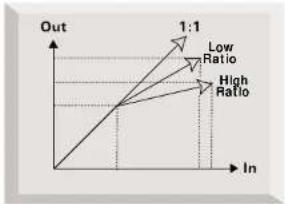
A Compressor is like an automatic fader. When the input signal exceeds a predetermined level, the compressor reduces the gain and the signal is attenuated. Compression begins once the signal level exceeds a certain point (called the 'threshold'). Beyond this threshold, subsequent increases in level are 'squashed' to reduce the amount of increase. How much reduction is determined by the RATIO.
A high ratio 'squashes' the dynamic range of signal levels above the threshold aggressively, making the increase of any input level above the threshold much smaller.
When a low ratio is used, the reduction in levels above the threshold is not so great, causing the dynamic range to be less 'squashed' than when a high ratio is applied. Very high ratios will cause any input level higher than the threshold to leave the compressor at almost the threshold level. This last case is called 'limiting' and is described below.
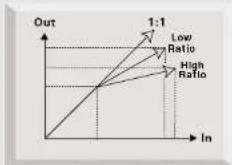
Because the compression causes a reduction in level of loud signals, gain must be applied after the compressor to bring the overall level back up, so that the reduced peak level returns to its original value. This is called MAKE UP GAIN. As more of the signal is nearer to peak level than it was before the compressor, the overall signal will now sound louder.
WHY YOU NEED COMPRESSORS
Compressors are probably the most widely used signal processors across the audio industry. Their two main purposes are as follows:
1. REDUCING DYNAMIC RANGE
This process involves taking a sound that varies greatly in level, and reducing these variations to get a more consistent level. This is extremely useful when recording, because a sound that varies greatly in level will appear and disappear in the mix. If every instrument in the mix does this, it will sound very uneven. Compressing each instrument will help smooth this out, whilst retaining some of the dynamics of the original performance. Any instruments you compress will also sound louder (as explained earlier).
2. PREVENTING OVERLOADING (LIMITING)
Typically engineers try to record the maximum level possible to get the best performance from their equipment. However, if the maximum recordable level is exceeded, then the sound quality starts to deteriorate fast. It is especially important not to overload digital systems. Using a very high ratio that only affects the maximum signal level and input signals that exceed it can prevent this from occurring, whilst allowing you to record the maximum signal level (no make up gain is applied under these circumstances). This is known as 'limiting'. It is possible to make a sound appear to be louder without increasing its peak level when using compression in this way. The more that the peaks are 'limited', the louder the sound will appear to be.
INTRODUCTION TO THE PENTA™
The Penta™ is a stereo compressor with 16 preset compression settings. All presets can be freely adjusted enabling the user to tailor their compression to their individual needs. The Penta™ also features a Class A mic preamp and high impedance instrument input (so you don't need a DI box). This means that the Penta™ can be used as a mono compressor when recording a vocal or instrument, AND as a stereo compressor when mixing down. (When necessary, the Penta™ may also be used as a stereo compressor when recording, if it is inserted across two channels of a mixing console, or when compressing e.g. a stereo keyboard signal.)
The Penta™ features an image width enhancer for altering the apparent image width of a stereo source. There is also an optional 24bit/96kHz high quality digital output available for the Penta™.
When recording, you don't necessarily have to route your signal through your mixing console; simply connect a microphone or instrument to the appropriate input on the Penta™, and feed its outputs directly into your recorder (such as a PC soundcard, hard disk recorder, DAT machine or other tape machine). This form of recording will ensure you record the cleanest signal at the highest quality, since it removes the possibility of noise being added to the signal when routing through a mixer.
The easiest way to learn how to use the Penta™, particularly if you are unfamiliar with compressors, is to try each control in turn. Finally, try them all together to enjoy the full creative potential of your Penta™!
REAR PANEL CONNECTIONS AND SWITCHES
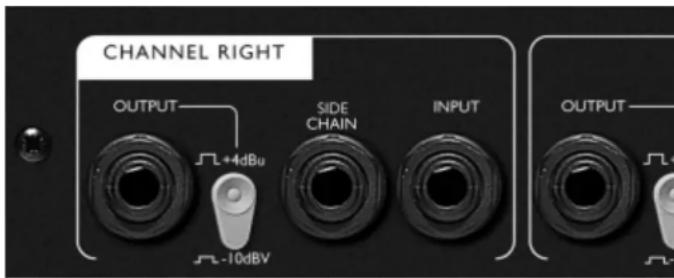
The Penta™ features left and right line level stereo (balanced) TRS inputs, with a nominal sensitivity of +4dBu. These inputs may also take mono (unbalanced) TRS connectors. The corresponding line level outputs will take mono (unbalanced) or stereo (balanced) TRS connectors, operating at either +4dBu, (to match professional equipment with balanced outputs such as mixing consoles or professional recorders,) or -10dBV (to match semi-professional or consumer equipment such as some DAT recorders or sound modules). +4dBu sensitivities require connection via stereo TRS connectors for balanced operation, -10dBV sensitivities may use either mono (unbalanced) or stereo (balanced) TRS connectors. For guidance on wiring up balanced and unbalanced connections see Connectors diagram.

text_image
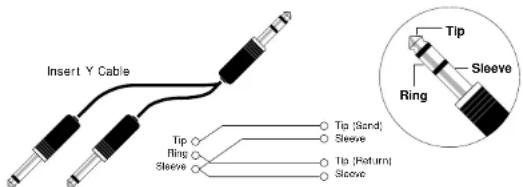
CHANNEL RIGHT OUTLINE OFF CHANNEL LEFT OUTLINE CHANNEL LEFT OFF CHANNEL LEFT OUTLINE CHANNEL LEFT OUTLINE CHANNEL LEFT OUTLINE CHANNEL LEFT OUTLINE CHANNEL LEFT OUTLINE CHANNEL LEFT OUTLINE CHANNEL LEFT OUTLINE CHANNEL LEFT OUTLINE CHANNEL LEFT OUTLINE CHANNEL LEFT OUTLINE CHANNEL LEFT OUTLINE CHANNEL LEFT OUTLINE CHANNEL LEFT OUTLINE CHANNEL LEFT OUTLINE CHANNEL LEFT OUTLINE CHANNEL LEFT OUTLINE CHANNEL LEFT OUTLINE CHANNEL LEFTThe Penta's compressor features side chain inserts for each channel. They require a 'Y' cable with a stereo (balanced) TRS connector at one end (to be connected to the side chain insert), and two mono (unbalanced) TRS connectors at the other end to be used as send and return connections for an external device. The returns may also be used on their own to feed an external signal into the side chain for creative purposes (e.g. ducking).
In addition to the analogue outputs, a high quality 128 times oversampled 24 bit stereo digital output (64 times oversampled at higher rates) may be fitted as an option. Rear panel switches select a sample frequency of 44.1, 48, 88.2 or 96 kHz. The output may be synchronised to an external wordclock if required via the BNC connector.
Digital output format is SPDIF on an RCA phono connector.
FACILITIES AND CONTROLS
POWER – turns the unit on and illuminates the blue 'ON' LED. We recommend that the unit is turned on before connecting to any equipment that it is feeding, to avoid clicks or thumps which may harm output devices. It is best to allow the unit to stabilise for a couple of minutes before use to ensure that internal circuitry is properly initialised.
Discrete Transistor Input Stage
This part of the unit is a preamplifier, for matching the level of a choice of incoming signals to the internal working level of the compressor section which follows.
M I C /IN S T S W I T C H – this is used to select the front panel inputs (mic and instrument) instead of the rear (line) inputs. When switched in, either the mic or instrument input may be used (see below). When released, only the rear panel LINE INPUTs are selected. If a microphone and instrument are connected simultaneously, the instrument input will override the mic input.
INSTRUMENT INPUT - this is the mono instrument input and feeds the left channel only. This is a high impedance input that allows you to connect an electric guitar or bass without loading the pickups, and without the need for a DI box. A synth with a low output may also be connected here. This input is only active when MIC/INST is pressed.
MIC INPUT - this is the mono microphone input and feeds the left channel only. The input is only active when MIC/INST is pressed. Inserting a jack in the INSTRUMENT INPUT automatically disconnects the MIC input.
+4 8 V - this provides +48V phantom power for condenser mics when pressed. The other inputs are not affected by this switch. If you are unsure whether your microphone requires phantom power, refer to its handbook, as it is possible to damage some microphones by providing phantom power.

text_image
Focusrite® INC INPUT +80V INPUT LEVEL 1 2 3 4 5 6 7 8 9 10 11 12 13 14 15 16 17 18 19 20 21 22 23 24 25 26 27 28 GAIN REDACTION COMPRESSOR HARDEN CAN MATO ATTACK RELEASE TUBE SCAND OUTPUT LEVEL OSC OSC -1 -2 -3 -4 -5 -6 -7 -8 -9 -10 -11 -12 -13 -14 -15 -16 -17 -18 -19 -20 RISKY HOODRY PAGE LOCK PAGE WIDTH STRAW POWER FLATMLA PENTA FRESH STEREO COMPRESSORPHASE ( ) — reverses the phase of the signal from the mic input. This may be necessary when wiring polarity is incorrect, or when using two microphones (one of which is connected through the Penta ^tw ), picking up the same source but at different distances from it. This may cause phase cancellation, and pressing the PHASE switch may rectify the problem.
HPF ( ) - is a High Pass Filter which removes unwanted low frequencies such as 'proximity effect', where bass frequencies are over emphasised as a result of close-miking, or stage rumble received through the mic stand.
INPUT GAIN - sets the level of the incoming signal from the selected input, starting with the INPUT GAIN control fully anticlockwise. Connect a signal source to the unit and slowly increase the control until the input level peaks at the -2dB LED on the input level meter. The O/L (overload) LED may light briefly on peaks in the signal, but if the O/L LED stays on continuously for any period, or you hear the unit distort during loud peaks, you should reduce the setting of the INPUT GAIN control.
OPTICAL COMPRESSOR
The Penta's compressor uses opto technology which gives more pleasant distortion characteristics than low-cost, VCA-based compressors.
The Penta ^™ provides 16 preset compressor settings which will be ideal to use unchanged in many instances, or may be used as starting points for individual settings for particular applications. The six variable controls should initially be set at the centre detent position for correct recall of the preset settings.
(Note that the control positions do not refer to absolute values. These values change depending on the individual preset selected, and the controls provide +/- adjustment of each stored setting).
Each control may then be adjusted (if necessary) to suit the particular application. Until you are familiar with the Penta™, start adjustments with the COMPRESSION and MAKEUP GAIN controls only, leaving the other controls at the centre positions. Then explore the effect of the other controls until you achieve the desired result.
All compressor controls operate on both channels simultaneously. However if using the MIC or INSTRUMENT INPUT the signal will only pass through the left channel.
COMPRESSOR IN – activates the compressor. When the switch is released the Compressor is bypassed, but the compressor settings are retained, allowing simple comparison of compressed/uncompressed signals.
PRESET COMPRESSOR SELECT – selects the chosen preset for the compressor. The buttons scroll the selection continuously (i.e. to get from preset 1 to 16, just press the left button once).
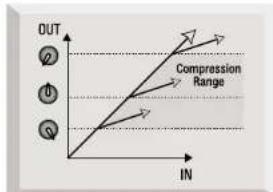
COMPRESSION – sets the threshold i.e. how much of the signal is affected by the compressor. Turning the control clockwise will increase the amount of the signal that the compressor affects – giving more compression. Turning the control anticlockwise will decrease the amount of the signal that the compressor affects – giving less compression.
text_image
OUT Compression Range INMAKE UP GAIN - The act of compressing makes loud signals quieter to reduce the dynamic range, producing an overall reduction in level. The MAKE UP GAIN control allows you to restore the signal peaks back to their original level.
If you increase either or both of the COMPRESSION and RATIO controls you will probably have to increase the MAKE UP GAIN control and vice versa. As a general rule, adjust the MAKE UP GAIN control whilst switching the compressor in and out and watching the OUTPUT LEVEL meter. The MAKE UP GAIN will be set correctly when the level shown on the OUTPUT LEVEL meter is the same whether the compressor is switched in or out.
RATIO - determines the amount of compression applied to the signal with increasing input, and is the ratio of change in input level compared to change in output level. Higher RATIO settings will produce more noticeable compression; for less obtrusive results, lower RATIO settings should be used.
SOFT KNEE - provides a smoother start to compression when pressed, for instances where more subtle compression is required. With the switch released, hard knee compression occurs, causing more noticeable compression. Some presets automatically set store in its memory whether this function was switched long as the unit remains powered up) so that you can change this switch each time. The switch illuminat active.
line
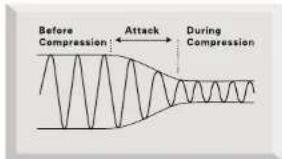
| In | Out | |---|---| | Low Ratio | 1:1 | | High Ratio | 1:1 |A T T A C K – alters the time taken for the compressor to react to a signal. For some instruments (such as drums or guitars) you may want the compressor to react more slowly so that the attack (or transient) of a note is not compressed, as compression can cause the attack of a note to sound “oversquashed.”
With other instruments (such as some synth sounds) you may be less concerned about the attack of a note and may want more even compression. In this case you may want a slightly quicker attack response from the compressor.
Note: The presets have been designed to automatically set an appropriate attack time so it may not be necessary to alter this control from its centre-detented position.
text_image
Before Compression Attack During Compression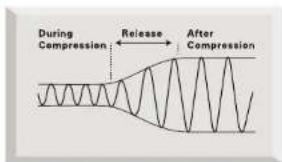
text_image
During Compression Release After CompressionRELEASE – determines how quickly compression dies away once the level of the source signal has fallen below the threshold at which the compressor reacts. When in the clockwise position the compression releases very quickly, which may be appropriate on rapidly varying signals to avoid compressing the beats that follow. However, note that this can result in distortion on more sustained material. Slower release times give a smoother effect, but at the same time may result in audible "pumping".
Note: The presets have been designed to automatically set an appropriate release time so it may not be necessary to alter this control from its centre-detented position.
In – switches the TUBE SOUND control into the compressor. Some presets automatically select this function. Also, the Penta ^™ will store in its memory whether this function was switched in the last time each preset was used (as long as the unit remains powered up) so that you can switch between presets without having to change this switch each time. The switch illuminates to show when this function is active.
TUBE SOUND – the Penta™ contains circuitry which simulates the warmth normally associated with tube or tape distortion, and this control adjusts the amount of tube style warmth added to the signal. This control is particularly useful for adding character when recording onto a digital medium. Rotating the control anti-clockwise reduces the amount of tube style warmth, and rotating the control clockwise increases the amount of tube style warmth.
GAIN REDUCTION METER - shows how many dB of gain reduction the compressor is causing. The more gain reduction, the more heavily you are compressing and vice-versa. This meter is a useful guide to how much MAKE UP GAIN may be required to restore the original overall signal level.
PRESET COMPRESSOR SELECTIONS
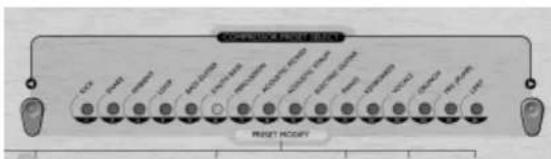
The PRESET COMPRESSOR SELECT switches provide a choice of built-in compressor settings which may be used as simple presets, or which may be used as a starting point for creating individual settings for particular applications. The preset selections are as follows:
Kick - Purely compression, with a light bottom end, suitable for kick drum. Use the ATTACK control to vary the amount of punch.
text_image
PUBST HODRY PUBST HODRYSnare - Control, but with lots of 'front', taming any wild dynamics on a real snare.
Add more COMPRESSION to make ghost notes more audible.
Use the ATTACK control to vary the 'crack' of the drum.
Set a slower RELEASE will increase the ringing overtones of the drum.
A mblent – Use with live drums or instruments to enhance natural room ambience, or to get the best sound from digital reverb.
Loop - Add punch to sampled drum loops and electronic sounds, making them sit in the mix.
Bass Guitar – Creates deep, rounded sounds suitable for evening out dynamic inconsistencies of a bass guitar.
Use a faster ATTACK to get a funky effect when slapping.
Use a slower ATTACK for a punchier bass line.
Vary the TUBE SOUND control to achieve a classic tube bass sound.
Synth Bass - Fat-sounding compression, ideal for synthesiser bass lines. Try using the TUBE SOUND control to create a vintage tube sound.
Percussion – Suitable for making live or acoustic drums and percussion 'pump', whilst taming any wild hits.
Use the ATTACK control to vary the amount of punch.
Use the RELEASE control to vary the 'pumping' of the drums.
Acoustic Picked - Smooth compression that gives a controlled yet dynamic response suitable for picked acoustic guitar.
Increase the COMPRESSION (and MAKE UP GAIN) to reduce the dynamic range of the guitar if it still doesn't 'sit' well in the mix.
Try varying the amount of TUBE SOUND to give more character to the guitar
Acoustic Strum – Clean and crisp, with a touch of warmth suitable for strummed acoustic guitar.
Try varying the amount of TUBE SOUND to give more character to the guitar.
Using a slower attack time will make the guitar sound crisper.
Electric Guitar - Perfect for smoothing out an electric guitar. When compressing a distorted electric guitar, use the compressor before the distortion effect, as distortion will compress a signal.
Try using the TUBE SOUND function to create a vintage tube sound.
Piano – Warm, smooth compression, suitable for controlling a piano, whilst helping it poke through the mix.
Keyboards – Warm compression, ideal for keyboards and pads. If recording in stereo, try increasing the stereo width using the IMAGE WIDTH control.
Vocals – Smooth, controlled and clean compression, for male or female vocal recording. Try using the TUBE SOUND control to give a vintage tube-style warmth to the vocal.
Crunch - An essential setting to make big drum loops really pump.
Use the ATTACK control to vary the amount of punch.
Use the RELEASE control to vary the 'pumping' of the drums.
M ix (P u m p) – The classic loud, pumping, and full-on mastering compression setting. Use the RELEASE control to vary the 'pumping' of the mix.
Limit - High threshold and ratio help to prevent overloading the inputs of any device placed directly after the Penta™. Set the COMPRESSION control so that only the loudest signal peaks are compressed. Compressing slightly more than just the loudest peaks (and increasing the MAKE UP GAIN) will make the overall source mix sound louder.
OUTPUT
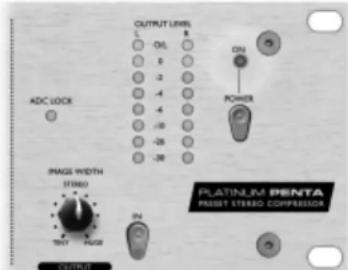
IMAGE WIDTH – allows the apparent width of the stereo image to be increased to make the sound more spacious, or to be reduced to give a tighter image. The WIDTH control
works by analysing the difference between the left and right signals and then amplifying ('Huge'), or reducing ('Tiny'), the difference.
Note: Only use this function when you have a stereo signal applied to BOTH line inputs on the rear of the unit. When using mono signals ensure that the IN switch is released to bypass the IMAGE WIDTH control.
IN - switches the image width control in.
OUTPUT METER – shows the
text_image
OUTPUT LEVEL L ONL 0 5 -3 -1 -4 -6 -20 -28 -30 DCN POWER ADC LOCK PAGE WIDTH STREED TNTY FLOOR IN OUTPUT PLATINUS PINTA RESET STREED COMPRESSORlevel of the signal leaving the Penta™. The output level should peak at 0dB in order to obtain the best performance from the Penta™ and any equipment that follows. If the O/L LEDs light, this means that the output is being overloaded. Under these conditions there may be severe distortion, particularly when feeding external digital equipment or the optional Digital Output.
ADC LOCK (applies to digital option only) – When the Penta ^™ is locked to an external clock source, the ADC LOCK LED will light to indicate correct operation. The ADC LOCK LED should be continuously lit – if this flickers it indicates bad jitter on the synchronising signal which will require investigation.
DIGITAL OUTPUT
In addition to the analogue outputs, a high quality 24 bit 128 times oversampled Digital Output may be fitted as an option, which can operate at sample frequencies from 44.1kHz to 96kHz. All of the following functions are available on the rear panel:
SPDIF OUTPUT - This 24 bit output is SPDIF format on an RCA phono connector. If 16 bit resolution is required, the receiver should dither the 24 bit signal to achieve 16 bit performance.
SAMPLE FREQUENCY - two switches give a choice of four sample frequencies as marked on the rear panel. The left hand switch selects between 44.1kHz (switch out) and 48kHz (switch in), and the right hand switch doubles the selected frequency.
EXT WCLK (WORD CLOCK) INPUT - if an external wordclock source is fed to the BNC connector, the Penta™ will attempt to synchronise to it. When the unit is correctly locked to the external clock source the ADC LOCK LED will light to indicate correct operation. In this case the ADC LOCK LED should be continuously lit - if this flickers it indicates bad jitter on the synchronising signal which would need investigation.
text_image
CHANNEL RIGHT OUTPUT L+4dBu SIDE CHAIN INPUT L-10dBV OUTPUTFREQUENTLY ASKED QUESTIONS
1. Q. My Penta ^™ gets quite hot when in use. Should I be worried about this?
A. No. This is a result of the high-quality Class A circuitry inside your Penta™ and should not be a problem. As a precaution, it is wise to rack hotter units lower down your rack than cooler units (see Q.2.) If space is available, fit a blank panel between units to allow extra ventilation.
2. Q. Where in my rack should I put my Penta ^™ ?
A. It is generally a good idea to place hotter units lower down your rack. This is because the air that is heated from each unit in the rack will rise to the top of the rack, placing the uppermost units in a hotter environment. Therefore, a hot unit at the top of a rack will get even hotter.
3. Q. What is the difference between +4dBu and -10dBV?
A. These are different signal operating levels. +4dBu usually refers to professional equipment and -10dBV usually refers to semi-professional equipment. It is important to make sure that any two or more devices connected to each other are operating at the same signal level. The +4dBu/-10dBV switches on the rear of the Penta ^™ allow you to use the Penta's outputs at either operating level.
eg. If the +4dBu output of a device feeds the -10dBV input of another device, this may cause the second device to overload.
Alternatively, if the -10dBV output of a device feeds the +4dBu input of another device, the second device may have a signal level which is too low (i.e. be too quiet).
-10dBV devices are usually connected by mono TRS connectors. This is known as an 'unbalanced' connection.
+4dBu devices are connected by stereo (balanced) TRS connectors or XLRs and will normally use 'balanced' inputs and outputs.
4. Q. Is the Penta ^™ a mono or stereo device?
A. The Penta ^™ is a stereo device. However it can also be used as a mono device when tracking, either by using the mic or instrument input on the front panel, or by conecting only one of the rear panel Line inputs.
5. Q. What is a 'side-chain'?
A. A side-chain is any signal that controls the action of the compressor. Usually the audio signal is split in two, with one part becoming the side-chain and controlling the compressor, and the other part of the audio signal being treated by the compressor.
A side-chain insert allows much greater creative flexibility than if the audio signal alone is controlling the action. The most common way to use a side-chain is to EQ the part of the audio signal that is sent to the side-chain. Frequencies are either cut in order to stop the compressor reacting to particular frequencies, or boosted in order to make the compressor react more to particular frequencies. This is known as 'frequency-conscious compression'.
6. Q. How might I use the compressor side-chain?
A. The main use of a side-chain insert is to use EQ to make the compressor react differently. For example, if you were putting drums through your Penta™ then you might find that the kick drum is causing the compressor to react the most, causing audible 'pumping' of the drums as the compression level rises after each kick drum and then is 'squashed' again. If this is undesirable, you could use the side-chain EQ to filter off some of the lower frequencies, reducing this effect. (Sometimes this effect is desirable, so you may wish to boost the low frequencies in order to emphasise this effect!)
Note: The side-chain insert on the Penta™ requires the use of a 'Y' cable. This is a cable that splits in two at one end. At the single end should be a stereo jack and at the other end there should be two mono 'send' and 'return' jacks. Connections are shown below:
text_image
Insert Y Cable Tip Ring Sleeve Tip (Sand) Sleeve Tip (Return) Sleeve7. Q. Should I use balanced connectors with my Penta™?
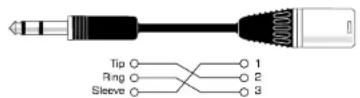
A. The Penta™ may be run balanced or unbalanced, although it is best to use balanced connectors where possible. If you want to connect your Penta™ to a device with XLR connectors, construct or purchase a cable that is wired as follows:
TROUBLESHOOTING
1. No output when using the Line Input.
• Is the POWER switched on?
- Is the MIC/INST switch on the front panel switched out?
- Is the GAIN set correctly (see Facilities and Controls section for details).
2. No output when using the Mic input
• Is the POWER switched on?
- Is the MIC/INST switch on the front panel switched in?
- Is the GAIN set correctly (see facilities and controls section for details).
- Is there a jack inserted in the INSTRUMENT IP? If so, remove it.
- For microphones that require phantom power, is the +48V switch switched in? (if you are unsure whether your microphone requires phantom power, check with the manual for your microphone).
3. No output when using the Instrument Input
• Is the POWER switched on?
- Is the mic/inst switch on the front panel switched in?
- Is the gain set correctly? (see Facilities and Controls section on page 7 for details).
4. The compressor is not working
• Is the COMPRESSOR IN switch pressed?
- Is the input GAIN set correctly? If not set high enough, the signal level may not be high enough to activate the compressor.
- Is the COMPRESSION control set correctly? (If set too low, the input level may not reach the threshold at which compression starts.)
5. The IMAGE WIDTH control is not working
- Is the IN switch pressed?
- Are both line inputs carrying an identical signal? (The IMAGE WIDTH control needs differences between the left and right channel in order to function properly.)
Note: This function should only be used when two signals from a stereo source are applied to the Penta™ via the left and right Line Inputs on the rear panel.
CONTACTING US
If have any questions about your Penta™, or are continuing to have difficulty, mail us for help at tech@focusrite.com, phone +4 4 (0)1 4 9 4 4 6 2 2 4 6, or contact your local distributor (see listing at the back of this manual)

text_image
Focusrite INPUT LEVEL GAIN REDACTION COMPRESSOR HARELL GAIN RATIO ATTACK RELEASE TUBE SCAND OUTPUT LEVEL ACI POWER TRANSFORMER STUDIO TRANSFORMER TRANSFORMER TRANSFORMER TRANSFORMER TRANSFORMER TRANSFORMER TRANSFORMER TRANSFORMER TRANSFORMER TRANSFORMER TRANSFORMER TRANSFORMER TRANSFORMER TRANSFORMER TRANSFORMER TRANSFORMER TRANSFORMER TRANSFORMER TRANSFORMER TRANSFORMER TRANSFORMER TRANSFORMER TRANSFORMER TRANSFORMER TRANSFORMER TRANSFORMEROVER TRANSFORMEROVER TRANSFORMEROVER TRANSFORMEROVER TRANSFORMEROVER TRANSFORMEROVER TRANSFORMEROVER TRANSFORMEROVER TRANSFORMEROVER TRANSFORMEROVER TRANSFORMEROVER TRANSFORMEROVER TRANSFORMEROVER TRANSFORMEROVER TRANSFORMEROVER TRANSFORMEROVER TRANSFORMEROVER TRANSFORMEROVER TRANSFORMEROVER TRANSFORMEROVER TRANSFORMEROVIER TRANSFORMEROVIER TRANSFORMEROVIER TRANSFORMEROVIER TRANSFORMEROVIER TRANSFORMEROVIER TRANSFORMEROVIER TRANSFORMEROVIER TRANSFORMEROVIER TRANSFORMEROVIER TRANSFORMEROVIER TRANSFORMEROVIER TRANSFORMEROVIER TRANSFORMEROVIER TRANSFORMEROVIER TRANSFORMEROVIER TRANSFORMEROVIER TRANSFORMERTOBERG TRANSFORMERTOBERG TRANSFORMERTOBERG TRANSFORMERTOBERG TRANSFORMERTOBERG TRANSFORMERTOBERG TRANSFORMERTOBERG TRANSFORMERTOBERG TRANSFORMERTOBERG TRANSFORMERTOBERG TRANSFORMERTOBERG TRANSFORMERTOBERG TRANSFORMERTOBERG TRANSFORMERTOBERG TRANSFORMERTOBERG Transoformer: 100% Transoformer: 100% Transoformer: 100% Transoformer: 100% Transoformer: 100% Transoformer: 100% Transoformer: 100% Transoformer: 100% Transoformer: 100% Transoformer: 100% Transoformer: 100%ERSTE SCHRITTE
text_image
OUT Compression Range ① ② ③ INtext_image
Before Compression Attack During Compression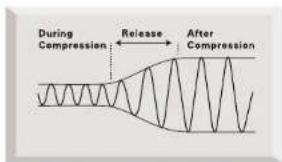
text_image
During Compression Release After Compressiontext_image
OUT Compression Range INtext_image
Before Compression ← Attack → During Compressionline
| In | Out | | --- | --- | | Low Ratio | 1:1 | | High Ratio | 1:1 |PERCHE' COMPRIMERE
Discrete Transistor Input Stage
text_image
OUT Compression Range ① ② ③ INITALIANO
text_image
Before Compression Attack During Compression
text_image
During Compression Release After Compressiontext_image
PUBST RADIY CCT MCC MCC TSS SCL-200 SCL-201 SCL-202 SCL-203 SCL-204 SCL-205 SCL-206 SCL-207 SCL-208 SCL-209 SCL-210 SCL-211 SCL-212 SCL-213 SCL-214 SCL-215 SCL-216 SCL-217 SCL-218 SCL-219 SCL-220 SCL-221 SCL-222 SCL-223 SCL-224 SCL-225 SCL-226 SCL-227 SCL-228 SCL-229 SCL-230 SCL-231 SCL-232 SCL-233 SCL-234 SCL-235 SCL-236 SCL-237 SCL-238 SCL-239 SCL-240 SCL-241 SCL-242 SCL-243 SCL-244 SCL-245 SCL-246 SCL-247 SCL-248 SCL-249 SCL-250 SCL-251 SCL-252 SCL-253 SCL-254 SCL-255 SCL-256 SCL-257 SCL-258 SCL-259 SCL-260 SCL-261 SCL-262 SCL-263 SCL-264 SCL-265 SCL-266 SCL-267 SCL-268 SCL-269 SCL-270 SCL-271 SCL-272 SCL-273 SCL-274 SCL-275 SCL-276 SCL-277 SCL-278 SCL-279 SCL-280 SCL-281 SCL-282 SCL-283 SCL-284 SCL-285 SCL-286 SCL-287 SCL-288 SCL-289 SCL-290 SCL-291 SCL-292 SCL-293 SCL-294 SCL-295 SCL-296 SCL-297 SCL-298 SCL-299 SCL-300text_image
CHANNEL RIGHT OUTPUT FLOOD INT CHANNEL LEFT OUTPUT FLOOD INT CHANNEL LEFT OUTPUT FLOOD INT CHANNEL LEFT OUTPUT FLOOD INT CHANNEL LEFT OUTPUT FLOOD INT CHANNEL LEFT OUTPUT FLOOD INT CHANNEL LEFT OUTPUT FLOOD INT CHANNEL LEFT OUTPUT FLOOD INT CHANNEL LEFT OUTPUT FLOOD INT CHANNEL LEFT OUTPUT FLOOD INT CHANNEL LEFT OUTPUT FLOOD INT CHANNEL Lefttext_image
OUT Compression Range INtext_image
Before Compression Attack During Compression
text_image
During Compression Release After Compressiontext_image
Insert Y Cable Tip Ring Sleeve Tip [Sand] Sleeve Tip [Return] SleeveThe Preset Compressor Selections store COMPRESSION (Threshold) and RATIO settings for each selection, and may also store the position of the SOFT KNEE and TUBE SOUND switches. Stored settings for each selection are as follows:
| PRESET | COMPRESSION(Threshold, dBu) | RATIO | SOFT | KNEE | TUBE | SOUND |
| Kick 0 2.5 : 1 ✘ | ✗ | |||||
| Snare +3 5 : 1 ✘ | ✗ | |||||
| Ambient +9 5 : 1 ✘ | ✗ | |||||
| Loop +7 7 : 1 ✘ | ✗ | |||||
| Bass Guitar +6 5 : 1 ✘ | √ | |||||
| Synth Bass +11 5 : 1 ✘ | ✗ | |||||
| Percussion +6 8 : 1 ✘ | ✗ | |||||
| Acoustic Picked -2 2.5 : 1 √ | √ | |||||
| Acoustic Strum +3 1.7 : 1 √ | √ | |||||
| Electric Guitar | +2 2.5 : 1 √ | ✗ | ||||
| Piano | +4 2.5 : 1 √ | √ | ||||
| Keyboards | 0 3 : 1 √ | √ | ||||
| Vocals | -4 2.5 : 1 √ | √ | ||||
| Crunch | +5 6 : 1 ✘ | ✗ | ||||
| Mix (Pump) | 0 1.7 : 1 √ | ✗ | ||||
| Limit | +14 | 13 : 1 | ✗ | √ |
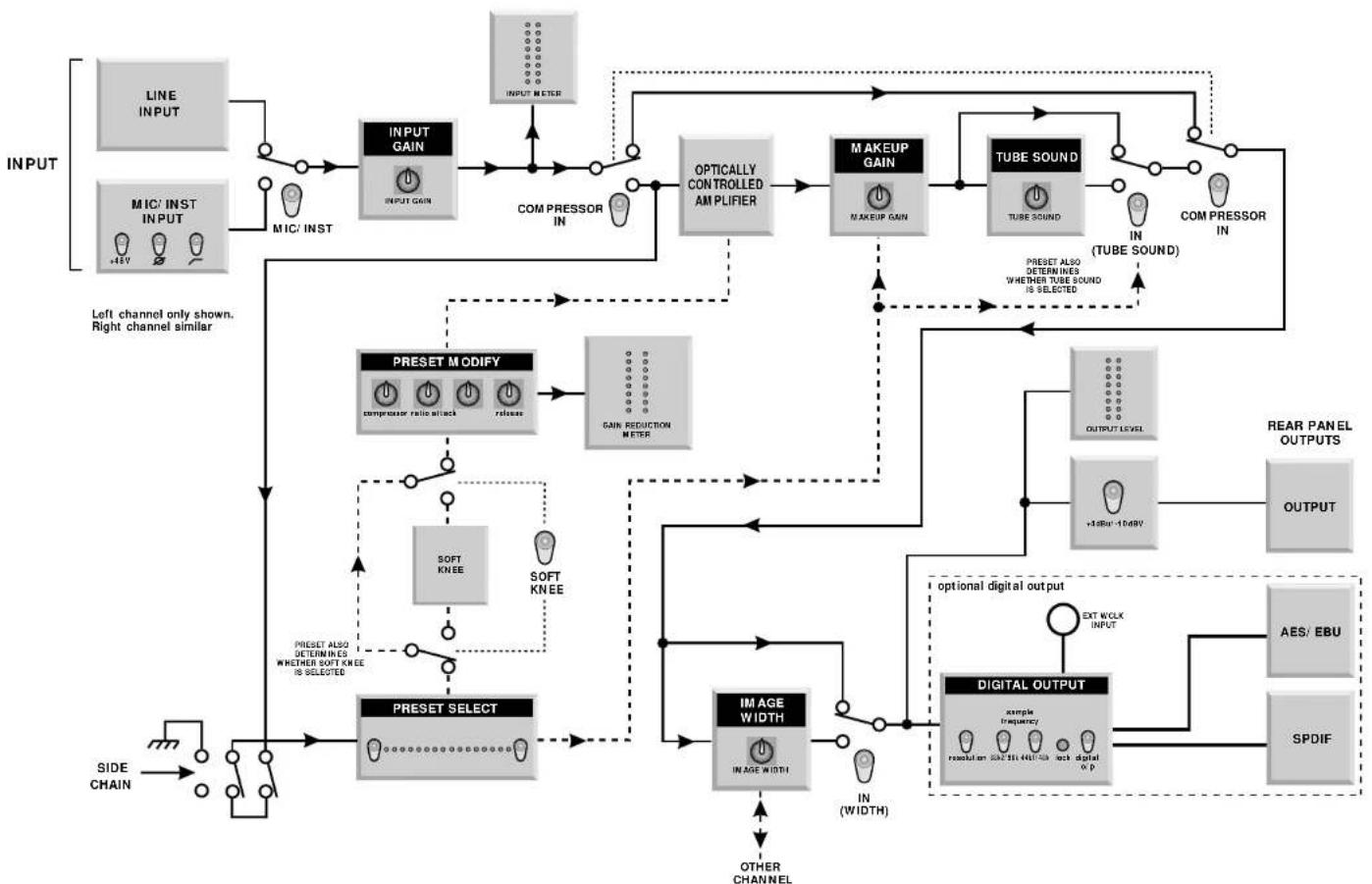
flowchart
graph TD
    A["INPUT"] --> B["LINE INPUT"]
    A --> C["MIC/ INST INPUT"]
    B --> D["INPUT GAIN"]
    C --> D
    D --> E["COMPRESSOR IN"]
    E --> F["OPTICALLY CONTROLLED AM PLIFIER"]
    F --> G["MAKEUP GAIN"]
    G --> H["TUBE SOUND"]
    H --> I["COMPRESSOR IN"]
    I --> J["(TUBE SOUND)"]
    J --> K["OUTPUT LEVEL"]
    K --> L["+1dBu-10dBV"]
    L --> M["OUTPUT"]
    N["PRESSET MODIFY"] --> O["COMPUTER ratio attack"]
    N --> P["RELEASE"]
    Q["SOFT KNEE"] --> R["SOFT KNEE"]
    S["PRESSET SELECT"] --> T["OTHER CHANNEL"]
    U["SIDE CHAIN"] --> V["Side chain"]
    W["LEFT CHANNEL only shown. Right channel similar"] --> D
    X["PRESSET ALSO DETERMINES WHETHER SOFT KNEE IS SELECTED"] --> Y["PRESSET SELECT"]
    Z["IN (WIDTH)"] --> AA["IMAGE WIDTH"]
    AB["OPTIONAL DIGITAL OUTPUT"] --> AC["optional digital output"]
    AD["AES/ EBU"] --> AE["SPDIF"]
    AF["EXT WOLX INPUT"] --> AG["DIGITAL OUTPUT"]
    AH["OTHER CHANNEL"] --> AI["IMAGE WIDTH"]
Australia Electric Factory Pty Ltd
Phone: +61 3 9480 5988
Fax: +61 3 9484 6708
Email: elfa@ozmail.com.au
Austria TC Electronic Austria
Phone: +43 1810 1002
Fax: +43 1810 1001
Email: TCA@tcelectronic.com
Belgium EML
Phone: +32 11 23 23 55
Fax: +32 11 23 21 72
Email: info@eml.be
Canada c/o Digidesign (San Francisco)
Phone: 00 1 650 842 7900
Fax: 00 1 650 842 7999
Email: prodinfo@digidesign.com
Croatia, Slovenia,
Bosnia, Macedonia
and Serbia Music Export
Phone: +49 89 746 123 90
Fax: +49 89 746 123 92
Email: Music.Exports@t-online.de
Cyprus Technosound
Phone: +357 2 499971
Fax: +357 2 499986
Email: technosd@cylink.com.cy
Czech Republic Mediaport
Phone: +420 2 7173 5610
Fax: +420 2 7273 4897
Email: info@mediaport.cz
Denmark New Musik AG
Phone: +45 86 190899
Fax: +45 86 193199
Email: aaudio@intouch.com
Finland Studiotec Ky
Phone: 00 358 9 5123 5330
Fax: 00 358 9 5123 5355
Email: sales@studiotec.fi
France Dynamic Audio
Phone: 00 33 1 48 63 04 43
Fax: 00 33 1 48 63 02 01
Email: infos@dynamicaudio.fr
Germany Total Audio GmbH
Phone: 00 497 531 282 490
Fax: 00 497 531 991 133
Hong Kong/China Digital Media Technology
Phone: 00 852 2721 0343
Fax: 00 852 2366 6883
Email: dmthk@dmtpro.com
Hungary Absolute
Phone: 00 361 252 0196
Fax: 00 361 341 0272
India R & S Electronics
Phone: 00 91 22 636 9147
Fax: 00 91 22 636 9691
Email: randsm@vsnl.com
Indonesia Paradi
Phone: 00 6221 831 8388
Fax: 00 6221 8370 3473
Email: Paradi@cbn.net.id
Israel Sontronics
Phone: 00 972 3 570 5223
Fax: 00 972 3 619 9297
Email: sontmcs@inter.net.il
Italy Grisby Music Professional
Phone: 00 39 0 71 7108471
Fax: 00 39 0 71 7108477
Email: grisbymusic@tin.it
Japan All Access Inc
Phone: 00 81 52 443 5537
Fax: 00 81 52 443 7738
Email: info@allaccess.co.jp
R. O. Maldives Island Acoustics
Phone: 00 960 32 0032
Fax: 00 960 31 8624
islmusic@dhivehinet.net.my
Latin America Digidesign Latin America
Mexico:
Phone: +525 681 7433
Fax: +525 595 4653
Email: pepe@digidesign.com
Brazil and all other Latin American territories:
Phone:
+5511 6331 6726
Fax:
+5511 6336 3811
Email:
Netherlands Total Audio BV
Phone: 00 31 20 4476447
Fax: 00 31 20 4476464
Email: info@total-audio.nl
New Zealand Protel
Phone: 00 64 4 801 9494
Fax: 00 64 4 384 2112
Norway Lydrommet
Phone: 00 47 22 80 94 50
Fax: 00 47 22 80 94 60
Romania A.F. Marcotec (Bucharest)
Phone: 00 40 1 337 1254
Fax: 00 40 1 337 1254
Email: marcotec@arexim.ro
Russia. Baltics.
Ukraine AT Trade
Phone: 00 7 095 956 1105
Fax: 00 7 095 956 6882
Email: alpha-brand@attrade.ru
Singapore/ Malaysia
Services Private Ltd Team 108 Technical
Phone: 00 65 748 9333
Fax: 00 65 747 7273
Email: 108@team108.com.sg
Slovakia
Centron
Phone: +421 7 6478 16
Fax: +421 7 6478 0767
Email: centron@ba.profinet.sk
South Africa Powerhouse Electronics
Phone: 00 27 11 728 3102
Fax: 00 27 11 728 6789
Email: earle@powerhouse-sa.com
South Korea Best Logic Sound Co.
Phone: 00 82 2 515 7385
Fax: 00 82 2 516 7385
Email: bscoltd@hitel.net
Spain Media Sys S.L
Phone: 00 34 93 426 6500
Fax: 00 34 93 424 7337
Email: mediasys@interplanet.es
Sri Lanka HiFi Centre Ltd
Phone: 00 94 1 580442
Fax: 00 94 1 503174
Email: hifi@eureka.lk
Sweden Polysonic ab
Phone: 00 46 31 7069050
Fax: 00 46 31 7069110
Email: polysonic@polysonic.com
Switzerland Bleuel Electronic ag
Phone: 00 41 1 751 7550
Fax: 00 41 1 751 7500
Email: bleuel-elec@swissonline.ch
Taiwan Digital Media Technology
(DMT) (Taiwan) Ltd
Phone: 00 886 2 25164318
Fax: 00 886 2 25159881
Emirates NMK Electronics Ent.
Phone: 00 971 4626683
Fax: 00 971 626682
Email: nmk@emirates.net.ae
United Kingdom
& Ireland Focusrite Audio
Engineering Ltd
Phone: +44 (0) 1494 462246
Fax: +44 (0) 1494 459920
Email: sales@focusrite.com
Website: www.focusrite.com
USA Digidesign (San Francisco)
Phone: 00 1 650 842 7900
Fax: 00 1 650 842 7999
Email: prodinfo@digidesign.com
Vietnam
Phone: 00 84 4 824 3058
Fax: 00 84 4 825 0099
Email: hanoimusic@netnam.org.vn
Other territories not listed:
contact Focusrite United Kingdom.