OctoPre MKII - Audio Equipment FOCUSRITE - Free user manual and instructions
Find the device manual for free OctoPre MKII FOCUSRITE in PDF.


User questions about OctoPre MKII FOCUSRITE
0 question about this device. Answer the ones you know or ask your own.
Ask a new question about this device
Download the instructions for your Audio Equipment in PDF format for free! Find your manual OctoPre MKII - FOCUSRITE and take your electronic device back in hand. On this page are published all the documents necessary for the use of your device. OctoPre MKII by FOCUSRITE.
USER MANUAL OctoPre MKII FOCUSRITE
Important Safety Instructions

CAUTION
RISK OF ELECTRIC SHOCK DO NOT OPEN

CAUTION : TO REDUCE THE RISK OF ELECTRIC SHOCK , DO NOT REMOVE COVER (OR BACK ). NO USE-SERVICEABLE PARTS INSIDE . REFER SERVICING TO QUALIFIED SERVICE PERSONNEL.

The lightning flash with arrowhead symbol, within an equilateral triangle, is intended to alert the user to presence of uninsulated "dangerous voltage" within the product's enclosure that may be of sufficient magnitude to constitute a risk of electric to persons.

The exclamation point within an equilateral triangle is intended to alert the user to the presence of important operation maintenance(servicing) instruction in literature accompanying the appliance.
WARNING : TO REDUCE THE RISK OF FIRE OF ELECTRIC SHOCK, DO NOT EXPOSE THE APPLIANCE TO RAIN OF MOISTURE
Read these instructions.1.
Keep these instructions.2.
Heed all warnings.3.
Follow all instructions.4.
Do not use this apparatus near water.5.
Clean only with dry cloth.6.
-
Do not block any ventilation openings. Install in accordance with the manufacturer's instructions.
-
Do not install near any heat sources such as radiators, heat registers, stoves, or other apparatus (including amplifiers) that produce heat.
-
Do not defeat the safety purpose of the polarized or grounding-type plug. A polarized plug has two blades with one wider than the other. A grounding type plug has two blades and a third grounding prong. The wide blade or the third prong is provided for your safety. If the provided plug does not fit into your outlet, consult an electrician for replacement of the obsolete outlet.
-
Protect the power cord from being walked on or pinched particularly at plugs, convenience receptacles, and the point where they exit from the apparatus. Only use attachments/accessories specified by the manufacturer.11.
Unplug this apparatus during lightning storms or when unused for long periods of time.12.
-
Refer all servicing to qualified service personnel. Servicing is required when the apparatus has been damaged in any way, such as power-supply cord or plug is damaged, liquid has been spilled or objects have fallen into the apparatus, the apparatus has been exposed to rain or moisture, does not operate normally, or has been dropped.
-
GB The apparatus shall be connected to a Mains socket outlet with a protective earthing connection.
FIN
- The apparatus shall not be exposed to dripping or splashing and that no objects filled with liquids, such as vases, shall be placed on the apparatus.
- WARNING - To reduce the risk of fire or electric shock do not expose this apparatus to rain or moisture.
- The appliance coupler is used as the disconnect device, the disconnect device shall remain readily operable.
- No naked flame sources, such as lighted candles, should be placed on the apparatus.
- Do not use a damaged or frayed power cord.
- If the mains plug supplying this apparatus incorporates a fuse then it should only be replaced with a fuse of identical or lower rupture value.
- Use only with the cart, stand, tripod, bracket, or table specified by the manufacturer, or sold with the apparatus. When a cart is used, use caution when moving the cart/apparatus combination to avoid injury from tip-over.

Contents
Introduction....3
Box Contents .... 3
Hardware....4
Back Panel 4
Front Panel....4
Using the OctoPre MkII 5
Combo Inputs 5
Pre-amp Gain 5
Phantom Power 5
Line Outputs 5
Digital Outputs 6
Digital Syncronisation 6
Example Setups....7
Specifications 9
Troubleshooting....10
Thank you for purchasing the Focusrite OctoPre MkII. This unit will provide 8 channels of high quality Focusrite pre-amplifiers for you to use on Microphone, Line and Instrument signals. You can use the OctoPre MkII as part of your studio set-up or live rig. The OctoPre MkII offers 8 direct outputs via the balanced Line outputs to connect to an analogue device, or via a single or dual ADAT connection to a digital device.
If the main User Guide sections do not provide the information you need, be sure to consult http://www.focusrite.com/answerbase, which contains a comprehensive list of common technical support queries regarding the product to date.
Box Contents
Along with your OctoPre Mk II you should have:
1 - IEC power cable
4 - Self-adhesive rubber feet - stick to the bottom of the unit for table-top placement
1 - Registration Card
1 - Focusrite Product Brochure
1 - Novation Product Brochure
Hardware
Back Panel
The Back Panel provides the majority of input and output connections on the OctoPre Mk II.

text_image
CAUTION RIN OF ELECTRIC SODD ON 10/24/2017 AIDS: NOUS OR OCHC ELECTRONIC HA VS CREAM WARNING THIS EQUIPMENT ALIAD ON CHAPES BY THE POWER CONS LATE ON EFFECTIVE SUBHASHATION/DESIGNITIMULS IN AUSTRALYSIS/MANANA APPROVATE HA SPICKLES/ORDER ENGLISH APPROVATE SHALL ANLICUM TELL AHEAD UTOS OFFICIAL OUT Designed in England LINE OUTPUTS 4 35 2 1 Focerta Audio Engineering Ltd. REC/LINE INPUTS1 6 x Combo inputs for Inputs 3 - 8. Mic via XLR or Line via Jack*
2 8 x Line outputs (1 - 8)*
3 2 x Optical output socket **
4 1 x BNC Word Clock input connector
5 1 x IEC Power input socket
* Either 1/4 inch TRS (balanced) or TS (unbalanced) Jack connectors can be used.
** @ sample rates of 44.1 / 48 kHz use output port 1 for 8 channels - ADAT.
@ sample rates of 88.2 / 96 kHz use output port 1 and 2 for 2 x 4 channels - ADAT SMUX.
Front Panel
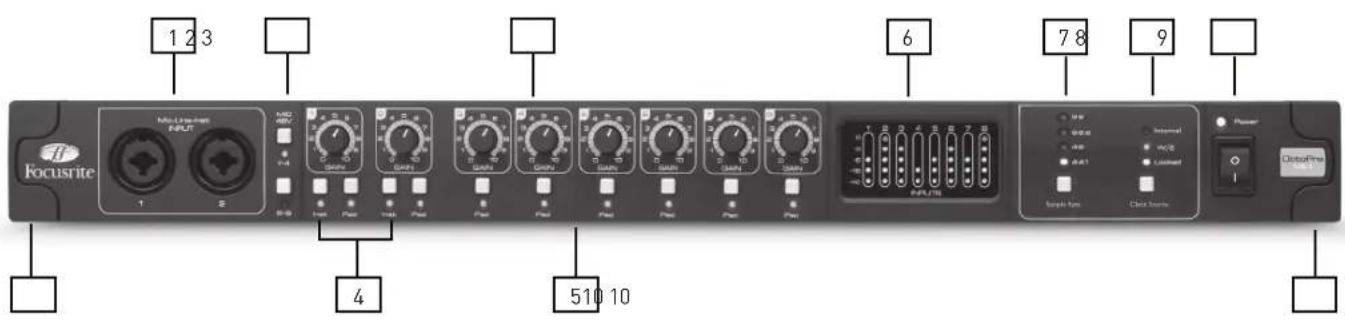
The Front Panel includes the input connectors for Mic, Line and Instrument signals, as well as the input gain controls and monitoring controls.
text_image
1 2 3 Focusrite Mini Linear Input 4 510 10 6 7 8 9 ClosePlus Signal Gain Control Output Signal Gain Control Signal Gain Control Signal Gain Control Signal Gain Control Signal Gain Control Signal Gain Control Signal Gain Control Signal Gain Control Signal Gain Control Signal Gain Control Signal Gain Control Signal Gain Control Signal Gain Control Signal Gain Control Signal Gain Control Signal Gain Control Signal Gain Control Signal Gain1 Channels 1 and 2 with Combo input sockets for Mic / Line / Instrument
2 + 48 V Phantom Power switches with LEDs for Channels 1-4 and 5-8
3 Pre-amp gain control pots for Inputs 1 - 8
4 Instrument switches with LEDs for inputs 1 and 2 LED On - Instrument / LED Off - Line
5 Pad switches with LEDs for inputs 1 - 8 LED On - 9dB Attenuation
6 Separate 5 LED meter for each input channel -42, -18, -6, -3, 0
7 Sample Rate switch with separate LEDs for each sample rate
8 Clock Source switch with separate LEDs for sync source / status
9 Power switch with LED - LED On when the unit receives power and is turned on
10 Removable rack-ear covers - remove to install unit into a 19 inch rack
Using the OctoPre MkII
Combo Inputs
All eight of the audio inputs use Neutrik Combo connectors. These can accept male XLR connectors, TS (un-balanced) and TRS (balanced) jack connectors.
If an XLR cable is used, then the pre-amp will automatically set to microphone level.
If a Jack cable is used, then the pre-amp will be at line level. For instrument signals connected to inputs 1 and 2 use the Inst button to switch to high impedance instrument level.
Pre-amp Gain
The gain of each pre-amp should be set accordingly to the level of the input source. Use the LED metering to monitor the signal level of each pre-amp.
Start with the preamp gain set to minimum. Ask the recording artist to play at the loudest level required by the performance. If the LED metering is already showing a high level, then switch on the Pad for that channel.
Then slowly increase the gain until the signal level reaches orange (-3dB).
Then lower the gain by a few dB.
This should ensure that the signal level is unlikely to ever reach red (0dB) and overload the analogue to digital converters.
Phantom Power
The two phantom power switches turn on +48V phantom power to Mic inputs 1-4 and 5-8. Phantom power is required for most condenser (capacitor) microphones. If phantom power is only sent to the XLR connectors on the combo input, so if a group of 4 preamps is shared between e.g. mic and line level signals, +48V is only sent to the microphones.
Dynamic microphones do not require phantom power, but most will operate with phantom power supplied.
Ribbon microphones do not require phantom power and may be damaged if supplied with phantom power.
If you are unsure about your microphone DO NOT supply phantom power until you have confirmed the specifications with the manufacturer.
Line Outputs
Use the line outputs to connect the OctoPre MkII to the line inputs of any analogue device.
The OctoPre MkII will accept either TS (un-balanced) or TRS (balanced) jacks.
TRS jacks will give a maximum signal level of +16dBu whereas TS jacks will give a maximum level of +10dBu.
Digital Outputs
Use the ADAT output(s) to connect the OctoPre MkII to the ADAT input(s) of any analogue device.
The OctoPre MkII will send 8 channels of audio @ 44.1 / 48kHz via a single optical cable. The same 8 channels is sent out of both optical ports.
The OctoPre MkII will send 4 channels of audio @ 88.2 / 96kHz via a single optical cable. Channels 1-4 and 5-8 are sent out of each optical port.
Use the Sample Rate to select the desired sample rate. You must ensure that the sample rate selected on the OctoPre MkII matches the sample rate set on the receiving digital device.
Digital Synchronisation
There are two synchronisation options available:
OctoPre MkII as Clock Source Master:
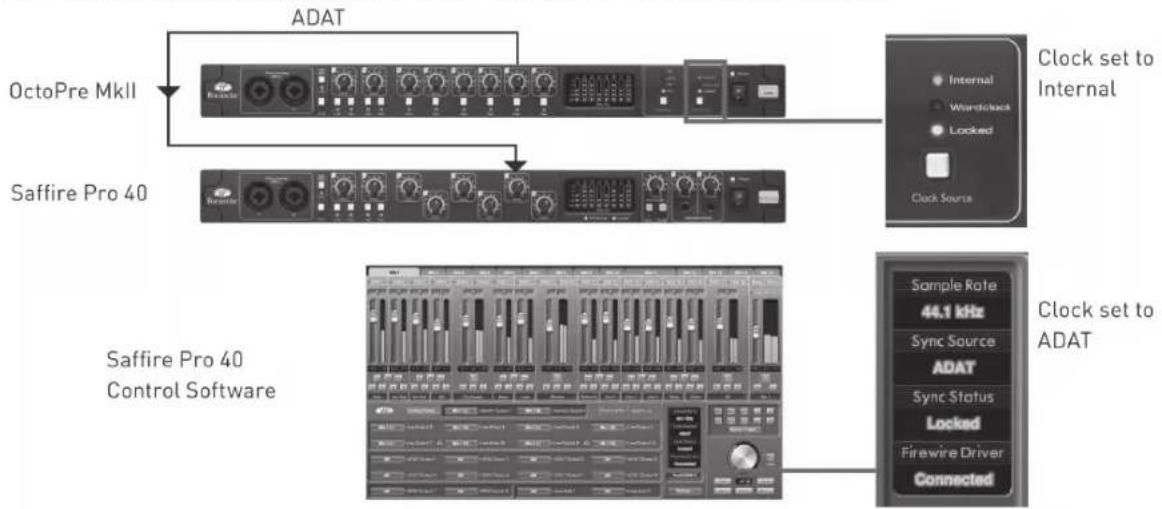
Connect the OctoPre MkII to the digital device via ADAT and ensure that the receiving device is set to receive clock from the ADAT input (also ensuring the sample rates on both devices are matched).
The OctoPre MkII Clock Source should be set to Internal and the Locked LED will light up Green.
OctoPre MkII as Clock Source Slave:
Connect the OctoPre MkII to the digital device via ADAT and connect a BNC cable (from the receiving device or any other device in the digital chain) to the Word Clock input (also ensuring the sample rates on both devices are matched).
The OctoPre MkII Clock Source should be set to Word Clock and the Locked LED will light up Green.
Example Setups
OctoPre MkII with Audio Interface: OctoPre MkII as Clock Source Master
flowchart
graph TD
    A["OctoPre MkII"] --> B["ADAT"]
    C["Saffire Pro 40"] --> D["Clock Source"]
    D --> E["Sample Rate 44.1 kHz"]
    D --> F["Sync Source ADAT"]
    D --> G["Sync Status Locked"]
    D --> H["Firewire Driver Connected"]
    style A fill:#f9f,stroke:#333
    style C fill:#f9f,stroke:#333
    style D fill:#ccf,stroke:#333
    style E fill:#dfd,stroke:#333
    style F fill:#dfd,stroke:#333
    style G fill:#dfd,stroke:#333
    style H fill:#dfd,stroke:#333
Here the OctoPre MkII is connected to a Focusrite Saffire Pro 40. Both units are running at 44.1kHz. The setup will be identical with any other audio interface with an ADAT input.
OctoPre MkII with Audio Interface: Audio Interface as Clock Source Master
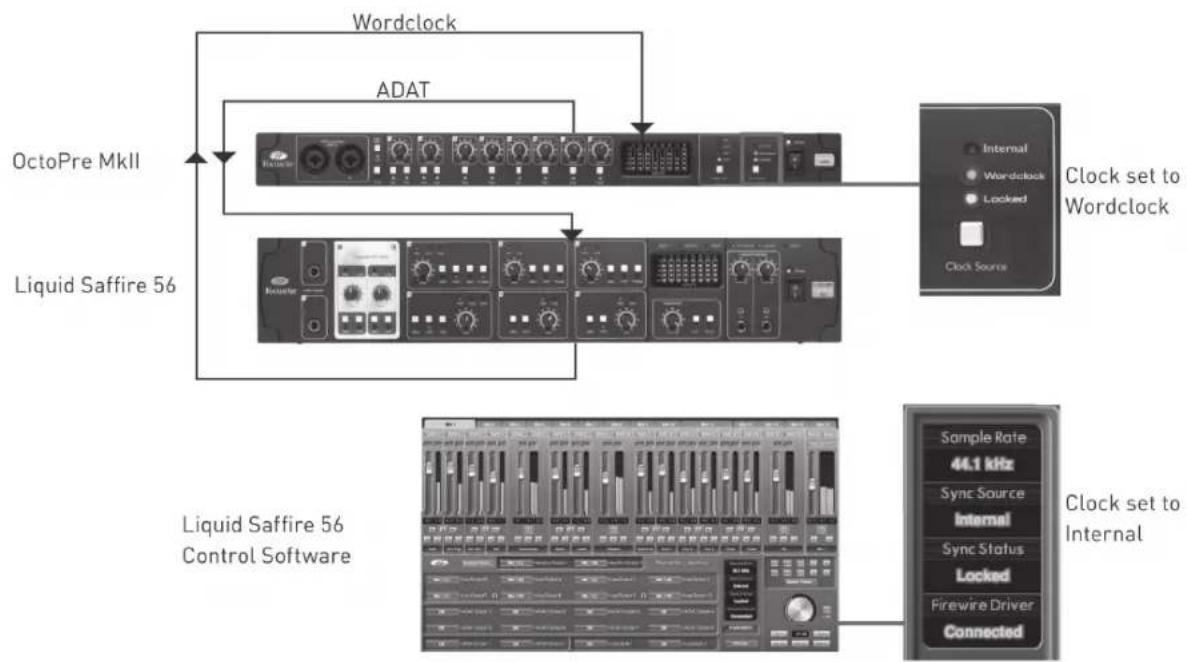
flowchart
graph TD
    A["OctoPre MkII"] --> B["Wordclock"]
    C["Liquid Saffire 56"] --> D["ADAT"]
    D --> E["Clock set to Wordclock"]
    F["Liquid Saffire 56 Control Software"] --> G["Sample Rate 44.1 kHz"]
    F --> H["Sync Source Internal"]
    F --> I["Sync Status Locked"]
    F --> J["Firewire Driver Connected"]
Here the OctoPre MkII is connected to a Focusrite Liquid Saffire 56. Both units are running at 44.1kHz. The setup will be identical with any other audio interface with ADAT input and Wordclock output.
OctoPre MkII with Liquid Saffi re 56 - SMUX mode.
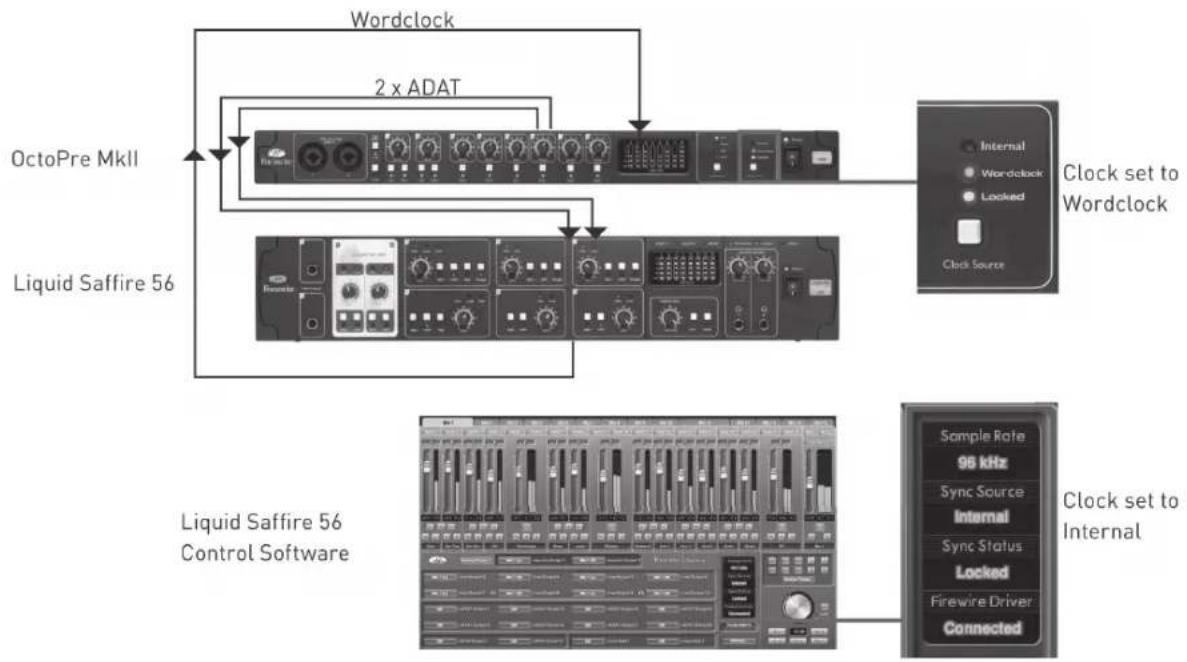
flowchart
graph TD
    A["OctoPre MkII"] --> B["Wordclock"]
    C["Liquid Saffire 56"] --> D["2 x ADAT"]
    B --> E["Clock set to Wordclock"]
    D --> E
    F["Liquid Saffire 56 Control Software"] --> G["Sample Rate 96 kHz"]
    F --> H["Sync Source Internal"]
    F --> I["Sync Status Locked"]
    F --> J["Firewire Driver Connected"]
Here the OctoPre MkII is connected to a Focusrite Liquid Saffire 56. Both units are running at 96kHz. Two ADAT cables are used sending 4 channels of audio each. The setup will be identical with any other audio interface with ADAT input and Wordclock output.
OctoPre MkII with Analogue Mixing Desk
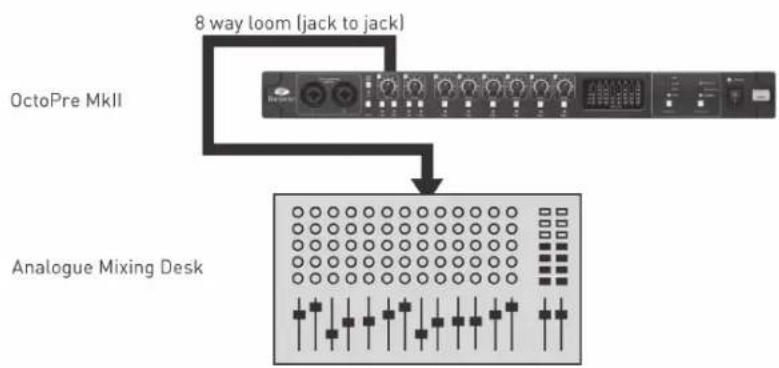
flowchart
graph TD
    A["OctoPre MkII"] --> B["Analogine Mixing Desk"]
    B --> C["8 way loom (jack to jack)"]
Connect the Octopre MkII to any analogue device using 8 TS or TRS jacks.
OctoPre MkII with Analogue Mixing Desk and Digital Record / Backup (44.1 / 48 kHz)
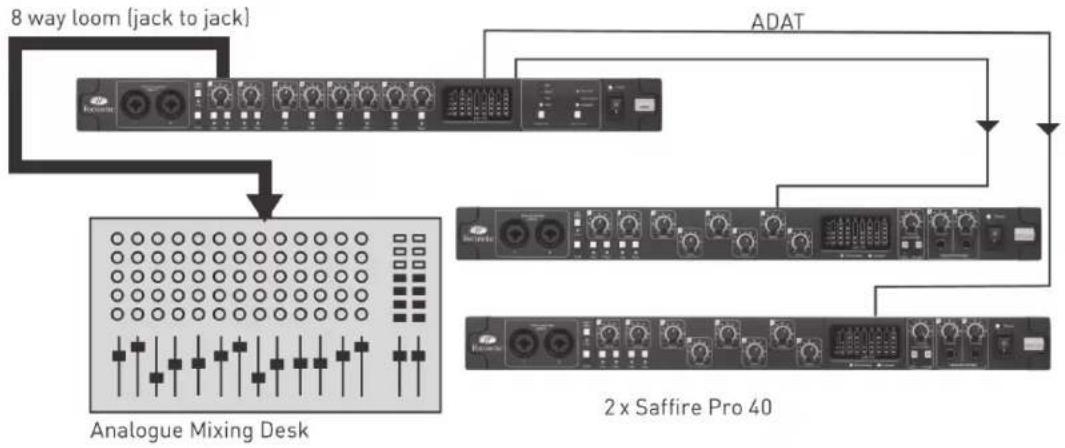
flowchart
graph TD
    A["8 way loom (jack to jack)"] --> B["Analogue Mixing Desk"]
    B --> C["ADAT"]
    C --> D["2 x Saffire Pro 40"]
The OctoPre MkII can output to both analogue and digital devices simultaneously. Here the Line outputs connect to the mixing desk (live monitor), ADAT output 1 to Saffire PRO 40 (record device), and ADAT 2 to the second Saffire Pro 40 (record 2 / backup device).
Note that this will work at sample rates of 44.1 and 48kHz.
At 88.2 and 96kHz the two ADAT cables connect to 1 device (4 channels per cable).
Performance Specifications
MIC
Frequency Response: 20Hz - 20kHz +/- 0.1 dB.
THD+N: 0.001% (measured at 1kHz with a 20Hz/22kHz bandpass filter).
- Noise: EIN >125dB (128dB analogue to digital): measured at \~60dB of gain with 150 Ohm termination (20Hz/22kHz bandpass f)
LINE
Frequency Response: 20Hz - 20kHz +/- 0.1dB.
- THD+N: <0.001% (measured with 0dBFS input and 22Hz/22kHz bandpass filter).
• Noise: -90dBu (22Hz/22kHz bandpass filter).
INSTRUMENT
Frequency Response: 20Hz - 20kHz +/- 0.1dB.
- THD+N: 0.004% (measured with 0dBu input and 20Hz/22kHz bandpass filter).
• Noise: -87dBu (20Hz/22kHz bandpass filter).
DIGITAL PERFORMANCE
- Clock Sources: Internal clock. Sync to Word Clock Input.
• A/D Dynamic Range 110dB 'A-weighted' (all inputs).
- JetPLL™ PLL technology providing superb jitter reduction for class leading converter performance.
• Clock Jitter <250 pico seconds.
• Sample rates: 44.1kHz to 96kHz.
• Sample Rate Clock Accuracy: +/- 20PPM.
WEIGHT and DIMS
Mic / Line inputs on XLR Combo with auto-switching between Mic (XLR) and Line / Instrument (TRS).
Mic / Line / Instrument 1 & 2: 2 x XLR Combo on front panel.
Mic / Line 3-8: 6 x XLR Combo.
Instrument: As above, switched to Instrument (inputs 1 & 2 only).
Mic Gain: +10dB to +55dB.
Line 1-8 Gain: -10dB to +36dB.
Instrument Gain: +10dB to +55dB.
Input Pad on inputs 1-8, \~-10dB.
Phantom power switched in 4 channel groups on Mic. 1-4 and 5-8.
Mic and instrument maximum input level +8dBu (+16dBu with pad on input).
Line maximum input level +22dBu.
ANALOGUE OUTPUTS
Line level 8 x 1/4" TRS Jack.
• Nominal output level 0dBFS = 16dBu, balanced.
• Frequency Response: 20Hz - 20kHz +/- 0.2dB.
- THD+N <0.0010% (-100dB) (measured with 0dBFS input 22Hz/22kHz bandpass filter, un-weighted).
DIGITAL I/O
• ADAT Out 1 & 2: 8 channels (44.1 / 48kHz) 4 channels S-MUX (88.2 / 96kHz, 8 channels total).
POWER
• Internal Universal Input PSU.
FRONT PANEL INDICATORS
• Metering of analogue inputs (channels 1-8), 5 segment (-42, -18, -6, -3 and 0dBFS).
• 4 Sample Rate LED's (44.1k, 48k, 88.2k & 96k).
• 2 Sync Source LED's (Internal, Word Clock).
- 'Lock' Indicator LED.
Troubleshooting
For all troubleshooting queries, please visit the Focusrite Answerbase where there are articles covering numerous troubleshooting examples. www.focusrite.com/answerbase.
E & O.E.
OctoPre MkII
Mode d'emploi
The lightning flash with arrowhead symbol, within an equilateral triangle, is intended to alert the user to presence of uninsulated "dangerous voltage" within the product's enclosure that may be of sufficient magnitude to constitute a risk of electric to persons.

The exclamation point within an equilateral triangle is intended to alert the user to the presence of important operation maintenance(servicing) instruction in literature accompanying the appliance.
WARNING : TO REDUCE THE RISK OF FIRE OF ELECTRIC SHOCK, DO NOT EXPOSE THE APPLIANCE TO RAIN OF MOISTURE