DR 58 - Audio Receiver ALBRECHT - Free user manual and instructions
Find the device manual for free DR 58 ALBRECHT in PDF.


User questions about DR 58 ALBRECHT
0 question about this device. Answer the ones you know or ask your own.
Ask a new question about this device
Download the instructions for your Audio Receiver in PDF format for free! Find your manual DR 58 - ALBRECHT and take your electronic device back in hand. On this page are published all the documents necessary for the use of your device. DR 58 by ALBRECHT.
USER MANUAL DR 58 ALBRECHT
text_image
Diagram of a car interior with labeled navigation and sensor points, including a 12V indicator and a vehicle's front view.natural_image
Simple line drawing of a trash bin with crossed lines indicating no waste or restriction (no text or symbols)service@alan-electronics.de
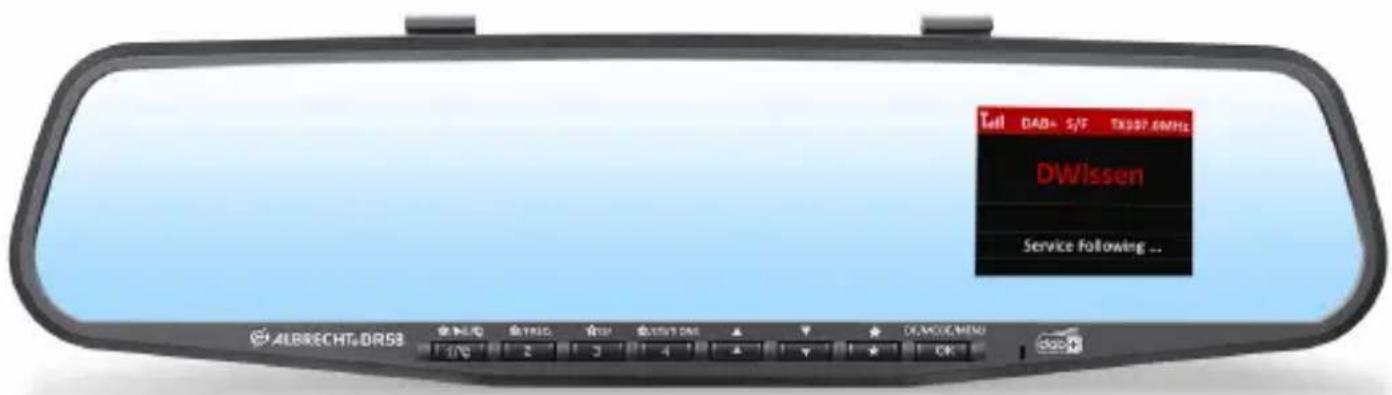
Car radio rearview mirror adapter
text_image
Tull DAD+ S/F TX307.6MHz DWissen Service following ... ALBRECHT&DR53 INTLQ INTLID TIN INT'L DAS 1/2 2 3 4 * DEMOC#NEW OKManual
English
Table of Content
- Main Unit and Accessories: 23
- Control Unit and Connectors 24
- Before first Use: 26
- Installing the DAB+ Antenna....26
- Navigate through menus 28
- Connecting the DR 58 to your Car Stereo 28
6.1. Connecting via FM-Transmitter....28
6.1.1. Automatic frequency selection .....28
6.1.2. Manual frequency selection .....29
6.2. Connection via Audio Cable 29
- DAB+ Mode 30
7.1. Search and Select DAB/DAB+ Channels: 30
7.2. Service Information: DAB+ Mode 30
7.3. DAB Service Following....30
7.3.1. De-/Activate Service Following ....31
7.4. Traffic Announcements....31
7.4.1. De-/Activate Traffic Announcements ....31
7.5. Storing Preset Stations ....31
7.6. Recalling Preset Stations....32
7.7. Remove Preset Stations 32
- Settings....32
8.1. Background and Font Colour: 32
8.2. LCD display Dimmer Control....32
8.3. Display Timeout....32
8.4. Turn off the display....33
8.5. Select Language 33
8.6.Restore Factory Setting 33
8.7. Software Version....33
- Bluetooth Mode ....34
9.1.De-/Activate Bluetooth 34
9.2. Pairing a Phone....34
9.3. Phone Call....35
9.3.1. Output Mode ...... 35
9.4. Bluetooth Music Playback 35
- Aux-In Mode ....36
- Charging USB Devices 36
- Product Specification....37
- Troubleshooting....38
- Safety Instructions....39
- Warranty and Recycling Information ......39
- CE Declaration of Conformity 40
- Service Address 40
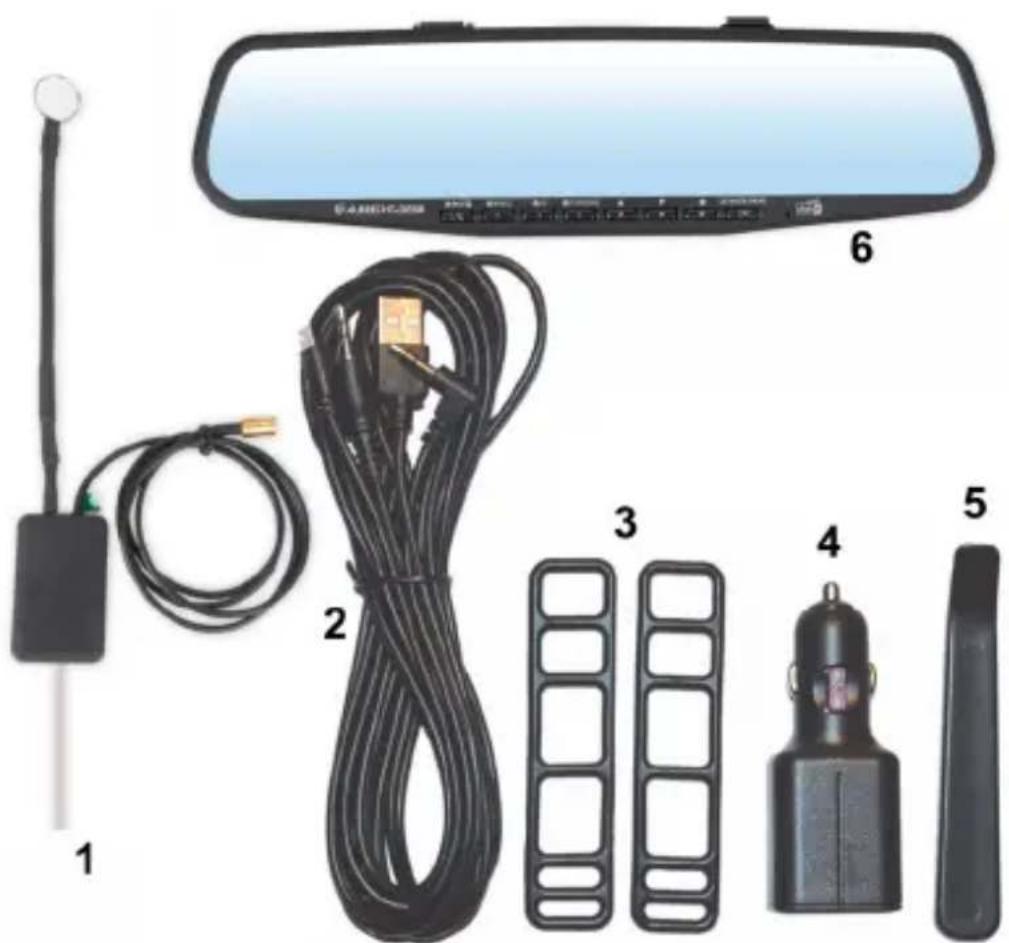
1. Main Unit and Accessories:
- DAB/DAB+ magnetic active antenna for main unit DR 58 rearview mirror DAB+ adapter
- Combined USB power and 3.5mm audio cable, 3m
- Rubber bands for mounting on old rearview mirror
- Dual USB charger for 12/24V
- Installation tool
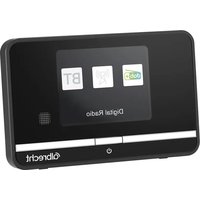
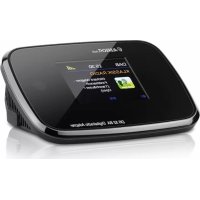
- DR 58 rearview mirror main unit
text_image
Labeled diagram of a car rearview mirror and its components including sensors, cables, and accessoriesNote: All accessories are designed to work specifically with the DR 58. Please do not use third party cables/adapters as these may reduce functions (no reception) and cause warranty invalidation.
2. Control Unit and Connectors
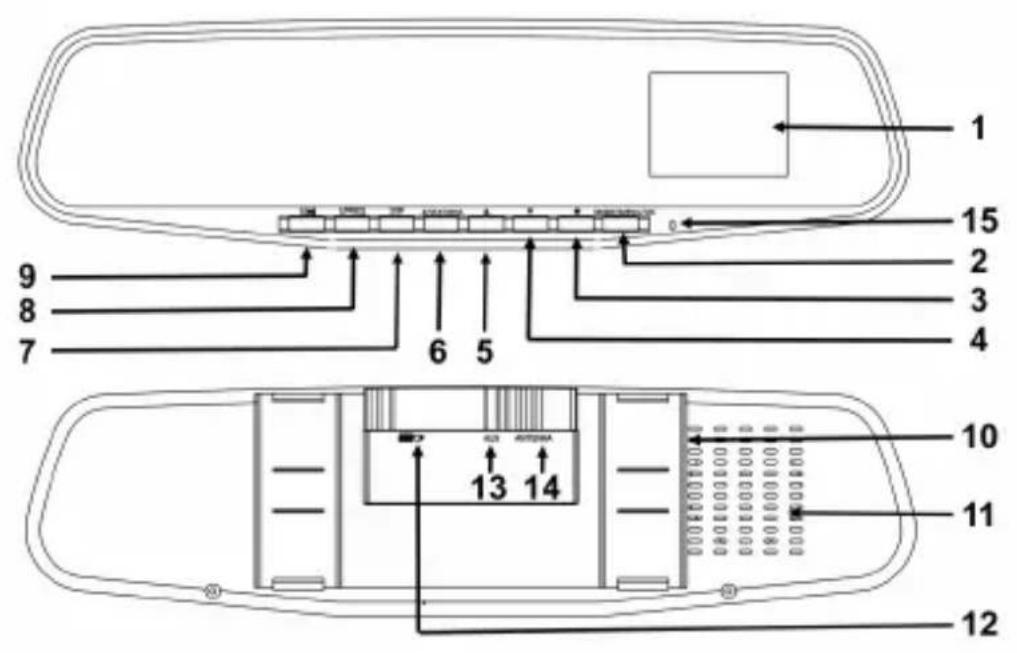
| 1 2.4” TFT colour display | ||
| 2 | OKMODEMENU | short press: confirm your selection / change modelong press: go to main menu |
| 3 |  | short press: go to favourite listlong press: save favourite |
| 4 |  | short press: navigate through menuslong press: turn off backlight |
| 5 |  | short press: navigate through menuslong press: dimmer function |
| 6 |  STATIONS STATIONS | short press: recall favourite #4long press: show station list |
| 7 |  | short press: recall favourite #3long press: Service Follow on/off |
| 8 |  F Q F Q | short press: recall favourite #2long press: change TX frequency / in Bluetooth mode: start pairing mode |
| 9 |  | short press: recall favourite #1in Bluetooth mode:short press: play / pauselong press: turn Bluetooth on/offin Telephone mode:short press: deny calllong press: accept / end call |
| 10 | rubber band to mount on car mirror | |
| 11 | integrated speaker for hands free talking | |
| 12 | DAB/DAB+ antenna socket | |
| 13 | Power supply Micro USB socket | |
| 14 | Aux-In / Aux-Out socket | |
| 15 | Microphone for hands free talking | |
3. Before first Use:
- Mount the DR 58 DAB+ with the rubber bands over the existing rearview mirror in your car.
- Connect one end of the USB power supply cable to the Micro USB power socket at the back of DR 58 and the other end to the dual USB car charger. Plug the dual USB car charger into the car cigarette-lighter socket.
- Connect the supplied antenna to the antenna socket.
- During the start the display will show the Albrecht logo, then the device will automatically scan all the local DAB/DAB+ channels and store them in the memory of the device until another "Auto Scan" is performed. During scanning a status bar will show the progress of the scan.
- Once the scan is completed, you can select any DAB/DAB+ radio channel by pressing ▼▲.
- To change the language of the menus, see chapter „8.5. Select Language“ on page 33
4. Installing the DAB+ Antenna
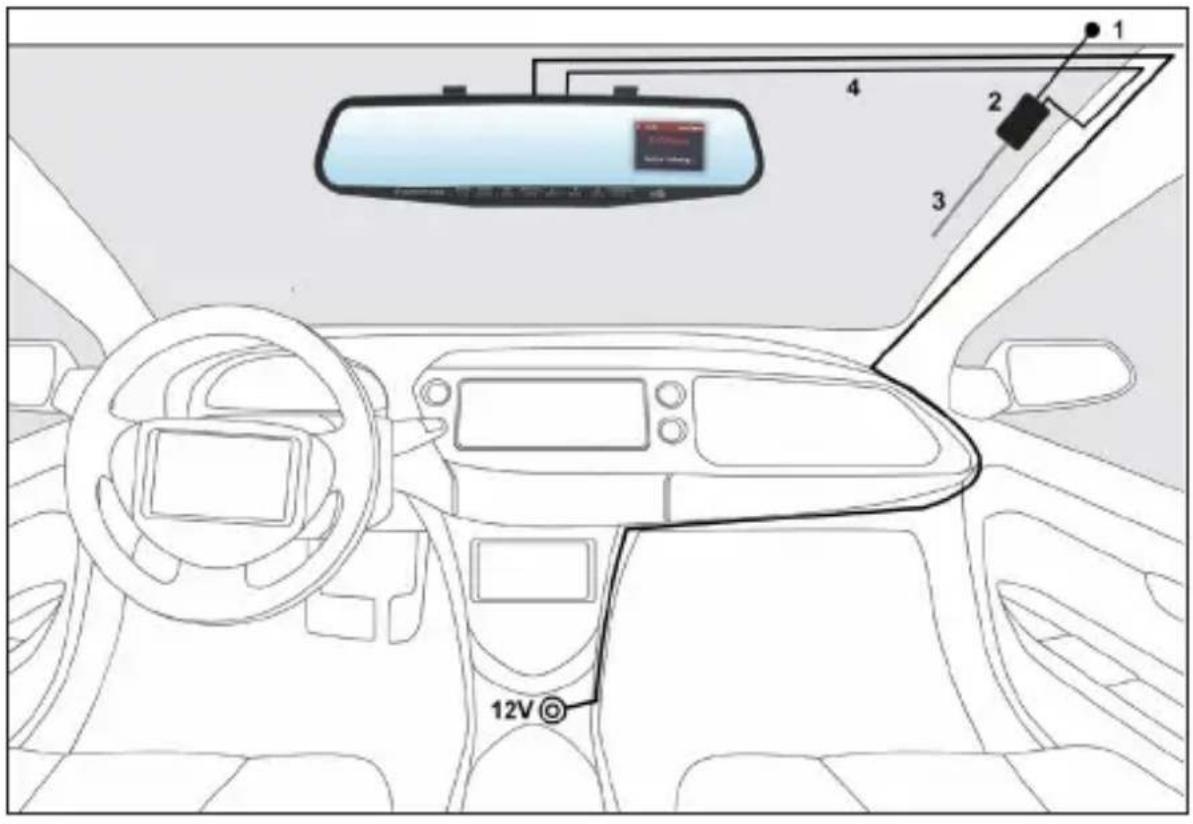
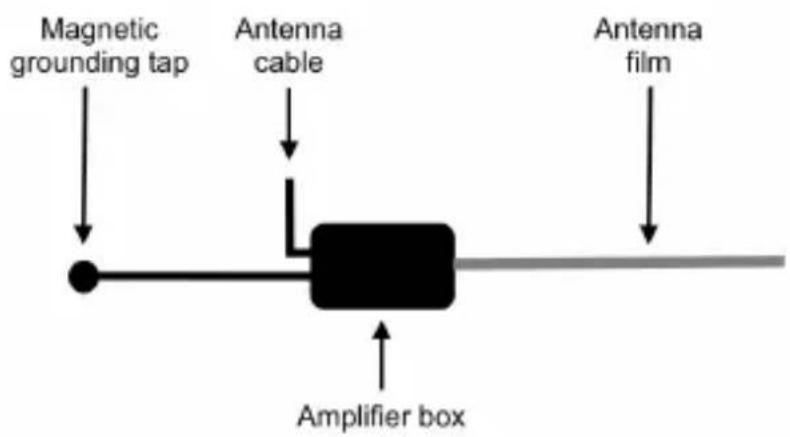
- Gently pull down the car roof liner with the help of the supplied installation tool. Insert the magnetic pad grounding tail and ensure the magnetic pad contacts to the metal roof of the car
- Use a wipe to clean the windscreen. Remove the adhesive backing from the antenna power amplifier box and stick to the window glass. The antenna should be mounted vertically, not horizontally.
- Stick the transparent antenna film to the glass as indicated in the diagram, gently applying pressure to remove any air bubbles.
- Tuck the cable behind the A-Frame and run it to the main unit DR 58
text_image
Diagram of a car interior with labeled navigation and sensor points, including a 12V indicator and a vehicle ahead view.- Do not attach the DAB antenna over heating wires, in a place that obstructs the driver's view, or in a place that can experiences interference from metal.
- Check for metallic heat coating (sun filter) on your car's front window if you are having issues with DAB connectivity. The heat coating or sun filter may have negative impact to the reception performance.
flowchart
graph TD
    A["Magnetic grounding tap"] --> B["Amplifier box"]
    C["Antenna cable"] --> B
    D["Antenna film"] --> B
5. Navigate through menus
At any time you can long press the MENU button to enter the main menu. Use the arrow keys ▼▲ to navigate through all menus. Always use the OK button to confirm your selection. To exit any menu without a selection, press ★r OK in the Station and Favoritelist.
6. Connecting the DR 58 to your Car Stereo
6.1. Connecting via FM-Transmitter
You can choose to set the FM transmitting frequency automatically or manually.
Note: For maximum reception sensitivity certain FM ranges are blocked. These depend on the received DAB stations.
6.1.1. Automatic frequency selection
- Enter the MENU and select Audio Out. Now choose FM Transmitter and confirm your selection.
Note: This is the default configuration, so this step can be skipped upon first use.
- Press and hold FREQ button to show the TX Frequency: xxx.xMHz at the footer and then press and hold FREQ again for 3 seconds to activate the automatic scanning of a “vacant” FM transmission frequency without interference from other channels. The scanning process will take 20-30 seconds. The display is showing “----.MHZ” and stops at a vacant frequency.
- After a “vacant” frequency is found, press OK to confirm the setting or it will automatically confirm after 3 seconds. The selected “vacant” frequency will be shown at the header, e.g. TX 108.0MHz
- Then tune your car FM radio system to match the selected FM transmitting frequency for transmission of the audio sig-
nal from DR 58 to your car stereo audio system.
6.1.2. Manual frequency selection
- Press and hold the FREQ button to enter FM transmitting frequency selection mode.
- Use ▼▲ to select your favourite vacant frequency which you would like to use
- The screen will go back to DAB+ mode automatically after 3 seconds and the selected frequency will be shown at the header, e.g. TX 108.0MHz.
Remarks: “Vacant frequency” means there is no FM radio broadcasting content or noise when the frequency is selected.
6.2. Connection via Audio Cable
- Connect the AUDIO OUT socket of the DR 58 through the supplied 3.5mm audio cable with the line-in socket of your car radio.
- Enter the Menu, select Audio Out and then Aux Out. A headphone icon will be displayed at the header.
Remark: In Aux Out mode, there will be no FM transmission to the car stereo.
7. DAB+ Mode
7.1. Search and Select DAB/DAB+ Channels:
If you are not in DAB+ mode, press the MODE button to change into “DAB+ Radio” mode and select the desired DAB/DAB+ channel. You can also press the STATIONS button to enter the Station list directly.
If you would like to update your current station list, select DAB Autoscan to reactivate the "Auto Scan" process.
Remark: For normal use, you don't have to perform the DAB
Autoscan every time you use the car DAB+ adapter. We suggest to use it to find new stations or if you drive through a different region.
7.2. Service Information: DAB+ Mode
The service information data will be displayed with scrolling text which is being broadcasted from the station.
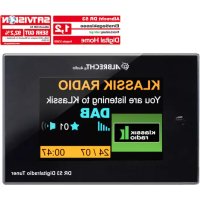
While listening to DAB+, the display will show the following information if applicable
- Channel Name
- Multiplex Name (DLS)
- DAB+ icon
- Signal Strength
• FM Transmitting Frequency - Bluetooth Connection Status
- Audio Out Status
• Service Following status
• Traffic Announcements status
7.3. DAB Service Following
If you leave the broadcast area of the station you are listening to, Service Following searches if the same station is broadcasted in
the new area as well and switches the frequency automatically.
7.3.1. De-/Activate Service Following
In “DAB” mode, press and hold SF button to turn ON the Service Following function. A white “S/F” icon will appear at the header of the display. Repeat the same procedure to turn OFF the service following function.
If the “S/F” icon turns from white to red, it means that the DAB station supports S/F feature and the device has detected it, however, it is not switched over yet. Once it does switch to another region, the S/F icon will turn white again.
Remark: For applications where SF feature is not used, it is recommended to turn off the SF function.
7.4. Traffic Announcements
Traffic Announcement lets you receive traffic announcements automatically, no matter what source you are listening to.
If Traffic Announcement is activated, the DR 58 will switch automatically to DAB mode once a traffic announcement is received independently of which source you are currently using.
7.4.1. De-/Activate Traffic Announcements
Enter the MENU and select in the Traffic Announcement menu
ON or OFF.
To cancel an active traffic announcement, simply press the button. The DR 58 will return to the last played radio station.
7.5. Storing Preset Stations
There are a total of 30 memory slots available. To save your DAB + favorites, proceed as follows:
Select a DAB+ station, press and hold the ★ button to enter the Store Preset Stations mode. Select a number in memory to store your favourite station and confirm with OK. A message Stored Successfully will be displayed.
7.6. Recalling Preset Stations
In DAB mode, press any Preset Buttons ★ on the front of the device to recall your favourite DAB+ preset station. Or press the ★ button to enter the Select Preset Stations list to show all the preset DAB+ stations.
7.7. Remove Preset Stations
To delete all of your favourite DAB+ preset stations, press and hold the MENU button to enter the menu mode, go to Delete All Presets and select YES or NO.
Attention: If YES is selected, then the complete memory will be cleared.
8. Settings
8.1. Background and Font Colour:
The color of the screen background and font can be set to four different combinations:
- White black background / white font
- Orange black background / orange font
- Blue black background / blue font
• Colour black background / colour font
To set the colour, enter the MENU and select Colour Settings.
8.2. LCD display Dimmer Control
When driving at night, you may want to change the brightness level of the colour LCD display. The brightness can be switched between high and low by pressing and holding ▲.
8.3. Display Timeout
Select the menu Display Timeout and choose the time after which the display is switched off.
8.4. Turn off the display
Press and hold the ▼ button to turn off the display. The next time you press any key, the display will turn on again.
8.5. Select Language
Enter the MENU and select Language to choose your preferred language from the list.
Please note all station presets, settings and configurations will be lost after you have performed the "Factory Reset".
Enter the MENU and select YES or NO in the Factory Reset menu.
8.7. Software Version
Select Software Version in the MENU. The current software version of the device will be displayed. Exit by pressing OK again.
9. Bluetooth Mode
In order to connect a Bluetooth phone to the DR 58 both units need to be paired. This only needs to be done during the first connection. Once both units are paired they will automatically connect in the future as soon as they are within Bluetooth range.
Up to eight devices can be paired to the DR 58. If more than one device is in Bluetooth range the DR 58 will connect to the last connected one. If a different phone shall be connected, the Bluetooth on the current phone needs to be disabled manually.
9.1. De-/Activate Bluetooth
In Bluetooth mode press and hold ▶ to toggle between Bluetooth on and off.
The Bluetooth icon in the header bar will indicate the status.
- Icon not visible: Bluetooth off
- Icon flashing: Bluetooth on; not connected
- Icon constantly visible: Bluetooth on; connected
9.2. Pairing a Phone
- Activate Bluetooth by pressing ▶||
- Press and hold FREQ in order to activate pairing mode. The display shows Pairing in Progress.
- Activate Bluetooth on your phone and search for available Bluetooth peripherals.
- Select "CAR DAB" from the list
- Once connection is established the DR 58 screen will show Connected and the Bluetooth icon will be shown constantly in the header.
Remark: the pairing time may take several seconds up to one minute depending on various brands or models of phone.
When asked for a PIN code
If you want to abort Paring in progress, you can always press

button.
9.3. Phone Call
When there is an incoming call, the DR 58 rings with a ringtone, press the button to answer a call.
• Answer a call: press during ringing
- Decline a call: press and hold during ringing
• End a call: press during the call
When the built-in speaker is used for hands free talking the display will show the speaker phone volume and talk time during the call, press ▼▲ to adjust the volume level.
9.3.1. Output Mode
You can output phone calls either via the built-in speaker or the car speakers. When Car Speaker mode is selected, the volume can only be adjusted by the car stereo volume control button.
Press and hold the MENU button and select Hands Free Speaker.
You can now choose between Built-in Speaker or Car Speaker.
9.4. Bluetooth Music Playback
Connected Bluetooth phones can now playback music files on the DR 58 (refer to your phone user guide for more information).
The music will be forwarded to your car stereo either via the FM transmitter or the audio out socket depending on the selected option in the Audio Out menu. For more information see chapter „6. Connecting the DR 58 to your Car Stereo“ on page 28
Press the ▶ button to play or pause the music playback. Press
▼ ▲ to select the previous or next song.
10. Aux-In Mode
To connect an external audio device, such as smartphones/tablets/iPods/MP3 players and the like, proceed as follows:
Select AUX-IN from the MENU. Connect the external audio source to the "AUX" socket on the backside of the DR 58 via the supplied 3.5mm audio cable.
Note: AUX IN can also be selected only if the DR 58 is connected to the car radio via the FM-Transmitter and not via audio cable, see chapter 5.1.
11. Charging USB Devices
Using your mobile phone USB cable and plug the USB connector into the dual USB car charger with 12/24V socket. Connect the other end of the cable to your device and start charging. (Charging Power Output: 5V, 1A, the current is big enough for iPad charging).
12. Product Specification
| 1 Product Model: DR 58 | |
| 2 | Radio format support: DAB/DAB+, FM Transmitter and DAB to DAB Service following |
| 3 D AB+ frequency: Band III (174.00 –240.00MHz) | |
| 4 FM transmission frequency: 87.6—107.9MHz | |
| 5 Bluetooth: Version 4.0 | |
| 6 Speaker phone output: 1.0W, 8Ω | |
| 7 Audio IN: 3.5mm stereo jack | |
| 8 Audio Out: 3.5mm stereo jack | |
| 9 | Power Output : 5V, 1A (charging for iPad2/iPhone/iPod/Android Phone etc.) |
| 10 Power Source: Car Cigarette-lighter Socket (10V- 30V) | |
| 11 Dimension: 318 x 82 x 13 mm | |
| 12 Net weight: 230g ( approx.) | |
*Information of this user manual is subject to change without prior notice.
13. Troubleshooting
Problem: DAB transmission via FM to the car radio is poor, with interference or not working at all.
Please use the supplied USB cable and cigarette adapter. Other cables often do not suppress interferences sufficiently.
Problem: No DAB reception when the DR 58 is connected via the line-in input to the car radio, although the DAB signal strength is good.
Please switch the DR 58 to the AUX OUT mode in the menu ("5.2 Connection via Audio Cable").
Poor DAB reception on some motorways or roads, part 1.
Because the DAB network is not yet fully expanded, this can result in poor reception while driving in some rural areas that are not yet fully developed. Therefore, please test the DR 58 receiver in a better developed area before you send in the device for repair because of faulty reception.
Problem: Poor DAB reception, part 2.
Commercially available USB adapters without interference suppression are certainly suitable for many applications, but not adequate for powerful DAB receivers. Therefore, for optimum reception, use the USB adapter and the cigarette adapter supplied by us which are specifically designed for the DR 58 receiver.
Problem: Poor DAB reception, part 3.
Check whether the supplied DAB antenna was installed exactly as described in the installation instructions and if it is also properly connected to the vehicle ground. Other electronic devices that are not interference suppressed (such as low-cost dash cams), especially in the interior of the vehicle, may interfere with the DAB reception.
14. Safety Instructions
- Do not use this radio in/near water.
- Clean with dry cloth.
- Do not block any ventilation openings.
-
Use only accessories provided by manufacturer.
-
Do not leave your radio where excessive heat could cause damage.
15. Warranty and Recycling Information
We are legally obliged to include disposal and warranty information as well as EU declaration of conformity with the use instructions in different countries for every unit. Please find this information on the following pages.
2-Year Warranty From Date Of Purchase
The manufacturer/retailer guarantees this product for two years from date of purchase. This warranty includes all malfunctions caused by defective components or incorrect functions within the warranty period excluding wear and tear, such as exhausted batteries, scratches on the display, defective casing, broken antenna cable and defects due to external effects such as corrosion, over voltage through improper external power supply or the use of unsuitable accessories. Defects due to unintended use are also excluded from the warranty.
natural_image
Symbol of a trash bin crossed with a diagonal line, no text or labels presentPlease contact your local dealer for warranty claims. The dealer will repair or exchange the product or forward it to an authorized service center.
You can also contact our service partner directly. Please include your proof of purchase with the product and describe the malfunction as clearly as possible.
16. CE Declaration of Conformity
Standards and Regulations
CE Hereby, Alan Electronics GmbH declares that the radio equipment type DR 58 is in compliance with Directive 2014/53/EU. The full text of the EU declaration of conformity is available at the following in-
ternet address: www.alan-electronics.de/download.aspx
WEEE and Recycling
The European laws do not allow any more the disposal of old or defective electric or electronic devices with the household waste. Return your product to a municipal collection point for recycling to dispose of it. This system is financed by the industry and ensures environmentally responsible disposal and the recycling of valuable raw materials.
17. Service Address
Technical Hotline (for units sold in Germany)
Contact our service hotline by phone +49 (0) 6103 / 9481 - 66 (regular costs for German fixed network) or e-mail at
service@alan-electronics.de
Before returning the product, check the chapter „13. Troubleshooting“ on page 38 for some easy steps and tests or contact our hotline.
© 2020 Alan Electronics GmbH
6.4.1. Désactiver/Activer Traffic Announcements....51
8.1. Désactiver/Activer Bluetooth....54
natural_image
Product display of a rear mirror with attached cable, sensor, and terminal components (no text or symbols visible)text_image
Diagram of a car interior with labeled navigation and sensor points, including a 12V indicator and a vehicle's front view.6.4.1. Désactiver/Activer Traffic Announcements
8.1. Désactiver/Activer Bluetooth
natural_image
Simple line drawing of a trash bin with crossed lines indicating no waste or restriction (no text or symbols)service@alan-electronics.de
text_image
DWIS FX167.8MHz DWissen Service Following...Manuale
Italiano