Dolceclima Compact 8 M - Air Conditioning OLIMPIA SPLENDID - Free user manual and instructions
Find the device manual for free Dolceclima Compact 8 M OLIMPIA SPLENDID in PDF.


| Product type | Portable monoblock air conditioner |
| Brand | Olimpia Splendid |
| Model | Dolceclima Compact 8 M |
| Dimensions (W x H x D) | 345 x 703 x 355 mm |
| Net weight | 24 kg |
| Power supply | 220-240 V, 50 Hz (single-phase) |
| Fuse | 3.15 A / 250 V, slow-blow |
| Refrigerant | R290 (flammable), quantity on label |
| Operating modes | Cooling, Dehumidification, Ventilation, Automatic, Night, Timer |
| Temperature range (cooling) | 17 °C to 30 °C (adjustable) |
| Remote control | Infrared, AAA 1.5 V batteries (x2) |
| Special functions | Follow Me, Shortcut, Wi-Fi (depending on model), Auto restart |
| Installation | Portable (with sliding kit) or fixed (hole in wall/window) |
| Filter maintenance | Clean every 250 h; replace additional filter every 500 h |
| Condensate drainage | Internal tank with full level alarm; manual drain |
| Safety devices | Thermal protection, 3 min compressor delay, R290 leak detection |
| Spare parts | Filters, remote control, air hose, sliding kit, condensate tube |
| Repairability | Repair by authorized after-sales service; use of genuine parts mandatory |
| Certifications | Compliant with European standards; R290 gas compliant with environmental directives |
| Operating temperature (cooling) | Indoor: 17-35 °C DB / Outdoor: 16-43 °C DB |
Frequently Asked Questions - Dolceclima Compact 8 M OLIMPIA SPLENDID
User questions about Dolceclima Compact 8 M OLIMPIA SPLENDID
0 question about this device. Answer the ones you know or ask your own.
Ask a new question about this device
Download the instructions for your Air Conditioning in PDF format for free! Find your manual Dolceclima Compact 8 M - OLIMPIA SPLENDID and take your electronic device back in hand. On this page are published all the documents necessary for the use of your device. Dolceclima Compact 8 M by OLIMPIA SPLENDID.
USER MANUAL Dolceclima Compact 8 M OLIMPIA SPLENDID
natural_image
Line drawing of a portable air conditioner unit with ventilation grilles and wheels (no text or symbols)DOLCECLIMA COMPACT M
Caution: risk of fire
natural_image
Illustration of kitchen appliances including a stove, air conditioner, and air purifier with crossed-out lines (no text or symbols)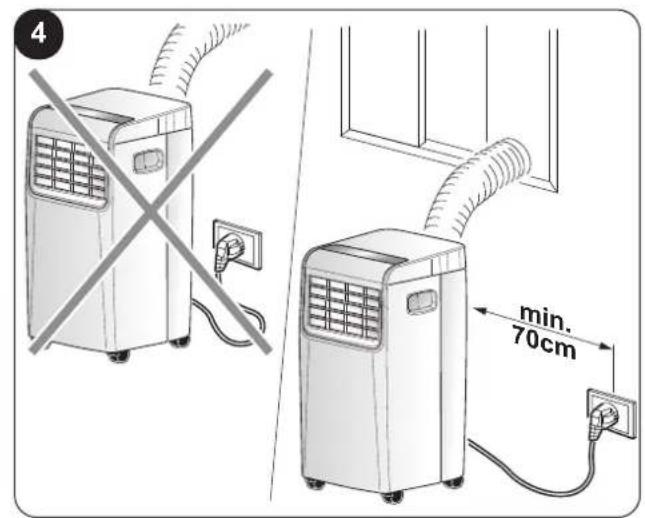
natural_image
Diagram showing two identical air conditioners with a diagonal line crossing, no text or symbols present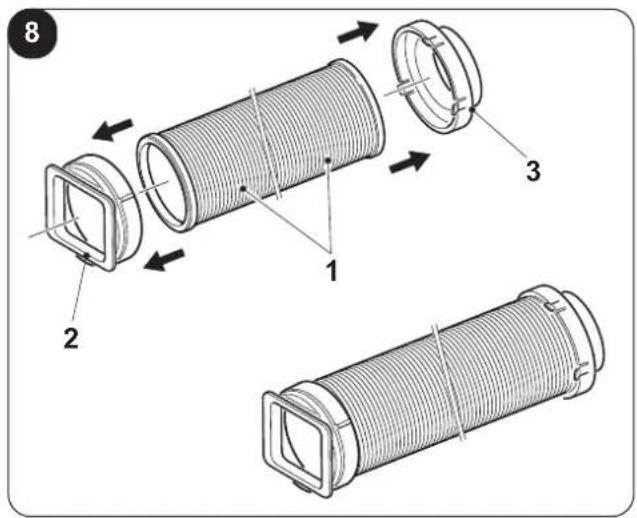

natural_image
Line drawing of a rectangular electronic device with a side panel and ventilation slots, showing an upward arrow (no text or symbols)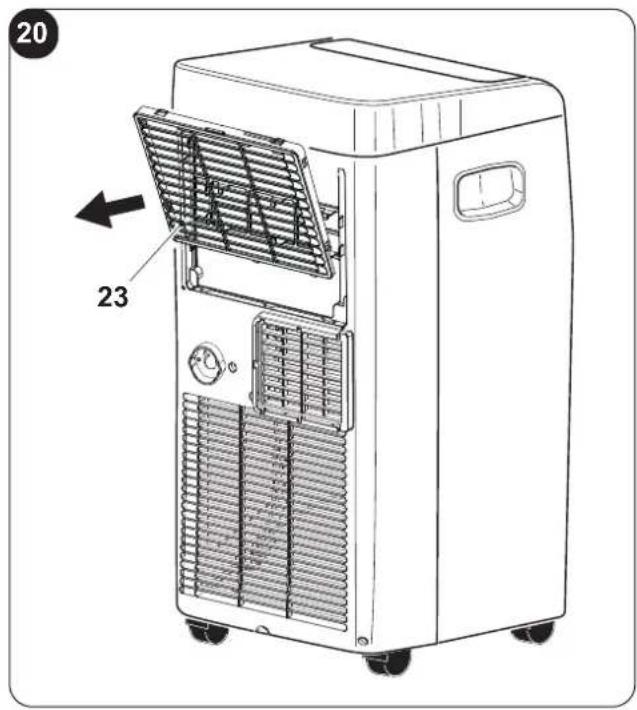
24
flowchart
graph TD
subgraph MAIN BOARD
direction TB
A["OPTIONAL"] --> B["SWING"]
B --> C["M"]
C --> D["ON"]
D --> E["M"]
E --> F["MOTOR"]
F --> G["DOWN FAN"]
G --> H["UP FCAP"]
H --> I["UP FAN"]
I --> J["UP FCAP"]
J --> K["UP FAN"]
K --> L["UP FAN"]
L --> M["UP FAN"]
M --> N["UP FAN"]
N --> O["UP FAN"]
O --> P["UP FAN"]
P --> Q["UP FAN"]
Q --> R["UP FAN"]
R --> S["UP FAN"]
S --> T["UP FAN"]
T --> U["UP FAN"]
U --> V["UP FAN"]
V --> W["UP FAN"]
W --> X["UP FAN"]
X --> Y["UP FAN"]
Y --> Z["UP FAN"]
Z --> AA["UP FAN"]
AA --> AB["UP FAN"]
AB --> AC["UP FAN"]
AC --> AD["UP FAN"]
AD --> AE["UP FAN"]
AE --> AF["UP FAN"]
AF --> AG["UP FAN"]
AG --> AH["UP FAN"]
AH --> AI["UP FAN"]
AI --> AJ["UP FAN"]
AJ --> AK["UP FAN"]
AK --> AL["UP FAN"]
AL --> AM["UP FAN"]
AM --> AN["UP FAN"]
AN --> AO["UP FAN"]
AO --> AP["UP FAN"]
AP --> AQ["UP FAN"]
AQ --> AR["UP FAN"]
AR --> AS["UP FAN"]
AS --> AT["UP FAN"]
AT --> AU["UP FAN"]
AU --> AV["UP FAN"]
AV --> AW["UP FAN"]
AW --> AX["UP FAN"]
AX --> AY["UP FAN"]
AY --> AZ["UP FAN"]
AZ --> BA["UP FAN"]
BA --> BB["UP FAN"]
BB --> BC["UP FAN"]
BC --> BD["UP FAN"]
BD --> BE["UP FAN"]
BE --> BF["UP FAN"]
BF --> BG["UP FAN"]
BG --> BH["UP FAN"]
BH --> BI["UP FAN"]
BI --> BJ["UP FAN"]
BJ --> BK["UP FAN"]
BK --> BL["UP FAN"]
BL --> BM["UP FAN"]
BM --> BN["UP FAN"]
BN --> BO["UP FAN"]
BO --> BP["UP FAN"]
BP --> BQ["UP FAN"]
BQ --> BR["UP FAN"]
BR --> BS["UP FAN"]
BS --> BT["UP FAN"]
BT --> BU["UP FAN"]
BU --> BV["UP FAN"]
BV --> BW["UP FAN"]
BW --> BX["UP FAN"]
BX --> BY["UP FAN"]
BY --> BZ["UP FAN"]
BZ --> CA["UP FAN"]
CA --> CB["UP FAN"]
CB --> CC["UP FAN"]
CC --> CD["UP FAN"]
CD --> CE["UP FAN"]
CE --> CF["UP FAN"]
CF --> CG["UP FAN"]
CG --> CH["UP FAN"]
CH --> CI["UP FAN"]
CI --> CJ["UP FAN"]
CJ --> CK["UP FAN"]
CK --> CL["UP FAN"]
CL --> CM["UP FAN"]
CM --> CN["UP FAN"]
CN --> CO["UP FAN"]
CO --> CP["UP FAN"]
CP --> CQ["UP FAN"]
CQ --> CR["UP FAN"]
CR --> CS["UP FAN"]
CS --> CT["UP FAN"]
CT --> CU["UP FAN"]
CU --> CV["UP FAN"]
CV --> CW["UP FAN"]
CW --> CX["UP FAN"]
CX --> CY["UP FAN"]
CY --> CZ["UP FAN"]
CZ --> DA["UP FAN"]
DA --> DB["UP FAN"]
DB --> DC["UP FAN"]
DC --> DD["UP FAN"]
DD --> DE["UP FAN"]
DE --> DF["UP FAN"]
DF --> DG["UP FAN"]
DG --> DH["UP FAN"]
DH --> DI["UP FAN"]
DI --> DJ["UP FAN"]
DJ --> DK["UP FAN"]
DK --> DL["UP FAN"]
DL --> DV["UP FAN"]
DV --> DW["UP FAN"]
DW --> DX["UP FAN"]
DX --> DY["UP FAN"]
end
subgraph MAIN BOARD
direction TB
end
note1["Notes: OPTIONAL"]
note2["This symbol indicates the element is optional, the actual shape shall prevail"]
note3["NOTE"]:::note1
note4["M":::note1"<br> note5["SWING"]:::note1
note6["ON"]:::note1
note7["ON"]:::note1
note8["ON"]:::note1
note9["ON"]:::note1
note10["ON"]:::note1
note11["ON"]:::note1
note12["ON"]:::note1
note13["ON"]:::note1
note14["ON"]:::note1
note15["ON"]:::note1
note16["ON"]:::note1
note17["ON"]:::note1
note18["ON"]:::note1
note19["ON"]:::note1
note20["ON"]:::note1
note21["ON"]:::note1
note22["ON"]:::note1
note23["ON"]:::note1
note24["ON"]:::note1
note25["ON"]:::note1
note26["ON"]:::note1
note27["ON"]:::note1
note28["ON"]:::note1
note29["ON"]:::note1
note30["ON"]:::note1
note31["ON"]:::note1
note32["ON"]:::note1
note33["ON"]:::note1
note34["ON"]:::note1
note35["ON"]:::note1
note36["ON"]:::note1
note37["ON"]:::note1
note38["ON"]:::note1
note39["ON"]:::note1
note40["ON"]:::note1
note41["ON"]:::note1
note42["ON"]:::note1
note43["ON"]:::note1
note44["ON"]:::note1
note45["ON"]:::note1
note46["ON"]:::note1
note47["ON"]:::note1
note48["ON"]:::note1
note49["ON"]:::note1
note50["ON"]:::note1
note51["ON"]:::note1
note52["ON"]:::note1
note53["ON"]:::note1
note54["ON"]:::note1
note55["ON"]:::note1
note56["ON"]:::note1
note57["ON"]:::note1
note58["ON"]:::note1
note59["ON"]:::note1
note60["ON"]:::note1
note61["ON"]:::note1
note62["ON"]:::note1
note63["ON"]:::note1
note64["ON"]:::note1
note65["ON"]:::note1
note66["ON"]:::note1
note67["ON"]:::note1
note68["ON"]:::note1
note69["ON"]:::note1
note70["ON"]:::note1
note71["ON"]:::note1
note72["ON"]:::note1
note73["ON"]:::note1
note74["ON"]:::note1
note75["ON"]:::note1
note76["ON"]:::note1
note77["ON"]:::note1
note78["ON"]:::note1
note79["ON"]:::note1
note80["ON"]:::note1
note81["ON"]:::note1
note82["ON"]:::note1
note83["ON"]:::note1
note84["ON"]:::note1
note85["ON"]:::note1
note86["ON"]:::note1
note87["ON"]:::note1
note88["ON"]:::note1
note89["ON"]:::note1
note90["ON"]:::note1
note91["ON"]:::note1
note92["ON"]:::note1
note93["ON"]:::note1
note94["ON"]:::note1
note95["ON"]:::note1
note96["ON"]:::note1
note97["ON"]:::note1
note98["ON"]:::note1
note99["ON"]:::note1
0 - AVVERTENZE 2
0.1 - INFORMAZIONI GENERALI 2
0.2 - SIMBOLOGIA....2
natural_image
Illustration of a hand using a power plug to switch an electrical outlet (no text or symbols present)natural_image
Illustration of a hand using a power plug to switch an electrical outlet (no text or symbols present)
AVVERTENZA
natural_image
Line drawing of a hand holding a remote control device (no text or symbols)natural_image
Illustration of a hand using a power plug to switch an electrical outlet (no text or symbols present)
natural_image
Hand inserting a plug into an electrical outlet socket (no text or symbols visible)
3 - USE OF THE APPLIANCE 12
3.1 - CONTROL PANEL SYMBOLS AND KEYS 13
3.2 - REMOTE CONTROL KEYS 13
3.3 - USE OF THE REMOTE CONTROL....14
3.3.a - Insertion of batteries 14
3.3.b - Replacement of batteries 14
3.3.c - Location of the remote control 14
3.4 - USE OF THE APPLIANCE....15
3.4.a - Preliminary operations....15
3.4.b - Appliance switching on/off 15
3.5 - VENTILATION MODE (FAN) 15
3.6 - COOLING MODE (COOL) 15
3.7 - DEHUMIDIFICATION MODE (DRY) 15
3.8 - AUTO MODE (Automatic) 16
3.9 - NIGHT FUNCTION....16
3.10 - TIMER MODE 16
3.10.a - Programmed switching on 16
3.10.b - Programmed switching off....16
3.11 - SETTING THE UNIT OF MEASUREMENT OF TEMPERATURE....16
3.12 - OTHER FUNCTIONS....17
3.12.a - FOLLOW ME function 17
3.12.b - Short Cut function....17
3.12.c - Auto-Restart....17
3.12.d - Wi-Fi 17
4 - MAINTENANCE AND CLEANING 17
4.1 - CLEANING....17
4.1.a - Cleaning the appliance and the remote control 17
4.1.b - Cleaning the suction filter....18
4.1.c - Recommendations for energy saving 18
4.2 - MAINTENANCE 18
4.2.a - Discharging condensation....19
4.2.b - Error codes....19
5 - TECHNICAL DATA....19
6 - WIRING DIAGRAM....19
7 - INCONVENIENCES AND POSSIBLE REMEDIES ....20
EN - 1
0 - WARNINGS
0.1 - GENERAL INFORMATION
First of all, we would like to thank you for choosing our appliance.
0.2 - SYMBOLS
The pictograms in the next chapter provide the necessary information for correct, safe use of the machine in a rapid, unmistakable way.
0.2.1 - Editorial pictograms
 | Indicates that this document must be read carefully before installing and/or using the appliance. |
| Indicates that this document must be read carefully before any maintenance and/or cleaning operation. | |
 | Indicates that there may be additional information in attached manuals. |
| Indicates that information is available in the user manual or in the installation manual. | |
 | Indicates that the assistance personnel must handle the appliance following the installation manual. |
 | Indicates that the appliance uses inflammable refrigerant. If the refrigerant escapes and is exposed to a source of external ignition, there is a fire risk. |
 | Signals to the personnel that the operation described could cause electrocution if not performed according to the safety rules. |
 | It informs the personnel concerned that if the operation is not carried out in compliance with the safety regulations, it presents the risk of suffering physical damage. |
 | It informs the personnel concerned that if the operation is not carried out in compliance with the safety regulations, it presents the risk of burns due to contact with components at very high temperatures. |
 | Paragraphs marked with this symbol contain very important information and recommendations, particularly as regards safety. Failure to comply with them may result in:- danger of injury to the operators- loss of the warranty- refusal of liability by the manufacturer. |
 | Refers to actions that absolutely must not be performed. |
| [084H] | Indicates to the personnel concerned, that it is prohibited to cover the appliance, to prevent over-heating. |
0.3 - GENERAL WARNINGS
WHEN USING ELECTRICAL EQUIPMENT, BASIC SAFETY PRECAUTIONS MUST ALWAYS BE FOLLOWED IN ORDER TO REDUCE RISKS OF FIRE, ELECTRIC SHOCKS AND INJURY, INCLUDING THE FOLLOWING:

To prevent possible damages to the compressor, each start is delayed by 3 minutes with respect to the last switching off.

- This document is restricted in use to the terms of the law and may not be copied or transferred to third parties without the express authorization of the manufacturer, OLIMPIA SPLENDID.
Our machines are subject to change and some parts may appear different from the ones shown here, without this affecting the text of the manual in any way.

read this manual carefully before performing any operation (installation, maintenance, use) and follow the instructions contained in each chapter.

Keep the manual carefully for future reference.
- After removing the packaging, check that the appliance is in perfect condition. The packaging materials must not be left within reach of children as they can be dangerous.
- THE MANUFACTURER IS NOT RESPONSIBLE FOR DAMAGES TO PERSONS OR PROPERTY CAUSED BY FAILURE TO FOLLOW THE INSTRUCTIONS IN THIS MANUAL.
- The manufacturer reserves the right to make any changes it deems advisable to its models, although the essential features described in this manual remain the same.

- The maintenance of equipment for conditioning such as this one may result dangerous since inside this appliance a refrigerant gas under pressure and live electrical components are present.
For this reason, possible maintenance interventions (with the exception of filters cleaning) must be performed exclusively by authorized and qualified personnel.
- Failing to comply with the instructions contained in this manual, and using the unit with temperatures exceeding the permissible temperature range will invalidate the warranty.
- Routine maintenance of the filters and general external cleaning can be done by the user as these operations are not difficult or dangerous.
- During assembly and at each maintenance operation, it is necessary to respect the precautions indicated in this manual and on the labels located inside or on the appliance, as well as to take all the precautions suggested by common sense and by the Safety Regulations in force in the country of installation.

- In case of replacement of parts, use only original OLIMPIA SPLENDID parts.

- If the unit is unused for a long period, or no-one uses the climate-controlled room, it is recommended to disconnect the electric power supply in order to prevent accidents.

- Do not use liquid or corrosive detergents to clean the unit, do not spray water or other liquids onto the unit, since they could damage the plastic components or even cause electric shocks.

- Do not wet the indoor unit and the remote control. Short circuits or fires may occur.

- In case of functioning anomalies (for example: abnormal noise, bad smell, smoke, abnormal increase in temperature, electrical dispersions, etc.), immediately switch off the appliance and disconnect the plug from the power socket.
For repair work contact solely the technical service centres authorised by the manufacturer and ask for original spare parts to be used. Failure to do this can affect the safety of the appliance.
- Do not let the air conditioner run for a long time when the humidity is very high and a door or a windows is left open.
Moisture may condense and wet or damage furniture.

-
Do not disconnect the power plug during functioning. or electrical shocks hazard.
-
Do not place heavy or hot objects on top of the appliance.
-
Before electrically connecting the appliance, make sure the plate data correspond to those of the distribution network. The power socket must be equipped with a Ground System. The plate (20) is located on the sides of the appliance (Fig.2).
-
Install the appliance according to the manufacturer's instructions. An incorrect installation can cause damage to people, animals or property for which the manufacturer accepts no responsibility.
-
If the appliance's plug is incompatible with the socket, have the socket replaced with a suitable one by a qualified technician, who must ascertain that the section of the socket cables is compatible with the power absorbed by the appliance. We do not recommend using adaptors and/or extension cables. If they cannot be avoided, however, they must comply with current safety regulations and their ampacity (A) must not be below the maximum ampacity of the appliance.
-
This appliance is not intended to be run via an external timer or with a separate remote control system.
-
Always and only use the appliance in a vertical position.
-
Do not obstruct the air inlet and outlet grids in any manner.
-
Do not insert extraneous items in the air inlet and outlet grids as this will create the risk of electrical shocks, fire or damages to the appliance.
-
Do not use the appliance:
- with wet or damp hands; - barefoot.
-
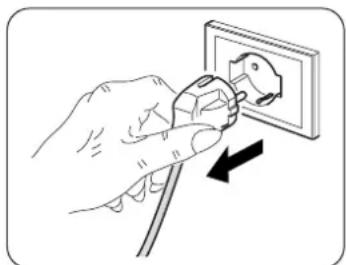
Do not pull the power cable or the appliance itself to remove the plug from the socket.
-
Do not use this product under direct sunlight or near a heat source such as a stove, heater or radiator (Fig.3).
-
Do not use the appliance near gas equipment (Fig.3).
-
Always place the appliance on a stable, plane and levelled surface.
-
Leave at least 50cm of free space on both sides and behind the appliance and leave at least 50cm of free space above it (Fig.1).
-
Do not place the appliance near a power socket (Fig.4).
-
The socket must be easily accessible so that the plug can be removed easily in an emergency.
-
Do not handle the plug with wet hands.
-
Do not excessively bend, twist, pull or damage the power cord.
-
Do not run the cord under carpeting, throw rugs or runners etc. Arrange cord away from traffic areas so that it will not be tripped over.
-
Unplug the cord when unit is not in use for an extended period of time and/or when no one is home.
-
Do not use the appliance in particularly moist environments (bathroom, kitchen, etc.).
-
Do not use the appliance outdoors or on wet surfaces. Avoid dropping liquids on the appliance. Do not use the appliance near sinks and taps.
-
Do not immerse the appliance in water or in other liquids.
-
Clean the appliance with a damp cloth; do not use abrasive products or materials. See the appropriate paragraph for the filters cleaning.
-
The most common cause of overheating is dust or lint deposit in the appliance. Regularly remove these accumulations by disconnecting the appliance from the power socket and vacuuming the grids.
-
Do not use the appliance in environments subject to significant temperature changes as condensation could form inside the appliance itself.
-
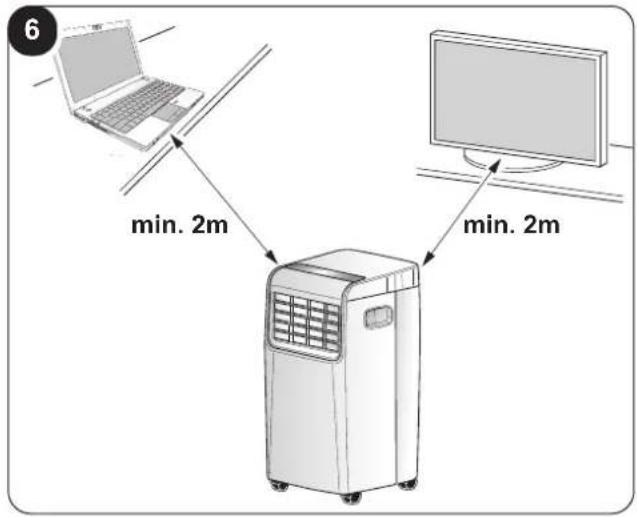
Install the appliance at at least 2 meters from other electronic devices (TV, radio, computer, dvd player, etc.) in order to avoid disturbances (Fig.6).
-
Do not use the appliance if insecticide gas has just been sprayed in the room or in the presence of burning incenses, chemical vapours or oily residues.
-
Do not use the appliance if the filters are not positioned correctly.
EN - 4
-
Disassembly, repair or reconversion performed by an unauthorized person could cause heavy damages and will cancel the manufacturer warranty.
-
Do not use the appliance in case of malfunctioning or faults, if the cord or plug are damaged, or if it has been dropped or damaged in any manner. Turn the appliance off, disconnect the plug from the socket and let it be checked by professionally qualified personnel.
-
Neither disassemble nor modify the appliance.
-
Repairing the appliance by yourself is extremely dangerous.
-
If you no longer wish to use this appliance, it must be made inoperative by cutting the power supply cable after removing the plug from the power socket. Hazardous parts of the appliance must be rendered harmless, especially as there is a risk of children playing with it.
-
Do not use tools different from those recommended by the manufacturer for the defrosting process and for the appliance cleaning.
-
The appliance is equipped with a thermal protector which preserves the circuit board in case of over-temperature. If this safety device intervenes, disconnect the plug from the power socket and wait for the appliance to completely cool down (at least 20÷30 minutes) and then reconnect the plug to the power socket and restart the appliance.
If the appliance doesn't restart, disconnect the plug from the power socket and contact an Assistance Centre.
- FUSE: 3.15A/250VAC Slow fusing.
0.4 - PROPER USE
- The air conditioner must be used exclusively to produce cold air or to dehumidify air (based on your choice) with the only purpose of making the temperature in the room comfortable.
• This appliance is only intended for a domestic use or similar.
- An improper use of the appliance with possible damages caused to people, things or animals releases OLIMPIA SPLENDID from any responsibility.
0.5 - HAZARDOUS ZONES
- The climate controllers must not be installed in environments with the presence of inflammable gases, explosive gases, in very humid environments (laundries, greenhouses, etc.), or in places with other machines that generate a strong heat source, in proximity of a sources of salt water or sulphurous water.
- DO NOT use gas, gasoline or other inflammable liquids near to the climate controller.
- Only use supplied components (see paragraph 1.1). The use of non-standard parts may cause water leaks, electric shocks, fires and injuries or damages to things.

This product must be used exclusively according to the specifications indicated in this manual. Use different to that specified, could cause serious injuries. THE MANUFACTURER IS NOT LIABLE FOR INJURY/DAMAGE TO PERSONS/OBJECTS DERIVING FROM FAILURE TO COMPLY WITH THE REGULATIONS CONTAINED IN THIS MANUAL.
0.6 - WARNINGS FOR R290 REFRIGERANT GAS
- THE APPLIANCE CONTAINS R290 GAS (FLAMMABILITY CLASSIFICATION A3).
- THE APPLIANCE SHALL BE STORED IN A WELL-VENTILATED AREA WHERE THE ROOM SIZE CORRESPONDS TO THE ROOM AREA AS SPECIFIED FOR OPERATION.
- APPLIANCE SHALL BE INSTALLED, OPERATED AND STORED IN A ROOM WITH A FLOOR AREA LARGER THAN X M² (X = INDICATED IN THE CHART).
| Quantity of R290 gas in Kg(see data label on the appliance) | 0,120 | 0,130 | 0,140 | 0,150 | 0,160 | 0,170 | 0,180 | 0,190 | 0,200 | 0,210 | 0,220 | ||
| Minimum size of the sitefor use and storage ( m^2 ) | 6 7 7 | 8 8 9 9 | 10 | 10 | 11 |
- THIS APPLIANCE CONTAINS A QUANTITY OF REFRIGERANT GAS R290 EQUAL TO THE ONE INDICATED IN THE DATA LABEL LOCATED ON THE APPLIANCE.
- THE APPLIANCE SHALL BE STORED IN A ROOM WITHOUT CONTINUOUSLY OPERATING IGNITION SOURCES (FOR EXAMPLE: OPEN FLAMES, AN OPERATING GAS APPLIANCE OR AN OPERATING ELECTRIC HEATER).
- Do not pierce or burn.
- Be aware that the refrigerants may not contain an odour.
- R290 is a refrigerant gas in compliance with the European directives on environment. Do not pierce any part of the refrigerant circuit.
- Do not use means to accelerate the defrosting process or to clean, other than those recommended by the manufacturer.
- Do not use tools different from those recommended by the manufacturer when defrosting and cleaning the appliance.
- If the appliance is installed, used or stored in a non-ventilated area, the room must be designed to prevent the accumulation of refrigerant leaks with the consequent fire or explosion hazard due to the refrigerant combustion caused by electrical heaters, stoves or others sources of ignition.
- Compliance with national gas regulations shall be observed.
- Keep ventilation openings clear of obstruction.
- The appliance shall be stored so as to prevent mechanical damage from occurring.
- Any person who is involved with working on or breaking into a refrigerant circuit should hold a current valid certificate from an industry-accredited assessment authority, which authorises their competence to handle refrigerants safely in accordance with an industry recognised assessment specification.

-
All working procedure that affects safety means shall only be carried by competent persons. Maintenance and repair requiring the assistance of other skilled personnel shall be carried out under the supervision of the person competent in the use of flammable refrigerants.
-
TRANSPORT OF EQUIPMENT CONTAINING FLAMMABLE REFRIGERANTS Compliance with the transport regulations.
- MARKING OF EQUIPMENT USING SIGNS Compliance with local regulations.
- DISPOSAL OF EQUIPMENT USING FLAMMABLE REFRIGERANTS Compliance with national regulations.
- STORAGE OF EQUIPMENT/APPLIANCES The storage of equipment should be in accordance with the manufacturer's instructions.
- STORAGE OF PACKED (UNSOLD) EQUIPMENT Storage package protection should be constructed such that mechanical damage to the equipment inside the package will not cause a leak of the refrigerant charge. The maximum number of pieces of equipment permitted to be stored together will be determined by local regulations.

- INFORMATION ON SERVICING
a) Checks to the area
Prior to beginning work on systems containing flammable refrigerants, safety checks are necessary to ensure that the risk of ignition is minimised.
For repair to the refrigerating system, the following precautions shall be complied with prior to conducting work on the system.
b) Work procedure
Work shall be undertaken under a controlled procedure so as to minimise the risk of a flammable gas or vapour being present while the work is being performed.
c) General work area
All maintenance staff and others working in the local area shall be instructed on the nature of work being carried out.
EN - 6
Work in confined spaces shall be avoided.
The area around the workspace shall be sectioned off.
Ensure that the conditions within the area have been made safe by control of flammable material.
d) Checking for presence of refrigerant
The area shall be checked with an appropriate refrigerant detector prior to and during work, to ensure the technician is aware of potentially flammable atmospheres.
Ensure that the leak detection equipment being used is suitable for use with flammable refrigerants, i.e. non-sparking, adequately sealed or intrinsically safe.
e) Presence of fire extinguisher
If any hot work is to be conducted on the refrigeration equipment or any associated parts, appropriate fire extinguishing equipment shall be available at hand.
Have a dry powder or CO2 fire extinguisher adjacent to the charging area.
f) No ignition sources
No person carrying out work in relation to a refrigeration system which involves exposing any pipe work that contains or has contained flammable refrigerant shall use any sources of ignition in such a manner that it may lead to the risk of fire or explosion.
All possible ignition sources, including cigarette smoking, should be kept sufficiently far away from the site of installation, repairing, removing and disposal, during which flammable refrigerant can possibly be released to the surrounding space.
Prior to work taking place, the area around the equipment is to be surveyed to make sure that there are no flammable hazards or ignition risks. No Smoking signs shall be displayed.
g) Ventilated area
Ensure that the area is in the open or that it is adequately ventilated before breaking into the system or conducting any hot work.
A degree of ventilation shall continue during the period that the work is carried out.
The ventilation should safely disperse any released refrigerant and preferably expel it externally into the atmosphere.
h) Checks to the refrigeration equipment
Where electrical components are being changed, they shall be fit for the purpose and to the correct specification. At all times the manufacturer's maintenance and service guidelines shall be followed. If in doubt consult the manufacturer's technical department for assistance.
The following checks shall be applied to installations using flammable refrigerants:
The charge size is in accordance with the room size within which the refrigerant containing parts are installed; The ventilation machinery and outlets are operating adequately and are not obstructed; If an indirect refrigerating circuit is being used, the secondary circuit shall be checked for the presence of refrigerant; Marking to the equipment continues to be visible and legible. Markings and signs that are illegible shall be corrected; Refrigeration pipe or components are installed in a position where they are unlikely to be exposed to any substance which may corrode refrigerant containing components, unless the components are constructed of materials which are inherently resistant to being corroded or are suitably protected against being so corroded.
i) Checks to electrical devices
Repair and maintenance to electrical components shall include initial safety checks and component inspection procedures. If a fault exists that could compromise safety, then no electrical supply shall be connected to the circuit until it is satisfactorily dealt with. If the fault cannot be corrected immediately but it is necessary to continue operation, an adequate temporary solution shall be used. This shall be reported to the owner of the equipment so all parties are advised. Initial safety checks shall include: That capacitors are discharged: this shall be done in a safe manner to avoid possibility of sparking; That there no live electrical components and wiring are exposed while charging, recovering or purging the system; That there is continuity of earth bonding.
23. REPAIRS TO SEALED COMPONENTS
a) During repairs to sealed components, all electrical supplies shall be disconnected from the equipment being worked upon prior to any removal of sealed covers, etc. If it is absolutely necessary to have an electrical supply to equipment during servicing, then a permanently operating form of leak detection shall be located at the most critical point to warn of a potentially hazardous situation.
b) Particular attention shall be paid to the following to ensure that by working on electrical components, the casing is not altered in such a way that the level of protection is affected.
This shall include damage to cables, excessive number of connections, terminals not made to original specification, damage to seals, incorrect fitting of glands, etc.
Ensure that apparatus is mounted securely.
Ensure that seals or sealing materials have not degraded such that they no longer serve the purpose of preventing the ingress of flammable atmospheres. Replacement parts shall be in accordance with the manufacturer's specifications.

The use of silicon sealant may inhibit the effectiveness of some types of leak detection equipment. Intrinsically safe components do not have to be isolated prior to working on them.
24. REPAIR TO INTRINSICALLY SAFE COMPONENTS
Do not apply any permanent inductive or capacitance loads to the circuit without ensuring that this will not exceed the permissible voltage and current permitted for the equipment in use. Intrinsically safe components are the only types that can be worked on while live in the presence of a flammable atmosphere. The test apparatus shall be at the correct rating.
Replace components only with parts specified by the manufacturer.
Other parts may result in the ignition of refrigerant in the atmosphere from a leak.
25. CABLING
Check that cabling will not be subject to wear, corrosion, excessive pressure, vibration, sharp edges or any other adverse environmental effects. The check shall also take into account the effects of aging or continual vibration from sources such as compressors or fans.
26. DETECTION OF FLAMMABLE REFRIGERANTS
Under no circumstances shall potential sources of ignition be used in the searching for or detection of refrigerant leaks.
A halide torch (or any other detector using a naked flame) shall not be used.
27. LEAK DETECTION METHODS
The following leak detection methods are deemed acceptable for systems containing flammable refrigerants.
Electronic leak detectors shall be used to detect flammable refrigerants, but the sensitivity may not be adequate, or may need re-calibration. (Detection equipment shall be calibrated in a refrigerant-free area).
Ensure that the detector is not a potential source of ignition and is suitable for the refrigerant used. Leak detection equipment shall be set at a percentage of the LFL of the refrigerant and shall be calibrated to the refrigerant employed and the appropriate percentage of gas (25 % maximum) is confirmed.
Leak detection fluids are suitable for use with most refrigerants but the use of detergents containing chlorine shall be avoided as the chlorine may react with the refrigerant and corrode the copper pipework.
If a leak is suspected, all naked flames shall be removed/ extinguished.
If a leakage of refrigerant is found which requires brazing, all of the refrigerant shall be recovered from the system, or isolated (by means of shut off valves) in a part of the system remote from the leak. Oxygen free nitrogen (OFN) shall then be purged through the system both before and during the brazing process.
28. RÉMOVAL AND EVACUATION
When breaking into the refrigerant circuit to make repairs or for any other purpose conventional procedures shall be used.
However, it is important that best practice is followed since flammability is a consideration.
The following procedure shall be adhered to:
- Remove refrigerant;
• Purge the circuit with inert gas; - Evacuate;
• Purge again with inert gas; - Open the circuit by cutting or brazing.
The refrigerant charge shall be recovered into the correct recovery cylinders. The system shall be flushed with OFN to render the unit safe.
This process may need to be repeated several times.
Compressed air or oxygen shall not be used for this task.
Flushing shall be achieved by breaking the vacuum in the system with OFN and continuing to fill until the working pressure is achieved, then venting to atmosphere, and finally pulling down to a vacuum.
This process shall be repeated until no refrigerant is within the system. When the final OFN charge is used, the system shall be vented down to atmospheric pressure to enable work to take place.
This operation is absolutely vital if brazing operations on the pipe-work are to take place.
Ensure that the outlet for the vacuum pump is not close to any ignition sources and there is ventilation available.
29. CHARGING PROCEDURES
In addition to conventional charging procedures, the following requirements shall be followed.
Ensure that contamination of different refrigerants does not occur when using charging equipment.
Hoses or lines shall be as short as possible to minimise the amount of refrigerant contained in them.
Cylinders shall be kept upright.
Ensure that the refrigeration system is earthed prior to charging the system with refrigerant.
Label the system when charging is complete (if not already).
Extreme care shall be taken not to overfill the refrigeration system. Prior to recharging the system it shall be pressure tested with OFN.
The system shall be leak tested on completion of charging but prior to commissioning. A follow up leak test shall be carried out prior to leaving the site.
30. DECOMMISSIONING
Before carrying out this procedure, it is essential that the technician is completely familiar with the equipment and all its detail. It is recommended good practice that all refrigerants are recovered safely.
Prior to the task being carried out, an oil and refrigerant sample shall be taken in case analysis is required prior to re-use of reclaimed refrigerant. It is essential that electrical power is available before the task is commenced.
a) Become familiar with the equipment and its operation.
b) Isolate system electrically.
c) Before attempting the procedure ensure that:
- Mechanical handling equipment is available, if required, for handling refrigerant cylinders;
- All personal protective equipment is available and being used correctly;
• The recovery process is supervised at all times by a competent person; - Recovery equipment and cylinders conform to the appropriate standards.
d) Pump down refrigerant system, if possible.
e) If a vacuum is not possible, make a manifold so that refrigerant can be removed from various parts of the system.
f) Make sure that cylinder is situated on the scales before recovery takes place.
g) Start the recovery machine and operate in accordance with manufacturer's instructions.
h) Do not overfill cylinders. (No more than 80 % volume liquid charge).
i) Do not exceed the maximum working pressure of the cylinder, even temporarily.
j) When the cylinders have been filled correctly and the process completed, make sure that the cylinders and the equipment are removed from site promptly and all isolation valves on the equipment are closed off.
k) Recovered refrigerant shall not be charged into another refrigeration system unless it has been cleaned and checked.
31. LABELLING
Equipment shall be labelled stating that it has been de-commissioned and emptied of refrigerant. The label shall be dated and signed.
Ensure that there are labels on the equipment stating the equipment contains flammable refrigerant.
32. RECOVERY
When removing refrigerant from a system, either for servicing or decommissioning, it is recommended good practice that all refrigerants are removed safely.
When transferring refrigerant into cylinders, ensure that only appropriate refrigerant recovery cylinders are employed. Ensure that the correct number of cylinders for holding the total system charge is available. All cylinders to be used are designated for the recovered refrigerant and labelled for that refrigerant (i.e. special cylinders for the recovery of refrigerant). Cylinders shall be complete with pressure relief valve and associated shut-off valves in good working order. Empty recovery cylinders are evacuated and, if possible, cooled before recovery occurs.
The recovery equipment shall be in good working order with a set of instructions concerning the equipment that is at hand and shall be suitable for the recovery of flammable refrigerants.
In addition, a set of calibrated weighing scales shall be available and in good working order.
Hoses shall be complete with leak-free disconnect couplings and in good condition.
Before using the recovery machine, check that it is in satisfactory working order, has been properly maintained and that any associated electrical components are sealed to prevent ignition in the event
of a refrigerant release. Consult manufacturer if in doubt. The recovered refrigerant shall be returned to the refrigerant supplier in the correct recovery cylinder, and the relevant Waste Transfer Note arranged. Do not mix refrigerants in recovery units and especially not in cylinders. If compressors or compressor oils are to be removed, ensure that they have been evacuated to an acceptable level to make certain that flammable refrigerant does not remain within the lubricant. The evacuation process shall be carried out prior to returning the compressor to the suppliers. Only electric heating to the compressor body shall be employed to accelerate this process. When oil is drained from a system, it shall be carried out safely.
1 - DESCRIPTION OF THE APPLIANCE
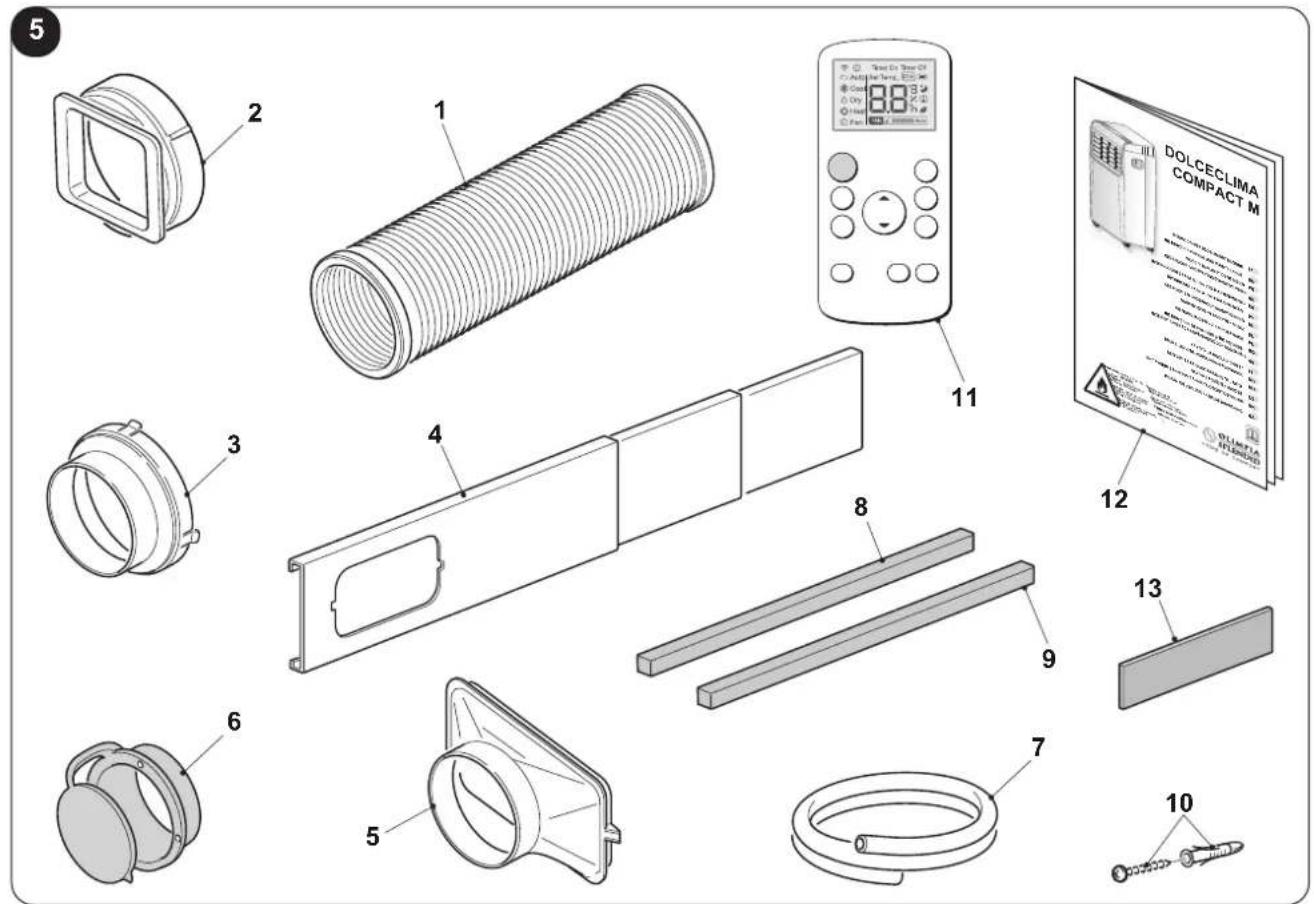
1.1 - LIST OF THE COMPONENTS SUPPLIED (Fig.5)
The appliance is packaged singularly in a cardboard packaging.
The packaging can be transported by hand by two operators or loaded on a forklift.

Store the packaging singularly; do not stack it.
- Flexible hose for air expulsion (cooling and automatic mode)
- Terminal for flexible hose machine side
- Terminal for flexible hose for fixed / slider installation
- SLIDER for installation on sliding / roller window
- Terminal for slider / window installation
-
Flange for fixed installation
-
Condensation discharge pipe (dehumidification mode only)
8-9. Seal for Slider installation - Plugs for fixed installation flange
- Remote control
- Manual
- Additional filter (only for models provided)
1.2 - IDENTIFICATION OF THE MAIN COMPONENTS (Fig.A)
- Control panel
- Air outlet grille
- Air filter with grille
-
Plug for draining condensation water (in case of transport, maintenance or excessive build-up of water)
-
Air inlet
- Air outlet
- Handle for moving
- Cap for condensate drain (dehumidification mode only)
- IR remote control receiver
A
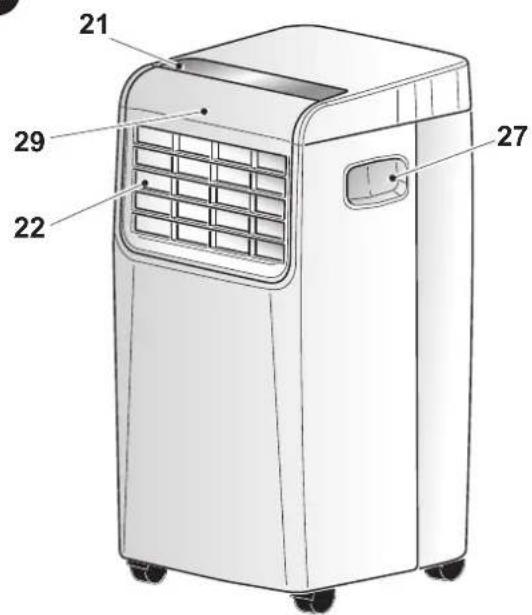
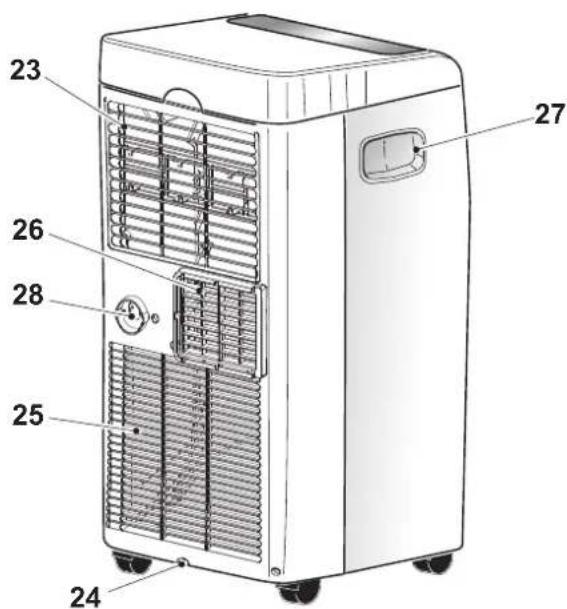
EN - 10
2 - INSTALLATION
2.1 - HOW TO TRANSPORT THE CONDITIONER
- Transport and handling of the appliance must be carried out in vertical position. - If it is transported in a horizontal position, wait at least one hour before starting it. - Before moving or transporting the appliance, completely drain condensation by working as described in paragraph 4.2.a

CAUTION
Moving the air conditioner on delicate flooring (e.g. wooden flooring): Completely drain condensation.
• Take great care when moving the conditioner as the wheels could mark the flooring. Although the wheels are made from a rigid material and are swivelling, they could get damaged by use or excessive dirt. It is recommended to check that the wheels are clean and that they can move freely.
2.2 - WARNINGS

A failure to respect what follows may cause damages to the appliance.
a. Install the air conditioner on flat and stable surfaces and on the floor.
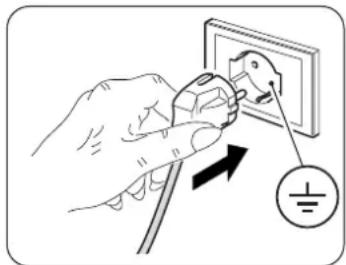
b. Only connect the air conditioner to power sockets equipped with a ground system.
c. Make sure that curtains or other objects do not obstruct the air suction filters (Fig.7).
d. Make sure to keep a minimum distance of 50 cm (Fig.1) between the air conditioner and the adjacent figures.
e. The appliance must always be activated paying attention that there are no obstacles for air suction and output.
f. The air conditioner must not be used in laundries.
g. The air conditioner must be installed in a dry place only.
h. The air conditioner must not be started in presence of dangerous materials, steams or liquids.
i. Clean the air filters at least once a week.
natural_image
Illustration of a hand using a power plug to insert an electrical socket into a wall, with a ground symbol nearby (no text or labels)2.3 - MOBILE INSTALLATION
The air conditioner must be installed in a suitable environment.
It is recommended to reduce solar radiation through curtains, Venetian blinds and to keep doors and windows closed.
a. Position the air conditioner in front of a window or French window.
b. Position the machine side terminal (2) on the flexible hose (1) as shown by Fig.8.
c. Position the terminal (3) on the opposite side of the flexible hose (1) (Fig.8).
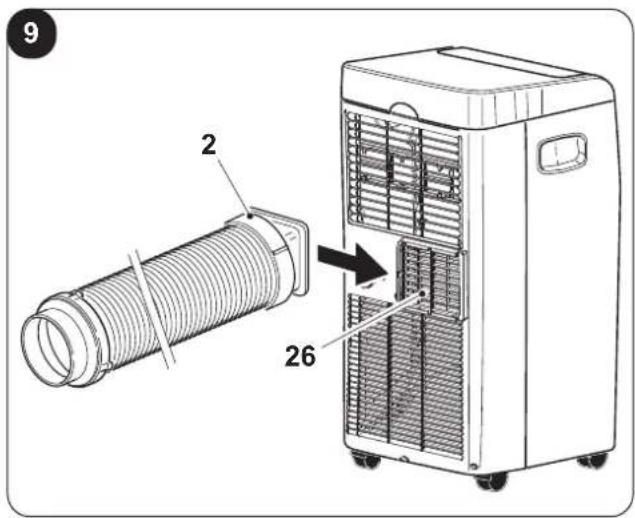
d. Insert the machine side terminal (2) on the air outlet grid of the appliance (26) as shown in figure 9.
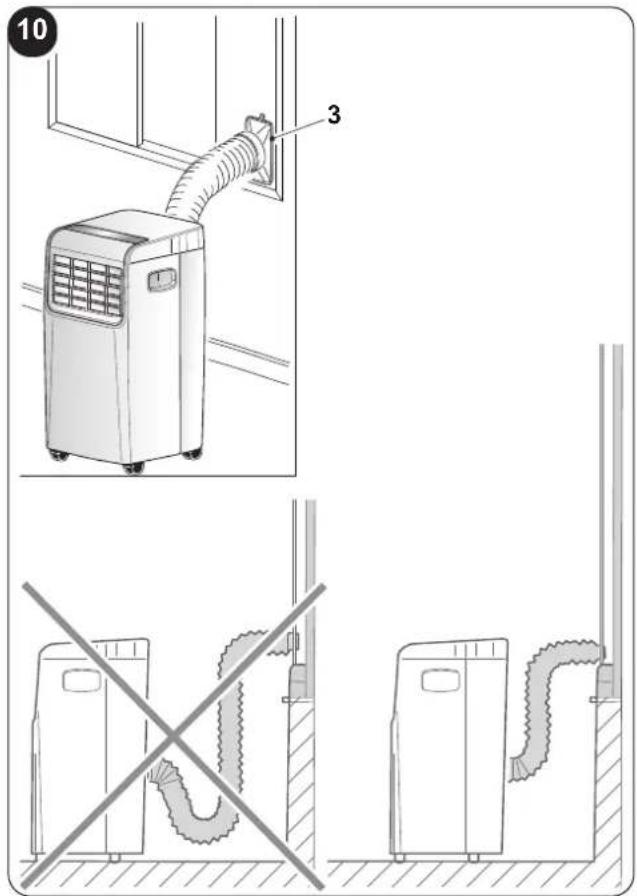
e. Position the terminal (3) in such a way as to make air exit to the exterior (Fig.10)
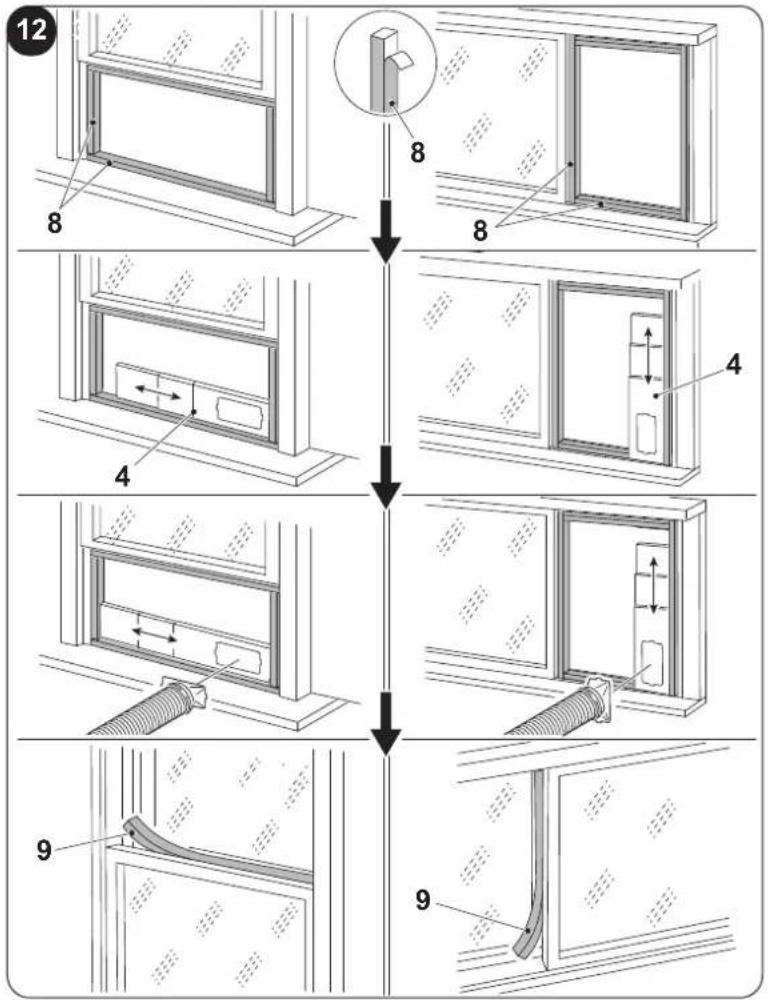
f. If you possess a sliding window (vertical or horizontal) or a shutter, it is possible to use the supplied "SLIDER KIT" (4) which allows a more efficient installation.
For the installation with KIT SLIDER, proceed as shown in figures 11 and 12.
g. Apply the adhesive seal (8) (Fig.12)
h. Position the "SLIDER KIT" (4) and adapt it (Fig.12)
i. Position the flexible hose (1) and apply the seal (9) (Fig.12)

Extend the pipe only to the necessary extent, so that the air conveyor remains closed between the fixture shutters.
2.4 - FIXED INSTALLATION
The air conditioner can also be installed with fixed holes in windows or walls.
Air flow must not be obstructed by protective mesh or similar.
Any forms of protection must have a total cross-section for air flow of not less than 140 cm^2 .
a. Position the machine side terminal (2) on the flexible hose (1) as shown by Fig.8.
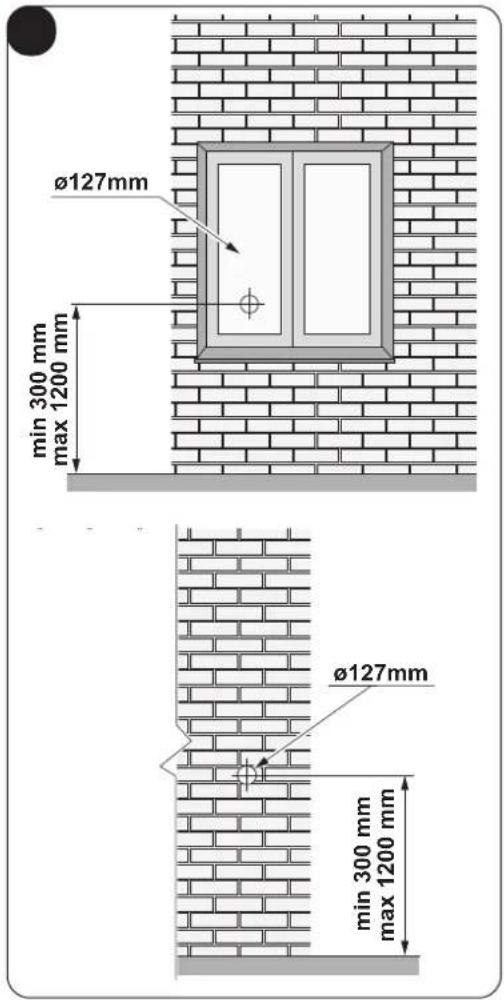
b. Drill a 127 mm hole in the glass or in the wall at a height above the floor included between 300 and 1200 mm (Fig.13).
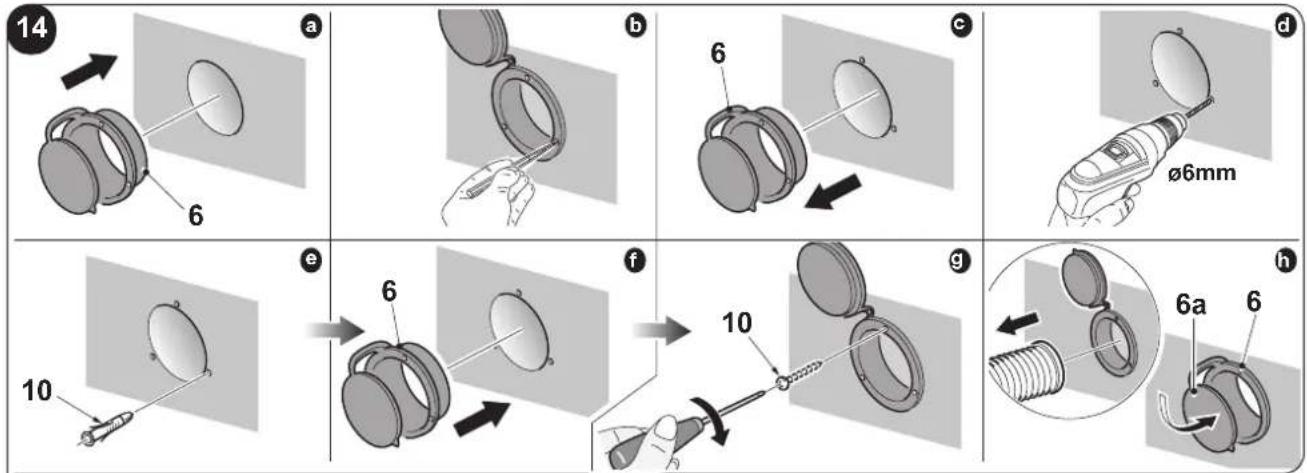
c. Position the terminal (6) in the wall hole and mark the drilling points (Fig. 14-a, 14-b).
d. Remove the terminal (6) and drill 6 mm holes (Fig. 14-c, 14-d).
e. Insert the supplied wallplugs (10) in the holes (Fig. 14-e).
f. Position the terminal (6) in the hole of the wall and fix it with the supplied screws (10) (Fig. 14-f, 14-g).
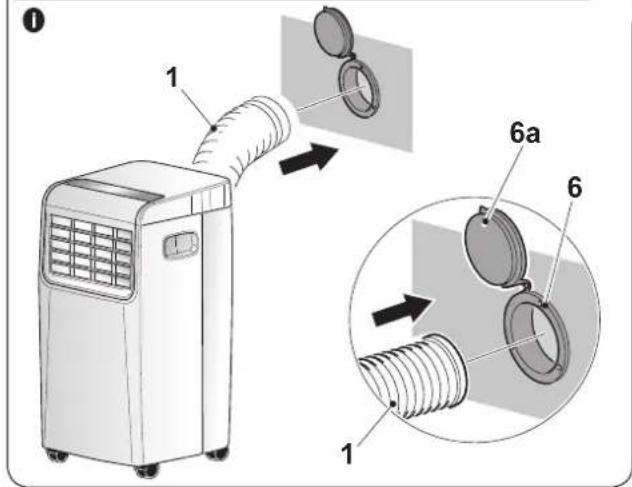
g. Insert the machine side terminal (2) on the air outlet grid of the appliance (26) as shown in figure 9.
h. Connect the other extremity of the flexible hose (1) on the terminal (6) (Fig.14-i).
i. Close the cap (6a) when the appliance is not running (Fig.14-h).
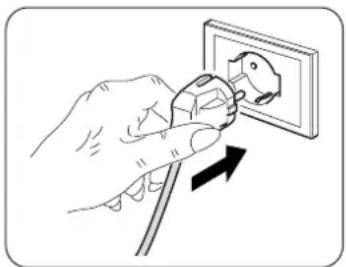
2.5 - ELECTRICAL CONNECTION
The appliance is fitted with a power cable with plug.
Before connecting the air conditioner ensure that:
- The voltage and power frequency values match those specified on the appliance plate data.
- The power line is equipped with an effective earth connection and is correctly sized for maximum power consumption of the air conditioner.
- The appliances power network must be equipped with a suitable omnipolar disconnection device compliant with national installation regulations.
- The appliance is powered solely through a socket compatible with the plug provided.
natural_image
Illustration of a hand using a power plug to switch an electrical outlet (no text or symbols present)
CAUTION
replacement of the power cable must be carried out solely by Olimpia Splendid technical support or by similarly qualified personnel.
2.6 - DRAINAGE
Depending on the modality of use of the appliance, it is necessary to connect the condensation discharge pipe.
2.6.a - Use as dehumidifier
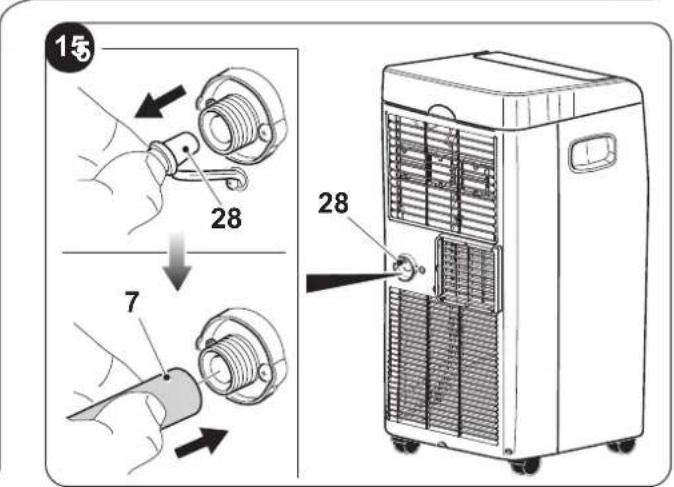
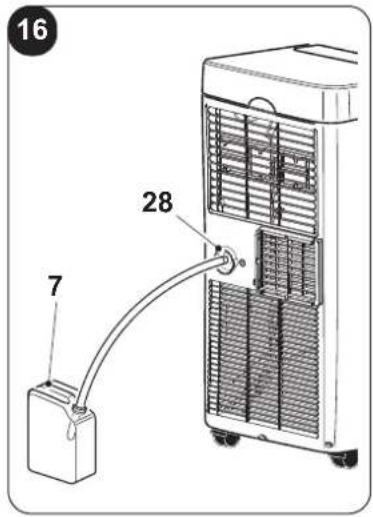
For the correct use of the appliance, work as follows (figures 15 and 16):
a. Remove the cap (28).
b. Insert the supplied pipe (7) in the connector.

Make sure the end of the discharge pipe (7) is positioned on a drain well or in a container.
Make sure the pipe (7) is not clogged.
3 - USE OF THE APPLIANCE
The functioning modes if the air conditioner can be selected both through the remote control and through the control panel located on board of the air conditioner.
The reception of the selected function is confirmed by the emission of a "beep" by the buzzer.
EN - 12
3.1 - CONTROL PANEL SYMBOLS AND KEYS (Fig.B)
B
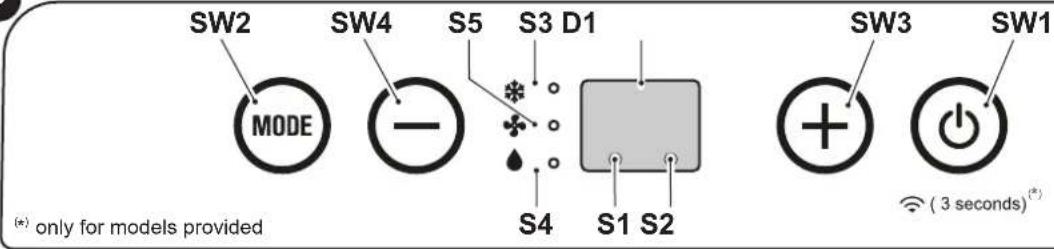
- SW1: Running / Stand-by; Wi-Fi Search (*);
- SW2: Working mode selection cooling =>
=> automatic =>
=> fan only =>
=> dehumidification =>
=> cooling =>...
- SW3: Temperature/delay set increase; - SW4: Temperature/delay set decrease;
S1: Standby mode. D1: Tset/Timer S2: Timer mode/Wi-Fi (*); S3: Cooling mode; S4: Dehumidification mode; S5: Ventilation mode.
3.2 - REMOTE CONTROL KEYS (Fig. C)
C
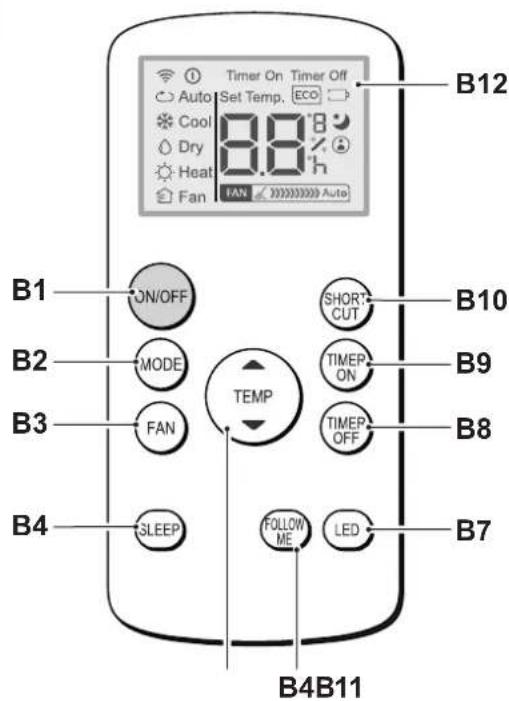
• B1: On/Off key for the appliance switching on/off
- B2: Operation mode select
AUTO (Automatic) =>
=> cooling =>
=> dehumidification =>
=> fan only => ...
• B3: Fan speed selection
Minimum speed => Maximum speed
• B4: SLEEP mode activation (ON/OFF)
• B5: Not available for this model
• B6: Activate/deactivate FOLLOW ME function
• B7: Activate/deactivate display on machine control panel
• B8: Unit switch OFF delay setting
• B9: Unit programmed switch-on setting
• B10: SHORT CUT
• B11: Temperature set increase ▲
Temperature set decrease ▼
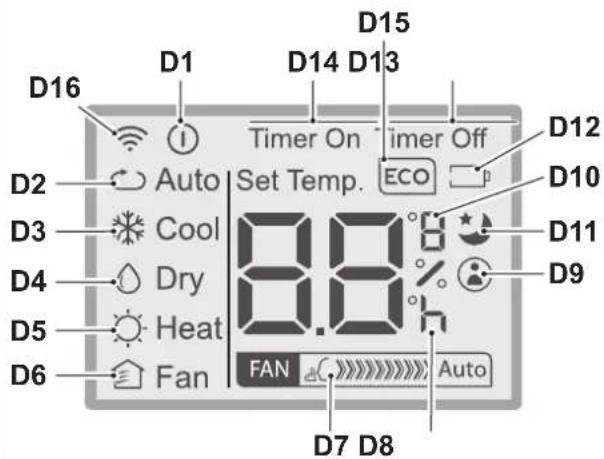
• B12: Display
• D1: Appliance running indicator
• D2: Automatic mode (ECO)
• D3: Cooling mode (COOL)
• D4: Dehumidification mode (DRY)
• D5: Not available for this model
• D6: Fan only mode (FAN)
• D7: Fan speed indication (vederte "B3")
• D8: Programmed switching on/off "hour" indicator
• D9: "FOLLOW ME" function active indicator
• D10: Temperature indicator in °C (F)
• D11: "SLEEP" function active indicator
• D12: Remote control battery low indicator
• D13: "TIME OFF" function active indicator
• D14: "TIME ON" function active indicator
• D15: Not available for this model
• D16: Remote control transmission signal
3.3 - USE OF THE REMOTE CONTROL
The remote control supplied with the air conditioner is the tool which allows You to use the appliance in the most comfortable manner.
It should be handled with care and in particular:
- Keep it dry (do not clean it with water or leave it outdoors in bad weather).
- Avoid dropping or bumping it.
- Keep it out of direct sunlight.
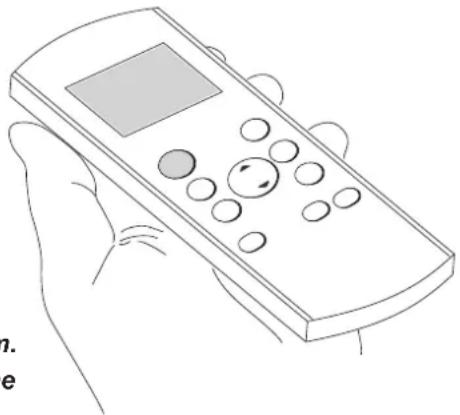
natural_image
Line drawing of a hand holding a remote control device (no text or symbols)
- The remote control operates by means of an infrared beam.
-
During use, there must not be any obstacle between the remote control and the air-conditioner.
-
If other appliances in the room have remote controls (TV, stereo, etc...), there may be interference.
- Electronic and fluorescent lights may also interfere with transmissions between remote control and air-conditioner.
- Remove the batteries in case of prolonged disuse of the remote control.
3.3.a - Insertion of batteries
To insert the batteries correctly:
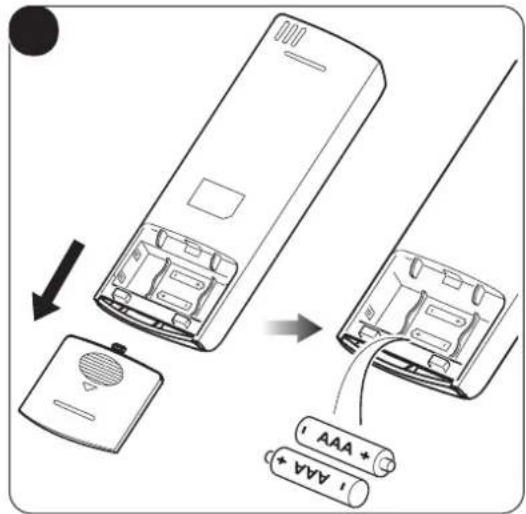
a. Remove the batteries compartment cover (figure 17).
b. Insert the batteries into the relevant compartment (figure 17).

Check the polarity indicated on the bottom of the compartment.
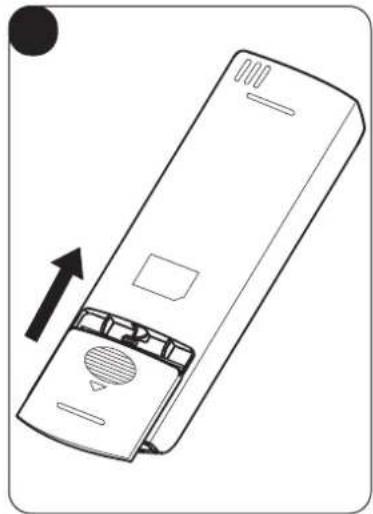
c. Close the compartment correctly (figure 18).
3.3.b - Replacement of batteries
The batteries must be replaced when the icon ☐ appears on the display.

Always use new batteries. The use of old or different batteries could generate malfunctioning of the remote control.
- The remote control uses two dry alkaline 1.5V batteries (AAA.) (Fig.17).

When replacing batteries, replace both and dispose of the dead batteries in the appropriate collection centres and as required by law.
- If the remote control is not used for several weeks or longer, remove the batteries. Any leaks from the batteries could damage the remote control.

Do not re-charge or disassemble the batteries. Do not throw the batteries into the fire. They can burn and explode.

If the battery liquid falls onto the skin or clothes, wash well with clean water. Do not use the remote control with batteries that have leaked.
The chemical products contained in the batteries can cause burns or other risks to health.
3.3.c - Location of the remote control
- Keep the remote control in a position from which the signal can reach the receiver (29) of the appliance (maximum distance is approx. 8 metres - with charged batteries) (figure 19).
The presence of obstacles (furniture, curtains, walls, etc.) between the remote control and the appliance reduces the remote control range.
EN - 14
3.4 - USE OF THE APPLIANCE
Work as follows in order to use the appliance.

To prevent possible damages to the compressor, each start is delayed by 3 minutes with respect to the last switching off.
3.4.a - Preliminary operations

- Place the appliance on a stable and not inclined base, at at least 30 cm. from the wall or from any other object, in order to ensure the correct air circulation. Place it on a water-resistant surface since the possible water leakage could damage furniture or the floor.
- Do not place the appliance directly on carpets, towels, blankets or other absorbent surfaces.
- Insert the plug in the power socket; the appliance emits a "beep", on the display appears the icon ⏻ and the environment temperature in °C.

Before electrically connecting the appliance, make sure the plate data correspond to those of the electricity distribution network.
3.4.b - Appliance switching on/off
a. The appliance can be switched ON or OFF for short periods by pressing B1 on the remote control or SW1 on the control panel (if the appliance is switched off for a long period then it should be deactivated by removing the plug from the mains supply.
b. The corresponding LED L2 lights up to indicate that the appliance is switched off.
c. In this condition, press B1 again on the remote control (or SW1 on the control panel) to restore all the formerly selected functions.
When the appliance is OFF all the working timers are 'reset'.
3.5 - VENTILATION MODE (FAN)
a. When this operating mode is used the appliance has no effect on the temperature or humidity of the environment, it merely circulates the air.
b. This mode can be selected by pressing B3 or SW2 until when the fan only symbol (S) is activated on the display of the control panel, while the symbol D6 appears on the remote controller display.
c. In this operating mode the internal fan is always on and the required fan speed can be selected at any time by pressing key B3 (only from the remote control) (symbol D7 on the remote control).
3.6 - COOLING MODE (COOL)
a. In this mode the appliance cools and dehumidifies the environment. This mode can be selected by pressing B2 or SW2 until the cooling only symbol (※ D3) is activated on the remote control and on the control panel display.
b. The internal fan is always on at automatic speed or (only from the remote control) at the selected speed.
c. The temperature set-point (Tset) can be adjusted from 17^ C to 30^ C (from 62 F to 86 F if present) in 1^ C steps by means of B11 or SW3/SW4, and its value is shown both on remote and local interfaces.
d. Three minutes (maximum) after the activation of this operating mode the compressor starts and the appliance starts to distribute cold air.
3.7 - DEHUMIDIFICATION MODE (DRY)
a. This mode can be selected by pressing B2 or SW2 until the dehumidification only symbol ( /D4 ) is activated on the remote control and on the control panel display.
EN - 15
b. This mode is similar to cooling mode, except that: fan speed selection not active (Set temperature) set equal to “Tamb” (ambient temperature).
c. In dehumidification mode only, the appliance can operate with only the condensate drain pipe connected (12) and without the flexible air expulsion hose.
3.8 - AUTO MODE (Automatic)
a. This mode can be selected by pressing B2 or SW2 until the automatic symbol (AUTO/ D2) is displayed on the remote control.
b. In this mode, the COOLING and FAN functions are selected automatically depending on the continuously monitored room temperature value to ensure that there is a perfect comfort-level in the conditioned room.
a. This mode can only be selected from the remote controller by pressing the B4 key, the symbol D11 appears on the display; this mode can only be used combined with cooling and automatic modes.
b. When this mode is enabled, the internal fan is forced to run at automatic speed and the set room temperature is automatically increased by 1^ C after 1/2 hour and by another 1^ C again after 1/2 hour (starting from function activation and consequent modification of the set temperature).
c. After 7 hours the initial temperature is automatically restored.
d. When the set temperature is modified from the remote control, when the appliance is placed in standby, or when the power supply is disconnected, the night function is disabled.
e. To deactivate the function press the B4 button again.
3.10 - TIMER MODE
a. This mode allows to program the switching on or the switching off of the appliance.
b. The delay time can be set by the remote control.
3.10.a - Programmed switching on
Select the operating mode, the desired temperature and the ventilation speed with which the unit will activate automatically as programmed.
a. By pressing B9, set the desired time delay (from 0.5 to 24 hours) after which the unit will switch ON (starting from timer confirmation).
If no button is pressed within 5 seconds the timer setting function will terminate automatically.
b. When the delay time set has elapsed, the unit switches ON with latest selected settings.
c. To cancel the delayed power-on, press button B9 again until a value of 0 is set.
d. When the timer is active, the symbol D14 lights up on the remote control, while, for the models without Wi-Fi, the LED S2 lights up.
3.10.b - Programmed switching off
a. With the unit in any working mode, press B8 to set the desired time delay (from 0.5 to 24 hours) after which the unit will switch OFF (starting from timer confirmation).
Each following B8 key operation increases the delay time value by 1 hour.
b. If no button is pressed within 5 seconds the timer setting function will terminate automatically.
When the delay time set has elapsed, the overall unit switches OFF.
c. To cancel the delayed shutdown, press button B8 again until a value of 0 is set.
d. When the timer is active, the symbol D13 lights up on the remote control, while, for the models without Wi-Fi, the LED S2 lights up.
3.11 - SETTING THE UNIT OF MEASUREMENT OF TEMPERATURE
On pressing buttons SW3 SW4 simultaneously for 3 seconds you can change the temperature unit of measure indicated on the machine display from CELSIUS (°C) to FAHRENHEIT (F) and vice versa.
3.12 - OTHER FUNCTIONS
3.12.a - FOLLOW ME function
- This function can be activated only from the remote control.
- This function is not available while the Dehumidification (DRY) and Fan Only (FAN) modes are active.
In this function, the remote control serves as a thermostat.
a. When the appliance is running, press the key "FOLLOW ME" on the remote control.
b. Move with the remote control in an area of the room different from where the appliance is positioned (maximum distance is 7÷8 metres) directing it towards the appliance itself and making sure there are no obstacles between them.
c. Set the desired temperature on the remote control; the appliance works until it takes the temperature of the area where the remote control is positioned to the value set on the remote control itself.
d. The remote control sends a signal to the appliance and, if it doesn't receive a response within a maximum time of 7 minutes, the function deactivates.
e. Press the key "FOLLOW ME" on the remote control or switch the appliance off to stop the function.
3.12.b - Short Cut function
- This function can be activated only from the remote control.
a. When the appliance is running in any of its modes, press the key "SHORT CUT" on the remote control and the appliance automatically configures itself to "AUTO" with a set temperature of 26^ (80 F).
3.12.c - Auto-Restart
a. If the appliance switches off due to interruption of power supply, it automatically restarts with the previous settings when electrical power is restored.
3.12.d - Wi-Fi (only for models provided)
a. Press SW1 for approximately 3 seconds to activate the "Wifi" function, on the display appears the message "AP" waiting for connection to the device.

For the connection to the Wi-Fi network and the use of the App, please refer to the Wi-Fi manual.
b. When the appliance is connected, the LED S2 remains on.
4 - MAINTENANCE AND CLEANING

Before proceeding with any maintenance and cleaning intervention, always make sure you disconnected the power plug from the power socket.

Do not touch the metal parts of the appliance when you remove the filter.
There is a risk of injury due to the sharp metal edges.
natural_image
Illustration of a hand using a power plug to switch an electrical outlet (no text or symbols present)
Do not use water to clean the internal parts of the air conditioner. sure to water can ruin the isolation, with the risk of electric shocks.
4.1 - CLEANING
4.1.a - Cleaning the appliance and the remote control
a. Use a dry cloth to clean the appliance and the remote control.
b. It is possible to use a cloth moistened with cold water to clean the appliance in case it's very dirty.

Do not use a chemically treated or antistatic cloth to clean the appliance.

Do not use gasoline, solvent, polish or similar solvents. The products could cause the breakage or deformation of the plastic surface.
4.1.b - Cleaning the suction filter
To ensure the indoor air is filtered correctly and to guarantee that your air conditioner runs efficiently, it is vital to clean the air filters regularly (Fig.20).
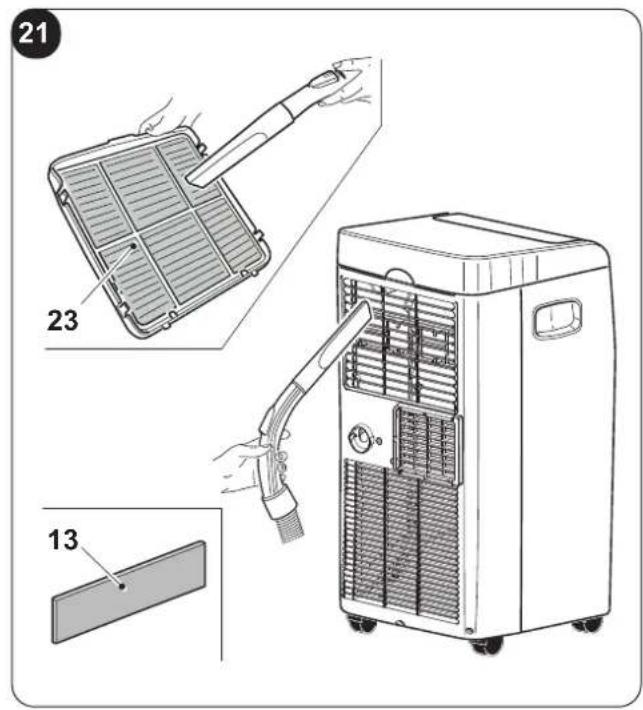
The filtering system is composed of an air filter (fig.20 ref.23) and an additional filter * (fig.5 ref.13).

Message F1 appears every 250 hours of operation of the fan motor.
The additional filters must be replaced after approximately 500 hours of operation (*)
Proceed with the filters cleaning and reset the hours counting by keeping key "ON/OFF" on the appliance control panel pressed for 5 seconds.
a. Switch off the conditioner and then remove the filters from the conditioner as indicated in figure 20.
b. Wash the filter with a water jet aimed at the side opposite the accumulation of dust.
c. If the dirt is particularly difficult to remove (such as grease or other types of deposit), first immerge the filter in a solution of water and a neutral detergent.
d. Shake off any water before reinserting the filter.

Provide for the filter (23) replacement if it is damaged.
e. Make sure the filter (23) has dried completely.
f. Correctly reposition the filter (23) in its specific seat.
g. Suck possible fluff from the grille (Fig. 21).

Do not use the appliance without the filter (23).
4.1.c - Recommendations for energy saving
Below find simple recommendations for reducing consumption:
• Always and constantly keep the filters clean (see maintenance and cleaning chapter).
- Keep the doors and windows of the rooms to be climate controlled closed.
- Do not let sun rays penetrate freely into the room (we recommend using curtains or lowering blinds or closing the shutters).
- Do not obstruct the air flow path (input and output) of the appliance; this, in addition to obtaining a non-optimal yield, also affects the correct operation of the appliance and the possibility of irreparable damages to the appliance itself.
4.2 - MAINTENANCE
If you do not intend to use the appliance for a long period of time, work as follows:
a. Activate the fan only mode for a few hours (approximately 1÷2 hours) to dry the interior of the appliance.
b. Stop the air conditioner and disconnect the power supply.
c. Clean the air filter.
d. Completely discharge condensation.
e. Remove the batteries from the remote control.
Checks before resuming use of the air conditioner:
a. Clean the filters after a long period of inactivity of the air conditioner.
b. Check that the air outlet or inlet are not obstructed (especially after a long period of inactivity of the air conditioner).
(*) only for models provided
EN - 18
4.2.a - Discharging condensation
When condensation in the lower tray reaches the predetermined level, the appliance emits beeps.
In this case:
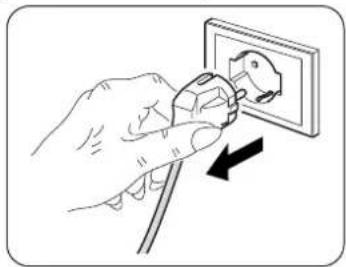
a. Disconnect the plug from the power socket.
b. Carefully move the appliance in position suitable to unload water.
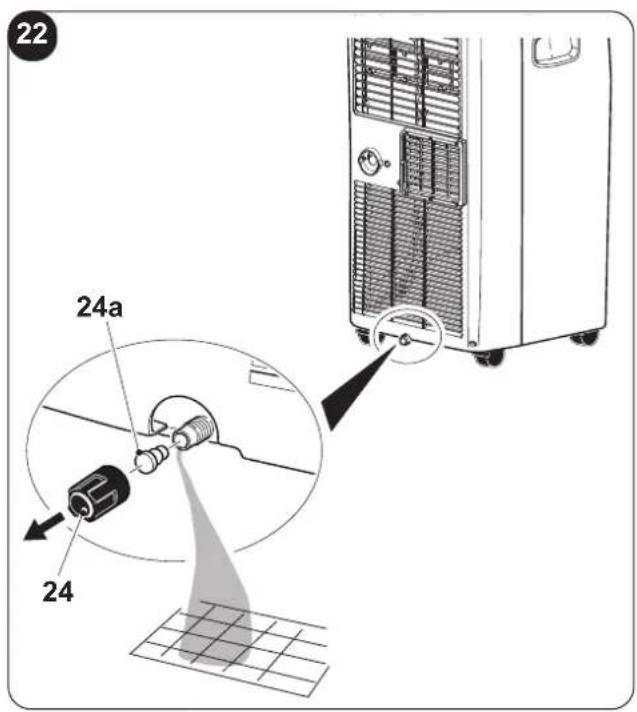
c. Remove the drain cap (24) and the rubber cap (24a) (Fig.22).

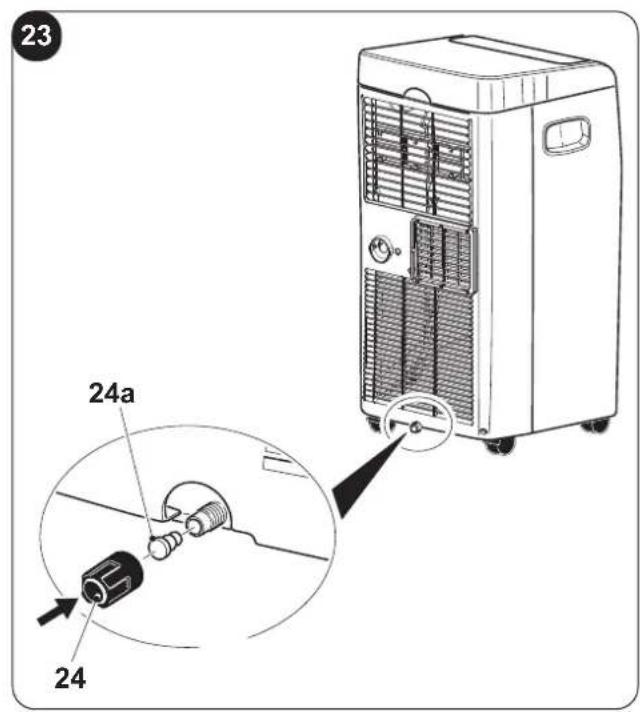
Make sure you correctly tightened the drain cap (24) in order to avoid water leak.
natural_image
Illustration of a hand using a power plug to switch an electrical outlet (no text or symbols present)d. Make water unload completely.
e. Reposition the rubber cap (24a) and screw the drain cap (24) (Fig.23).
f. Insert the plug in the power socket.

If the error repeats, please contact an Assistance Centre.
4.2.b - Error codes
During the appliance functioning, a few anomalies which stop its functioning could appear. In these cases, some error codes appear on the control panel.
• P1 Lower tray full.
• F1 Filters cleaning.
• E1 • E2 • E3 • E4
In these cases:
a. electrically disconnect the appliance
b. wait a few minutes
c. connect the plug to the power socket
d. restart the appliance.

If the inconvenience persists and the error code doesn't turn off, electrically disconnect the appliance and refer to an Assistance Centre.
5 - TECHNICAL DATA
For the technical data, please consult the data plate applied to the product (Fig.2).
| • Dimensions (W x H x D) 345 x 703 | x 355 mm |
| • Weight (without packing) 24 Kg | |
| • Maximum operating temperature in cooling mode | DB 35°C - WB 24°C * / DB 43°C - WB 32°C ** |
| • Minimum operating temperature in cooling mode | 17°C * / 16°C ** |
| * Internal ambient temp.** Outside ambient temp. | |
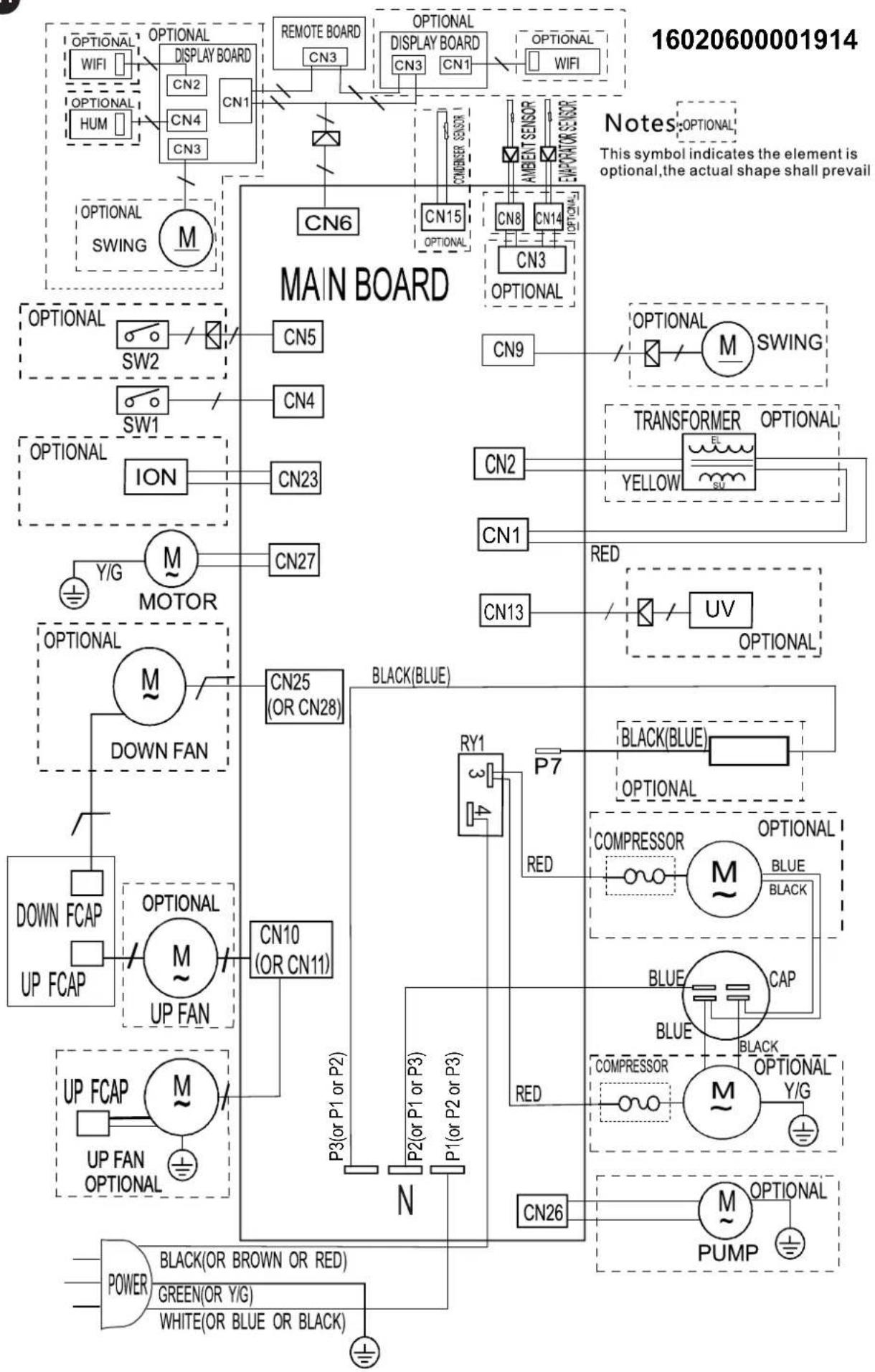
6 - WIRING DIAGRAM
The wiring diagram is shown in image 24.
7 - INCONVENIENCES AND POSSIBLE REMEDIES
| MALFUNCTIONThe conditioner does not work. | CAUSENo power.The plug has not been inserted.Timer is ON | WHAT DO I DO?Wait.Plug in the conditioner.Switch off the timer |
| The conditioner works only for a short period. | The temperature set is too close to ambient temperature.Suction of outside air is obstructed. | Lower the temperature set.Remove the obstructions.Call the Service Center. |
| The conditioner works but does not refresh the room. | Window open.Some source of heat is operating in the room (burner, lamps, etc.) or the room is crowded.The temperature set is too high.The power of the conditioner is not suitable for ambient conditions or dimensions. | Close the window.Eliminate sources of heat.Lower the temperature set. |
| Water leaks from the conditioner during transport. | The conditioner has been tilted or laid flat. | Remove the plug (fig.2 ref. n°4) and drain the water before moving the conditioner. |
| The conditioner switches off, the controls on the remote control and the control panel do not respond and alarm signal “E1” flashes on the control panel display. | Pull out the plugCall the Service Centre. | |
| The conditioner switches off, the controls on the remote control and the control panel do not respond and alarm signal “E2” flashes on the control panel display. | Pull out the plugCall the Service Centre. | |
| The conditioner switches off, the controls on the remote control and the control panel do not respond and alarm signal “E4” flashes on the control panel display. | Pull out the plugCall the Service Centre. | |
| The conditioner switches off, the controls on the remote control and the control panel do not respond and alarm signal “P1” flashes on the control panel display. | Excessive build-up of water inside the conditioner | Pull out the plugDain the water contained by removing the plug (fig.2 ref. n°4). If this alarm is displayed too frequently, call the Service Centre. |
| In cooling, night-time or automatic mode, minimum speed cannot be selected. | Ambient temperature too low | Air conditioner behaviour is normal. |
Do not try to repair the appliance by yourself.
If the problem has not been solved, please contact your local retailer or the closest assistance service. Supply detailed information about the malfunction and the equipment version.
EN - 20
0 - MISES EN GARDE....2
0.1 - INFORMATIONS GÉNÉRALES ...... 2
0.2 - SYMBOLOGIE 2
natural_image
Illustration of a hand using a power plug to switch an electrical outlet (no text or symbols present)natural_image
Illustration of a hand using a power plug to switch an electrical outlet (no text or symbols present)
Recommendation
natural_image
Line drawing of a hand holding a remote control device (no text or symbols)
3.5 - MODE VENTILATION (FAN)
natural_image
Illustration of a hand using a power plug to switch an electrical outlet (no text or symbols present)
natural_image
Illustration of a hand using a power plug to insert an electrical socket (no text or symbols present)
natural_image
Illustration of a hand using a power plug to install an electrical socket (no text or symbols present)2.3 - BEWEGLICHE INSTALLATION
natural_image
Illustration of a hand using a power plug to switch an electrical outlet (no text or symbols present)
Hinweis
natural_image
Line drawing of a hand holding a remote control device (no text or symbols)natural_image
Hand inserting a plug into an electrical socket (no text or symbols visible)
natural_image
Illustration of a hand using a power plug to insert an electrical socket (no text or symbols present)natural_image
Illustration of a hand using a power plug to install an electrical socket (no text or symbols present)
Advertencia
natural_image
Line drawing of a hand holding a remote control with buttons and a display (no text or symbols)
natural_image
Illustration of a hand using a power plug to switch an electrical outlet (no text or symbols present)natural_image
Illustration of a hand using a power plug to switch an electrical outlet (no text or symbols present)
4.2 - MANUTENÇÃO....18
7 - PROBLEMAS E POSSÍVEIS SOLUÇÕES ......20
0 - ADVERTÊNCIAS
0.1 - INFORMAÇÕES GERAIS
natural_image
Illustration of a hand using a power plug to insert an electrical socket into a wall, with a ground symbol nearby (no text or labels)natural_image
Illustration of a hand using a power plug to switch an electrical outlet (no text or symbols present)
Advertência
natural_image
Line drawing of a hand holding a remote control device (no text or symbols on the device itself)
natural_image
Illustration of a hand using a power plug to install an electrical socket (no text or symbols present)
natural_image
Illustration of a hand using a power plug to switch an electrical outlet (no text or symbols present)
7 - PROBLEMAS E POSSÍVEIS SOLUÇÕES
0 - WAARSCHUWINGEN 2
0.1 - ALGEMENE INFORMATIE....2
0.2 - SYMBOLLEN 2
0.2.1 - Redactionele pictogrammen 2
0.3 - ALGEMEEN ADVIES 3
0.4 - BEOOGD GEBRUIK 5
0.5 - RISICOZONES....5
0.6 - WAARSCHUWINGEN VOOR HET KOELGAS R290 5
1 - OMSCHRIJVING VAN HET APPARAAT....10
1.1 - LIJST VAN DE MEEGELEVERDE ONDERDELEN 10
1.2 - IDENTIFICATIE VAN DE VOORNAAMSTE ONDERDELEN 10
2 - INSTALLATIE ....11
2.1 - TRANSPORT VAN DE AIRCONDITIONER 11
2.2 - WAARSCHUWINGEN....11
2.3 - MOBIELE INSTALLATIE 11
2.4 - VASTE INSTALLATIE 12
2.5 - ELEKTRISCHE AANSLUITING....12
2.6 - DRAINAGE....12
0.6 - WAARSCHUWINGEN VOOR HET KOELGAS R290
- HET APPARAAT BEVAT GAS R290 (ONTVLAMBAARHEIDSCATEGORIE A3)
- HET APPARAAT MOET OPGESLAGEN WORDEN IN EEN GOED GEVENTILEERD VERTREK, WAARVAN DE AFMETINGEN OVEREENKOMEN MET DE MATEN DIE GESPECIFICEERD ZIJN VOOR HET GEBRUIK VAN HET APPARAAT.
- HET APPARAAT MOET GEINSTALLEERD, GEBRUIKT EN BEWAARD WORDEN IN EEN RUIMTE WAARVAN HET OPPERVLAK VAN DE VLOER GROTER IS DAN X M (X = AANGEGEVEN IN DE TABEL).
NL - 5
1 - OMSCHRIJVING VAN HET APPARAAT
1.1 - LIJST VAN DE MEEGELEVERDE ONDERDELEN
2.2 - WAARSCHUWINGEN
natural_image
Illustration of a hand using a power plug to switch an electrical outlet (no text or symbols present)2.3 - MOBIELE INSTALLATIE
natural_image
Illustration of a hand using a power plug to insert an electrical socket (no text or symbols)
Waarschuwing
natural_image
Line drawing of a hand holding a remote control device (no text or symbols)3.5 - VENTILATIEWERKWIJZE (FAN)
natural_image
Illustration of a hand using a power plug to switch an electrical outlet (no text or symbols present)
natural_image
Hand inserting a plug into an electrical outlet socket (no text or symbols visible)natural_image
Illustration of a hand using a power plug to switch an electrical outlet (no text or symbols present)natural_image
Illustration of a hand using a power plug to insert an electrical socket (no text or symbols present)
Προειδοποίηση
$$ = > \psi \acute {u} \xi \eta = > \dots $$
natural_image
Line drawing of a hand holding a remote control device (no text or symbols)3.5 - ΛΕΙΤΟΥΡΓΙΑ ΑΝΕΜΙΣΤΗΡΑ (FAN)
natural_image
Illustration of a hand using a power plug to insert an electrical socket (no text or symbols present)
natural_image
Hand inserting a plug into an electrical outlet socket (no text or symbols visible)natural_image
Illustration of a hand using a power plug to switch an electrical outlet (no text or symbols present)
OSTRZEŻENIE
natural_image
Line drawing of a hand holding a remote control device (no text or symbols)
3.5 - TRYB WENTYLACJI (FAN)
natural_image
Illustration of a hand using a power plug to switch an electrical outlet (no text or symbols present)2.3 - INSTALARE MOBILĂ
natural_image
Illustration of a hand using a power plug to switch an electrical outlet (no text or symbols present)
AVERTISMENT
natural_image
Line drawing of a hand holding a remote control device (no text or symbols)
3.5 - MOD VENTILATIE (FAN)
natural_image
Illustration of a hand using a power plug to switch an electrical outlet (no text or symbols present)
natural_image
Illustration of a hand using a power plug to switch an electrical outlet (no text or symbols present)
ALLMÄN INNEHÅLLSFÖRTECKNING
0 - WARNINGAR....2
0.1 - ALLMÄN INFORMATION 2
0.2 - SYMBOLER 2
0.2.1 - Redaktionella piktogram 2
0.3 - ALLMÄNNA VARNINGSTEXTER....3
0.4 - AVSEDD ANVÄNDNING 5
0.5 - RISKZONER 5
0.6 - VARNINGAR FÖR KYLGASEN R290....5
1 - BESKRIVNING AV APPARATEN 10
1.1 - LISTA ÖVER KOMPONENTER SOM LEVERERAS MED ENHETEN....10
1.2 - IDENTIFIERING AV HUVUDDELAR....10
2 - INSTALLATION .... 11
2.1 - TRANSPORT AV KLIMATANLÄGGNINGEN....11
2.2 - WARNINGAR 11
2.3 - MOBIL INSTALLATION 11
2.4 - FAST INSTALLATION 12
2.5 - ELEKTRISK ANSLUTNING....12
2.6 - DRÄNERING....12
2.6.a - Användning som avfuktare 12
3 - ANVÄNDNING AV APPARATEN....12
3.1 - SYMBOLER OCH KNAPPAR PÅ MANÖVERPANELEN 13
3.2 - KNAPPAR PÅ FJÄRRKONTROLLEN....13
3.3 - ANVÄNDNING AV FJÄRRKONTROLLEN 14
3.3.a - Isättning av batterier 14
3.3.b - Byte av batterier 14
3.3.c - Fjärrkontrollens läge....14
3.4 - ANVÄNDNING AV APPARATEN 15
3.4.a -Förberedande moment....15
3.4.b - Slå på/stänga av apparaten....15
3.5 - VENTILATIONSLÄGE (FAN)......15
3.6 - KYLLÄGE (COOL) 15
3.7 - AVFUKTNINGSLÄGE (DRY)....15
3.8 - AUTO-LÄGE (Automatiskt)....16
3.9 - NATTDRIFT 16
3.10 - TIMER-LÄGE 16
3.10.a - Programmerad påslagning 16
3.10.b - Programmerad avstängning 16
3.11 - Inställning av mättenhet för temperaturen....16
3.12 - ANDRA FUNKTIONER....17
3.12.a - FOLLOW ME-funktion 17
3.12.b - Short Cut-funktion....17
3.12.c - Auto-Restart....17
3.12.d - Wi-Fi 17
4 - UNDERHÅLL OCH RENGÖRING....17
natural_image
Illustration of a hand using a power plug to insert an electrical socket into a wall, with a ground symbol nearby (no text or labels)natural_image
Illustration of a hand using a power plug to switch an electrical outlet (no text or symbols present)
VARNINGAR
natural_image
Line drawing of a hand holding a remote control device (no text or symbols)3.5 - VENTILATIONSLÄGE (FAN)
natural_image
Illustration of a hand using a power tool to switch an electrical socket (no text or symbols present)
natural_image
Illustration of a hand using a power plug to switch an electrical outlet (no text or symbols present)
5 - TEKNISET TIEDOT 19
6 - SÄHKÖKAAVIO....19
7 - ONGELMAT JA MAHDOLLISET KORJAUSTOIMENPITEET ....20
0 - VAROITUKSIA
0.1 - YLEISTIETOJA
natural_image
Illustration of a hand using a power plug to insert an electrical socket into a wall, with a ground symbol nearby (no text or labels)2.3 - LIIKKUVA ASENNUS
natural_image
Illustration of a hand using a power plug to install an electrical socket (no text or symbols present)
VAROITUS
3.3 - KAUKOSÄÄTIMEN KÄYTTÖ
natural_image
Line drawing of a hand holding a remote control device (no text or symbols)
3.5 - ILMANVAIHTOTAPA (FAN)
3.12 - MUUT TOIMINNOT
natural_image
Hand inserting a plug into an electrical outlet (no text or symbols visible)4.1 - PUHDISTUS
natural_image
Illustration of a hand using a power plug to insert an electrical socket (no text or symbols present)
4 - VEDLIKEHOLD OG RENGJ∅RING....17
4.1 - RENGJ∅RING 17
4.2 - VEDLIKEHOLD 18
- INFORMASJON OM VEDLIKEHOLD
natural_image
Illustration of a hand using a power plug to insert an electrical socket into a wall, with a ground symbol nearby (no text or labels)2.3 - MOBIL INSTALLASJON
Luftkjøleren må installeres på et passende sted.
natural_image
Illustration of a hand using a power plug to switch an electrical outlet (no text or symbols present)
ADVARSEL
natural_image
Line drawing of a hand holding a remote control device (no text or symbols)natural_image
Illustration of a hand using a power plug to switch an electrical outlet (no text or symbols present)
natural_image
Hand inserting a plug into an electrical outlet socket (no text or symbols visible)natural_image
Illustration of a hand using a power plug to insert an electrical socket into a wall, with a ground symbol nearby (no text or labels)2.3. - MOZGATHATÓ TELEPÍTÉS
natural_image
Line drawing of a hand holding a remote control device (no text or symbols)
natural_image
Illustration of a hand using a power plug to switch an electrical outlet (no text or symbols present)
natural_image
Illustration of a hand using a power plug to insert an electrical socket (no text or symbols)
3.5 - REŽIM VENTILACE (FAN) 15
3.6 - REŽIM OCHLAZOVÁNÍ (COOL) 15
3.7 - REŽIM ODVLHČOVÁNÍ (DRY) 15
3.8 - AUTOMATICKÝ REŽIM (Automatický)......16
3.9 - NOČNÍ PROVOZ....16
3.10 - REŽIM ČASOVAČE 16
natural_image
Illustration of a hand using a power plug to switch an electrical outlet (no text or symbols present)2.3 - MOBILNÍ INSTALACE
natural_image
Illustration of a hand using a power plug to switch an electrical outlet (no text or symbols present)
UPOZORNĚNÍ
natural_image
Line drawing of a hand holding a remote control device (no text or symbols)3.5 - REŽIM VENTILACE (FAN)
natural_image
Illustration of a hand using a power plug to switch an electrical outlet (no text or symbols present)
natural_image
Illustration of a hand using a power plug to switch an electrical outlet (no text or symbols present)
natural_image
Illustration of a hand using a power plug to switch an electrical outlet (no text or symbols present)natural_image
Illustration of a hand using a power plug to switch an electrical outlet (no text or symbols present)
natural_image
Line drawing of a hand holding a remote control device (no text or symbols)natural_image
Illustration of a hand using a power plug to insert an electrical socket (no text or symbols present)natural_image
Illustration of a hand using a power plug to insert an electrical socket into a wall, with a ground symbol nearby (no text or labels)2.3 - MOBIL INSTALLATION
Klimatiseringsapparatet skal installeres i passende omgivelser.
natural_image
Illustration of a hand using a power plug to switch an electrical outlet (no text or symbols present)
ADVARSEL
natural_image
Line drawing of a hand holding a remote control device (no text or symbols)
natural_image
Illustration of a hand using a power plug to switch an electrical outlet (no text or symbols present)4.1 - RENG∅RING
natural_image
Illustration of a hand using a power plug to switch an electrical outlet (no text or symbols present)
This symbol on the product or its packaging indicates that the appliance cannot be treated as normal domestic trash, but must be handed in at a collection point for recycling electric and electronic appliances. Your contribution to the correct disposal of this product protects the environment and the health of your fellow men. Health and the environment are endangered by incorrect disposal. Further information about the recycling of this product can be obtained from your local town hall, your refuse collection service, or in the store at which you bought the product. This regulation is valid only in EU member states.