Hobot 388 - Windshield wiper EZICLEAN - Free user manual and instructions
Find the device manual for free Hobot 388 EZICLEAN in PDF.


User questions about Hobot 388 EZICLEAN
0 question about this device. Answer the ones you know or ask your own.
Ask a new question about this device
Download the instructions for your Windshield wiper in PDF format for free! Find your manual Hobot 388 - EZICLEAN and take your electronic device back in hand. On this page are published all the documents necessary for the use of your device. Hobot 388 by EZICLEAN.
USER MANUAL Hobot 388 EZICLEAN
natural_image
Top-down view of a HOBOT (Al. Technologie) robotic device with visible sensor and control buttons (no text or symbols on body)flowchart
graph TD
    A["1st Round"] --> B["Weather icon: sun, cloud, rain"]
    C["2nd Round"] --> D["Weather icon: rain, snow, water, rain"]
    style A fill:#f9f,stroke:#333
    style C fill:#f9f,stroke:#333
text_image
HOBOT Air Conditioning MAXnatural_image
Line drawing of a hand holding a small electronic device with a cable, no text or symbols presentNettoyage & entretien
natural_image
Three abstract geometric symbols: square, parallelogram, and circle (no text or labels)natural_image
Close-up of a white cleaning brush with adjustable handle and mounting bracket (no text or symbols visible)natural_image
Illustration of a hand holding a circular component next to a mechanical device (no text or symbols visible)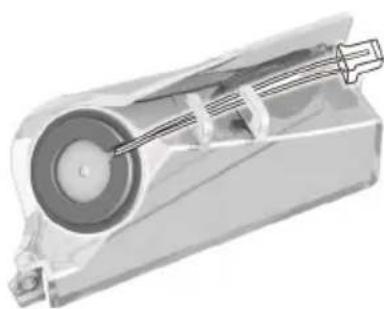
natural_image
Mechanical device diagram showing internal components with a shaft and housing (no text or symbols)Télécommande
text_image
QR code image containing encoded data, no visible human-readable textIndication des LEDS
46/48, rue Gay Lussac
94430 Chennevières-sur-Marne
www.e-zicom.com
Welcome to EZI® - Make it easy
Thank you for the trust you place in our EZIclean® range.
We hope you are satisfied with this product and now let you take note of the following instructions for use.
- This device can be used by children at least 8 years old and by people with reduced physical, sensory or mental capacities or with no experience or knowledge in this area.
• They must receive instructions on the safe use of the device and understand the risks involved. Children should not play with the device. Cleaning and maintenance should not be done by children without supervision. - If the power cord is damaged, stop using the appliance immediately. To avoid the risk of accident, a repairer authorized by the manufacturer must replace the power cord.
- If the area to be cleaned has a balcony, a physical barrier must be used to prevent access to the balcony and to ensure safe use.
- Small children and pets should be supervised while the robot cleans.
- Charge the battery and use only the original charger supplied with the device. Check that the supply voltage is the same as that indicated on the charger. Never recharge the batteries in temperatures above 30^ or below 0^ .
- Plug the charger sold with the device into a suitable outlet. Battery cells may leak under extreme conditions of use or temperature. If the liquid touches the skin, wash it off quickly with water. If the liquid gets into the eyes, immediately rinse them with clean water for at least 10 minutes. See a doctor. It's normal for the charger to become warm to the touch when it's charging.
- Use only accessories, consumables and spare parts recommended or supplied by the manufacturer
- Stop using your device or charger if they appear to be defective. To ensure the safe and efficient use of this device, we recommend that it be serviced and repaired only by a repairer authorized by the manufacturer.
- Do not use this appliance to clean people or animals. Do not replace the robot's batteries with non-rechargeable batteries.
- The HOBOT robot is only intended for domestic maintenance in accordance with this user manual.
- In order to maintain the manufacturer's warranty, do not disassemble the device without the consent of our company.
- Keep the device away from magnetic sources, heat or flammable products.
- Attach HOBOT with its safety cord for indoor and outdoor use. This is to prevent any risk of falls.
- Do not use outdoors in the event of rain, high humidity or extreme cold.
- Do not start HOBOT only when it has perfect adhesion to the glass.
- Do not moisten the robot directly. This one is not waterproof. Risk of oxidation.
- Make sure that the glass wall contains nothing that could cause a risk of scratching.
- Do not attempt to put a foreign object between the robot and the glass when the device is in operation.

The symbol on this appliance indicates that it cannot be disposed of with household waste. You must deposit it in an electrical and electronic waste recycling center. Disposal must be carried out in accordance with local waste regulations. For further information on the treatment, recovery and recycling of this appliance, please contact your municipality, the local household waste disposal service or the retailer of the appliance.


Your device
text_image
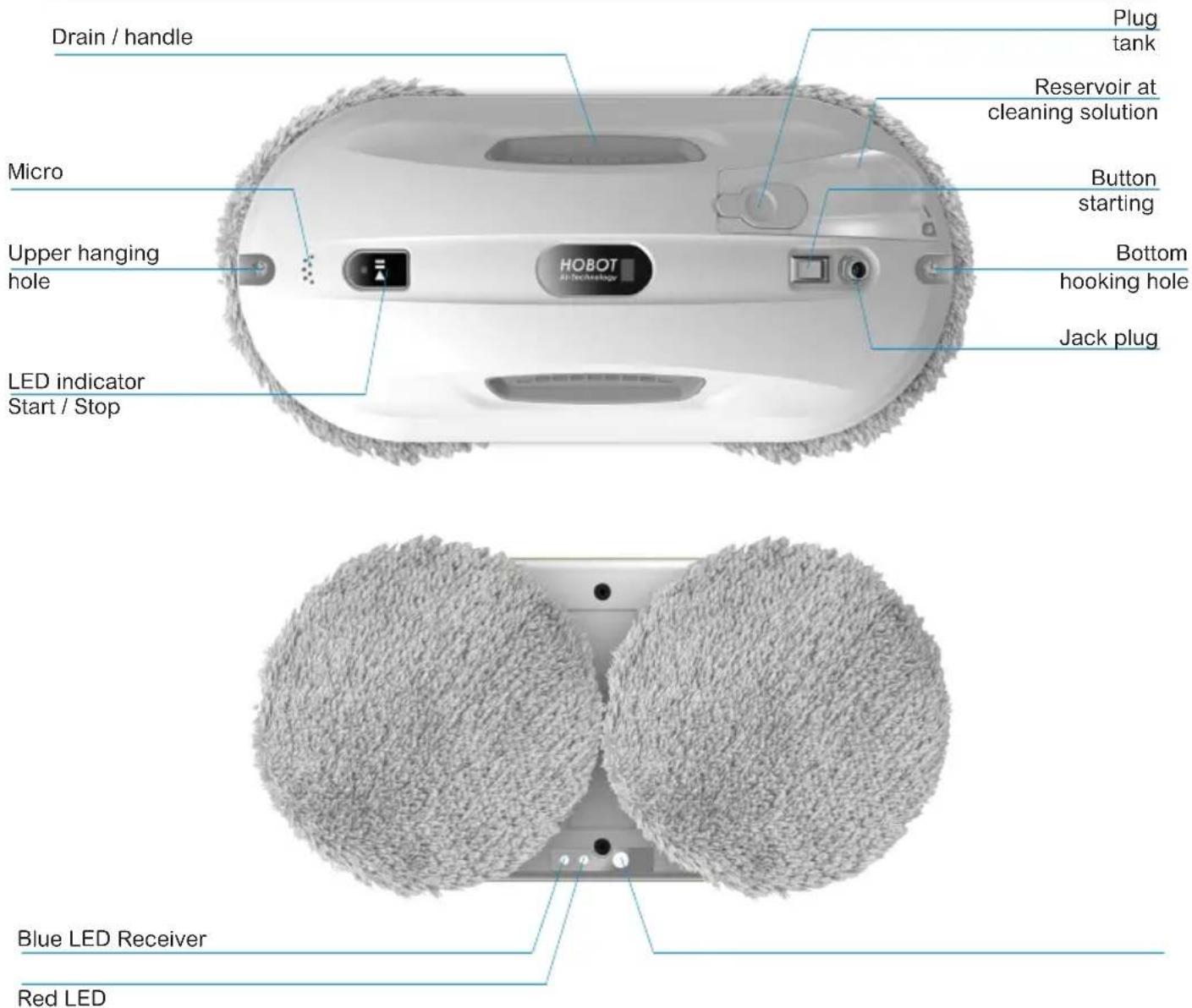
Drain / handle Plug tank Reservoir at cleaning solution Button starting Bottom hooking hole Jack plug Micro Upper hanging hole HOBOT Air-Technology LED indicator Start / Stop Blue LED Receiver Red LEDClean your windows
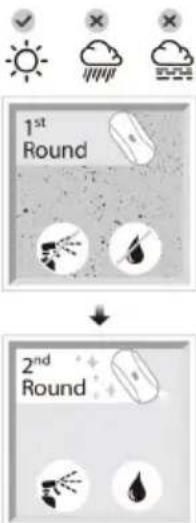
1 - Dry wash
- Use clean and dry microfiber pads to remove dust and the dirt on the glass.
- Use your device on sunny or slightly humid days to obtain best results. Do not use your window cleaning robot on rainy days or very humid to avoid leaving streaks of water.
2 - Wash with water
- Use new clean and dry microfiber pads.
- Spray a small amount of cleaning solution or water on the lower pad of your device while keeping the upper pad dry, then clean again glass.
flowchart
graph TD
    A["1st Round"] --> B["Weather Icon: Sunny, Cloud, Drought"]
    C["2nd Round"] --> D["Weather Icon: Rainfall, Wind, Earth"]
Operate your device
1 - Use
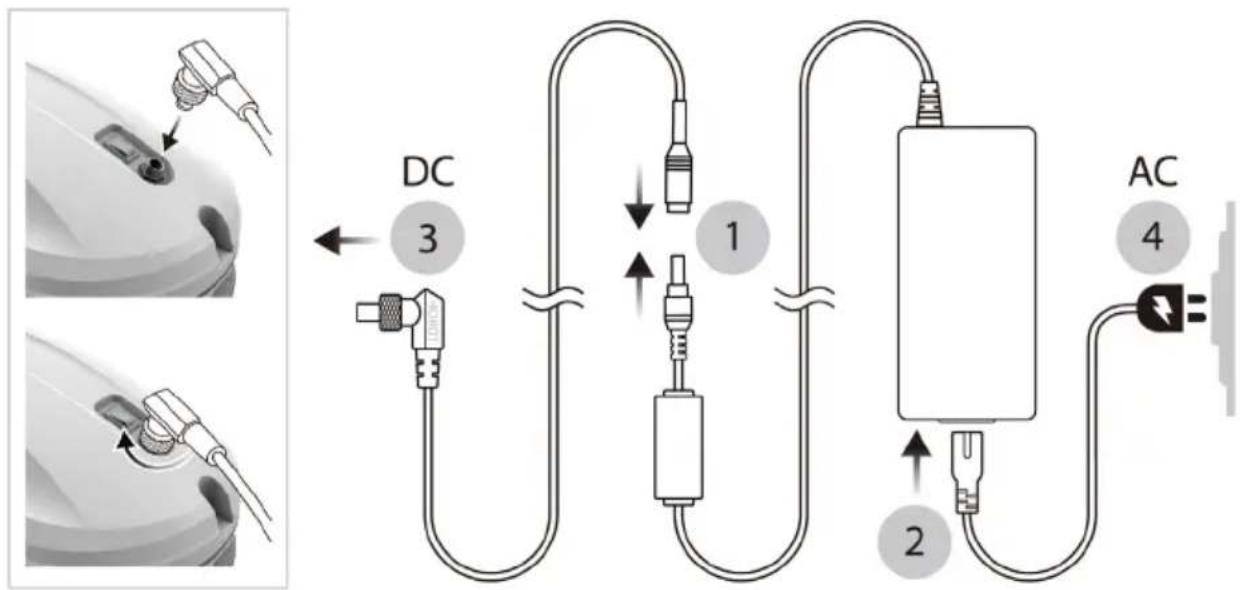
- Connect the adapter to the power cord (1).
- Connect the adapter to the power cord (2).
- Plug the L-shaped connector into the power socket of your device and screw it (3).
- Plug the power cord into the socket (4).
flowchart
graph TD
    A["DC"] --> B["1"]
    B --> C["AC"]
    C --> D["2"]
    D --> E["3"]
    style A fill:#f9f,stroke:#333
    style B fill:#ccf,stroke:#333
    style C fill:#cfc,stroke:#333
    style D fill:#fcc,stroke:#333
2 - Charging the battery
- Ensure that the battery is fully charged (green light on) before use:
- Turn off the power switch of your window cleaning robot, then connect it to a power source. The orange light on means that your device is charging.
- The green LED on means that the battery is fully charged.
3 - Install the cleaning rings and the microfiber pads
- Make sure that the cleaning ring is perfectly covered by the microfiber pad and then fix it correctly on the cleaning wheel to avoid air leaks.
4 - Security
- For windows without a balcony, a warning zone must be provided on the floor to prevent people from approaching it.
- Check that the safety rope is not broken and that the knot is properly tightened.
- Tie the safety rope and tie it to something high before using your window cleaning robot.
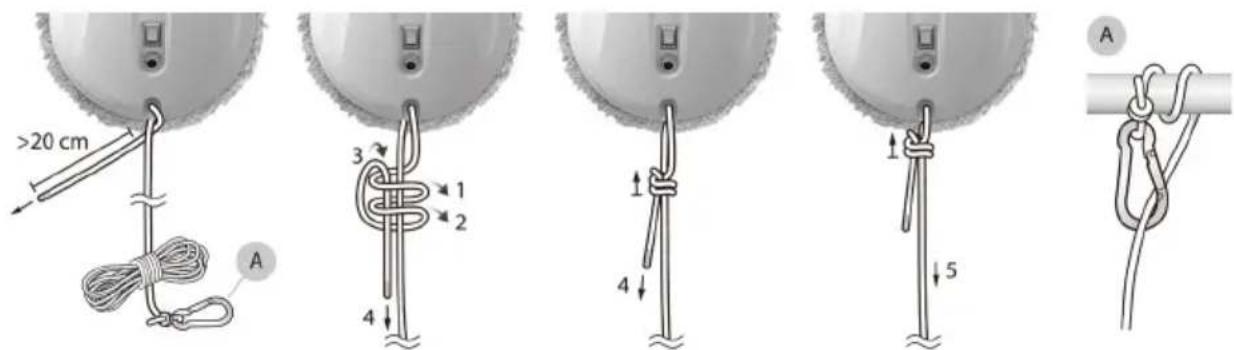
text_image
>20 cm A 3 1 2 4 4 1 5 A5. Fill the tank.
Fill the water tank with pure water or from eziclean® cleaning solution to the «MAX» line and fully tighten the tank cover.

text_image
HOBOT Air Conditioning MAX6. Place your robot on the glass.
- Switch on the device. Make sure the fan is running.
- Place your device on the glass and keep it 10 cm from the edge.
- Check that the robot sticks to the glass before releasing it.
7. Cleaning with automatic mode and manual mode
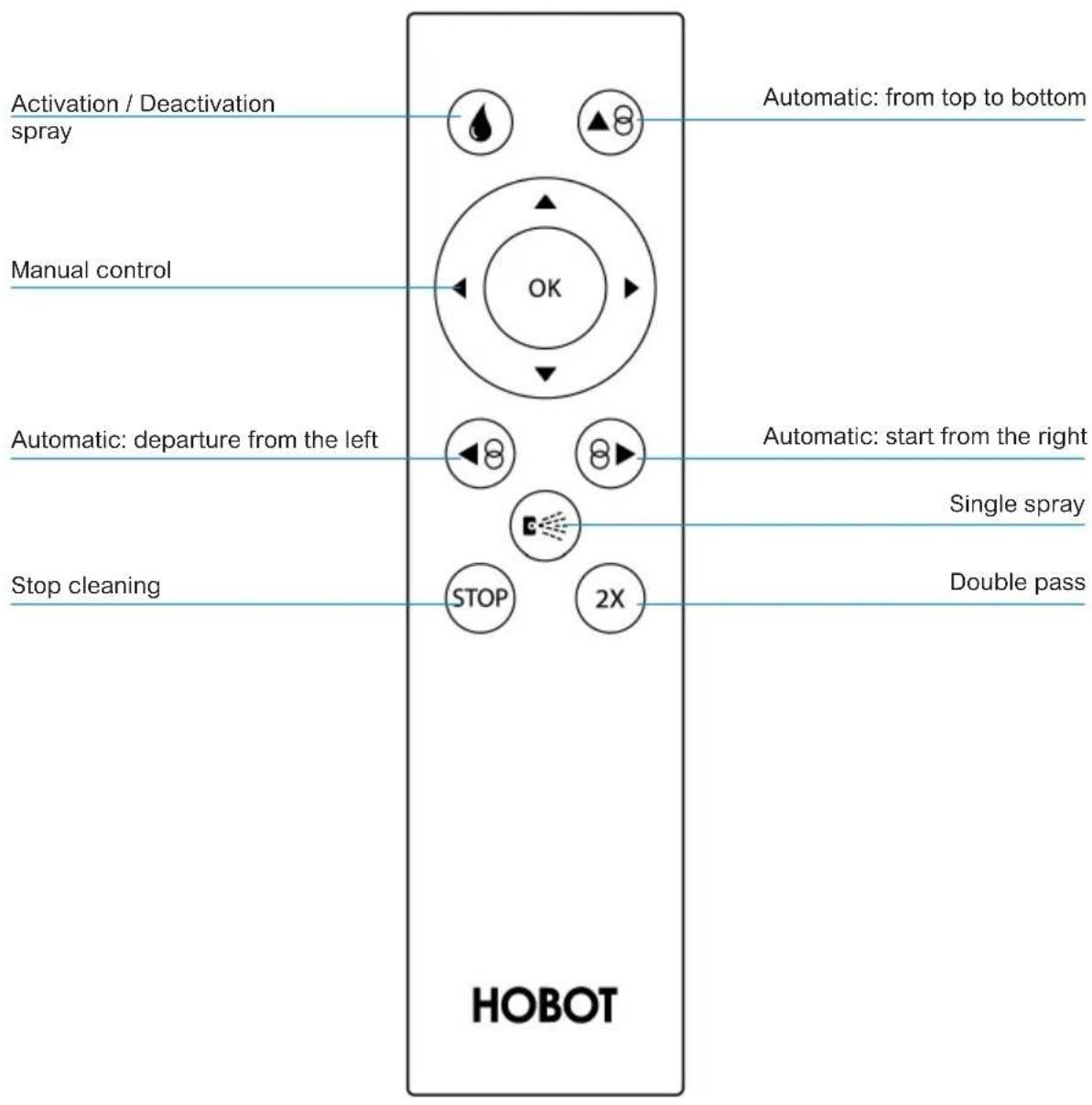
- Press ⬆ or ⬆ or ⬆, your robot automatically cleans the entire window.
- Press STOP to stop your device.
- Press (or) or or to manually control the direction of movement of your robot.
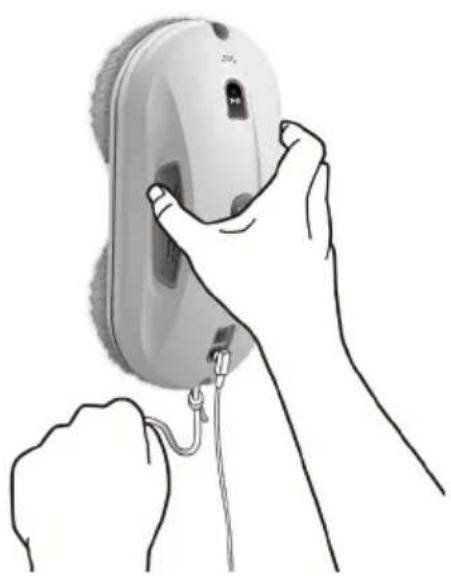
8. Finish cleaning and remove your device from the glass.
(1) Hold the lifeline with one hand and grasp your device firmly with the other hand to remove it from the glass.
(2) Turn off your device once you have placed it on a table or secure surface.
UPS (Uninterruptible Power Supply)
- The backup battery powers your device for 20 minutes in the event of a power failure.
- Your device will stop automatically, beep an alert and will flash red and blue.
- Remove your robot from the glass as soon as possible.
natural_image
Illustration of a hand holding a small electronic device with a cable, no text or symbols presentCleaning & maintenance
1. Cleaning and maintenance of your microfiber pads
- Read the maintenance instructions for the microfiber pads:
- Wash below 40 °C (104 °F).
- Do not bleach.
- Do not use fabric softener.
- Do not tumble dry.
- Do not iron.
- Do not dry clean.
- Clean after each maintenance of your windows.
Please contact a reseller or the brand to purchase other microfiber pads.
For optimal cleaning, it is recommended to change your consumables every 6 months.


natural_image
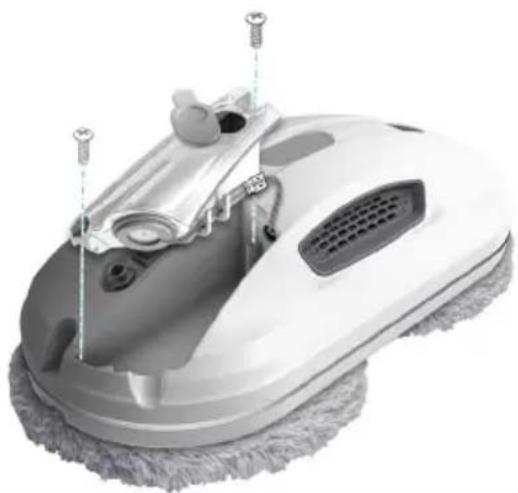
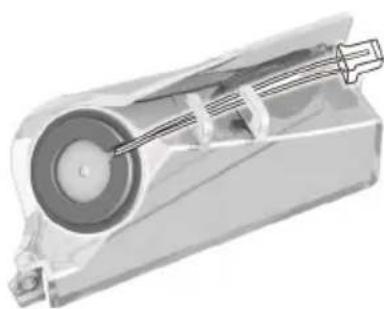
Three abstract geometric symbols: square, parallelogram, and circle (no text or labels)2. Replace the tank.
- Use a Phillips screwdriver to unscrew
The reservoir. - Disconnect the cable from the old tank, then drag it to extract it.
- Connect the new tank to the robot, slide it back, then tighten the screw.
Maintenance frequency: when the ultrasonic nozzle is blocked and cannot spray water.
Please contact a local dealer or local authorized dealer for other consumable spare parts.
natural_image
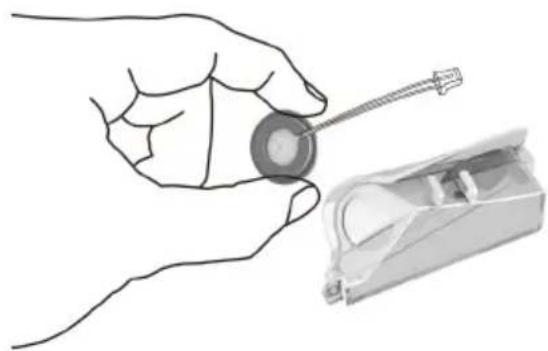
Close-up of a white cleaning brush with adjustable handle and mounting bracket (no text or symbols visible)3. Replace the ultrasonic spray nozzle :
- Follow the instructions above to detach
The reservoir.
- Slightly lift the silicone ring and remove it from the tank. Do not press on the welding spot and / or the ultrasonic nozzle.
- Place the new ultrasonic spray nozzle on the tank, make sure the connection cable is aligned near the side of the tank, then install the bottom of the silicone ring on the tank.
- Press the silicone ring to fix it, then use another finger to press the top of the silicone ring lightly into the tank.
- Check that the new ultrasonic spray nozzle is properly fitted to the tank.
- Connect the new tank to the robot, slide it back, then tighten the screw.
natural_image
Illustration of a hand holding a circular object next to a mechanical device (no text or symbols visible)Maintenance frequency: when the ultrasonic nozzle is blocked and cannot spray water.
Contact a local dealer or the brand for other spare parts.
natural_image
Mechanical device diagram showing internal components with a shaft and housing (no text or symbols)Remote control
text_image
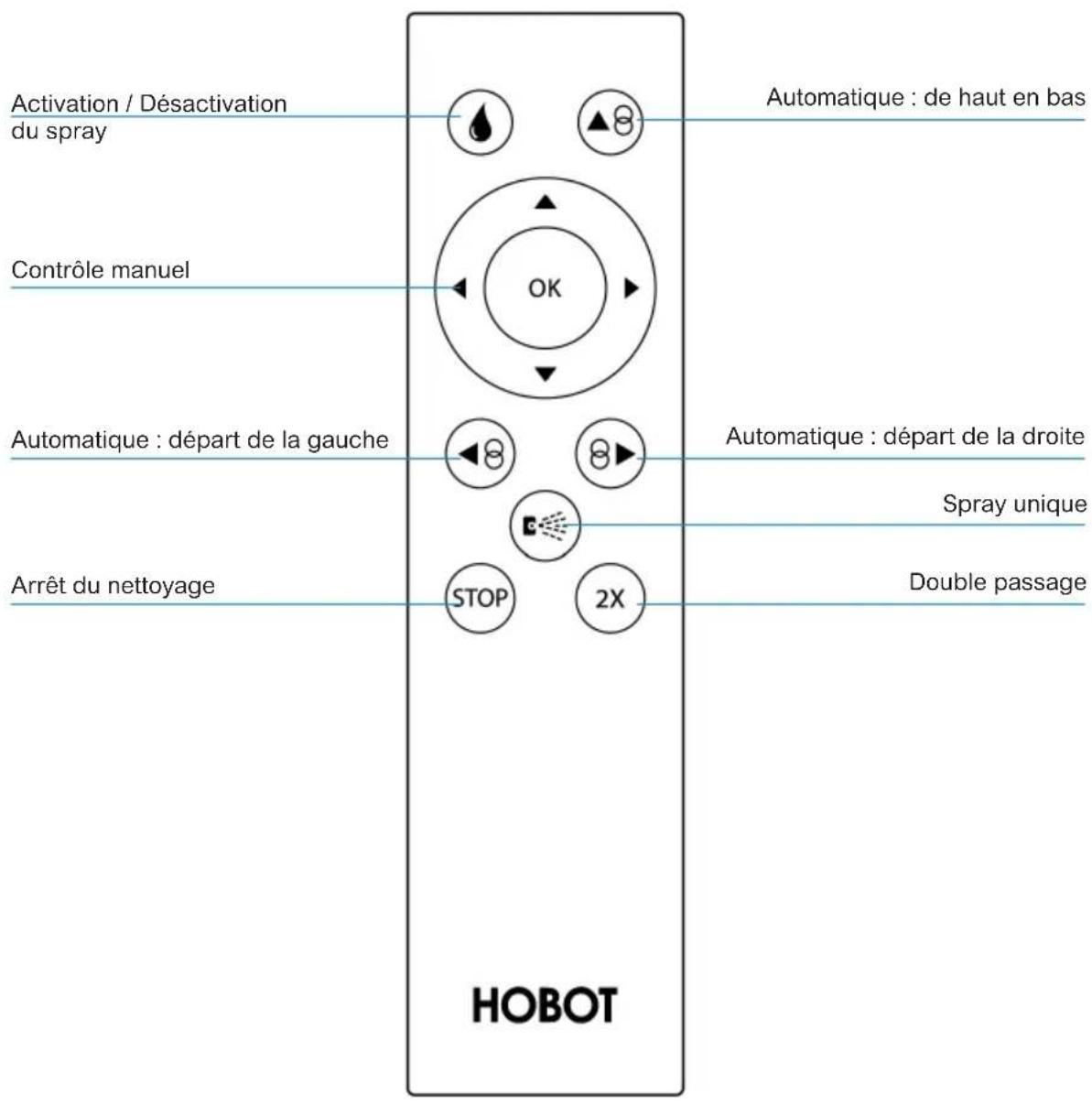
Activation / Deactivation spray Manual control Automatic: departure from the left Stop cleaning Automatic: from top to bottom OK Automatic: start from the right Single spray Double pass STOP 2X HOBOTHOBOT APP
Your Hobot can be controlled by both the remote control and the HOBOT app from your phone.
1 - Download your application
Scan the QR code or search for «HOBOT» on the App Store or Google Play to download the application on your smartphone or your tablet.
2 - Start cleaning with the HOBOT application
- Activate bluetooth and press "Open" the application.
- Switch on your device and wait for the word «Connected» to appear on the app.

text_image
QR code image containing encoded data, no visible human-readable textLED indication
| STATUS | LED INDICATION | ALERT | SITUATION AND HANDLING |
| Loading | Orange light - | Backup battery charging | |
| Green light - | Fully charged backup battery | ||
| Operating | Blue and white blinking | - | Low battery, refer to FAQ Q1 to resolve the problem. |
| Blue light | - | Being cleaning. | |
| One long beep and two short beeps | Cleaning finished. | ||
| Light off One beep | Air leakage, your device does not will not start. | ||
| Red and blue blinking | Continuous beep | Power interrupted, reconnect to the power source. In case of power failure or unable to restore the power source, refer to FAQ Q2 to resolve it. | |
| Flashing blue Two | beeps | Refer to FAQ Q3 to resolve it. | |
| Flashing white Two | beeps | Refer to FAQ Q7 and Q8 to resolve it. | |
| Flashing red Two | beeps | Hardware failure. Contact a local dealer or the brand for repairs. | |
Frequently asked questions
1. Charging the backup battery.
- If your device is not used for a long time, store it in a dry and safe place. The battery must be charged every 4 to 6 months to maintain its lifespan. If the battery cannot be fully charged after 3 to 4 hours, contact a local dealer or an authorized dealer for battery replacement.
2. Your device stops working due to a power failure with a long alert and a flashing red and blue light.
- Hold the safety rope in one hand and grasp your device firmly with the other hand to remove it from the glass.
- Switch off your device in a safe place.
- Check if the power cord is damaged or broken.
3. The blue light flashes and beeps when your device fails at the end of the start-up check.
- If the cleaning cloth is too dirty.
- Glass stickers and window films have too low a friction factor.
- If the window is cleaned several times, the glass surface will become very slippery.
- The glass surface will become slippery if it is cleaned several times in a low humidity environment, such as an air-conditioned room.
- Keep your device at least 10 cm from the window frame before placing it on the glass to avoid false detection.
4. Your device slides and cannot detect the upper frame of the window in «Automatic ascent then descent» mode.
- Press ⬆ and switch to automatic cleaning mode.
5. Your device slides and cannot climb to the top of the window.
- The friction factor is too low, usually due to the stickers or the glass film on the glass.
- The cleaning cloth may be too wet.
- If the window is cleaned several times, the glass surface will become very slippery.
- The glass surface will become slippery if it is cleaned several times in a low humidity environment, such as an air-conditioned room.
- Keep your device at least 10 cm from the window frame before placing it on the glass to avoid false detection.
6. Your device cannot finish cleaning the window and stops working.
- Press ◀ or ⚙️ switch to automatic cleaning mode left or right.
7. The white light flashes and beeps when the device stops at the edge of the glass.
- Some glass strips are very flat and can sometimes be stuck by your device and cause air leaks. Move the unit 10 cm or more from the window frame and use the automatic cleaning mode to continue.
8. Your device is not moving correctly or irregularly.
- The cleaning cloth is too dirty, replace it.
- The difference in friction factor due to glass stickers, window film, etc. Avoid using your device on the surface with a special finish.
- The cleaning wheel screw may be loose. Just tighten it.
- The cleaning ring is broken, replace it.
9. After cleaning, swirl marks are left on the glass.
- The cleaning cloth is too dirty or too wet, replace it.
10. How to avoid leaving swirl marks on the glass visible under intense lighting?
- Use a pair of clean dry cloth to remove dust and dirt from the glass, then use another pair of clean dry cloth, spray a small amount of cleaning solution or rubbing alcohol only on the lower cleaning cloth while keeping the upper cleaning cloth dry and clean the glass again.
11. HOBOT does not stop cleaning after the task is finished.
Press the "STOP" button to stop your apparatus.
12. Unable to link to the App / HOBOT
- Restart your device the application.
- Activate the bluetooth function on the smartphone and connect.
- Check the list of bluetooth devices on the smartphone and select «HOBOT».
- If problems arise and this manual cannot provide the necessary solution, contact a local dealer or local authorized dealer.
Technical characteristics
Weight: 915 g
Device size (LWH): 295 × 148 × 95 mm
Software: AI V4.0 Technology
Cleaning method: Rotating, zigzag
Ultrasonic spray of integrated cleaning solution: Yes
Appropriate glass thickness: Any thickness
Input voltage: 100-240V, 50 / 60Hz
Energy consumption: 90W
Turn off the power supply system (UPS): 20 minutes
Warranty and certificates
E.ZICOM®
- Limited Warranty -
NOTE: This Limited Warranty does not affect your rights under the law relating to the sale of consumer products.
The products of the company E.ZICOM give right to the legal guarantee in force, that is to say 2 years (and 1 year of extension offered for any registration of your product on our website). Batteries, having a limited cycle time, are considered to be consumable. As a result they are covered by a 1 year warranty just like the accessories.
The duration of the manufacturer's warranty for some of our products may occasionally be changed when sold on distribution networks deemed to be non-traditional. In this case, the customer purchasing a product from E.ZICOM is clearly informed on the product presentation page on the reseller's site. Information on the content of the product, its packaging or user manual may be altered.
In all cases, the company E.ZICOM cannot be held responsible for non-compliance with the regulatory and legislative provisions in force in the country of reception, the responsibility of E.ZICOM is systematically limited to the value of the product in question, value on its date of sale and this without the possibility of recourse to the brand or the company producing the product. In any event, the customer benefits from the legal guarantee of eviction and hidden defects (Art.1625 and following of the Civil Code). On the condition that the buyer proves the hidden defect, the seller must legally repair all the consequences (art.1641 and following of the civil code); In order to know the steps to follow concerning the after-sales service for any problem or breakdown on a product, the customer can contact the Customer service by email via the contact form (a response as soon as possible will be provided by E.ZICOM).
It is essential to keep the original packaging of the items purchased throughout the warranty period. To be able to benefit from the product warranty, it is imperative to keep the purchase invoice for the product.
The guarantees do not cover:
Replacement of consumables (batteries, filters, brushes, virtual wall, power supply, charging station, perimeter cable, etc.),
Abnormal or improper use of the products. The customer is invited in this regard to carefully consult the instructions for use supplied with the products, Breakdowns related to accessories (power cables ...), Defects and their consequences due to the intervention of a repairer not approved by E.ZICOM,
Defects and their consequences related to the use not in accordance with the use for which the product is intended (professional, collective use ...), Defects and their consequences related to any external cause.
In the event of a breakdown not covered by the warranty, or sending of a service support file with missing administrative documents, a quote of 99.00 Euros (incl. Tax) will be sent to the customer. If it should be refused, the device will be returned after receipt of the copy of the refused quote signed and a payment of 32.00 Euros including tax for administrative costs, storage and return of the product.
To find out more about:
. The warranty of my EZIclean® device Contact us directly on our official website: http://www.e-zicom.com
. How my EZIclean® device works Contact your supplier or visit our website
. Explore device accessories All accessories are available on: http://www.e-zicom.com
E.ZICOM SAS 46-48 Rue Gay Lussac 94430 CHENNEVIERES SUR MARNE FRANCE
ezi®
make it easy
EZI® is a brand of E.ZICOM® company
46/48, rue Gay Lussac
94430 Chennevières-sur-Marne
www.e-zicom.com
Vorsichtsmassnahmen
text_image
1st Round 2nd Roundtext_image
HOBOT MAXnatural_image
Illustration of a hand holding a small electronic device with a cable, no text or symbols presentCleaning & maintenance
natural_image
Three abstract geometric symbols: square, parallelogram, and circle (no text or labels)natural_image
Close-up of a white cleaning brush with adjustable handle and mounting bracket (no text or symbols visible)natural_image
Illustration of a hand holding a circular component next to a mechanical device (no text or symbols visible)
natural_image
Mechanical device diagram showing internal components with a shaft and housing (no text or symbols)Fernbedienung
text_image
QR code image containing encoded data, no visible human-readable textLED indication
CE Declaration of Conformity
We herewith confirm the following designated products to comply with the Requirements set out in the Council Directive on the approximation of the laws of the Member States relating Electromagnetic Compatibility Directive (2014/30/EC) with Applicable standards Listed below.
| Product | : Glass Cleaning Robot |
| Trade name | : HOBOT |
| Model Number | : HOBOT-358 HOBOT-368 HOBOT-388 |
| Applicable Harmonized | : EN 55014-1 : 2006+A2:2011 |
| Standards under Directive | : EN 55014-2 : 2015 |
| 2014/30/EC | : EN 61000-3-2 :2014 |
| : IEC 61000-4-2 Ed.2.0:2008 | |
| : IEC 61000-4-3 Ed.3.2:2010 | |
| : IEC 61000-4-4 Ed.3.0:2012 | |
| : IEC 61000-4-5 Ed.3.1:2014 +A1:2017 | |
| : IEC 61000-4-6 Ed.4.0:2013 | |
| : IEC 61000-4-11 Ed.2.1:2004 +A1:2017 | |
| ERP Directive | : Lot 7((278/2009) of (2009/125/EC) |
| Low Voltage Directive | : 2006/95/EC and 2014/35/EU |
| RoHS | : RoHS 2.0 (2011)EU |
| Safety | : IEC 62368-1 :2014+A11:2017 |
| RF Exposure Report | : EN62479: 2010 |
Company Name : HOBOT Technology Inc
Company Address : No.216.Alko 2 ^nd Road,Chupel City,HsInchu County,Taiwan,(R.O.C)
Telephone : 886-3-6676699
Facsimile: 886-3-6673925
Person in responsible for marking this declaration
text_image
George Chao Name (Full Name) 2020/1/20 Data