Cycloboost R680 TURBO FLEX - Broom EZICLEAN - Free user manual and instructions
Find the device manual for free Cycloboost R680 TURBO FLEX EZICLEAN in PDF.


User questions about Cycloboost R680 TURBO FLEX EZICLEAN
0 question about this device. Answer the ones you know or ask your own.
Ask a new question about this device
Download the instructions for your Broom in PDF format for free! Find your manual Cycloboost R680 TURBO FLEX - EZICLEAN and take your electronic device back in hand. On this page are published all the documents necessary for the use of your device. Cycloboost R680 TURBO FLEX by EZICLEAN.
USER MANUAL Cycloboost R680 TURBO FLEX EZICLEAN
text_image
QR code image containing encoded data, no visible human-readable textBesoin d'aide ?
Need help ? Brauchen Sie Hilfe ? Necesidad de ayuda ? Ho bisogno di aiuto ?

text_image
QR code image containing encoded data, no visible human-readable textnatural_image
Diagram showing a mechanical assembly process with arrows indicating motion direction (no text or symbols)RECHARGER VOTRE APPAREIL
natural_image
Diagram showing a device being connected to a battery via cable, with arrows indicating motion (no text or symbols present)natural_image
Technical line drawing of a mechanical device with attached wiring and a magnified inset showing a close-up detail (no text or symbols)UTILISER VOTRE APPAREIL
natural_image
Simple line drawing of a vehicle interior with a circular outline and a shaded curved area (no text or symbols)natural_image
Simple line drawing of a mechanical component inside a circular frame (no text or symbols)NETTOYER LE COLLECTEUR DE POUSSIÈRE
natural_image
Diagram showing a device being processed from a base to a top, with an inset close-up highlighting the process (no text or symbols present)natural_image
Technical line drawing of a mechanical device with a black arrow pointing to a component (no text or symbols present)text_image
Technical diagram illustrating the assembly of a mechanical device with labeled parts and directional arrows indicating process flow.flowchart
graph TD
    A["Engine with valve"] --> B["Assembly Step 1"]
    B --> C["Assembly Step 2"]
    C --> D["Backfilling Step"]

    subgraph Production
    E["Engine with valve"] --> F["Assembly Step 3"]
    F --> G["Assembly Step 4"]
    end

    subgraph Testing
    H["Engine with valve"] --> I["Assembly Step 5"]
    I --> J["Backfilling Step"]

    subgraph Packaging
    K["Engine with valve"] --> L["Assembly Step 6"]
    L --> M["Backfilling Step"]

    style A fill:#f9f,stroke:#333
    style B fill:#ccf,stroke:#333
    style C fill:#cfc,stroke:#333
    style D fill:#fcc,stroke:#333
    style E fill:#ffc,stroke:#333
    style F fill:#cfc,stroke:#333
    style G fill:#fcc,stroke:#333
    style H fill:#ffc,stroke:#333
    style I fill:#cfc,stroke:#333
    style J fill:#fcc,stroke:#333
    style K fill:#ffc,stroke:#333
    style L fill:#cfc,stroke:#333
    style M fill:#fcc,stroke:#333
text_image
Diagram illustrating the step-by-step procedure for inserting a device into a device, with magnified detail showing the eye and internal structure.- Only use accessories, consumables or spare parts recommended or supplied by EZIclean®.
- Do not use your machine outdoors, on a wet surface or for wet pick-up.
- Do not vacuum hard or sharp objects, matches, hot ashes, cigarette butts or other similar objects.
- Do not spray or vacuum flammable liquids, liquid cleaning products, aerosols or their vapours.
- Do not step on the power cord when using your appliance and do not pull the plug out of the socket.
- If your appliance appears to be defective, stop using it immediately.
- To ensure the safe and efficient use of this appliance, we recommend that only an authorised service technician carries out maintenance or repairs.
- Do not step on the power cord or wrap it around your arms or legs when using the appliance.
- This appliance should only be used for domestic cleaning in accordance with this user guide.
- Do not use the appliance on people
or animals.
- This appliance may be used by children of at least 8 years of age and by persons with reduced physical, sensory or mental capabilities, or without experience or knowledge. They must be instructed in the safe use of the appliance and understand the risks involved.
- Children should not play with the appliance.
- Cleaning and maintenance should not be carried out by children without supervision.
- If the power cord is damaged, stop using the appliance immediately.
- Only allow maintenance or repairs to be carried out by an authorised repairer.
- Keep hands, feet, clothing and hair away from the rotating brushes.
- This appliance is supplied with a double-insulated charger for 230V sockets
- Make sure that the voltage of the power supply is the same as the one indicated on the charger.
- The appliance must not be connected to the mains when removing the batteries.
- It is normal for the charger to become hot to the touch when charging.
- Do not unplug by pulling on the power cord.
- Never modify the charger.
- A damaged cord can cause fire or electric shock.
- The power cord cannot be replaced, the entire charger must be replaced if it is damaged.
- Unplug the charger if you are going to be away for a long time.
- Do not pick up the charger with wet hands.
- Do not expose the battery to high temperatures. Do not store it near a heat source: fires, radiators, sunlight, etc.
- In case of battery leakage, do not touch the liquids, risk of burns or irritation.
- Used batteries should be taken to a recycling point and not disposed of with household waste.
Please read the following information carefully before using your robot hoover or its accessories. Do not disassemble the appliance or attempt to repair it yourself. In case of malfunction, please contact your dealer for professional advice. Stairs: The device uses sensors to prevent falling down steps, stairs or over an edge. In some situations, the sensors may malfunction. This device cannot detect steps that are less than 8 cm high. Steps less than 8 cm high may cause the robot to fall. Highly reflective or dark surfaces on some steps or stairs, such as glass or polished ceramic, may cause the device to fall. If available, use the virtual wall or place a mat on the bottom step to prevent your robot from falling. Avoid using your robot hoover on mezzanines, landings or unbounded high surfaces.
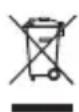
The symbol on this device indicates that it cannot be disposed of with household waste. You must dispose of it at a recycling centre for electrical and electronic waste. Disposal must be carried out in accordance with local waste regulations. For further information on the treatment, recovery and recycling of this appliance, please contact your local municipality, your local waste disposal service or the dealer of the appliance.

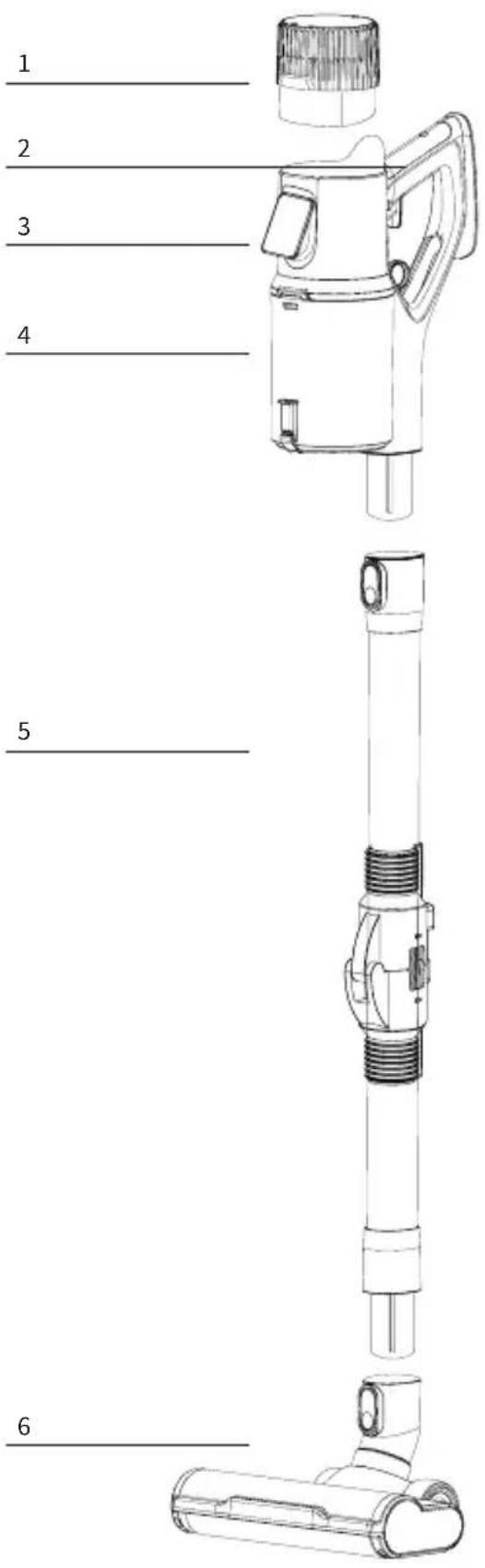
text_image
1 2 3 4 5 61 - Battery
2 - Handle
3 - Screen
4 - Dust collector
5 - Flexible tube
6 - Brush block
7 - Speed
8 - Collector filling indicator
9 - Battery percentage
10 - Mode used
11 - Brush lock indicator
12 - Touch button to switch modes
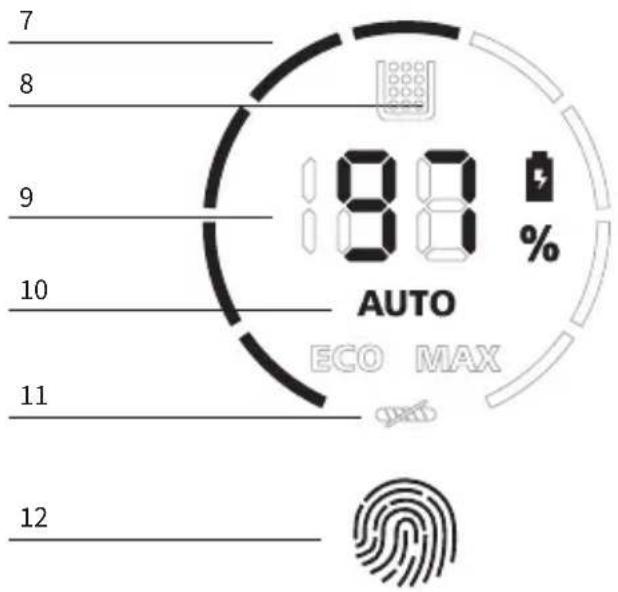
text_image
7 8 9 10 11 12 80 % AUTO ECO MAX GNDTASSEMBLING YOUR DEVICE

natural_image
Diagram showing a mechanical assembly process with arrows indicating motion, no text or symbols presentCHARGING YOUR DEVICE
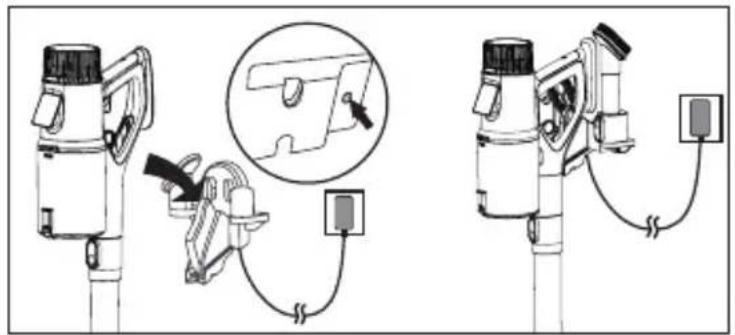
Note: It is important to switch off your device before charging. Please do not attempt to turn it back on while it is charging. Once the battery is full, the adapter will automatically stop charging your appliance. You can therefore leave your hoover on its charging base even when fully charged.
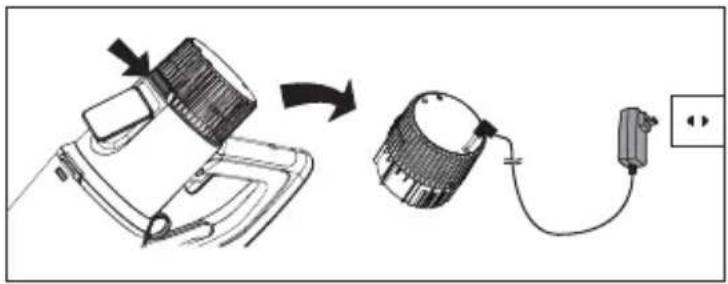
natural_image
Diagram showing a device being connected to a battery via cable, with an arrow indicating the process (no text or symbols present)A / Remove the battery from your device and plug the AC adapter directly into the battery. You can then buy a second battery and charge one while using the other.
B/ Plug your mains adapter into your wall or stand charger. Simply place your hoover on it and it will charge automatically.
text_image
Technical diagram showing two mechanical device configurations with labeled components and a magnified inset highlighting a detail view.USING YOUR DEVICE
natural_image
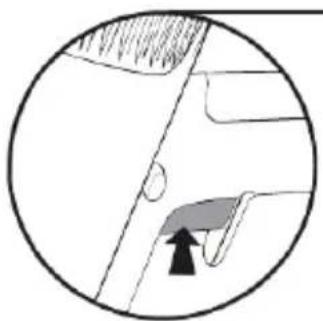
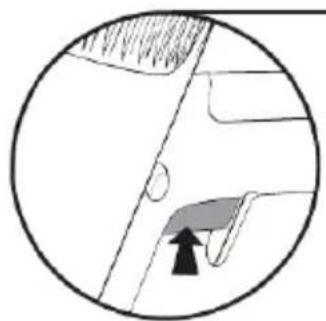
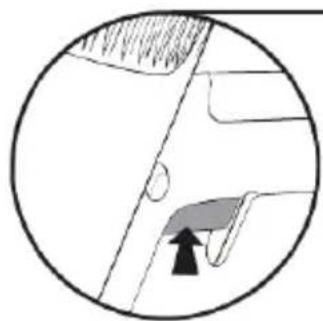
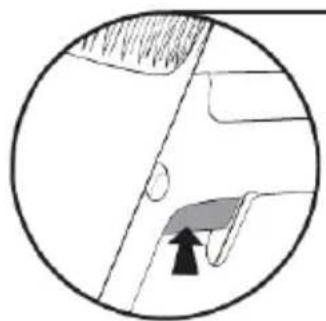
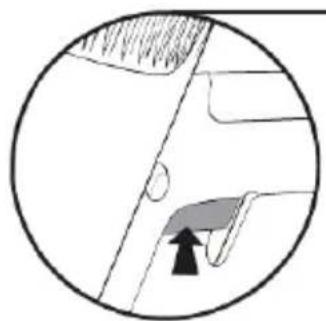
Diagram showing a circular area with a shaded region and an arrow pointing to a small feature, no text or symbols present.Press and hold the trigger to start vacuuming.
Press this button to keep the trigger depressed without having to press it.

natural_image
Simple line drawing of a mechanical component with an arrow pointing to a feature (no text or symbols)Switch off the appliance before cleaning.

natural_image
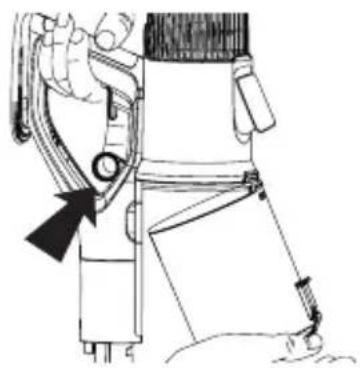
Diagram showing a blender being placed on a base, with an inset close-up of the lid and a magnified view of the device (no text or symbols present)Press the button on the manifold to open and empty it.
natural_image
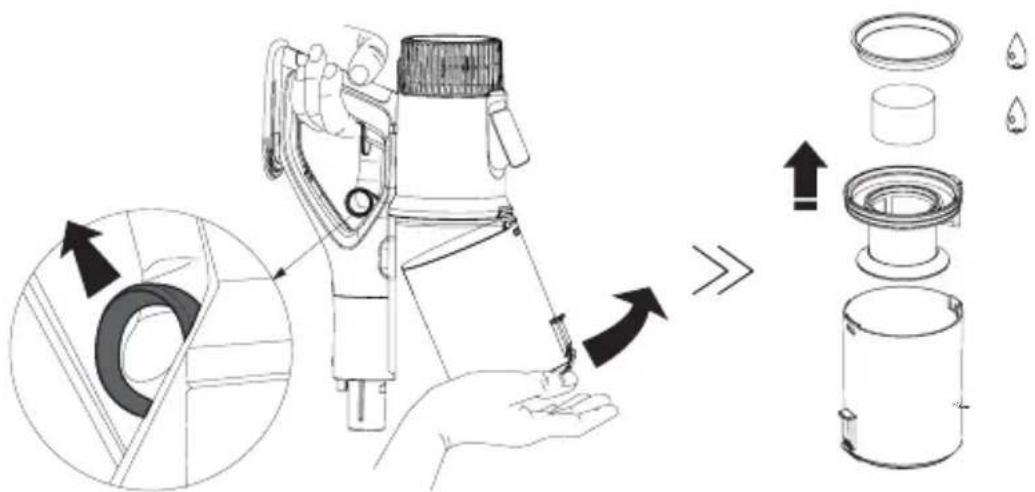
Technical line drawing of a mechanical device with a black arrow pointing to a component (no text or symbols present)It is also possible to remove the the collector by pulling the ring to completely empty and clean it.
The dust collector can be run under clean water to clean it. Just be sure to let it dry for 24 hours and make sure it is completely that it is completely dry before reinstalling it.
CLEANING THE FILTER
Switch off the unit before cleaning. Remove the dust collector by pulling the ring.
text_image
Technical diagram illustrating the process of a mechanical device with labeled parts and directional arrows indicating assembly or operation.Clean the filter with clean water or a little neutral detergent by rubbing it lightly. Wait at least 24 hours until the filter is completely dry before reinstalling it in the collector.

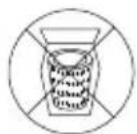
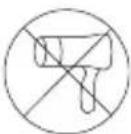
Please note: the filters of this appliance cannot be machine washed. They cannot be dried with a hair dryer. We strongly advise against scrubbing the filters with a brush to avoid damaging them.
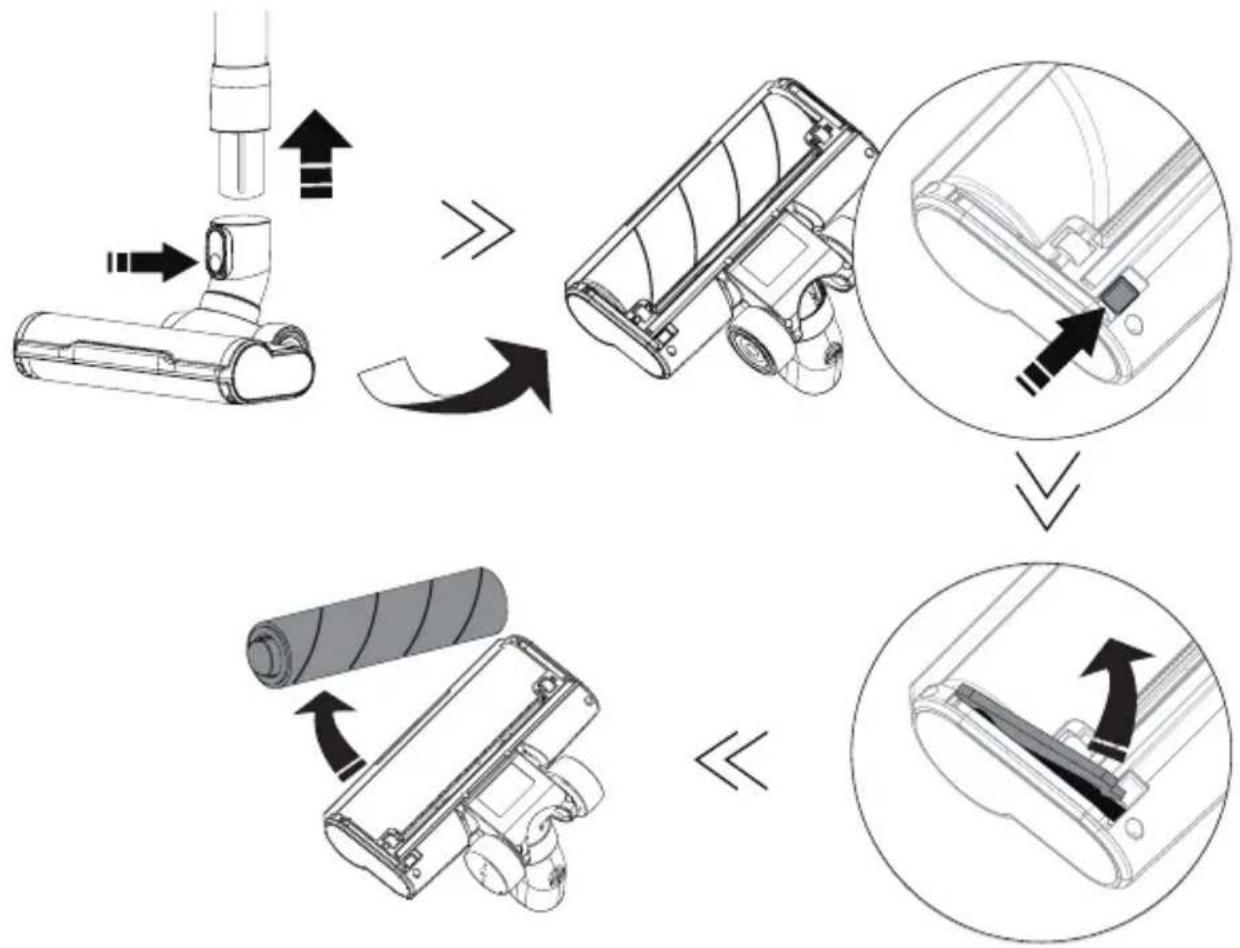
Switch off the appliance before cleaning. To remove the brush, refer to the diagram below:
flowchart
graph TD
    A["Engine with valve"] --> B["Assembly Step 1"]
    B --> C["Assembly Step 2"]
    C --> D["Assembly Step 3"]
    D --> E["Roller with roller"]
    style A fill:#f9f,stroke:#333
    style B fill:#ccf,stroke:#333
    style C fill:#cfc,stroke:#333
    style D fill:#fcc,stroke:#333
    style E fill:#ffc,stroke:#333
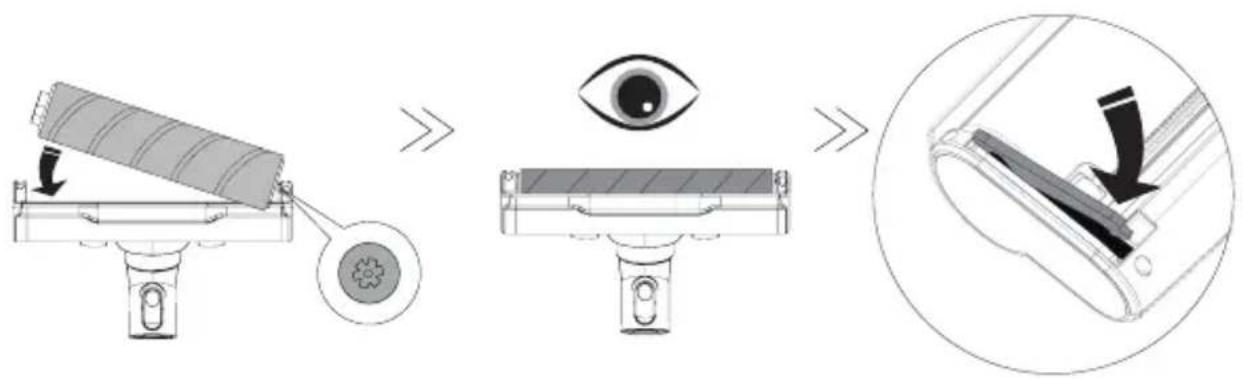
Once the brush has been removed from its block, use a sharp object to remove the bristles and coiled hair. The brush can be rinsed under clean water to clean it. Just be sure to let it dry for 24 hours for 24 hours and ensure that it is completely dry before reinstalling it as follows:
text_image
Diagram illustrating the step-by-step procedure for inserting a device into a device, with magnified detail showing the eye and internal structure.natural_image
Diagram showing a mechanical assembly process with arrows indicating motion, no text or symbols presentIHR GERÄT AUFLADEN
natural_image
Diagram showing a device being connected to a battery via cable, with an arrow indicating the process (no text or symbols present)natural_image
Technical line drawing of a mechanical device with attached wiring and a magnified inset showing a close-up detail (no text or symbols)IHR GERÄT VERWENDEN
natural_image
Cross-sectional diagram of a mechanical or architectural component with no visible text or symbolsnatural_image
Simple line drawing of a mechanical component inside a circular frame, no text or symbols presentnatural_image
Diagram showing a blender being placed on a stand, with an inset close-up of the lid and contents (no text or symbols present)natural_image
Technical line drawing of a mechanical device with a black arrow pointing to a component (no text or symbols present)text_image
Technical diagram illustrating the assembly of a mechanical device with labeled parts and directional arrows indicating process flow.flowchart
graph TD
    A["Component Insert"] --> B["Assembly Step 1"]
    B --> C["Assembly Step 2"]
    C --> D["Assembly Step 3"]
    D --> E["Final Packaging"]
text_image
Diagram illustrating the step-by-step procedure for inserting a device into a lens, with magnified detail showing the process.natural_image
Diagram showing a mechanical assembly process with arrows indicating motion, no text or symbols presentnatural_image
Diagram showing a device being connected to a battery via cable, with arrows indicating the process (no text or symbols present)text_image
Technical diagram showing two mechanical device setups with labeled components and a magnified inset of the device's internal structure.natural_image
Diagram showing a circular object with internal lines and a shaded region, no text or symbols presentnatural_image
Simple line drawing of a mechanical component or bracket with an arrow pointing to a detail (no text or symbols)natural_image
Diagram showing a device being processed from a container, with an inset close-up highlighting the internal structure (no text or symbols present)natural_image
Technical line drawing of a robotic arm with a black arrow pointing to the handle (no text or symbols present)text_image
Technical diagram illustrating the process of a mechanical device with labeled parts and directional arrows indicating assembly or operation.text_image
Diagram illustrating the step-by-step procedure for inserting a device into a device, with magnified detail showing the eye and internal structure.natural_image
Diagram showing a mechanical assembly process with arrows indicating motion, no text or symbols presentnatural_image
Diagram showing a device being connected to a battery via cable, with an arrow indicating the process (no text or symbols present)text_image
Technical diagram showing two types of mechanical devices connected by wires, with one highlighted in a circle.USANDO IL TUO DISPOSITIVO
natural_image
Diagram showing a circular structure with internal components and a shaded region, no text or symbols present.natural_image
Simple line drawing of a mechanical component inside a circular frame (no text or symbols)natural_image
Diagram showing a blender being placed on a cup, with an inset close-up of the lid and handle (no text or symbols present)natural_image
Technical line drawing of a mechanical device with a black arrow pointing to a component (no text or symbols present)text_image
Technical diagram illustrating the process of a mechanical device with labeled parts and directional arrows indicating assembly or operation.flowchart
graph TD
    A["Component Insert"] --> B["Assembly Step 1"]
    B --> C["Assembly Step 2"]
    C --> D["Assembly Step 3"]
    D --> E["Final Packaging"]
text_image
Diagram illustrating the step-by-step procedure for inserting a device into a device, showing eye manipulation and component insertion.natural_image
Diagram showing a mechanical assembly process with arrows indicating motion, no text or symbols presentUW TOESTEL OPLADEN
natural_image
Diagram showing a device being connected to a battery via cable, with an arrow indicating the process (no text or symbols present)text_image
Technical diagram showing two mechanical device configurations with labeled components and a magnified inset highlighting a detail of the component.GEBRUIK VAN UW TOESTEL
natural_image
Diagram showing a circular object with internal lines and a shaded region, no text or symbols presentnatural_image
Simple line drawing of a mechanical component or bracket with a circular outline (no text or symbols)natural_image
Diagram showing a device being processed from a base to a top, with an inset close-up highlighting the process (no text or symbols present)natural_image
Technical line drawing of a mechanical device with a black arrow pointing to a component (no text or symbols present)text_image
Technical diagram illustrating the process of a mechanical device with labeled parts and directional arrows indicating assembly or operation.flowchart
graph TD
    A["Component Insert"] --> B["Assembly Step 1"]
    B --> C["Assembly Step 2"]
    C --> D["Assembly Step 3"]
    D --> E["Final Packaging"]
text_image
Diagram illustrating the step-by-step procedure for inserting a device into a device, with magnified detail showing the eye and internal structure.text_image
QR code image containing encoded data, no visible human-readable textBesoin d'aide ?
Need help ? Brauchen Sie Hilfe ? Necesidad de ayuda ? Ho bisogno di aiuto ?

text_image
QR code image containing encoded data, no visible human-readable textezi clean® make it easy
EZIclean® is a brand of E.ZICOM® company
46/48, rue Gay Lussac
94430 Chennevières-sur-Marne
www.eziclean.com