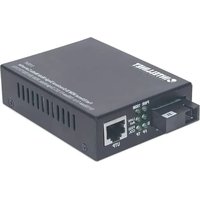
510547 - Audio/video converter Intellinet - Free user manual and instructions
Find the device manual for free 510547 Intellinet in PDF.


| Product Type | Bidirectional WDM Ethernet Media Converter |
| Brand | Intellinet |
| Model | 510547 |
| Category | Audio/Video Converter |
| Network Interface | 1 RJ45 port (UTP) and 1 fiber optic port (WDM) |
| Fiber Type | Single-mode, simplex connector |
| Wavelength | 1310 nm (transmit/receive) |
| Supported Data Rate | Fast Ethernet (100 Mbps) or Gigabit Ethernet (depending on paired model) |
| Power Supply | External power adapter (not specified, estimated 5 V DC) |
| Power Consumption | Approximately 3 W |
| LED Indicators | PWR, 1000M, Link/Act (TP and FP), FDX/COL, SD |
| Operating Temperature | 0 °C to 50 °C |
| Operating Humidity | 10% to 90% (non-condensing) |
| Dimensions | Approximately 95 × 70 × 26 mm |
| Weight | Approximately 200 g |
| Maintenance and Cleaning | Clean with a soft, dry cloth. Do not use chemical products. |
| Safety | Use only the supplied adapter. Disconnect before maintenance. |
| Spare Parts and Repairability | No user-serviceable parts. Contact after-sales service. |
| General Information | Complies with directives 2014/53/EU and 2004/108/EC & 2006/95/EC. |
Frequently Asked Questions - 510547 Intellinet
User questions about 510547 Intellinet
0 question about this device. Answer the ones you know or ask your own.
Ask a new question about this device
Download the instructions for your Audio/video converter in PDF format for free! Find your manual 510547 - Intellinet and take your electronic device back in hand. On this page are published all the documents necessary for the use of your device. 510547 by Intellinet.
USER MANUAL 510547 Intellinet
WDM Bi-Directional Ethernet Media Converter English
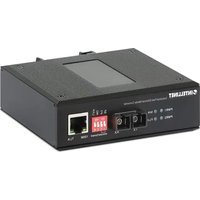
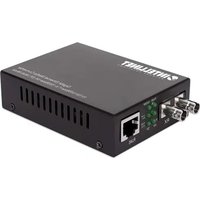
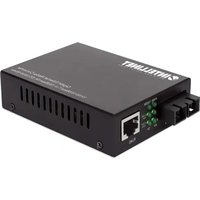
Thank you for purchasing the Intellinet WDM Bi-Directional Single Mode Media Converter. Media converters connect two Ethernet networks over a longer distance using fiber optic cable.
WDM BI-DIRECTIONAL VERSUS STANDARD MEDIA CONVERTER Standard Media Converter
To create a connection between two media converters you need two fiber cables, referred to as a fiber duplex cable.
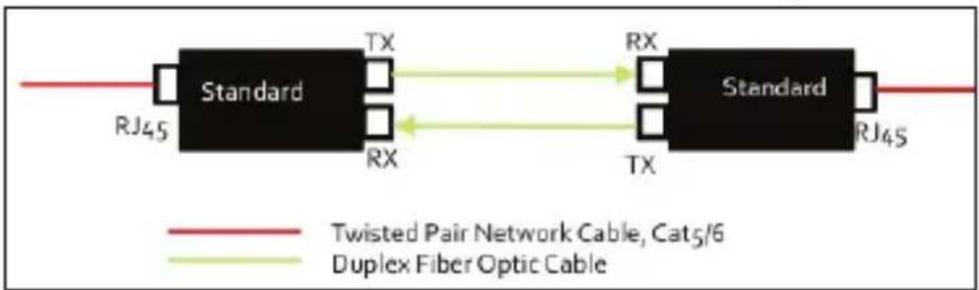
flowchart
graph LR
    A["Standard"] -->|TX| B["Standard"]
    B -->|RX| A
    A -->|RJ45| C["Red Line"]
    B -->|RJ45| D["Green Line"]
    style A fill:#000,stroke:#fff,color:#fff
    style B fill:#000,stroke:#fff,color:#fff
    style C stroke:#ff0000,stroke-width:2px
    style D stroke:#ff0000,stroke-width:2px
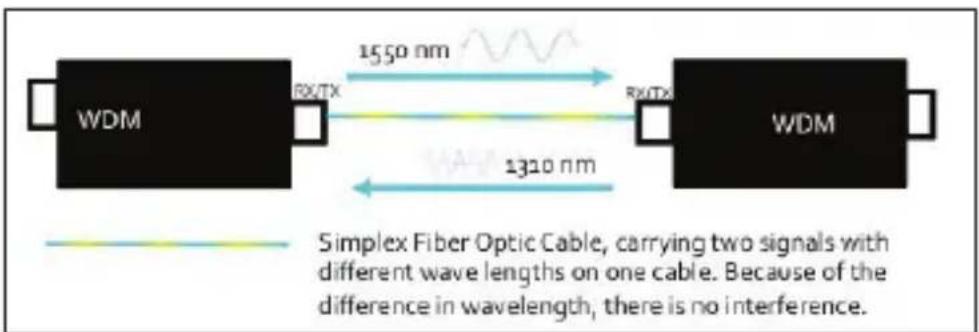
WDM Bi-Directional Converter
One fiber cable between both media converters is sufficient in order to create a connection. The signal travels both ways.
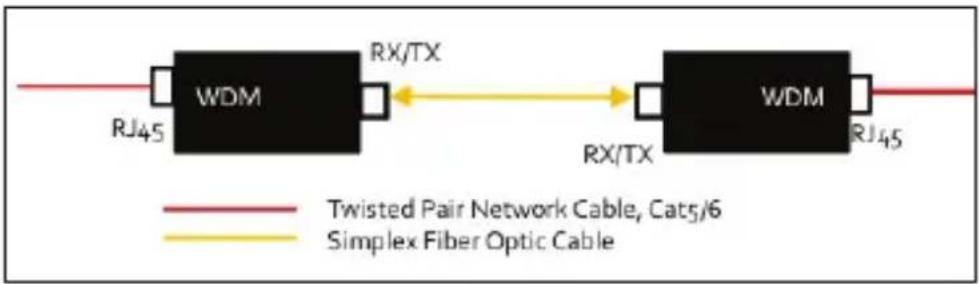
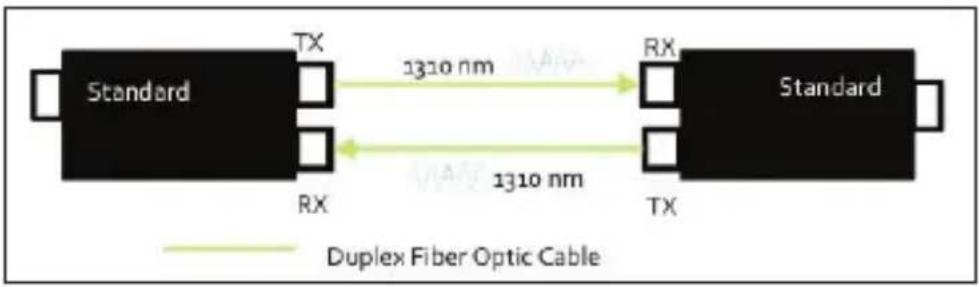
flowchart
graph LR
    A["Standard"] -->|TX 1310 nm| B["Standard"]
    B -->|RX 1310 nm| A
    style A fill:#000,stroke:#fff,color:#fff
    style B fill:#000,stroke:#fff,color:#fff
    note right of B "Duplex Fiber Optic Cable"
MODELS
- Fast Ethernet WDM Bi-Directional Single Mode Media Converter (510547)
10/100Base-TX to 100Base-FX (SC) Single-Mode, 20 km (12.4 mi.), WDM (RX1550/TX1310)
- Fast Ethernet WDM Bi-Directional Single Mode Media Converter (510530)
10/100Base-TX to 100Base-FX (SC) Single-Mode, 20 km (12.4 mi.), WDM (RX1310/TX1550)
- Gigabit Ethernet WDM Bi-Directional Single Mode Media Converter (545068)
10/100/1000Base-TX to 1000Base-LX (SC) Single-Mode, 20 km (12.4 mi.), WDM (RX1550/TX1310)
• Gigabit Ethernet WDM Bi-Directional Single Mode Media Converter (545075)
10/100/1000Base-TX to 1000Base-LX (SC) Single-Mode, 20 km (12.4 mi.), WDM (RX1310/TX1550)
CONNECTIONS
Twisted Pair - RJ45
Connect the UTP port of the media converter to an RJ45 port on the network; e.g., to an Ethernet switch. Cat5e or better cabling is recommended.
Fiber Optic
As shown above, one fiber optic cable needs to be connected between two WDM media converters. As a rule, these media converters must be used in pairs. Model 510547 connects to model 510530 (Fast Ethernet), and model 545068 connects to 545075 (Gigabit Ethernet).
POWER
Plug the power adapter into the 5 V DC input jack on the media converter, then connect it to a regular power outlet. Only use the included power adapter or one with matching specifications (output of 5 V DC, at least 1 A).
LEDS
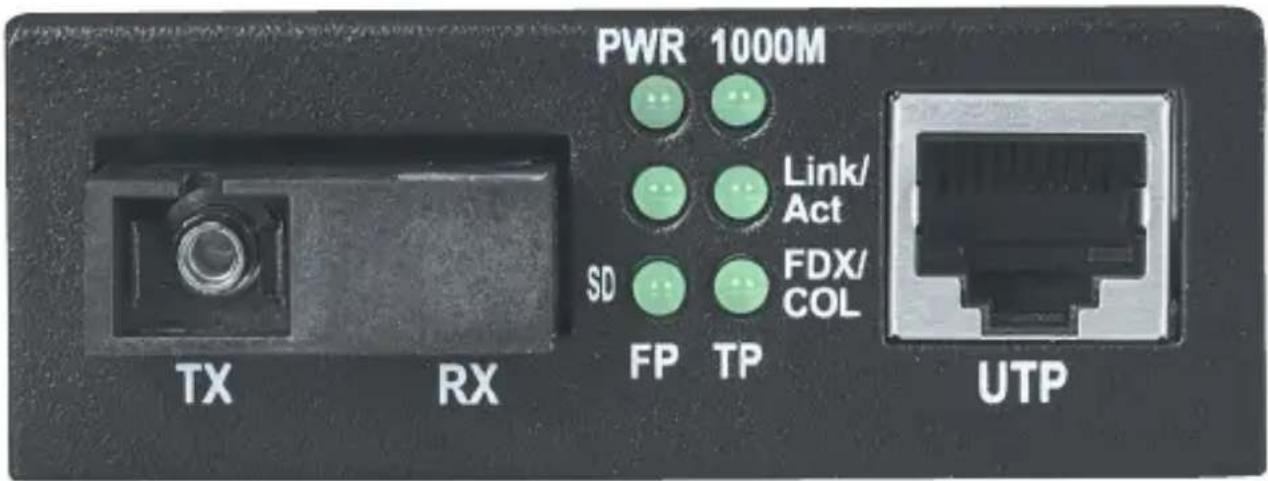
PWR – The power adapter is connected when lit.
1000M – 1000 Mbps link on the twisted pair connection when lit.
Link/Act (TP = RJ45; FP = Fiber) – Active link when lit; data traffic when flashing; no active network link when unlit.
FDX/COL (for TP/RJ45) – Full duplex connection when lit; data collisions when flashing; half duplex when unlit.
SD (for FP/Fiber) – Fiber optic signal is detected when lit; no signal when unlit.
For specifications, go to intellinetnetwork.com.
Bidirektionaler WDM Ethernet Medienkonverter Deutsch
flowchart
graph LR
    A["Standard"] -->|TX| B["Standard"]
    B -->|RX| A
    style A fill:#000,stroke:#fff,color:#fff
    style B fill:#000,stroke:#fff,color:#fff
    linkStyle 0 stroke:#ff0000,stroke-width:2px
    linkStyle 1 stroke:#ff0000,stroke-width:2px
    linkStyle 2 stroke:#ff0000,stroke-width:2px
    linkStyle 3 stroke:#ff0000,stroke-width:2px
    linkStyle 4 stroke:#ff0000,stroke-width:2px
    linkStyle 5 stroke:#ff0000,stroke-width:2px
    linkStyle 6 stroke:#ff0000,stroke-width:2px
    linkStyle 7 stroke:#ff0000,stroke-width:2px
    linkStyle 8 stroke:#ff0000,stroke-width:2px
    linkStyle 9 stroke:#ff0000,stroke-width:2px
    linkStyle 10 stroke:#ff0000,stroke-width:2px
    linkStyle 11 stroke:#ff0000,stroke-width:2px
    linkStyle 12 stroke:#ff0000,stroke-width:2px
    linkStyle 13 stroke:#ff0000,stroke-width:2px
    linkStyle 14 stroke:#ff0000,stroke-width:2px
    linkStyle 15 stroke:#ff0000,stroke-width:2px
    linkStyle 16 stroke:#ff0000,stroke-width:2px
    linkStyle 17 stroke:#ff0000,stroke-width:2px
    linkStyle 18 stroke:#ff0000,stroke-width:2px
    linkStyle 19 stroke:#ff0000,stroke-width:2px
    linkStyle 20 stroke:#ff0000,stroke-width:2px
    linkStyle 21 stroke:#ff0000,stroke-width:2px
    linkStyle 22 stroke:#ff0000,stroke-width:2px
    linkStyle 23 stroke:#ff0000,stroke-width:2px
    linkStyle 24 stroke:#ff0000,stroke-width:2px
    linkStyle 25 stroke:#ff0000,stroke-width:2px
    linkStyle 26 stroke:#ff0000,stroke-width:2px
    linkStyle 27 stroke:#ff0000,stroke-width:2px
    linkStyle 28 stroke:#ff0000,stroke-width:2px
    linkStyle 29 stroke:#ff0000,stroke-width:2px
    linkStyle 30 stroke:#ff0000,stroke-width:2px
    linkStyle 31 stroke:#ff0000,stroke-width:2px
    linkStyle 32 stroke:#ff0000,stroke-width:2px
    linkStyle 33 stroke:#ff0000,stroke-width:2px
    linkStyle 34 stroke:#ff0000,stroke-width:2px
    linkStyle 35 stroke:#ff0000,stroke-width:2px
    linkStyle 36 stroke:#ff0000,stroke-width:2px
    linkStyle 37 stroke:#ff0000,stroke-width:2px
    linkStyle 38 stroke:#ff0000,stroke-width:2px
    linkStyle 39 stroke:#ff0000,stroke-width:2px
    linkStyle 40 stroke:#ff0000,stroke-width:2px
    linkStyle 41 stroke:#ff0000,stroke-width:2px
    linkStyle 42 stroke:#ff0000,stroke-width:2px
    linkStyle 43 stroke:#ff0000,stroke-width:2px
    linkStyle 44 stroke:#ff0000,stroke-width:2px
    linkStyle 45 stroke:#ff0000,stroke-width:2px
    linkStyle 46 stroke:#ff0000,stroke-width:2px
    linkStyle 47 stroke:#ff0000,stroke-width:2px
    linkStyle 48 stroke:#ff0000,stroke-width:2px
    linkStyle 49 stroke:#ff0000,stroke-width:2px
    linkStyle 50 stroke:#ff0000,stroke-width:2px
Bidirektionaler WDM Medienkonverter
MODELLE
- Fast Ethernet WDM bidirektionaler Single Mode Medienkonverter (510547)
10/100Base-TX auf 100Base-FX (SC) Single Mode, 20 km, WDM (RX1550/TX1310) - Fast Ethernet WDM bidirektionaler Single Mode Medienkonverter (510530)
10/100Base-TX auf 100Base-FX (SC) Single-Mode, 20 km, WDM (RX1310/TX1550) - Gigabit Ethernet WDM bidirektionaler Single Mode Medienkonverter (545068)
10/100/1000Base-TX auf 1000Base-LX (SC) Single-Mode, 20 km, WDM (RX1550/TX1310) - Gigabit Ethernet WDM bidirektionaler Single Mode Medienkonverter (545075)
10/100/1000Base-TX auf 1000Base-LX (SC) Single-Mode, 20 km, WDM (RX1310/TX1550)
ANSCHLÜSSE
Twisted Pair - RJ45
LEDS
LEDS
MODÈLES
- Convertisseur de support Fast Ethernet WDM bidirectionnel monomode (510547)
10/100Base-TX vers 100Base-FX (SC) monomode, 20 km, WDM (RX1550/TX1310)
- Convertisseur de support Fast Ethernet WDM bidirectionnel monomode (510530)
10/100Base-TX vers 100Base-FX (SC) monomode, 20 km, WDM (RX1310/TX1550)
- Convertisseur de support Gigabit Ethernet WDM bidirectionnel monomode (545068)
10/100/1000Base-TX vers 1000Base-LX (SC) monomode, 20 km, WDM (RX1550/TX1310)
- Convertisseur de support Gigabit Ethernet WDM bidirectionnel monomode (545075)
10/100/1000Base-TX vers 1000Base-LX (SC) monomode, 20 km, WDM (RX1310/TX1550)
CONNEXIONS
Paires torsadées – RJ45
DELS
DIODY
LED
Disposal of Electric and Electronic Equipment per European Union Directive: 2012/19/EU

ENGLISH This symbol on the product or its packaging indicates that this product shall not be treated as household waste. Instead, it should be taken to an applicable collection point for the recycling of electrical and electronic equipment. By ensuring this product is disposed of correctly, you will help prevent potential negative consequences to the environment and human health, which could otherwise be caused by inappropriate waste handling of this product. If your equipment contains easily removable batteries or accumulators, dispose of these separately according to your local requirements. The recycling of materials will help to conserve natural resources. For more detailed information about recycling of this product, contact your local city office, your household waste disposal service or the shop where you purchased this product. In countries outside of the EU: If you wish to discard this product, contact your local authorities and ask for the correct manner of disposal.
ENGLISH: For warranty information, go to intellinetnetwork.com/warranty.
This equipment has been tested and found to comply with the limits for a Class A digital device, pursuant to Part 15 of Federal Communications Commission (FCC) Rules. These limits are designed to provide reasonable protection against harmful interference in a residential installation. This equipment generates, uses and can radiate radio frequency energy, and if not installed and used in accordance with the instructions may cause harmful interference to radio communications. However, there is no guarantee that interference will not occur in a particular installation. If this equipment does cause harmful interference to radio or television reception, which can be determined by turning the equipment off and on, the user is encouraged to try to correct the interference by one or more of the following measures:
- Reorient or relocate the receiving antenna.
- Increase the separation between the equipment and the receiver.
- Connect the equipment to an outlet on a circuit different from the receiver.
- Consult the dealer or an experienced radio/TV technician for help.
CE (RE / EMC / LVD)
ENGLISH: This device complies with the requirements of directives 2014/53/EU and/or 2004/108/EC & 2006/95/EC. The Declaration of Conformity for this product is available at:
North & South America
IC Intracom Americas 550 Commerce Blvd. Oldsmar, FL 34677
USA
Asia & Africa
IC Intracom Asia 4-F, No. 77, Sec. 1, Xintai 5th Rd.
Xizhi Dist., New Taipei City 221, Taiwan
Europe
IC Intracom Europe Löhbacher Str. 7 D-58553
Halver, Germany

INTELLINET®
NETWORK SOLUTIONS
- WDM Bi-Directional Ethernet Media Converter English
- WDM BI-DIRECTIONAL VERSUS STANDARD MEDIA CONVERTER Standard Media Converter
- WDM Bi-Directional Converter
- MODELS
- CONNECTIONS
- Twisted Pair - RJ45
- Fiber Optic
- POWER
- LEDS
- Bidirektionaler WDM Ethernet Medienkonverter Deutsch
- Bidirektionaler WDM Medienkonverter
- MODELLE
- ANSCHLÜSSE
- MODÈLES
- CONNEXIONS
- Paires torsadées – RJ45
- DELS
- DIODY
- LED
- CE (RE / EMC / LVD)
- North & South America
- Asia & Africa
- Europe
- INTELLINET®
Brand : Intellinet
Model : 510547
Category : Audio/video converter