USER MANUAL EKHHE260PCV37 DAIKIN
User, Installations and Maintenance Manual

Domestic Hot Water Heat Pump Monobloc type
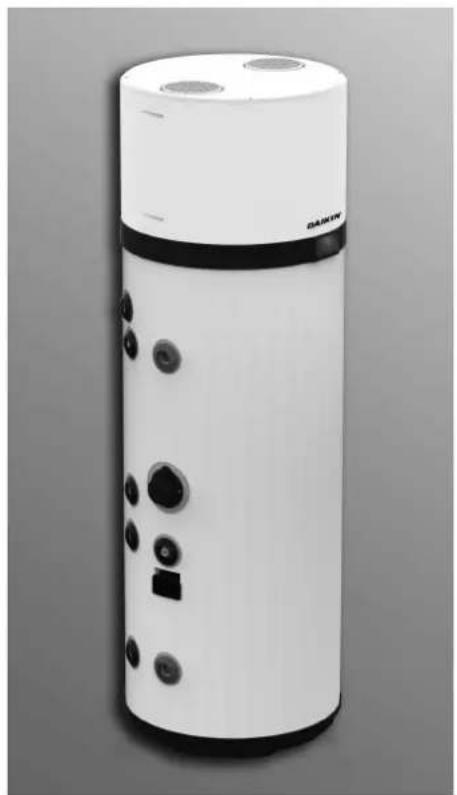
natural_image
White cylindrical water heater with control buttons and a square button, shown against a plain gray background (no text or symbols visible)
EKHHE200CV37
EKHHE200PCV37
EKHHE260CV37
EKHHE260PCV37
User, Installations and Maintenance Manual
Domestic Hot Water Heat Pump - Monobloc type
- GENERAL SAFETY PRECAUTIONS ....3
- INTRODUCTION 7
2.1 Products 7
2.2 Disclaimer 7
2.3 Language....7
2.4 Copyright 8
2.5 Available versions and configurations 8
- HANDLING AND TRANSPORT ....8
3.1 Receipt....8
- CONSTRUCTION CHARACTERISTICS ....10
4.1 Dimensional data.... 11
4.2 Technical characteristics....12
- IMPORTANT INFORMATION ....13
5.1 Compliance with European regulations....13
5.2 Casing protection rating 13
5.3 Operating limits....13
5.4 Operating limits 13
5.5 Basic safety rules.... 14
5.6 Information on the refrigerant used 14
- INSTALLATION AND CONNECTIONS....14
6.1 Preparation of place of installation 14
6.2 Securing to the floor.... 15
6.3 Aeraulic connections.... 15
6.4 Securing and connections of this appliance 17
6.5 Hydraulic connections 17
6.6 Integration with solar thermal system (only for models EKHHE200PCV37, EKHHE260PCV37) 18
6.7 Electrical connections 19
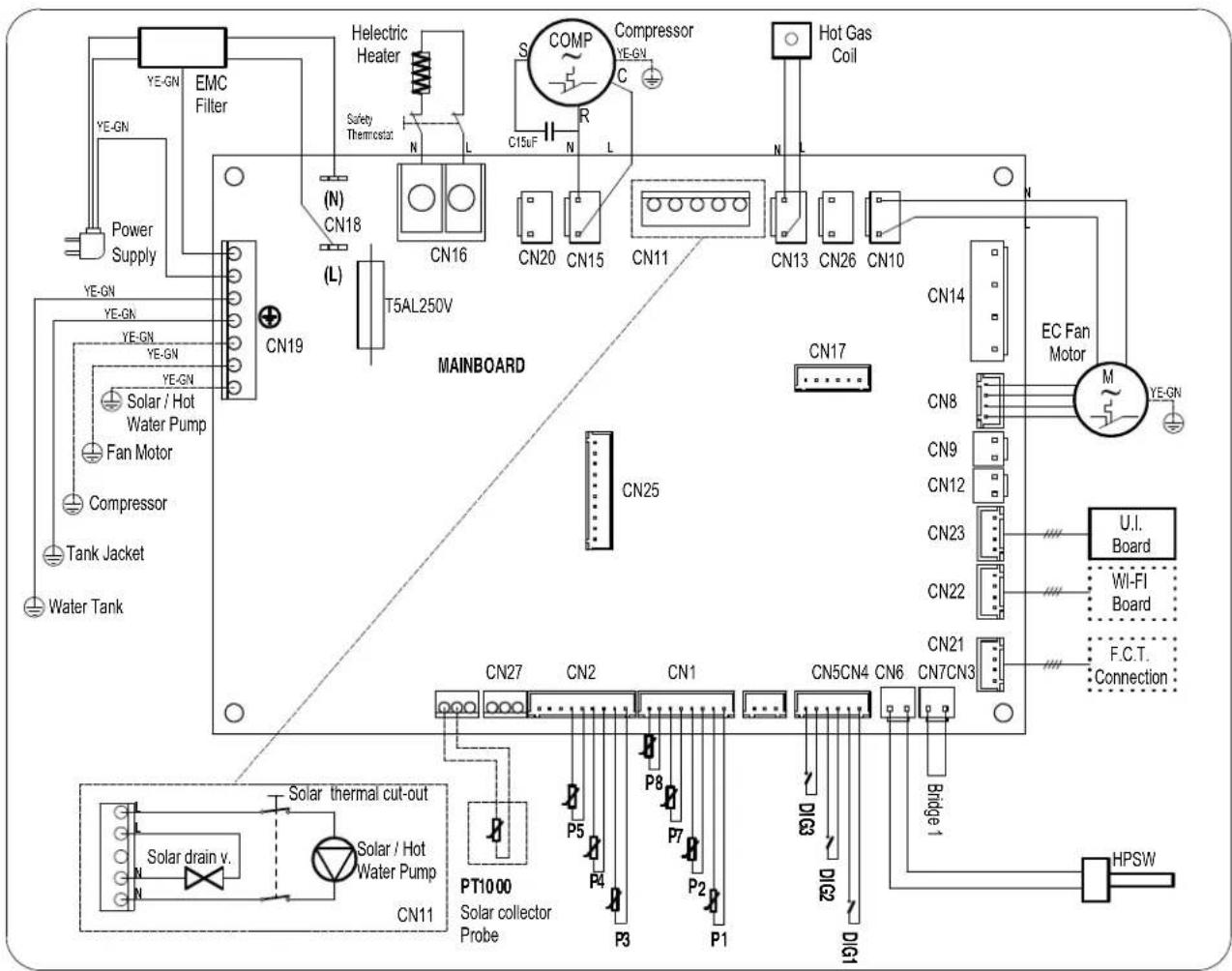
6.8 Wiring diagram....21
- DESCRIPTION OF USER INTERFACE AND OPERATION OF EQUIPMENT 22
7.1 Turning the water heater on and off and unlocking the buttons....23
7.2 Setting the clock....23
7.3 Setting time bands....23
7.4 Setting the hot water set-point....23
7.5 Operating mode 24
7.6 Additional features....24
7.7 Faults/protection 26
- COMMISSIONING......27
8.1 Query, editing operating parameters 27
- TROUBLESHOOTING....31
9.1 Power board fuse replacement....32
9.2 Heating element safety thermostat reset 32
- MAINTENANCE ....33
10.1 Sacrificial anode check/replacement....33
10.2 Boiler emptying 33
- DISPOSAL....34
- PRODUCT SHEET....34
1. GENERAL SAFETY PRECAUTIONS
CAUTION:
- This manual is an integral part of the product. Keep it with care with the appliance, and hand it on to the next user/owner in case of change of property.
- These instructions are also available from the manufacturer's customer service and its website: www.daikin.eu
- Read the instructions and warnings in this manual carefully, they contain important information regarding safe installation, use and maintenance.
SAFETY WARNINGS
Do not use the appliance for any other than its specified use. The manufacturer is not liable for damage resulting from improper or incorrect use or failure to observe the instructions given in this manual.
This appliance is not intended for use by persons (including children) whose physical, sensory or mental capacities are reduced, or persons without experience or knowledge, unless they have been given instructions and monitored previously when using the appliance by a person responsible for their safety.
Children must be supervised to ensure they do not play with the appliance.
This appliance may be used by children 8 years of age or older, and those with reduced physical, sensory or mental capacity or lack of experience or knowledge, if they are properly supervised or if instructions for the safe use of the appliance have been given to them and the risks involved are clear to them.
Children are not permitted to play with the appliance.
Water heated to over 50^ C can cause immediate serious burns if delivered directly to the taps. Children, disabled persons and the elderly are particularly at risk. It is recommended to install a thermostatic mixer valve on the water delivery line.
This appliance must not be cleaned or maintained by children without supervision.
Do not touch the appliance when barefoot or if any part of your body is wet.
Do not leave flammable materials in contact with or in the vicinity of the appliance.
The appliance must be emptied when it is out of service in an area subject to subzero temperatures. Drain as described in the appropriate chapter.
INSTALLATION CAUTION
The appliance must be installed and commissioned by a qualified technician in accordance with local legislation and health and safety regulations. All power circuits must be shut off before you open the terminal block.
Incorrect installation can result in damage to property and injury to persons and animals; the manufacturer is not liable for the consequences.
This product is heavy, handle with care and install the product in a frost-free room.
Ensure that the floor can support the weight of the water filled appliance.
The destruction of the appliance by overpressure due to the blocking of the safety device inactivates the warranty.
INSTALLATION WARNINGS
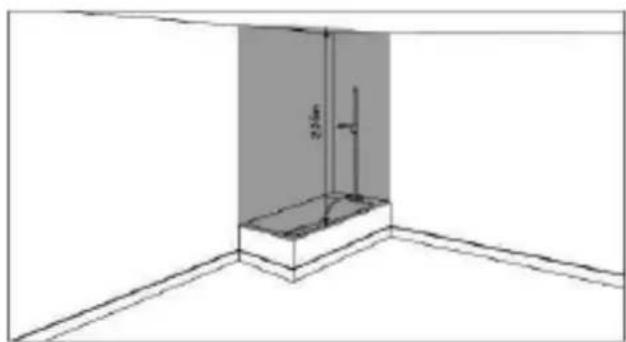
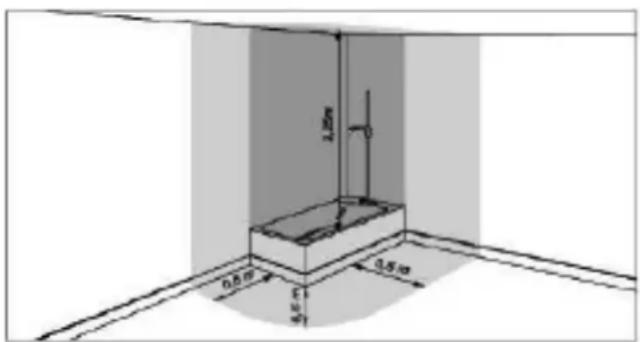
When installing this product in a bathroom do not use the “Prohibited space” and respect, at least, the “Protected space” listed as shown below:
natural_image
Line drawing of a room corner with a wall-mounted fixture and a vertical dimension labeled '2.5mm' (no text or symbols beyond measurement)
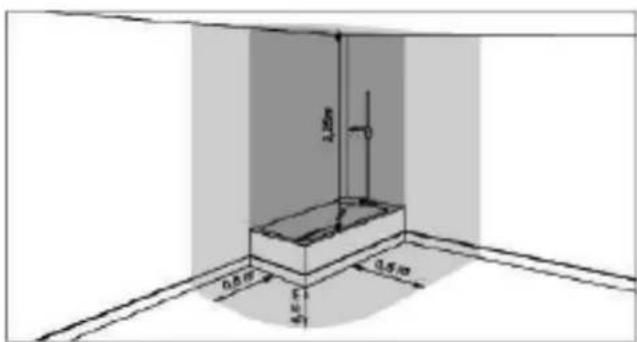
Prohibited space Protected space
This product must be placed in an accessible location.
The water heater must be fixed to the ground using the fixing brackets provided for this purpose and adhesives are not considered to be a reliable fixing means.
This product is designed to be used at a maximum altitude of 2000 m.
Refer to description and illustrations in paragraphs 6.1, 6.2 and 6.4.
AERAULIC CONNECTIONS WARNINGS
The simultaneous operation of an open-chamber hearth (e.g. open fireplace) and the heat pump causes a dangerous negative pressure in the room. The negative pressure can cause the return of exhaust gases into the room. Do not operate the heat pump together with an open-chamber hearth. Only use sealed-chamber hearths (approved) with separate combustion air supply.
Seal the doors of boiler rooms that do not have the inflow of combustion air in common with living areas.
A suitable protection grille must be installed both at the air intake and outtake connections to prevent any foreign bodies from going inside the equipment.
Refer to description and illustrations in the "Aeraulic connections." paragraph 6.3.
HYDRAULIC CONNECTIONS WARNINGS
It is mandatory to screw on to the appliance's water intake pipe a suitable device against overpressure (not supplied). In countries which acknowledge EN 1487, the appliance's water intake pipe must be equipped with a safety device compliant with previously mentioned standard. It must be new, with 3/4" dimensions and calibrated to a maximum pressure of 0.7 MPa, including at least a cock, check valve, safety valve and hydraulic load cut-out.
This safety device must not be tampered with and must be made to operate frequently in order to check that it is not blocked and to remove any limescale.
The water may drip from the discharge pipe of the pressure-relief device and the pipe must be left open to the atmosphere. The discharge pipe connected to the pressure-relief device is to be installed in a continuously downward direction and in a frost-free environment.
A pressure reducer (not supplied) is required when the inlet water pressure is greater than 0.7 MPa (7 bar), which must be attached to the water mains.
The minimum inlet water pressure for the correct operation of the appliance is 0.15 MPa (1.5 bar).
Connect a rubber pipe to the condensate drain, taking care not to force too much so as not to break the drain pipe and refer to par. "6.6.1".
Use only connecting pipes (not supplied), rigid and resistant to electrolysis both at the inlet of cold water and at the outlet of hot water from the device.
For models that incorporate a heat exchanger (solar coil), the circuit must not exceed 1.0 MPa (10 bar) and its temperature must not exceed 80°C.
Refer to description and illustrations in the “Hydraulic connections” paragraph 6.6 and “Integration with solar thermal system” paragraph 6.7.
ELECTRICAL CONNECTIONS WARNINGS
The appliance shall be installed in accordance with national wiring regulations.
The electrical installation must include an all-pole disconnection with a separation of the contacts on all poles capable of guaranteeing complete disconnection in the overvoltage category III upstream of the appliance, complying with local installation rules in force.
The device must be protected by an adequate differential switch (max 30 mA). The type of differential switch should be selected by assessing the type of electrical devices used by the system as a whole.
Earth connection is mandatory. The manufacturer of the appliance shall not be held liable for any damage caused by failure to earth the system or due to anomalies in the electric power supply.
It is strictly forbidden to connect the appliance at the AC mains through extensions or by a power strip.
Before taking off the cover, make sure that the power is turned off to prevent injury or electric shock.
Refer to description and illustrations, respectively, in the “Electrical connections” paragraph 6.8 and “Wiring diagram” paragraph 6.9.
SERVICING - MAINTENANCE - TROUBLESHOOTING WARNINGS
Any repairs, maintenance, plumbing and electrical connections must be done by qualified technicians using original spare parts only. Failure to observe the above instructions can compromise the safety of the appliance and relieves the manufacturer of any liability for the consequences.
To empty the appliance: turn off the power supply and cold water, open the hot water taps and then operate the drain valve of the safety device.
The pressure relief valve must be operated regularly to remove scale deposits and to ensure that it is not blocked.
The appliance is equipped with a supply cord that if damaged, must be replaced by the manufacturer, its service agent or similarly qualified persons in order to avoid a hazard.
The appliance incorporates a time-lag miniature fuse-link that if broken, it must be replaced with a fuse model "T5AL250V" in accordance with IEC 60127.
Refer to description and illustrations, respectively, in the “TROUBLESHOOTING” chapter 9 and “MAINTENANCE” chapter 10.
2. INTRODUCTION
This installation and maintenance manual is an integral part of the heat pump (hereinafter equipment).
The manual must be kept for future reference until dismantling. It is intended for the specialist installer (installers - maintenance technicians) and the end user. The manual describes the installation procedures to be observed for correct and safe operation of the equipment, and the methods of use and maintenance.
In case of sale or transfer to another user, the manual must stay with the unit.
Before installing and/or using the equipment, read this instruction manual carefully and in particular chapter 5 on safety.
The manual must be kept with the unit and always be available to qualified installation and maintenance personnel.
The following symbols are used in the manual to highlight the most important information:
| Caution |
| Procedures to be followed |
| Information / Suggestions |
2.1 Products
Dear Customer,
Thank you for purchasing this product.
Our company, always attentive to environmental issues, uses low environmental impact technologies and materials for its products, in compliance with EU WEEE standards (2012/19/EU – RoHS 2011/65/EU).
2.2 Disclaimer
The conformity of these operating instructions with the hardware and the software has been carefully checked. Nevertheless there may be differences; and no responsibility is assumed for total conformity.
In the interest of technical improvement, we reserve the right to make construction or technical data changes at any time. Any claim based on indications, figures, drawings or descriptions is therefore excluded. They are subject to possible errors.
The constructor declines any liability for damage due to command errors, improper or inappropriate use, or due to unauthorized repairs or modifications.
2.3 Language
The manual was written in Italian (IT), the original language of the manufacturer.
Any translations into additional languages must be made from the original instructions.
The Manufacturer is held responsible for the information contained in the original instructions; translations into different languages cannot be fully verified, therefore, if an inconsistency is found, it is necessary to follow the original language text or contact our Technical Documentation Office.
2.4 Copyright
These operating instructions contain information protected by copyright. No part of these operating instructions may be photocopied, duplicated, translated or recorded on storage media without prior permission from the supplier. Any violations will be subject to compensation for damage. All rights, including those resulting from the granting of patents or registration of utility models, are reserved.
2.5 Available versions and configurations
This appliance incorporates a 1.9 kW heat-pump unit and can be set up in different configurations, according to possible integration with additional heating sources (e.g. solar heating) or depending on boiler capacity.
| Version Configuration description |
| EKHHE200CV37 | Air heat pump for domestic hot water (DHW) production |
| EKHHE260CV37 |
| EKHHE200PCV37 | Air heat pump for DHW production prearranged for the solar thermal system. |
| EKHHE260PCV37 |
3. HANDLING AND TRANSPORT
The equipment comes in a cardboard box(*).
It is secured to a pallet by means of three screws.
For unloading operations use a forklift or an adequate pallet truck.
The packed equipment can be placed horizontally and back down to facilitate undoing the anchoring screws.
Unpacking must done carefully so as not to damage the equipment casing if using knives or cutters to open the cardboard packaging.
After removing the packaging, check the integrity of the unit. If in doubt, do not use the unit; contact authorized technical personnel.
Before eliminating the packaging, according to the applicable environmental protection regulations, make sure all the accessories supplied have been removed.
(*) Note: The type of packaging may undergo variations at the discretion of the manufacturer.
For the entire period the equipment remains idle, awaiting commissioning, it is advisable to put it in a place protected from atmospheric agents
3.1 Receipt
In addition to the units, the packages contain accessories and technical documentation for use and installation. Check that the following are present:
• 1x user, installation and maintenance manual;
• 3x fastening brackets plus screws;
- 1x thermal cut-out (only for EKHHE200PCV3 and EKHHE260PCV3).
For the entire period the equipment remains idle, awaiting commissioning, it is advisable to put it in a place protected from atmospheric agents.
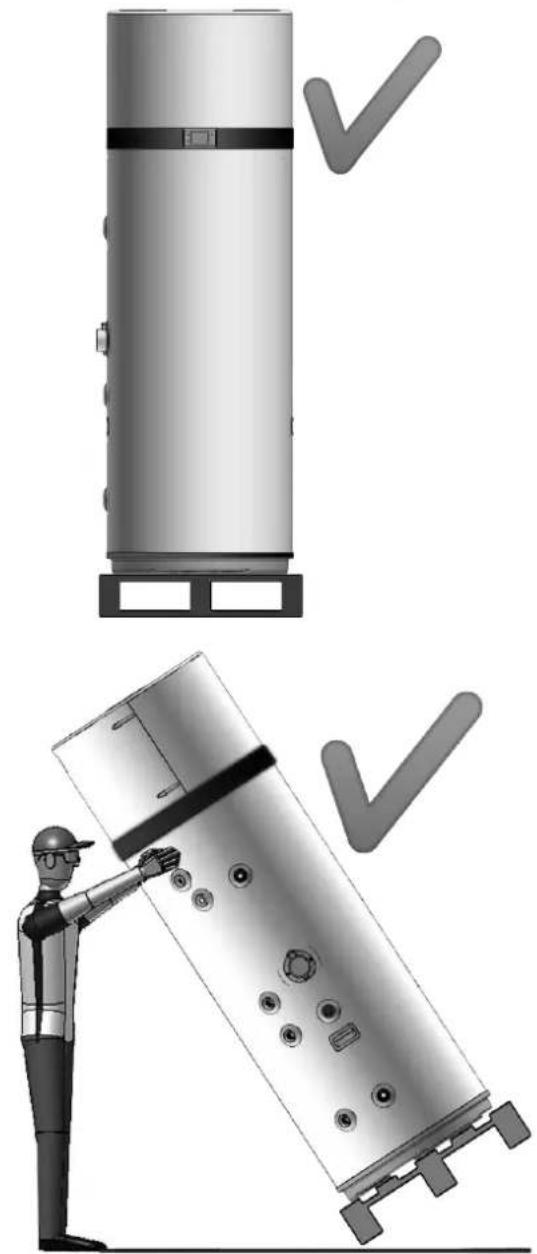
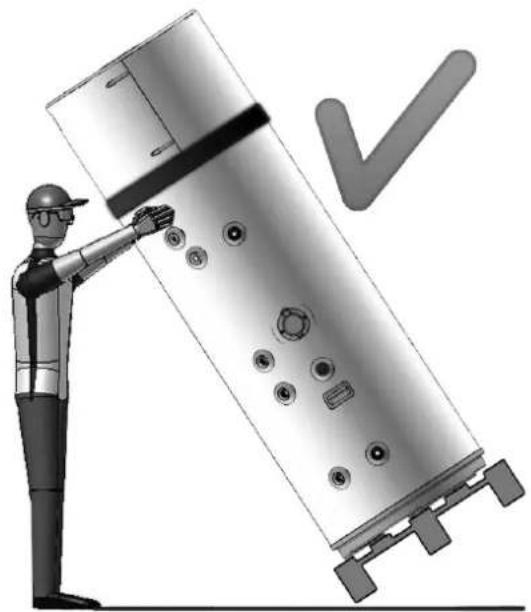
Positions allowed for transport and handling
natural_image
Illustration of a worker inspecting a cylindrical mechanical component with checkmarks indicating inspection (no text or symbols present)
fig. 1

ATTENTION! During the product handling and installation phases the upper part must not be stressed in any way, as it is not structural.

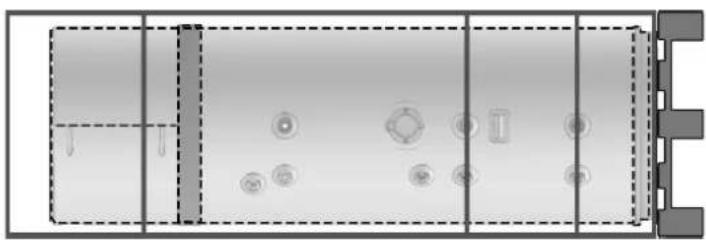
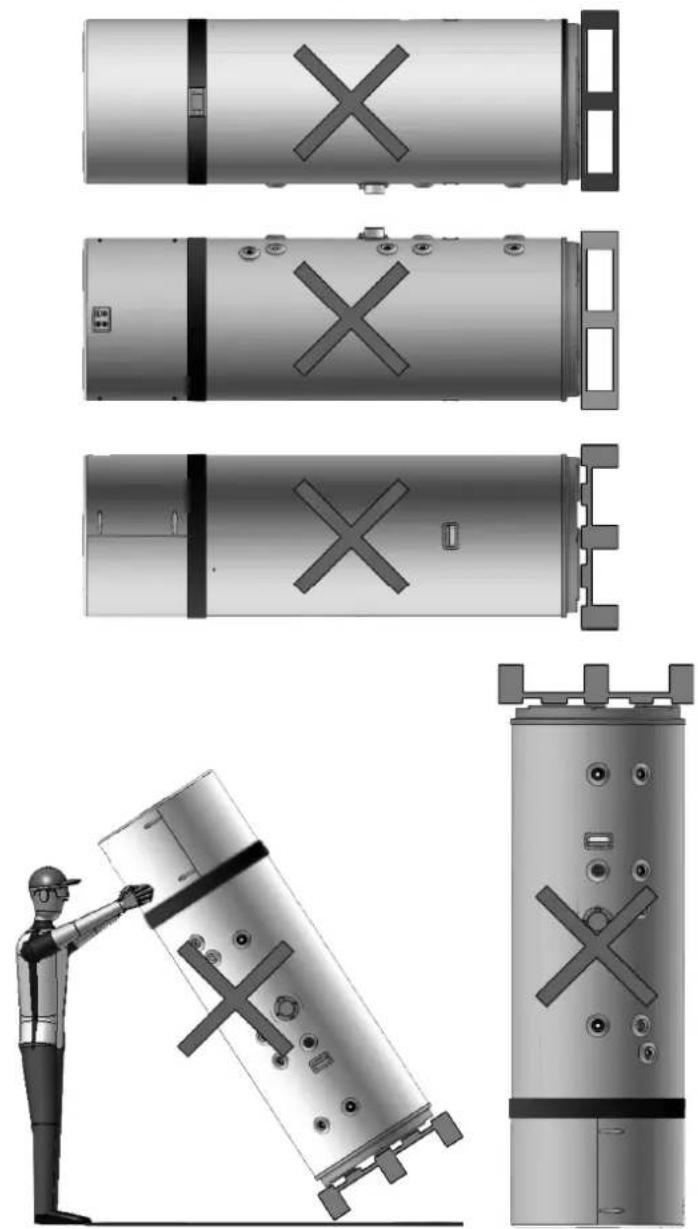
ATTENTION! Horizontal transport is allowed only for the last km according to that indicated (see "Positions not allowed for transport and handling"), making sure supports are positioned in such a way at the bottom of the boiler so as not to stress the upper part, as it is not structural. During horizontal transport the display must face upwards.
Position allowed only for the last km
natural_image
Top-down schematic of a cylindrical device with internal components and mounting holes (no text or symbols)
Positions not allowed for transport and handling
natural_image
Technical illustration of a cylindrical mechanical component with cross marks, shown from top to bottom views including a worker inspecting the part (no text or symbols present)
fig. 2
- CONSTRUCTION CHARACTERISTICS
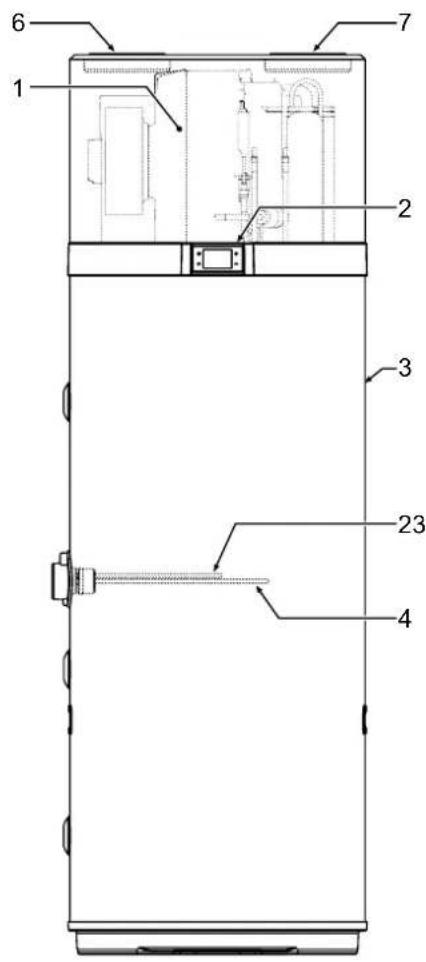
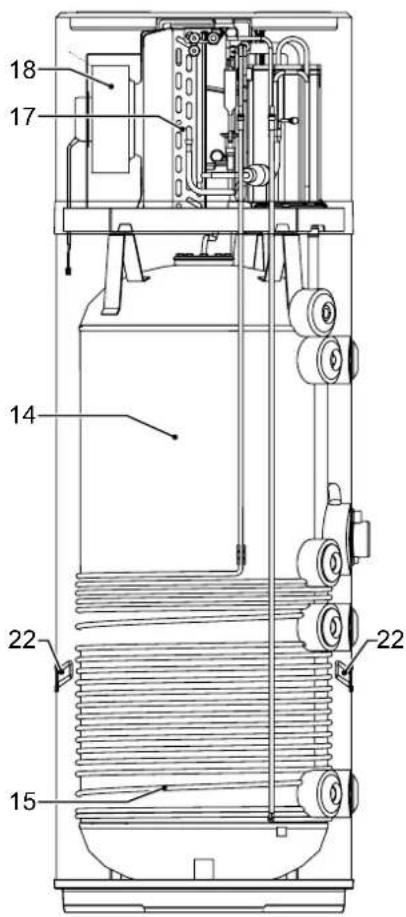

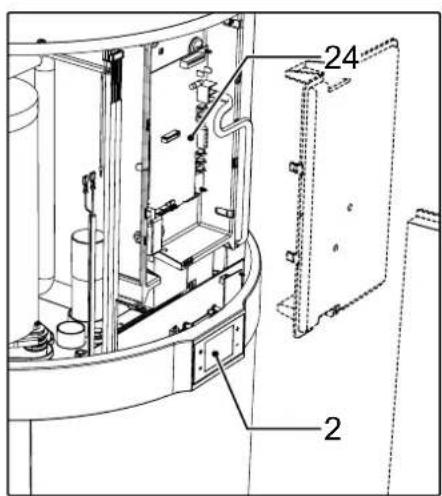
fig. 3
1 Heat pump
2 User interface
3 Steel casing
4 Heating element
5 Magnesium anode
6 Ventilation air inlet (∅ 160 mm)
7 Ventilation air outlet (∅ 160 mm)
8 Cold water inlet connection
9 Hot water outlet connection
10 Prearrangement for recirculation
11 Conderate drain
12 Prearrangement for solar coil Inlet
Only for models EKHHE200PCV37
EKHHE260PCV37
13 Prearrangement for solar coil outlet
Only for models EKHHE200PCV37
EKHHE260PCV37
14 Steel tank with vitreous enamel coating according to DIN 4753-3
15 Condenser
16 Rotary compressor
17 Finned pack evaporator
18 Electronic fan
19 Boiler probes
20 Probe holder pocket for solar - Only for models
EKHHE200PCV37
EKHHE260PCV37
21 Polyurethane insulation
22 Carrying handles
23 Tube for safety thermostat bulb
24 Power board
26 Compartment for accessing heating element and safety thermostat bulb
4.1 Dimensional data
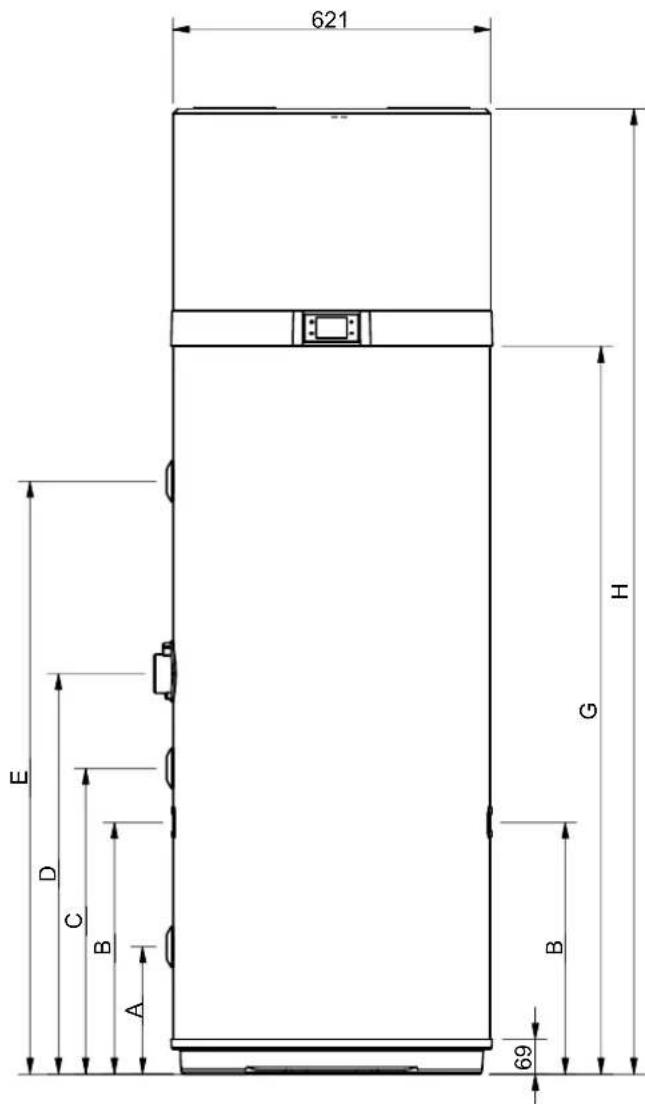
fig. 4
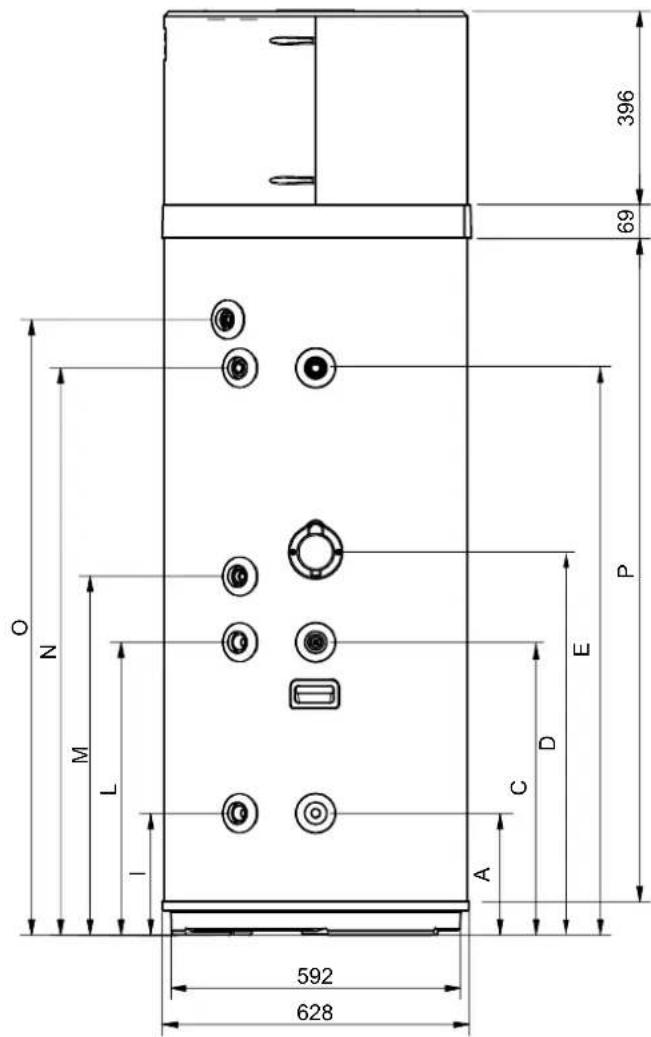
fig. 5
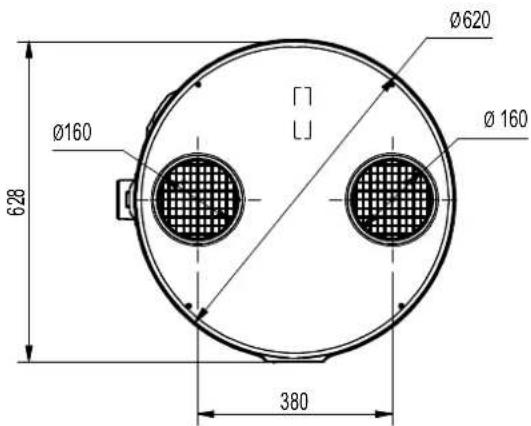
fig. 6
| MODEL ∅ | EKHHE200PCV37 | EKHHE260PCV37 | EKHHE200CV37 | EKHHE260CV37 | UM |
| A 1"G 250 250 250 250 mm | | | |
| B - 490 493 // mm | | | | |
| C 1/2"G | 600 600 600 | 600 mm | | | |
| D - 705 785 | 705 785 mm | | | | |
| E | 1"G | 876.5 | 1162 | 876.5 | 1162 | mm |
| G | - | 1142 | 1427 | 1142 | 1427 | mm |
| H | - | 1607 | 1892 | 1607 | 1892 | mm |
| I | 3/4"G | 250 250 // mm | | | |
| L | 3/4"G | 599 600 // mm | | | |
| M | 3/4"G | 705 735 | 705 735 mm | | | |
| N | 3/4"G | 877 | 1162 | 877 | 1162 | mm |
| O* | 1/2"G | 976 | 1261 | 976 | 1261 | mm |
| P | - | 1073 | 1358 | 1073 | 1358 | mm |
*O - Outlet connection in plastic material
4.2 Technical characteristics
| Modello | EKHHE200CV37 | EKHHE260CV37 | EKHHE200PCV37 | EKHHE260PCV37 | U.m. |
| General data | Voltage suplie 230Vac-50Hz - | | |
| Tank water content - Vnom 192 250 187 247 dm | | | | | ^3 |
| Maximum inlet water pressure 0.7 0.7 0.7 0.7 MPa | | | | | |
| Empty weight 85 97 96 106 kg | | | | | |
| Operating weight | 277 347 283 353 | kg | | |
| Dimensions (φxh) | 621 x 1607 | 621 x 1892 | 621 x 1607 | 621 x 1892 | mm |
| Max. Hot water temperature with heat pump 62 | 62 62 62 | °C | | | |
| Max. Hot water temperature with additional electric heater | 75 75 75 | 75 °C | | | |
| Tank | Material | Enameled steel | - |
| Cathodic protection | Mg rod anode | - |
| Insulating type | Polyurethane | - |
| Insulation thickness | 50 50 50 | 50 mm | | |
| Heat pump electrical data | Average power input in heating | 430 430 | 430 430 | W | | |
| Maximum power input | 530 530 | 530 530 | W | | |
| Maximum current input | 2.43 | 2.43 | 2.43 | 2.43 | A |
| Electric heater electrical data | Supply voltage | 230Vac-50Hz | |
| Power input | 1500 | 1500 | 1500 | 1500 | W |
| Current input | 6.5 6.5 6.5 | 6.5 | A | | |
| Electrical data Heat pump + electric heater | Maximum power input | 1960 | 1960 | 1960 | 1960 | W |
| Maximum current input | 8.5 8.5 8.5 | 8.5 | A | | |
| Air circuit | Fan type | Centrifugal | - |
| Air volume flow rate | 450 450 | 450 450 | m | | ^3/h |
| Available external static pressure | 117 | 117 | 117 | 117 | Pa |
| Ducts diameter | 160 160 | 160 160 mm | | | |
| Refrigerant circuit | Compressor | Rotary | - |
| Refrigerant | R134a | - |
| Refrigerant charge | 1 | 1 | 1 | 1 | kg |
| Evaporator | Copper-aluminum finned coil | - |
| Condenser | Aluminum tube wound outside tank | - |
| Solar coil | Material | - | - | Enameled steel | Enameled steel | - |
| Surface | - | - | 0.72 | 0.72 | m^2 |
| Max pressure | - | - | 1 | 1 | MPa |
| Data according to EN 16147: 2017 standard for AVERAGE climate (unit in ECO mode, Hot water setpoint = 55 °C; Inlet water = 10 °C; Inlet air temp = 7 °C DB / 6 °C WB)* according to European regulation 812/2013 | Load profile | L | XL | L | XL | - |
| Water heating energy efficiency class * | A+ | A+ | A+ | A+ | - |
| Water heating energy efficiency - _wh | 135 138 | 135 138 | % | | |
| COP_DHW | 3.23 | 3.37 | 3.23 | 3.37 | - |
| Maximum volume of mixed water at 40 °C - V_40 | 247 340 | 241 335 dm | | | ^3 |
| Reference hot water temperature - '_wh | 52.5 | 53.2 | 52.5 | 53.2 | °C |
| Rated heat output - Prated | 1.339 | 1.249 | 1.339 | 1.249 | kW |
| Heating up time - t_h | 06:27 | 09:29 | 06:27 | 09:29 | hh:mm |
| Annual electricity consumption - AEC | 761 | 1210 | 761 | 1210 | kWh |
| Stand-by power input ( P_sc ) | 26 28 26 | 28 W | | | |
| Data according to EN 12102-2: 2019 ECO mode with Inlet air temp = 7 °C DB / 6 °C WB | Indoor sound power level | 53 51 53 | 51 dB(A) | | | |
| Outdoor sound power level | 45 44 45 | 44 dB(A) | | | |
5.1 Compliance with European regulations
This heat pump is a product intended for domestic use in compliance with the following European directives:
• Directive 2012/19/EU (WEEE)
- Directive 2011/65/EU on the restriction of the use of certain hazardous substances in electrical and electronic equipment (RoHS)
• Directive 2014/30/EU electromagnetic compatibility (EMC)
• Directive 2014/35/EU low voltage (LVD)
• Directive 2009/125/EC eco-friendly design
• Regulation 2017/1369/EU energy labeling
5.2 Casing protection rating
The equipment protection rating is: IP24.
5.3 Operating limits

PROHIBITION! This product is not designed or intended for use in hazardous environments (due to the presence of potentially explosive atmospheres - ATEX or with required IP level higher than that of the unit) or in applications requiring safety features (fault-tolerant, fail-safe) which may be systems and/or technologies to support life or any other context in which the malfunction of an application can lead to death or injury to people or animals, or serious damage to property or the environment.

NB!: If the possibility of a product fault or failure can cause damage (to people, animals and property) it is necessary to provide for a separate functional surveillance system equipped with alarm functions in order to exclude such damage. It is also necessary to arrange the replacement operation!

Appliance is not designed for installation outdoors but in a "closed" place not exposed to the elements.
5.4 Operating limits
The product in question is designed exclusively for heating hot water for sanitary uses within the limits described below. For this purpose, it must be connected to the domestic water supply and the power supply (see chapter "6. INSTALLATION AND CONNECTIONS").
5.4.1 Temperature range
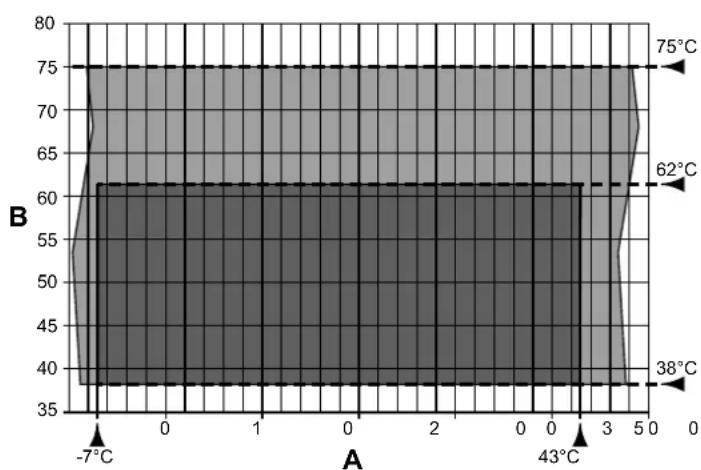
area
| X-Axis (°C) | Y-Axis (°C) |
| :--- | :--- |
| -7 | 38 |
| -4 | 62 |
| 43 | 75 |
The chart displays a shaded region representing temperature values across the X-axis range from -7 to 5. The Y-axis ranges from 35 to 80. Key data points are annotated: 38°C, 62°C, and 75°C. The shaded area under the curve is filled with varying shades of gray, indicating a range or density of measured values. No explicit numerical values or trends are provided in the image.
fig. 7- Chart
A = Inlet air temperature (°C)
B = Hot water temperature (°C)
■ = Operating range for heat pump (HP)
■ = Integration with heating element only
5.4.2 Water hardness
The unit must not operate with water of hardness under 12^ F; however, with particularly hard water (above 25^ F), it is advisable to use a properly calibrated and monitored water softener, in this case the residual hardness must not fall below 15^ F.

NB!: In the design and construction phase of the plants, the applicable local regulations and provisions must be respected.
5.5 Basic safety rules
• The product must be used by adults;
- Do not open or disassemble the product when it is electrically powered;
- Do not touch the product if barefoot or with wet or damp parts of the body;
- Do not pour or spray water on the product;
- Do not climb, sit and/or place any type of object on the product.
This product contains fluorinated greenhouse gases included in the Kyoto protocol. Do not release these gases into the atmosphere.
Type of refrigerant: HFC-R134a.

NB!: Maintenance and disposal operations must only be carried out by qualified personnel.
6. INSTALLATION AND CONNECTIONS
6.1 Preparation of place of installation
The product must be installed in a suitable place, i.e. to allow normal use and adjustment operations as well as routine and extraordinary maintenance.
The necessary operating space must therefore be prepared by referring to the dimensions given in fig. 8 and fig. 9.
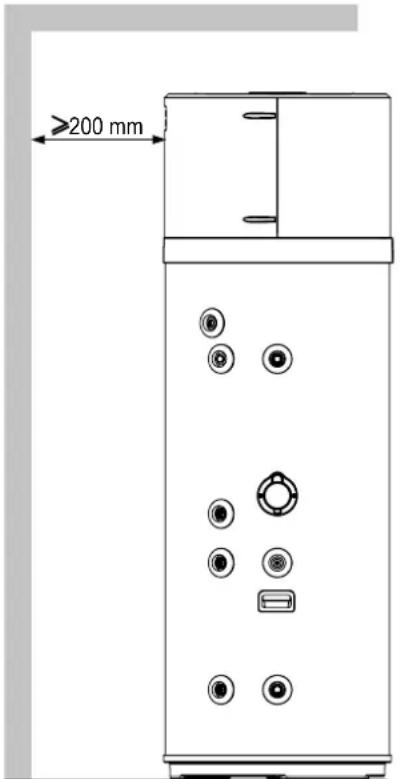
fig. 8- Minimum spaces
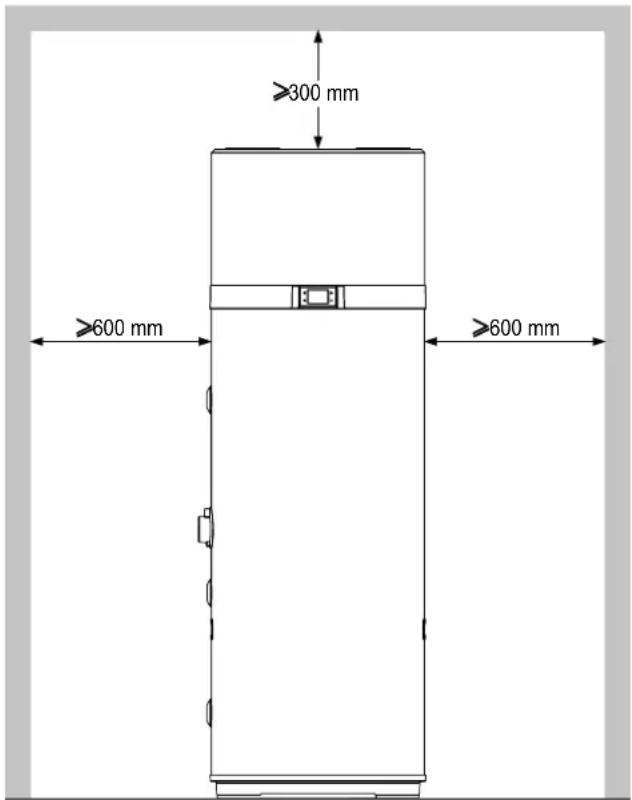
fig. 9- Minimum spaces
The room must also be:
• Equipped with adequate water and electricity supply lines;
- Prearranged for the condensation water discharge connection;
- Prearranged with adequate water drains in case of boiler damage or safety valve intervention or the breakage of pipes/connections;
- Equipped with possible containment systems in case of serious water leakage;
- Sufficiently illuminated (where required);
• Not less than 20 m3 in volume;
- Protected against frost and be dry.

ATTENTION! To avoid the propagation of mechanical vibrations, do not install the equipment on floors with wooden beams (e.g. in the attic).
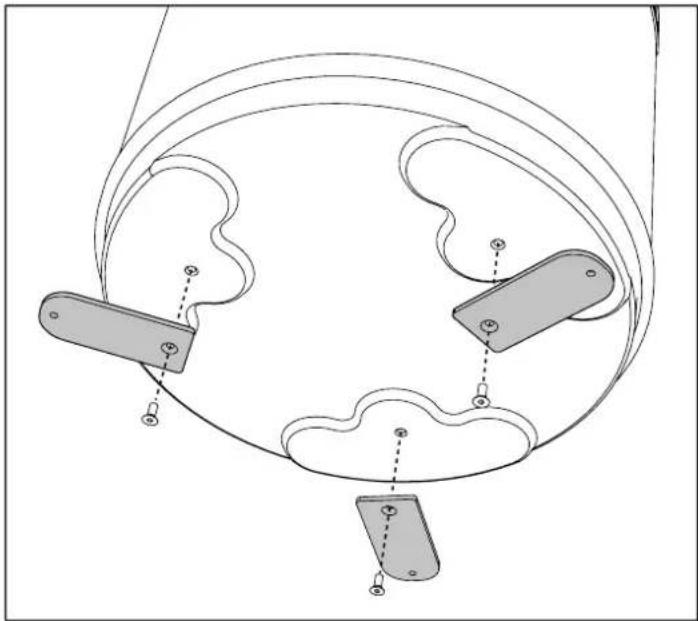
6.2 Securing to the floor
To secure the product to the floor, fasten the supplied brackets as shown in fig. 10.
natural_image
Pure mechanical diagram showing three connected components with no text, numbers, or symbols
fig. 10- Fastening brackets
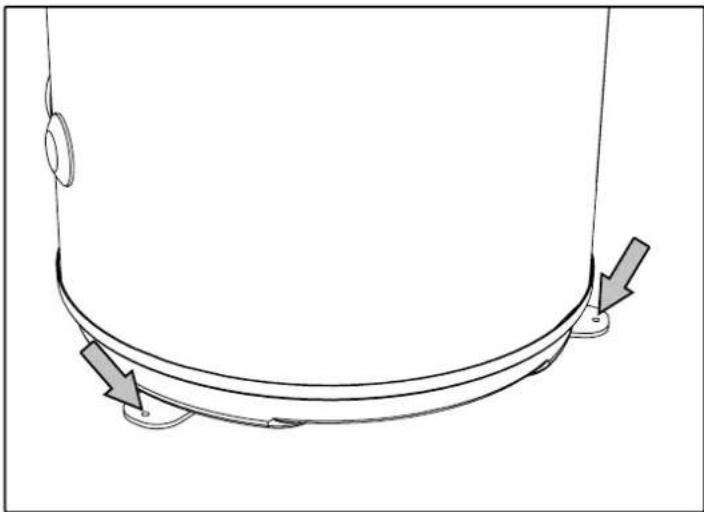
Then secure the unit to the floor with the aid of suitable plugs, not supplied, as shown in fig. 11.
natural_image
Pure technical line drawing of a curved mechanical component with directional arrows indicating motion (no text or symbols)
fig. 11- Securing to the floor
6.3 Aeraulic connections
In addition to the spaces indicated in 6.1, the heat pump requires adequate air ventilation.
Create a dedicated air channel as indicated in fig. 12.
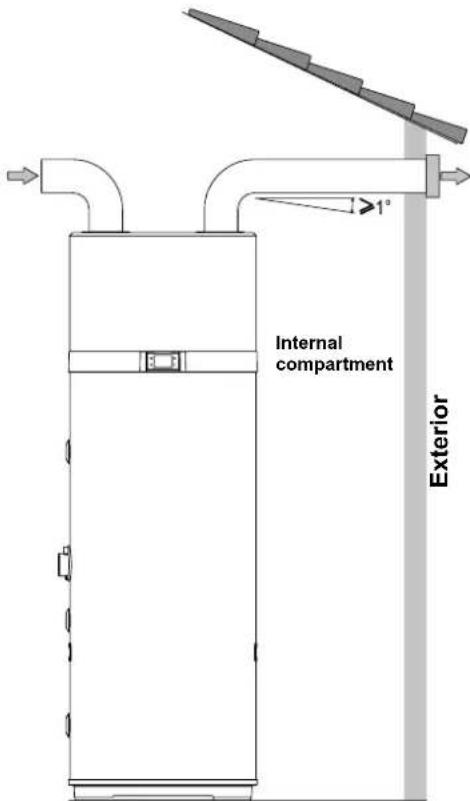
fig. 12- Example of air outlet connection
It is also important to ensure adequate ventilation of the room containing the unit. An alternative solution is shown in the figure below (fig. 13): it provides for a second ducting that takes air from the outside instead of directly from the inside room.
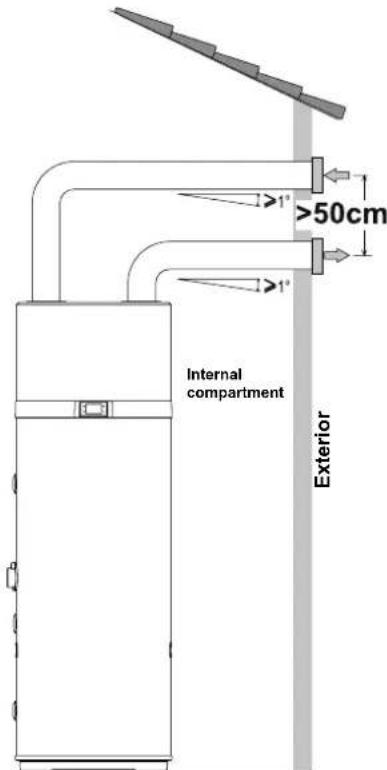
fig. 13– Example of air outlet connection
Install each air channel, making sure:
• It does not weigh down on the equipment.
• It allows maintenance operations.
- It is adequately protected to prevent the accidental intrusion of materials inside the equipment.
- The connection to the outside must be done with suitable, non-flammable piping.
- The total equivalent length of the extraction pipes plus the delivery, including grilles, must not exceed 12 m.
The table gives the characteristic data of commercial ducting components with reference to nominal air flows and diameters 160 mm.
| Data | Smooth straight pipe | Smooth 90° curve | Grille UM | |
| Type | 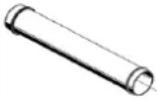 | 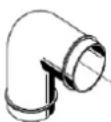 | 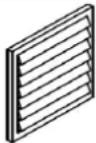 | |
| Effective length | 1 \ m | | | |
| Equivalent length | 1 2 2 m | | | |

During operation, the heat pump tends to lower the room temperature if the air ducting is not to the outside.

A suitable protection grille must be installed at the air extraction pipe to the outside to prevent any foreign bodies from entering inside the equipment. To ensure maximum product performance, the grille must be selected from those with low pressure loss.

To avoid the formation of condensation water: insulate the air extraction pipes and the ducted air cover connections with a steam-tight thermal covering of adequate thickness.

Install silencers if deemed necessary to prevent noise due to the flow. Equip the pipes, wall outlets and connections to the heat pump with vibration-damping systems.
6.3.1 Special installation
One of the peculiarities of the heat pump heating systems is that these units considerably lower the air temperature, generally expelled to the outside of the house. As well as being colder than the ambient air, the expelled air is also completely dehumidified, therefore the air flow can be returned inside for the summer cooling of specific rooms or areas.
Installation provides for splitting of the extraction pipe, which is fitted with two dampers ("A" and "B") for directing the air flow to the outside (fig. 15) or the inside of the house (fig. 14).
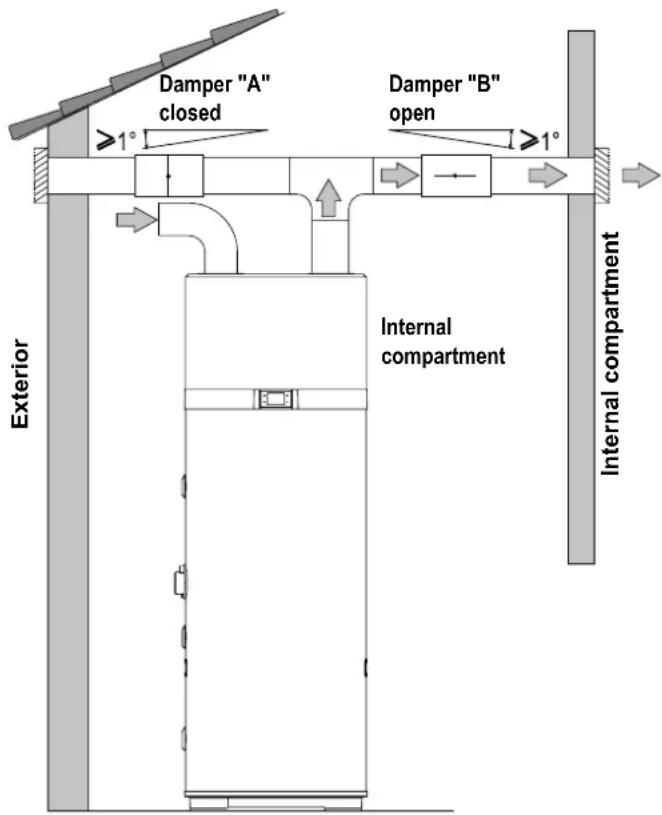
fig. 14- Example of installation in the summer period
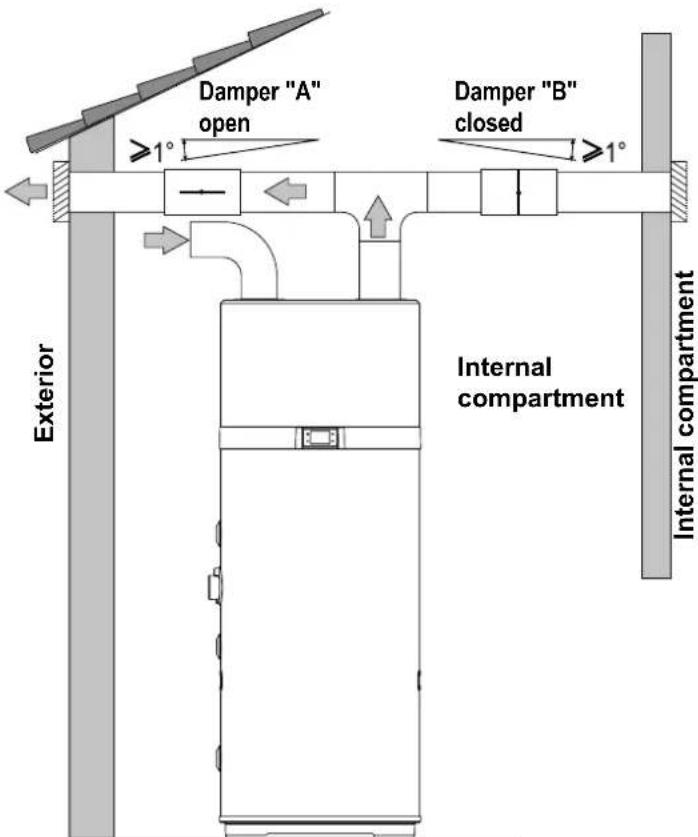
fig. 15- Example of installation in the winter period
6.4 Securing and connections of this appliance
The product must be installed on a stable, flat floor that is not subject to vibrations.
6.5 Hydraulic connections
Connect the cold water supply line and the outlet line to the appropriate connection points (fig. 16).
The table below gives the characteristics of the connection points.
| Ref. Function Model 200 l / 260 l | |
| 1 Cold water inlet 1"G | |
| 2 * Solar coil outlet 3/4"G | |
| 3 * Solar coil inlet 3/4"G | |
| 4 Recirculation 3/4"G | |
| 5 Hot water outlet 1"G | |
| 6 Condensate drain 1/2"G | |
| A* | Pit for solar probe and thermal cut-out bulb | 1/2"G |
*: only for EKHHE200PCV37 and EKHHE260PCV37 models.
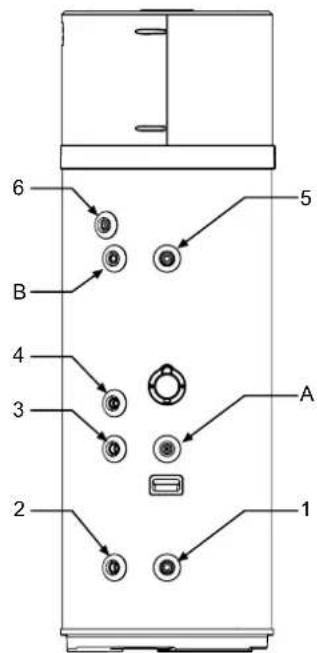
fig. 16
The following figure (fig. 17) illustrates an example of plumbing connection.
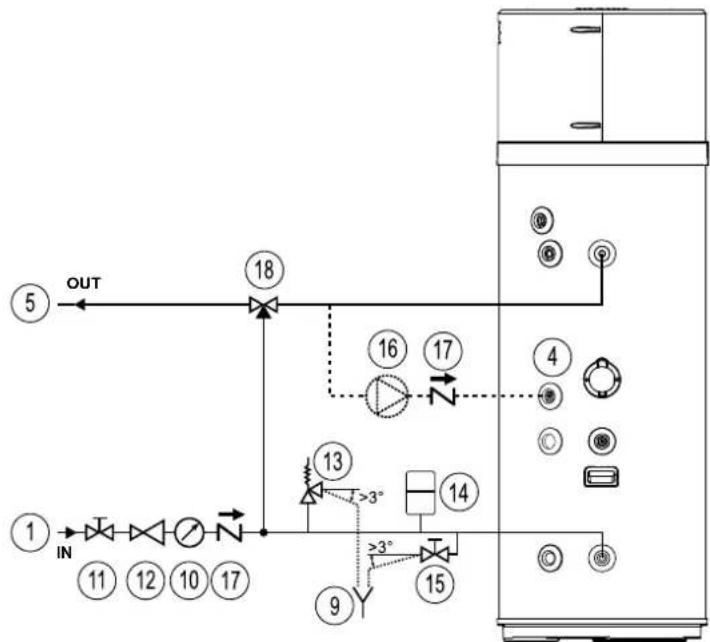
fig. 17- Example of water system
Legend (fig. 17)
1 Water inlet pipe
4 Recirculation water inlet
5 Hot water outlet pipe
9 Inspectionable end of discharge pipe
10 Pressure gauge
11 Shut-off valve
12 Pressure regulator
13 Safety valve
14 Expansion vessel
15 Drain tap
16 Recirculation pump
17 Spring check valve
18 Automatic thermostat mixing equipment
6.5.1 Condensate drain connection
The condensate forming during heat pump operation flows through a special drain pipe (1/2"G) that passes inside the insulating casing and comes out at the side of the equipment. It must be connected, via a trap, to a duct so that the condensate can flow regularly (fig. 18).
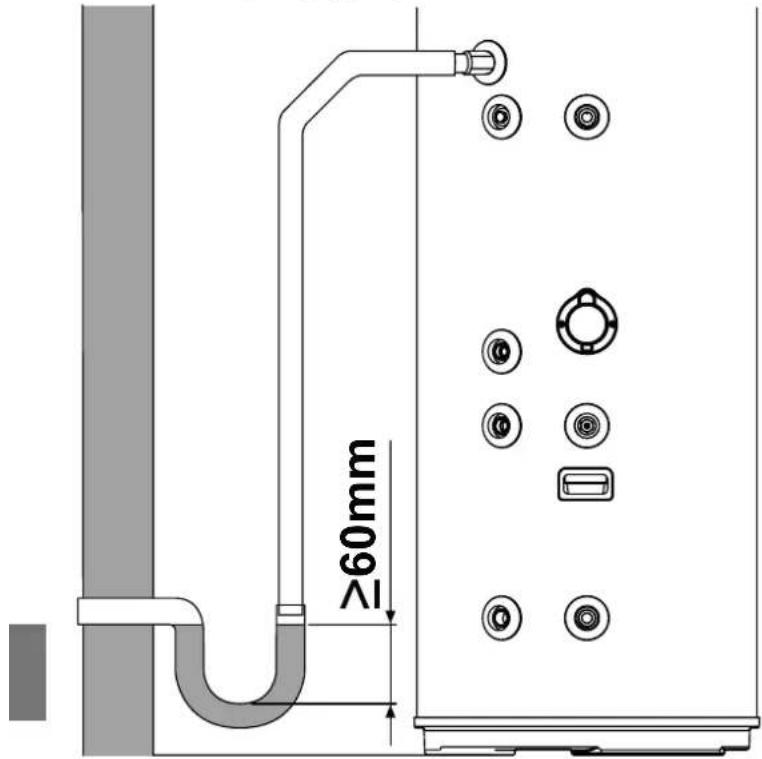
fig. 18- Examples of condensate drain connection via a trap
6.6 Integration with solar thermal system (only for models EKHHE200PCV37, EKHHE260PCV37)
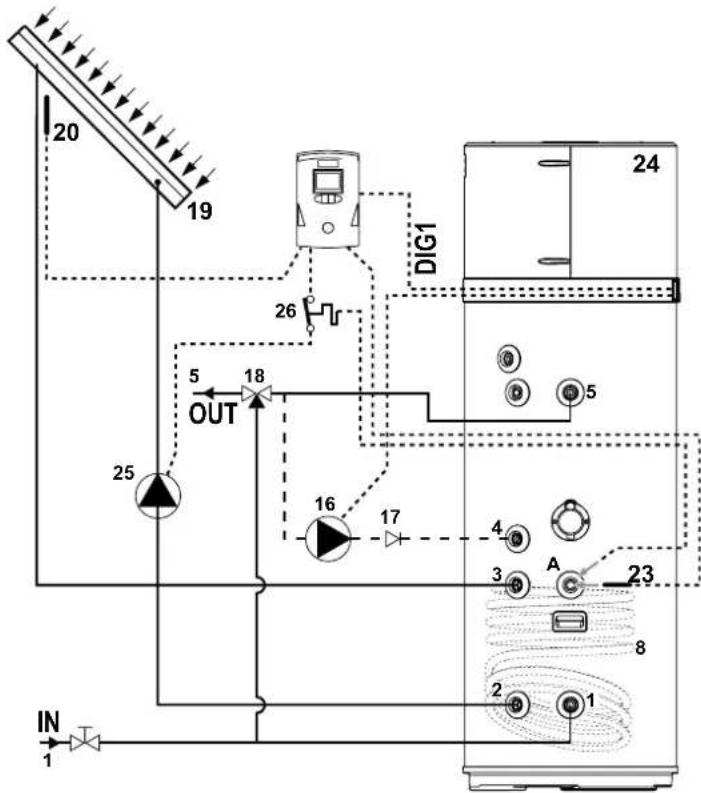
The following figure (fig. 19) shows how to connect the equipment to a solar thermal system controlled by a dedicated electronic controller (not supplied) that has a "voltage-free contact" type output to be connected to the DIG.1 input of the equipment (see "6.7.1 Remote connections").
To use the equipment in this configuration it is necessary to set the parameter P16 = 1 (see par. 8.1).
flowchart
graph TD
    A["Sensor 1"] --> B["Inverter"]
    B --> C["20"]
    C --> D["19"]
    D --> E["25"]
    E --> F["OUT"]
    F --> G["18"]
    G --> H["16"]
    H --> I["17"]
    I --> J["4"]
    J --> K["A"]
    K --> L["23"]
    L --> M["8"]
    M --> N["2"]
    N --> O["1"]
    O --> P["24"]
    P --> Q["26"]
    Q --> R["DiG1"]
fig. 19
The following figures (fig. 20 and fig. 21) show how to connect the equipment to a solar thermal system controlled directly by the latter, without the aid of a dedicated electronic controller.
In the configuration of fig. 20, in case of solar collector overtemperature a drain valve (not supplied) is activated to discharge in a DHW storage tank (puffer) hot water contained in the equipment.
In the configuration of fig. 21, however, in this condition the solar collector shutter is closed.
In both cases this occurs in order to allow the collector to cool down.
To use the equipment in both these configurations it is necessary to set the parameter P12 = 2 and P16 = 2 (see par.8.1).
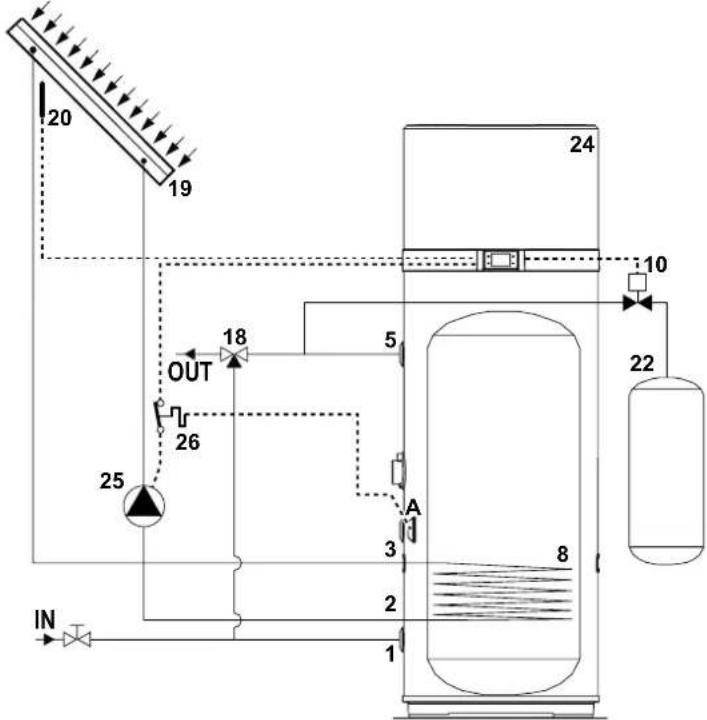
fig. 20
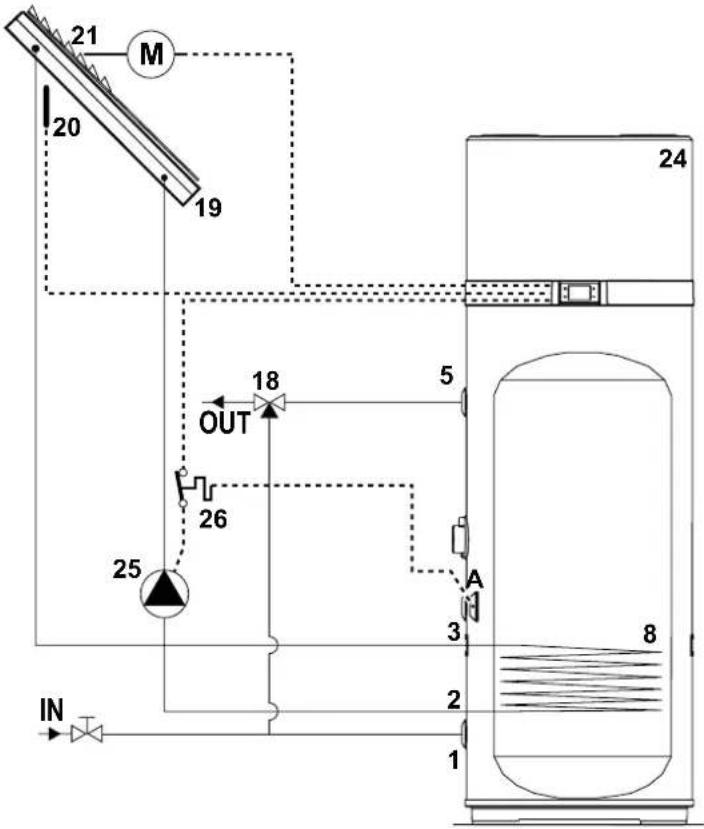
flowchart
graph TD
    A["IN"] --> B["25"]
    B --> C["OUT"]
    C --> D["18"]
    D --> E["5"]
    E --> F["A"]
    F --> G["3"]
    G --> H["2"]
    H --> I["1"]
    I --> J["8"]
    K["20"] --> L["19"]
    M["M"] --> L
    style A fill:#f9f,stroke:#333
    style J fill:#ccf,stroke:#333
fig. 21
Legend (fig. 19, fig. 20 and fig. 21)
1 Cold water inlet
2 Solar coil outlet
3 Solar coil inlet
4 Recirculation
5 Hot water outlet
8 Solar thermal coil
10 Drain valve
16 Recirculating pump (ON/OFF type)
17 Check valve
18 Automatic thermostatic mixing device
19 Solar collector
20 Solar collector probe (PT1000 not supplied*)
21 Solar collector shutter
22 DHW puffer
23 Solar coil probe (not supplied)
24 Heat pump
25 Solar pump (ON/OFF type)
26 Thermal cut-out (supplied) for solar pump
A Pit for solar probe and thermal cut-out
* We advise to use solar collector probe PT1000 (available on manufacturer's accessories list)
6.7 Electrical connections
Before connecting the appliance to AC mains, a check must be carried out on the electrical system to verify conformity to the regulations in force and that the electrical system can suitably withstand the water heater's maximum power consumption values (refer paragraph 4.2 for technical characteristics), in terms of the size of the cables and their conformity to the regulations in force.
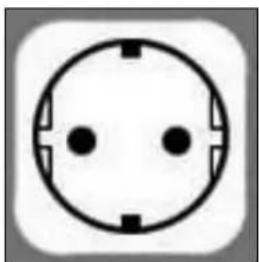
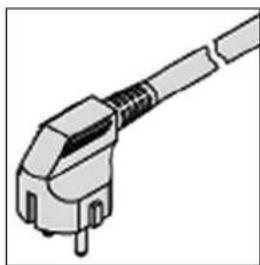
The appliance is supplied with a power cord with a Schuko plug (fig. 23) and for the connection with AC mains is required:
- a Schuko wall socket with ground and separate protection is required (fig. 22);
- an omnipolar 16 A circuit breaker with a contact opening of at least 3 mm;
• a 30 mA differential circuit breaker.
It is forbidden to use multiple outlet sockets, extension cables or adaptors.
It is forbidden to use piping from the water, heating and gas systems for earthing the appliance.
Prior to operating the machine, make sure that the electricity mains voltage conforms to the value indicated on the appliance's data plate.
The manufacturer of the appliance shall not be held liable for any damage caused by failure to earth the system or due to anomalies in the electric power supply.
natural_image
Simple electrical outlet symbol with three dots and circuit lines, no text or labels present
natural_image
Illustration of a mechanical connector or plug assembly (no text or symbols visible)
fig. 22 - Schuko socket fig. 23 - Unit plug
6.7.1 Remote connections
The equipment is designed to be connected to other remote energy systems or energy meters (solar thermal, photovoltaic, Off-Peak)
- Digital 1 (DIG1). Digital input for solar thermal (only for models PCV3). In case of a solar thermal system with dedicated control unit, the latter can be connected to the equipment to deactivate the heat pump when there is energy production from solar source. Having a voltage-free contact that closes when the solar system is active, it can be connected to the two white and brown wires of the 6-core cable supplied with the equipment.
Set the parameter P16 = 1 to activate the supplement with solar thermal.
- Digital 2 (DIG2). Digital input for photovoltaic. In case of a photovoltaic system connected to the plant, it can be used to subtract energy in the form of hot water in times of overproduction. If there is a voltage-free contact, e.g. from the inverter, which closes when there is overproduction of energy, it can be connected to the two green and yellow wires of the 6-core cable supplied with the equipment.
Set the parameter P23 = 1 to activate the supplement with photovoltaic.
- Digital 3 (DIG3). Input for Off-Peak. This function, available only in some countries, allows the equipment to be activated only when there is a signal coming from outside with preferential tariff. If the electric contactor has a voltage-free contact which closes when the preferential tariff is available, it can be connected to the two gray and pink wires of the 6-core cable supplied with the equipment.
Set the parameter P24 = 1 to activate Off-peak in ECO mode or P24 = 2 for Off-peak in AUTO mode.
- Digital input (LPSW) for the flow switch of the solar thermal/DHW circulating pump (not supplied)
- Analog input (PT1000) for solar collector probe.
OUTPUTS
230 Vac - 16 A relay output with N.O. contact. for solar thermal / DHW recirculation circulating pump (ON/OFF type).
230 Vac - 5 A relay output with contact N.O. for solar collector shutter / drain valve.
Only for models PCV3

Note: For more information on remote connections and the configuration of the equipment with these systems, see the par. "7.5 Operating mode" and "8.1.1 List of equipment parameters".
6.7.1.1 Remote connection
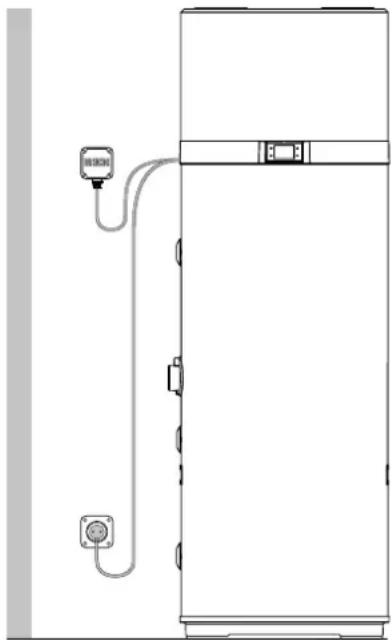
For the connection to the digital inputs the equipment is supplied with an additional 6-core cable already connected to the PCBA of the user interface (located inside the device). The remote connections to possible energy systems are the responsibility of the qualified installer (connection boxes, terminals and connection cables).
The following figures give an example of remote connection (fig. 24 and fig. 25) which must not be longer than 3 m.
natural_image
Line drawing of a vertical electrical cabinet with a power outlet and connection lines (no text or symbols)
fig. 24- Example of remote connection
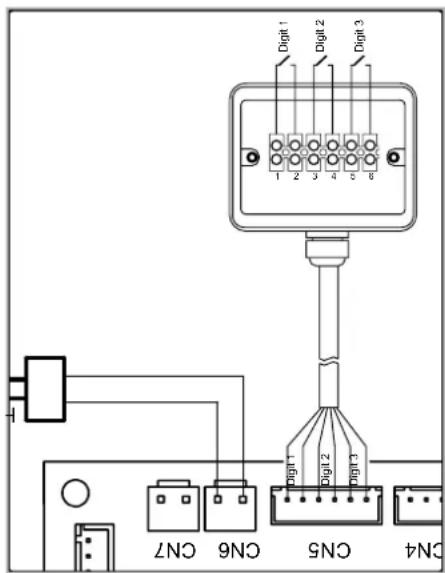
fig. 25
To access the 6-core cable for remote connection, remove the upper cover of the boiler and run to the outside the cable, al-
ready present inside the unit, through the special cable gland installed in the back cover.
6.8 Wiring diagram
flowchart
graph TD
    subgraph MAINBOARD
        A["HElectric Heater"] --> B["N"]
        C["Safety Thermostat"] --> D["L"]
        E["COMP"] --> F["C"]
        G["Compressor"] --> H["C"]
        I["Hot Gas Coil"] --> J["C"]
        K["T5AL250V"] --> L["L"]
        M["CN16"] --> N["L"]
        O["CN20"] --> P["L"]
        Q["CN15"] --> R["L"]
        S["CN11"] --> T["L"]
        U["CN13"] --> V["L"]
        W["CN26"] --> X["L"]
        Y["CN10"] --> Z["L"]
        AA["CN17"] --> AB["L"]
    end
    subgraph POWER
        AC["Power Supply"] --> AD["YE-GN"]
        AE["YE-GN"] --> AF["YE-GN"]
        AG["YE-GN"] --> AH["YE-GN"]
        AI["YE-GN"] --> AJ["YE-GN"]
        AK["YE-GN"] --> AL["YE-GN"]
        AM["Solar / Hot Water Pump"] --> AN["Fan Motor"]
        AO["Compressor"] --> AP["Tank Jacket"]
        AQ["Water Tank"] --> AR["Water Tank"]
    end
    subgraph MAINBOARD
        AS["T5AL250V"] --> AT["L"]
        AU["CN16"] --> AV["L"]
        AW["CN20"] --> AX["L"]
        AY["CN15"] --> AZ["L"]
        BA["CN11"] --> BB["L"]
        BC["CN13"] --> BD["L"]
        BE["CN26"] --> BF["L"]
        BG["CN10"] --> BH["L"]
    end
    subgraph MAINBOARD
        BI["CN25"] --> BJ["CN27"]
        BK["CN2"] --> BL["CN2"]
        BM["CN1"] --> BN["CN1"]
        BO["CN5CN4"] --> BP["CN6"]
        BQ["CN7CN3"] --> BR["CN8"]
        BS["EC Fan Motor"] --> BT["M"]
        BU["YE-GN"] --> BV["YE-GN"]
        BW["U.I. Board"] --> BX["WI-FI Board"]
        BY["F.C.T. Connection"] --> BZ["HPSW"]
    end
    subgraph MAINBOARD
        CA["PN 1000 Solar collector Probe"] --> CB["P3"]
        CC["P5"] --> CD["P4"]
        DD["P7"] --> DE["P2"]
        F["DIG3"] --> GD["DIG2"]
        HD["DIG1"] --> DI["DIG1"]
    end
    subgraph MAINBOARD
        DJ["CON27"] --> DK["P5"]
        DL["CON2"] --> DM["P4"]
        DN["CON1"] --> DO["P8"]
        DP["CON5CN4"] --> DP["P7"]
        DR["CON6"] --> DV["P2"]
    end
fig. 26- Equipment wiring diagram
Description of connections available on the power board
| CN1 Air, defrost and water NTC probes |
| CN2 Not usable |
| CN3 | Probe for solar thermal management - Only for models PCV3 |
| CN4 Not usable |
| CN5 Solar digital inputs, PV, Off-peak |
| CN6 High pressure switch |
| CN7 | Flow switch for solar thermal/DHW circulating pump (not supplied) |
| CN8 Electronic fan PWM control (EC) |
| CN9+CN12 | Not usable |
| CN10 Fan power supply EC, AC |
| CN11 | Solar thermal/DHW circulating pump (ON/OFF type), drain valve or solar collector shutter - Only for models PCV3 |
| CN13 Hot gas defrost valve power supply |
| CN14 Not usable |
| CN15 Compressor power supply |
| CN16 Heating element power supply |
| CN17 Not usable |
| CN18 Main power supply 230 V - 1 PH - 50 Hz |
| CN19 Earth connections |
| CN20 | 230 Vac power supply for impressed current anode converter |
| CN21 Connection with end of line inspection/test |
| CN22 WI-FI card connection (not supplied) |
| CN23 User interface connection |
| CN25 Not usable |
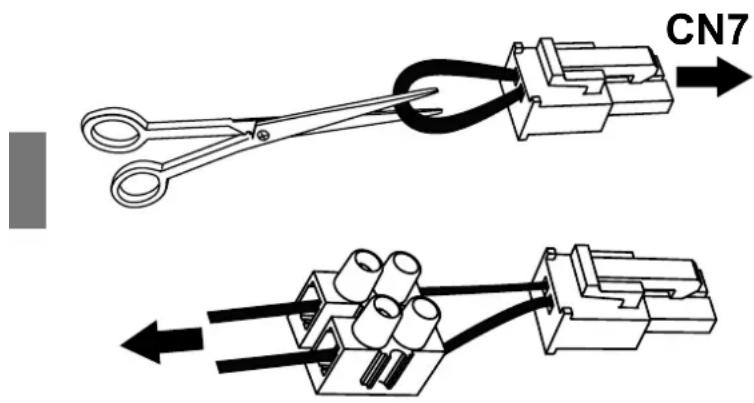
To connect a safety flow switch for the solar thermal/hot water recirculation circuit to the equipment, proceed as follows (reserved only for qualified technical personnel):
- Disconnect the power to the equipment.
- Remove the top cover of the equipment and then the power board cover.
- Disconnect the "jumper" (bridge 1) from connector CN7 of the power board, then cut the conductor forming the bridge in the middle and connect a suitable terminal.
- Then connect a normally-closed (N.C.) type flow switch and connect everything to CN7.
- Reassemble all the plastics and make sure the equipment is correctly installed before powering it.
If, instead, a normally-open (N.O.) type flow switch is used, it is necessary to set the parameter P15 = 1 (see par.8.1).
To connect the thermal cut-off (supplied) for the solar circulation pump, proceed as follows (reserved only for qualified technical personnel):
- Disconnect the power to the appliance;
- Put the bulb fully inside the dedicated tank pit ("A") and close the cable gland;
- Unwind the capillary enough is necessary to place the thermal cut-out inside an adequate enclosure fixed to the wall;
- Connect the thermal cut-out in series with line ("L") and neutral ("N") power-supply connections of solar circulating pump, for all-pole disconnection.
- Verify all connections before power-supply the appliance.
7. DESCRIPTION OF USER INTERFACE AND OPERATION OF EQUIPMENT
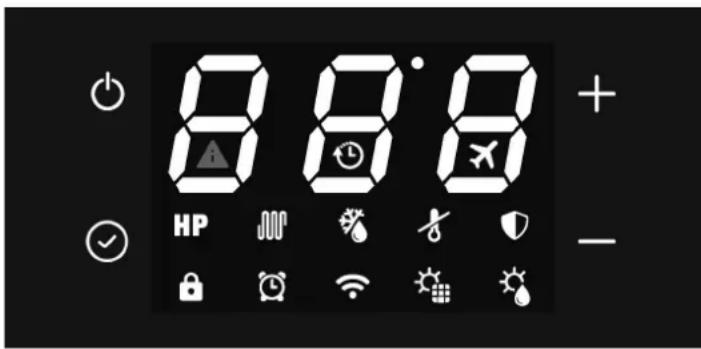
fig. 27
| Description Symbol | |
| "On/Off" button for switching on, putting the product in standby mode, unlocking buttons, saving changes |  |
| "Set" button to edit the parameter value, confirm; |  |
| "Increase" button to increase the set-point value, parameter or password |  |
| "Decrease" button to decrease the set-point value, parameter or password |  |
| Heat pump operation (ECO mode) |  |
| Heating element operation (ELECTRIC mode) |  |
| AUTOMATIC mode | H  |
| BOOST mode (symbols flash) | H  |
| Button lock active |  |
| Defrost |  |
| Frost protection |  |
| Anti-legionella cycle |  |
| Holiday mode; |  |
| Operation with time bands |  |
| Clock setting (symbol flashes) |  |
| Connected with WI-FI (not available for these models) |  |
| Photovoltaic mode (with symbol flashing the supplement is not active) | [DT8AA] |
| Solar thermal mode (with symbol flashing the supplement is not active) |  |
| Fault or protection active |  |
| Off-Peak mode (with symbol flashing the equipment remains on standby) |  |
The user interface of this water heater model consists of four capacitive buttons, and a LED display.
As soon as the water heater is powered the four buttons are backlit and all the icons and display segments light up simultaneously for 3 s.
During normal operation of the product the three digits on the display show the water temperature in ^ C, measured with the upper water probe if parameter P11 is set to 1 or with the lower water probe if P11 = 0.
During modification of the selected operating mode set-point, the set-point temperature is shown on the display.
The icons indicate the selected operating mode, the presence or not of alarms, Wi-Fi connection status, and other information on product status.
When the water heater is correctly powered it can be "ON" and, therefore, in one of the available operating modes (ECO, Automatic, etc.) or in standby mode.
During standby mode the four capacitive buttons are backlit for easy visibility, the Wi-Fi icon is lit up according to the connection status with an external Wi-Fi router (not supplied) and, in the absence of alarms or frost protection active, all other icons as well as the segments of the three digits are off.
Turning on
With the water heater in standby mode and "button lock" function active (padlock icon at the bottom left lit up), it is necessary to first "unlock" the buttons by pressing the ON/OFF button for at least 3 seconds (the padlock icon goes off), then press the ON/OFF button again for 3 seconds to turn on the water heater.
Turning off
With the water heater on and "button lock" function active, it is necessary to first "unlock" the buttons by pressing the ON/OFF button for at least 3 seconds, then press the ON/OFF button again for 3 seconds to turn off the water heater (putting in standby mode).
In any status, 60 seconds after the last press of any of the four user interface buttons, the button lock function is automatically activated to prevent possible interactions with the water heater, e.g. by children, etc. At the same time the backlighting level of the buttons and display decreases to reduce the unit's energy consumption.
By pressing any of the four buttons, the backlighting of the buttons and display will immediately return to its normal level for better visibility.
7.2 Setting the clock
With the buttons unlocked, press the button √ for 3 seconds to access the clock settings (the symbol 🔒 flashes).
Set the time with the "+" and "-" buttons, press " √" to confirm and then set the minutes.
Press the button √ to confirm and exit.
7.3 Setting time bands
The equipment clock must be set before activating the time bands.
Select the desired operating mode then set the time bands.
The time bands can be activated only in the ECO - AUTOMATIC - BOOST - ELECTRIC and VENTILATION modes.
With the buttons released, press th button √ and "-" button together for 3 seconds to set the time bands (the symbol 🔒 is displayed).
Set the switch-on time using the "+" and "-" buttons, press " √" to confirm and then set the On minutes.
Press ☑ to confirm and go to switch-off time setting.
Press √ to confirm, then, using the "+" and "-" buttons, select the desired operating mode for the time band (ECO, AUTOMATIC, BOOST, ELECTRIC, VENTILATION).
Press √ to confirm and exit.
Note: At the end of the time band the equipment goes to standby mode and remains there until repetition of the time band the next day
To deactivate the time bands:
• set the on and off times to midnight (00:00);
- press to confirm;
- press button and "-" button together for 3 seconds (the symbol goes off).
7.4 Setting the hot water set-point
It is possible to adjust the hot water set-point in the ECO, AUTOMATIC, BOOST and ELECTRIC modes
Select the desired mode with the button √, then adjust the set-point with the "+" and "-" buttons.
Press the button √ to confirm and ⏻ to exit.
| Mode | Hot water set-point |
| Range Default | |
| ECO 43÷62°C 55°C | | |
| AUTOMATIC 43÷62°C 55°C | | |
| BOOST 43÷75°C* 55°C | | |
| ELECTRIC 43÷75°C 55°C | | |
* In BOOST mode the maximum set-point value for the heat pump is 62°C. Therefore, by setting a higher value this is to be considered only for the heating element.
7.5 OPERATING MODE
The following modes are available for this water heater:
- ECO;
- BOOST;
- ELECTRIC;
- VENTILATION;
- HOLIDAY;
- AUTOMATIC.
The equipment is set in ECO mode; pressing this button √ it is possible to select the desired mode.
For the ECO, BOOST and AUTOMATIC modes, by pressing button "+" and "-" simultaneously for 3 seconds, it is possible to activate the "silent mode" (for example during the night) which reduces the noise of the equipment; in this condition, performance in terms of water heating rate may be lower.
To deactivate this mode, press buttons "+" and "-" again for 3 seconds.
7.5.1 ECO
The display shows the symbol HP
With this mode only the heat pump is used within the product operating limits to ensure maximum possible energy saving.
The heat pump is switched on 5 minutes after selecting this mode or from the last switch-off.
In case of switching off, within the first 5 minutes, the heat pump will remain on anyway to ensure at least 5 minutes of continuous operation.
7.5.2 BOOST
The display shows the symbols HP flashing.
This mode uses the heat pump and the heating element, within the product operating limits, to ensure faster heating.
The heat pump is switched on 5 minutes after selecting this mode or from the last switch-off.
In case of switching off, within the first 5 minutes, the heat pump will remain on anyway to ensure at least 5 minutes of continuous operation.
The heating element is switched on immediately.
7.5.3 ELECTRIC
The display shows the symbol 🐎
With this mode only the heating element is used within the product operating limits and is useful in situations of low inlet air temperatures.
7.5.4 VENTILATION
The display shows the message FRn
With this mode only the electronic fan inside the device is used and is useful for recirculating the air in the installation room if desired.
In automatic mode the fan will be adjusted to the minimum speed.
7.5.5 HOLIDAY
The display shows the symbol ✗
This mode is useful when away for a limited time and then automatically finding the device working in automatic mode.
Using buttons + and - it is possible to set the days of absence during which you want the equipment to remain in stand-by.
Press √ and then on off to confirm.

7.5.6 AUTOMATIC
The display shows the symbol HP
With this mode the heat pump is used and, if necessary, also the heating element, within the product operating limits, to ensure best possible comfort.
The heat pump is switched on 5 minutes after selecting this mode or from the last switch-off.
In case of switching off, within the first 5 minutes, the heat pump will remain on anyway to ensure at least 5 minutes of continuous operation.
7.6 ADDITIONAL FEATURES
7.6.1 Solar Mode HP or HP 🎨 🎩 🎩
(Only for models PCV3)
When the solar mode is activated from the installer menu, only ECO - AUTOMATIC - HOLIDAY will be available.
When the symbol ⚙ on the display flashes, the solar mode is not operating and the unit works in the set mode: ECO, AUTOMATIC or HOLIDAY.
When the symbol ⚙ on the display is lit up, the energy produced by the solar system is used to heat the water inside the tank via the solar coil.
7.6.2 Photovoltaic mode HP or HP 🎨 🎩
When the photovoltaic mode is activated from the installer menu, only ECO - AUTOMATIC - HOLIDAY will be available.
When the symbol ⚙ on the display flashes, the photovoltaic mode is not operating and the unit works in the set mode: ECO, AUTOMATIC or HOLIDAY.
When the symbol ⭐ on the display is lit up, the energy produced by the photovoltaic system is used to heat the water inside the tank.
With ECO mode selected, the heat pump will operate until the set-point is reached and the heating element is switched on until the photovoltaic set-point set from the installer menu is reached. Otherwise, with AUTOMATIC mode selected, the heating element can also be switched on before reaching the set-point of this mode if the conditions require it.
7.6.3 Off-Peak Mode HP or +HP 🎨
When the photovoltaic mode is activated from the installer menu, only ECO - AUTOMATIC will be available.
When the symbol ⏻ on the display flashes, the Off-Peak mode is not operating and the unit remains on standby and the heat pump and heating element are off.
Otherwise, when the symbol ⏻ on the display is lit up, the unit works in the ECO or AUTOMATIC mode.
7.6.4 Anti-Legionella
The display shows the symbol
Every two weeks, at the set time, a water heating cycle is carried out by means of the heating element inside the tank, up to the anti-legionella temperature, maintaining it for the set time. If, on reaching the anti-legionella temperature, the cycle is not performed correctly within 10 hours, it is stopped and will be run again after 2 weeks.
If the request for the anti-legionella function occurs with HOLIDAY mode selected, the anti-legionella cycle will be carried out immediately when the unit is reactivated after the set days of absence.
| Anti-legionella parameters Range Default | | |
| Anti-legionella temperature set-point (P3) 50÷75°C 75°C | | |
| Anti-legionella cycle duration (P4) 0÷90 min 30 min | | |
| Anti-legionella cycle activation time (P29) 0÷23 h | 23 h | |
7.6.5 Defrost function
The display shows the symbol ⚙.
This device has an automatic evaporator defrost function which is activated, when the operating conditions require it, during heat pump operation.
Defrosting occurs through the injection of hot gas into the evaporator, allowing it to be rapidly defrosted.
During defrosting, the heating element, which the equipment is provided with, is switched off unless otherwise set via the installer menu (parameter P6).
The max. duration of defrosting is 8 minutes.
7.6.6 Frost protection
The display shows the symbol
This protection prevents the water temperature inside the tank from reaching values close to zero.
With the equipment in standby mode, when the water temperature inside the tank is below or equal to 5°C (parameter configurable via installer menu), the frost protection function activates, which switches on the heating element until 12°C is reached (parameter configurable via installer menu)..
7.7 Faults/protection
This equipment has a self-diagnosis system that covers some possible faults or protections from anomalous operating conditions through: detection, signaling and adoption of an emergency procedure until resolution of the fault.
| Fault/Protection Error code Display indication | | |
| Tank lower probe fault P01 | | i + P01 |
| Tank upper probe fault P02 | | i + P02 |
| Defrost probe fault P03 | | i + P03 |
| Inlet air probe fault P04 | | i + P04 |
| Evaporator inlet probe fault P05 | | i + P05 |
| Evaporator outlet probe fault P06 | | i + P06 |
| Compressor flow probe fault P07 | | i + P07 |
| Solar collector probe fault P08 | | i + P08 |
| High pressure protection E01 | | i + E01 |
| Solar/recirculation circuit alarm E02 | | i + E02 |
| Temperature not suitable for heat pump operation alarm(With alarm active the water is heated only with heating element) | PA | i + PA |
| No communication (with alarm active the equipment does not work) | E08 | i + E08 |
| Electronic fan fault E03 | | i + E03 |
In case of any of the above faults, it is necessary to contact the manufacturer's technical assistance service, indicating the error code shown on the display.
8. COMMISSIONING

ATTENTION!: Check that the equipment has been connected to the ground wire.

ATTENTION!: Check that the line voltage is that indicated on the equipment rating plate.

CAUTION: The appliance can only be turned on after it has been filled with water.
Proceed with the following operations for commissioning:
- Once the appliance is installed and all connections are performed (aeraulic, hydraulic, electrical, etc), it must be filled with water from the domestic water supply network. In order to fill the appliance, it is necessary to open the central tap of the domestic network supply and the nearest hot water tap, while making sure that all the air in the tank is gradually expelled.
- Do not exceed the max. permissible pressure indicated in the "general technical data" section.
- Check the water circuit safety devices.
- Plug the unit into the power outlet.
- When the plug is inserted, the boiler is in standby mode, the display remains off, the power button lights up.
- Press the ON/OFF button, the unit is activated in "ECO" mode (factory setting).
In case of a sudden power outage, when restored the equipment will restart from the operating mode prior to the interruption.
8.1 Query, editing operating parameters
This equipment has two distinct menus, respectively, for consulting and editing the operating parameters (see "8.1.1 List of equipment parameters").
With the equipment operating, the parameters can be freely consulted at any time by unlocking the buttons (see "7.1 Turning the water heater on and off and unlocking the buttons") and pressing the "💡 and "+" buttons together for 3 seconds. The label of the first parameter is shown on the display with the letter "A". Pressing the "+" button displays its value and, pressing this button again, the label of the second parameter "B" is displayed, and so on.
The entire parameter list can then be scrolled forward/back with the "+" and "-" buttons.
Press the "ON/OFF" button to exit.
Editing one or more operating parameters can only be done with the equipment in standby mode and requires the password to be entered.

NB!: "Use of the password is reserved for qualified personnel; any consequences due to incorrect parameter settings will be the sole responsibility of the customer. Therefore, any interventions requested by the customer from an authorized technical assistance center DAIKIN during the standard warranty period, for product problems due to incorrect settings of password-protected parameters, will not be covered by the standard warranty."
With buttons unlocked, only in standby mode, press the " &= and "+" buttons together for 3 seconds to access the equipment parameter editing menu (password protected: 35). The display shows the two digits "00". Press the " &= " button. The digit "0" on the left flashes and with "+" and "-" select the first number to enter (3) and press " &= " to confirm. Proceed in the same way for the second digit (5).
If the password is correct, the parameter P1 is displayed. Pressing the "+" button displays the default value of this parameter which can be changed by pressing ☑, and using the "+" and "-" buttons it is possible to change the value within the permissible range for this parameter. Then press ☑ to confirm and the "+" button to continue with the other parameters.
After editing the desired parameters, press the on/off button to save and exit.
The equipment now returns to standby mode.
8.1.1 List of equipment parameters
| Parameter | Description Range Default Notes | | | |
| A | Lower water temperature probe -30÷99°C Measured | value Not modifiable | | |
| B | Upper water temperature probe -30÷99°C Measured | value Not modifiable | | |
| C | Defrosting temperature probe -30÷99°C Measured value Not modifiable | | |
| D | Supply-air temperature probe -30÷99°C Measured value Not modifiable | | |
| E | Evaporator inlet gas temperature probe | -30÷99°C | Measured value / “0°C” if P33 = 0 | Not modifiable (1) |
| F | Evaporator outlet gas temperature probe | -30÷99°C | Measured value / “0°C” if P33 = 0 | Not modifiable (1) |
| G | Compressor discharge gas temperature probe 0÷125°C | Measured value / “0°C” if P33 = 0 Not modifiable (1) |
| H | Solar collector temperature probe (PT1000) | 0÷150°C | Measured value / “0°C” if P16 = 2 | Not modifiable (2) |
| I | EEV opening step | 30÷500 | Measured value / P40 value if P39 = 1 | Not modifiable (1) |
| J | Power-board firmware version | 0÷99 | Current value | Not modifiable |
| L | User-interface firmware version | 0÷99 | Current value | Not modifiable |
| P1 | Hysteresis on lower water probe for heat-pump working | 2÷15°C | 7°C | Modifiable |
| P2 | Electrical heater switching-on delay | 0÷90 min | 6 min | Function excluded |
| P3 | Antilegionella setpoint temperature | 50°C÷75°C | 75°C | Modifiable |
| P4 | Antilegionella duration | 0÷90 min | 30 min | Modifiable |
| P5 | Defrosting mode | 0 = compressor stop1 = hot-gas | 1 | Modifiable |
| P6 | Electrical heater usage during defrosting | 0 = OFF1 = ON | 0 | Modifiable |
| P7 | Delay between two consecutive defrosting cycle | 30÷90 min | 60 min | Modifiable |
| P8 | Temperature threshold for defrosting start | -30÷0°C | -5°C | Modifiable |
| P9 | Temperature threshold for defrosting stop | 2÷30°C | 3°C | Modifiable |
| P10 | Maximum defrosting duration | 3min÷12min | 10 min | Modifiable |
| P11 | Water temperature probe value shown on the display | 0 = lower1 = upper | 1 | Modifiable |
| P12 | External pump usage mode | 0 = always OFF1 = hot-water recirculation2 = Thermal solar system | 1 | Modifiable |
| P13 | Hot-water recirculation pump working mode | 0 = with heat-pump1 = always ON | 0 | Modifiable |
| P14 | Type of evaporator fan (EC; AC; AC with double speed; EC with dynamic speed control) | 0 = EC1 = AC2 = AC with double speed3 = EC with dynamic speed control | 3 | Modifiable |
| P15 | Type of safety flow switch for hot / solar water recirculation circuit, low pressure selection switch | 0 = NC1 = NO2 = low pressure selection switch | 0 | Modifiable |
| P16 | Solar mode integration | 0 = permanently deactivated1 = working with DIG12 = Direct control of thermal solar system | 0 | Modifiable (2) |
| P17 | Heat-pump starting delay after DIG1 opening | 10÷60min | 20 min | Modifiable (2) |
| P18 | Lower water probe temperature value to stop the heat-pump in solar mode integration = 1 (working with DIG1) | 20÷60°C | 40°C | Modifiable (2) |
| P19 | Hysteresis on lower water probe to start the pump in solar mode integration = 2 (direct control of thermal solar system solar) | 5÷20°C | 10°C | Modifiable (2) |
| P20 | Temperature threshold for solar drain valve / solar collector roll-up shutter action in solar mode integration = 2 (direct control of thermal solar system solar) | 100÷150°C 140°C Modifiable (2) | | |
| P21 | Lower water probe temperature value to stop the heat-pump in photovoltaic mode integration | 30÷70°C 62°C Modifiable | | |
| P22 | Upper water probe temperature value to stop the electrical heater in photovoltaic mode integration | 30÷80°C 75°C Modifiable | | |
| P23 | Photovoltaic mode integration | 0 = permanently deactivated1 = activated | 0 Modifiable | |
| P24 | Off-peak working mode | 0 = permanently deactivated1 = activated with ECO2 = activated with AUTO | 0 Modifiable | |
| P25 | Offset value on upper water temp probe -25÷25°C 2°C Modifiable | |
| P26 | Offset value on lower water temp probe | -25÷25°C | 2°C | Modifiable |
| P27 | Offset value on air-inlet temp probe | -25÷25°C | 0°C | Modifiable |
| P28 | Offset value on defrosting temp probe | -25÷25°C | 0°C | Modifiable |
| P29 | Antilegionella starting hour | 0÷23 hours | 23 hours | Modifiable |
| P30 | Hysteresis on upper water probe for electrical heater working | 2÷20°C | 7°C | Modifiable |
| P31 | Heat-pump working period in AUTO mode for heating rate calculation | 10÷80 min | 30 min | Modifiable |
| P32 | Temperature threshold for electrical heater usage in AUTO mode | 0÷20°C | 4°C | Modifiable |
| P33 | Electronic-expansion valve (EEV) control | 0 = permanently deactivated1 = activated | 1 Modifiable (1) | |
| P34 | Superheating calculation period for EEV automatic control mode | 20÷90s | 30 s | Modifiable (1) |
| P35 | Superheating setpoint for EEV automatic control mode | -8÷15°C | 4°C | Modifiable (1) |
| P36 | Desuperheating setpoint for EEV automatic control mode | 60÷110°C 88°C Modifiable (1) | | |
| P37 | EEV step opening during defrosting mode (x10) | 5÷50 | 15 | Modifiable (1) |
| P38 | Minimum EEV step opening with automatic control mode (x10) | 3~45 | 9 Modifiable (1) | |
| P39 | EEV control mode | 0= automatic1 = manual | 0 Modifiable (1) | |
| P40 | Initial EEV step opening with automatic control mode / EEV step opening with manual control mode (x10) | 5÷50 | 25 | Modifiable (1) |
| P41 | AKP1 temperature threshold for EEV KP1 gain | -10÷10°C | -1 | Modifiable (1) |
| P42 | AKP2 temperature threshold for EEV KP2 gain -10÷10°C 0 Modifiable (1) | | | |
| P43 | AKP3 temperature threshold for EEV KP3 gain -10÷10°C 0 Modifiable (1) | | | |
| P44 | EEV KP1 gain -10÷10 | 2 Modifiable (1) | | |
| P45 | EEV KP2 gain -10÷10 | 2 Modifiable (1) | | |
| P46 | EEV KP3 gain -10÷10 | 1 Modifiable (1) | | |
| P47 | Maximum allowed inlet temperature for heat-pump working | 38÷43°C 43°C | Modifiable | |
| P48 | Minimum allowed inlet temperature for heat-pump working | -10÷10°C -7°C | Modifiable | |
| P49 | Threshold on inlet temperature for evaporator EC or AC with double speed blower speed setting | 10÷40°C 25°C Modifiable | | |
| P50 | Amifreeze lower water temperature setpoint 0÷15°C | 12°C Modifiable | | |
| P51 | Evaporator EC blower higher speed setpoint 60÷10% | 90% Modifiable | | |
| P52 | Evaporator EC blower lower speed setpoint 10÷60% | 50% Modifiable | | |
| P53 | EC evaporator fan defrost speed setpoint 0÷100% | 50% Modifiable | | |
| P54 | Low pressure switch bypass time | 1÷240 min | 1 | Modifiable |
| P55 | Band 1 evaporator temperature proportional regulation | 1÷20°C 4°C | Modifiable | |
| P56 | Differential temperature with activation of maximum speed | P57÷20°C | 2°C | Modifiable |
| P57 | Differential temperature with deactivation of maximum speed | 1°C÷P56 | 1°C | Modifiable |
| P58 | Use of the evaporator fan with the compressor off | 0 = OFF1 = ON with manual speed control2 = ON with automatic speed control | 0 | Modifiable |
| P59 | Evaporator fan speed (EC) with compressor off | 0÷100% | 40% | Modifiable |
| P60 | Temperature difference 1 of evaporation of the air for the calculation of the setpoint | 1÷25°C 4°C | Modifiable | |
| P61 | Temperature difference 2 of evaporation of the air for the calculation of the setpoint | 1÷25°C 2°C | Modifiable | |
| P62 | Temperature difference 3 of evaporation of the air for the calculation of the setpoint | 1÷25°C 6°C | Modifiable | |
| P63 | Temperature difference 4 of evaporation of the air for the calculation of the setpoint | 1÷25°C 3°C | Modifiable | |
| P64 | Temperature difference 5 of evaporation of the air for the calculation of the setpoint | 1÷25°C 10°C Modifiable | | |
| P65 | Temperature difference 6 of evaporation of the air for the calculation of the setpoint | 1÷25°C 18°C Modifiable | | |
| P66 | Band 2 evaporator temperature proportional regulation | 1÷20°C 2°C | Modifiable | |
| P67 | Band 3 evaporator temperature proportional regulation | 1÷20°C 9°C | Modifiable | |
| P68 | Band 4 evaporator temperature proportional regulation | 1÷20°C 5°C | Modifiable | |
| P69 | Band 5 evaporator temperature proportional regulation | 1÷20°C 10°C Modifiable | | |
| P70 | Band 6 evaporator temperature proportional regulation | 1÷20°C 5°C | Modifiable | |
| P71 | EC evaporator fan speed reduction for silent mode | 0÷40% | 15% Modifiable | |
| P72 | EC fan speed regulator gain | 1÷100 | 5 | Modifiable |
(1) = NOT USABLE FOR THIS DEVICE
(2) = ONLY FOR MODELS "EKHHE200PCV37, EKHHE260PCV37"
9. TROUBLESHOOTING

CAUTION: Do not attempt to repair your appliance Yourself.
following checks are reserved for qualified personnel only
| Fault Recommended action | |
| The equipment does not switch on | Check that the product is actually powered by the mains.Disconnect the equipment then reconnect it after a few minutes.Check the power cable inside the product.Check that the fuse on the power board is intact. If not, replace it with an IEC-60127-2/II certified time-delay 5 A fuse. |
| Water cannot be heated via the heat pump in ECO or AUTOMATIC mode | Switch the equipment off, then switch it on again after a few hours.Disconnect the equipment from the mains, drain part of the water contained in the tank (approx. 50%) then refill it and switch the equipment on again in ECO mode. |
| The heat pump remains on without ever stopping | Without drawing hot water from the product, check that in a few hours heating via heat pump occurs positively. |
| Water cannot be heated via the integrated heating element in AUTOMATIC mode | Switch off the equipment and check the safety thermostat of the heating element inside the equipment and reset it if necessary. Then switch on the equipment in AUTOMATIC mode.Disconnect the equipment from the mains, drain part of the water contained in the tank (approx. 50%) then refill it and switch the equipment back on again in AUTOMATIC mode.Access the installer menu and increase the value of parameter P32, e.g. to 7°C.Check that the heating element safety thermostat has not intervened (see 9.2) |
9.1 Power board fuse replacement
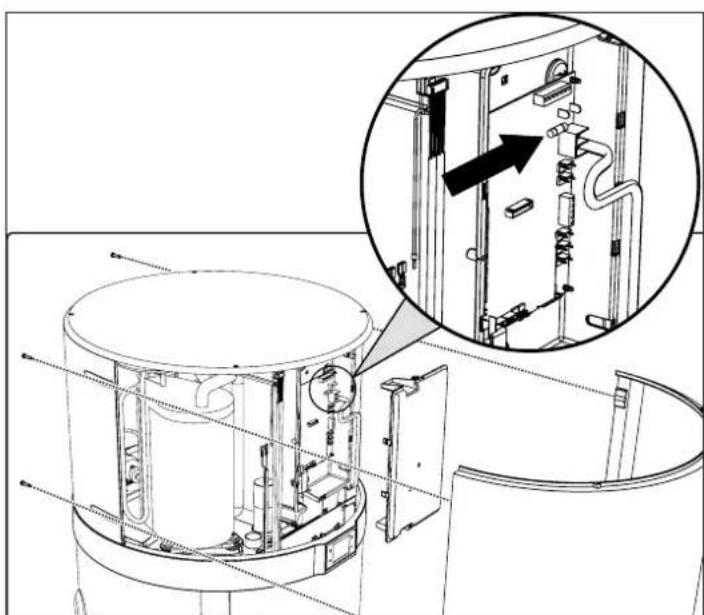
Proceed as indicated below (reserved for qualified technical personnel only):
- Disconnect the power to the equipment.
- Remove the top cover of the equipment and then the power board cover.
- Remove the fuse cap, then the fuse, using a suitable screw - driver.
• Install a new IEC-60127-2/II certified time-delay 5 A fuse (T5AL250V), then refit the protective cap.
- Reassemble all the plastics and make sure the equipment is correctly installed before powering it.
natural_image
Technical line drawing of a mechanical assembly with an inset showing internal components (no text or symbols)
fig. 28
9.2 Heating element safety thermostat reset
This equipment has a manual-reset safety thermostat connected in series with the heating element immersed in water, which interrupts the power supply in case of overtemperature inside the tank.
If necessary, proceed as follows to reset the thermostat (reserved for qualified technical personnel):
- Unplug the product.
- Remove any air ducts.
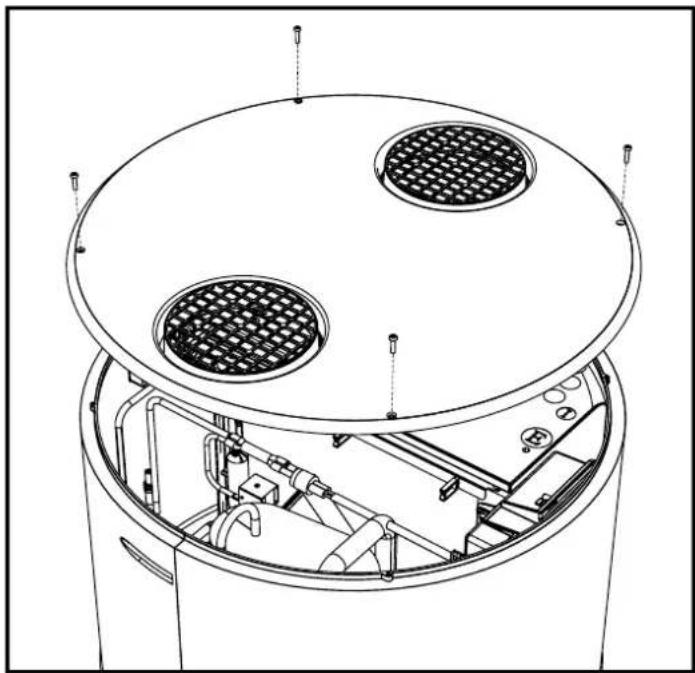
- Remove the top cover by first undoing the locking screws (fig. 29).
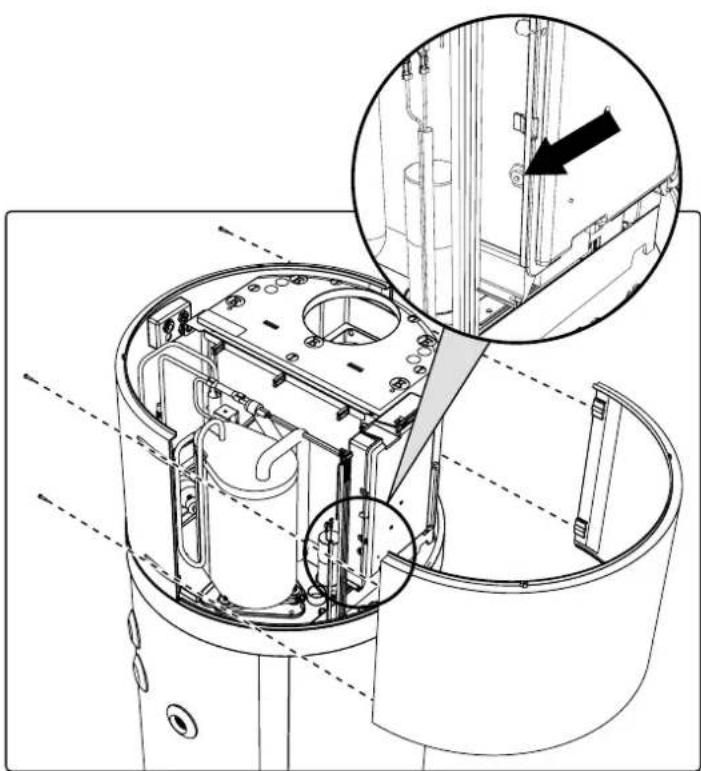
- Remove the front panel and manually reset the tripped safety thermostat (fig. 30). In case of intervention, the central pin of the thermostat comes out by about 2 mm.
- Refit the previously removed top cover.
natural_image
Technical line drawing of a cylindrical industrial or laboratory device with internal components and mounting holes (no text or symbols)
fig. 29- Top cover removal
natural_image
Technical line drawing of a mechanical device interior with internal components and a magnified inset showing a detail (no text or symbols)
fig. 30- Front panel removal

ATTENTION!: Intervention of the safety thermostat can be caused by a fault linked to the control board or by no water inside the tank.

ATTENTION!: Carrying out repair work on parts with safety function compromises safe operation of the equipment. Replace faulty parts with original spare parts only.

NB!: Intervention of the thermostat excludes operation of the heating element but not the heat pump system within the permitted operating limits.

ATTENTION! If the operator is unable to eliminate the fault, switch off the equipment and contact the Technical Assistance Service, communicating the model of the product purchased.
10. MAINTENANCE

ATTENTION!: Any repairs to the equipment must be carried out by qualified personnel. Improper repairs can put the user in serious danger. If your equipment needs any repair, contact the service center.

ATTENTION!: Before undertaking any maintenance operation make sure the equipment is not and cannot accidentally be electrically powered. Therefore, disconnect the power at every maintenance or cleaning operation.
10.1 Sacrificial anode check/replacement
The magnesium (Mg) anode, also called "sacrificial" anode, prevents any eddy currents generated inside the boiler from triggering surface corrosion processes.
In fact, magnesium is a weakly charged metal compared to the material of which the inside of the boiler is coated, therefore it attracts first the negative charges that form with the heating of water, consuming itself. The anode therefore "sacrifices" itself by corroding itself instead of the tank. The boiler has two anodes, one fitted in the lower part of the tank and one fitted in the upper part of the tank (area more subject to corrosion).
The integrity of the Mg anodes must be checked at least every two years (preferably once a year). The operation must be performed by qualified personnel.
Before doing the check:
- Close the cold water inlet.
- Proceed with emptying the boiler (see par. "10.2 Boiler emptying").
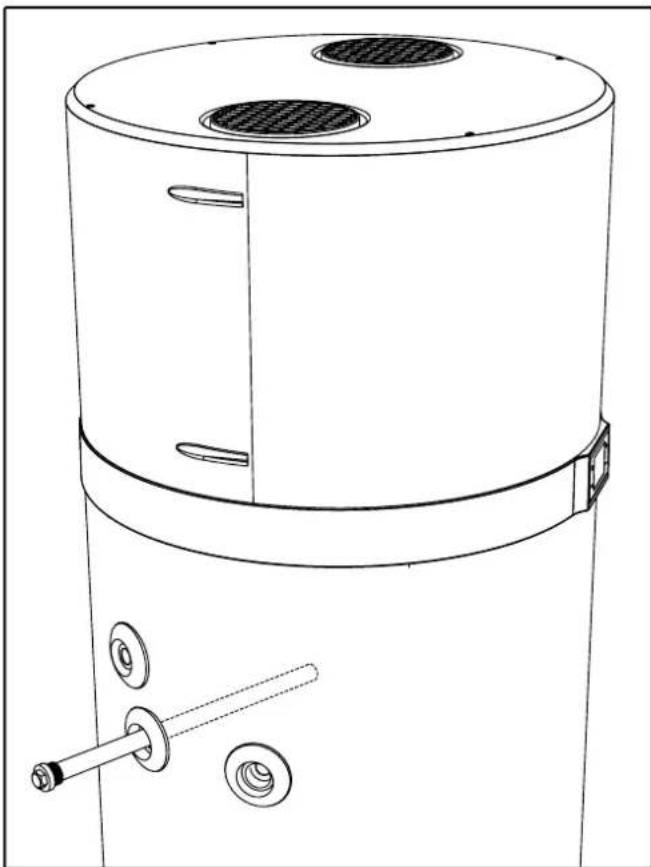
- Unscrew the upper anode and check its corrosion; if the corrosion affects more than 2/3 of the anode surface proceed with replacement.
natural_image
Technical line drawing of a cylindrical industrial device with ventilation grilles and a shaft (no text or symbols)
fig. 31
The anodes have a special sealing gasket, to prevent water leaks; it is advisable to use anaerobic thread sealant compatible for use in heating-plumbing systems. The gaskets must be replaced with new ones in case of checking and also anode replacement.
10.2 Boiler emptying
If not in use, especially in case of low temperatures, it is advisable to drain the water inside the boiler.
For the equipment in question, just detach the water inlet connection (see par. "6.5 Hydraulic connections"). Alternatively, when setting up the system, it is advisable to install a drain cock fitted with a hose connection.

NB!: In case of low temperatures, remember to empty the system to avoid freezing.
11. DISPOSAL
At the end of use, the heat pumps must be disposed of in compliance with current regulations.

ATTENTION!: This equipment contains fluorinated greenhouse gases included in the Kyoto protocol. Maintenance and disposal operations must be carried out only by qualified personnel.
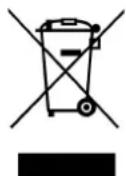
Pursuant to Directives 2011/65/EU and 2012/19/EU on the restriction of the use of hazardous substances in electrical and electronic equipment, as well as the disposal of waste.
The crossed-out bin symbol on the equipment or on its packaging indicates that, at the end of its useful life, the product must be collected separately from other waste.
Therefore, at the end of its life, the user must give the equipment to the appropriate recycling centers for electrical and electronic equipment, or return it to the dealer when purchasing new, equivalent type equipment, on a one-to-one basis.
Adequate separate waste collection for subsequent sending of the decommissioned equipment to environmentally compatible recycling, treatment and/or disposal helps prevent negative effects on the environment and health and favors the reuse and/or recycling of the materials that make up the equipment.
Unauthorized disposal of the product by the user involves the application of the administrative sanctions provided for by current legislation.
The main materials that make up the equipment in question are:
- steel
- copper
- magnesium
- aluminum
- plastic
- polyurethane
12. PRODUCT SHEET
| Descriptions u.m. | | EKHHE200CV37 | EKHHE260CV37 | EKHHE200PCV37 | EKHHE260PCV37 |
| Declared load profile - L XL L XL | | | | | |
| Water heater thermostat temperature settings °C 55 55 55 55 | | | | | |
| Water heating energy efficiency class (1) | - A+ | A+ | A+ | A+ | |
| Water heating energy efficiency - _wh^(1) | % | 135 | 138 | 135 | 138 |
| COP_DHW^(1) | - 3.23 | 3.37 | 3.23 | 3.37 | |
| Annual electricity consumption - AEC (1) | kWh | 761 | 1210 | 761 | 1210 |
| Water heating energy efficiency - _wh^(2) | % | 106 | 112 | 106 | 112 |
| COP_DHW^(2) | - 2.55 | 2.73 | 2.55 | 2.73 | |
| Annual electricity consumption - AEC (2) | kWh | 844 | 1496 | 944 | 1496 |
| Water heating energy efficiency - _wh^(3) | % | 162 | 160 | 162 | 160 |
| COP_DHW^(3) | - 3.89 | 3.9 | 3.89 | 3.9 | |
| Annual electricity consumption - AEC (3) | kWh | 631 | 1046 | 631 | 1046 |
| Indoor sound power level (4) | dB (A) | 53 51 53 | 51 | | |
| Outdoor sound power level (4) | dB (A) | 45 44 45 | 44 | | |
| The water heater can work during off-peak hours only | - | NO | NO | NO | NO |
| Any specific precautions that shall be taken when the water heater is assembled, installed or maintained | - | See manual |
(1): Data according to EN 16147: 2017 standard for AVERAGE climate (unit in ECO mode; Inlet water = 10 °C; Inlet air temp = 7 °C DB / 6 °C WB)
(2): Data according to EN 16147: 2017 standard for COLDER climate (unit in ECO mode; Inlet water = 10 °C; Inlet air temp = 2 °C DB / 1 °C WB)
(3): Data according to EN 16147: 2017 standard for WARMER climate (unit in ECO mode; Inlet water = 10 °C; Inlet air temp = 14 °C DB / 13 °C WB)
(4): Data according to EN 12102-2: 2019 ECO mode with Inlet air temp = 7 °C DB / 6 °C WB
natural_image
Simple line drawing of a room corner with a vertical wall and a horizontal floor, no text or symbols present.
natural_image
Illustration of a cylindrical industrial vessel with a checkmark indicating inspection or status (no text or symbols present)
natural_image
Illustration of a worker inspecting a large cylindrical mechanical component with circular holes, accompanied by a checkmark symbol (no text or labels present)
Abb. 1

natural_image
Top-down schematic of a mechanical or electrical component with no visible text, numbers, or symbols
natural_image
Three identical cylindrical electronic components with X-shaped marks, shown from top to bottom (no text or symbols)
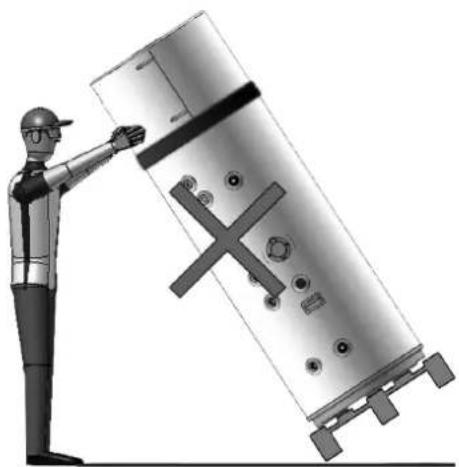
natural_image
Illustration of a person adjusting a large cylindrical device with a cross symbol, no text or symbols present
Abb. 2
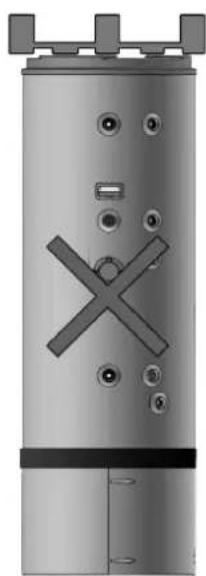
natural_image
Metal cylindrical device with X-shaped mark and mounting holes (no text or symbols)
- KONSTRUKTIONSMERKMALE
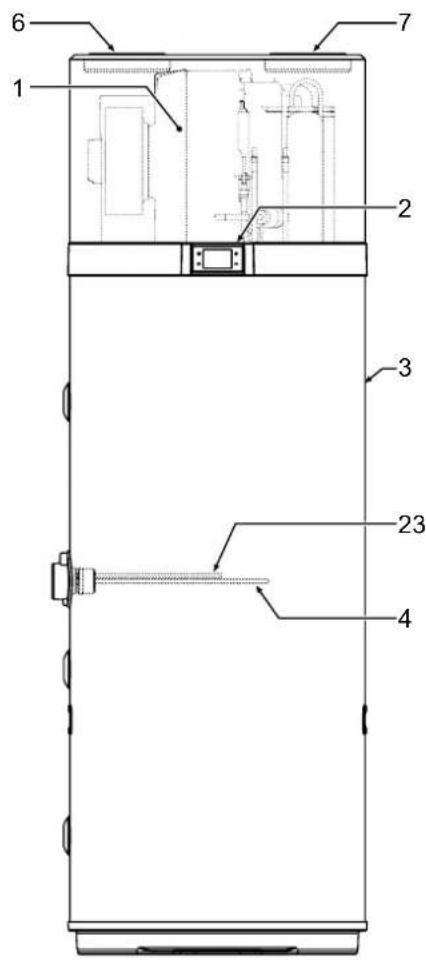
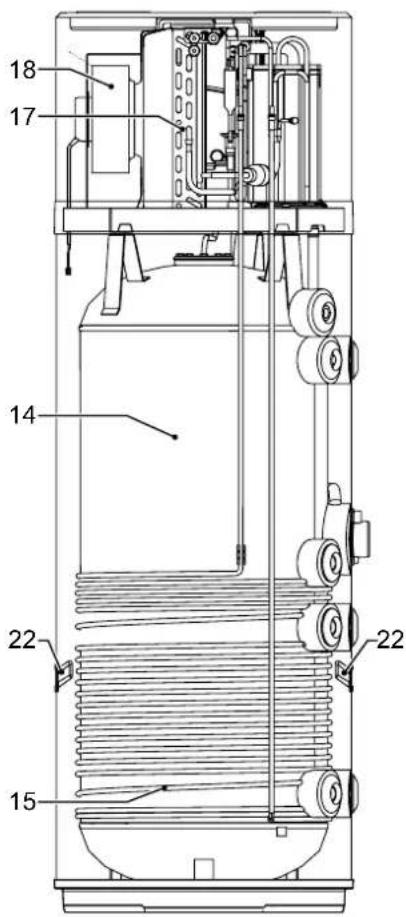
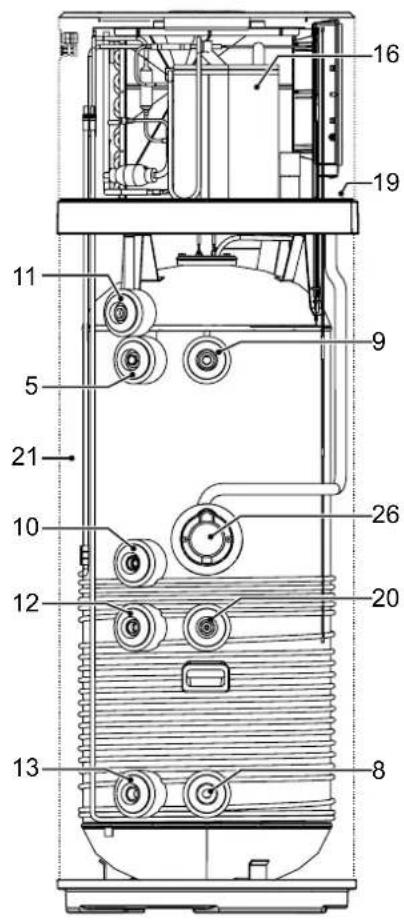
Abb. 3
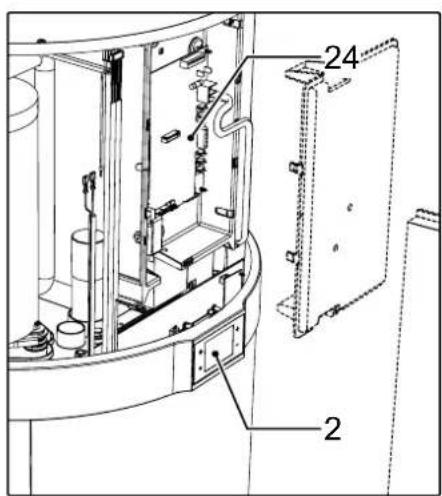
Abb. 5
| MODELL | ∅ | EKHHE200PCV37 | EKHHE260PCV37 | EKHHE200CV37 | EKHHE260CV37 | UM |
| A 1"G | 250 | 250 250 mm | | | | |
| B - 490 | 493 | // mm | | | | |
| C 1/2"G | 600 | 600 600 mm | | | | |
| D - 705 | 785 | 705 785 mm | | | | |
| E | 1"G | 876,5 | 1162 | 876,5 | 1162 | mm |
| G | - | 1142 | 1427 | 1142 | 1427 | mm |
| H | - | 1607 | 1892 | 1607 | 1892 | mm |
| I | 3/4"G | 250 250 // mm | | | | |
| L | 3/4"G | 599 600 // mm | | | | |
| M | 3/4"G | 705 735 705 | 735 mm | | | |
| N | 3/4"G | 877 | 1162 | 877 | 1162 | mm |
| O* | 1/2"G | 976 | 1261 | 976 | 1261 | mm |
| P | - | 1073 | 1358 | 1073 | 1358 | mm |
area
| Latitude (°C) | Longitude (°C) | Temperature (°C) |
|---|---|---|
| -7 | -7 | 38 |
| -1 | 0 | 62 |
| 43 | 0 | 75 |
The chart displays a shaded region representing the temperature range from 38°C to 75°C. The x-axis is labeled 'A' and the y-axis is labeled 'B'. The shaded area under the curve is filled with varying shades of gray. No explicit numerical values are provided for the data series.
Abb. 7- Diagramm
natural_image
Pure mechanical diagram showing three connected components with no text, numbers, or symbols
natural_image
Pure diagram of a curved pipe or channel with directional arrows indicating flow or movement (no text or symbols)
6.5 Hydraulikanschlüsse
natural_image
Simple electrical outlet symbol with three dots and control points, no text or labels present
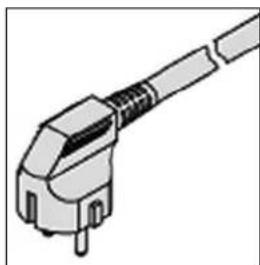
natural_image
Illustration of a mechanical connector or plug assembly (no text or symbols visible)
natural_image
Line drawing of a vertical industrial cabinet with a pressure gauge and electrical outlet (no text or symbols)
natural_image
Technical line drawing of a mechanical device with an inset showing internal components and a magnified view of the component (no text or symbols present)
Abb. 28
natural_image
Technical line drawing of a cylindrical industrial or laboratory device with internal components and mounting holes (no text or symbols)
natural_image
Technical line drawing of a mechanical assembly with internal components and a magnified inset showing a detail (no text or symbols)
natural_image
Line drawing of a cylindrical industrial or laboratory device with two vented chambers and a handle (no text or symbols)
Abb. 31
- INFORMATIONS IMPORTANTES....12
- MISE AU REBUT....33
- FICHE PRODUIT....33
1. CONSIGNES DE SÉCURITÉ GÉNÉRALES
ATTENTION:
natural_image
Simple line drawing of a room corner with a bathtub and wall, no text or symbols present
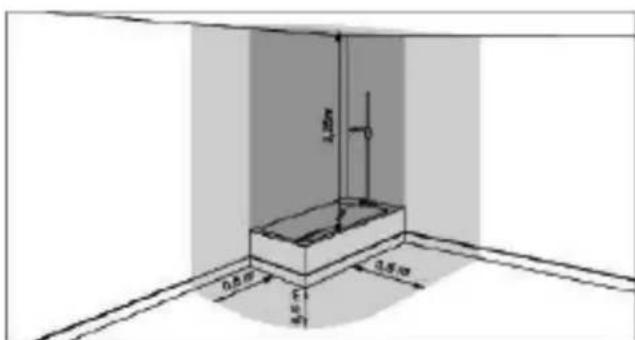
Cher client, chère cliente,
natural_image
Illustration of a worker inspecting a cylindrical industrial component with checkmarks indicating inspection (no text or symbols present)
fig. 1

natural_image
Technical diagram of a cylindrical device with internal components and mounting holes, enclosed in a dashed rectangular frame (no text or symbols)
natural_image
Technical illustration of a cylindrical mechanical component with cross marks, shown from top to bottom views with a worker inspecting it (no text or symbols present)
fig. 2
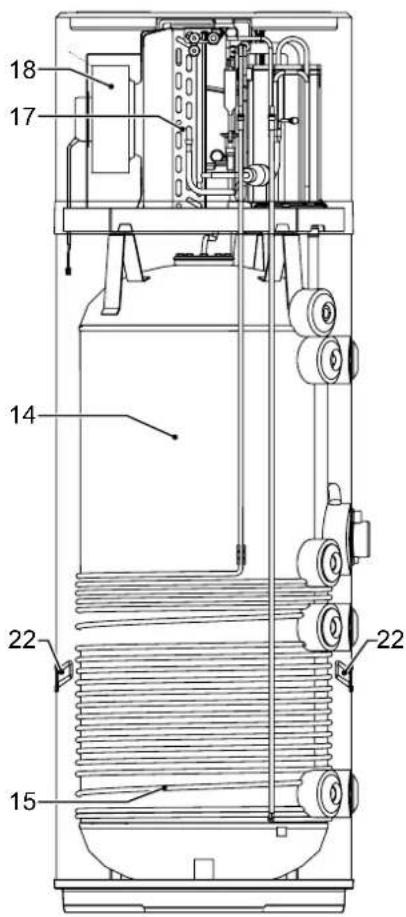
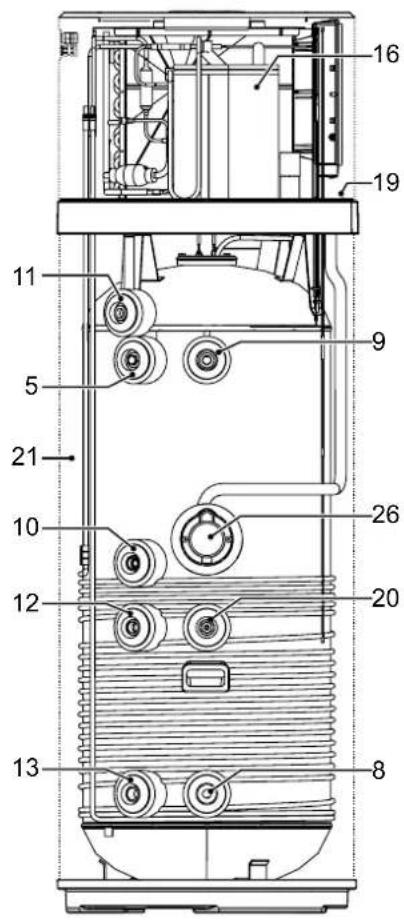
fig. 3
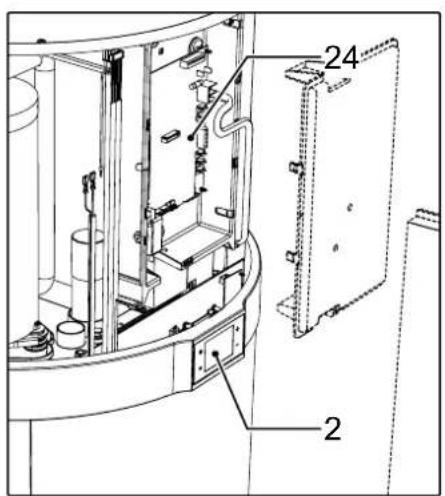
1 Pompe à chaleur
area
| X-Axis (°C) | Y-Axis (°C) |
| :--- | :--- |
| -7 | 38 |
| -4 | 62 |
| 43 | 75 |
The chart displays a shaded region representing temperature values across the spatial domain. The horizontal dashed lines indicate reference temperatures of 38°C, 62°C, and 75°C. The shaded area under the curve is filled with varying shades of gray, suggesting different data series or conditions. No explicit numerical values are provided for the shaded area.
fig. 7- Tableau
natural_image
Pure mechanical diagram showing three connected components with no text, numbers, or symbols
fig. 10- Fixation des supports
natural_image
Diagram of a curved mechanical component with directional arrows indicating movement or force (no text or symbols)
natural_image
Simple electrical outlet symbol with three dots and control points, no text or labels present
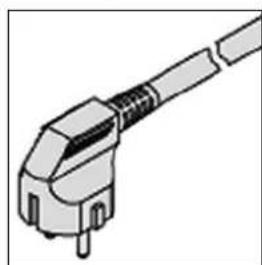
natural_image
Illustration of a mechanical connector or plug assembly (no text or symbols visible)
natural_image
Line drawing of a vertical cabinet with a pressure gauge and electrical outlet (no text or symbols)
7.7 Pannes/protection
natural_image
Technical line drawing of a mechanical assembly with an inset showing internal components (no text or symbols)
fig. 28
natural_image
Technical line drawing of a cylindrical industrial or laboratory device with internal components and mounting holes (no text or symbols)
natural_image
Technical line drawing of a mechanical device interior with internal components and a magnified inset showing a detail (no text or symbols)
natural_image
Line drawing of a cylindrical industrial device with two vented chambers and a handle (no text or symbols)
fig. 31
- PROBLEEMOPLOSSING ....30
VEILIGHEIDSWAARSCHUWINGEN
WAARSCHUWING BETREFFENDE DE INSTALLATIE
INSTALLATIEWAARSCHUWINGEN
natural_image
Simple line drawing of a room corner with a wall-mounted fixture and a vertical dimension label (no text or symbols)
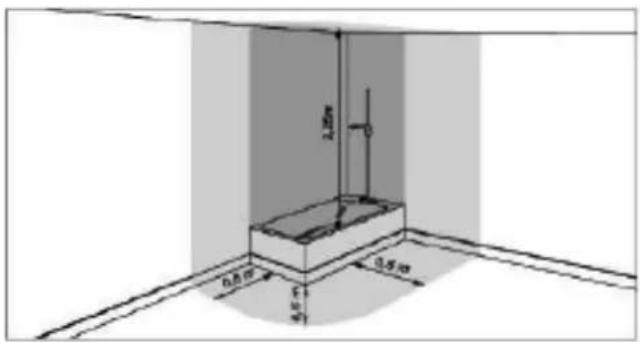
natural_image
Illustration of a worker installing or adjusting a cylindrical device with a checkmark (no text or symbols present)
afb. 1

natural_image
Top-down schematic of a mechanical or electrical component layout with no visible text, numbers, or symbols.
natural_image
Three identical cylindrical electronic components with 'X' marks on their surfaces, shown from top to bottom (no text or symbols)
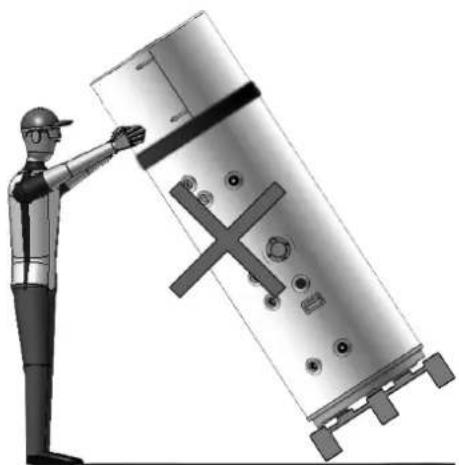
natural_image
Illustration of a worker pointing at a large cylindrical mechanical component with cross marks (no text or symbols)
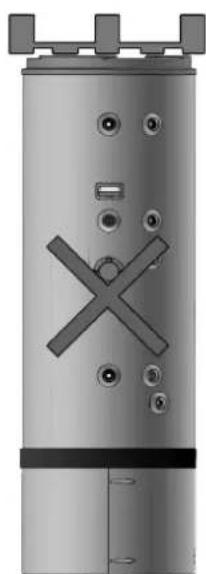
natural_image
Exterior view of a cylindrical industrial vessel with internal components and mounting tabs (no visible text or symbols)
afb.2
4. BOUWKENMERKEN
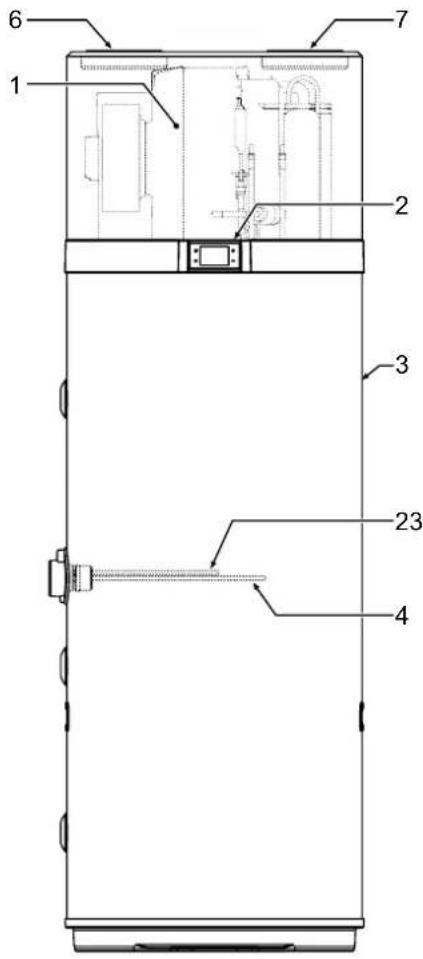
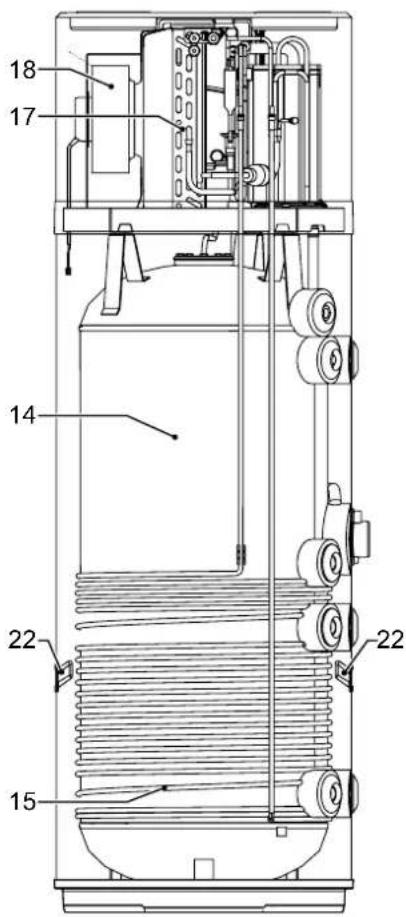
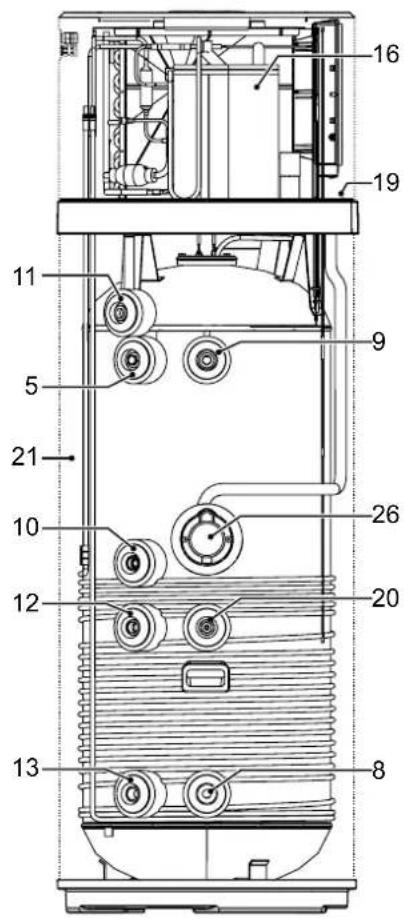
afb. 3
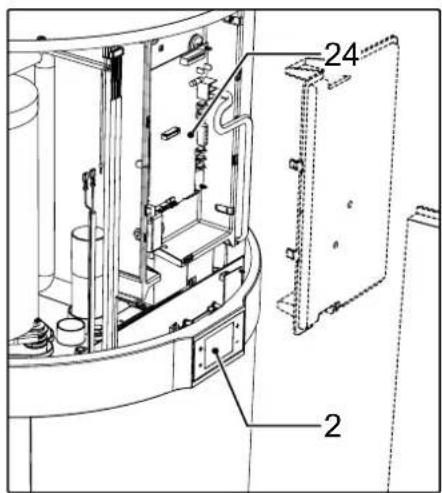
afb. 5
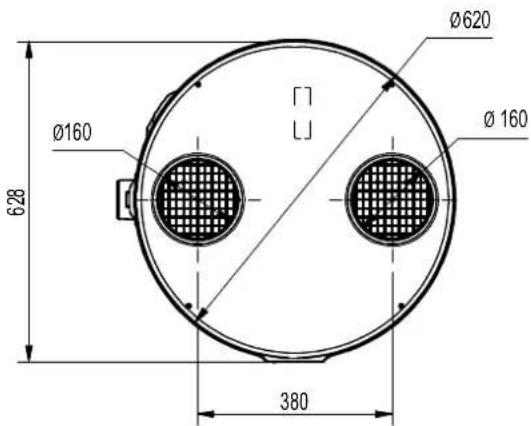
afb. 6
| MODEL ∅ | EKHHE200PCV37 | EKHHE260PCV37 | EKHHE200CV37 | EKHHE260CV37 | UM |
| A 1"G 250 250 250 250 mm | | | |
| B - 490 493 // mm | | | | |
| C 1/2"G 600 600 600 mm | | | |
| D - 705 785 705 785 mm | | | |
| E | 1"G | 876,5 | 1162 | 876,5 | 1162 | mm |
| G | - | 1142 | 1427 | 1142 | 1427 | mm |
| H | - | 1607 | 1892 | 1607 | 1892 | mm |
| I | 3/4"G | 250 250 // mm | | | |
| L | 3/4"G | 599 600 // mm | | | |
| M | 3/4"G | 705 735 705 | 735 mm | | | |
| N | 3/4"G | 877 | 1162 | 877 | 1162 | mm |
| O* | 1/2"G | 976 | 1261 | 976 | 1261 | mm |
| P | - | 1073 | 1358 | 1073 | 1358 | mm |
natural_image
Pure mechanical diagram showing three connected components with no text, numbers, or symbols
natural_image
Pure technical line drawing of a curved mechanical component with directional arrows indicating fastening or cutting (no text or symbols)
natural_image
Simple electrical outlet symbol with three dots and circuit lines, no text or labels present
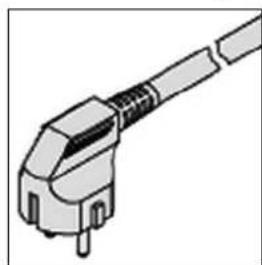
natural_image
Illustration of a mechanical connector or plug assembly (no text or symbols visible)
natural_image
Line drawing of a vertical cabinet with a pressure gauge and electrical outlet (no text or symbols)
(1) = NIET BRUIKBAAR VOOR DIT APPARAAT
(2) = ALLEEN VOOR MODELLEN "EKHHE200PCV37, EKHHE260PCV37"
9. PROBLEEMOPLOSSING

natural_image
Technical line drawing of a cylindrical industrial machine with internal components and an inset close-up showing internal wiring (no text or symbols)
afb. 28
natural_image
Technical line drawing of a cylindrical industrial or laboratory device with internal components and mounting holes (no text or symbols)
natural_image
Technical line drawing of a mechanical device interior with internal components and a magnified inset showing a detail (no text or symbols)
natural_image
Line drawing of a cylindrical industrial device with two vented chambers and a handle (no text or symbols)
afb. 31
natural_image
Architectural sketch of a room corner with a wall-mounted fixture and a vertical dimension line (no text or symbols)
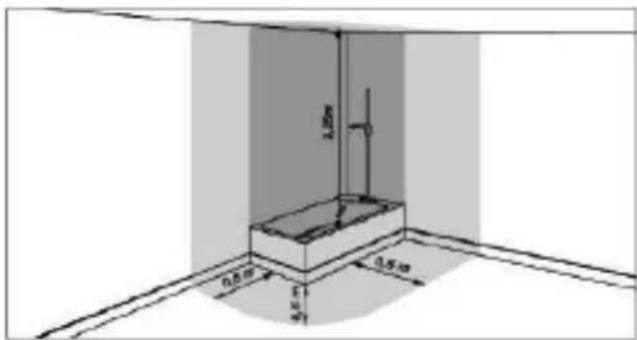
natural_image
Illustration of a worker installing or adjusting a cylindrical mechanical component, with no visible text or symbols.
fig. 1

natural_image
Top-down schematic of a cylindrical device with internal components and mounting holes (no text or symbols)
natural_image
Technical illustration of a cylindrical mechanical component with cross marks, shown from top to bottom and side by side (no text or symbols present)
fig. 2
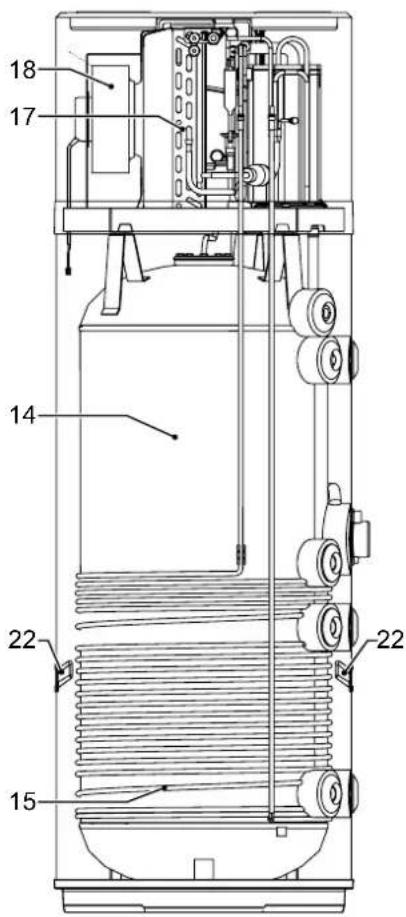
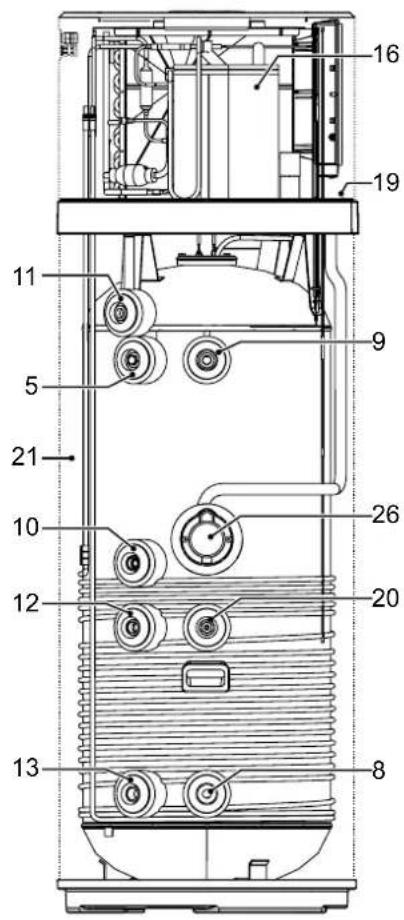
fig. 3
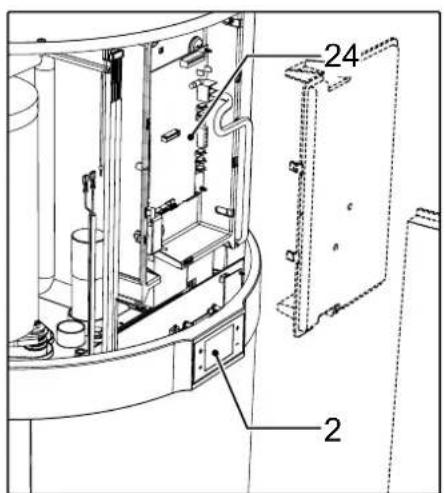
natural_image
Technical line drawing of a mechanical assembly with three components and mounting holes (no text or symbols)
natural_image
Diagram of a curved pipe or channel with directional arrows indicating flow or movement (no text or symbols)
natural_image
Simple electrical outlet symbol with three dots and control points, no text or labels present
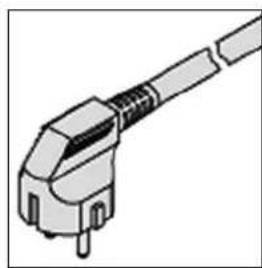
natural_image
Illustration of a mechanical connector or plug assembly (no text or symbols visible)
natural_image
Line drawing of a vertical electrical cabinet with connected piping and a pressure gauge (no text or symbols)
natural_image
Technical line drawing of a mechanical assembly with an inset showing internal components (no text or symbols)
fig. 28
natural_image
Technical line drawing of a cylindrical industrial device with two circular vented grilles and internal components (no text or symbols)
natural_image
Technical line drawing of a mechanical device interior with internal components and a magnified inset showing a detail (no text or symbols)
natural_image
Line drawing of a cylindrical industrial or laboratory device with two vented chambers and a handle (no text or symbols)
fig. 31
natural_image
Simple line drawing of a room corner with a vertical wall and a horizontal floor, no text or symbols present.
natural_image
Illustration of a worker inspecting a cylindrical mechanical component with circular holes, alongside a checkmark indicating inspection (no text or symbols present)
fig. 1
natural_image
Technical diagram of a cylindrical mechanical component with mounting holes and internal features (no text or symbols)
natural_image
Three identical cylindrical electronic components with X-shaped marks, shown from top to bottom (no text or symbols)
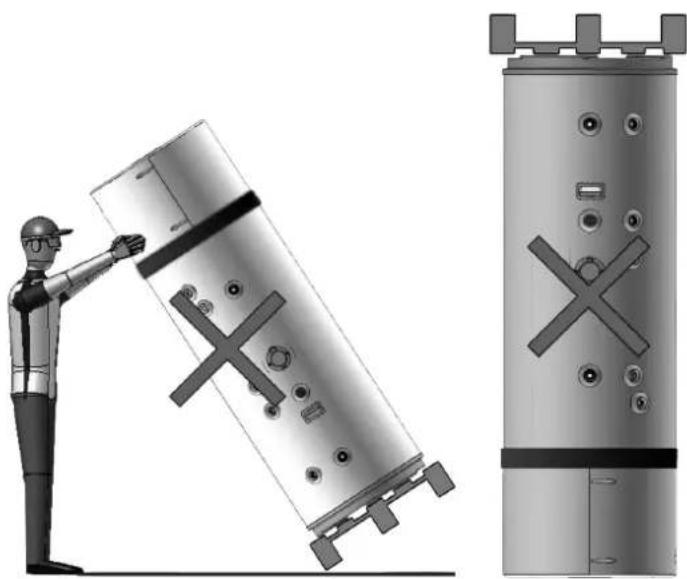
natural_image
Illustration of a worker inspecting a cylindrical mechanical component with cross marks, alongside a separate view of its external cylindrical structure (no text or symbols present)
fig. 2
4. CARATTERISTICHE COSTRUTTIVE
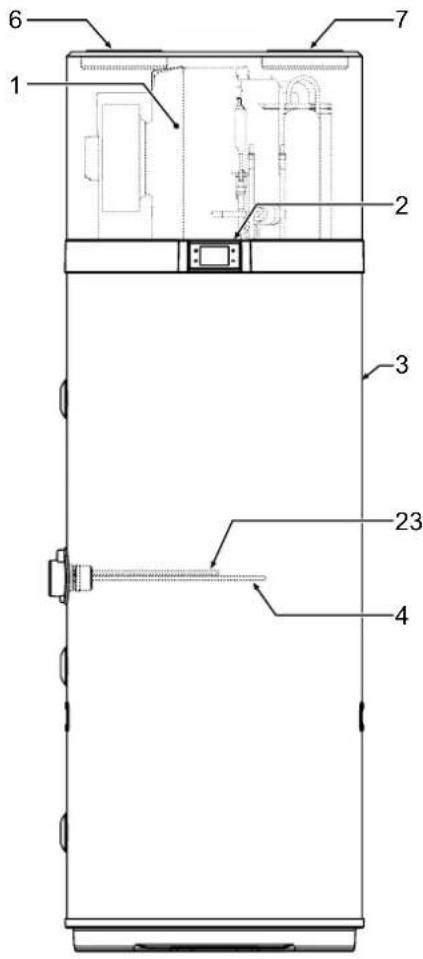
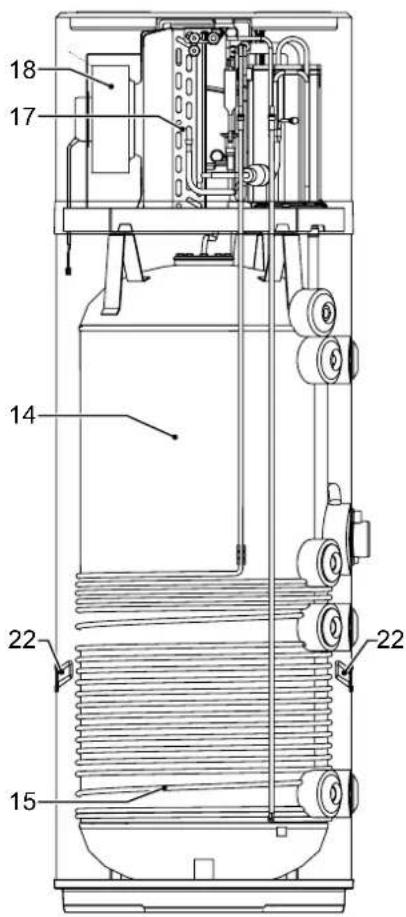
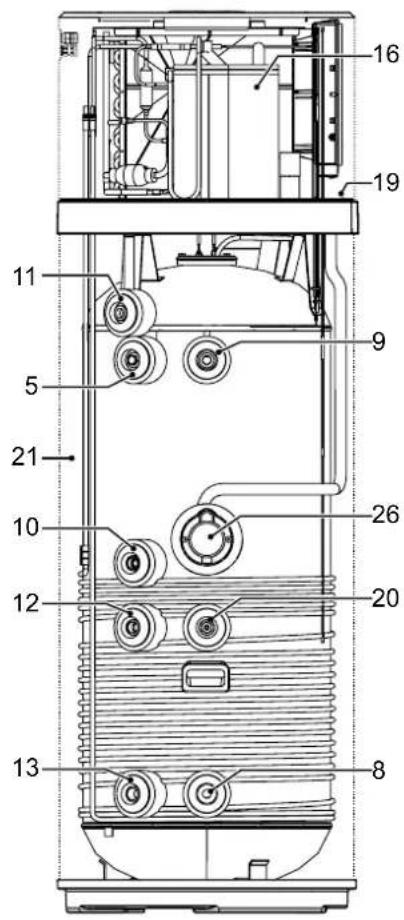
fig. 3
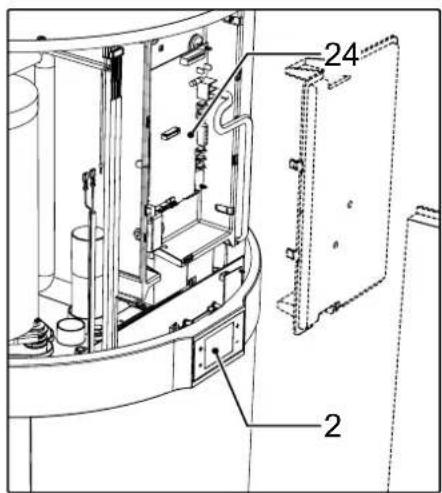
fig. 5
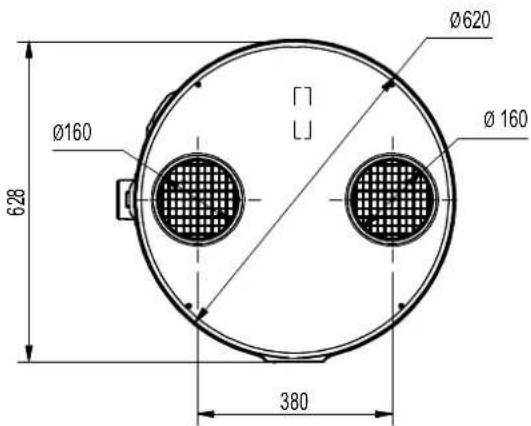
fig. 6
| MODELLO | ∅ | EKHHE200PCV37 | EKHHE260PCV37 | EKHHE200CV37 | EKHHE260CV37 | UM |
| A 1"G | 250 | 250 250 250 mm | | | | |
| B - 490 | 493 | // mm | | | | |
| C 1/2"G | 600 | 600 600 mm | | | | |
| D - 705 | 785 | 705 785 mm | | | | |
| E | 1"G | 876,5 | 1162 | 876,5 | 1162 | mm |
| G | - | 1142 | 1427 | 1142 | 1427 | mm |
| H | - | 1607 | 1892 | 1607 | 1892 | mm |
| I | 3/4"G | 250 250 // mm | | | | |
| L | 3/4"G | 599 600 // mm | | | | |
| M | 3/4"G | 705 735 705 | 735 mm | | | |
| N | 3/4"G | 877 | 1162 | 877 | 1162 | mm |
| O* | 1/2"G | 976 | 1261 | 976 | 1261 | mm |
| P | - | 1073 | 1358 | 1073 | 1358 | mm |
area
| X-Axis (°C) | Y-Axis (°C) |
| :--- | :--- |
| -7 | 38 |
| -4 | 62 |
| 43 | 75 |
The chart displays a shaded region representing temperature values across the spatial domain. The horizontal dashed lines indicate reference temperatures of 38°C, 62°C, and 75°C. The shaded area under the curve is filled with varying shades of gray, suggesting a range or density of measured values. No explicit numerical data is provided for the shaded area.
fig. 7- Tabella
A = Temperatura aria in entrata (°C)
natural_image
Technical line drawing of a mechanical assembly with three components and mounting holes (no text or symbols)
natural_image
Diagram of a curved pipe or channel with directional arrows indicating flow or movement (no text or symbols)
natural_image
Simple electrical outlet symbol with three dots and control points, no text or labels present
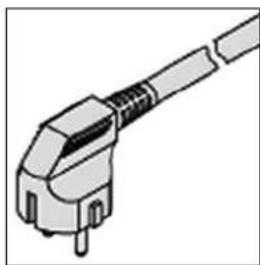
natural_image
Illustration of a mechanical connector or plug assembly (no text or symbols visible)
natural_image
Line drawing of a vertical cabinet with a pressure gauge and electrical outlet (no text or symbols)
fig. 27
natural_image
Technical line drawing of a mechanical assembly with an inset showing internal components and a magnified detail (no text or symbols)
fig. 28
natural_image
Technical line drawing of a cylindrical industrial or laboratory device with internal components and mounting holes (no text or symbols)
natural_image
Technical line drawing of a mechanical device interior with internal components and a magnified inset showing a detail (no text or symbols)
natural_image
Line drawing of a cylindrical industrial device with two vented chambers and a handle (no text or symbols)
fig. 31
natural_image
Architectural line drawing of a room corner with a bathtub and wall, no text or symbols present
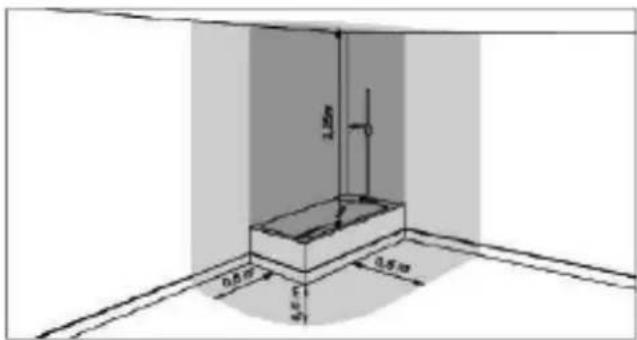
natural_image
Illustration of a worker installing or adjusting a cylindrical mechanical component, with checkmarks indicating approval (no text or symbols present)
fig. 1

natural_image
Technical diagram of a cylindrical device with internal components and mounting holes (no text or labels)
natural_image
Technical illustration of a cylindrical mechanical component with cross marks, shown from top to bottom and side by side (no text or symbols present)
fig. 2
- CARACTERÍSTICAS DE CONSTRUÇÃO
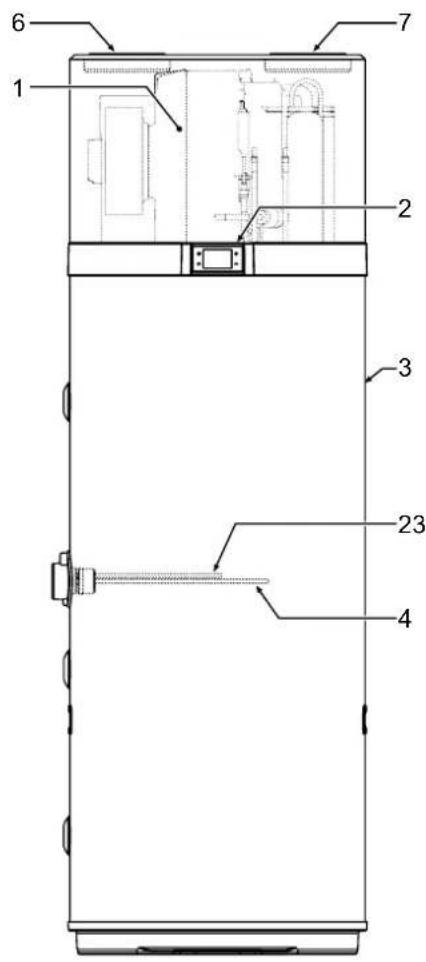
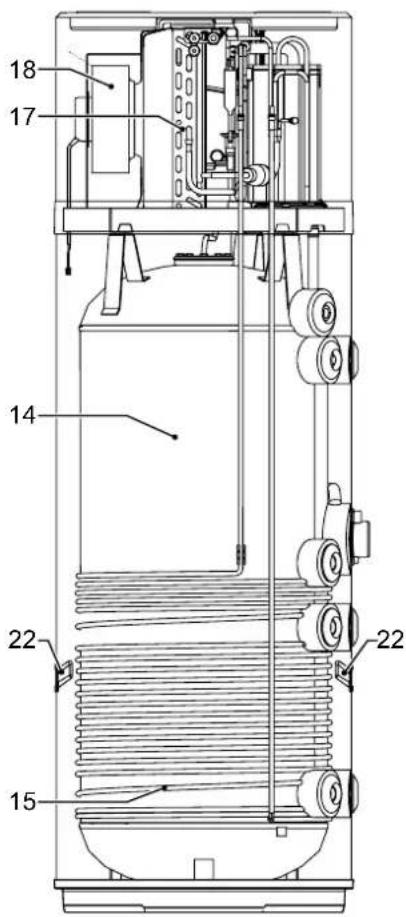
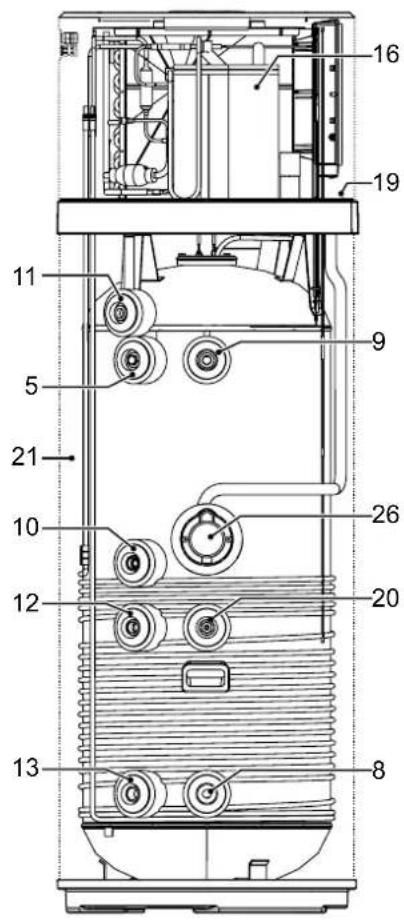
fig. 3
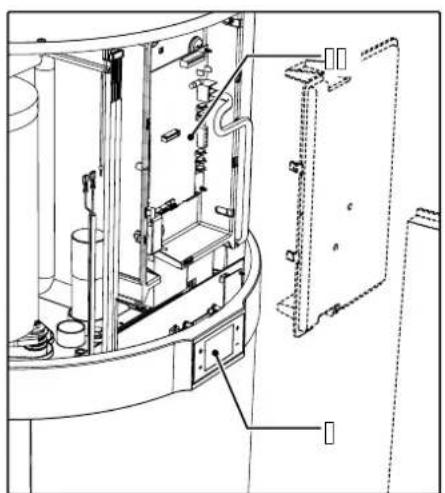
natural_image
Technical line drawing of a mechanical assembly with internal components and labeled parts (no text or symbols)
1 Bomba de calor
fig. 5
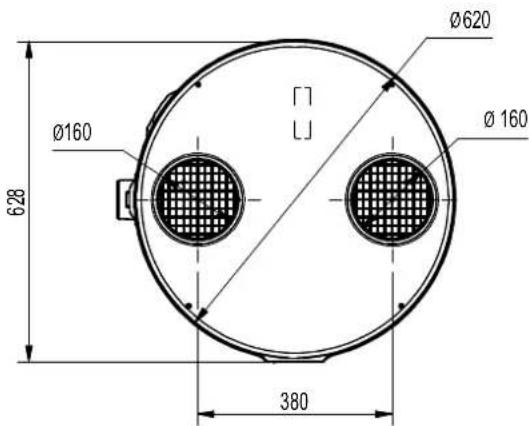
fig. 6
| MODELO | ∅ | EKHHE200PCV37 | EKHHE260PCV37 | EKHHE200CV37 | EKHHE260CV37 | UM |
| A 1"G | 250 | 250 250 250 mm | | | | |
| B - | 490 | 493 // mm | | | | |
| C 1/2"G | 600 | 600 600 600 mm | | | | |
| D - | 705 | 785 705 785 mm | | | | |
| E | 1"G | 876,5 | 1162 | 876,5 | 1162 | mm |
| G | - | 1142 | 1427 | 1142 | 1427 | mm |
| A | - | 1607 | 1892 | 1607 | 1892 | mm |
| I | 3/4"G | 250 250 // mm | | | | |
| L | 3/4"G | 599 600 // mm | | | | |
| M | 3/4"G | 705 735 705 | 735 mm | | | |
| N | 3/4"G | 877 | 1162 | 877 | 1162 | mm |
| O* | 1/2"G | 976 | 1261 | 976 | 1261 | mm |
| P | - | 1073 | 1358 | 1073 | 1358 | mm |
natural_image
Pure mechanical diagram showing three connected components with no text, numbers, or symbols
natural_image
Diagram of a curved pipe or channel with directional arrows indicating flow or movement (no text or symbols)
natural_image
Simple electrical outlet symbol with three dots and control points, no text or labels present
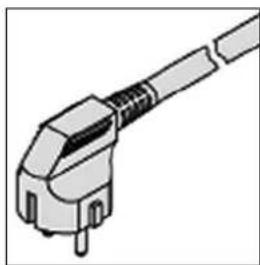
natural_image
Illustration of a mechanical connector or plug assembly (no text or symbols visible)
natural_image
Line drawing of a vertical electrical cabinet with a power outlet and connection lines (no text or symbols)
natural_image
Technical line drawing of a mechanical assembly with an inset showing internal components (no text or symbols)
fig. 28
natural_image
Technical line drawing of a cylindrical industrial device with internal components and mounting holes (no text or symbols)
natural_image
Technical line drawing of a mechanical device interior with internal components and a magnified inset showing a detail (no text or symbols)
natural_image
Line drawing of a cylindrical industrial device with two vented chambers and a handle (no text or symbols)
fig. 31
- ALLMÄNNA SÄKERHETSFÖRESKRIFTER....2
- INLEDNING 6
natural_image
Architectural line drawing of a room corner with a wall-mounted fixture and a vertical dimension label (no text or symbols)

natural_image
Illustration of a worker inspecting a cylindrical mechanical component with a checkmark indicating inspection (no text or symbols present)
fig. 1

natural_image
Technical diagram of a cylindrical device with internal components and mounting holes, enclosed in a dashed rectangular frame (no text or symbols)
natural_image
Three identical cylindrical electronic components with X-shaped marks, shown from top to bottom (no text or symbols)
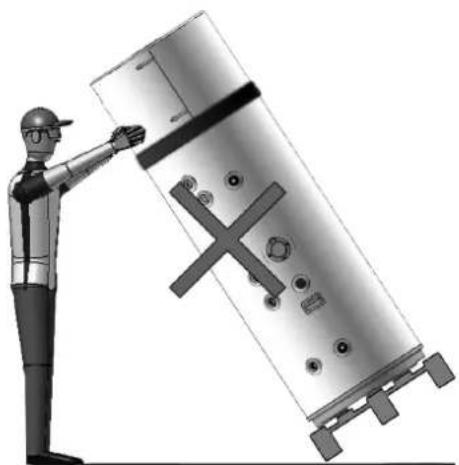
natural_image
Illustration of a worker pointing at a large industrial component with a cross symbol (no text or labels)
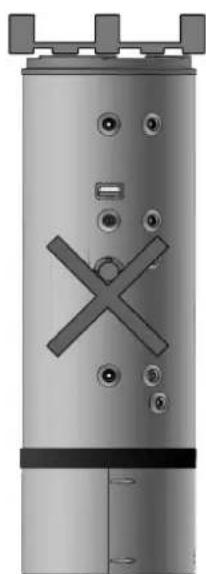
natural_image
Exterior view of a cylindrical industrial vessel with internal X-shaped cutouts and mounting feet (no text or symbols)
fig. 2
- KONSTRUKTIONSEGENSKAPER
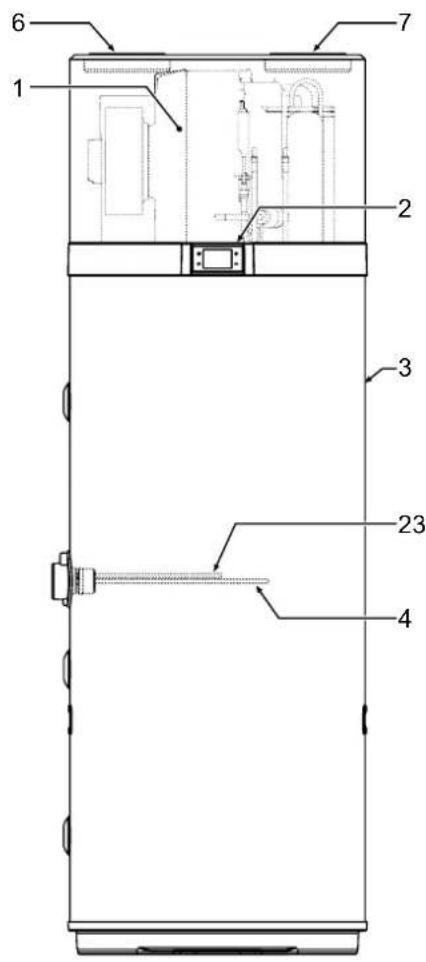
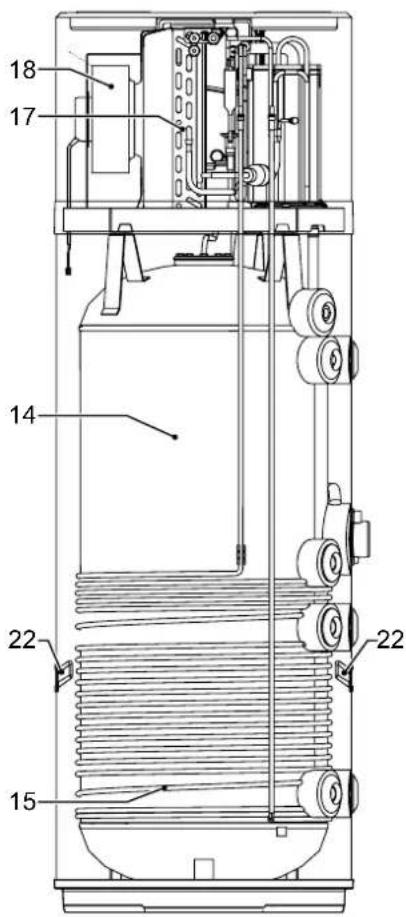
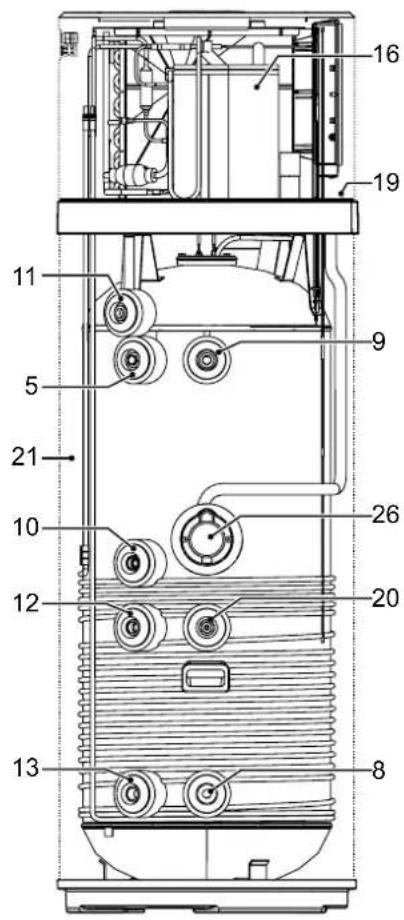
fig. 3
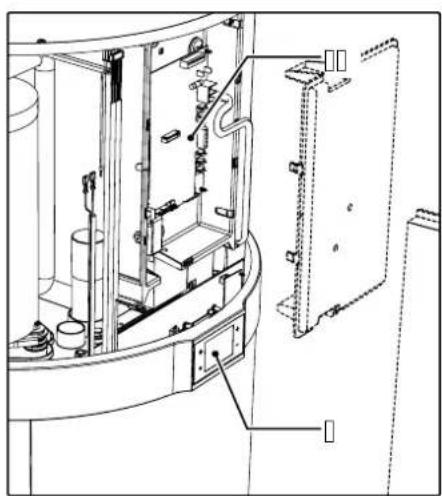
natural_image
Technical line drawing of a mechanical assembly with no visible text or symbols
fig. 5
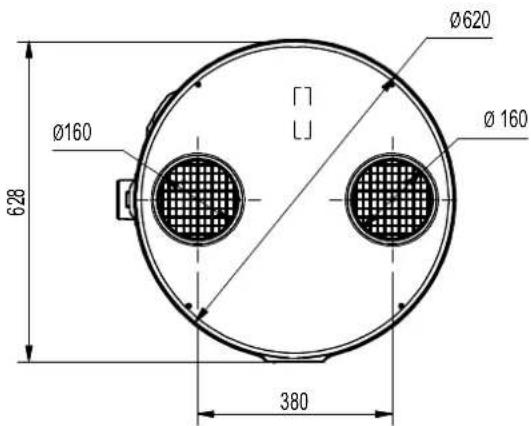
fig. 6
| MODELL | ∅ | EKHHE200PCV37 | EKHHE260PCV37 | EKHHE200CV37 | EKHHE260CV37 | UM |
| A 1"G | 250 | 250 250 mm | | | | |
| B - 490 | 493 | // mm | | | | |
| C 1/2"G | 600 | 600 600 mm | | | | |
| D - 705 | 785 | 705 785 mm | | | | |
| E | 1"G | 876,5 | 1162 | 876,5 | 1162 | mm |
| G | - | 1142 | 1427 | 1142 | 1427 | mm |
| H | - | 1607 | 1892 | 1607 | 1892 | mm |
| I | 3/4"G | 250 250 // mm | | | | |
| L | 3/4"G | 599 600 // mm | | | | |
| M | 3/4"G | 705 735 705 | 735 mm | | | |
| N | 3/4"G | 877 | 1162 | 877 | 1162 | mm |
| O* | 1/2"G | 976 | 1261 | 976 | 1261 | mm |
| P | - | 1073 | 1358 | 1073 | 1358 | mm |
natural_image
Pure mechanical diagram showing three connected components with no text, numbers, or symbols
natural_image
Pure technical line drawing of a curved mechanical component with directional arrows indicating fastening or wear (no text or symbols)
natural_image
Simple electrical outlet symbol with three dots and control points, no text or labels present
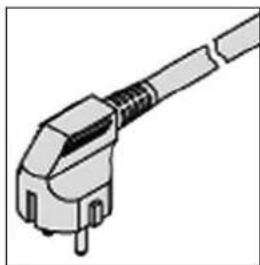
natural_image
Illustration of a mechanical connector or plug assembly (no text or symbols visible)
fig. 22 - Schuko-uttag fig. 23 - Enhetskontakt
natural_image
Line drawing of a vertical panel connected to a wall-mounted device, showing wiring and mounting points (no text or symbols)
natural_image
Technical line drawing of a mechanical assembly with an inset showing internal components (no text or symbols)
fig. 28
natural_image
Technical line drawing of a cylindrical industrial machine with two circular vented grilles and internal components (no text or symbols)
natural_image
Technical line drawing of a mechanical assembly with internal components and an inset magnified view (no text or symbols)
natural_image
Line drawing of a cylindrical industrial device with two vented chambers and a shaft (no text or symbols)
fig. 31
natural_image
Simple line drawing of a room corner with a vertical wall and horizontal floor, no text or symbols present

natural_image
Illustration of a worker inspecting a cylindrical industrial component with checkmarks indicating inspection (no text or symbols present)
rys. 1

natural_image
Technical diagram of a cylindrical device with internal components and mounting holes (no text or symbols)
natural_image
Technical illustration of a cylindrical mechanical component with cross marks, shown from top to bottom and side, plus a worker inspecting it (no text or symbols on the diagram itself)
- ELEMENTY KONSTRUKCYJNE
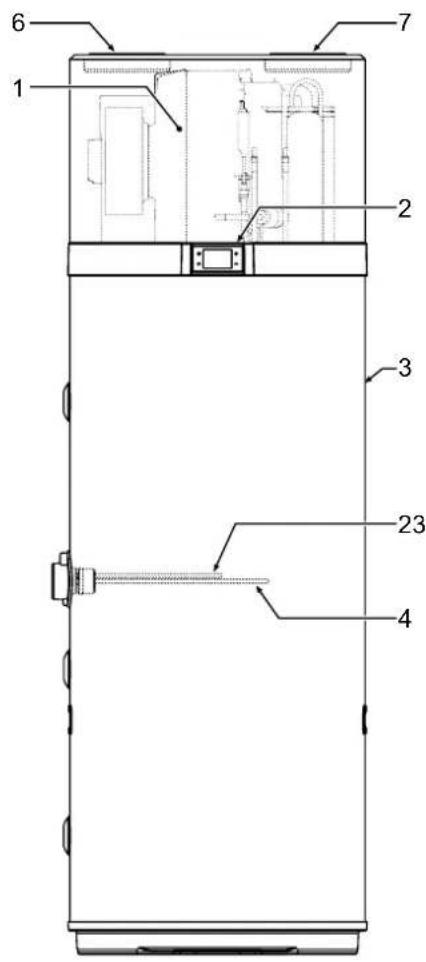
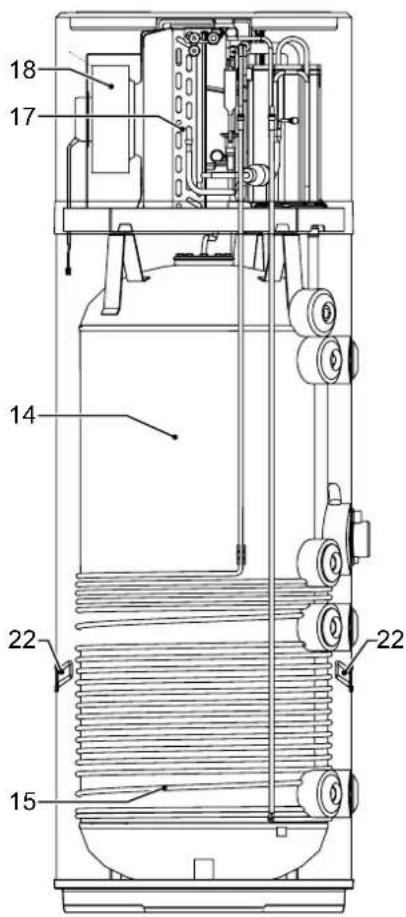
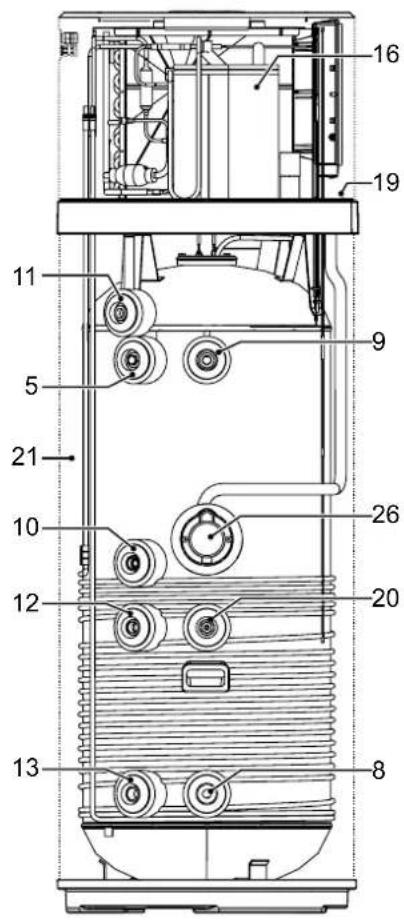
rys. 3
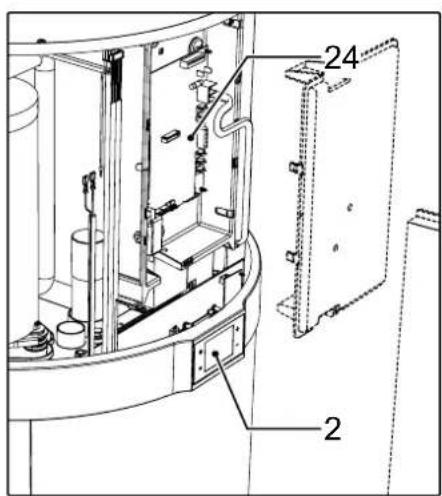
1 Pompa ciepła
rys. 5
| MODEL ∅ | EKHHE200PCV37 | EKHHE260PCV37 | EKHHE200CV37 | EKHHE260CV37 | JM |
| A 1"G 250 250 250 250 mm | | | |
| B - 490 493 // mm | | | | |
| C 1/2"G 600 600 600 mm | | | |
| D - 705 785 705 785 mm | | | |
| E | 1"G | 876,5 | 1162 | 876,5 | 1162 | mm |
| G | - | 1142 | 1427 | 1142 | 1427 | mm |
| H | - | 1607 | 1892 | 1607 | 1892 | mm |
| I | 3/4"G | 250 250 // mm | | | |
| L | 3/4"G | 599 600 // mm | | | |
| M | 3/4"G | 705 735 705 | 735 mm | | | |
| N | 3/4"G | 877 | 1162 | 877 | 1162 | mm |
| O* | 1/2"G | 976 | 1261 | 976 | 1261 | mm |
| P | - | 1073 | 1358 | 1073 | 1358 | mm |
natural_image
Pure mechanical diagram showing three connected components with no text, numbers, or symbols
natural_image
Pure diagram of a curved pipe or tube with directional arrows indicating flow or movement (no text or symbols)
natural_image
Simple electrical outlet symbol with three dots and circuit lines, no text or labels present
natural_image
Illustration of a mechanical connector or plug assembly (no text or symbols visible)
natural_image
Line drawing of a vertical industrial cabinet with connected piping and control panel (no text or symbols)
natural_image
Technical line drawing of a mechanical assembly with an inset showing internal components and a magnified detail (no text or symbols)
rys. 28
natural_image
Technical line drawing of a cylindrical industrial or laboratory device with internal components and mounting holes (no text or symbols)
natural_image
Technical line drawing of a mechanical device interior with internal components and a magnified inset showing a detail view (no text or symbols)
natural_image
Line drawing of a cylindrical industrial or laboratory device with two vented chambers and a handle (no text or symbols)
rys. 31
natural_image
Architectural line drawing of a room corner with a bathtub and wall, no text or symbols present
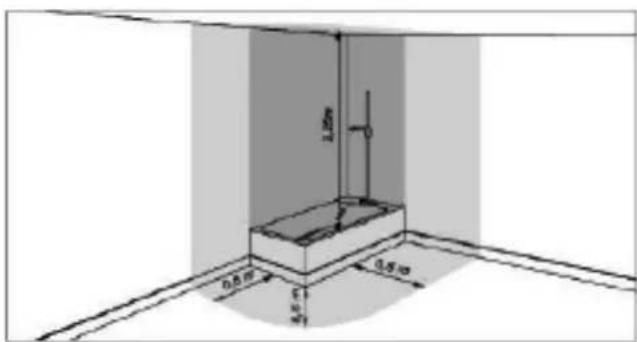
natural_image
Illustration of a worker inspecting a cylindrical mechanical component with a checkmark indicating inspection (no text or symbols present)
εικ. 1

natural_image
Top-down schematic of a mechanical or electrical component layout with no visible text, numbers, or symbols.
natural_image
Three identical cylindrical electronic components with X-shaped marks, shown from top to bottom (no text or symbols)
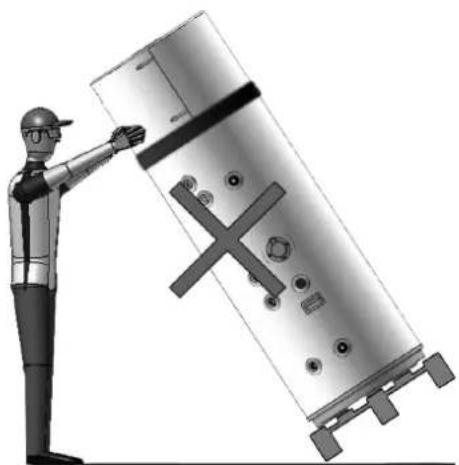
natural_image
Illustration of a worker pointing at a large metallic cylindrical device with a cross symbol, no text or symbols present.
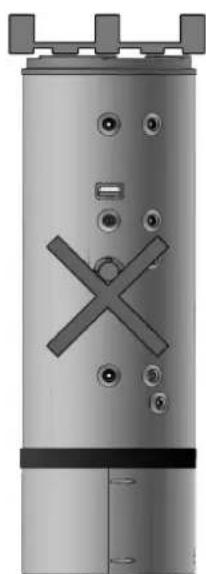
natural_image
Exterior view of a cylindrical industrial vessel with internal X-shaped cutouts and mounting feet (no text or symbols)
εικ. 2
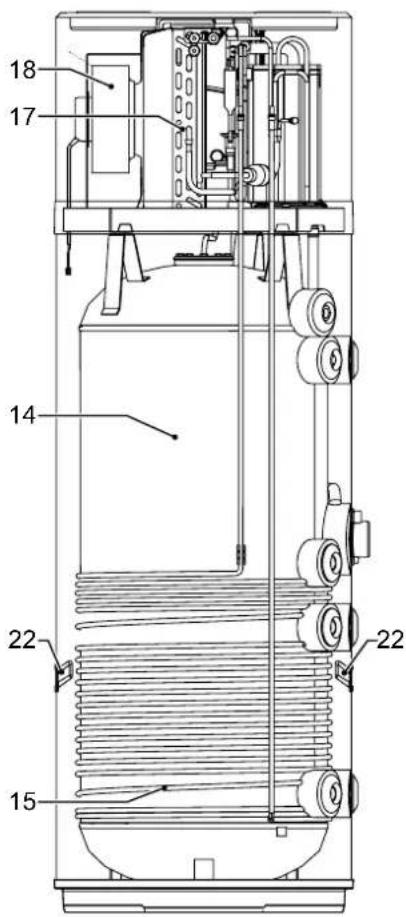
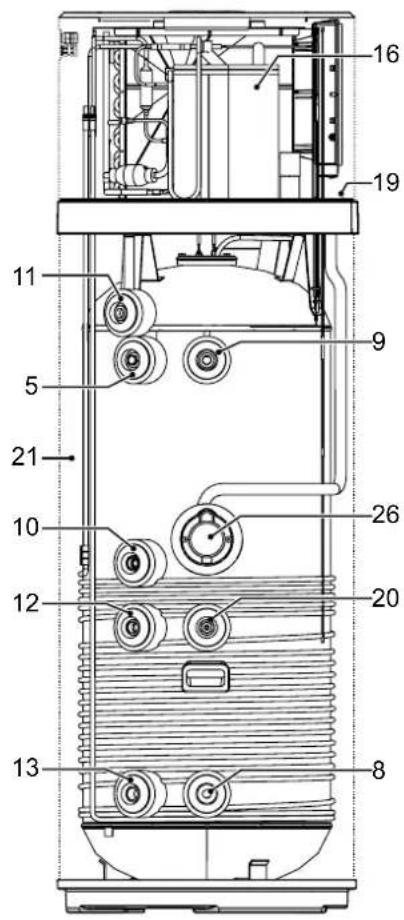
εικ. 3
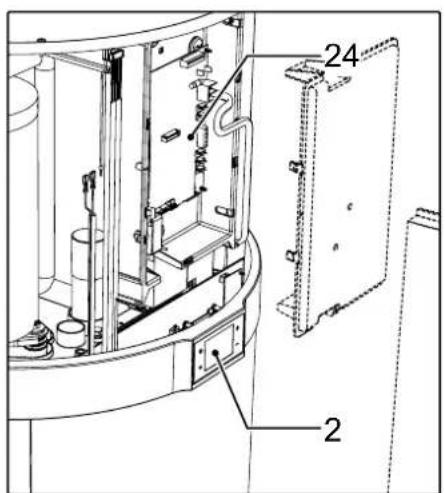
εικ. 5
| MONTEAO | ∅ | EKHHE200PCV37 | EKHHE260PCV37 | EKHHE200CV37 | EKHHE260CV37 | MM |
| A 1"G | 250 | 250 250 mm | | | | |
| B - 490 | 493 | // mm | | | | |
| C 1/2"G | 600 | 600 600 mm | | | | |
| D - 705 | 785 | 705 785 mm | | | | |
| E | 1"G | 876,5 | 1162 | 876,5 | 1162 | mm |
| G | - | 1142 | 1427 | 1142 | 1427 | mm |
| H | - | 1607 | 1892 | 1607 | 1892 | mm |
| I | 3/4"G | 250 250 // mm | | | | |
| L | 3/4"G | 599 600 // mm | | | | |
| M | 3/4"G | 705 735 705 | 735 mm | | | |
| N | 3/4"G | 877 | 1162 | 877 | 1162 | mm |
| O | 1/2"G | 976 | 1261 | 976 | 1261 | mm |
| P | - | 1073 | 1358 | 1073 | 1358 | mm |
natural_image
Pure mechanical diagram showing three connected components with no text, numbers, or symbols
natural_image
Pure diagram of a curved pipe or channel with directional arrows indicating flow or movement (no text or symbols)
natural_image
Simple electrical outlet symbol with three dots and control points, no text or labels present
natural_image
Illustration of a mechanical connector or plug assembly (no text or symbols visible)
natural_image
Line drawing of a vertical industrial or gas storage unit with a connected piping and outlet (no text or symbols)
εικ. 27
natural_image
Technical line drawing of a mechanical assembly with an inset showing internal components (no text or symbols)
εικ. 28
natural_image
Technical line drawing of a cylindrical industrial or laboratory device with internal components and mounting holes (no text or symbols)
natural_image
Technical line drawing of a mechanical assembly with internal components and a magnified inset showing a detail (no text or symbols)
natural_image
Line drawing of a cylindrical industrial or laboratory device with two vented chambers and a handle (no text or symbols)
εικ. 31