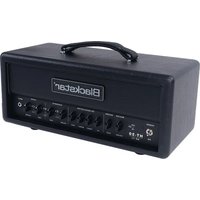
HT-20RH MK III - Guitar amp BLACKSTAR - Free user manual and instructions
Find the device manual for free HT-20RH MK III BLACKSTAR in PDF.


| Brand | Blackstar |
| Model | HT-20RH MK III |
| Product Type | Guitar Amplifier (Head) |
| Power (RMS) | 20 watts |
| Valves | 2 x EL84 (power), 2 x ECC83 (preamp) |
| Weight | 9.57 kg |
| Dimensions (W x H x D) | 468 x 245 x 222 mm |
| Mains Power Supply | 120-230 V AC, 50/60 Hz (fuse according to voltage) |
| Channels | 2 channels (Clean and Overdrive), each channel with 2 voicings |
| Tone Control | Bass, Middle, Treble + ISF (Infinite Shape Feature) |
| Reverb | Digital reverb with level control |
| Power Reduction | Power switch: full power (20W) or 10% (2W) |
| Speaker Outputs | 1x16 Ω, 1x8 Ω or 2x16 Ω |
| Audio Outputs | XLR balanced (CabRig), Line Out / Headphones stereo (CabRig) |
| Line Input | Stereo input for audio device (mini jack) |
| Effects Loop | Send/Return with level switch (+4 dBV / -10 dBV) |
| Connectivity | USB-C (recording and editing via Architect software), footswitch input (FS-16/FS-22 compatible) |
| Speaker Emulation | CabRig with 3 selectable patches |
| Care and Cleaning | Clean with a dry cloth; do not open the chassis; refer repairs to qualified technician |
| Safety | Do not expose to moisture or liquids; do not block ventilation slots; use only the supplied power cord |
| Spare Parts and Repairability | Fuses of appropriate type and rating; user-inaccessible parts; after-sales service by authorized repairer |
| General Information | Valve amplifier with HT MK III technology, ideal for studio, stage and home practice |
Frequently Asked Questions - HT-20RH MK III BLACKSTAR
User questions about HT-20RH MK III BLACKSTAR
0 question about this device. Answer the ones you know or ask your own.
Ask a new question about this device
Download the instructions for your Guitar amp in PDF format for free! Find your manual HT-20RH MK III - BLACKSTAR and take your electronic device back in hand. On this page are published all the documents necessary for the use of your device. HT-20RH MK III by BLACKSTAR.
USER MANUAL HT-20RH MK III BLACKSTAR
HT-5R MK III / HT-5RH MK III
HT-20R MK III / HT-20RH MK III
Owner's Manual
the sound in your head
Blackstar Amplification Ltd, Beckett House, 14 Billing Road, Northampton, NN1 5AW, UK
For the latest information go to: www.blackstaramps.com
Whilst the information contained herein is correct at the time of publication, due to our policy of constant improvement and development, Blackstar Amplification Ltd reserves the right to alter specifications without prior notice.
Designed and Engineered by
Blackstar Amplification OK

IMPORTANT SAFETY INSTRUCTIONS
- Read these instructions.
- Keep these instructions.
- Heed all warnings.
- Follow all instructions.
- Do not use this apparatus near water.
- Clean only with dry cloth.
- Do not block any ventilation openings.
- Install in accordance with the manufacturer's instructions.
- Do not install near any heat sources such as radiators, heat registers, stoves, or other apparatus (including amplifiers) that produce heat.
- Do not defeat the safety purpose of the polarized or grounding-type plug. A polarized plug has two blades with one wider than the other. A grounding type plug has two blades and a third grounding prong. The wide blade or the third prong are provided for your safety. If the provided plug does not fit into your outlet, consult an electrician for replacement of the obsolete outlet.
- Protect the power cord from being walked on or pinched particularly at plugs, convenience receptacles, and the point where they exit from the apparatus.
- Only use attachments/accessories specified by the manufacturer.
- Unplug this apparatus during lightning storms or when unused for long periods of time.
- Refer all servicing to qualified service personnel. Servicing is required when the apparatus has been damaged in any way, such as power-supply cord or plug is damaged, liquid has been spilled or objects have fallen into the apparatus, the apparatus has been exposed to rain or moisture, does not operate normally, or has been dropped.
"TO COMPLETELY DISCONNECT THIS APPARATUS FROM THE AC MAINS, DISCONNECT THE POWER SUPPLY CORD PLUG FROM THE AC RECEPTACLE".
"WARNING: TO REDUCE THE RISK OF FIRE OR ELECTRIC SHOCK, DO NOT EXPOSE THIS APPARATUS TO RAIN OR MOISTURE AND OBJECTS FILLED WITH LIQUIDS, SUCH AS VASES, SHOULD NOT BE PLACED ON THIS APPARATUS".

This symbol is intended to alert the user to the presence of important operation and maintenance (servicing) instructions in the literature accompanying the appliance.

This symbol is intended to alert the user to the presence of uninsulated "dangerous voltage" within the product's enclosure that may be of sufficient magnitude to constitute a risk of electric shock to persons.
BLACK ★
BLACK ★
Warning!
Important safety information!
READ THE FOLLOWING INFORMATION CAREFULLY. SAVE ALL INSTRUCTIONS FOR FUTURE REFERENCE!
Follow all warnings and instructions marked on the product!
Danger! High internal operating voltages.
Do not open the equipment case. There are no user serviceable parts in this equipment. Refer all servicing to qualified service personnel.
Clean only with dry cloth.
Condensation can form on the inside of an amplifier if it is moved from a cold environment to a warmer location. Before switching the unit on, it is recommended that the unit be allowed to reach room temperature.
Unauthorised modification of this equipment is expressly forbidden by Blackstar Amplification Ltd.
Never push objects of any kind into ventilation slots on the equipment casing.
Do not expose this apparatus to rain, liquids or moisture of any type.
Do not place this product on an unstable trolley, stand or table. The product may fall, causing serious damage to the product or to persons!
Do not cover or block ventilation slots or openings.
This product should not be placed near a source of heat such as a stove, radiator, or another heat producing amplifier.
Use only the supplied power cord which is compatible with the mains voltage supply in your area.
Power supply cords should always be handled carefully and should be replaced if damaged in any way.
Never break off the earth (ground) pin on the power supply cord.
The power supply cord should be unplugged when the unit is to be unused for long periods of time.
Before the unit is switched on, the loudspeaker should be connected as described in the handbook using the lead recommended by the manufacturer.
Always replace damaged fuses with the correct rating and type.
Never disconnect the protective mains earth connection.
High loudspeaker levels can cause permanent hearing damage. You should therefore avoid the direct vicinity of loudspeakers operating at high levels. Wear hearing protection if continuously exposed to high levels.
If the product does not operate normally when the operating instructions are followed, then refer the product to a qualified service engineer.
The U.S. Government's Occupational Safety and Health Administration (OSHA) has specified the following permissible noise level exposures:
Duration Per Day In Hours Sound Level dBA, Slow Response
| 8 | 90 | |
| 6 | 92 | |
| 4 | 95 | |
| 3 | 97 | |
| 2 | 100 | |
| 112 | 102 | |
| 1 | 105 | |
| 112 | 110 | |
| 112 or less | 115 |
According to OSHA, any exposure in excess of the above permissible limits could result in some hearing loss.
Ear plug protectors in the ear canals or over the ears must be worn when operating this amplification system in order to prevent a permanent hearing loss if exposure is in excess of the limits as set forth above. To ensure against potentially dangerous exposure to high sound pressure levels, it is recommended that all persons exposed to equipment capable of producing high sound pressure levels such as this amplification system be protected by hearing protectors while this unit is in operation.

All electrical and electronic products should be disposed of separately from the municipal waste stream via designated collection facilities appointed by the government or the local authorities.

Introduction
Thank you for purchasing this Blackstar HT-20R MK III amplifier. Like all our products, this amp is the result of countless hours of painstaking Research and Development by our world-class design team. Based in Northampton (UK), the Blackstar team are all experienced musicians themselves and the sole aim of the development process is to provide guitarists with products which are the ultimate tools for self-expression.
All Blackstar products are subjected to extensive laboratory and road testing to ensure that they are truly uncompromising in terms of reliability, quality and above all TONE.
This manual covers the following models;
- HT-5R MK III
• HT-5RH MK III
- HT-20R MK III
- HT-20RH MK III
The HT MK III's flexible two channel design features the unique patented ISF (Infinite Shape Feature) control and although it has a comprehensive control set, it is still simple and intuitive to use. Please read through this handbook carefully to ensure you get the maximum benefit from your new Blackstar product.
If you like what you hear and want to find out more about the Blackstar range of products please visit our website at www.blackstaramps.com.
Thanks!
The Blackstar Team
Features
The HT-5R MK III and HT-20R MK III are highly versatile amplifiers suited to a wide range of playing styles and situations, by including the great tone and innovative features of the HT Venue MK III range.
The Clean Channel has two voices; one based on a classic American circuit and the other based on a classic British tone. The Voice switch reconfigures the preamp voicing, EQ and valve gain structure, as well as the power amplifier damping. This produces a clean, bright and tight but solid bass response for the American tone and a highly responsive 'chime' with looser bottom for the British tone that can be pushed into a midrange overdrive when driven hard. The Voice setting can also be selected via footswitch.
These amplifiers also have two voices on the Overdrive Channel, which share a common EQ section. These two voices provide a broad palette of overdriven tones.
As with the Clean Channel, each of these voices can also be selected by footswitch.
The Overdrive voices are characterised by a tone which is high in gain, but avoids any of the detached top-end 'fizz' often found in other designs. This is a result of unique preamplifier and power amplifier shaping techniques, which also benefit the player in the way the overdrives clean up beautifully as the guitar volume is reduced. Even at the most extreme settings, the Overdrive voices remain natural sounding.
The patented ISF (Infinite Shape Feature) control is unique to Blackstar Amplification and represents a major step forward in tone shaping flexibility. The ISF control shifts the response of the three-control tone stack between, a US type response at one end, and at the other, a UK type response. Importantly, in between the two extremes lie an infinite number of alternative tone choices that would be otherwise unavailable.
The amplifier features naturally sounding digital reverb that can be adjusted via the Reverb control on the front panel.
The reverb decay times can also be adjusted differently for each channel by connecting via USB to our proprietary Architect software.
A Power switch is provided on the front panel to switch the amplifier between full power and 10% power. This means that the full tonal depth of the power valve stage can be enjoyed at any volume, retaining the distinctive sound of power valves working hard.
A USB connector allows for sending a speaker emulated output into a computer for recording purposes.
It also enables the connection to the previously mentioned Architect software for deep editing of not only the reverb, but also extensive control of CabRig parameters for power amp/speaker/cabinet/mic/room emulations from the USB, balanced DI and stereo headphone/line outputs, for practicing, recording and live use.
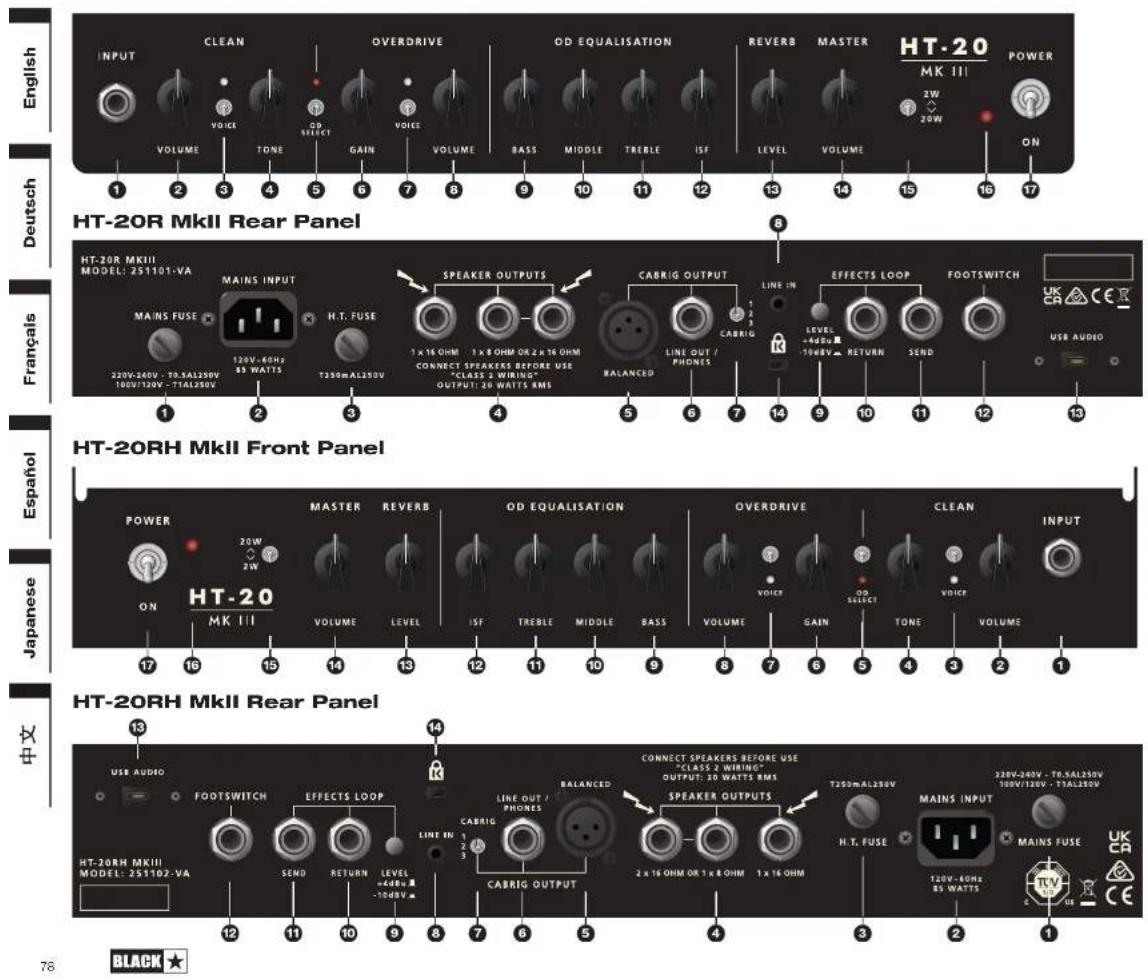
Front Panel
1. Input
Plug your guitar in here. Always use a good quality screened guitar lead.
If there is no connection to the input, the power amp is automatically set to Standby Mode.
Clean Channel
2. Clean Volume
This controls the volume of the Clean Channel. Turning it clockwise increases the volume. At extreme clockwise settings the preamplifier will start to overdrive, particularly in the 'British' mode.
3. Clean Voice Switch
This switch selects between the two clean voices. With the switch up, the 'American' setting is very clean and bright but with a solid and tight low end. When this Voice is selected, the Voice LED is unlit. With the switch down, the 'British' setting has a looser bass response with warmer mid-range and is very sensitive to the output level of the guitar and the player's dynamics. When this Voice is selected, the white Voice LED is lit. The EQ voicing and valve gain structure is completely reconfigured between each voice.
4. Tone
This is a dual control that effectively adjusts the treble and bass for the Clean Channel at the same time. Fully counter clockwise (CCW) will be darker and bassy in character. Rotating the control clockwise (CW) will progressively brighten the sound and thin the bass.
OD (Overdrive) Channel
5. OD Select Switch
Press this switch down to select the OD Channel. When the red LED is on, the OD Channel is selected. When the red LED is off, the Clean Channel is selected.
6. OD Gain
The OD Gain control adjusts the amount of this Channel's overdrive or distortion. Low settings (anti-clockwise) will deliver a clean sound on the edge of break-up. As the Gain control is increased clockwise the sound will become more overdriven, moving through crunch tones until, at its maximum position, a full distorted tone is reached.
7. OD Voice Switch
The switch selects between the two voices of the OD Channel. When the small white LED is unlit, this channel has a 'classic' but 'hot-rooded' overdrive, with medium power amp damping. With the white LED lit the overdrive sound has a more 'modern' voicing that includes a strong mid-emphasised pre-overdrive boost, as well as a looser, more aggressive sound due to reduced power amp damping.
8. OD Volume
This control adjusts the overall volume of the OD Channel. Turning it clockwise increases the volume.
9. Bass
The Bass control adjusts the amount of low-end frequencies in your tone. This amp has an advanced tone shaping circuit which allows the tone to be varied from tight and cutting when counter clockwise, to warm and thumping when fully clockwise.
10. Middle
The Middle control adjusts the amount of middle frequencies in your tone. The middle frequencies are particularly important in setting the amount of 'body' your tone has. With the Middle control set to its minimum position (fully counter clockwise) the sound will be aggressive and scooped, a tone ideal for aggressive rhythm playing. As the Middle control is increased (clockwise) the amount of 'body' is increased, which is more suitable for sustained lead guitar tones.
11. Treble
The Treble control allows exact adjustment of the treble frequencies within the sound. At low settings (counter clockwise) the sound will be warm and darker in character. As the Treble control is increased (clockwise) the sound will become brighter. At the maximum settings the sound will be aggressive and cutting.
12. ISF (Infinite Shape Feature)
The patented ISF control works in conjunction with the Bass, Middle and Treble controls. It allows you to choose the exact tonal signature you prefer. Fully counter clockwise has a more American characteristic with a tight bottom-end and more aggressive middle, and fully clockwise has a British characteristic which is more 'woody' and less aggressive.
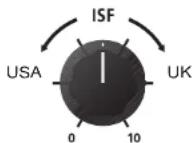
Unlike conventional 'contour' controls and parametric equalisation systems, the Bass, Middle and Treble controls remain interactive with each other just like in a traditional guitar amplifier tone stack. This leads to a very familiar, musical response.
Master
13. Reverb
The Reverb control sets the overall level of the reverb effect. With the control fully counter clockwise there will be no reverb. Turning the control clockwise will increase the amount of reverb.
Reverb decay times can be adjusted for the Clean and OD channels by connecting to our Architect deep-editing software.
14. Volume (HT-20R/RH MK III ONLY)
This controls the overall volume of your amplifier. Turning it clockwise increases the volume.
15. Power Switch
This switch allows the reduction of the output stage from full power down to 10% power. This means the full tonal depth of the valve power amplifier can be enjoyed at lower volumes, therefore making the HT MK III ideal for recording, smaller glgs and home practice use. Working in conjunction with the power amplifier voltages, this method of power reduction suffers none of the loss in tone of other power reduction systems.
16. Power Indicator Light
The LED will be illuminated when the amplifier is switched on.
17. Power
This switch is used to turn the amplifier on and off.
NOTE: There is no standby switch on these amplifiers. The valves will warm up as normal and the amplifier will automatically switch to standby mode if either the Input or Speaker Output jacks are not in use.
Rear Panel
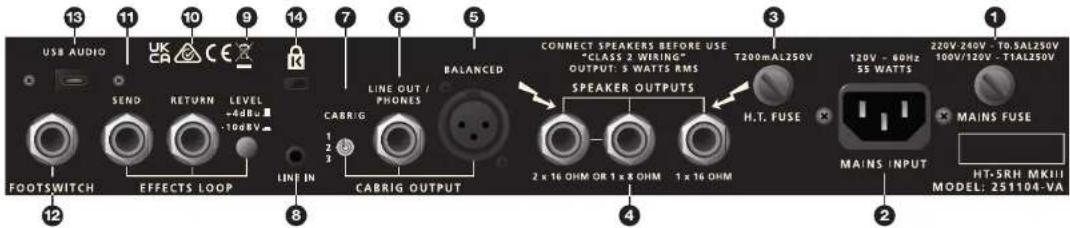
1. Mains Fuse
The value of the Mains Fuse is specified on the rear panel. Never use a fuse of the incorrect value or attempt to bypass it.
2. Mains Input
The supplied detachable mains lead is connected here. The lead should only be connected to a power outlet that is compatible with the voltage, power and frequency requirements stated on the rear panel. If in doubt get advice from a qualified technician.
3. H.T. Fuse
The value of the H.T. Fuse is specified on the rear panel. Never use a fuse of the incorrect value or attempt to bypass it.
4. Speaker Outputs
The output marked '1x16 Ohm' is for the connection of a single 16 Ohm extension speaker cabinet.
The outputs marked '1x8 Ohm or 2x16 Ohm' are for the connection of either a single 8 Ohm extension cabinet or two 16 Ohm cabinets.
If no connection is made to any speaker outputs, the power amp is automatically set to Standby mode. Unlike most other valve amplifiers, this is safe to do.
'1x16 Ohm' output ' 1x8 Ohm or 2x16 Ohm' outputs
| Internal 16 Ohm combo speaker √ | X | X | |||
| Internal 16 Ohm combo speaker plus one 16 Ohm extension cab | X | √ | √ | ||
| One 16 Ohm extension cabinet | √ | X | |||
| Two 16 Ohm extension cabinets | X | √ | √ | ||
| Single 8 Ohm extension cabinet | X | √ | X |
WARNING: The output marked '1x16 Ohm' should never be used at the same time as any of the outputs marked '1x8 Ohm or 2x16 Ohm'. Failure to correctly match the impedance of the amplifier and speakers could damage the amplifier.
5. CabRig Output - Mono Balanced XLR socket
This output provides a balanced, low impedance connection to a recording device, stage box or mixing desk using a standard XLR cable.
6. CabRig Output - Stereo Line Out / Phones socket
This output provides a stereo un-balanced connection to a recording device or mixing desk. Always use a good quality screened TRS lead. The stereo jack socket also accommodates connection of headphones, allowing you to practice silently.
NOTE: Both the XLR and Stereo Emulated outputs remain active even when in Standby mode. This allows for silent recording or practice when the amplifier is not connected to a speaker.
7. CabRig Switch
The switch enables you to instantly select between one of the three stored CabRig patches. This will apply to the XLR, Line Out / Phones and the relevant USB output. CabRig patches can be edited using Architect software.
Learn more about Architect here: https://blackstaramps.com/architect/
8. Line In
This is a stereo mini jack input. Connect the output of your audio device here and adjust the player's volume to match that of your guitar to enable you to play along.
NOTE: This connection is stereo, and will remain stereo from the Emulated Output Stereo Jack Socket (6). All others outputs will mix the incoming stereo signal and output a mono version.
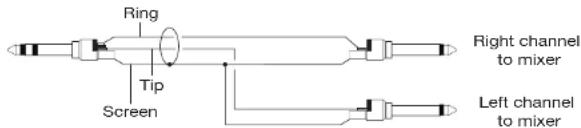
9. Effects Loop Level
The Effects Loop Level switch sets the effects loop to either +4dBV/-10dBV, which enables you to use it with either professional equipment (+4dBV setting), or with guitar level effects such as effects pedals (-10dBV setting).
10. Effects Loop Return
Connect the (mono) output of an external effects unit here.
11. Effects Loop Send
Connect the (mono) input of an external effects unit here.
12. Footswitch
The latching 2-way footswitch can be connected here. The footswitch will enable the selection of the Clean and Overdrive channels, and the two voices on each Channel.
NOTE: Using a footswitch will disable the front panel channel and voice switches. Therefore, full control via the footswitch is granted irrespective of how the amplifier is set.
EXTERNAL SWITCHING: This can also be used by people who wish to control the main features of the amp using an external switching device that connects via the TRS connection of the socket.
The following external conditions will switch the channels and voices as follows:
TIP RING CHANNEL VOICE
Closed Closed Clean Voice 1
Closed Open Clean Voice 2
Open Closed Overdrive Voice 1
Open Open Overdrive Voice 2
13. USB
This USB-C socket is for connection to a computer via a suitable lead (not supplied). The output will be a stereo, fully processed guitar signal complete with speaker cabinet emulation and reverb.
WINDOWS – The Blackstar Amplification USB Audio Driver is required to work on Windows. Please download the driver by scanning the following QR code:

or go to:
www.blackstaramps.com/audio-driver-download
MAC - No installation of Audio Drivers are required. Connect your amp directly to your Mac to use as a plug and play audio interface.
For a guide on low latency USB recording visit:
www.blackstaramps.com/usbrecording
NOTE: Always connect the amplifier via a main USB port, often found on the rear of the computer. The amplifier will appear as an audio capture device within recording software.
14. Kensington Lock
Also known as a Kensington Security Slot or K-Slot this is a specifically sized hole for connecting a compatible Kensington Lock to secure the amplifier to a fixed point. For more information please refer to www.kensington.com
Technical Specification
HT-5R MK III
Power (RMS): 5 Watts
Valves: 1 x 12BH7, 1 x ECC83
Weight (kg): 14.4
Dimensions (mm): 443 x 405 x 252
Footswitch: FS-16 (Included) and FS-22 compatible
Speaker: Custom Designed 12"
HT-5RH MK III
Power (RMS): 5 Watts
Valves: 1 x 12BH7, 1 x ECC83
Weight (kg): 8.5
Dimensions (mm): 398 x 213 x 222
Footswitch: FS-16 (included) and FS-22 compatible
HT-20R MK III
Power (RMS): 20 Watts
Valves: 2 x EL84, 2 x ECC83
Weight (kg): 16.23
Dimensions (mm): 503 x 456 x 271
Footswitch: FS-16 (included) and FS-22 compatible
Speaker: Custom Designed 12"
HT-20RH MK III
Power (RMS): 20 Watts
Valves: 2 x EL84, 2 x ECC83
Weight (kg): 9.57
Dimensions (mm): 468 x 245 x 222
Footswitch: FS-16 (included) and FS-22 compatible
Kanal OD (Overdrive)
5. Wahlschalter OD
12. ISF (Infinite Shape Feature)
www.blackstaramps.com/usbrecording
Valves: 1 x 12BH7, 1 x EOC83
Weight (kg): 14.40
Dimensions (mm): 443 x 405 x 252
Footswitch: FS-16 and FS-22 compatible
Speaker: Custom Designed 12"
HT-5RH MK III
Power (RMS): 5 Watts
Valves: 1 x 12BH7, 1 x ECC83
Weight (kg): 8.5
Dimensions (mm): 398 x 213 x 222
Footswitch: FS-16 (included) and FS-22 compatible
HT-20R MK III
Power (RMS): 20 Watts
Valves: 2 x EL84, 2 x ECC83
Weight (kg): 16.3
Dimensions (mm): 503 x 456 x 271
Footswitch: FS-16 (Included) and FS-22 compatible
Speaker: Custom Designed 12"
HT-20RH MK III
Power (RMS): 20 Watts
Valves: 2 x EL84, 2 x ECC83
Weight (kg): 9.57
Dimensions (mm): 468 x 245 x 222
Footswitch: FS-16 (included) and FS-22 compatible


Canal Clean (son clair)
2. Volume du canal Clean
Canal OD (Overdrive)
12. ISF (Infinite Shape Feature)
Canal OD (Overdrive)
5. Conmutador OD Select
12. ISF (Infinite Shape Feature)
| Closed Closed Clean Voice 1 | ||
| Closed Open Clean Voice 2 | ||
| Open | Closed Overdrive | Voice 1 |
| Open | Open Overdrive | Voice 2 |
13. USB

or go to:
www.blackstaramps.com/audio-driver-download
www.blackstaramps.com/usbrecording
Right channel to mixer
Left channel to mixer

9. エフェクトループレベル
| TIP RING | CHANNEL | VOICE | |
| Closed | Closed | Clean | Voice 1 |
| Closed | Open | Clean | Voice 2 |
| Open | Closed | Overdrive | Voice 1 |
| Open | Open | Overdrive | Voice 2 |
13. USB
www.blackstaramps.com/audio-driver-download
www.blackstaramps.com/usbrecording
Duration Per Day In Hours. Sound Level dBA, Slow Response
8 90
6 92
4 95
3 97
2 DO
13 102
1 105
16 110
1/4 or less 115
At electrical and electronic products should be disposed of separately from the municipal waste stream via designated collection facilities appointed by the government or the local authorities.

简介
- OD Select Switch OD 选择按钮
7. Emulated Output Cabinet Switch 仿真输出箱体开关
www.blackstaramps.com/audio-driver-download
HT-5R MK III Rear Panel

HT-5RH MK III Front Panel

HT-5RH MK III Rear Panel
BLACK ★
BLACK ★
HT-20R MkII Front Panel