300052 - Computer accessory CSL - Free user manual and instructions
Find the device manual for free 300052 CSL in PDF.


| Product Type | Bidirectional Serial ATA-IDE Converter |
| Brand | CSL |
| Model | 300052 |
| Category | Computer Accessory |
| Chipset | JM20330 |
| Connections | Serial ATA (SATA) and IDE (PATA) |
| Power Supply | Via 4-pin Molex connector from PC power supply unit |
| Main Functions | Bidirectional conversion between SATA and IDE |
| Delivery Contents | Converter, SATA cable, Molex cable, user manual |
| Installation | Open the PC case, set the switch and jumper according to the conversion direction, connect the converter to the drive and controller, then power via Molex |
| Safety Instructions | Disconnect the PC before installation, avoid electrostatic discharges, do not repair yourself |
| Care and Cleaning | Use only in a dry environment, clean with a dry cloth, avoid humidity and high temperatures |
| Disposal | Compliant with WEEE directive 2012/19/EU, recycle separately at a collection point |
| WEEE Registration Number | DE 67896761 |
| Warranty | Void if unauthorized repair or modification |
| Usage | Indoor only, keep out of reach of children |
Frequently Asked Questions - 300052 CSL
User questions about 300052 CSL
0 question about this device. Answer the ones you know or ask your own.
Ask a new question about this device
Download the instructions for your Computer accessory in PDF format for free! Find your manual 300052 - CSL and take your electronic device back in hand. On this page are published all the documents necessary for the use of your device. 300052 by CSL.
USER MANUAL 300052 CSL
natural_image
Close-up of an electronic circuit board with labeled components and a red LED indicator (no readable text or symbols beyond basic labels)Serial ATA – IDE Konverter, bidirektional
Mod.- Nr.: 300052/20200305SZ019
Thank you for choosing a CSL product. Please read the following user manual carefully so that you can enjoy the purchased product for a long time. Before using the product, first check that the delivered item is complete, accurate and undamaged.
1. Scope of delivery
- Serial ATA IDE converter (bidirectional)
- Serial ATA connection cable
- Molex connection cable
- User manual
2. Technical data
| Connections | • Serial ATA• IDE |
| Power supply Via 4-pin Molex power connector | |
| Chipset JM20330 |
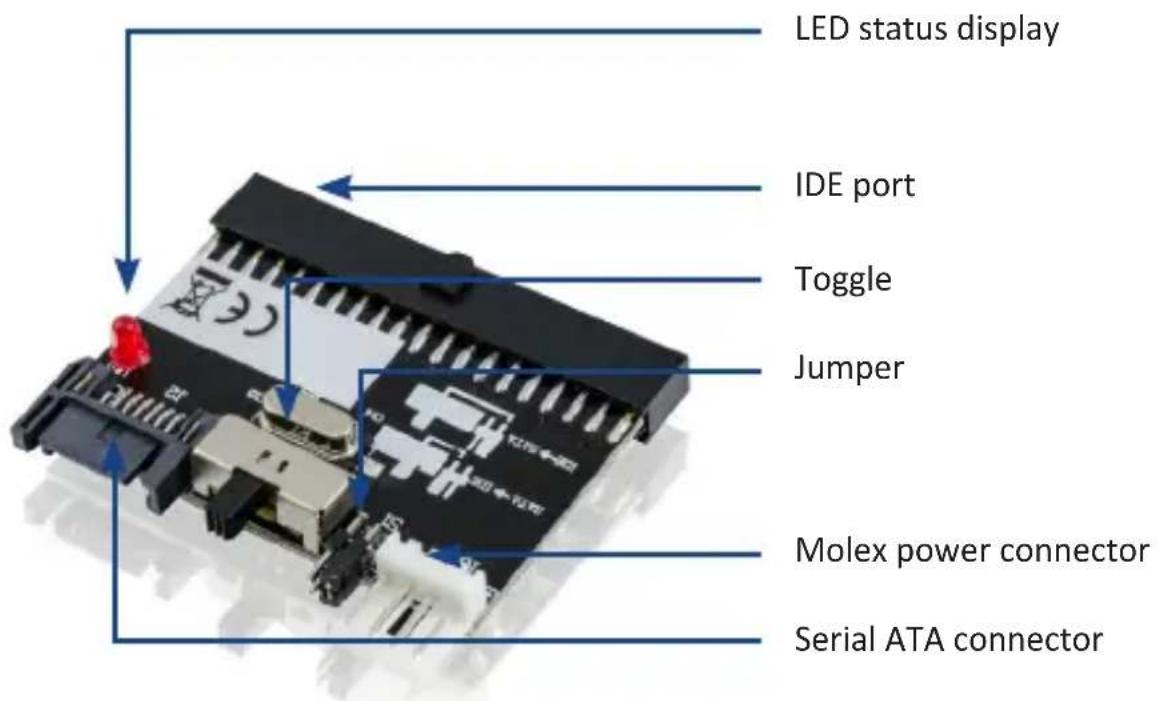
3. Product details
4. Installation
Check that the product and the components are intact and that the device is working properly when using it for the first time Please disconnect your computer completely from the power supply before starting the installation. Do not touch the sensitive components on the converter and in your computer. Open the housing of your computer and place the switch and the jumper at the required position. See the diagram on the PCB for this purpose. Then connect the converter to your hard drive and the IDE or SATA controller. Finally, the converter must be supplied with power.
| SATA -> IDE IDE drive to SATA controller | |
| IDE -> SATA SATA drive to IDE controller |
For this purpose, connect the converter to your computer power adapter using the supplied Molex connection cable. Please replace the computer housing after installation.
Note: Power is not supplied to the IDE or SATA drive via the converter connecting cable. Please use the appropriate connection cable of your PC power adapter or an alternative power supply.
Check the product for any damage and proper assembly before every use.
5. Safety instructions and disclaimer
Never try to repair or modify the plug-in card by yourself. Avoid contact with the mains supply. The product does not carry current only when disconnected. Earth yourself before touching the electronic components. This prevents damage to the components caused by electrostatic discharge of your body.
Electrostatic discharge causes irreparable damage to the plug-in card, as well as to all associated hardware components! The plug-in card is installed at your own risk. Please have the card installed by a specialist if you do not have any technical and practical experience in the field of computers/electronics.
The manufacturer is not liable for any damage and consequential damage caused by improper installation or use.
The customer is solely responsible for taking backup.
The device is not approved for outdoor use. Therefore, please use it only in dry surroundings. Protect it from high humidity, water and snow. Do not expose the device to high temperatures.
Do not expose the device to sudden changes in temperature or strong vibrations, as this could damage the electronic components.
Check the device for any damage before using it. The device should not be used if it has been subject to impact or has been damaged in any other way.
Please follow the local regulations and restrictions.
Do not use the device for purposes other than those described in this manual.
This product is not a toy. Keep it out of the reach of children or mentally disabled persons.
Any repair or modifications to the device, which is not carried out by the original supplier will void any warranty and guarantee claims.
The specifications of the device may be changed without prior notice.
6. Disposal instructions
In line with the European WEEE directive, electrical and electronic devices should not be disposed of along with domestic waste. Their components must be sent for recycling or disposal separately, as improper disposal of toxic and dangerous components could permanently damage the environment.
According to the electrical and electronic equipment act (ElektroG), you are obliged (as a consumer) to return (free of charge) electrical and electronic devices to the manufacturer, the point of sale or public collection points at the end of their service life. The relevant local laws regulate the details in this regard. The symbol displayed on the product, in the user manual or/and on the packaging refers to these regulations. With this manner of sorting, recycling and disposal of used devices, you make an important contribution towards protecting our environment.

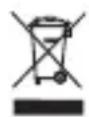
WEEE directive: 2012/19/EU WEEE Register no.: DE 67896761
The company WD Plus GmbH hereby certifies that the device 300052/20200305SZ019 complies with the fundamental requirements and all other relevant stipulations. A complete conformity statement can be obtained from: WD Plus GmbH, Wohlenbergstraße 16, 30179 Hanover
| SATA -> IDE Drive IDE a controller SATA | |
| IDE -> SATA Drive SATA a controller IDE |