303115 - Joystick CSL - Free user manual and instructions
Find the device manual for free 303115 CSL in PDF.


| Product Type | Joystick |
| Brand | CSL |
| Model | 303115 |
| Dimensions (approx.) | 150 x 80 x 80 mm |
| Weight | 200 g |
| Power Supply | USB 5V DC (via cable) |
| Cable Length | 1.5 m |
| Number of Buttons | 8 |
| Hat Switch (POV) | Yes, 4-way or 8-way (check preference) |
| Axis | X, Y (and twist if supported) |
| Interface | USB 2.0 (plug and play) |
| Compatible Operating Systems | Windows XP/Vista/7/8/10/11 |
| Main Functions | Precise control for flight simulators, games |
| Cleaning Instructions | Wipe with a soft dry cloth; avoid liquids |
| Storage | Store in a dry place at room temperature |
| Spare Parts Availability | Contact CSL customer service |
| Repairability | Limited; professional service recommended |
| Warranty | Standard 2 years (check local terms) |
Frequently Asked Questions - 303115 CSL
User questions about 303115 CSL
0 question about this device. Answer the ones you know or ask your own.
Ask a new question about this device
Download the instructions for your Joystick in PDF format for free! Find your manual 303115 - CSL and take your electronic device back in hand. On this page are published all the documents necessary for the use of your device. 303115 by CSL.
USER MANUAL 303115 CSL
Thank you for having chosen this CSL product and for placing your trust in our company. Please read this manual carefully before installation to ensure your long-term enjoyment of this product. For future reference, please keep this manual.
1. Scope of delivery
- Gamepad
• USB Type C charging cable - User manual
2. Technical specifications
| Connection Bluetooth-Version 3.0 | |
| Power supply Internal | 500mAh battery (rechargeable via USB) |
| Frequency range 2402 | MHz-2480MHz |
| transmission power 0,2dBm | |
| Buttons • 12 buttons | • 2 analogue sticks• HOME button• Control pad |
| Features • Dual vibration function | • Turbo mode• Automatic energy-saving mode (after 10min inactivity) |
| Compatibility Nintendo Switch | |
3. Product details
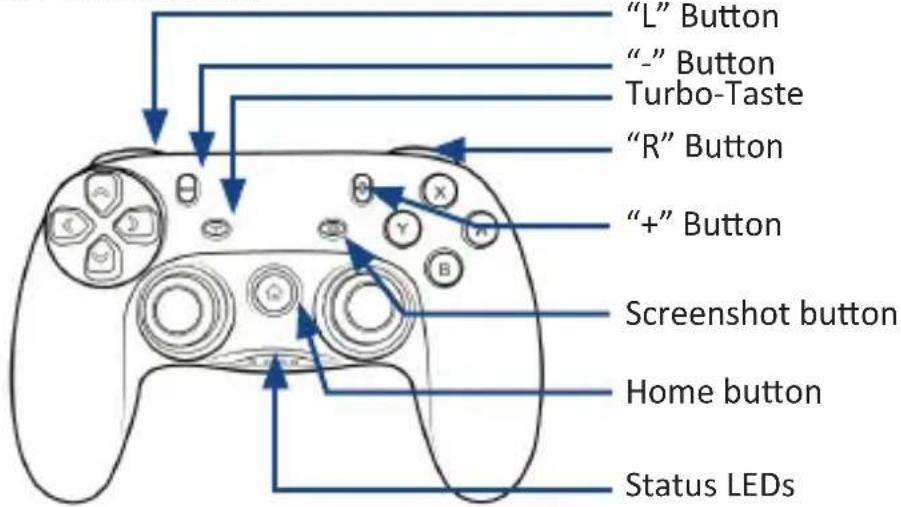
4. Key assignment
HOME button:
This mode is used to connect and turn the Bluetooth gamepad on or off. Press and hold the “home” button for 5 seconds in order to turn it on or off.
Turbo button:
Press the “turbo” button and any other button to provide those with a repetitive pulse. You can provide as many buttons as you wish with the “Turbo” mode. Repeat the process to remove this effect from the chosen button. When Turbo mode is activated, there is no long signal, but many short signals are generated in succession.
Screenshot button:
The “screenshot” button causes that a screenshot is taken when pressing this button.
5. Charging process
Please fully charge the gamepad before the first usage. Therefore connect the included type C charging cable to the gamepad.
A suitable power source can an USB charging adapter, for example. As soon as the gamepad is charging it is shown on the LED display.
Note: When the battery is fully charged, the LED will stop flashing.
6. Dual vibration function
The gamepad has two strong vibration motors. Due to the vibration effect, the simulations become more realistic.
Note: Please bear in mind that the vibration only works if the game or programme is supporting this function. This option must be activated in the gaming options.
7. Connection of the gamepad
Please open the controller menu on the switch (JoyCon symbol) and select "Handle / Change order".
Please hold down the home button of the controller for 5 seconds until all 4 LEDs flash very quickly.
Note: Before the LEDs flash quickly, they flash slowly before. At this time, keep the button pressed until the LEDs change from slow to fast flashing.
Pairing with the Nintendo Switch is now completed. The controller is shown on the switch display.

Note: The included USB Type C cable can only be used to charge the gamepad.
8. Safety instructions and liability disclaimer
Never try to open the device to carry out repairs or conversions. Avoid contact with mains voltages. Do not short-circuit the product. The device is not certified for use in the open air; only use it in dry conditions. Protect it from high humidity, water and snow. Keep it away from high temperatures. Do not subject the device to sudden changes in temperature or heavy vibration as this might damage electronic components. Examine the device for damage before using it. The unit should not be used if it has received an impact or has been damaged in any other way. Please observe national regulations and restrictions. Do not use the device for purposes other than those described in the instructions. This product is not a toy. Keep it out of the reach of children or mentally impaired persons. Any repair or alteration to the device not carried out by the original supplier, will invalidate the warranty or guarantee. The product may only be used by persons who have read and understood these instructions. The device specifications may change without any separate prior notice to this effect.
9. Disposal instructions
Electrical and electronic devices may only be disposed of in accordance with the European WEEE Directive and not with household rubbish. Components must be disposed of or recycled separately as dangerous, toxic elements can inflict sustained damage on the environment if they are disposed of incorrectly. As a consumer, you are bound by the Electrical and Electronic Devices Act (ElektroG) to return electrical and electronic goods free of charge at the end of their useful life to the manufacturer, the place of purchase or to specially set up, public collection points. The details in each case are governed by national law. The symbol on the product, the operating instructions and/or the packaging refers to these regulations. By separating materials in this way, recycling and disposing of old devices, you are making an important contribution towards protecting our environment.
10. Instructions on the disposal of batteries
With regard to the sale of batteries or the supply of devices containing batteries, the supplier is obliged to draw the customer's attention to the following: As the end user, the customer has a statutory obligation to return used batteries. He can return old batteries stocked or previously stocked by the supplier in the form of new batteries to the supplier's despatch warehouse (despatch address) free of charge. The symbols shown on the batteries have the following meanings: Pb = battery contains more than 0.004 percent by mass of lead, Cd = battery contains more than 0.002 percent by mass of cadmium, Hg = battery contains more than 0.0005 percent by mass of quicksilver.

The symbol of the rubbish bin with a cross through it indicates that the battery may not be put in household waste.
WEEE guideline: 2012/19/EU WEEE register number: DE 67896761
WD Plus GmbH, herewith declares that this product 303115/20181229SZ209 conforms to the principle requirements and other relevant stipulations of Directive 2014/53/EU. The complete Declaration of Conformity can be obtained from: WD Plus GmbH, Wohlenbergstraße 16,30179 Hanover, https://www.ganzeinfach.de/
Brand : CSL
Model : 303115
Category : Joystick